Course size

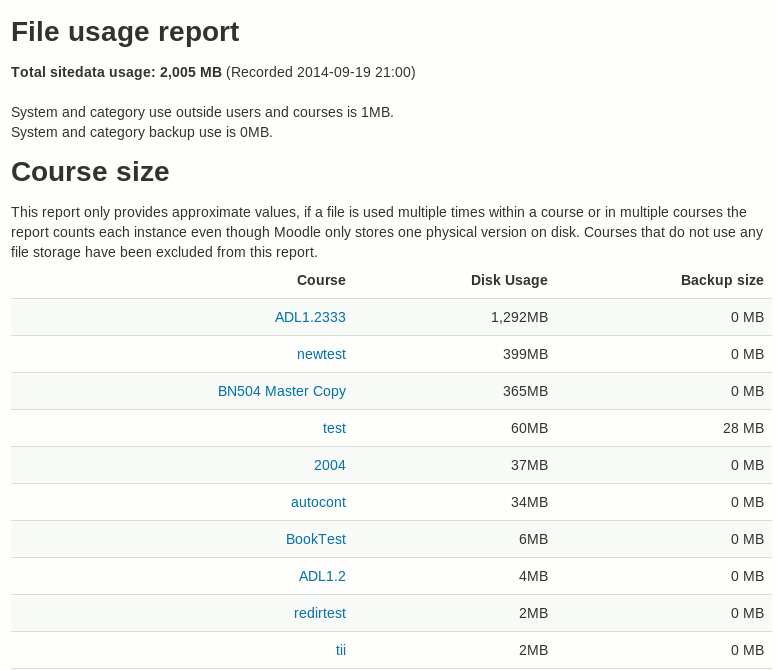
This plugin provides approximate disk usage by Moodle courses.
Price option: Free

Supports Moodle 2.3-4.5 See all versions
Latest release: 7 months ago
Installations: 7010
Downloads (last 90 days): 1157

Frankenstyle name: report_coursesize
Reports

Comments

Comments are no longer open for new posts. Existing comments remain available to read.

Will this plugin be updated to support Moodle 5.x?
Hi Dan, thanks for all you work on this plugin! I'm wondering if you could elaborate on the meaning of Users (top 10) Totals... my issue is that I have a user (one of our former Moodle admins) with a Total of 393 GB, but they are only showing as a Participant in one course, currently (a course with a size of 1.2 GB)... so I'm asking myself if the User Totals are talking about the amount of data an individual has "interacted with" (ex. copying course content from one term to the next, etc.) rather than their files (i.e. files that that they have added, or files that are part of their courses). Note: there is also nothing showing under private files for the above user, or in the backups area for their course. Hope this makes sense, and thanks so much!
@David - I'd like to see us move to using reportbuilder to allow admins to create a report that includes whatever columns they would find useful: https://github.com/catalyst/moodle-report_coursesize/issues/33 - if you have internal development capabilities feel free to send us through a Pull request, or reach out privately if you would like to fund the time for a developer to add further improvements!
I use this Plugin like at least every week, but I have one question, could it be adapted to maybe give some information on where the courses are located?
I have tons upon tons of categories, and it would massively help on understanding where the offending courses are instead of just their size.
Either way this still helps a lot.
The task is set to run overnight by default - you should be able to find it by going to admin > server > scheduled tasks and search for "coursesize"
Hi,
Thank you for the plugin!
We use Moodle 4.4.3 on Linux, with pathtodu configured as in https://docs.moodle.org/405/en/System_paths#Path_to_du
After installing CourseSize, no course data is shown, but at 'Top 10 Users' I can see a list of users and a number of Mb / Kb for each one.
At the Course Size area I see the message 'Waiting for scheduled task to generate stats'.
If I change report_coursesize | calcmethod from 'Scheduled task' to 'On page load' I can see the course list, but if I turn back to the suggested option 'Scheduled task', the course list is empty again.
Which task is this and what´s the execution frequence?
@Severin, the latest versions of all our plugins are in the github repository - this definitely supports 4.1 and we don't currently have any reports of it not working in newer versions, although there are reports of php warnings when debugging is turned on and when using PHP 8.1 - what's more helpful than "Is this plugin supported" is reports in our github issues tracker stating "I've tested this in version X and it works - can you please bump the version in the plugins db" or... "this doesn't work in version x, here are the issues I found."
Hi,
Is it planned to update this plugin to officialy support recent and supported Moodle versions? If yes, do you have an idea of when it should be the case?
@Bobby - nice catch - I'll get that fixed in the next release! - you're correct that definitely isn't necessary!!
@Dan - Just confirming we are running this in 3.11 and it has been great. One question - the scheduled task default is set to run every minute from 1:01am to 1:59am. I wasn't sure why this was necessary since on our (pretty large) site, it took about 5 minutes to run. So I changed the default to 0 1 * * * so it runs once daily at 1:00am. I know the documentation suggests the default is once daily so I wanted to be sure my change wouldn't adversely affect the report's functionality. Fantastic plugin - really a game changer for us.
either trigger the scheduled task responsible for generating the stats, or wait for it to run overnight (runs once per night) .... or... in the admin settings for the plugin, set calcmethod to run on load rather than via cron (but keep in mind this report is very slow for larger sites so it may impact on page load time.)
Would it be possible for you to update the plugin on here with the one on github with 3.9 compatibility, as we are running a managed install and the company will only install plug-ins from the Moodle plugin DB.
Thanks
@clovis, the latest versions of all our plugins are in the github repository - this definitely supports 3.9 and and I have it on a 3.11 site but don't think anyone has actually "viewed" the report to make sure it's working but I assume it does. We are currently looking at automating the upload of the latest versions of our plugins to the moodle.org plugins db but in the meantime please download direct from github -thanks.
Please, would you know when we will have a version of this plugin for Moodle 3.9, 3.10?
that looks like a bug with Moodle's version checker - I've reported it here: https://tracker.moodle.org/browse/MDLSITE-6427