
Offline Quiz
Maintained by
AMC Academic Moodle Cooperation
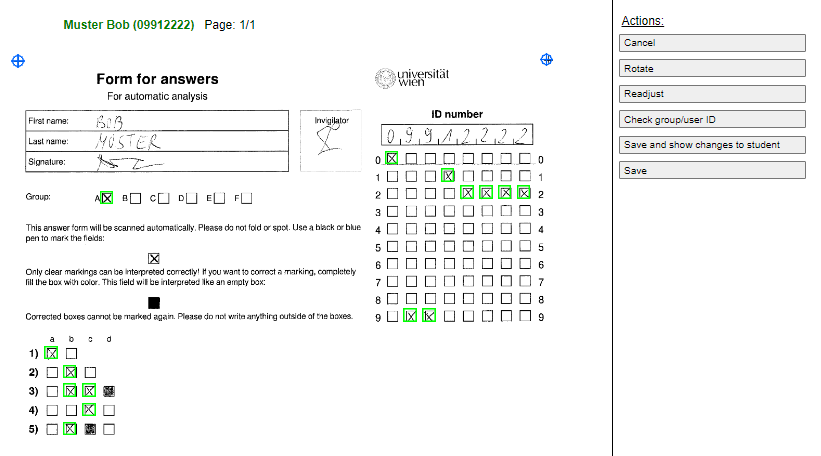
The Offline Quiz activity allows the creation of multiple choice tests with questions from the question bank of a Moodle course, which are handed out to students in printed form. After completion, the answer forms are scanned and can be automatically evaluated online directly in Moodle.
Comments
Comments are no longer open for new posts. Existing comments remain available to read.
I am working in an RHEL 9 environment with Moodle 4.5 and I can not manage to get the results readen. I have scanned my tests as pdf and tif, in black and white, 300dpi.
The file are processed, but it says "File is not an image or PDF doesn't contain an image" or Tiff is not supported. I have seen the files have arrived to moodledata/temp/offlinequiz/import/ but there is something there not working.
When I click on the information I get these details:
error/Could not load file
Más información sobre este error
Información de depuración:
Error code: Could not load file
$a contents:
Trazado de la pila (stack):
line 521 of /mod/offlinequiz/report/rimport/scanner.php: core\exception\moodle_exception thrown
line 127 of /mod/offlinequiz/correct.php: call to offlinequiz_page_scanner->load_stored_image()
If I try a different version of Moodle (4114) in the same server, I get these messages in the log of the sheduled task:
Execute scheduled task: Answer sheet evaluation for the offlinequiz-plugin (mod_offlinequiz\task\page_evaluation_task)
... started 15:47:02. Current memory use 5.4 MB.
job 5: evaluating /usr/data/moodle4114/temp/offlinequiz/import/1748270791615959989/20250526133541612_0001.jpg
Warning: imagecreatefrompng(/usr/data/moodle4114/temp/1748270822_dst.png): Failed to open stream: No such file or directory in /var/www/html/moodle4114/mod/offlinequiz/report/rimport/scanner.php on line 1055
... used 27 dbqueries
... used 0.81038284301758 seconds
Scheduled task failed: Answer sheet evaluation for the offlinequiz-plugin (mod_offlinequiz\task\page_evaluation_task),imagesx(): Argument #1 ($image) must be of type GdImage, bool given
Backtrace:
* line 1062 of /mod/offlinequiz/report/rimport/scanner.php: call to imagesx()
* line 1416 of /mod/offlinequiz/report/rimport/scanner.php: call to offlinequiz_page_scanner->rotate_90()
* line 482 of /mod/offlinequiz/report/rimport/scanner.php: call to offlinequiz_page_scanner->adjust()
* line 168 of /mod/offlinequiz/cron.php: call to offlinequiz_page_scanner->load_image()
* line 40 of /mod/offlinequiz/classes/task/page_evaluation_task.php: call to offlinequiz_evaluation_cron()
* line 263 of /lib/cronlib.php: call to mod_offlinequiz\task\page_evaluation_task->execute()
* line 120 of /lib/cronlib.php: call to cron_run_inner_scheduled_task()
* line 73 of /lib/cronlib.php: call to cron_run_scheduled_tasks()
* line 178 of /admin/cli/cron.php: call to cron_run()
It seems that there is some extension missing in my server or that I have to give writing permissions to some folder in moodledata. I would appreciate any help on this, many thanks in advance.
Best,
First of all, thank you for this great plugin, which has proven to be extremely useful for our very big cohorts! I was wondering whether you are thinking of developping an additional feature or a new plugin based on Offline Quiz, allowing students to write a text (assignment) on paper that could be scanned, then read by AI on Moodle (then graded manually or half manually). That would be awesome considering the upcoming need for this kind of evaluation that allows teachers - especially in the Humanities - to ensure students are not using AI for their homework / assignments.
Since v4.4 regrading is done automatically and the "offlinequiz_regrade" sub plugin is no longer required. You can probably simply ignore this message. Otherwise open an issue on GitHub.
Any idea?
I'm happy to find this plugin, I've tried installing version 4.4 then tried making the quiz.
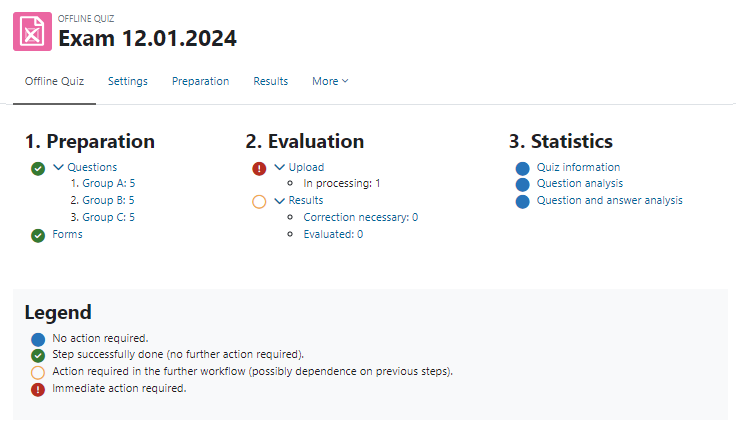
but I had a problem when uploading student answers and the message "answer form(s) is/are pending evaluation" appeared. I waited a few minutes and the message still didn't disappear, then the next day it still opened and didn't disappear. I wonder if there was something wrong with me during the installation process? or maybe there is another solution?
It will have support for changing the font, so yo can use it with asian/arabic/other characters.
You can check it out in our github in the master branch.