
Offline Quiz
Versions
Current version
v4.5.4 (2024071204)
v4.5.4
Plugin type: Activities
Frankenstyle component name: mod_offlinequiz
Version build number: 2024071204
Version release name: v4.5.4
Maturity: Stable
Supported Moodle versions: 4.5
Repository URL (Git): https://github.com/academic-moodle-cooperation/moodle-mod_offlinequiz
Repository branch:
Repository tag: v4.5.4
Issue/bug tracker URL: https://github.com/academic-moodle-cooperation/moodle-mod_offlinequiz/issues
CHANGELOG
4.5.4
- [Security] Fixed a remote code execution with uploading arbitrary files. Thanks for the disclosure to https://global.ptsecurity.com/en/
4.5.3
- [Bug] Fixed that no change in version was possible after restore
- [Bug] Fixed missing pdffont setting for newer installations
- [Bug] Fixed missing column-definition for pdffont in file install.xml [github #290]
- [Bug] Fixed answers which contain < > characters still break the PDFs in specific situations. [github PR #283 @juacas]
- [Bug] Fixed deprecated use of \qbank_managecategories\question_category_object in addrandom.php [github #296]
- [Bug] Fixed deprecated filter mathjaxloader [github #286/ github PR #287 @mhughes2k]
- [Bug] Fixed JSON parse error with unrecognized token '<' when adding questions [github #294]
4.5.1
- [Bug] Fixed that adding questions was not possible, introduced through moodle core 4.5.2 [github #284/ github PR #285 @jboulen]
4.5.0
- [Feature] 4.5 compatible version
4.4.0
- [Feature] 4.4 compatible version with new logo using the new logo style
- [Feature] Rework on the tutorial so it is translateable in AMOS now
- [Feature] Manual regrading removed, since it's done automatically
- [Feature] New setting for PDF font style. Warning for admins: The default font has changed - from (Free-)Sans - but can be (re-)set in the admin settings.
- [Feature] New admin setting for default font size [github #254]
- [Feature] Students will be sent immediately to either the tutorial or their result depending on the status of the offline quiz
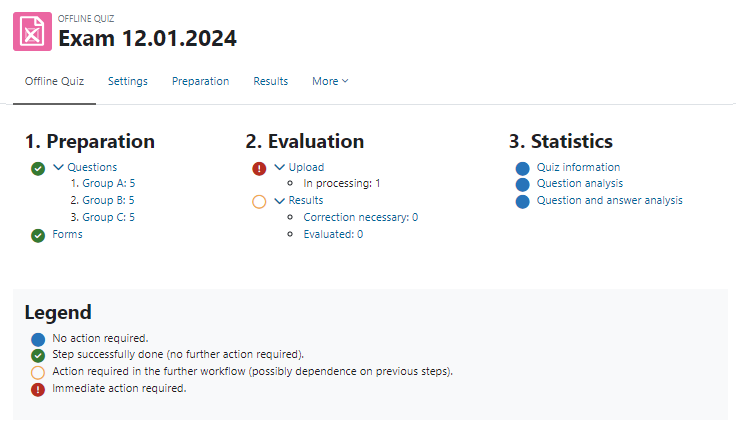
- [Feature] Rework on the activity overview page: attendances now available in new style
- [Feature] Report subplugins can now add themselves to the navigation by implementing a offlinequiz_${pluginname}_report->add_to_tabs() function. [github PR #219 @juacas]
- [Info] You might want to checkout a new subplugin for prefilled forms support: https://github.com/juacas/moodle-offlinequiz_identified. Since this plugin is developed by the community, we cannot provide support for it.
- [Bug] Fixed PHP 8.2 warnings
- [Bug] Fixed bug where a question could be added twice if an older version was already added
- [Bug] Fixed encoding issues concerned with uploaded files
- [Bug] Fixed bug in the document creation after changing the question version
4.3.3
[Bug] Fixed a version upgrade path in Offlinequiz 4.1.5 which lead to offlinequiz not working anymore.
4.3.2
- [Bug] Fixed some more statistics errors [github #245]
- [Bug] Fixed some bugs regarding the filter for adding questions from question bank
- [Bug] Fixed that the question version selection in restored offlinequizzes was not correct
- [Bug] Fixed that some data was not deleted correctly when deleting a course/offlinequiz activity [github #230]
- [Bug] Fixed that user_get_participants was used in the privacy provider which doesn't exist anymore [github #242]
- [Bug] Fixed deleting offlinequizzes resulted in questions still in use [github #165]
4.3.1
- [Bug] Fixed some statistics that weren't displayed correctly
- [Bug] Fixed bug with adding and deleting questions in Group B to F
- [Bug] Fixed bug with adding questions randomly
- [Bug] Fixed some bugs with the filter when adding questions from the question bank
4.3.0
- [Feature] Compatible Version for Moodle 4.03
- [Feature] Support questions from global context and use the question add popup like in quiz
- [Feature] Support for up to 10 digits for the user identification [github #213]
- [Feature] User table field "id" and fields with numbers (phone1,phone2) are now officially supported for user identification [github #181 and #204/ github pull request #207/ #208 @mhughes2k]
- [Bug] Fixed wrong amount of tests with errors/results displayed on the overview page
- [Bug] Fixed bug for "<" and ">" in plain text fields [github #221]
- [Bug] Fixed bug to manually mark participants as present/not present [github #173]
- [Bug] Fixed statistics to work with big offlinequizzes with many users even on big moodle instances
- [Bug] Fixed bug with divide by zero error in statistics if nobody chose the answer of a question
- [Bug] Fixed bug with error message when no results where chosen to delete
- [Bug] Fixed image out of bounds error for skew answer sheets
- [Bug] Fixed some filename errors under windows
- [Bug] Fixed that page not displayed in course block Activities if there are offlinequizzes in multiple sections [github #222]
- [Bug] Fixed incorrect overview displayed under oracle databases [github #211]
- [Bug] Fixed statistics under oracle databases [github #146]
- [Bug] Fixed bug in line 155 index.php [github #222]
- [Bug] Fixed bug with url enconding [github pull request #188 @jboulen]
- [Bug] Fixed that deleting groups has no effect in overview
- [Bug] Grades and Gradebook update now correctly after question version is changed
4.2.0
WARNING: THIS UPDATE MAY TAKE SOME TIME ON LARGE INSTANCES! For more information see https://github.com/academic-moodle-cooperation/moodle-mod_offlinequiz/issues/220
- [Feature] Compatible Version for Moodle 4.02
- [Feature] Regrading now works automatically. It is still possible to regrade on request in case of an error.
- [Feature] Using newer PDFWord version compatible with PHP 8.2+
- [Feature] Better feedback on changing question versions.
- [Bug] Fixed missing question references so you can't delete questions that are still in use.
- [Bug] Fixed some bugs regarding participants lists with multiple pages and multiple groups
- [Bug] Fixed that questions were not randomized even if shuffle questions was turned on.
- [Bug] Fixed a bug that new versions were not added to all groups.
- [Bug] Fixed a bug, that question versions were displayed wrong.
- [Bug] Fixed an error in the preview caused changing question versions
4.1.0
- [Feature] Compatible Version for Moodle 4.01
- [Feature] On the overview page you can see the progress of what's done.
4.0.1
- [Bug] Fixed that offlinequiz was not compatible with Moodle 4.0.0 to 4.0.3
4.0.0
- [Feature] Compatible Version for Moodle 4.0
- [Feature] It is now possible to change the question version, even after the documents are created
- [Feature] New activity overview page when coming in to offlinequiz
- [Feature] changing a question directly in offlinequiz results in a recalculation of all the grades in that group
- [Feature] sub-navigation changed so it fits to the new moodle standard
3.11.4
- [Bug] Fix PHP 8.0 incompabilities
- [Bug] Date of test used instead of review start used for calendar
- [Bug] Wrong language string for "group" was used in all questionsheets (pdf, LaTeX and docx)
3.11.3
- [Bug] Fixed a bug that special html characters would break docx documents
3.11.2
- [Feature] Autocompletion rules from quiz: grade and passing grade as well as view have been added.
- [Bug] Fix privacy provider if there are multiple users in an offlinequiz context. [github pull #157 @micaherne]
- [Bug] Heading consistency: Every page has a heading before the tabs.
- [Feature] Question sheet: Latex question sheet now shows activityname instead of coursename, both variables are still possible.
- [Bug] CLI execution on another server than the cron server is now possible again.
- [Bug] Non-breaking spaces are now possible to use in docx documents.
- [Bug] Removed deprecation message on the statistics page.
- [Bug] The edit page for the questions looks much nicer and without any strange artifacts.
3.11.1
- [Feature] Solve version confusion with 3.11.0 and 3.10.1
3.11.0
- [Feature] Compatible Version for Moodle 3.11
3.10.1
- [Bug] Fix privacy bug for people using integer-idnumber
3.10.0
- [Feature] Compatible Version for Moodle 3.10
3.9.0
- [Feature] Support for all kinds of special characters in pdf/docx/LaTeX documents.
- [Feature] Deleted table offlinequiz_attempts, which wasn't used since moodle/offlinequiz 2.0.
- [Feature] Support of superscript and subscript in docx documents.
- [Feature] Support of "<" and ">" in LaTeX documents.
- [Bug] Changed css so it doesn't interfere with quiz anymore.
- [Feature] Offlinequiz now recognizes, if there are multiple users with a given idnumber.
It will choose the one in the course. Otherwise it will throw an error. - [Feature] Rewrote some of the privacy lang strings to make them more clear.
3.8.2
- [Bug] Fixed a long existing bug with offlinequiz not using the right temp folder which leads to errors when setting localcache-directory in config.php.
3.8.1
- [Bug] Fixed a bug that not all questions were shown in question statistics
3.8.0
- [Feature] Moodle 3.8 compatible Version
- [Feature] Updated PDFWord version to 0.17.0
3.7.0
- [Feature] Moodle 3.7 compatible Version
- [Feature] #6046 changed the place of reviewoptions to be more accurate
- [Bug] #6166 deletion of hotspots and old temp-files has not been done, now done by an own task
- [Feature] #6038 export results as printable html for face to face review
- [Feature] #6125 support of the plugin editdates
- [Bug] #6047 question tagging now works properly as in quiz
- [Feature] #4375 extended information about review options in offlinequiz
- [Bug] #6054, github issue #79: fixed that only students could be enroled into courses
- [Bug] #6115, github issue #81: fixed a couple of problems with oracle databases.
3.6.2 (2019-02-28)
- added information about imagemagick in the README.md
- fixed broken image links in 'show student view' popup
- fixed a performance bug for upgrading big moodle-instances to 3.6.0. If you already upgraded to 3.6.0 this fix will not affect you at all.
- fixed a spacing issue in the statistics tab for choosing groups
- fixed a missing langstring ('questionpage')
3.6.1 (2019-02-11)
- fixed a wrong hardcoded prefix in the offlinequiz plugin
- fixed an upgrade-query not working on certain databases
- added the userlist_provider feature
3.6.0 (2019-01-29)
- Moodle 3.6 compatible Version
- added an experimental way to evaluate answer sheets. This is the new way, but don't use it in production systems
- Icon for adding questions was not visible.
- Privacy-API changes for moodle 3.6
- return to default group if chosen in the statistics menu
- fixed an evaluation error for big zip file uploads
3.5.3 (2018-11-29)
- Bugfix: Questions can not be sorted
3.5.2 (2018-11-29)
- Fixed a bug, where the update of scanned pages lead to wrong results with "missing pages", even though there is only one page in the test
3.5.1 (2018-11-27)
- fixed a bug where under certain circumstances at the result download the grade was not correct.
3.5.0 (2018-08-13)
- Moodle 3.5 compatible version
- introduced privacy API
- partial results are displayed by default in the result table
- added possibility to upload pdf files
3.4.2 (2018-04-10)
- changed the way how LaTeX-Question sheets work. It should now support almost every question that is written in the moodle editor
- export of results now has the column "letter"
- fixed an error for the calender-plugin where the report-appointment was displayed for all the days
3.4.1 (2018-01-17)
- fixed an error, where under certain condition the field id_digits was missing.
3.4.0 (2017-11-16)
- latex-document supports double-$ as begin-tag for formulas in new line
- latex-document supports underline, bold and italic texts
- new option for alignment of latex-questions in pdf-files
3.3.2 (2017-11-06)
- additional index for tables page_corners and scanned_page
3.3.0 (2017-08-03)
- Moodle 3.3 compatible version
- Official support of boost Theme
- Offlinequizzes are now searchable through the moodle search
- Multiple little bugfixes
3.2.0 (2017-02-01)
- Moodle 3.2 compatible version
3.1 (2016-07-23)
- First release for Moodle 3.1
3.0 (2016-05-18)
- First release for Moodle 3.0
2.9 (2015-11-20)
- First release for Moodle 2.9
2.8 (2015-06-09)
- First release for Moodle 2.8
2.7 (2014-09-23)
- First release for Moodle 2.7
2.6 (2014-03-31)
- First release for Moodle 2.6
v5.0.7 (2025080407)
v5.0.7
Plugin type: Activities
Frankenstyle component name: mod_offlinequiz
Version build number: 2025080407
Version release name: v5.0.7
Maturity: Stable
Supported Moodle versions: 5.0
Repository URL (Git): https://github.com/academic-moodle-cooperation/moodle-mod_offlinequiz
Repository branch:
Repository tag: v5.0.7
Issue/bug tracker URL: https://github.com/academic-moodle-cooperation/moodle-mod_offlinequiz/issues
CHANGELOG
5.0.7
- [Security] Fixed a remote code execution with uploading arbitrary files
5.0.6
- [Bug] Fixed an error with viewing the full report [github #338]
- [Bug] Fixed an error deleting questions in Group A instead of the requested group when deleting multiple questions
5.0.5
- [Bug] removed extra gap between answers in question pdf
5.0.4
- [Bug] Fixed broken intro format after duplication or import
- [Bug] Fixed adding random questions doesn't update the total marks
- [Bug] Fixed underline style of TinyMCE doesn't work in PDF and DOCX
- [Bug] Fixed that after duplication the description wasn't shown with TinyMCE/Atto
- [Bug] Prevent use of already added questions when adding random questions
- [Bug] Fixed that adding questions from subcategories doesn't work when adding random questions
- [Bug] Fixed that questions were visible in the wrong questionbank when adding questions
5.0.3
- [Bug] fixed evaluation mails not being sent under certain conditions
- [Bug] fixed that temporary file evaluation task deleted the cron folder
5.0.2
- [Bug] Fixed a bug that evaluations didn't work if offlinequiz was installed with 5.0.0 or later
- [Bug] Fixed that random questions couldn't be added [githhub #323]
- [Bug] Fixed fail of scheduled task deleting temporary files [github #322]
5.0.1
- [Bug] Fixed that it was not possible to use questions from other question banks
5.0.0
- [Feature] 5.0 compatible version.
- [Feature] Adding questions is changed to the behaviour like in Quiz 5.0
- [Feature] Introduced a list of all uploaded files to the offline quiz on the "Correction" page.
- [Feature] It is possible to download the original uploaded file now.
- [Feature] Offlinequiz uses adhoc tasks now instead of cronjobs. The old cronjobs are still supported for compatibility reasons.
- [Feature] (Technical) Notifications that an upload has been processed use the moodle notifications API to give users more choice how to use it. [github PR #308 @juacas]
- [Feature] Now offlinequiz supports wiris math equations. [github PR 305 @juacas]
- [Feature] It is now possible to create prefilled forms for a students attendance list. If you used the subplugin "identified" please uninstall it before upgrading [github pull #299 @juacas]
- [Feature] (Technical) Started supporting easier sub plugin development for offlinequiz. Documentation will come for a later release.
- [Feature] The amount of pages being displayed is now saved for each user [github #265]
- [Feature] Students get more info before they can try the tutorial [github #311, PR #313 @juacas]
- [Feature] Administrators can choose if the navigation is displayed as tab or select [PR #282 @juacas, PR #298, @juacas]
- [Bug] Fixed that uploading large files crashing the webserver by moving the page extraction to adhoc task.
- [Bug] Fixed restoring without user data creates records of scanned pages [#github 301]
- [Bug] Fixed uploading files with special made strange erros.
- [Bug] Deprecated JS function M.core_question_engine.init_form removed [github #297]
- [Bug] Fixed black images extraction [github PR #314 @juacas]
- [Bug] Non editing teachers can't access the activity [github #309/ github PR #310 @juacas]
- [Bug] Rewrote the backup process to fix multiple backup/restore bugs.
- [Bug] Fixed that < breaks docx documents [github #306, PR #305 @juacas]
4.5.3
- [Bug] Fixed that no change in version was possible after restore
- [Bug] Fixed missing pdffont setting for newer installations
- [Bug] Fixed missing column-definition for pdffont in file install.xml [github #290]
- [Bug] Fixed answers which contain < > characters still break the PDFs in specific situations. [github PR #283 @juacas]
- [Bug] Fixed deprecated use of \qbank_managecategories\question_category_object in addrandom.php [github #296]
- [Bug] Fixed deprecated filter mathjaxloader [github #286/ github PR #287 @mhughes2k]
- [Bug] Fixed JSON parse error with unrecognized token '<' when adding questions [github #294]
4.5.2
This version was skipped.
4.5.1
- [Bug] Fixed that adding questions was not possible, introduced through moodle core 4.5.2
4.5.0
- [Feature] 4.5 compatible version
4.4.0
- [Feature] 4.4 compatible version with new logo using the new logo style
- [Feature] Rework on the tutorial so it is translateable in AMOS now
- [Feature] Manual regrading removed, since it's done automatically
- [Feature] New setting for PDF font style. Warning for admins: The default font has changed - from (Free-)Sans - but can be (re-)set in the admin settings.
- [Feature] New admin setting for default font size [github #254]
- [Feature] Students will be sent immediately to either the tutorial or their result depending on the status of the offline quiz
- [Feature] Rework on the activity overview page: attendances now available in new style
- [Feature] Report subplugins can now add themselves to the navigation by implementing a offlinequiz_${pluginname}_report->add_to_tabs() function. [github PR #219 - juacas]
- [Info] You might want to checkout a new subplugin for prefilled forms support: https://github.com/juacas/moodle-offlinequiz_identified. Since this plugin is developed by the community, we cannot provide support for it.
- [Bug] Fixed PHP 8.2 warnings
- [Bug] Fixed bug where a question could be added twice if an older version was already added
- [Bug] Fixed encoding issues concerned with uploaded files
- [Bug] Fixed bug in the document creation after changing the question version
4.3.3
[Bug] Fixed a version upgrade path in Offlinequiz 4.1.5 which lead to offlinequiz not working anymore.
4.3.2
- [Bug] Fixed some more statistics errors [github #245]
- [Bug] Fixed some bugs regarding the filter for adding questions from question bank
- [Bug] Fixed that the question version selection in restored offlinequizzes was not correct
- [Bug] Fixed that some data was not deleted correctly when deleting a course/offlinequiz activity [github #230]
- [Bug] Fixed that user_get_participants was used in the privacy provider which doesn't exist anymore [github #242]
- [Bug] Fixed deleting offlinequizzes resulted in questions still in use [github #165]
4.3.1
- [Bug] Fixed some statistics that weren't displayed correctly
- [Bug] Fixed bug with adding and deleting questions in Group B to F
- [Bug] Fixed bug with adding questions randomly
- [Bug] Fixed some bugs with the filter when adding questions from the question bank
4.3.0
- [Feature] Compatible Version for Moodle 4.03
- [Feature] Support questions from global context and use the question add popup like in quiz
- [Feature] Support for up to 10 digits for the user identification [github #213]
- [Feature] User table field "id" and fields with numbers (phone1,phone2) are now officially supported for user identification [github #181 and #204/ github pull request #207/ #208 @mhughes2k]
- [Bug] Fixed wrong amount of tests with errors/results displayed on the overview page
- [Bug] Fixed bug for "<" and ">" in plain text fields [github #221]
- [Bug] Fixed bug to manually mark participants as present/not present [github #173]
- [Bug] Fixed statistics to work with big offlinequizzes with many users even on big moodle instances
- [Bug] Fixed bug with divide by zero error in statistics if nobody chose the answer of a question
- [Bug] Fixed bug with error message when no results where chosen to delete
- [Bug] Fixed image out of bounds error for skew answer sheets
- [Bug] Fixed some filename errors under windows
- [Bug] Fixed that page not displayed in course block Activities if there are offlinequizzes in multiple sections [github #222]
- [Bug] Fixed incorrect overview displayed under oracle databases [github #211]
- [Bug] Fixed statistics under oracle databases [github #146]
- [Bug] Fixed bug in line 155 index.php [github #222]
- [Bug] Fixed bug with url enconding [github pull request #188 @jboulen]
- [Bug] Fixed that deleting groups has no effect in overview
- [Bug] Grades and Gradebook update now correctly after question version is changed
4.2.0
WARNING: THIS UPDATE MAY TAKE SOME TIME ON LARGE INSTANCES! For more information see https://github.com/academic-moodle-cooperation/moodle-mod_offlinequiz/issues/220
- [Feature] Compatible Version for Moodle 4.02
- [Feature] Regrading now works automatically. It is still possible to regrade on request in case of an error.
- [Feature] Using newer PDFWord version compatible with PHP 8.2+
- [Feature] Better feedback on changing question versions.
- [Bug] Fixed missing question references so you can't delete questions that are still in use.
- [Bug] Fixed some bugs regarding participants lists with multiple pages and multiple groups
- [Bug] Fixed that questions were not randomized even if shuffle questions was turned on.
- [Bug] Fixed a bug that new versions were not added to all groups.
- [Bug] Fixed a bug, that question versions were displayed wrong.
- [Bug] Fixed an error in the preview caused changing question versions
4.1.0
- [Feature] Compatible Version for Moodle 4.01
- [Feature] On the overview page you can see the progress of what's done.
4.0.1
- [Bug] Fixed that offlinequiz was not compatible with Moodle 4.0.0 to 4.0.3
4.0.0
- [Feature] Compatible Version for Moodle 4.0
- [Feature] It is now possible to change the question version, even after the documents are created
- [Feature] New activity overview page when coming in to offlinequiz
- [Feature] changing a question directly in offlinequiz results in a recalculation of all the grades in that group
- [Feature] sub-navigation changed so it fits to the new moodle standard
3.11.4
- [Bug] Fix PHP 8.0 incompabilities
- [Bug] Date of test used instead of review start used for calendar
- [Bug] Wrong language string for "group" was used in all questionsheets (pdf, LaTeX and docx)
3.11.3
- [Bug] Fixed a bug that special html characters would break docx documents
3.11.2
- [Feature] Autocompletion rules from quiz: grade and passing grade as well as view have been added.
- [Bug] Fix privacy provider if there are multiple users in an offlinequiz context. [github pull #157 @micaherne]
- [Bug] Heading consistency: Every page has a heading before the tabs.
- [Feature] Question sheet: Latex question sheet now shows activityname instead of coursename, both variables are still possible.
- [Bug] CLI execution on another server than the cron server is now possible again.
- [Bug] Non-breaking spaces are now possible to use in docx documents.
- [Bug] Removed deprecation message on the statistics page.
- [Bug] The edit page for the questions looks much nicer and without any strange artifacts.
3.11.1
- [Feature] Solve version confusion with 3.11.0 and 3.10.1
3.11.0
- [Feature] Compatible Version for Moodle 3.11
3.10.1
- [Bug] Fix privacy bug for people using integer-idnumber
3.10.0
- [Feature] Compatible Version for Moodle 3.10
3.9.0
- [Feature] Support for all kinds of special characters in pdf/docx/LaTeX documents.
- [Feature] Deleted table offlinequiz_attempts, which wasn't used since moodle/offlinequiz 2.0.
- [Feature] Support of superscript and subscript in docx documents.
- [Feature] Support of "<" and ">" in LaTeX documents.
- [Bug] Changed css so it doesn't interfere with quiz anymore.
- [Feature] Offlinequiz now recognizes, if there are multiple users with a given idnumber.
It will choose the one in the course. Otherwise it will throw an error. - [Feature] Rewrote some of the privacy lang strings to make them more clear.
3.8.2
- [Bug] Fixed a long existing bug with offlinequiz not using the right temp folder which leads to errors when setting localcache-directory in config.php.
3.8.1
- [Bug] Fixed a bug that not all questions were shown in question statistics
3.8.0
- [Feature] Moodle 3.8 compatible Version
- [Feature] Updated PDFWord version to 0.17.0
3.7.0
- [Feature] Moodle 3.7 compatible Version
- [Feature] #6046 changed the place of reviewoptions to be more accurate
- [Bug] #6166 deletion of hotspots and old temp-files has not been done, now done by an own task
- [Feature] #6038 export results as printable html for face to face review
- [Feature] #6125 support of the plugin editdates
- [Bug] #6047 question tagging now works properly as in quiz
- [Feature] #4375 extended information about review options in offlinequiz
- [Bug] #6054, github issue #79: fixed that only students could be enroled into courses
- [Bug] #6115, github issue #81: fixed a couple of problems with oracle databases.
3.6.2 (2019-02-28)
- added information about imagemagick in the README.md
- fixed broken image links in 'show student view' popup
- fixed a performance bug for upgrading big moodle-instances to 3.6.0. If you already upgraded to 3.6.0 this fix will not affect you at all.
- fixed a spacing issue in the statistics tab for choosing groups
- fixed a missing langstring ('questionpage')
3.6.1 (2019-02-11)
- fixed a wrong hardcoded prefix in the offlinequiz plugin
- fixed an upgrade-query not working on certain databases
- added the userlist_provider feature
3.6.0 (2019-01-29)
- Moodle 3.6 compatible Version
- added an experimental way to evaluate answer sheets. This is the new way, but don't use it in production systems
- Icon for adding questions was not visible.
- Privacy-API changes for moodle 3.6
- return to default group if chosen in the statistics menu
- fixed an evaluation error for big zip file uploads
3.5.3 (2018-11-29)
- Bugfix: Questions can not be sorted
3.5.2 (2018-11-29)
- Fixed a bug, where the update of scanned pages lead to wrong results with "missing pages", even though there is only one page in the test
3.5.1 (2018-11-27)
- fixed a bug where under certain circumstances at the result download the grade was not correct.
3.5.0 (2018-08-13)
- Moodle 3.5 compatible version
- introduced privacy API
- partial results are displayed by default in the result table
- added possibility to upload pdf files
3.4.2 (2018-04-10)
- changed the way how LaTeX-Question sheets work. It should now support almost every question that is written in the moodle editor
- export of results now has the column "letter"
- fixed an error for the calender-plugin where the report-appointment was displayed for all the days
3.4.1 (2018-01-17)
- fixed an error, where under certain condition the field id_digits was missing.
3.4.0 (2017-11-16)
- latex-document supports double-$ as begin-tag for formulas in new line
- latex-document supports underline, bold and italic texts
- new option for alignment of latex-questions in pdf-files
3.3.2 (2017-11-06)
- additional index for tables page_corners and scanned_page
3.3.0 (2017-08-03)
- Moodle 3.3 compatible version
- Official support of boost Theme
- Offlinequizzes are now searchable through the moodle search
- Multiple little bugfixes
3.2.0 (2017-02-01)
- Moodle 3.2 compatible version
3.1 (2016-07-23)
- First release for Moodle 3.1
3.0 (2016-05-18)
- First release for Moodle 3.0
2.9 (2015-11-20)
- First release for Moodle 2.9
2.8 (2015-06-09)
- First release for Moodle 2.8
2.7 (2014-09-23)
- First release for Moodle 2.7
2.6 (2014-03-31)
- First release for Moodle 2.6
v5.1.1 (2026012901)
v5.1.1
Plugin type: Activities
Frankenstyle component name: mod_offlinequiz
Version build number: 2026012901
Version release name: v5.1.1
Maturity: Stable
Supported Moodle versions: 5.1
Repository URL (Git): https://github.com/academic-moodle-cooperation/moodle-mod_offlinequiz
Repository branch:
Repository tag: v5.1.1
Issue/bug tracker URL: https://github.com/academic-moodle-cooperation/moodle-mod_offlinequiz/issues
CHANGELOG
5.1.1
- [Security] Fixed a remote code execution with uploading arbitrary files
5.1.0
- [Feature] 5.1 compatible version
- [Feature] added a setting to set a default max mark [github #321 @gmanaud]
- [Feature] Display question categories in the question overview
- [Feature] Support for code and pre tags
- [Feature] Support further information in the activity overview
- [Bug] Fontsize was not working for LaTeX forms
- [Bug] Changed that partial results also show the name and user profile picture
- [Bug] Fixed faulty display of questions list for long questions or questions with html
- [Bug] Support underline formatting of tinymce
- [Bug] Fixed PDFs if the logo size can not be calculated for some reason [github #331 @jpahullo]
- [Bug] Fixed PDF upload in attendance lists
- [Bug] Fixed "0" as answer leading to broken docx document generation
- [Bug] Fixed questionnaire box formatting in docx
- [Bug] Fixed that the pdf file name isn't displayed correctly in the list of uploaded files
- [Bug] Fixed that the questions in the tutorial weren't indented properly
- [Bug] Fixed the duplication of multiple offlinequizzes
5.0.6
- [Bug] Fixed an error with viewing the full report [github #338]
- [Bug] Fixed an error deleting questions in Group A instead of the requested group when deleting multiple questions
5.0.5
- [Bug] removed extra gap between answers in question pdf
5.0.4
- [Bug] Fixed broken intro format after duplication or import
5.0.3
- [Bug] fixed evaluation mails not being sent under certain conditions
- [Bug] fixed that temporary file evaluation task deleted the cron folder
5.0.2
- [Bug] Fixed a bug that evaluations didn't work if offlinequiz was installed with 5.0.0 or later
- [Bug] Fixed that random questions couldn't be added [github #323]
- [Bug] Fixed fail of scheduled task deleting temporary files [github #322]
5.0.1
- [Bug] Fixed that it was not possible to use questions from other question banks
5.0.0
- [Feature] 5.0 compatible version.
- [Feature] Adding questions is changed to the behaviour like in Quiz 5.0
- [Feature] Introduced a list of all uploaded files to the offline quiz on the "Correction" page.
- [Feature] It is possible to download the original uploaded file now.
- [Feature] Offlinequiz uses adhoc tasks now instead of cronjobs. The old cronjobs are still supported for compatibility reasons.
- [Feature] (Technical) Notifications that an upload has been processed use the moodle notifications API to give users more choice how to use it. [github PR #308 @juacas]
- [Feature] Now offlinequiz supports wiris math equations. [github PR 305 @juacas]
- [Feature] It is now possible to create prefilled forms for a students attendance list. If you used the subplugin "identified" please uninstall it before upgrading [github pull #299 @juacas]
- [Feature] (Technical) Started supporting easier sub plugin development for offlinequiz. Documentation will come for a later release.
- [Feature] The amount of pages being displayed is now saved for each user [github #265]
- [Feature] Students get more info before they can try the tutorial [github #311, PR #313 @juacas]
- [Feature] Administrators can choose if the navigation is displayed as tab or select [PR #282 @juacas, PR #298, @juacas]
- [Bug] Fixed that uploading large files crashing the webserver by moving the page extraction to adhoc task.
- [Bug] Fixed restoring without user data creates records of scanned pages [#github 301]
- [Bug] Fixed uploading files with special made strange erros.
- [Bug] Deprecated JS function M.core_question_engine.init_form removed [github #297]
- [Bug] Fixed black images extraction [github PR #314 @juacas]
- [Bug] Non editing teachers can't access the activity [github #309/ github PR #310 @juacas]
- [Bug] Rewrote the backup process to fix multiple backup/restore bugs.
- [Bug] Fixed that < breaks docx documents [github #306, PR #305 @juacas]
4.5.3
- [Bug] Fixed that no change in version was possible after restore
- [Bug] Fixed missing pdffont setting for newer installations
- [Bug] Fixed missing column-definition for pdffont in file install.xml [github #290]
- [Bug] Fixed answers which contain < > characters still break the PDFs in specific situations. [github PR #283 @juacas]
- [Bug] Fixed deprecated use of \qbank_managecategories\question_category_object in addrandom.php [github #296]
- [Bug] Fixed deprecated filter mathjaxloader [github #286/ github PR #287 @mhughes2k]
- [Bug] Fixed JSON parse error with unrecognized token '<' when adding questions [github #294]
4.5.2
This version was skipped.
4.5.1
- [Bug] Fixed that adding questions was not possible, introduced through moodle core 4.5.2
4.5.0
- [Feature] 4.5 compatible version
4.4.0
- [Feature] 4.4 compatible version with new logo using the new logo style
- [Feature] Rework on the tutorial so it is translateable in AMOS now
- [Feature] Manual regrading removed, since it's done automatically
- [Feature] New setting for PDF font style. Warning for admins: The default font has changed - from (Free-)Sans - but can be (re-)set in the admin settings.
- [Feature] New admin setting for default font size [github #254]
- [Feature] Students will be sent immediately to either the tutorial or their result depending on the status of the offline quiz
- [Feature] Rework on the activity overview page: attendances now available in new style
- [Feature] Report subplugins can now add themselves to the navigation by implementing a offlinequiz_${pluginname}_report->add_to_tabs() function. [github PR #219 - juacas]
- [Info] You might want to checkout a new subplugin for prefilled forms support: https://github.com/juacas/moodle-offlinequiz_identified. Since this plugin is developed by the community, we cannot provide support for it.
- [Bug] Fixed PHP 8.2 warnings
- [Bug] Fixed bug where a question could be added twice if an older version was already added
- [Bug] Fixed encoding issues concerned with uploaded files
- [Bug] Fixed bug in the document creation after changing the question version
4.3.3
[Bug] Fixed a version upgrade path in Offlinequiz 4.1.5 which lead to offlinequiz not working anymore.
4.3.2
- [Bug] Fixed some more statistics errors [github #245]
- [Bug] Fixed some bugs regarding the filter for adding questions from question bank
- [Bug] Fixed that the question version selection in restored offlinequizzes was not correct
- [Bug] Fixed that some data was not deleted correctly when deleting a course/offlinequiz activity [github #230]
- [Bug] Fixed that user_get_participants was used in the privacy provider which doesn't exist anymore [github #242]
- [Bug] Fixed deleting offlinequizzes resulted in questions still in use [github #165]
4.3.1
- [Bug] Fixed some statistics that weren't displayed correctly
- [Bug] Fixed bug with adding and deleting questions in Group B to F
- [Bug] Fixed bug with adding questions randomly
- [Bug] Fixed some bugs with the filter when adding questions from the question bank
4.3.0
- [Feature] Compatible Version for Moodle 4.03
- [Feature] Support questions from global context and use the question add popup like in quiz
- [Feature] Support for up to 10 digits for the user identification [github #213]
- [Feature] User table field "id" and fields with numbers (phone1,phone2) are now officially supported for user identification [github #181 and #204/ github pull request #207/ #208 @mhughes2k]
- [Bug] Fixed wrong amount of tests with errors/results displayed on the overview page
- [Bug] Fixed bug for "<" and ">" in plain text fields [github #221]
- [Bug] Fixed bug to manually mark participants as present/not present [github #173]
- [Bug] Fixed statistics to work with big offlinequizzes with many users even on big moodle instances
- [Bug] Fixed bug with divide by zero error in statistics if nobody chose the answer of a question
- [Bug] Fixed bug with error message when no results where chosen to delete
- [Bug] Fixed image out of bounds error for skew answer sheets
- [Bug] Fixed some filename errors under windows
- [Bug] Fixed that page not displayed in course block Activities if there are offlinequizzes in multiple sections [github #222]
- [Bug] Fixed incorrect overview displayed under oracle databases [github #211]
- [Bug] Fixed statistics under oracle databases [github #146]
- [Bug] Fixed bug in line 155 index.php [github #222]
- [Bug] Fixed bug with url enconding [github pull request #188 @jboulen]
- [Bug] Fixed that deleting groups has no effect in overview
- [Bug] Grades and Gradebook update now correctly after question version is changed
4.2.0
WARNING: THIS UPDATE MAY TAKE SOME TIME ON LARGE INSTANCES! For more information see https://github.com/academic-moodle-cooperation/moodle-mod_offlinequiz/issues/220
- [Feature] Compatible Version for Moodle 4.02
- [Feature] Regrading now works automatically. It is still possible to regrade on request in case of an error.
- [Feature] Using newer PDFWord version compatible with PHP 8.2+
- [Feature] Better feedback on changing question versions.
- [Bug] Fixed missing question references so you can't delete questions that are still in use.
- [Bug] Fixed some bugs regarding participants lists with multiple pages and multiple groups
- [Bug] Fixed that questions were not randomized even if shuffle questions was turned on.
- [Bug] Fixed a bug that new versions were not added to all groups.
- [Bug] Fixed a bug, that question versions were displayed wrong.
- [Bug] Fixed an error in the preview caused changing question versions
4.1.0
- [Feature] Compatible Version for Moodle 4.01
- [Feature] On the overview page you can see the progress of what's done.
4.0.1
- [Bug] Fixed that offlinequiz was not compatible with Moodle 4.0.0 to 4.0.3
4.0.0
- [Feature] Compatible Version for Moodle 4.0
- [Feature] It is now possible to change the question version, even after the documents are created
- [Feature] New activity overview page when coming in to offlinequiz
- [Feature] changing a question directly in offlinequiz results in a recalculation of all the grades in that group
- [Feature] sub-navigation changed so it fits to the new moodle standard
3.11.4
- [Bug] Fix PHP 8.0 incompabilities
- [Bug] Date of test used instead of review start used for calendar
- [Bug] Wrong language string for "group" was used in all questionsheets (pdf, LaTeX and docx)
3.11.3
- [Bug] Fixed a bug that special html characters would break docx documents
3.11.2
- [Feature] Autocompletion rules from quiz: grade and passing grade as well as view have been added.
- [Bug] Fix privacy provider if there are multiple users in an offlinequiz context. [github pull #157 @micaherne]
- [Bug] Heading consistency: Every page has a heading before the tabs.
- [Feature] Question sheet: Latex question sheet now shows activityname instead of coursename, both variables are still possible.
- [Bug] CLI execution on another server than the cron server is now possible again.
- [Bug] Non-breaking spaces are now possible to use in docx documents.
- [Bug] Removed deprecation message on the statistics page.
- [Bug] The edit page for the questions looks much nicer and without any strange artifacts.
3.11.1
- [Feature] Solve version confusion with 3.11.0 and 3.10.1
3.11.0
- [Feature] Compatible Version for Moodle 3.11
3.10.1
- [Bug] Fix privacy bug for people using integer-idnumber
3.10.0
- [Feature] Compatible Version for Moodle 3.10
3.9.0
- [Feature] Support for all kinds of special characters in pdf/docx/LaTeX documents.
- [Feature] Deleted table offlinequiz_attempts, which wasn't used since moodle/offlinequiz 2.0.
- [Feature] Support of superscript and subscript in docx documents.
- [Feature] Support of "<" and ">" in LaTeX documents.
- [Bug] Changed css so it doesn't interfere with quiz anymore.
- [Feature] Offlinequiz now recognizes, if there are multiple users with a given idnumber.
It will choose the one in the course. Otherwise it will throw an error. - [Feature] Rewrote some of the privacy lang strings to make them more clear.
3.8.2
- [Bug] Fixed a long existing bug with offlinequiz not using the right temp folder which leads to errors when setting localcache-directory in config.php.
3.8.1
- [Bug] Fixed a bug that not all questions were shown in question statistics
3.8.0
- [Feature] Moodle 3.8 compatible Version
- [Feature] Updated PDFWord version to 0.17.0
3.7.0
- [Feature] Moodle 3.7 compatible Version
- [Feature] #6046 changed the place of reviewoptions to be more accurate
- [Bug] #6166 deletion of hotspots and old temp-files has not been done, now done by an own task
- [Feature] #6038 export results as printable html for face to face review
- [Feature] #6125 support of the plugin editdates
- [Bug] #6047 question tagging now works properly as in quiz
- [Feature] #4375 extended information about review options in offlinequiz
- [Bug] #6054, github issue #79: fixed that only students could be enroled into courses
- [Bug] #6115, github issue #81: fixed a couple of problems with oracle databases.
3.6.2 (2019-02-28)
- added information about imagemagick in the README.md
- fixed broken image links in 'show student view' popup
- fixed a performance bug for upgrading big moodle-instances to 3.6.0. If you already upgraded to 3.6.0 this fix will not affect you at all.
- fixed a spacing issue in the statistics tab for choosing groups
- fixed a missing langstring ('questionpage')
3.6.1 (2019-02-11)
- fixed a wrong hardcoded prefix in the offlinequiz plugin
- fixed an upgrade-query not working on certain databases
- added the userlist_provider feature
3.6.0 (2019-01-29)
- Moodle 3.6 compatible Version
- added an experimental way to evaluate answer sheets. This is the new way, but don't use it in production systems
- Icon for adding questions was not visible.
- Privacy-API changes for moodle 3.6
- return to default group if chosen in the statistics menu
- fixed an evaluation error for big zip file uploads
3.5.3 (2018-11-29)
- Bugfix: Questions can not be sorted
3.5.2 (2018-11-29)
- Fixed a bug, where the update of scanned pages lead to wrong results with "missing pages", even though there is only one page in the test
3.5.1 (2018-11-27)
- fixed a bug where under certain circumstances at the result download the grade was not correct.
3.5.0 (2018-08-13)
- Moodle 3.5 compatible version
- introduced privacy API
- partial results are displayed by default in the result table
- added possibility to upload pdf files
3.4.2 (2018-04-10)
- changed the way how LaTeX-Question sheets work. It should now support almost every question that is written in the moodle editor
- export of results now has the column "letter"
- fixed an error for the calender-plugin where the report-appointment was displayed for all the days
3.4.1 (2018-01-17)
- fixed an error, where under certain condition the field id_digits was missing.
3.4.0 (2017-11-16)
- latex-document supports double-$ as begin-tag for formulas in new line
- latex-document supports underline, bold and italic texts
- new option for alignment of latex-questions in pdf-files
3.3.2 (2017-11-06)
- additional index for tables page_corners and scanned_page
3.3.0 (2017-08-03)
- Moodle 3.3 compatible version
- Official support of boost Theme
- Offlinequizzes are now searchable through the moodle search
- Multiple little bugfixes
3.2.0 (2017-02-01)
- Moodle 3.2 compatible version
3.1 (2016-07-23)
- First release for Moodle 3.1
3.0 (2016-05-18)
- First release for Moodle 3.0
2.9 (2015-11-20)
- First release for Moodle 2.9
2.8 (2015-06-09)
- First release for Moodle 2.8
2.7 (2014-09-23)
- First release for Moodle 2.7
2.6 (2014-03-31)
- First release for Moodle 2.6
v4.3.5 (2024012405)
v4.3.5
Plugin type: Activities
Frankenstyle component name: mod_offlinequiz
Version build number: 2024012405
Version release name: v4.3.5
Maturity: Stable
Supported Moodle versions: 4.3
Repository URL (Git): https://github.com/academic-moodle-cooperation/moodle-mod_offlinequiz
Repository branch: MOODLE_403_STABLE
Repository tag: v4.3.5
Issue/bug tracker URL: https://github.com/academic-moodle-cooperation/moodle-mod_offlinequiz/issues
CHANGELOG
4.3.5
- [Bug] Added missing privacy API for the regrade subplugin
4.3.4
- [Bug] Fixed that adding questions was not possible, introduced through moodle core 4.3.10
4.3.3
- [Bug] Fixed a version upgrade path in Offlinequiz 4.1.5 which lead to offlinequiz not working anymore.
4.3.2
- [Bug] Fixed some more statistics errors [github #245]
- [Bug] Fixed some bugs regarding the filter for adding questions from question bank
- [Bug] Fixed that the question version selection in restored offlinequizzes was not correct
- [Bug] Fixed that some data was not deleted correctly when deleting a course/offlinequiz activity [github #230]
- [Bug] Fixed that user_get_participants was used in the privacy provider which doesn't exist anymore [github #242]
- [Bug] Fixed deleting offlinequizzes resulted in questions still in use [github #165]
4.3.1
- [Bug] Fixed some statistics that weren't displayed correctly
- [Bug] Fixed bug with adding and deleting questions in Group B to F
- [Bug] Fixed bug with adding questions randomly
- [Bug] Fixed some bugs with the filter when adding questions from the question bank
4.3.0
- [Feature] Compatible Version for Moodle 4.03
- [Feature] Support questions from global context and use the question add popup like in quiz
- [Feature] Support for up to 10 digits for the user identification [github #213]
- [Feature] User table field "id" and fields with numbers (phone1,phone2) are now officially supported for user identification [github #181 and #204/ github pull request #207/ #208 @mhughes2k]
- [Bug] Fixed wrong amount of tests with errors/results displayed on the overview page
- [Bug] Fixed bug for "<" and ">" in plain text fields [github #221]
- [Bug] Fixed bug to manually mark participants as present/not present [github #173]
- [Bug] Fixed statistics to work with big offlinequizzes with many users even on big moodle instances
- [Bug] Fixed bug with divide by zero error in statistics if nobody chose the answer of a question
- [Bug] Fixed bug with error message when no results where chosen to delete
- [Bug] Fixed image out of bounds error for skew answer sheets
- [Bug] Fixed some filename errors under windows
- [Bug] Fixed that page not displayed in course block Activities if there are offlinequizzes in multiple sections [github #222]
- [Bug] Fixed incorrect overview displayed under oracle databases [github #211]
- [Bug] Fixed statistics under oracle databases [github #146]
- [Bug] Fixed bug in line 155 index.php [github #222]
- [Bug] Fixed bug with url enconding [github pull request #188 @jboulen]
- [Bug] Fixed that deleting groups has no effect in overview
- [Bug] Grades and Gradebook update now correctly after question version is changed
4.2.0
WARNING: THIS UPDATE MAY TAKE SOME TIME ON LARGE INSTANCES! For more information see https://github.com/academic-moodle-cooperation/moodle-mod_offlinequiz/issues/220
- [Feature] Compatible Version for Moodle 4.02
- [Feature] Regrading now works automatically. It is still possible to regrade on request in case of an error.
- [Feature] Using newer PDFWord version compatible with PHP 8.2+
- [Feature] Better feedback on changing question versions.
- [Bug] Fixed missing question references so you can't delete questions that are still in use.
- [Bug] Fixed some bugs regarding participants lists with multiple pages and multiple groups
- [Bug] Fixed that questions were not randomized even if shuffle questions was turned on.
- [Bug] Fixed a bug that new versions were not added to all groups.
- [Bug] Fixed a bug, that question versions were displayed wrong.
- [Bug] Fixed an error in the preview caused changing question versions
4.1.0
- [Feature] Compatible Version for Moodle 4.01
- [Feature] On the overview page you can see the progress of what's done.
4.0.1
- [Bug] Fixed that offlinequiz was not compatible with Moodle 4.0.0 to 4.0.3
4.0.0
- [Feature] Compatible Version for Moodle 4.0
- [Feature] It is now possible to change the question version, even after the documents are created
- [Feature] New activity overview page when coming in to offlinequiz
- [Feature] changing a question directly in offlinequiz results in a recalculation of all the grades in that group
- [Feature] sub-navigation changed so it fits to the new moodle standard
3.11.4
- [Bug] Fix PHP 8.0 incompabilities
- [Bug] Date of test used instead of review start used for calendar
- [Bug] Wrong language string for "group" was used in all questionsheets (pdf, LaTeX and docx)
3.11.3
- [Bug] Fixed a bug that special html characters would break docx documents
3.11.2
- [Feature] Autocompletion rules from quiz: grade and passing grade as well as view have been added.
- [Bug] Fix privacy provider if there are multiple users in an offlinequiz context. [github pull #157 @micaherne]
- [Bug] Heading consistency: Every page has a heading before the tabs.
- [Feature] Question sheet: Latex question sheet now shows activityname instead of coursename, both variables are still possible.
- [Bug] CLI execution on another server than the cron server is now possible again.
- [Bug] Non-breaking spaces are now possible to use in docx documents.
- [Bug] Removed deprecation message on the statistics page.
- [Bug] The edit page for the questions looks much nicer and without any strange artifacts.
3.11.1
- [Feature] Solve version confusion with 3.11.0 and 3.10.1
3.11.0
- [Feature] Compatible Version for Moodle 3.11
3.10.1
- [Bug] Fix privacy bug for people using integer-idnumber
3.10.0
- [Feature] Compatible Version for Moodle 3.10
3.9.0
- [Feature] Support for all kinds of special characters in pdf/docx/LaTeX documents.
- [Feature] Deleted table offlinequiz_attempts, which wasn't used since moodle/offlinequiz 2.0.
- [Feature] Support of superscript and subscript in docx documents.
- [Feature] Support of "<" and ">" in LaTeX documents.
- [Bug] Changed css so it doesn't interfere with quiz anymore.
- [Feature] Offlinequiz now recognizes, if there are multiple users with a given idnumber.
It will choose the one in the course. Otherwise it will throw an error. - [Feature] Rewrote some of the privacy lang strings to make them more clear.
3.8.2
- [Bug] Fixed a long existing bug with offlinequiz not using the right temp folder which leads to errors when setting localcache-directory in config.php.
3.8.1
- [Bug] Fixed a bug that not all questions were shown in question statistics
3.8.0
- [Feature] Moodle 3.8 compatible Version
- [Feature] Updated PDFWord version to 0.17.0
3.7.0
- [Feature] Moodle 3.7 compatible Version
- [Feature] #6046 changed the place of reviewoptions to be more accurate
- [Bug] #6166 deletion of hotspots and old temp-files has not been done, now done by an own task
- [Feature] #6038 export results as printable html for face to face review
- [Feature] #6125 support of the plugin editdates
- [Bug] #6047 question tagging now works properly as in quiz
- [Feature] #4375 extended information about review options in offlinequiz
- [Bug] #6054, github issue #79: fixed that only students could be enroled into courses
- [Bug] #6115, github issue #81: fixed a couple of problems with oracle databases.
3.6.2 (2019-02-28)
- added information about imagemagick in the README.md
- fixed broken image links in 'show student view' popup
- fixed a performance bug for upgrading big moodle-instances to 3.6.0. If you already upgraded to 3.6.0 this fix will not affect you at all.
- fixed a spacing issue in the statistics tab for choosing groups
- fixed a missing langstring ('questionpage')
3.6.1 (2019-02-11)
- fixed a wrong hardcoded prefix in the offlinequiz plugin
- fixed an upgrade-query not working on certain databases
- added the userlist_provider feature
3.6.0 (2019-01-29)
- Moodle 3.6 compatible Version
- added an experimental way to evaluate answer sheets. This is the new way, but don't use it in production systems
- Icon for adding questions was not visible.
- Privacy-API changes for moodle 3.6
- return to default group if chosen in the statistics menu
- fixed an evaluation error for big zip file uploads
3.5.3 (2018-11-29)
- Bugfix: Questions can not be sorted
3.5.2 (2018-11-29)
- Fixed a bug, where the update of scanned pages lead to wrong results with "missing pages", even though there is only one page in the test
3.5.1 (2018-11-27)
- fixed a bug where under certain circumstances at the result download the grade was not correct.
3.5.0 (2018-08-13)
- Moodle 3.5 compatible version
- introduced privacy API
- partial results are displayed by default in the result table
- added possibility to upload pdf files
3.4.2 (2018-04-10)
- changed the way how LaTeX-Question sheets work. It should now support almost every question that is written in the moodle editor
- export of results now has the column "letter"
- fixed an error for the calender-plugin where the report-appointment was displayed for all the days
3.4.1 (2018-01-17)
- fixed an error, where under certain condition the field id_digits was missing.
3.4.0 (2017-11-16)
- latex-document supports double-$ as begin-tag for formulas in new line
- latex-document supports underline, bold and italic texts
- new option for alignment of latex-questions in pdf-files
3.3.2 (2017-11-06)
- additional index for tables page_corners and scanned_page
3.3.0 (2017-08-03)
- Moodle 3.3 compatible version
- Official support of boost Theme
- Offlinequizzes are now searchable through the moodle search
- Multiple little bugfixes
3.2.0 (2017-02-01)
- Moodle 3.2 compatible version
3.1 (2016-07-23)
- First release for Moodle 3.1
3.0 (2016-05-18)
- First release for Moodle 3.0
2.9 (2015-11-20)
- First release for Moodle 2.9
2.8 (2015-06-09)
- First release for Moodle 2.8
2.7 (2014-09-23)
- First release for Moodle 2.7
2.6 (2014-03-31)
- First release for Moodle 2.6
v4.4.1 (2024071001)
v4.4.1
Plugin type: Activities
Frankenstyle component name: mod_offlinequiz
Version build number: 2024071001
Version release name: v4.4.1
Maturity: Stable
Supported Moodle versions: 4.4
Repository URL (Git): https://github.com/academic-moodle-cooperation/moodle-mod_offlinequiz
Repository branch: MOODLE_404_STABLE
Repository tag: v4.4.1
Issue/bug tracker URL: https://github.com/academic-moodle-cooperation/moodle-mod_offlinequiz/issues
CHANGELOG
4.4.1
- [Bug] Fixed that adding questions was not possible, introduced through moodle core 4.4.6
4.4.0
- [Feature] 4.4 compatible version with new logo using the new logo style
- [Feature] Rework on the tutorial so it is translateable in AMOS now
- [Feature] Manual regrading removed, since it's done automatically
- [Feature] New setting for PDF font style. Warning for admins: The default font has changed - from (Free-)Sans - but can be (re-)set in the admin settings.
- [Feature] New admin setting for default font size [github #254]
- [Feature] Students will be sent immediately to either the tutorial or their result depending on the status of the offline quiz
- [Feature] Rework on the activity overview page: attendances now available in new style
- [Feature] Report subplugins can now add themselves to the navigation by implementing a offlinequiz_${pluginname}_report->add_to_tabs() function. [github PR #219 - juacas]
- [Info] You might want to checkout a new subplugin for prefilled forms support: https://github.com/juacas/moodle-offlinequiz_identified. Since this plugin is developed by the community, we cannot provide support for it.
- [Bug] Fixed PHP 8.2 warnings
- [Bug] Fixed bug where a question could be added twice if an older version was already added
- [Bug] Fixed encoding issues concerned with uploaded files
- [Bug] Fixed bug in the document creation after changing the question version
4.3.3
[Bug] Fixed a version upgrade path in Offlinequiz 4.1.5 which lead to offlinequiz not working anymore.
4.3.2
- [Bug] Fixed some more statistics errors [github #245]
- [Bug] Fixed some bugs regarding the filter for adding questions from question bank
- [Bug] Fixed that the question version selection in restored offlinequizzes was not correct
- [Bug] Fixed that some data was not deleted correctly when deleting a course/offlinequiz activity [github #230]
- [Bug] Fixed that user_get_participants was used in the privacy provider which doesn't exist anymore [github #242]
- [Bug] Fixed deleting offlinequizzes resulted in questions still in use [github #165]
4.3.1
- [Bug] Fixed some statistics that weren't displayed correctly
- [Bug] Fixed bug with adding and deleting questions in Group B to F
- [Bug] Fixed bug with adding questions randomly
- [Bug] Fixed some bugs with the filter when adding questions from the question bank
4.3.0
- [Feature] Compatible Version for Moodle 4.03
- [Feature] Support questions from global context and use the question add popup like in quiz
- [Feature] Support for up to 10 digits for the user identification [github #213]
- [Feature] User table field "id" and fields with numbers (phone1,phone2) are now officially supported for user identification [github #181 and #204/ github pull request #207/ #208 @mhughes2k]
- [Bug] Fixed wrong amount of tests with errors/results displayed on the overview page
- [Bug] Fixed bug for "<" and ">" in plain text fields [github #221]
- [Bug] Fixed bug to manually mark participants as present/not present [github #173]
- [Bug] Fixed statistics to work with big offlinequizzes with many users even on big moodle instances
- [Bug] Fixed bug with divide by zero error in statistics if nobody chose the answer of a question
- [Bug] Fixed bug with error message when no results where chosen to delete
- [Bug] Fixed image out of bounds error for skew answer sheets
- [Bug] Fixed some filename errors under windows
- [Bug] Fixed that page not displayed in course block Activities if there are offlinequizzes in multiple sections [github #222]
- [Bug] Fixed incorrect overview displayed under oracle databases [github #211]
- [Bug] Fixed statistics under oracle databases [github #146]
- [Bug] Fixed bug in line 155 index.php [github #222]
- [Bug] Fixed bug with url enconding [github pull request #188 @jboulen]
- [Bug] Fixed that deleting groups has no effect in overview
- [Bug] Grades and Gradebook update now correctly after question version is changed
4.2.0
WARNING: THIS UPDATE MAY TAKE SOME TIME ON LARGE INSTANCES! For more information see https://github.com/academic-moodle-cooperation/moodle-mod_offlinequiz/issues/220
- [Feature] Compatible Version for Moodle 4.02
- [Feature] Regrading now works automatically. It is still possible to regrade on request in case of an error.
- [Feature] Using newer PDFWord version compatible with PHP 8.2+
- [Feature] Better feedback on changing question versions.
- [Bug] Fixed missing question references so you can't delete questions that are still in use.
- [Bug] Fixed some bugs regarding participants lists with multiple pages and multiple groups
- [Bug] Fixed that questions were not randomized even if shuffle questions was turned on.
- [Bug] Fixed a bug that new versions were not added to all groups.
- [Bug] Fixed a bug, that question versions were displayed wrong.
- [Bug] Fixed an error in the preview caused changing question versions
4.1.0
- [Feature] Compatible Version for Moodle 4.01
- [Feature] On the overview page you can see the progress of what's done.
4.0.1
- [Bug] Fixed that offlinequiz was not compatible with Moodle 4.0.0 to 4.0.3
4.0.0
- [Feature] Compatible Version for Moodle 4.0
- [Feature] It is now possible to change the question version, even after the documents are created
- [Feature] New activity overview page when coming in to offlinequiz
- [Feature] changing a question directly in offlinequiz results in a recalculation of all the grades in that group
- [Feature] sub-navigation changed so it fits to the new moodle standard
3.11.4
- [Bug] Fix PHP 8.0 incompabilities
- [Bug] Date of test used instead of review start used for calendar
- [Bug] Wrong language string for "group" was used in all questionsheets (pdf, LaTeX and docx)
3.11.3
- [Bug] Fixed a bug that special html characters would break docx documents
3.11.2
- [Feature] Autocompletion rules from quiz: grade and passing grade as well as view have been added.
- [Bug] Fix privacy provider if there are multiple users in an offlinequiz context. [github pull #157 @micaherne]
- [Bug] Heading consistency: Every page has a heading before the tabs.
- [Feature] Question sheet: Latex question sheet now shows activityname instead of coursename, both variables are still possible.
- [Bug] CLI execution on another server than the cron server is now possible again.
- [Bug] Non-breaking spaces are now possible to use in docx documents.
- [Bug] Removed deprecation message on the statistics page.
- [Bug] The edit page for the questions looks much nicer and without any strange artifacts.
3.11.1
- [Feature] Solve version confusion with 3.11.0 and 3.10.1
3.11.0
- [Feature] Compatible Version for Moodle 3.11
3.10.1
- [Bug] Fix privacy bug for people using integer-idnumber
3.10.0
- [Feature] Compatible Version for Moodle 3.10
3.9.0
- [Feature] Support for all kinds of special characters in pdf/docx/LaTeX documents.
- [Feature] Deleted table offlinequiz_attempts, which wasn't used since moodle/offlinequiz 2.0.
- [Feature] Support of superscript and subscript in docx documents.
- [Feature] Support of "<" and ">" in LaTeX documents.
- [Bug] Changed css so it doesn't interfere with quiz anymore.
- [Feature] Offlinequiz now recognizes, if there are multiple users with a given idnumber.
It will choose the one in the course. Otherwise it will throw an error. - [Feature] Rewrote some of the privacy lang strings to make them more clear.
3.8.2
- [Bug] Fixed a long existing bug with offlinequiz not using the right temp folder which leads to errors when setting localcache-directory in config.php.
3.8.1
- [Bug] Fixed a bug that not all questions were shown in question statistics
3.8.0
- [Feature] Moodle 3.8 compatible Version
- [Feature] Updated PDFWord version to 0.17.0
3.7.0
- [Feature] Moodle 3.7 compatible Version
- [Feature] #6046 changed the place of reviewoptions to be more accurate
- [Bug] #6166 deletion of hotspots and old temp-files has not been done, now done by an own task
- [Feature] #6038 export results as printable html for face to face review
- [Feature] #6125 support of the plugin editdates
- [Bug] #6047 question tagging now works properly as in quiz
- [Feature] #4375 extended information about review options in offlinequiz
- [Bug] #6054, github issue #79: fixed that only students could be enroled into courses
- [Bug] #6115, github issue #81: fixed a couple of problems with oracle databases.
3.6.2 (2019-02-28)
- added information about imagemagick in the README.md
- fixed broken image links in 'show student view' popup
- fixed a performance bug for upgrading big moodle-instances to 3.6.0. If you already upgraded to 3.6.0 this fix will not affect you at all.
- fixed a spacing issue in the statistics tab for choosing groups
- fixed a missing langstring ('questionpage')
3.6.1 (2019-02-11)
- fixed a wrong hardcoded prefix in the offlinequiz plugin
- fixed an upgrade-query not working on certain databases
- added the userlist_provider feature
3.6.0 (2019-01-29)
- Moodle 3.6 compatible Version
- added an experimental way to evaluate answer sheets. This is the new way, but don't use it in production systems
- Icon for adding questions was not visible.
- Privacy-API changes for moodle 3.6
- return to default group if chosen in the statistics menu
- fixed an evaluation error for big zip file uploads
3.5.3 (2018-11-29)
- Bugfix: Questions can not be sorted
3.5.2 (2018-11-29)
- Fixed a bug, where the update of scanned pages lead to wrong results with "missing pages", even though there is only one page in the test
3.5.1 (2018-11-27)
- fixed a bug where under certain circumstances at the result download the grade was not correct.
3.5.0 (2018-08-13)
- Moodle 3.5 compatible version
- introduced privacy API
- partial results are displayed by default in the result table
- added possibility to upload pdf files
3.4.2 (2018-04-10)
- changed the way how LaTeX-Question sheets work. It should now support almost every question that is written in the moodle editor
- export of results now has the column "letter"
- fixed an error for the calender-plugin where the report-appointment was displayed for all the days
3.4.1 (2018-01-17)
- fixed an error, where under certain condition the field id_digits was missing.
3.4.0 (2017-11-16)
- latex-document supports double-$ as begin-tag for formulas in new line
- latex-document supports underline, bold and italic texts
- new option for alignment of latex-questions in pdf-files
3.3.2 (2017-11-06)
- additional index for tables page_corners and scanned_page
3.3.0 (2017-08-03)
- Moodle 3.3 compatible version
- Official support of boost Theme
- Offlinequizzes are now searchable through the moodle search
- Multiple little bugfixes
3.2.0 (2017-02-01)
- Moodle 3.2 compatible version
3.1 (2016-07-23)
- First release for Moodle 3.1
3.0 (2016-05-18)
- First release for Moodle 3.0
2.9 (2015-11-20)
- First release for Moodle 2.9
2.8 (2015-06-09)
- First release for Moodle 2.8
2.7 (2014-09-23)
- First release for Moodle 2.7
2.6 (2014-03-31)
- First release for Moodle 2.6
v4.1.7 (2024012207)
v4.1.7
Plugin type: Activities
Frankenstyle component name: mod_offlinequiz
Version build number: 2024012207
Version release name: v4.1.7
Maturity: Stable
Supported Moodle versions: 4.1
Repository URL (Git): https://github.com/academic-moodle-cooperation/moodle-mod_offlinequiz
Repository branch:
Repository tag: v4.1.7
Issue/bug tracker URL: https://github.com/academic-moodle-cooperation/moodle-mod_offlinequiz/issues
CHANGELOG
4.1.7
- [Bug] Fixed another version upgrade confusion bug which lead to offlinequiz not working anymore
4.1.6
- [Bug] Fixed a version upgrade confusion bug which lead to offlinequiz not working anymore
4.1.5
- [Feature] It is now possible to add own offlinequiz report plugins
- [Bug] Fixed that some data was not deleted correctly when deleting a course/offlinequiz activity [github #230]
- [Bug] Fixed deleting offlinequizzes resulted in questions still in use [github #165]
4.1.4
- [Bug] Grades and Gradebook update now correctly after question version is changed
4.1.3
- [Bug] Fixed a bug where changing the version in offlinequiz break other quiz instances
4.1.1/4.1.2
WARNING: THIS UPDATE MAY TAKE SOME TIME ON BIGGER INSTANCES! For more information see https://github.com/academic-moodle-cooperation/moodle-mod_offlinequiz/issues/220
- [Feature] Regrading now works automatically. It is still possible to regrade on request in case of an error.
- [Feature] Using newer PDFWord version compatible with PHP 8.2+
- [Feature] Better feedback on changing question versions.
- [Bug] Fixed missing question references so you can't delete questions that are still in use.
- [Bug] Fixed some bugs regarding participants lists with multiple pages and multiple groups
- [Bug] Fixed that questions were not randomized even if shuffle questions was turned on.
- [Bug] Fixed a bug that new versions were not added to all groups.
- [Bug] Fixed a bug, that question versions were displayed wrongly.
- [Bug] Fixed an error in the preview caused by changing question versions
4.1.0
- [Feature] Compatible Version for Moodle 4.01
- [Feature] On the overview page you can see the progress of what's done.
4.0.1
- [Bug] Fixed that offlinequiz was not compatible with Moodle 4.0.0 to 4.0.3
4.0.0
- [Feature] Compatible Version for Moodle 4.0
- [Feature] It is now possible to change the question version, even after the documents are created
- [Feature] New activity overview page when coming in to offlinequiz
- [Feature] changing a question directly in offlinequiz results in a recalculation of all the grades in that group
- [Feature] sub-navigation changed so it fits to the new moodle standard
3.11.4
- [Bug] Fix PHP 8.0 incompabilities
- [Bug] Date of test used instead of review start used for calendar
- [Bug] Wrong language string for "group" was used in all questionsheets (pdf, LaTeX and docx)
3.11.3
- [Bug] Fixed a bug that special html characters would break docx documents
3.11.2
- [Feature] Autocompletion rules from quiz: grade and passing grade as well as view have been added.
- [Bug] Fix privacy provider if there are multiple users in an offlinequiz context. [github pull #157 @micaherne]
- [Bug] Heading consistency: Every page has a heading before the tabs.
- [Feature] Question sheet: Latex question sheet now shows activityname instead of coursename, both variables are still possible.
- [Bug] CLI execution on another server than the cron server is now possible again.
- [Bug] Non-breaking spaces are now possible to use in docx documents.
- [Bug] Removed deprecation message on the statistics page.
- [Bug] The edit page for the questions looks much nicer and without any strange artifacts.
3.11.1
- [Feature] Solve version confusion with 3.11.0 and 3.10.1
3.11.0
- [Feature] Compatible Version for Moodle 3.11
3.10.1
- [Bug] Fix privacy bug for people using integer-idnumber
3.10.0
- [Feature] Compatible Version for Moodle 3.10
3.9.0
- [Feature] Support for all kinds of special characters in pdf/docx/LaTeX documents.
- [Feature] Deleted table offlinequiz_attempts, which wasn't used since moodle/offlinequiz 2.0.
- [Feature] Support of superscript and subscript in docx documents.
- [Feature] Support of "<" and ">" in LaTeX documents.
- [Bug] Changed css so it doesn't interfere with quiz anymore.
- [Feature] Offlinequiz now recognizes, if there are multiple users with a given idnumber.
It will choose the one in the course. Otherwise it will throw an error. - [Feature] Rewrote some of the privacy lang strings to make them more clear.
3.8.2
- [Bug] Fixed a long existing bug with offlinequiz not using the right temp folder which leads to errors when setting localcache-directory in config.php.
3.8.1
- [Bug] Fixed a bug that not all questions were shown in question statistics
3.8.0
- [Feature] Moodle 3.8 compatible Version
- [Feature] Updated PDFWord version to 0.17.0
3.7.0
- [Feature] Moodle 3.7 compatible Version
- [Feature] #6046 changed the place of reviewoptions to be more accurate
- [Bug] #6166 deletion of hotspots and old temp-files has not been done, now done by an own task
- [Feature] #6038 export results as printable html for face to face review
- [Feature] #6125 support of the plugin editdates
- [Bug] #6047 question tagging now works properly as in quiz
- [Feature] #4375 extended information about review options in offlinequiz
- [Bug] #6054, github issue #79: fixed that only students could be enroled into courses
- [Bug] #6115, github issue #81: fixed a couple of problems with oracle databases.
3.6.2 (2019-02-28)
- added information about imagemagick in the README.md
- fixed broken image links in 'show student view' popup
- fixed a performance bug for upgrading big moodle-instances to 3.6.0. If you already upgraded to 3.6.0 this fix will not affect you at all.
- fixed a spacing issue in the statistics tab for choosing groups
- fixed a missing langstring ('questionpage')
3.6.1 (2019-02-11)
- fixed a wrong hardcoded prefix in the offlinequiz plugin
- fixed an upgrade-query not working on certain databases
- added the userlist_provider feature
3.6.0 (2019-01-29)
- Moodle 3.6 compatible Version
- added an experimental way to evaluate answer sheets. This is the new way, but don't use it in production systems
- Icon for adding questions was not visible.
- Privacy-API changes for moodle 3.6
- return to default group if chosen in the statistics menu
- fixed an evaluation error for big zip file uploads
3.5.3 (2018-11-29)
- Bugfix: Questions can not be sorted
3.5.2 (2018-11-29)
- Fixed a bug, where the update of scanned pages lead to wrong results with "missing pages", even though there is only one page in the test
3.5.1 (2018-11-27)
- fixed a bug where under certain circumstances at the result download the grade was not correct.
3.5.0 (2018-08-13)
- Moodle 3.5 compatible version
- introduced privacy API
- partial results are displayed by default in the result table
- added possibility to upload pdf files
3.4.2 (2018-04-10)
- changed the way how LaTeX-Question sheets work. It should now support almost every question that is written in the moodle editor
- export of results now has the column "letter"
- fixed an error for the calender-plugin where the report-appointment was displayed for all the days
3.4.1 (2018-01-17)
- fixed an error, where under certain condition the field id_digits was missing.
3.4.0 (2017-11-16)
- latex-document supports double-$ as begin-tag for formulas in new line
- latex-document supports underline, bold and italic texts
- new option for alignment of latex-questions in pdf-files
3.3.2 (2017-11-06)
- additional index for tables page_corners and scanned_page
3.3.0 (2017-08-03)
- Moodle 3.3 compatible version
- Official support of boost Theme
- Offlinequizzes are now searchable through the moodle search
- Multiple little bugfixes
3.2.0 (2017-02-01)
- Moodle 3.2 compatible version
3.1 (2016-07-23)
- First release for Moodle 3.1
3.0 (2016-05-18)
- First release for Moodle 3.0
2.9 (2015-11-20)
- First release for Moodle 2.9
2.8 (2015-06-09)
- First release for Moodle 2.8
2.7 (2014-09-23)
- First release for Moodle 2.7
2.6 (2014-03-31)
- First release for Moodle 2.6
v4.2.4 (2024012304)
v4.2.4
Plugin type: Activities
Frankenstyle component name: mod_offlinequiz
Version build number: 2024012304
Version release name: v4.2.4
Maturity: Stable
Supported Moodle versions: 4.2
Repository URL (Git): https://github.com/academic-moodle-cooperation/moodle-mod_offlinequiz
Repository branch: MOODLE_402_STABLE
Repository tag: v4.2.4
Issue/bug tracker URL: https://github.com/academic-moodle-cooperation/moodle-mod_offlinequiz/issues
CHANGELOG
4.2.4
- [Bug] Fixed a version upgrade path in Offlinequiz 4.1.5 which lead to offlinequiz not working anymore.
4.2.3
- [Feature] It is now possible to add own offlinequiz report plugins
- [Bug] Fixed that some data was not deleted correctly when deleting a course/offlinequiz activity [github #230]
- [Bug] Fixed deleting offlinequizzes resulted in questions still in use [github #165]
4.2.2
- [Bug] Grades and Gradebook update now correctly after question version is changed
4.2.1
- [Bug] Fixed a bug where changing the version in offlinequiz break other quiz instances
4.2.0
WARNING: THIS UPDATE MAY TAKE SOME TIME ON LARGE INSTANCES! For more information see https://github.com/academic-moodle-cooperation/moodle-mod_offlinequiz/issues/220
- [Feature] Compatible Version for Moodle 4.02
- [Feature] Regrading now works automatically. It is still possible to regrade on request in case of an error.
- [Feature] Using newer PDFWord version compatible with PHP 8.2+
- [Feature] Better feedback on changing question versions.
- [Bug] Fixed missing question references so you can't delete questions that are still in use.
- [Bug] Fixed some bugs regarding participants lists with multiple pages and multiple groups
- [Bug] Fixed that questions were not randomized even if shuffle questions was turned on.
- [Bug] Fixed a bug that new versions were not added to all groups.
- [Bug] Fixed a bug, that question versions were displayed wrong.
- [Bug] Fixed an error in the preview caused changing question versions
4.1.0
- [Feature] Compatible Version for Moodle 4.01
- [Feature] On the overview page you can see the progress of what's done.
4.0.1
- [Bug] Fixed that offlinequiz was not compatible with Moodle 4.0.0 to 4.0.3
4.0.0
- [Feature] Compatible Version for Moodle 4.0
- [Feature] It is now possible to change the question version, even after the documents are created
- [Feature] New activity overview page when coming in to offlinequiz
- [Feature] changing a question directly in offlinequiz results in a recalculation of all the grades in that group
- [Feature] sub-navigation changed so it fits to the new moodle standard
3.11.4
- [Bug] Fix PHP 8.0 incompabilities
- [Bug] Date of test used instead of review start used for calendar
- [Bug] Wrong language string for "group" was used in all questionsheets (pdf, LaTeX and docx)
3.11.3
- [Bug] Fixed a bug that special html characters would break docx documents
3.11.2
- [Feature] Autocompletion rules from quiz: grade and passing grade as well as view have been added.
- [Bug] Fix privacy provider if there are multiple users in an offlinequiz context. [github pull #157 @micaherne]
- [Bug] Heading consistency: Every page has a heading before the tabs.
- [Feature] Question sheet: Latex question sheet now shows activityname instead of coursename, both variables are still possible.
- [Bug] CLI execution on another server than the cron server is now possible again.
- [Bug] Non-breaking spaces are now possible to use in docx documents.
- [Bug] Removed deprecation message on the statistics page.
- [Bug] The edit page for the questions looks much nicer and without any strange artifacts.
3.11.1
- [Feature] Solve version confusion with 3.11.0 and 3.10.1
3.11.0
- [Feature] Compatible Version for Moodle 3.11
3.10.1
- [Bug] Fix privacy bug for people using integer-idnumber
3.10.0
- [Feature] Compatible Version for Moodle 3.10
3.9.0
- [Feature] Support for all kinds of special characters in pdf/docx/LaTeX documents.
- [Feature] Deleted table offlinequiz_attempts, which wasn't used since moodle/offlinequiz 2.0.
- [Feature] Support of superscript and subscript in docx documents.
- [Feature] Support of "<" and ">" in LaTeX documents.
- [Bug] Changed css so it doesn't interfere with quiz anymore.
- [Feature] Offlinequiz now recognizes, if there are multiple users with a given idnumber.
It will choose the one in the course. Otherwise it will throw an error. - [Feature] Rewrote some of the privacy lang strings to make them more clear.
3.8.2
- [Bug] Fixed a long existing bug with offlinequiz not using the right temp folder which leads to errors when setting localcache-directory in config.php.
3.8.1
- [Bug] Fixed a bug that not all questions were shown in question statistics
3.8.0
- [Feature] Moodle 3.8 compatible Version
- [Feature] Updated PDFWord version to 0.17.0
3.7.0
- [Feature] Moodle 3.7 compatible Version
- [Feature] #6046 changed the place of reviewoptions to be more accurate
- [Bug] #6166 deletion of hotspots and old temp-files has not been done, now done by an own task
- [Feature] #6038 export results as printable html for face to face review
- [Feature] #6125 support of the plugin editdates
- [Bug] #6047 question tagging now works properly as in quiz
- [Feature] #4375 extended information about review options in offlinequiz
- [Bug] #6054, github issue #79: fixed that only students could be enroled into courses
- [Bug] #6115, github issue #81: fixed a couple of problems with oracle databases.
3.6.2 (2019-02-28)
- added information about imagemagick in the README.md
- fixed broken image links in 'show student view' popup
- fixed a performance bug for upgrading big moodle-instances to 3.6.0. If you already upgraded to 3.6.0 this fix will not affect you at all.
- fixed a spacing issue in the statistics tab for choosing groups
- fixed a missing langstring ('questionpage')
3.6.1 (2019-02-11)
- fixed a wrong hardcoded prefix in the offlinequiz plugin
- fixed an upgrade-query not working on certain databases
- added the userlist_provider feature
3.6.0 (2019-01-29)
- Moodle 3.6 compatible Version
- added an experimental way to evaluate answer sheets. This is the new way, but don't use it in production systems
- Icon for adding questions was not visible.
- Privacy-API changes for moodle 3.6
- return to default group if chosen in the statistics menu
- fixed an evaluation error for big zip file uploads
3.5.3 (2018-11-29)
- Bugfix: Questions can not be sorted
3.5.2 (2018-11-29)
- Fixed a bug, where the update of scanned pages lead to wrong results with "missing pages", even though there is only one page in the test
3.5.1 (2018-11-27)
- fixed a bug where under certain circumstances at the result download the grade was not correct.
3.5.0 (2018-08-13)
- Moodle 3.5 compatible version
- introduced privacy API
- partial results are displayed by default in the result table
- added possibility to upload pdf files
3.4.2 (2018-04-10)
- changed the way how LaTeX-Question sheets work. It should now support almost every question that is written in the moodle editor
- export of results now has the column "letter"
- fixed an error for the calender-plugin where the report-appointment was displayed for all the days
3.4.1 (2018-01-17)
- fixed an error, where under certain condition the field id_digits was missing.
3.4.0 (2017-11-16)
- latex-document supports double-$ as begin-tag for formulas in new line
- latex-document supports underline, bold and italic texts
- new option for alignment of latex-questions in pdf-files
3.3.2 (2017-11-06)
- additional index for tables page_corners and scanned_page
3.3.0 (2017-08-03)
- Moodle 3.3 compatible version
- Official support of boost Theme
- Offlinequizzes are now searchable through the moodle search
- Multiple little bugfixes
3.2.0 (2017-02-01)
- Moodle 3.2 compatible version
3.1 (2016-07-23)
- First release for Moodle 3.1
3.0 (2016-05-18)
- First release for Moodle 3.0
2.9 (2015-11-20)
- First release for Moodle 2.9
2.8 (2015-06-09)
- First release for Moodle 2.8
2.7 (2014-09-23)
- First release for Moodle 2.7
2.6 (2014-03-31)
- First release for Moodle 2.6
v4.0.1 (2022111501)
v4.0.1
Plugin type: Activities
Frankenstyle component name: mod_offlinequiz
Version build number: 2022111501
Version release name: v4.0.1
Maturity: Stable
Supported Moodle versions: 4.0
Repository URL (Git): https://github.com/academic-moodle-cooperation/moodle-mod_offlinequiz
Repository branch: MOODLE_400_STABLE
Repository tag: v4.0.1
Issue/bug tracker URL: https://github.com/academic-moodle-cooperation/moodle-mod_offlinequiz/issues
CHANGELOG
4.0.1
- [Bug] Fixed that offlinequiz was not compatible with Moodle 4.0.0 to 4.0.3
4.0.0
- [Feature] Compatible Version for Moodle 4.0
- [Feature] It is now possible to change the question version, even after the documents are created
- [Feature] New activity overview page when coming in to offlinequiz
- [Feature] changing a question directly in offlinequiz results in a recalculation of all the grades in that group
- [Feature] sub-navigation changed so it fits to the new moodle standard
3.11.4
- [Bug] Fix PHP 8.0 incompabilities
- [Bug] Date of test used instead of review start used for calendar
- [Bug] Wrong language string for "group" was used in all questionsheets (pdf, LaTeX and docx)
3.11.3
- [Bug] Fixed a bug that special html characters would break docx documents
3.11.2
- [Feature] Autocompletion rules from quiz: grade and passing grade as well as view have been added.
- [Bug] Fix privacy provider if there are multiple users in an offlinequiz context. [github pull #157 @micaherne]
- [Bug] Heading consistency: Every page has a heading before the tabs.
- [Feature] Question sheet: Latex question sheet now shows activityname instead of coursename, both variables are still possible.
- [Bug] CLI execution on another server than the cron server is now possible again.
- [Bug] Non-breaking spaces are now possible to use in docx documents.
- [Bug] Removed deprecation message on the statistics page.
- [Bug] The edit page for the questions looks much nicer and without any strange artifacts.
3.11.1
- [Feature] Solve version confusion with 3.11.0 and 3.10.1
3.11.0
- [Feature] Compatible Version for Moodle 3.11
3.10.1
- [Bug] Fix privacy bug for people using integer-idnumber
3.10.0
- [Feature] Compatible Version for Moodle 3.10
3.9.0
- [Feature] Support for all kinds of special characters in pdf/docx/LaTeX documents.
- [Feature] Deleted table offlinequiz_attempts, which wasn't used since moodle/offlinequiz 2.0.
- [Feature] Support of superscript and subscript in docx documents.
- [Feature] Support of "<" and ">" in LaTeX documents.
- [Bug] Changed css so it doesn't interfere with quiz anymore.
- [Feature] Offlinequiz now recognizes, if there are multiple users with a given idnumber.
It will choose the one in the course. Otherwise it will throw an error. - [Feature] Rewrote some of the privacy lang strings to make them more clear.
3.8.2
- [Bug] Fixed a long existing bug with offlinequiz not using the right temp folder which leads to errors when setting localcache-directory in config.php.
3.8.1
- [Bug] Fixed a bug that not all questions were shown in question statistics
3.8.0
- [Feature] Moodle 3.8 compatible Version
- [Feature] Updated PDFWord version to 0.17.0
3.7.0
- [Feature] Moodle 3.7 compatible Version
- [Feature] #6046 changed the place of reviewoptions to be more accurate
- [Bug] #6166 deletion of hotspots and old temp-files has not been done, now done by an own task
- [Feature] #6038 export results as printable html for face to face review
- [Feature] #6125 support of the plugin editdates
- [Bug] #6047 question tagging now works properly as in quiz
- [Feature] #4375 extended information about review options in offlinequiz
- [Bug] #6054, github issue #79: fixed that only students could be enroled into courses
- [Bug] #6115, github issue #81: fixed a couple of problems with oracle databases.
3.6.2 (2019-02-28)
- added information about imagemagick in the README.md
- fixed broken image links in 'show student view' popup
- fixed a performance bug for upgrading big moodle-instances to 3.6.0. If you already upgraded to 3.6.0 this fix will not affect you at all.
- fixed a spacing issue in the statistics tab for choosing groups
- fixed a missing langstring ('questionpage')
3.6.1 (2019-02-11)
- fixed a wrong hardcoded prefix in the offlinequiz plugin
- fixed an upgrade-query not working on certain databases
- added the userlist_provider feature
3.6.0 (2019-01-29)
- Moodle 3.6 compatible Version
- added an experimental way to evaluate answer sheets. This is the new way, but don't use it in production systems
- Icon for adding questions was not visible.
- Privacy-API changes for moodle 3.6
- return to default group if chosen in the statistics menu
- fixed an evaluation error for big zip file uploads
3.5.3 (2018-11-29)
- Bugfix: Questions can not be sorted
3.5.2 (2018-11-29)
- Fixed a bug, where the update of scanned pages lead to wrong results with "missing pages", even though there is only one page in the test
3.5.1 (2018-11-27)
- fixed a bug where under certain circumstances at the result download the grade was not correct.
3.5.0 (2018-08-13)
- Moodle 3.5 compatible version
- introduced privacy API
- partial results are displayed by default in the result table
- added possibility to upload pdf files
3.4.2 (2018-04-10)
- changed the way how LaTeX-Question sheets work. It should now support almost every question that is written in the moodle editor
- export of results now has the column "letter"
- fixed an error for the calender-plugin where the report-appointment was displayed for all the days
3.4.1 (2018-01-17)
- fixed an error, where under certain condition the field id_digits was missing.
3.4.0 (2017-11-16)
- latex-document supports double-$ as begin-tag for formulas in new line
- latex-document supports underline, bold and italic texts
- new option for alignment of latex-questions in pdf-files
3.3.2 (2017-11-06)
- additional index for tables page_corners and scanned_page
3.3.0 (2017-08-03)
- Moodle 3.3 compatible version
- Official support of boost Theme
- Offlinequizzes are now searchable through the moodle search
- Multiple little bugfixes
3.2.0 (2017-02-01)
- Moodle 3.2 compatible version
3.1 (2016-07-23)
- First release for Moodle 3.1
3.0 (2016-05-18)
- First release for Moodle 3.0
2.9 (2015-11-20)
- First release for Moodle 2.9
2.8 (2015-06-09)
- First release for Moodle 2.8
2.7 (2014-09-23)
- First release for Moodle 2.7
2.6 (2014-03-31)
- First release for Moodle 2.6
v3.11.4 (2021070804)
v3.11.4
Plugin type: Activities
Frankenstyle component name: mod_offlinequiz
Version build number: 2021070804
Version release name: v3.11.4
Maturity: Stable
Supported Moodle versions: 3.11
Repository URL (Git): https://github.com/academic-moodle-cooperation/moodle-mod_offlinequiz
Repository branch: MOODLE_311_STABLE
Repository tag: v3.11.4
Issue/bug tracker URL: https://github.com/academic-moodle-cooperation/moodle-mod_offlinequiz/issues
Offline Quiz Module
This file is part of the mod_offlinequiz plugin for Moodle - http://moodle.org/
Author: Thomas Wedekind, Juergen Zimmer, Richard Rode, Alexander Heher, Adrian Czermak
Copyright: 2014 Academic Moodle Cooperation
License: GNU GPL v3 or later
Description
The MC Offline Quiz module adds paper-and-pencil multiple-choice quizzes to Moodle. In offline
quizzes students mark answers to questions on a sheet of paper (the answer form). The students'
answer forms are evaluated and graded automatically by the offline quiz module.
More precisely, a complete offline quiz consists (at least) of the following steps:
A teacher creates an offline quiz in Moodle and adds multiple-choice questions, all-or-nothing
multiple-choice questions or description questions (text) to the quiz. This is very similar to
creating online quizzes (standard Moodle quizzes).
From the question lists the teacher creates question sheets and answer forms as PDF (DOCX, LaTeX)
documents using the module.
The question sheets and answer forms are handed out to students for the actual quiz. The students
mark the answers they think are correct in the answer form.
The teacher scans the filled-in answer forms and uploads the resulting images into the offline
quiz. The scanned answer forms are evaluated and graded automatically by the module.
If necessary, the teacher corrects errors that might have occurred due to mistakes made by the
students or due to bad scan quality.
After results have been created in an offline quiz, students can review their result as usual. If
the teacher allows it, students can also see the scanned answer forms and which markings have been
recognised as crosses.
The module supports up to six groups which are not related to Moodle course groups. Each group can
contain a different set of questions in a different order. Separate question sheets and answer
forms are created for the different offline quiz groups.
The module also supports lists of participants which are useful for checking which students
actually took part in the exam. Lists of participants are pre-filled with students in Moodle. PDF
versions of those lists can be created in the module for easy marking during the exam. The marked
lists can be uploaded and evaluated automatically.
Furthermore you can use the Offline Quiz Cron plugin (report_offlinequizcron), which adds an interface to the Offline Quiz activity (mod_offlinequiz) to inspect and change pending cronjobs for the Offline Quiz.
https://moodle.org/plugins/report_offlinequizcron
https://github.com/academic-moodle-cooperation/moodle-report_offlinequizcron
Example
The Offline Quiz module is used intensively at different Austrian universities for mass exams.
Hundreds of students can be easily examined at the same time (given enough seating space in lecture
halls) without the need for expensive e-testing equipment.
Requirements
The plugin is available for Moodle 2.5+.
You need to have imagemagick and the relating php module (http://pecl.php.net/package/imagick) installed.
It is used for converting the uploaded answer sheets.
If you want to use LaTeX formulas in the questions it is necessary to have LaTeX installed.
See https://www.latex-project.org/get/ for more information how to install it.
You can set your latex path in the admin settings at:
Plugins -> Filters -> Manage filters -> TeX Notation -> Settings
Everything should work if the "pathconvert" has a tick symbol.
Installation
Copy the module code directly to the mod/offlinequiz directory.
Log into Moodle as administrator.
Open the administration area (http://your-moodle-site/admin) to start the installation
automatically.
Cron Job
The plugin uses a cron job for evaluating the answer forms. If you didn't configure the offline-quiz
cron job, the automated analysis of answer forms is not going work! Information about how to
configure cron jobs can be found at https://docs.moodle.org/en/Cron
Before Version 3.2 there was an additional cron job required. This cron job is no longer necessary,
unless you intend to run the cron job on a separate server.
Since the evaluation of answer forms usually takes a lot of system resources, it is recommended to
run this cron job on a separate application server to take load from the frontend servers.
If you want to run the cron job on a dedicated server you have to disable it in the moodle settings
and create an additional job on the dedicated server looking like this:
*/10 * * * * DATE=`date +\%Y\%m\%d`; php <your moodle root dir>/admin/cli/scheduled_task.php --execute="\mod_offlinequiz\task\page_evaluation_task" >> /var/log/moodle/cron-olq.log.$DATE 2>&1
Admin Settings
In the website admin settings for the module
Site Administration -> Plugins -> Activity modules -> Offline Quiz
One can choose the default settings for the module and also determine the University Logo that will
appear on the top of the answer forms:
- formula for participant identification (text field)
- mix questions (checkbox)
- mix answers (checkbox)
- logo URL (text field)
- copyright indication (checkbox)
- settings for exam inspection (checkbox)
- decimal places (drop down)
- paper's white level (drop down)
- 1-click inscription (checkbox)
- role for inscription (drop down)
- saving days (text field)
The user identification has to be set to a formula describing how the user IDs
can be retrieved from the digits marked by the students on the answer forms. For example:
 A user identification formula

    a[7]=username

 means that the students mark a 7 digit number on the answer form. A concatenation of the letter 'a' and that number

 denotes the 'username' of the user in Moodle's 'user' table.


 A formula

    b[5]cd=idnumber

 means that the students mark a 5 digit number on the answer form. A concatenation of the letter 'b', the marked number,

 and the string 'cd' denotes the 'idnumber' of the user in Moodle's 'user' table.
Scanning of Answer Forms
Answer forms should be scanned as black-and-white images with 200 - 300 dpi. Do not scan in
greyscale! Supported file types are TIF, PNG and GIF and PDF.
If you have problems that not all pdf pages are recognized try to increase the memory limit of imagemagick which can be found in the policy.xml (in linux based systems in /etc/ImageMagick-${version}/policy.xml).
Documentation
You can find a cheat sheet for the plugin on the AMC
website and a video tutorial
in German only in the AMC YouTube Channel.
Bug Reports / Support
We try our best to deliver bug-free plugins, but we cannot test the plugin for every platform,
database, PHP and Moodle version. If you find any bug please report it on
GitHub. Please
provide a detailed bug description, including the plugin and Moodle version and, if applicable, a
screenshot.
You may also file a request for enhancement on GitHub. If we consider the request generally useful
and if it can be implemented with reasonable effort we might implement it in a future version.
You may also post general questions on the plugin on GitHub, but note that we do not have the
resources to provide detailed support.
License
This plugin is free software: you can redistribute it and/or modify it under the terms of the GNU
General Public License as published by the Free Software Foundation, either version 3 of the
License, or (at your option) any later version.
The plugin is distributed in the hope that it will be useful, but WITHOUT ANY WARRANTY; without
even the implied warranty of MERCHANTABILITY or FITNESS FOR A PARTICULAR PURPOSE. See the GNU
General Public License for more details.
You should have received a copy of the GNU General Public License with Moodle. If not, see
http://www.gnu.org/licenses/.
Good luck and have fun!
v3.10.1 (2020110501)
v3.10.1
Plugin type: Activities
Frankenstyle component name: mod_offlinequiz
Version build number: 2020110501
Version release name: v3.10.1
Maturity: Stable
Supported Moodle versions: 3.10
Repository URL (Git): https://github.com/academic-moodle-cooperation/moodle-mod_offlinequiz
Repository branch: MOODLE_310_STABLE
Repository tag: v3.10.1
Issue/bug tracker URL: https://github.com/academic-moodle-cooperation/moodle-mod_offlinequiz/issues
Offline Quiz Module
This file is part of the mod_offlinequiz plugin for Moodle - http://moodle.org/
Author: Thomas Wedekind, Juergen Zimmer, Richard Rode, Alexander Heher
Copyright: 2014 Academic Moodle Cooperation
License: GNU GPL v3 or later
Description
The MC Offline Quiz module adds paper-and-pencil multiple-choice quizzes to Moodle. In offline
quizzes students mark answers to questions on a sheet of paper (the answer form). The students'
answer forms are evaluated and graded automatically by the offline quiz module.
More precisely, a complete offline quiz consists (at least) of the following steps:
A teacher creates an offline quiz in Moodle and adds multiple-choice questions, all-or-nothing
multiple-choice questions or description questions (text) to the quiz. This is very similar to
creating online quizzes (standard Moodle quizzes).
From the question lists the teacher creates question sheets and answer forms as PDF (DOCX, LaTeX)
documents using the module.
The question sheets and answer forms are handed out to students for the actual quiz. The students
mark the answers they think are correct in the answer form.
The teacher scans the filled-in answer forms and uploads the resulting images into the offline
quiz. The scanned answer forms are evaluated and graded automatically by the module.
If necessary, the teacher corrects errors that might have occurred due to mistakes made by the
students or due to bad scan quality.
After results have been created in an offline quiz, students can review their result as usual. If
the teacher allows it, students can also see the scanned answer forms and which markings have been
recognised as crosses.
The module supports up to six groups which are not related to Moodle course groups. Each group can
contain a different set of questions in a different order. Separate question sheets and answer
forms are created for the different offline quiz groups.
The module also supports lists of participants which are useful for checking which students
actually took part in the exam. Lists of participants are pre-filled with students in Moodle. PDF
versions of those lists can be created in the module for easy marking during the exam. The marked
lists can be uploaded and evaluated automatically.
Furthermore you can use the Offline Quiz Cron plugin (report_offlinequizcron), which adds an interface to the Offline Quiz activity (mod_offlinequiz) to inspect and change pending cronjobs for the Offline Quiz.
https://moodle.org/plugins/report_offlinequizcron
https://github.com/academic-moodle-cooperation/moodle-report_offlinequizcron
Example
The Offline Quiz module is used intensively at different Austrian universities for mass exams.
Hundreds of students can be easily examined at the same time (given enough seating space in lecture
halls) without the need for expensive e-testing equipment.
Requirements
The plugin is available for Moodle 2.5+.
You need to have imagemagick and the relating php module (http://pecl.php.net/package/imagick) installed.
Installation
Copy the module code directly to the mod/offlinequiz directory.
Log into Moodle as administrator.
Open the administration area (http://your-moodle-site/admin) to start the installation
automatically.
Cron Job
The plugin uses a cron job for evaluating the answer forms. If you didn't configure the offline-quiz
cron job, the automated analysis of answer forms is not going work! Information about how to
configure cron jobs can be found at https://docs.moodle.org/en/Cron
Before Version 3.2 there was an additional cron job required. This cron job is no longer necessary,
unless you intend to run the cron job on a separate server.
Since the evaluation of answer forms usually takes a lot of system resources, it is recommended to
run this cron job on a separate application server to take load from the frontend servers.
If you want to run the cron job on a dedicated server you have to disable it in the moodle settings
and create an additional job on the dedicated server looking like this:
*/10 * * * * DATE=`date +\%Y\%m\%d`; php <your moodle root dir>/mod/offlinequiz/cron.php --cli=1 >> /var/log/moodle/cron-olq.log.$DATE 2>&1
Admin Settings
In the website admin settings for the module
Site Administration -> Plugins -> Activity modules -> Offline Quiz
One can choose the default settings for the module and also determine the University Logo that will
appear on the top of the answer forms:
- formula for participant identification (text field)
- mix questions (checkbox)
- mix answers (checkbox)
- logo URL (text field)
- copyright indication (checkbox)
- settings for exam inspection (checkbox)
- decimal places (drop down)
- paper's white level (drop down)
- 1-click inscription (checkbox)
- role for inscription (drop down)
- saving days (text field)
The user identification has to be set to a formula describing how the user IDs
can be retrieved from the digits marked by the students on the answer forms. For example:
A user identification formula
a[7]=username
means that the students mark a 7 digit number on the answer form. A concatenation of the letter 'a'
and that number denotes the 'username' of the user in Moodle's 'user' table.
A formula
b[5]cd=idnumber
means that the students mark a 5 digit number on the answer form. A concatenation of the letter
'b', the marked number, and the string 'cd' denotes the 'idnumber' of the user in Moodle's 'user'
table.
Scanning of Answer Forms
Answer forms should be scanned as black-and-white images with 200 - 300 dpi. Do not scan in
greyscale! Supported file types are TIF, PNG and GIF and PDF.
If you have problems that not all pdf pages are recognized try to increase the memory limit of imagemagick which can be found in the policy.xml (in linux based systems in /etc/ImageMagick-${version}/policy.xml).
Documentation
You can find a cheat sheet for the plugin on the AMC
website and a video tutorial
in German only in the AMC YouTube Channel.
Bug Reports / Support
We try our best to deliver bug-free plugins, but we cannot test the plugin for every platform,
database, PHP and Moodle version. If you find any bug please report it on
GitHub. Please
provide a detailed bug description, including the plugin and Moodle version and, if applicable, a
screenshot.
You may also file a request for enhancement on GitHub. If we consider the request generally useful
and if it can be implemented with reasonable effort we might implement it in a future version.
You may also post general questions on the plugin on GitHub, but note that we do not have the
resources to provide detailed support.
License
This plugin is free software: you can redistribute it and/or modify it under the terms of the GNU
General Public License as published by the Free Software Foundation, either version 3 of the
License, or (at your option) any later version.
The plugin is distributed in the hope that it will be useful, but WITHOUT ANY WARRANTY; without
even the implied warranty of MERCHANTABILITY or FITNESS FOR A PARTICULAR PURPOSE. See the GNU
General Public License for more details.
You should have received a copy of the GNU General Public License with Moodle. If not, see
http://www.gnu.org/licenses/.
Good luck and have fun!
v3.9.1 (2020060801)
v3.9.1
Plugin type: Activities
Frankenstyle component name: mod_offlinequiz
Version build number: 2020060801
Version release name: v3.9.1
Maturity: Stable
Supported Moodle versions: 3.9
Repository URL (Git): https://github.com/academic-moodle-cooperation/moodle-mod_offlinequiz
Repository branch: MOODLE_39_STABLE
Repository tag: v3.9.1
Issue/bug tracker URL: https://github.com/academic-moodle-cooperation/moodle-mod_offlinequiz/issues
Offline Quiz Module
This file is part of the mod_offlinequiz plugin for Moodle - http://moodle.org/
Author: Thomas Wedekind, Juergen Zimmer, Richard Rode, Alexander Heher
Copyright: 2014 Academic Moodle Cooperation
License: GNU GPL v3 or later
Description
The MC Offline Quiz module adds paper-and-pencil multiple-choice quizzes to Moodle. In offline
quizzes students mark answers to questions on a sheet of paper (the answer form). The students'
answer forms are evaluated and graded automatically by the offline quiz module.
More precisely, a complete offline quiz consists (at least) of the following steps:
A teacher creates an offline quiz in Moodle and adds multiple-choice questions, all-or-nothing
multiple-choice questions or description questions (text) to the quiz. This is very similar to
creating online quizzes (standard Moodle quizzes).
From the question lists the teacher creates question sheets and answer forms as PDF (DOCX, LaTeX)
documents using the module.
The question sheets and answer forms are handed out to students for the actual quiz. The students
mark the answers they think are correct in the answer form.
The teacher scans the filled-in answer forms and uploads the resulting images into the offline
quiz. The scanned answer forms are evaluated and graded automatically by the module.
If necessary, the teacher corrects errors that might have occurred due to mistakes made by the
students or due to bad scan quality.
After results have been created in an offline quiz, students can review their result as usual. If
the teacher allows it, students can also see the scanned answer forms and which markings have been
recognised as crosses.
The module supports up to six groups which are not related to Moodle course groups. Each group can
contain a different set of questions in a different order. Separate question sheets and answer
forms are created for the different offline quiz groups.
The module also supports lists of participants which are useful for checking which students
actually took part in the exam. Lists of participants are pre-filled with students in Moodle. PDF
versions of those lists can be created in the module for easy marking during the exam. The marked
lists can be uploaded and evaluated automatically.
Example
The Offline Quiz module is used intensively at different Austrian universities for mass exams.
Hundreds of students can be easily examined at the same time (given enough seating space in lecture
halls) without the need for expensive e-testing equipment.
Requirements
The plugin is available for Moodle 2.5+. This version is for Moodle 3.9.
You need to have imagemagick and the relating php module (http://pecl.php.net/package/imagick) installed.
Installation
Copy the module code directly to the mod/offlinequiz directory.
Log into Moodle as administrator.
Open the administration area (http://your-moodle-site/admin) to start the installation
automatically.
*If you plan to import your answer sheets as PDF in one file, you might need to change your
Cron Job
The plugin uses a cron job for evaluating the answer forms. If you didn't configure the offline-quiz
cron job, the automated analysis of answer forms is not going work! Information about how to
configure cron jobs can be found at https://docs.moodle.org/en/Cron
Before Version 3.2 there was an additional cron job required. This cron job is no longer necessary,
unless you intend to run the cron job on a separate server.
Since the evaluation of answer forms usually takes a lot of system resources, it is recommended to
run this cron job on a separate application server to take load from the frontend servers.
If you want to run the cron job on a dedicated server you have to disable it in the moodle settings
and create an additional job on the dedicated server looking like this:
*/10 * * * * DATE=`date +\%Y\%m\%d`; php <your moodle root dir>/mod/offlinequiz/cron.php --cli=1 >> /var/log/moodle/cron-olq.log.$DATE 2>&1
Admin Settings
In the website admin settings for the module
Site Administration -> Plugins -> Activity modules -> Offline Quiz
One can choose the default settings for the module and also determine the University Logo that will
appear on the top of the answer forms:
- formula for participant identification (text field)
- mix questions (checkbox)
- mix answers (checkbox)
- logo URL (text field)
- copyright indication (checkbox)
- settings for exam inspection (checkbox)
- decimal places (drop down)
- paper's white level (drop down)
- 1-click inscription (checkbox)
- role for inscription (drop down)
- saving days (text field)
The user identification has to be set to a formula describing how the user IDs
can be retrieved from the digits marked by the students on the answer forms. For example:
A user identification formula
a[7]=username
means that the students mark a 7 digit number on the answer form. A concatenation of the letter 'a'
and that number denotes the 'username' of the user in Moodle's 'user' table.
A formula
b[5]cd=idnumber
means that the students mark a 5 digit number on the answer form. A concatenation of the letter
'b', the marked number, and the string 'cd' denotes the 'idnumber' of the user in Moodle's 'user'
table.
Scanning of Answer Forms
Answer forms should be scanned as black-and-white images with 200 - 300 dpi. Do not scan in
greyscale! Supported file types are TIF, PNG and GIF and PDF.
If you have problems that not all pdf pages are recognized try to increase the memory limit of imagemagick which can be found in the policy.xml (in linux based systems in /etc/ImageMagick-${version}/policy.xml).
Documentation
You can find a cheat sheet for the plugin on the AMC
website and a video tutorial
in German only in the AMC YouTube Channel.
Bug Reports / Support
We try our best to deliver bug-free plugins, but we cannot test the plugin for every platform,
database, PHP and Moodle version. If you find any bug please report it on
GitHub. Please
provide a detailed bug description, including the plugin and Moodle version and, if applicable, a
screenshot.
You may also file a request for enhancement on GitHub. If we consider the request generally useful
and if it can be implemented with reasonable effort we might implement it in a future version.
You may also post general questions on the plugin on GitHub, but note that we do not have the
resources to provide detailed support.
License
This plugin is free software: you can redistribute it and/or modify it under the terms of the GNU
General Public License as published by the Free Software Foundation, either version 3 of the
License, or (at your option) any later version.
The plugin is distributed in the hope that it will be useful, but WITHOUT ANY WARRANTY; without
even the implied warranty of MERCHANTABILITY or FITNESS FOR A PARTICULAR PURPOSE. See the GNU
General Public License for more details.
You should have received a copy of the GNU General Public License with Moodle. If not, see
http://www.gnu.org/licenses/.
Good luck and have fun!
v3.8.1 (2020020101)
v3.8.1
Plugin type: Activities
Frankenstyle component name: mod_offlinequiz
Version build number: 2020020101
Version release name: v3.8.1
Maturity: Stable
Supported Moodle versions: 3.8
Repository URL (Git): https://github.com/academic-moodle-cooperation/moodle-mod_offlinequiz
Repository branch: MOODLE_38_STABLE
Repository tag: v3.8.1
Issue/bug tracker URL: https://github.com/academic-moodle-cooperation/moodle-mod_offlinequiz/issues
Offline Quiz Module
This file is part of the mod_offlinequiz plugin for Moodle - http://moodle.org/
Author: Thomas Wedekind, Juergen Zimmer, Richard Rode, Alexander Heher
Copyright: 2014 Academic Moodle Cooperation
License: GNU GPL v3 or later
Description
The MC Offline Quiz module adds paper-and-pencil multiple-choice quizzes to Moodle. In offline
quizzes students mark answers to questions on a sheet of paper (the answer form). The students'
answer forms are evaluated and graded automatically by the offline quiz module.
More precisely, a complete offline quiz consists (at least) of the following steps:
A teacher creates an offline quiz in Moodle and adds multiple-choice questions, all-or-nothing
multiple-choice questions or description questions (text) to the quiz. This is very similar to
creating online quizzes (standard Moodle quizzes).
From the question lists the teacher creates question sheets and answer forms as PDF (DOCX, LaTeX)
documents using the module.
The question sheets and answer forms are handed out to students for the actual quiz. The students
mark the answers they think are correct in the answer form.
The teacher scans the filled-in answer forms and uploads the resulting images into the offline
quiz. The scanned answer forms are evaluated and graded automatically by the module.
If necessary, the teacher corrects errors that might have occurred due to mistakes made by the
students or due to bad scan quality.
After results have been created in an offline quiz, students can review their result as usual. If
the teacher allows it, students can also see the scanned answer forms and which markings have been
recognised as crosses.
The module supports up to six groups which are not related to Moodle course groups. Each group can
contain a different set of questions in a different order. Separate question sheets and answer
forms are created for the different offline quiz groups.
The module also supports lists of participants which are useful for checking which students
actually took part in the exam. Lists of participants are pre-filled with students in Moodle. PDF
versions of those lists can be created in the module for easy marking during the exam. The marked
lists can be uploaded and evaluated automatically.
Example
The Offline Quiz module is used intensively at different Austrian universities for mass exams.
Hundreds of students can be easily examined at the same time (given enough seating space in lecture
halls) without the need for expensive e-testing equipment.
Requirements
The plugin is available for Moodle 2.5+. This version is for Moodle 3.8.
You need to have imagemagick and the relating php module (http://pecl.php.net/package/imagick) installed.
Installation
Copy the module code directly to the mod/offlinequiz directory.
Log into Moodle as administrator.
Open the administration area (http://your-moodle-site/admin) to start the installation
automatically.
*If you plan to import your answer sheets as PDF in one file, you might need to change your
Cron Job
The plugin uses a cron job for evaluating the answer forms. If you didn't configure the offline-quiz
cron job, the automated analysis of answer forms is not going work! Information about how to
configure cron jobs can be found at https://docs.moodle.org/en/Cron
Before Version 3.2 there was an additional cron job required. This cron job is no longer necessary,
unless you intend to run the cron job on a separate server.
Since the evaluation of answer forms usually takes a lot of system resources, it is recommended to
run this cron job on a separate application server to take load from the frontend servers.
If you want to run the cron job on a dedicated server you have to disable it in the moodle settings
and create an additional job on the dedicated server looking like this:
*/10 * * * * DATE=`date +\%Y\%m\%d`; php <your moodle root dir>/mod/offlinequiz/cron.php --cli=1 >> /var/log/moodle/cron-olq.log.$DATE 2>&1
Admin Settings
In the website admin settings for the module
Site Administration -> Plugins -> Activity modules -> Offline Quiz
One can choose the default settings for the module and also determine the University Logo that will
appear on the top of the answer forms:
- formula for participant identification (text field)
- mix questions (checkbox)
- mix answers (checkbox)
- logo URL (text field)
- copyright indication (checkbox)
- settings for exam inspection (checkbox)
- decimal places (drop down)
- paper's white level (drop down)
- 1-click inscription (checkbox)
- role for inscription (drop down)
- saving days (text field)
The user identification has to be set to a formula describing how the user IDs
can be retrieved from the digits marked by the students on the answer forms. For example:
A user identification formula
a[7]=username
means that the students mark a 7 digit number on the answer form. A concatenation of the letter 'a'
and that number denotes the 'username' of the user in Moodle's 'user' table.
A formula
b[5]cd=idnumber
means that the students mark a 5 digit number on the answer form. A concatenation of the letter
'b', the marked number, and the string 'cd' denotes the 'idnumber' of the user in Moodle's 'user'
table.
Scanning of Answer Forms
Answer forms should be scanned as black-and-white images with 200 - 300 dpi. Do not scan in
greyscale! Supported file types are TIF, PNG and GIF and PDF.
If you have problems that not all pdf pages are recognized try to increase the memory limit of imagemagick which can be found in the policy.xml (in linux based systems in /etc/ImageMagick-${version}/policy.xml).
Documentation
You can find a cheat sheet for the plugin on the AMC
website and a video tutorial
in German only in the AMC YouTube Channel.
Bug Reports / Support
We try our best to deliver bug-free plugins, but we cannot test the plugin for every platform,
database, PHP and Moodle version. If you find any bug please report it on
GitHub. Please
provide a detailed bug description, including the plugin and Moodle version and, if applicable, a
screenshot.
You may also file a request for enhancement on GitHub. If we consider the request generally useful
and if it can be implemented with reasonable effort we might implement it in a future version.
You may also post general questions on the plugin on GitHub, but note that we do not have the
resources to provide detailed support.
License
This plugin is free software: you can redistribute it and/or modify it under the terms of the GNU
General Public License as published by the Free Software Foundation, either version 3 of the
License, or (at your option) any later version.
The plugin is distributed in the hope that it will be useful, but WITHOUT ANY WARRANTY; without
even the implied warranty of MERCHANTABILITY or FITNESS FOR A PARTICULAR PURPOSE. See the GNU
General Public License for more details.
You should have received a copy of the GNU General Public License with Moodle. If not, see
http://www.gnu.org/licenses/.
Good luck and have fun!
v3.7.0 (2019080700)
v3.7.0
Plugin type: Activities
Frankenstyle component name: mod_offlinequiz
Version build number: 2019080700
Version release name: v3.7.0
Maturity: Stable
Supported Moodle versions: 3.7
Repository URL (Git): https://github.com/academic-moodle-cooperation/moodle-mod_offlinequiz
Repository branch: MOODLE_37_STABLE
Repository tag: v3.7.0
Issue/bug tracker URL: https://github.com/academic-moodle-cooperation/moodle-mod_offlinequiz/issues
Offline Quiz Module
This file is part of the mod_offlinequiz plugin for Moodle - http://moodle.org/
Author: Thomas Wedekind, Juergen Zimmer, Richard Rode, Alexander Heher
Copyright: 2014 Academic Moodle Cooperation
License: GNU GPL v3 or later
Description
The MC Offline Quiz module adds paper-and-pencil multiple-choice quizzes to Moodle. In offline
quizzes students mark answers to questions on a sheet of paper (the answer form). The students'
answer forms are evaluated and graded automatically by the offline quiz module.
More precisely, a complete offline quiz consists (at least) of the following steps:
A teacher creates an offline quiz in Moodle and adds multiple-choice questions, all-or-nothing
multiple-choice questions or description questions (text) to the quiz. This is very similar to
creating online quizzes (standard Moodle quizzes).
From the question lists the teacher creates question sheets and answer forms as PDF (DOCX, LaTeX)
documents using the module.
The question sheets and answer forms are handed out to students for the actual quiz. The students
mark the answers they think are correct in the answer form.
The teacher scans the filled-in answer forms and uploads the resulting images into the offline
quiz. The scanned answer forms are evaluated and graded automatically by the module.
If necessary, the teacher corrects errors that might have occurred due to mistakes made by the
students or due to bad scan quality.
After results have been created in an offline quiz, students can review their result as usual. If
the teacher allows it, students can also see the scanned answer forms and which markings have been
recognised as crosses.
The module supports up to six groups which are not related to Moodle course groups. Each group can
contain a different set of questions in a different order. Separate question sheets and answer
forms are created for the different offline quiz groups.
The module also supports lists of participants which are useful for checking which students
actually took part in the exam. Lists of participants are pre-filled with students in Moodle. PDF
versions of those lists can be created in the module for easy marking during the exam. The marked
lists can be uploaded and evaluated automatically.
Example
The Offline Quiz module is used intensively at different Austrian universities for mass exams.
Hundreds of students can be easily examined at the same time (given enough seating space in lecture
halls) without the need for expensive e-testing equipment.
Requirements
The plugin is available for Moodle 2.5+. This version is for Moodle 3.7.
You need to have imagemagick and the relating php module (http://pecl.php.net/package/imagick) installed.
Installation
Copy the module code directly to the mod/offlinequiz directory.
Log into Moodle as administrator.
Open the administration area (http://your-moodle-site/admin) to start the installation
automatically.
*If you plan to import your answer sheets as PDF in one file, you might need to change your
Cron Job
The plugin uses a cron job for evaluating the answer forms. If you didn't configure the offline-quiz
cron job, the automated analysis of answer forms is not going work! Information about how to
configure cron jobs can be found at https://docs.moodle.org/en/Cron
Before Version 3.2 there was an additional cron job required. This cron job is no longer necessary,
unless you intend to run the cron job on a separate server.
Since the evaluation of answer forms usually takes a lot of system resources, it is recommended to
run this cron job on a separate application server to take load from the frontend servers.
If you want to run the cron job on a dedicated server you have to disable it in the moodle settings
and create an additional job on the dedicated server looking like this:
*/10 * * * * DATE=`date +\%Y\%m\%d`; php <your moodle root dir>/mod/offlinequiz/cron.php --cli=1 >> /var/log/moodle/cron-olq.log.$DATE 2>&1
Admin Settings
In the website admin settings for the module
Site Administration -> Plugins -> Activity modules -> Offline Quiz
One can choose the default settings for the module and also determine the University Logo that will
appear on the top of the answer forms:
- formula for participant identification (text field)
- mix questions (checkbox)
- mix answers (checkbox)
- logo URL (text field)
- copyright indication (checkbox)
- settings for exam inspection (checkbox)
- decimal places (drop down)
- paper's white level (drop down)
- 1-click inscription (checkbox)
- role for inscription (drop down)
- saving days (text field)
The user identification has to be set to a formula describing how the user IDs
can be retrieved from the digits marked by the students on the answer forms. For example:
A user identification formula
a[7]=username
means that the students mark a 7 digit number on the answer form. A concatenation of the letter 'a'
and that number denotes the 'username' of the user in Moodle's 'user' table.
A formula
b[5]cd=idnumber
means that the students mark a 5 digit number on the answer form. A concatenation of the letter
'b', the marked number, and the string 'cd' denotes the 'idnumber' of the user in Moodle's 'user'
table.
Scanning of Answer Forms
Answer forms should be scanned as black-and-white images with 200 - 300 dpi. Do not scan in
greyscale! Supported file types are TIF, PNG and GIF and PDF.
If you have problems that not all pdf pages are recognized try to increase the memory limit of imagemagick which can be found in the policy.xml (in linux based systems in /etc/ImageMagick-${version}/policy.xml).
Documentation
You can find a cheat sheet for the plugin on the AMC
website and a video tutorial
in German only in the AMC YouTube Channel.
Bug Reports / Support
We try our best to deliver bug-free plugins, but we cannot test the plugin for every platform,
database, PHP and Moodle version. If you find any bug please report it on
GitHub. Please
provide a detailed bug description, including the plugin and Moodle version and, if applicable, a
screenshot.
You may also file a request for enhancement on GitHub. If we consider the request generally useful
and if it can be implemented with reasonable effort we might implement it in a future version.
You may also post general questions on the plugin on GitHub, but note that we do not have the
resources to provide detailed support.
License
This plugin is free software: you can redistribute it and/or modify it under the terms of the GNU
General Public License as published by the Free Software Foundation, either version 3 of the
License, or (at your option) any later version.
The plugin is distributed in the hope that it will be useful, but WITHOUT ANY WARRANTY; without
even the implied warranty of MERCHANTABILITY or FITNESS FOR A PARTICULAR PURPOSE. See the GNU
General Public License for more details.
You should have received a copy of the GNU General Public License with Moodle. If not, see
http://www.gnu.org/licenses/.
Good luck and have fun!
v3.6.3 (2019012903)
v3.6.3
Plugin type: Activities
Frankenstyle component name: mod_offlinequiz
Version build number: 2019012903
Version release name: v3.6.3
Maturity: Stable
Supported Moodle versions: 3.6
Repository URL (Git): https://github.com/academic-moodle-cooperation/moodle-mod_offlinequiz
Repository branch: MOODLE_36_STABLE
Repository tag: v3.6.3
Issue/bug tracker URL: https://github.com/academic-moodle-cooperation/moodle-mod_offlinequiz/issues
Offline Quiz Module
This file is part of the mod_offlinequiz plugin for Moodle - http://moodle.org/
Author: Thomas Wedekind, Juergen Zimmer, Richard Rode, Alexander Heher
Copyright: 2014 Academic Moodle Cooperation
License: GNU GPL v3 or later
Description
The MC Offline Quiz module adds paper-and-pencil multiple-choice quizzes to Moodle. In offline
quizzes students mark answers to questions on a sheet of paper (the answer form). The students'
answer forms are evaluated and graded automatically by the offline quiz module.
More precisely, a complete offline quiz consists (at least) of the following steps:
A teacher creates an offline quiz in Moodle and adds multiple-choice questions, all-or-nothing
multiple-choice questions or description questions (text) to the quiz. This is very similar to
creating online quizzes (standard Moodle quizzes).
From the question lists the teacher creates question sheets and answer forms as PDF (DOCX, LaTeX)
documents using the module.
The question sheets and answer forms are handed out to students for the actual quiz. The students
mark the answers they think are correct in the answer form.
The teacher scans the filled-in answer forms and uploads the resulting images into the offline
quiz. The scanned answer forms are evaluated and graded automatically by the module.
If necessary, the teacher corrects errors that might have occurred due to mistakes made by the
students or due to bad scan quality.
After results have been created in an offline quiz, students can review their result as usual. If
the teacher allows it, students can also see the scanned answer forms and which markings have been
recognised as crosses.
The module supports up to six groups which are not related to Moodle course groups. Each group can
contain a different set of questions in a different order. Separate question sheets and answer
forms are created for the different offline quiz groups.
The module also supports lists of participants which are useful for checking which students
actually took part in the exam. Lists of participants are pre-filled with students in Moodle. PDF
versions of those lists can be created in the module for easy marking during the exam. The marked
lists can be uploaded and evaluated automatically.
Example
The Offline Quiz module is used intensively at different Austrian universities for mass exams.
Hundreds of students can be easily examined at the same time (given enough seating space in lecture
halls) without the need for expensive e-testing equipment.
Requirements
The plugin is available for Moodle 2.5+. This version is for Moodle 3.6.
You need to have imagemagick and the relating php module (http://pecl.php.net/package/imagick) installed.
Installation
Copy the module code directly to the mod/offlinequiz directory.
Log into Moodle as administrator.
Open the administration area (http://your-moodle-site/admin) to start the installation
automatically.
*If you plan to import your answer sheets as PDF in one file, you might need to change your
Cron Job
The plugin uses a cron job for evaluating the answer forms. If you didn't configure the offline-quiz
cron job, the automated analysis of answer forms is not going work! Information about how to
configure cron jobs can be found at https://docs.moodle.org/en/Cron
Before Version 3.2 there was an additional cron job required. This cron job is no longer necessary,
unless you intend to run the cron job on a separate server.
Since the evaluation of answer forms usually takes a lot of system resources, it is recommended to
run this cron job on a separate application server to take load from the frontend servers.
If you want to run the cron job on a dedicated server you have to disable it in the moodle settings
and create an additional job on the dedicated server looking like this:
*/10 * * * * DATE=`date +\%Y\%m\%d`; php <your moodle root dir>/mod/offlinequiz/cron.php --cli=1 >> /var/log/moodle/cron-olq.log.$DATE 2>&1
Admin Settings
In the website admin settings for the module
Site Administration -> Plugins -> Activity modules -> Offline Quiz
One can choose the default settings for the module and also determine the University Logo that will
appear on the top of the answer forms:
- formula for participant identification (text field)
- mix questions (checkbox)
- mix answers (checkbox)
- logo URL (text field)
- copyright indication (checkbox)
- settings for exam inspection (checkbox)
- decimal places (drop down)
- paper's white level (drop down)
- 1-click inscription (checkbox)
- role for inscription (drop down)
- saving days (text field)
The user identification has to be set to a formula describing how the user IDs
can be retrieved from the digits marked by the students on the answer forms. For example:
A user identification formula
a[7]=username
means that the students mark a 7 digit number on the answer form. A concatenation of the letter 'a'
and that number denotes the 'username' of the user in Moodle's 'user' table.
A formula
b[5]cd=idnumber
means that the students mark a 5 digit number on the answer form. A concatenation of the letter
'b', the marked number, and the string 'cd' denotes the 'idnumber' of the user in Moodle's 'user'
table.
Scanning of Answer Forms
Answer forms should be scanned as black-and-white images with 200 - 300 dpi. Do not scan in
greyscale! Supported file types are TIF, PNG and GIF and PDF.
If you have problems that not all pdf pages are recognized try to increase the memory limit of imagemagick which can be found in the policy.xml (in linux based systems in /etc/ImageMagick-${version}/policy.xml).
Documentation
You can find a cheat sheet for the plugin on the AMC
website and a video tutorial
in German only in the AMC YouTube Channel.
Bug Reports / Support
We try our best to deliver bug-free plugins, but we cannot test the plugin for every platform,
database, PHP and Moodle version. If you find any bug please report it on
GitHub. Please
provide a detailed bug description, including the plugin and Moodle version and, if applicable, a
screenshot.
You may also file a request for enhancement on GitHub. If we consider the request generally useful
and if it can be implemented with reasonable effort we might implement it in a future version.
You may also post general questions on the plugin on GitHub, but note that we do not have the
resources to provide detailed support.
License
This plugin is free software: you can redistribute it and/or modify it under the terms of the GNU
General Public License as published by the Free Software Foundation, either version 3 of the
License, or (at your option) any later version.
The plugin is distributed in the hope that it will be useful, but WITHOUT ANY WARRANTY; without
even the implied warranty of MERCHANTABILITY or FITNESS FOR A PARTICULAR PURPOSE. See the GNU
General Public License for more details.
You should have received a copy of the GNU General Public License with Moodle. If not, see
http://www.gnu.org/licenses/.
Good luck and have fun!
v3.5.4 (2018081304)
v3.5.4
Plugin type: Activities
Frankenstyle component name: mod_offlinequiz
Version build number: 2018081304
Version release name: v3.5.4
Maturity: Stable
Supported Moodle versions: 3.5
Repository URL (Git): https://github.com/academic-moodle-cooperation/moodle-mod_offlinequiz
Repository branch: MOODLE_35_STABLE
Repository tag: v3.5.4
Issue/bug tracker URL: https://github.com/academic-moodle-cooperation/moodle-mod_offlinequiz/issues
Offline Quiz Module
This file is part of the mod_offlinequiz plugin for Moodle - http://moodle.org/
Author: Thomas Wedekind, Juergen Zimmer, Richard Rode, Alexander Heher
Copyright: 2014 Academic Moodle Cooperation
License: GNU GPL v3 or later
Description
The MC Offline Quiz module adds paper-and-pencil multiple-choice quizzes to Moodle. In offline
quizzes students mark answers to questions on a sheet of paper (the answer form). The students'
answer forms are evaluated and graded automatically by the offline quiz module.
More precisely, a complete offline quiz consists (at least) of the following steps:
A teacher creates an offline quiz in Moodle and adds multiple-choice questions, all-or-nothing
multiple-choice questions or description questions (text) to the quiz. This is very similar to
creating online quizzes (standard Moodle quizzes).
From the question lists the teacher creates question sheets and answer forms as PDF (DOCX, LaTeX)
documents using the module.
The question sheets and answer forms are handed out to students for the actual quiz. The students
mark the answers they think are correct in the answer form.
The teacher scans the filled-in answer forms and uploads the resulting images into the offline
quiz. The scanned answer forms are evaluated and graded automatically by the module.
If necessary, the teacher corrects errors that might have occurred due to mistakes made by the
students or due to bad scan quality.
After results have been created in an offline quiz, students can review their result as usual. If
the teacher allows it, students can also see the scanned answer forms and which markings have been
recognised as crosses.
The module supports up to six groups which are not related to Moodle course groups. Each group can
contain a different set of questions in a different order. Separate question sheets and answer
forms are created for the different offline quiz groups.
The module also supports lists of participants which are useful for checking which students
actually took part in the exam. Lists of participants are pre-filled with students in Moodle. PDF
versions of those lists can be created in the module for easy marking during the exam. The marked
lists can be uploaded and evaluated automatically.
Example
The Offline Quiz module is used intensively at different Austrian universities for mass exams.
Hundreds of students can be easily examined at the same time (given enough seating space in lecture
halls) without the need for expensive e-testing equipment.
Requirements
The plugin is available for Moodle 2.5+. This version is for Moodle 3.5.
Installation
Copy the module code directly to the mod/offlinequiz directory.
Log into Moodle as administrator.
Open the administration area (http://your-moodle-site/admin) to start the installation
automatically.
Cron Job
The plugin uses a cron job for evaluating the answer forms. If you didn't configure the offline-quiz
cron job, the automated analysis of answer forms is not going work! Information about how to
configure cron jobs can be found at https://docs.moodle.org/en/Cron
Before Version 3.2 there was an additional cron job required. This cron job is no longer necessary,
unless you intend to run the cron job on a separate server.
Since the evaluation of answer forms usually takes a lot of system resources, it is recommended to
run this cron job on a separate application server to take load from the frontend servers.
If you want to run the cron job on a dedicated server you have to disable it in the moodle settings
and create an additional job on the dedicated server looking like this:
*/10 * * * * DATE=`date +\%Y\%m\%d`; php <your moodle root dir>/mod/offlinequiz/cron.php --cli=1 >> /var/log/moodle/cron-olq.log.$DATE 2>&1
Admin Settings
In the website admin settings for the module
Site Administration -> Plugins -> Activity modules -> Offline Quiz
One can choose the default settings for the module and also determine the University Logo that will
appear on the top of the answer forms:
- formula for participant identification (text field)
- mix questions (checkbox)
- mix answers (checkbox)
- logo URL (text field)
- copyright indication (checkbox)
- settings for exam inspection (checkbox)
- decimal places (drop down)
- paper's white level (drop down)
- 1-click inscription (checkbox)
- role for inscription (drop down)
- saving days (text field)
The user identification has to be set to a formula describing how the user IDs
can be retrieved from the digits marked by the students on the answer forms. For example:
A user identification formula
a[7]=username
means that the students mark a 7 digit number on the answer form. A concatenation of the letter 'a'
and that number denotes the 'username' of the user in Moodle's 'user' table.
A formula
b[5]cd=idnumber
means that the students mark a 5 digit number on the answer form. A concatenation of the letter
'b', the marked number, and the string 'cd' denotes the 'idnumber' of the user in Moodle's 'user'
table.
Scanning of Answer Forms
 Answer forms should be scanned as black-and-white images with 200 - 300 dpi. Do not scan in greyscale!

 Supported file types are TIF, PNG and GIF.
Documentation
You can find a cheat sheet for the plugin on the AMC
website and a video tutorial
in German only in the AMC YouTube Channel.
Bug Reports / Support
We try our best to deliver bug-free plugins, but we cannot test the plugin for every platform,
database, PHP and Moodle version. If you find any bug please report it on
GitHub. Please
provide a detailed bug description, including the plugin and Moodle version and, if applicable, a
screenshot.
You may also file a request for enhancement on GitHub. If we consider the request generally useful
and if it can be implemented with reasonable effort we might implement it in a future version.
You may also post general questions on the plugin on GitHub, but note that we do not have the
resources to provide detailed support.
License
This plugin is free software: you can redistribute it and/or modify it under the terms of the GNU
General Public License as published by the Free Software Foundation, either version 3 of the
License, or (at your option) any later version.
The plugin is distributed in the hope that it will be useful, but WITHOUT ANY WARRANTY; without
even the implied warranty of MERCHANTABILITY or FITNESS FOR A PARTICULAR PURPOSE. See the GNU
General Public License for more details.
You should have received a copy of the GNU General Public License with Moodle. If not, see
http://www.gnu.org/licenses/.
Good luck and have fun!
v3.4.2 (2018011602)
v3.4.2
Plugin type: Activities
Frankenstyle component name: mod_offlinequiz
Version build number: 2018011602
Version release name: v3.4.2
Maturity: Stable
Supported Moodle versions: 3.4
Repository URL (Git): https://github.com/academic-moodle-cooperation/moodle-mod_offlinequiz
Repository branch: MOODLE_34_STABLE
Repository tag: v3.4.2
Issue/bug tracker URL: https://github.com/academic-moodle-cooperation/moodle-mod_offlinequiz/issues
Offline Quiz Module
This file is part of the mod_offlinequiz plugin for Moodle - http://moodle.org/
Author: Thomas Wedekind, Juergen Zimmer, Richard Rode, Alexander Heher
Copyright: 2014 Academic Moodle Cooperation
License: GNU GPL v3 or later
Description
The MC Offline Quiz module adds paper-and-pencil multiple-choice quizzes to Moodle. In offline
quizzes students mark answers to questions on a sheet of paper (the answer form). The students'
answer forms are evaluated and graded automatically by the offline quiz module.
More precisely, a complete offline quiz consists (at least) of the following steps:
A teacher creates an offline quiz in Moodle and adds multiple-choice questions, all-or-nothing
multiple-choice questions or description questions (text) to the quiz. This is very similar to
creating online quizzes (standard Moodle quizzes).
From the question lists the teacher creates question sheets and answer forms as PDF (DOCX, LaTeX)
documents using the module.
The question sheets and answer forms are handed out to students for the actual quiz. The students
mark the answers they think are correct in the answer form.
The teacher scans the filled-in answer forms and uploads the resulting images into the offline
quiz. The scanned answer forms are evaluated and graded automatically by the module.
If necessary, the teacher corrects errors that might have occurred due to mistakes made by the
students or due to bad scan quality.
After results have been created in an offline quiz, students can review their result as usual. If
the teacher allows it, students can also see the scanned answer forms and which markings have been
recognised as crosses.
The module supports up to six groups which are not related to Moodle course groups. Each group can
contain a different set of questions in a different order. Separate question sheets and answer
forms are created for the different offline quiz groups.
The module also supports lists of participants which are useful for checking which students
actually took part in the exam. Lists of participants are pre-filled with students in Moodle. PDF
versions of those lists can be created in the module for easy marking during the exam. The marked
lists can be uploaded and evaluated automatically.
Example
The Offline Quiz module is used intensively at different Austrian universities for mass exams.
Hundreds of students can be easily examined at the same time (given enough seating space in lecture
halls) without the need for expensive e-testing equipment.
Requirements
The plugin is available for Moodle 2.5+. This version is for Moodle 3.4.
Installation
Copy the module code directly to the mod/offlinequiz directory.
Log into Moodle as administrator.
Open the administration area (http://your-moodle-site/admin) to start the installation
automatically.
Cron Job
The plugin uses a cron job for evaluating the answer forms. If you didn't configure the offline-quiz
cron job, the automated analysis of answer forms is not going work! Information about how to
configure cron jobs can be found at https://docs.moodle.org/en/Cron
Before Version 3.2 there was an additional cron job required. This cron job is no longer necessary,
unless you intend to run the cron job on a separate server.
Since the evaluation of answer forms usually takes a lot of system resources, it is recommended to
run this cron job on a separate application server to take load from the frontend servers.
If you want to run the cron job on a dedicated server you have to disable it in the moodle settings
and create an additional job on the dedicated server looking like this:
*/10 * * * * DATE=`date +\%Y\%m\%d`; php <your moodle root dir>/mod/offlinequiz/cron.php --cli=1 >> /var/log/moodle/cron-olq.log.$DATE 2>&1
Admin Settings
In the website admin settings for the module
Site Administration -> Plugins -> Activity modules -> Offline Quiz
One can choose the default settings for the module and also determine the University Logo that will
appear on the top of the answer forms:
- formula for participant identification (text field)
- mix questions (checkbox)
- mix answers (checkbox)
- logo URL (text field)
- copyright indication (checkbox)
- settings for exam inspection (checkbox)
- decimal places (drop down)
- paper's white level (drop down)
- 1-click inscription (checkbox)
- role for inscription (drop down)
- saving days (text field)
The user identification has to be set to a formula describing how the user IDs
can be retrieved from the digits marked by the students on the answer forms. For example:
 A user identification formula

    a[7]=username

 means that the students mark a 7 digit number on the answer form. A concatenation of the letter 'a' and that number

 denotes the 'username' of the user in Moodle's 'user' table.


 A formula

    b[5]cd=idnumber

 means that the students mark a 5 digit number on the answer form. A concatenation of the letter 'b', the marked number,

 and the string 'cd' denotes the 'idnumber' of the user in Moodle's 'user' table.
Scanning of Answer Forms
 Answer forms should be scanned as black-and-white images with 200 - 300 dpi. Do not scan in greyscale!

 Supported file types are TIF, PNG and GIF.
Documentation
You can find a cheat sheet for the plugin on the AMC
website and a video tutorial
in German only in the AMC YouTube Channel.
Bug Reports / Support
We try our best to deliver bug-free plugins, but we cannot test the plugin for every platform,
database, PHP and Moodle version. If you find any bug please report it on
GitHub. Please
provide a detailed bug description, including the plugin and Moodle version and, if applicable, a
screenshot.
You may also file a request for enhancement on GitHub. If we consider the request generally useful
and if it can be implemented with reasonable effort we might implement it in a future version.
You may also post general questions on the plugin on GitHub, but note that we do not have the
resources to provide detailed support.
License
This plugin is free software: you can redistribute it and/or modify it under the terms of the GNU
General Public License as published by the Free Software Foundation, either version 3 of the
License, or (at your option) any later version.
The plugin is distributed in the hope that it will be useful, but WITHOUT ANY WARRANTY; without
even the implied warranty of MERCHANTABILITY or FITNESS FOR A PARTICULAR PURPOSE. See the GNU
General Public License for more details.
You should have received a copy of the GNU General Public License with Moodle. If not, see
http://www.gnu.org/licenses/.
Good luck and have fun!
v3.3.2 (2017081102)
v3.3.2
Plugin type: Activities
Frankenstyle component name: mod_offlinequiz
Version build number: 2017081102
Version release name: v3.3.2
Maturity: Stable
Supported Moodle versions: 3.3
Repository URL (Git): https://github.com/academic-moodle-cooperation/moodle-mod_offlinequiz
Repository branch: MOODLE_33_STABLE
Repository tag: v3.3.2
Issue/bug tracker URL: https://github.com/academic-moodle-cooperation/moodle-mod_offlinequiz/issues
Offline Quiz Module
This file is part of the mod_offlinequiz plugin for Moodle - http://moodle.org/
Author: Thomas Wedekind, Juergen Zimmer, Richard Rode, Alexander Heher
Copyright: 2014 Academic Moodle Cooperation
License: GNU GPL v3 or later
Description
The MC Offline Quiz module adds paper-and-pencil multiple-choice quizzes to Moodle. In offline
quizzes students mark answers to questions on a sheet of paper (the answer form). The students'
answer forms are evaluated and graded automatically by the offline quiz module.
More precisely, a complete offline quiz consists (at least) of the following steps:
A teacher creates an offline quiz in Moodle and adds multiple-choice questions, all-or-nothing
multiple-choice questions or description questions (text) to the quiz. This is very similar to
creating online quizzes (standard Moodle quizzes).
From the question lists the teacher creates question sheets and answer forms as PDF (DOCX, LaTeX)
documents using the module.
The question sheets and answer forms are handed out to students for the actual quiz. The students
mark the answers they think are correct in the answer form.
The teacher scans the filled-in answer forms and uploads the resulting images into the offline
quiz. The scanned answer forms are evaluated and graded automatically by the module.
If necessary, the teacher corrects errors that might have occurred due to mistakes made by the
students or due to bad scan quality.
After results have been created in an offline quiz, students can review their result as usual. If
the teacher allows it, students can also see the scanned answer forms and which markings have been
recognised as crosses.
The module supports up to six groups which are not related to Moodle course groups. Each group can
contain a different set of questions in a different order. Separate question sheets and answer
forms are created for the different offline quiz groups.
The module also supports lists of participants which are useful for checking which students
actually took part in the exam. Lists of participants are pre-filled with students in Moodle. PDF
versions of those lists can be created in the module for easy marking during the exam. The marked
lists can be uploaded and evaluated automatically.
Example
The Offline Quiz module is used intensively at different Austrian universities for mass exams.
Hundreds of students can be easily examined at the same time (given enough seating space in lecture
halls) without the need for expensive e-testing equipment.
Requirements
The plugin is available for Moodle 2.5+. This version is for Moodle 3.3.
Installation
Copy the module code directly to the mod/offlinequiz directory.
Log into Moodle as administrator.
Open the administration area (http://your-moodle-site/admin) to start the installation
automatically.
Cron Job
The plugin uses a cron job for evaluating the answer forms. If you didn't configure the offline-quiz
cron job, the automated analysis of answer forms is not going work! Information about how to
configure cron jobs can be found at https://docs.moodle.org/en/Cron
Before Version 3.2 there was an additional cron job required. This cron job is no longer necessary,
unless you intend to run the cron job on a separate server.
Since the evaluation of answer forms usually takes a lot of system resources, it is recommended to
run this cron job on a separate application server to take load from the frontend servers.
If you want to run the cron job on a dedicated server you have to disable it in the moodle settings
and create an additional job on the dedicated server looking like this:
*/10 * * * * DATE=`date +\%Y\%m\%d`; php <your moodle root dir>/mod/offlinequiz/cron.php --cli=1 >> /var/log/moodle/cron-olq.log.$DATE 2>&1
Admin Settings
In the website admin settings for the module
Site Administration -> Plugins -> Activity modules -> Offline Quiz
One can choose the default settings for the module and also determine the University Logo that will
appear on the top of the answer forms:
- formula for participant identification (text field)
- mix questions (checkbox)
- mix answers (checkbox)
- logo URL (text field)
- copyright indication (checkbox)
- settings for exam inspection (checkbox)
- decimal places (drop down)
- paper's white level (drop down)
- 1-click inscription (checkbox)
- role for inscription (drop down)
- saving days (text field)
The user identification has to be set to a formula describing how the user IDs
can be retrieved from the digits marked by the students on the answer forms. For example:
 A user identification formula

    a[7]=username

 means that the students mark a 7 digit number on the answer form. A concatenation of the letter 'a' and that number

 denotes the 'username' of the user in Moodle's 'user' table.


 A formula

    b[5]cd=idnumber

 means that the students mark a 5 digit number on the answer form. A concatenation of the letter 'b', the marked number,

 and the string 'cd' denotes the 'idnumber' of the user in Moodle's 'user' table.
Scanning of Answer Forms
 Answer forms should be scanned as black-and-white images with 200 - 300 dpi. Do not scan in greyscale!

 Supported file types are TIF, PNG and GIF.
Documentation
You can find a cheat sheet for the plugin on the AMC
website and a video tutorial
in German only in the AMC YouTube Channel.
Bug Reports / Support
We try our best to deliver bug-free plugins, but we cannot test the plugin for every platform,
database, PHP and Moodle version. If you find any bug please report it on
GitHub. Please
provide a detailed bug description, including the plugin and Moodle version and, if applicable, a
screenshot.
You may also file a request for enhancement on GitHub. If we consider the request generally useful
and if it can be implemented with reasonable effort we might implement it in a future version.
You may also post general questions on the plugin on GitHub, but note that we do not have the
resources to provide detailed support.
License
This plugin is free software: you can redistribute it and/or modify it under the terms of the GNU
General Public License as published by the Free Software Foundation, either version 3 of the
License, or (at your option) any later version.
The plugin is distributed in the hope that it will be useful, but WITHOUT ANY WARRANTY; without
even the implied warranty of MERCHANTABILITY or FITNESS FOR A PARTICULAR PURPOSE. See the GNU
General Public License for more details.
You should have received a copy of the GNU General Public License with Moodle. If not, see
http://www.gnu.org/licenses/.
Good luck and have fun!
v3.2.5 (2017020205)
v3.2.5
Plugin type: Activities
Frankenstyle component name: mod_offlinequiz
Version build number: 2017020205
Version release name: v3.2.5
Maturity: Stable
Supported Moodle versions: 3.2
Repository URL (Git): https://github.com/academic-moodle-cooperation/moodle-mod_offlinequiz
Repository branch: MOODLE_33_STABLE
Repository tag: v3.2.5
Issue/bug tracker URL: https://github.com/academic-moodle-cooperation/moodle-mod_offlinequiz/issues
Offline Quiz Module
This file is part of the mod_offlinequiz plugin for Moodle - http://moodle.org/
Author: Thomas Wedekind, Juergen Zimmer, Richard Rode
Copyright: 2014 Academic Moodle Cooperation
License: GNU GPL v3 or later
Description
The MC Offline Quiz module adds paper-and-pencil multiple-choice quizzes to Moodle. In offline
quizzes students mark answers to questions on a sheet of paper (the answer form). The students'
answer forms are evaluated and graded automatically by the offline quiz module.
More precisely, a complete offline quiz consists (at least) of the following steps:
A teacher creates an offline quiz in Moodle and adds multiple-choice questions, all-or-nothing
multiple-choice questions or description questions (text) to the quiz. This is very similar to
creating online quizzes (standard Moodle quizzes).
From the question lists the teacher creates question sheets and answer forms as PDF (DOCX)
documents using the module.
The question sheets and answer forms are handed out to students for the actual quiz. The students
mark the answers they think are correct in the answer form.
The teacher scans the filled-in answer forms and uploads the resulting images into the offline
quiz. The scanned answer forms are evaluated and graded automatically by the module.
If necessary, the teacher corrects errors that might have occurred due to mistakes made by the
students or due to bad scan quality.
After results have been created in an offline quiz, students can review their result as usual. If
the teacher allows it, students can also see the scanned answer forms and which markings have been
recognised as crosses.
The module supports up to six groups which are not related to Moodle course groups. Each group can
contain a different set of questions in a different order. Separate question sheets and answer
forms are created for the different offline quiz groups.
The module also supports lists of participants which are useful for checking which students
actually took part in the exam. Lists of participants are pre-filled with students in Moodle. PDF
versions of those lists can be created in the module for easy marking during the exam. The marked
lists can be uploaded and evaluated automatically.
Example
The Offline Quiz module is used intensively at different Austrian universities for mass exams.
Hundreds of students can be easily examined at the same time (given enough seating space in lecture
halls) without the need for expensive e-testing equipment.
Requirements
The plugin is available for Moodle 2.5+. This version is for Moodle 3.2.
Installation
Copy the module code directly to the mod/offlinequiz directory.
Log into Moodle as administrator.
Open the administration area (http://your-moodle-site/admin) to start the installation
automatically.
Cron Job
The plugin uses a cron job for evaluating the answer forms. If you didn't configure the offline-quiz
cron job, the automated analysis of answer forms is not going work! Information about how to
configure cron jobs can be found at https://docs.moodle.org/en/Cron
Before Version 3.2 there was an additional cron job required. This cron job is no longer necessary,
unless you intend to run the cron job on a separate server.
Since the evaluation of answer forms usually takes a lot of system resources, it is recommended to
run this cron job on a separate application server to take load from the frontend servers.
If you want to run the cron job on a dedicated server you have to disable it in the moodle settings
and create an additional job on the dedicated server looking like this:
*/10 * * * * DATE=`date +\%Y\%m\%d`; php <your moodle root dir>/mod/offlinequiz/cron.php --cli=1 >> /var/log/moodle/cron-olq.log.$DATE 2>&1
Admin Settings
In the website admin settings for the module
Site Administration -> Plugins -> Activity modules -> Offline Quiz
One can choose the default settings for the module and also determine the University Logo that will
appear on the top of the answer forms:
- formula for participant identification (text field)
- mix questions (checkbox)
- mix answers (checkbox)
- logo URL (text field)
- copyright indication (checkbox)
- settings for exam inspection (checkbox)
- decimal places (drop down)
- paper's white level (drop down)
- 1-click inscription (checkbox)
- role for inscription (drop down)
- saving days (text field)
The user identification has to be set to a formula describing how the user IDs
can be retrieved from the digits marked by the students on the answer forms. For example:
 A user identification formula

    a[7]=username

 means that the students mark a 7 digit number on the answer form. A concatenation of the letter 'a' and that number

 denotes the 'username' of the user in Moodle's 'user' table.


 A formula

    b[5]cd=idnumber

 means that the students mark a 5 digit number on the answer form. A concatenation of the letter 'b', the marked number,

 and the string 'cd' denotes the 'idnumber' of the user in Moodle's 'user' table.
Scanning of Answer Forms
 Answer forms should be scanned as black-and-white images with 200 - 300 dpi. Do not scan in greyscale!

 Supported file types are TIF, PNG and GIF.
Documentation
You can find a cheat sheet for the plugin on the AMC
website and a video tutorial
in German only in the AMC YouTube Channel.
Bug Reports / Support
We try our best to deliver bug-free plugins, but we cannot test the plugin for every platform,
database, PHP and Moodle version. If you find any bug please report it on
GitHub. Please
provide a detailed bug description, including the plugin and Moodle version and, if applicable, a
screenshot.
You may also file a request for enhancement on GitHub. If we consider the request generally useful
and if it can be implemented with reasonable effort we might implement it in a future version.
You may also post general questions on the plugin on GitHub, but note that we do not have the
resources to provide detailed support.
License
This plugin is free software: you can redistribute it and/or modify it under the terms of the GNU
General Public License as published by the Free Software Foundation, either version 3 of the
License, or (at your option) any later version.
The plugin is distributed in the hope that it will be useful, but WITHOUT ANY WARRANTY; without
even the implied warranty of MERCHANTABILITY or FITNESS FOR A PARTICULAR PURPOSE. See the GNU
General Public License for more details.
You should have received a copy of the GNU General Public License with Moodle. If not, see
http://www.gnu.org/licenses/.
Good luck and have fun!
v2.9.8 (2015112008)
v2.9.8
Plugin type: Activities
Frankenstyle component name: mod_offlinequiz
Version build number: 2015112008
Version release name: v2.9.8
Maturity: Stable
Supported Moodle versions: 2.9
Repository URL (Git): https://github.com/academic-moodle-cooperation/moodle-mod_offlinequiz
Repository branch: MOODLE_29_STABLE
Repository tag:
Issue/bug tracker URL: https://github.com/academic-moodle-cooperation/moodle-mod_offlinequiz/issues
// This file is for Moodle - http://moodle.org/
//
// Moodle is free software: you can redistribute it and/or modify
// it under the terms of the GNU General Public License as published by
// the Free Software Foundation, either version 3 of the License, or
// (at your option) any later version.
//
// Moodle is distributed in the hope that it will be useful,
// but WITHOUT ANY WARRANTY; without even the implied warranty of
// MERCHANTABILITY or FITNESS FOR A PARTICULAR PURPOSE. See the
// GNU General Public License for more details.
//
// You should have received a copy of the GNU General Public License
// along with Moodle. If not, see http://www.gnu.org/licenses/.
/**
- README.txt
- @package mod
- @subpackage offlinequiz
- @author Juergen Zimmer zimmerj7@univie.ac.at
- @copyright 2015 Academic Moodle Cooperation {@link http://www.academic-moodle-cooperation.org}
- @since Moodle 2.2+
- @license http://www.gnu.org/copyleft/gpl.html GNU GPL v3 or later
**/
I. Summary
The Moodle module offlinequiz adds paper-and-pencil quizzes to Moodle
Versions 2.x+. In offline quizzes students mark answers to Moodle
questions on a sheet of paper (the answer form). The students' answer
forms are evaluated and graded automatically by the offlinequiz module.
More precisely, a complete offline quiz consists (at least) of the following steps :
- A teacher creates an offline quiz in Moodle. This is very similar to creating online quizzes (standard Moodle quizzes).
- The teacher creates question sheets and answer forms as PDF (DOCX) documents using the module.
- The question sheets and answer forms are handed out to students for the actual quiz. The students mark the answers they think are correct in the answer form.
- The teacher scans the filled-in answer forms and uploads the resulting images into the offline quiz.
The scanned answer forms are evaluated and graded automatically by the module. - If necessary, the teacher corrects errors that might have occurred due to mistakes made by the students or due to bad scan quality.
After results have been created in an offlinequiz, students can review
their result as usual. If the teacher allows it, students can also see
the scanned answer forms and which markings have been recognised as
crosses.
The module supports up to six groups which are not related to Moodle
course groups. Each group can contain a different set of questions in a
different order. Separate question sheets and answer forms are created
for the different offlinequiz groups.
The module also supports lists of participants which are useful for
checking which students actually took part in the exam. Lists of
participants are pre-filled with students in Moodle. PDF versions of
those lists can be created in the module for easy marking during the
exam. The marked lists can be uploaded and evaluated automatically.
The offline quiz module is used intensively at different Austrian
Universities for mass exams. Hundreds of students can be easily examined
at the same time (given enough seating space in lecture halls) without the need
for expensive e-testing equipment.
II. Installation
The module is an activity module and has to be installed in the directory
III. Cronjob
For the evaluation of answer forms an additional cronjob has to be installed. This should look similar to the following
*/10 * * * * DATE=`date +\%Y\%m\%d`; php <your moodle root dir>/mod/offlinequiz/cron.php --cli=1 >> /var/log/moodle/cron-olq.log.$DATE 2>&1
but has to be adjusted to your environment. Since the evaluation of answer forms usually takes a lot of system resources, it
is recommended to run this cronjob on a separate application server to take load from the frontend servers.
IV. Website settings
In the website admin settings for the module
Site Administration -> Plugins -> Activity modules -> Offline Quiz
One can choose the default settings for the module and also determine the University Logo that will appear on the top
of the answer forms (Logo URL).
The user identification has to be set to a formula describing how the user IDs
can be retrieved from the digits marked by the students on the answer forms.
For example:
 A user identification formula

    a[7]=username

 means that the students mark a 7 digit number on the answer form. A concatenation of the letter 'a' and that number

 denotes the 'username' of the user in Moodle's 'user' table.


 A formula

    b[5]cd=idnumber

 means that the students mark a 5 digit number on the answer form. A concatenation of the letter 'b', the marked number,

 and the string 'cd' denotes the 'idnumber' of the user in Moodle's 'user' table.
V. Scanning of answer forms
Answer forms should be scanned as black-and-white images with 200 - 300 dpi. Do not scan in greyscale!
Supported file types are TIF, PNG and GIF.
V. Contact
In case you have any questions regarding this module you can either contact the author of the module (zimmerj7@univie.ac.at)
v3.0.2 (2016051802)
v3.0.2
Plugin type: Activities
Frankenstyle component name: mod_offlinequiz
Version build number: 2016051802
Version release name: v3.0.2
Maturity: Stable
Supported Moodle versions: 3.0
Repository URL (Git): https://github.com/academic-moodle-cooperation/moodle-mod_offlinequiz
Repository branch: MOODLE_30_STABLE
Repository tag:
Issue/bug tracker URL: https://github.com/academic-moodle-cooperation/moodle-mod_offlinequiz/issues
// This file is for Moodle - http://moodle.org/
//
// Moodle is free software: you can redistribute it and/or modify
// it under the terms of the GNU General Public License as published by
// the Free Software Foundation, either version 3 of the License, or
// (at your option) any later version.
//
// Moodle is distributed in the hope that it will be useful,
// but WITHOUT ANY WARRANTY; without even the implied warranty of
// MERCHANTABILITY or FITNESS FOR A PARTICULAR PURPOSE. See the
// GNU General Public License for more details.
//
// You should have received a copy of the GNU General Public License
// along with Moodle. If not, see .
/**
- README.txt
- @package mod
- @subpackage offlinequiz
- @author Juergen Zimmer
- @copyright 2015 Academic Moodle Cooperation {@link http://www.academic-moodle-cooperation.org}
- @since Moodle 2.2+
- @license http://www.gnu.org/copyleft/gpl.html GNU GPL v3 or later
**/
I. Summary
The Moodle module offlinequiz adds paper-and-pencil quizzes to Moodle
Versions 2.x+. In offline quizzes students mark answers to Moodle
questions on a sheet of paper (the answer form). The students' answer
forms are evaluated and graded automatically by the offlinequiz module.
More precisely, a complete offline quiz consists (at least) of the following steps :
- A teacher creates an offline quiz in Moodle. This is very similar to creating online quizzes (standard Moodle quizzes).
- The teacher creates question sheets and answer forms as PDF (DOCX) documents using the module.
- The question sheets and answer forms are handed out to students for the actual quiz. The students mark the answers they think are correct in the answer form.
- The teacher scans the filled-in answer forms and uploads the resulting images into the offline quiz.
The scanned answer forms are evaluated and graded automatically by the module. - If necessary, the teacher corrects errors that might have occurred due to mistakes made by the students or due to bad scan quality.
After results have been created in an offlinequiz, students can review
their result as usual. If the teacher allows it, students can also see
the scanned answer forms and which markings have been recognised as
crosses.
The module supports up to six groups which are not related to Moodle
course groups. Each group can contain a different set of questions in a
different order. Separate question sheets and answer forms are created
for the different offlinequiz groups.
The module also supports lists of participants which are useful for
checking which students actually took part in the exam. Lists of
participants are pre-filled with students in Moodle. PDF versions of
those lists can be created in the module for easy marking during the
exam. The marked lists can be uploaded and evaluated automatically.
The offline quiz module is used intensively at different Austrian
Universities for mass exams. Hundreds of students can be easily examined
at the same time (given enough seating space in lecture halls) without the need
for expensive e-testing equipment.
II. Installation
The module is an activity module and has to be installed in the directory
/mod/offlinequiz
III. Cronjob
For the evaluation of answer forms an additional cronjob has to be installed. This should look similar to the following
*/10 * * * * DATE=`date +\%Y\%m\%d`; php /mod/offlinequiz/cron.php --cli=1 >> /var/log/moodle/cron-olq.log.$DATE 2>&1
but has to be adjusted to your environment. Since the evaluation of answer forms usually takes a lot of system resources, it
is recommended to run this cronjob on a separate application server to take load from the frontend servers.
IV. Website settings
In the website admin settings for the module
Site Administration -> Plugins -> Activity modules -> Offline Quiz
One can choose the default settings for the module and also determine the University Logo that will appear on the top
of the answer forms (Logo URL).
The user identification has to be set to a formula describing how the user IDs
can be retrieved from the digits marked by the students on the answer forms.
For example:
 A user identification formula

    a[7]=username

 means that the students mark a 7 digit number on the answer form. A concatenation of the letter 'a' and that number

 denotes the 'username' of the user in Moodle's 'user' table.


 A formula

    b[5]cd=idnumber

 means that the students mark a 5 digit number on the answer form. A concatenation of the letter 'b', the marked number,

 and the string 'cd' denotes the 'idnumber' of the user in Moodle's 'user' table.
V. Scanning of answer forms
Answer forms should be scanned as black-and-white images with 200 - 300 dpi. Do not scan in greyscale!
Supported file types are TIF, PNG and GIF.
VI. Contact
In case you have any questions regarding this module you can contact the AMC support (info@academic-moodle-cooperation.org)
v3.1.1 (2016072301)
v3.1.1
Plugin type: Activities
Frankenstyle component name: mod_offlinequiz
Version build number: 2016072301
Version release name: v3.1.1
Maturity: Stable
Supported Moodle versions: 3.1
Repository URL (Git): https://github.com/academic-moodle-cooperation/moodle-mod_offlinequiz
Repository branch: https://github.com/academic-moodle-cooperation/moodle-mod_offlinequiz/tree/MOODLE_31_STABLE
Repository tag:
Issue/bug tracker URL: https://github.com/academic-moodle-cooperation/moodle-mod_offlinequiz/issues
// This file is for Moodle - http://moodle.org/
//
// Moodle is free software: you can redistribute it and/or modify
// it under the terms of the GNU General Public License as published by
// the Free Software Foundation, either version 3 of the License, or
// (at your option) any later version.
//
// Moodle is distributed in the hope that it will be useful,
// but WITHOUT ANY WARRANTY; without even the implied warranty of
// MERCHANTABILITY or FITNESS FOR A PARTICULAR PURPOSE. See the
// GNU General Public License for more details.
//
// You should have received a copy of the GNU General Public License
// along with Moodle. If not, see .
/**
- README.txt
- @package mod
- @subpackage offlinequiz
- @author Juergen Zimmer
- @copyright 2015 Academic Moodle Cooperation {@link http://www.academic-moodle-cooperation.org}
- @since Moodle 2.2+
- @license http://www.gnu.org/copyleft/gpl.html GNU GPL v3 or later
**/
I. Summary
The Moodle module offlinequiz adds paper-and-pencil quizzes to Moodle
Versions 2.x+. In offline quizzes students mark answers to Moodle
questions on a sheet of paper (the answer form). The students' answer
forms are evaluated and graded automatically by the offlinequiz module.
More precisely, a complete offline quiz consists (at least) of the following steps :
- A teacher creates an offline quiz in Moodle. This is very similar to creating online quizzes (standard Moodle quizzes).
- The teacher creates question sheets and answer forms as PDF (DOCX) documents using the module.
- The question sheets and answer forms are handed out to students for the actual quiz. The students mark the answers they think are correct in the answer form.
- The teacher scans the filled-in answer forms and uploads the resulting images into the offline quiz.
The scanned answer forms are evaluated and graded automatically by the module. - If necessary, the teacher corrects errors that might have occurred due to mistakes made by the students or due to bad scan quality.
After results have been created in an offlinequiz, students can review
their result as usual. If the teacher allows it, students can also see
the scanned answer forms and which markings have been recognised as
crosses.
The module supports up to six groups which are not related to Moodle
course groups. Each group can contain a different set of questions in a
different order. Separate question sheets and answer forms are created
for the different offlinequiz groups.
The module also supports lists of participants which are useful for
checking which students actually took part in the exam. Lists of
participants are pre-filled with students in Moodle. PDF versions of
those lists can be created in the module for easy marking during the
exam. The marked lists can be uploaded and evaluated automatically.
The offline quiz module is used intensively at different Austrian
Universities for mass exams. Hundreds of students can be easily examined
at the same time (given enough seating space in lecture halls) without the need
for expensive e-testing equipment.
II. Installation
The module is an activity module and has to be installed in the directory
/mod/offlinequiz
III. Cronjob
For the evaluation of answer forms an additional cronjob has to be installed. This should look similar to the following
*/10 * * * * DATE=`date +\%Y\%m\%d`; php /mod/offlinequiz/cron.php --cli=1 >> /var/log/moodle/cron-olq.log.$DATE 2>&1
but has to be adjusted to your environment. Since the evaluation of answer forms usually takes a lot of system resources, it
is recommended to run this cronjob on a separate application server to take load from the frontend servers.
IV. Website settings
In the website admin settings for the module
Site Administration -> Plugins -> Activity modules -> Offline Quiz
One can choose the default settings for the module and also determine the University Logo that will appear on the top
of the answer forms (Logo URL).
The user identification has to be set to a formula describing how the user IDs
can be retrieved from the digits marked by the students on the answer forms.
For example:
A user identification formula
a[7]=username
means that the students mark a 7 digit number on the answer form. A concatenation of the letter 'a' and that number
denotes the 'username' of the user in Moodle's 'user' table.
A formula
b[5]cd=idnumber
means that the students mark a 5 digit number on the answer form. A concatenation of the letter 'b', the marked number,
and the string 'cd' denotes the 'idnumber' of the user in Moodle's 'user' table.
V. Scanning of answer forms
Answer forms should be scanned as black-and-white images with 200 - 300 dpi. Do not scan in greyscale!
Supported file types are TIF, PNG and GIF.
VI. Contact
In case you have any questions regarding this module you can contact the AMC support (info@academic-moodle-cooperation.org)
2015-06-16 (2015103001)
2015-06-16
Plugin type: Activities
Frankenstyle component name: mod_offlinequiz
Version build number: 2015103001
Version release name: 2015-06-16
Maturity: Stable
Supported Moodle versions: 2.8
Repository URL (Git): https://github.com/academic-moodle-cooperation/moodle-mod_offlinequiz
Repository branch: MOODLE_28_STABLE
Repository tag:
Issue/bug tracker URL: https://github.com/academic-moodle-cooperation/moodle-mod_offlinequiz/issues
// This file is for Moodle - http://moodle.org/
//
// Moodle is free software: you can redistribute it and/or modify
// it under the terms of the GNU General Public License as published by
// the Free Software Foundation, either version 3 of the License, or
// (at your option) any later version.
//
// Moodle is distributed in the hope that it will be useful,
// but WITHOUT ANY WARRANTY; without even the implied warranty of
// MERCHANTABILITY or FITNESS FOR A PARTICULAR PURPOSE. See the
// GNU General Public License for more details.
//
// You should have received a copy of the GNU General Public License
// along with Moodle. If not, see http://www.gnu.org/licenses/.
/**
- README.txt
- @package mod
- @subpackage offlinequiz
- @author Juergen Zimmer zimmerj7@univie.ac.at
- @copyright 2015 Academic Moodle Cooperation {@link http://www.academic-moodle-cooperation.org}
- @since Moodle 2.2+
- @license http://www.gnu.org/copyleft/gpl.html GNU GPL v3 or later
**/
I. Summary
The Moodle module offlinequiz adds paper-and-pencil quizzes to Moodle
Versions 2.x+. In offline quizzes students mark answers to Moodle
questions on a sheet of paper (the answer form). The students' answer
forms are evaluated and graded automatically by the offlinequiz module.
More precisely, a complete offline quiz consists (at least) of the following steps :
- A teacher creates an offline quiz in Moodle. This is very similar to creating online quizzes (standard Moodle quizzes).
- The teacher creates question sheets and answer forms as PDF (DOCX) documents using the module.
- The question sheets and answer forms are handed out to students for the actual quiz. The students mark the answers they think are correct in the answer form.
- The teacher scans the filled-in answer forms and uploads the resulting images into the offline quiz.
The scanned answer forms are evaluated and graded automatically by the module. - If necessary, the teacher corrects errors that might have occurred due to mistakes made by the students or due to bad scan quality.
After results have been created in an offlinequiz, students can review
their result as usual. If the teacher allows it, students can also see
the scanned answer forms and which markings have been recognised as
crosses.
The module supports up to six groups which are not related to Moodle
course groups. Each group can contain a different set of questions in a
different order. Separate question sheets and answer forms are created
for the different offlinequiz groups.
The module also supports lists of participants which are useful for
checking which students actually took part in the exam. Lists of
participants are pre-filled with students in Moodle. PDF versions of
those lists can be created in the module for easy marking during the
exam. The marked lists can be uploaded and evaluated automatically.
The offline quiz module is used intensively at different Austrian
Universities for mass exams. Hundreds of students can be easily examined
at the same time (given enough seating space in lecture halls) without the need
for expensive e-testing equipment.
II. Installation
The module is an activity module and has to be installed in the directory
III. Cronjob
For the evaluation of answer forms an additional cronjob has to be installed. This should look similar to the following
*/10 * * * * DATE=`date +\%Y\%m\%d`; php <your moodle root dir>/mod/offlinequiz/cron.php --cli=1 >> /var/log/moodle/cron-olq.log.$DATE 2>&1
but has to be adjusted to your environment. Since the evaluation of answer forms usually takes a lot of system resources, it
is recommended to run this cronjob on a separate application server to take load from the frontend servers.
IV. Website settings
In the website admin settings for the module
Site Administration -> Plugins -> Activity modules -> Offline Quiz
One can choose the default settings for the module and also determine the University Logo that will appear on the top
of the answer forms (Logo URL).
The user identification has to be set to a formula describing how the user IDs
can be retrieved from the digits marked by the students on the answer forms.
For example:
A user identification formula
a[7]=username
means that the students mark a 7 digit number on the answer form. A concatenation of the letter 'a' and that number
denotes the 'username' of the user in Moodle's 'user' table.
A formula
b[5]cd=idnumber
means that the students mark a 5 digit number on the answer form. A concatenation of the letter 'b', the marked number,
and the string 'cd' denotes the 'idnumber' of the user in Moodle's 'user' table.
V. Scanning of answer forms
Answer forms should be scanned as black-and-white images with 200 - 300 dpi. Do not scan in greyscale!
Supported file types are TIF, PNG and GIF.
V. Contact
In case you have any questions regarding this module you can either contact the author of the module (zimmerj7@univie.ac.at) or the
e-learning support of the University of Vienna (e-support.zid@univie.ac.at).
2014-09-15 (2014092301)
2014-09-15
Plugin type: Activities
Frankenstyle component name: mod_offlinequiz
Version build number: 2014092301
Version release name: 2014-09-15
Maturity: Stable
Supported Moodle versions: 2.7
Repository URL (Git): https://github.com/academic-moodle-cooperation/moodle-mod_offlinequiz
Repository branch: MOODLE_27_STABLE
Repository tag:
Issue/bug tracker URL: https://github.com/academic-moodle-cooperation/moodle-mod_offlinequiz/issues
// This file is for Moodle - http://moodle.org/
//
// Moodle is free software: you can redistribute it and/or modify
// it under the terms of the GNU General Public License as published by
// the Free Software Foundation, either version 3 of the License, or
// (at your option) any later version.
//
// Moodle is distributed in the hope that it will be useful,
// but WITHOUT ANY WARRANTY; without even the implied warranty of
// MERCHANTABILITY or FITNESS FOR A PARTICULAR PURPOSE. See the
// GNU General Public License for more details.
//
// You should have received a copy of the GNU General Public License
// along with Moodle. If not, see http://www.gnu.org/licenses/.
/**
- README.txt
- @version 2014-02-24
- @package mod
- @subpackage offlinequiz
- @author Juergen Zimmer zimmerj7@univie.ac.at
- @copyright 2014 Academic Moodle Cooperation {@link http://www.academic-moodle-cooperation.org}
- @since Moodle 2.2+
- @license http://www.gnu.org/copyleft/gpl.html GNU GPL v3 or later
**/
I. Summary
The Moodle module offlinequiz adds paper-and-pencil quizzes to Moodle
Versions 2.x+. In offline quizzes students mark answers to Moodle
questions on a sheet of paper (the answer form). The students' answer
forms are evaluated and graded automatically by the offlinequiz module.
More precisely, a complete offline quiz consists (at least) of the following steps :
- A teacher creates an offline quiz in Moodle. This is very similar to creating online quizzes (standard Moodle quizzes).
- The teacher creates question sheets and answer forms as PDF (DOCX) documents using the module.
- The question sheets and answer forms are handed out to students for the actual quiz. The students mark the answers they think are correct in the answer form.
- The teacher scans the filled-in answer forms and uploads the resulting images into the offline quiz.
The scanned answer forms are evaluated and graded automatically by the module. - If necessary, the teacher corrects errors that might have occurred due to mistakes made by the students or due to bad scan quality.
After results have been created in an offlinequiz, students can review
their result as usual. If the teacher allows it, students can also see
the scanned answer forms and which markings have been recognised as
crosses.
The module supports up to six groups which are not related to Moodle
course groups. Each group can contain a different set of questions in a
different order. Separate question sheets and answer forms are created
for the different offlinequiz groups.
The module also supports lists of participants which are useful for
checking which students actually took part in the exam. Lists of
participants are pre-filled with students in Moodle. PDF versions of
those lists can be created in the module for easy marking during the
exam. The marked lists can be uploaded and evaluated automatically.
The offline quiz module is used intensively at different Austrian
Universities for mass exams. Hundreds of students can be easily examined
at the same time (given enough seating space in lecture halls) without the need
for expensive e-testing equipment.
II. Installation
The module is an activity module and has to be installed in the directory
III. Cronjob
For the evaluation of answer forms an additional cronjob has to be installed. This should look similar to the following
*/10 * * * * DATE=`date +\%Y\%m\%d`; php <your moodle root dir>/mod/offlinequiz/cron.php --cli=1 >> /var/log/moodle/cron-olq.log.$DATE 2>&1
but has to be adjusted to your environment. Since the evaluation of answer forms usually takes a lot of system resources, it
is recommended to run this cronjob on a separate application server to take load from the frontend servers.
IV. Website settings
In the website admin settings for the module
Site Administration -> Plugins -> Activity modules -> Offline Quiz
One can choose the default settings for the module and also determine the University Logo that will appear on the top
of the answer forms (Logo URL).
The user identification has to be set to a formula describing how the user IDs
can be retrieved from the digits marked by the students on the answer forms.
For example:
A user identification formula
a[7]=username
means that the students mark a 7 digit number on the answer form. A concatenation of the letter 'a' and that number
denotes the 'username' of the user in Moodle's 'user' table.
A formula
b[5]cd=idnumber
means that the students mark a 5 digit number on the answer form. A concatenation of the letter 'b', the marked number,
and the string 'cd' denotes the 'idnumber' of the user in Moodle's 'user' table.
V. Contact
In case you have any questions regarding this module you can either contact the author of the module (zimmerj7@univie.ac.at) or the
e-learning support of the University of Vienna (e-support.zid@univie.ac.at).
2014-03-31 (2014033100)
2014-03-31
Plugin type: Activities
Frankenstyle component name: mod_offlinequiz
Version build number: 2014033100
Version release name: 2014-03-31
Maturity: Stable
Supported Moodle versions: 2.6
Repository URL (Git): https://github.com/academic-moodle-cooperation/moodle-mod_offlinequiz
Repository branch:
Repository tag:
Issue/bug tracker URL: https://github.com/academic-moodle-cooperation/moodle-mod_offlinequiz/issues
// This file is for Moodle - http://moodle.org/
//
// Moodle is free software: you can redistribute it and/or modify
// it under the terms of the GNU General Public License as published by
// the Free Software Foundation, either version 3 of the License, or
// (at your option) any later version.
//
// Moodle is distributed in the hope that it will be useful,
// but WITHOUT ANY WARRANTY; without even the implied warranty of
// MERCHANTABILITY or FITNESS FOR A PARTICULAR PURPOSE. See the
// GNU General Public License for more details.
//
// You should have received a copy of the GNU General Public License
// along with Moodle. If not, see http://www.gnu.org/licenses/.
/**
- README.txt
- @version 2014-02-24
- @package mod
- @subpackage offlinequiz
- @author Juergen Zimmer
- @copyright 2014 Academic Moodle Cooperation {@link http://www.academic-moodle-cooperation.org}
- @since Moodle 2.2+
- @license http://www.gnu.org/copyleft/gpl.html GNU GPL v3 or later
**/
I. Summary
The Moodle module offlinequiz adds paper-and-pencil quizzes to Moodle
Versions 2.x+. In offline quizzes students mark answers to Moodle
questions on a sheet of paper (the answer form). The students' answer
forms are evaluated and graded automatically by the offlinequiz module.
More precisely, a complete offline quiz consists (at least) of the following steps :
- A teacher creates an offline quiz in Moodle. This is very similar to creating online quizzes (standard Moodle quizzes).
- The teacher creates question sheets and answer forms as PDF (DOCX) documents using the module.
- The question sheets and answer forms are handed out to students for the actual quiz. The students mark the answers they think are correct in the answer form.
- The teacher scans the filled-in answer forms and uploads the resulting images into the offline quiz.
The scanned answer forms are evaluated and graded automatically by the module. - If necessary, the teacher corrects errors that might have occurred due to mistakes made by the students or due to bad scan quality.
After results have been created in an offlinequiz, students can review
their result as usual. If the teacher allows it, students can also see
the scanned answer forms and which markings have been recognised as
crosses.
The module supports up to six groups which are not related to Moodle
course groups. Each group can contain a different set of questions in a
different order. Separate question sheets and answer forms are created
for the different offlinequiz groups.
The module also supports lists of participants which are useful for
checking which students actually took part in the exam. Lists of
participants are pre-filled with students in Moodle. PDF versions of
those lists can be created in the module for easy marking during the
exam. The marked lists can be uploaded and evaluated automatically.
The offline quiz module is used intensively at different Austrian
Universities for mass exams. Hundreds of students can be easily examined
at the same time (given enough seating space in lecture halls) without the need
for expensive e-testing equipment.
II. Installation
The module is an activity module and has to be installed in the directory
III. Cronjob
For the evaluation of answer forms an additional cronjob has to be installed. This should look similar to the following
*/10 * * * * DATE=`date +\%Y\%m\%d`; php <your moodle root dir>/mod/offlinequiz/cron.php --cli=1 >> /var/log/moodle/cron-olq.log.$DATE 2>&1
but has to be adjusted to your environment. Since the evaluation of answer forms usually takes a lot of system resources, it
is recommended to run this cronjob on a separate application server to take load from the frontend servers.
IV. Website settings
In the website admin settings for the module
Site Administration -> Plugins -> Activity modules -> Offline Quiz
One can choose the default settings for the module and also determine the University Logo that will appear on the top
of the answer forms (Logo URL).
The user identification has to be set to a formula describing how the user IDs
can be retrieved from the digits marked by the students on the answer forms.
For example:
A user identification formula
a[7]=username
means that the students mark a 7 digit number on the answer form. A concatenation of the letter 'a' and that number
denotes the 'username' of the user in Moodle's 'user' table.
A formula
b[5]cd=idnumber
means that the students mark a 5 digit number on the answer form. A concatenation of the letter 'b', the marked number,
and the string 'cd' denotes the 'idnumber' of the user in Moodle's 'user' table.
V. Contact
In case you have any questions regarding this module you can either contact the author of the module (zimmerj7@univie.ac.at) or the
e-learning support of the University of Vienna (e-support.zid@univie.ac.at).