CUL Activity Stream Block
Versions
Current version
4.0.0 (Build: 2022062500) (2022062500)
4.0.0 (Build: 2022062500)
Plugin type: Blocks
Frankenstyle component name: block_culactivity_stream
Version build number: 2022062500
Version release name: 4.0.0 (Build: 2022062500)
Maturity: Stable
Supported Moodle versions: 4.0, 4.1
Repository URL (Git): https://github.com/amandadoughty/moodle-block_culactivity_stream/tree/master
Repository branch:
Repository tag: 4.0.0
Issue/bug tracker URL: https://github.com/amandadoughty/moodle-block_culactivity_stream/issues
Activity stream block
The block has a dependency on moodle-message_culactivity_stream which creates and populates the table it uses.
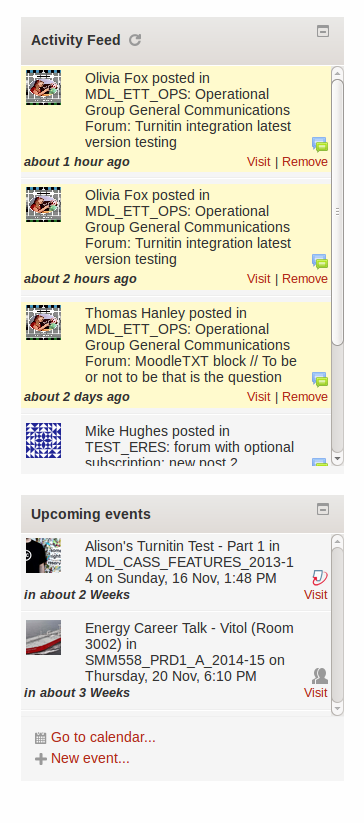
The block selects and displays a list of the users messages from the table {message_culactivity_stream}. Each message includes a link to view the notification subject and one to remove the message from the users feed. With JS enabled, the block checks for new notifications every 5 mins. It also appends older messages as the users scrolls down the list. If the block is displayed on the site page then all course messages are included. If the block is displayed on a course page then only course messages for the containing course are displayed.
The block identifies course messages by displaying a course image (the first image file uploaded to the course summary files area) or a pattern (if the course has no course image). The messages are required to include the course id for this to work. The event data sent to the message lib does not always include the course id or any useful/consistent way of identifying the course that the message originated from. If the mesage cannot be linked to a course id, the avatar will be the user from picture or a pattern if none exists.
The block has a setting to choose a pattern type but this will only work if the core code setting 'enablepattern' is enabled. So in summary, the avatar for a message defaults in the following order:
Requirement - course id and image uploaded to course summary files.
- Course image centred horizontally and vertically
Requirement - course id and 'enablepattern' is enabled - Course pattern
Requirement - course id - Moodle image /pix/u/f2
Requirement - user from image uploaded - User image
Requirement - 'enablepattern' is enabled - User pattern
- Moodle image /pix/u/f2
Maintainer
The block has been written and is currently maintained by Amanda Doughty.
Documentation
Documentation will be provided at the page at Moodle wiki
if the block makes it into the Moodle plugins directory.
3.11.0 (Build: 2021100100) (2021100100)
3.11.0 (Build: 2021100100)
Plugin type: Blocks
Frankenstyle component name: block_culactivity_stream
Version build number: 2021100100
Version release name: 3.11.0 (Build: 2021100100)
Maturity: Stable
Supported Moodle versions: 3.11
Repository URL (Git): https://github.com/amandadoughty/moodle-block_culactivity_stream/tree/master
Repository branch:
Repository tag:
Issue/bug tracker URL: https://github.com/amandadoughty/moodle-block_culactivity_stream/issues
Activity stream block
The block has a dependency on moodle-message_culactivity_stream which creates and populates the table it uses.
The block selects and displays a list of the users messages from the table {message_culactivity_stream}. Each message includes a link to view the notification subject and one to remove the message from the users feed. With JS enabled, the block checks for new notifications every 5 mins. It also appends older messages as the users scrolls down the list. If the block is displayed on the site page then all course messages are included. If the block is displayed on a course page then only course messages for the containing course are displayed.
The block identifies course messages by displaying a course image (the first image file uploaded to the course summary files area) or a pattern (if the course has no course image). The messages are required to include the course id for this to work. The event data sent to the message lib does not always include the course id or any useful/consistent way of identifying the course that the message originated from. If the mesage cannot be linked to a course id, the avatar will be the user from picture or a pattern if none exists.
The block has a setting to choose a pattern type but this will only work if the core code setting 'enablepattern' is enabled. So in summary, the avatar for a message defaults in the following order:
Requirement - course id and image uploaded to course summary files.
- Course image centred horizontally and vertically
Requirement - course id and 'enablepattern' is enabled - Course pattern
Requirement - course id - Moodle image /pix/u/f2
Requirement - user from image uploaded - User image
Requirement - 'enablepattern' is enabled - User pattern
- Moodle image /pix/u/f2
Maintainer
The block has been written and is currently maintained by Amanda Doughty.
Documentation
Documentation will be provided at the page at Moodle wiki
if the block makes it into the Moodle plugins directory.
3.9.0 (Build: 2020121000) (2020121000)
3.9.0 (Build: 2020121000)
Plugin type: Blocks
Frankenstyle component name: block_culactivity_stream
Version build number: 2020121000
Version release name: 3.9.0 (Build: 2020121000)
Maturity: Stable
Supported Moodle versions: 3.10, 3.8, 3.9
Repository URL (Git): https://github.com/amandadoughty/moodle-block_culactivity_stream/tree/master
Repository branch:
Repository tag: 3.9.0
Issue/bug tracker URL: https://github.com/amandadoughty/moodle-block_culactivity_stream/issues
Activity stream block
The block has a dependency on moodle-message_culactivity_stream which creates and populates the table it uses.
The block selects and displays a list of the users messages from the table {message_culactivity_stream}. Each message includes a link to view the notification subject and one to remove the message from the users feed. With JS enabled, the block checks for new notifications every 5 mins. It also appends older messages as the users scrolls down the list. If the block is displayed on the site page then all course messages are included. If the block is displayed on a course page then only course messages for the containing course are displayed.
The block identifies course messages by displaying a course image (the first image file uploaded to the course summary files area) or a pattern (if the course has no course image). The messages are required to include the course id for this to work. The event data sent to the message lib does not always include the course id or any useful/consistent way of identifying the course that the message originated from. If the mesage cannot be linked to a course id, the avatar will be the user from picture or a pattern if none exists.
The block has a setting to choose a pattern type but this will only work if the core code setting 'enablepattern' is enabled. So in summary, the avatar for a message defaults in the following order:
Requirement - course id and image uploaded to course summary files.
- Course image centred horizontally and vertically
Requirement - course id and 'enablepattern' is enabled - Course pattern
Requirement - course id - Moodle image /pix/u/f2
Requirement - user from image uploaded - User image
Requirement - 'enablepattern' is enabled - User pattern
- Moodle image /pix/u/f2
Maintainer
The block has been written and is currently maintained by Amanda Doughty.
Documentation
Documentation will be provided at the page at Moodle wiki
if the block makes it into the Moodle plugins directory.
3.8.0 (Build: 2019031202) (2019031202)
3.8.0 (Build: 2019031202)
Plugin type: Blocks
Frankenstyle component name: block_culactivity_stream
Version build number: 2019031202
Version release name: 3.8.0 (Build: 2019031202)
Maturity: Stable
Supported Moodle versions: 3.8
Repository URL (Git): https://github.com/amandadoughty/moodle-block_culactivity_stream/tree/master
Repository branch:
Repository tag:
Issue/bug tracker URL: https://github.com/amandadoughty/moodle-block_culactivity_stream/issues
Activity stream block
The block has a dependency on moodle-message_culactivity_stream which creates and populates the table it uses.
The block selects and displays a list of the users messages from the table {message_culactivity_stream}. Each message includes a link to view the notification subject and one to remove the message from the users feed. With JS enabled, the block checks for new notifications every 5 mins. It also appends older messages as the users scrolls down the list. If the block is displayed on the site page then all course messages are included. If the block is displayed on a course page then only course messages for the containing course are displayed.
The block identifies course messages by displaying a course image (the first image file uploaded to the course summary files area) or a pattern (if the course has no course image). The messages are required to include the course id for this to work. The event data sent to the message lib does not always include the course id or any useful/consistent way of identifying the course that the message originated from. If the mesage cannot be linked to a course id, the avatar will be the user from picture or a pattern if none exists.
The block has a setting to choose a pattern type but this will only work if the core code setting 'enablepattern' is enabled. So in summary, the avatar for a message defaults in the following order:
Requirement - course id and image uploaded to course summary files.
- Course image centred horizontally and vertically
Requirement - course id and 'enablepattern' is enabled - Course pattern
Requirement - course id - Moodle image /pix/u/f2
Requirement - user from image uploaded - User image
Requirement - 'enablepattern' is enabled - User pattern
- Moodle image /pix/u/f2
Maintainer
The block has been written and is currently maintained by Amanda Doughty.
Documentation
Documentation will be provided at the page at Moodle wiki
if the block makes it into the Moodle plugins directory.
3.6.0 (Build: 2019031201) (2019031201)
3.6.0 (Build: 2019031201)
Plugin type: Blocks
Frankenstyle component name: block_culactivity_stream
Version build number: 2019031201
Version release name: 3.6.0 (Build: 2019031201)
Maturity: Stable
Supported Moodle versions: 3.6
Repository URL (Git): https://github.com/amandadoughty/moodle-block_culactivity_stream/tree/master
Repository branch:
Repository tag:
Issue/bug tracker URL: https://github.com/amandadoughty/moodle-block_culactivity_stream/issues
Activity stream block
The block has a dependency on moodle-message_culactivity_stream which creates and populates the table it uses.
The block selects and displays a list of the users messages from the table {message_culactivity_stream}. Each message includes a link to view the notification subject and one to remove the message from the users feed. With JS enabled, the block checks for new notifications every 5 mins. It also appends older messages as the users scrolls down the list. If the block is displayed on the site page then all course messages are included. If the block is displayed on a course page then only course messages for the containing course are displayed.
The block identifies course messages by displaying a course image (the first image file uploaded to the course summary files area) or a pattern (if the course has no course image). The messages are required to include the course id for this to work. The event data sent to the message lib does not always include the course id or any useful/consistent way of identifying the course that the message originated from. If the mesage cannot be linked to a course id, the avatar will be the user from picture or a pattern if none exists.
The block has a setting to choose a pattern type but this will only work if the core code setting 'enablepattern' is enabled. So in summary, the avatar for a message defaults in the following order:
Requirement - course id and image uploaded to course summary files.
- Course image centred horizontally and vertically
Requirement - course id and 'enablepattern' is enabled - Course pattern
Requirement - course id - Moodle image /pix/u/f2
Requirement - user from image uploaded - User image
Requirement - 'enablepattern' is enabled - User pattern
- Moodle image /pix/u/f2
Maintainer
The block has been written and is currently maintained by Amanda Doughty.
Documentation
Documentation will be provided at the page at Moodle wiki
if the block makes it into the Moodle plugins directory.
3.6.0 (Build: 2019031200) (2019031200)
3.6.0 (Build: 2019031200)
Plugin type: Blocks
Frankenstyle component name: block_culactivity_stream
Version build number: 2019031200
Version release name: 3.6.0 (Build: 2019031200)
Maturity: Stable
Supported Moodle versions: 3.6
Repository URL (Git): https://github.com/amandadoughty/moodle-block_culactivity_stream/tree/master
Repository branch:
Repository tag:
Issue/bug tracker URL: https://github.com/amandadoughty/moodle-block_culactivity_stream/issues
Activity stream block
The block has a dependency on moodle-message_culactivity_stream which creates and populates the table it uses.
The block selects and displays a list of the users messages from the table {message_culactivity_stream}. Each message includes a link to view the notification subject and one to remove the message from the users feed. With JS enabled, the block checks for new notifications every 5 mins. It also appends older messages as the users scrolls down the list. If the block is displayed on the site page then all course messages are included. If the block is displayed on a course page then only course messages for the containing course are displayed.
The block identifies course messages by displaying a course image (the first image file uploaded to the course summary files area) or a pattern (if the course has no course image). The messages are required to include the course id for this to work. The event data sent to the message lib does not always include the course id or any useful/consistent way of identifying the course that the message originated from. If the mesage cannot be linked to a course id, the avatar will be the user from picture or a pattern if none exists.
The block has a setting to choose a pattern type but this will only work if the core code setting 'enablepattern' is enabled. So in summary, the avatar for a message defaults in the following order:
Requirement - course id and image uploaded to course summary files.
- Course image centred horizontally and vertically
Requirement - course id and 'enablepattern' is enabled - Course pattern
Requirement - course id - Moodle image /pix/u/f2
Requirement - user from image uploaded - User image
Requirement - 'enablepattern' is enabled - User pattern
- Moodle image /pix/u/f2
Maintainer
The block has been written and is currently maintained by Amanda Doughty.
Documentation
Documentation will be provided at the page at Moodle wiki
if the block makes it into the Moodle plugins directory.
3.0.3 (Build: 2016110403) (2016110403)
3.0.3 (Build: 2016110403)
Plugin type: Blocks
Frankenstyle component name: block_culactivity_stream
Version build number: 2016110403
Version release name: 3.0.3 (Build: 2016110403)
Maturity: Stable
Supported Moodle versions: 3.3, 3.4
Repository URL (Git): https://github.com/amandadoughty/moodle-block_culactivity_stream/tree/master
Repository branch:
Repository tag:
Issue/bug tracker URL: https://github.com/amandadoughty/moodle-block_culactivity_stream/issues
Activity stream block
The block has a dependency on moodle-message_culactivity_stream which creates and populates the table it uses.
The block selects and displays a list of the users messages from the table {message_culactivity_stream}. Each message includes a link to view the notification subject and one to remove the message from the users feed. With JS enabled, the block checks for new notifications every 5 mins. It also appends older messages as the users scrolls down the list. If the block is displayed on the site page then all course messages are included. If the block is displayed on a course page then only course messages for the containing course are displayed.
The block identifies course messages by displaying a course image (the first image file uploaded to the course summary files area) or a gravatar (if the course has no course image). The messages are required to include the course id for this to work. The event data sent to the message lib does not always include the course id or any useful/consistent way of identifying the course that the message originated from. If the mesage cannot be linked to a course id, the avatar will be the user from picture or a gravatar if none exists.
The block has a setting to choose a gravatar type but this will only work if the core code setting 'enablegravatar' is enabled. So in summary, the avatar for a message defaults in the following order:
Requirement - course id and image uploaded to course summary files.
- Course image centred horizontally and vertically
Requirement - course id and 'enablegravatar' is enabled - Course gravatar
Requirement - course id - Moodle image /pix/u/f2
Requirement - user from image uploaded - User image
Requirement - 'enablegravatar' is enabled - User gravatar
- Moodle image /pix/u/f2
Maintainer
The block has been written and is currently maintained by Amanda Doughty.
Documentation
Documentation will be provided at the page at Moodle wiki
if the block makes it into the Moodle plugins directory.
3.0.0 (Build: 2016110400) (2016110400)
3.0.0 (Build: 2016110400)
Plugin type: Blocks
Frankenstyle component name: block_culactivity_stream
Version build number: 2016110400
Version release name: 3.0.0 (Build: 2016110400)
Maturity: Stable
Supported Moodle versions: 2.6, 2.7, 2.8, 2.9, 3.0, 3.1, 3.2
Repository URL (Git): https://github.com/amandadoughty/moodle-block_culactivity_stream/tree/master
Repository branch:
Repository tag:
Issue/bug tracker URL: https://github.com/amandadoughty/moodle-block_culactivity_stream/issues
Activity stream block
The block has a dependency on moodle-message_culactivity_stream which creates and populates the table it uses.
The block selects and displays a list of the users messages from the table {message_culactivity_stream}. Each message includes a link to view the notification subject and one to remove the message from the users feed. With JS enabled, the block checks for new notifications every 5 mins. It also appends older messages as the users scrolls down the list. If the block is displayed on the site page then all course messages are included. If the block is displayed on a course page then only course messages for the containing course are displayed.
The block identifies course messages by displaying a course image (the first image file uploaded to the course summary files area) or a gravatar (if the course has no course image). The messages are required to include the course id for this to work. The event data sent to the message lib does not always include the course id or any useful/consistent way of identifying the course that the message originated from. If the mesage cannot be linked to a course id, the avatar will be the user from picture or a gravatar if none exists.
The block has a setting to choose a gravatar type but this will only work if the core code setting 'enablegravatar' is enabled. So in summary, the avatar for a message defaults in the following order:
Requirement - course id and image uploaded to course summary files.
- Course image centred horizontally and vertically
Requirement - course id and 'enablegravatar' is enabled - Course gravatar
Requirement - course id - Moodle image /pix/u/f2
Requirement - user from image uploaded - User image
Requirement - 'enablegravatar' is enabled - User gravatar
- Moodle image /pix/u/f2
Maintainer
The block has been written and is currently maintained by Amanda Doughty.
1.0.5 (Build: 2015110600) (2015110600)
1.0.5 (Build: 2015110600)
Plugin type: Blocks
Frankenstyle component name: block_culactivity_stream
Version build number: 2015110600
Version release name: 1.0.5 (Build: 2015110600)
Maturity: Stable
Supported Moodle versions: 2.6, 2.7, 2.8, 2.9, 3.0
Repository URL (Git): https://github.com/amandadoughty/moodle-block_culactivity_stream/tree/master
Repository branch:
Repository tag:
Issue/bug tracker URL: https://github.com/amandadoughty/moodle-block_culactivity_stream/issues
Activity stream block
The block has a dependency on moodle-message_culactivity_stream which creates and populates the table it uses.
The block selects and displays a list of the users messages from the table {message_culactivity_stream}. Each message includes a link to view the notification subject and one to remove the message from the users feed. With JS enabled, the block checks for new notifications every 5 mins. It also appends older messages as the users scrolls down the list. If the block is displayed on the site page then all course messages are included. If the block is displayed on a course page then only course messages for the containing course are displayed.
The block identifies course messages by displaying a course image (the first image file uploaded to the course summary files area) or a gravatar (if the course has no course image). The messages are required to include the course id for this to work. The event data sent to the message lib does not always include the course id or any useful/consistent way of identifying the course that the message originated from. If the mesage cannot be linked to a course id, the avatar will be the user from picture or a gravatar if none exists.
The block has a setting to choose a gravatar type but this will only work if the core code setting 'enablegravatar' is enabled. So in summary, the avatar for a message defaults in the following order:
Requirement - course id and image uploaded to course summary files.
- Course image centred horizontally and vertically
Requirement - course id and 'enablegravatar' is enabled - Course gravatar
Requirement - course id - Moodle image /pix/u/f2
Requirement - user from image uploaded - User image
Requirement - 'enablegravatar' is enabled - User gravatar
- Moodle image /pix/u/f2
Maintainer
The block has been written and is currently maintained by Amanda Doughty.
Documentation
Documentation will be provided at the page at Moodle wiki
if the block makes it into the Moodle plugins directory.
1.0.4 (Build: 2015022600) (2015022600)
1.0.4 (Build: 2015022600)
Plugin type: Blocks
Frankenstyle component name: block_culactivity_stream
Version build number: 2015022600
Version release name: 1.0.4 (Build: 2015022600)
Maturity: Stable
Supported Moodle versions: 2.6, 2.7, 2.8
Repository URL (Git): https://github.com/amandadoughty/moodle-block_culactivity_stream/tree/master
Repository branch:
Repository tag:
Issue/bug tracker URL: https://github.com/amandadoughty/moodle-block_culactivity_stream/issues
Activity stream block
The block has a dependency on moodle-message_culactivity_stream which creates and populates the table it uses.
The block selects and displays a list of the users messages from the table {message_culactivity_stream}. Each message includes a link to view the notification subject and one to remove the message from the users feed. With JS enabled, the block checks for new notifications every 5 mins. It also appends older messages as the users scrolls down the list. If the block is displayed on the site page then all course messages are included. If the block is displayed on a course page then only course messages for the containing course are displayed.
The block identifies course messages by displaying a course image (the first image file uploaded to the course summary files area) or a gravatar (if the course has no course image). The messages are required to include the course id for this to work. The event data sent to the message lib does not always include the course id or any useful/consistent way of identifying the course that the message originated from. If the mesage cannot be linked to a course id, the avatar will be the user from picture or a gravatar if none exists.
The block has a setting to choose a gravatar type but this will only work if the core code setting 'enablegravatar' is enabled. So in summary, the avatar for a message defaults in the following order:
Requirement - course id and image uploaded to course summary files.
- Course image centred horizontally and vertically
Requirement - course id and 'enablegravatar' is enabled - Course gravatar
Requirement - course id - Moodle image /pix/u/f2
Requirement - user from image uploaded - User image
Requirement - 'enablegravatar' is enabled - User gravatar
- Moodle image /pix/u/f2
Maintainer
The block has been written and is currently maintained by Amanda Doughty.
Documentation
Documentation will be provided at the page at Moodle wiki
if the block makes it into the Moodle plugins directory.
1.0.3 (Build: 2015011400) (2015011400)
1.0.3 (Build: 2015011400)
Plugin type: Blocks
Frankenstyle component name: block_culactivity_stream
Version build number: 2015011400
Version release name: 1.0.3 (Build: 2015011400)
Maturity: Stable
Supported Moodle versions: 2.6, 2.7, 2.8
Repository URL (Git): https://github.com/amandadoughty/moodle-block_culactivity_stream/tree/master
Repository branch:
Repository tag:
Issue/bug tracker URL: https://github.com/amandadoughty/moodle-block_culactivity_stream/issues
Activity stream block
The block has a dependency on moodle-message_culactivity_stream which creates and populates the table it uses.
The block selects and displays a list of the users messages from the table {message_culactivity_stream}. Each message includes a link to view the notification subject and one to remove the message from the users feed. With JS enabled, the block checks for new notifications every 5 mins. It also appends older messages as the users scrolls down the list. If the block is displayed on the site page then all course messages are included. If the block is displayed on a course page then only course messages for the containing course are displayed.
The block identifies course messages by displaying a course image (the first image file uploaded to the course summary files area) or a gravatar (if the course has no course image). The messages are required to include the course id for this to work. The event data sent to the message lib does not always include the course id or any useful/consistent way of identifying the course that the message originated from. If the mesage cannot be linked to a course id, the avatar will be the user from picture or a gravatar if none exists.
The block has a setting to choose a gravatar type but this will only work if the core code setting 'enablegravatar' is enabled. So in summary, the avatar for a message defaults in the following order:
Requirement - course id and image uploaded to course summary files.
- Course image centred horizontally and vertically
Requirement - course id and 'enablegravatar' is enabled - Course gravatar
Requirement - course id - Moodle image /pix/u/f2
Requirement - user from image uploaded - User image
Requirement - 'enablegravatar' is enabled - User gravatar
- Moodle image /pix/u/f2
Maintainer
The block has been written and is currently maintained by Amanda Doughty.
Documentation
Documentation will be provided at the page at Moodle wiki
if the block makes it into the Moodle plugins directory.
1.0.1 (Build: 2014110500) (2014110500)
1.0.1 (Build: 2014110500)
Plugin type: Blocks
Frankenstyle component name: block_culactivity_stream
Version build number: 2014110500
Version release name: 1.0.1 (Build: 2014110500)
Maturity: Stable
Supported Moodle versions: 2.6, 2.7, 2.8
Repository URL (Git): https://github.com/amandadoughty/moodle-block_culactivity_stream/tree/master
Repository branch:
Repository tag:
Issue/bug tracker URL: https://github.com/amandadoughty/moodle-block_culactivity_stream/issues
Activity stream block
The block has a dependency on moodle-message_culactivity_stream which creates and populates the table it uses.
The block selects and displays a list of the users messages from the table {message_culactivity_stream}. Each message includes a link to view the notification subject and one to remove the message from the users feed. With JS enabled, the block checks for new notifications every 5 mins. It also appends older messages as the users scrolls down the list. If the block is displayed on the site page then all course messages are included. If the block is displayed on a course page then only course messages for the containing course are displayed.
The block identifies course messages by displaying a course image (the first image file uploaded to the course summary files area) or a gravatar (if the course has no course image). The messages are required to include the course id for this to work. The event data sent to the message lib does not always include the course id or any useful/consistent way of identifying the course that the message originated from. If the mesage cannot be linked to a course id, the avatar will be the user from picture or a gravatar if none exists.
The block has a setting to choose a gravatar type but this will only work if the core code setting 'enablegravatar' is enabled. So in summary, the avatar for a message defaults in the following order:
Requirement - course id and image uploaded to course summary files.
- Course image centred horizontally and vertically
Requirement - course id and 'enablegravatar' is enabled - Course gravatar
Requirement - course id - Moodle image /pix/u/f2
Requirement - user from image uploaded - User image
Requirement - 'enablegravatar' is enabled - User gravatar
- Moodle image /pix/u/f2
Maintainer
The block has been written and is currently maintained by Amanda Doughty.
Documentation
Documentation will be provided at the page at Moodle wiki
if the block makes it into the Moodle plugins directory.
1.0 (Build: 2014081400) (2014081400)
1.0 (Build: 2014081400)
Plugin type: Blocks
Frankenstyle component name: block_culactivity_stream
Version build number: 2014081400
Version release name: 1.0 (Build: 2014081400)
Maturity: Stable
Supported Moodle versions: 2.6
Repository URL (Git): https://github.com/amandadoughty/moodle-block_culactivity_stream/tree/master
Repository branch:
Repository tag:
Issue/bug tracker URL: https://github.com/amandadoughty/moodle-block_culactivity_stream/issues
Activity stream block
The block has a dependency on moodle-message_culactivity_stream which creates and populates the table it uses.
The block selects and displays a list of the users messages from the table {message_culactivity_stream}. Each message includes a link to view the notification subject and one to remove the message from the users feed. With JS enabled, the block checks for new notifications every 5 mins. It also appends older messages as the users scrolls down the list. If the block is displayed on the site page then all course messages are included. If the block is displayed on a course page then only course messages for the containing course are displayed.
The block identifies course messages by displaying a course image (the first image file uploaded to the course summary files area) or a gravatar (if the course has no course image). The messages are required to include the course id for this to work. The event data sent to the message lib does not always include the course id or any useful/consistent way of identifying the course that the message originated from. If the mesage cannot be linked to a course id, the avatar will be the user from picture or a gravatar if none exists.
The block has a setting to choose a gravatar type but this will only work if the core code setting 'enablegravatar' is enabled. So in summary, the avatar for a message defaults in the following order:
Requirement - course id and image uploaded to course summary files.
- Course image centred horizontally and vertically
Requirement - course id and 'enablegravatar' is enabled - Course gravatar
Requirement - course id - Moodle image /pix/u/f2
Requirement - user from image uploaded - User image
Requirement - 'enablegravatar' is enabled - User gravatar
- Moodle image /pix/u/f2
Maintainer
The block has been written and is currently maintained by Amanda Doughty.
Documentation
Documentation will be provided at the page at Moodle wiki
if the block makes it into the Moodle plugins directory.