
Student folder
Maintained by
AMC Academic Moodle Cooperation
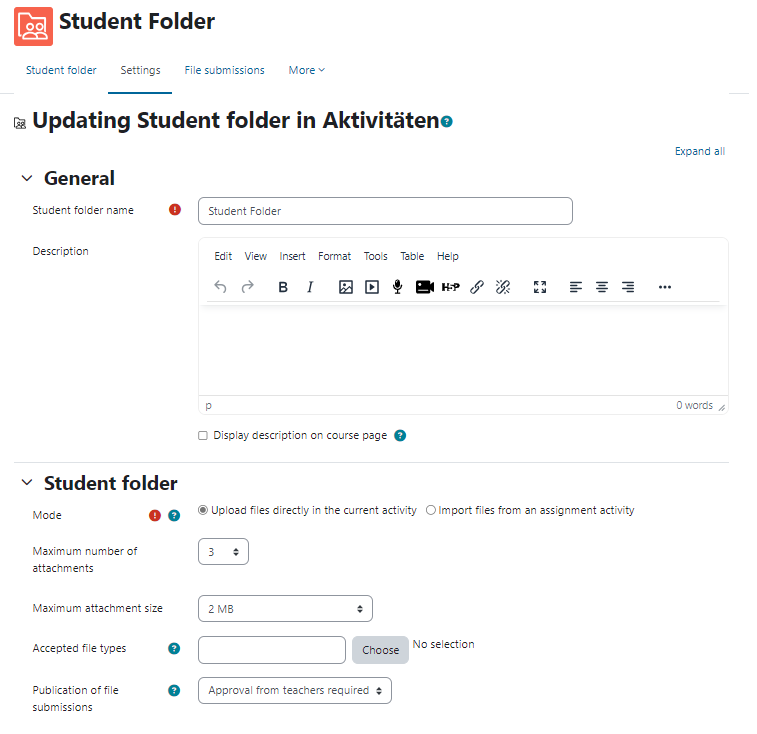
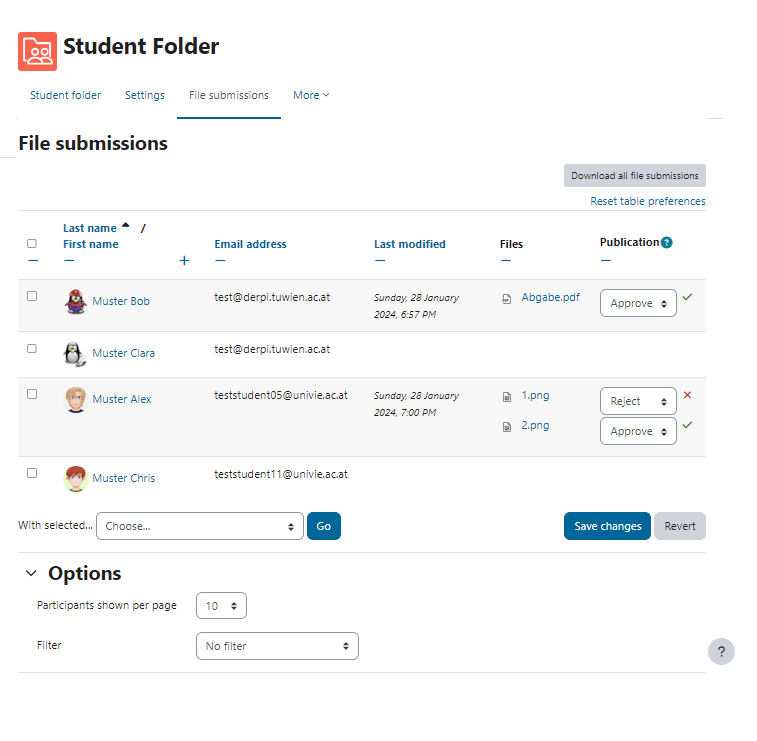
Online texts and files can be collected and published via the Student Folder activity and thus made available to everyone in a Moodle course. Submissions can be made directly by uploading or alternatively can be taken over by teachers from an assignment activity.
Comments
Comments are no longer open for new posts. Existing comments remain available to read.
I ccan create a rule named "student-folder-1" with the Area to minitor being "Student folder". However, when it comes to the Event itself, currently in Moodle 2.8 (which I am using), there are only two events to monitor: "Course module instance list viewed" and "Course module viewed". Neither of which will be helpful to me because I want to monitor whenever an upload is done on the Student Folder activity. To see what I mean, here's a screenshot of the Rule settings.
So guess I am back to square one.
That's a really good point. Currently we do not have any filters for the list displayed, but I'll take that info and let it be discussed by our whole dev-team. Maybe we can come up with good solutions (filters, messages, etc.) for a future version. But that improvements won't come before 3.4 due to our 3.3 release currently being in QA-testing-phase.
You could sort the table by "last modified" in the meantime, if you click on the header of the table's "last modified" column showing you the newest/oldest uploads as the first entries.
We'll definitely try to improve the plugin's UX!
cheers,
Philipp
you can control access and visibility of the activity via capabilities: just remove the capability "mod/publication:view" from the students role.
Alternatively you could use Moodle's conditional access settings (https://docs.moodle.org/33/en/Restrict_access_settings) in connection with a group just for the trainers.
Hope this helped you!
Cheers,
Philipp
Is there a way to hide the Public Files block only on students' page?
I would like to show that block only to the teachers and not to the students.
Hope you can help.
Thanks,
ad 4) You have a setting to let the files be visible directly after being uploaded OR the teacher has to approve the files before they are visible for other students!
ad 5) There will only be displayed the whole "submission" has been updated (the date the most recent file got uploaded, replaced, deleted, etc.)
ad 6) The student folder can not be graded. If you want to grade the submitted files, you should use Moodle core's Assignment activity. You can then use the student folder import every submission from the Assignment instance.
Cheers and you're welcome!
Thank you so much for your kind and quick answer!
If have 3 more questions, if you don't mind:
4- Can users see the files that other user uploaded? If so, can this be avoided? (i.e. Separate groups, like data bases)
5- If the user uploads more than one file to a folder, does Moodle display when the user's/group's files have been updated the last time FOR EACH FILE (not for the whole folder)?
6- Can this activity (student folder) be graded?
Sorry for bothering, but I don't have full administrator rights in the Moodle course I administrate, and before I ask the ADministrator to install this plug in I need to make sure it does what I need, and I also need to write a report proving it... :S
Thank you so much!!
ad 1) The student folder is a regular activity module and therefore you can add as many student folder instances in a course as you like!
ad 2) You can define how many files can be uploaded by students via a setting per student folder instance.
ad 3) In the student folder's table with the public files are the dates displayed when the user's/group's files have been updated the last time.
I hope that helped you!
Cheers,
Philipp
Thank you very much for sharing your work.
I would like to ask you 2 questions:
1. Is it possible to create more than one folder for students (as if the folder was an activity)?
2. Is so, is it possible for students to upload more than one file in each folder?
3. If so, it does Moodle show the date each folder was uploaded?
Thank you so much!
the Student Folder is not really comparable with the database activity.
Do you have any specific questions concerning this plugin?