Download private files from other moodle platforms
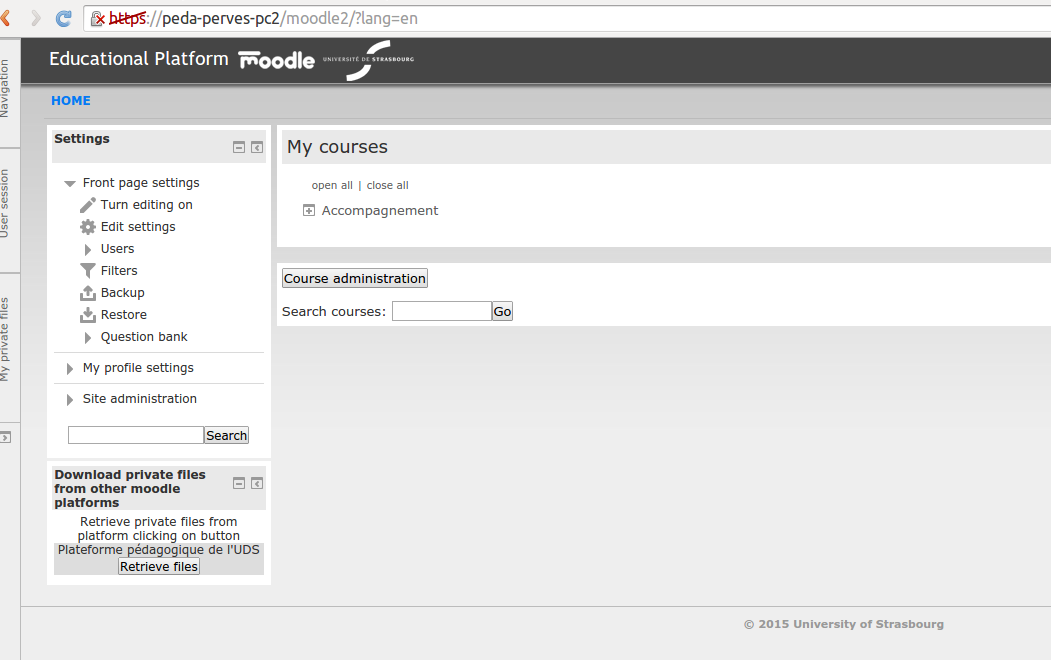
Versions
Current version
3.1.0 (2025022000)
3.1.0
Plugin type: Blocks
Frankenstyle component name: block_my_external_privatefiles
Version build number: 2025022000
Version release name: 3.1.0
Maturity: Stable
Supported Moodle versions: 4.5
Repository URL (Git): https://github.com/cperves/moodle-blocks-my_external_privatefiles.git
Repository branch: MOODLE_405_STABLE
Repository tag: 3.1.0
Issue/bug tracker URL: https://github.com/cperves/moodle-blocks-my_external_privatefiles/issues
- 2025022000
- webservice migration
- curl file serving changes
- 2023053000
- Moodle 4.1 and php 8.1 compliant
- solve namespace issues
- file scope cleanup
- unit tests
3.0.0 (2023053000)
3.0.0
Plugin type: Blocks
Frankenstyle component name: block_my_external_privatefiles
Version build number: 2023053000
Version release name: 3.0.0
Maturity: Stable
Supported Moodle versions: 4.0, 4.1, 4.2
Repository URL (Git): https://github.com/cperves/moodle-blocks-my_external_privatefiles.git
Repository branch: MOODLE_401_STABLE
Repository tag: 3.0.0
Issue/bug tracker URL: https://github.com/cperves/moodle-blocks-my_external_privatefiles/issues
- 2023053000
- Moodle 4.1 and php 8.1 compliant
- solve namespace issues
- file scope cleanup
- unit tests
2.0.0 (2021030800)
2.0.0
Plugin type: Blocks
Frankenstyle component name: block_my_external_privatefiles
Version build number: 2021030800
Version release name: 2.0.0
Maturity: Stable
Supported Moodle versions: 3.9
Repository URL (Git): https://github.com/cperves/moodle-blocks-my_external_privatefiles.git
Repository branch: master
Repository tag: 2.0.0
Issue/bug tracker URL: https://github.com/cperves/moodle-blocks-my_external_privatefiles/issues
block my_external_privatesfiles : Download private files from other moodle platforms
my_external_privatesfiles is a Moodle block that enable a user to retrieve a zip of his private files from an external moodle
Features
- private files are retrieved on other platforms threw same username
- Multiple external moodle possible
- create zip files on external moodle that are destructed by cron
- in case of webservice error doesn't, show the link to external moodle in block
- in case of webservice error while downloading, show an error page
Security warning
- This plugin use a capability block/my_external_privatefiles:can_retrieve_files_from_other_users that enable webservice account to donload files of other users
- To improve security it is strongly recommended to generate token with IPrestriction on server side IPs
mnet warning usage
this plugin may not work in MNet environments fully because the username in that conditions username is not unique
Download
Installation
Block installation
- Install block on blocks directory in the current moodle and in each external moodle youy need to connect to
for each moodle concerned - a automated installation script is available for webservice installation
cli installation
- Execute cli, that will install webservice, rôle and user
- you will only need to generate token (see after)
/var/www/moodlepath/blocks/my_external_privatefiles/cli/install_server.php
manual installation
- create a profile for webservice
- add the protocol rest capability to this role webservice/rest:use
- add the capbility to download files of other users block/my_external_privatefiles:can_retrieve_files_from_other_users
*add the capability block/my_external_privatefiles:can_create_draftuserfiles_for_other_users
- Create a user account for webservice account
- assign role on system context for this newly created account
- Under webservice administration :
- Under Site administration -> Plugins -> Web Services -> External services, add a new custom service
- check Enabled
- ckeck Authorised users only
- check Can download files
- once created add funtions to the new custom external service
- core_webservice_get_site_info
- block_my_external_privatefiles_get_private_files_zip
- add the webservice user account created previously to the authorized users of the new custom service
- Under Site administration -> Plugins -> Web Services -> External services, add a new custom service
webservice token generation (for automated and manual installations)
Under Site administration -> Plugins -> Web Services -> Manage Tokens
* create a new token, restrited on your php server(s) for the custom external service previously created
* for automated cli installation :
* service is wsblockmyexternalprivatefiles
* user is block_my_external_privatefiles_user
* This token will be one to enter in the block parameters off block_my_external_privatefiles
Block setting
Moodle(s) to connect to
Under Plugins -> Blocks -> Download private files from other moodle platforms
- in my_external_privatefiles | external_moodles enter the key/value list of moodles/token to connect to
- The format is a php list [moodle_url1,external_moodle_token_for_webservice_account1;moodle_url2,external_moodle_token_for_webservice_account2...]
- moodle cli version
php /var/www/moodle_path/admin/cli/cfg.php --component='block_my_external_privatefiles' --name=https://external_moodle --set=site;xxxtokenxxx
Other parameters availbles
- block_my_external_privatefiles | filename : prefix filename
- block_my_external_privatefiles | includesitename : include site name into filename
- block_my_external_privatefiles | sitenamelength : site name length in filename
Contributions
Contributions of any form are welcome. Github pull requests are preferred.
File any bugs, improvements, or feature requiests in our [issue tracker][issues].
License
- http://www.gnu.org/copyleft/gpl.html GNU GPL v3 or later
[my_external_private_files_github]:
[issues]:
(2015111600)
Plugin type: Blocks
Frankenstyle component name: block_my_external_privatefiles
Version build number: 2015111600
Version release name:
Maturity: Stable
Supported Moodle versions: 2.9, 3.0
Repository URL (Git): https://github.com/cperves/moodle-blocks-my_external_privatefiles.git
Repository branch:
Repository tag:
Issue/bug tracker URL: https://github.com/cperves/moodle-blocks-my_external_privatefiles/issues
block my_external_privatesfiles : Download private files from other moodle platforms
my_external_privatesfiles is a Moodle block that enable a user to retrieve a zip of his private files from an external moodle
Features
- private files are retrieved on other platforms threw same username
- Multiple external moodle possible
- create zip files on external moodle that are destructed by cron
- in case of webservice error doesn't, show the link to external moodle in block
- in case of webservice error while downloading, show an error page
Security warning
- This plugin use a capability block/my_external_privatefiles:can_retrieve_files_from_other_users that enable webservice account to donload files of other users
- To improve security it is strongly recommended to generate token with IPrestriction on server side IPs
mnet warning usage
this plugin may not work in MNet environments fully because the username in that conditions username is not unique
Download
Installation
Block installation
Install block on blocks directory in the current moodle and in each external moodle youy need to connect to
for each moodle concerned :
- create a profile for webservice
- add the protocol rest capability to this role webservice/rest:use
- add the capbility to download files of other users block/my_external_privatefiles:can_retrieve_files_from_other_users
*add the capability block/my_external_privatefiles:can_create_draftuserfiles_for_other_users
- Create a user account for webservice account
- assign role on system context for this newly created account
- Under webservice administration :
- Under Site administration -> Plugins -> Web Services -> External services, add a new custom service
- check Enabled
- ckeck Authorised users only
- check Can download files
- once created add funtions to the new custom external service
- core_webservice_get_site_info
- block_my_external_privatefiles_get_private_files_zip
- add the webservice user account created previously to the authorized users of the new custom service
- Under Site administration -> Plugins -> Web Services -> Manage Tokens
- create a new token, restrited on your php server(s) for the custom external sservice previously created
- This token will be one to enter in the block parameters off block_my_external_privatefiles
- Under Site administration -> Plugins -> Web Services -> External services, add a new custom service
Block setting
Under Plugins -> Blocks -> Download private files from other moodle platforms
- in my_external_privatefiles | external_moodles enter the key/value list of moodles/token to connect to
- The format is a php list [moodle_url1,external_moodle_token_for_webservice_account1;moodle_url2,external_moodle_token_for_webservice_account2...]
Contributions
Contributions of any form are welcome. Github pull requests are preferred.
File any bugs, improvements, or feature requiests in our [issue tracker][issues].
License
- http://www.gnu.org/copyleft/gpl.html GNU GPL v3 or later
[my_external_private_files_github]:
[issues]:
(2015111000)
Plugin type: Blocks
Frankenstyle component name: block_my_external_privatefiles
Version build number: 2015111000
Version release name:
Maturity: Alpha
Supported Moodle versions: 2.9
Repository URL (Git): https://github.com/cperves/moodle-blocks-my_external_privatefiles.git
Repository branch:
Repository tag:
Issue/bug tracker URL: https://github.com/cperves/moodle-blocks-my_external_privatefiles/issues
block my_external_privatesfiles : Download private files from other moodle platforms
my_external_privatesfiles is a Moodle block that enable a user to retrieve a zip of his private files from an external moodle
Features
- private files are retrieved on other platforms threw same username
- Multiple external moodle possible
- create zip files on external moodle that are destructed by cron
- in case of webservice error doesn't, show the link to external moodle in block
- in case of webservice error while downloading, show an error page
Security warning
- This plugin use a capability block/my_external_privatefiles:can_retrieve_files_from_other_users that enable webservice account to donload files of other users
- To improve security it is strongly recommended to generate token with IPrestriction on server side IPs
mnet warning usage
this plugin may not work in MNet environments fully because the username in that conditions username is not unique
Download
Installation
Block installation
Install block on blocks directory in the current moodle and in each external moodle youy need to connect to
for each moodle concerned :
- create a profile for webservice
- add the protocol rest capability to this role webservice/rest:use
- add the capbility to download files of other users block/my_external_privatefiles:can_retrieve_files_from_other_users
*add the capability block/my_external_privatefiles:can_create_draftuserfiles_for_other_users
- Create a user account for webservice account
- assign role on system context for this newly created account
- Under webservice administration :
- Under Site administration -> Plugins -> Web Services -> External services, add a new custom service
- check Enabled
- ckeck Authorised users only
- check Can download files
- once created add funtions to the new custom external service
- core_webservice_get_site_info
- block_my_external_privatefiles_get_private_files_zip
- add the webservice user account created previously to the authorized users of the new custom service
- Under Site administration -> Plugins -> Web Services -> Manage Tokens
- create a new token, restrited on your php server(s) for the custom external sservice previously created
- This token will be one to enter in the block parameters off block_my_external_privatefiles
- Under Site administration -> Plugins -> Web Services -> External services, add a new custom service
Block setting
Under Plugins -> Blocks -> Download private files from other moodle platforms
- in my_external_privatefiles | external_moodles enter the key/value list of moodles/token to connect to
- The format is a php list [moodle_url1,external_moodle_token_for_webservice_account1;moodle_url2,external_moodle_token_for_webservice_account2...]
Contributions
Contributions of any form are welcome. Github pull requests are preferred.
File any bugs, improvements, or feature requiests in our [issue tracker][issues].
License
- http://www.gnu.org/copyleft/gpl.html GNU GPL v3 or later
[my_external_private_files_github]:
[issues]:
(2015093002)
Plugin type: Blocks
Frankenstyle component name: block_my_external_privatefiles
Version build number: 2015093002
Version release name:
Maturity: Release Candidate
Supported Moodle versions: 2.9
Repository URL (Git): https://github.com/cperves/moodle-blocks-my_external_privatefiles.git
Repository branch:
Repository tag:
Issue/bug tracker URL: https://github.com/cperves/moodle-blocks-my_external_privatefiles/issues
block my_external_privatesfiles : Download private files from other moodle platforms
my_external_privatesfiles is a Moodle block that enable a user to retirieve a zip of his private files from an external moodle
Features
- private files retrieved from username
- Multiple external moodle possible
- create zip files on external moodle that are destructed by cron
- in case of webservice error doesn't, show the link to external moodle in block
- in case of webservice error while downloading, show an error page
Security warning
- This plugin use a capability block/my_external_privatefiles:can_retrieve_files_from_other_users that enable webservice account to donload files of other users
- To improve security it is strongly recommended to generate token with IPrestriction on server side IPs
Download
Installation
Block installation
Install block on blocks directory in the current moodle and in each external moodle youy need to connect to
for each moodle concerned :
- create a profile for webservice
- add the protocol rest capability to this role webservice/rest:use
- add the capbility to download files of other users block/my_external_privatefiles:can_retrieve_files_from_other_users
*add the capability block/my_external_privatefiles:can_create_draftuserfiles_for_other_users
- Create a user account for webservice account
- assign role on system context for this newly created account
- Under webservice administration :
- Under Site administration -> Plugins -> Web Services -> External services, add a new custom service
- check Enabled
- ckeck Authorised users only
- check Can download files
- once created add funtions to the new custom external service
- core_webservice_get_site_info
- block_my_external_privatefiles_get_private_files_zip
- add the webservice user account created previously to the authorized users of the new custom service
- Under Site administration -> Plugins -> Web Services -> Manage Tokens
- create a new token, restrited on your php server(s) for the custom external sservice previously created
- This token will be one to enter in the block parameters off block_my_external_privatefiles
- Under Site administration -> Plugins -> Web Services -> External services, add a new custom service
Block setting
Under Plugins -> Blocks -> Download private files from other moodle platforms
- in my_external_privatefiles | external_moodles enter the key/value list of moodles/token to connect to
- The format is a php list [moodle_url1,external_moodle_token_for_webservice_account1;moodle_url2,external_moodle_token_for_webservice_account2...]
Contributions
Contributions of any form are welcome. Github pull requests are preferred.
File any bugs, improvements, or feature requiests in our [issue tracker][issues].
License
- http://www.gnu.org/copyleft/gpl.html GNU GPL v3 or later
[my_external_private_files_github]:
[issues]:
(2015030903)
Plugin type: Blocks
Frankenstyle component name: block_my_external_privatefiles
Version build number: 2015030903
Version release name:
Maturity: Alpha
Supported Moodle versions: 2.4
Repository URL (Git): https://github.com/cperves/moodle-blocks-my_external_privatefiles.git
Repository branch:
Repository tag:
Issue/bug tracker URL: https://github.com/cperves/moodle-blocks-my_external_privatefiles/issues
block my_external_privatesfiles : Download private files from other moodle platforms
my_external_privatesfiles is a Moodle block that enable a user to retirieve a zip of his private files from an external moodle
Features
- private files retrieved from username
- Multiple external moodle possible
- create zip files on external moodle that are destructed by cron
- in case of webservice error doesn't, show the link to external moodle in block
- in case of webservice error while downloading, show an error page
Security warning
- This plugin use a capability block/my_external_privatefiles:can_retrieve_files_from_other_users that enable webservice account to donload files of other users
- To improve security it is strongly recommended to generate token with IPrestriction on server side IPs
Download
Installation
Block installation
Install block on blocks directory in the current moodle and in each external moodle youy need to connect to
for each moodle concerned :
- create a profile for webservice
- add the protocol rest capability to this role webservice/rest:use
- add the capbility to download files of other users block/my_external_privatefiles:can_retrieve_files_from_other_users
*add the capability block/my_external_privatefiles:can_create_draftuserfiles_for_other_users
- Create a user account for webservice account
- assign role on system context for this newly created account
- Under webservice administration :
- Under Site administration -> Plugins -> Web Services -> External services, add a new custom service
- check Enabled
- ckeck Authorised users only
- check Can download files
- once created add funtions to the new custom external service
- core_webservice_get_site_info
- block_my_external_privatefiles_get_private_files_zip
- add the webservice user account created previously to the authorized users of the new custom service
- Under Site administration -> Plugins -> Web Services -> Manage Tokens
- create a new token, restrited on your php server(s) for the custom external sservice previously created
- This token will be one to enter in the block parameters off block_my_external_privatefiles
- Under Site administration -> Plugins -> Web Services -> External services, add a new custom service
Block setting
Under Plugins -> Blocks -> Download private files from other moodle platforms
- in my_external_privatefiles | external_moodles enter the key/value list of moodles/token to connect to
- The format is a php list [moodle_url1,external_moodle_token_for_webservice_account1;moodle_url2,external_moodle_token_for_webservice_account2...]
Contributions
Contributions of any form are welcome. Github pull requests are preferred.
File any bugs, improvements, or feature requiests in our [issue tracker][issues].
License
- http://www.gnu.org/copyleft/gpl.html GNU GPL v3 or later
[my_external_private_files_github]:
[issues]: