User Restore
Versions
Current version
4.0.0 (build 2025120100) (2025120100)
4.0.0 (build 2025120100)
Plugin type: Administration tools
Frankenstyle component name: tool_userrestore
Version build number: 2025120100
Version release name: 4.0.0 (build 2025120100)
Maturity: Stable
Supported Moodle versions: 4.2, 4.3, 4.4, 4.5, 5.0, 5.1
Repository URL (Git): https://github.com/sebsoftnl/moodle-tool_userrestore
Repository branch:
Repository tag: 4.0.0
Issue/bug tracker URL: https://github.com/sebsoftnl/moodle-tool_userrestore/issues
Version 4.0.0 (build 2025120100)
- Merged/implemented PR#2 (thans cgrauer https://github.com/cgrauer)
- Complete overhaul of code, logic and interface (no longer using a cache, but stored data)
Version 3.6.3 (build 2019060103)
- Removed "LIMIT 1" and replaced with IGNORE_MISSING in util.php (DB engine compatibility).
Version 3.6.2 (build 2019060102)
- Unserialsation of event logs now checks logstore settings for JSON serialisation or json encoded data.
- Added setting to enable or disable the user_deleted observer due to the fact bulk deletion is severely impacted by this.
The default is now not to use the observer. - Changed default cachefill task to run every 10 minutes by default.
- Changed mimimal Moodle version to 3.7
- Added limited cachefill (10 records at once)
Version 3.6.1 (build 2019060101)
- Updated privacy provider.
Version 3.6.0 (build 2019060100)
- Added caching to speed up overviews
Version 3.5.0 (build 2018050300)
- Added privacy provider
- Validated functionality for Moodle 3.5 onwards
- Minimum required Moodle version: 3.5
Version 3.3.0 (build 2017092500)
- Fixed deprecated pix_url references (replaced y image_url)
- Added setting for maximum number of users to display on restore.php / restore form
- Added paginag bar on restore.php
- Validated functionality for Moodle 3.3 onwards
- Minimum required Moodle version: 3.3
Version 3.0.0 (build 2017050100)
- Code overhaul to comply to Moodle standards
- Validated functionality for Moodle 3.0 onwards
- Minimum required Moodle version: 3.0
3.6.2 (build 2019060102) (2019060102)
3.6.2 (build 2019060102)
Plugin type: Administration tools
Frankenstyle component name: tool_userrestore
Version build number: 2019060102
Version release name: 3.6.2 (build 2019060102)
Maturity: Stable
Supported Moodle versions: 3.7, 3.8, 3.9, 3.10
Repository URL (Git): https://github.com/sebsoftnl/moodle-tool_userrestore
Repository branch:
Repository tag:
Issue/bug tracker URL: https://github.com/sebsoftnl/moodle-tool_userrestore/issues
SEBSOFT USERRESTORE PLUGIN
The Sebsoft User Restore Plugin offers you the possibility to restore user accounts
that were deleted from moodle.
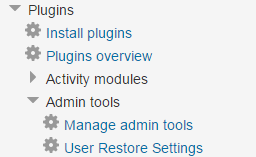
When the plugin has been installed, you can select a number of user accounts to restore and optionally
send an email informing them their accounts have been restored.
This plugin takes the following into account:
- Users to be restored are checked on e-mail:
if an e-mail address already exists for an active account, this user will not be restored. - Users to be restored are checked on username:
if an username already exists for an active account, this user will not be restored. - Users to be restored are checked on MNET host:
if the MNET host of the account to be restored is not the locally configured one, this user will not be restored.
Important note:
Moodle removes ALL relevant data upon deleting a user account, and only the record in the
user table itself remains. This utility can't do anything about this and is only capable of restoring the
record from the user table.
Important note for moodle 2.7 and up:
Before Moodle 2.7 there is NO way we can retrieve all information. However, with Moodle 2.7 and the new
event logging tables, the original user information is stored in the event data. Therefore, from Moodle 2.7
onwards, this plugin will try and restore the original user information from there.
This effectively means, that from Moodle 2.7 onwards, we will have the correct original username, email,
idnumber, picture and mnethostid. Before that, only the email could be restored, and even that method is
not foolproof (due to the fact the username is cleaned with PARAM_USERNAME upon deletion).
INSTALLATION
- Copy the userrestore folder to your admin/tool directory.
- Configure your admin tool.
- We're ready to run!
3.6.1 (build 2019060101) (2019060101)
3.6.1 (build 2019060101)
Plugin type: Administration tools
Frankenstyle component name: tool_userrestore
Version build number: 2019060101
Version release name: 3.6.1 (build 2019060101)
Maturity: Stable
Supported Moodle versions: 3.5, 3.6, 3.7, 3.8
Repository URL (Git): https://bitbucket.org/sebsoft/moodle-tool_userrestore/
Repository branch:
Repository tag:
Issue/bug tracker URL: https://github.com/sebsoftnl/moodle-tool_userrestore/issues
SEBSOFT USERRESTORE PLUGIN
The Sebsoft User Restore Plugin offers you the possibility to restore user accounts
that were deleted from moodle.
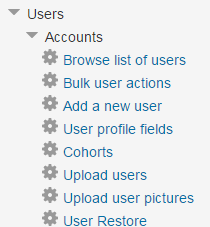
When the plugin has been installed, you can select a number of user accounts to restore and optionally
send an email informing them their accounts have been restored.
This plugin takes the following into account:
- Users to be restored are checked on e-mail:
if an e-mail address already exists for an active account, this user will not be restored. - Users to be restored are checked on username:
if an username already exists for an active account, this user will not be restored. - Users to be restored are checked on MNET host:
if the MNET host of the account to be restored is not the locally configured one, this user will not be restored.
Important note:
Moodle removes ALL relevant data upon deleting a user account, and only the record in the
user table itself remains. This utility can't do anything about this and is only capable of restoring the
record from the user table.
Important note for moodle 2.7 and up:
Before Moodle 2.7 there is NO way we can retrieve all information. However, with Moodle 2.7 and the new
event logging tables, the original user information is stored in the event data. Therefore, from Moodle 2.7
onwards, this plugin will try and restore the original user information from there.
This effectively means, that from Moodle 2.7 onwards, we will have the correct original username, email,
idnumber, picture and mnethostid. Before that, only the email could be restored, and even that method is
not foolproof (due to the fact the username is cleaned with PARAM_USERNAME upon deletion).
INSTALLATION
- Copy the userrestore folder to your admin/tool directory.
- Configure your admin tool.
- We're ready to run!
3.6.0 (build 2019060100) (2019060100)
3.6.0 (build 2019060100)
Plugin type: Administration tools
Frankenstyle component name: tool_userrestore
Version build number: 2019060100
Version release name: 3.6.0 (build 2019060100)
Maturity: Stable
Supported Moodle versions: 3.5, 3.6, 3.7
Repository URL (Git): https://bitbucket.org/sebsoft/moodle-tool_userrestore/
Repository branch:
Repository tag:
Issue/bug tracker URL: https://github.com/sebsoftnl/moodle-tool_userrestore/issues
SEBSOFT USERRESTORE PLUGIN
The Sebsoft User Restore Plugin offers you the possibility to restore user accounts
that were deleted from moodle.
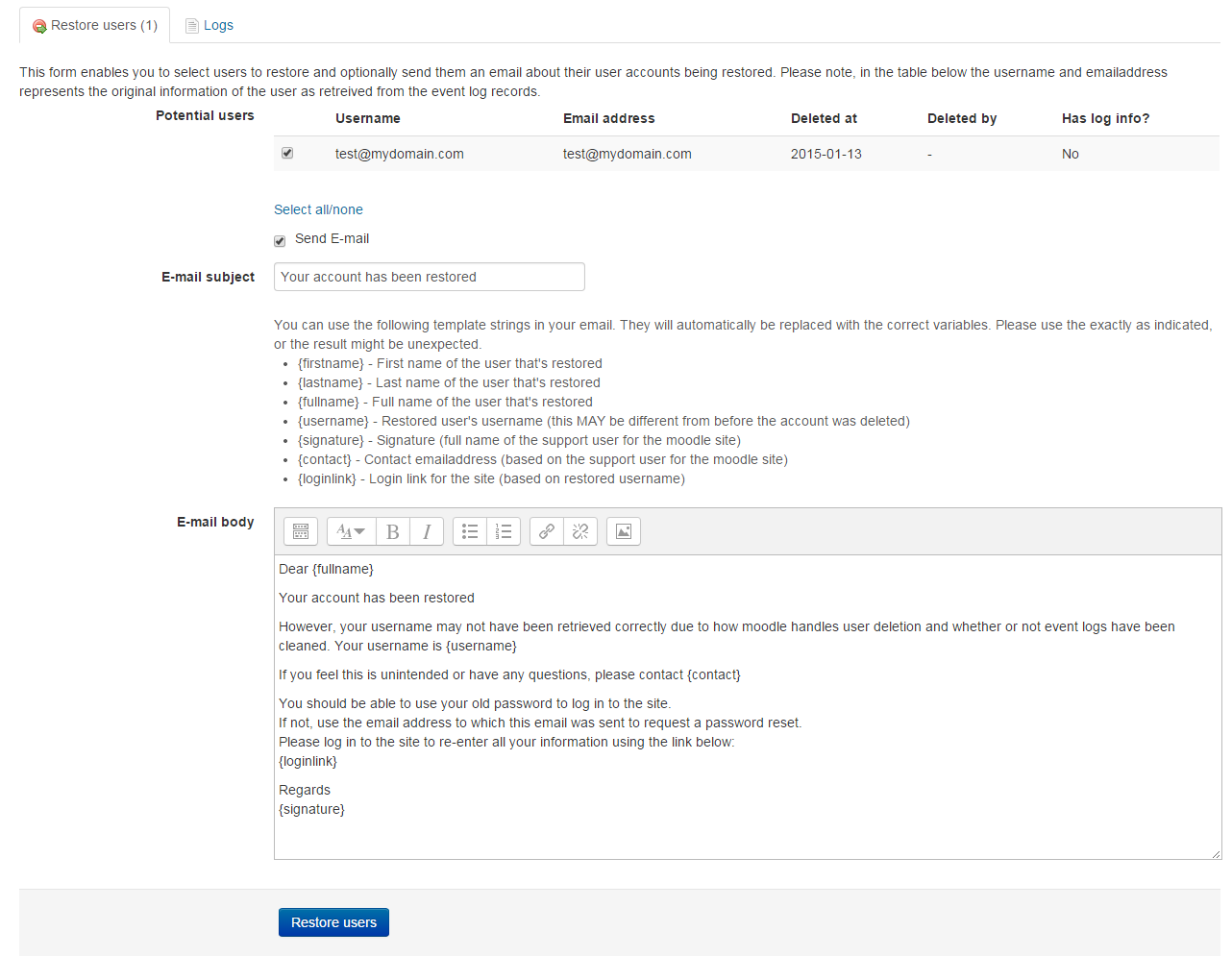
When the plugin has been installed, you can select a number of user accounts to restore and optionally
send an email informing them their accounts have been restored.
This plugin takes the following into account:
- Users to be restored are checked on e-mail:
if an e-mail address already exists for an active account, this user will not be restored. - Users to be restored are checked on username:
if an username already exists for an active account, this user will not be restored. - Users to be restored are checked on MNET host:
if the MNET host of the account to be restored is not the locally configured one, this user will not be restored.
Important note:
Moodle removes ALL relevant data upon deleting a user account, and only the record in the
user table itself remains. This utility can't do anything about this and is only capable of restoring the
record from the user table.
Important note for moodle 2.7 and up:
Before Moodle 2.7 there is NO way we can retrieve all information. However, with Moodle 2.7 and the new
event logging tables, the original user information is stored in the event data. Therefore, from Moodle 2.7
onwards, this plugin will try and restore the original user information from there.
This effectively means, that from Moodle 2.7 onwards, we will have the correct original username, email,
idnumber, picture and mnethostid. Before that, only the email could be restored, and even that method is
not foolproof (due to the fact the username is cleaned with PARAM_USERNAME upon deletion).
INSTALLATION
- Copy the userrestore folder to your admin/tool directory.
- Configure your admin tool.
- We're ready to run!
3.5.0 (build 2018050300) (2018050300)
3.5.0 (build 2018050300)
Plugin type: Administration tools
Frankenstyle component name: tool_userrestore
Version build number: 2018050300
Version release name: 3.5.0 (build 2018050300)
Maturity: Stable
Supported Moodle versions: 3.5
Repository URL (Git): https://bitbucket.org/sebsoft/moodle-tool_userrestore/
Repository branch:
Repository tag:
Issue/bug tracker URL: https://github.com/sebsoftnl/moodle-tool_userrestore/issues
SEBSOFT USERRESTORE PLUGIN
The Sebsoft User Restore Plugin offers you the possibility to restore user accounts
that were deleted from moodle.

When the plugin has been installed, you can select a number of user accounts to restore and optionally
send an email informing them their accounts have been restored.
This plugin takes the following into account:
- Users to be restored are checked on e-mail:
if an e-mail address already exists for an active account, this user will not be restored. - Users to be restored are checked on username:
if an username already exists for an active account, this user will not be restored. - Users to be restored are checked on MNET host:
if the MNET host of the account to be restored is not the locally configured one, this user will not be restored.
Important note:
Moodle removes ALL relevant data upon deleting a user account, and only the record in the
user table itself remains. This utility can't do anything about this and is only capable of restoring the
record from the user table.
Important note for moodle 2.7 and up:
Before Moodle 2.7 there is NO way we can retrieve all information. However, with Moodle 2.7 and the new
event logging tables, the original user information is stored in the event data. Therefore, from Moodle 2.7
onwards, this plugin will try and restore the original user information from there.
This effectively means, that from Moodle 2.7 onwards, we will have the correct original username, email,
idnumber, picture and mnethostid. Before that, only the email could be restored, and even that method is
not foolproof (due to the fact the username is cleaned with PARAM_USERNAME upon deletion).
INSTALLATION
- Copy the userrestore folder to your admin/tool directory.
- Configure your admin tool.
- We're ready to run!
3.3.0 (build 2017092500) (2017092500)
3.3.0 (build 2017092500)
Plugin type: Administration tools
Frankenstyle component name: tool_userrestore
Version build number: 2017092500
Version release name: 3.3.0 (build 2017092500)
Maturity: Stable
Supported Moodle versions: 3.3
Repository URL (Git): https://bitbucket.org/sebsoft/moodle-tool_userrestore/
Repository branch:
Repository tag:
Issue/bug tracker URL: https://github.com/sebsoftnl/moodle-tool_userrestore/issues
SEBSOFT USERRESTORE PLUGIN
The Sebsoft User Restore Plugin offers you the possibility to restore user accounts
that were deleted from moodle.
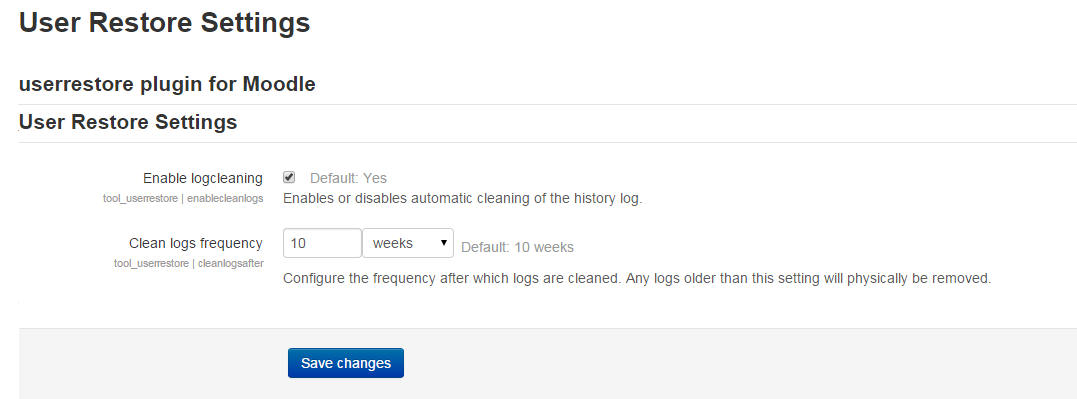
When the plugin has been installed, you can select a number of user accounts to restore and optionally
send an email informing them their accounts have been restored.
This plugin takes the following into account:
- Users to be restored are checked on e-mail:
if an e-mail address already exists for an active account, this user will not be restored. - Users to be restored are checked on username:
if an username already exists for an active account, this user will not be restored. - Users to be restored are checked on MNET host:
if the MNET host of the account to be restored is not the locally configured one, this user will not be restored.
Important note:
Moodle removes ALL relevant data upon deleting a user account, and only the record in the
user table itself remains. This utility can't do anything about this and is only capable of restoring the
record from the user table.
Important note for moodle 2.7 and up:
Before Moodle 2.7 there is NO way we can retrieve all information. However, with Moodle 2.7 and the new
event logging tables, the original user information is stored in the event data. Therefore, from Moodle 2.7
onwards, this plugin will try and restore the original user information from there.
This effectively means, that from Moodle 2.7 onwards, we will have the correct original username, email,
idnumber, picture and mnethostid. Before that, only the email could be restored, and even that method is
not foolproof (due to the fact the username is cleaned with PARAM_USERNAME upon deletion).
INSTALLATION
- Copy the userrestore folder to your admin/tool directory.
- Configure your admin tool.
- We're ready to run!
3.0.0 (build 2017050100) (2017050100)
3.0.0 (build 2017050100)
Plugin type: Administration tools
Frankenstyle component name: tool_userrestore
Version build number: 2017050100
Version release name: 3.0.0 (build 2017050100)
Maturity: Stable
Supported Moodle versions: 3.0, 3.1, 3.2, 3.3
Repository URL (Git): https://bitbucket.org/sebsoft/moodle-tool_userrestore/
Repository branch:
Repository tag:
Issue/bug tracker URL: https://github.com/sebsoftnl/moodle-tool_userrestore/issues
SEBSOFT USERRESTORE PLUGIN
The Sebsoft User Restore Plugin offers you the possibility to restore user accounts
that were deleted from moodle.
When the plugin has been installed, you can select a number of user accounts to restore and optionally
send an email informing them their accounts have been restored.
This plugin takes the following into account:
- Users to be restored are checked on e-mail:
if an e-mail address already exists for an active account, this user will not be restored. - Users to be restored are checked on username:
if an username already exists for an active account, this user will not be restored. - Users to be restored are checked on MNET host:
if the MNET host of the account to be restored is not the locally configured one, this user will not be restored.
Important note:
Moodle removes ALL relevant data upon deleting a user account, and only the record in the
user table itself remains. This utility can't do anything about this and is only capable of restoring the
record from the user table.
Important note for moodle 2.7 and up:
Before Moodle 2.7 there is NO way we can retrieve all information. However, with Moodle 2.7 and the new
event logging tables, the original user information is stored in the event data. Therefore, from Moodle 2.7
onwards, this plugin will try and restore the original user information from there.
This effectively means, that from Moodle 2.7 onwards, we will have the correct original username, email,
idnumber, picture and mnethostid. Before that, only the email could be restored, and even that method is
not foolproof (due to the fact the username is cleaned with PARAM_USERNAME upon deletion).
INSTALLATION
- Copy the userrestore folder to your admin/tool directory.
- Configure your admin tool.
- We're ready to run!
2.7.0 (build 2015042002) (2015042002)
2.7.0 (build 2015042002)
Plugin type: Administration tools
Frankenstyle component name: tool_userrestore
Version build number: 2015042002
Version release name: 2.7.0 (build 2015042002)
Maturity: Stable
Supported Moodle versions: 2.7, 2.8, 2.9, 3.0
Repository URL (Git): https://bitbucket.org/sebsoft/moodle-tool_userrestore/
Repository branch:
Repository tag:
Issue/bug tracker URL: https://github.com/sebsoftnl/moodle-tool_userrestore/issues
SEBSOFT USERRESTORE PLUGIN
The Sebsoft User Restore Plugin offers you the possibility to restore user accounts
that were deleted from moodle.
When the plugin has been installed, you can select a number of user accounts to restore and optionally
send an email informing them their accounts have been restored.
This plugin takes the following into account:
- Users to be restored are checked on e-mail:
if an e-mail address already exists for an active account, this user will not be restored. - Users to be restored are checked on username:
if an username already exists for an active account, this user will not be restored. - Users to be restored are checked on MNET host:
if the MNET host of the account to be restored is not the locally configured one, this user will not be restored.
Important note:
Moodle removes ALL relevant data upon deleting a user account, and only the record in the
user table itself remains. This utility can't do anything about this and is only capable of restoring the
record from the user table.
Important note for moodle 2.7 and up:
Before Moodle 2.7 there is NO way we can retrieve all information. However, with Moodle 2.7 and the new
event logging tables, the original user information is stored in the event data. Therefore, from Moodle 2.7
onwards, this plugin will try and restore the original user information from there.
This effectively means, that from Moodle 2.7 onwards, we will have the correct original username, email,
idnumber, picture and mnethostid. Before that, only the email could be restored, and even that method is
not foolproof (due to the fact the username is cleaned with PARAM_USERNAME upon deletion).
INSTALLATION
- Copy the userrestore folder to your admin/tool directory.
- Configure your admin tool.
- We're ready to run!
2.7.0 (2015042001)
2.7.0
Plugin type: Administration tools
Frankenstyle component name: tool_userrestore
Version build number: 2015042001
Version release name: 2.7.0
Maturity: Stable
Supported Moodle versions: 2.7, 2.8
Repository URL (Git): https://bitbucket.org/sebsoft/moodle-tool_userrestore/
Repository branch:
Repository tag:
Issue/bug tracker URL: https://github.com/sebsoftnl/moodle-tool_userrestore/issues
SEBSOFT USERRESTORE PLUGIN
The Sebsoft User Restore Plugin offers you the possibility to restore user accounts
that were deleted from moodle.
When the plugin has been installed, you can select a number of user accounts to restore and optionally
send an email informing them their accounts have been restored.
This plugin takes the following into account:
- Users to be restored are checked on e-mail:
if an e-mail address already exists for an active account, this user will not be restored. - Users to be restored are checked on username:
if an username already exists for an active account, this user will not be restored. - Users to be restored are checked on MNET host:
if the MNET host of the account to be restored is not the locally configured one, this user will not be restored.
Important note:
Moodle removes ALL relevant data upon deleting a user account, and only the record in the
user table itself remains. This utility can't do anything about this and is only capable of restoring the
record from the user table.
Important note for moodle 2.7 and up:
Before Moodle 2.7 there is NO way we can retrieve all information. However, with Moodle 2.7 and the new
event logging tables, the original user information is stored in the event data. Therefore, from Moodle 2.7
onwards, this plugin will try and restore the original user information from there.
This effectively means, that from Moodle 2.7 onwards, we will have the correct original username, email,
idnumber, picture and mnethostid. Before that, only the email could be restored, and even that method is
not foolproof (due to the fact the username is cleaned with PARAM_USERNAME upon deletion).
INSTALLATION
- Copy the userrestore folder to your admin/tool directory.
- Configure your admin tool.
- We're ready to run!