Adaptive Quiz: CAT (Computer-Adaptive Testing) implementation for Moodle
Maintained by
Vitaly Potenko, Adam Franco
Create tests that efficiently measure users' abilities by adapting the questions difficulty to the estimation of user's ability.
Comments
Comments are no longer open for new posts. Existing comments remain available to read.
Next, for each question, go to settings (or click on the little pencil), scroll to the bottom and open up "Tags" to select one of the standard tags you just created that corresponds to level of difficulty for that question. You'll need to do this for all of your questions. Works great once it is set up.
HTH,
David
P.S. Adam, if you read this, I hope you find some time soon to fix the images and audio file problem I reported earlier. I'd like to add listening questions to the placement test but so far I'm unable to do so until this issue is fixed. Much appreciated!!!
After I created a few questions I tried to start the Adaptive quiz but an error message occured. This is Missing tag prefix. What should i do, where can i go to fix this problem? Everything else works fine to me. I woulb be grateful if someone can help me because i am stacked here and can't proceed.
Thanks in anvance.
This plugin works really well except for adding images or an audio file to the questions using the text editor. They show up in edit mode but are missing when actually taking the test. It seems like it might be a path problem. I reported this on github but it doesn't appear that any bugs are being fixed. Just wondering if you or any developers can take a quick look and fix this path problem. Would really like to display images and the audio player in tests. Otherwise, this plugin is terrific!
Thanks, much.
David
Like with most server plugins for open source projects, I expected to run into problems when attempting to use this activity, but it did exactly what it said it would do without any tinkering. I also took a brief peek under the hood, and the code looks well written and maintainable.
I just wanted to say, Great Job!
Is there any way to have "Quiz navigation" option in adaptive quiz also just like we have in case of normal quiz?
If not then it can be added as enhancement.
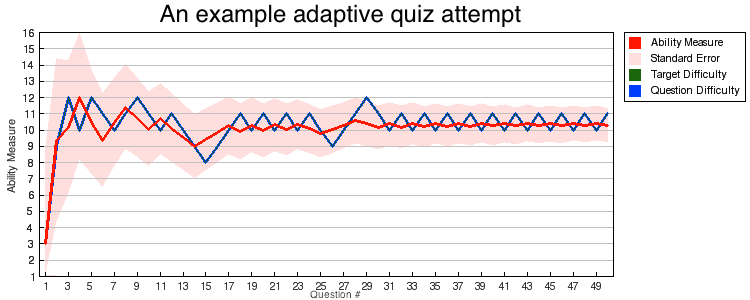
For the theory behind this adaptive testing system and how to effectively utilize it I recommend that you read John Linacre's "Computer-Adaptive Testing: A Methodology Whose Time Has Come." MESA Memorandum No. 69 (2000). This adaptive testing module implements the algorithm discussed in that paper and detailed at: "Practical Adaptive Testing CAT Algorithm" by B.D. Wright published in Rasch Measurement Transactions, 1988, 2:2 p.24. In the article above Linacre goes through the theory of adaptive testing and details how to construct item banks and interpret results.
While I am a developer of this Moodle module and can verify that it is an implementation of Wright's algorithm (to the best of our ability), I must defer to the literature on questions related to the interpretation of results, constructing and weighting of item banks, and validations of the testing system.
All that said, my own [implementation-focused] understanding of the algorithm is that a measure of 4.50 (to use your example) would indicate that the test taker is estimated to be equally likely to provide a right or wrong answer to a theoretical question at level 4.50, whether or not such a question actually exists in the item bank.
For our own use of an adaptive placement test at Middlebury, our program validated their test in two ways: (1) by having instructors take the test answering questions as if they were a student of a certain knowledge level and (2) by having a number of students well known to the instructors take the adaptive test, allowing the instructors to verify that the test reported score for these students that matched their known proficiency. The results of this validation exercise were sufficient for our program to rely on their adaptive test and its item-bank, though I do not have a report on their analysis.
Best,
Adam
How can we interpret results of users?
For instance, we have English Placement Test with levels
1 - Elementary
2 - Pre-Intermediate
3 - Intermediate
4 - Upper-Intermediate
5 - Advanced
Every level has 20 questions: adpq_1, adpq_2, adpq_3, adpq_4 and adpq_5
After taking the quiz user gets 4.50 (87.55 %)
Which level it fits?
How can we grade results?