Adaptive Quiz: CAT (Computer-Adaptive Testing) implementation for Moodle
Versions
Current version
2.5.0 (2025092702)
2.5.0
Plugin type: Activities
Frankenstyle component name: mod_adaptivequiz
Version build number: 2025092702
Version release name: 2.5.0
Maturity: Stable
Supported Moodle versions: 4.4, 4.5
Repository URL (Git): https://github.com/vtos/moodle-mod_adaptivequiz
Repository branch: https://github.com/vtos/moodle-mod_adaptivequiz/tree/MOODLE_404
Repository tag:
Issue/bug tracker URL: https://github.com/vtos/moodle-mod_adaptivequiz/issues
Release Notes
New features:
- Custom attempt feedback with Moodle's text editor! For user manual, see the plugin's wiki
- Experimental support of MSSQL. 'Experimental' means the support is covered by automated tests, but not covered by complete manual testing. However, starting from this version, the plugin will be enhancing full MSSQL support.
Bug fixes:
- visual anomalies on the 'Question Analysis' page
- support for Moodle Gradebook's core links
- Moodle's core unit test failing with the plugin installed
2.3.6 (2024041900)
2.3.6
Plugin type: Activities
Frankenstyle component name: mod_adaptivequiz
Version build number: 2024041900
Version release name: 2.3.6
Maturity: Stable
Supported Moodle versions: 4.1, 4.2, 4.3
Repository URL (Git): https://github.com/vtos/moodle-mod_adaptivequiz
Repository branch: https://github.com/vtos/moodle-mod_adaptivequiz/tree/MOODLE_401
Repository tag:
Issue/bug tracker URL: https://github.com/vtos/moodle-mod_adaptivequiz/issues
Release Notes
This plugin version ensures compatibility with all PHP versions which are supported by Moodle versions from 4.1 to 4.3.
It also resolves one bug - https://github.com/vtos/moodle-mod_adaptivequiz/issues/13.
2.3.1 (2023011500)
2.3.1
Plugin type: Activities
Frankenstyle component name: mod_adaptivequiz
Version build number: 2023011500
Version release name: 2.3.1
Maturity: Stable
Supported Moodle versions: 4.0
Repository URL (Git): https://github.com/vtos/moodle-mod_adaptivequiz
Repository branch: https://github.com/vtos/moodle-mod_adaptivequiz/tree/MOODLE_400
Repository tag:
Issue/bug tracker URL: https://github.com/vtos/moodle-mod_adaptivequiz/issues
Release Notes
New features:
- custom completion rule: an adaptive quiz can be marked for the student as complete when at least one attempt has been completed
- quiz progress feature: approximate number of questions left to answer. By default it's not activated in the settings
- minor improvements in the layout to fit the core's layouts for activity plugins
Bug fixes:
- images are now rendered in questions
- deleted users do not appear in the plugin's reports
2.3.1 (2023011400)
2.3.1
Plugin type: Activities
Frankenstyle component name: mod_adaptivequiz
Version build number: 2023011400
Version release name: 2.3.1
Maturity: Stable
Supported Moodle versions: 3.11
Repository URL (Git): https://github.com/vtos/moodle-mod_adaptivequiz
Repository branch: https://github.com/vtos/moodle-mod_adaptivequiz/tree/MOODLE_311
Repository tag:
Issue/bug tracker URL: https://github.com/vtos/moodle-mod_adaptivequiz/issues
Release Notes
New features:
- custom completion rule: an adaptive quiz can be marked for the student as complete when at least one attempt has been completed
- quiz progress feature: approximate number of questions left to answer. By default it's not activated in the settings
Bug fixes:
- images are now rendered in questions
- deleted users do not appear in the plugin's reports
This version also contains all features and bug fixes from both versions 2.2.0 and 2.2.1 released for Moodle 4 earlier.
2.3.1 (2023011300)
2.3.1
Plugin type: Activities
Frankenstyle component name: mod_adaptivequiz
Version build number: 2023011300
Version release name: 2.3.1
Maturity: Stable
Supported Moodle versions: 3.10
Repository URL (Git): https://github.com/vtos/moodle-mod_adaptivequiz
Repository branch: https://github.com/vtos/moodle-mod_adaptivequiz/tree/MOODLE_310
Repository tag:
Issue/bug tracker URL: https://github.com/vtos/moodle-mod_adaptivequiz/issues
Release Notes
New features:
- custom completion rule: an adaptive quiz can be marked for the student as complete when at least one attempt has been completed
- quiz progress feature: approximate number of questions left to answer. By default it's not activated in the settings
Bug fixes:
- images are now rendered in questions
- deleted users do not appear in the plugin's reports
This version also contains all features and bug fixes from both versions 2.2.0 and 2.2.1 released for Moodle 4 earlier.
2.3.1 (2023011200)
2.3.1
Plugin type: Activities
Frankenstyle component name: mod_adaptivequiz
Version build number: 2023011200
Version release name: 2.3.1
Maturity: Stable
Supported Moodle versions: 3.8, 3.9
Repository URL (Git): https://github.com/vtos/moodle-mod_adaptivequiz
Repository branch: https://github.com/vtos/moodle-mod_adaptivequiz/tree/MOODLE_38
Repository tag:
Issue/bug tracker URL: https://github.com/vtos/moodle-mod_adaptivequiz/issues
Release Notes
New features:
- custom completion rule: an adaptive quiz can be marked for the student as complete when at least one attempt has been completed
- quiz progress feature: approximate number of questions left to answer. By default it's not activated in the settings
Bug fixes:
- images are now rendered in questions
- deleted users do not appear in the plugin's reports
This version also contains all features and bug fixes from both versions 2.2.0 and 2.2.1 released for Moodle 4 earlier.
1.2.3 (2017011900)
1.2.3
Plugin type: Activities
Frankenstyle component name: mod_adaptivequiz
Version build number: 2017011900
Version release name: 1.2.3
Maturity: Stable
Supported Moodle versions: 2.7, 2.8, 2.9, 3.0, 3.1
Repository URL (Git): https://github.com/middlebury/moodle-mod_adaptivequiz
Repository branch:
Repository tag: 1.2.3
Issue/bug tracker URL: https://github.com/vtos/moodle-mod_adaptivequiz/issues
Moodle Adaptive Test Activity
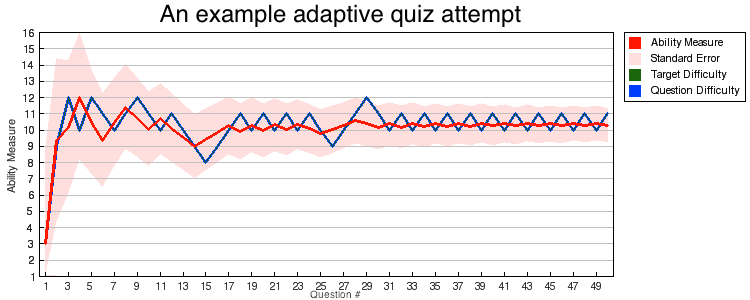
The Adaptive Test activity enables a teacher to create tests that efficiently measure
the takers' abilities. Adaptive tests are comprised of questions selected from the
question bank that are tagged with a score of their difficulty. The questions are
chosen to match the estimated ability level of the current test-taker. If the
test-taker succeeds on a question, a more challenging question is presented next. If
the test-taker answers a question incorrectly, a less-challenging question is
presented next. This technique will develop into a sequence of questions converging
on the test-taker's effective ability level. The test stops when the test-taker's
ability is determined to the required accuracy.
The Adaptive Test activity uses the "Practical Adaptive Testing CAT Algorithm" by
B.D. Wright published in Rasch Measurement Transactions, 1988, 2:2 p.24 and
discussed in John Linacre's "Computer-Adaptive Testing: A Methodology Whose Time Has
Come." MESA Memorandum No. 69 (2000).
This Moodle activity module was created as a collaborative effort between Middlebury
College and Remote Learner. The latest code, documentation, and bug-tracker
can be found at https://github.com/middlebury/moodle-mod_adaptivequiz.
The Question Bank
To begin with, questions to be used with this activity are added or imported into
Moodle's question bank. Only questions that can automatically be graded may be used.
As well, questions should not award partial credit. The questions can be placed in
one or more categories.
This activity is best suited to determining an ability measure along a unidimensional
scale. While the scale can be very broad, the questions must all provide a measure of
ability or aptitude on the same scale. In a placement test for example, questions low
on the scale that novices are able to answer correctly should also be answerable by
experts, while questions higher on the scale should only be answerable by experts or
a lucky guess. Questions that do not discriminate between takers of different
abilities on will make the test ineffective and may provide inconclusive results.
Take for example a language placement test. Low-difficulty vocabulary and
reading-comprehension questions would likely be answerable by all but the most novice
test-takers. Likewise, high-difficulty questions involving advanced gramatical
constructs and nuanced reading-comprehension would be likely only be correctly
answered by advanced, high-level test-takers. Such questions would all be good
candidates for usage in an Adaptive Test. In contrast, a question like "Is 25¥ a good
price for a sandwich?" would not measure language ability but rather local knowledge
and would be as likely to be answered correctly by a novice speaker who has recently
been to China as it would be answered incorrectly by an advanced speaker who comes
from Taiwan -- where a different currency is used. Such questions should not be
included in the question-pool.
Questions must be tagged tagged with a 'difficulty score' using the format
'adpq_n' where n is a positive integer, e.g. 'adpq_1' or 'adpq_57'. The range
of the scale is arbitrary (e.g. 1-10, 0-99, 1-1000), but should have enough levels to
distinguish between
question difficulties.
The Testing Process
The Adaptive Test activity is configured with a fixed starting level. The test will
begin by presenting the test-taker with a random question from that starting level.
As described in Linacre (2000), it often makes sense to have the starting level
be in the lower part of the difficulty range so that most test-takers get to answer
at least one of the first few questions correctly, helping their moral.
After the test-taker submits their answer, the system calculates the target question
difficulty it will select next. If the last question was answered correctly, the next
question will be harder; if the last question was answered incorrectly, the next
question will be easier. The system also calculates a measure of the test-taker's
ability and the standard error for that measure. A next random question at or near
the target difficulty is selected and presented to the user.
This process of alternating harder questions following correct answers and easier
questions following wrong answers continues until one of the stopping conditions is
met. The possible stopping conditions are as follows:
- There are no remaining easier questions to ask after a wrong answer.
- There are no remaining harder questions to ask after a correct answer.
- The standard error in the measure has become precise enough to stop.
- The maximum number of questions has been exceeded.

Test Parameters and Operation
The primary parameters for tuning the operation of the test are:
- The starting level
- The minimum number of questions
- The maximum number of questions
- The standard error to stop
Relationship between maximum number of questions and Standard Error
As discussed in Wright (1988), the formula for calculating the standard error is
given by:
Standard Error (± logits) = sqrt((R+W)/(R*W))
where R is the number of right answers and W is the number of wrong answers. This
value is on a logit scale, so we can apply the
inverse-logit function to convert it to an percentage scale:
Standard Error (± %) = ((1 / ( 1 + e^( -1 * sqrt((R+W)/(R*W)) ) ) ) - 0.5) * 100
Looking at the Standard Error function, it is important to note that it depends only
on the difference between the number of right and wrong answers and the total number
of answers, not on any other features such as which answers were right and which
answers were wrong. For a given number of questions asked, the Standard Error will be
smallest when half the answers are right and half are wrong. From this, we can deduce
the minimum standard error possible to achieve for any number of questions asked:
- 10 questions (5 right, 5 wrong) ' Minimum Standard Error = ± 15.30%
- 20 questions (10 right, 10 wrong) ' Minimum Standard Error = ± 11.00%
- 30 questions (15 right, 15 wrong) ' Minimum Standard Error = ± 9.03%
- 40 questions (20 right, 20 wrong) ' Minimum Standard Error = ± 7.84%
- 50 questions (25 right, 25 wrong) ' Minimum Standard Error = ± 7.02%
- 60 questions (30 right, 30 wrong) ' Minimum Standard Error = ± 6.42%
- 70 questions (35 right, 35 wrong) ' Minimum Standard Error = ± 5.95%
- 80 questions (40 right, 40 wrong) ' Minimum Standard Error = ± 5.57%
- 90 questions (45 right, 45 wrong) ' Minimum Standard Error = ± 5.25%
- 100 questions (50 right, 50 wrong) ' Minimum Standard Error = ± 4.98%
- 110 questions (55 right, 55 wrong) ' Minimum Standard Error = ± 4.75%
- 120 questions (60 right, 60 wrong) ' Minimum Standard Error = ± 4.55%
- 130 questions (65 right, 65 wrong) ' Minimum Standard Error = ± 4.37%
- 140 questions (70 right, 70 wrong) ' Minimum Standard Error = ± 4.22%
- 150 questions (75 right, 75 wrong) ' Minimum Standard Error = ± 4.07%
- 160 questions (80 right, 80 wrong) ' Minimum Standard Error = ± 3.94%
- 170 questions (85 right, 85 wrong) ' Minimum Standard Error = ± 3.83%
- 180 questions (90 right, 90 wrong) ' Minimum Standard Error = ± 3.72%
- 190 questions (95 right, 95 wrong) ' Minimum Standard Error = ± 3.62%
- 200 questions (100 right, 100 wrong) ' Minimum Standard Error = ± 3.53%
What this listing indicates is that for a test configured with a maximum of 50
questions and a "standard error to stop" of 7%, the maximum number of questions will
always be encountered first and stop the test. Conversely, if you are looking for a
standard error of 5% or better, the test must ask at least 100 questions.
Note that these are best-case scenarios for the number of questions asked. If a
test-taker answers a lopsided run of questions right or wrong the test will require
more questions to reach a target standard of error.
Minimum number of questions
For most purposes this value can be set to 1 since the standard of error to stop
will generally set a base-line for the number of questions required. This could be
configured to be greater than the minimum number of questions needed to achieve the
standard of error to stop if you wish to ensure that all test-takers answer
additional questions.
Starting level
As mentioned above, this usually will be set in the lower part of the difficulty
range (about 1/3 of the way up from the bottom) so that most test takers will be able
answer one of the first two questions correctly and get a moral boost from their
correct answers. If the starting level is too high, low-ability users would be asked
several questions they can't answer before the test begins asking them questions at a
level they can answer.
Scoring
As discussed in Wright (1988), the formula for calculating the ability measure is given by:
Ability Measure = H/L + ln(R/W)
where H is the sum of all question difficulties answered, L is the number of
questions answered, R is the number of right answers, and W is the number of
wrong answers.
Note that this measure is not affected by the order of answers, just the total
difficulty and number of right and wrong answers. This measure is dependent on the
test algorithm presenting alternating easier/harder questions as the user answers
wrong/right and may not be applicable to other algorithms. In practice, this means
that the ability measure should not greatly affected by a small number of spurrious
right or wrong answers.
As discussed in Linacre (2000), the ability measure of the test taker aligns
with the question-difficulty at which the test-taker has a 50% probability of
answering a question correctly.
For example, given a test with levels 1-10 and a test-taker that answered every
question 5 and below correctly and every question 6 and up wrong, the test-taker's
ability measure would fall close to 5.5.
Remember that the ability measure does have error associated with it. Be sure to take the standard error ammount into account when acting on the score.
1.2.2 (2016112900)
1.2.2
Plugin type: Activities
Frankenstyle component name: mod_adaptivequiz
Version build number: 2016112900
Version release name: 1.2.2
Maturity: Stable
Supported Moodle versions: 2.6, 2.7, 2.8, 2.9
Repository URL (Git): https://github.com/middlebury/moodle-mod_adaptivequiz
Repository branch:
Repository tag: 1.2.2
Issue/bug tracker URL: https://github.com/vtos/moodle-mod_adaptivequiz/issues
Moodle Adaptive Test Activity
The Adaptive Test activity enables a teacher to create tests that efficiently measure
the takers' abilities. Adaptive tests are comprised of questions selected from the
question bank that are tagged with a score of their difficulty. The questions are
chosen to match the estimated ability level of the current test-taker. If the
test-taker succeeds on a question, a more challenging question is presented next. If
the test-taker answers a question incorrectly, a less-challenging question is
presented next. This technique will develop into a sequence of questions converging
on the test-taker's effective ability level. The test stops when the test-taker's
ability is determined to the required accuracy.
The Adaptive Test activity uses the "Practical Adaptive Testing CAT Algorithm" by
B.D. Wright published in Rasch Measurement Transactions, 1988, 2:2 p.24 and
discussed in John Linacre's "Computer-Adaptive Testing: A Methodology Whose Time Has
Come." MESA Memorandum No. 69 (2000).
This Moodle activity module was created as a collaborative effort between Middlebury
College and Remote Learner. The latest code, documentation, and bug-tracker
can be found at https://github.com/middlebury/moodle-mod_adaptivequiz.
The Question Bank
To begin with, questions to be used with this activity are added or imported into
Moodle's question bank. Only questions that can automatically be graded may be used.
As well, questions should not award partial credit. The questions can be placed in
one or more categories.
This activity is best suited to determining an ability measure along a unidimensional
scale. While the scale can be very broad, the questions must all provide a measure of
ability or aptitude on the same scale. In a placement test for example, questions low
on the scale that novices are able to answer correctly should also be answerable by
experts, while questions higher on the scale should only be answerable by experts or
a lucky guess. Questions that do not discriminate between takers of different
abilities on will make the test ineffective and may provide inconclusive results.
Take for example a language placement test. Low-difficulty vocabulary and
reading-comprehension questions would likely be answerable by all but the most novice
test-takers. Likewise, high-difficulty questions involving advanced gramatical
constructs and nuanced reading-comprehension would be likely only be correctly
answered by advanced, high-level test-takers. Such questions would all be good
candidates for usage in an Adaptive Test. In contrast, a question like "Is 25¥ a good
price for a sandwich?" would not measure language ability but rather local knowledge
and would be as likely to be answered correctly by a novice speaker who has recently
been to China as it would be answered incorrectly by an advanced speaker who comes
from Taiwan -- where a different currency is used. Such questions should not be
included in the question-pool.
Questions must be tagged tagged with a 'difficulty score' using the format
'adpq_n' where n is a positive integer, e.g. 'adpq_1' or 'adpq_57'. The range
of the scale is arbitrary (e.g. 1-10, 0-99, 1-1000), but should have enough levels to
distinguish between
question difficulties.
The Testing Process
The Adaptive Test activity is configured with a fixed starting level. The test will
begin by presenting the test-taker with a random question from that starting level.
As described in Linacre (2000), it often makes sense to have the starting level
be in the lower part of the difficulty range so that most test-takers get to answer
at least one of the first few questions correctly, helping their moral.
After the test-taker submits their answer, the system calculates the target question
difficulty it will select next. If the last question was answered correctly, the next
question will be harder; if the last question was answered incorrectly, the next
question will be easier. The system also calculates a measure of the test-taker's
ability and the standard error for that measure. A next random question at or near
the target difficulty is selected and presented to the user.
This process of alternating harder questions following correct answers and easier
questions following wrong answers continues until one of the stopping conditions is
met. The possible stopping conditions are as follows:
- There are no remaining easier questions to ask after a wrong answer.
- There are no remaining harder questions to ask after a correct answer.
- The standard error in the measure has become precise enough to stop.
- The maximum number of questions has been exceeded.
Test Parameters and Operation
The primary parameters for tuning the operation of the test are:
- The starting level
- The minimum number of questions
- The maximum number of questions
- The standard error to stop
Relationship between maximum number of questions and Standard Error
As discussed in Wright (1988), the formula for calculating the standard error is
given by:
Standard Error (± logits) = sqrt((R+W)/(R*W))
where R is the number of right answers and W is the number of wrong answers. This
value is on a logit scale, so we can apply the
inverse-logit function to convert it to an percentage scale:
Standard Error (± %) = ((1 / ( 1 + e^( -1 * sqrt((R+W)/(R*W)) ) ) ) - 0.5) * 100
Looking at the Standard Error function, it is important to note that it depends only
on the difference between the number of right and wrong answers and the total number
of answers, not on any other features such as which answers were right and which
answers were wrong. For a given number of questions asked, the Standard Error will be
smallest when half the answers are right and half are wrong. From this, we can deduce
the minimum standard error possible to achieve for any number of questions asked:
- 10 questions (5 right, 5 wrong) ' Minimum Standard Error = ± 15.30%
- 20 questions (10 right, 10 wrong) ' Minimum Standard Error = ± 11.00%
- 30 questions (15 right, 15 wrong) ' Minimum Standard Error = ± 9.03%
- 40 questions (20 right, 20 wrong) ' Minimum Standard Error = ± 7.84%
- 50 questions (25 right, 25 wrong) ' Minimum Standard Error = ± 7.02%
- 60 questions (30 right, 30 wrong) ' Minimum Standard Error = ± 6.42%
- 70 questions (35 right, 35 wrong) ' Minimum Standard Error = ± 5.95%
- 80 questions (40 right, 40 wrong) ' Minimum Standard Error = ± 5.57%
- 90 questions (45 right, 45 wrong) ' Minimum Standard Error = ± 5.25%
- 100 questions (50 right, 50 wrong) ' Minimum Standard Error = ± 4.98%
- 110 questions (55 right, 55 wrong) ' Minimum Standard Error = ± 4.75%
- 120 questions (60 right, 60 wrong) ' Minimum Standard Error = ± 4.55%
- 130 questions (65 right, 65 wrong) ' Minimum Standard Error = ± 4.37%
- 140 questions (70 right, 70 wrong) ' Minimum Standard Error = ± 4.22%
- 150 questions (75 right, 75 wrong) ' Minimum Standard Error = ± 4.07%
- 160 questions (80 right, 80 wrong) ' Minimum Standard Error = ± 3.94%
- 170 questions (85 right, 85 wrong) ' Minimum Standard Error = ± 3.83%
- 180 questions (90 right, 90 wrong) ' Minimum Standard Error = ± 3.72%
- 190 questions (95 right, 95 wrong) ' Minimum Standard Error = ± 3.62%
- 200 questions (100 right, 100 wrong) ' Minimum Standard Error = ± 3.53%
What this listing indicates is that for a test configured with a maximum of 50
questions and a "standard error to stop" of 7%, the maximum number of questions will
always be encountered first and stop the test. Conversely, if you are looking for a
standard error of 5% or better, the test must ask at least 100 questions.
Note that these are best-case scenarios for the number of questions asked. If a
test-taker answers a lopsided run of questions right or wrong the test will require
more questions to reach a target standard of error.
Minimum number of questions
For most purposes this value can be set to 1 since the standard of error to stop
will generally set a base-line for the number of questions required. This could be
configured to be greater than the minimum number of questions needed to achieve the
standard of error to stop if you wish to ensure that all test-takers answer
additional questions.
Starting level
As mentioned above, this usually will be set in the lower part of the difficulty
range (about 1/3 of the way up from the bottom) so that most test takers will be able
answer one of the first two questions correctly and get a moral boost from their
correct answers. If the starting level is too high, low-ability users would be asked
several questions they can't answer before the test begins asking them questions at a
level they can answer.
Scoring
As discussed in Wright (1988), the formula for calculating the ability measure is given by:
Ability Measure = H/L + ln(R/W)
where H is the sum of all question difficulties answered, L is the number of
questions answered, R is the number of right answers, and W is the number of
wrong answers.
Note that this measure is not affected by the order of answers, just the total
difficulty and number of right and wrong answers. This measure is dependent on the
test algorithm presenting alternating easier/harder questions as the user answers
wrong/right and may not be applicable to other algorithms. In practice, this means
that the ability measure should not greatly affected by a small number of spurrious
right or wrong answers.
As discussed in Linacre (2000), the ability measure of the test taker aligns
with the question-difficulty at which the test-taker has a 50% probability of
answering a question correctly.
For example, given a test with levels 1-10 and a test-taker that answered every
question 5 and below correctly and every question 6 and up wrong, the test-taker's
ability measure would fall close to 5.5.
Remember that the ability measure does have error associated with it. Be sure to take the standard error ammount into account when acting on the score.
1.2.1 (2015060900)
1.2.1
Plugin type: Activities
Frankenstyle component name: mod_adaptivequiz
Version build number: 2015060900
Version release name: 1.2.1
Maturity: Stable
Supported Moodle versions: 2.6, 2.7, 2.8, 2.9
Repository URL (Git): https://github.com/middlebury/moodle-mod_adaptivequiz
Repository branch:
Repository tag: 1.2.1
Issue/bug tracker URL: https://github.com/vtos/moodle-mod_adaptivequiz/issues
Moodle Adaptive Test Activity
The Adaptive Test activity enables a teacher to create tests that efficiently measure
the takers' abilities. Adaptive tests are comprised of questions selected from the
question bank that are tagged with a score of their difficulty. The questions are
chosen to match the estimated ability level of the current test-taker. If the
test-taker succeeds on a question, a more challenging question is presented next. If
the test-taker answers a question incorrectly, a less-challenging question is
presented next. This technique will develop into a sequence of questions converging
on the test-taker's effective ability level. The test stops when the test-taker's
ability is determined to the required accuracy.
The Adaptive Test activity uses the "Practical Adaptive Testing CAT Algorithm" by
B.D. Wright published in Rasch Measurement Transactions, 1988, 2:2 p.24 and
discussed in John Linacre's "Computer-Adaptive Testing: A Methodology Whose Time Has
Come." MESA Memorandum No. 69 (2000).
This Moodle activity module was created as a collaborative effort between Middlebury
College and Remote Learner. The latest code, documentation, and bug-tracker
can be found at https://github.com/middlebury/moodle-mod_adaptivequiz.
The Question Bank
To begin with, questions to be used with this activity are added or imported into
Moodle's question bank. Only questions that can automatically be graded may be used.
As well, questions should not award partial credit. The questions can be placed in
one or more categories.
This activity is best suited to determining an ability measure along a unidimensional
scale. While the scale can be very broad, the questions must all provide a measure of
ability or aptitude on the same scale. In a placement test for example, questions low
on the scale that novices are able to answer correctly should also be answerable by
experts, while questions higher on the scale should only be answerable by experts or
a lucky guess. Questions that do not discriminate between takers of different
abilities on will make the test ineffective and may provide inconclusive results.
Take for example a language placement test. Low-difficulty vocabulary and
reading-comprehension questions would likely be answerable by all but the most novice
test-takers. Likewise, high-difficulty questions involving advanced gramatical
constructs and nuanced reading-comprehension would be likely only be correctly
answered by advanced, high-level test-takers. Such questions would all be good
candidates for usage in an Adaptive Test. In contrast, a question like "Is 25¥ a good
price for a sandwich?" would not measure language ability but rather local knowledge
and would be as likely to be answered correctly by a novice speaker who has recently
been to China as it would be answered incorrectly by an advanced speaker who comes
from Taiwan -- where a different currency is used. Such questions should not be
included in the question-pool.
Questions must be tagged tagged with a 'difficulty score' using the format
'adpq_n' where n is a positive integer, e.g. 'adpq_1' or 'adpq_57'. The range
of the scale is arbitrary (e.g. 1-10, 0-99, 1-1000), but should have enough levels to
distinguish between
question difficulties.
The Testing Process
The Adaptive Test activity is configured with a fixed starting level. The test will
begin by presenting the test-taker with a random question from that starting level.
As described in Linacre (2000), it often makes sense to have the starting level
be in the lower part of the difficulty range so that most test-takers get to answer
at least one of the first few questions correctly, helping their moral.
After the test-taker submits their answer, the system calculates the target question
difficulty it will select next. If the last question was answered correctly, the next
question will be harder; if the last question was answered incorrectly, the next
question will be easier. The system also calculates a measure of the test-taker's
ability and the standard error for that measure. A next random question at or near
the target difficulty is selected and presented to the user.
This process of alternating harder questions following correct answers and easier
questions following wrong answers continues until one of the stopping conditions is
met. The possible stopping conditions are as follows:
- There are no remaining easier questions to ask after a wrong answer.
- There are no remaining harder questions to ask after a correct answer.
- The standard error in the measure has become precise enough to stop.
- The maximum number of questions has been exceeded.
Test Parameters and Operation
The primary parameters for tuning the operation of the test are:
- The starting level
- The minimum number of questions
- The maximum number of questions
- The standard error to stop
Relationship between maximum number of questions and Standard Error
As discussed in Wright (1988), the formula for calculating the standard error is
given by:
Standard Error (± logits) = sqrt((R+W)/(R*W))
where R is the number of right answers and W is the number of wrong answers. This
value is on a logit scale, so we can apply the
inverse-logit function to convert it to an percentage scale:
Standard Error (± %) = ((1 / ( 1 + e^( -1 * sqrt((R+W)/(R*W)) ) ) ) - 0.5) * 100
Looking at the Standard Error function, it is important to note that it depends only
on the difference between the number of right and wrong answers and the total number
of answers, not on any other features such as which answers were right and which
answers were wrong. For a given number of questions asked, the Standard Error will be
smallest when half the answers are right and half are wrong. From this, we can deduce
the minimum standard error possible to achieve for any number of questions asked:
- 10 questions (5 right, 5 wrong) ' Minimum Standard Error = ± 15.30%
- 20 questions (10 right, 10 wrong) ' Minimum Standard Error = ± 11.00%
- 30 questions (15 right, 15 wrong) ' Minimum Standard Error = ± 9.03%
- 40 questions (20 right, 20 wrong) ' Minimum Standard Error = ± 7.84%
- 50 questions (25 right, 25 wrong) ' Minimum Standard Error = ± 7.02%
- 60 questions (30 right, 30 wrong) ' Minimum Standard Error = ± 6.42%
- 70 questions (35 right, 35 wrong) ' Minimum Standard Error = ± 5.95%
- 80 questions (40 right, 40 wrong) ' Minimum Standard Error = ± 5.57%
- 90 questions (45 right, 45 wrong) ' Minimum Standard Error = ± 5.25%
- 100 questions (50 right, 50 wrong) ' Minimum Standard Error = ± 4.98%
- 110 questions (55 right, 55 wrong) ' Minimum Standard Error = ± 4.75%
- 120 questions (60 right, 60 wrong) ' Minimum Standard Error = ± 4.55%
- 130 questions (65 right, 65 wrong) ' Minimum Standard Error = ± 4.37%
- 140 questions (70 right, 70 wrong) ' Minimum Standard Error = ± 4.22%
- 150 questions (75 right, 75 wrong) ' Minimum Standard Error = ± 4.07%
- 160 questions (80 right, 80 wrong) ' Minimum Standard Error = ± 3.94%
- 170 questions (85 right, 85 wrong) ' Minimum Standard Error = ± 3.83%
- 180 questions (90 right, 90 wrong) ' Minimum Standard Error = ± 3.72%
- 190 questions (95 right, 95 wrong) ' Minimum Standard Error = ± 3.62%
- 200 questions (100 right, 100 wrong) ' Minimum Standard Error = ± 3.53%
What this listing indicates is that for a test configured with a maximum of 50
questions and a "standard error to stop" of 7%, the maximum number of questions will
always be encountered first and stop the test. Conversely, if you are looking for a
standard error of 5% or better, the test must ask at least 100 questions.
Note that these are best-case scenarios for the number of questions asked. If a
test-taker answers a lopsided run of questions right or wrong the test will require
more questions to reach a target standard of error.
Minimum number of questions
For most purposes this value can be set to 1 since the standard of error to stop
will generally set a base-line for the number of questions required. This could be
configured to be greater than the minimum number of questions needed to achieve the
standard of error to stop if you wish to ensure that all test-takers answer
additional questions.
Starting level
As mentioned above, this usually will be set in the lower part of the difficulty
range (about 1/3 of the way up from the bottom) so that most test takers will be able
answer one of the first two questions correctly and get a moral boost from their
correct answers. If the starting level is too high, low-ability users would be asked
several questions they can't answer before the test begins asking them questions at a
level they can answer.
Scoring
As discussed in Wright (1988), the formula for calculating the ability measure is given by:
Ability Measure = H/L + ln(R/W)
where H is the sum of all question difficulties answered, L is the number of
questions answered, R is the number of right answers, and W is the number of
wrong answers.
Note that this measure is not affected by the order of answers, just the total
difficulty and number of right and wrong answers. This measure is dependent on the
test algorithm presenting alternating easier/harder questions as the user answers
wrong/right and may not be applicable to other algorithms. In practice, this means
that the ability measure should not greatly affected by a small number of spurrious
right or wrong answers.
As discussed in Linacre (2000), the ability measure of the test taker aligns
with the question-difficulty at which the test-taker has a 50% probability of
answering a question correctly.
For example, given a test with levels 1-10 and a test-taker that answered every
question 5 and below correctly and every question 6 and up wrong, the test-taker's
ability measure would fall close to 5.5.
Remember that the ability measure does have error associated with it. Be sure to take the standard error ammount into account when acting on the score.