
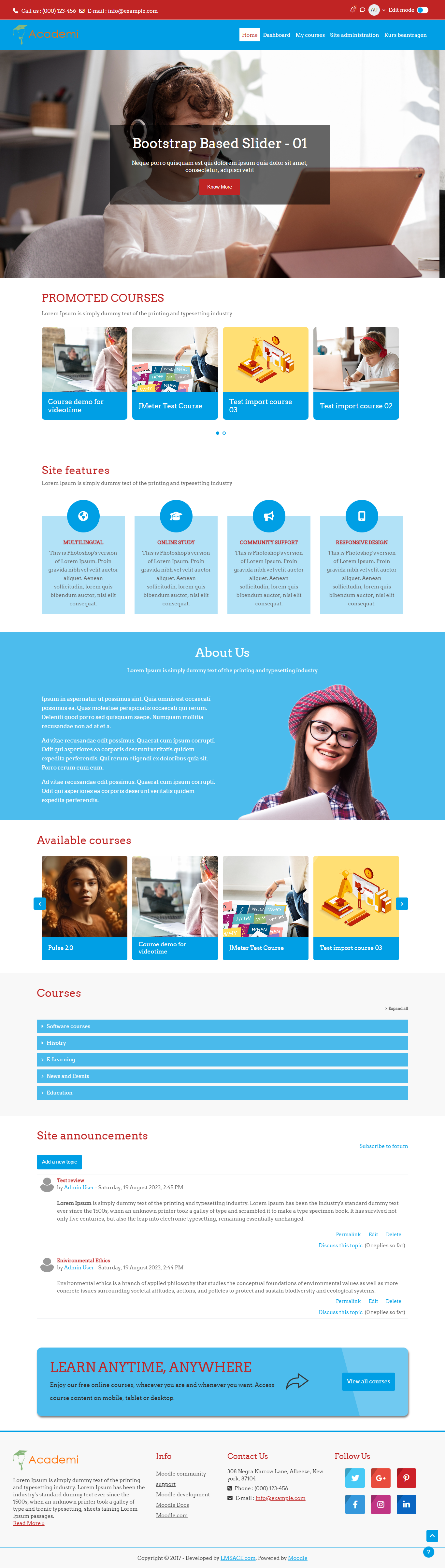
Academi

Versions
Current version
v5.2 (2026042900)
v5.2
Plugin type: Themes
Frankenstyle component name: theme_academi
Version build number: 2026042900
Version release name: v5.2
Maturity: Stable
Supported Moodle versions: 5.2
Repository URL (Git): https://github.com/lmsace/academi/
Repository branch: v5.2
Repository tag: v5.2.0
Issue/bug tracker URL: https://github.com/lmsace/academi/issues
Academi V5.2 source files
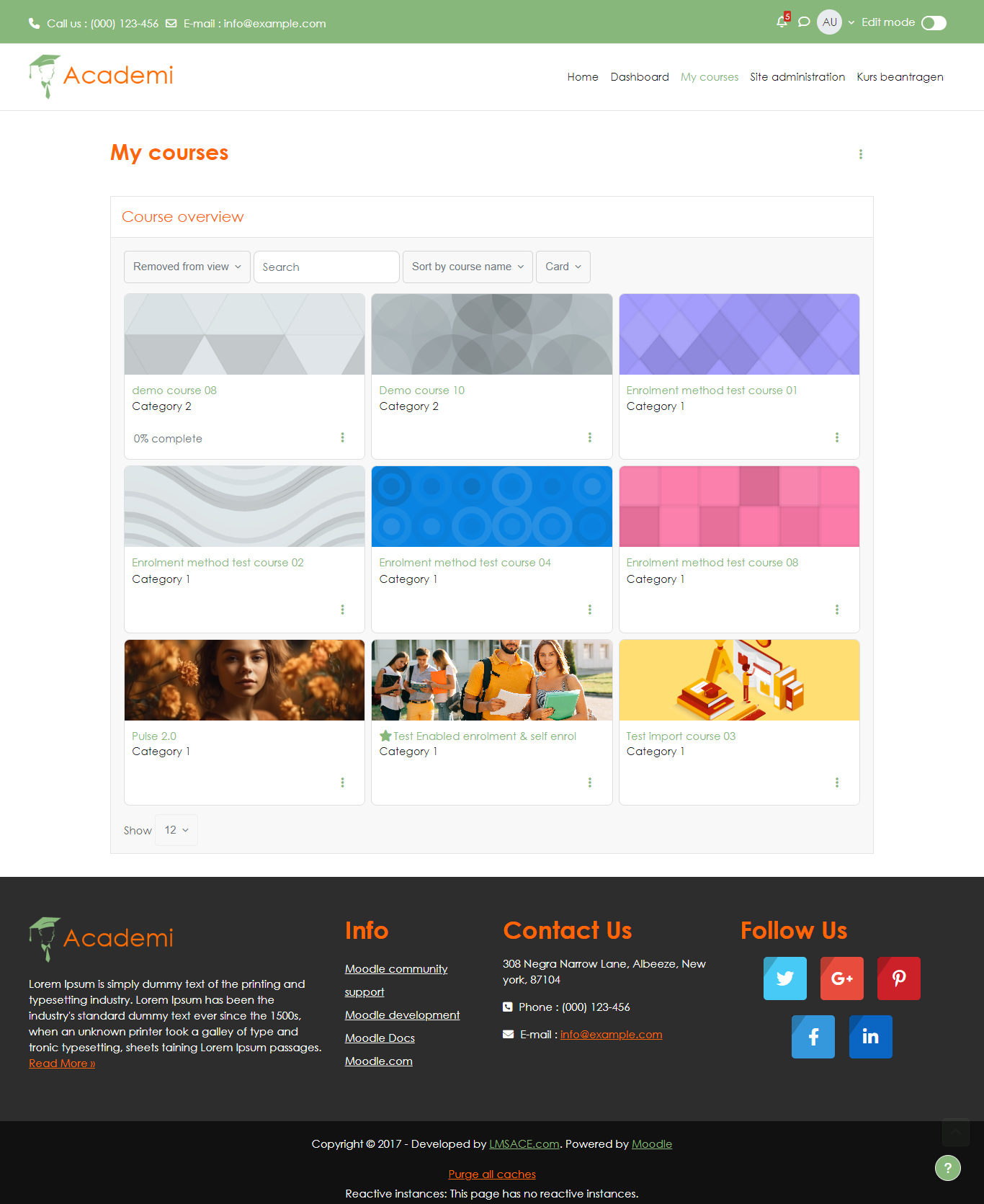
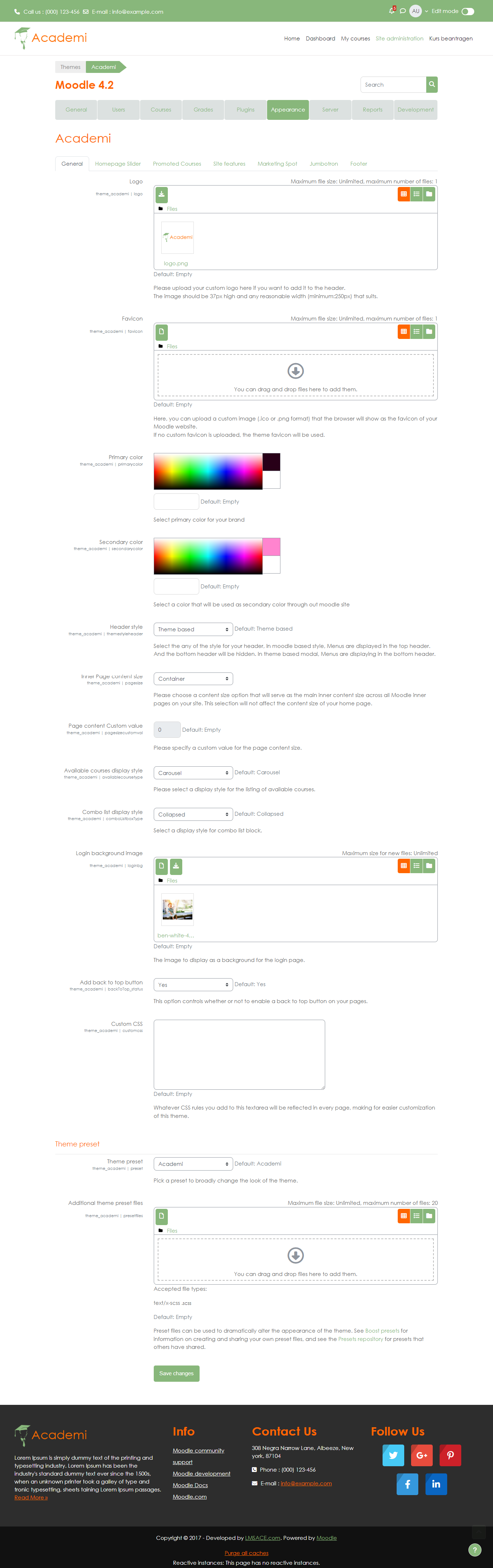
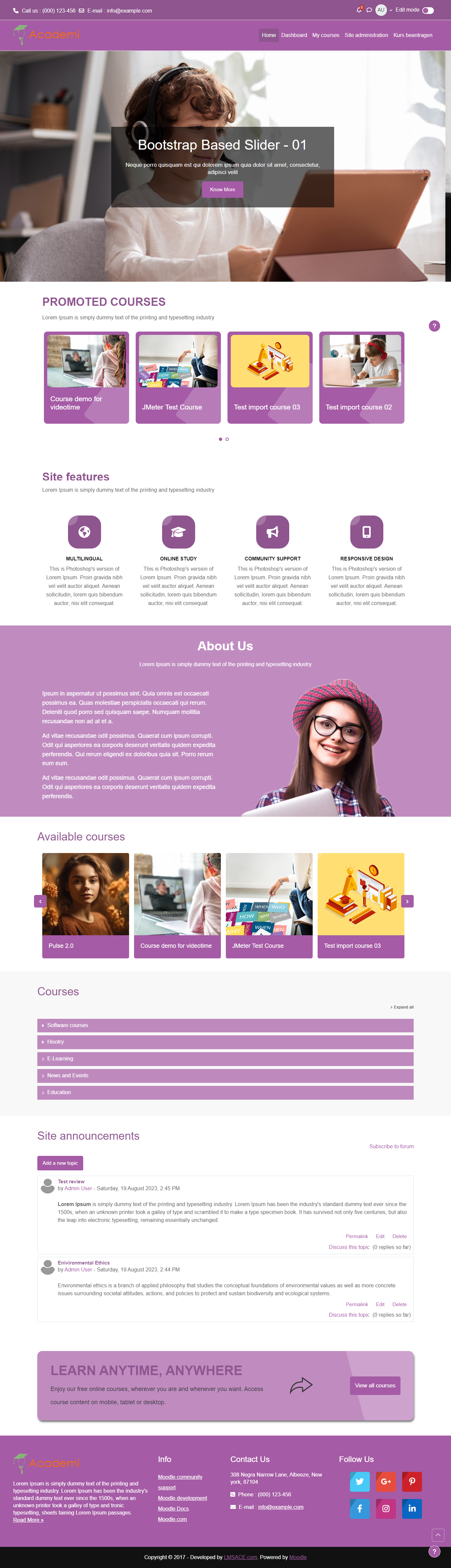
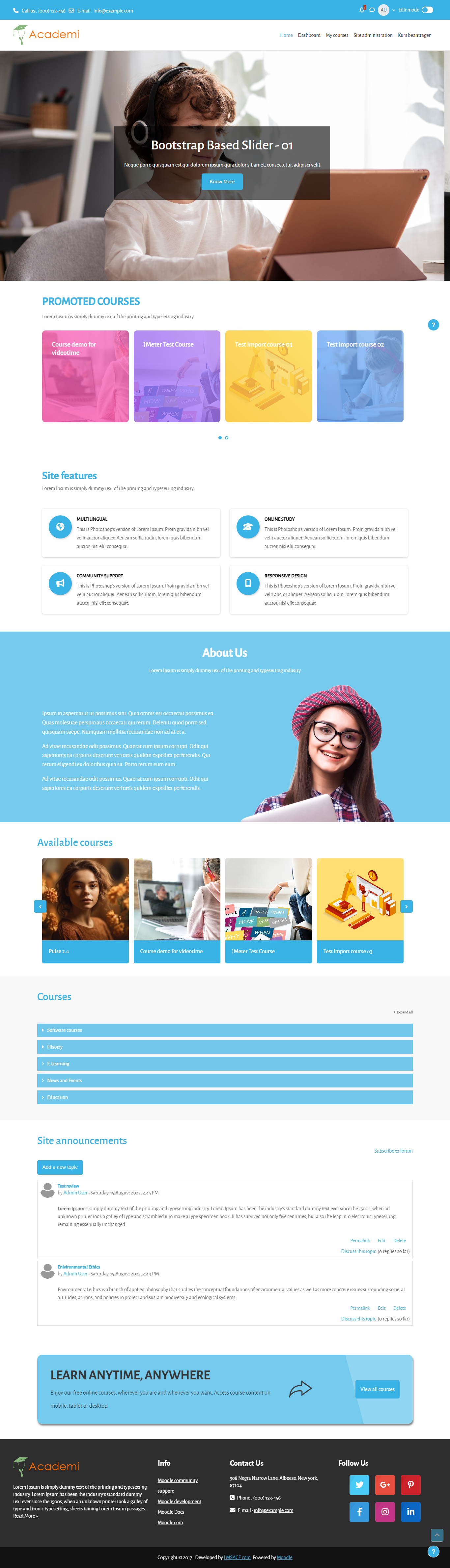
Academi - a responsive Moodle theme developed by LMSACE
About Academi Moodle theme
Academi is a professional responsive Moodle theme. It will make your online Moodle portal stand out from the crowd!
- Theme Demo URL : Moodle Academi Theme
- Theme Version : 5.2
- Relesed on : 29 April 2026
- Authors : LMSACE Dev Team
- Copyright © 2015 onwards www.lmsace.com
Supported moodle versions
Compatible with Moodle 5.2
Supported browsers
IE9+
Recent versions of all modern browsers
Academi theme - Installation steps
- Please unzip the downloaded theme zip file, you will get a folder 'academi'
- Copy folder 'academi' and put it into the theme folder of your Moodle system
- Next login as Site administrator
- Go to 'Site administration' -> 'Notifications', here on the 'Plugins check' page, you will see the academi theme in the listing.
- Click the "Upgrade Moodle database now" button displayed at the bottom of the page
- You will get a success message once the theme is installed successfully.
- By clicking the "Continue" button on the success page, you will get options to change the academi theme settings.
- You can modify the settings later too :-)
Steps to set academi theme as default theme for your Moodle system
- Login as site administrator
- Go to Site administration -> Appearance -> Themes -> Theme selector
- Click the "Change theme" button for device type as "Default"
- It will list all the available themes for "Default device"
- Then click the "Use theme" button on "Academi theme"
- Next, click the "Continue" button, that's it.
- Cheers, you have done it !!!
- If you need any support related to this theme, kindly send a mail to info@lmsace.com
v5.1 (2025121800)
v5.1
Plugin type: Themes
Frankenstyle component name: theme_academi
Version build number: 2025121800
Version release name: v5.1
Maturity: Stable
Supported Moodle versions: 5.0, 5.1
Repository URL (Git): https://github.com/lmsace/academi/
Repository branch:
Repository tag:
Issue/bug tracker URL: https://github.com/lmsace/academi/issues
Academi V5.1 source files
Academi - a responsive Moodle theme developed by LMSACE
About Academi Moodle theme
Academi is a professional responsive Moodle theme. It will make your online Moodle portal stand out from the crowd!
- Theme Demo URL : Moodle Academi Theme
- Theme Version : 5.1
- Relesed on : 18 December 2025
- Authors : LMSACE Dev Team
- Copyright © 2015 onwards www.lmsace.com
Supported moodle versions
Compatible with Moodle 5.0
Supported browsers
IE9+
Recent versions of all modern browsers
Academi theme - Installation steps
- Please unzip the downloaded theme zip file, you will get a folder 'academi'
- Copy folder 'academi' and put it into the theme folder of your Moodle system
- Next login as Site administrator
- Go to 'Site administration' -> 'Notifications', here on the 'Plugins check' page, you will see the academi theme in the listing.
- Click the "Upgrade Moodle database now" button displayed at the bottom of the page
- You will get a success message once the theme is installed successfully.
- By clicking the "Continue" button on the success page, you will get options to change the academi theme settings.
- You can modify the settings later too :-)
Steps to set academi theme as default theme for your Moodle system
- Login as site administrator
- Go to Site administration -> Appearance -> Themes -> Theme selector
- Click the "Change theme" button for device type as "Default"
- It will list all the available themes for "Default device"
- Then click the "Use theme" button on "Academi theme"
- Next, click the "Continue" button, that's it.
- Cheers, you have done it !!!
- If you need any support related to this theme, kindly send a mail to info@lmsace.com
v5.0.1 (2025050301)
v5.0.1
Plugin type: Themes
Frankenstyle component name: theme_academi
Version build number: 2025050301
Version release name: v5.0.1
Maturity: Stable
Supported Moodle versions: 5.0
Repository URL (Git): https://github.com/lmsace/academi/
Repository branch:
Repository tag:
Issue/bug tracker URL: https://github.com/lmsace/academi/issues
Academi V5.0 source files
Academi - a responsive Moodle theme developed by LMSACE
About Academi Moodle theme
Academi is a professional responsive Moodle theme. It will make your online Moodle portal stand out from the crowd!
- Theme Demo URL : Moodle Academi Theme
- Theme Version : 5.0.1
- Relesed on : 03 May 2025
- Authors : LMSACE Dev Team
- Copyright © 2015 onwards www.lmsace.com
Supported moodle versions
Compatible with Moodle 5.0
Supported browsers
IE9+
Recent versions of all modern browsers
Academi theme - Installation steps
- Please unzip the downloaded theme zip file, you will get a folder 'academi'
- Copy folder 'academi' and put it into the theme folder of your Moodle system
- Next login as Site administrator
- Go to 'Site administration' -> 'Notifications', here on the 'Plugins check' page, you will see the academi theme in the listing.
- Click the "Upgrade Moodle database now" button displayed at the bottom of the page
- You will get a success message once the theme is installed successfully.
- By clicking the "Continue" button on the success page, you will get options to change the academi theme settings.
- You can modify the settings later too :-)
Steps to set academi theme as default theme for your Moodle system
- Login as site administrator
- Go to Site administration -> Appearance -> Themes
- It will list all the available themes
- Then click the "Select theme" button on "Academi theme"
- Cheers, you have done it !!!
- If you need any support related to this theme, kindly send a mail to info@lmsace.com
v4.5.1 (2025050300)
v4.5.1
Plugin type: Themes
Frankenstyle component name: theme_academi
Version build number: 2025050300
Version release name: v4.5.1
Maturity: Stable
Supported Moodle versions: 4.5
Repository URL (Git): https://github.com/lmsace/academi/
Repository branch:
Repository tag:
Issue/bug tracker URL: https://github.com/lmsace/academi/issues
Academi V4.0 source files
Academi - a responsive moodle theme developed by LMSACE
About Academi Moodle theme
Academi is a professional responsive Moodle theme. It will make your online moodle portal stand out from the crowd!
- Theme Demo URL : Moodle Academi Theme
- Theme Version : 4.5
- Relesed on : 03 May 2025
- Authors : LMSACE Dev Team
- Copyright © 2015 onwards www.lmsace.com
Supported moodle versions
Compatible with Moodle 4.0
Supported browsers
IE9+
Recent versions of all modern browsers
Academi theme - Installation steps
- Please unzip the downloaded theme zip file, you will get folder 'academi'
- Copy folder 'academi' and put into theme folder of your moodle system
- Next login as Site administrator
- Go to 'Site administration' -> 'Notifications' , here on 'Plugins check' page you will see the academi theme in listing.
- Click the "Upgrade Moodle database now" button displayed on bottom of the page
- You will get success message once the theme installed successfully.
- By clicking "Continue" button on success page , you will get options to change the academi theme settings.
- You can modify the settings later too :-)
Steps to set academi theme as default theme for your moodle system
- Login as site administrator
- Go to Site administration -> Appearance -> Themes
- It will list all the available themes
- Then click "Select theme" button on "Academi theme"
- Cheers, you have done it !!!
- If you need any support related to this theme , kindly send a mail to info@lmsace.com
v5.0 (2025042900)
v5.0
Plugin type: Themes
Frankenstyle component name: theme_academi
Version build number: 2025042900
Version release name: v5.0
Maturity: Stable
Supported Moodle versions: 5.0
Repository URL (Git): https://github.com/lmsace/academi/
Repository branch:
Repository tag:
Issue/bug tracker URL: https://github.com/lmsace/academi/issues
Academi V5.0 source files
Academi - a responsive Moodle theme developed by LMSACE
About Academi Moodle theme
Academi is a professional responsive Moodle theme. It will make your online Moodle portal stand out from the crowd!
- Theme Demo URL : Moodle Academi Theme
- Theme Version : 5.0
- Relesed on : 29 April 2025
- Authors : LMSACE Dev Team
- Copyright © 2015 onwards www.lmsace.com
Supported moodle versions
Compatible with Moodle 5.0
Supported browsers
IE9+
Recent versions of all modern browsers
Academi theme - Installation steps
- Please unzip the downloaded theme zip file, you will get a folder 'academi'
- Copy folder 'academi' and put it into the theme folder of your Moodle system
- Next login as Site administrator
- Go to 'Site administration' -> 'Notifications', here on 'the Plugins check' page, you will see the academi theme in the listing.
- Click the "Upgrade Moodle database now" button displayed at the bottom of the page
- You will get a success message once the theme is installed successfully.
- By clicking the "Continue" button on the success page, you will get options to change the academi theme settings.
- You can modify the settings later too :-)
Steps to set academi theme as default theme for your Moodle system
- Login as site administrator
- Go to Site administration -> Appearance -> Themes
- It will list all the available themes
- Then click the "Select theme" button on "Academi theme"
- Cheers, you have done it !!!
- If you need any support related to this theme, kindly send a mail to info@lmsace.com
v4.5 (2025042200)
v4.5
Plugin type: Themes
Frankenstyle component name: theme_academi
Version build number: 2025042200
Version release name: v4.5
Maturity: Stable
Supported Moodle versions: 4.5
Repository URL (Git): https://github.com/lmsace/academi/
Repository branch:
Repository tag:
Issue/bug tracker URL: https://github.com/lmsace/academi/issues
Academi V4.0 source files
Academi - a responsive moodle theme developed by LMSACE
About Academi Moodle theme
Academi is a professional responsive Moodle theme. It will make your online moodle portal stand out from the crowd!
- Theme Demo URL : Moodle Academi Theme
- Theme Version : 4.5
- Relesed on : 22 April 2025
- Authors : LMSACE Dev Team
- Copyright © 2015 onwards www.lmsace.com
Supported moodle versions
Compatible with Moodle 4.0
Supported browsers
IE9+
Recent versions of all modern browsers
Academi theme - Installation steps
- Please unzip the downloaded theme zip file, you will get folder 'academi'
- Copy folder 'academi' and put into theme folder of your moodle system
- Next login as Site administrator
- Go to 'Site administration' -> 'Notifications' , here on 'Plugins check' page you will see the academi theme in listing.
- Click the "Upgrade Moodle database now" button displayed on bottom of the page
- You will get success message once the theme installed successfully.
- By clicking "Continue" button on success page , you will get options to change the academi theme settings.
- You can modify the settings later too :-)
Steps to set academi theme as default theme for your moodle system
- Login as site administrator
- Go to Site administration -> Appearance -> Themes -> Theme selector
- Click the "Change theme" button for device type as "Default"
- It will list all the available themes for "Default device"
- Then click "Use theme" button on "Academi theme"
- Next click the "Continue" button ,thats it.
- Cheers, you have done it !!!
- If you need any support related to this theme , kindly send a mail to info@lmsace.com
v4.5 (2025010400)
v4.5
Plugin type: Themes
Frankenstyle component name: theme_academi
Version build number: 2025010400
Version release name: v4.5
Maturity: Stable
Supported Moodle versions: 4.5
Repository URL (Git): https://github.com/lmsace/academi/
Repository branch:
Repository tag:
Issue/bug tracker URL: https://github.com/lmsace/academi/issues
Academi V4.0 source files
Academi - a responsive moodle theme developed by LMSACE
About Academi Moodle theme
Academi is a professional responsive Moodle theme. It will make your online moodle portal stand out from the crowd!
- Theme Demo URL : Moodle Academi Theme
- Theme Version : 4.5
- Relesed on : 4 Jan 2025
- Authors : LMSACE Dev Team
- Copyright © 2015 onwards www.lmsace.com
Supported moodle versions
Compatible with Moodle 4.0
Supported browsers
IE9+
Recent versions of all modern browsers
Academi theme - Installation steps
- Please unzip the downloaded theme zip file, you will get folder 'academi'
- Copy folder 'academi' and put into theme folder of your moodle system
- Next login as Site administrator
- Go to 'Site administration' -> 'Notifications' , here on 'Plugins check' page you will see the academi theme in listing.
- Click the "Upgrade Moodle database now" button displayed on bottom of the page
- You will get success message once the theme installed successfully.
- By clicking "Continue" button on success page , you will get options to change the academi theme settings.
- You can modify the settings later too :-)
Steps to set academi theme as default theme for your moodle system
- Login as site administrator
- Go to Site administration -> Appearance -> Themes -> Theme selector
- Click the "Change theme" button for device type as "Default"
- It will list all the available themes for "Default device"
- Then click "Use theme" button on "Academi theme"
- Next click the "Continue" button ,thats it.
- Cheers, you have done it !!!
- If you need any support related to this theme , kindly send a mail to info@lmsace.com
v4.4.2 (2024060503)
v4.4.2
Plugin type: Themes
Frankenstyle component name: theme_academi
Version build number: 2024060503
Version release name: v4.4.2
Maturity: Stable
Supported Moodle versions: 4.4
Repository URL (Git): https://github.com/lmsace/academi/
Repository branch:
Repository tag:
Issue/bug tracker URL: https://github.com/lmsace/academi/issues
Academi V4.0 source files
Academi - a responsive moodle theme developed by LMSACE
About Academi Moodle theme
Academi is a professional responsive Moodle theme. It will make your online moodle portal stand out from the crowd!
- Theme Demo URL : Moodle Academi Theme
- Theme Version : 4.4.2
- Relesed on : 5 Jun 2024
- Authors : LMSACE Dev Team
- Copyright © 2015 onwards www.lmsace.com
Supported moodle versions
Compatible with Moodle 4.0
Supported browsers
IE9+
Recent versions of all modern browsers
Academi theme - Installation steps
- Please unzip the downloaded theme zip file, you will get folder 'academi'
- Copy folder 'academi' and put into theme folder of your moodle system
- Next login as Site administrator
- Go to 'Site administration' -> 'Notifications' , here on 'Plugins check' page you will see the academi theme in listing.
- Click the "Upgrade Moodle database now" button displayed on bottom of the page
- You will get success message once the theme installed successfully.
- By clicking "Continue" button on success page , you will get options to change the academi theme settings.
- You can modify the settings later too :-)
Steps to set academi theme as default theme for your moodle system
- Login as site administrator
- Go to Site administration -> Appearance -> Themes -> Theme selector
- Click the "Change theme" button for device type as "Default"
- It will list all the available themes for "Default device"
- Then click "Use theme" button on "Academi theme"
- Next click the "Continue" button ,thats it.
- Cheers, you have done it !!!
- If you need any support related to this theme , kindly send a mail to info@lmsace.com
v4.4.1 (2024060502)
v4.4.1
Plugin type: Themes
Frankenstyle component name: theme_academi
Version build number: 2024060502
Version release name: v4.4.1
Maturity: Stable
Supported Moodle versions: 4.4
Repository URL (Git): https://github.com/lmsace/academi/
Repository branch:
Repository tag:
Issue/bug tracker URL: https://github.com/lmsace/academi/issues
Academi V4.0 source files
Academi - a responsive moodle theme developed by LMSACE
About Academi Moodle theme
Academi is a professional responsive Moodle theme. It will make your online moodle portal stand out from the crowd!
- Theme Demo URL : Moodle Academi Theme
- Theme Version : 4.4.1
- Relesed on : 5 Jun 2024
- Authors : LMSACE Dev Team
- Copyright © 2015 onwards www.lmsace.com
Supported moodle versions
Compatible with Moodle 4.0
Supported browsers
IE9+
Recent versions of all modern browsers
Academi theme - Installation steps
- Please unzip the downloaded theme zip file, you will get folder 'academi'
- Copy folder 'academi' and put into theme folder of your moodle system
- Next login as Site administrator
- Go to 'Site administration' -> 'Notifications' , here on 'Plugins check' page you will see the academi theme in listing.
- Click the "Upgrade Moodle database now" button displayed on bottom of the page
- You will get success message once the theme installed successfully.
- By clicking "Continue" button on success page , you will get options to change the academi theme settings.
- You can modify the settings later too :-)
Steps to set academi theme as default theme for your moodle system
- Login as site administrator
- Go to Site administration -> Appearance -> Themes -> Theme selector
- Click the "Change theme" button for device type as "Default"
- It will list all the available themes for "Default device"
- Then click "Use theme" button on "Academi theme"
- Next click the "Continue" button ,thats it.
- Cheers, you have done it !!!
- If you need any support related to this theme , kindly send a mail to info@lmsace.com
v4.4 (2024060500)
v4.4
Plugin type: Themes
Frankenstyle component name: theme_academi
Version build number: 2024060500
Version release name: v4.4
Maturity: Stable
Supported Moodle versions: 4.4
Repository URL (Git): https://github.com/lmsace/academi/
Repository branch:
Repository tag:
Issue/bug tracker URL: https://github.com/lmsace/academi/issues
Academi V4.0 source files
Academi - a responsive moodle theme developed by LMSACE
About Academi Moodle theme
Academi is a professional responsive Moodle theme. It will make your online moodle portal stand out from the crowd!
- Theme Demo URL : Moodle Academi Theme
- Theme Version : 4.4
- Relesed on : 5 Jun 2024
- Authors : LMSACE Dev Team
- Copyright © 2015 onwards www.lmsace.com
Supported moodle versions
Compatible with Moodle 4.0
Supported browsers
IE9+
Recent versions of all modern browsers
Academi theme - Installation steps
- Please unzip the downloaded theme zip file, you will get folder 'academi'
- Copy folder 'academi' and put into theme folder of your moodle system
- Next login as Site administrator
- Go to 'Site administration' -> 'Notifications' , here on 'Plugins check' page you will see the academi theme in listing.
- Click the "Upgrade Moodle database now" button displayed on bottom of the page
- You will get success message once the theme installed successfully.
- By clicking "Continue" button on success page , you will get options to change the academi theme settings.
- You can modify the settings later too :-)
Steps to set academi theme as default theme for your moodle system
- Login as site administrator
- Go to Site administration -> Appearance -> Themes -> Theme selector
- Click the "Change theme" button for device type as "Default"
- It will list all the available themes for "Default device"
- Then click "Use theme" button on "Academi theme"
- Next click the "Continue" button ,thats it.
- Cheers, you have done it !!!
- If you need any support related to this theme , kindly send a mail to info@lmsace.com
v4.3.3 (2024041700)
v4.3.3
Plugin type: Themes
Frankenstyle component name: theme_academi
Version build number: 2024041700
Version release name: v4.3.3
Maturity: Stable
Supported Moodle versions: 4.0, 4.1, 4.2, 4.3
Repository URL (Git): https://github.com/lmsace/academi/
Repository branch:
Repository tag:
Issue/bug tracker URL: https://github.com/lmsace/academi/issues
Academi V4.0 source files
Academi - a responsive moodle theme developed by LMSACE
About Academi Moodle theme
Academi is a professional responsive Moodle theme. It will make your online moodle portal stand out from the crowd!
- Theme Demo URL : Moodle Academi Theme
- Theme Version : 4.3.3
- Relesed on : 17 April 2024
- Authors : LMSACE Dev Team
- Copyright © 2015 onwards www.lmsace.com
Supported moodle versions
Compatible with Moodle 4.0
Supported browsers
IE9+
Recent versions of all modern browsers
Academi theme - Installation steps
- Please unzip the downloaded theme zip file, you will get folder 'academi'
- Copy folder 'academi' and put into theme folder of your moodle system
- Next login as Site administrator
- Go to 'Site administration' -> 'Notifications' , here on 'Plugins check' page you will see the academi theme in listing.
- Click the "Upgrade Moodle database now" button displayed on bottom of the page
- You will get success message once the theme installed successfully.
- By clicking "Continue" button on success page , you will get options to change the academi theme settings.
- You can modify the settings later too :-)
Steps to set academi theme as default theme for your moodle system
- Login as site administrator
- Go to Site administration -> Appearance -> Themes -> Theme selector
- Click the "Change theme" button for device type as "Default"
- It will list all the available themes for "Default device"
- Then click "Use theme" button on "Academi theme"
- Next click the "Continue" button ,thats it.
- Cheers, you have done it !!!
- If you need any support related to this theme , kindly send a mail to info@lmsace.com
v4.3.2 (2024010201)
v4.3.2
Plugin type: Themes
Frankenstyle component name: theme_academi
Version build number: 2024010201
Version release name: v4.3.2
Maturity: Stable
Supported Moodle versions: 4.3
Repository URL (Git): https://github.com/lmsace/academi/
Repository branch:
Repository tag:
Issue/bug tracker URL: https://github.com/lmsace/academi/issues
Academi V4.0 source files
Academi - a responsive moodle theme developed by LMSACE
About Academi Moodle theme
Academi is a professional responsive Moodle theme. It will make your online moodle portal stand out from the crowd!
- Theme Demo URL : Moodle Academi Theme
- Theme Version : 4.3.2
- Relesed on : 02 January 2024
- Authors : LMSACE Dev Team
- Copyright © 2015 onwards www.lmsace.com
Supported moodle versions
Compatible with Moodle 4.0
Supported browsers
IE9+
Recent versions of all modern browsers
Academi theme - Installation steps
- Please unzip the downloaded theme zip file, you will get folder 'academi'
- Copy folder 'academi' and put into theme folder of your moodle system
- Next login as Site administrator
- Go to 'Site administration' -> 'Notifications' , here on 'Plugins check' page you will see the academi theme in listing.
- Click the "Upgrade Moodle database now" button displayed on bottom of the page
- You will get success message once the theme installed successfully.
- By clicking "Continue" button on success page , you will get options to change the academi theme settings.
- You can modify the settings later too :-)
Steps to set academi theme as default theme for your moodle system
- Login as site administrator
- Go to Site administration -> Appearance -> Themes -> Theme selector
- Click the "Change theme" button for device type as "Default"
- It will list all the available themes for "Default device"
- Then click "Use theme" button on "Academi theme"
- Next click the "Continue" button ,thats it.
- Cheers, you have done it !!!
- If you need any support related to this theme , kindly send a mail to info@lmsace.com
v4.3.1 (2024010200)
v4.3.1
Plugin type: Themes
Frankenstyle component name: theme_academi
Version build number: 2024010200
Version release name: v4.3.1
Maturity: Stable
Supported Moodle versions: 4.0, 4.1, 4.2, 4.3
Repository URL (Git): https://github.com/lmsace/academi/
Repository branch:
Repository tag:
Issue/bug tracker URL: https://github.com/lmsace/academi/issues
Academi V4.0 source files
Academi - a responsive moodle theme developed by LMSACE
About Academi Moodle theme
Academi is a professional responsive Moodle theme. It will make your online moodle portal stand out from the crowd!
- Theme Demo URL : Moodle Academi Theme
- Theme Version : 4.3.1
- Relesed on : 02 January 2023
- Authors : LMSACE Dev Team
- Copyright © 2015 onwards www.lmsace.com
Supported moodle versions
Compatible with Moodle 4.0
Supported browsers
IE9+
Recent versions of all modern browsers
Academi theme - Installation steps
- Please unzip the downloaded theme zip file, you will get folder 'academi'
- Copy folder 'academi' and put into theme folder of your moodle system
- Next login as Site administrator
- Go to 'Site administration' -> 'Notifications' , here on 'Plugins check' page you will see the academi theme in listing.
- Click the "Upgrade Moodle database now" button displayed on bottom of the page
- You will get success message once the theme installed successfully.
- By clicking "Continue" button on success page , you will get options to change the academi theme settings.
- You can modify the settings later too :-)
Steps to set academi theme as default theme for your moodle system
- Login as site administrator
- Go to Site administration -> Appearance -> Themes -> Theme selector
- Click the "Change theme" button for device type as "Default"
- It will list all the available themes for "Default device"
- Then click "Use theme" button on "Academi theme"
- Next click the "Continue" button ,thats it.
- Cheers, you have done it !!!
- If you need any support related to this theme , kindly send a mail to info@lmsace.com
v4.3 (2023102400)
v4.3
Plugin type: Themes
Frankenstyle component name: theme_academi
Version build number: 2023102400
Version release name: v4.3
Maturity: Stable
Supported Moodle versions: 4.0, 4.1, 4.2, 4.3
Repository URL (Git): https://github.com/lmsace/academi/
Repository branch:
Repository tag:
Issue/bug tracker URL: https://github.com/lmsace/academi/issues
Academi V4.0 source files
Academi - a responsive moodle theme developed by LMSACE
About Academi Moodle theme
Academi is a professional responsive Moodle theme. It will make your online moodle portal stand out from the crowd!
- Theme Demo URL : Moodle Academi Theme
- Theme Version : 4.3
- Relesed on : 24 Oct 2023
- Authors : LMSACE Dev Team
- Copyright © 2015 onwards www.lmsace.com
Supported moodle versions
Compatible with Moodle 4.0
Supported browsers
IE9+
Recent versions of all modern browsers
Academi theme - Installation steps
- Please unzip the downloaded theme zip file, you will get folder 'academi'
- Copy folder 'academi' and put into theme folder of your moodle system
- Next login as Site administrator
- Go to 'Site administration' -> 'Notifications' , here on 'Plugins check' page you will see the academi theme in listing.
- Click the "Upgrade Moodle database now" button displayed on bottom of the page
- You will get success message once the theme installed successfully.
- By clicking "Continue" button on success page , you will get options to change the academi theme settings.
- You can modify the settings later too :-)
Steps to set academi theme as default theme for your moodle system
- Login as site administrator
- Go to Site administration -> Appearance -> Themes -> Theme selector
- Click the "Change theme" button for device type as "Default"
- It will list all the available themes for "Default device"
- Then click "Use theme" button on "Academi theme"
- Next click the "Continue" button ,thats it.
- Cheers, you have done it !!!
- If you need any support related to this theme , kindly send a mail to info@lmsace.com
v4.2.2 (2023083102)
v4.2.2
Plugin type: Themes
Frankenstyle component name: theme_academi
Version build number: 2023083102
Version release name: v4.2.2
Maturity: Stable
Supported Moodle versions: 4.0, 4.1, 4.2
Repository URL (Git): https://github.com/lmsace/academi/
Repository branch:
Repository tag:
Issue/bug tracker URL: https://github.com/lmsace/academi/issues
Academi V4.0 source files
Academi - a responsive moodle theme developed by LMSACE
About Academi Moodle theme
Academi is a professional responsive Moodle theme. It will make your online moodle portal stand out from the crowd!
- Theme Demo URL : Moodle Academi Theme
- Theme Version : 4.2.2
- Relesed on : 31 August 2023
- Authors : LMSACE Dev Team
- Copyright © 2015 onwards www.lmsace.com
Supported moodle versions
Compatible with Moodle 4.0
Supported browsers
IE9+
Recent versions of all modern browsers
Academi theme - Installation steps
- Please unzip the downloaded theme zip file, you will get folder 'academi'
- Copy folder 'academi' and put into theme folder of your moodle system
- Next login as Site administrator
- Go to 'Site administration' -> 'Notifications' , here on 'Plugins check' page you will see the academi theme in listing.
- Click the "Upgrade Moodle database now" button displayed on bottom of the page
- You will get success message once the theme installed successfully.
- By clicking "Continue" button on success page , you will get options to change the academi theme settings.
- You can modify the settings later too :-)
Steps to set academi theme as default theme for your moodle system
- Login as site administrator
- Go to Site administration -> Appearance -> Themes -> Theme selector
- Click the "Change theme" button for device type as "Default"
- It will list all the available themes for "Default device"
- Then click "Use theme" button on "Academi theme"
- Next click the "Continue" button ,thats it.
- Cheers, you have done it !!!
- If you need any support related to this theme , kindly send a mail to info@lmsace.com
v4.2 (2023083101)
v4.2
Plugin type: Themes
Frankenstyle component name: theme_academi
Version build number: 2023083101
Version release name: v4.2
Maturity: Stable
Supported Moodle versions: 4.0, 4.1, 4.2
Repository URL (Git): https://github.com/lmsace/academi/
Repository branch:
Repository tag:
Issue/bug tracker URL: https://github.com/lmsace/academi/issues
Academi V4.0 source files
Academi - a responsive moodle theme developed by LMSACE
About Academi Moodle theme
Academi is a professional responsive Moodle theme. It will make your online moodle portal stand out from the crowd!
- Theme Demo URL : Moodle Academi Theme
- Theme Version : 4.2
- Relesed on : 31 August 2023
- Authors : LMSACE Dev Team
- Copyright © 2015 onwards www.lmsace.com
Supported moodle versions
Compatible with Moodle 4.2
Supported browsers
IE9+
Recent versions of all modern browsers
Academi theme - Installation steps
- Please unzip the downloaded theme zip file, you will get folder 'academi'
- Copy folder 'academi' and put into theme folder of your moodle system
- Next login as Site administrator
- Go to 'Site administration' -> 'Notifications' , here on 'Plugins check' page you will see the academi theme in listing.
- Click the "Upgrade Moodle database now" button displayed on bottom of the page
- You will get success message once the theme installed successfully.
- By clicking "Continue" button on success page , you will get options to change the academi theme settings.
- You can modify the settings later too :-)
Steps to set academi theme as default theme for your moodle system
- Login as site administrator
- Go to Site administration -> Appearance -> Themes -> Theme selector
- Click the "Change theme" button for device type as "Default"
- It will list all the available themes for "Default device"
- Then click "Use theme" button on "Academi theme"
- Next click the "Continue" button ,thats it.
- Cheers, you have done it !!!
- If you need any support related to this theme , kindly send a mail to info@lmsace.com
v4.1.1 (2023011901)
v4.1.1
Plugin type: Themes
Frankenstyle component name: theme_academi
Version build number: 2023011901
Version release name: v4.1.1
Maturity: Stable
Supported Moodle versions: 4.1
Repository URL (Git): https://github.com/lmsace/academi/
Repository branch:
Repository tag:
Issue/bug tracker URL: https://github.com/lmsace/academi/issues
Academi
About Academi Moodle theme
Academi is a professional responsive Moodle theme. It will make your online moodle portal stand out from the crowd!
- Theme Demo URL : Moodle Academi Theme
- Theme Version : 4.1
- Relesed on : 19 January 2023
- Authors : LMSACE Dev Team
- Copyright © 2015 onwards www.lmsace.com
Supported moodle versions
Compatible with Moodle 4.0
Supported browsers
IE9+
Recent versions of all modern browsers
Academi theme - Installation steps
- Please unzip the downloaded theme zip file, you will get folder 'academi'
- Copy folder 'academi' and put into theme folder of your moodle system
- Next login as Site administrator
- Go to 'Site administration' -> 'Notifications' , here on 'Plugins check' page you will see the academi theme in listing.
- Click the "Upgrade Moodle database now" button displayed on bottom of the page
- You will get success message once the theme installed successfully.
- By clicking "Continue" button on success page , you will get options to change the academi theme settings.
- You can modify the settings later too :-)
Steps to set academi theme as default theme for your moodle system
- Login as site administrator
- Go to Site administration -> Appearance -> Themes -> Theme selector
- Click the "Change theme" button for device type as "Default"
- It will list all the available themes for "Default device"
- Then click "Use theme" button on "Academi theme"
- Next click the "Continue" button ,thats it.
- Cheers, you have done it !!!
- If you need any support related to this theme , kindly send a mail to info@lmsace.com
v4.2 (2023080100)
v4.2
Plugin type: Themes
Frankenstyle component name: theme_academi
Version build number: 2023080100
Version release name: v4.2
Maturity: Stable
Supported Moodle versions: 4.2
Repository URL (Git): https://github.com/lmsace/academi/
Repository branch:
Repository tag:
Issue/bug tracker URL: https://github.com/lmsace/academi/issues
Academi
About Academi Moodle theme
Academi is a professional responsive Moodle theme. It will make your online moodle portal stand out from the crowd!
- Theme Demo URL : Moodle Academi Theme
- Theme Version : 4.2
- Relesed on : 01 August 2023
- Authors : LMSACE Dev Team
- Copyright © 2015 onwards www.lmsace.com
Supported moodle versions
Compatible with Moodle 4.2
Supported browsers
IE9+
Recent versions of all modern browsers
Academi theme - Installation steps
- Please unzip the downloaded theme zip file, you will get folder 'academi'
- Copy folder 'academi' and put into theme folder of your moodle system
- Next login as Site administrator
- Go to 'Site administration' -> 'Notifications' , here on 'Plugins check' page you will see the academi theme in listing.
- Click the "Upgrade Moodle database now" button displayed on bottom of the page
- You will get success message once the theme installed successfully.
- By clicking "Continue" button on success page , you will get options to change the academi theme settings.
- You can modify the settings later too :-)
Steps to set academi theme as default theme for your moodle system
- Login as site administrator
- Go to Site administration -> Appearance -> Themes -> Theme selector
- Click the "Change theme" button for device type as "Default"
- It will list all the available themes for "Default device"
- Then click "Use theme" button on "Academi theme"
- Next click the "Continue" button ,thats it.
- Cheers, you have done it !!!
- If you need any support related to this theme , kindly send a mail to info@lmsace.com
v4.1 (2023011900)
v4.1
Plugin type: Themes
Frankenstyle component name: theme_academi
Version build number: 2023011900
Version release name: v4.1
Maturity: Stable
Supported Moodle versions: 4.1
Repository URL (Git): https://github.com/lmsace/academi/
Repository branch: https://github.com/lmsace/academi/tree/v4.1
Repository tag: https://github.com/lmsace/academi/tree/V4.1
Issue/bug tracker URL: https://github.com/lmsace/academi/issues
Academi
About Academi Moodle theme
Academi is a professional responsive Moodle theme. It will make your online moodle portal stand out from the crowd!
- Theme Demo URL : Moodle Academi Theme
- Theme Version : 4.1
- Relesed on : 19 January 2023
- Authors : LMSACE Dev Team
- Copyright © 2015 onwards www.lmsace.com
Supported moodle versions
Compatible with Moodle 4.0
Supported browsers
IE9+
Recent versions of all modern browsers
Academi theme - Installation steps
- Please unzip the downloaded theme zip file, you will get folder 'academi'
- Copy folder 'academi' and put into theme folder of your moodle system
- Next login as Site administrator
- Go to 'Site administration' -> 'Notifications' , here on 'Plugins check' page you will see the academi theme in listing.
- Click the "Upgrade Moodle database now" button displayed on bottom of the page
- You will get success message once the theme installed successfully.
- By clicking "Continue" button on success page , you will get options to change the academi theme settings.
- You can modify the settings later too :-)
Steps to set academi theme as default theme for your moodle system
- Login as site administrator
- Go to Site administration -> Appearance -> Themes -> Theme selector
- Click the "Change theme" button for device type as "Default"
- It will list all the available themes for "Default device"
- Then click "Use theme" button on "Academi theme"
- Next click the "Continue" button ,thats it.
- Cheers, you have done it !!!
- If you need any support related to this theme , kindly send a mail to info@lmsace.com
<div class="social-links">

    <ul>

        <li><a href="https://www.facebook.com/Lmsaceofficial-960502504094063/"><i class="fa fa-facebook"></i></a></li>

        <li><a href="https://twitter.com/lmsaceofficial"><i class="fa fa-twitter"></i></a></li>

        <li><a><i class="fa fa-skype"></i></a></li>

        <li><a href="https://www.linkedin.com/company/lmsaceofficial/"><i class="fa fa-linkedin"></i></a></li>

    </ul>

</div>
v4.0.2 (2022072701)
v4.0.2
Plugin type: Themes
Frankenstyle component name: theme_academi
Version build number: 2022072701
Version release name: v4.0.2
Maturity: Stable
Supported Moodle versions: 4.0
Repository URL (Git): https://github.com/lmsace/academi/
Repository branch:
Repository tag:
Issue/bug tracker URL: https://github.com/lmsace/academi/issues
Academi
About Academi Moodle theme
Academi is a professional responsive Moodle theme. It will make your online moodle portal stand out from the crowd!
- Theme Demo URL : Moodle Academi Theme
- Theme Version : 4.0.2
- Relesed on : 27 July 2022
- Authors : LMSACE Dev Team
- Copyright © 2015 onwards www.lmsace.com
Supported moodle versions
Compatible with Moodle 4.0
Supported browsers
IE9+
Recent versions of all modern browsers
Academi theme - Installation steps
- Please unzip the downloaded theme zip file, you will get folder 'academi'
- Copy folder 'academi' and put into theme folder of your moodle system
- Next login as Site administrator
- Go to 'Site administration' -> 'Notifications' , here on 'Plugins check' page you will see the academi theme in listing.
- Click the "Upgrade Moodle database now" button displayed on bottom of the page
- You will get success message once the theme installed successfully.
- By clicking "Continue" button on success page , you will get options to change the academi theme settings.
- You can modify the settings later too :-)
Steps to set academi theme as default theme for your moodle system
- Login as site administrator
- Go to Site administration -> Appearance -> Themes -> Theme selector
- Click the "Change theme" button for device type as "Default"
- It will list all the available themes for "Default device"
- Then click "Use theme" button on "Academi theme"
- Next click the "Continue" button ,thats it.
- Cheers, you have done it !!!
- If you need any support related to this theme , kindly send a mail to info@lmsace.com
v4.0.1 (2022072600)
v4.0.1
Plugin type: Themes
Frankenstyle component name: theme_academi
Version build number: 2022072600
Version release name: v4.0.1
Maturity: Stable
Supported Moodle versions: 4.0
Repository URL (Git): https://github.com/lmsace/academi/
Repository branch:
Repository tag:
Issue/bug tracker URL: https://github.com/lmsace/academi/issues
Academi
About Academi Moodle theme
Academi is a professional responsive Moodle theme. It will make your online moodle portal stand out from the crowd!
- Theme Demo URL : Moodle Academi Theme
- Theme Version : 4.0.1
- Relesed on : 26 July 2022
- Authors : LMSACE Dev Team
- Copyright © 2015 onwards www.lmsace.com
Supported moodle versions
Compatible with Moodle 4.0
Supported browsers
IE9+
Recent versions of all modern browsers
Academi theme - Installation steps
- Please unzip the downloaded theme zip file, you will get folder 'academi'
- Copy folder 'academi' and put into theme folder of your moodle system
- Next login as Site administrator
- Go to 'Site administration' -> 'Notifications' , here on 'Plugins check' page you will see the academi theme in listing.
- Click the "Upgrade Moodle database now" button displayed on bottom of the page
- You will get success message once the theme installed successfully.
- By clicking "Continue" button on success page , you will get options to change the academi theme settings.
- You can modify the settings later too :-)
Steps to set academi theme as default theme for your moodle system
- Login as site administrator
- Go to Site administration -> Appearance -> Themes -> Theme selector
- Click the "Change theme" button for device type as "Default"
- It will list all the available themes for "Default device"
- Then click "Use theme" button on "Academi theme"
- Next click the "Continue" button ,thats it.
- Cheers, you have done it !!!
- If you need any support related to this theme , kindly send a mail to info@lmsace.com
v4.0 (2022051700)
v4.0
Plugin type: Themes
Frankenstyle component name: theme_academi
Version build number: 2022051700
Version release name: v4.0
Maturity: Stable
Supported Moodle versions: 4.0
Repository URL (Git): https://github.com/lmsace/academi/
Repository branch:
Repository tag:
Issue/bug tracker URL: https://github.com/lmsace/academi/issues
Read Me
Academi
About Academi Moodle theme
Academi is a professional responsive Moodle theme. It will make your online moodle portal stand out from the crowd!
- Theme Demo URL : Moodle Academi Theme
- Theme Version : 4.0
- Relesed on : 17 May 2022
- Authors : LMSACE Dev Team
- Copyright © 2015 onwards www.lmsace.com
Supported moodle versions
Compatible with Moodle 4.0
Supported browsers
IE9+
Recent versions of all modern browsers
Academi theme - Installation steps
- Please unzip the downloaded theme zip file, you will get folder 'academi'
- Copy folder 'academi' and put into theme folder of your moodle system
- Next login as Site administrator
- Go to 'Site administration' -> 'Notifications' , here on 'Plugins check' page you will see the academi theme in listing.
- Click the "Upgrade Moodle database now" button displayed on bottom of the page
- You will get success message once the theme installed successfully.
- By clicking "Continue" button on success page , you will get options to change the academi theme settings.
- You can modify the settings later too :-)
Steps to set academi theme as default theme for your moodle system
- Login as site administrator
- Go to Site administration -> Appearance -> Themes -> Theme selector
- Click the "Change theme" button for device type as "Default"
- It will list all the available themes for "Default device"
- Then click "Use theme" button on "Academi theme"
- Next click the "Continue" button ,thats it.
- Cheers, you have done it !!!
- If you need any support related to this theme , kindly send a mail to info@lmsace.com
v4.0 (2022051600)
v4.0
Plugin type: Themes
Frankenstyle component name: theme_academi
Version build number: 2022051600
Version release name: v4.0
Maturity: Stable
Supported Moodle versions: 4.0
Repository URL (Git): https://github.com/lmsace/academi/
Repository branch:
Repository tag:
Issue/bug tracker URL: https://github.com/lmsace/academi/issues
Academi
About Academi Moodle theme
Academi is a professional responsive Moodle theme. It will make your online moodle portal stand out from the crowd!
- Theme Demo URL : Moodle Academi Theme
- Theme Version : 4.0
- Relesed on : 16 May 2022
- Authors : LMSACE Dev Team
- Copyright © 2015 onwards www.lmsace.com
Supported moodle versions
Compatible with Moodle 4.0
Supported browsers
IE9+
Recent versions of all modern browsers
Academi theme - Installation steps
- Please unzip the downloaded theme zip file, you will get folder 'academi'
- Copy folder 'academi' and put into theme folder of your moodle system
- Next login as Site administrator
- Go to 'Site administration' -> 'Notifications' , here on 'Plugins check' page you will see the academi theme in listing.
- Click the "Upgrade Moodle database now" button displayed on bottom of the page
- You will get success message once the theme installed successfully.
- By clicking "Continue" button on success page , you will get options to change the academi theme settings.
- You can modify the settings later too :-)
Steps to set academi theme as default theme for your moodle system
- Login as site administrator
- Go to Site administration -> Appearance -> Themes -> Theme selector
- Click the "Change theme" button for device type as "Default"
- It will list all the available themes for "Default device"
- Then click "Use theme" button on "Academi theme"
- Next click the "Continue" button ,thats it.
- Cheers, you have done it !!!
- If you need any support related to this theme , kindly send a mail to info@lmsace.com
v4.0 (2022050700)
v4.0
Plugin type: Themes
Frankenstyle component name: theme_academi
Version build number: 2022050700
Version release name: v4.0
Maturity: Stable
Supported Moodle versions: 4.0
Repository URL (Git): https://github.com/lmsace/academi/
Repository branch:
Repository tag:
Issue/bug tracker URL: https://github.com/lmsace/academi/issues
Academi
About Academi Moodle theme
Academi is a professional responsive Moodle theme. It will make your online moodle portal stand out from the crowd!
- Theme Demo URL : Moodle Academi Theme
- Theme Version : 4.0
- Relesed on : 07 May 2022
- Authors : LMSACE Dev Team
- Copyright © 2015 onwards www.lmsace.com
Supported moodle versions
Compatible with Moodle 4.0
Supported browsers
IE9+
Recent versions of all modern browsers
Academi theme - Installation steps
- Please unzip the downloaded theme zip file, you will get folder 'academi'
- Copy folder 'academi' and put into theme folder of your moodle system
- Next login as Site administrator
- Go to 'Site administration' -> 'Notifications' , here on 'Plugins check' page you will see the academi theme in listing.
- Click the "Upgrade Moodle database now" button displayed on bottom of the page
- You will get success message once the theme installed successfully.
- By clicking "Continue" button on success page , you will get options to change the academi theme settings.
- You can modify the settings later too :-)
Steps to set academi theme as default theme for your moodle system
- Login as site administrator
- Go to Site administration -> Appearance -> Themes -> Theme selector
- Click the "Change theme" button for device type as "Default"
- It will list all the available themes for "Default device"
- Then click "Use theme" button on "Academi theme"
- Next click the "Continue" button ,thats it.
- Cheers, you have done it !!!
- If you need any support related to this theme , kindly send a mail to info@lmsace.com
v4.0 (2022050200)
v4.0
Plugin type: Themes
Frankenstyle component name: theme_academi
Version build number: 2022050200
Version release name: v4.0
Maturity: Stable
Supported Moodle versions: 4.0
Repository URL (Git): https://github.com/lmsace/academi/
Repository branch:
Repository tag:
Issue/bug tracker URL: https://github.com/lmsace/academi/issues
Read Me
Academi
About Academi Moodle theme
Academi is a professional responsive Moodle theme. It will make your online moodle portal stand out from the crowd!
- Theme Demo URL : Moodle Academi Theme
- Theme Version : 4.0
- Relesed on : 02 May 2022
- Authors : LMSACE Dev Team
- Copyright © 2015 onwards www.lmsace.com
Supported moodle versions
Compatible with Moodle 4.0
Supported browsers
IE9+
Recent versions of all modern browsers
Academi theme - Installation steps
- Please unzip the downloaded theme zip file, you will get folder 'academi'
- Copy folder 'academi' and put into theme folder of your moodle system
- Next login as Site administrator
- Go to 'Site administration' -> 'Notifications' , here on 'Plugins check' page you will see the academi theme in listing.
- Click the "Upgrade Moodle database now" button displayed on bottom of the page
- You will get success message once the theme installed successfully.
- By clicking "Continue" button on success page , you will get options to change the academi theme settings.
- You can modify the settings later too :-)
Steps to set academi theme as default theme for your moodle system
- Login as site administrator
- Go to Site administration -> Appearance -> Themes -> Theme selector
- Click the "Change theme" button for device type as "Default"
- It will list all the available themes for "Default device"
- Then click "Use theme" button on "Academi theme"
- Next click the "Continue" button ,thats it.
- Cheers, you have done it !!!
- If you need any support related to this theme , kindly send a mail to info@lmsace.com
v3.11 (2021052100)
v3.11
Plugin type: Themes
Frankenstyle component name: theme_academi
Version build number: 2021052100
Version release name: v3.11
Maturity: Stable
Supported Moodle versions: 3.11
Repository URL (Git): https://github.com/lmsace/academi/
Repository branch:
Repository tag:
Issue/bug tracker URL: https://github.com/lmsace/academi/issues
Academi
About Academi Moodle theme
Academi is a professional responsive Moodle theme. It will make your online moodle portal stand out from the crowd!
- Theme Demo URL : Moodle Academi Theme
- Theme Version : 3.11
- Relesed on : 21 May 2021
- Authors : LMSACE Dev Team
- Copyright © 2015 onwards www.lmsace.com
Supported moodle versions
Compatible with Moodle 3.11
Supported browsers
IE9+
Recent versions of all modern browsers
Academi theme - Installation steps
- Please unzip the downloaded theme zip file, you will get folder 'academi'
- Copy folder 'academi' and put into theme folder of your moodle system
- Next login as Site administrator
- Go to 'Site administration' -> 'Notifications' , here on 'Plugins check' page you will see the academi theme in listing.
- Click the "Upgrade Moodle database now" button displayed on bottom of the page
- You will get success message once the theme installed successfully.
- By clicking "Continue" button on success page , you will get options to change the academi theme settings.
- You can modify the settings later too :-)
Steps to set academi theme as default theme for your moodle system
- Login as site administrator
- Go to Site administration -> Appearance -> Themes -> Theme selector
- Click the "Change theme" button for device type as "Default"
- It will list all the available themes for "Default device"
- Then click "Use theme" button on "Academi theme"
- Next click the "Continue" button ,thats it.
- Cheers, you have done it !!!
- If you need any support related to this theme , kindly send a mail to info@lmsace.com
v3.10 (2020112700)
v3.10
Plugin type: Themes
Frankenstyle component name: theme_academi
Version build number: 2020112700
Version release name: v3.10
Maturity: Stable
Supported Moodle versions: 3.10
Repository URL (Git): https://github.com/lmsace/academi/
Repository branch:
Repository tag:
Issue/bug tracker URL: https://github.com/lmsace/academi/issues
Academi
About Academi Moodle theme
Academi is a professional responsive Moodle theme. It will make your online moodle portal stand out from the crowd!
- Theme Demo URL : Moodle Academi Theme
- Theme Version : 3.10
- Relesed on : 27 November 2020
- Authors : LMSACE Dev Team
- Copyright © 2015 onwards www.lmsace.com
Supported moodle versions
Compatible with Moodle 3.10
Supported browsers
IE9+
Recent versions of all modern browsers
Academi theme - Installation steps
- Please unzip the downloaded theme zip file, you will get folder 'academi'
- Copy folder 'academi' and put into theme folder of your moodle system
- Next login as Site administrator
- Go to 'Site administration' -> 'Notifications' , here on 'Plugins check' page you will see the academi theme in listing.
- Click the "Upgrade Moodle database now" button displayed on bottom of the page
- You will get success message once the theme installed successfully.
- By clicking "Continue" button on success page , you will get options to change the academi theme settings.
- You can modify the settings later too :-)
Steps to set academi theme as default theme for your moodle system
- Login as site administrator
- Go to Site administration -> Appearance -> Themes -> Theme selector
- Click the "Change theme" button for device type as "Default"
- It will list all the available themes for "Default device"
- Then click "Use theme" button on "Academi theme"
- Next click the "Continue" button ,thats it.
- Cheers, you have done it !!!
- If you need any support related to this theme , kindly send a mail to info@lmsace.com
v3.9 (2020062200)
v3.9
Plugin type: Themes
Frankenstyle component name: theme_academi
Version build number: 2020062200
Version release name: v3.9
Maturity: Stable
Supported Moodle versions: 3.9
Repository URL (Git): https://github.com/lmsace/academi/
Repository branch:
Repository tag:
Issue/bug tracker URL: https://github.com/lmsace/academi/issues
Read Me
Academi
About Academi Moodle theme
Academi is a professional responsive Moodle theme. It will make your online moodle portal stand out from the crowd!
- Theme Demo URL : Moodle Academi Theme
- Theme Version : 3.9
- Relesed on : 22 June 2020
- Authors : LMSACE Dev Team
- Copyright © 2015 onwards www.lmsace.com
Supported moodle versions
Compatible with Moodle 3.9
Supported browsers
IE9+
Recent versions of all modern browsers
Academi theme - Installation steps
- Please unzip the downloaded theme zip file, you will get folder 'academi'
- Copy folder 'academi' and put into theme folder of your moodle system
- Next login as Site administrator
- Go to 'Site administration' -> 'Notifications' , here on 'Plugins check' page you will see the academi theme in listing.
- Click the "Upgrade Moodle database now" button displayed on bottom of the page
- You will get success message once the theme installed successfully.
- By clicking "Continue" button on success page , you will get options to change the academi theme settings.
- You can modify the settings later too :-)
Steps to set academi theme as default theme for your moodle system
- Login as site administrator
- Go to Site administration -> Appearance -> Themes -> Theme selector
- Click the "Change theme" button for device type as "Default"
- It will list all the available themes for "Default device"
- Then click "Use theme" button on "Academi theme"
- Next click the "Continue" button ,thats it.
- Cheers, you have done it !!!
- If you need any support related to this theme , kindly send a mail to info@lmsace.com
v3.8.0.1 (2019112201)
v3.8.0.1
Plugin type: Themes
Frankenstyle component name: theme_academi
Version build number: 2019112201
Version release name: v3.8.0.1
Maturity: Stable
Supported Moodle versions: 3.8
Repository URL (Git): https://github.com/lmsace/academi/
Repository branch:
Repository tag:
Issue/bug tracker URL: https://github.com/lmsace/academi/issues
Read Me
<div class="logo">

    <h2><span>Academi</span></h2>

</div>
About Academi Moodle theme
Academi is a professional responsive Moodle theme. It will make your online moodle portal stand out from the crowd!
- Theme Demo URL : Moodle Academi Theme
- Theme Version : 3.8.0.1
- Relesed on : 22 Novermber 2019
- Authors : LMSACE Dev Team
- Copyright © 2015 onwards www.lmsace.com
Supported moodle versions
Compatible with Moodle 3.8
Supported browsers
IE9+
Recent versions of all modern browsers
Academi theme - Installation steps
- Please unzip the downloaded theme zip file, you will get folder 'academi'
- Copy folder 'academi' and put into theme folder of your moodle system
- Next login as Site administrator
- Go to 'Site administration' -> 'Notifications' , here on 'Plugins check' page you will see the academi theme in listing.
- Click the "Upgrade Moodle database now" button displayed on bottom of the page
- You will get success message once the theme installed successfully.
- By clicking "Continue" button on success page , you will get options to change the academi theme settings.
- You can modify the settings later too :-)
Steps to set academi theme as default theme for your moodle system
- Login as site administrator
- Go to Site administration -> Appearance -> Themes -> Theme selector
- Click the "Change theme" button for device type as "Default"
- It will list all the available themes for "Default device"
- Then click "Use theme" button on "Academi theme"
- Next click the "Continue" button ,thats it.
- Cheers, you have done it !!!
- If you need any support related to this theme , kindly send a mail to info@lmsace.com
v3.8 (2019112000)
v3.8
Plugin type: Themes
Frankenstyle component name: theme_academi
Version build number: 2019112000
Version release name: v3.8
Maturity: Stable
Supported Moodle versions: 3.8
Repository URL (Git): https://github.com/lmsace/academi/
Repository branch:
Repository tag:
Issue/bug tracker URL: https://github.com/lmsace/academi/issues
Read Me
Academi
About Academi Moodle theme
Academi is a professional responsive Moodle theme. It will make your online moodle portal stand out from the crowd!
- Theme Demo URL : Moodle Academi Theme
- Theme Version : 3.8
- Relesed on : 20 Novermber 2019
- Authors : LMSACE Dev Team
- Copyright © 2015 onwards www.lmsace.com
Supported moodle versions
Compatible with Moodle 3.8
Supported browsers
IE9+
Recent versions of all modern browsers
Academi theme - Installation steps
- Please unzip the downloaded theme zip file, you will get folder 'academi'
- Copy folder 'academi' and put into theme folder of your moodle system
- Next login as Site administrator
- Go to 'Site administration' -> 'Notifications' , here on 'Plugins check' page you will see the academi theme in listing.
- Click the "Upgrade Moodle database now" button displayed on bottom of the page
- You will get success message once the theme installed successfully.
- By clicking "Continue" button on success page , you will get options to change the academi theme settings.
- You can modify the settings later too :-)
Steps to set academi theme as default theme for your moodle system
- Login as site administrator
- Go to Site administration -> Appearance -> Themes -> Theme selector
- Click the "Change theme" button for device type as "Default"
- It will list all the available themes for "Default device"
- Then click "Use theme" button on "Academi theme"
- Next click the "Continue" button ,thats it.
- Cheers, you have done it !!!
- If you need any support related to this theme , kindly send a mail to info@lmsace.com
v3.7 (2019052000)
v3.7
Plugin type: Themes
Frankenstyle component name: theme_academi
Version build number: 2019052000
Version release name: v3.7
Maturity: Stable
Supported Moodle versions: 3.7
Repository URL (Git): https://github.com/lmsace/academi/
Repository branch:
Repository tag:
Issue/bug tracker URL: https://github.com/lmsace/academi/issues
Read Me
<div class="logo">

    <h2><span>Academi</span></h2>

</div>
About Academi Moodle theme
Academi is a professional responsive Moodle theme. It will make your online moodle portal stand out from the crowd!
- Theme Demo URL : Moodle Academi Theme
- Theme Version : 3.7
- Relesed on : 20 May 2019
- Authors : LMSACE Dev Team
- Copyright © 2015 onwards www.lmsace.com
Supported moodle versions
Compatible with Moodle 3.7
Supported browsers
IE9+
Recent versions of all modern browsers
Academi theme - Installation steps
- Please unzip the downloaded theme zip file, you will get folder 'academi'
- Copy folder 'academi' and put into theme folder of your moodle system
- Next login as Site administrator
- Go to 'Site administration' -> 'Notifications' , here on 'Plugins check' page you will see the academi theme in listing.
- Click the "Upgrade Moodle database now" button displayed on bottom of the page
- You will get success message once the theme installed successfully.
- By clicking "Continue" button on success page , you will get options to change the academi theme settings.
- You can modify the settings later too :-)
Steps to set academi theme as default theme for your moodle system
- Login as site administrator
- Go to Site administration -> Appearance -> Themes -> Theme selector
- Click the "Change theme" button for device type as "Default"
- It will list all the available themes for "Default device"
- Then click "Use theme" button on "Academi theme"
- Next click the "Continue" button ,thats it.
- Cheers, you have done it !!!
- If you need any support related to this theme , kindly send a mail to info@lmsace.com
v3.6.2 (2019012601)
v3.6.2
Plugin type: Themes
Frankenstyle component name: theme_academi
Version build number: 2019012601
Version release name: v3.6.2
Maturity: Stable
Supported Moodle versions: 3.6
Repository URL (Git): https://github.com/lmsace/academi/
Repository branch:
Repository tag:
Issue/bug tracker URL: https://github.com/lmsace/academi/issues
Read Me
Academi
<h3>About Academi Moodle theme</h3>
<p>Academi is a professional responsive Moodle theme. It will make your online moodle portal stand out from the crowd! </p>
<ul>
<li>Theme Demo URL : <a href="http://moodle.lmsace.com/?theme=academi">Moodle Academi Theme</a></li>
<li>Theme Version : 3.6.2 </li>
<li>Relesed on : 26 January 2019</li>
<li>Authors : LMSACE Dev Team</li>
<li>Copyright © 2015 onwards <a href="http://www.lmsace.com">www.lmsace.com</a></li>
</ul>
<h3>Supported moodle versions</h3>
<p>Compatible with Moodle 3.6.2 </p>
<h3>Supported browsers</h3>
<p>IE9+ <br><br> Recent versions of all modern browsers
</p>
<h3>Academi theme - Installation steps</h3>
<ul>
<li>Please unzip the downloaded theme zip file, you will get folder 'academi'</li>
<li>Copy folder 'academi' and put into theme folder of your moodle system</li>
<li>Next login as Site administrator</li>
<li>Go to 'Site administration' -> 'Notifications' , here on 'Plugins check' page you will see the academi theme in listing.</li>
<li>Click the "Upgrade Moodle database now" button displayed on bottom of the page</li>
<li>You will get success message once the theme installed successfully.</li>
<li>By clicking "Continue" button on success page , you will get options to change the academi theme settings.</li>
<li>You can modify the settings later too :-)</li>
</ul>
<h3>Steps to set academi theme as default theme for your moodle system</h3>
<ul>
<li>Login as site administrator</li>
<li>Go to Site administration -> Appearance -> Themes -> Theme selector</li>
<li>Click the "Change theme" button for device type as "Default"</li>
<li>It will list all the available themes for "Default device"</li>
<li>Then click "Use theme" button on "Academi theme"</li>
<li>Next click the "Continue" button ,thats it.</li>
<li>Cheers, you have done it !!!</li>
<li>If you need any support related to this theme , kindly send a mail to <a href="mailto:info@lmsace.com">info@lmsace.com</a></li>
</ul>
</div>
v3.6.2 (2019012600)
v3.6.2
Plugin type: Themes
Frankenstyle component name: theme_academi
Version build number: 2019012600
Version release name: v3.6.2
Maturity: Stable
Supported Moodle versions: 3.6
Repository URL (Git): https://github.com/lmsace/academi/
Repository branch:
Repository tag:
Issue/bug tracker URL: https://github.com/lmsace/academi/issues
Read Me
Academi
<h3>About Academi Moodle theme</h3>
<p>Academi is a professional responsive Moodle theme. It will make your online moodle portal stand out from the crowd!</p>
<ul>
<li>Theme Demo URL : <a href="http://moodle.lmsace.com">Moodle Academi Theme</a></li>
<li>Theme Version : 3.6.2</li>
<li>Relesed on : 26 January 2019</li>
<li>Authors : LMSACE Dev Team</li>
<li>Copyright © 2015 onwards <a href="http://www.lmsace.com">www.lmsace.com</a></li>
</ul>
<h3>Supported moodle versions</h3>
<p>Compatible with Moodle 3.6.2</p>
<h3>Supported browsers</h3>
<p>IE9+ <br><br>Recent versions of all modern browsers</p>
<h3>Academi theme - Installation steps</h3>
<ul>
<li>Please unzip the downloaded theme zip file, you will get folder 'academi'</li>
<li>Copy folder 'academi' and put into theme folder of your moodle system</li>
<li>Next login as Site administrator</li>
<li>Go to 'Site administration' -> 'Notifications' , here on 'Plugins check' page you will see the academi theme in listing.</li>
<li>Click the "Upgrade Moodle database now" button displayed on bottom of the page</li>
<li>You will get success message once the theme installed successfully.</li>
<li>By clicking "Continue" button on success page , you will get options to change the academi theme settings.</li>
<li>You can modify the settings later too :-)</li>
</ul>
<h3>Steps to set academi theme as default theme for your moodle system</h3>
<ul>
<li>Login as site administrator</li>
<li>Go to Site administration -> Appearance -> Themes -> Theme selector</li>
<li>Click the "Change theme" button for device type as "Default"</li>
<li>It will list all the available themes for "Default device"</li>
<li>Then click "Use theme" button on "Academi theme"</li>
<li>Next click the "Continue" button ,thats it.</li>
<li>Cheers, you have done it !!!</li>
<li>If you need any support related to this theme , kindly send a mail to <a href="mailto:info@lmsace.com">info@lmsace.com</a></li>
</ul>
</div>
v3.6.1 (2018122900)
v3.6.1
Plugin type: Themes
Frankenstyle component name: theme_academi
Version build number: 2018122900
Version release name: v3.6.1
Maturity: Stable
Supported Moodle versions: 3.6
Repository URL (Git): https://github.com/lmsace/academi/
Repository branch:
Repository tag:
Issue/bug tracker URL: https://github.com/lmsace/academi/issues
Read Me
<div class="logo">

    <h2><span>Academi</span></h2>

</div>
About Academi Moodle theme
Academi is a professional responsive Moodle theme. It will make your online moodle portal stand out from the crowd!
- Theme Demo URL : Moodle Academi Theme
- Theme Version : 3.6.1
- Relesed on : 29 December 2018
- Authors : LMSACE Dev Team
- Copyright © 2015 onwards www.lmsace.com
Supported moodle versions
Compatible with Moodle 3.6.1
Supported browsers
IE9+
Recent versions of all modern browsers
Academi theme - Installation steps
- Please unzip the downloaded theme zip file, you will get folder 'academi'
- Copy folder 'academi' and put into theme folder of your moodle system
- Next login as Site administrator
- Go to 'Site administration' -> 'Notifications' , here on 'Plugins check' page you will see the academi theme in listing.
- Click the "Upgrade Moodle database now" button displayed on bottom of the page
- You will get success message once the theme installed successfully.
- By clicking "Continue" button on success page , you will get options to change the academi theme settings.
- You can modify the settings later too :-)
Steps to set academi theme as default theme for your moodle system
- Login as site administrator
- Go to Site administration -> Appearance -> Themes -> Theme selector
- Click the "Change theme" button for device type as "Default"
- It will list all the available themes for "Default device"
- Then click "Use theme" button on "Academi theme"
- Next click the "Continue" button ,thats it.
- Cheers, you have done it !!!
- If you need any support related to this theme , kindly send a mail to info@lmsace.com
v3.6.1 (2018121000)
v3.6.1
Plugin type: Themes
Frankenstyle component name: theme_academi
Version build number: 2018121000
Version release name: v3.6.1
Maturity: Stable
Supported Moodle versions: 3.6
Repository URL (Git): https://github.com/lmsace/academi/
Repository branch:
Repository tag:
Issue/bug tracker URL: https://github.com/lmsace/academi/issues
Read Me
<div class="logo">

    <h2><span>Academi</span></h2>

</div>
About Academi Moodle theme
Academi is a professional responsive Moodle theme. It will make your online moodle portal stand out from the crowd!
- Theme Demo URL : Moodle Academi Theme
- Theme Version : 3.6.1
- Relesed on : 10 December 2018
- Authors : LMSACE Dev Team
- Copyright © 2015 onwards www.lmsace.com
Supported moodle versions
Compatible with Moodle 3.6.1
Supported browsers
IE9+
Recent versions of all modern browsers
Academi theme - Installation steps
- Please unzip the downloaded theme zip file, you will get folder 'academi'
- Copy folder 'academi' and put into theme folder of your moodle system
- Next login as Site administrator
- Go to 'Site administration' -> 'Notifications' , here on 'Plugins check' page you will see the academi theme in listing.
- Click the "Upgrade Moodle database now" button displayed on bottom of the page
- You will get success message once the theme installed successfully.
- By clicking "Continue" button on success page , you will get options to change the academi theme settings.
- You can modify the settings later too :-)
Steps to set academi theme as default theme for your moodle system
- Login as site administrator
- Go to Site administration -> Appearance -> Themes -> Theme selector
- Click the "Change theme" button for device type as "Default"
- It will list all the available themes for "Default device"
- Then click "Use theme" button on "Academi theme"
- Next click the "Continue" button ,thats it.
- Cheers, you have done it !!!
- If you need any support related to this theme , kindly send a mail to info@lmsace.com
v3.5.2 (2018101301)
v3.5.2
Plugin type: Themes
Frankenstyle component name: theme_academi
Version build number: 2018101301
Version release name: v3.5.2
Maturity: Stable
Supported Moodle versions: 3.5
Repository URL (Git): https://github.com/lmsace/academi/
Repository branch:
Repository tag:
Issue/bug tracker URL: https://github.com/lmsace/academi/issues
Read Me
<div class="logo">

    <h2><span>Academi</span></h2>

</div>
About Academi Moodle theme
Academi is a professional responsive Moodle theme. It will make your online moodle portal stand out from the crowd!
- Theme Demo URL : Moodle Academi Theme
- Theme Version : 3.5.2
- Relesed on : 13 oct 2018
- Authors : LMSACE Dev Team
- Copyright © 2015 onwards www.lmsace.com
Supported moodle versions
Compatible with Moodle 3.5.2
Supported browsers
IE9+
Recent versions of all modern browsers
Academi theme - Installation steps
- Please unzip the downloaded theme zip file, you will get folder 'academi'
- Copy folder 'academi' and put into theme folder of your moodle system
- Next login as Site administrator
- Go to 'Site administration' -> 'Notifications' , here on 'Plugins check' page you will see the academi theme in listing.
- Click the "Upgrade Moodle database now" button displayed on bottom of the page
- You will get success message once the theme installed successfully.
- By clicking "Continue" button on success page , you will get options to change the academi theme settings.
- You can modify the settings later too :-)
Steps to set academi theme as default theme for your moodle system
- Login as site administrator
- Go to Site administration -> Appearance -> Themes -> Theme selector
- Click the "Change theme" button for device type as "Default"
- It will list all the available themes for "Default device"
- Then click "Use theme" button on "Academi theme"
- Next click the "Continue" button ,thats it.
- Cheers, you have done it !!!
- If you need any support related to this theme , kindly send a mail to info@lmsace.com
v3.4.0.3 (2018052800)
v3.4.0.3
Plugin type: Themes
Frankenstyle component name: theme_academi
Version build number: 2018052800
Version release name: v3.4.0.3
Maturity: Stable
Supported Moodle versions: 3.4
Repository URL (Git): https://github.com/lmsace/academi/
Repository branch:
Repository tag:
Issue/bug tracker URL: https://github.com/lmsace/academi/issues
Academi
About Academi Moodle theme
Academi is a professional responsive Moodle theme. It will make your online moodle portal stand out from the crowd!
- Theme Demo URL : Moodle Academi Theme
- Theme Version : 3.4.0.3
- Relesed on : 28 May 2018
- Authors : LMSACE Dev Team
- Copyright © 2015 onwards www.lmsace.com
Supported moodle versions
Compatible with Moodle 3.4
Supported browsers
IE9+
Recent versions of all modern browsers
Academi theme - Installation steps
- Please unzip the downloaded theme zip file, you will get folder 'academi'
- Copy folder 'academi' and put into theme folder of your moodle system
- Next login as Site administrator
- Go to 'Site administration' -> 'Notifications' , here on 'Plugins check' page you will see the academi theme in listing.
- Click the "Upgrade Moodle database now" button displayed on bottom of the page
- You will get success message once the theme installed successfully.
- By clicking "Continue" button on success page , you will get options to change the academi theme settings.
- You can modify the settings later too :-)
Steps to set academi theme as default theme for your moodle system
- Login as site administrator
- Go to Site administration -> Appearance -> Themes -> Theme selector
- Click the "Change theme" button for device type as "Default"
- It will list all the available themes for "Default device"
- Then click "Use theme" button on "Academi theme"
- Next click the "Continue" button ,thats it.
- Cheers, you have done it !!!
- If you need any support related to this theme , kindly send a mail to info@lmsace.com
v3.5.0.1 (2018051800)
v3.5.0.1
Plugin type: Themes
Frankenstyle component name: theme_academi
Version build number: 2018051800
Version release name: v3.5.0.1
Maturity: Stable
Supported Moodle versions: 3.5
Repository URL (Git): https://github.com/lmsace/academi/
Repository branch:
Repository tag:
Issue/bug tracker URL: https://github.com/lmsace/academi/issues
Academi
About Academi Moodle theme
Academi is a professional responsive Moodle theme. It will make your online moodle portal stand out from the crowd!
- Theme Demo URL : Moodle Academi Theme
- Theme Version : 3.5.0.1
- Relesed on : 18 May 2018
- Authors : LMSACE Dev Team
- Copyright © 2015 onwards www.lmsace.com
Supported moodle versions
Compatible with Moodle 3.5
Supported browsers
IE9+
Recent versions of all modern browsers
Academi theme - Installation steps
- Please unzip the downloaded theme zip file, you will get folder 'academi'
- Copy folder 'academi' and put into theme folder of your moodle system
- Next login as Site administrator
- Go to 'Site administration' -> 'Notifications' , here on 'Plugins check' page you will see the academi theme in listing.
- Click the "Upgrade Moodle database now" button displayed on bottom of the page
- You will get success message once the theme installed successfully.
- By clicking "Continue" button on success page , you will get options to change the academi theme settings.
- You can modify the settings later too :-)
Steps to set academi theme as default theme for your moodle system
- Login as site administrator
- Go to Site administration -> Appearance -> Themes -> Theme selector
- Click the "Change theme" button for device type as "Default"
- It will list all the available themes for "Default device"
- Then click "Use theme" button on "Academi theme"
- Next click the "Continue" button ,thats it.
- Cheers, you have done it !!!
- If you need any support related to this theme , kindly send a mail to info@lmsace.com
v3.4.0.2 (2017110900)
v3.4.0.2
Plugin type: Themes
Frankenstyle component name: theme_academi
Version build number: 2017110900
Version release name: v3.4.0.2
Maturity: Stable
Supported Moodle versions: 3.4
Repository URL (Git): https://bitbucket.org/lmsace/academi/src
Repository branch:
Repository tag:
Issue/bug tracker URL: https://github.com/lmsace/academi/issues
<div class="logo">

    <h2><span>Academi</span></h2>

</div>
About Academi Moodle theme
Academi is a professional responsive Moodle theme. It will make your online moodle portal stand out from the crowd!
- Theme Demo URL : Moodle Academi Theme
- Theme Version : 3.4.0.2
- Relesed on : 09 November 2017
- Authors : LMSACE Dev Team
- Copyright © 2015 onwards www.lmsace.com
Supported moodle versions
Compatible with Moodle 3.4
Supported browsers
IE9+
Recent versions of all modern browsers
Academi theme - Installation steps
- Please unzip the downloaded theme zip file, you will get folder 'academi'
- Copy folder 'academi' and put into theme folder of your moodle system
- Next login as Site administrator
- Go to 'Site administration' -> 'Notifications', here on 'Plugins check' page you will see the academi theme in listing.
- Click the "Upgrade Moodle database now" button displayed on bottom of the page
- You will get success message once the theme installed successfully.
- By clicking "Continue" button on success page, you will get options to change the academi theme settings.
- You can modify the settings later too :-)
Steps to set academi theme as default theme for your moodle system
- Login as site administrator
- Go to Site administration -> Appearance -> Themes -> Theme selector
- Click the "Change theme" button for device type as "Default"
- It will list all the available themes for "Default device"
- Then click "Use theme" button on "Academi theme"
- Next, click the "Continue" button, thats it.
- Cheers, you have done it !!!
- If you need any support related to this theme, kindly send a mail to info@lmsace.com
v3.4.0.1 (2017110800)
v3.4.0.1
Plugin type: Themes
Frankenstyle component name: theme_academi
Version build number: 2017110800
Version release name: v3.4.0.1
Maturity: Stable
Supported Moodle versions: 3.4
Repository URL (Git): https://bitbucket.org/lmsace/academi/src
Repository branch:
Repository tag:
Issue/bug tracker URL: https://github.com/lmsace/academi/issues
Academi
About Academi Moodle theme
Academi is a professional responsive Moodle theme. It will make your online moodle portal stand out from the crowd!
- Theme Demo URL : Moodle Academi Theme
- Theme Version : 3.4.0.1
- Relesed on : 08 November 2017
- Authors : LMSACE Dev Team
- Copyright © 2015 onwards www.lmsace.com
Supported moodle versions
Compatible with Moodle 3.4
Supported browsers
IE9+
Recent versions of all modern browsers
Academi theme - Installation steps
- Please unzip the downloaded theme zip file, you will get folder 'academi'
- Copy folder 'academi' and put into theme folder of your moodle system
- Next login as Site administrator
- Go to 'Site administration' -> 'Notifications' , here on 'Plugins check' page you will see the academi theme in listing.
- Click the "Upgrade Moodle database now" button displayed on bottom of the page
- You will get success message once the theme installed successfully.
- By clicking "Continue" button on success page , you will get options to change the academi theme settings.
- You can modify the settings later too :-)
Steps to set academi theme as default theme for your moodle system
- Login as site administrator
- Go to Site administration -> Appearance -> Themes -> Theme selector
- Click the "Change theme" button for device type as "Default"
- It will list all the available themes for "Default device"
- Then click "Use theme" button on "Academi theme"
- Next click the "Continue" button ,thats it.
- Cheers, you have done it !!!
- If you need any support related to this theme , kindly send a mail to info@lmsace.com
v1.5.1 (2017051600)
v1.5.1
Plugin type: Themes
Frankenstyle component name: theme_academi
Version build number: 2017051600
Version release name: v1.5.1
Maturity: Stable
Supported Moodle versions: 3.3
Repository URL (Git): https://bitbucket.org/lmsace/academi/src
Repository branch:
Repository tag:
Issue/bug tracker URL: https://github.com/lmsace/academi/issues
Academi is a professional responsive Moodle theme. It will make your online moodle portal stand out from the crowd!
- Theme Demo URL : Moodle Academi Theme
- Theme Version : 1.5.1
- Relesed on : 16 May 2017
- Authors : LMSACE Dev Team
- Copyright © 2015 onwards www.lmsace.com
Supported moodle versions
Compatible with Moodle 3.3
Supported browsers
IE9+
Recent versions of all modern browsers
Academi theme - Installation steps
- Please unzip the downloaded theme zip file, you will get folder 'academi'
- Copy folder 'academi' and put into theme folder of your moodle system
- Next login as Site administrator
- Go to 'Site administration' -> 'Notifications' , here on 'Plugins check' page you will see the academi theme in listing.
- Click the "Upgrade Moodle database now" button displayed on bottom of the page
- You will get success message once the theme installed successfully.
- By clicking "Continue" button on success page , you will get options to change the academi theme settings.
- You can modify the settings later too :-)
Steps to set academi theme as default theme for your moodle system
- Login as site administrator
- Go to Site administration -> Appearance -> Themes -> Theme selector
- Click the "Change theme" button for device type as "Default"
- It will list all the available themes for "Default device"
- Then click "Use theme" button on "Academi theme"
- Next click the "Continue" button ,thats it.
- Cheers, you have done it !!!
- If you need any support related to this theme , kindly send a mail to info@lmsace.com
v1.5 (2017051500)
v1.5
Plugin type: Themes
Frankenstyle component name: theme_academi
Version build number: 2017051500
Version release name: v1.5
Maturity: Stable
Supported Moodle versions: 3.3
Repository URL (Git): https://bitbucket.org/lmsace/academi/src
Repository branch:
Repository tag:
Issue/bug tracker URL: https://github.com/lmsace/academi/issues
Academi is a professional responsive Moodle theme. It will make your online Moodle portal stand out from the crowd!
- Theme Demo URL : Moodle Academi Theme
- Theme Version : 1.5
- Released on : 15 May 2017
- Authors : LMSACE Dev Team
- Copyright © 2015 onwards www.lmsace.com
Supported moodle versions
Compatible with Moodle 3.3
Supported browsers
IE9+
Recent versions of all modern browsers
Academi theme - Installation steps
- Please unzip the downloaded theme zip file, you will get folder 'academi'
- Copy folder 'academi' and put into theme folder of your moodle system
- Next login as Site administrator
- Go to 'Site administration' -> 'Notifications' , here on 'Plugins check' page you will see the academi theme in listing.
- Click the "Upgrade Moodle database now" button displayed on bottom of the page
- You will get success message once the theme installed successfully.
- By clicking "Continue" button on success page , you will get options to change the academi theme settings.
- You can modify the settings later too :-)
Steps to set academi theme as default theme for your moodle system
- Login as site administrator
- Go to Site administration -> Appearance -> Themes -> Theme selector
- Click the "Change theme" button for device type as "Default"
- It will list all the available themes for "Default device"
- Then click "Use theme" button on "Academi theme"
- Next click the "Continue" button ,thats it.
- Cheers, you have done it !!!
- If you need any support related to this theme , kindly send a mail to info@lmsace.com
v1.4 (2017041300)
v1.4
Plugin type: Themes
Frankenstyle component name: theme_academi
Version build number: 2017041300
Version release name: v1.4
Maturity: Stable
Supported Moodle versions: 3.2
Repository URL (Git): https://bitbucket.org/lmsace/academi/src
Repository branch:
Repository tag:
Issue/bug tracker URL: https://github.com/lmsace/academi/issues
Read Me
About Academi Moodle theme
Academi is a professional responsive Moodle theme. It will make your online moodle portal stand out from the crowd!
- Theme Demo URL : Moodle Academi Theme
- Theme Version : 1.4
- Relesed on : 13 April 2017
- Authors : LMSACE Dev Team
- Copyright © 2015 onwards www.lmsace.com
Supported moodle versions
Compatible with Moodle 3.2 - 3.2.2+
Supported browsers
IE9+
Recent versions of all modern browsers
Academi theme - Installation steps
- Please unzip the downloaded theme zip file, you will get folder 'academi'
- Copy folder 'academi' and put into theme folder of your moodle system
- Next login as Site administrator
- Go to 'Site administration' -> 'Notifications' , here on 'Plugins check' page you will see the academi theme in listing.
- Click the "Upgrade Moodle database now" button displayed on bottom of the page
- You will get success message once the theme installed successfully.
- By clicking "Continue" button on success page , you will get options to change the academi theme settings.
- You can modify the settings later too :-)
Steps to set academi theme as default theme for your moodle system
- Login as site administrator
- Go to Site administration -> Appearance -> Themes -> Theme selector
- Click the "Change theme" button for device type as "Default"
- It will list all the available themes for "Default device"
- Then click "Use theme" button on "Academi theme"
- Next click the "Continue" button ,thats it.
- Cheers, you have done it !!!
- If you need any support related to this theme , kindly send a mail to info@lmsace.com
v1.3 (2016110400)
v1.3
Plugin type: Themes
Frankenstyle component name: theme_academi
Version build number: 2016110400
Version release name: v1.3
Maturity: Stable
Supported Moodle versions: 2.6, 2.7, 2.8, 2.9, 3.0, 3.1
Repository URL (Git): https://bitbucket.org/nephzatofficial/moodle-theme_academi/src
Repository branch:
Repository tag:
Issue/bug tracker URL: https://github.com/lmsace/academi/issues
About Academi Moodle theme
This is Responsive Bootstrapbase Moodle Theme
package Moodle Academi Theme
copyright 2015 onwards www.lmsace.com
authors LMSACE Dev Team
Supported moodle versions
Compatible with Moodle 2.6, 2.7, 2.8, 2.9, 3.0 and 3.1
Academi theme - Installation
- Login as an administrator and put Moodle in 'Maintenance Mode' so that there are no users using it bar you as the
administrator. - Copy the extracted 'academi' folder to the '/theme/' folder on your Moodle system.
- Go to 'Site administration' -> 'Notifications' and follow standard the 'plugin' update notification.
- Select 'academi' as the theme for the site.
- Put Moodle out of Maintenance Mode.
Academi theme - Upgrading
- Login as an administrator and put Moodle in 'Maintenance Mode' so that there are no users using it bar you as the
administrator. - Make a backup of your old 'academi' folder in '/theme/' and then delete the folder.
- Copy the replacement extracted 'academi' folder to the '/theme/' folder.
- Go to 'Site administration' -> 'Notifications' and follow standard the 'plugin' update notification.
- If automatic 'Purge all caches' appears not to work by lack of display etc. then perform a manual 'Purge all caches'
under 'Home -> Site administration -> Development -> Purge all caches'. - Put Moodle out of Maintenance Mode.
Customisation
If you like this theme and would like us to customize it, transpose functionality to another theme, build a new theme from scratch
or create a child theme then we offer competitive rates. Please contact us via 'www.lmsace.com' or
'senthilgurue at gmail dot com' to discuss your requirements.
Academi v1.1 (2015070600)
Academi v1.1
Plugin type: Themes
Frankenstyle component name: theme_academi
Version build number: 2015070600
Version release name: Academi v1.1
Maturity: Stable
Supported Moodle versions: 2.6, 2.7, 2.8, 2.9
Repository URL (Git): https://bitbucket.org/nephzatofficial/moodle-theme_academi/src
Repository branch:
Repository tag:
Issue/bug tracker URL: https://github.com/lmsace/academi/issues
Changelog
03/08/2015 : v1.1
Added new logo for the theme
Theme settings provided to modify links in "INFO" block on footer section
Theme settings provided to change social media links in "Get social" block on footer section
Theme settings provided to change copyright information on footer section
27/06/2015 : v1.0
Initial release
About Academi Moodle theme
This is Responsive Bootstrapbase Moodle Theme
package Moodle Academi Theme
copyright 2015 onwards www.lmsthemes.com
authors Nephzat Dev Team
Supported moodle versions
Compatible with Moodle 2.6,2.7,2.8 and 2.9
Supported browsers
IE9+
Recent versions of all modern browsers
Academi theme - Installation steps
On your download pacakge, you will find theme_academi.zip
Unzip - theme_academi.zip, you will get folder 'academi'
Copy folder 'academi' and put into theme folder of your moodle system
Next login as Site administrator
Go to 'Site administration' -> 'Notifications' , here on 'Plugins check' page you will find both the items.
Click the "Upgrade Moodle database now" button displayed on bottom of the page
You will get success message once the plugins installed successfully.
By clicking "Continue" button on success page , you will get options to change the academi theme settings.
You can modify the settings later too :-)
Steps to set academi theme as default theme for your moodle system
Login as site administrator
Go to Site administration -> Appearance -> Themes ->
Theme selector
Click the "Change theme" button for device type as "Default"
It will list all the available themes for "Default device"
Then click "Use theme" button on "Academi theme"
Next click the "Continue" button ,thats it.
Cheers,you have done it !!!
If you need any support related to this theme , kindly send a mail to info@nephzat.com
Changelog
03/08/2015 : v1.1
Added new logo for the theme
Theme settings provided to modify links in "INFO" block on footer section
Theme settings provided to change social media links in "Get social" block on footer section
Theme settings provided to change copyright information on footer section
27/06/2015 : v1.0
Initial release
2.9+ (Build: 20150514) (2015061200)
2.9+ (Build: 20150514)
Plugin type: Themes
Frankenstyle component name: theme_academi
Version build number: 2015061200
Version release name: 2.9+ (Build: 20150514)
Maturity: Stable
Supported Moodle versions: 2.6, 2.7, 2.8, 2.9
Repository URL (Git):
Repository branch:
Repository tag:
Issue/bug tracker URL: https://github.com/lmsace/academi/issues
About Academi Moodle theme
This is Responsive Bootstrapbase Moodle Theme
package Moodle Academi Theme
copyright 2015 onwards www.buymoodlethemes.com
authors Nephzat Dev Team
Supported moodle versions
Compatible with Moodle 2.6,2.7,2.8 and 2.9
Supported browsers
IE9+
Recent versions of all modern browsers
Academi theme - Installation steps
On your download pacakge, you will find theme_academi.zip
Unzip - theme_academi.zip, you will get folder 'academi'
Copy folder 'academi' and put into theme folder of your moodle system
Next login as Site administrator
Go to 'Site administration' -> 'Notifications' , here on 'Plugins check' page you will find both the items.
Click the "Upgrade Moodle database now" button displayed on bottom of the page
You will get success message once the plugins installed successfully.
By clicking "Continue" button on success page , you will get options to change the academi theme settings.
You can modify the settings later too :-)
Steps to set academi theme as default theme for your moodle system
Login as site administrator
Go to Site administration -> Appearance -> Themes ->
Theme selector
Click the "Change theme" button for device type as "Default"
It will list all the available themes for "Default device"
Then click "Use theme" button on "Academi theme"
Next click the "Continue" button ,thats it.
Cheers,you have done it !!!
If you need any support related to this theme , kindly send a mail to info@nephzat.com