Max Views
Certified Partner Plugin
Maintained by
Daniel Neis Araujo
An availability condition for Moodle that limits the number of views of activities and resources by users
Comments
Comments are no longer open for new posts. Existing comments remain available to read.
I am using in our moodle site i am able to restrict but as i save the it in the course
next time i am not able to access the restriction its completely disabled for the admin
later i need to go to plugins and disable the MAXVIEW, then the whole restrict tab starts working.
Some one please help me..
This plugins generated yesterday in one of our test campus the following messages in our security system.
The campus, after install thos plugins, did not permit edit acction in all campus.
We can see the resources, but dont edit and dont insert new resource.
The status back to normal situation after un-install the plugin
[Tue Jul 19 14:18:04 2016] [error] [client XX.XX.XX.XX] ModSecurity: Access denied with code 500 (phase 2). Match of "rx ^OPTIONS$" against "REQUEST_METHOD" required. [file "/etc/apache2/modsecurity/modsecurity_crs_21_protocol_anomalies.conf"] [line "41"] [id "960015"] [msg "Request Missing an Accept Header"] [severity "CRITICAL"] [tag "PROTOCOL_VIOLATION/MISSING_HEADER"] [hostname "xxxxxxxxxx.xxx.gov.ar"] [uri "/"] [unique_id "V45gzAoCAwQAAGrRjZgAAABg"]
PLease, verify bebfore install this pluging.
We verify that the pluging its the problem with second test in another campus installation.
regards
Carlos
Thanks Daniel. I am approving the plugin now. You are cleared to land, welcome to the Plugins directory.
don't know why the behat tests are not catching this error.
I've fixed it and now it works:
https://travis-ci.org/danielneis/moodle-availability_maxviews/jobs/136257982
Kind regards,
Daniel
After installation to Moodle 3.0, attempting to edit a module settings throws
Note the same method is already present there in the class. Should not your Behat test catch that?
thanks!
I was previously testing with a student account that had not made any views to an activity and set the maxviews availability setting to "1" both with "Must" and "Must not" settings but it did not seem to allow the student access to the activity to make the first view. (I'll test with your version from github tonight)
leave the core strings as-is for now - but make sure you have a different string in your plugin for the "Must" and "Must not" values as I think they will need to be different. Once we get your plugin approved we can then create a bug in the tracker(if there isn't one already) to modify the core lang to remove the word "unless" and make it more generic.
you must have Legacy Logs disabled to use this plugins, since for some reason,
the sql_reader does not count correctly from standard log if you have legacy log enabled too.
also, you must try to use the plugin with a non-admin user or with an user that cannot view hidden activities,
since in these cases moodle has an strange default of "false" for "is_available_for_all" function that makes the activities
"dimmed" by default. i think it is not a good default because conditiosn like groups does not have all the parameter available
for "is_available_for_all" that we have for "is_available" so, groups restrictions also show dimmed by default. the date restrictions
does not show dimmed because it does not need any information about users and course_module info, it just rely on the current date.
Kind regards,
Daniel
http://integration.moodle.org/job/Precheck%20remote%20branch/15020/artifact/work/smurf.html
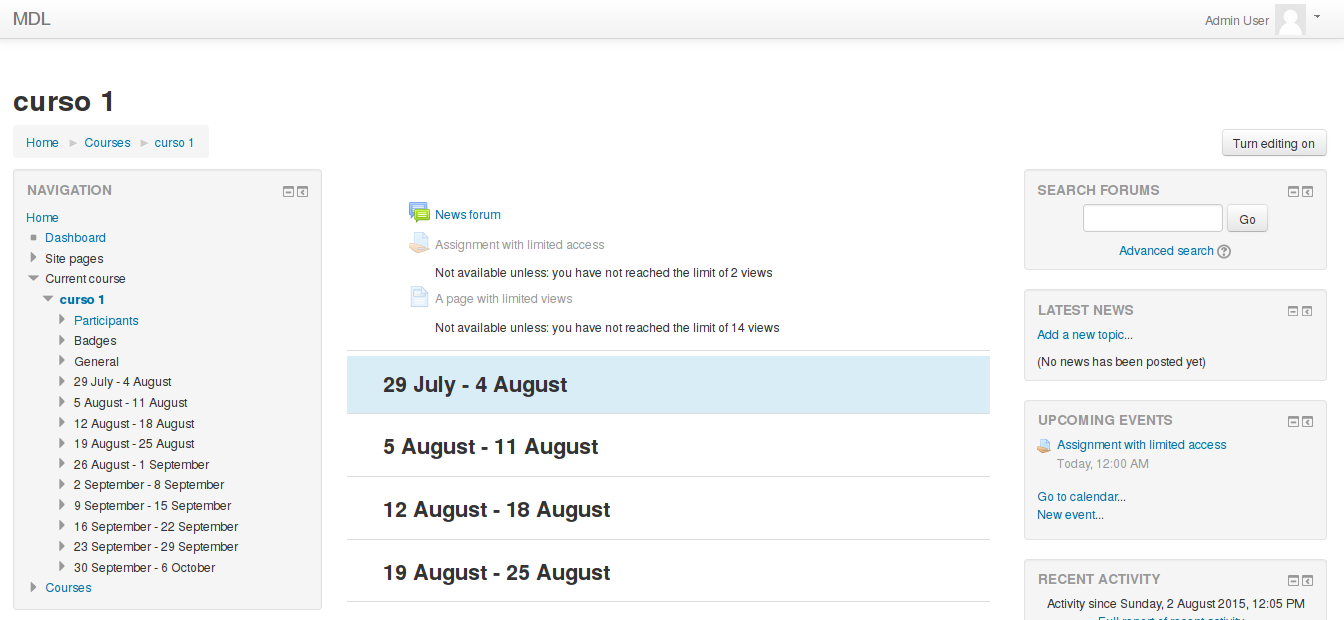
"you have not reached the limit of {$a} views"
I was really unconfortable with that, but not sure, thanks, sorry =)
About the availability strings:
./availability.php:$string['list_root_and'] = 'Not available unless:';
./availability.php:$string['list_root_or'] = 'Not available unless any of:';
Never understood why this "double negation". If you agree with me, i can try to change to just
"Available if"
KInd regards,
Daniel
Additionally, please pay attention to the plugin check results above and provide a full description and screenshots of your plugin. Thanks.
The text shown to users "Not available unless: you reach the limit 1 views" doesn't read very well either - I suspect the word "unless" comes from a core lang string - have you looked to see if it can be changed/improved?