
Heatmap
Maintained by
Michael de Raadt
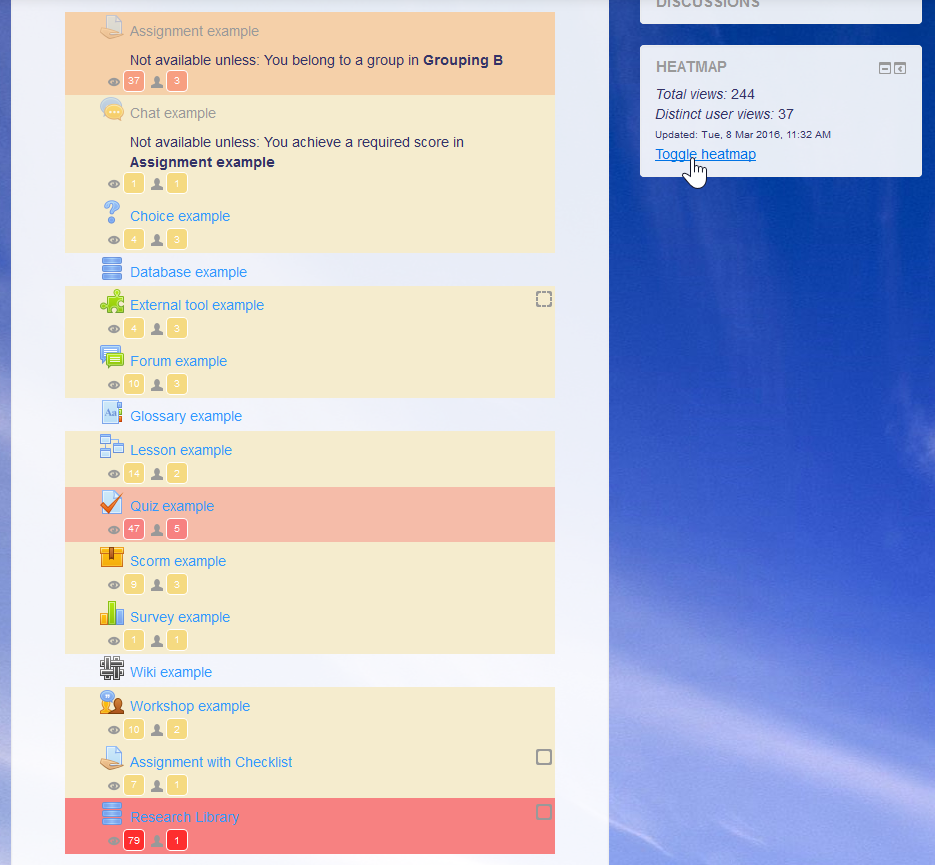
The Heatmap block overlays a heatmap onto a course to highlight activities with more or less activity to help teachers improve their courses.
Comments
Comments are no longer open for new posts. Existing comments remain available to read.
I've checked the latest version with Moodle 3.1 and 3.2.
Enjoy!
Michael
Yes, you're correct....I'm using labels with picture links to both websites and YouTube Videos.....a shame, but many thanks for your prompt reply
Frank
I assume you mean things in labels. It would not be able to target the styles around the things you have there and I'm not sure if they would be logged, so my initial thought is that these could not be highlighted.
Michael
I have picture links to websites and YouTube videos in my Moodle courses. Unfortunately these do not show a heat map of activity...
Will a future Heat map update show activity on this type of resource ?
Cheers, Frank Smith
Could it be that you don't have logging enabled on your site? This is needed. The number of users shouldn't matter.
If you do have logging enabled and your still seeing this, please put in an issue on tracker.moodle.org with some details of your setup.
Michael
I am having trouble making this very interesting plugin work.
I have installed it successfully in Moodle 2.7, however when I enable the block, I get an "No usable log reader is enabled" message. In the course, there are 4 users with limited activity. Could this be the reason? Does the plugin require much activity in order to be actually activated?
Any insights on how to fix this?
Thanks!
Thanks for this - I really like that it looks at the logs (rather than depending on setting up activity completion in advance for example) so it can be applied to look at data retrospectively.
I was going to ask what determines the colours in the heatmap but I think I've roughly figured it out. I'll put it here for others' info and maybe you can correct me if I'm wrong or remove my comment.
- 0 views = no colour
- up to 40% of the number of views on the most viewed item = #F5ECCE (yellow)
- between 40% and 60% of the number of views on the most viewed item = #F5D0A9 (orange)
- between 60% and 80% of the number of views on the most viewed item = #f5bca9 (salmon)
- between 80% and 99% of the number of views on the most viewed item = #F5A9A9 (pink)
- most viewed item = #F78181(dark pink)
Catherine
I hope people find it useful. I can't claim most of the credit here. The ideas come from the MAV and the queries come from the Activity viewer. I was just the guy who brought them together. I'll make that more clear in the description.
Hi, German.
Thanks as always, German. I really appreciate your input.
Congratulations
It is a pity that my University is still in Moodle 2.6
I have just added a Mexican Spanish translation for the AMOS strings and the Moodle Docs page.
Thanks Michael for another nice useful plugin.
Thanks Michael for sharing this block with the Moodle community. And thanks for promptly addressing the issues raised by the automated coding style checker. No need to worry about the remaining CSS !important warning. The prechecker correctly warns about it, but you are also well aware that its usage here is valid for obvious reasons.
I really like the idea of the block. It provides Moodle teachers with a nice reporting tool and they can base their further actions in the course on the data provided by the heatmap. I also like the implementation of the block, especially the way how log records are being fetched and cached. Well done on that.
I am happy to approve the plugin now. You are cleared to land. Welcome to the Plugins directory!
http://integration.moodle.org/job/Precheck%20remote%20branch/21885/artifact/work/smurf.html