Realtime Quiz
Versions
Current version
4.1.0.3 (2026042400)
4.1.0.3
Plugin type: Activities
Frankenstyle component name: mod_realtimequiz
Version build number: 2026042400
Version release name: 4.1.0.3
Maturity: Stable
Supported Moodle versions: 4.1, 4.2, 4.3, 4.4, 4.5, 5.0, 5.1, 5.2
Repository URL (Git): https://github.com/davosmith/moodle-realtimequiz
Repository branch: MOODLE_500_STABLE
Repository tag: 4.1.0.3
Issue/bug tracker URL: https://tracker.moodle.org/issues/?jql=project%20%3D%20CONTRIB%20AND%20component%20%3D%20%22Module%3A+Realtime+Quiz%22
REALTIME QUIZ
What is it?
This is a type of quiz designed to be used in face-to-face lessons, with a classroom full of computers.
The teacher creates the quiz in advance - adding multiple-choice questions, with a range of answers (and indicating which is the correct answer).
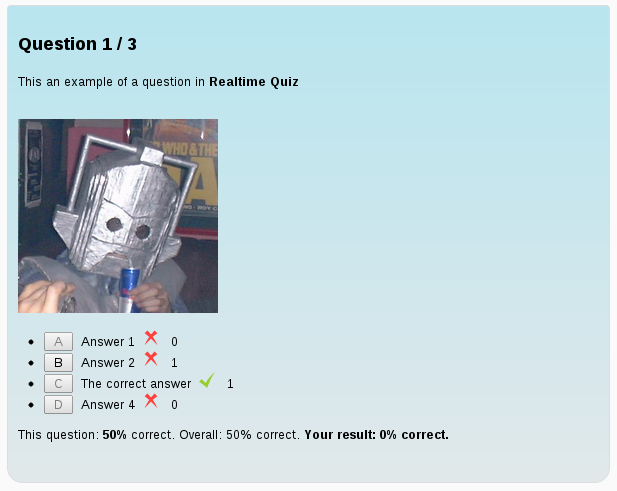
During the lesson, the teacher starts the quiz (optionally giving the quiz a 'session name'). Students can now connect to this quiz. Once the teacher is satisfied that all students have connected to the quiz, they can click on 'Next' to show the first question. The question will be displayed for a pre-defined amount of time, after which the correct answer will be displayed, along with a count of how many students gave each answer. The teacher can then discuss the question, before clicking on 'Next' to show the next question. Once all the questions have been shown, the final result for the class is displayed.
The teacher can, at a later date, go back through the results and, for each question, see exactly what answer each student gave.
Changes:
2026-04-24 - 4.1.0.3 - M5.2 compatibility fixes
2025-10-18 - 4.0.0.2 - M5.1 compatibility fixes
2025-04-19 - 4.0.0.1 - M5.0 compatibility fixes, drop support for M3.11 and below.
2024-10-19 - 3.4.4.2 - Minor M4.5 compatibility fixes
2024-04-04 - 3.4.4.1 - Minor M4.4 compatibility fixes
2023-10-02 - 3.4.4.0 - update GitHub actions ready for 4.3 release
2023-04-14 - 3.4.3.0 - Minor M4.2 compatibility fixes (remove legacy log functions in events)
2022-11-19 - 3.4.2.0 - Minor M4.1 compatibility fixes, fix layout in M4.0+
2022-01-22 - Minor M4.0 compatibility fixes
2021-05-15 - M3.11 compatibility fix (add 'completion info' to the top of each page)
2021-04-09 - Minor internal documentation fixes and switch from Travis to Github actions, M3.11 compatibility fix
2018-11-26 - Minor fixes to work with Moodle 3.6
2018-10-15 - Show number of students connected on start page - thanks to Alain Corbière for this feature
2018-04-21 - Add support for GDPR. This requires Moodle 3.4 or above.
2017-11-09 - Minor PHP 7 compatibility fix.
2017-05-12 - Moodle 3.3 compatibility fixes.
2015-11-08 - Moodle 3.0 minor compatibility fix.
2015-05-09 - Moodle 2.9 compatibility fixes.
2014-10-28 - Moodle 2.7 compatibility fixes (from Tony Butler); reduced server load with large number of clients (from Ruslan Kabalin); ability for teachers to reconnect to running quizzes, if they navigate away from them
2013-11-28 - More Moodle 2.6 compatibility fixes
2013-11-19 - Moodle 2.6 compatibility fixes
2013-07-30 - Fixed embedding images when first creating a question.
2013-01-10 - Fixed HTML Editor in Moodle 2.3
2013-01-06 - Backup and restore now available
2013-01-05 - Questions now use a standard Moodle form, so can include images, videos, etc.
2012-07-02 - Reports page can now show all user responses - thanks to Frankie Kam and Al Rachels for the original code
2012-01-13 - Minor tweak: questions with 'no correct answers' score 100% for everyone (not 0%) for statistical purposes
2012-01-12 - Now able to include questions with no correct answers (for 'surveys'). Note: mixing questions with answers and no answers will give incorrect statistics. Also added various minor fixes.
... lots of changes that were not recorded here - see https://github.com/davosmith/moodle-realtimequiz for details
v0.8 (20/12/2008) - Fixed: deleting associated answers/submissions when deleting questions. Now able to restore realtime quizzes from backups.
v0.7 (15/11/2008) - NOT RELEASED. Now able to backup (but not restore) realtime quizzes.
v0.6 (4/10/2008) - Made the client computer resend requests if nothing comes back from the server within 2 seconds (should stop quiz from getting stuck in heavy network traffic). Moved the language files into the same folder as the rest of the files.
v0.5 (18/7/2008) - Fixed bug where '&' '<' '>' symbols in questions / answers would cause quiz to break.
v0.4 (22/11/2007) - you can now have different times for each question (set to '0' for the default time set for the quiz)
v0.3 - added individual scores for students, display total number of questions
v0.2 - fixed 404 errors for non-admin logins
v0.1 - initial release
Installation:
Unzip all the files into a temporary directory.
Copy the 'realtimequiz' folder into '
Uninstalling:
Delete the module from the 'Activities' module list in the amin section.
Feedback:
You can contact me on moodle@davosmith.co.uk
Please let me know any bugs or feature requests - the former I will try to fix ASAP; the latter will be noted and I'll look at them when I have time (in between marking and looking after my children).
4.0.0.2 (2025101800)
4.0.0.2
Plugin type: Activities
Frankenstyle component name: mod_realtimequiz
Version build number: 2025101800
Version release name: 4.0.0.2
Maturity: Stable
Supported Moodle versions: 4.0, 4.1, 4.2, 4.3, 4.4, 4.5, 5.0, 5.1
Repository URL (Git): https://github.com/davosmith/moodle-realtimequiz
Repository branch: MOODLE_500_STABLE
Repository tag: 4.0.0.2
Issue/bug tracker URL: https://tracker.moodle.org/issues/?jql=project%20%3D%20CONTRIB%20AND%20component%20%3D%20%22Module%3A+Realtime+Quiz%22
REALTIME QUIZ
What is it?
This is a type of quiz designed to be used in face-to-face lessons, with a classroom full of computers.
The teacher creates the quiz in advance - adding multiple-choice questions, with a range of answers (and indicating which is the correct answer).
During the lesson, the teacher starts the quiz (optionally giving the quiz a 'session name'). Students can now connect to this quiz. Once the teacher is satisfied that all students have connected to the quiz, they can click on 'Next' to show the first question. The question will be displayed for a pre-defined amount of time, after which the correct answer will be displayed, along with a count of how many students gave each answer. The teacher can then discuss the question, before clicking on 'Next' to show the next question. Once all the questions have been shown, the final result for the class is displayed.
The teacher can, at a later date, go back through the results and, for each question, see exactly what answer each student gave.
Changes:
2025-10-18 - 4.0.0.2 - M5.1 compatibility fixes
2025-04-19 - 4.0.0.1 - M5.0 compatibility fixes, drop support for M3.11 and below.
2024-10-19 - 3.4.4.2 - Minor M4.5 compatibility fixes
2024-04-04 - 3.4.4.1 - Minor M4.4 compatibility fixes
2023-10-02 - 3.4.4.0 - update GitHub actions ready for 4.3 release
2023-04-14 - 3.4.3.0 - Minor M4.2 compatibility fixes (remove legacy log functions in events)
2022-11-19 - 3.4.2.0 - Minor M4.1 compatibility fixes, fix layout in M4.0+
2022-01-22 - Minor M4.0 compatibility fixes
2021-05-15 - M3.11 compatibility fix (add 'completion info' to the top of each page)
2021-04-09 - Minor internal documentation fixes and switch from Travis to Github actions, M3.11 compatibility fix
2018-11-26 - Minor fixes to work with Moodle 3.6
2018-10-15 - Show number of students connected on start page - thanks to Alain Corbière for this feature
2018-04-21 - Add support for GDPR. This requires Moodle 3.4 or above.
2017-11-09 - Minor PHP 7 compatibility fix.
2017-05-12 - Moodle 3.3 compatibility fixes.
2015-11-08 - Moodle 3.0 minor compatibility fix.
2015-05-09 - Moodle 2.9 compatibility fixes.
2014-10-28 - Moodle 2.7 compatibility fixes (from Tony Butler); reduced server load with large number of clients (from Ruslan Kabalin); ability for teachers to reconnect to running quizzes, if they navigate away from them
2013-11-28 - More Moodle 2.6 compatibility fixes
2013-11-19 - Moodle 2.6 compatibility fixes
2013-07-30 - Fixed embedding images when first creating a question.
2013-01-10 - Fixed HTML Editor in Moodle 2.3
2013-01-06 - Backup and restore now available
2013-01-05 - Questions now use a standard Moodle form, so can include images, videos, etc.
2012-07-02 - Reports page can now show all user responses - thanks to Frankie Kam and Al Rachels for the original code
2012-01-13 - Minor tweak: questions with 'no correct answers' score 100% for everyone (not 0%) for statistical purposes
2012-01-12 - Now able to include questions with no correct answers (for 'surveys'). Note: mixing questions with answers and no answers will give incorrect statistics. Also added various minor fixes.
... lots of changes that were not recorded here - see https://github.com/davosmith/moodle-realtimequiz for details
v0.8 (20/12/2008) - Fixed: deleting associated answers/submissions when deleting questions. Now able to restore realtime quizzes from backups.
v0.7 (15/11/2008) - NOT RELEASED. Now able to backup (but not restore) realtime quizzes.
v0.6 (4/10/2008) - Made the client computer resend requests if nothing comes back from the server within 2 seconds (should stop quiz from getting stuck in heavy network traffic). Moved the language files into the same folder as the rest of the files.
v0.5 (18/7/2008) - Fixed bug where '&' '<' '>' symbols in questions / answers would cause quiz to break.
v0.4 (22/11/2007) - you can now have different times for each question (set to '0' for the default time set for the quiz)
v0.3 - added individual scores for students, display total number of questions
v0.2 - fixed 404 errors for non-admin logins
v0.1 - initial release
Installation:
Unzip all the files into a temporary directory.
Copy the 'realtimequiz' folder into '
Uninstalling:
Delete the module from the 'Activities' module list in the amin section.
Feedback:
You can contact me on moodle@davosmith.co.uk
Please let me know any bugs or feature requests - the former I will try to fix ASAP; the latter will be noted and I'll look at them when I have time (in between marking and looking after my children).
4.0.0.1 (2025041900)
4.0.0.1
Plugin type: Activities
Frankenstyle component name: mod_realtimequiz
Version build number: 2025041900
Version release name: 4.0.0.1
Maturity: Stable
Supported Moodle versions: 4.0, 4.1, 4.2, 4.3, 4.4, 4.5, 5.0
Repository URL (Git): https://github.com/davosmith/moodle-realtimequiz
Repository branch: MOODLE_500_STABLE
Repository tag: 4.0.0.1
Issue/bug tracker URL: https://tracker.moodle.org/issues/?jql=project%20%3D%20CONTRIB%20AND%20component%20%3D%20%22Module%3A+Realtime+Quiz%22
REALTIME QUIZ
What is it?
This is a type of quiz designed to be used in face-to-face lessons, with a classroom full of computers.
The teacher creates the quiz in advance - adding multiple-choice questions, with a range of answers (and indicating which is the correct answer).
During the lesson, the teacher starts the quiz (optionally giving the quiz a 'session name'). Students can now connect to this quiz. Once the teacher is satisfied that all students have connected to the quiz, they can click on 'Next' to show the first question. The question will be displayed for a pre-defined amount of time, after which the correct answer will be displayed, along with a count of how many students gave each answer. The teacher can then discuss the question, before clicking on 'Next' to show the next question. Once all the questions have been shown, the final result for the class is displayed.
The teacher can, at a later date, go back through the results and, for each question, see exactly what answer each student gave.
Changes:
2025-04-19 - 4.0.0.1 - M5.0 compatibility fixes, drop support for M3.11 and below.
2024-10-19 - 3.4.4.2 - Minor M4.5 compatibility fixes
2024-04-04 - 3.4.4.1 - Minor M4.4 compatibility fixes
2023-10-02 - 3.4.4.0 - update GitHub actions ready for 4.3 release
2023-04-14 - 3.4.3.0 - Minor M4.2 compatibility fixes (remove legacy log functions in events)
2022-11-19 - 3.4.2.0 - Minor M4.1 compatibility fixes, fix layout in M4.0+
2022-01-22 - Minor M4.0 compatibility fixes
2021-05-15 - M3.11 compatibility fix (add 'completion info' to the top of each page)
2021-04-09 - Minor internal documentation fixes and switch from Travis to Github actions, M3.11 compatibility fix
2018-11-26 - Minor fixes to work with Moodle 3.6
2018-10-15 - Show number of students connected on start page - thanks to Alain Corbière for this feature
2018-04-21 - Add support for GDPR. This requires Moodle 3.4 or above.
2017-11-09 - Minor PHP 7 compatibility fix.
2017-05-12 - Moodle 3.3 compatibility fixes.
2015-11-08 - Moodle 3.0 minor compatibility fix.
2015-05-09 - Moodle 2.9 compatibility fixes.
2014-10-28 - Moodle 2.7 compatibility fixes (from Tony Butler); reduced server load with large number of clients (from Ruslan Kabalin); ability for teachers to reconnect to running quizzes, if they navigate away from them
2013-11-28 - More Moodle 2.6 compatibility fixes
2013-11-19 - Moodle 2.6 compatibility fixes
2013-07-30 - Fixed embedding images when first creating a question.
2013-01-10 - Fixed HTML Editor in Moodle 2.3
2013-01-06 - Backup and restore now available
2013-01-05 - Questions now use a standard Moodle form, so can include images, videos, etc.
2012-07-02 - Reports page can now show all user responses - thanks to Frankie Kam and Al Rachels for the original code
2012-01-13 - Minor tweak: questions with 'no correct answers' score 100% for everyone (not 0%) for statistical purposes
2012-01-12 - Now able to include questions with no correct answers (for 'surveys'). Note: mixing questions with answers and no answers will give incorrect statistics. Also added various minor fixes.
... lots of changes that were not recorded here - see https://github.com/davosmith/moodle-realtimequiz for details
v0.8 (20/12/2008) - Fixed: deleting associated answers/submissions when deleting questions. Now able to restore realtime quizzes from backups.
v0.7 (15/11/2008) - NOT RELEASED. Now able to backup (but not restore) realtime quizzes.
v0.6 (4/10/2008) - Made the client computer resend requests if nothing comes back from the server within 2 seconds (should stop quiz from getting stuck in heavy network traffic). Moved the language files into the same folder as the rest of the files.
v0.5 (18/7/2008) - Fixed bug where '&' '<' '>' symbols in questions / answers would cause quiz to break.
v0.4 (22/11/2007) - you can now have different times for each question (set to '0' for the default time set for the quiz)
v0.3 - added individual scores for students, display total number of questions
v0.2 - fixed 404 errors for non-admin logins
v0.1 - initial release
Installation:
Unzip all the files into a temporary directory.
Copy the 'realtimequiz' folder into '
Uninstalling:
Delete the module from the 'Activities' module list in the amin section.
Feedback:
You can contact me on moodle@davosmith.co.uk
Please let me know any bugs or feature requests - the former I will try to fix ASAP; the latter will be noted and I'll look at them when I have time (in between marking and looking after my children).
3.4.4.2 (2024101900)
3.4.4.2
Plugin type: Activities
Frankenstyle component name: mod_realtimequiz
Version build number: 2024101900
Version release name: 3.4.4.2
Maturity: Stable
Supported Moodle versions: 3.10, 3.11, 3.4, 3.5, 3.6, 3.7, 3.8, 3.9, 4.0, 4.1, 4.2, 4.3, 4.4, 4.5
Repository URL (Git): https://github.com/davosmith/moodle-realtimequiz
Repository branch: master
Repository tag: 3.4.4.2
Issue/bug tracker URL: https://tracker.moodle.org/issues/?jql=project%20%3D%20CONTRIB%20AND%20component%20%3D%20%22Module%3A+Realtime+Quiz%22
REALTIME QUIZ
What is it?
This is a type of quiz designed to be used in face-to-face lessons, with a classroom full of computers.
The teacher creates the quiz in advance - adding multiple-choice questions, with a range of answers (and indicating which is the correct answer).
During the lesson, the teacher starts the quiz (optionally giving the quiz a 'session name'). Students can now connect to this quiz. Once the teacher is satisfied that all students have connected to the quiz, they can click on 'Next' to show the first question. The question will be displayed for a pre-defined amount of time, after which the correct answer will be displayed, along with a count of how many students gave each answer. The teacher can then discuss the question, before clicking on 'Next' to show the next question. Once all the questions have been shown, the final result for the class is displayed.
The teacher can, at a later date, go back through the results and, for each question, see exactly what answer each student gave.
Changes:
2024-10-19 - 3.4.4.2 - Minor M4.5 compatibility fixes
2024-04-04 - 3.4.4.1 - Minor M4.4 compatibility fixes
2023-10-02 - 3.4.4.0 - update GitHub actions ready for 4.3 release
2023-04-14 - 3.4.3.0 - Minor M4.2 compatibility fixes (remove legacy log functions in events)
2022-11-19 - 3.4.2.0 - Minor M4.1 compatibility fixes, fix layout in M4.0+
2022-01-22 - Minor M4.0 compatibility fixes
2021-05-15 - M3.11 compatibility fix (add 'completion info' to the top of each page)
2021-04-09 - Minor internal documentation fixes and switch from Travis to Github actions, M3.11 compatibility fix
2018-11-26 - Minor fixes to work with Moodle 3.6
2018-10-15 - Show number of students connected on start page - thanks to Alain Corbière for this feature
2018-04-21 - Add support for GDPR. This requires Moodle 3.4 or above.
2017-11-09 - Minor PHP 7 compatibility fix.
2017-05-12 - Moodle 3.3 compatibility fixes.
2015-11-08 - Moodle 3.0 minor compatibility fix.
2015-05-09 - Moodle 2.9 compatibility fixes.
2014-10-28 - Moodle 2.7 compatibility fixes (from Tony Butler); reduced server load with large number of clients (from Ruslan Kabalin); ability for teachers to reconnect to running quizzes, if they navigate away from them
2013-11-28 - More Moodle 2.6 compatibility fixes
2013-11-19 - Moodle 2.6 compatibility fixes
2013-07-30 - Fixed embedding images when first creating a question.
2013-01-10 - Fixed HTML Editor in Moodle 2.3
2013-01-06 - Backup and restore now available
2013-01-05 - Questions now use a standard Moodle form, so can include images, videos, etc.
2012-07-02 - Reports page can now show all user responses - thanks to Frankie Kam and Al Rachels for the original code
2012-01-13 - Minor tweak: questions with 'no correct answers' score 100% for everyone (not 0%) for statistical purposes
2012-01-12 - Now able to include questions with no correct answers (for 'surveys'). Note: mixing questions with answers and no answers will give incorrect statistics. Also added various minor fixes.
... lots of changes that were not recorded here - see https://github.com/davosmith/moodle-realtimequiz for details
v0.8 (20/12/2008) - Fixed: deleting associated answers/submissions when deleting questions. Now able to restore realtime quizzes from backups.
v0.7 (15/11/2008) - NOT RELEASED. Now able to backup (but not restore) realtime quizzes.
v0.6 (4/10/2008) - Made the client computer resend requests if nothing comes back from the server within 2 seconds (should stop quiz from getting stuck in heavy network traffic). Moved the language files into the same folder as the rest of the files.
v0.5 (18/7/2008) - Fixed bug where '&' '<' '>' symbols in questions / answers would cause quiz to break.
v0.4 (22/11/2007) - you can now have different times for each question (set to '0' for the default time set for the quiz)
v0.3 - added individual scores for students, display total number of questions
v0.2 - fixed 404 errors for non-admin logins
v0.1 - initial release
Installation:
Unzip all the files into a temporary directory.
Copy the 'realtimequiz' folder into '
Uninstalling:
Delete the module from the 'Activities' module list in the amin section.
Feedback:
You can contact me on moodle@davosmith.co.uk
Please let me know any bugs or feature requests - the former I will try to fix ASAP; the latter will be noted and I'll look at them when I have time (in between marking and looking after my children).
3.4.4.1 (2024040400)
3.4.4.1
Plugin type: Activities
Frankenstyle component name: mod_realtimequiz
Version build number: 2024040400
Version release name: 3.4.4.1
Maturity: Stable
Supported Moodle versions: 3.10, 3.11, 3.4, 3.5, 3.6, 3.7, 3.8, 3.9, 4.0, 4.1, 4.2, 4.3, 4.4
Repository URL (Git): https://github.com/davosmith/moodle-realtimequiz
Repository branch:
Repository tag: 3.4.4.1
Issue/bug tracker URL: https://tracker.moodle.org/issues/?jql=project%20%3D%20CONTRIB%20AND%20component%20%3D%20%22Module%3A+Realtime+Quiz%22
REALTIME QUIZ
What is it?
This is a type of quiz designed to be used in face-to-face lessons, with a classroom full of computers.
The teacher creates the quiz in advance - adding multiple-choice questions, with a range of answers (and indicating which is the correct answer).
During the lesson, the teacher starts the quiz (optionally giving the quiz a 'session name'). Students can now connect to this quiz. Once the teacher is satisfied that all students have connected to the quiz, they can click on 'Next' to show the first question. The question will be displayed for a pre-defined amount of time, after which the correct answer will be displayed, along with a count of how many students gave each answer. The teacher can then discuss the question, before clicking on 'Next' to show the next question. Once all the questions have been shown, the final result for the class is displayed.
The teacher can, at a later date, go back through the results and, for each question, see exactly what answer each student gave.
Changes:
2024-04-04 - 3.4.4.1 - Minor M4.4 compatibility fixes
2023-10-02 - 3.4.4.0 - update GitHub actions ready for 4.3 release
2023-04-14 - 3.4.3.0 - Minor M4.2 compatibility fixes (remove legacy log functions in events)
2022-11-19 - 3.4.2.0 - Minor M4.1 compatibility fixes, fix layout in M4.0+
2022-01-22 - Minor M4.0 compatibility fixes
2021-05-15 - M3.11 compatibility fix (add 'completion info' to the top of each page)
2021-04-09 - Minor internal documentation fixes and switch from Travis to Github actions, M3.11 compatibility fix
2018-11-26 - Minor fixes to work with Moodle 3.6
2018-10-15 - Show number of students connected on start page - thanks to Alain Corbière for this feature
2018-04-21 - Add support for GDPR. This requires Moodle 3.4 or above.
2017-11-09 - Minor PHP 7 compatibility fix.
2017-05-12 - Moodle 3.3 compatibility fixes.
2015-11-08 - Moodle 3.0 minor compatibility fix.
2015-05-09 - Moodle 2.9 compatibility fixes.
2014-10-28 - Moodle 2.7 compatibility fixes (from Tony Butler); reduced server load with large number of clients (from Ruslan Kabalin); ability for teachers to reconnect to running quizzes, if they navigate away from them
2013-11-28 - More Moodle 2.6 compatibility fixes
2013-11-19 - Moodle 2.6 compatibility fixes
2013-07-30 - Fixed embedding images when first creating a question.
2013-01-10 - Fixed HTML Editor in Moodle 2.3
2013-01-06 - Backup and restore now available
2013-01-05 - Questions now use a standard Moodle form, so can include images, videos, etc.
2012-07-02 - Reports page can now show all user responses - thanks to Frankie Kam and Al Rachels for the original code
2012-01-13 - Minor tweak: questions with 'no correct answers' score 100% for everyone (not 0%) for statistical purposes
2012-01-12 - Now able to include questions with no correct answers (for 'surveys'). Note: mixing questions with answers and no answers will give incorrect statistics. Also added various minor fixes.
... lots of changes that were not recorded here - see https://github.com/davosmith/moodle-realtimequiz for details
v0.8 (20/12/2008) - Fixed: deleting associated answers/submissions when deleting questions. Now able to restore realtime quizzes from backups.
v0.7 (15/11/2008) - NOT RELEASED. Now able to backup (but not restore) realtime quizzes.
v0.6 (4/10/2008) - Made the client computer resend requests if nothing comes back from the server within 2 seconds (should stop quiz from getting stuck in heavy network traffic). Moved the language files into the same folder as the rest of the files.
v0.5 (18/7/2008) - Fixed bug where '&' '<' '>' symbols in questions / answers would cause quiz to break.
v0.4 (22/11/2007) - you can now have different times for each question (set to '0' for the default time set for the quiz)
v0.3 - added individual scores for students, display total number of questions
v0.2 - fixed 404 errors for non-admin logins
v0.1 - initial release
Installation:
Unzip all the files into a temporary directory.
Copy the 'realtimequiz' folder into '
Uninstalling:
Delete the module from the 'Activities' module list in the amin section.
Feedback:
You can contact me on moodle@davosmith.co.uk
Please let me know any bugs or feature requests - the former I will try to fix ASAP; the latter will be noted and I'll look at them when I have time (in between marking and looking after my children).
3.4.4.0 (2023100200)
3.4.4.0
Plugin type: Activities
Frankenstyle component name: mod_realtimequiz
Version build number: 2023100200
Version release name: 3.4.4.0
Maturity: Stable
Supported Moodle versions: 3.10, 3.11, 3.4, 3.5, 3.6, 3.7, 3.8, 3.9, 4.0, 4.1, 4.2, 4.3
Repository URL (Git): https://github.com/davosmith/moodle-realtimequiz
Repository branch:
Repository tag: 3.4.4.0
Issue/bug tracker URL: https://tracker.moodle.org/issues/?jql=project%20%3D%20CONTRIB%20AND%20component%20%3D%20%22Module%3A+Realtime+Quiz%22
REALTIME QUIZ
What is it?
This is a type of quiz designed to be used in face-to-face lessons, with a classroom full of computers.
The teacher creates the quiz in advance - adding multiple-choice questions, with a range of answers (and indicating which is the correct answer).
During the lesson, the teacher starts the quiz (optionally giving the quiz a 'session name'). Students can now connect to this quiz. Once the teacher is satisfied that all students have connected to the quiz, they can click on 'Next' to show the first question. The question will be displayed for a pre-defined amount of time, after which the correct answer will be displayed, along with a count of how many students gave each answer. The teacher can then discuss the question, before clicking on 'Next' to show the next question. Once all the questions have been shown, the final result for the class is displayed.
The teacher can, at a later date, go back through the results and, for each question, see exactly what answer each student gave.
Changes:
2023-10-02 - 3.4.4.0 - update GitHub actions ready for 4.3 release
2023-04-14 - 3.4.3.0 - Minor M4.2 compatibility fixes (remove legacy log functions in events)
2022-11-19 - 3.4.2.0 - Minor M4.1 compatibility fixes, fix layout in M4.0+
2022-01-22 - Minor M4.0 compatibility fixes
2021-05-15 - M3.11 compatibility fix (add 'completion info' to the top of each page)
2021-04-09 - Minor internal documentation fixes and switch from Travis to Github actions, M3.11 compatibility fix
2018-11-26 - Minor fixes to work with Moodle 3.6
2018-10-15 - Show number of students connected on start page - thanks to Alain Corbière for this feature
2018-04-21 - Add support for GDPR. This requires Moodle 3.4 or above.
2017-11-09 - Minor PHP 7 compatibility fix.
2017-05-12 - Moodle 3.3 compatibility fixes.
2015-11-08 - Moodle 3.0 minor compatibility fix.
2015-05-09 - Moodle 2.9 compatibility fixes.
2014-10-28 - Moodle 2.7 compatibility fixes (from Tony Butler); reduced server load with large number of clients (from Ruslan Kabalin); ability for teachers to reconnect to running quizzes, if they navigate away from them
2013-11-28 - More Moodle 2.6 compatibility fixes
2013-11-19 - Moodle 2.6 compatibility fixes
2013-07-30 - Fixed embedding images when first creating a question.
2013-01-10 - Fixed HTML Editor in Moodle 2.3
2013-01-06 - Backup and restore now available
2013-01-05 - Questions now use a standard Moodle form, so can include images, videos, etc.
2012-07-02 - Reports page can now show all user responses - thanks to Frankie Kam and Al Rachels for the original code
2012-01-13 - Minor tweak: questions with 'no correct answers' score 100% for everyone (not 0%) for statistical purposes
2012-01-12 - Now able to include questions with no correct answers (for 'surveys'). Note: mixing questions with answers and no answers will give incorrect statistics. Also added various minor fixes.
... lots of changes that were not recorded here - see https://github.com/davosmith/moodle-realtimequiz for details
v0.8 (20/12/2008) - Fixed: deleting associated answers/submissions when deleting questions. Now able to restore realtime quizzes from backups.
v0.7 (15/11/2008) - NOT RELEASED. Now able to backup (but not restore) realtime quizzes.
v0.6 (4/10/2008) - Made the client computer resend requests if nothing comes back from the server within 2 seconds (should stop quiz from getting stuck in heavy network traffic). Moved the language files into the same folder as the rest of the files.
v0.5 (18/7/2008) - Fixed bug where '&' '<' '>' symbols in questions / answers would cause quiz to break.
v0.4 (22/11/2007) - you can now have different times for each question (set to '0' for the default time set for the quiz)
v0.3 - added individual scores for students, display total number of questions
v0.2 - fixed 404 errors for non-admin logins
v0.1 - initial release
Installation:
Unzip all the files into a temporary directory.
Copy the 'realtimequiz' folder into '
Uninstalling:
Delete the module from the 'Activities' module list in the amin section.
Feedback:
You can contact me on moodle@davosmith.co.uk
Please let me know any bugs or feature requests - the former I will try to fix ASAP; the latter will be noted and I'll look at them when I have time (in between marking and looking after my children).
3.4.3.0 (2023041400)
3.4.3.0
Plugin type: Activities
Frankenstyle component name: mod_realtimequiz
Version build number: 2023041400
Version release name: 3.4.3.0
Maturity: Stable
Supported Moodle versions: 3.10, 3.11, 3.4, 3.5, 3.6, 3.7, 3.8, 3.9, 4.0, 4.1, 4.2
Repository URL (Git): https://github.com/davosmith/moodle-realtimequiz
Repository branch: master
Repository tag: 3.4.3.0
Issue/bug tracker URL: https://tracker.moodle.org/issues/?jql=project%20%3D%20CONTRIB%20AND%20component%20%3D%20%22Module%3A+Realtime+Quiz%22
REALTIME QUIZ
What is it?
This is a type of quiz designed to be used in face-to-face lessons, with a classroom full of computers.
The teacher creates the quiz in advance - adding multiple-choice questions, with a range of answers (and indicating which is the correct answer).
During the lesson, the teacher starts the quiz (optionally giving the quiz a 'session name'). Students can now connect to this quiz. Once the teacher is satisfied that all students have connected to the quiz, they can click on 'Next' to show the first question. The question will be displayed for a pre-defined amount of time, after which the correct answer will be displayed, along with a count of how many students gave each answer. The teacher can then discuss the question, before clicking on 'Next' to show the next question. Once all the questions have been shown, the final result for the class is displayed.
The teacher can, at a later date, go back through the results and, for each question, see exactly what answer each student gave.
Changes:
2023-04-14 - 3.4.3.0 - Minor M4.2 compatibility fixes (remove legacy log functions in events)
2022-11-19 - 3.4.2.0 - Minor M4.1 compatibility fixes, fix layout in M4.0+
2022-01-22 - Minor M4.0 compatibility fixes
2021-05-15 - M3.11 compatibility fix (add 'completion info' to the top of each page)
2021-04-09 - Minor internal documentation fixes and switch from Travis to Github actions, M3.11 compatibility fix
2018-11-26 - Minor fixes to work with Moodle 3.6
2018-10-15 - Show number of students connected on start page - thanks to Alain Corbière for this feature
2018-04-21 - Add support for GDPR. This requires Moodle 3.4 or above.
2017-11-09 - Minor PHP 7 compatibility fix.
2017-05-12 - Moodle 3.3 compatibility fixes.
2015-11-08 - Moodle 3.0 minor compatibility fix.
2015-05-09 - Moodle 2.9 compatibility fixes.
2014-10-28 - Moodle 2.7 compatibility fixes (from Tony Butler); reduced server load with large number of clients (from Ruslan Kabalin); ability for teachers to reconnect to running quizzes, if they navigate away from them
2013-11-28 - More Moodle 2.6 compatibility fixes
2013-11-19 - Moodle 2.6 compatibility fixes
2013-07-30 - Fixed embedding images when first creating a question.
2013-01-10 - Fixed HTML Editor in Moodle 2.3
2013-01-06 - Backup and restore now available
2013-01-05 - Questions now use a standard Moodle form, so can include images, videos, etc.
2012-07-02 - Reports page can now show all user responses - thanks to Frankie Kam and Al Rachels for the original code
2012-01-13 - Minor tweak: questions with 'no correct answers' score 100% for everyone (not 0%) for statistical purposes
2012-01-12 - Now able to include questions with no correct answers (for 'surveys'). Note: mixing questions with answers and no answers will give incorrect statistics. Also added various minor fixes.
... lots of changes that were not recorded here - see https://github.com/davosmith/moodle-realtimequiz for details
v0.8 (20/12/2008) - Fixed: deleting associated answers/submissions when deleting questions. Now able to restore realtime quizzes from backups.
v0.7 (15/11/2008) - NOT RELEASED. Now able to backup (but not restore) realtime quizzes.
v0.6 (4/10/2008) - Made the client computer resend requests if nothing comes back from the server within 2 seconds (should stop quiz from getting stuck in heavy network traffic). Moved the language files into the same folder as the rest of the files.
v0.5 (18/7/2008) - Fixed bug where '&' '<' '>' symbols in questions / answers would cause quiz to break.
v0.4 (22/11/2007) - you can now have different times for each question (set to '0' for the default time set for the quiz)
v0.3 - added individual scores for students, display total number of questions
v0.2 - fixed 404 errors for non-admin logins
v0.1 - initial release
Installation:
Unzip all the files into a temporary directory.
Copy the 'realtimequiz' folder into '
Uninstalling:
Delete the module from the 'Activities' module list in the amin section.
Feedback:
You can contact me on moodle@davosmith.co.uk
Please let me know any bugs or feature requests - the former I will try to fix ASAP; the latter will be noted and I'll look at them when I have time (in between marking and looking after my children).
3.4.2.0 (2022111901)
3.4.2.0
Plugin type: Activities
Frankenstyle component name: mod_realtimequiz
Version build number: 2022111901
Version release name: 3.4.2.0
Maturity: Stable
Supported Moodle versions: 3.10, 3.11, 3.4, 3.5, 3.6, 3.7, 3.8, 3.9, 4.0, 4.1
Repository URL (Git): https://github.com/davosmith/moodle-realtimequiz
Repository branch:
Repository tag: 3.4.2.0
Issue/bug tracker URL: https://tracker.moodle.org/issues/?jql=project%20%3D%20CONTRIB%20AND%20component%20%3D%20%22Module%3A+Realtime+Quiz%22
REALTIME QUIZ
What is it?
This is a type of quiz designed to be used in face-to-face lessons, with a classroom full of computers.
The teacher creates the quiz in advance - adding multiple-choice questions, with a range of answers (and indicating which is the correct answer).
During the lesson, the teacher starts the quiz (optionally giving the quiz a 'session name'). Students can now connect to this quiz. Once the teacher is satisfied that all students have connected to the quiz, they can click on 'Next' to show the first question. The question will be displayed for a pre-defined amount of time, after which the correct answer will be displayed, along with a count of how many students gave each answer. The teacher can then discuss the question, before clicking on 'Next' to show the next question. Once all the questions have been shown, the final result for the class is displayed.
The teacher can, at a later date, go back through the results and, for each question, see exactly what answer each student gave.
Changes:
2022-11-19 - 3.4.2.0 - Minor M4.1 compatibility fixes, fix layout in M4.0+
2022-01-22 - Minor M4.0 compatibility fixes
2021-05-15 - M3.11 compatibility fix (add 'completion info' to the top of each page)
2021-04-09 - Minor internal documentation fixes and switch from Travis to Github actions, M3.11 compatibility fix
2018-11-26 - Minor fixes to work with Moodle 3.6
2018-10-15 - Show number of students connected on start page - thanks to Alain Corbière for this feature
2018-04-21 - Add support for GDPR. This requires Moodle 3.4 or above.
2017-11-09 - Minor PHP 7 compatibility fix.
2017-05-12 - Moodle 3.3 compatibility fixes.
2015-11-08 - Moodle 3.0 minor compatibility fix.
2015-05-09 - Moodle 2.9 compatibility fixes.
2014-10-28 - Moodle 2.7 compatibility fixes (from Tony Butler); reduced server load with large number of clients (from Ruslan Kabalin); ability for teachers to reconnect to running quizzes, if they navigate away from them
2013-11-28 - More Moodle 2.6 compatibility fixes
2013-11-19 - Moodle 2.6 compatibility fixes
2013-07-30 - Fixed embedding images when first creating a question.
2013-01-10 - Fixed HTML Editor in Moodle 2.3
2013-01-06 - Backup and restore now available
2013-01-05 - Questions now use a standard Moodle form, so can include images, videos, etc.
2012-07-02 - Reports page can now show all user responses - thanks to Frankie Kam and Al Rachels for the original code
2012-01-13 - Minor tweak: questions with 'no correct answers' score 100% for everyone (not 0%) for statistical purposes
2012-01-12 - Now able to include questions with no correct answers (for 'surveys'). Note: mixing questions with answers and no answers will give incorrect statistics. Also added various minor fixes.
... lots of changes that were not recorded here - see https://github.com/davosmith/moodle-realtimequiz for details
v0.8 (20/12/2008) - Fixed: deleting associated answers/submissions when deleting questions. Now able to restore realtime quizzes from backups.
v0.7 (15/11/2008) - NOT RELEASED. Now able to backup (but not restore) realtime quizzes.
v0.6 (4/10/2008) - Made the client computer resend requests if nothing comes back from the server within 2 seconds (should stop quiz from getting stuck in heavy network traffic). Moved the language files into the same folder as the rest of the files.
v0.5 (18/7/2008) - Fixed bug where '&' '<' '>' symbols in questions / answers would cause quiz to break.
v0.4 (22/11/2007) - you can now have different times for each question (set to '0' for the default time set for the quiz)
v0.3 - added individual scores for students, display total number of questions
v0.2 - fixed 404 errors for non-admin logins
v0.1 - initial release
Installation:
Unzip all the files into a temporary directory.
Copy the 'realtimequiz' folder into '
Uninstalling:
Delete the module from the 'Activities' module list in the amin section.
Feedback:
You can contact me on moodle@davosmith.co.uk
Please let me know any bugs or feature requests - the former I will try to fix ASAP; the latter will be noted and I'll look at them when I have time (in between marking and looking after my children).
3.4.1.0 (2022111900)
3.4.1.0
Plugin type: Activities
Frankenstyle component name: mod_realtimequiz
Version build number: 2022111900
Version release name: 3.4.1.0
Maturity: Stable
Supported Moodle versions: 3.10, 3.11, 3.4, 3.5, 3.6, 3.7, 3.8, 3.9, 4.0, 4.1
Repository URL (Git): https://github.com/davosmith/moodle-realtimequiz
Repository branch:
Repository tag: 3.4.1.0
Issue/bug tracker URL: https://tracker.moodle.org/issues/?jql=project%20%3D%20CONTRIB%20AND%20component%20%3D%20%22Module%3A+Realtime+Quiz%22
REALTIME QUIZ
What is it?
This is a type of quiz designed to be used in face-to-face lessons, with a classroom full of computers.
The teacher creates the quiz in advance - adding multiple-choice questions, with a range of answers (and indicating which is the correct answer).
During the lesson, the teacher starts the quiz (optionally giving the quiz a 'session name'). Students can now connect to this quiz. Once the teacher is satisfied that all students have connected to the quiz, they can click on 'Next' to show the first question. The question will be displayed for a pre-defined amount of time, after which the correct answer will be displayed, along with a count of how many students gave each answer. The teacher can then discuss the question, before clicking on 'Next' to show the next question. Once all the questions have been shown, the final result for the class is displayed.
The teacher can, at a later date, go back through the results and, for each question, see exactly what answer each student gave.
Changes:
2022-11-19 - Minor M4.1 compatibility fixes
2022-01-22 - Minor M4.0 compatibility fixes
2021-05-15 - M3.11 compatibility fix (add 'completion info' to the top of each page)
2021-04-09 - Minor internal documentation fixes and switch from Travis to Github actions, M3.11 compatibility fix
2018-11-26 - Minor fixes to work with Moodle 3.6
2018-10-15 - Show number of students connected on start page - thanks to Alain Corbière for this feature
2018-04-21 - Add support for GDPR. This requires Moodle 3.4 or above.
2017-11-09 - Minor PHP 7 compatibility fix.
2017-05-12 - Moodle 3.3 compatibility fixes.
2015-11-08 - Moodle 3.0 minor compatibility fix.
2015-05-09 - Moodle 2.9 compatibility fixes.
2014-10-28 - Moodle 2.7 compatibility fixes (from Tony Butler); reduced server load with large number of clients (from Ruslan Kabalin); ability for teachers to reconnect to running quizzes, if they navigate away from them
2013-11-28 - More Moodle 2.6 compatibility fixes
2013-11-19 - Moodle 2.6 compatibility fixes
2013-07-30 - Fixed embedding images when first creating a question.
2013-01-10 - Fixed HTML Editor in Moodle 2.3
2013-01-06 - Backup and restore now available
2013-01-05 - Questions now use a standard Moodle form, so can include images, videos, etc.
2012-07-02 - Reports page can now show all user responses - thanks to Frankie Kam and Al Rachels for the original code
2012-01-13 - Minor tweak: questions with 'no correct answers' score 100% for everyone (not 0%) for statistical purposes
2012-01-12 - Now able to include questions with no correct answers (for 'surveys'). Note: mixing questions with answers and no answers will give incorrect statistics. Also added various minor fixes.
... lots of changes that were not recorded here - see https://github.com/davosmith/moodle-realtimequiz for details
v0.8 (20/12/2008) - Fixed: deleting associated answers/submissions when deleting questions. Now able to restore realtime quizzes from backups.
v0.7 (15/11/2008) - NOT RELEASED. Now able to backup (but not restore) realtime quizzes.
v0.6 (4/10/2008) - Made the client computer resend requests if nothing comes back from the server within 2 seconds (should stop quiz from getting stuck in heavy network traffic). Moved the language files into the same folder as the rest of the files.
v0.5 (18/7/2008) - Fixed bug where '&' '<' '>' symbols in questions / answers would cause quiz to break.
v0.4 (22/11/2007) - you can now have different times for each question (set to '0' for the default time set for the quiz)
v0.3 - added individual scores for students, display total number of questions
v0.2 - fixed 404 errors for non-admin logins
v0.1 - initial release
Installation:
Unzip all the files into a temporary directory.
Copy the 'realtimequiz' folder into '
Uninstalling:
Delete the module from the 'Activities' module list in the amin section.
Feedback:
You can contact me on moodle@davosmith.co.uk
Please let me know any bugs or feature requests - the former I will try to fix ASAP; the latter will be noted and I'll look at them when I have time (in between marking and looking after my children).
3.4+ (Build: 2022012200) (2022012200)
3.4+ (Build: 2022012200)
Plugin type: Activities
Frankenstyle component name: mod_realtimequiz
Version build number: 2022012200
Version release name: 3.4+ (Build: 2022012200)
Maturity: Stable
Supported Moodle versions: 3.10, 3.11, 3.4, 3.5, 3.6, 3.7, 3.8, 3.9, 4.0
Repository URL (Git): https://github.com/davosmith/moodle-realtimequiz
Repository branch: master
Repository tag:
Issue/bug tracker URL: https://tracker.moodle.org/issues/?jql=project%20%3D%20CONTRIB%20AND%20component%20%3D%20%22Module%3A+Realtime+Quiz%22
REALTIME QUIZ
What is it?
This is a type of quiz designed to be used in face-to-face lessons, with a classroom full of computers.
The teacher creates the quiz in advance - adding multiple-choice questions, with a range of answers (and indicating which is the correct answer).
During the lesson, the teacher starts the quiz (optionally giving the quiz a 'session name'). Students can now connect to this quiz. Once the teacher is satisfied that all students have connected to the quiz, they can click on 'Next' to show the first question. The question will be displayed for a pre-defined amount of time, after which the correct answer will be displayed, along with a count of how many students gave each answer. The teacher can then discuss the question, before clicking on 'Next' to show the next question. Once all the questions have been shown, the final result for the class is displayed.
The teacher can, at a later date, go back through the results and, for each question, see exactly what answer each student gave.
Changes:
2022-01-22 - Minor M4.0 compatibility fixes
2021-05-15 - M3.11 compatibility fix (add 'completion info' to the top of each page)
2021-04-09 - Minor internal documentation fixes and switch from Travis to Github actions, M3.11 compatibility fix
2018-11-26 - Minor fixes to work with Moodle 3.6
2018-10-15 - Show number of students connected on start page - thanks to Alain Corbière for this feature
2018-04-21 - Add support for GDPR. This requires Moodle 3.4 or above.
2017-11-09 - Minor PHP 7 compatibility fix.
2017-05-12 - Moodle 3.3 compatibility fixes.
2015-11-08 - Moodle 3.0 minor compatibility fix.
2015-05-09 - Moodle 2.9 compatibility fixes.
2014-10-28 - Moodle 2.7 compatibility fixes (from Tony Butler); reduced server load with large number of clients (from Ruslan Kabalin); ability for teachers to reconnect to running quizzes, if they navigate away from them
2013-11-28 - More Moodle 2.6 compatibility fixes
2013-11-19 - Moodle 2.6 compatibility fixes
2013-07-30 - Fixed embedding images when first creating a question.
2013-01-10 - Fixed HTML Editor in Moodle 2.3
2013-01-06 - Backup and restore now available
2013-01-05 - Questions now use a standard Moodle form, so can include images, videos, etc.
2012-07-02 - Reports page can now show all user responses - thanks to Frankie Kam and Al Rachels for the original code
2012-01-13 - Minor tweak: questions with 'no correct answers' score 100% for everyone (not 0%) for statistical purposes
2012-01-12 - Now able to include questions with no correct answers (for 'surveys'). Note: mixing questions with answers and no answers will give incorrect statistics. Also added various minor fixes.
... lots of changes that were not recorded here - see https://github.com/davosmith/moodle-realtimequiz for details
v0.8 (20/12/2008) - Fixed: deleting associated answers/submissions when deleting questions. Now able to restore realtime quizzes from backups.
v0.7 (15/11/2008) - NOT RELEASED. Now able to backup (but not restore) realtime quizzes.
v0.6 (4/10/2008) - Made the client computer resend requests if nothing comes back from the server within 2 seconds (should stop quiz from getting stuck in heavy network traffic). Moved the language files into the same folder as the rest of the files.
v0.5 (18/7/2008) - Fixed bug where '&' '<' '>' symbols in questions / answers would cause quiz to break.
v0.4 (22/11/2007) - you can now have different times for each question (set to '0' for the default time set for the quiz)
v0.3 - added individual scores for students, display total number of questions
v0.2 - fixed 404 errors for non-admin logins
v0.1 - initial release
Installation:
Unzip all the files into a temporary directory.
Copy the 'realtimequiz' folder into '
Uninstalling:
Delete the module from the 'Activities' module list in the amin section.
Feedback:
You can contact me on moodle@davosmith.co.uk
Please let me know any bugs or feature requests - the former I will try to fix ASAP; the latter will be noted and I'll look at them when I have time (in between marking and looking after my children).
3.4+ (Build: 2021051500) (2021051500)
3.4+ (Build: 2021051500)
Plugin type: Activities
Frankenstyle component name: mod_realtimequiz
Version build number: 2021051500
Version release name: 3.4+ (Build: 2021051500)
Maturity: Stable
Supported Moodle versions: 3.10, 3.11, 3.4, 3.5, 3.6, 3.7, 3.8, 3.9
Repository URL (Git): https://github.com/davosmith/moodle-realtimequiz
Repository branch: master
Repository tag:
Issue/bug tracker URL: https://tracker.moodle.org/issues/?jql=project%20%3D%20CONTRIB%20AND%20component%20%3D%20%22Module%3A+Realtime+Quiz%22
REALTIME QUIZ
What is it?
This is a type of quiz designed to be used in face-to-face lessons, with a classroom full of computers.
The teacher creates the quiz in advance - adding multiple-choice questions, with a range of answers (and indicating which is the correct answer).
During the lesson, the teacher starts the quiz (optionally giving the quiz a 'session name'). Students can now connect to this quiz. Once the teacher is satisfied that all students have connected to the quiz, they can click on 'Next' to show the first question. The question will be displayed for a pre-defined amount of time, after which the correct answer will be displayed, along with a count of how many students gave each answer. The teacher can then discuss the question, before clicking on 'Next' to show the next question. Once all the questions have been shown, the final result for the class is displayed.
The teacher can, at a later date, go back through the results and, for each question, see exactly what answer each student gave.
Changes:
2021-05-15 - M3.11 compatibility fix (add 'completion info' to the top of each page)
2021-04-09 - Minor internal documentation fixes and switch from Travis to Github actions, M3.11 compatibility fix
2018-11-26 - Minor fixes to work with Moodle 3.6
2018-10-15 - Show number of students connected on start page - thanks to Alain Corbière for this feature
2018-04-21 - Add support for GDPR. This requires Moodle 3.4 or above.
2017-11-09 - Minor PHP 7 compatibility fix.
2017-05-12 - Moodle 3.3 compatibility fixes.
2015-11-08 - Moodle 3.0 minor compatibility fix.
2015-05-09 - Moodle 2.9 compatibility fixes.
2014-10-28 - Moodle 2.7 compatibility fixes (from Tony Butler); reduced server load with large number of clients (from Ruslan Kabalin); ability for teachers to reconnect to running quizzes, if they navigate away from them
2013-11-28 - More Moodle 2.6 compatibility fixes
2013-11-19 - Moodle 2.6 compatibility fixes
2013-07-30 - Fixed embedding images when first creating a question.
2013-01-10 - Fixed HTML Editor in Moodle 2.3
2013-01-06 - Backup and restore now available
2013-01-05 - Questions now use a standard Moodle form, so can include images, videos, etc.
2012-07-02 - Reports page can now show all user responses - thanks to Frankie Kam and Al Rachels for the original code
2012-01-13 - Minor tweak: questions with 'no correct answers' score 100% for everyone (not 0%) for statistical purposes
2012-01-12 - Now able to include questions with no correct answers (for 'surveys'). Note: mixing questions with answers and no answers will give incorrect statistics. Also added various minor fixes.
... lots of changes that were not recorded here - see https://github.com/davosmith/moodle-realtimequiz for details
v0.8 (20/12/2008) - Fixed: deleting associated answers/submissions when deleting questions. Now able to restore realtime quizzes from backups.
v0.7 (15/11/2008) - NOT RELEASED. Now able to backup (but not restore) realtime quizzes.
v0.6 (4/10/2008) - Made the client computer resend requests if nothing comes back from the server within 2 seconds (should stop quiz from getting stuck in heavy network traffic). Moved the language files into the same folder as the rest of the files.
v0.5 (18/7/2008) - Fixed bug where '&' '<' '>' symbols in questions / answers would cause quiz to break.
v0.4 (22/11/2007) - you can now have different times for each question (set to '0' for the default time set for the quiz)
v0.3 - added individual scores for students, display total number of questions
v0.2 - fixed 404 errors for non-admin logins
v0.1 - initial release
Installation:
Unzip all the files into a temporary directory.
Copy the 'realtimequiz' folder into '
Uninstalling:
Delete the module from the 'Activities' module list in the amin section.
Feedback:
You can contact me on moodle@davosmith.co.uk
Please let me know any bugs or feature requests - the former I will try to fix ASAP; the latter will be noted and I'll look at them when I have time (in between marking and looking after my children).
3.4+ (Build: 2018051500) (2018101500)
3.4+ (Build: 2018051500)
Plugin type: Activities
Frankenstyle component name: mod_realtimequiz
Version build number: 2018101500
Version release name: 3.4+ (Build: 2018051500)
Maturity: Stable
Supported Moodle versions: 3.10, 3.4, 3.5, 3.6, 3.7, 3.8, 3.9
Repository URL (Git): https://github.com/davosmith/moodle-realtimequiz
Repository branch: master
Repository tag:
Issue/bug tracker URL: https://tracker.moodle.org/issues/?jql=project%20%3D%20CONTRIB%20AND%20component%20%3D%20%22Module%3A+Realtime+Quiz%22
REALTIME QUIZ
What is it?
This is a type of quiz designed to be used in face-to-face lessons, with a classroom full of computers.
The teacher creates the quiz in advance - adding multiple-choice questions, with a range of answers (and indicating which is the correct answer).
During the lesson, the teacher starts the quiz (optionally giving the quiz a 'session name'). Students can now connect to this quiz. Once the teacher is satisfied that all students have connected to the quiz, they can click on 'Next' to show the first question. The question will be displayed for a pre-defined amount of time, after which the correct answer will be displayed, along with a count of how many students gave each answer. The teacher can then discuss the question, before clicking on 'Next' to show the next question. Once all the questions have been shown, the final result for the class is displayed.
The teacher can, at a later date, go back through the results and, for each question, see exactly what answer each student gave.
Changes:
2018-11-26 - Minor fixes to work with Moodle 3.6
2018-10-15 - Show number of students connected on start page - thanks to Alain Corbière for this feature
2018-04-21 - Add support for GDPR. This requires Moodle 3.4 or above.
2017-11-09 - Minor PHP 7 compatibility fix.
2017-05-12 - Moodle 3.3 compatibility fixes.
2015-11-08 - Moodle 3.0 minor compatibility fix.
2015-05-09 - Moodle 2.9 compatibility fixes.
2014-10-28 - Moodle 2.7 compatibility fixes (from Tony Butler); reduced server load with large number of clients (from Ruslan Kabalin); ability for teachers to reconnect to running quizzes, if they navigate away from them
2013-11-28 - More Moodle 2.6 compatibility fixes
2013-11-19 - Moodle 2.6 compatibility fixes
2013-07-30 - Fixed embedding images when first creating a question.
2013-01-10 - Fixed HTML Editor in Moodle 2.3
2013-01-06 - Backup and restore now available
2013-01-05 - Questions now use a standard Moodle form, so can include images, videos, etc.
2012-07-02 - Reports page can now show all user responses - thanks to Frankie Kam and Al Rachels for the original code
2012-01-13 - Minor tweak: questions with 'no correct answers' score 100% for everyone (not 0%) for statistical purposes
2012-01-12 - Now able to include questions with no correct answers (for 'surveys'). Note: mixing questions with answers and no answers will give incorrect statistics. Also added various minor fixes.
... lots of changes that were not recorded here - see https://github.com/davosmith/moodle-realtimequiz for details
v0.8 (20/12/2008) - Fixed: deleting associated answers/submissions when deleting questions. Now able to restore realtime quizzes from backups.
v0.7 (15/11/2008) - NOT RELEASED. Now able to backup (but not restore) realtime quizzes.
v0.6 (4/10/2008) - Made the client computer resend requests if nothing comes back from the server within 2 seconds (should stop quiz from getting stuck in heavy network traffic). Moved the language files into the same folder as the rest of the files.
v0.5 (18/7/2008) - Fixed bug where '&' '<' '>' symbols in questions / answers would cause quiz to break.
v0.4 (22/11/2007) - you can now have different times for each question (set to '0' for the default time set for the quiz)
v0.3 - added individual scores for students, display total number of questions
v0.2 - fixed 404 errors for non-admin logins
v0.1 - initial release
Installation:
Unzip all the files into a temporary directory.
Copy the 'realtimequiz' folder into '/mod'.
The system administrator shoudld then log in to moodle and click on the 'Notifications' link in the Site administration block.
Uninstalling:
Delete the module from the 'Activities' module list in the amin section.
Feedback:
You can contact me on 'moodle AT davosmith DOT co DOT uk, or at http://www.davosmith.co.uk/contact.php
Please let me know any bugs or feature requests - the former I will try to fix ASAP; the latter will be noted and I'll look at them when I have time (in between marking and looking after my children).
3.4+ (Build: 2018042100) (2018042100)
3.4+ (Build: 2018042100)
Plugin type: Activities
Frankenstyle component name: mod_realtimequiz
Version build number: 2018042100
Version release name: 3.4+ (Build: 2018042100)
Maturity: Stable
Supported Moodle versions: 3.4, 3.5
Repository URL (Git): https://github.com/davosmith/moodle-realtimequiz
Repository branch: master
Repository tag:
Issue/bug tracker URL: https://tracker.moodle.org/issues/?jql=project%20%3D%20CONTRIB%20AND%20component%20%3D%20%22Module%3A+Realtime+Quiz%22
REALTIME QUIZ
What is it?
This is a type of quiz designed to be used in face-to-face lessons, with a classroom full of computers.
The teacher creates the quiz in advance - adding multiple-choice questions, with a range of answers (and indicating which is the correct answer).
During the lesson, the teacher starts the quiz (optionally giving the quiz a 'session name'). Students can now connect to this quiz. Once the teacher is satisfied that all students have connected to the quiz, they can click on 'Next' to show the first question. The question will be displayed for a pre-defined amount of time, after which the correct answer will be displayed, along with a count of how many students gave each answer. The teacher can then discuss the question, before clicking on 'Next' to show the next question. Once all the questions have been shown, the final result for the class is displayed.
The teacher can, at a later date, go back through the results and, for each question, see exactly what answer each student gave.
Changes:
2018-04-21 - Add support for GDPR. This requires Moodle 3.4 or above.
2017-11-09 - Minor PHP 7 compatibility fix.
2017-05-12 - Moodle 3.3 compatibility fixes.
2015-11-08 - Moodle 3.0 minor compatibility fix.
2015-05-09 - Moodle 2.9 compatibility fixes.
2014-10-28 - Moodle 2.7 compatibility fixes (from Tony Butler); reduced server load with large number of clients (from Ruslan Kabalin); ability for teachers to reconnect to running quizzes, if they navigate away from them
2013-11-28 - More Moodle 2.6 compatibility fixes
2013-11-19 - Moodle 2.6 compatibility fixes
2013-07-30 - Fixed embedding images when first creating a question.
2013-01-10 - Fixed HTML Editor in Moodle 2.3
2013-01-06 - Backup and restore now available
2013-01-05 - Questions now use a standard Moodle form, so can include images, videos, etc.
2012-07-02 - Reports page can now show all user responses - thanks to Frankie Kam and Al Rachels for the original code
2012-01-13 - Minor tweak: questions with 'no correct answers' score 100% for everyone (not 0%) for statistical purposes
2012-01-12 - Now able to include questions with no correct answers (for 'surveys'). Note: mixing questions with answers and no answers will give incorrect statistics. Also added various minor fixes.
... lots of changes that were not recorded here - see https://github.com/davosmith/moodle-realtimequiz for details
v0.8 (20/12/2008) - Fixed: deleting associated answers/submissions when deleting questions. Now able to restore realtime quizzes from backups.
v0.7 (15/11/2008) - NOT RELEASED. Now able to backup (but not restore) realtime quizzes.
v0.6 (4/10/2008) - Made the client computer resend requests if nothing comes back from the server within 2 seconds (should stop quiz from getting stuck in heavy network traffic). Moved the language files into the same folder as the rest of the files.
v0.5 (18/7/2008) - Fixed bug where '&' '<' '>' symbols in questions / answers would cause quiz to break.
v0.4 (22/11/2007) - you can now have different times for each question (set to '0' for the default time set for the quiz)
v0.3 - added individual scores for students, display total number of questions
v0.2 - fixed 404 errors for non-admin logins
v0.1 - initial release
Installation:
Unzip all the files into a temporary directory.
Copy the 'realtimequiz' folder into '
Uninstalling:
Delete the module from the 'Activities' module list in the amin section.
Feedback:
You can contact me on 'moodle AT davosmith DOT co DOT uk, or at http://www.davosmith.co.uk/contact.php
Please let me know any bugs or feature requests - the former I will try to fix ASAP; the latter will be noted and I'll look at them when I have time (in between marking and looking after my children).
2.x (Build: 2017110900) (2017110900)
2.x (Build: 2017110900)
Plugin type: Activities
Frankenstyle component name: mod_realtimequiz
Version build number: 2017110900
Version release name: 2.x (Build: 2017110900)
Maturity: Stable
Supported Moodle versions: 2.0, 2.1, 2.2, 2.3, 2.4, 2.5, 2.6, 2.7, 2.8, 2.9, 3.0, 3.1, 3.2, 3.3, 3.4
Repository URL (Git): https://github.com/davosmith/moodle-realtimequiz
Repository branch: master
Repository tag:
Issue/bug tracker URL: https://tracker.moodle.org/issues/?jql=project%20%3D%20CONTRIB%20AND%20component%20%3D%20%22Module%3A+Realtime+Quiz%22
REALTIME QUIZ
What is it?
This is a type of quiz designed to be used in face-to-face lessons, with a classroom full of computers.
The teacher creates the quiz in advance - adding multiple-choice questions, with a range of answers (and indicating which is the correct answer).
During the lesson, the teacher starts the quiz (optionally giving the quiz a 'session name'). Students can now connect to this quiz. Once the teacher is satisfied that all students have connected to the quiz, they can click on 'Next' to show the first question. The question will be displayed for a pre-defined amount of time, after which the correct answer will be displayed, along with a count of how many students gave each answer. The teacher can then discuss the question, before clicking on 'Next' to show the next question. Once all the questions have been shown, the final result for the class is displayed.
The teacher can, at a later date, go back through the results and, for each question, see exactly what answer each student gave.
Changes:
2017-11-09 - Minor PHP 7 compatibility fix.
2017-05-12 - Moodle 3.3 compatibility fixes.
2015-11-08 - Moodle 3.0 minor compatibility fix.
2015-05-09 - Moodle 2.9 compatibility fixes.
2014-10-28 - Moodle 2.7 compatibility fixes (from Tony Butler); reduced server load with large number of clients (from Ruslan Kabalin); ability for teachers to reconnect to running quizzes, if they navigate away from them
2013-11-28 - More Moodle 2.6 compatibility fixes
2013-11-19 - Moodle 2.6 compatibility fixes
2013-07-30 - Fixed embedding images when first creating a question.
2013-01-10 - Fixed HTML Editor in Moodle 2.3
2013-01-06 - Backup and restore now available
2013-01-05 - Questions now use a standard Moodle form, so can include images, videos, etc.
2012-07-02 - Reports page can now show all user responses - thanks to Frankie Kam and Al Rachels for the original code
2012-01-13 - Minor tweak: questions with 'no correct answers' score 100% for everyone (not 0%) for statistical purposes
2012-01-12 - Now able to include questions with no correct answers (for 'surveys'). Note: mixing questions with answers and no answers will give incorrect statistics. Also added various minor fixes.
... lots of changes that were not recorded here - see https://github.com/davosmith/moodle-realtimequiz for details
v0.8 (20/12/2008) - Fixed: deleting associated answers/submissions when deleting questions. Now able to restore realtime quizzes from backups.
v0.7 (15/11/2008) - NOT RELEASED. Now able to backup (but not restore) realtime quizzes.
v0.6 (4/10/2008) - Made the client computer resend requests if nothing comes back from the server within 2 seconds (should stop quiz from getting stuck in heavy network traffic). Moved the language files into the same folder as the rest of the files.
v0.5 (18/7/2008) - Fixed bug where '&' '<' '>' symbols in questions / answers would cause quiz to break.
v0.4 (22/11/2007) - you can now have different times for each question (set to '0' for the default time set for the quiz)
v0.3 - added individual scores for students, display total number of questions
v0.2 - fixed 404 errors for non-admin logins
v0.1 - initial release
Installation:
Unzip all the files into a temporary directory.
Copy the 'realtimequiz' folder into '
Uninstalling:
Delete the module from the 'Activities' module list in the amin section.
Feedback:
You can contact me on 'moodle AT davosmith DOT co DOT uk, or at http://www.davosmith.co.uk/contact.php
Please let me know any bugs or feature requests - the former I will try to fix ASAP; the latter will be noted and I'll look at them when I have time (in between marking and looking after my children).
2.x (Build: 2017051201) (2017051201)
2.x (Build: 2017051201)
Plugin type: Activities
Frankenstyle component name: mod_realtimequiz
Version build number: 2017051201
Version release name: 2.x (Build: 2017051201)
Maturity: Stable
Supported Moodle versions: 2.0, 2.1, 2.2, 2.3, 2.4, 2.5, 2.6, 2.7, 2.8, 2.9, 3.0, 3.1, 3.2, 3.3, 3.4
Repository URL (Git): https://github.com/davosmith/moodle-realtimequiz
Repository branch: master
Repository tag:
Issue/bug tracker URL: https://tracker.moodle.org/issues/?jql=project%20%3D%20CONTRIB%20AND%20component%20%3D%20%22Module%3A+Realtime+Quiz%22
REALTIME QUIZ
What is it?
This is a type of quiz designed to be used in face-to-face lessons, with a classroom full of computers.
The teacher creates the quiz in advance - adding multiple-choice questions, with a range of answers (and indicating which is the correct answer).
During the lesson, the teacher starts the quiz (optionally giving the quiz a 'session name'). Students can now connect to this quiz. Once the teacher is satisfied that all students have connected to the quiz, they can click on 'Next' to show the first question. The question will be displayed for a pre-defined amount of time, after which the correct answer will be displayed, along with a count of how many students gave each answer. The teacher can then discuss the question, before clicking on 'Next' to show the next question. Once all the questions have been shown, the final result for the class is displayed.
The teacher can, at a later date, go back through the results and, for each question, see exactly what answer each student gave.
Changes:
2017-05-12 - Moodle 3.3 compatibility fixes.
2015-11-08 - Moodle 3.0 minor compatibility fix.
2015-05-09 - Moodle 2.9 compatibility fixes.
2014-10-28 - Moodle 2.7 compatibility fixes (from Tony Butler); reduced server load with large number of clients (from Ruslan Kabalin); ability for teachers to reconnect to running quizzes, if they navigate away from them
2013-11-28 - More Moodle 2.6 compatibility fixes
2013-11-19 - Moodle 2.6 compatibility fixes
2013-07-30 - Fixed embedding images when first creating a question.
2013-01-10 - Fixed HTML Editor in Moodle 2.3
2013-01-06 - Backup and restore now available
2013-01-05 - Questions now use a standard Moodle form, so can include images, videos, etc.
2012-07-02 - Reports page can now show all user responses - thanks to Frankie Kam and Al Rachels for the original code
2012-01-13 - Minor tweak: questions with 'no correct answers' score 100% for everyone (not 0%) for statistical purposes
2012-01-12 - Now able to include questions with no correct answers (for 'surveys'). Note: mixing questions with answers and no answers will give incorrect statistics. Also added various minor fixes.
... lots of changes that were not recorded here - see https://github.com/davosmith/moodle-realtimequiz for details
v0.8 (20/12/2008) - Fixed: deleting associated answers/submissions when deleting questions. Now able to restore realtime quizzes from backups.
v0.7 (15/11/2008) - NOT RELEASED. Now able to backup (but not restore) realtime quizzes.
v0.6 (4/10/2008) - Made the client computer resend requests if nothing comes back from the server within 2 seconds (should stop quiz from getting stuck in heavy network traffic). Moved the language files into the same folder as the rest of the files.
v0.5 (18/7/2008) - Fixed bug where '&' '<' '>' symbols in questions / answers would cause quiz to break.
v0.4 (22/11/2007) - you can now have different times for each question (set to '0' for the default time set for the quiz)
v0.3 - added individual scores for students, display total number of questions
v0.2 - fixed 404 errors for non-admin logins
v0.1 - initial release
Installation:
Unzip all the files into a temporary directory.
Copy the 'realtimequiz' folder into '/mod'.
The system administrator shoudld then log in to moodle and click on the 'Notifications' link in the Site administration block.
Uninstalling:
Delete the module from the 'Activities' module list in the amin section.
Feedback:
You can contact me on 'moodle AT davosmith DOT co DOT uk, or at http://www.davosmith.co.uk/contact.php
Please let me know any bugs or feature requests - the former I will try to fix ASAP; the latter will be noted and I'll look at them when I have time (in between marking and looking after my children).
2.x (Build: 2017051200) (2017051200)
2.x (Build: 2017051200)
Plugin type: Activities
Frankenstyle component name: mod_realtimequiz
Version build number: 2017051200
Version release name: 2.x (Build: 2017051200)
Maturity: Stable
Supported Moodle versions: 2.0, 2.1, 2.2, 2.3, 2.4, 2.5, 2.6, 2.7, 2.8, 2.9, 3.0, 3.1, 3.2, 3.3
Repository URL (Git): https://github.com/davosmith/moodle-realtimequiz
Repository branch: master
Repository tag:
Issue/bug tracker URL: https://tracker.moodle.org/issues/?jql=project%20%3D%20CONTRIB%20AND%20component%20%3D%20%22Module%3A+Realtime+Quiz%22
REALTIME QUIZ
What is it?
This is a type of quiz designed to be used in face-to-face lessons, with a classroom full of computers.
The teacher creates the quiz in advance - adding multiple-choice questions, with a range of answers (and indicating which is the correct answer).
During the lesson, the teacher starts the quiz (optionally giving the quiz a 'session name'). Students can now connect to this quiz. Once the teacher is satisfied that all students have connected to the quiz, they can click on 'Next' to show the first question. The question will be displayed for a pre-defined amount of time, after which the correct answer will be displayed, along with a count of how many students gave each answer. The teacher can then discuss the question, before clicking on 'Next' to show the next question. Once all the questions have been shown, the final result for the class is displayed.
The teacher can, at a later date, go back through the results and, for each question, see exactly what answer each student gave.
Changes:
2017-05-12 - Moodle 3.3 compatibility fixes.
2015-11-08 - Moodle 3.0 minor compatibility fix.
2015-05-09 - Moodle 2.9 compatibility fixes.
2014-10-28 - Moodle 2.7 compatibility fixes (from Tony Butler); reduced server load with large number of clients (from Ruslan Kabalin); ability for teachers to reconnect to running quizzes, if they navigate away from them
2013-11-28 - More Moodle 2.6 compatibility fixes
2013-11-19 - Moodle 2.6 compatibility fixes
2013-07-30 - Fixed embedding images when first creating a question.
2013-01-10 - Fixed HTML Editor in Moodle 2.3
2013-01-06 - Backup and restore now available
2013-01-05 - Questions now use a standard Moodle form, so can include images, videos, etc.
2012-07-02 - Reports page can now show all user responses - thanks to Frankie Kam and Al Rachels for the original code
2012-01-13 - Minor tweak: questions with 'no correct answers' score 100% for everyone (not 0%) for statistical purposes
2012-01-12 - Now able to include questions with no correct answers (for 'surveys'). Note: mixing questions with answers and no answers will give incorrect statistics. Also added various minor fixes.
... lots of changes that were not recorded here - see https://github.com/davosmith/moodle-realtimequiz for details
v0.8 (20/12/2008) - Fixed: deleting associated answers/submissions when deleting questions. Now able to restore realtime quizzes from backups.
v0.7 (15/11/2008) - NOT RELEASED. Now able to backup (but not restore) realtime quizzes.
v0.6 (4/10/2008) - Made the client computer resend requests if nothing comes back from the server within 2 seconds (should stop quiz from getting stuck in heavy network traffic). Moved the language files into the same folder as the rest of the files.
v0.5 (18/7/2008) - Fixed bug where '&' '<' '>' symbols in questions / answers would cause quiz to break.
v0.4 (22/11/2007) - you can now have different times for each question (set to '0' for the default time set for the quiz)
v0.3 - added individual scores for students, display total number of questions
v0.2 - fixed 404 errors for non-admin logins
v0.1 - initial release
Installation:
Unzip all the files into a temporary directory.
Copy the 'realtimequiz' folder into '
Uninstalling:
Delete the module from the 'Activities' module list in the amin section.
Feedback:
You can contact me on 'moodle AT davosmith DOT co DOT uk, or at http://www.davosmith.co.uk/contact.php
Please let me know any bugs or feature requests - the former I will try to fix ASAP; the latter will be noted and I'll look at them when I have time (in between marking and looking after my children).
2.x (Build: 2015110800) (2015110800)
2.x (Build: 2015110800)
Plugin type: Activities
Frankenstyle component name: mod_realtimequiz
Version build number: 2015110800
Version release name: 2.x (Build: 2015110800)
Maturity: Stable
Supported Moodle versions: 2.0, 2.1, 2.2, 2.3, 2.4, 2.5, 2.6, 2.7, 2.8, 2.9, 3.0, 3.1, 3.2
Repository URL (Git): https://github.com/davosmith/moodle-realtimequiz
Repository branch: master
Repository tag:
Issue/bug tracker URL: https://tracker.moodle.org/issues/?jql=project%20%3D%20CONTRIB%20AND%20component%20%3D%20%22Module%3A+Realtime+Quiz%22
REALTIME QUIZ
What is it?
This is a type of quiz designed to be used in face-to-face lessons, with a classroom full of computers.
The teacher creates the quiz in advance - adding multiple-choice questions, with a range of answers (and indicating which is the correct answer).
During the lesson, the teacher starts the quiz (optionally giving the quiz a 'session name'). Students can now connect to this quiz. Once the teacher is satisfied that all students have connected to the quiz, they can click on 'Next' to show the first question. The question will be displayed for a pre-defined amount of time, after which the correct answer will be displayed, along with a count of how many students gave each answer. The teacher can then discuss the question, before clicking on 'Next' to show the next question. Once all the questions have been shown, the final result for the class is displayed.
The teacher can, at a later date, go back through the results and, for each question, see exactly what answer each student gave.
Changes:
2015-11-08 - Moodle 3.0 minor compatibility fix.
2015-05-09 - Moodle 2.9 compatibility fixes.
2014-10-28 - Moodle 2.7 compatibility fixes (from Tony Butler); reduced server load with large number of clients (from Ruslan Kabalin); ability for teachers to reconnect to running quizzes, if they navigate away from them
2013-11-28 - More Moodle 2.6 compatibility fixes
2013-11-19 - Moodle 2.6 compatibility fixes
2013-07-30 - Fixed embedding images when first creating a question.
2013-01-10 - Fixed HTML Editor in Moodle 2.3
2013-01-06 - Backup and restore now available
2013-01-05 - Questions now use a standard Moodle form, so can include images, videos, etc.
2012-07-02 - Reports page can now show all user responses - thanks to Frankie Kam and Al Rachels for the original code
2012-01-13 - Minor tweak: questions with 'no correct answers' score 100% for everyone (not 0%) for statistical purposes
2012-01-12 - Now able to include questions with no correct answers (for 'surveys'). Note: mixing questions with answers and no answers will give incorrect statistics. Also added various minor fixes.
... lots of changes that were not recorded here - see https://github.com/davosmith/moodle-realtimequiz for details
v0.8 (20/12/2008) - Fixed: deleting associated answers/submissions when deleting questions. Now able to restore realtime quizzes from backups.
v0.7 (15/11/2008) - NOT RELEASED. Now able to backup (but not restore) realtime quizzes.
v0.6 (4/10/2008) - Made the client computer resend requests if nothing comes back from the server within 2 seconds (should stop quiz from getting stuck in heavy network traffic). Moved the language files into the same folder as the rest of the files.
v0.5 (18/7/2008) - Fixed bug where '&' '<' '>' symbols in questions / answers would cause quiz to break.
v0.4 (22/11/2007) - you can now have different times for each question (set to '0' for the default time set for the quiz)
v0.3 - added individual scores for students, display total number of questions
v0.2 - fixed 404 errors for non-admin logins
v0.1 - initial release
Installation:
Unzip all the files into a temporary directory.
Copy the 'realtimequiz' folder into '/mod'.
The system administrator shoudld then log in to moodle and click on the 'Notifications' link in the Site administration block.
Uninstalling:
Delete the module from the 'Activities' module list in the amin section.
Feedback:
You can contact me on 'moodle AT davosmith DOT co DOT uk, or at http://www.davosmith.co.uk/contact.php
Please let me know any bugs or feature requests - the former I will try to fix ASAP; the latter will be noted and I'll look at them when I have time (in between marking and looking after my children).
2.x (Build: 2014103001) (2014103001)
2.x (Build: 2014103001)
Plugin type: Activities
Frankenstyle component name: mod_realtimequiz
Version build number: 2014103001
Version release name: 2.x (Build: 2014103001)
Maturity: Stable
Supported Moodle versions: 2.0, 2.1, 2.2, 2.3, 2.4, 2.5, 2.6, 2.7, 2.8, 2.9
Repository URL (Git): https://github.com/davosmith/moodle-realtimequiz
Repository branch: master
Repository tag:
Issue/bug tracker URL: https://tracker.moodle.org/issues/?jql=project%20%3D%20CONTRIB%20AND%20component%20%3D%20%22Module%3A+Realtime+Quiz%22
REALTIME QUIZ
What is it?
This is a type of quiz designed to be used in face-to-face lessons, with a classroom full of computers.
The teacher creates the quiz in advance - adding multiple-choice questions, with a range of answers (and indicating which is the correct answer).
During the lesson, the teacher starts the quiz (optionally giving the quiz a 'session name'). Students can now connect to this quiz. Once the teacher is satisfied that all students have connected to the quiz, they can click on 'Next' to show the first question. The question will be displayed for a pre-defined amount of time, after which the correct answer will be displayed, along with a count of how many students gave each answer. The teacher can then discuss the question, before clicking on 'Next' to show the next question. Once all the questions have been shown, the final result for the class is displayed.
The teacher can, at a later date, go back through the results and, for each question, see exactly what answer each student gave.
Changes:
2015-05-09 - Moodle 2.9 compatibility fixes.
2014-10-28 - Moodle 2.7 compatibility fixes (from Tony Butler); reduced server load with large number of clients (from Ruslan Kabalin); ability for teachers to reconnect to running quizzes, if they navigate away from them
2013-11-28 - More Moodle 2.6 compatibility fixes
2013-11-19 - Moodle 2.6 compatibility fixes
2013-07-30 - Fixed embedding images when first creating a question.
2013-01-10 - Fixed HTML Editor in Moodle 2.3
2013-01-06 - Backup and restore now available
2013-01-05 - Questions now use a standard Moodle form, so can include images, videos, etc.
2012-07-02 - Reports page can now show all user responses - thanks to Frankie Kam and Al Rachels for the original code
2012-01-13 - Minor tweak: questions with 'no correct answers' score 100% for everyone (not 0%) for statistical purposes
2012-01-12 - Now able to include questions with no correct answers (for 'surveys'). Note: mixing questions with answers and no answers will give incorrect statistics. Also added various minor fixes.
... lots of changes that were not recorded here - see https://github.com/davosmith/moodle-realtimequiz for details
v0.8 (20/12/2008) - Fixed: deleting associated answers/submissions when deleting questions. Now able to restore realtime quizzes from backups.
v0.7 (15/11/2008) - NOT RELEASED. Now able to backup (but not restore) realtime quizzes.
v0.6 (4/10/2008) - Made the client computer resend requests if nothing comes back from the server within 2 seconds (should stop quiz from getting stuck in heavy network traffic). Moved the language files into the same folder as the rest of the files.
v0.5 (18/7/2008) - Fixed bug where '&' '<' '>' symbols in questions / answers would cause quiz to break.
v0.4 (22/11/2007) - you can now have different times for each question (set to '0' for the default time set for the quiz)
v0.3 - added individual scores for students, display total number of questions
v0.2 - fixed 404 errors for non-admin logins
v0.1 - initial release
Installation:
Unzip all the files into a temporary directory.
Copy the 'realtimequiz' folder into '
Uninstalling:
Delete the module from the 'Activities' module list in the amin section.
Feedback:
You can contact me on 'moodle AT davosmith DOT co DOT uk, or at http://www.davosmith.co.uk/contact.php
Please let me know any bugs or feature requests - the former I will try to fix ASAP; the latter will be noted and I'll look at them when I have time (in between marking and looking after my children).
2.x (Build: 2014103000) (2014103000)
2.x (Build: 2014103000)
Plugin type: Activities
Frankenstyle component name: mod_realtimequiz
Version build number: 2014103000
Version release name: 2.x (Build: 2014103000)
Maturity: Stable
Supported Moodle versions: 2.0, 2.1, 2.2, 2.3, 2.4, 2.5, 2.6, 2.7, 2.8
Repository URL (Git): https://github.com/davosmith/moodle-realtimequiz
Repository branch:
Repository tag:
Issue/bug tracker URL: https://tracker.moodle.org/issues/?jql=project%20%3D%20CONTRIB%20AND%20component%20%3D%20%22Module%3A+Realtime+Quiz%22
REALTIME QUIZ
What is it?
This is a type of quiz designed to be used in face-to-face lessons, with a classroom full of computers.
The teacher creates the quiz in advance - adding multiple-choice questions, with a range of answers (and indicating which is the correct answer).
During the lesson, the teacher starts the quiz (optionally giving the quiz a 'session name'). Students can now connect to this quiz. Once the teacher is satisfied that all students have connected to the quiz, they can click on 'Next' to show the first question. The question will be displayed for a pre-defined amount of time, after which the correct answer will be displayed, along with a count of how many students gave each answer. The teacher can then discuss the question, before clicking on 'Next' to show the next question. Once all the questions have been shown, the final result for the class is displayed.
The teacher can, at a later date, go back through the results and, for each question, see exactly what answer each student gave.
Changes:
2014-11-10 - Confirmed compatible with Moodle 2.8
2014-10-28 - Moodle 2.7 compatibility fixes (from Tony Butler); reduced server load with large number of clients (from Ruslan Kabalin); ability for teachers to reconnect to running quizzes, if they navigate away from them
2013-11-28 - More Moodle 2.6 compatibility fixes
2013-11-19 - Moodle 2.6 compatibility fixes
2013-07-30 - Fixed embedding images when first creating a question.
2013-01-10 - Fixed HTML Editor in Moodle 2.3
2013-01-06 - Backup and restore now available
2013-01-05 - Questions now use a standard Moodle form, so can include images, videos, etc.
2012-07-02 - Reports page can now show all user responses - thanks to Frankie Kam and Al Rachels for the original code
2012-01-13 - Minor tweak: questions with 'no correct answers' score 100% for everyone (not 0%) for statistical purposes
2012-01-12 - Now able to include questions with no correct answers (for 'surveys'). Note: mixing questions with answers and no answers will give incorrect statistics. Also added various minor fixes.
... lots of changes that were not recorded here - see https://github.com/davosmith/moodle-realtimequiz for details
v0.8 (20/12/2008) - Fixed: deleting associated answers/submissions when deleting questions. Now able to restore realtime quizzes from backups.
v0.7 (15/11/2008) - NOT RELEASED. Now able to backup (but not restore) realtime quizzes.
v0.6 (4/10/2008) - Made the client computer resend requests if nothing comes back from the server within 2 seconds (should stop quiz from getting stuck in heavy network traffic). Moved the language files into the same folder as the rest of the files.
v0.5 (18/7/2008) - Fixed bug where '&' '<' '>' symbols in questions / answers would cause quiz to break.
v0.4 (22/11/2007) - you can now have different times for each question (set to '0' for the default time set for the quiz)
v0.3 - added individual scores for students, display total number of questions
v0.2 - fixed 404 errors for non-admin logins
v0.1 - initial release
Installation:
Unzip all the files into a temporary directory.
Copy the 'realtimequiz' folder into '/mod'.
The system administrator shoudld then log in to moodle and click on the 'Notifications' link in the Site administration block.
Uninstalling:
Delete the module from the 'Activities' module list in the amin section.
Feedback:
You can contact me on 'moodle AT davosmith DOT co DOT uk, or at http://www.davosmith.co.uk/contact.php
Please let me know any bugs or feature requests - the former I will try to fix ASAP; the latter will be noted and I'll look at them when I have time (in between marking and looking after my children).
2.x (Build: 2013112800) (2013112800)
2.x (Build: 2013112800)
Plugin type: Activities
Frankenstyle component name: mod_realtimequiz
Version build number: 2013112800
Version release name: 2.x (Build: 2013112800)
Maturity: Stable
Supported Moodle versions: 2.0, 2.1, 2.2, 2.3, 2.4, 2.5, 2.6
Repository URL (Git): https://github.com/davosmith/moodle-realtimequiz
Repository branch: master
Repository tag:
Issue/bug tracker URL: https://tracker.moodle.org/issues/?jql=project%20%3D%20CONTRIB%20AND%20component%20%3D%20%22Module%3A+Realtime+Quiz%22
REALTIME QUIZ
What is it?
This is a type of quiz designed to be used in face-to-face lessons, with a classroom full of computers.
The teacher creates the quiz in advance - adding multiple-choice questions, with a range of answers (and indicating which is the correct answer).
During the lesson, the teacher starts the quiz (optionally giving the quiz a 'session name'). Students can now connect to this quiz. Once the teacher is satisfied that all students have connected to the quiz, they can click on 'Next' to show the first question. The question will be displayed for a pre-defined amount of time, after which the correct answer will be displayed, along with a count of how many students gave each answer. The teacher can then discuss the question, before clicking on 'Next' to show the next question. Once all the questions have been shown, the final result for the class is displayed.
The teacher can, at a later date, go back through the results and, for each question, see exactly what answer each student gave.
Changes:
2013-11-28 - More Moodle 2.6 compatibility fixes
2013-11-19 - Moodle 2.6 compatibility fixes
2013-07-30 - Fixed embedding images when first creating a question.
2013-01-10 - Fixed HTML Editor in Moodle 2.3
2013-01-06 - Backup and restore now available
2013-01-05 - Questions now use a standard Moodle form, so can include images, videos, etc.
2012-07-02 - Reports page can now show all user responses - thanks to Frankie Kam and Al Rachels for the original code
2012-01-13 - Minor tweak: questions with 'no correct answers' score 100% for everyone (not 0%) for statistical purposes
2012-01-12 - Now able to include questions with no correct answers (for 'surveys'). Note: mixing questions with answers and no answers will give incorrect statistics. Also added various minor fixes.
... lots of changes that were not recorded here - see https://github.com/davosmith/moodle-realtimequiz for details
v0.8 (20/12/2008) - Fixed: deleting associated answers/submissions when deleting questions. Now able to restore realtime quizzes from backups.
v0.7 (15/11/2008) - NOT RELEASED. Now able to backup (but not restore) realtime quizzes.
v0.6 (4/10/2008) - Made the client computer resend requests if nothing comes back from the server within 2 seconds (should stop quiz from getting stuck in heavy network traffic). Moved the language files into the same folder as the rest of the files.
v0.5 (18/7/2008) - Fixed bug where '&' '<' '>' symbols in questions / answers would cause quiz to break.
v0.4 (22/11/2007) - you can now have different times for each question (set to '0' for the default time set for the quiz)
v0.3 - added individual scores for students, display total number of questions
v0.2 - fixed 404 errors for non-admin logins
v0.1 - initial release
Installation:
Unzip all the files into a temporary directory.
Copy the 'realtimequiz' folder into '
Uninstalling:
Delete the module from the 'Activities' module list in the amin section.
Feedback:
You can contact me on 'moodle AT davosmith DOT co DOT uk, or at http://www.davosmith.co.uk/contact.php
Please let me know any bugs or feature requests - the former I will try to fix ASAP; the latter will be noted and I'll look at them when I have time (in between marking and looking after my children).
2.x (Build: 2013073000) (2013073000)
2.x (Build: 2013073000)
Plugin type: Activities
Frankenstyle component name: mod_realtimequiz
Version build number: 2013073000
Version release name: 2.x (Build: 2013073000)
Maturity: Stable
Supported Moodle versions: 2.0, 2.1, 2.2, 2.3, 2.4, 2.5
Repository URL (Git): https://github.com/davosmith/moodle-realtimequiz
Repository branch: master
Repository tag:
Issue/bug tracker URL: https://tracker.moodle.org/issues/?jql=project%20%3D%20CONTRIB%20AND%20component%20%3D%20%22Module%3A+Realtime+Quiz%22
REALTIME QUIZ
What is it?
This is a type of quiz designed to be used in face-to-face lessons, with a classroom full of computers.
The teacher creates the quiz in advance - adding multiple-choice questions, with a range of answers (and indicating which is the correct answer).
During the lesson, the teacher starts the quiz (optionally giving the quiz a 'session name'). Students can now connect to this quiz. Once the teacher is satisfied that all students have connected to the quiz, they can click on 'Next' to show the first question. The question will be displayed for a pre-defined amount of time, after which the correct answer will be displayed, along with a count of how many students gave each answer. The teacher can then discuss the question, before clicking on 'Next' to show the next question. Once all the questions have been shown, the final result for the class is displayed.
The teacher can, at a later date, go back through the results and, for each question, see exactly what answer each student gave.
Changes:
2013-07-30 - Fixed embedding images when first creating a question.
2013-01-10 - Fixed HTML Editor in Moodle 2.3
2013-01-06 - Backup and restore now available
2013-01-05 - Questions now use a standard Moodle form, so can include images, videos, etc.
2012-07-02 - Reports page can now show all user responses - thanks to Frankie Kam and Al Rachels for the original code
2012-01-13 - Minor tweak: questions with 'no correct answers' score 100% for everyone (not 0%) for statistical purposes
2012-01-12 - Now able to include questions with no correct answers (for 'surveys'). Note: mixing questions with answers and no answers will give incorrect statistics. Also added various minor fixes.
... lots of changes that were not recorded here - see https://github.com/davosmith/moodle-realtimequiz for details
v0.8 (20/12/2008) - Fixed: deleting associated answers/submissions when deleting questions. Now able to restore realtime quizzes from backups.
v0.7 (15/11/2008) - NOT RELEASED. Now able to backup (but not restore) realtime quizzes.
v0.6 (4/10/2008) - Made the client computer resend requests if nothing comes back from the server within 2 seconds (should stop quiz from getting stuck in heavy network traffic). Moved the language files into the same folder as the rest of the files.
v0.5 (18/7/2008) - Fixed bug where '&' '<' '>' symbols in questions / answers would cause quiz to break.
v0.4 (22/11/2007) - you can now have different times for each question (set to '0' for the default time set for the quiz)
v0.3 - added individual scores for students, display total number of questions
v0.2 - fixed 404 errors for non-admin logins
v0.1 - initial release
Installation:
Unzip all the files into a temporary directory.
Copy the 'realtimequiz' folder into '
Uninstalling:
Delete the module from the 'Activities' module list in the amin section.
Feedback:
You can contact me on 'moodle AT davosmith DOT co DOT uk, or at http://www.davosmith.co.uk/contact.php
Please let me know any bugs or feature requests - the former I will try to fix ASAP; the latter will be noted and I'll look at them when I have time (in between marking and looking after my children).
2.x (Build: 2013061200) (2013061200)
2.x (Build: 2013061200)
Plugin type: Activities
Frankenstyle component name: mod_realtimequiz
Version build number: 2013061200
Version release name: 2.x (Build: 2013061200)
Maturity: Stable
Supported Moodle versions: 2.0, 2.1, 2.2, 2.3, 2.4, 2.5
Repository URL (Git): https://github.com/davosmith/moodle-realtimequiz
Repository branch: master
Repository tag:
Issue/bug tracker URL: https://tracker.moodle.org/issues/?jql=project%20%3D%20CONTRIB%20AND%20component%20%3D%20%22Module%3A+Realtime+Quiz%22
REALTIME QUIZ
What is it?
This is a type of quiz designed to be used in face-to-face lessons, with a classroom full of computers.
The teacher creates the quiz in advance - adding multiple-choice questions, with a range of answers (and indicating which is the correct answer).
During the lesson, the teacher starts the quiz (optionally giving the quiz a 'session name'). Students can now connect to this quiz. Once the teacher is satisfied that all students have connected to the quiz, they can click on 'Next' to show the first question. The question will be displayed for a pre-defined amount of time, after which the correct answer will be displayed, along with a count of how many students gave each answer. The teacher can then discuss the question, before clicking on 'Next' to show the next question. Once all the questions have been shown, the final result for the class is displayed.
The teacher can, at a later date, go back through the results and, for each question, see exactly what answer each student gave.
Changes:
2013-01-10 - Fixed HTML Editor in Moodle 2.3
2013-01-06 - Backup and restore now available
2013-01-05 - Questions now use a standard Moodle form, so can include images, videos, etc.
2012-07-02 - Reports page can now show all user responses - thanks to Frankie Kam and Al Rachels for the original code
2012-01-13 - Minor tweak: questions with 'no correct answers' score 100% for everyone (not 0%) for statistical purposes
2012-01-12 - Now able to include questions with no correct answers (for 'surveys'). Note: mixing questions with answers and no answers will give incorrect statistics. Also added various minor fixes.
... lots of changes that were not recorded here - see https://github.com/davosmith/moodle-realtimequiz for details
v0.8 (20/12/2008) - Fixed: deleting associated answers/submissions when deleting questions. Now able to restore realtime quizzes from backups.
v0.7 (15/11/2008) - NOT RELEASED. Now able to backup (but not restore) realtime quizzes.
v0.6 (4/10/2008) - Made the client computer resend requests if nothing comes back from the server within 2 seconds (should stop quiz from getting stuck in heavy network traffic). Moved the language files into the same folder as the rest of the files.
v0.5 (18/7/2008) - Fixed bug where '&' '<' '>' symbols in questions / answers would cause quiz to break.
v0.4 (22/11/2007) - you can now have different times for each question (set to '0' for the default time set for the quiz)
v0.3 - added individual scores for students, display total number of questions
v0.2 - fixed 404 errors for non-admin logins
v0.1 - initial release
Installation:
Unzip all the files into a temporary directory.
Copy the 'realtimequiz' folder into '
Uninstalling:
Delete the module from the 'Activities' module list in the amin section.
Feedback:
You can contact me on 'moodle AT davosmith DOT co DOT uk, or at http://www.davosmith.co.uk/contact.php
Please let me know any bugs or feature requests - the former I will try to fix ASAP; the latter will be noted and I'll look at them when I have time (in between marking and looking after my children).
2.x (Build: 2013011000) (2013011000)
2.x (Build: 2013011000)
Plugin type: Activities
Frankenstyle component name: mod_realtimequiz
Version build number: 2013011000
Version release name: 2.x (Build: 2013011000)
Maturity: Stable
Supported Moodle versions: 2.0, 2.1, 2.2, 2.3, 2.4
Repository URL (Git): https://github.com/davosmith/moodle-realtimequiz
Repository branch: master
Repository tag:
Issue/bug tracker URL: https://tracker.moodle.org/issues/?jql=project%20%3D%20CONTRIB%20AND%20component%20%3D%20%22Module%3A+Realtime+Quiz%22
REALTIME QUIZ
What is it?
This is a type of quiz designed to be used in face-to-face lessons, with a classroom full of computers.
The teacher creates the quiz in advance - adding multiple-choice questions, with a range of answers (and indicating which is the correct answer).
During the lesson, the teacher starts the quiz (optionally giving the quiz a 'session name'). Students can now connect to this quiz. Once the teacher is satisfied that all students have connected to the quiz, they can click on 'Next' to show the first question. The question will be displayed for a pre-defined amount of time, after which the correct answer will be displayed, along with a count of how many students gave each answer. The teacher can then discuss the question, before clicking on 'Next' to show the next question. Once all the questions have been shown, the final result for the class is displayed.
The teacher can, at a later date, go back through the results and, for each question, see exactly what answer each student gave.
Changes:
2013-01-10 - Fixed HTML Editor in Moodle 2.3
2013-01-06 - Backup and restore now available
2013-01-05 - Questions now use a standard Moodle form, so can include images, videos, etc.
2012-07-02 - Reports page can now show all user responses - thanks to Frankie Kam and Al Rachels for the original code
2012-01-13 - Minor tweak: questions with 'no correct answers' score 100% for everyone (not 0%) for statistical purposes
2012-01-12 - Now able to include questions with no correct answers (for 'surveys'). Note: mixing questions with answers and no answers will give incorrect statistics. Also added various minor fixes.
... lots of changes that were not recorded here - see https://github.com/davosmith/moodle-realtimequiz for details
v0.8 (20/12/2008) - Fixed: deleting associated answers/submissions when deleting questions. Now able to restore realtime quizzes from backups.
v0.7 (15/11/2008) - NOT RELEASED. Now able to backup (but not restore) realtime quizzes.
v0.6 (4/10/2008) - Made the client computer resend requests if nothing comes back from the server within 2 seconds (should stop quiz from getting stuck in heavy network traffic). Moved the language files into the same folder as the rest of the files.
v0.5 (18/7/2008) - Fixed bug where '&' '<' '>' symbols in questions / answers would cause quiz to break.
v0.4 (22/11/2007) - you can now have different times for each question (set to '0' for the default time set for the quiz)
v0.3 - added individual scores for students, display total number of questions
v0.2 - fixed 404 errors for non-admin logins
v0.1 - initial release
Installation:
Unzip all the files into a temporary directory.
Copy the 'realtimequiz' folder into '
Uninstalling:
Delete the module from the 'Activities' module list in the amin section.
Feedback:
You can contact me on 'moodle AT davosmith DOT co DOT uk, or at http://www.davosmith.co.uk/contact.php
Please let me know any bugs or feature requests - the former I will try to fix ASAP; the latter will be noted and I'll look at them when I have time (in between marking and looking after my children).
2.x (Build: 2013010600) (2013010600)
2.x (Build: 2013010600)
Plugin type: Activities
Frankenstyle component name: mod_realtimequiz
Version build number: 2013010600
Version release name: 2.x (Build: 2013010600)
Maturity: Stable
Supported Moodle versions: 2.0, 2.1, 2.2, 2.3, 2.4
Repository URL (Git): https://github.com/davosmith/moodle-realtimequiz
Repository branch: master
Repository tag:
Issue/bug tracker URL: https://tracker.moodle.org/issues/?jql=project%20%3D%20CONTRIB%20AND%20component%20%3D%20%22Module%3A+Realtime+Quiz%22
REALTIME QUIZ
What is it?
This is a type of quiz designed to be used in face-to-face lessons, with a classroom full of computers.
The teacher creates the quiz in advance - adding multiple-choice questions, with a range of answers (and indicating which is the correct answer).
During the lesson, the teacher starts the quiz (optionally giving the quiz a 'session name'). Students can now connect to this quiz. Once the teacher is satisfied that all students have connected to the quiz, they can click on 'Next' to show the first question. The question will be displayed for a pre-defined amount of time, after which the correct answer will be displayed, along with a count of how many students gave each answer. The teacher can then discuss the question, before clicking on 'Next' to show the next question. Once all the questions have been shown, the final result for the class is displayed.
The teacher can, at a later date, go back through the results and, for each question, see exactly what answer each student gave.
Changes:
2013-01-06 - Backup and restore now available
2013-01-05 - Questions now use a standard Moodle form, so can include images, videos, etc.
2012-07-02 - Reports page can now show all user responses - thanks to Frankie Kam and Al Rachels for the original code
2012-01-13 - Minor tweak: questions with 'no correct answers' score 100% for everyone (not 0%) for statistical purposes
2012-01-12 - Now able to include questions with no correct answers (for 'surveys'). Note: mixing questions with answers and no answers will give incorrect statistics. Also added various minor fixes.
... lots of changes that were not recorded here - see https://github.com/davosmith/moodle-realtimequiz for details
v0.8 (20/12/2008) - Fixed: deleting associated answers/submissions when deleting questions. Now able to restore realtime quizzes from backups.
v0.7 (15/11/2008) - NOT RELEASED. Now able to backup (but not restore) realtime quizzes.
v0.6 (4/10/2008) - Made the client computer resend requests if nothing comes back from the server within 2 seconds (should stop quiz from getting stuck in heavy network traffic). Moved the language files into the same folder as the rest of the files.
v0.5 (18/7/2008) - Fixed bug where '&' '<' '>' symbols in questions / answers would cause quiz to break.
v0.4 (22/11/2007) - you can now have different times for each question (set to '0' for the default time set for the quiz)
v0.3 - added individual scores for students, display total number of questions
v0.2 - fixed 404 errors for non-admin logins
v0.1 - initial release
Installation:
Unzip all the files into a temporary directory.
Copy the 'realtimequiz' folder into '
Uninstalling:
Delete the module from the 'Activities' module list in the amin section.
Feedback:
You can contact me on 'moodle AT davosmith DOT co DOT uk, or at http://www.davosmith.co.uk/contact.php
Please let me know any bugs or feature requests - the former I will try to fix ASAP; the latter will be noted and I'll look at them when I have time (in between marking and looking after my children).
2.x (Build: 2012011300) (2012011300)
2.x (Build: 2012011300)
Plugin type: Activities
Frankenstyle component name: mod_realtimequiz
Version build number: 2012011300
Version release name: 2.x (Build: 2012011300)
Maturity: Stable
Supported Moodle versions: 2.0, 2.1, 2.2
Repository URL (Git): https://github.com/davosmith/moodle-realtimequiz.git
Repository branch: master
Repository tag:
Issue/bug tracker URL: https://tracker.moodle.org/issues/?jql=project%20%3D%20CONTRIB%20AND%20component%20%3D%20%22Module%3A+Realtime+Quiz%22
REALTIME QUIZ
What is it?
This is a type of quiz designed to be used in face-to-face lessons, with a classroom full of computers.
The teacher creates the quiz in advance - adding multiple-choice questions, with a range of answers (and indicating which is the correct answer).
During the lesson, the teacher starts the quiz (optionally giving the quiz a 'session name'). Students can now connect to this quiz. Once the teacher is satisfied that all students have connected to the quiz, they can click on 'Next' to show the first question. The question will be displayed for a pre-defined amount of time, after which the correct answer will be displayed, along with a count of how many students gave each answer. The teacher can then discuss the question, before clicking on 'Next' to show the next question. Once all the questions have been shown, the final result for the class is displayed.
The teacher can, at a later date, go back through the results and, for each question, see exactly what answer each student gave.
Changes:
2012-01-13 - Minor tweak: questions with 'no correct answers' score 100% for everyone (not 0%) for statistical purposes
2012-01-12 - Now able to include questions with no correct answers (for 'surveys'). Note: mixing questions with answers and no answers will give incorrect statistics. Also added various minor fixes.
... lots of changes that were not recorded here - see https://github.com/davosmith/moodle-realtimequiz for details
v0.8 (20/12/2008) - Fixed: deleting associated answers/submissions when deleting questions. Now able to restore realtime quizzes from backups.
v0.7 (15/11/2008) - NOT RELEASED. Now able to backup (but not restore) realtime quizzes.
v0.6 (4/10/2008) - Made the client computer resend requests if nothing comes back from the server within 2 seconds (should stop quiz from getting stuck in heavy network traffic). Moved the language files into the same folder as the rest of the files.
v0.5 (18/7/2008) - Fixed bug where '&' '<' '>' symbols in questions / answers would cause quiz to break.
v0.4 (22/11/2007) - you can now have different times for each question (set to '0' for the default time set for the quiz)
v0.3 - added individual scores for students, display total number of questions
v0.2 - fixed 404 errors for non-admin logins
v0.1 - initial release
Installation:
Unzip all the files into a temporary directory.
Copy the 'realtimequiz' folder into '
Uninstalling:
Delete the module from the 'Activities' module list in the amin section.
Feedback:
You can contact me on 'moodle AT davosmith DOT co DOT uk, or at http://www.davosmith.co.uk/contact.php
Please let me know any bugs or feature requests - the former I will try to fix ASAP; the latter will be noted and I'll look at them when I have time (in between marking and looking after my children).
2.x (Build: 2012011200) (2012011200)
2.x (Build: 2012011200)
Plugin type: Activities
Frankenstyle component name: mod_realtimequiz
Version build number: 2012011200
Version release name: 2.x (Build: 2012011200)
Maturity: Stable
Supported Moodle versions: 2.0, 2.1, 2.2
Repository URL (Git): https://github.com/davosmith/moodle-realtimequiz
Repository branch: master
Repository tag:
Issue/bug tracker URL: https://tracker.moodle.org/issues/?jql=project%20%3D%20CONTRIB%20AND%20component%20%3D%20%22Module%3A+Realtime+Quiz%22
REALTIME QUIZ
What is it?
This is a type of quiz designed to be used in face-to-face lessons, with a classroom full of computers.
The teacher creates the quiz in advance - adding multiple-choice questions, with a range of answers (and indicating which is the correct answer).
During the lesson, the teacher starts the quiz (optionally giving the quiz a 'session name'). Students can now connect to this quiz. Once the teacher is satisfied that all students have connected to the quiz, they can click on 'Next' to show the first question. The question will be displayed for a pre-defined amount of time, after which the correct answer will be displayed, along with a count of how many students gave each answer. The teacher can then discuss the question, before clicking on 'Next' to show the next question. Once all the questions have been shown, the final result for the class is displayed.
The teacher can, at a later date, go back through the results and, for each question, see exactly what answer each student gave.
Installation:
Unzip all the files into a temporary directory.
Copy the 'realtimequiz' folder into '/mod'.
The system administrator shoudld then log in to moodle and click on the 'Notifications' link in the Site administration block.
Uninstalling:
Delete the module from the 'Activities' module list in the amin section.
Feedback:
You can contact me on 'moodle AT davosmith DOT co DOT uk, or at http://www.davosmith.co.uk/contact.php
Please let me know any bugs or feature requests - the former I will try to fix ASAP; the latter will be noted and I'll look at them when I have time (in between marking and looking after my children).
Changes:
2012-01-12 - Now able to include questions with no correct answers (for 'surveys'). Note: mixing questions with answers and no answers will give incorrect statistics. Also added various minor fixes.
... lots of changes that were not recorded here - see https://github.com/davosmith/moodle-realtimequiz for details
v0.8 (20/12/2008) - Fixed: deleting associated answers/submissions when deleting questions. Now able to restore realtime quizzes from backups.
v0.7 (15/11/2008) - NOT RELEASED. Now able to backup (but not restore) realtime quizzes.
v0.6 (4/10/2008) - Made the client computer resend requests if nothing comes back from the server within 2 seconds (should stop quiz from getting stuck in heavy network traffic). Moved the language files into the same folder as the rest of the files.
v0.5 (18/7/2008) - Fixed bug where '&' '<' '>' symbols in questions / answers would cause quiz to break.
v0.4 (22/11/2007) - you can now have different times for each question (set to '0' for the default time set for the quiz)
v0.3 - added individual scores for students, display total number of questions
v0.2 - fixed 404 errors for non-admin logins
v0.1 - initial release
v0.8 (2011030602)
v0.8
Plugin type: Activities
Frankenstyle component name: mod_realtimequiz
Version build number: 2011030602
Version release name: v0.8
Maturity: Beta
Supported Moodle versions: 2.0, 2.1
Repository URL (Git): https://github.com/davosmith/moodle-realtimequiz
Repository branch: master
Repository tag:
Issue/bug tracker URL: https://tracker.moodle.org/issues/?jql=project%20%3D%20CONTRIB%20AND%20component%20%3D%20%22Module%3A+Realtime+Quiz%22
REALTIME QUIZ v0.8
What is it?
This is a type of quiz designed to be used in face-to-face lessons, with a classroom full of computers.
The teacher creates the quiz in advance - adding multiple-choice questions, with a range of answers (and indicating which is the correct answer).
During the lesson, the teacher starts the quiz (optionally giving the quiz a 'session name'). Students can now connect to this quiz. Once the teacher is satisfied that all students have connected to the quiz, they can click on 'Next' to show the first question. The question will be displayed for a pre-defined amount of time, after which the correct answer will be displayed, along with a count of how many students gave each answer. The teacher can then discuss the question, before clicking on 'Next' to show the next question. Once all the questions have been shown, the final result for the class is displayed.
The teacher can, at a later date, go back through the results and, for each question, see exactly what answer each student gave.
Installation:
Unzip all the files into a temporary directory.
Copy the 'realtimequiz' folder into '/mod'.
The system administrator shoudld then log in to moodle and click on the 'Notifications' link in the Site administration block.
Uninstalling:
Delete the module from the 'Activities' module list in the amin section.
Feedback:
You can contact me on 'moodle AT davosmith DOT co DOT uk, or at http://www.davosmith.co.uk/contact.php
Please let me know any bugs or feature requests - the former I will try to fix ASAP; the latter will be noted and I'll look at them when I have time (in between marking and looking after my children).
Changes:
v0.8 (20/12/2008) - Fixed: deleting associated answers/submissions when deleting questions. Now able to restore realtime quizzes from backups.
v0.7 (15/11/2008) - NOT RELEASED. Now able to backup (but not restore) realtime quizzes.
v0.6 (4/10/2008) - Made the client computer resend requests if nothing comes back from the server within 2 seconds (should stop quiz from getting stuck in heavy network traffic). Moved the language files into the same folder as the rest of the files.
v0.5 (18/7/2008) - Fixed bug where '&' '<' '>' symbols in questions / answers would cause quiz to break.
v0.4 (22/11/2007) - you can now have different times for each question (set to '0' for the default time set for the quiz)
v0.3 - added individual scores for students, display total number of questions
v0.2 - fixed 404 errors for non-admin logins
v0.1 - initial release
v0.8 (2010080902)
v0.8
Plugin type: Activities
Frankenstyle component name: mod_realtimequiz
Version build number: 2010080902
Version release name: v0.8
Maturity: Stable
Supported Moodle versions: 1.9
Repository URL (Git): git://github.com/davosmith/moodle-realtimequiz.git
Repository branch: MOODLE_19_STABLE
Repository tag:
Issue/bug tracker URL: https://tracker.moodle.org/issues/?jql=project%20%3D%20CONTRIB%20AND%20component%20%3D%20%22Module%3A+Realtime+Quiz%22
REALTIME QUIZ v0.8
What is it?
This is a type of quiz designed to be used in face-to-face lessons, with a classroom full of computers.
The teacher creates the quiz in advance - adding multiple-choice questions, with a range of answers (and indicating which is the correct answer).
During the lesson, the teacher starts the quiz (optionally giving the quiz a 'session name'). Students can now connect to this quiz. Once the teacher is satisfied that all students have connected to the quiz, they can click on 'Next' to show the first question. The question will be displayed for a pre-defined amount of time, after which the correct answer will be displayed, along with a count of how many students gave each answer. The teacher can then discuss the question, before clicking on 'Next' to show the next question. Once all the questions have been shown, the final result for the class is displayed.
The teacher can, at a later date, go back through the results and, for each question, see exactly what answer each student gave.
Installation:
Unzip all the files into a temporary directory.
Copy the 'realtimequiz' folder into '/mod'.
The system administrator shoudld then log in to moodle and click on the 'Notifications' link in the Site administration block.
Uninstalling:
Delete the module from the 'Activities' module list in the amin section.
Feedback:
You can contact me on 'moodle AT davosmith DOT co DOT uk, or at http://www.davosmith.co.uk/contact.php
Please let me know any bugs or feature requests - the former I will try to fix ASAP; the latter will be noted and I'll look at them when I have time (in between marking and looking after my children).
Changes:
v0.8 (20/12/2008) - Fixed: deleting associated answers/submissions when deleting questions. Now able to restore realtime quizzes from backups.
v0.7 (15/11/2008) - NOT RELEASED. Now able to backup (but not restore) realtime quizzes.
v0.6 (4/10/2008) - Made the client computer resend requests if nothing comes back from the server within 2 seconds (should stop quiz from getting stuck in heavy network traffic). Moved the language files into the same folder as the rest of the files.
v0.5 (18/7/2008) - Fixed bug where '&' '<' '>' symbols in questions / answers would cause quiz to break.
v0.4 (22/11/2007) - you can now have different times for each question (set to '0' for the default time set for the quiz)
v0.3 - added individual scores for students, display total number of questions
v0.2 - fixed 404 errors for non-admin logins
v0.1 - initial release