
Dialogue
Versions
Current version
2025032000 (2025032000)
2025032000
Plugin type: Activities
Frankenstyle component name: mod_dialogue
Version build number: 2025032000
Version release name: 2025032000
Maturity: Stable
Supported Moodle versions: 4.1, 4.2, 4.3, 4.4, 4.5
Repository URL (Git): https://github.com/danmarsden/moodle-mod_dialogue
Repository branch: MOODLE_401_STABLE
Repository tag:
Issue/bug tracker URL: https://github.com/danmarsden/moodle-mod_dialogue/issues
Dialogue module for Moodle (http://moodle.org/)
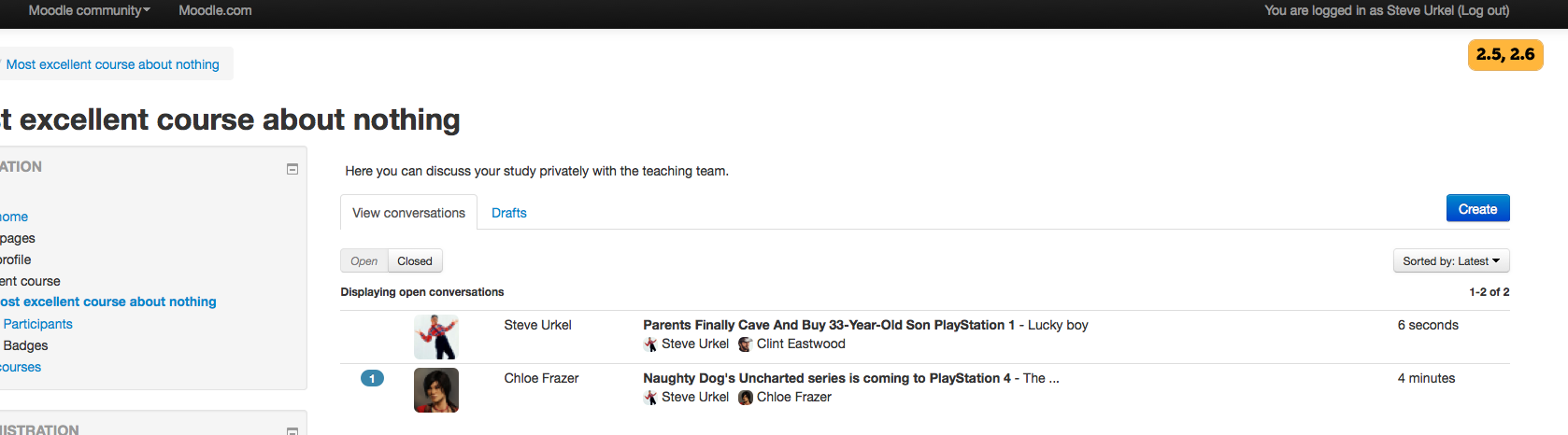
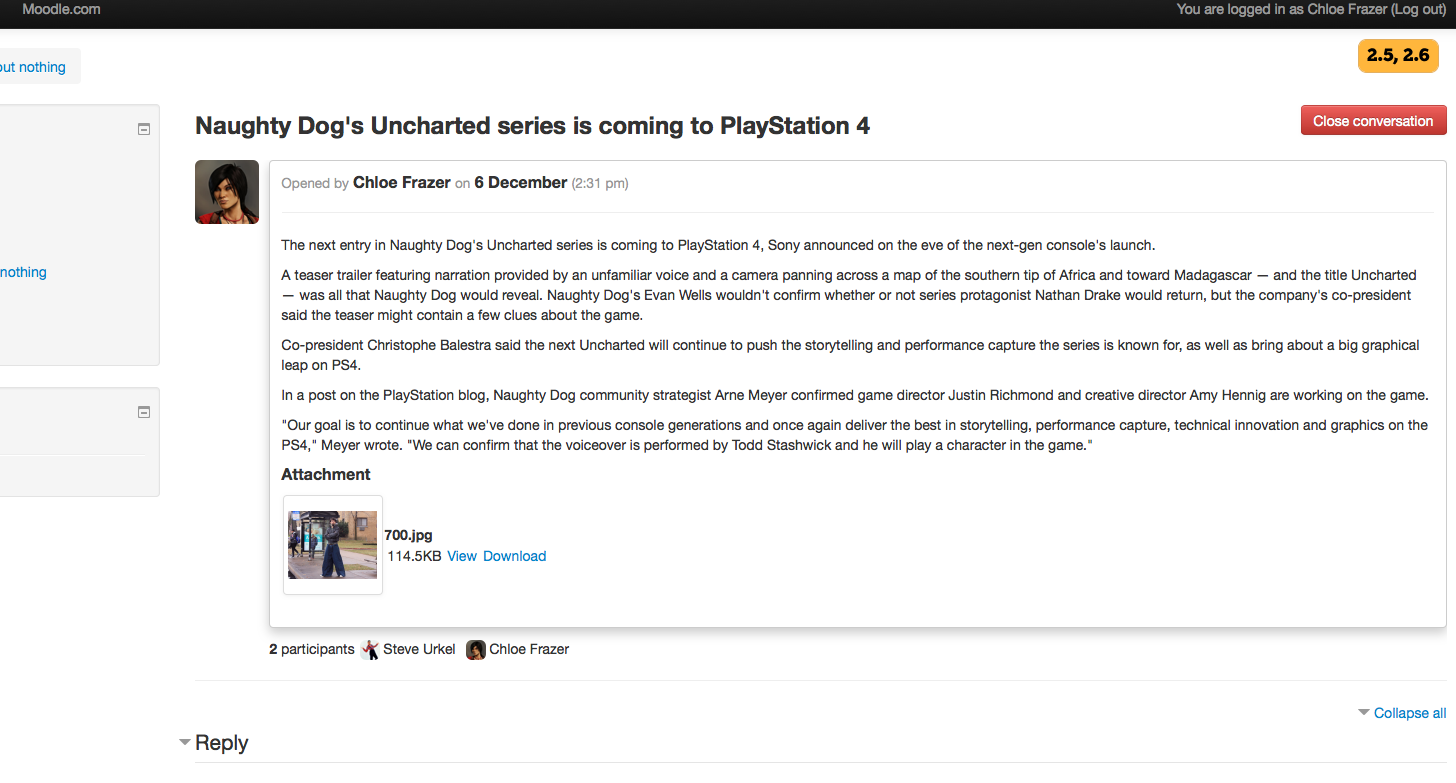
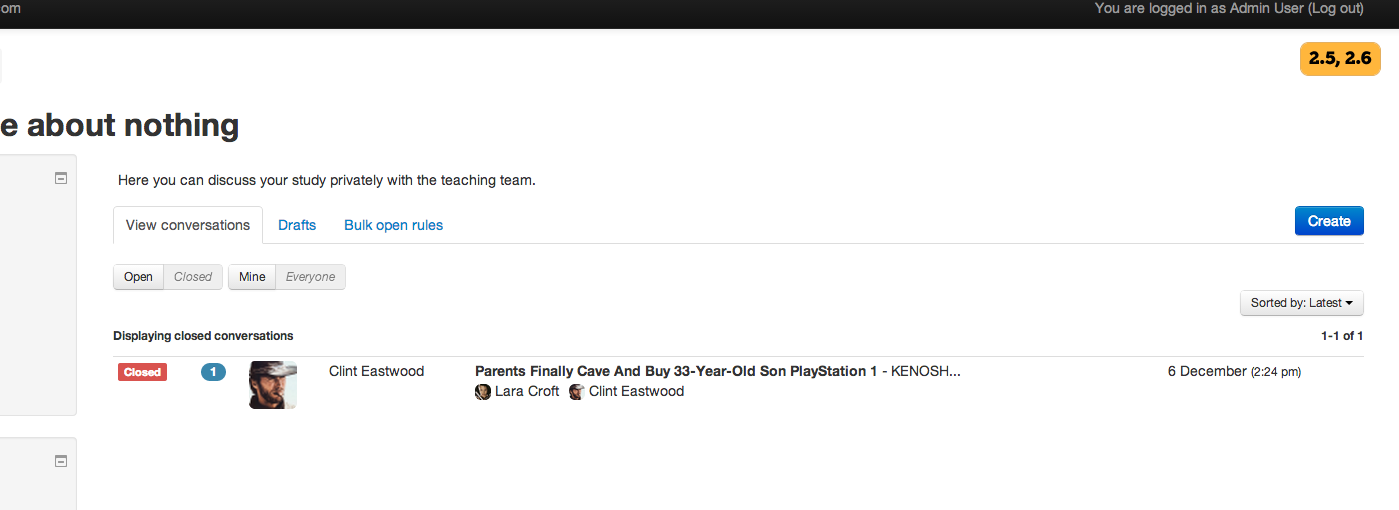
The Dialogue module allows for private conversation between two or more parties.
They can be useful when the teacher wants a place to give private feedback to a
student on their online activity. For example, if a student is participating in
a language forum and made a grammatical error that the teacher wants to point
out without embarrassing the student, a dialogue is the perfect place.
Branches
The git branches here support the following versions.
| Moodle version | Branch |
| ----------------- | ----------- |
| Mooodle 3.5 - 3.8 | MOODLE_35_STABLE |
| Moodle 3.9 - 3.10 | MOODLE_39_STABLE |
| Moodle 3.11 | MOODLE_311_STABLE |
| Moodle 4.0 and higher | MOODLE_400_STABLE |
Contributions
Originally written by Ray Kingdon
Rewritten by Troy Williams - 2013
Contributions by many others
Download
https://moodle.org/plugins/view.php?plugin=mod_dialogue
Installation
Make a folder called dialogue under /mod folder so that you have a /mod/dialogue folder.
Uncompress archive and copy the files into the /mod/dialogue folder.
Go to the /admin page and allow the module to be installed.
Upgrading
Before upgrading it is advisable that you test the upgrade first on a COPY of your production site, to make sure it works as you expect.
Backup important data
There are three areas that should be backed up before any upgrade:
- Moodle dataroot (For example, server/moodledata)
- Moodle database (For example, your Postgres or MySQL database dump)
Version specific
Dialogue 2.8
You can only upgrade from Dialogue 2.5 or later.
Dialogue 2.7, 2.6, 2.5
You can only upgrade from Dialogue 2.0 or later. There are major changes to schema, and you with have to either upgrade dialogues manually from Moodle admin or the cli script cli/upgrade.php.
2025012000 (2025012000)
2025012000
Plugin type: Activities
Frankenstyle component name: mod_dialogue
Version build number: 2025012000
Version release name: 2025012000
Maturity: Stable
Supported Moodle versions: 4.1, 4.2, 4.3, 4.4, 4.5
Repository URL (Git): https://github.com/danmarsden/moodle-mod_dialogue
Repository branch: MOODLE_401_STABLE
Repository tag:
Issue/bug tracker URL: https://github.com/danmarsden/moodle-mod_dialogue/issues
Dialogue module for Moodle (http://moodle.org/)
The Dialogue module allows for private conversation between two or more parties.
They can be useful when the teacher wants a place to give private feedback to a
student on their online activity. For example, if a student is participating in
a language forum and made a grammatical error that the teacher wants to point
out without embarrassing the student, a dialogue is the perfect place.
Branches
The git branches here support the following versions.
| Moodle version | Branch |
| ----------------- | ----------- |
| Mooodle 3.5 - 3.8 | MOODLE_35_STABLE |
| Moodle 3.9 - 3.10 | MOODLE_39_STABLE |
| Moodle 3.11 | MOODLE_311_STABLE |
| Moodle 4.0 and higher | MOODLE_400_STABLE |
Contributions
Originally written by Ray Kingdon
Rewritten by Troy Williams - 2013
Contributions by many others
Download
https://moodle.org/plugins/view.php?plugin=mod_dialogue
Installation
Make a folder called dialogue under /mod folder so that you have a /mod/dialogue folder.
Uncompress archive and copy the files into the /mod/dialogue folder.
Go to the /admin page and allow the module to be installed.
Upgrading
Before upgrading it is advisable that you test the upgrade first on a COPY of your production site, to make sure it works as you expect.
Backup important data
There are three areas that should be backed up before any upgrade:
- Moodle dataroot (For example, server/moodledata)
- Moodle database (For example, your Postgres or MySQL database dump)
Version specific
Dialogue 2.8
You can only upgrade from Dialogue 2.5 or later.
Dialogue 2.7, 2.6, 2.5
You can only upgrade from Dialogue 2.0 or later. There are major changes to schema, and you with have to either upgrade dialogues manually from Moodle admin or the cli script cli/upgrade.php.
2024050200 (2024050200)
2024050200
Plugin type: Activities
Frankenstyle component name: mod_dialogue
Version build number: 2024050200
Version release name: 2024050200
Maturity: Stable
Supported Moodle versions: 4.1, 4.2, 4.3, 4.4
Repository URL (Git): https://github.com/danmarsden/moodle-mod_dialogue
Repository branch: MOODLE_401_STABLE
Repository tag:
Issue/bug tracker URL: https://github.com/danmarsden/moodle-mod_dialogue/issues
Dialogue module for Moodle (http://moodle.org/)
The Dialogue module allows for private conversation between two or more parties.
They can be useful when the teacher wants a place to give private feedback to a
student on their online activity. For example, if a student is participating in
a language forum and made a grammatical error that the teacher wants to point
out without embarrassing the student, a dialogue is the perfect place.
Branches
The git branches here support the following versions.
| Moodle version | Branch |
| ----------------- | ----------- |
| Mooodle 3.5 - 3.8 | MOODLE_35_STABLE |
| Moodle 3.9 - 3.10 | MOODLE_39_STABLE |
| Moodle 3.11 | MOODLE_311_STABLE |
| Moodle 4.0 and higher | MOODLE_400_STABLE |
Contributions
Originally written by Ray Kingdon
Rewritten by Troy Williams - 2013
Contributions by many others
Download
https://moodle.org/plugins/view.php?plugin=mod_dialogue
Installation
Make a folder called dialogue under /mod folder so that you have a /mod/dialogue folder.
Uncompress archive and copy the files into the /mod/dialogue folder.
Go to the /admin page and allow the module to be installed.
Upgrading
Before upgrading it is advisable that you test the upgrade first on a COPY of your production site, to make sure it works as you expect.
Backup important data
There are three areas that should be backed up before any upgrade:
- Moodle dataroot (For example, server/moodledata)
- Moodle database (For example, your Postgres or MySQL database dump)
Version specific
Dialogue 2.8
You can only upgrade from Dialogue 2.5 or later.
Dialogue 2.7, 2.6, 2.5
You can only upgrade from Dialogue 2.0 or later. There are major changes to schema, and you with have to either upgrade dialogues manually from Moodle admin or the cli script cli/upgrade.php.
2024042200 (2024042200)
2024042200
Plugin type: Activities
Frankenstyle component name: mod_dialogue
Version build number: 2024042200
Version release name: 2024042200
Maturity: Stable
Supported Moodle versions: 4.1, 4.2, 4.3, 4.4
Repository URL (Git): https://github.com/danmarsden/moodle-mod_dialogue
Repository branch: MOODLE_401_STABLE
Repository tag:
Issue/bug tracker URL: https://github.com/danmarsden/moodle-mod_dialogue/issues
Dialogue module for Moodle (http://moodle.org/)
The Dialogue module allows for private conversation between two or more parties.
They can be useful when the teacher wants a place to give private feedback to a
student on their online activity. For example, if a student is participating in
a language forum and made a grammatical error that the teacher wants to point
out without embarrassing the student, a dialogue is the perfect place.
Branches
The git branches here support the following versions.
| Moodle version | Branch |
| ----------------- | ----------- |
| Mooodle 3.5 - 3.8 | MOODLE_35_STABLE |
| Moodle 3.9 - 3.10 | MOODLE_39_STABLE |
| Moodle 3.11 | MOODLE_311_STABLE |
| Moodle 4.0 and higher | MOODLE_400_STABLE |
Contributions
Originally written by Ray Kingdon
Rewritten by Troy Williams - 2013
Contributions by many others
Download
https://moodle.org/plugins/view.php?plugin=mod_dialogue
Installation
Make a folder called dialogue under /mod folder so that you have a /mod/dialogue folder.
Uncompress archive and copy the files into the /mod/dialogue folder.
Go to the /admin page and allow the module to be installed.
Upgrading
Before upgrading it is advisable that you test the upgrade first on a COPY of your production site, to make sure it works as you expect.
Backup important data
There are three areas that should be backed up before any upgrade:
- Moodle dataroot (For example, server/moodledata)
- Moodle database (For example, your Postgres or MySQL database dump)
Version specific
Dialogue 2.8
You can only upgrade from Dialogue 2.5 or later.
Dialogue 2.7, 2.6, 2.5
You can only upgrade from Dialogue 2.0 or later. There are major changes to schema, and you with have to either upgrade dialogues manually from Moodle admin or the cli script cli/upgrade.php.
4.2 (2022112400)
4.2
Plugin type: Activities
Frankenstyle component name: mod_dialogue
Version build number: 2022112400
Version release name: 4.2
Maturity: Stable
Supported Moodle versions: 4.0, 4.1
Repository URL (Git): https://github.com/danmarsden/moodle-mod_dialogue
Repository branch: MOODLE_400_STABLE
Repository tag:
Issue/bug tracker URL: https://github.com/danmarsden/moodle-mod_dialogue/issues
Dialogue module for Moodle (http://moodle.org/)
The Dialogue module allows for private conversation between two or more parties.
They can be useful when the teacher wants a place to give private feedback to a
student on their online activity. For example, if a student is participating in
a language forum and made a grammatical error that the teacher wants to point
out without embarrassing the student, a dialogue is the perfect place.
Branches
The git branches here support the following versions.
| Moodle version | Branch |
| ----------------- | ----------- |
| Mooodle 3.5 - 3.8 | MOODLE_35_STABLE |
| Moodle 3.9 - 3.10 | MOODLE_39_STABLE |
| Moodle 3.11 | MOODLE_311_STABLE |
| Moodle 4.0 and higher | MOODLE_400_STABLE |
Contributions
Originally written by Ray Kingdon
Rewritten by Troy Williams - 2013
Contributions by many others
Download
https://moodle.org/plugins/view.php?plugin=mod_dialogue
Installation
Make a folder called dialogue under /mod folder so that you have a /mod/dialogue folder.
Uncompress archive and copy the files into the /mod/dialogue folder.
Go to the /admin page and allow the module to be installed.
Upgrading
Before upgrading it is advisable that you test the upgrade first on a COPY of your production site, to make sure it works as you expect.
Backup important data
There are three areas that should be backed up before any upgrade:
- Moodle dataroot (For example, server/moodledata)
- Moodle database (For example, your Postgres or MySQL database dump)
Version specific
Dialogue 2.8
You can only upgrade from Dialogue 2.5 or later.
Dialogue 2.7, 2.6, 2.5
You can only upgrade from Dialogue 2.0 or later. There are major changes to schema, and you with have to either upgrade dialogues manually from Moodle admin or the cli script cli/upgrade.php.
3.11.3 (2021062902)
3.11.3
Plugin type: Activities
Frankenstyle component name: mod_dialogue
Version build number: 2021062902
Version release name: 3.11.3
Maturity: Stable
Supported Moodle versions: 3.11
Repository URL (Git): https://github.com/danmarsden/moodle-mod_dialogue
Repository branch: MOODLE_311_STABLE
Repository tag:
Issue/bug tracker URL: https://github.com/danmarsden/moodle-mod_dialogue/issues
Dialogue module for Moodle (http://moodle.org/)
The Dialogue module allows for private conversation between two or more parties.
They can be useful when the teacher wants a place to give private feedback to a
student on their online activity. For example, if a student is participating in
a language forum and made a grammatical error that the teacher wants to point
out without embarrassing the student, a dialogue is the perfect place.
Branches
The git branches here support the following versions.
| Moodle version | Branch |
| ----------------- | ----------- |
| Mooodle 3.5 - 3.8 | MOODLE_35_STABLE |
| Moodle 3.9 - 3.10 | MOODLE_39_STABLE |
| Moodle 3.11 | MOODLE_311_STABLE |
| Moodle 4.0 and higher | MOODLE_400_STABLE |
Contributions
Originally written by Ray Kingdon
Rewritten by Troy Williams - 2013
Contributions by many others
Download
https://moodle.org/plugins/view.php?plugin=mod_dialogue
Installation
Make a folder called dialogue under /mod folder so that you have a /mod/dialogue folder.
Uncompress archive and copy the files into the /mod/dialogue folder.
Go to the /admin page and allow the module to be installed.
Upgrading
Before upgrading it is advisable that you test the upgrade first on a COPY of your production site, to make sure it works as you expect.
Backup important data
There are three areas that should be backed up before any upgrade:
- Moodle dataroot (For example, server/moodledata)
- Moodle database (For example, your Postgres or MySQL database dump)
Version specific
Dialogue 2.8
You can only upgrade from Dialogue 2.5 or later.
Dialogue 2.7, 2.6, 2.5
You can only upgrade from Dialogue 2.0 or later. There are major changes to schema, and you with have to either upgrade dialogues manually from Moodle admin or the cli script cli/upgrade.php.
4.1 (2022111500)
4.1
Plugin type: Activities
Frankenstyle component name: mod_dialogue
Version build number: 2022111500
Version release name: 4.1
Maturity: Stable
Supported Moodle versions: 4.0
Repository URL (Git): https://github.com/danmarsden/moodle-mod_dialogue
Repository branch: MOODLE_400_STABLE
Repository tag:
Issue/bug tracker URL: https://github.com/danmarsden/moodle-mod_dialogue/issues
Dialogue module for Moodle (http://moodle.org/)
The Dialogue module allows for private conversation between two or more parties.
They can be useful when the teacher wants a place to give private feedback to a
student on their online activity. For example, if a student is participating in
a language forum and made a grammatical error that the teacher wants to point
out without embarrassing the student, a dialogue is the perfect place.
Branches
The git branches here support the following versions.
| Moodle version | Branch |
| ----------------- | ----------- |
| Mooodle 3.5 - 3.8 | MOODLE_35_STABLE |
| Moodle 3.9 - 3.10 | MOODLE_39_STABLE |
| Moodle 3.11 | MOODLE_311_STABLE |
| Moodle 4.0 and higher | MOODLE_400_STABLE |
Contributions
Originally written by Ray Kingdon
Rewritten by Troy Williams - 2013
Contributions by many others
Download
https://moodle.org/plugins/view.php?plugin=mod_dialogue
Installation
Make a folder called dialogue under /mod folder so that you have a /mod/dialogue folder.
Uncompress archive and copy the files into the /mod/dialogue folder.
Go to the /admin page and allow the module to be installed.
Upgrading
Before upgrading it is advisable that you test the upgrade first on a COPY of your production site, to make sure it works as you expect.
Backup important data
There are three areas that should be backed up before any upgrade:
- Moodle dataroot (For example, server/moodledata)
- Moodle database (For example, your Postgres or MySQL database dump)
Version specific
Dialogue 2.8
You can only upgrade from Dialogue 2.5 or later.
Dialogue 2.7, 2.6, 2.5
You can only upgrade from Dialogue 2.0 or later. There are major changes to schema, and you with have to either upgrade dialogues manually from Moodle admin or the cli script cli/upgrade.php.
4.0 (2022032500)
4.0
Plugin type: Activities
Frankenstyle component name: mod_dialogue
Version build number: 2022032500
Version release name: 4.0
Maturity: Stable
Supported Moodle versions: 4.0
Repository URL (Git): https://github.com/danmarsden/moodle-mod_dialogue
Repository branch: MOODLE_400_STABLE
Repository tag:
Issue/bug tracker URL: https://github.com/danmarsden/moodle-mod_dialogue/issues
Dialogue module for Moodle (http://moodle.org/)
The Dialogue module allows for private conversation between two or more parties.
They can be useful when the teacher wants a place to give private feedback to a
student on their online activity. For example, if a student is participating in
a language forum and made a grammatical error that the teacher wants to point
out without embarrassing the student, a dialogue is the perfect place.
Branches
The git branches here support the following versions.
| Moodle version | Branch |
| ----------------- | ----------- |
| Mooodle 3.5 - 3.8 | MOODLE_35_STABLE |
| Moodle 3.9 - 3.10 | MOODLE_39_STABLE |
| Moodle 3.11 | MOODLE_311_STABLE |
| Moodle 4.0 and higher | MOODLE_400_STABLE |
Contributions
Originally written by Ray Kingdon
Rewritten by Troy Williams - 2013
Contributions by many others
Download
https://moodle.org/plugins/view.php?plugin=mod_dialogue
Installation
Make a folder called dialogue under /mod folder so that you have a /mod/dialogue folder.
Uncompress archive and copy the files into the /mod/dialogue folder.
Go to the /admin page and allow the module to be installed.
Upgrading
Before upgrading it is advisable that you test the upgrade first on a COPY of your production site, to make sure it works as you expect.
Backup important data
There are three areas that should be backed up before any upgrade:
- Moodle dataroot (For example, server/moodledata)
- Moodle database (For example, your Postgres or MySQL database dump)
Version specific
Dialogue 2.8
You can only upgrade from Dialogue 2.5 or later.
Dialogue 2.7, 2.6, 2.5
You can only upgrade from Dialogue 2.0 or later. There are major changes to schema, and you with have to either upgrade dialogues manually from Moodle admin or the cli script cli/upgrade.php.
3.9.1 (2017111303)
3.9.1
Plugin type: Activities
Frankenstyle component name: mod_dialogue
Version build number: 2017111303
Version release name: 3.9.1
Maturity: Stable
Supported Moodle versions: 3.10, 3.9
Repository URL (Git): https://github.com/danmarsden/moodle-mod_dialogue
Repository branch: MOODLE_39_STABLE
Repository tag:
Issue/bug tracker URL: https://github.com/danmarsden/moodle-mod_dialogue/issues
Dialogue module for Moodle (http://moodle.org/)
The Dialogue module allows for private conversation between two or more parties.
They can be useful when the teacher wants a place to give private feedback to a
student on their online activity. For example, if a student is participating in
a language forum and made a grammatical error that the teacher wants to point
out without embarrassing the student, a dialogue is the perfect place.
Branches
The git branches here support the following versions.
| Moodle version | Branch |
| ----------------- | ----------- |
| Mooodle 3.5 - 3.8 | MOODLE_35_STABLE |
| Moodle 3.9 - 3.10 | MOODLE_39_STABLE |
| Moodle 3.11 and higher | MOODLE_311_STABLE |
Contributions
Originally written by Ray Kingdon
Rewritten by Troy Williams - 2013
Contributions by many others
Download
https://moodle.org/plugins/view.php?plugin=mod_dialogue
Installation
Make a folder called dialogue under /mod folder so that you have a /mod/dialogue folder.
Uncompress archive and copy the files into the /mod/dialogue folder.
Go to the /admin page and allow the module to be installed.
Upgrading
Before upgrading it is advisable that you test the upgrade first on a COPY of your production site, to make sure it works as you expect.
Backup important data
There are three areas that should be backed up before any upgrade:
- Moodle dataroot (For example, server/moodledata)
- Moodle database (For example, your Postgres or MySQL database dump)
Version specific
Dialogue 2.8
You can only upgrade from Dialogue 2.5 or later.
Dialogue 2.7, 2.6, 2.5
You can only upgrade from Dialogue 2.0 or later. There are major changes to schema, and you with have to either upgrade dialogues manually from Moodle admin or the cli script cli/upgrade.php.
3.11.1 (2021062900)
3.11.1
Plugin type: Activities
Frankenstyle component name: mod_dialogue
Version build number: 2021062900
Version release name: 3.11.1
Maturity: Stable
Supported Moodle versions: 3.11
Repository URL (Git): https://github.com/danmarsden/moodle-mod_dialogue
Repository branch: MOODLE_311_STABLE
Repository tag:
Issue/bug tracker URL: https://github.com/danmarsden/moodle-mod_dialogue/issues
Dialogue module for Moodle (http://moodle.org/)
The Dialogue module allows for private conversation between two or more parties.
They can be useful when the teacher wants a place to give private feedback to a
student on their online activity. For example, if a student is participating in
a language forum and made a grammatical error that the teacher wants to point
out without embarrassing the student, a dialogue is the perfect place.
Branches
The git branches here support the following versions.
| Moodle version | Branch |
| ----------------- | ----------- |
| Mooodle 3.5 - 3.8 | MOODLE_35_STABLE |
| Moodle 3.9 - 3.10 | MOODLE_39_STABLE |
| Moodle 3.11 and higher | MOODLE_311_STABLE |
Contributions
Originally written by Ray Kingdon
Rewritten by Troy Williams - 2013
Contributions by many others
Download
https://moodle.org/plugins/view.php?plugin=mod_dialogue
Installation
Make a folder called dialogue under /mod folder so that you have a /mod/dialogue folder.
Uncompress archive and copy the files into the /mod/dialogue folder.
Go to the /admin page and allow the module to be installed.
Upgrading
Before upgrading it is advisable that you test the upgrade first on a COPY of your production site, to make sure it works as you expect.
Backup important data
There are three areas that should be backed up before any upgrade:
- Moodle dataroot (For example, server/moodledata)
- Moodle database (For example, your Postgres or MySQL database dump)
Version specific
Dialogue 2.8
You can only upgrade from Dialogue 2.5 or later.
Dialogue 2.7, 2.6, 2.5
You can only upgrade from Dialogue 2.0 or later. There are major changes to schema, and you with have to either upgrade dialogues manually from Moodle admin or the cli script cli/upgrade.php.
3.9 (2017111302)
3.9
Plugin type: Activities
Frankenstyle component name: mod_dialogue
Version build number: 2017111302
Version release name: 3.9
Maturity: Stable
Supported Moodle versions: 3.10, 3.9
Repository URL (Git): https://github.com/danmarsden/moodle-mod_dialogue
Repository branch: MOODLE_39_STABLE
Repository tag:
Issue/bug tracker URL: https://github.com/danmarsden/moodle-mod_dialogue/issues
Dialogue module for Moodle (http://moodle.org/)
The Dialogue module allows for private conversation between two or more parties.
They can be useful when the teacher wants a place to give private feedback to a
student on their online activity. For example, if a student is participating in
a language forum and made a grammatical error that the teacher wants to point
out without embarrassing the student, a dialogue is the perfect place.
Branches
The git branches here support the following versions.
| Moodle version | Branch |
| ----------------- | ----------- |
| Mooodle 3.5 - 3.8 | MOODLE_35_STABLE |
| Moodle 3.9 - 3.10 | MOODLE_39_STABLE |
| Moodle 3.11 and higher | MOODLE_311_STABLE |
Contributions
Originally written by Ray Kingdon
Rewritten by Troy Williams - 2013
Contributions by many others
Download
https://moodle.org/plugins/view.php?plugin=mod_dialogue
Installation
Make a folder called dialogue under /mod folder so that you have a /mod/dialogue folder.
Uncompress archive and copy the files into the /mod/dialogue folder.
Go to the /admin page and allow the module to be installed.
Upgrading
Before upgrading it is advisable that you test the upgrade first on a COPY of your production site, to make sure it works as you expect.
Backup important data
There are three areas that should be backed up before any upgrade:
- Moodle dataroot (For example, server/moodledata)
- Moodle database (For example, your Postgres or MySQL database dump)
Version specific
Dialogue 2.8
You can only upgrade from Dialogue 2.5 or later.
Dialogue 2.7, 2.6, 2.5
You can only upgrade from Dialogue 2.0 or later. There are major changes to schema, and you with have to either upgrade dialogues manually from Moodle admin or the cli script cli/upgrade.php.
3.11 (2021062301)
3.11
Plugin type: Activities
Frankenstyle component name: mod_dialogue
Version build number: 2021062301
Version release name: 3.11
Maturity: Stable
Supported Moodle versions: 3.11
Repository URL (Git): https://github.com/danmarsden/moodle-mod_dialogue
Repository branch: MOODLE_311_STABLE
Repository tag:
Issue/bug tracker URL: https://github.com/danmarsden/moodle-mod_dialogue/issues
Dialogue module for Moodle (http://moodle.org/)
The Dialogue module allows for private conversation between two or more parties.
They can be useful when the teacher wants a place to give private feedback to a
student on their online activity. For example, if a student is participating in
a language forum and made a grammatical error that the teacher wants to point
out without embarrassing the student, a dialogue is the perfect place.
Branches
The git branches here support the following versions.
| Moodle version | Branch |
| ----------------- | ----------- |
| Mooodle 3.5 - 3.8 | MOODLE_35_STABLE |
| Moodle 3.9 - 3.10 | MOODLE_39_STABLE |
| Moodle 3.11 and higher | MOODLE_311_STABLE |
Contributions
Originally written by Ray Kingdon
Rewritten by Troy Williams - 2013
Contributions by many others
Download
https://moodle.org/plugins/view.php?plugin=mod_dialogue
Installation
Make a folder called dialogue under /mod folder so that you have a /mod/dialogue folder.
Uncompress archive and copy the files into the /mod/dialogue folder.
Go to the /admin page and allow the module to be installed.
Upgrading
Before upgrading it is advisable that you test the upgrade first on a COPY of your production site, to make sure it works as you expect.
Backup important data
There are three areas that should be backed up before any upgrade:
- Moodle dataroot (For example, server/moodledata)
- Moodle database (For example, your Postgres or MySQL database dump)
Version specific
Dialogue 2.8
You can only upgrade from Dialogue 2.5 or later.
Dialogue 2.7, 2.6, 2.5
You can only upgrade from Dialogue 2.0 or later. There are major changes to schema, and you with have to either upgrade dialogues manually from Moodle admin or the cli script cli/upgrade.php.
3.4 (2017111300)
3.4
Plugin type: Activities
Frankenstyle component name: mod_dialogue
Version build number: 2017111300
Version release name: 3.4
Maturity: Stable
Supported Moodle versions: 3.4
Repository URL (Git): https://github.com/troywilliams/moodle-mod_dialogue
Repository branch:
Repository tag: v3.4.0
Issue/bug tracker URL: https://github.com/danmarsden/moodle-mod_dialogue/issues
Dialogue module for Moodle (http://moodle.org/)
The Dialogue module allows for private conversation between two or more parties.
They can be useful when the teacher wants a place to give private feedback to a
student on their online activity. For example, if a student is participating in
a language forum and made a grammatical error that the teacher wants to point
out without embarrassing the student, a dialogue is the perfect place.
This program is free software; you can redistribute it and/or modify
it under the terms of the GNU General Public License as published by
the Free Software Foundation; either version 3 of the License, or
(at your option) any later version.
This program is distributed in the hope that it will be useful,
but WITHOUT ANY WARRANTY; without even the implied warranty of
MERCHANTABILITY or FITNESS FOR A PARTICULAR PURPOSE. See the
GNU General Public License for more details: http://www.gnu.org/copyleft/gpl.html
Contributions
Originally written by Ray Kingdon
Rewritten by Troy Williams - 2013
Contributions by many others
Download
https://moodle.org/plugins/view.php?plugin=mod_dialogue
Installation
Make a folder called dialogue under /mod folder so that you have a /mod/dialogue folder.
Uncompress archive and copy the files into the /mod/dialogue folder.
Go to the /admin page and allow the module to be installed.
Upgrading
Before upgrading it is advisable that you test the upgrade first on a COPY of your production site, to make sure it works as you expect.
Backup important data
There are three areas that should be backed up before any upgrade:
- Moodle dataroot (For example, server/moodledata)
- Moodle database (For example, your Postgres or MySQL database dump)
Version specific
Dialogue 2.8
You can only upgrade from Dialogue 2.5 or later.
Dialogue 2.7, 2.6, 2.5
You can only upgrade from Dialogue 2.0 or later. There are major changes to schema, and you with have to either upgrade dialogues manually from Moodle admin or the cli script cli/upgrade.php.
3.3.0 (2017051500)
3.3.0
Plugin type: Activities
Frankenstyle component name: mod_dialogue
Version build number: 2017051500
Version release name: 3.3.0
Maturity: Stable
Supported Moodle versions: 3.3
Repository URL (Git): https://github.com/troywilliams/moodle-mod_dialogue
Repository branch:
Repository tag: v3.3.0
Issue/bug tracker URL: https://github.com/danmarsden/moodle-mod_dialogue/issues
Dialogue module for Moodle (http://moodle.org/)
The Dialogue module allows for private conversation between two or more parties.
They can be useful when the teacher wants a place to give private feedback to a
student on their online activity. For example, if a student is participating in
a language forum and made a grammatical error that the teacher wants to point
out without embarrassing the student, a dialogue is the perfect place.
This program is free software; you can redistribute it and/or modify
it under the terms of the GNU General Public License as published by
the Free Software Foundation; either version 3 of the License, or
(at your option) any later version.
This program is distributed in the hope that it will be useful,
but WITHOUT ANY WARRANTY; without even the implied warranty of
MERCHANTABILITY or FITNESS FOR A PARTICULAR PURPOSE. See the
GNU General Public License for more details: http://www.gnu.org/copyleft/gpl.html
Contributions
Originally written by Ray Kingdon
Rewritten by Troy Williams - 2013
Contributions by many others
Download
https://moodle.org/plugins/view.php?plugin=mod_dialogue
Installation
Make a folder called dialogue under /mod folder so that you have a /mod/dialogue folder.
Uncompress archive and copy the files into the /mod/dialogue folder.
Go to the /admin page and allow the module to be installed.
Upgrading
Before upgrading it is advisable that you test the upgrade first on a COPY of your production site, to make sure it works as you expect.
Backup important data
There are three areas that should be backed up before any upgrade:
- Moodle dataroot (For example, server/moodledata)
- Moodle database (For example, your Postgres or MySQL database dump)
Version specific
Dialogue 2.8
You can only upgrade from Dialogue 2.5 or later.
Dialogue 2.7, 2.6, 2.5
You can only upgrade from Dialogue 2.0 or later. There are major changes to schema, and you with have to either upgrade dialogues manually from Moodle admin or the cli script cli/upgrade.php.
3.1 (2016111600)
3.1
Plugin type: Activities
Frankenstyle component name: mod_dialogue
Version build number: 2016111600
Version release name: 3.1
Maturity: Stable
Supported Moodle versions: 3.1
Repository URL (Git): https://github.com/troywilliams/moodle-mod_dialogue
Repository branch: MOODLE_31_STABLE
Repository tag:
Issue/bug tracker URL: https://github.com/danmarsden/moodle-mod_dialogue/issues
Dialogue module for Moodle (http://moodle.org/)
The Dialogue module allows for private conversation between two or more parties.
They can be useful when the teacher wants a place to give private feedback to a
student on their online activity. For example, if a student is participating in
a language forum and made a grammatical error that the teacher wants to point
out without embarrassing the student, a dialogue is the perfect place.
This program is free software; you can redistribute it and/or modify
it under the terms of the GNU General Public License as published by
the Free Software Foundation; either version 3 of the License, or
(at your option) any later version.
This program is distributed in the hope that it will be useful,
but WITHOUT ANY WARRANTY; without even the implied warranty of
MERCHANTABILITY or FITNESS FOR A PARTICULAR PURPOSE. See the
GNU General Public License for more details: http://www.gnu.org/copyleft/gpl.html
Contributions
Originally written by Ray Kingdon
Rewritten by Troy Williams - 2013
Contributions by many others
Download
https://moodle.org/plugins/view.php?plugin=mod_dialogue
Installation
Make a folder called dialogue under /mod folder so that you have a /mod/dialogue folder.
Uncompress archive and copy the files into the /mod/dialogue folder.
Go to the /admin page and allow the module to be installed.
Upgrading
Before upgrading it is advisable that you test the upgrade first on a COPY of your production site, to make sure it works as you expect.
Backup important data
There are three areas that should be backed up before any upgrade:
- Moodle dataroot (For example, server/moodledata)
- Moodle database (For example, your Postgres or MySQL database dump)
Version specific
Dialogue 2.8
You can only upgrade from Dialogue 2.5 or later.
Dialogue 2.7, 2.6, 2.5
You can only upgrade from Dialogue 2.0 or later. There are major changes to schema, and you with have to either upgrade dialogues manually from Moodle admin or the cli script cli/upgrade.php.