
CodeRunner
Versions
Current version
5.9.2 (2026051000)
5.9.2
Plugin type: Question types
Frankenstyle component name: qtype_coderunner
Version build number: 2026051000
Version release name: 5.9.2
Maturity: Stable
Supported Moodle versions: 4.3, 4.4, 4.5, 5.0, 5.1, 5.2
Repository URL (Git): https://github.com/trampgeek/moodle-qtype_coderunner
Repository branch:
Repository tag: v5.9.2
Issue/bug tracker URL: https://github.com/trampgeek/moodle-qtype_coderunner/issues
CodeRunner
Version: 5.9.2 May 10, 2026. Requires MOODLE V4.3 or later + PHP >=8.1. Earlier versions
of Moodle must use CodeRunner V4.
CodeRunner is a Moodle question type that allows teachers to run a program in
order to grade a student's answer. By far the most common use of CodeRunner is
in programming courses where students are asked to write program code to some
specification and that code is then graded by running it in a series of tests.
CodeRunner questions have also been used in other areas of computer science and
engineering to grade questions in which a program must be used to assess correctness.
Authors: Richard Lobb, University of Canterbury, New Zealand.
Paul McKeown, University of Canterbury, New Zealand.
Tim Hunt, The Open University, UK.
For full documentation, see https://trampgeek.github.io/moodle-qtype_coderunner/
NOTE: A few sample quizzes containing example CodeRunner questions
are available at coderunner.org.nz. There's also
a forum there, where you
can post CodeRunner questions, such as
requests for help if things go wrong, or are looking for ideas on how to write some
unusual question type.
Changes since V5.8.0
Fix issues #288, #289 to make CodeRunner Moodle 5.2 compatible (but also need new version of adaptive_adapted_for_coderunner behaviour).
Management scripts such as bulk tester, question browser etc now accessed via a new script <coderunner-base>/management.php.
New managements scripts added:
- Integrity check question bank and delete all old question versions, keeping only the most recent or any other in-use versions.
- Estimate time on task by each student over a given period of time or for a given activity.
- Plot student mark trajectory for a selected student, i.e. a plot of mark as a function of time-on-task for a given quiz. Useful only for quizzes with adaptive behaviour.
Bug fix: updating CodeRunner resulted in (hidden) orphaned system level prototypes, which should have been deleted
Some styling changes, e.g. to tables, for better Moodle 5.1 compatibility.
Bug fix: QUIZ parameter was not being passed to prototype when its template parameters were evaluated.
Bug fix: support files from one question could (rarely) be copied into another question if both were simultaneously open for edit and save-and-continue was licked on both in sequence.
Update GitHub CI testing to include PHP8.4 and Moodle 5.2.
Twig updated to version 3.19.0
Bug fix: Ace editor window resizing was failing when window width was reduced.
5.8.0 (2025101200)
5.8.0
Plugin type: Question types
Frankenstyle component name: qtype_coderunner
Version build number: 2025101200
Version release name: 5.8.0
Maturity: Stable
Supported Moodle versions: 4.3, 4.4, 4.5, 5.0, 5.1
Repository URL (Git): https://github.com/trampgeek/moodle-qtype_coderunner
Repository branch:
Repository tag: v5.8.0
Issue/bug tracker URL: https://github.com/trampgeek/moodle-qtype_coderunner/issues
CodeRunner
Version: 5.8.0 October 31, 2025. Requires MOODLE V4.3 or later + PHP >=8.1. Earlier versions
of Moodle must use CodeRunner V4.
CodeRunner is a Moodle question type that allows teachers to run a program in
order to grade a student's answer. By far the most common use of CodeRunner is
in programming courses where students are asked to write program code to some
specification and that code is then graded by running it in a series of tests.
CodeRunner questions have also been used in other areas of computer science and
engineering to grade questions in which a program must be used to assess correctness.
Authors: Richard Lobb, University of Canterbury, New Zealand.
Paul McKeown, University of Canterbury, New Zealand.
Tim Hunt, The Open University, UK.
For full documentation, see https://trampgeek.github.io/moodle-qtype_coderunner/
NOTE: A few sample quizzes containing example CodeRunner questions
are available at coderunner.org.nz. There's also
a forum there, where you
can post CodeRunner questions, such as
requests for help if things go wrong, or are looking for ideas on how to write some
unusual question type.
Changes since V5.7.2+
- New question browser script moodlehome/question/type/coderunner/questionbrowserindex.php allows easy browsing
of all CodeRunner questions in a given course or context, including text or regex search on any of the
question fields and instant display of question text, answer and quiz usage. - Add a QUIZ variable to the Twig context with fields QUIZ.name and QUIZ.tags. Allows customising the behaviour
of CodeRunner questions according to the quiz in which they're running. - Extend TwigAll to include penalty regime.
- Improve resilience of combinator template grader code to bad responses from author's template.
- Improvements to test suite (issues #266, #267 and #276)
- Bug fix: when using equality grader, trailing space characters were correctly being removed from
all lines but the spec said all whitespace characters were being removed. That wasn't true - characters
like tabs and return characters weren't removed - Move document to mkdocs format with much improved browsing at https://trampgeek.github.io/moodle-qtype_coderunner/
- Various code tweaks and polishing.
5.7.2+ (2025081500)
5.7.2+
Plugin type: Question types
Frankenstyle component name: qtype_coderunner
Version build number: 2025081500
Version release name: 5.7.2+
Maturity: Stable
Supported Moodle versions: 4.3, 4.4, 4.5, 5.0
Repository URL (Git): https://github.com/trampgeek/moodle-qtype_coderunner
Repository branch:
Repository tag: v5.7.2+
Issue/bug tracker URL: https://github.com/trampgeek/moodle-qtype_coderunner/issues
#CodeRunner
Version: 5.7.1+ May 26, 2025. Requires MOODLE V4.3 or later + PHP >=8.1. Earlier versions of Moodle must use CodeRunner V4.
Authors: Richard Lobb, University of Canterbury, New Zealand. Tim Hunt, The Open University, UK.
For full documentation of this plugin, see here.
NOTE: A few sample quizzes containing example CodeRunner questions are available at coderunner.org.nz. There's also a forum there, where you can post CodeRunner questions, such as requests for help if things go wrong, or are looking for ideas on how to write some unusual question type.
Release Notes Version 5.7.2+ August 19, 2025.
- Updates to grade caching.
- Scheduled task purges old cache entries automatically (only if using FileStore)
- Manual grade-cache cleaner available (script cachepurgeindex.php)
- Fix for issue #261 Unsupported modification of PAGE->context
- Extended bulk-tester capabilites
- Works with question banks in Moodle 5
- Can run multiple tests for each question (helps with randomised questions)
- Can optionally disable grade cache
- Improved output including timings
- Fix for issue #254 The presence of a CodeRunner question in the course's question bank causes the duplication of quizzes to fail.
- Fix for issues #246/#258 Cache cleaner task failed because of use of redis
- Fix for issue #260 When you navigate to the ace editor with keyboard using tab,
the screen reader does not state that you are on the editor clearly.
5.7.1+ (2025052100)
5.7.1+
Plugin type: Question types
Frankenstyle component name: qtype_coderunner
Version build number: 2025052100
Version release name: 5.7.1+
Maturity: Stable
Supported Moodle versions: 4.3, 4.4, 4.5, 5.0
Repository URL (Git): https://github.com/trampgeek/moodle-qtype_coderunner
Repository branch:
Repository tag: v5.7.1+
Issue/bug tracker URL: https://github.com/trampgeek/moodle-qtype_coderunner/issues
#CodeRunner
Version: 5.7.1+ May 26, 2025. Requires MOODLE V4.3 or later + PHP >=8.1. Earlier versions of Moodle must use CodeRunner V4.
Authors: Richard Lobb, University of Canterbury, New Zealand. Tim Hunt, The Open University, UK.
For full documentation of this plugin, see here.
NOTE: A few sample quizzes containing example CodeRunner questions are available at coderunner.org.nz. There's also a forum there, where you can post CodeRunner questions, such as requests for help if things go wrong, or are looking for ideas on how to write some unusual question type.
Release Notes Version 5.7.1+ May 26, 2025.
This update is mainly relevant only to people attempting to use CodeRunner on Moodle 5.0. However, the caveat from the previous release notes (see below) still applies: WARNING: Moodle 5.0 functionality should be regarded as alpha-level only. It has not been tested in a full production environment.
New feature
- The Unsupported question types folder now includes "C program with scanf echoing of stdin plus scratchpad."
Bug fixes:
- With Moodle 5.0, questions using prototypes that were not in the Front Page question
bank were working for teachers but not students. - The layout of Scratchpad expand/collapse button for Scratchpad UI was broken in Moodle 5.0.
- The Help icon for Scratchpad UI was not working in Moodle 5.0.
- The test suite was reporting errors in the signature of the onnotsuccessfultest function.
#Release Notes Version 5.7.0 May 5, 2025.
##New features
- #249 The plugin now implements the API changes made necessary by the fix for MDL-83541. Without this update to CodeRunner, any site that has installed the MDL-83541 fix (e.g. Moodle 4.5.3+) will have found that all CodeRunner questions in the question bank were duplicated whenever any quiz was duplicated or a course was restored onto the same server on which the original copy still resided.
- Functionality to support Moodle 5.0 added. WARNING: Moodle 5.0 functionality should be regarded as alpha-level only. It has not been tested in a full production environment.
- Twig has been updated to the latest version.
- Various enhancements to the bulk tester, including the ability to purge the grade cache prior to testing.
- Various enhancements to the Jobe grade cache functionality.
- Updates and additions to the Unsupported question types.
- The Scratchpad Run button has been made much more distinctive to reduce the likelikhood of confusing it with the Check button.
##Bug fixes
- The copy-got-to-expected buttons displayed on question validation failures were either not available at all when using combinator template graders or did not work with them when the ordering of test cases was changed from the default.
- The downloadquizattempts script was failing on systems with pgsql.
- #244 Some test code was failing due to the misnaming of \Exception as just Exception in cache_purger.php.
5.7.0 (2025050400)
5.7.0
Plugin type: Question types
Frankenstyle component name: qtype_coderunner
Version build number: 2025050400
Version release name: 5.7.0
Maturity: Stable
Supported Moodle versions: 4.3, 4.4, 4.5, 5.0
Repository URL (Git): https://github.com/trampgeek/moodle-qtype_coderunner
Repository branch:
Repository tag: v5.7.0
Issue/bug tracker URL: https://github.com/trampgeek/moodle-qtype_coderunner/issues
CodeRunner
Version: 5.7.0 May 06, 2025. Requires MOODLE V4.3 or later + PHP >=8.1. Earlier versions
of Moodle must use CodeRunner V4.
Authors: Richard Lobb, University of Canterbury, New Zealand. Tim Hunt, The Open University, UK.
For full documentation of this plugin, see here.
NOTE: A few sample quizzes containing example CodeRunner questions
are available at coderunner.org.nz. There's also
a forum there, where you
can post CodeRunner questions, such as
requests for help if things go wrong, or are looking for ideas on how to write some
unusual question type.
Release Notes Version 5.7.0 May 2025.
New features
- #249 The plugin now implements the API changes made necessary by the fix for MDL-83541. Without this update to CodeRunner, any site that has installed the MDL-83541 fix (e.g. Moodle 4.5.3+) will have found that all CodeRunner questions in the question bank were duplicated whenever any quiz was duplicated or a course was restored onto the same server on which the original copy still resided.
- Functionality to support Moodle 5.0 added. WARNING: Moodle 5.0 functionality should be regarded as alpha-level only. It has not been tested in a full production environment.
- Twig has been updated to the latest version.
- Various enhancements to the bulk tester, including the ability to purge the grade cache prior to testing.
- Various enhancements to the Jobe grade cache functionality.
- Updates and additions to the Unsupported question types.
- The Scratchpad Run button has been made much more distinctive to reduce the likelikhood of confusing it with the Check button.
Bug fixes
- The copy-got-to-expected buttons displayed on question validation failures were either not available at all when using combinator template graders or did not work with them when the ordering of test cases was changed from the default.
- The downloadquizattempts script was failing on systems with pgsql.
- #244 Some test code was failing due to the misnaming of \Exception as just Exception in cache_purger.php.
5.5.0 (2025010200)
5.5.0
Plugin type: Question types
Frankenstyle component name: qtype_coderunner
Version build number: 2025010200
Version release name: 5.5.0
Maturity: Stable
Supported Moodle versions: 4.0, 4.1, 4.2, 4.3, 4.4, 4.5
Repository URL (Git): https://github.com/trampgeek/moodle-qtype_coderunner
Repository branch:
Repository tag: v5.5.0
Issue/bug tracker URL: https://github.com/trampgeek/moodle-qtype_coderunner/issues
CodeRunner
Version: 5.5.0+ January , 2025. Requires MOODLE V4.0 or later. Earlier versions
of Moodle must use CodeRunner V4.
Authors: Richard Lobb, University of Canterbury, New Zealand. Tim Hunt, The Open University, UK.
For full documentation of this plugin, see here.
NOTE: A few sample quizzes containing example CodeRunner questions are available at coderunner.org.nz.. There's also a forum there, where you can post CodeRunner questions, such as requests for help if things go wrong, or are looking for ideas on how to write some unusual question type.
Release Notes
24 January 2025 5.5.0+
New features
- Added a folder of unsupported question types.
5 January 2025 5.5.0
New features
- Question authoring form styling changed to match other question types.
Bug fixes
- Combinator grader templates using the html_wrapper were causing deserialization errors with Moodle systems using pgsql.
- Use of a sandbox-language preprocessor (i.e. not Twig) was not respecting any specific sandbox parameters set within the question.
- Some language strings relating to the experimental CodeRunner runs-cache were missing.
- Bulk tester was displaying count of CodeRunner questions including all versions, not just the counts of the final versions.
- Bulk tester was giving "session mutated after closing" PHP warnings in Moodle 4.5.
5.4.1 (2024090500)
5.4.1
Plugin type: Question types
Frankenstyle component name: qtype_coderunner
Version build number: 2024090500
Version release name: 5.4.1
Maturity: Stable
Supported Moodle versions: 4.0, 4.1, 4.2, 4.3, 4.4
Repository URL (Git): https://github.com/trampgeek/moodle-qtype_coderunner
Repository branch:
Repository tag: v5.4.1
Issue/bug tracker URL: https://github.com/trampgeek/moodle-qtype_coderunner/issues
CodeRunner
Version: 5.4.1 14 September 2024. Requires MOODLE V4.0 or later. Earlier versions
of Moodle must use CodeRunner V4.
Authors: Richard Lobb, University of Canterbury, New Zealand.
Tim Hunt, The Open University, UK.
For full documentation of this plugin, see here.
NOTE: A few sample quizzes containing example CodeRunner questions
are available at coderunner.org.nz. There's also
a forum there, where you
can post CodeRunner questions, such as
requests for help if things go wrong, or are looking for ideas on how to write some
unusual question type.
Release notes
14 September 2024. 5.4.1
- New features:
- a Jobe-run cache stores run results, which dramatically
speeds up regrading of quizzes. Experimental, so off by default but has been
used extensively on our production server. One caution: cache can consume
a lot of disk space and clearing the cache on system upgrades can be slow. - Support for Jobe server load balancing using cookies added (#206).
- Category and course shortname have been added to the bulk test report (#212).
- Full screen mode for Ace editor.
- a Jobe-run cache stores run results, which dramatically
- Various code tidying and Behat testing improvements.
- Bug fixes:
- The prototypeextra field was missing from the Twig QUESTION variable (#211).
- PHP was issuing warnings "undefined property behat_prefix" (#208).
- The getallattempts script that was suppressing -precheck, -submit etc rows.
- Testcases marked as Precheck Only were not being validating on save.
- With combinator grader, all test cases were being displayed when a question didn't validate, rather than just the failed ones.
11 February 2024. 5.3.0
- Significant refactoring to improve PHP8.2 compatibility, particularly with regard to dynamic attributes (thanks Anupama).
- Improve code to identify Java main class (thanks zupanibla).
- Bug fix: ace-gapfiller UI did not allow non-ASCII alphabetic characters (e.g. Maori macrons)
20 December 2023. 5.2.4
- Extensive code tidying to conform to latest Moodle PHP coding standards.
- Issue #145: some testcases didn't check if the sandbox were available before running the
test, causing test failure. - Bug fix: locked_cell functionality in table UI was not working (regression mid-year)
- Improve error reporting when Jobe request fails.
- Issue #182: LaTeX embedded in question feedback was not being processed by MathJax
- Extended the copy-got-to-expected functionality when a saved question failed validation
to include combinator graders under certain specified conditions. - Criterion to delete prototypes from system context tighten to delete only prototypes with
the string BUILT_IN in their names. - Issue #181: Scratchpad UI errors were displayed as JavaScript alerts. Changed to show inline.
- Issue #179: Multilanguage question type extended to handle Perl, Ruby, C# and Golang
- Improve twig error messages
- Strip white space from node and edge labels in GraphUI
5.2.1 (2023090800)
5.2.1
Plugin type: Question types
Frankenstyle component name: qtype_coderunner
Version build number: 2023090800
Version release name: 5.2.1
Maturity: Stable
Supported Moodle versions: 4.0, 4.1, 4.2, 4.3
Repository URL (Git): https://github.com/trampgeek/moodle-qtype_coderunner
Repository branch:
Repository tag: v5.2.2
Issue/bug tracker URL: https://github.com/trampgeek/moodle-qtype_coderunner/issues
CodeRunner
Version: 5.2.1, 18 September 2023. Requires MOODLE V4.0 or later. Earlier versions
of Moodle must use CodeRunner V4.
Authors: Richard Lobb, University of Canterbury, New Zealand.
Tim Hunt, The Open University, UK.
For full documentation of this plugin, see here.
NOTE: A few sample quizzes containing example CodeRunner questions
are available at coderunner.org.nz. There's also
a forum there, where you
can post CodeRunner questions, such as
requests for help if things go wrong, or are looking for ideas on how to write some
unusual question type.
Updates in Version 5.2.1
- Major change: add scratchpad UI (thanks James Napier). This provides students
with a mini IDE within each question, where they can test their code without
making actual Moodle submissions. See here for examples. Requires the coderunner web service to be
enabled. - Added several UI parameters to Ace editor: auto_switch_light_dark, font_size,
import_from_scratchpad, live_autocompletion, theme. - Better error messages for missing/duplicate prototypes.
- Changes to better support the ace-inline filter (e.g. language checking
to improve error message if question author has a typo). - Make Ace user changes to theme (via Ctrl + ',') sticky.
- Reduce sync interval time in Ace UI from 5 secs to 2 secs to reduce data loss
if a quiz times out. Also, reduce default timeout for all UIs from 10s to 5s. - Use HTML input elements in the Table UI rather than textareas when there is
only 1 row per cell to reduce confusion when student hits Enter. - Set specific column widths for SQL questions for compatibility with latest
sqlite3. - Change multilanguage question type so that answer code cannot be entered
until a language has been selected but the user can step through
the question (unanswered) without being required to select a language. - Prevent grading of an unchanged preloaded answer.
- Add instructorhtml functionality to combinator grader so that a teacher can
see HTML feedback that's hidden from student. - Changed implementation of per-user rate throttling for web-service traffic
to reduce the risk of log-manager SQL queries causing hangs (if that was
indeed happening - problem was never fully diagnosed). - Issue a specific "URL blocked" error message when Moodle HTML security
is blocking outgoing HTTP requests. - Some changes for PHP 8.1/8.2 compatibility.
- Various code tidying.
- Bug fix: the UI parameters were not being loaded correctly for non-Ace UIs
when the question type was first selected. - Bug fix: the UI parameters from the prototype should be ignored if
the UI has changed from that of the prototype. - Bug fix: sample answer attachments were not being included when previewing
or bulk testing.
5.1.1 (2022110900)
5.1.1
Plugin type: Question types
Frankenstyle component name: qtype_coderunner
Version build number: 2022110900
Version release name: 5.1.1
Maturity: Stable
Supported Moodle versions: 4.0, 4.1, 4.2
Repository URL (Git): https://github.com/trampgeek/moodle-qtype_coderunner
Repository branch:
Repository tag: v5.1.1
Issue/bug tracker URL: https://github.com/trampgeek/moodle-qtype_coderunner/issues
CodeRunner
Version: 5.1.1 November 9, 2022. Requires MOODLE V4.0 or later. Earlier versions
of Moodle must use CodeRunner V4.
Authors: Richard Lobb, University of Canterbury, New Zealand.
Tim Hunt, The Open University, UK.
NOTE: A few sample quizzes containing example CodeRunner questions
are available at coderunner.org.nz. There's also
a forum there, where you
can post CodeRunner questions, such as
requests for help if things go wrong, or are looking for ideas on how to write some
unusual question type.
Updates since last version (5.0.0)
- Classify as MATURITY_STABLE rather than as a release candidate.
- On review page, if question author's answer is to be displayed, require a click on a link to show it (reduces
risk that teachers mistake the author's answer for the student's). - Improve the error message when the Moodle security settings are blocking the
Jobe connection. - Increase size of Ace window when displaying more lines of code than will
fit the specified or default text area size. - Tweak AJAX code to allow CodeRunner to run in Docker Desktop on Linux
(as distinct from Docker Engine, in which it ran anyway). - Various tweaks to the test suite to improve handling of alerts and to facilitate testing of individual phpunit
classes or methods. - Bug fix: version upgrades were resulting in duplicated built-in prototypes (with numeric suffixes being
added to the associated question type names). - Bug fix: questions with student file attachments were sometimes not displaying
correctly in Moodle 4.0 - Bug fix: GraphUI plugin wasn't working in the question authoring page in Moodle 4.0
- Bug fix: Octave function question type was producing unhelpful "error sourcing
file" when the answer contained a syntax error and a more recent version
of Octave was being used.
5.0.0 (2022082201)
5.0.0
Plugin type: Question types
Frankenstyle component name: qtype_coderunner
Version build number: 2022082201
Version release name: 5.0.0
Maturity: Release Candidate
Supported Moodle versions: 4.0
Repository URL (Git): https://github.com/trampgeek/moodle-qtype_coderunner
Repository branch: master
Repository tag: v5.0.0
Issue/bug tracker URL: https://github.com/trampgeek/moodle-qtype_coderunner/issues
Release Candidate for Moodle 4.0
Warning: this version works only with Moodle 4.0. It is classified as a release candidate, rather than stable, because it has not been tested by the developers on a production server with lots of students. It does however pass the test suite, runs at least 1,000 questions in our test bank, and according to the latest Moodle stats page has been installed on 346 Moodle 4.0 sites without issues as far as the developers are aware.
Note that while Moodle 4.0 support multiple versions of questions, allowing different quizzes to use different versions of the same question, CodeRunner question prototypes (i.e. the questions that define new CodeRunner question types) are treated somewhat differently. Only the most recent version of a question prototype is ever in force and versioning is relevant only to provide a history of recent changes.
Please provide feedback, positive or negative, in the forums on coderunner.org.nz.
Apart from the changes for Moodle 4.0 compatibility, the only other changes are:
- Document the 'columnformats' field used by some combinator-template graders.
- Improve output of prototype-usage script.
- Make Behat tests a bit faster and more robust (Thanks Tim Hunt)
- Bug fix: exporting of questions with missing prototypes was failing.
4.2.3 (2022022300)
4.2.3
Plugin type: Question types
Frankenstyle component name: qtype_coderunner
Version build number: 2022022300
Version release name: 4.2.3
Maturity: Stable
Supported Moodle versions: 3.10, 3.11, 3.8, 3.9
Repository URL (Git): https://github.com/trampgeek/moodle-qtype_coderunner
Repository branch: MOODLE_3X_STABLE
Repository tag: v4.2.3
Issue/bug tracker URL: https://github.com/trampgeek/moodle-qtype_coderunner/issues
CodeRunner
Version: 4.2.3 February 2022
Authors: Richard Lobb, University of Canterbury, New Zealand.
Tim Hunt, The Open University, UK.
NOTE: Full documentation, change history and a few sample quizzes containing example CodeRunner questions are available at coderunner.org.nz. There's also a forum there, where you can post CodeRunner questions, such as requests for help if things go wrong, or are looking for ideas on how to write some unusual question type.
Changes since version 4.1.1
- New experimental web service added that allows AJAX access to the
CodeRunner sandbox (usually Jobe). Disabled by default. Supports the new
ace_inline filter that allows embedding of syntax-coloured
editable and runnable code in any Moodle page. The web service is disabled by default and must be enabled
by a system administrator in order to use the new filter. - Specific capability (qtype/coderunner:viewhiddentestcases) added for viewing
hidden test cases (default to existing built-in moodle/grade:viewhidden).
Thanks Tim Hunt. - A new field
prototypeextraallows question authors to define extra data that belongs to a question prototype rather than to
a particular question (c.f.globalextra). - The HTML-UI can be configured to take the HTML source from the new
prototypeextrarather than fromglobalextra, which
greatly simplies defining new question types that use HTML-UI. - Minor tweaks to HTML UI error handling.
4.1.1 (2021112300)
4.1.1
Plugin type: Question types
Frankenstyle component name: qtype_coderunner
Version build number: 2021112300
Version release name: 4.1.1
Maturity: Stable
Supported Moodle versions: 3.10, 3.11, 3.8, 3.9
Repository URL (Git): https://github.com/trampgeek/moodle-qtype_coderunner
Repository branch:
Repository tag: v4.1.1
Issue/bug tracker URL: https://github.com/trampgeek/moodle-qtype_coderunner/issues
CodeRunner
Version: 4.1.1 November 2021
Authors: Richard Lobb, University of Canterbury, New Zealand.
Tim Hunt, The Open University, UK.
NOTE: Full documentation, change history and a few sample quizzes containing example CodeRunner questions are available at coderunner.org.nz. There's also a forum there, where you can post CodeRunner questions, such as requests for help if things go wrong, or are looking for ideas on how to write some unusual question type.
Changes since version 4.1.0+
Question authors can provide students with a 'Stop and read feedback' button that allows them to give up on a question and read whatever feedback the author chooses to provide, such as a hint or a sample answer, etc. Thanks Tim Hunt.
Administrators can provide a comma-separated list of Jobe servers rather than just a single one. A random one is picked for each job. Thanks Khang Pham Nguyen.
Question authors using combinator template graders can pass information from one run to the next using a new 'graderstate' attribute in their output json.
The 'stepinfo' record now includes a 'coderunnerversion' field.
The Twig sandboxing capability has been turned on for improved security in question authoring.
Bug fix: if a combinator template grader yielded invalid output on systems using Postgres as the database, the response was an unhelpful message "Stored test results could not be deserialised" rather than the intended explanation of the problem (such as a missing 'fraction' field).
Various minor refactoring, documentation tweaks, etc.
4.1.0+ (2021092600)
4.1.0+
Plugin type: Question types
Frankenstyle component name: qtype_coderunner
Version build number: 2021092600
Version release name: 4.1.0+
Maturity: Stable
Supported Moodle versions: 3.10, 3.11, 3.8, 3.9
Repository URL (Git): https://github.com/trampgeek/moodle-qtype_coderunner
Repository branch:
Repository tag: v4.1.0+
Issue/bug tracker URL: https://github.com/trampgeek/moodle-qtype_coderunner/issues
CODE RUNNER
Version: 4.1.0+ September 2021
Authors: Richard Lobb, University of Canterbury, New Zealand.
Tim Hunt, The Open University, UK.
NOTE: Full documentation, change history and a few sample quizzes containing example CodeRunner questions
are available at coderunner.org.nz. There's also
a forum there, where you
can post CodeRunner questions, such as
requests for help if things go wrong, or are looking for ideas on how to write some
unusual question type.
Changes since 4.0.2
- New feature (experimental): A new UI, the Ace gapfiller, allows gap-filler questions in
which code is displayed by the Ace editor with gaps for the students to fill in. - New feature: allow use of support files by Jobe-based template-parameter preprocessors.
- New feature: add /ace/ext-static_highlight.js to the list of Ace scripts to
include. This allows for the possibility of using Ace to statically highlight code,
e.g. when embedded in question specifications. - Remove PHP code from language string file which was raising an exception in AMOS.
- Add missing Twig text area macro for using in HTML-UI questions
(documented but never actually implemented). - With combinator template graders, only render the result table if there is at least
one non-header row to display. - Change the default value for 'Evaluate per student' when using Jobe languages
to evaluate the template parameters from True to False. - Various documentation and error message tweaks.
- Deleted various autotag scripts which were potentially unsafe in various ways
and shouldn't ever have been part of the distribution anyway. - Bug fix: existing gapfiller UI was not working correctly with textarea gaps.
- Bug fix: saving a question with an undefined question type could crash.
- Bug fix: students with spaces or apostrophes in their names were breaking
question that used Jobe-based template-parameter preprocessors. - Bug fix: sample answer for multilanguage questions were not being correctly
displayed. - Bug fix: multilanguage questions were not being validated using the 'answer_language'
template parameter but were instead using the default language.
4.0.2 (2021050800)
4.0.2
Plugin type: Question types
Frankenstyle component name: qtype_coderunner
Version build number: 2021050800
Version release name: 4.0.2
Maturity: Stable
Supported Moodle versions: 3.10, 3.11, 3.8, 3.9
Repository URL (Git): https://github.com/trampgeek/moodle-qtype_coderunner
Repository branch:
Repository tag: v4.0.2
Issue/bug tracker URL: https://github.com/trampgeek/moodle-qtype_coderunner/issues
CODE RUNNER
Version: 4.0.2 May 2021
Authors: Richard Lobb, University of Canterbury, New Zealand. Tim Hunt, The Open University, UK
For the full documentation of this plugin, see here.
NOTE: A few sample quizzes containing example CodeRunner questions are available at coderunner.org.nz. There's also a forum there, where you can post CodeRunner questions, such as requests for help if things go wrong, or are looking for ideas on how to write some unusual question type.
Changes since V4.0.1 (March 2021):
- Added a
lines_per_cellparameter to the table UI. - Bug fix: template preprocessor runs broke if a student had an apostrophe or space within their first or last names.
- Bug fix: PHP errors were generated if the template parameters were bad, e.g. if a template parameter preprocessor run failed.
- Bug fix: the sample answer for multilanguage questions was not being correctly displayed in a quiz review.
4.0.1 (2021031400)
4.0.1
Plugin type: Question types
Frankenstyle component name: qtype_coderunner
Version build number: 2021031400
Version release name: 4.0.1
Maturity: Stable
Supported Moodle versions: 3.10, 3.8, 3.9
Repository URL (Git): https://github.com/trampgeek/moodle-qtype_coderunner
Repository branch:
Repository tag: v4.0.1
Issue/bug tracker URL: https://github.com/trampgeek/moodle-qtype_coderunner/issues
CODE RUNNER
Version: 4.0.1 March 2021
Authors: Richard Lobb, University of Canterbury, New Zealand.
Tim Hunt, The Open University, UK
For the full documentation of this plugin, see here.
NOTE: A few sample quizzes containing example CodeRunner questions
are available at coderunner.org.nz. There's also
a forum there, where you
can post CodeRunner questions, such as
requests for help if things go wrong, or are looking for ideas on how to write some
unusual question type.
Changes since V3.7.9+ (October 2020):
- Add a template parameter preprocessing capability that allows uses of languages other than Twig for generating the JSON template parameter set. [Experimental feature. Has potential to overload Jobe server at the start of tests and exams if misused.]
- Separate UI-plugin parameters from template parameters and provide an improved UI that lists all available UI parameters and their meanings for the currently selected UI.
- Update Twig to the latest version (3.1).
- Add QUESTION.stepinfo to the Twig environment. This is a record with attributes
preferredbehaviour, numchecks, numprechecks and fraction allowing authors
to provide more elaborate feedback according to quiz mode and previous submissions. - Add a macro ___textareaId___ to the HTML-UI that gets replaced by the id of the textarea element that the HTML-UI is operating on.
- Add special __twigprefix__ template parameter that, if defined in a question’s prototype, provides content (e.g. Twig macros) that is inserted at the start of all Twig-expanded question fields.
- Reduce unnecessary calls to the Jobe server to get its list of supported languages when there is only one sandbox available (the usual case nowadays).
- Bug fix: UI plugins other than Ace and GraphUI were not syncing changed answers back to the server when a quiz timed out and the student hadn't Checked or Prechecked their answer.
- Bug fix: nodejs programs in ESM style were breaking. So changed filename extension to .js
- Bug fix: Ace plugin was generating duplicate (and wrong) ids when multiple ace editors were present in a form.
- Bug fix: Ace editor was not being initialised to the correct language with multilanguage questions for which a default language was specified.
- Bug fix: some non-inherited fields were being mistakenly loaded from the prototype when changing question type via Ajax.
- Bug fix: %h formats for columns were being ignored in the "For example" table.
3.7.9+ (2020092901)
3.7.9+
Plugin type: Question types
Frankenstyle component name: qtype_coderunner
Version build number: 2020092901
Version release name: 3.7.9+
Maturity: Stable
Supported Moodle versions: 3.0, 3.1, 3.10, 3.2, 3.3, 3.4, 3.5, 3.6, 3.7, 3.8, 3.9
Repository URL (Git): https://github.com/trampgeek/moodle-qtype_coderunner
Repository branch:
Repository tag: v3.7.9+
Issue/bug tracker URL: https://github.com/trampgeek/moodle-qtype_coderunner/issues
CODE RUNNER
Version: 3.7.9+ October 4, 2020
Authors: Richard Lobb, University of Canterbury, New Zealand.
Tim Hunt, The Open University, UK
CodeRunner is a Moodle question type that allows teachers to run a program in order to grade a student's answer. By far the most common use of CodeRunner is in programming courses where students are asked to write program code to some specification and that code is then graded by running it in a series of tests. CodeRunner questions have also been used in other areas of computer science and engineering to grade questions in which many different correct answers are possible and a program must be used to assess correctness.
For full documentation of CodeRunner see https://coderunner.org.nz/mod/url/view.php?id=199.
This is a maintenance release from version 3.7.9 to resolve an issue when upgrading CodeRunner on Moodle versions 3.9.1+ and beyond.
Note: a few sample quizzes containing example CodeRunner questions
are available at coderunner.org.nz. There's also
a forum there, where you
can post CodeRunner questions, such as
requests for help if things go wrong, or are looking for ideas on how to write some
unusual question type.
3.7.9 (2020080300)
3.7.9
Plugin type: Question types
Frankenstyle component name: qtype_coderunner
Version build number: 2020080300
Version release name: 3.7.9
Maturity: Stable
Supported Moodle versions: 3.0, 3.1, 3.2, 3.3, 3.4, 3.5, 3.6, 3.7, 3.8, 3.9
Repository URL (Git): https://github.com/trampgeek/moodle-qtype_coderunner
Repository branch:
Repository tag: v3.7.9
Issue/bug tracker URL: https://github.com/trampgeek/moodle-qtype_coderunner/issues
CODE RUNNER
Version: 3.7.9 August 2020
Authors: Richard Lobb, University of Canterbury, New Zealand.
Tim Hunt, The Open University, UK
For full documentation plus a few sample quizzes containing example CodeRunner questions visit coderunner.org.nz. There's also a forum there, where you can post CodeRunner questions, such as requests for help if things go wrong, or are looking for ideas on how to write some unusual question type.
Changes since V3.7.8
- Several graphUI enhancements: undo/redo, cursor movement with arrow keys when editing text, dragging
of link label text, adding of a Clear button (thanks Eric Song). - Removed the now-defunct linklabelreldist template parameter from graphUI.
- Improved (I hope) display of bulk tester categories.
- Remove "Experimental" tag from various established features.
- Bug fix: embedded example code in the author form's on-line help was not being displayed in Moodle 3.9.
- Bug fix: files attached to a question as part of the sample answer were not being copied into the course backup file.
- Bug fix: Html_UI questions were not displaying the author's sample answer.
- Bug fix: customising a question to use a non-standard Jobe server did not work if that server required an API key.
- Several documentation tweaks.
3.7.8 (2020062600)
3.7.8
Plugin type: Question types
Frankenstyle component name: qtype_coderunner
Version build number: 2020062600
Version release name: 3.7.8
Maturity: Stable
Supported Moodle versions: 3.0, 3.1, 3.2, 3.3, 3.4, 3.5, 3.6, 3.7, 3.8, 3.9
Repository URL (Git): https://github.com/trampgeek/moodle-qtype_coderunner
Repository branch:
Repository tag: v3.7.8
Issue/bug tracker URL: https://github.com/trampgeek/moodle-qtype_coderunner/issues
CODE RUNNER
Version: 3.7.8 June 2020
Authors: Richard Lobb, University of Canterbury, New Zealand.
Tim Hunt, The Open University, UK
For full documentation plus a few sample quizzes containing example CodeRunner questions visit coderunner.org.nz. There's also a forum there, where you can post CodeRunner questions, such as requests for help if things go wrong, or are looking for ideas on how to write some unusual question type.
Changes since V3.7.7
- Correct faulty documentation of import of html module within Twig.
- Bug fix: displaying the question author's solution to a question with the
UI plugin explicitly set to None generates a PHP warning regarding an undefined
constant fieldid. - Bug fix: The Show Differences button was comparing the wrong two columns
in Moodle 3.9. - Add a linklabelreldist template parameter to the GraphUI to allow positioning
of link labels at relative distances other than 0.5 along the link. Supported
only with straight links. - Test suite tweaks.
3.7.7 (2020050400)
3.7.7
Plugin type: Question types
Frankenstyle component name: qtype_coderunner
Version build number: 2020050400
Version release name: 3.7.7
Maturity: Stable
Supported Moodle versions: 3.0, 3.1, 3.2, 3.3, 3.4, 3.5, 3.6, 3.7, 3.8
Repository URL (Git): https://github.com/trampgeek/moodle-qtype_coderunner
Repository branch:
Repository tag: v3.7.7
Issue/bug tracker URL: https://github.com/trampgeek/moodle-qtype_coderunner/issues
CODE RUNNER
Version: 3.7.7 May 2020
Authors: Richard Lobb, University of Canterbury, New Zealand. Tim Hunt, The Open University, UK
For full documentation plus a few sample quizzes containing example CodeRunner questions visit coderunner.org.nz. There's also a forum there, where you can post CodeRunner questions, such as requests for help if things go wrong, or are looking for ideas on how to write some unusual question type.
Changes since V3.7.5
Improve styling of some UI buttons in Moodle 3.8.
Show warning message if Moodle server configured to use the test Jobe server at U Canterbury.
Add a textoffset template parameter to GraphUI to control positioning of link labels.
GraphUI bug fix: self-links could not be labelled (regression introduced in 3.7.5).
Allow Java programs to use different ordering of public and static keywords in declaration of main method.
Add a 'showoutputonly' option to combinator template graders for use in ungraded questions that allow students to experiment with code.
Various documentation tweaks.
3.7.5 (2020012500)
3.7.5
Plugin type: Question types
Frankenstyle component name: qtype_coderunner
Version build number: 2020012500
Version release name: 3.7.5
Maturity: Stable
Supported Moodle versions: 3.0, 3.1, 3.2, 3.3, 3.4, 3.5, 3.6, 3.7, 3.8
Repository URL (Git): https://github.com/trampgeek/moodle-qtype_coderunner
Repository branch:
Repository tag: v3.7.5
Issue/bug tracker URL: https://github.com/trampgeek/moodle-qtype_coderunner/issues
CODE RUNNER
Version: 3.7.5 January 31 2020
Authors: Richard Lobb, University of Canterbury, New Zealand.
Tim Hunt, The Open University, UK
For full documentation plus a few sample quizzes containing example CodeRunner questions visit coderunner.org.nz. There's also a forum there, where you can post CodeRunner questions, such as requests for help if things go wrong, or are looking for ideas on how to write some unusual question type.
Changes since V3.7.4+
- Display a warning message whenever a question is run using the default University of Canterbury Jobe server, which is intended only for initial CodeRunner testing, not production use.
- Display sample answer using the selected user-interface wrapper (e.g. Ace) rather than just showing the straight text version.
- Replace Ace editor code with the latest full source version rather than an older minimised version. This turns out to greatly speed up the Ace editor loading, because the Moodle JavaScript minimiser choked when re-minimising the code.
- Bug fix: combinator template grader questions were being run in multiple Jobe submissions - one per test - when standard inputs were provided to the tests and Allow multiple stdins was not checked.
- Bug fix: Questions using gapfiller_ui did not allow editing of sample answer when the html code source was the first test case rather than globalextra.
- Bug fix: answer preload button did not have correct CSS class.
- Bug fix: Show Differences button was not working when Result Table had no Test column.
3.7.4+ (2019111900)
3.7.4+
Plugin type: Question types
Frankenstyle component name: qtype_coderunner
Version build number: 2019111900
Version release name: 3.7.4+
Maturity: Stable
Supported Moodle versions: 3.0, 3.1, 3.2, 3.3, 3.4, 3.5, 3.6, 3.7, 3.8
Repository URL (Git): https://github.com/trampgeek/moodle-qtype_coderunner
Repository branch:
Repository tag: v3.7.4+
Issue/bug tracker URL: https://github.com/trampgeek/moodle-qtype_coderunner/issues
CODE RUNNER
Version: 3.7.4+ November 2019
Authors: Richard Lobb, University of Canterbury, New Zealand.
Tim Hunt, The Open University, UK
For full documentation and installation instructions see here.
A few sample quizzes containing example CodeRunner questions
are available at coderunner.org.nz. There's also
a forum there, where you
can post CodeRunner questions, such as
requests for help if things go wrong, or are looking for ideas on how to write some
unusual question type.
Changes since v3.7.2:
The default value of the "validate-on-save" checkbox in the question editing form has been changed from False to True.
Fix to regression introduced in v3.7.2 : Questions using the Twig STUDENT variable displayed wrongly when being reviewed by a teacher - the teacher's details appeared rather than the student's.
Bug fix: questions using the new gapfiller user interface did not allow editing of the sample answer when the question source was coming from the first test case rather than the usual (default) 'globalextra' field.
Bug fix: the bulk tester was unable to correctly test multilanguage questions in which the sample answer was not in the default language but was specified by the template parameter 'answer_language'.
3.7.2 (2019110100)
3.7.2
Plugin type: Question types
Frankenstyle component name: qtype_coderunner
Version build number: 2019110100
Version release name: 3.7.2
Maturity: Stable
Supported Moodle versions: 3.0, 3.1, 3.2, 3.3, 3.4, 3.5, 3.6, 3.7
Repository URL (Git): https://github.com/trampgeek/moodle-qtype_coderunner
Repository branch:
Repository tag: v3.7.2
Issue/bug tracker URL: https://github.com/trampgeek/moodle-qtype_coderunner/issues
CODE RUNNER
A plug in that allows teachers to set coding questions. For full documentation see here.
Version: 3.7.2 November 2019
Authors: Richard Lobb, University of Canterbury, New Zealand.
Tim Hunt, The Open University, UK
NOTE: A few sample quizzes containing example CodeRunner questions
are available at coderunner.org.nz. There's also
a forum there, where you
can post CodeRunner questions, such as
requests for help if things go wrong, or are looking for ideas on how to write some
unusual question type.
This release includes bug fixes for the new Attachments capability introduced in V3.6, including one that results in a debug message "Call to a member function get_files() on string".
New features:
A new globalextra field in the question author form allows authors of customised questions to define code that can, for example, be included in all test cases.
A new experimental "gap filler" UI allows question authors to provide students with code that has bits missing. Students enter the missing bits into html text input or text area fields. A demo of this capability will soon be made available on coderunner.org.nz.
System administrators can specify that the connection to Jobe should be via https rather than http, though it is over to them either to configure Jobe to accept https or to place Jobe behind a reverse proxy to terminate the SSL connection. [Thanks Eric Villard.]
The Table UI now has two new template parameters: table-row-labels to allow row labels as well as or instead of column headers and table_locked_cells to lock certain cells in a table to prevent students modifying them.
The Twig template engine has been updated to the most recent 1.n version.
Bug fixes:
A message "Call to a member function get_files() on string" was being logged if debugging was turned on.
If students attached files after submitting a question without attachments they got a runtime error.
Student file attachments didn't work in conjunction with author-supplied support files.
UI plugins such as TableUI that used template parameters broke if Twig code was used within the author form's template parameters field, e.g. for randomisation.
The nodejs prototype was broken.
3.6.1 (2019072000)
3.6.1
Plugin type: Question types
Frankenstyle component name: qtype_coderunner
Version build number: 2019072000
Version release name: 3.6.1
Maturity: Stable
Supported Moodle versions: 3.4, 3.5, 3.6, 3.7
Repository URL (Git): https://github.com/trampgeek/moodle-qtype_coderunner
Repository branch:
Repository tag: v3.6.1
Issue/bug tracker URL: https://github.com/trampgeek/moodle-qtype_coderunner/issues
CodeRunner V3.6.1
Version: 3.6.1 July 2019
Authors: Richard Lobb, University of Canterbury, New Zealand.
Tim Hunt, The Open University, UK
CodeRunner is a question type plugin that allows teachers to run a program in
order to grade a student's answer. By far the most common use of CodeRunner is
in programming courses where students are asked to write program code to some
specification and that code is then graded by running it in a series of tests.
CodeRunner questions have also been used in other areas of computer science and
engineering to grade questions in which many different correct answers are
possible and a program must be used to assess correctness.
For full documentation, sample quizzes, forums etc, see https://coderunner.org.nz.
Version 3.6.1 Updates
The following changes have been made since Version 3.5.3:
- Officially support Moodle 3.7 (although the previous version worked with it, too).
- Add a new experimental feature that allows students to attach files to
their submissions. The attached files are loaded into the working directory
during the run. - Add a Feedback dropdown to the question authoring form that allows the
question author to display or hide the result table regardless of the
behaviour mode chosen for the quiz. - Improve detection of syntax errors in the penalty regime specification and
extend the syntax to allow space separators as well as commas. - Prevent or at least greatly reduce annoying flashing of GraphUI help screen.
- Add locknodes and lockedges template parameters to GraphUI to allow
question authors to preload answer box with a particular graph and prevent
students altering the topology. - Improve handling of a failed unserialise of a legacy question attempt, which
can (rarely) occur if a complete course, including student activity attempts,
is moved between sites with different Moodle versions or database charsets. - Improve handling of Twig errors when editing questions that use TwigAll in
conjunction with ValidateOnSave. - Various minor documentation tweaks.
- Bug fix: missing prototype error message included extraneous junk, due
to an exception being thrown. - Bug fix: answerbox preloads of greater than ~1k generated debugging error
message if developer-level messages were enabled. - Bug fix: Twig-all was not being applied to the question's General Feedback
- Bug fix: the Reset answer button was not working correctly with TableUI questions.
- Bug fix: the snip operation to reduce the size of over-long answer strings was not working correctly with
multibyte strings (thanks Ivan Marichev). - Bug fix: if a prototype and a derived question had support files with the same name, the prototype
version of the file was being loaded into the workspace rather than the derived question version (which
should override the prototype version). - Asymptomatic bug fix: the wrong database default was set for useace in upgrade.php (thanks Mahmoud Kassaei).
3.6.0 (2019013000)
3.6.0
Plugin type: Question types
Frankenstyle component name: qtype_coderunner
Version build number: 2019013000
Version release name: 3.6.0
Maturity: Stable
Supported Moodle versions: 3.4, 3.5, 3.6
Repository URL (Git): https://github.com/trampgeek/moodle-qtype_coderunner
Repository branch:
Repository tag: v3.6.0
Issue/bug tracker URL: https://github.com/trampgeek/moodle-qtype_coderunner/issues
CodeRunner V 3.6.0
The two most important changes in this new version are:
Student Attachments. Question authors can optionally allow students to attach extra files to their submissions. You can control how many files are allowed and/or required, specify a regular expression that uploaded filenames must match and set an upper limit on file size. The attachment files are loaded into the run-time working directory on Jobe when the task is run. You can check what files students have attached through the {{ ATTACHMENTS }} template parameter. This feature is still marked experimental; please let me know of any issues you find. Also see the note on the new version of Jobe, below.
Forced display or hiding of CodeRunner feedback. To allow CodeRunner questions to be used in quizzes that are not using Adaptive mode behaviour, you can now force display of the CodeRunner result table regardless of the selected behaviour. A Feedback dropdown in the question author form sets the desired behaviour of each question (Force hide, Force show, Use quiz default).
The full change log since the last release (v3.5.3) is as follows
30 January 2018. v3.6.0
Add a new experimental feature that allows students to attach files to their submissions. The attached files are loaded into the working directory during the run.
Add a Feedback dropdown to the question authoring form that allows the question author to display or hide the result table regardless of the behaviour mode chosen for the quiz.
Fix bug in missing prototype error message (extraneous junk included, due to an exception being thrown).
18 November 2018. 3.5.3+
Bug fix: answerbox preloads of greater than ~1k generated debugging error messages (if developer-level messages were enabled). Thanks Tim Hunt.
Bug fix: Twig-all was not being applied to the question's General Feedback.
Improve handling of a failed unserialise of a legacy question attempt, which can (rarely) occur if a complete course, including student activity attempts, is moved between sites with different Moodle versions or database charsets.
Improve handling of Twig errors when editing questions that use TwigAll in conjunction with ValidateOnSave.
A new version of Jobe
A new version of Jobe, v1.6.0, is also available on github. You should consider upgrading your Jobe server in due course if you think heavy use will be made of student file attachments. The old Jobe server caches uploaded files indefinitely so performance might degrade over time as the number of files grows and disk space might also run out. The new Jobe server has a hierarchical file cache that should provide faster access with very large numbers of files and also includes a cache cleaner that kicks in if free disk space falls before 5%. This upgrade is not a high priority unless you think server will handle a large number of attachments and/or very large attachments. You may wish to defer any upgrade until you experience actual problems or you need to upgrade for other reasons, e.g. a more recent base OS.
3.5.3 (2018103000)
3.5.3
Plugin type: Question types
Frankenstyle component name: qtype_coderunner
Version build number: 2018103000
Version release name: 3.5.3
Maturity: Stable
Supported Moodle versions: 3.0, 3.1, 3.2, 3.3, 3.4, 3.5
Repository URL (Git): https://github.com/trampgeek/moodle-qtype_coderunner
Repository branch: master
Repository tag: v3.5.3
Issue/bug tracker URL: https://github.com/trampgeek/moodle-qtype_coderunner/issues
#CodeRunner Version 3.5.3
Changes since Version 3.5.0 are as below. The most important bug fix is for users running Moodle 3.5, who might have been getting error messages of the form mdb->get_record() found more than one record! in their error logs or even on screen if the debugging level was sufficiently high. Even if you haven't been seeing those messages, if you're running Moodle 3.5 you should still install this update to correct the misconfigured system level question categories caused by the previous version.
Note for JavaScript users: the name of the built-in nodejs question type was inadvertently changed to nodejs-2 a year or two ago; this update restores it to its original name. If you are using nodejs-2 questions you will either need to change them to use nodejs or you will need to preserve the old question type, e.g. by copying the nodejs-2 question type out of the system CR_PROTOTYPES category before performing the upgrade.
Other bug fixes and minor enhancements are as below; there is no need to upgrade if you're running Moodle 3.4 or earlier and have not been troubled by the minor issues.
29 October 2018. 3.5.3
- Bug fix: installing CodeRunner on Moodle 3.5 with error debug messages
enabled resulted in messages "Error: mdb->get_record() found more than one record!"
when browsing the question bank. Alternatively, if CodeRunner was
installed on a freshly built Moodle 3.5, the CR_PROTOTYPES category
became a proxy for the Top category in the system category and its name
was hidden.
18 October 2018. 3.5.2+
- Fix broken PHP question type and add test cases for it.
- Fix GraphUI plugin to prevent new arcs from exactly overlying old ones
- Bug fix: nodejs question type not working with strict mode. Also,
renamed question type from nodejs-2 to just nodejs (as it used to be). - Add trivial nodejs question sample to samples folder.
- Add the UOC Python3 tkinter question type to the samples folder.
- Improve error message when duplicate question prototypes are found.
- Bug fix: behat export test not working with latest Moodle versions (Thanks
Tim Hunt).
14 August 2018. 3.5.1
- Fix error in Privacy Provider (failing with PHP versions 7.x).Thanks to Sam Marshall.
3.5.0 (2018071000)
3.5.0
Plugin type: Question types
Frankenstyle component name: qtype_coderunner
Version build number: 2018071000
Version release name: 3.5.0
Maturity: Stable
Supported Moodle versions: 3.0, 3.1, 3.2, 3.3, 3.4, 3.5
Repository URL (Git): https://github.com/trampgeek/moodle-qtype_coderunner
Repository branch:
Repository tag: v3.5.0
Issue/bug tracker URL: https://github.com/trampgeek/moodle-qtype_coderunner/issues
Version 3.5.0 20 July 2018
Changes from 3.4.0:
- Implement Moodle privacy API for GDPR compatibility. This involves simply
implementing the "null provider" class, essentially
declaring that CodeRunner does not record any personal data about users. - Refactoring to allow repair of questions with missing prototypes
via the usual author editing form. Plus improved error messages in questions
that use such broken prototypes. - Addition of an experimental TableUI user interface plugin that presents students with
a table to fill in rather than a single text area. This supports a new
experimental python3_testing question, where the student must supply a set
of tests, given a specification. - Improve error messages if a UI plugin doesn't load in time (usually the Ace
editor). - Add an experimental administrator script that deletes entire empty question
category subtrees. - Use language strings to document built-in questions rather than the question
text to enable translation via AMOS. - Reduce time for which the GraphUI displays the serialised answer during question
submission. - Various documentation tweaks.
- Allow submission of questions with no test cases (e.g. when template does all
the testing). - Miscellaneous bug fixes including:
- Questions with missing prototypes were breaking the display of the list of all
questions in a quiz in Moodle 3.5. - Bug in skool-is-kool take 2 sample question.
- Column header in the 'For example' table did not use a proper language string,
so not subject to translation. - Author editing form Ace editor panels were too narrow in Moodle 3.5 with
Clean theme (and probably other non-Boost themes) - Prototypes for java-method, octave-function, python2 and python3 questions
were all broken on Windows-based Moodle servers. - Some combinator template graders were failing with PHP 7.2.
- Questions with missing prototypes were breaking the display of the list of all
3.4.0 (2018042800)
3.4.0
Plugin type: Question types
Frankenstyle component name: qtype_coderunner
Version build number: 2018042800
Version release name: 3.4.0
Maturity: Stable
Supported Moodle versions: 3.0, 3.1, 3.2, 3.3, 3.4, 3.5
Repository URL (Git): https://github.com/trampgeek/moodle-qtype_coderunner
Repository branch:
Repository tag: v3.4.0
Issue/bug tracker URL: https://github.com/trampgeek/moodle-qtype_coderunner/issues
CHANGE HISTORY
28 April 2018. 3.4.0
- Add randomisation capabilities so that students can be presented with
a randomly generated question variant when they start a question in a quiz.
Randomisation is achieved by the use of Twig expansion of the template
parameters field (assumed to include at least one call to the Twig random
function) followed by Twig expansion of all other question fields using
the expanded template parameters as a Twig environment. For details see
here. - Add a Reset answer button to the student question answer page if the answer
box contains preloaded content. - Add function set_random_seed to Twig for use with the question randomisation, e.g. to ensure
that a student always sees the same variant of a question no matter how often
they attempt it. - Add id field to the Twig STUDENT variable, e.g. for use with the above.
- Use Ace editor for template-parameters field.
- Add Twig All and Hoist template parameters checkboxes to the authoring interface for
use with randomisation and to simplify template authoring in general. - Add fontsize parameter to the GraphUI plugin.
- Fix a long-standing bug that caused questions to be flagged as incomplete after
earlier having been marked correct even though the answer had not been altered.
This turned out to occur if the student's answer began with a blank line. - Improve question author feedback in the event of Twig errors.
- Miscellaneous code-cleaning and minor bug fixes.
18 February 2018. 3.3.0
- Add multilanguage program question type to base set, plus various changes
to UI-handling code to allow student to select a language in such questions. - Allow UTF-8 output from programs, if Jobe server is configured to
allow this. - Implement UI plugin architecture to allow different JavaScript plugins
to manage the question answer textarea and related textareas in the
question authoring form. - Incorporate the GraphUI plugin from Emily Price into the new plugin architecture
(thanks Emily). - Add directed and undirected graph prototypes to the built-in prototype set.
- Fix bug with the auto-correcting of test cases that fail during validation.
If the author changed the ordering of testcases via the "ordering" field, the
wrong test case was getting updated. Resolved by preventing re-ordering during
validation, deferring it until question is finally saved. - Fixed bug in IdeoneSandbox - language name strings were no longer appropriate.
However, this sandbox should be regarded as deprecated and will be removed
some time in the future.
3 December 2017. 3.2.2
Incorporate changes from abautu (Andrei Bautu) to allow question authors
to update test case 'expected' fields directly from a table of
test failures generated by running the sample answer during validation
of the question author form. Thanks Andrei.
Added an experimental script
Bug fix: a submitted answer of '0' (an edge case that might be possible
when student answer is not code) was being rejected as an empty response, due
to the use of PHP's empty function. Thanks to David Bowes for the fixes here.
Added SQL prototype and 2 simple samples (experimental).
Bug fix: testsplitterre and allowmultiplestdin fields of author form were not
being correctly initialised when a new combinator question type was downloaded
with AJAX.
3.3.0 (2018021800)
3.3.0
Plugin type: Question types
Frankenstyle component name: qtype_coderunner
Version build number: 2018021800
Version release name: 3.3.0
Maturity: Stable
Supported Moodle versions: 3.0, 3.1, 3.2, 3.3, 3.4
Repository URL (Git): https://github.com/trampgeek/moodle-qtype_coderunner
Repository branch:
Repository tag: v3.3.0
Issue/bug tracker URL: https://github.com/trampgeek/moodle-qtype_coderunner/issues
CODE RUNNER
Version: 3.3.0 February 2018
Authors: Richard Lobb, University of Canterbury, New Zealand.
Tim Hunt, The Open University, UK
New features in V3.3:
- A graph question type that allows you to set questions to which the answer is a graph that the student can draw directly into the answer box. This supports FSMs, directed graphs and undirected graphs. See below for a screenshot. Thanks to Emily Price (UCan) for the initial prototype version of this.
- A multilanguage question type that provides "Write a program" questions that the student can answer in C, C++, Java or Python3. Other languages could be added if required.
- An SQL question type that allows you to set questions that require SQL answers (but restricted to the sqlite3 dialect). Thanks to Trent Lewis (Monash Uni).
- Programs can now output non-ASCII UTF-8 characters. However, this only works with the latest version of Jobe (version 1.4.0) and if the Apache LANG environment variable is set to a UTF-8 locale. See the Jobe installation instructions for details.
- A question can be customised to use a different Jobe sandbox from normal, allowing for load balancing and specialist Jobe servers e.g. for a language not supported by the production Jobe server.
- The question authoring UI now allows one-click correction of test cases that fail during "Validate on save" (assuming the sample answer is correct - caveat emptor). Thanks Andrei Bautu (Trier Uni).
- PHP and Python scripts are now available to download and analyse all submissions to a quiz, rather than just the final one by each student.
- Various bug fixes.
As part of the refactoring required to support pluggable user interfaces the capability of explicitly setting the width of the answer box has been removed. The answer box now expands to fit the available space. Only the height (num_rows) can be set by the author, and the student can increase the height if they wish (except with Microsoft browsers).
One known issue: course backups created with this version of CodeRunner cannot be restored on sites running earlier versions of CodeRunner - database errors will occur. CodeRunner must first be upgraded to the latest version before the course restore is attempted.
3.2.0 (2017072800)
3.2.0
Plugin type: Question types
Frankenstyle component name: qtype_coderunner
Version build number: 2017072800
Version release name: 3.2.0
Maturity: Stable
Supported Moodle versions: 2.9, 3.0, 3.1, 3.2, 3.3
Repository URL (Git): https://github.com/trampgeek/moodle-qtype_coderunner
Repository branch:
Repository tag:
Issue/bug tracker URL: https://github.com/trampgeek/moodle-qtype_coderunner/issues
Change History: Version 3.2.0 (8 August 2017)
- Add allow_multiple_stdins option for advanced use of combinator templates.
This option disables the usual behaviour of running combinator templates
once for each test when any tests have standard input defined. When enabled,
the combinator is given all testcases (as when standard input is not present)
and must itself manage the switching of standard inputs between tests. - Bug fix: All-or-nothing checkbox was not labelled when using Clean theme
- Bug fix: All-or-nothing grading was not working with per-test-case template
graders - students were getting partial marks. - Generate a validate-on-save error message when using a combinator template
grader that has a test-results table. - Change Runtime Error message to just Error since it's not always
clear what is runtime versus compile time. - Change DB type of templateparams to text (was char(255)) to allow for
more elaborate template parameters. - Use text area for template params rather than a one-line entry field in
order to cater for longer multi-line template parameters - Update the uocprototypes.xml file in the samples directory to the latest
version. - Incorporate style changes from Open University (thanks Mahmoud Kassaei) for
improved accessibility of the Ace editor. - Fix bug in display of "For example" table when question has customised
columns/headers. - Improve various tests, e.g. fork bomb.
- Some documentation updates.
3.1.5 (2017052600)
3.1.5
Plugin type: Question types
Frankenstyle component name: qtype_coderunner
Version build number: 2017052600
Version release name: 3.1.5
Maturity: Stable
Supported Moodle versions: 2.9, 3.0, 3.1, 3.2, 3.3
Repository URL (Git): https://github.com/trampgeek/moodle-qtype_coderunner
Repository branch:
Repository tag: v3.1.5
Issue/bug tracker URL: https://github.com/trampgeek/moodle-qtype_coderunner/issues
This is a bugfix release, including a fix of one fairly serious bug relating to grading of questions when precheck is being used (see the first item below). It should be installed by anyone using the precheck capability. For full CodeRunner documentation see the Readme.md file.
CHANGE HISTORY
23 May 2017. Version 3.1.5
- Major bug fix: when grading of questions with precheck enabled, if a student's
last submission to a question prior to closing the quiz was a precheck that passed,
the question would be marked correct. - Bug fix: sample answer and answer preload fields of author form were not
using the correct Ace language when the question type was first set. - Bug fix: validate on save not working with support files on the first
save of the question. - Bug fix: Show Differences button was not working correctly in Edge browser.
- Bug fix: questions with precheck=selected were not being correctly saved
in course backup. - Various documentation and error message tweaks + code tidying.
3.1.4 (2017031901)
3.1.4
Plugin type: Question types
Frankenstyle component name: qtype_coderunner
Version build number: 2017031901
Version release name: 3.1.4
Maturity: Stable
Supported Moodle versions: 2.9, 3.0, 3.1, 3.2
Repository URL (Git): https://github.com/trampgeek/moodle-qtype_coderunner
Repository branch:
Repository tag: v3.1.4
Issue/bug tracker URL: https://github.com/trampgeek/moodle-qtype_coderunner/issues
This is a minor maintenance release. The only significant change from V3.1.3 is that the sample question files have all been updated and some broken questions fixed or removed. If you're not using those sample questions there's no need to upgrade.
3.1.3 (2017030201)
3.1.3
Plugin type: Question types
Frankenstyle component name: qtype_coderunner
Version build number: 2017030201
Version release name: 3.1.3
Maturity: Stable
Supported Moodle versions: 2.9, 3.0, 3.1, 3.2
Repository URL (Git): https://github.com/trampgeek/moodle-qtype_coderunner
Repository branch:
Repository tag:
Issue/bug tracker URL: https://github.com/trampgeek/moodle-qtype_coderunner/issues
CHANGE HISTORY
2 March 2017. Version 3.1.3
- Fix occasional mishandling of whitespace by Show Differences button.
- Fix bug (introduced in 3.1) in display of hidden test cases to students
(rather than being suppressed, the hidden test cases were being displayed
as repeated versions of the preceding visible test). - Refine handling of Jobe sandbox errors: improve error messages and ensure
no penalty is applied. - Replace term "Pre-check" with "Precheck" throughout.
1 February 2017. Version 3.1.2+.
- A couple more tweaks to improve appearance with Boost theme
- Add administrator script to analyse prototype usages in a course
(run script - Fix crash if user attempts to validate a new prototype question.
26 January 2017. Version 3.1.2.
Minor updates and bug fixes including:
- Fix broken layout of question authoring form with Boost theme (V3.1.1)
- Fix bugs in PHP and NodeJS question types
- Add Twig STUDENT variable (thanks David Bowes)
- Fix ACE editor gutter showing through Moodle help popups (thanks Tim Hunt)
- Various documentation updates.
6 January 2017. Version 3.1.0.
Another major refactoring with some significant new features including:
- A 'Precheck' capability, which presents students with an extra button
(beside the 'Check' button) that gives a penalty-free submission with
limited checking as defined by the question author. - An answerbox preload capability, allowing the question author to define
some initial text to appear in the question answer box. - Question authors can request that the sample answer be validated whenever
a question is saved. - Simplification of the template mechanism, combining the combinator template
and the pre-test template into a single template plus an 'iscombinator'
boolean. - Reworking of the Show differences button, so it's now implemented entirely
in JavaScript, removing the complication of having to specify it via
the column header. - Addition of C++ 'write-a-function' and 'write-a-program' question types
- Improved accessibility for visually-impaired students (thanks to Tim Hunt).
The tab key now moves focus through all fields in the question-answering
form until the student types or clicks in a field. The Ace editor can be
switched off with CTRL/M. - A bulk tester allows administrators and authors to check that all question
sample answers pass all tests (copied, with modifications, from the
Stack question type). - The 'Multiple tries' section of the authoring form has been removed and
a penalty regime is now mandatory. This eliminates the confusion between
the standard Moodle static question penalty (now hidden) and the formerly
optional penalty regime. The behaviour of legacy questions is unaffected.
6 January 2017. Version 3.0.2.
- Add nodejs question type to built-ins.
- Fix bug in regular-expression grader when Expected has trailing new lines.
15 July 2016. Version 3.0.1.
Minor bug fixes, including:
- Use of Show Differences button with questions containing significant
white space output resulted in premature line truncation and/or
invalid html output - Ace editor was not doing syntax highlighting for nodejs questions
- Several panels in question authoring form had monospace labels in
Moodle 3.1
Also, the documentation for custom template grading has been rewritten.
8 February 2016. Version 3.0.0.
A restructured version of the code to conform to Moodle standards. The question behaviour has been deleted from
this project, and is now a separate github project
moodle-qbehaviour_adaptive_adapted_for_coderunner. The
moodle-qtype_coderunner project now contains
just the question type code, which has been moved up the file hierarchy to the
top level.
Discontinued features:
- The runguard sandbox and the Liu sandbox have both been dropped from
this version. Only the Jobe sandbox is officially supported. The
ideone sandbox remains as a proof of concept, only. It has never been
officially supported. - Support for upgrading from CodeRunner versions prior to 2.4 has been
dropped.
New features:
- Built-in difference-checker to allow students to see how their output
differs from the expected output (experimental feature) - Updated documentation.
23 October 2015. Version 2.5.0.
Added a feature to display help on the
selected CodeRunner question type to the question author in an unfoldable
section on the question author form. The displayed help information is the
question text from the prototype question that defines the question text.
Also added a feature that allows the author of a question using a template
grader to abort the test process, e.g. if a pre-run check on the student's
submission failed.
15 September 2015. Version 2.4.2.
Various bug fixes, most notably to fix broken
export of custom question prototypes. Other minor changes and bug fixes include:
- Minor documentation tweaks, e.g. a warning on the perils of duplicating
question prototypes and correction to regular expression grader help. - Fix broken styling of result table with Moodle 2.9 (odd/even row
colours weren't happening). - Improve the error message issued if a prototype fetch fails.
- Fix bug that caused datafiles to get lost when a question was moved to
from the special "Default fo quiz" category. - Improve error message from JobeSandbox e.g. from network failures.
- Fix incompatibility with older (pre 5.4) versions of PHP
- Fix wrong error message issued on inconsistent test cases.
- Fix bug in initialisation of 'ordering' form fields with >15 test cases.
- Remove some obsolete question types.
- Add some new question types to built-ins and to U of Canterbury set.
- Add some demo questions for new users.
- Fix PostgreSQL incompatibility (thanks Arnaud Trouvé)
- Fix bug in question export when multiple prototypes with the same type
name exist in different contexts.
29/1/15. Version 2.4.1.
- Added code to support use of an API-key when accessing a
jobe server. Fixed bug in advanced question authoring interface - combinator
template was no longer being disabled when per-test template was edited.
Dec 2014/Jan 2015. Version 2.4.0.
Refactored code to conform to Moodle style
guidelines. Added functionality:
- Files can now be attached to prototypes
- An 'ordering' field associated with each test case allows easy reordering
of test cases - Use of Ace code editor for template editing
- Prompt for disabling combinator template when per-test-case template
altered - Improved ability to pass compile and run parameters to Jobe sandbox
3.1.2 (2017012603)
3.1.2
Plugin type: Question types
Frankenstyle component name: qtype_coderunner
Version build number: 2017012603
Version release name: 3.1.2
Maturity: Stable
Supported Moodle versions: 2.9, 3.0, 3.1, 3.2
Repository URL (Git): https://github.com/trampgeek/moodle-qtype_coderunner
Repository branch:
Repository tag: V3.1.2+
Issue/bug tracker URL: https://github.com/trampgeek/moodle-qtype_coderunner/issues
CODE RUNNER
Version: 3.1 January 2017
Authors: Richard Lobb, University of Canterbury, New Zealand.
Tim Hunt, The Open University, UK
NOTE: this documentation is available in a more-easily browsed form,
together with a sample quiz containing a few CodeRunner questions, at
coderunner.org.nz. Note, too, that there's
a forum on that site, where you can post CodeRunner questions, such as
requests for help if things go wrong, or are looking for ideas on how to write some
unusual question type.
Introduction
CodeRunner is a Moodle question type that allows teachers to run a program
in order to grade a student's answer. By far the most common use of CodeRunner
is in programming courses where students are asked to write program code to
some specification and that code is then graded by running it in a series of
tests. CodeRunner questions have also been used in other areas of
computer science and engineering to grade questions in which many different
correct answers are possible and a program must be used to assess correctness.
However, the focus throughout most of this document will be on programming
questions, where the students' code is being graded.
Regardless of the behaviour chosen for a quiz, CodeRunner questions always
run in an adaptive mode, in which students can click a Check button to see
if their code passes the tests defined in the question. If not, students can
resubmit, typically for a small penalty. In the typical
'all-or-nothing' mode, all test cases must pass
if the submission is to be awarded any marks. The mark for a set of questions
in a quiz is then determined primarily by which questions the student is able
to solve successfully and then secondarily by how many submissions the student
makes on each question. However, it is also possible to configure CodeRunner
questions so that the mark is determined by how many of the tests
the code successfully passes.
CodeRunner and its predecessors pycode and ccode has been in use at the
University of Canterbury for about six years, running over a million
student quiz question submissions in Python, C , JavaScript, PHP, Octave and Matlab.
Laboratory work, assignment work and mid-semester tests in the
introductory first year Python programming course (COSC121), which has around
500 students
in the first semester and 300 in the second, are all assessed using CodeRunner
questions. The final exams for COSC121 have also been run
using Moodle/CodeRunner since November 2014.
The second year C course (ENCE260) of around 200 students makes similar
use of CodeRunner
using C questions and a third year Civil Engineering course (ENCN305),
taught in Matlab,
uses CodeRunner for all labs and for the mid-semester programming exam. Other
courses using Moodle/CodeRunner include:
- EMTH171 Mathematical Modelling and Computation
- SENG02 Software Engineering I
- COSC261 Formal Languages and Compilers
- COSC367 Computational Intelligence
- ENCE360 Operating Systems
- SENG365 Web Computing Architectures
CodeRunner currently supports Python2 (considered obsolescent), Python3,
C, C++, Java, PHP, JavaScript (NodeJS), Octave and Matlab.
The architecture allows easy extension to other languages.
CodeRunner can safely be used on an institutional Moodle server, provided
that the sandbox software in which code is run ("Jobe") is installed on a separate
machine with adequate security and firewalling. However, if CodeRunner-based
quizzes are to be used for tests and final exams, a separate Moodle server is
recommended, both for load reasons and so that various Moodle communication facilities,
like chat and messaging, can be turned off without impacting other classes.
A single 4-core Moodle server can handle an average quiz question submission rate of
about 60 quiz questions per minute while maintaining a response time of less
than about 3 - 4 seconds, assuming the student code itself runs in a
fraction of a second. We have run CodeRunner-based exams with nearly 300 students
and experienced only light to moderate load factors on an 8-core Moodle
server. The Jobe server, which runs student submissions (see below),
is even more lightly loaded during such an exam.
The CodeRunner question type can be installed on any modern Moodle system
(version 2.6 or later including version 3.0), on Linux, Windows and Mac. For security reasons
submitted jobs are usually run on a separate machine called the "Jobe server"
or "Jobe sandbox machine".
Installation
This chapter describes how to install CodeRunner. It assumes the
existence of a working Moodle system, version 2.6 or later (including
Moodle 3).
If you are installing for the first time, jump straight to section 2.2.
Upgrading from a CodeRunner version earlier than 2.4.0
The current version of CodeRunner is incompatible with versions prior to
2.4.0. If you're attempting to upgrade from an earlier version, you should
first upgrade to the most recent version 2 (checkout branch V2 in the repository).
That will upgrade all questions in the database to a format that can be handled
by current versions.
If you are already running CodeRunner version 2.4.0 or later, you can upgrade
simply by following the instructions in the next two sections.
Upgrading from CodeRunner versions between 2.4 and 3.0
Upgrading to version 3.1 from version 2.4 through 3.0 should generally be
straightforward though, as usual, you should make a database backup before
upgrading. To upgrade, simply install the latest code and login to the web
interface as an administrator. When Moodle detects the
changed version number it will run upgrade code that updates all questions to
the latest format.
However, if you have written your own question types
you should be aware that all existing questions in the system
CR_PROTOTYPES category with names containing the
string PROTOTYPE_ are deleted by the installer/upgrader.
The installer then re-loads them from the file
db/questions-CR_PROTOTYPES.xml
Hence if you have developed your own question prototypes and placed them in
the system CR_PROTOTYPES category (not recommended) you must export them
in Moodle XML format before upgrading. You can then re-import them after the
upgrade is complete using the usual question-bank import function in the
web interface. However, it is strongly recommended that you do not put your
own question prototypes in the CR_PROTOTYPES category but create a new
category for your own use.
Note for enthusiasts only.
Version 3.1 no-longer allows a question to have both a per-test template
and a combinator template: questions must have one or the other. In upgrading
from Version 3.0 and earlier, the combinator template is used if "Enable
combinator" was set or a combinator template grader is being used, otherwise
the per-test template is used. This should not change the behaviour of the
question provided the two templates are consistent in the sense that running
any test in the per-test template yields exactly the same result as running
that same test all by itself in the combinator template.
Installing CodeRunner from scratch
CodeRunner requires two separate plug-ins, one for the question type and one
for the specialised adaptive behaviour. The plug-ins are in two
different github repositories: github.com/trampgeek/moodle-qbehaviour_adaptive_adapted_for_coderunner
and github.com/trampgeek/moodle-qtype_coderunner. Install the two plugs
using one of the following two methods.
EITHER:
Download the zip file of the required branch from the coderunner github repository
unzip it into the directorymoodle/question/typeand change the name
of the newly-created directory frommoodle-qtype_coderunner-<branchname>to just
coderunner. Similarly download the zip file of the required question behaviour
from the behaviour github repository,
unzip it into the directorymoodle/question/behaviourand change the
newly-created directory name toqbehaviour_adaptive_adapted_for_coderunner.
OR
Get the code using git by running the following commands in the
top level folder of your Moodle install:
 git clone git://github.com/trampgeek/moodle-qtype_coderunner.git question/type/coderunner

 git clone git://github.com/trampgeek/moodle-qbehaviour_adaptive_adapted_for_coderunner.git question/behaviour/adaptive_adapted_for_coderunner
Either way you may also need to change the ownership
and access rights to ensure the directory and
its contents are readable by the webserver.
You can then complete the
installation by logging onto the server through the web interface as an
administrator and following the prompts to upgrade the database as appropriate.
In its initial configuration, CodeRunner is set to use a University of
Canterbury Jobe server to run jobs. You are
welcome to use this during initial testing, but it is
not intended for production use. Authentication and authorisation
on that server is
via an API-key and the default API-key given with CodeRunner imposes
a limit of 100
per hour over all clients using that key, worldwide. If you decide that CodeRunner is
useful to you, please set up your own Jobe sandbox as
described in Sandbox configuration below. Alternatively, if you wish to
continue to use our Jobe server, you can apply to the principal
developer for your own
API key, stating how long you will need to use the key and a reasonable
upper bound on the number of jobs you will need to submit per hour. We
will do our best to accommodate you if we have sufficient capacity.
WARNING: at least a couple of users have broken CodeRunner by duplicating
the prototype questions in the System/CR_PROTOTYPES category. Do not touch
those special questions until you have read this entire manual and
are familiar with the inner workings of CodeRunner. Even then, you should
proceed with caution. These prototypes are not
for normal use - they are akin to base classes in a prototypal inheritance
system like JavaScript's. If you duplicate a prototype question the question
type will become unusable, as CodeRunner doesn't know which version of the
prototype to use.
Preliminary testing of the CodeRunner question type
Once you have installed the CodeRunner question type, you should be able to
run CodeRunner questions using the University of Canterbury's Jobe Server
as a sandbox. It is
recommended that you do this before proceeding to install and configure your
own sandbox.
Using the standard Moodle web interface, either as a Moodle
administrator or as a teacher in a course you have set up, go to the Question
Bank and try creating a new CodeRunner question. A simple Python3 test question
is: "Write a function sqr(n) that returns the square of its
parameter n.". The introductory quick-start guide in the incomplete
Question Authoring Guide
gives step-by-step instructions for creating such a question. Alternatively
you can just try to create a question using the on-line help in the question
authoring form. Test cases for the question might be:
| Test | Expected |
|---|---|
| print(sqr(-7)) | 49 |
| print(sqr(5)) | 25 |
| print(sqr(-1)) | 1 |
| print(sqr(0)) | 0 |
| print(sqr(-100)) | 10000 |
You could check the 'UseAsExample' checkbox on the first two (which results
in the student seeing a simple "For example" table) and perhaps make the last
case a hidden test case. (It is recommended that all questions have at least
one hidden test case to prevent students synthesising code that works just for
the known test cases).
Save your new question, then preview it, entering both correct and
incorrect answers.
If you want a few more CodeRunner questions to play with, try importing the
files
MoodleHome>/question/type/coderunner/samples/simpledemoquestions.xml and/or
MoodleHome>/question/type/coderunner/samples/python3demoquestions.xml.
These contains
most of the questions from the two tutorial quizzes on the
demo site.
If you wish to run the questions in the file python3demoquestions.xml,
you will also need to import
the file MoodleHome>/question/type/coderunner/samples/uoc_prototypes.xml
or you will receive a "Missing prototype" error.
Sandbox Configuration
Although CodeRunner has a flexible architecture that supports various different
ways of running student task in a protected ("sandboxed") environment, only
one sandbox - the Jobe sandbox - is supported by the current version. This
sandbox makes use of a
separate server, developed specifically for use by CodeRunner, called Jobe.
As explained
at the end of the section on installing CodeRunner from scratch, the initial
configuration uses the Jobe server at the University of Canterbury. This is not
suitable for production use. Please switch
to using your own Jobe server as soon as possible.
To build a Jobe server, follow the instructions at
https://github.com/trampgeek/jobe. Then use the
Moodle administrator interface for the CodeRunner plug-in to specify the Jobe
host name and perhaps port number. Depending on how you've chosen to
configure your Jobe server, you may also need to supply an API-Key through
the same interface.
If you intend running unit tests you
will also need to copy the file tests/fixtures/test-sandbox-config-dist.php
to 'tests/fixtures/test-sandbox-config.php', then edit it to set the correct
host and any other necessary configuration for the Jobe server.
Assuming you have built Jobe on a separate server, the JobeSandbox fully
isolates student code from the Moodle server. However, Jobe can be installed
on the Moodle server itself, rather than on a
completely different machine. This works fine,
but is much less secure than running Jobe on
a completely separate machine. If a student program manages to break out of
the sandbox when it's running on a separate machine, the worst it can do is
bring the sandbox server down, whereas a security breach on the Moodle server
could be used to hack into the Moodle database, which contains student run results
and marks. That said, our Computer Science department used an earlier even less
secure Sandbox for some years without any ill effects. Moodle keeps extensive logs
of all activities, so a student deliberately breaching security is taking a
huge risk.
Running the unit tests
If your Moodle installation includes the
phpunit system for testing Moodle modules, you might wish to test the
CodeRunner installation. Most tests require that at least python2 and python3
are installed.
Before running any tests you first need to copy the file
<moodlehome>/question/type/coderunner/tests/fixtures/test-sandbox-config-dist.php
to '
    cd <moodlehome>

    sudo php admin/tool/phpunit/cli/init.php
You can then run the full CodeRunner test suite with one of the following two commands,
depending on which version of phpunit you're using:
sudo -u apache vendor/bin/phpunit --verbose --testsuite="qtype_coderunner test suite"
or
sudo -u apache vendor/bin/phpunit --verbose --testsuite="qtype_coderunner_testsuite"
This will almost certainly show lots of skipped or failed tests relating
to the various sandboxes and languages that you have not installed, e.g.
the LiuSandbox, Matlab, Octave and Java. These can all be ignored unless you plan to use
those capabilities. The name of the failing tests should be sufficient to
tell you if you need be at all worried.
Feel free to email the principal developer if you have problems
with the installation.
The Architecture of CodeRunner
Although it's straightforward to write simple questions using the
built-in question types, anything more advanced than that requires
an understanding of how CodeRunner works.
The block diagram below shows the components of CodeRunner and the path taken
as a student submission is graded.
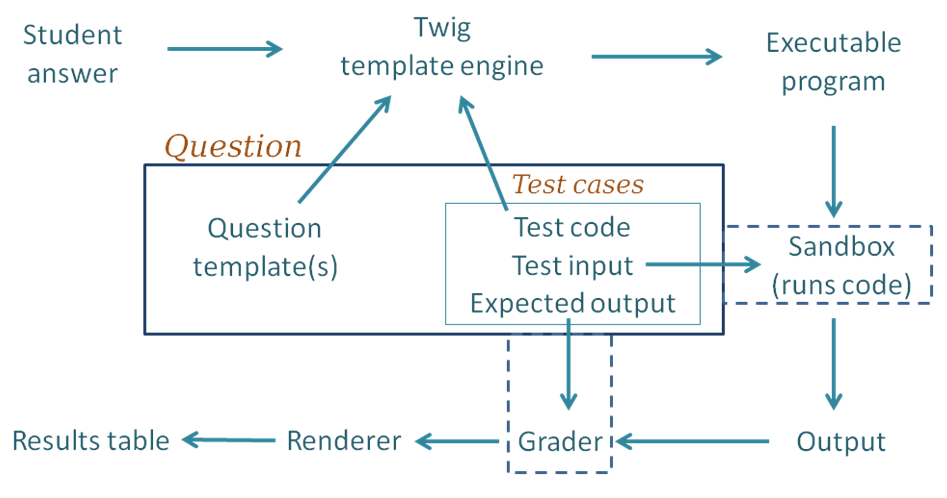
Following through the grading process step by step:
- For each of the test cases, the Twig template engine
merges the student's submitted answer with
the question's template together with code for this particular test case to yield an executable program.
By "executable", we mean a program that can be executed, possibly
with a preliminary compilation step. - The executable program is passed into whatever sandbox is configured
for this question (usually the Jobe sandbox). The sandbox compiles the program (if necessary) and runs it,
using the standard input supplied by the testcase. - The output from the run is passed into whatever Grader component is
configured, as is the expected output specified for the test case. The most common grader is the
"exact match" grader but other types are available. - The output from the grader is a "test result object" which contains
(amongst other things) "Expected" and "Got" attributes. - The above steps are repeated for all testcases, giving an array of
test result objects (not shown explicitly in the figure). - All the test results are passed to the CodeRunner question renderer,
which presents them to the user as the Results Table. Tests that pass
are shown with a green tick and failing ones shown with a red cross.
Typically the whole table is coloured red if any tests fail or green
if all tests pass.
The above description is somewhat simplified.
Firstly, it is not always necessary to
run a different job in the sandbox for each test case. Instead, all tests can often
be combined into a single executable program. This is achieved by use of what is known as
a "combinator template" rather than the simpler "per-test template" described
above. Combinator templates are useful with questions of the write-a-function
or write-a-class variety. They are not often used with write-a-program questions,
which are usually tested with different standard inputs, so multiple
execution runs are required. Furthermore, even with write-a-function questions
that do have a combinator template,
CodeRunner will revert to running tests one-at-a-time (sti
3.1.1 (2017010604)
3.1.1
Plugin type: Question types
Frankenstyle component name: qtype_coderunner
Version build number: 2017010604
Version release name: 3.1.1
Maturity: Stable
Supported Moodle versions: 2.9, 3.0, 3.1, 3.2
Repository URL (Git): https://github.com/trampgeek/moodle-qtype_coderunner
Repository branch:
Repository tag:
Issue/bug tracker URL: https://github.com/trampgeek/moodle-qtype_coderunner/issues
CODE RUNNER
Version: 3.1 January 2017
Authors: Richard Lobb, University of Canterbury, New Zealand.
Tim Hunt, The Open University, UK
NOTE: this documentation is available in a more-easily browsed form,
together with a sample quiz containing a few CodeRunner questions, at
coderunner.org.nz. Note, too, that there's
a forum on that site, where you can post CodeRunner questions, such as
requests for help if things go wrong, or are looking for ideas on how to write some
unusual question type.
Introduction
CodeRunner is a Moodle question type that allows teachers to run a program
in order to grade a student's answer. By far the most common use of CodeRunner
is in programming courses where students are asked to write program code to
some specification and that code is then graded by running it in a series of
tests. CodeRunner questions have also been used in other areas of
computer science and engineering to grade questions in which many different
correct answers are possible and a program must be used to assess correctness.
However, the focus throughout most of this document will be on programming
questions, where the students' code is being graded.
Regardless of the behaviour chosen for a quiz, CodeRunner questions always
run in an adaptive mode, in which students can click a Check button to see
if their code passes the tests defined in the question. If not, students can
resubmit, typically for a small penalty. In the typical
'all-or-nothing' mode, all test cases must pass
if the submission is to be awarded any marks. The mark for a set of questions
in a quiz is then determined primarily by which questions the student is able
to solve successfully and then secondarily by how many submissions the student
makes on each question. However, it is also possible to configure CodeRunner
questions so that the mark is determined by how many of the tests
the code successfully passes.
CodeRunner and its predecessors pycode and ccode has been in use at the
University of Canterbury for about six years, running over a million
student quiz question submissions in Python, C , JavaScript, PHP, Octave and Matlab.
Laboratory work, assignment work and mid-semester tests in the
introductory first year Python programming course (COSC121), which has around
500 students
in the first semester and 300 in the second, are all assessed using CodeRunner
questions. The final exams for COSC121 have also been run
using Moodle/CodeRunner since November 2014.
The second year C course (ENCE260) of around 200 students makes similar
use of CodeRunner
using C questions and a third year Civil Engineering course (ENCN305),
taught in Matlab,
uses CodeRunner for all labs and for the mid-semester programming exam. Other
courses using Moodle/CodeRunner include:
- EMTH171 Mathematical Modelling and Computation
- SENG02 Software Engineering I
- COSC261 Formal Languages and Compilers
- COSC367 Computational Intelligence
- ENCE360 Operating Systems
- SENG365 Web Computing Architectures
CodeRunner currently supports Python2 (considered obsolescent), Python3,
C, C++, Java, PHP, JavaScript (NodeJS), Octave and Matlab.
The architecture allows easy extension to other languages.
For security and load reasons, it is recommended that CodeRunner be set up
on a special quiz-server rather than on an institution-wide Moodle server.
However, CodeRunner can safely be used on an institutional server, provided
that the sandbox software in which code is run is installed on a separate
machine with adequate security and firewalling.
A single 4-core Moodle server can handle an average quiz question submission rate of
about 60 quiz questions per minute while maintaining a response time of less
than about 3 - 4 seconds, assuming the student code itself runs in a
fraction of a second. We have run CodeRunner-based exams with nearly 300 students
and experienced only light to moderate load factors on an 8-core Moodle
server. The Jobe server, which runs student submissions (see below),
is even more lightly loaded during such an exam.
The CodeRunner question type can be installed on any modern Moodle system
(version 2.6 or later including version 3.0), on Linux, Windows and Mac. For security reasons
submitted jobs are usually run on a separate machine called the "Jobe server"
or "Jobe sandbox machine".
Installation
This chapter describes how to install CodeRunner. It assumes the
existence of a working Moodle system, version 2.6 or later (including
Moodle 3).
If you are installing for the first time, jump straight to section 2.2.
Upgrading from a CodeRunner version earlier than 2.4.0
The current version of CodeRunner is incompatible with versions prior to
2.4.0. If you're attempting to upgrade from an earlier version, you should
first upgrade to the most recent version 2 (checkout branch V2 in the repository).
That will upgrade all questions in the database to a format that can be handled
by current versions.
If you are already running CodeRunner version 2.4.0 or later, you can upgrade
simply by following the instructions in the next two sections.
Upgrading from CodeRunner versions between 2.4 and 3.0
Upgrading to version 3.1 from version 2.4 through 3.0 should generally be
straightforward though, as usual, you should make a database backup before
upgrading. To upgrade, simply install the latest code and login to the web
interface as an administrator. When Moodle detects the
changed version number it will run upgrade code that updates all questions to
the latest format.
However, if you have written your own question types
you should be aware that all existing questions in the system
CR_PROTOTYPES category with names containing the
string PROTOTYPE_ are deleted by the installer/upgrader.
The installer then re-loads them from the file
db/questions-CR_PROTOTYPES.xml
Hence if you have developed your own question prototypes and placed them in
the system CR_PROTOTYPES category (not recommended) you must export them
in Moodle XML format before upgrading. You can then re-import them after the
upgrade is complete using the usual question-bank import function in the
web interface. However, it is strongly recommended that you do not put your
own question prototypes in the CR_PROTOTYPES category but create a new
category for your own use.
Note for enthusiasts only.
Version 3.1 no-longer allows a question to have both a per-test template
and a combinator template: questions must have one or the other. In upgrading
from Version 3.0 and earlier, the combinator template is used if "Enable
combinator" was set or a combinator template grader is being used, otherwise
the per-test template is used. This should not change the behaviour of the
question provided the two templates are consistent in the sense that running
any test in the per-test template yields exactly the same result as running
that same test all by itself in the combinator template.
Installing CodeRunner from scratch
CodeRunner requires two separate plug-ins, one for the question type and one
for the specialised adaptive behaviour. The plug-ins are in two
different github repositories: github.com/trampgeek/moodle-qbehaviour_adaptive_adapted_for_coderunner
and github.com/trampgeek/moodle-qtype_coderunner. Install the question behaviour
first (see the instructions within that repository), then the question type second,
as follows.
To install the question type, either:
Download the zip file of the required branch from github,
unzip it into the directorymoodle/question/typeand change the name
of the newly-created directory frommoodle-qtype_coderunner-<branchname>to just
coderunner.
Get the code using git by running the following command in the
top level folder of your Moodle install:
git clone git://github.com/trampgeek/moodle-qtype_coderunner.git question/type/coderunner
Either way you may also need to change the ownership
and access rights to ensure the directory and
its contents are readable by the webserver.
You can then complete the
installation by logging onto the server through the web interface as an
administrator and following the prompts to upgrade the database as appropriate.
In its initial configuration, CodeRunner is set to use a University of
Canterbury Jobe server to run jobs. You are
welcome to use this during initial testing, but it is
not intended for production use. Authentication and authorisation
on that server is
via an API-key and the default API-key given with CodeRunner imposes
a limit of 100
per hour over all clients using that key, worldwide. If you decide that CodeRunner is
useful to you, please set up your own Jobe sandbox as
described in Sandbox configuration below. Alternatively, if you wish to
continue to use our Jobe server, you can apply to the principal
developer for your own
API key, stating how long you will need to use the key and a reasonable
upper bound on the number of jobs you will need to submit per hour. We
will do our best to accommodate you if we have sufficient capacity.
WARNING: at least a couple of users have broken CodeRunner by duplicating
the prototype questions in the System/CR_PROTOTYPES category. Do not touch
those special questions until you have read this entire manual and
are familiar with the inner workings of CodeRunner. Even then, you should
proceed with caution. These prototypes are not
for normal use - they are akin to base classes in a prototypal inheritance
system like JavaScript's. If you duplicate a prototype question the question
type will become unusable, as CodeRunner doesn't know which version of the
prototype to use.
Preliminary testing of the CodeRunner question type
Once you have installed the CodeRunner question type, you should be able to
run CodeRunner questions using the University of Canterbury's Jobe Server
as a sandbox. It is
recommended that you do this before proceeding to install and configure your
own sandbox. Using the standard Moodle web interface, either as a Moodle
administrator or as a teacher in a course you have set up, go to the Question
Bank and try creating a new CodeRunner question. A simple Python3 test question
is: "Write a function sqr(n) that returns the square of its
parameter n.". Test cases for this might be:
| Test | Expected |
|---|---|
| print(sqr(-7)) | 49 |
| print(sqr(5)) | 25 |
| print(sqr(-1)) | 1 |
| print(sqr(0)) | 0 |
| print(sqr(-100)) | 10000 |
You could check the 'UseAsExample' checkbox on the first two (which results
in the student seeing a simple "For example" table) and perhaps make the last
case a hidden test case. (It is recommended that all questions have at least
one hidden test case to prevent students synthesising code that works just for
the known test cases).
Save your new question, then preview it, entering both correct and
incorrect answers.
If you want a few more CodeRunner questions to play with, try importing the
files
MoodleHome>/question/type/coderunner/samples/simpledemoquestions.xml and/or
MoodleHome>/question/type/coderunner/samples/python3demoquestions.xml.
These contains
most of the questions from the two tutorial quizzes on the
demo site.
If you wish to run the questions in the file python3demoquestions.xml,
you will also need to import
the file MoodleHome>/question/type/coderunner/samples/uoc_prototypes.xml
or you will receive a "Missing prototype" error.
Sandbox Configuration
Although CodeRunner has a flexible architecture that supports various different
ways of running student task in a protected ("sandboxed") environment, only
one sandbox - the Jobe sandbox - is supported by the current version. This
sandbox makes use of a
separate server, developed specifically for use by CodeRunner, called Jobe.
As explained
at the end of the section on installing CodeRunner from scratch, the initial
configuration uses the Jobe server at the University of Canterbury. This is not
suitable for production use. Please switch
to using your own Jobe server as soon as possible.
To build a Jobe server, follow the instructions at
https://github.com/trampgeek/jobe. Then use the
Moodle administrator interface for the CodeRunner plug-in to specify the Jobe
host name and perhaps port number. Depending on how you've chosen to
configure your Jobe server, you may also need to supply an API-Key through
the same interface.
If you intend running unit tests you
will also need to copy the file tests/fixtures/test-sandbox-config-dist.php
to 'tests/fixtures/test-sandbox-config.php', then edit it to set the correct
host and any other necessary configuration for the Jobe server.
Assuming you have built Jobe on a separate server, the JobeSandbox fully
isolates student code from the Moodle server. However, Jobe can be installed
on the Moodle server itself, rather than on a
completely different machine. This works fine,
but is much less secure than running Jobe on
a completely separate machine. If a student program manages to break out of
the sandbox when it's running on a separate machine, the worst it can do is
bring the sandbox server down, whereas a security breach on the Moodle server
could be used to hack into the Moodle database, which contains student run results
and marks. That said, our Computer Science department used an earlier even less
secure Sandbox for some years without any ill effects. Moodle keeps extensive logs
of all activities, so a student deliberately breaching security is taking a
huge risk.
Running the unit tests
If your Moodle installation includes the
phpunit system for testing Moodle modules, you might wish to test the
CodeRunner installation. Most tests require that at least python2 and python3
are installed.
Before running any tests you first need to copy the file
<moodlehome>/question/type/coderunner/tests/fixtures/test-sandbox-config-dist.php
to '
    cd <moodlehome>

    sudo php admin/tool/phpunit/cli/init.php
You can then run the full CodeRunner test suite with one of the following two commands,
depending on which version of phpunit you're using:
sudo -u apache vendor/bin/phpunit --verbose --testsuite="qtype_coderunner test suite"
or
sudo -u apache vendor/bin/phpunit --verbose --testsuite="qtype_coderunner_testsuite"
This will almost certainly show lots of skipped or failed tests relating
to the various sandboxes and languages that you have not installed, e.g.
the LiuSandbox, Matlab, Octave and Java. These can all be ignored unless you plan to use
those capabilities. The name of the failing tests should be sufficient to
tell you if you need be at all worried.
Feel free to email the principal developer if you have problems
with the installation.
The Architecture of CodeRunner
Although it's straightforward to write simple questions using the
built-in question types, anything more advanced than that requires
an understanding of how CodeRunner works.
The block diagram below shows the components of CodeRunner and the path taken
as a student submission is graded.
Following through the grading process step by step:
- For each of the test cases, the Twig template engine
merges the student's submitted answer with
the question's template together with code for this particular test case to yield an executable program.
By "executable", we mean a program that can be executed, possibly
with a preliminary compilation step. - The executable program is passed into whatever sandbox is configured
for this question (usually the Jobe sandbox). The sandbox compiles the program (if necessary) and runs it,
using the standard input supplied by the testcase. - The output from the run is passed into whatever Grader component is
configured, as is the expected output specified for the test case. The most common grader is the
"exact match" grader but other types are available. - The output from the grader is a "test result object" which contains
(amongst other things) "Expected" and "Got" attributes. - The above steps are repeated for all testcases, giving an array of
test result objects (not shown explicitly in the figure). - All the test results are passed to the CodeRunner question renderer,
which presents them to the user as the Results Table. Tests that pass
are shown with a green tick and failing ones shown with a red cross.
Typically the whole table is coloured red if any tests fail or green
if all tests pass.
The above description is somewhat simplified.
Firstly, it is not always necessary to
run a different job in the sandbox for each test case. Instead, all tests can often
be combined into a single executable program. This is achieved by use of what is known as
a "combinator template" rather than the simpler "per-test template" described
above. Combinator templates are useful with questions of the write-a-function
or write-a-class variety. They are not often used with write-a-program questions,
which are usually tested with different standard inputs, so multiple
execution runs are required. Furthermore, even with write-a-function questions
that do have a combinator template,
CodeRunner will revert to running tests one-at-a-time (still using the combinator
template) if running all tests in the one program gives some form of runtime error,
in order that students can be
presented with all test results up until the one that failed.
Combinator templates are explained in the Templates
section.
Secondly, the above description of the grading process ignores template graders,
which do grading as well as testing. These support more advanced testing
strategies, such as running thousands of tests or awarding marks in more complex
ways than is possible with the standard option of either "all-or-nothing" marking
or linear summation of individual test marks.
A per-test-case template grader can be used to define each
row of the result table, or a combinator template grader can be used to
defines the entire feedback panel, with or without a result table.
See the section on grading templates for
more information.
Question types
CodeRunner support a wide variety of question types and can easily be
ex
3.1.0 (2017010603)
3.1.0
Plugin type: Question types
Frankenstyle component name: qtype_coderunner
Version build number: 2017010603
Version release name: 3.1.0
Maturity: Stable
Supported Moodle versions: 2.9, 3.0, 3.1, 3.2
Repository URL (Git): https://github.com/trampgeek/moodle-qtype_coderunner
Repository branch:
Repository tag:
Issue/bug tracker URL: https://github.com/trampgeek/moodle-qtype_coderunner/issues
CODE RUNNER
Version: 3.1 January 2017
Authors: Richard Lobb, University of Canterbury, New Zealand.
Tim Hunt, The Open University, UK
NOTE: this documentation is available in a more-easily browsed form,
together with a sample quiz containing a few CodeRunner questions, at
coderunner.org.nz. Note, too, that there's
a forum on that site, where you can post CodeRunner questions, such as
requests for help if things go wrong, or are looking for ideas on how to write some
unusual question type.
Introduction
CodeRunner is a Moodle question type that allows teachers to run a program
in order to grade a student's answer. By far the most common use of CodeRunner
is in programming courses where students are asked to write program code to
some specification and that code is then graded by running it in a series of
tests. CodeRunner questions have also been used in other areas of
computer science and engineering to grade questions in which many different
correct answers are possible and a program must be used to assess correctness.
However, the focus throughout most of this document will be on programming
questions, where the students' code is being graded.
Regardless of the behaviour chosen for a quiz, CodeRunner questions always
run in an adaptive mode, in which students can click a Check button to see
if their code passes the tests defined in the question. If not, students can
resubmit, typically for a small penalty. In the typical
'all-or-nothing' mode, all test cases must pass
if the submission is to be awarded any marks. The mark for a set of questions
in a quiz is then determined primarily by which questions the student is able
to solve successfully and then secondarily by how many submissions the student
makes on each question. However, it is also possible to configure CodeRunner
questions so that the mark is determined by how many of the tests
the code successfully passes.
CodeRunner and its predecessors pycode and ccode has been in use at the
University of Canterbury for about six years, running over a million
student quiz question submissions in Python, C , JavaScript, PHP, Octave and Matlab.
Laboratory work, assignment work and mid-semester tests in the
introductory first year Python programming course (COSC121), which has around
500 students
in the first semester and 300 in the second, are all assessed using CodeRunner
questions. The final exams for COSC121 have also been run
using Moodle/CodeRunner since November 2014.
The second year C course (ENCE260) of around 200 students makes similar
use of CodeRunner
using C questions and a third year Civil Engineering course (ENCN305),
taught in Matlab,
uses CodeRunner for all labs and for the mid-semester programming exam. Other
courses using Moodle/CodeRunner include:
- EMTH171 Mathematical Modelling and Computation
- SENG02 Software Engineering I
- COSC261 Formal Languages and Compilers
- COSC367 Computational Intelligence
- ENCE360 Operating Systems
- SENG365 Web Computing Architectures
CodeRunner currently supports Python2 (considered obsolescent), Python3,
C, C++, Java, PHP, JavaScript (NodeJS), Octave and Matlab.
The architecture allows easy extension to other languages.
For security and load reasons, it is recommended that CodeRunner be set up
on a special quiz-server rather than on an institution-wide Moodle server.
However, CodeRunner can safely be used on an institutional server, provided
that the sandbox software in which code is run is installed on a separate
machine with adequate security and firewalling.
A single 4-core Moodle server can handle an average quiz question submission rate of
about 60 quiz questions per minute while maintaining a response time of less
than about 3 - 4 seconds, assuming the student code itself runs in a
fraction of a second. We have run CodeRunner-based exams with nearly 300 students
and experienced only light to moderate load factors on an 8-core Moodle
server. The Jobe server, which runs student submissions (see below),
is even more lightly loaded during such an exam.
The CodeRunner question type can be installed on any modern Moodle system
(version 2.6 or later including version 3.0), on Linux, Windows and Mac. For security reasons
submitted jobs are usually run on a separate machine called the "Jobe server"
or "Jobe sandbox machine".
Installation
This chapter describes how to install CodeRunner. It assumes the
existence of a working Moodle system, version 2.6 or later (including
Moodle 3).
If you are installing for the first time, jump straight to section 2.2.
Upgrading from a CodeRunner version earlier than 2.4.0
The current version of CodeRunner is incompatible with versions prior to
2.4.0. If you're attempting to upgrade from an earlier version, you should
first upgrade to the most recent version 2 (checkout branch V2 in the repository).
That will upgrade all questions in the database to a format that can be handled
by current versions.
If you are already running CodeRunner version 2.4.0 or later, you can upgrade
simply by following the instructions in the next two sections.
Upgrading from CodeRunner versions between 2.4 and 3.0
Upgrading to version 3.1 from version 2.4 through 3.0 should generally be
straightforward though, as usual, you should make a database backup before
upgrading. To upgrade, simply install the latest code and login to the web
interface as an administrator. When Moodle detects the
changed version number it will run upgrade code that updates all questions to
the latest format.
However, if you have written your own question types
you should be aware that all existing questions in the system
CR_PROTOTYPES category with names containing the
string PROTOTYPE_ are deleted by the installer/upgrader.
The installer then re-loads them from the file
db/questions-CR_PROTOTYPES.xml
Hence if you have developed your own question prototypes and placed them in
the system CR_PROTOTYPES category (not recommended) you must export them
in Moodle XML format before upgrading. You can then re-import them after the
upgrade is complete using the usual question-bank import function in the
web interface. However, it is strongly recommended that you do not put your
own question prototypes in the CR_PROTOTYPES category but create a new
category for your own use.
Note for enthusiasts only.
Version 3.1 no-longer allows a question to have both a per-test template
and a combinator template: questions must have one or the other. In upgrading
from Version 3.0 and earlier, the combinator template is used if "Enable
combinator" was set or a combinator template grader is being used, otherwise
the per-test template is used. This should not change the behaviour of the
question provided the two templates are consistent in the sense that running
any test in the per-test template yields exactly the same result as running
that same test all by itself in the combinator template.
Installing CodeRunner from scratch
CodeRunner requires two separate plug-ins, one for the question type and one
for the specialised adaptive behaviour. The plug-ins are in two
different github repositories: github.com/trampgeek/moodle-qbehaviour_adaptive_adapted_for_coderunner
and github.com/trampgeek/moodle-qtype_coderunner. Install the question behaviour
first (see the instructions within that repository), then the question type second,
as follows.
To install the question type, either:
Download the zip file of the required branch from github,
unzip it into the directorymoodle/question/typeand change the name
of the newly-created directory frommoodle-qtype_coderunner-<branchname>to just
coderunner.
Get the code using git by running the following command in the
top level folder of your Moodle install:
git clone git://github.com/trampgeek/moodle-qtype_coderunner.git question/type/coderunner
Either way you may also need to change the ownership
and access rights to ensure the directory and
its contents are readable by the webserver.
You can then complete the
installation by logging onto the server through the web interface as an
administrator and following the prompts to upgrade the database as appropriate.
In its initial configuration, CodeRunner is set to use a University of
Canterbury Jobe server to run jobs. You are
welcome to use this during initial testing, but it is
not intended for production use. Authentication and authorisation
on that server is
via an API-key and the default API-key given with CodeRunner imposes
a limit of 100
per hour over all clients using that key, worldwide. If you decide that CodeRunner is
useful to you, please set up your own Jobe sandbox as
described in Sandbox configuration below. Alternatively, if you wish to
continue to use our Jobe server, you can apply to the principal
developer for your own
API key, stating how long you will need to use the key and a reasonable
upper bound on the number of jobs you will need to submit per hour. We
will do our best to accommodate you if we have sufficient capacity.
WARNING: at least a couple of users have broken CodeRunner by duplicating
the prototype questions in the System/CR_PROTOTYPES category. Do not touch
those special questions until you have read this entire manual and
are familiar with the inner workings of CodeRunner. Even then, you should
proceed with caution. These prototypes are not
for normal use - they are akin to base classes in a prototypal inheritance
system like JavaScript's. If you duplicate a prototype question the question
type will become unusable, as CodeRunner doesn't know which version of the
prototype to use.
Preliminary testing of the CodeRunner question type
Once you have installed the CodeRunner question type, you should be able to
run CodeRunner questions using the University of Canterbury's Jobe Server
as a sandbox. It is
recommended that you do this before proceeding to install and configure your
own sandbox. Using the standard Moodle web interface, either as a Moodle
administrator or as a teacher in a course you have set up, go to the Question
Bank and try creating a new CodeRunner question. A simple Python3 test question
is: "Write a function sqr(n) that returns the square of its
parameter n.". Test cases for this might be:
| Test | Expected |
|---|---|
| print(sqr(-7)) | 49 |
| print(sqr(5)) | 25 |
| print(sqr(-1)) | 1 |
| print(sqr(0)) | 0 |
| print(sqr(-100)) | 10000 |
You could check the 'UseAsExample' checkbox on the first two (which results
in the student seeing a simple "For example" table) and perhaps make the last
case a hidden test case. (It is recommended that all questions have at least
one hidden test case to prevent students synthesising code that works just for
the known test cases).
Save your new question, then preview it, entering both correct and
incorrect answers.
If you want a few more CodeRunner questions to play with, try importing the
files
MoodleHome>/question/type/coderunner/samples/simpledemoquestions.xml and/or
MoodleHome>/question/type/coderunner/samples/python3demoquestions.xml.
These contains
most of the questions from the two tutorial quizzes on the
demo site.
If you wish to run the questions in the file python3demoquestions.xml,
you will also need to import
the file MoodleHome>/question/type/coderunner/samples/uoc_prototypes.xml
or you will receive a "Missing prototype" error.
Sandbox Configuration
Although CodeRunner has a flexible architecture that supports various different
ways of running student task in a protected ("sandboxed") environment, only
one sandbox - the Jobe sandbox - is supported by the current version. This
sandbox makes use of a
separate server, developed specifically for use by CodeRunner, called Jobe.
As explained
at the end of the section on installing CodeRunner from scratch, the initial
configuration uses the Jobe server at the University of Canterbury. This is not
suitable for production use. Please switch
to using your own Jobe server as soon as possible.
To build a Jobe server, follow the instructions at
https://github.com/trampgeek/jobe. Then use the
Moodle administrator interface for the CodeRunner plug-in to specify the Jobe
host name and perhaps port number. Depending on how you've chosen to
configure your Jobe server, you may also need to supply an API-Key through
the same interface.
If you intend running unit tests you
will also need to copy the file tests/fixtures/test-sandbox-config-dist.php
to 'tests/fixtures/test-sandbox-config.php', then edit it to set the correct
host and any other necessary configuration for the Jobe server.
Assuming you have built Jobe on a separate server, the JobeSandbox fully
isolates student code from the Moodle server. However, Jobe can be installed
on the Moodle server itself, rather than on a
completely different machine. This works fine,
but is much less secure than running Jobe on
a completely separate machine. If a student program manages to break out of
the sandbox when it's running on a separate machine, the worst it can do is
bring the sandbox server down, whereas a security breach on the Moodle server
could be used to hack into the Moodle database, which contains student run results
and marks. That said, our Computer Science department used an earlier even less
secure Sandbox for some years without any ill effects. Moodle keeps extensive logs
of all activities, so a student deliberately breaching security is taking a
huge risk.
Running the unit tests
If your Moodle installation includes the
phpunit system for testing Moodle modules, you might wish to test the
CodeRunner installation. Most tests require that at least python2 and python3
are installed.
Before running any tests you first need to copy the file
<moodlehome>/question/type/coderunner/tests/fixtures/test-sandbox-config-dist.php
to '
    cd <moodlehome>

    sudo php admin/tool/phpunit/cli/init.php
You can then run the full CodeRunner test suite with one of the following two commands,
depending on which version of phpunit you're using:
sudo -u apache vendor/bin/phpunit --verbose --testsuite="qtype_coderunner test suite"
or
sudo -u apache vendor/bin/phpunit --verbose --testsuite="qtype_coderunner_testsuite"
This will almost certainly show lots of skipped or failed tests relating
to the various sandboxes and languages that you have not installed, e.g.
the LiuSandbox, Matlab, Octave and Java. These can all be ignored unless you plan to use
those capabilities. The name of the failing tests should be sufficient to
tell you if you need be at all worried.
Feel free to email the principal developer if you have problems
with the installation.
The Architecture of CodeRunner
Although it's straightforward to write simple questions using the
built-in question types, anything more advanced than that requires
an understanding of how CodeRunner works.
The block diagram below shows the components of CodeRunner and the path taken
as a student submission is graded.
Following through the grading process step by step:
- For each of the test cases, the Twig template engine
merges the student's submitted answer with
the question's template together with code for this particular test case to yield an executable program.
By "executable", we mean a program that can be executed, possibly
with a preliminary compilation step. - The executable program is passed into whatever sandbox is configured
for this question (usually the Jobe sandbox). The sandbox compiles the program (if necessary) and runs it,
using the standard input supplied by the testcase. - The output from the run is passed into whatever Grader component is
configured, as is the expected output specified for the test case. The most common grader is the
"exact match" grader but other types are available. - The output from the grader is a "test result object" which contains
(amongst other things) "Expected" and "Got" attributes. - The above steps are repeated for all testcases, giving an array of
test result objects (not shown explicitly in the figure). - All the test results are passed to the CodeRunner question renderer,
which presents them to the user as the Results Table. Tests that pass
are shown with a green tick and failing ones shown with a red cross.
Typically the whole table is coloured red if any tests fail or green
if all tests pass.
The above description is somewhat simplified.
Firstly, it is not always necessary to
run a different job in the sandbox for each test case. Instead, all tests can often
be combined into a single executable program. This is achieved by use of what is known as
a "combinator template" rather than the simpler "per-test template" described
above. Combinator templates are useful with questions of the write-a-function
or write-a-class variety. They are not often used with write-a-program questions,
which are usually tested with different standard inputs, so multiple
execution runs are required. Furthermore, even with write-a-function questions
that do have a combinator template,
CodeRunner will revert to running tests one-at-a-time (still using the combinator
template) if running all tests in the one program gives some form of runtime error,
in order that students can be
presented with all test results up until the one that failed.
Combinator templates are explained in the Templates
section.
Secondly, the above description of the grading process ignores template graders,
which do grading as well as testing. These support more advanced testing
strategies, such as running thousands of tests or awarding marks in more complex
ways than is possible with the standard option of either "all-or-nothing" marking
or linear summation of individual test marks.
A per-test-case template grader can be used to define each
row of the result table, or a combinator template grader can be used to
defines the entire feedback panel, with or without a result table.
See the section on grading templates for
more information.
Question types
CodeRunner support a wide variety of question types and can easily be
ex