
Dark Blue 2.0 icon

Dark Blue 2.0

Maintained by John St
A three column theme with a settings page that allows the user to change theme colors, etc.
Price option: Free

Supports Moodle 2.0-2.4 See all versions
Latest release: 13 years ago
Installations: 53
Downloads (last 90 days): 44

Frankenstyle name: theme_darkb
Themes

Comments

Comments are no longer open for new posts. Existing comments remain available to read.

Really like this theme, but as with one comment above, I can't change the colour on either the link or main colour options. Any ideas? Still going to use it, just would satisfy the institution colour scheme better if I could change.
Re Guy O' Malley
1) Settings > Turn editing on
2) Click "Configuration" in the Block you want in the right column
3) In " Where this block appears" "Default region" select "right"
4) In addition you may want to change "On this page" "Region" also: select "right"
Done.
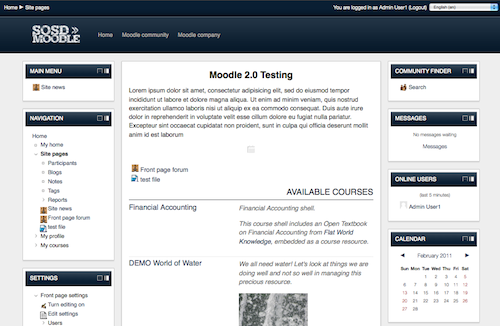
The screenshot shows it as three columns, but mine appears as two, and I can't find how to change it - any suggestions? Thanks
You have to have site topic enabled in frontpage settings to add things to the frontpage.
Base and Canvas are certainly still part of Moodle. I just downloaded the latest and they are (as expected) there. Thanks!
John, Does Darb Blue still also use the Cancas and Base themes. They are not in the current version of Moodle.
I have been using your theme for quite a while. I just upgraded to the latest version of Moodle and also upgraded your theme. My only issue is that I am upable to add anything to the items on the top middle of the front page. On your screenshot it is the items like "Front Page Forums" and "Test Page" There is a Add item or Resource link in the bottom right of the area but it does not seen to work for me. Any thoughts?
I've been trying to change tyhe color from blue to red on theme settings, but it's not working.
Any thoughts?
In the screen capture of the theme, there is a top menu. How do I add this?
Hi John, any details with your latest release (2012051500)? Any CSS changes or tweaks that may affect its usability? Thanks!
Hi John, I'm having a problem with the Grades area for your theme. When I'm in the Grader Report, the student rows have a larger height than their respective grade rows. This results in the student column running past the amount of grading rows, making the Grader Report confusing for my faculty to view.
This is happening in IE (7, 8, 9) and Chrome but not in Firefox. Is something going on with the CSS for this theme? Thanks!
Any plans to make this theme compatible with 2.2? It is a great looking theme.