Use template on course creation
Maintained by
Charles Fulton, Andrew Zito
This local plugin allows site administrators to create "template" courses which will be restored into new courses on course creation.
Comments
Product ratings and reviews are coming to Moodle Marketplace. Until then, existing comments remain available to read, but new posts have been disabled.
Charles
Course short names are as follows:
SUBJ--NUM_YYYY-TT_SEC (ENG--900_2017-SP_01 as an example)
Current term extraction pattern:
/([0-9]+\-[A-Z]+)/ (should return 2017-SP for the example course short name above)
Template name format:
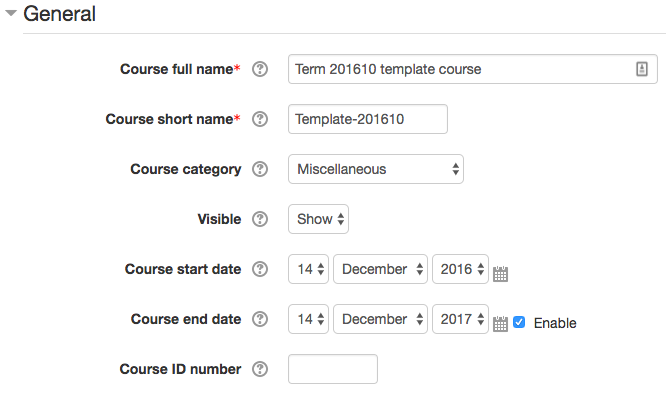
Template-[TERMCODE]
Template Course Name:
Template-2017-SP
So if I create a test course with the short name ENG--900_2017-SP_01, it does not seem to be triggering the automatic restore from the template. Any thought as to what might be wrong? Maybe the regex?
I tried using your supplied regex, but the plugin still doesn't work. I have also tried other regex codes I found through Google (Stackexchange). I don't believe the regex is the issue here. Any other ideas what may be wrong?
Mable Simons
Charles
I am trying to get this plugin to work, but it has thus far not done anything for me. The plugin has installed correctly, and I can find its details in Local Plugins/Use template on course creation. I have set the term code to /^[^\d]*(\d+)/ and the shortname format to Template-[TERMCODE]
I have created a template in the Miscelaneous category. It is titled "Certificate Template", has the shortname "Template-1", and includes a forum activity and a standard block.
I create a new course in a separate category with a title of, let's say "foo" and a shortname of "bar". Its idea is "1-002-02". The regex code should return a "1" in this situation. However, when I view my created course, it does not look like it fits the template I created. Does anyone know why this has happened?
Best regards,
Mable Simons
Thank you for sharing your extremely useful plugin. You saved my time a lot and plugin is extremely useful for me.
@Mar
This is really useful. For example, I need to create many courses for students projects. Each student should have a course to collaborate with the supervisor. I created template course with predefined structures and assign a shortcode. Then, when I create a course, I enter the course template idnumber to match a template course shortcode. The plugin automatically creates the structure. Otherwise, I have to restore one by one. This is really useful if you are creating many courses with the same structure.
@ charles
I found a minor issue:
The plugin can create only sections up to the number of sections in course default settings. If the course default sections are less than the number of sections of the template, extra sections will not create. If I set a number of default sections to a higher number, the plugin will create sections with default section names. This is a minor issue if someone has many course templates with a different number of sections.
Best Regards
Ranil
Until now, we have used backup and restore in a new course for creating courses with similar structure and content. In this case, we maintain the content configured but not the Settings of the course. I'd like to know the advantage of using this plug-in instead of a backup. I guess that the time consumed restoring a course is much longer than the time for creating a course from a template. Could you please confirm it and provide more advantages (if possible) in using the plugin? I would like to install it in our Moodle but I need to provide all the advantages to the management in order to make a decision.
Thank you very much!!
- http://php.net/manual/en/function.preg-match.php
- http://php.fnlist.com/regexp/preg_match
I understand that i have to create a template course in which the short name contains the template id. Subsequently I can create courses by giving them a course id that triggers the course creation by using the template id. I don't understand the part of a regular expression. How and where to do what? Could you describe that?