Multi-Language Content (v2)
Versions
Current version
2.0.5.5 (2026041801)
2.0.5.5
Plugin type: Filters
Frankenstyle component name: filter_multilang2
Version build number: 2026041801
Version release name: 2.0.5.5
Maturity: Stable
Supported Moodle versions: 4.1, 4.2, 4.3, 4.4, 4.5, 5.0, 5.1, 5.2
Repository URL (Git): https://github.com/iarenaza/moodle-filter_multilang2
Repository branch:
Repository tag: 2.0.5.5
Issue/bug tracker URL: https://github.com/iarenaza/moodle-filter_multilang2/issues
Changelog
All notable changes to this project will be documented in this file.
The format is based on Keep a Changelog,
and this project adheres to Semantic Versioning.
Unreleased
2.0.5.5 - 2026.04.18
Fixed
- Small typo in a language string. Credit goes to Iñigo Zendegi (@izendegi)
2.0.5.4 - 2026.04.12
Fixed
- Small phpcs linter issue
2.0.5.3 - 2026.04.12
Changed
- Updated the language strings for the configuration setting help, and the README file. No code changes were done.
- Remove help texts for languages other than English. They should be managed by AMOS, not by the plugin itself.
2.0.5.2 - 2025.04.17
Changed
- Updated the copyright notices to remove Moodle, and use filter_multilang2 instead. See https://moodle.org/mod/forum/discuss.php?d=467516 for the rationale.
- Ignore phpcs codesniff that check for standard Moodle copyright boilerplate.
2.0.5.1 - 2024.12.12
Fixed
- [#56] Updated Basque translations for latest changes (I forgot to do it in 2.0.5)
2.0.5 - 2024.11.27
Added
- [#42] [#25] Added a setting to configure the parent languages behaviour (see README.md for additional details on the setting).
2.0.4 - 2024.10.18
Fixed
- [#54] Fixed exceptions thrown when using Moodle 4.1 in some sites (thanks to Michael Milette!)
2.0.3 - 2024.10.12
Fixed
moodle-plugin-ci validatenow passes successfully.
2.0.2 - 2024-10-08
Added
- [#49] Add support to Moodle 4.5
- Added Moodle 4.4 and 4.5 to the CI test matrix
2.0.1 - 2024-01-30
Added
- This CHANGELOG.
- Moodle 4.3 to the CI test matrix.
Fixed
- #45 Exception: Return value must be of type string, null returned
2.0.0 - 2022-12-17
Added
- Early checks for "text" that cannot be filtered or is not worth filtering (e.g., non-strings, or empty strings).
- #35 Addded GitHub Actions and information in README.md, contributed by Luca Bösch.
Changed
- #32 [BREAKING CHANGE] Updated the unit test machinery to be compatible with Moodle 3.11 and later. The new machinery is incompatible with Moodle 3.10 and later, making this a breaking change.
Fixed
- Fixed some Moodle Code Checker and Documentation Checker warnings.
Security
- #39 MDL-77525 apply multilang2 before text formatting and cleaning
2.0.5.4 (2026041202)
2.0.5.4
Plugin type: Filters
Frankenstyle component name: filter_multilang2
Version build number: 2026041202
Version release name: 2.0.5.4
Maturity: Stable
Supported Moodle versions: 4.1, 4.2, 4.3, 4.4, 4.5, 5.0, 5.1, 5.2
Repository URL (Git): https://github.com/iarenaza/moodle-filter_multilang2
Repository branch:
Repository tag: 2.0.5.4
Issue/bug tracker URL: https://github.com/iarenaza/moodle-filter_multilang2/issues
Changelog
All notable changes to this project will be documented in this file.
The format is based on Keep a Changelog,
and this project adheres to Semantic Versioning.
Unreleased
2.0.5.4 - 2026.04.12
Fixed
- Small phpcs linter issue
2.0.5.3 - 2026.04.12
Changed
- Updated the language strings for the configuration setting help, and the README file. No code changes were done.
- Remove help texts for languages other than English. They should be managed by AMOS, not by the plugin itself.
2.0.5.2 - 2025.04.17
Changed
- Updated the copyright notices to remove Moodle, and use filter_multilang2 instead. See https://moodle.org/mod/forum/discuss.php?d=467516 for the rationale.
- Ignore phpcs codesniff that check for standard Moodle copyright boilerplate.
2.0.5.1 - 2024.12.12
Fixed
- [#56] Updated Basque translations for latest changes (I forgot to do it in 2.0.5)
2.0.5 - 2024.11.27
Added
- [#42] [#25] Added a setting to configure the parent languages behaviour (see README.md for additional details on the setting).
2.0.4 - 2024.10.18
Fixed
- [#54] Fixed exceptions thrown when using Moodle 4.1 in some sites (thanks to Michael Milette!)
2.0.3 - 2024.10.12
Fixed
moodle-plugin-ci validatenow passes successfully.
2.0.2 - 2024-10-08
Added
- [#49] Add support to Moodle 4.5
- Added Moodle 4.4 and 4.5 to the CI test matrix
2.0.1 - 2024-01-30
Added
- This CHANGELOG.
- Moodle 4.3 to the CI test matrix.
Fixed
- #45 Exception: Return value must be of type string, null returned
2.0.0 - 2022-12-17
Added
- Early checks for "text" that cannot be filtered or is not worth filtering (e.g., non-strings, or empty strings).
- #35 Addded GitHub Actions and information in README.md, contributed by Luca Bösch.
Changed
- #32 [BREAKING CHANGE] Updated the unit test machinery to be compatible with Moodle 3.11 and later. The new machinery is incompatible with Moodle 3.10 and later, making this a breaking change.
Fixed
- Fixed some Moodle Code Checker and Documentation Checker warnings.
Security
- #39 MDL-77525 apply multilang2 before text formatting and cleaning
2.0.5.2 (2025041701)
2.0.5.2
Plugin type: Filters
Frankenstyle component name: filter_multilang2
Version build number: 2025041701
Version release name: 2.0.5.2
Maturity: Stable
Supported Moodle versions: 4.1, 4.2, 4.3, 4.4, 4.5, 5.0, 5.1, 5.2
Repository URL (Git): https://github.com/iarenaza/moodle-filter_multilang2
Repository branch:
Repository tag: 2.0.5.2
Issue/bug tracker URL: https://github.com/iarenaza/moodle-filter_multilang2/issues
Changelog
All notable changes to this project will be documented in this file.
The format is based on Keep a Changelog,
and this project adheres to Semantic Versioning.
Unreleased
[2.0.5.2] - 2025.04.17
Changed
- Updated the copyright notices to remove Moodle, and use filter_multilang2 instead. See https://moodle.org/mod/forum/discuss.php?d=467516 for the rationale.
- Ignore phpcs codesniff that check for standard Moodle copyright boilerplate.
[2.0.5.1] - 2024.12.12
Fixed
- [#56] Updated Basque translations for latest changes (I forgot to do it in 2.0.5)
[2.0.5] - 2024.11.27
Added
- [#42] [#25] Added a setting to configure the parent languages behaviour (see README.md for additional details on the setting).
[2.0.4] - 2024.10.18
Fixed
- [#54] Fixed exceptions thrown when using Moodle 4.1 in some sites (thanks to Michael Milette!)
[2.0.3] - 2024.10.12
Fixed
moodle-plugin-ci validatenow passes successfully.
[2.0.2] - 2024-10-08
Added
- [#49] Add support to Moodle 4.5
- Added Moodle 4.4 and 4.5 to the CI test matrix
2.0.1 - 2024-01-30
Added
- This CHANGELOG.
- Moodle 4.3 to the CI test matrix.
Fixed
- #45 Exception: Return value must be of type string, null returned
2.0.0 - 2022-12-17
Added
- Early checks for "text" that cannot be filtered or is not worth filtering (e.g., non-strings, or empty strings).
- #35 Addded GitHub Actions and information in README.md, contributed by Luca Bösch.
Changed
- #32 [BREAKING CHANGE] Updated the unit test machinery to be compatible with Moodle 3.11 and later. The new machinery is incompatible with Moodle 3.10 and later, making this a breaking change.
Fixed
- Fixed some Moodle Code Checker and Documentation Checker warnings.
Security
- #39 MDL-77525 apply multilang2 before text formatting and cleaning
2.0.5.1 (2024121201)
2.0.5.1
Plugin type: Filters
Frankenstyle component name: filter_multilang2
Version build number: 2024121201
Version release name: 2.0.5.1
Maturity: Stable
Supported Moodle versions: 4.1, 4.2, 4.3, 4.4, 4.5
Repository URL (Git): https://github.com/iarenaza/moodle-filter_multilang2
Repository branch:
Repository tag: 2.0.5.1
Issue/bug tracker URL: https://github.com/iarenaza/moodle-filter_multilang2/issues
Changelog
All notable changes to this project will be documented in this file.
The format is based on Keep a Changelog,
and this project adheres to Semantic Versioning.
Unreleased
[2.0.5.1] - 2024.12.12
Fixed
- [#56] Updated Basque translations for latest changes (I forgot to do it in 2.0.5)
[2.0.5] - 2024.11.27
Added
- [#42] [#25] Added a setting to configure the parent languages behaviour (see README.md for additional details on the setting).
[2.0.4] - 2024.10.18
Fixed
- [#54] Fixed exceptions thrown when using Moodle 4.1 in some sites (thanks to Michael Milette!)
[2.0.3] - 2024.10.12
Fixed
moodle-plugin-ci validatenow passes successfully.
[2.0.2] - 2024-10-08
Added
- [#49] Add support to Moodle 4.5
- Added Moodle 4.4 and 4.5 to the CI test matrix
2.0.1 - 2024-01-30
Added
- This CHANGELOG.
- Moodle 4.3 to the CI test matrix.
Fixed
- #45 Exception: Return value must be of type string, null returned
2.0.0 - 2022-12-17
Added
- Early checks for "text" that cannot be filtered or is not worth filtering (e.g., non-strings, or empty strings).
- #35 Addded GitHub Actions and information in README.md, contributed by Luca Bösch.
Changed
- #32 [BREAKING CHANGE] Updated the unit test machinery to be compatible with Moodle 3.11 and later. The new machinery is incompatible with Moodle 3.10 and later, making this a breaking change.
Fixed
- Fixed some Moodle Code Checker and Documentation Checker warnings.
Security
- #39 MDL-77525 apply multilang2 before text formatting and cleaning
2.0.5 (2024112701)
2.0.5
Plugin type: Filters
Frankenstyle component name: filter_multilang2
Version build number: 2024112701
Version release name: 2.0.5
Maturity: Stable
Supported Moodle versions: 4.1, 4.2, 4.3, 4.4, 4.5
Repository URL (Git): https://github.com/iarenaza/moodle-filter_multilang2
Repository branch:
Repository tag: 2.0.5
Issue/bug tracker URL: https://github.com/iarenaza/moodle-filter_multilang2/issues
Changelog
All notable changes to this project will be documented in this file.
The format is based on Keep a Changelog,
and this project adheres to Semantic Versioning.
Unreleased
[2.0.5] - 2024.11.27
Added
- [#42] [#25] Added a setting to configure the parent languages behaviour (see README.md for additional details on the setting).
[2.0.4] - 2024.10.18
Fixed
- [#54] Fixed exceptions thrown when using Moodle 4.1 in some sites (thanks to Michael Milette!)
[2.0.3] - 2024.10.12
Fixed
moodle-plugin-ci validatenow passes successfully.
[2.0.2] - 2024-10-08
Added
- [#49] Add support to Moodle 4.5
- Added Moodle 4.4 and 4.5 to the CI test matrix
2.0.1 - 2024-01-30
Added
- This CHANGELOG.
- Moodle 4.3 to the CI test matrix.
Fixed
- #45 Exception: Return value must be of type string, null returned
2.0.0 - 2022-12-17
Added
- Early checks for "text" that cannot be filtered or is not worth filtering (e.g., non-strings, or empty strings).
- #35 Addded GitHub Actions and information in README.md, contributed by Luca Bösch.
Changed
- #32 [BREAKING CHANGE] Updated the unit test machinery to be compatible with Moodle 3.11 and later. The new machinery is incompatible with Moodle 3.10 and later, making this a breaking change.
Fixed
- Fixed some Moodle Code Checker and Documentation Checker warnings.
Security
- #39 MDL-77525 apply multilang2 before text formatting and cleaning
2.0.4 (2024101801)
2.0.4
Plugin type: Filters
Frankenstyle component name: filter_multilang2
Version build number: 2024101801
Version release name: 2.0.4
Maturity: Stable
Supported Moodle versions: 4.1, 4.2, 4.3, 4.4, 4.5
Repository URL (Git): https://github.com/iarenaza/moodle-filter_multilang2
Repository branch:
Repository tag: 2.0.4
Issue/bug tracker URL: https://github.com/iarenaza/moodle-filter_multilang2/issues
Changelog
All notable changes to this project will be documented in this file.
The format is based on Keep a Changelog,
and this project adheres to Semantic Versioning.
Unreleased
[2.0.4] - 2024.10.18
Fixed
- [#54] Fixed exceptions thrown when using Moodle 4.1 in some sites (thanks to Michael Milette!)
[2.0.3] - 2024.10.12
Fixed
moodle-plugin-ci validatenow passes successfully.
[2.0.2] - 2024-10-08
Added
- [#49] Add support to Moodle 4.5
- Added Moodle 4.4 and 4.5 to the CI test matrix
2.0.1 - 2024-01-30
Added
- This CHANGELOG.
- Moodle 4.3 to the CI test matrix.
Fixed
- #45 Exception: Return value must be of type string, null returned
2.0.0 - 2022-12-17
Added
- Early checks for "text" that cannot be filtered or is not worth filtering (e.g., non-strings, or empty strings).
- #35 Addded GitHub Actions and information in README.md, contributed by Luca Bösch.
Changed
- #32 [BREAKING CHANGE] Updated the unit test machinery to be compatible with Moodle 3.11 and later. The new machinery is incompatible with Moodle 3.10 and later, making this a breaking change.
Fixed
- Fixed some Moodle Code Checker and Documentation Checker warnings.
Security
- #39 MDL-77525 apply multilang2 before text formatting and cleaning
2.0.3 (2024101201)
2.0.3
Plugin type: Filters
Frankenstyle component name: filter_multilang2
Version build number: 2024101201
Version release name: 2.0.3
Maturity: Stable
Supported Moodle versions: 4.2, 4.3, 4.4, 4.5
Repository URL (Git): https://github.com/iarenaza/moodle-filter_multilang2
Repository branch:
Repository tag: 2.0.3
Issue/bug tracker URL: https://github.com/iarenaza/moodle-filter_multilang2/issues
Changelog
All notable changes to this project will be documented in this file.
The format is based on Keep a Changelog,
and this project adheres to Semantic Versioning.
Unreleased
[2.0.3] - 2024.10.12
Fixed
moodle-plugin-ci validatenow passes successfully.
[2.0.2] - 2024-10-08
Added
- [#49] Add support to Moodle 4.5
- Added Moodle 4.4 and 4.5 to the CI test matrix
2.0.1 - 2024-01-30
Added
- This CHANGELOG.
- Moodle 4.3 to the CI test matrix.
Fixed
- #45 Exception: Return value must be of type string, null returned
2.0.0 - 2022-12-17
Added
- Early checks for "text" that cannot be filtered or is not worth filtering (e.g., non-strings, or empty strings).
- #35 Addded GitHub Actions and information in README.md, contributed by Luca Bösch.
Changed
- #32 [BREAKING CHANGE] Updated the unit test machinery to be compatible with Moodle 3.11 and later. The new machinery is incompatible with Moodle 3.10 and later, making this a breaking change.
Fixed
- Fixed some Moodle Code Checker and Documentation Checker warnings.
Security
- #39 MDL-77525 apply multilang2 before text formatting and cleaning
2.0.2 (2024100801)
2.0.2
Plugin type: Filters
Frankenstyle component name: filter_multilang2
Version build number: 2024100801
Version release name: 2.0.2
Maturity: Stable
Supported Moodle versions: 4.2, 4.3, 4.4, 4.5
Repository URL (Git): https://github.com/iarenaza/moodle-filter_multilang2
Repository branch:
Repository tag: 2.0.2
Issue/bug tracker URL: https://github.com/iarenaza/moodle-filter_multilang2/issues
Changelog
All notable changes to this project will be documented in this file.
The format is based on Keep a Changelog,
and this project adheres to Semantic Versioning.
Unreleased
2.0.2 - 2024-10-08
Added
- Added Moodle 4.4 and 4.5 to the CI test matrix.
Fixed
- [#49 ] Moodle 4.5 Compatibility Issue
2.0.1 - 2024-01-30
Added
- This CHANGELOG.
- Moodle 4.3 to the CI test matrix.
Fixed
- #45 Exception: Return value must be of type string, null returned
2.0.0 - 2022-12-17
Added
- Early checks for "text" that cannot be filtered or is not worth filtering (e.g., non-strings, or empty strings).
- #35 Addded GitHub Actions and information in README.md, contributed by Luca Bösch.
Changed
- #32 [BREAKING CHANGE] Updated the unit test machinery to be compatible with Moodle 3.11 and later. The new machinery is incompatible with Moodle 3.10 and later, making this a breaking change.
Fixed
- Fixed some Moodle Code Checker and Documentation Checker warnings.
Security
- #39 MDL-77525 apply multilang2 before text formatting and cleaning
2.0.1 (2024013101)
2.0.1
Plugin type: Filters
Frankenstyle component name: filter_multilang2
Version build number: 2024013101
Version release name: 2.0.1
Maturity: Stable
Supported Moodle versions: 3.11, 4.0, 4.1, 4.2, 4.3, 4.4
Repository URL (Git): https://github.com/iarenaza/moodle-filter_multilang2
Repository branch: master
Repository tag: 2.0.1
Issue/bug tracker URL: https://github.com/iarenaza/moodle-filter_multilang2/issues
Changelog
All notable changes to this project will be documented in this file.
The format is based on Keep a Changelog,
and this project adheres to Semantic Versioning.
Unreleased
2.0.1 - 2024-01-30
Added
- This CHANGELOG.
- Moodle 4.3 to the CI test matrix.
Fixed
- #45 Exception: Return value must be of type string, null returned
2.0.0 - 2022-12-17
Added
- Early checks for "text" that cannot be filtered or is not worth filtering (e.g., non-strings, or empty strings).
- #35 Addded GitHub Actions and information in README.md, contributed by Luca Bösch.
Changed
- #32 [BREAKING CHANGE] Updated the unit test machinery to be compatible with Moodle 3.11 and later. The new machinery is incompatible with Moodle 3.10 and later, making this a breaking change.
Fixed
- Fixed some Moodle Code Checker and Documentation Checker warnings.
Security
- #39 MDL-77525 apply multilang2 before text formatting and cleaning
2.0.0 (2022120900)
2.0.0
Plugin type: Filters
Frankenstyle component name: filter_multilang2
Version build number: 2022120900
Version release name: 2.0.0
Maturity: Stable
Supported Moodle versions: 3.11, 4.0, 4.1, 4.2, 4.3
Repository URL (Git): https://github.com/iarenaza/moodle-filter_multilang2
Repository branch:
Repository tag:
Issue/bug tracker URL: https://github.com/iarenaza/moodle-filter_multilang2/issues
moodle-filter_multilang2
To Install it manually
- Unzip the plugin in the moodle .../filter/ directory.
To Enable it
- Go to "Site Administration >> Plugins >> Filters >> Manage filters" and enable the plugin there.
To Use it
- Create your contents in multiple languages.
- Enclose every language content between {mlang NN} and {mlang} tags:
{mlang XX}content in language XX{mlang}
{mlang YY}content in language YY{mlang}
{mlang other}content for other languages{mlang}
- where XX and YY are the Moodle short names for the language packs (i.e., en, fr, de, etc.) or the special language name 'other'.
- Version 1.1.1 and later: a new enhanced syntax to be able to specify multiple languages for a single tag is now available. Just specify the list of the languages separated by commas:
{mlang XX,YY,ZZ}Text displayed if current lang is XX, YY or ZZ, or one of their parent laguages.{mlang}
- Test it (by changing your browsing language in Moodle).
How it works
- Look for "lang blocks" in the text to be filtered.
- For each "lang block":
- If there are texts in the currently active language, print them.
- Else, if there exist texts in the current parent language, print them.
- Else, as fallback, print the text with language 'other' if such
one is set.
- Text outside of "lang blocks" will always be shown.
Definition of "lang block"
Is any text (including spaces, tabs, linefeeds or return characters) placed between '{mlang XX}' and '{mlang}' markers. You can not only put text inside "lang block", but also images, videos or external embedded content. For example, this is a valid "lang block":
{mlang es,es_mx,es_co}
First paragraph of text. First paragraph of text. First paragraph of text.
Second paragraph of text. Second paragraph of text. Second paragraph of text.
An image could go here
Third paragraph of text. Third paragraph of text. Third paragraph of text.
An embedded Youtube video could go here
Fourth paragraph of text. Fourth paragraph of text. Fourth paragraph of text.
{mlang}
A couple of examples in action
Using text only
This text:
{mlang other}Hello!{mlang}{mlang es,es_mx}¡Hola!{mlang}
This text is common for all languages because it's outside of all lang blocks.
{mlang other}Bye!{mlang}{mlang it}Ciao!{mlang}
- If the current language is any language except "Spanish International", "Spanish - Mexico" or Italian, it will print:
Hello!
This text is common for all languages because it's outside of all lang blocks.
Bye!
- If the current language is "Spanish International" or "Spanish - Mexico", it will print:
¡Hola!
This text is common for all languages because it's outside of all lang blocks.
- Notice the final 'Bye!' / 'Ciao!' is not printed.
- If the current language is Italian, it will print:
This text is common for all languages because it's outside of all lang blocks.
Ciao!
- Notice the leading 'Hello!' / '¡Hola!' and the final 'Bye!' are not printed.
Using text, images and external embedded content
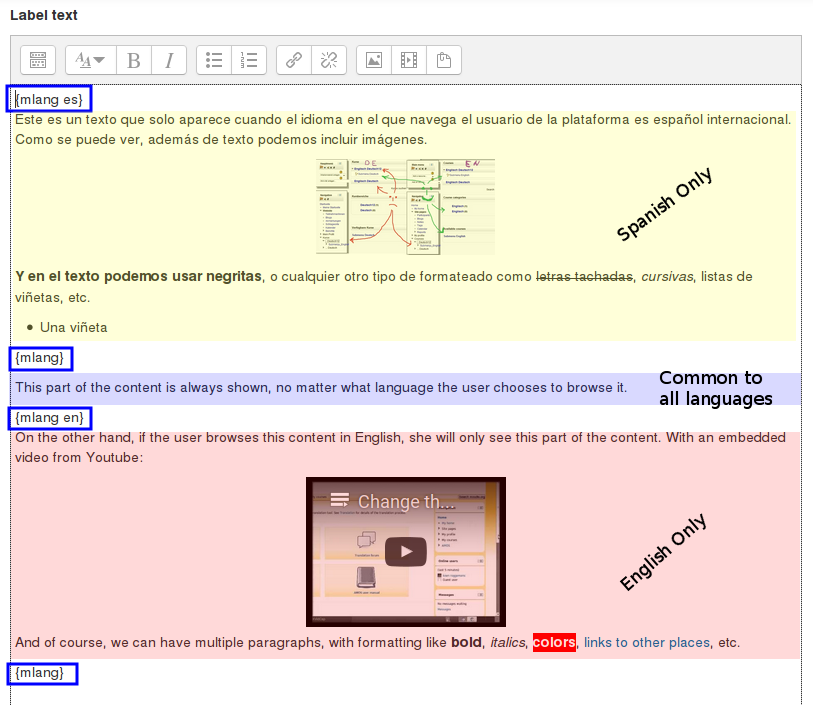
We create a label with the content shown in the following image:

The "lang block" tags are highlighted using blue boxes. You can see that we have three pieces of content: the Spanish-only content (light yellow box), the language-independent content (light blue) and the English-only content (light red).
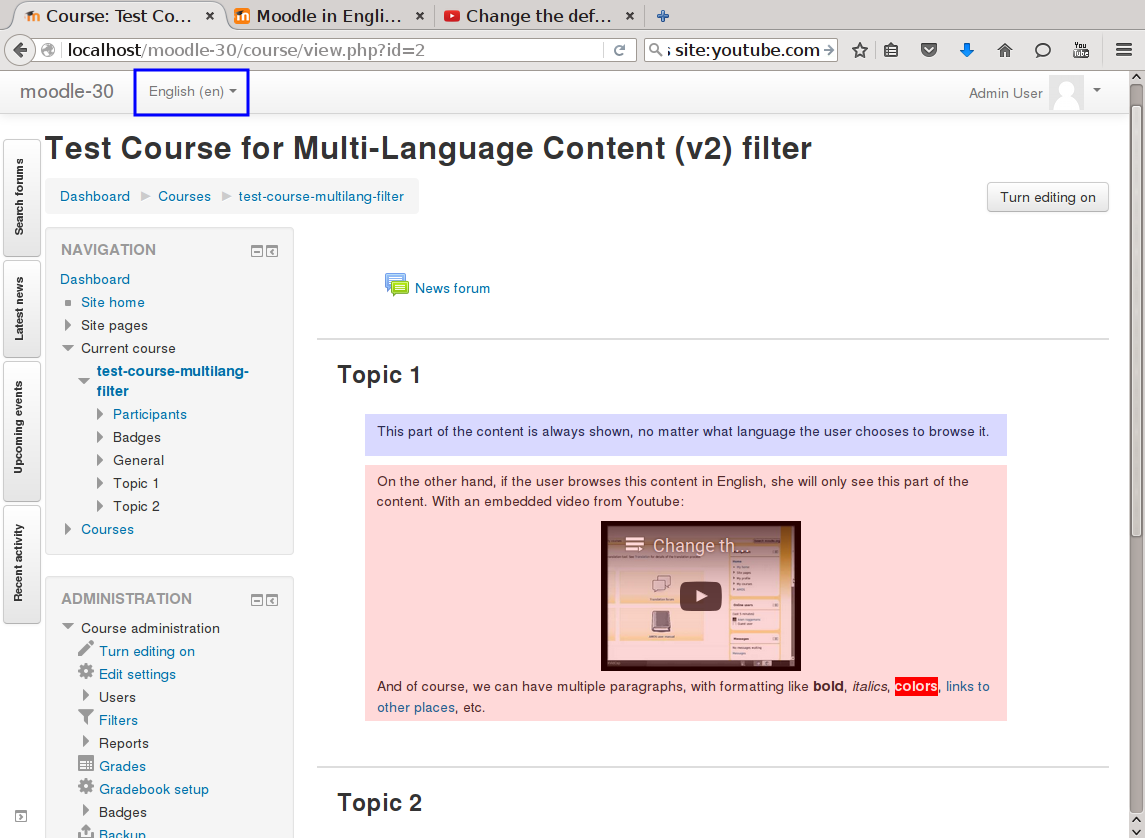
If the user browses the page with English as her configured language, she will see the common content (light blue box) and the English-only content (light red):

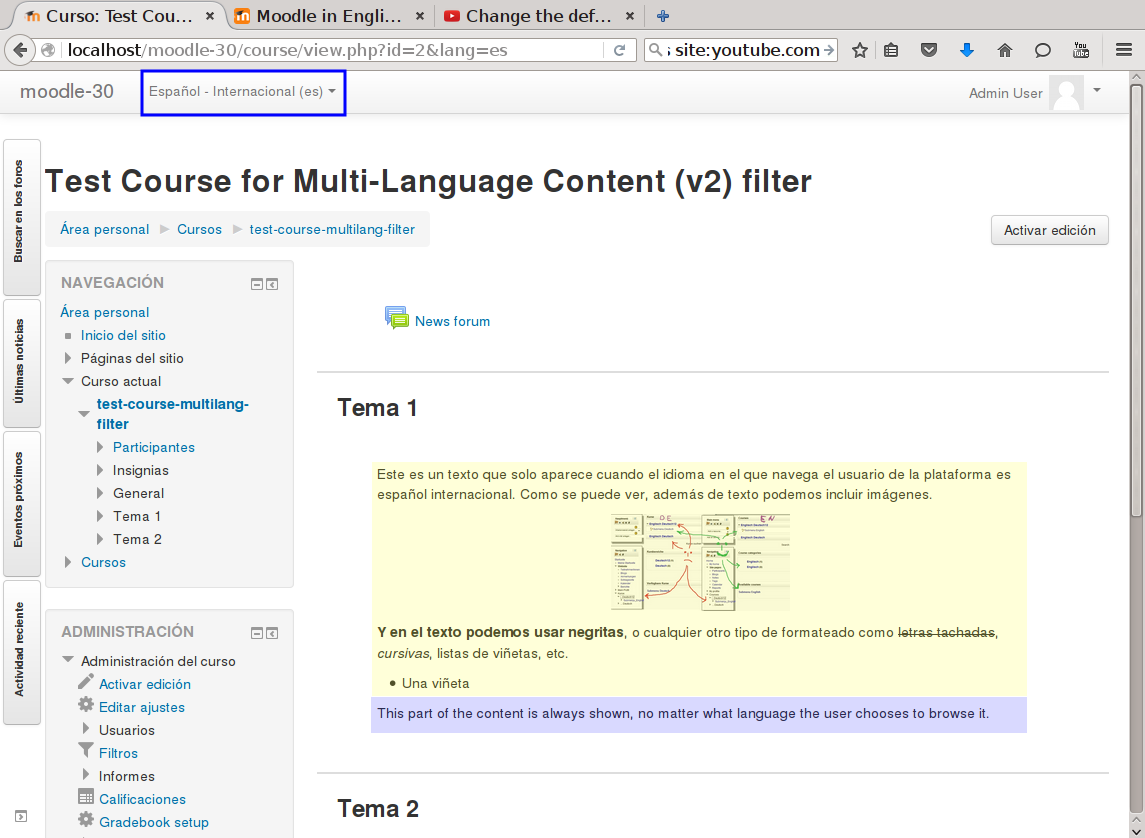
If the user browses the page with Spanish as her configured language, she will see the Spanish-only content (light yellow) plus the common content (light blue box):

1.1.2 (2020101300)
1.1.2
Plugin type: Filters
Frankenstyle component name: filter_multilang2
Version build number: 2020101300
Version release name: 1.1.2
Maturity: Stable
Supported Moodle versions: 3.5, 3.6, 3.7, 3.8, 3.9, 3.10, 3.11, 4.0, 4.1, 4.2, 4.3
Repository URL (Git): https://github.com/iarenaza/moodle-filter_multilang2
Repository branch:
Repository tag: 1.1.2
Issue/bug tracker URL: https://github.com/iarenaza/moodle-filter_multilang2/issues
To Install it manually
- Unzip the plugin in the moodle .../filter/ directory.
To Enable it
- Go to "Site Administration >> Plugins >> Filters >> Manage filters" and enable the plugin there.
To Use it
- Create your contents in multiple languages.
- Enclose every language content between {mlang NN} and {mlang} tags:
{mlang XX}content in language XX{mlang}
{mlang YY}content in language YY{mlang}
{mlang other}content for other languages{mlang}
- where XX and YY are the Moodle short names for the language packs (i.e., en, fr, de, etc.) or the special language name 'other'.
- Version 1.1.1 and later: a new enhanced syntax to be able to specify multiple languages for a single tag is now available. Just specify the list of the languages separated by commas:
{mlang XX,YY,ZZ}Text displayed if current lang is XX, YY or ZZ, or one of their parent laguages.{mlang}
- Test it (by changing your browsing language in Moodle).
How it works
- Look for "lang blocks" in the text to be filtered.
- For each "lang block":
- If there are texts in the currently active language, print them.
- Else, if there exist texts in the current parent language, print them.
- Else, as fallback, print the text with language 'other' if such
one is set.
- Text outside of "lang blocks" will always be shown.
Definition of "lang block"
Is any text (including spaces, tabs, linefeeds or return characters) placed between '{mlang XX}' and '{mlang}' markers. You can not only put text inside "lang block", but also images, videos or external embedded content. For example, this is a valid "lang block":
{mlang es,es_mx,es_co}
First paragraph of text. First paragraph of text. First paragraph of text.
Second paragraph of text. Second paragraph of text. Second paragraph of text.
An image could go here
Third paragraph of text. Third paragraph of text. Third paragraph of text.
An embedded Youtube video could go here
Fourth paragraph of text. Fourth paragraph of text. Fourth paragraph of text.
{mlang}
A couple of examples in action
Using text only
This text:
{mlang other}Hello!{mlang}{mlang es,es_mx}¡Hola!{mlang}
This text is common for all languages because it's outside of all lang blocks.
{mlang other}Bye!{mlang}{mlang it}Ciao!{mlang}
- If the current language is any language except "Spanish International", "Spanish - Mexico" or Italian, it will print:
Hello!
This text is common for all languages because it's outside of all lang blocks.
Bye!
- If the current language is "Spanish International" or "Spanish - Mexico", it will print:
¡Hola!
This text is common for all languages because it's outside of all lang blocks.
- Notice the final 'Bye!' / 'Ciao!' is not printed.
- If the current language is Italian, it will print:
This text is common for all languages because it's outside of all lang blocks.
Ciao!
- Notice the leading 'Hello!' / '¡Hola!' and the final 'Bye!' are not printed.
Using text, images and external embedded content
We create a label with the content shown in the following image:

The "lang block" tags are highlighted using blue boxes. You can see that we have three pieces of content: the Spanish-only content (light yellow box), the language-independent content (light blue) and the English-only content (light red).
If the user browses the page with English as her configured language, she will see the common content (light blue box) and the English-only content (light red):

If the user browses the page with Spanish as her configured language, she will see the Spanish-only content (light yellow) plus the common content (light blue box):

1.1.1 (2019111900)
1.1.1
Plugin type: Filters
Frankenstyle component name: filter_multilang2
Version build number: 2019111900
Version release name: 1.1.1
Maturity: Stable
Supported Moodle versions: 3.4, 3.5, 3.6, 3.7, 3.8, 3.9
Repository URL (Git): https://github.com/iarenaza/moodle-filter_multilang2
Repository branch: master
Repository tag: 1.1.1
Issue/bug tracker URL: https://github.com/iarenaza/moodle-filter_multilang2/issues
To Install it manually
- Unzip the plugin in the moodle .../filter/ directory.
To Enable it
- Go to "Site Administration >> Plugins >> Filters >> Manage filters" and enable the plugin there.
To Use it
- Create your contents in multiple languages.
- Enclose every language content between {mlang NN} and {mlang} tags:
{mlang XX}content in language XX{mlang}
{mlang YY}content in language YY{mlang}
{mlang other}content for other languages{mlang}
- where XX and YY are the Moodle short names for the language packs (i.e., en, fr, de, etc.) or the special language name 'other'.
- Version 1.1.1 and later: a new enhanced syntax to be able to specify multiple languages for a single tag is now available. Just specify the list of the languages separated by commas:
{mlang XX,YY,ZZ}Text displayed if current lang is XX, YY or ZZ, or one of their parent laguages.{mlang}
- Test it (by changing your browsing language in Moodle).
How it works
- Look for "lang blocks" in the text to be filtered.
- For each "lang block":
- If there are texts in the currently active language, print them.
- Else, if there exist texts in the current parent language, print them.
- Else, as fallback, print the text with language 'other' if such
one is set.
- Text outside of "lang blocks" will always be shown.
Definition of "lang block"
Is any text (including spaces, tabs, linefeeds or return characters) placed between '{mlang XX}' and '{mlang}' markers. You can not only put text inside "lang block", but also images, videos or external embedded content. For example, this is a valid "lang block":
{mlang es,es_mx,es_co}
First paragraph of text. First paragraph of text. First paragraph of text.
Second paragraph of text. Second paragraph of text. Second paragraph of text.
An image could go here
Third paragraph of text. Third paragraph of text. Third paragraph of text.
An embedded Youtube video could go here
Fourth paragraph of text. Fourth paragraph of text. Fourth paragraph of text.
{mlang}
A couple of examples in action
Using text only
This text:
{mlang other}Hello!{mlang}{mlang es,es_mx}¡Hola!{mlang}
This text is common for all languages because it's outside of all lang blocks.
{mlang other}Bye!{mlang}{mlang it}Ciao!{mlang}
- If the current language is any language except "Spanish International", "Spanish - Mexico" or Italian, it will print:
Hello!
This text is common for all languages because it's outside of all lang blocks.
Bye!
- If the current language is "Spanish International" or "Spanish - Mexico", it will print:
¡Hola!
This text is common for all languages because it's outside of all lang blocks.
- Notice the final 'Bye!' / 'Ciao!' is not printed.
- If the current language is Italian, it will print:
This text is common for all languages because it's outside of all lang blocks.
Ciao!
- Notice the leading 'Hello!' / '¡Hola!' and the final 'Bye!' are not printed.
Using text, images and external embedded content
We create a label with the content shown in the following image:

The "lang block" tags are highlighted using blue boxes. You can see that we have three pieces of content: the Spanish-only content (light yellow box), the language-independent content (light blue) and the English-only content (light red).
If the user browses the page with English as her configured language, she will see the common content (light blue box) and the English-only content (light red):

If the user browses the page with Spanish as her configured language, she will see the Spanish-only content (light yellow) plus the common content (light blue box):

1.0.1 (2018070401)
1.0.1
Plugin type: Filters
Frankenstyle component name: filter_multilang2
Version build number: 2018070401
Version release name: 1.0.1
Maturity: Stable
Supported Moodle versions: 3.4, 3.5, 3.6, 3.7
Repository URL (Git): https://github.com/iarenaza/moodle-filter_multilang2
Repository branch:
Repository tag:
Issue/bug tracker URL: https://github.com/iarenaza/moodle-filter_multilang2/issues
To Install it manually
- Unzip the plugin in the moodle .../filter/ directory.
- Enable it from "Site Administration >> Plugins >> Filters >> Manage filters".
To Use it
- Create your contents in multiple languages.
- Enclose every language content between {mlang NN} and {mlang} tags:
{mlang XX}content in language XX{mlang}
{mlang YY}content in language YY{mlang}Forum 1{mlang}
where XX and YY are the Moodle short names for the language packs
(i.e., en, fr, de, etc.) - Test it (by changing your browsing language in Moodle).
How it works
- Look for "lang blocks" in the code.
- For each "lang block":
- If there are texts in the currently active language, print them.
- Else, if there exists texts in the current parent language, print them.
- Else, don't print any text inside the lang block.
- Text outside of "lang blocks" will always be shown.
Definition of "lang block"
Is any text (including spaces, tabs, linefeeds or return characters)
placed between '{mlang XX}' and '{mlang}' markers. You can not only
put text inside "lang block", but also images, videos or external
embedded content. For example, this is a valid "lang block":
{mlang es}
First paragraph of text. First paragraph of text. First paragraph of text.
Second paragraph of text. Second paragraph of text. Second paragraph of text.
((-- An image goes here --))
Third paragraph of text. Third paragraph of text. Third paragraph of text.
((-- A Youtube video goes here --))
Fourth paragraph of text. Fourth paragraph of text. Fourth paragraph of text.
{mlang}
One example in action
- This text:
{mlang en}Hello!{mlang}{mlang es}¡Hola!{mlang}
This text is common for all languages because it's outside of all lang blocks.
{mlang en}Bye!{mlang}{mlang it}Ciao!{mlang}
- If the current language is English, it will print:
Hello!
This text is common for all languages because it's outside of all lang blocks.
Bye!
- If the current language is Spanish, it will print:
¡Hola!
This text is common for all languages because it's outside of all lang blocks.
Notice the final 'Bye!' / 'Ciao!' is not printed. - If the current language is Italian, it will print:
This text is common for all languages because it's outside of all lang blocks.
Ciao!
Notice the leading 'Hello!' / '¡Hola!' is not printed.
1.0.5 (2016080700)
1.0.5
Plugin type: Filters
Frankenstyle component name: filter_multilang2
Version build number: 2016080700
Version release name: 1.0.5
Maturity: Stable
Supported Moodle versions: 2.8, 2.9, 3.0, 3.1, 3.2, 3.3, 3.4, 3.5
Repository URL (Git): https://github.com/iarenaza/moodle-filter_multilang2
Repository branch:
Repository tag:
Issue/bug tracker URL: https://github.com/iarenaza/moodle-filter_multilang2/issues
To Install it manually
- Unzip the plugin in the moodle .../filter/ directory.
- Enable it from "Site Administration >> Plugins >> Filters >> Manage filters".
To Use it
- Create your contents in multiple languages.
- Enclose every language content between {mlang NN} and {mlang} tags:
{mlang XX}content in language XX{mlang}
{mlang YY}content in language YY{mlang}
where XX and YY are the Moodle short names for the language packs
(i.e., en, fr, de, etc.) - Test it (by changing your browsing language in Moodle).
How it works
- Look for "lang blocks" in the code.
- For each "lang block":
- If there are texts in the currently active language, print them.
- Else, if there exists texts in the current parent language, print them.
- Else, don't print any text inside the lang block.
- Text outside of "lang blocks" will always be shown.
Definition of "lang block"
Is any text (including spaces, tabs, linefeeds or return characters)
placed between '{mlang XX}' and '{mlang}' markers. You can not only
put text inside "lang block", but also images, videos or external
embedded content. For example, this is a valid "lang block":
{mlang es}
First paragraph of text. First paragraph of text. First paragraph of text.
Second paragraph of text. Second paragraph of text. Second paragraph of text.
((-- An image goes here --))
Third paragraph of text. Third paragraph of text. Third paragraph of text.
((-- A Youtube video goes here --))
Fourth paragraph of text. Fourth paragraph of text. Fourth paragraph of text.
{mlang}
One example in action
- This text:
{mlang en}Hello!{mlang}{mlang es}¡Hola!{mlang}
This text is common for all languages because it's outside of all lang blocks.
{mlang en}Bye!{mlang}{mlang it}Ciao!{mlang}
- If the current language is English, it will print:
Hello!
This text is common for all languages because it's outside of all lang blocks.
Bye!
- If the current language is Spanish, it will print:
¡Hola!
This text is common for all languages because it's outside of all lang blocks.
Notice the final 'Bye!' / 'Ciao!' is not printed. - If the current language is Italian, it will print:
This text is common for all languages because it's outside of all lang blocks.
Ciao!
Notice the leading 'Hello!' / '¡Hola!' is not printed.