
Hot Question
Versions
Current version
5.1.2 (Build: 2026063000) (2026063000)
5.1.2 (Build: 2026063000)
Plugin type: Activities
Frankenstyle component name: mod_hotquestion
Version build number: 2026063000
Version release name: 5.1.2 (Build: 2026063000)
Maturity: Stable
Supported Moodle versions: 4.5, 5.0, 5.1, 5.2
Repository URL (Git): https://github.com/drachels/moodle-mod_hotquestion
Repository branch:
Repository tag: v5.1.2
Issue/bug tracker URL: https://github.com/drachels/moodle-mod_hotquestion/issues

Moodle Hot Question module
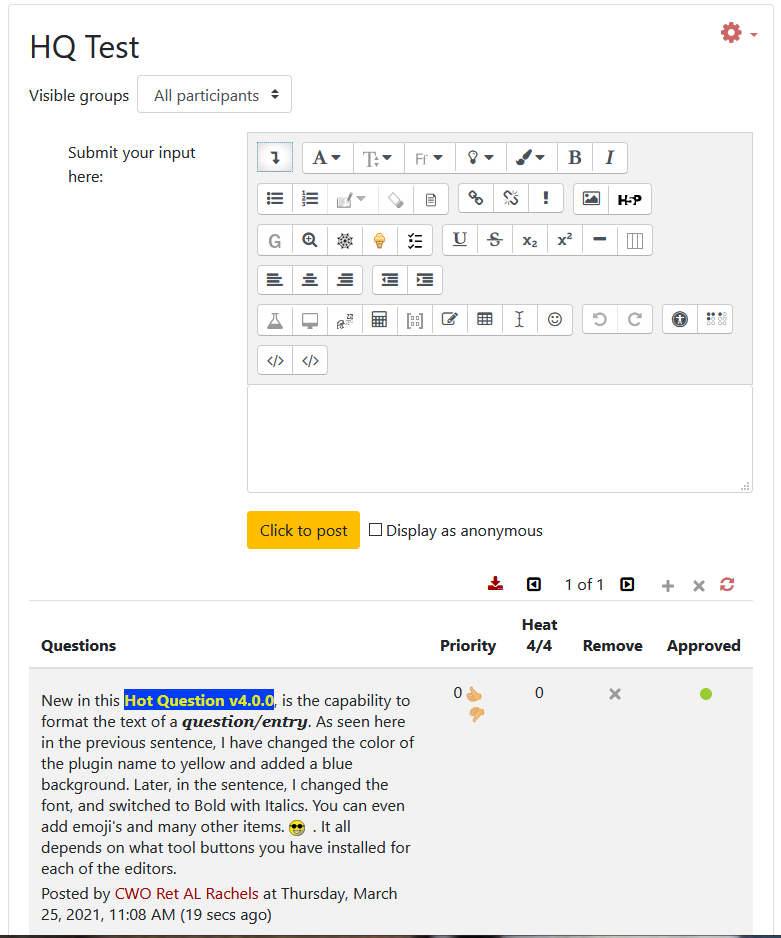
The first moodle activity for physical classroom. The idea comes from
Purdue University's hotseat.
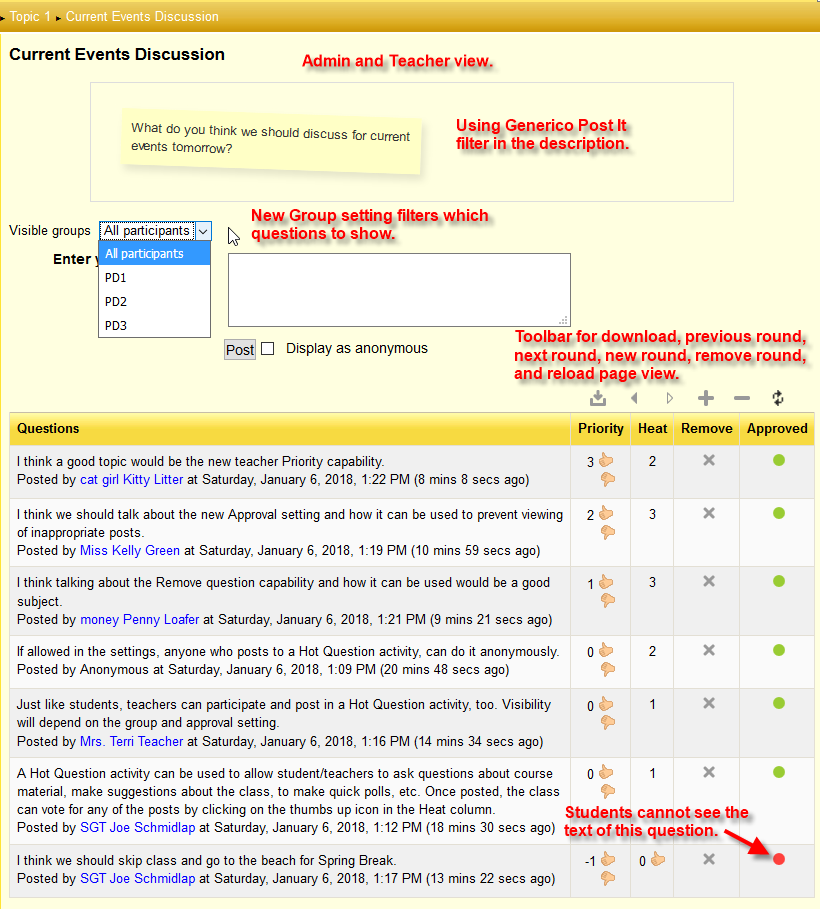
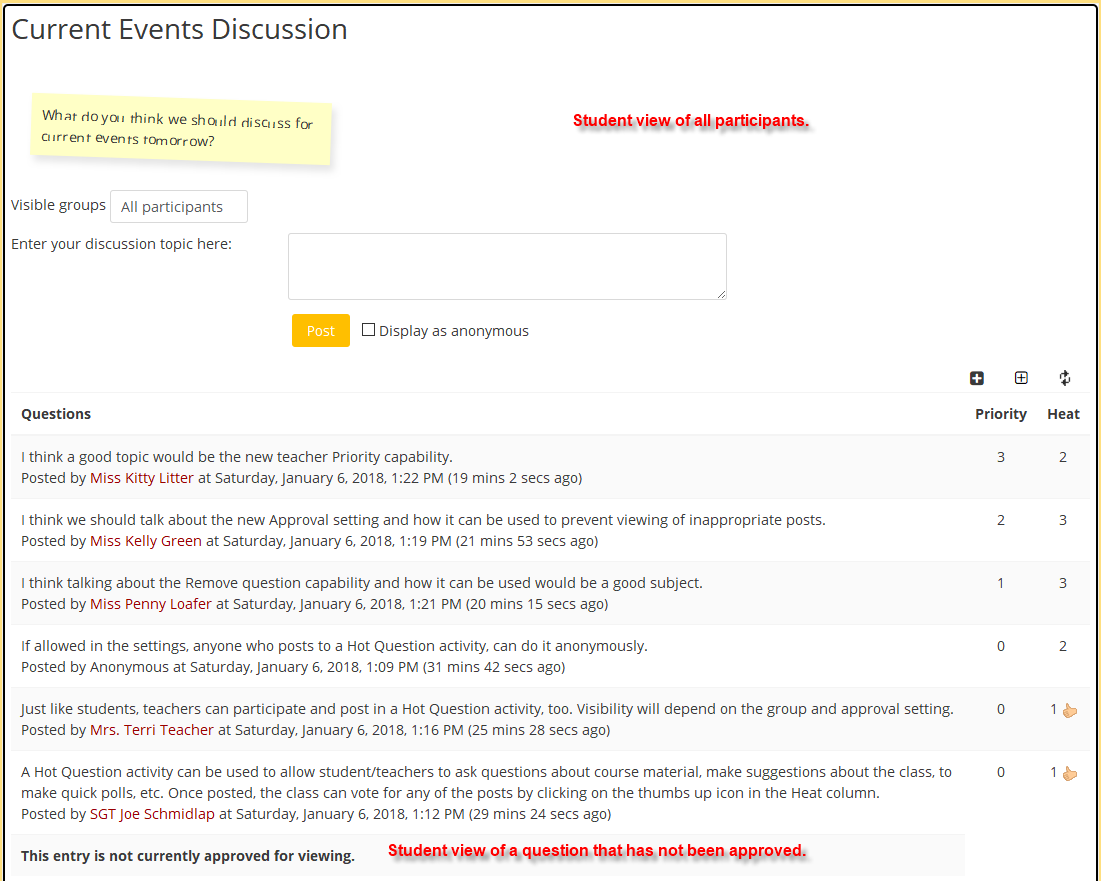
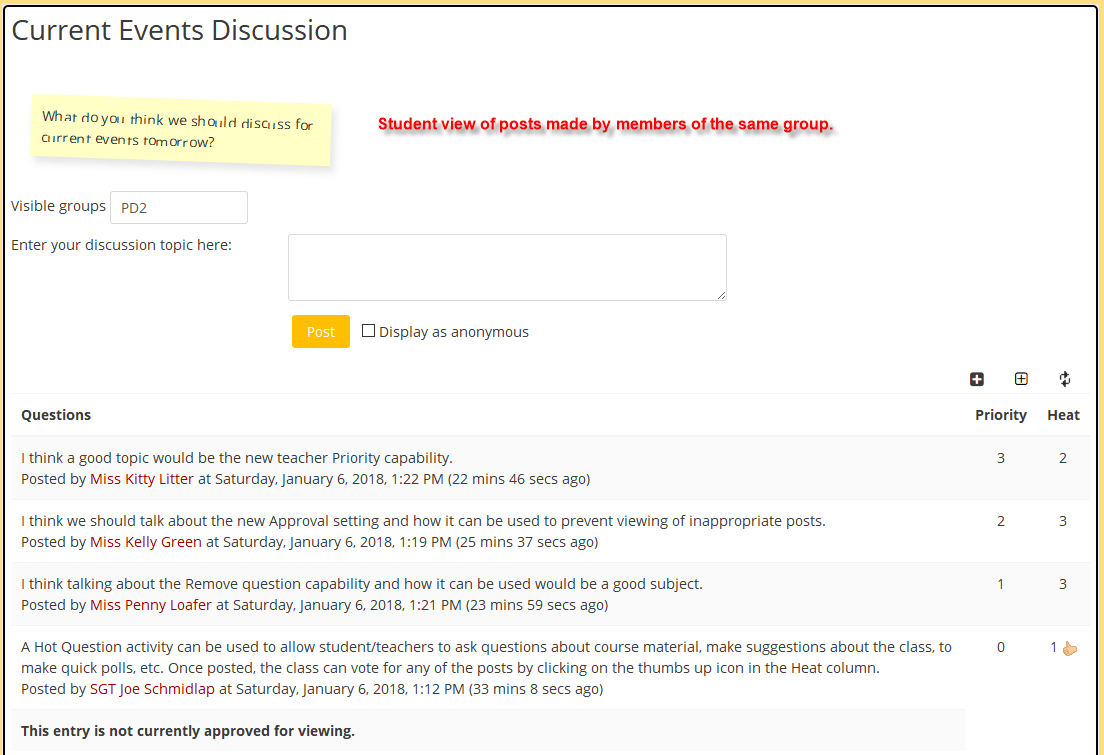
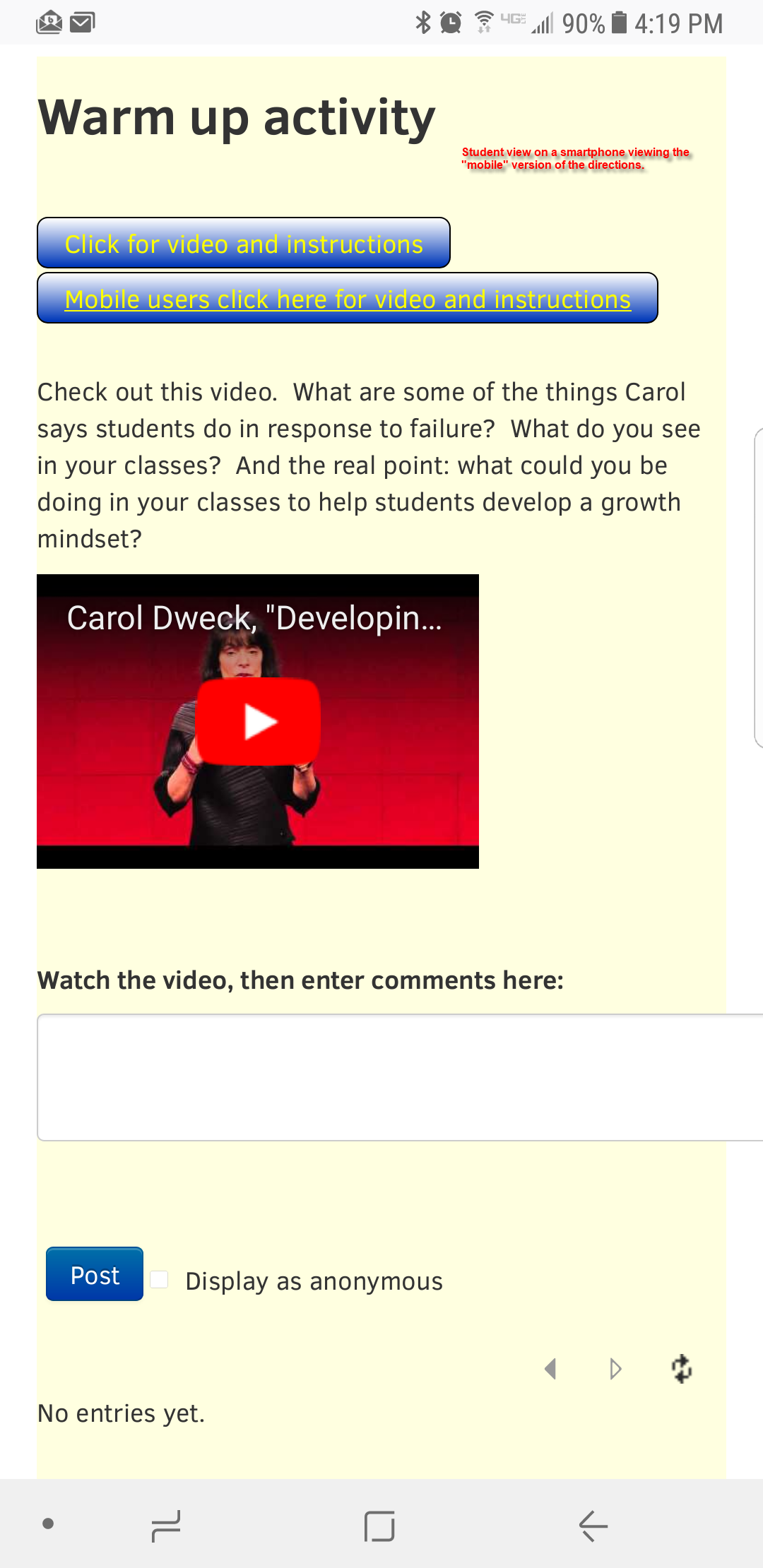
Inside or outside classroom, students post questions into a Hot Question
activity from notebook, netbook, android, iPhone, iPod or any other device
which can access the moodle site. Students can also vote on others'
questions, so that the hottest questions will be popped up to the top of
the list. Teachers can make oral comments on selected questions in classroom.
See the download page for more suggestions and way to use this plugin.
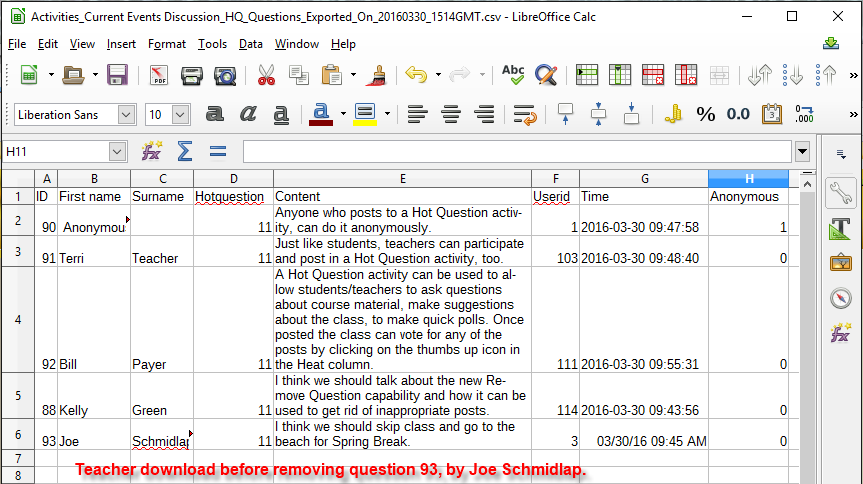
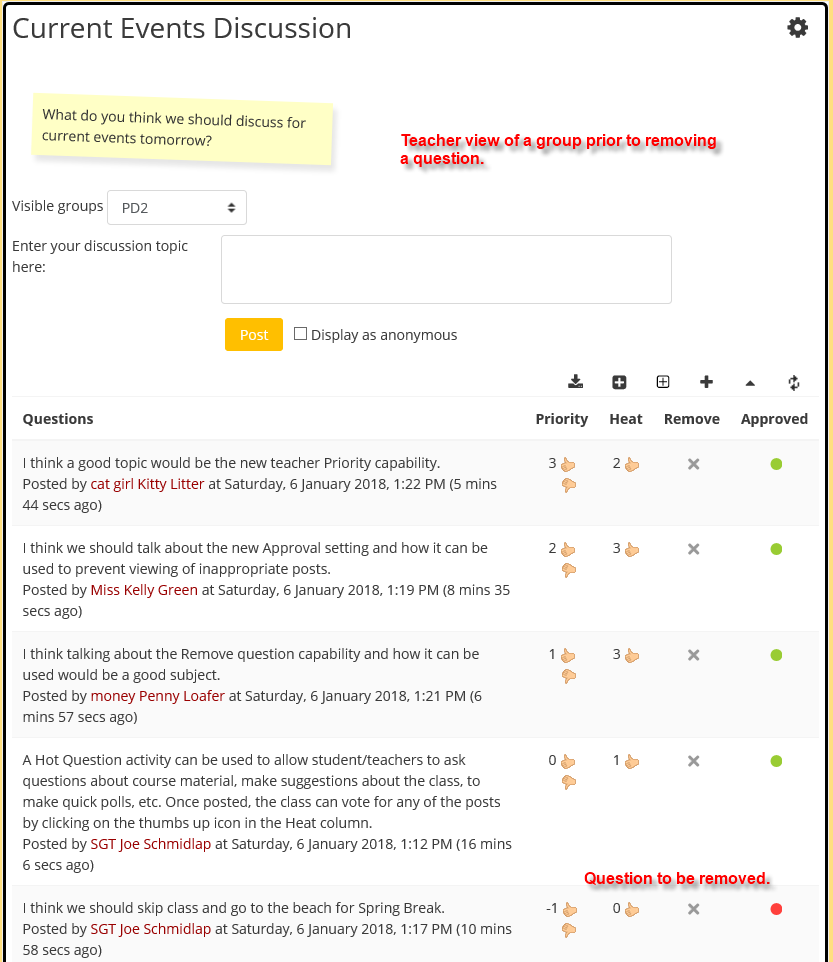
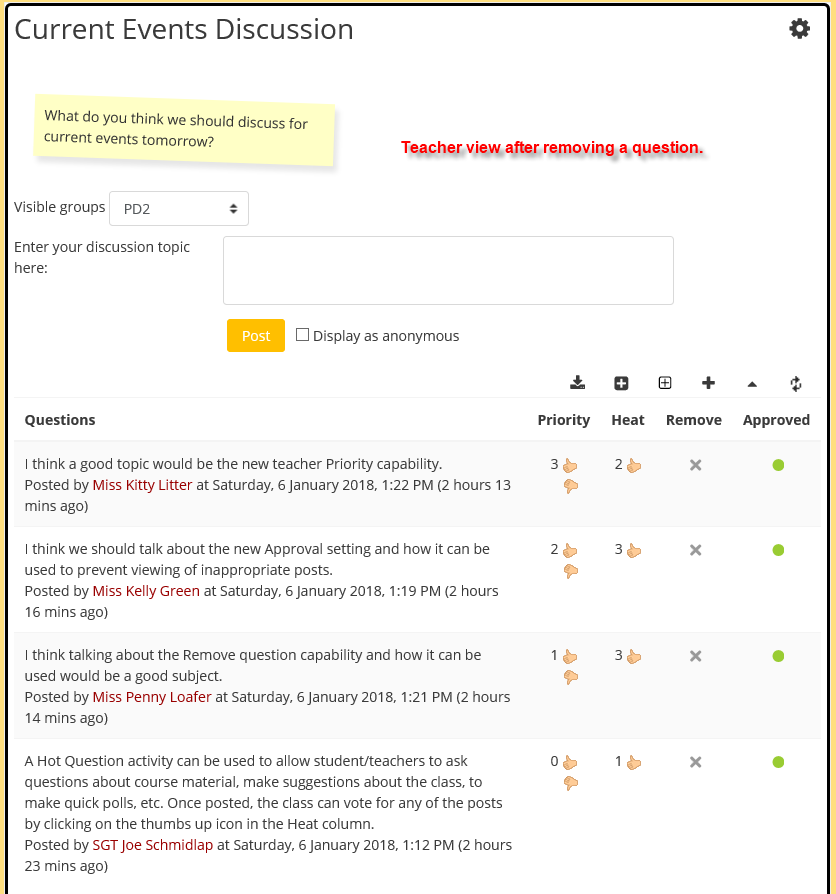
NOTE: If you plan on disciplinary action for any inappropriate question,
you should download the evidence BEFORE you remove questions or remove rounds,
as once removed, questions and rounds are not recoverable.
Details: https://github.com/hit-moodle/moodle-mod_hotquestion/wiki
- Moodle tracker component: https://github.com/drachels/moodle-mod_hotquestion/issues
- Documentation: https://github.com/drachels/moodle-mod_hotquestion/wiki
- Source Code: https://github.com/drachels/moodle-mod_hotquestion
- License: http://www.gnu.org/licenses/gpl.txt
Install from git
- Navigate to Moodle root folder
- git clone git://github.com/drachels/moodle-mod_hotquestion.git mod/hotquestion
- cd hotquestion
- git checkout MOODLE_XXX_STABLE (where XXX is the moodle version, e.g: MOODLE_404_STABLE, MOODLE_405_STABLE...)
- Click the 'Notifications' link on the frontpage administration block or php admin/cli/upgrade.php if you have access to a command line interpreter.
Install from a compressed file
- Extract the compressed file data
- Rename the main folder to hotquestion
- Copy to the Moodle mod/ folder
- Click the 'Notifications' link on the frontpage administration block or php admin/cli/upgrade.php if you have access to a command line interpreter.
Install directly in newer versions of Moodle
- Download the zip file from Moodle downloads
- In your Moodle navigate to Site administration > Plugins > Install plugins
- Drag and drop the downloaded zip file into the file area
- Click the 'Install plugin from the ZIP file' button.
5.1.1 (Build: 2026051800) (2026051800)
5.1.1 (Build: 2026051800)
Plugin type: Activities
Frankenstyle component name: mod_hotquestion
Version build number: 2026051800
Version release name: 5.1.1 (Build: 2026051800)
Maturity: Stable
Supported Moodle versions: 4.5, 5.0, 5.1, 5.2
Repository URL (Git): https://github.com/drachels/moodle-mod_hotquestion
Repository branch:
Repository tag: v5.1.1
Issue/bug tracker URL: https://github.com/drachels/moodle-mod_hotquestion/issues
Moodle Hot Question module
The first moodle activity for physical classroom. The idea comes from
Purdue University's hotseat.
Inside or outside classroom, students post questions into a Hot Question
activity from notebook, netbook, android, iPhone, iPod or any other device
which can access the moodle site. Students can also vote on others'
questions, so that the hottest questions will be popped up to the top of
the list. Teachers can make oral comments on selected questions in classroom.
See the download page for more suggestions and way to use this plugin.
NOTE: If you plan on disciplinary action for any inappropriate question,
you should download the evidence BEFORE you remove questions or remove rounds,
as once removed, questions and rounds are not recoverable.
Details: https://github.com/hit-moodle/moodle-mod_hotquestion/wiki
- Moodle tracker component: https://github.com/drachels/moodle-mod_hotquestion/issues
- Documentation: https://github.com/drachels/moodle-mod_hotquestion/wiki
- Source Code: https://github.com/drachels/moodle-mod_hotquestion
- License: http://www.gnu.org/licenses/gpl.txt
Install from git
- Navigate to Moodle root folder
- git clone git://github.com/drachels/moodle-mod_hotquestion.git mod/hotquestion
- cd hotquestion
- git checkout MOODLE_XXX_STABLE (where XXX is the moodle version, e.g: MOODLE_404_STABLE, MOODLE_405_STABLE...)
- Click the 'Notifications' link on the frontpage administration block or php admin/cli/upgrade.php if you have access to a command line interpreter.
Install from a compressed file
- Extract the compressed file data
- Rename the main folder to hotquestion
- Copy to the Moodle mod/ folder
- Click the 'Notifications' link on the frontpage administration block or php admin/cli/upgrade.php if you have access to a command line interpreter.
Install directly in newer versions of Moodle
- Download the zip file from Moodle downloads
- In your Moodle navigate to Site administration > Plugins > Install plugins
- Drag and drop the downloaded zip file into the file area
- Click the 'Install plugin from the ZIP file' button.
5.1.0 (Build: 2026050901) (2026050901)
5.1.0 (Build: 2026050901)
Plugin type: Activities
Frankenstyle component name: mod_hotquestion
Version build number: 2026050901
Version release name: 5.1.0 (Build: 2026050901)
Maturity: Stable
Supported Moodle versions: 4.5, 5.0, 5.1, 5.2
Repository URL (Git): https://github.com/drachels/moodle-mod_hotquestion
Repository branch:
Repository tag: v5.1.0
Issue/bug tracker URL: https://github.com/drachels/moodle-mod_hotquestion/issues
Moodle Hot Question module
The first moodle activity for physical classroom. The idea comes from
Purdue University's hotseat.
Inside or outside classroom, students post questions into a Hot Question
activity from notebook, netbook, android, iPhone, iPod or any other device
which can access the moodle site. Students can also vote on others'
questions, so that the hottest questions will be popped up to the top of
the list. Teachers can make oral comments on selected questions in classroom.
See the download page for more suggestions and way to use this plugin.
NOTE: If you plan on disciplinary action for any inappropriate question,
you should download the evidence BEFORE you remove questions or remove rounds,
as once removed, questions and rounds are not recoverable.
Details: https://github.com/hit-moodle/moodle-mod_hotquestion/wiki
- Moodle tracker component: https://github.com/drachels/moodle-mod_hotquestion/issues
- Documentation: https://github.com/drachels/moodle-mod_hotquestion/wiki
- Source Code: https://github.com/drachels/moodle-mod_hotquestion
- License: http://www.gnu.org/licenses/gpl.txt
Install from git
- Navigate to Moodle root folder
- git clone git://github.com/drachels/moodle-mod_hotquestion.git mod/hotquestion
- cd hotquestion
- git checkout MOODLE_XXX_STABLE (where XXX is the moodle version, e.g: MOODLE_404_STABLE, MOODLE_405_STABLE...)
- Click the 'Notifications' link on the frontpage administration block or php admin/cli/upgrade.php if you have access to a command line interpreter.
Install from a compressed file
- Extract the compressed file data
- Rename the main folder to hotquestion
- Copy to the Moodle mod/ folder
- Click the 'Notifications' link on the frontpage administration block or php admin/cli/upgrade.php if you have access to a command line interpreter.
Install directly in newer versions of Moodle
- Download the zip file from Moodle downloads
- In your Moodle navigate to Site administration > Plugins > Install plugins
- Drag and drop the downloaded zip file into the file area
- Click the 'Install plugin from the ZIP file' button.
5.0.0 (Build: 2026032400) (2026032400)
5.0.0 (Build: 2026032400)
Plugin type: Activities
Frankenstyle component name: mod_hotquestion
Version build number: 2026032400
Version release name: 5.0.0 (Build: 2026032400)
Maturity: Stable
Supported Moodle versions: 4.5, 5.0, 5.1, 5.2
Repository URL (Git): https://github.com/drachels/moodle-mod_hotquestion
Repository branch:
Repository tag: v5.0.0
Issue/bug tracker URL: https://github.com/drachels/moodle-mod_hotquestion/issues
Moodle Hot Question module
The first moodle activity for physical classroom. The idea comes from
Purdue University's hotseat.
Inside or outside classroom, students post questions into a Hot Question
activity from notebook, netbook, android, iPhone, iPod or any other device
which can access the moodle site. Students can also vote on others'
questions, so that the hottest questions will be popped up to the top of
the list. Teachers can make oral comments on selected questions in classroom.
See the download page for more suggestions and way to use this plugin.
NOTE: If you plan on disciplinary action for any inappropriate question,
you should download the evidence BEFORE you remove questions or remove rounds,
as once removed, questions and rounds are not recoverable.
Details: https://github.com/hit-moodle/moodle-mod_hotquestion/wiki
- Moodle tracker component: https://github.com/drachels/moodle-mod_hotquestion/issues
- Documentation: https://github.com/drachels/moodle-mod_hotquestion/wiki
- Source Code: https://github.com/drachels/moodle-mod_hotquestion
- License: http://www.gnu.org/licenses/gpl.txt
Install from git
- Navigate to Moodle root folder
- git clone git://github.com/drachels/moodle-mod_hotquestion.git mod/hotquestion
- cd hotquestion
- git checkout MOODLE_XXX_STABLE (where XXX is the moodle version, e.g: MOODLE_404_STABLE, MOODLE_405_STABLE...)
- Click the 'Notifications' link on the frontpage administration block or php admin/cli/upgrade.php if you have access to a command line interpreter.
Install from a compressed file
- Extract the compressed file data
- Rename the main folder to hotquestion
- Copy to the Moodle mod/ folder
- Click the 'Notifications' link on the frontpage administration block or php admin/cli/upgrade.php if you have access to a command line interpreter.
Install directly in newer versions of Moodle
- Download the zip file from Moodle downloads
- In your Moodle navigate to Site administration > Plugins > Install plugins
- Drag and drop the downloaded zip file into the file area
- Click the 'Install plugin from the ZIP file' button.
4.2.5 (Build: 2025060200) (2025060200)
4.2.5 (Build: 2025060200)
Plugin type: Activities
Frankenstyle component name: mod_hotquestion
Version build number: 2025060200
Version release name: 4.2.5 (Build: 2025060200)
Maturity: Stable
Supported Moodle versions: 3.11, 4.0, 4.1, 4.2, 4.3, 4.4, 4.5, 5.0, 5.1
Repository URL (Git): https://github.com/drachels/moodle-mod_hotquestion
Repository branch:
Repository tag: v4.2.5
Issue/bug tracker URL: https://github.com/drachels/moodle-mod_hotquestion/issues
Moodle Hot Question module
The first moodle activity for physical classroom. The idea comes from
Purdue University's hotseat.
Inside or outside classroom, students post questions into a Hot Question
activity from notebook, netbook, android, iPhone, iPod or any other device
which can access the moodle site. Students can also vote on others'
questions, so that the hottest questions will be popped up to the top of
the list. Teachers can make oral comments on selected questions in classroom.
See the download page for more suggestions and way to use this plugin.
NOTE: If you plan on disciplinary action for any inappropriate question,
you should download the evidence BEFORE you remove questions or remove rounds,
as once removed, questions and rounds are not recoverable.
Details: https://github.com/hit-moodle/moodle-mod_hotquestion/wiki
- Moodle tracker component: https://github.com/drachels/moodle-mod_hotquestion/issues
- Documentation: https://github.com/drachels/moodle-mod_hotquestion/wiki
- Source Code: https://github.com/drachels/moodle-mod_hotquestion
- License: http://www.gnu.org/licenses/gpl.txt
Install from git
- Navigate to Moodle root folder
- git clone git://github.com/drachels/moodle-mod_hotquestion.git mod/hotquestion
- cd hotquestion
- git checkout MOODLE_XXX_STABLE (where XXX is the moodle version, e.g: MOODLE_404_STABLE, MOODLE_405_STABLE...)
- Click the 'Notifications' link on the frontpage administration block or php admin/cli/upgrade.php if you have access to a command line interpreter.
Install from a compressed file
- Extract the compressed file data
- Rename the main folder to hotquestion
- Copy to the Moodle mod/ folder
- Click the 'Notifications' link on the frontpage administration block or php admin/cli/upgrade.php if you have access to a command line interpreter.
Install directly in newer versions of Moodle
- Download the zip file from Moodle downloads
- In your Moodle navigate to Site administration > Plugins > Install plugins
- Drag and drop the downloaded zip file into the file area
- Click the 'Install plugin from the ZIP file' button.
4.2.4 (Build: 2025041500) (2025041500)
4.2.4 (Build: 2025041500)
Plugin type: Activities
Frankenstyle component name: mod_hotquestion
Version build number: 2025041500
Version release name: 4.2.4 (Build: 2025041500)
Maturity: Stable
Supported Moodle versions: 3.11, 4.0, 4.1, 4.2, 4.3, 4.4, 4.5, 5.0
Repository URL (Git): https://github.com/drachels/moodle-mod_hotquestion
Repository branch:
Repository tag: v4.2.4
Issue/bug tracker URL: https://github.com/drachels/moodle-mod_hotquestion/issues
Moodle Hot Question module
The first moodle activity for physical classroom. The idea comes from
Purdue University's hotseat.
Inside or outside classroom, students post questions into a Hot Question
activity from notebook, netbook, android, iPhone, iPod or any other device
which can access the moodle site. Students can also vote on others'
questions, so that the hottest questions will be popped up to the top of
the list. Teachers can make oral comments on selected questions in classroom.
See the download page for more suggestions and way to use this plugin.
NOTE: If you plan on disciplinary action for any inappropriate question,
you should download the evidence BEFORE you remove questions or remove rounds,
as once removed, questions and rounds are not recoverable.
Details: https://github.com/hit-moodle/moodle-mod_hotquestion/wiki
- Moodle tracker component: https://github.com/drachels/moodle-mod_hotquestion/issues
- Documentation: https://github.com/drachels/moodle-mod_hotquestion/wiki
- Source Code: https://github.com/drachels/moodle-mod_hotquestion
- License: http://www.gnu.org/licenses/gpl.txt
Install from git
- Navigate to Moodle root folder
- git clone git://github.com/drachels/moodle-mod_hotquestion.git mod/hotquestion
- cd hotquestion
- git checkout MOODLE_XXX_STABLE (where XXX is the moodle version, e.g: MOODLE_404_STABLE, MOODLE_405_STABLE...)
- Click the 'Notifications' link on the frontpage administration block or php admin/cli/upgrade.php if you have access to a command line interpreter.
Install from a compressed file
- Extract the compressed file data
- Rename the main folder to hotquestion
- Copy to the Moodle mod/ folder
- Click the 'Notifications' link on the frontpage administration block or php admin/cli/upgrade.php if you have access to a command line interpreter.
Install directly in newer versions of Moodle
- Download the zip file from Moodle downloads
- In your Moodle navigate to Site administration > Plugins > Install plugins
- Drag and drop the downloaded zip file into the file area
- Click the 'Install plugin from the ZIP file' button.
4.2.3 (Build: 2024100900) (2024100900)
4.2.3 (Build: 2024100900)
Plugin type: Activities
Frankenstyle component name: mod_hotquestion
Version build number: 2024100900
Version release name: 4.2.3 (Build: 2024100900)
Maturity: Stable
Supported Moodle versions: 3.11, 4.0, 4.1, 4.2, 4.3, 4.4, 4.5
Repository URL (Git): https://github.com/drachels/moodle-mod_hotquestion
Repository branch:
Repository tag: v4.2.3
Issue/bug tracker URL: https://github.com/drachels/moodle-mod_hotquestion/issues
Moodle Hot Question module
The first moodle activity for physical classroom. The idea comes from
Purdue University's hotseat.
Inside or outside classroom, students post questions into a Hot Question
activity from notebook, netbook, android, iPhone, iPod or any other device
which can access the moodle site. Students can also vote on others'
questions, so that the hottest questions will be popped up to the top of
the list. Teachers can make oral comments on selected questions in classroom.
See the download page for more suggestions and way to use this plugin.
NOTE: If you plan on disciplinary action for any inappropriate question,
you should download the evidence BEFORE you remove questions or remove rounds,
as once removed, questions and rounds are not recoverable.
Details: https://github.com/hit-moodle/moodle-mod_hotquestion/wiki
- Moodle tracker component: https://github.com/drachels/moodle-mod_hotquestion/issues
- Documentation: https://github.com/drachels/moodle-mod_hotquestion/wiki
- Source Code: https://github.com/drachels/moodle-mod_hotquestion
- License: http://www.gnu.org/licenses/gpl.txt
Install from git
- Navigate to Moodle root folder
- git clone git://github.com/drachels/moodle-mod_hotquestion.git mod/hotquestion
- cd hotquestion
- git checkout MOODLE_XY_STABLE (where XY is the moodle version, e.g: MOODLE_311_STABLE, MOODLE_400_STABLE...)
- Click the 'Notifications' link on the frontpage administration block or php admin/cli/upgrade.php if you have access to a command line interpreter.
Install from a compressed file
- Extract the compressed file data
- Rename the main folder to hotquestion
- Copy to the Moodle mod/ folder
- Click the 'Notifications' link on the frontpage administration block or php admin/cli/upgrade.php if you have access to a command line interpreter.
Install directly in newer versions of Moodle
- Download the zip file from Moodle downloads
- In your Moodle navigate to Site administration > Plugins > Install plugins
- Drag and drop the downloaded zip file into the file area
- Click the 'Install plugin from the ZIP file' button.
4.2.2 (Build: 2024090400) (2024090400)
4.2.2 (Build: 2024090400)
Plugin type: Activities
Frankenstyle component name: mod_hotquestion
Version build number: 2024090400
Version release name: 4.2.2 (Build: 2024090400)
Maturity: Stable
Supported Moodle versions: 3.11, 4.0, 4.1, 4.2, 4.3, 4.4
Repository URL (Git): https://github.com/drachels/moodle-mod_hotquestion
Repository branch:
Repository tag: v4.2.2
Issue/bug tracker URL: https://github.com/drachels/moodle-mod_hotquestion/issues
Moodle Hot Question module
The first moodle activity for physical classroom. The idea comes from
Purdue University's hotseat.
Inside or outside classroom, students post questions into a Hot Question
activity from notebook, netbook, android, iPhone, iPod or any other device
which can access the moodle site. Students can also vote on others'
questions, so that the hottest questions will be popped up to the top of
the list. Teachers can make oral comments on selected questions in classroom.
See the download page for more suggestions and way to use this plugin.
NOTE: If you plan on disciplinary action for any inappropriate question,
you should download the evidence BEFORE you remove questions or remove rounds,
as once removed, questions and rounds are not recoverable.
Details: https://github.com/hit-moodle/moodle-mod_hotquestion/wiki
- Moodle tracker component: https://github.com/drachels/moodle-mod_hotquestion/issues
- Documentation: https://github.com/drachels/moodle-mod_hotquestion/wiki
- Source Code: https://github.com/drachels/moodle-mod_hotquestion
- License: http://www.gnu.org/licenses/gpl.txt
Install from git
- Navigate to Moodle root folder
- git clone git://github.com/drachels/moodle-mod_hotquestion.git mod/hotquestion
- cd hotquestion
- git checkout MOODLE_XY_STABLE (where XY is the moodle version, e.g: MOODLE_311_STABLE, MOODLE_400_STABLE...)
- Click the 'Notifications' link on the frontpage administration block or php admin/cli/upgrade.php if you have access to a command line interpreter.
Install from a compressed file
- Extract the compressed file data
- Rename the main folder to hotquestion
- Copy to the Moodle mod/ folder
- Click the 'Notifications' link on the frontpage administration block or php admin/cli/upgrade.php if you have access to a command line interpreter.
Install directly in newer versions of Moodle
- Download the zip file from Moodle downloads
- In your Moodle navigate to Site administration > Plugins > Install plugins
- Drag and drop the downloaded zip file into the file area
- Click the 'Install plugin from the ZIP file' button.
4.2.1 (Build: 2024070700) (2024070700)
4.2.1 (Build: 2024070700)
Plugin type: Activities
Frankenstyle component name: mod_hotquestion
Version build number: 2024070700
Version release name: 4.2.1 (Build: 2024070700)
Maturity: Stable
Supported Moodle versions: 3.11, 4.0, 4.1, 4.2, 4.3, 4.4
Repository URL (Git): https://github.com/drachels/moodle-mod_hotquestion
Repository branch:
Repository tag: V4.2.1
Issue/bug tracker URL: https://github.com/drachels/moodle-mod_hotquestion/issues
Moodle Hot Question module
The first moodle activity for physical classroom. The idea comes from
Purdue University's hotseat.
Inside or outside classroom, students post questions into a Hot Question
activity from notebook, netbook, android, iPhone, iPod or any other device
which can access the moodle site. Students can also vote on others'
questions, so that the hottest questions will be popped up to the top of
the list. Teachers can make oral comments on selected questions in classroom.
See the download page for more suggestions and way to use this plugin.
NOTE: If you plan on disciplinary action for any inappropriate question,
you should download the evidence BEFORE you remove questions or remove rounds,
as once removed, questions and rounds are not recoverable.
Details: https://github.com/hit-moodle/moodle-mod_hotquestion/wiki
- Moodle tracker component: https://github.com/drachels/moodle-mod_hotquestion/issues
- Documentation: https://github.com/drachels/moodle-mod_hotquestion/wiki
- Source Code: https://github.com/drachels/moodle-mod_hotquestion
- License: http://www.gnu.org/licenses/gpl.txt
Install from git
- Navigate to Moodle root folder
- git clone git://github.com/drachels/moodle-mod_hotquestion.git mod/hotquestion
- cd hotquestion
- git checkout MOODLE_XY_STABLE (where XY is the moodle version, e.g: MOODLE_311_STABLE, MOODLE_400_STABLE...)
- Click the 'Notifications' link on the frontpage administration block or php admin/cli/upgrade.php if you have access to a command line interpreter.
Install from a compressed file
- Extract the compressed file data
- Rename the main folder to hotquestion
- Copy to the Moodle mod/ folder
- Click the 'Notifications' link on the frontpage administration block or php admin/cli/upgrade.php if you have access to a command line interpreter.
Install directly in newer versions of Moodle
- Download the zip file from Moodle downloads
- In your Moodle navigate to Site administration > Plugins > Install plugins
- Drag and drop the downloaded zip file into the file area
- Click the 'Install plugin from the ZIP file' button.
4.2.0 (Build: 2024020900) (2024020900)
4.2.0 (Build: 2024020900)
Plugin type: Activities
Frankenstyle component name: mod_hotquestion
Version build number: 2024020900
Version release name: 4.2.0 (Build: 2024020900)
Maturity: Stable
Supported Moodle versions: 3.11, 4.0, 4.1, 4.2, 4.3, 4.4
Repository URL (Git): https://github.com/drachels/moodle-mod_hotquestion
Repository branch:
Repository tag: v4.2.0
Issue/bug tracker URL: https://github.com/drachels/moodle-mod_hotquestion/issues
Moodle Hot Question module
The first moodle activity for physical classroom. The idea comes from
Purdue University's hotseat.
Inside or outside classroom, students post questions into a Hot Question
activity from notebook, netbook, android, iPhone, iPod or any other device
which can access the moodle site. Students can also vote on others'
questions, so that the hottest questions will be popped up to the top of
the list. Teachers can make oral comments on selected questions in classroom.
See the download page for more suggestions and way to use this plugin.
NOTE: If you plan on disciplinary action for any inappropriate question,
you should download the evidence BEFORE you remove questions or remove rounds,
as once removed, questions and rounds are not recoverable.
Details: https://github.com/hit-moodle/moodle-mod_hotquestion/wiki
- Moodle tracker component: https://github.com/drachels/moodle-mod_hotquestion/issues
- Documentation: https://github.com/drachels/moodle-mod_hotquestion/wiki
- Source Code: https://github.com/drachels/moodle-mod_hotquestion
- License: http://www.gnu.org/licenses/gpl.txt
Install from git
- Navigate to Moodle root folder
- git clone git://github.com/drachels/moodle-mod_hotquestion.git mod/hotquestion
- cd hotquestion
- git checkout MOODLE_XY_STABLE (where XY is the moodle version, e.g: MOODLE_311_STABLE, MOODLE_400_STABLE...)
- Click the 'Notifications' link on the frontpage administration block or php admin/cli/upgrade.php if you have access to a command line interpreter.
Install from a compressed file
- Extract the compressed file data
- Rename the main folder to hotquestion
- Copy to the Moodle mod/ folder
- Click the 'Notifications' link on the frontpage administration block or php admin/cli/upgrade.php if you have access to a command line interpreter.
Install directly in newer versions of Moodle
- Download the zip file from Moodle downloads
- In your Moodle navigate to Site administration > Plugins > Install plugins
- Drag and drop the downloaded zip file into the file area
- Click the 'Install plugin from the ZIP file' button.
4.1.9 (Build: 2023112600) (2023112600)
4.1.9 (Build: 2023112600)
Plugin type: Activities
Frankenstyle component name: mod_hotquestion
Version build number: 2023112600
Version release name: 4.1.9 (Build: 2023112600)
Maturity: Stable
Supported Moodle versions: 3.11, 4.0, 4.1, 4.2, 4.3
Repository URL (Git): https://github.com/drachels/moodle-mod_hotquestion
Repository branch:
Repository tag: v4.1.9
Issue/bug tracker URL: https://github.com/drachels/moodle-mod_hotquestion/issues
Moodle Hot Question module
The first moodle activity for physical classroom. The idea comes from
Purdue University's hotseat.
Inside or outside classroom, students post questions into a Hot Question
activity from notebook, netbook, android, iPhone, iPod or any other device
which can access the moodle site. Students can also vote on others'
questions, so that the hottest questions will be popped up to the top of
the list. Teachers can make oral comments on selected questions in classroom.
See the download page for more suggestions and way to use this plugin.
NOTE: If you plan on disciplinary action for any inappropriate question,
you should download the evidence BEFORE you remove questions or remove rounds,
as once removed, questions and rounds are not recoverable.
Details: https://github.com/hit-moodle/moodle-mod_hotquestion/wiki
- Moodle tracker component: https://github.com/drachels/moodle-mod_hotquestion/issues
- Documentation: https://github.com/drachels/moodle-mod_hotquestion/wiki
- Source Code: https://github.com/drachels/moodle-mod_hotquestion
- License: http://www.gnu.org/licenses/gpl.txt
Install from git
- Navigate to Moodle root folder
- git clone git://github.com/drachels/moodle-mod_hotquestion.git mod/hotquestion
- cd hotquestion
- git checkout MOODLE_XY_STABLE (where XY is the moodle version, e.g: MOODLE_311_STABLE, MOODLE_400_STABLE...)
- Click the 'Notifications' link on the frontpage administration block or php admin/cli/upgrade.php if you have access to a command line interpreter.
Install from a compressed file
- Extract the compressed file data
- Rename the main folder to hotquestion
- Copy to the Moodle mod/ folder
- Click the 'Notifications' link on the frontpage administration block or php admin/cli/upgrade.php if you have access to a command line interpreter.
Install directly in newer versions of Moodle
- Download the zip file from Moodle downloads
- In your Moodle navigate to Site administration > Plugins > Install plugins
- Drag and drop the downloaded zip file into the file area
- Click the 'Install plugin from the ZIP file' button.
4.1.8+ (Build: 2023101702) (2023101702)
4.1.8+ (Build: 2023101702)
Plugin type: Activities
Frankenstyle component name: mod_hotquestion
Version build number: 2023101702
Version release name: 4.1.8+ (Build: 2023101702)
Maturity: Stable
Supported Moodle versions: 3.11, 4.0, 4.1, 4.2, 4.3
Repository URL (Git): https://github.com/drachels/moodle-mod_hotquestion
Repository branch:
Repository tag: v4.1.8.02+
Issue/bug tracker URL: https://github.com/drachels/moodle-mod_hotquestion/issues
Moodle Hot Question module
The first moodle activity for physical classroom. The idea comes from
Purdue University's hotseat.
Inside or outside classroom, students post questions into a Hot Question
activity from notebook, netbook, android, iPhone, iPod or any other device
which can access the moodle site. Students can also vote on others'
questions, so that the hottest questions will be popped up to the top of
the list. Teachers can make oral comments on selected questions in classroom.
See the download page for more suggestions and way to use this plugin.
NOTE: If you plan on disciplinary action for any inappropriate question,
you should download the evidence BEFORE you remove questions or remove rounds,
as once removed, questions and rounds are not recoverable.
Details: https://github.com/hit-moodle/moodle-mod_hotquestion/wiki
- Moodle tracker component: https://github.com/drachels/moodle-mod_hotquestion/issues
- Documentation: https://github.com/drachels/moodle-mod_hotquestion/wiki
- Source Code: https://github.com/drachels/moodle-mod_hotquestion
- License: http://www.gnu.org/licenses/gpl.txt
Install from git
- Navigate to Moodle root folder
- git clone git://github.com/drachels/moodle-mod_hotquestion.git mod/hotquestion
- cd hotquestion
- git checkout MOODLE_XY_STABLE (where XY is the moodle version, e.g: MOODLE_311_STABLE, MOODLE_400_STABLE...)
- Click the 'Notifications' link on the frontpage administration block or php admin/cli/upgrade.php if you have access to a command line interpreter.
Install from a compressed file
- Extract the compressed file data
- Rename the main folder to hotquestion
- Copy to the Moodle mod/ folder
- Click the 'Notifications' link on the frontpage administration block or php admin/cli/upgrade.php if you have access to a command line interpreter.
Install directly in newer versions of Moodle
- Download the zip file from Moodle downloads
- In your Moodle navigate to Site administration > Plugins > Install plugins
- Drag and drop the downloaded zip file into the file area
- Click the 'Install plugin from the ZIP file' button.
4.1.8+ (Build: 2023101701) (2023101701)
4.1.8+ (Build: 2023101701)
Plugin type: Activities
Frankenstyle component name: mod_hotquestion
Version build number: 2023101701
Version release name: 4.1.8+ (Build: 2023101701)
Maturity: Stable
Supported Moodle versions: 3.11, 4.0, 4.1, 4.2, 4.3
Repository URL (Git): https://github.com/drachels/moodle-mod_hotquestion
Repository branch:
Repository tag: v4.1.8.01+
Issue/bug tracker URL: https://github.com/drachels/moodle-mod_hotquestion/issues
Moodle Hot Question module
The first moodle activity for physical classroom. The idea comes from
Purdue University's hotseat.
Inside or outside classroom, students post questions into a Hot Question
activity from notebook, netbook, android, iPhone, iPod or any other device
which can access the moodle site. Students can also vote on others'
questions, so that the hottest questions will be popped up to the top of
the list. Teachers can make oral comments on selected questions in classroom.
See the download page for more suggestions and way to use this plugin.
NOTE: If you plan on disciplinary action for any inappropriate question,
you should download the evidence BEFORE you remove questions or remove rounds,
as once removed, questions and rounds are not recoverable.
Details: https://github.com/hit-moodle/moodle-mod_hotquestion/wiki
- Moodle tracker component: https://github.com/drachels/moodle-mod_hotquestion/issues
- Documentation: https://github.com/drachels/moodle-mod_hotquestion/wiki
- Source Code: https://github.com/drachels/moodle-mod_hotquestion
- License: http://www.gnu.org/licenses/gpl.txt
Install from git
- Navigate to Moodle root folder
- git clone git://github.com/drachels/moodle-mod_hotquestion.git mod/hotquestion
- cd hotquestion
- git checkout MOODLE_XY_STABLE (where XY is the moodle version, e.g: MOODLE_311_STABLE, MOODLE_400_STABLE...)
- Click the 'Notifications' link on the frontpage administration block or php admin/cli/upgrade.php if you have access to a command line interpreter.
Install from a compressed file
- Extract the compressed file data
- Rename the main folder to hotquestion
- Copy to the Moodle mod/ folder
- Click the 'Notifications' link on the frontpage administration block or php admin/cli/upgrade.php if you have access to a command line interpreter.
Install directly in newer versions of Moodle
- Download the zip file from Moodle downloads
- In your Moodle navigate to Site administration > Plugins > Install plugins
- Drag and drop the downloaded zip file into the file area
- Click the 'Install plugin from the ZIP file' button.
4.1.8 (Build: 2023101700) (2023101700)
4.1.8 (Build: 2023101700)
Plugin type: Activities
Frankenstyle component name: mod_hotquestion
Version build number: 2023101700
Version release name: 4.1.8 (Build: 2023101700)
Maturity: Stable
Supported Moodle versions: 3.11, 4.0, 4.1, 4.2, 4.3
Repository URL (Git): https://github.com/drachels/moodle-mod_hotquestion
Repository branch:
Repository tag: v4.1.8
Issue/bug tracker URL: https://github.com/drachels/moodle-mod_hotquestion/issues
Moodle Hot Question module
The first moodle activity for physical classroom. The idea comes from
Purdue University's hotseat.
Inside or outside classroom, students post questions into a Hot Question
activity from notebook, netbook, android, iPhone, iPod or any other device
which can access the moodle site. Students can also vote on others'
questions, so that the hottest questions will be popped up to the top of
the list. Teachers can make oral comments on selected questions in classroom.
See the download page for more suggestions and way to use this plugin.
NOTE: If you plan on disciplinary action for any inappropriate question,
you should download the evidence BEFORE you remove questions or remove rounds,
as once removed, questions and rounds are not recoverable.
Details: https://github.com/hit-moodle/moodle-mod_hotquestion/wiki
- Moodle tracker component: https://github.com/drachels/moodle-mod_hotquestion/issues
- Documentation: https://github.com/drachels/moodle-mod_hotquestion/wiki
- Source Code: https://github.com/drachels/moodle-mod_hotquestion
- License: http://www.gnu.org/licenses/gpl.txt
Install from git
- Navigate to Moodle root folder
- git clone git://github.com/drachels/moodle-mod_hotquestion.git mod/hotquestion
- cd hotquestion
- git checkout MOODLE_XY_STABLE (where XY is the moodle version, e.g: MOODLE_311_STABLE, MOODLE_400_STABLE...)
- Click the 'Notifications' link on the frontpage administration block or php admin/cli/upgrade.php if you have access to a command line interpreter.
Install from a compressed file
- Extract the compressed file data
- Rename the main folder to hotquestion
- Copy to the Moodle mod/ folder
- Click the 'Notifications' link on the frontpage administration block or php admin/cli/upgrade.php if you have access to a command line interpreter.
Install directly in newer versions of Moodle
- Download the zip file from Moodle downloads
- In your Moodle navigate to Site administration > Plugins > Install plugins
- Drag and drop the downloaded zip file into the file area
- Click the 'Install plugin from the ZIP file' button.
4.1.7+ (Build: 2023061100) (2023052502)
4.1.7+ (Build: 2023061100)
Plugin type: Activities
Frankenstyle component name: mod_hotquestion
Version build number: 2023052502
Version release name: 4.1.7+ (Build: 2023061100)
Maturity: Stable
Supported Moodle versions: 3.11, 4.0, 4.1, 4.2, 4.3
Repository URL (Git): https://github.com/drachels/moodle-mod_hotquestion
Repository branch:
Repository tag: v4.1.7.02
Issue/bug tracker URL: https://github.com/drachels/moodle-mod_hotquestion/issues
Moodle Hot Question module
The first moodle activity for physical classroom. The idea comes from
Purdue University's hotseat.
Inside or outside classroom, students post questions into a Hot Question
activity from notebook, netbook, android, iPhone, iPod or any other device
which can access the moodle site. Students can also vote on others'
questions, so that the hottest questions will be popped up to the top of
the list. Teachers can make oral comments on selected questions in classroom.
See the download page for more suggestions and way to use this plugin.
NOTE: If you plan on disciplinary action for any inappropriate question,
you should download the evidence BEFORE you remove questions or remove rounds,
as once removed, questions and rounds are not recoverable.
Details: https://github.com/hit-moodle/moodle-mod_hotquestion/wiki
- Moodle tracker component: https://github.com/drachels/moodle-mod_hotquestion/issues
- Documentation: https://github.com/drachels/moodle-mod_hotquestion/wiki
- Source Code: https://github.com/drachels/moodle-mod_hotquestion
- License: http://www.gnu.org/licenses/gpl.txt
Install from git
- Navigate to Moodle root folder
- git clone git://github.com/drachels/moodle-mod_hotquestion.git mod/hotquestion
- cd hotquestion
- git checkout MOODLE_XY_STABLE (where XY is the moodle version, e.g: MOODLE_311_STABLE, MOODLE_400_STABLE...)
- Click the 'Notifications' link on the frontpage administration block or php admin/cli/upgrade.php if you have access to a command line interpreter.
Install from a compressed file
- Extract the compressed file data
- Rename the main folder to hotquestion
- Copy to the Moodle mod/ folder
- Click the 'Notifications' link on the frontpage administration block or php admin/cli/upgrade.php if you have access to a command line interpreter.
Install directly in newer versions of Moodle
- Download the zip file from Moodle downloads
- In your Moodle navigate to Site administration > Plugins > Install plugins
- Drag and drop the downloaded zip file into the file area
- Click the 'Install plugin from the ZIP file' button.
4.1.7 (Build: 2023052500) (2023052500)
4.1.7 (Build: 2023052500)
Plugin type: Activities
Frankenstyle component name: mod_hotquestion
Version build number: 2023052500
Version release name: 4.1.7 (Build: 2023052500)
Maturity: Stable
Supported Moodle versions: 3.11, 4.0, 4.1, 4.2
Repository URL (Git): https://github.com/drachels/moodle-mod_hotquestion
Repository branch:
Repository tag: v4.1.7
Issue/bug tracker URL: https://github.com/drachels/moodle-mod_hotquestion/issues
Moodle Hot Question module
The first moodle activity for physical classroom. The idea comes from
Purdue University's hotseat.
Inside or outside classroom, students post questions into a Hot Question
activity from notebook, netbook, android, iPhone, iPod or any other device
which can access the moodle site. Students can also vote on others'
questions, so that the hottest questions will be popped up to the top of
the list. Teachers can make oral comments on selected questions in classroom.
See the download page for more suggestions and way to use this plugin.
NOTE: If you plan on disciplinary action for any inappropriate question,
you should download the evidence BEFORE you remove questions or remove rounds,
as once removed, questions and rounds are not recoverable.
Details: https://github.com/hit-moodle/moodle-mod_hotquestion/wiki
- Moodle tracker component: https://github.com/drachels/moodle-mod_hotquestion/issues
- Documentation: https://github.com/drachels/moodle-mod_hotquestion/wiki
- Source Code: https://github.com/drachels/moodle-mod_hotquestion
- License: http://www.gnu.org/licenses/gpl.txt
Install from git
- Navigate to Moodle root folder
- git clone git://github.com/drachels/moodle-mod_hotquestion.git mod/hotquestion
- cd hotquestion
- git checkout MOODLE_XY_STABLE (where XY is the moodle version, e.g: MOODLE_311_STABLE, MOODLE_400_STABLE...)
- Click the 'Notifications' link on the frontpage administration block or php admin/cli/upgrade.php if you have access to a command line interpreter.
Install from a compressed file
- Extract the compressed file data
- Rename the main folder to hotquestion
- Copy to the Moodle mod/ folder
- Click the 'Notifications' link on the frontpage administration block or php admin/cli/upgrade.php if you have access to a command line interpreter.
Install directly in newer versions of Moodle
- Download the zip file from Moodle downloads
- In your Moodle navigate to Site administration > Plugins > Install plugins
- Drag and drop the downloaded zip file into the file area
- Click the 'Install plugin from the ZIP file' button.
4.1.6+ (Build: 2023040701) (2023040701)
4.1.6+ (Build: 2023040701)
Plugin type: Activities
Frankenstyle component name: mod_hotquestion
Version build number: 2023040701
Version release name: 4.1.6+ (Build: 2023040701)
Maturity: Stable
Supported Moodle versions: 3.11, 4.0, 4.1, 4.2
Repository URL (Git): https://github.com/drachels/moodle-mod_hotquestion
Repository branch:
Repository tag: v4.1.6.01
Issue/bug tracker URL: https://github.com/drachels/moodle-mod_hotquestion/issues
Moodle Hot Question module
The first moodle activity for physical classroom. The idea comes from
Purdue University's hotseat.
Inside or outside classroom, students post questions into a Hot Question
activity from notebook, netbook, android, iPhone, iPod or any other device
which can access the moodle site. Students can also vote on others'
questions, so that the hottest questions will be popped up to the top of
the list. Teachers can make oral comments on selected questions in classroom.
See the download page for more suggestions and way to use this plugin.
NOTE: If you plan on disciplinary action for any inappropriate question,
you should download the evidence BEFORE you remove questions or remove rounds,
as once removed, questions and rounds are not recoverable.
Details: https://github.com/hit-moodle/moodle-mod_hotquestion/wiki
- Moodle tracker component: https://github.com/drachels/moodle-mod_hotquestion/issues
- Documentation: https://github.com/drachels/moodle-mod_hotquestion/wiki
- Source Code: https://github.com/drachels/moodle-mod_hotquestion
- License: http://www.gnu.org/licenses/gpl.txt
Install from git
- Navigate to Moodle root folder
- git clone git://github.com/drachels/moodle-mod_hotquestion.git mod/hotquestion
- cd hotquestion
- git checkout MOODLE_XY_STABLE (where XY is the moodle version, e.g: MOODLE_311_STABLE, MOODLE_400_STABLE...)
- Click the 'Notifications' link on the frontpage administration block or php admin/cli/upgrade.php if you have access to a command line interpreter.
Install from a compressed file
- Extract the compressed file data
- Rename the main folder to hotquestion
- Copy to the Moodle mod/ folder
- Click the 'Notifications' link on the frontpage administration block or php admin/cli/upgrade.php if you have access to a command line interpreter.
Install directly in newer versions of Moodle
- Download the zip file from Moodle downloads
- In your Moodle navigate to Site administration > Plugins > Install plugins
- Drag and drop the downloaded zip file into the file area
- Click the 'Install plugin from the ZIP file' button.
4.1.6 (Build: 2023040700) (2023040700)
4.1.6 (Build: 2023040700)
Plugin type: Activities
Frankenstyle component name: mod_hotquestion
Version build number: 2023040700
Version release name: 4.1.6 (Build: 2023040700)
Maturity: Stable
Supported Moodle versions: 3.11, 4.0, 4.1, 4.2
Repository URL (Git): https://github.com/drachels/moodle-mod_hotquestion
Repository branch:
Repository tag: v4.1.6
Issue/bug tracker URL: https://github.com/drachels/moodle-mod_hotquestion/issues
Moodle Hot Question module
The first moodle activity for physical classroom. The idea comes from
Purdue University's hotseat.
Inside or outside classroom, students post questions into a Hot Question
activity from notebook, netbook, android, iPhone, iPod or any other device
which can access the moodle site. Students can also vote on others'
questions, so that the hottest questions will be popped up to the top of
the list. Teachers can make oral comments on selected questions in classroom.
See the download page for more suggestions and way to use this plugin.
NOTE: If you plan on disciplinary action for any inappropriate question,
you should download the evidence BEFORE you remove questions or remove rounds,
as once removed, questions and rounds are not recoverable.
Details: https://github.com/hit-moodle/moodle-mod_hotquestion/wiki
- Moodle tracker component: https://github.com/drachels/moodle-mod_hotquestion/issues
- Documentation: https://github.com/drachels/moodle-mod_hotquestion/wiki
- Source Code: https://github.com/drachels/moodle-mod_hotquestion
- License: http://www.gnu.org/licenses/gpl.txt
Install from git
- Navigate to Moodle root folder
- git clone git://github.com/drachels/moodle-mod_hotquestion.git mod/hotquestion
- cd hotquestion
- git checkout MOODLE_XY_STABLE (where XY is the moodle version, e.g: MOODLE_311_STABLE, MOODLE_400_STABLE...)
- Click the 'Notifications' link on the frontpage administration block or php admin/cli/upgrade.php if you have access to a command line interpreter.
Install from a compressed file
- Extract the compressed file data
- Rename the main folder to hotquestion
- Copy to the Moodle mod/ folder
- Click the 'Notifications' link on the frontpage administration block or php admin/cli/upgrade.php if you have access to a command line interpreter.
Install directly in newer versions of Moodle
- Download the zip file from Moodle downloads
- In your Moodle navigate to Site administration > Plugins > Install plugins
- Drag and drop the downloaded zip file into the file area
- Click the 'Install plugin from the ZIP file' button.
4.1.5 (Build: 2023012600) (2023012600)
4.1.5 (Build: 2023012600)
Plugin type: Activities
Frankenstyle component name: mod_hotquestion
Version build number: 2023012600
Version release name: 4.1.5 (Build: 2023012600)
Maturity: Stable
Supported Moodle versions: 3.11, 4.0, 4.1
Repository URL (Git): https://github.com/drachels/moodle-mod_hotquestion
Repository branch:
Repository tag: v4.1.5
Issue/bug tracker URL: https://github.com/drachels/moodle-mod_hotquestion/issues
Moodle Hot Question module
The first moodle activity for physical classroom. The idea comes from
Purdue University's hotseat.
Inside or outside classroom, students post questions into a Hot Question
activity from notebook, netbook, android, iPhone, iPod or any other device
which can access the moodle site. Students can also vote on others'
questions, so that the hottest questions will be popped up to the top of
the list. Teachers can make oral comments on selected questions in classroom.
See the download page for more suggestions and way to use this plugin.
NOTE: If you plan on disciplinary action for any inappropriate question,
you should download the evidence BEFORE you remove questions or remove rounds,
as once removed, questions and rounds are not recoverable.
Details: https://github.com/hit-moodle/moodle-mod_hotquestion/wiki
- Moodle tracker component: https://github.com/drachels/moodle-mod_hotquestion/issues
- Documentation: https://github.com/drachels/moodle-mod_hotquestion/wiki
- Source Code: https://github.com/drachels/moodle-mod_hotquestion
- License: http://www.gnu.org/licenses/gpl.txt
Install from git
- Navigate to Moodle root folder
- git clone git://github.com/drachels/moodle-mod_hotquestion.git mod/hotquestion
- cd hotquestion
- git checkout MOODLE_XY_STABLE (where XY is the moodle version, e.g: MOODLE_311_STABLE, MOODLE_400_STABLE...)
- Click the 'Notifications' link on the frontpage administration block or php admin/cli/upgrade.php if you have access to a command line interpreter.
Install from a compressed file
- Extract the compressed file data
- Rename the main folder to hotquestion
- Copy to the Moodle mod/ folder
- Click the 'Notifications' link on the frontpage administration block or php admin/cli/upgrade.php if you have access to a command line interpreter.
Install directly in newer versions of Moodle
- Download the zip file from Moodle downloads
- In your Moodle navigate to Site administration > Plugins > Install plugins
- Drag and drop the downloaded zip file into the file area
- Click the 'Install plugin from the ZIP file' button.
4.1.4 (Build: 2022121900) (2022121900)
4.1.4 (Build: 2022121900)
Plugin type: Activities
Frankenstyle component name: mod_hotquestion
Version build number: 2022121900
Version release name: 4.1.4 (Build: 2022121900)
Maturity: Stable
Supported Moodle versions: 3.11, 4.0, 4.1
Repository URL (Git): https://github.com/drachels/moodle-mod_hotquestion
Repository branch:
Repository tag: v4.1.4
Issue/bug tracker URL: https://github.com/drachels/moodle-mod_hotquestion/issues
Moodle Hot Question module
The first moodle activity for physical classroom. The idea comes from
Purdue University's hotseat.
Inside or outside classroom, students post questions into a Hot Question
activity from notebook, netbook, android, iPhone, iPod or any other device
which can access the moodle site. Students can also vote on others'
questions, so that the hottest questions will be popped up to the top of
the list. Teachers can make oral comments on selected questions in classroom.
See the download page for more suggestions and way to use this plugin.
NOTE: If you plan on disciplinary action for any inappropriate question,
you should download the evidence BEFORE you remove questions or remove rounds,
as once removed, questions and rounds are not recoverable.
Details: https://github.com/hit-moodle/moodle-mod_hotquestion/wiki
- Moodle tracker component: https://github.com/drachels/moodle-mod_hotquestion/issues
- Documentation: https://github.com/drachels/moodle-mod_hotquestion/wiki
- Source Code: https://github.com/drachels/moodle-mod_hotquestion
- License: http://www.gnu.org/licenses/gpl.txt
Install from git
- Navigate to Moodle root folder
- git clone git://github.com/drachels/moodle-mod_hotquestion.git mod/hotquestion
- cd hotquestion
- git checkout MOODLE_XY_STABLE (where XY is the moodle version, e.g: MOODLE_311_STABLE, MOODLE_400_STABLE...)
- Click the 'Notifications' link on the frontpage administration block or php admin/cli/upgrade.php if you have access to a command line interpreter.
Install from a compressed file
- Extract the compressed file data
- Rename the main folder to hotquestion
- Copy to the Moodle mod/ folder
- Click the 'Notifications' link on the frontpage administration block or php admin/cli/upgrade.php if you have access to a command line interpreter.
Install directly in newer versions of Moodle
- Download the zip file from Moodle downloads
- In your Moodle navigate to Site administration > Plugins > Install plugins
- Drag and drop the downloaded zip file into the file area
- Click the 'Install plugin from the ZIP file' button.
4.1.3 (Build: 2022120400) (2022120400)
4.1.3 (Build: 2022120400)
Plugin type: Activities
Frankenstyle component name: mod_hotquestion
Version build number: 2022120400
Version release name: 4.1.3 (Build: 2022120400)
Maturity: Stable
Supported Moodle versions: 3.11, 4.0, 4.1
Repository URL (Git): https://github.com/drachels/moodle-mod_hotquestion
Repository branch:
Repository tag: v4.1.3
Issue/bug tracker URL: https://github.com/drachels/moodle-mod_hotquestion/issues
Moodle Hot Question module
The first Moodle activity for physical classroom. The idea comes from
Purdue University's hotseat.
Inside or outside classroom, students post questions into a Hot Question
activity from notebook, netbook, android, iPhone, iPod or any other device
which can access the Moodle site. Students can also vote on others'
questions, so that the hottest questions will be popped up to the top of
the list. Teachers can make oral comments on selected questions in classroom.
The current version can be set up for grading and written comments. Unapproved
questions are sorted to the bottom of the list and viewing them can be toggled ON/OFF.
See the download page for more suggestions and way to use this plugin.
NOTE: If you plan on disciplinary action for any inappropriate question,
you should download the evidence BEFORE you remove questions or remove rounds,
as once removed, questions and rounds are not recoverable.
Details: https://github.com/hit-moodle/moodle-mod_hotquestion/wiki
- Moodle tracker component: https://github.com/drachels/moodle-mod_hotquestion/issues
- Documentation: https://github.com/drachels/moodle-mod_hotquestion/wiki
- Source Code: https://github.com/drachels/moodle-mod_hotquestion
- License: http://www.gnu.org/licenses/gpl.txt
Install from git
- Navigate to Moodle root folder
- git clone git://github.com/drachels/moodle-mod_hotquestion.git mod/hotquestion
- cd hotquestion
- git checkout MOODLE_XY_STABLE (where XY is the moodle version, e.g: MOODLE_311_STABLE, MOODLE_400_STABLE...)
- Click the 'Notifications' link on the frontpage administration block or php admin/cli/upgrade.php if you have access to a command line interpreter.
Install from a compressed file
- Extract the compressed file data
- Rename the main folder to hotquestion
- Copy to the Moodle mod/ folder
- Click the 'Notifications' link on the frontpage administration block or php admin/cli/upgrade.php if you have access to a command line interpreter.
Install directly in newer versions of Moodle
- Download the zip file from Moodle downloads
- In your Moodle navigate to Site administration > Plugins > Install plugins
- Drag and drop the downloaded zip file into the file area
- Click the 'Install plugin from the ZIP file' button.
4.1.2 (Build: 2022082100) (2022082100)
4.1.2 (Build: 2022082100)
Plugin type: Activities
Frankenstyle component name: mod_hotquestion
Version build number: 2022082100
Version release name: 4.1.2 (Build: 2022082100)
Maturity: Stable
Supported Moodle versions: 3.11, 4.0
Repository URL (Git): https://github.com/drachels/moodle-mod_hotquestion
Repository branch:
Repository tag: v4.1.2.01
Issue/bug tracker URL: https://github.com/drachels/moodle-mod_hotquestion/issues
Moodle Hot Question module
The first moodle activity for physical classroom. The idea comes from
Purdue University's hotseat.
Inside or outside classroom, students post questions into a Hot Question
activity from notebook, netbook, android, iPhone, iPod or any other device
which can access the moodle site. Students can also vote on others'
questions, so that the hottest questions will be popped up to the top of
the list. Teachers can make oral comments on selected questions in classroom.
See the download page for more suggestions and way to use this plugin.
NOTE: If you plan on disciplinary action for any inappropriate question,
you should download the evidence BEFORE you remove questions or remove rounds,
as once removed, questions and rounds are not recoverable.
Details: https://github.com/hit-moodle/moodle-mod_hotquestion/wiki
- Moodle tracker component: https://github.com/drachels/moodle-mod_hotquestion/issues
- Documentation: https://github.com/drachels/moodle-mod_hotquestion/wiki
- Source Code: https://github.com/drachels/moodle-mod_hotquestion
- License: http://www.gnu.org/licenses/gpl.txt
Install from git
- Navigate to Moodle root folder
- git clone git://github.com/drachels/moodle-mod_hotquestion.git mod/hotquestion
- cd hotquestion
- git checkout MOODLE_XY_STABLE (where XY is the moodle version, e.g: MOODLE_30_STABLE, MOODLE_28_STABLE...)
- Click the 'Notifications' link on the frontpage administration block or php admin/cli/upgrade.php if you have access to a command line interpreter.
Install from a compressed file
- Extract the compressed file data
- Rename the main folder to hotquestion
- Copy to the Moodle mod/ folder
- Click the 'Notifications' link on the frontpage administration block or php admin/cli/upgrade.php if you have access to a command line interpreter.
Install directly in newer versions of Moodle
- Download the zip file from Moodle downloads
- In your Moodle navigate to Site administration > Plugins > Install plugins
- Drag and drop the downloaded zip file into the file area
- Click the 'Install plugin from the ZIP file' button.
4.1.2 (Build: 2022081700) (2022081700)
4.1.2 (Build: 2022081700)
Plugin type: Activities
Frankenstyle component name: mod_hotquestion
Version build number: 2022081700
Version release name: 4.1.2 (Build: 2022081700)
Maturity: Stable
Supported Moodle versions: 3.11, 4.0
Repository URL (Git): https://github.com/drachels/moodle-mod_hotquestion
Repository branch:
Repository tag: v4.1.2.00
Issue/bug tracker URL: https://github.com/drachels/moodle-mod_hotquestion/issues
Moodle Hot Question module
The first moodle activity for physical classroom. The idea comes from
Purdue University's hotseat.
Inside or outside a classroom, students post questions into a Hot Question
activity from notebook, netbook, android, iPhone, iPod or any other device
which can access the Moodle site. Students can also vote on others'
questions, so that the hottest questions will be popped up to the top of
the list. Teachers can make oral comments on selected questions in classroom.
See the download page for more suggestions and ways to use this plugin.
NOTE: If you plan on disciplinary action for any inappropriate question,
you should download the evidence BEFORE you remove questions or remove rounds,
as once removed, questions and rounds are not recoverable.
Details: https://github.com/hit-moodle/moodle-mod_hotquestion/wiki
- Moodle tracker component: https://github.com/drachels/moodle-mod_hotquestion/issues
- Documentation: https://github.com/drachels/moodle-mod_hotquestion/wiki
- Source Code: https://github.com/drachels/moodle-mod_hotquestion
- License: http://www.gnu.org/licenses/gpl.txt
Install from git
- Navigate to Moodle root folder
- git clone git://github.com/drachels/moodle-mod_hotquestion.git mod/hotquestion
- cd hotquestion
- git checkout MOODLE_XY_STABLE (where XY is the moodle version, e.g: MOODLE_30_STABLE, MOODLE_28_STABLE...)
- Click the 'Notifications' link on the frontpage administration block or php admin/cli/upgrade.php if you have access to a command line interpreter.
Install from a compressed file
- Extract the compressed file data
- Rename the main folder to hotquestion
- Copy to the Moodle mod/ folder
- Click the 'Notifications' link on the frontpage administration block or php admin/cli/upgrade.php if you have access to a command line interpreter.
Install directly in newer versions of Moodle
- Download the zip file from Moodle downloads
- In your Moodle navigate to Site administration > Plugins > Install plugins
- Drag and drop the downloaded zip file into the file area
- Click the 'Install plugin from the ZIP file' button.
4.1.1+ (Build: 2022070702) (2022070702)
4.1.1+ (Build: 2022070702)
Plugin type: Activities
Frankenstyle component name: mod_hotquestion
Version build number: 2022070702
Version release name: 4.1.1+ (Build: 2022070702)
Maturity: Stable
Supported Moodle versions: 3.11, 4.0
Repository URL (Git): https://github.com/drachels/moodle-mod_hotquestion
Repository branch:
Repository tag: v4.1.1.02
Issue/bug tracker URL: https://github.com/drachels/moodle-mod_hotquestion/issues
Moodle Hot Question module
The first moodle activity for physical classroom. The idea comes from
Purdue University's hotseat.
Inside or outside classroom, students post questions into a Hot Question
activity from notebook, netbook, android, iPhone, iPod or any other device
which can access the moodle site. Students can also vote on others'
questions, so that the hottest questions will be popped up to the top of
the list. Teachers and students can make comments on selected questions.
See the download page for more suggestions and way to use this plugin.
NOTE: If you plan on disciplinary action for any inappropriate question,
you should download the evidence BEFORE you remove questions or remove rounds,
as once removed, questions and rounds are not recoverable.
Details: https://github.com/hit-moodle/moodle-mod_hotquestion/wiki
- Moodle tracker component: https://github.com/drachels/moodle-mod_hotquestion/issues
- Documentation: https://github.com/drachels/moodle-mod_hotquestion/wiki
- Source Code: https://github.com/drachels/moodle-mod_hotquestion
- License: http://www.gnu.org/licenses/gpl.txt
Install from git
- Navigate to Moodle root folder
- git clone git://github.com/drachels/moodle-mod_hotquestion.git mod/hotquestion
- cd hotquestion
- git checkout MOODLE_XY_STABLE (where XY is the moodle version, e.g: MOODLE_30_STABLE, MOODLE_28_STABLE...)
- Click the 'Notifications' link on the frontpage administration block or php admin/cli/upgrade.php if you have access to a command line interpreter.
Install from a compressed file
- Extract the compressed file data
- Rename the main folder to hotquestion
- Copy to the Moodle mod/ folder
- Click the 'Notifications' link on the frontpage administration block or php admin/cli/upgrade.php if you have access to a command line interpreter.
Install directly in newer versions of Moodle
- Download the zip file from Moodle downloads
- In your Moodle navigate to Site administration > Plugins > Install plugins
- Drag and drop the downloaded zip file into the file area
- Click the 'Install plugin from the ZIP file' button.
4.1.1 (Build: 2022070701) (2022070701)
4.1.1 (Build: 2022070701)
Plugin type: Activities
Frankenstyle component name: mod_hotquestion
Version build number: 2022070701
Version release name: 4.1.1 (Build: 2022070701)
Maturity: Stable
Supported Moodle versions: 3.11, 4.0
Repository URL (Git): https://github.com/drachels/moodle-mod_hotquestion
Repository branch:
Repository tag: v4.1.1
Issue/bug tracker URL: https://github.com/drachels/moodle-mod_hotquestion/issues
Moodle Hot Question module
The first moodle activity for physical classroom. The idea comes from
Purdue University's hotseat.
Inside or outside classroom, students post questions into a Hot Question
activity from notebook, netbook, android, iPhone, iPod or any other device
which can access the moodle site. Students can also vote on others'
questions, so that the hottest questions will be popped up to the top of
the list. Teachers can make oral comments on selected questions in classroom.
See the download page for more suggestions and way to use this plugin.
NOTE: If you plan on disciplinary action for any inappropriate question,
you should download the evidence BEFORE you remove questions or remove rounds,
as once removed, questions and rounds are not recoverable.
Details: https://github.com/hit-moodle/moodle-mod_hotquestion/wiki
- Moodle tracker component: https://github.com/drachels/moodle-mod_hotquestion/issues
- Documentation: https://github.com/drachels/moodle-mod_hotquestion/wiki
- Source Code: https://github.com/drachels/moodle-mod_hotquestion
- License: http://www.gnu.org/licenses/gpl.txt
Install from git
- Navigate to Moodle root folder
- git clone git://github.com/drachels/moodle-mod_hotquestion.git mod/hotquestion
- cd hotquestion
- git checkout MOODLE_XY_STABLE (where XY is the moodle version, e.g: MOODLE_30_STABLE, MOODLE_28_STABLE...)
- Click the 'Notifications' link on the frontpage administration block or php admin/cli/upgrade.php if you have access to a command line interpreter.
Install from a compressed file
- Extract the compressed file data
- Rename the main folder to hotquestion
- Copy to the Moodle mod/ folder
- Click the 'Notifications' link on the frontpage administration block or php admin/cli/upgrade.php if you have access to a command line interpreter.
Install directly in newer versions of Moodle
- Download the zip file from Moodle downloads
- In your Moodle navigate to Site administration > Plugins > Install plugins
- Drag and drop the downloaded zip file into the file area
- Click the 'Install plugin from the ZIP file' button.
4.0.2 (Build: 2022041000) (2022041000)
4.0.2 (Build: 2022041000)
Plugin type: Activities
Frankenstyle component name: mod_hotquestion
Version build number: 2022041000
Version release name: 4.0.2 (Build: 2022041000)
Maturity: Stable
Supported Moodle versions: 3.11, 4.0
Repository URL (Git): https://github.com/drachels/moodle-mod_hotquestion
Repository branch:
Repository tag: v4.0.2
Issue/bug tracker URL: https://github.com/drachels/moodle-mod_hotquestion/issues
Moodle Hot Question module
The first moodle activity for physical classroom. The idea comes from
Purdue University's hotseat.
Inside or outside classroom, students post questions into a Hot Question
activity from notebook, netbook, android, iPhone, iPod or any other device
which can access the moodle site. Students can also vote on others'
questions, so that the hottest questions will be popped up to the top of
the list. Teachers can make oral comments on selected questions in classroom.
See the download page for more suggestions and way to use this plugin.
NOTE: If you plan on disciplinary action for any inappropriate question,
you should download the evidence BEFORE you remove questions or remove rounds,
as once removed, questions and rounds are not recoverable.
Details: https://github.com/hit-moodle/moodle-mod_hotquestion/wiki
- Moodle tracker component: https://github.com/drachels/moodle-mod_hotquestion/issues
- Documentation: https://github.com/drachels/moodle-mod_hotquestion/wiki
- Source Code: https://github.com/drachels/moodle-mod_hotquestion
- License: http://www.gnu.org/licenses/gpl.txt
Install from git
- Navigate to Moodle root folder
- git clone git://github.com/drachels/moodle-mod_hotquestion.git mod/hotquestion
- cd hotquestion
- git checkout MOODLE_XY_STABLE (where XY is the moodle version, e.g: MOODLE_30_STABLE, MOODLE_28_STABLE...)
- Click the 'Notifications' link on the frontpage administration block or php admin/cli/upgrade.php if you have access to a command line interpreter.
Install from a compressed file
- Extract the compressed file data
- Rename the main folder to hotquestion
- Copy to the Moodle mod/ folder
- Click the 'Notifications' link on the frontpage administration block or php admin/cli/upgrade.php if you have access to a command line interpreter.
Install directly in newer versions of Moodle
- Download the zip file from Moodle downloads
- In your Moodle navigate to Site administration > Plugins > Install plugins
- Drag and drop the downloaded zip file into the file area
- Click the 'Install plugin from the ZIP file' button.
4.0.1 (Build: 2021100100) (2021100100)
4.0.1 (Build: 2021100100)
Plugin type: Activities
Frankenstyle component name: mod_hotquestion
Version build number: 2021100100
Version release name: 4.0.1 (Build: 2021100100)
Maturity: Stable
Supported Moodle versions: 2.8, 2.9, 3.0, 3.1, 3.10, 3.11, 3.2, 3.3, 3.4, 3.5, 3.6, 3.7, 3.8, 3.9
Repository URL (Git): https://github.com/drachels/moodle-mod_hotquestion
Repository branch:
Repository tag:
Issue/bug tracker URL: https://github.com/drachels/moodle-mod_hotquestion/issues
Moodle Hot Question module
The first moodle activity for physical classroom. The idea comes from
Purdue University's hotseat.
Inside or outside classroom, students post questions into a Hot Question
activity from notebook, netbook, android, iPhone, iPod or any other device
which can access the moodle site. Students can also vote on others'
questions, so that the hottest questions will be popped up to the top of
the list. Teachers can make oral comments on selected questions in classroom.
See the download page for more suggestions and way to use this plugin.
NOTE: If you plan on disciplinary action for any inappropriate question,
you should download the evidence BEFORE you remove questions or remove rounds,
as once removed, questions and rounds are not recoverable.
Details: https://github.com/hit-moodle/moodle-mod_hotquestion/wiki
- Moodle tracker component: https://github.com/drachels/moodle-mod_hotquestion/issues
- Documentation: https://github.com/drachels/moodle-mod_hotquestion/wiki
- Source Code: https://github.com/drachels/moodle-mod_hotquestion
- License: http://www.gnu.org/licenses/gpl.txt
Install from git
- Navigate to Moodle root folder
- git clone git://github.com/drachels/moodle-mod_hotquestion.git mod/hotquestion
- cd hotquestion
- git checkout MOODLE_XY_STABLE (where XY is the moodle version, e.g: MOODLE_30_STABLE, MOODLE_28_STABLE...)
- Click the 'Notifications' link on the frontpage administration block or php admin/cli/upgrade.php if you have access to a command line interpreter.
Install from a compressed file
- Extract the compressed file data
- Rename the main folder to hotquestion
- Copy to the Moodle mod/ folder
- Click the 'Notifications' link on the frontpage administration block or php admin/cli/upgrade.php if you have access to a command line interpreter.
Install directly in newer versions of Moodle
- Download the zip file from Moodle downloads
- In your Moodle navigate to Site administration > Plugins > Install plugins
- Drag and drop the downloaded zip file into the file area
- Click the 'Install plugin from the ZIP file' button.
4.0.0 (Build: 2021032300) (2021032300)
4.0.0 (Build: 2021032300)
Plugin type: Activities
Frankenstyle component name: mod_hotquestion
Version build number: 2021032300
Version release name: 4.0.0 (Build: 2021032300)
Maturity: Stable
Supported Moodle versions: 2.8, 2.9, 3.0, 3.1, 3.10, 3.11, 3.2, 3.3, 3.4, 3.5, 3.6, 3.7, 3.8, 3.9
Repository URL (Git): https://github.com/drachels/moodle-mod_hotquestion
Repository branch:
Repository tag: v4.0.0
Issue/bug tracker URL: https://github.com/drachels/moodle-mod_hotquestion/issues
Moodle Hot Question module
The first moodle activity for physical classroom. The idea comes from
Purdue University's hotseat.
Inside or outside classroom, students post questions into a Hot Question
activity from notebook, netbook, android, iPhone, iPod or any other device
which can access the moodle site. Students can also vote on others'
questions, so that the hottest questions will be popped up to the top of
the list. Teachers can make oral comments on selected questions in classroom.
See the download page for more suggestions and way to use this plugin.
NOTE: If you plan on disciplinary action for any inappropriate question,
you should download the evidence BEFORE you remove questions or remove rounds,
as once removed, questions and rounds are not recoverable.
Details: https://github.com/hit-moodle/moodle-mod_hotquestion/wiki
- Moodle tracker component: https://github.com/drachels/moodle-mod_hotquestion/issues
- Documentation: https://github.com/drachels/moodle-mod_hotquestion/wiki
- Source Code: https://github.com/drachels/moodle-mod_hotquestion
- License: http://www.gnu.org/licenses/gpl.txt
Install from git
- Navigate to Moodle root folder
- git clone git://github.com/drachels/moodle-mod_hotquestion.git mod/hotquestion
- cd hotquestion
- git checkout MOODLE_XY_STABLE (where XY is the moodle version, e.g: MOODLE_30_STABLE, MOODLE_28_STABLE...)
- Click the 'Notifications' link on the frontpage administration block or php admin/cli/upgrade.php if you have access to a command line interpreter.
Install from a compressed file
- Extract the compressed file data
- Rename the main folder to hotquestion
- Copy to the Moodle mod/ folder
- Click the 'Notifications' link on the frontpage administration block or php admin/cli/upgrade.php if you have access to a command line interpreter.
Install directly in newer versions of Moodle
- Download the zip file from Moodle downloads
- In your Moodle navigate to Site administration > Plugins > Install plugins
- Drag and drop the downloaded zip file into the file area
- Click the 'Install plugin from the ZIP file' button.
3.9.2 (Build: 2021021500) (2021021500)
3.9.2 (Build: 2021021500)
Plugin type: Activities
Frankenstyle component name: mod_hotquestion
Version build number: 2021021500
Version release name: 3.9.2 (Build: 2021021500)
Maturity: Stable
Supported Moodle versions: 2.8, 2.9, 3.0, 3.1, 3.10, 3.2, 3.3, 3.4, 3.5, 3.6, 3.7, 3.8, 3.9
Repository URL (Git): https://github.com/drachels/moodle-mod_hotquestion
Repository branch:
Repository tag: v3.9.2
Issue/bug tracker URL: https://github.com/drachels/moodle-mod_hotquestion/issues
Moodle Hot Question module
The first moodle activity for physical classroom. The idea comes from
Purdue University's hotseat.
Inside or outside classroom, students post questions into a Hot Question
activity from notebook, netbook, android, iPhone, iPod or any other device
which can access the moodle site. Students can also vote on others'
questions, so that the hottest questions will be popped up to the top of
the list. Teachers can make oral comments on selected questions in classroom.
See the download page for more suggestions and way to use this plugin.
NOTE: If you plan on disciplinary action for any inappropriate question,
you should download the evidence BEFORE you remove questions or remove rounds,
as once removed, questions and rounds are not recoverable.
Details: https://github.com/hit-moodle/moodle-mod_hotquestion/wiki
- Moodle tracker component: https://github.com/drachels/moodle-mod_hotquestion/issues
- Documentation: https://github.com/drachels/moodle-mod_hotquestion/wiki
- Source Code: https://github.com/drachels/moodle-mod_hotquestion
- License: http://www.gnu.org/licenses/gpl.txt
Install from git
- Navigate to Moodle root folder
- git clone git://github.com/drachels/moodle-mod_hotquestion.git mod/hotquestion
- cd hotquestion
- git checkout MOODLE_XY_STABLE (where XY is the moodle version, e.g: MOODLE_30_STABLE, MOODLE_28_STABLE...)
- Click the 'Notifications' link on the frontpage administration block or php admin/cli/upgrade.php if you have access to a command line interpreter.
Install from a compressed file
- Extract the compressed file data
- Rename the main folder to hotquestion
- Copy to the Moodle mod/ folder
- Click the 'Notifications' link on the frontpage administration block or php admin/cli/upgrade.php if you have access to a command line interpreter.
Install directly in newer versions of Moodle
- Download the zip file from Moodle downloads
- In your Moodle navigate to Site administration > Plugins > Install plugins
- Drag and drop the downloaded zip file into the file area
- Click the 'Install plugin from the ZIP file' button.
3.9.1 (Build: 2020121700) (2020121700)
3.9.1 (Build: 2020121700)
Plugin type: Activities
Frankenstyle component name: mod_hotquestion
Version build number: 2020121700
Version release name: 3.9.1 (Build: 2020121700)
Maturity: Stable
Supported Moodle versions: 2.8, 2.9, 3.0, 3.1, 3.10, 3.2, 3.3, 3.4, 3.5, 3.6, 3.7, 3.8, 3.9
Repository URL (Git): https://github.com/drachels/moodle-mod_hotquestion
Repository branch:
Repository tag: v3.9.1
Issue/bug tracker URL: https://github.com/drachels/moodle-mod_hotquestion/issues
Moodle Hot Question module
The first moodle activity for physical classroom. The idea comes from
Purdue University's hotseat.
Inside or outside classroom, students post questions into a Hot Question
activity from notebook, netbook, android, iPhone, iPod or any other device
which can access the moodle site. Students can also vote on others'
questions, so that the hottest questions will be popped up to the top of
the list. Teachers can make oral comments on selected questions in classroom.
See the download page for more suggestions and way to use this plugin.
NOTE: If you plan on disciplinary action for any inappropriate question,
you should download the evidence BEFORE you remove questions or remove rounds,
as once removed, questions and rounds are not recoverable.
Details: https://github.com/hit-moodle/moodle-mod_hotquestion/wiki
- Moodle tracker component: https://github.com/drachels/moodle-mod_hotquestion/issues
- Documentation: https://github.com/drachels/moodle-mod_hotquestion/wiki
- Source Code: https://github.com/drachels/moodle-mod_hotquestion
- License: http://www.gnu.org/licenses/gpl.txt
Install from git
- Navigate to Moodle root folder
- git clone git://github.com/drachels/moodle-mod_hotquestion.git mod/hotquestion
- cd hotquestion
- git checkout MOODLE_XY_STABLE (where XY is the moodle version, e.g: MOODLE_30_STABLE, MOODLE_28_STABLE...)
- Click the 'Notifications' link on the frontpage administration block or php admin/cli/upgrade.php if you have access to a command line interpreter.
Install from a compressed file
- Extract the compressed file data
- Rename the main folder to hotquestion
- Copy to the Moodle mod/ folder
- Click the 'Notifications' link on the frontpage administration block or php admin/cli/upgrade.php if you have access to a command line interpreter.
Install directly in newer versions of Moodle
- Download the zip file from Moodle downloads
- In your Moodle navigate to Site administration > Plugins > Install plugins
- Drag and drop the downloaded zip file into the file area
- Click the 'Install plugin from the ZIP file' button.
3.9.0+ (Build: 2020060603) (2020060603)
3.9.0+ (Build: 2020060603)
Plugin type: Activities
Frankenstyle component name: mod_hotquestion
Version build number: 2020060603
Version release name: 3.9.0+ (Build: 2020060603)
Maturity: Stable
Supported Moodle versions: 2.8, 2.9, 3.0, 3.1, 3.10, 3.2, 3.3, 3.4, 3.5, 3.6, 3.7, 3.8, 3.9
Repository URL (Git): https://github.com/drachels/moodle-mod_hotquestion
Repository branch:
Repository tag:
Issue/bug tracker URL: https://github.com/drachels/moodle-mod_hotquestion/issues
Moodle Hot Question module
The first moodle activity for physical classroom. The idea comes from
Purdue University's hotseat.
Inside or outside classroom, students post questions into a Hot Question
activity from notebook, netbook, android, iPhone, iPod or any other device
which can access the moodle site. Students can also vote on others'
questions, so that the hottest questions will be popped up to the top of
the list. Teachers can make oral comments on selected questions in classroom.
See the download page for more suggestions and way to use this plugin.
NOTE: If you plan on disciplinary action for any inappropriate question,
you should download the evidence BEFORE you remove questions or remove rounds,
as once removed, questions and rounds are not recoverable.
Details: https://github.com/hit-moodle/moodle-mod_hotquestion/wiki
- Moodle tracker component: https://github.com/drachels/moodle-mod_hotquestion/issues
- Documentation: https://github.com/drachels/moodle-mod_hotquestion/wiki
- Source Code: https://github.com/drachels/moodle-mod_hotquestion
- License: http://www.gnu.org/licenses/gpl.txt
Install from git
- Navigate to Moodle root folder
- git clone git://github.com/drachels/moodle-mod_hotquestion.git mod/hotquestion
- cd hotquestion
- git checkout MOODLE_XY_STABLE (where XY is the moodle version, e.g: MOODLE_30_STABLE, MOODLE_28_STABLE...)
- Click the 'Notifications' link on the frontpage administration block or php admin/cli/upgrade.php if you have access to a command line interpreter.
Install from a compressed file
- Extract the compressed file data
- Rename the main folder to hotquestion
- Copy to the Moodle mod/ folder
- Click the 'Notifications' link on the frontpage administration block or php admin/cli/upgrade.php if you have access to a command line interpreter.
Install directly in newer versions of Moodle
- Download the zip file from Moodle downloads
- In your Moodle navigate to Site administration > Plugins > Install plugins
- Drag and drop the downloaded zip file into the file area
- Click the 'Install plugin from the ZIP file' button.
3.9.0 (Build: 2020060600) (2020060600)
3.9.0 (Build: 2020060600)
Plugin type: Activities
Frankenstyle component name: mod_hotquestion
Version build number: 2020060600
Version release name: 3.9.0 (Build: 2020060600)
Maturity: Stable
Supported Moodle versions: 2.8, 2.9, 3.0, 3.1, 3.2, 3.3, 3.4, 3.5, 3.6, 3.7, 3.8, 3.9
Repository URL (Git): https://github.com/drachels/moodle-mod_hotquestion
Repository branch:
Repository tag:
Issue/bug tracker URL: https://github.com/drachels/moodle-mod_hotquestion/issues
Moodle Hot Question module
The first moodle activity for physical classroom. The idea comes from
Purdue University's hotseat.
Inside or outside classroom, users can post entries into a Hot Question
activity from notebook, netbook, android, iPhone, iPod or any other device
which can access the Moodle site. Users can also vote on others'
entries, so that the hottest entry will be popped up to the top of
the list. Teachers can make oral comments on selected entries in classroom.
See the download page for more suggestions and ways to use this plugin.
NOTE: If you plan on disciplinary action for any inappropriate question,
you should download the evidence BEFORE you remove questions or remove rounds,
as once removed, questions and rounds are not recoverable.
Details: https://github.com/hit-moodle/moodle-mod_hotquestion/wiki
- Moodle tracker component: https://github.com/drachels/moodle-mod_hotquestion/issues
- Documentation: https://github.com/drachels/moodle-mod_hotquestion/wiki
- Source Code: https://github.com/drachels/moodle-mod_hotquestion
- License: http://www.gnu.org/licenses/gpl.txt
Install from git
- Navigate to Moodle root folder
- git clone git://github.com/drachels/moodle-mod_hotquestion.git mod/hotquestion
- cd hotquestion
- git checkout MOODLE_XY_STABLE (where XY is the moodle version, e.g: MOODLE_30_STABLE, MOODLE_28_STABLE...)
- Click the 'Notifications' link on the frontpage administration block or php admin/cli/upgrade.php if you have access to a command line interpreter.
Install from a compressed file
- Extract the compressed file data
- Rename the main folder to hotquestion
- Copy to the Moodle mod/ folder
- Click the 'Notifications' link on the frontpage administration block or php admin/cli/upgrade.php if you have access to a command line interpreter.
Install directly in newer versions of Moodle
- Download the zip file from Moodle downloads
- In your Moodle navigate to Site administration > Plugins > Install plugins
- Drag and drop the downloaded zip file into the file area
- Click the 'Install plugin from the ZIP file' button.
3.8.2 (Build: 2020052400) (2020052400)
3.8.2 (Build: 2020052400)
Plugin type: Activities
Frankenstyle component name: mod_hotquestion
Version build number: 2020052400
Version release name: 3.8.2 (Build: 2020052400)
Maturity: Stable
Supported Moodle versions: 2.8, 2.9, 3.0, 3.1, 3.2, 3.3, 3.4, 3.5, 3.6, 3.7, 3.8
Repository URL (Git): https://github.com/drachels/moodle-mod_hotquestion
Repository branch:
Repository tag:
Issue/bug tracker URL: https://github.com/drachels/moodle-mod_hotquestion/issues
Moodle Hot Question module
The first moodle activity for physical classroom. The idea comes from
Purdue University's hotseat.
Inside or outside classroom, students post questions into a Hot Question
activity from notebook, netbook, android, iPhone, iPod or any other device
which can access the moodle site. Students can also vote on others'
questions, so that the hottest questions will be popped up to the top of
the list. Teachers can make oral comments on selected questions in classroom.
December 2018 Added code for HotQuestion activity calendar Open and Close events.
November 2018 Changed Behat tests due to new language string for the Post button.
Changed the code for Export to CSV to make it also work with PostgreSQL.
Reorganized the fields in the Export CSV to make it easier to read in spreadsheets.
Added width and height styles for the thumb up and thumb down icons used for
teacher priority and thumb up for heat. This is due to Moodle 3.6 has added
svg versions of the files and uses them by default.
June 2017 Added 10 Behat tests.
Changed the code for Export to CSV to make it simpler.
Changed the order of the fields exported in Export to CSV. MS Excel will not open files
in which the first record is "ID" so it was moved from column 1 to column 3.
May 2017, fixed code style and documentation errors and warnings.
Moved remove_question event from view.php to function remove_question in locallib.php
Added new setting capability 10/6/2016 to display description on a course page.
Added new setting capability 10/6/2016 for availability dates for open and close.
Added new setting capability 10/6/2016 to allow creator to change wording of submit
directions text.
Included new icon 10/6/2016 for optional use.
Enhanced remove question capability 7/16/2016 to show a message that you
have successfully removed a question. Reworded the message for opening a
new round.
New capability added 7/15/2016 that places an entry with link in the
Recent Activity block when anyone posts an entry in a Hot Question acitivity.
Added a Recent activity setting that lets you limit students to seeing
only their posts. Admin, teachers and managers still see all posts.
New capability added 4/01/2016 that allows admin, teachers, and managers to delete
any round in the current Hot Question activity if they deem all the questions in the
round are no longer needed, or if the round is empty. Can also be used to reset
the activity. If you need to keep a copy of the questions in a round, you must download
them before the round is removed.
New capability added 3/29/2016 that allows admin, teachers, and managers to download
a csv file of the questions in the current Hot Question activity. An admin can
also download questions and their download will include ALL questions from the Moodle
site.
New capability added 3/29/2016 that allows admin, teachers, and managers to delete
any question in the current Hot Question activity if they deem the question
as inappropriate or not applicable to the subject.
NOTE: If you plan on disciplinary action for any inappropriate question,
you should download the evidence BEFORE you remove questions or remove rounds,
as once removed, questions and rounds are not recoverable.
Details: https://github.com/hit-moodle/moodle-mod_hotquestion/wiki
- Moodle tracker component: https://github.com/drachels/moodle-mod_hotquestion/issues
- Documentation: https://github.com/drachels/moodle-mod_hotquestion/wiki
- Source Code: https://github.com/drachels/moodle-mod_hotquestion
- License: http://www.gnu.org/licenses/gpl.txt
Install from git
- Navigate to Moodle root folder
- git clone git://github.com/drachels/moodle-mod_hotquestion.git mod/hotquestion
- cd hotquestion
- git checkout MOODLE_XY_STABLE (where XY is the moodle version, e.g: MOODLE_30_STABLE, MOODLE_28_STABLE...)
- Click the 'Notifications' link on the frontpage administration block or php admin/cli/upgrade.php if you have access to a command line interpreter.
Install from a compressed file
- Extract the compressed file data
- Rename the main folder to hotquestion
- Copy to the Moodle mod/ folder
- Click the 'Notifications' link on the frontpage administration block or php admin/cli/upgrade.php if you have access to a command line interpreter.
3.8.1 (Build: 2020050300) (2020050300)
3.8.1 (Build: 2020050300)
Plugin type: Activities
Frankenstyle component name: mod_hotquestion
Version build number: 2020050300
Version release name: 3.8.1 (Build: 2020050300)
Maturity: Stable
Supported Moodle versions: 2.8, 2.9, 3.0, 3.1, 3.2, 3.3, 3.4, 3.5, 3.6, 3.7, 3.8
Repository URL (Git): https://github.com/drachels/moodle-mod_hotquestion
Repository branch:
Repository tag:
Issue/bug tracker URL: https://github.com/drachels/moodle-mod_hotquestion/issues
Moodle Hot Question module
The first moodle activity for physical classroom. The idea comes from
Purdue University's hotseat.
Inside or outside classroom, students post questions into a Hot Question
activity from notebook, netbook, android, iPhone, iPod or any other device
which can access the moodle site. Students can also vote on others'
questions, so that the hottest questions will be popped up to the top of
the list. Teachers can make oral comments on selected questions in classroom.
December 2018 Added code for HotQuestion activity calendar Open and Close events.
November 2018 Changed Behat tests due to new language string for the Post button.
Changed the code for Export to CSV to make it also work with PostgreSQL.
Reorganized the fields in the Export CSV to make it easier to read in spreadsheets.
Added width and height styles for the thumb up and thumb down icons used for
teacher priority and thumb up for heat. This is due to Moodle 3.6 has added
svg versions of the files and uses them by default.
June 2017 Added 10 Behat tests.
Changed the code for Export to CSV to make it simpler.
Changed the order of the fields exported in Export to CSV. MS Excel will not open files
in which the first record is "ID" so it was moved from column 1 to column 3.
May 2017, fixed code style and documentation errors and warnings.
Moved remove_question event from view.php to function remove_question in locallib.php
Added new setting capability 10/6/2016 to display description on a course page.
Added new setting capability 10/6/2016 for availability dates for open and close.
Added new setting capability 10/6/2016 to allow creator to change wording of submit
directions text.
Included new icon 10/6/2016 for optional use.
Enhanced remove question capability 7/16/2016 to show a message that you
have successfully removed a question. Reworded the message for opening a
new round.
New capability added 7/15/2016 that places an entry with link in the
Recent Activity block when anyone posts an entry in a Hot Question acitivity.
Added a Recent activity setting that lets you limit students to seeing
only their posts. Admin, teachers and managers still see all posts.
New capability added 4/01/2016 that allows admin, teachers, and managers to delete
any round in the current Hot Question activity if they deem all the questions in the
round are no longer needed, or if the round is empty. Can also be used to reset
the activity. If you need to keep a copy of the questions in a round, you must download
them before the round is removed.
New capability added 3/29/2016 that allows admin, teachers, and managers to download
a csv file of the questions in the current Hot Question activity. An admin can
also download questions and their download will include ALL questions from the Moodle
site.
New capability added 3/29/2016 that allows admin, teachers, and managers to delete
any question in the current Hot Question activity if they deem the question
as inappropriate or not applicable to the subject.
NOTE: If you plan on disciplinary action for any inappropriate question,
you should download the evidence BEFORE you remove questions or remove rounds,
as once removed, questions and rounds are not recoverable.
Details: https://github.com/hit-moodle/moodle-mod_hotquestion/wiki
- Moodle tracker component: https://github.com/drachels/moodle-mod_hotquestion/issues
- Documentation: https://github.com/drachels/moodle-mod_hotquestion/wiki
- Source Code: https://github.com/drachels/moodle-mod_hotquestion
- License: http://www.gnu.org/licenses/gpl.txt
Install from git
- Navigate to Moodle root folder
- git clone git://github.com/drachels/moodle-mod_hotquestion.git mod/hotquestion
- cd hotquestion
- git checkout MOODLE_XY_STABLE (where XY is the moodle version, e.g: MOODLE_30_STABLE, MOODLE_28_STABLE...)
- Click the 'Notifications' link on the frontpage administration block or php admin/cli/upgrade.php if you have access to a command line interpreter.
Install from a compressed file
- Extract the compressed file data
- Rename the main folder to hotquestion
- Copy to the Moodle mod/ folder
- Click the 'Notifications' link on the frontpage administration block or php admin/cli/upgrade.php if you have access to a command line interpreter.
3.8.0 (Build: 2019112201) (2019112201)
3.8.0 (Build: 2019112201)
Plugin type: Activities
Frankenstyle component name: mod_hotquestion
Version build number: 2019112201
Version release name: 3.8.0 (Build: 2019112201)
Maturity: Stable
Supported Moodle versions: 2.8, 2.9, 3.0, 3.1, 3.2, 3.3, 3.4, 3.5, 3.6, 3.7, 3.8
Repository URL (Git): https://github.com/drachels/moodle-mod_hotquestion
Repository branch:
Repository tag:
Issue/bug tracker URL: https://github.com/drachels/moodle-mod_hotquestion/issues
Moodle Hot Question module
The first moodle activity for physical classroom. The idea comes from
Purdue University's hotseat.
Inside or outside classroom, students post questions into a Hot Question
activity from notebook, netbook, android, iPhone, iPod or any other device
which can access the moodle site. Students can also vote on others'
questions, so that the hottest questions will be popped up to the top of
the list. Teachers can make oral comments on selected questions in classroom.
November 2019 Added setting to show/hide Priority and Heat columns.
December 2018 Added code for HotQuestion activity calendar Open and Close events.
November 2018 Changed Behat tests due to new language string for the Post button.
Changed the code for Export to CSV to make it also work with PostgreSQL.
Reorganized the fields in the Export CSV to make it easier to read in spreadsheets.
Added width and height styles for the thumb up and thumb down icons used for
teacher priority and thumb up for heat. This is due to Moodle 3.6 has added
svg versions of the files and uses them by default.
June 2017 Added 10 Behat tests.
Changed the code for Export to CSV to make it simpler.
Changed the order of the fields exported in Export to CSV. MS Excel will not open files
in which the first record is "ID" so it was moved from column 1 to column 3.
May 2017, fixed code style and documentation errors and warnings.
Moved remove_question event from view.php to function remove_question in locallib.php
Added new setting capability 10/6/2016 to display description on a course page.
Added new setting capability 10/6/2016 for availability dates for open and close.
Added new setting capability 10/6/2016 to allow creator to change wording of submit
directions text.
Included new icon 10/6/2016 for optional use.
Enhanced remove question capability 7/16/2016 to show a message that you
have successfully removed a question. Reworded the message for opening a
new round.
New capability added 7/15/2016 that places an entry with link in the
Recent Activity block when anyone posts an entry in a Hot Question acitivity.
Added a Recent activity setting that lets you limit students to seeing
only their posts. Admin, teachers and managers still see all posts.
New capability added 4/01/2016 that allows admin, teachers, and managers to delete
any round in the current Hot Question activity if they deem all the questions in the
round are no longer needed, or if the round is empty. Can also be used to reset
the activity. If you need to keep a copy of the questions in a round, you must download
them before the round is removed.
New capability added 3/29/2016 that allows admin, teachers, and managers to download
a csv file of the questions in the current Hot Question activity. An admin can
also download questions and their download will include ALL questions from the Moodle
site.
New capability added 3/29/2016 that allows admin, teachers, and managers to delete
any question in the current Hot Question activity if they deem the question
as inappropriate or not applicable to the subject.
NOTE: If you plan on disciplinary action for any inappropriate question,
you should download the evidence BEFORE you remove questions or remove rounds,
as once removed, questions and rounds are not recoverable.
Details: https://github.com/hit-moodle/moodle-mod_hotquestion/wiki
- Moodle tracker component: https://github.com/drachels/moodle-mod_hotquestion/issues
- Documentation: https://github.com/drachels/moodle-mod_hotquestion/wiki
- Source Code: https://github.com/drachels/moodle-mod_hotquestion
- License: http://www.gnu.org/licenses/gpl.txt
Install from git
- Navigate to Moodle root folder
- git clone git://github.com/drachels/moodle-mod_hotquestion.git mod/hotquestion
- cd hotquestion
- git checkout MOODLE_XY_STABLE (where XY is the moodle version, e.g: MOODLE_30_STABLE, MOODLE_28_STABLE...)
- Click the 'Notifications' link on the frontpage administration block or php admin/cli/upgrade.php if you have access to a command line interpreter.
Install from a compressed file
- Extract the compressed file data
- Rename the main folder to hotquestion
- Copy to the Moodle mod/ folder
- Click the 'Notifications' link on the frontpage administration block or php admin/cli/upgrade.php if you have access to a command line interpreter.
3.7.0 (Build: 2019111300) (2019111300)
3.7.0 (Build: 2019111300)
Plugin type: Activities
Frankenstyle component name: mod_hotquestion
Version build number: 2019111300
Version release name: 3.7.0 (Build: 2019111300)
Maturity: Stable
Supported Moodle versions: 2.8, 2.9, 3.0, 3.1, 3.2, 3.3, 3.4, 3.5, 3.6, 3.7, 3.8
Repository URL (Git): https://github.com/drachels/moodle-mod_hotquestion
Repository branch:
Repository tag:
Issue/bug tracker URL: https://github.com/drachels/moodle-mod_hotquestion/issues
Moodle Hot Question module
The first moodle activity for physical classroom. The idea comes from
Purdue University's hotseat.
Inside or outside classroom, students post questions into a Hot Question
activity from notebook, netbook, android, iPhone, iPod or any other device
which can access the moodle site. Students can also vote on others'
questions, so that the hottest questions will be popped up to the top of
the list. Teachers can make oral comments on selected questions in classroom.
Novermber 2019 Rewrote the event codes.
December 2018 Added code for HotQuestion activity calendar Open and Close events.
November 2018 Changed Behat tests due to new language string for the Post button.
Changed the code for Export to CSV to make it also work with PostgreSQL.
Reorganized the fields in the Export CSV to make it easier to read in spreadsheets.
Added width and height styles for the thumb up and thumb down icons used for
teacher priority and thumb up for heat. This is due to Moodle 3.6 has added
svg versions of the files and uses them by default.
June 2017 Added 10 Behat tests.
Changed the code for Export to CSV to make it simpler.
Changed the order of the fields exported in Export to CSV. MS Excel will not open files
in which the first record is "ID" so it was moved from column 1 to column 3.
May 2017, fixed code style and documentation errors and warnings.
Moved remove_question event from view.php to function remove_question in locallib.php
Added new setting capability 10/6/2016 to display description on a course page.
Added new setting capability 10/6/2016 for availability dates for open and close.
Added new setting capability 10/6/2016 to allow creator to change wording of submit
directions text.
Included new icon 10/6/2016 for optional use.
Enhanced remove question capability 7/16/2016 to show a message that you
have successfully removed a question. Reworded the message for opening a
new round.
New capability added 7/15/2016 that places an entry with link in the
Recent Activity block when anyone posts an entry in a Hot Question acitivity.
Added a Recent activity setting that lets you limit students to seeing
only their posts. Admin, teachers and managers still see all posts.
New capability added 4/01/2016 that allows admin, teachers, and managers to delete
any round in the current Hot Question activity if they deem all the questions in the
round are no longer needed, or if the round is empty. Can also be used to reset
the activity. If you need to keep a copy of the questions in a round, you must download
them before the round is removed.
New capability added 3/29/2016 that allows admin, teachers, and managers to download
a csv file of the questions in the current Hot Question activity. An admin can
also download questions and their download will include ALL questions from the Moodle
site.
New capability added 3/29/2016 that allows admin, teachers, and managers to delete
any question in the current Hot Question activity if they deem the question
as inappropriate or not applicable to the subject.
NOTE: If you plan on disciplinary action for any inappropriate question,
you should download the evidence BEFORE you remove questions or remove rounds,
as once removed, questions and rounds are not recoverable.
Details: https://github.com/hit-moodle/moodle-mod_hotquestion/wiki
- Moodle tracker component: https://github.com/drachels/moodle-mod_hotquestion/issues
- Documentation: https://github.com/drachels/moodle-mod_hotquestion/wiki
- Source Code: https://github.com/drachels/moodle-mod_hotquestion
- License: http://www.gnu.org/licenses/gpl.txt
Install from git
- Navigate to Moodle root folder
- git clone git://github.com/drachels/moodle-mod_hotquestion.git mod/hotquestion
- cd hotquestion
- git checkout MOODLE_XY_STABLE (where XY is the moodle version, e.g: MOODLE_30_STABLE, MOODLE_28_STABLE...)
- Click the 'Notifications' link on the frontpage administration block or php admin/cli/upgrade.php if you have access to a command line interpreter.
Install from a compressed file
- Extract the compressed file data
- Rename the main folder to hotquestion
- Copy to the Moodle mod/ folder
- Click the 'Notifications' link on the frontpage administration block or php admin/cli/upgrade.php if you have access to a command line interpreter.
3.6.0 (Build: 2019062400) (2019062400)
3.6.0 (Build: 2019062400)
Plugin type: Activities
Frankenstyle component name: mod_hotquestion
Version build number: 2019062400
Version release name: 3.6.0 (Build: 2019062400)
Maturity: Stable
Supported Moodle versions: 2.8, 2.9, 3.0, 3.1, 3.2, 3.3, 3.4, 3.5, 3.6, 3.7
Repository URL (Git): https://github.com/drachels/moodle-mod_hotquestion
Repository branch:
Repository tag:
Issue/bug tracker URL: https://github.com/drachels/moodle-mod_hotquestion/issues
Moodle Hot Question module
The first moodle activity for physical classroom. The idea comes from
Purdue University's hotseat.
Inside or outside classroom, students post questions into a Hot Question
activity from notebook, netbook, android, iPhone, iPod or any other device
which can access the moodle site. Students can also vote on others'
questions, so that the hottest questions will be popped up to the top of
the list. Teachers can make oral comments on selected questions in classroom.
June 2019 Some minor code cleanup. Added new confirmation pop when adding a new round. Added new documentation link.
December 2018 Added code for HotQuestion activity calendar Open and Close events.
November 2018 Changed Behat tests due to new language string for the Post button.
Changed the code for Export to CSV to make it also work with PostgreSQL.
Reorganized the fields in the Export CSV to make it easier to read in spreadsheets.
Added width and height styles for the thumb up and thumb down icons used for
teacher priority and thumb up for heat. This is due to Moodle 3.6 has added
svg versions of the files and uses them by default.
June 2017 Added 10 Behat tests.
Changed the code for Export to CSV to make it simpler.
Changed the order of the fields exported in Export to CSV. MS Excel will not open files
in which the first record is "ID" so it was moved from column 1 to column 3.
May 2017, fixed code style and documentation errors and warnings.
Moved remove_question event from view.php to function remove_question in locallib.php
Added new setting capability 10/6/2016 to display description on a course page.
Added new setting capability 10/6/2016 for availability dates for open and close.
Added new setting capability 10/6/2016 to allow creator to change wording of submit
directions text.
Included new icon 10/6/2016 for optional use.
Enhanced remove question capability 7/16/2016 to show a message that you
have successfully removed a question. Reworded the message for opening a
new round.
New capability added 7/15/2016 that places an entry with link in the
Recent Activity block when anyone posts an entry in a Hot Question acitivity.
Added a Recent activity setting that lets you limit students to seeing
only their posts. Admin, teachers and managers still see all posts.
New capability added 4/01/2016 that allows admin, teachers, and managers to delete
any round in the current Hot Question activity if they deem all the questions in the
round are no longer needed, or if the round is empty. Can also be used to reset
the activity. If you need to keep a copy of the questions in a round, you must download
them before the round is removed.
New capability added 3/29/2016 that allows admin, teachers, and managers to download
a csv file of the questions in the current Hot Question activity. An admin can
also download questions and their download will include ALL questions from the Moodle
site.
New capability added 3/29/2016 that allows admin, teachers, and managers to delete
any question in the current Hot Question activity if they deem the question
as inappropriate or not applicable to the subject.
NOTE: If you plan on disciplinary action for any inappropriate question,
you should download the evidence BEFORE you remove questions or remove rounds,
as once removed, questions and rounds are not recoverable.
Details: https://github.com/hit-moodle/moodle-mod_hotquestion/wiki
- Moodle tracker component: https://github.com/drachels/moodle-mod_hotquestion/issues
- Documentation: https://github.com/drachels/moodle-mod_hotquestion/wiki
- Source Code: https://github.com/drachels/moodle-mod_hotquestion
- License: http://www.gnu.org/licenses/gpl.txt
Install from git
- Navigate to Moodle root folder
- git clone git://github.com/drachels/moodle-mod_hotquestion.git mod/hotquestion
- cd hotquestion
- git checkout MOODLE_XY_STABLE (where XY is the moodle version, e.g: MOODLE_30_STABLE, MOODLE_28_STABLE...)
- Click the 'Notifications' link on the frontpage administration block or php admin/cli/upgrade.php if you have access to a command line interpreter.
Install from a compressed file
- Extract the compressed file data
- Rename the main folder to hotquestion
- Copy to the Moodle mod/ folder
- Click the 'Notifications' link on the frontpage administration block or php admin/cli/upgrade.php if you have access to a command line interpreter.
3.5.3+ (Build: 2019021600) (2019021102)
3.5.3+ (Build: 2019021600)
Plugin type: Activities
Frankenstyle component name: mod_hotquestion
Version build number: 2019021102
Version release name: 3.5.3+ (Build: 2019021600)
Maturity: Stable
Supported Moodle versions: 2.8, 2.9, 3.0, 3.1, 3.2, 3.3, 3.4, 3.5, 3.6, 3.7
Repository URL (Git): https://github.com/drachels/moodle-mod_hotquestion
Repository branch:
Repository tag:
Issue/bug tracker URL: https://github.com/drachels/moodle-mod_hotquestion/issues
Moodle Hot Question module
The first moodle activity for physical classroom. The idea comes from
Purdue University's hotseat.
Inside or outside classroom, students post questions into a Hot Question
activity from notebook, netbook, android, iPhone, iPod or any other device
which can access the moodle site. Students can also vote on others'
questions, so that the hottest questions will be popped up to the top of
the list. Teachers can make oral comments on selected questions in classroom.
December 2018 Added code for HotQuestion activity calendar Open and Close events.
November 2018 Changed Behat tests due to new language string for the Post button.
Changed the code for Export to CSV to make it also work with PostgreSQL.
Reorganized the fields in the Export CSV to make it easier to read in spreadsheets.
Added width and height styles for the thumb up and thumb down icons used for
teacher priority and thumb up for heat. This is due to Moodle 3.6 has added
svg versions of the files and uses them by default.
June 2017 Added 10 Behat tests.
Changed the code for Export to CSV to make it simpler.
Changed the order of the fields exported in Export to CSV. MS Excel will not open files
in which the first record is "ID" so it was moved from column 1 to column 3.
May 2017, fixed code style and documentation errors and warnings.
Moved remove_question event from view.php to function remove_question in locallib.php
Added new setting capability 10/6/2016 to display description on a course page.
Added new setting capability 10/6/2016 for availability dates for open and close.
Added new setting capability 10/6/2016 to allow creator to change wording of submit
directions text.
Included new icon 10/6/2016 for optional use.
Enhanced remove question capability 7/16/2016 to show a message that you
have successfully removed a question. Reworded the message for opening a
new round.
New capability added 7/15/2016 that places an entry with link in the
Recent Activity block when anyone posts an entry in a Hot Question acitivity.
Added a Recent activity setting that lets you limit students to seeing
only their posts. Admin, teachers and managers still see all posts.
New capability added 4/01/2016 that allows admin, teachers, and managers to delete
any round in the current Hot Question activity if they deem all the questions in the
round are no longer needed, or if the round is empty. Can also be used to reset
the activity. If you need to keep a copy of the questions in a round, you must download
them before the round is removed.
New capability added 3/29/2016 that allows admin, teachers, and managers to download
a csv file of the questions in the current Hot Question activity. An admin can
also download questions and their download will include ALL questions from the Moodle
site.
New capability added 3/29/2016 that allows admin, teachers, and managers to delete
any question in the current Hot Question activity if they deem the question
as inappropriate or not applicable to the subject.
NOTE: If you plan on disciplinary action for any inappropriate question,
you should download the evidence BEFORE you remove questions or remove rounds,
as once removed, questions and rounds are not recoverable.
Details: https://github.com/hit-moodle/moodle-mod_hotquestion/wiki
- Moodle tracker component: https://github.com/drachels/moodle-mod_hotquestion/issues
- Documentation: https://github.com/drachels/moodle-mod_hotquestion/wiki
- Source Code: https://github.com/drachels/moodle-mod_hotquestion
- License: http://www.gnu.org/licenses/gpl.txt
Install from git
- Navigate to Moodle root folder
- git clone git://github.com/drachels/moodle-mod_hotquestion.git mod/hotquestion
- cd hotquestion
- git checkout MOODLE_XY_STABLE (where XY is the moodle version, e.g: MOODLE_30_STABLE, MOODLE_28_STABLE...)
- Click the 'Notifications' link on the frontpage administration block or php admin/cli/upgrade.php if you have access to a command line interpreter.
Install from a compressed file
- Extract the compressed file data
- Rename the main folder to hotquestion
- Copy to the Moodle mod/ folder
- Click the 'Notifications' link on the frontpage administration block or php admin/cli/upgrade.php if you have access to a command line interpreter.
3.5.3+ (Build: 2019021101) (2019021101)
3.5.3+ (Build: 2019021101)
Plugin type: Activities
Frankenstyle component name: mod_hotquestion
Version build number: 2019021101
Version release name: 3.5.3+ (Build: 2019021101)
Maturity: Stable
Supported Moodle versions: 2.8, 2.9, 3.0, 3.1, 3.2, 3.3, 3.4, 3.5, 3.6
Repository URL (Git): https://github.com/drachels/moodle-mod_hotquestion
Repository branch:
Repository tag:
Issue/bug tracker URL: https://github.com/drachels/moodle-mod_hotquestion/issues
Moodle Hot Question module
The first moodle activity for physical classroom. The idea comes from
Purdue University's hotseat.
Inside or outside classroom, students post questions into a Hot Question
activity from notebook, netbook, android, iPhone, iPod or any other device
which can access the moodle site. Students can also vote on others'
questions, so that the hottest questions will be popped up to the top of
the list. Teachers can make oral comments on selected questions in classroom.
December 2018 Added code for HotQuestion activity calendar Open and Close events.
November 2018 Changed Behat tests due to new language string for the Post button.
Changed the code for Export to CSV to make it also work with PostgreSQL.
Reorganized the fields in the Export CSV to make it easier to read in spreadsheets.
Added width and height styles for the thumb up and thumb down icons used for
teacher priority and thumb up for heat. This is due to Moodle 3.6 has added
svg versions of the files and uses them by default.
June 2017 Added 10 Behat tests.
Changed the code for Export to CSV to make it simpler.
Changed the order of the fields exported in Export to CSV. MS Excel will not open files
in which the first record is "ID" so it was moved from column 1 to column 3.
May 2017, fixed code style and documentation errors and warnings.
Moved remove_question event from view.php to function remove_question in locallib.php
Added new setting capability 10/6/2016 to display description on a course page.
Added new setting capability 10/6/2016 for availability dates for open and close.
Added new setting capability 10/6/2016 to allow creator to change wording of submit
directions text.
Included new icon 10/6/2016 for optional use.
Enhanced remove question capability 7/16/2016 to show a message that you
have successfully removed a question. Reworded the message for opening a
new round.
New capability added 7/15/2016 that places an entry with link in the
Recent Activity block when anyone posts an entry in a Hot Question acitivity.
Added a Recent activity setting that lets you limit students to seeing
only their posts. Admin, teachers and managers still see all posts.
New capability added 4/01/2016 that allows admin, teachers, and managers to delete
any round in the current Hot Question activity if they deem all the questions in the
round are no longer needed, or if the round is empty. Can also be used to reset
the activity. If you need to keep a copy of the questions in a round, you must download
them before the round is removed.
New capability added 3/29/2016 that allows admin, teachers, and managers to download
a csv file of the questions in the current Hot Question activity. An admin can
also download questions and their download will include ALL questions from the Moodle
site.
New capability added 3/29/2016 that allows admin, teachers, and managers to delete
any question in the current Hot Question activity if they deem the question
as inappropriate or not applicable to the subject.
NOTE: If you plan on disciplinary action for any inappropriate question,
you should download the evidence BEFORE you remove questions or remove rounds,
as once removed, questions and rounds are not recoverable.
Details: https://github.com/hit-moodle/moodle-mod_hotquestion/wiki
- Moodle tracker component: https://github.com/drachels/moodle-mod_hotquestion/issues
- Documentation: https://github.com/drachels/moodle-mod_hotquestion/wiki
- Source Code: https://github.com/drachels/moodle-mod_hotquestion
- License: http://www.gnu.org/licenses/gpl.txt
Install from git
- Navigate to Moodle root folder
- git clone git://github.com/drachels/moodle-mod_hotquestion.git mod/hotquestion
- cd hotquestion
- git checkout MOODLE_XY_STABLE (where XY is the moodle version, e.g: MOODLE_30_STABLE, MOODLE_28_STABLE...)
- Click the 'Notifications' link on the frontpage administration block or php admin/cli/upgrade.php if you have access to a command line interpreter.
Install from a compressed file
- Extract the compressed file data
- Rename the main folder to hotquestion
- Copy to the Moodle mod/ folder
- Click the 'Notifications' link on the frontpage administration block or php admin/cli/upgrade.php if you have access to a command line interpreter.
3.5.3 (Build: 2019021100) (2019021100)
3.5.3 (Build: 2019021100)
Plugin type: Activities
Frankenstyle component name: mod_hotquestion
Version build number: 2019021100
Version release name: 3.5.3 (Build: 2019021100)
Maturity: Stable
Supported Moodle versions: 2.8, 2.9, 3.0, 3.1, 3.2, 3.3, 3.4, 3.5, 3.6
Repository URL (Git): https://github.com/drachels/moodle-mod_hotquestion
Repository branch:
Repository tag:
Issue/bug tracker URL: https://github.com/drachels/moodle-mod_hotquestion/issues
Moodle Hot Question module
The first moodle activity for physical classroom. The idea comes from
Purdue University's hotseat.
Inside or outside classroom, students post questions into a Hot Question
activity from notebook, netbook, android, iPhone, iPod or any other device
which can access the moodle site. Students can also vote on others'
questions, so that the hottest questions will be popped up to the top of
the list. Teachers can make oral comments on selected questions in classroom.
January - February 2019 Added Completion tracking, Groups, Grouping, Group members only.
Also added code to require clicking Confirm when deleting an entry or a round.
December 2018 Added code for HotQuestion activity calendar Open and Close events.
November 2018 Changed Behat tests due to new language string for the Post button.
Changed the code for Export to CSV to make it also work with PostgreSQL.
Reorganized the fields in the Export CSV to make it easier to read in spreadsheets.
Added width and height styles for the thumb up and thumb down icons used for
teacher priority and thumb up for heat. This is due to Moodle 3.6 has added
svg versions of the files and uses them by default.
June 2017 Added 10 Behat tests.
Changed the code for Export to CSV to make it simpler.
Changed the order of the fields exported in Export to CSV. MS Excel will not open files
in which the first record is "ID" so it was moved from column 1 to column 3.
May 2017, fixed code style and documentation errors and warnings.
Moved remove_question event from view.php to function remove_question in locallib.php
Added new setting capability 10/6/2016 to display description on a course page.
Added new setting capability 10/6/2016 for availability dates for open and close.
Added new setting capability 10/6/2016 to allow creator to change wording of submit
directions text.
Included new icon 10/6/2016 for optional use.
Enhanced remove question capability 7/16/2016 to show a message that you
have successfully removed a question. Reworded the message for opening a
new round.
New capability added 7/15/2016 that places an entry with link in the
Recent Activity block when anyone posts an entry in a Hot Question acitivity.
Added a Recent activity setting that lets you limit students to seeing
only their posts. Admin, teachers and managers still see all posts.
New capability added 4/01/2016 that allows admin, teachers, and managers to delete
any round in the current Hot Question activity if they deem all the questions in the
round are no longer needed, or if the round is empty. Can also be used to reset
the activity. If you need to keep a copy of the questions in a round, you must download
them before the round is removed.
New capability added 3/29/2016 that allows admin, teachers, and managers to download
a csv file of the questions in the current Hot Question activity. An admin can
also download questions and their download will include ALL questions from the Moodle
site.
New capability added 3/29/2016 that allows admin, teachers, and managers to delete
any question in the current Hot Question activity if they deem the question
as inappropriate or not applicable to the subject.
NOTE: If you plan on disciplinary action for any inappropriate question,
you should download the evidence BEFORE you remove questions or remove rounds,
as once removed, questions and rounds are not recoverable.
Details: https://github.com/hit-moodle/moodle-mod_hotquestion/wiki
- Moodle tracker component: https://github.com/drachels/moodle-mod_hotquestion/issues
- Documentation: https://github.com/drachels/moodle-mod_hotquestion/wiki
- Source Code: https://github.com/drachels/moodle-mod_hotquestion
- License: http://www.gnu.org/licenses/gpl.txt
Install from git
- Navigate to Moodle root folder
- git clone git://github.com/drachels/moodle-mod_hotquestion.git mod/hotquestion
- cd hotquestion
- git checkout MOODLE_XY_STABLE (where XY is the moodle version, e.g: MOODLE_30_STABLE, MOODLE_28_STABLE...)
- Click the 'Notifications' link on the frontpage administration block or php admin/cli/upgrade.php if you have access to a command line interpreter.
Install from a compressed file
- Extract the compressed file data
- Rename the main folder to hotquestion
- Copy to the Moodle mod/ folder
- Click the 'Notifications' link on the frontpage administration block or php admin/cli/upgrade.php if you have access to a command line interpreter.
3.5.2 (Build: 2018112800) (2018112800)
3.5.2 (Build: 2018112800)
Plugin type: Activities
Frankenstyle component name: mod_hotquestion
Version build number: 2018112800
Version release name: 3.5.2 (Build: 2018112800)
Maturity: Stable
Supported Moodle versions: 2.8, 2.9, 3.0, 3.1, 3.2, 3.3, 3.4, 3.5, 3.6
Repository URL (Git): https://github.com/drachels/moodle-mod_hotquestion
Repository branch:
Repository tag:
Issue/bug tracker URL: https://github.com/drachels/moodle-mod_hotquestion/issues
Moodle Hot Question module
The first moodle activity for physical classroom. The idea comes from
Purdue University's hotseat.
Inside or outside classroom, students post questions into a Hot Question
activity from notebook, netbook, android, iPhone, iPod or any other device
which can access the moodle site. Students can also vote on others'
questions, so that the hottest questions will be popped up to the top of
the list. Teachers can make oral comments on selected questions in classroom.
November 2018 Changed Behat tests due to new language string for the Post button.
Changed the code for Export to CSV to make it also work with PostgreSQL.
Reorganized the fields in the Export CSV to make it easier to read in spreadsheets.
Added width and height styles for the thumb up and thumb down icons used for
teacher priority and thumb up for heat. This is due to Moodle 3.6 has added
svg versions of the files and uses them by default.
June 2017 Added 10 Behat tests.
Changed the code for Export to CSV to make it simpler.
Changed the order of the fields exported in Export to CSV. MS Excel will not open files
in which the first record is "ID" so it was moved from column 1 to column 3.
May 2017, fixed code style and documentation errors and warnings.
Moved remove_question event from view.php to function remove_question in locallib.php
Added new setting capability 10/6/2016 to display description on a course page.
Added new setting capability 10/6/2016 for availability dates for open and close.
Added new setting capability 10/6/2016 to allow creator to change wording of submit
directions text.
Included new icon 10/6/2016 for optional use.
Enhanced remove question capability 7/16/2016 to show a message that you
have successfully removed a question. Reworded the message for opening a
new round.
New capability added 7/15/2016 that places an entry with link in the
Recent Activity block when anyone posts an entry in a Hot Question acitivity.
Added a Recent activity setting that lets you limit students to seeing
only their posts. Admin, teachers and managers still see all posts.
New capability added 4/01/2016 that allows admin, teachers, and managers to delete
any round in the current Hot Question activity if they deem all the questions in the
round are no longer needed, or if the round is empty. Can also be used to reset
the activity. If you need to keep a copy of the questions in a round, you must download
them before the round is removed.
New capability added 3/29/2016 that allows admin, teachers, and managers to download
a csv file of the questions in the current Hot Question activity. An admin can
also download questions and their download will include ALL questions from the Moodle
site.
New capability added 3/29/2016 that allows admin, teachers, and managers to delete
any question in the current Hot Question activity if they deem the question
as inappropriate or not applicable to the subject.
NOTE: If you plan on disciplinary action for any inappropriate question,
you should download the evidence BEFORE you remove questions or remove rounds,
as once removed, questions and rounds are not recoverable.
Details: https://github.com/hit-moodle/moodle-mod_hotquestion/wiki
- Moodle tracker component: https://github.com/drachels/moodle-mod_hotquestion/issues
- Documentation: https://github.com/drachels/moodle-mod_hotquestion/wiki
- Source Code: https://github.com/drachels/moodle-mod_hotquestion
- License: http://www.gnu.org/licenses/gpl.txt
Install from git
- Navigate to Moodle root folder
- git clone git://github.com/drachels/moodle-mod_hotquestion.git mod/hotquestion
- cd hotquestion
- git checkout MOODLE_XY_STABLE (where XY is the moodle version, e.g: MOODLE_30_STABLE, MOODLE_28_STABLE...)
- Click the 'Notifications' link on the frontpage administration block or php admin/cli/upgrade.php if you have access to a command line interpreter.
Install from a compressed file
- Extract the compressed file data
- Rename the main folder to hotquestion
- Copy to the Moodle mod/ folder
- Click the 'Notifications' link on the frontpage administration block or php admin/cli/upgrade.php if you have access to a command line interpreter.
3.5.1 (Build: 2018060301) (2018060301)
3.5.1 (Build: 2018060301)
Plugin type: Activities
Frankenstyle component name: mod_hotquestion
Version build number: 2018060301
Version release name: 3.5.1 (Build: 2018060301)
Maturity: Stable
Supported Moodle versions: 2.8, 2.9, 3.0, 3.1, 3.2, 3.3, 3.4, 3.5
Repository URL (Git): https://github.com/drachels/moodle-mod_hotquestion
Repository branch:
Repository tag:
Issue/bug tracker URL: https://github.com/drachels/moodle-mod_hotquestion/issues
Moodle Hot Question module
The first moodle activity for physical classroom. The idea comes from
Purdue University's hotseat.
Inside or outside classroom, students post questions into a Hot Question
activity from notebook, netbook, android, iPhone, iPod or any other device
which can access the moodle site. Students can also vote on others'
questions, so that the hottest questions will be popped up to the top of
the list. Teachers can make oral comments on selected questions in classroom.
June 2018, Added code for GDPR compliance. Even though compatibility back to
Moodle 2.8 is maintained, GDPR code works only on latest Moodle 3.3, 3.4, and 3.5.
December 2017, Added code so teacher can approve/disapprove questions to control visibility.
Added code to let a teacher assign a priority ranking to question.
Added code to show icons correctly based on the Moodle version.
June 2017 Added 10 Behat tests.
Changed the code for Export to CSV to make it simpler.
Changed the order of the fields exported in Export to CSV. MS Excel will not open files
in which the first record is "ID" so it was moved from column 1 to column 3.
May 2017, fixed code style and documentation errors and warnings.
Moved remove_question event from view.php to function remove_question in locallib.php
Added new setting capability 10/6/2016 to display description on a course page.
Added new setting capability 10/6/2016 for availability dates for open and close.
Added new setting capability 10/6/2016 to allow creator to change wording of submit
directions text.
Included new icon 10/6/2016 for optional use.
Enhanced remove question capability 7/16/2016 to show a message that you
have successfully removed a question. Reworded the message for opening a
new round.
New capability added 7/15/2016 that places an entry with link in the
Recent Activity block when anyone posts an entry in a Hot Question acitivity.
Added a Recent activity setting that lets you limit students to seeing
only their posts. Admin, teachers and managers still see all posts.
New capability added 4/01/2016 that allows admin, teachers, and managers to delete
any round in the current Hot Question activity if they deem all the questions in the
round are no longer needed, or if the round is empty. Can also be used to reset
the activity. If you need to keep a copy of the questions in a round, you must download
them before the round is removed.
New capability added 3/29/2016 that allows admin, teachers, and managers to download
a csv file of the questions in the current Hot Question activity. An admin can
also download questions and their download will include ALL questions from the Moodle
site.
New capability added 3/29/2016 that allows admin, teachers, and managers to delete
any question in the current Hot Question activity if they deem the question
as inappropriate or not applicable to the subject.
NOTE: If you plan on disciplinary action for any inappropriate question,
you should download the evidence BEFORE you remove questions or remove rounds,
as once removed, questions and rounds are not recoverable.
Details: https://github.com/hit-moodle/moodle-mod_hotquestion/wiki
- Moodle tracker component: https://github.com/drachels/moodle-mod_hotquestion/issues
- Documentation: https://github.com/drachels/moodle-mod_hotquestion/wiki
- Source Code: https://github.com/drachels/moodle-mod_hotquestion
- License: http://www.gnu.org/licenses/gpl.txt
Install from git
- Navigate to Moodle root folder
- git clone git://github.com/drachels/moodle-mod_hotquestion.git mod/hotquestion
- cd hotquestion
- git checkout MOODLE_XY_STABLE (where XY is the moodle version, e.g: MOODLE_30_STABLE, MOODLE_28_STABLE...)
- Click the 'Notifications' link on the frontpage administration block or php admin/cli/upgrade.php if you have access to a command line interpreter.
Install from a compressed file
- Extract the compressed file data
- Rename the main folder to hotquestion
- Copy to the Moodle mod/ folder
- Click the 'Notifications' link on the frontpage administration block or php admin/cli/upgrade.php if you have access to a command line interpreter.
3.4.1 (Build: 2018051600) (2018051600)
3.4.1 (Build: 2018051600)
Plugin type: Activities
Frankenstyle component name: mod_hotquestion
Version build number: 2018051600
Version release name: 3.4.1 (Build: 2018051600)
Maturity: Stable
Supported Moodle versions: 2.8, 2.9, 3.0, 3.1, 3.2, 3.3, 3.4, 3.5
Repository URL (Git): https://github.com/drachels/moodle-mod_hotquestion
Repository branch:
Repository tag:
Issue/bug tracker URL: https://github.com/drachels/moodle-mod_hotquestion/issues
Moodle Hot Question module
The first moodle activity for physical classroom. The idea comes from
Purdue University's hotseat.
Inside or outside classroom, students post questions into a Hot Question
activity from notebook, netbook, android, iPhone, iPod or any other device
which can access the moodle site. Students can also vote on others'
questions, so that the hottest questions will be popped up to the top of
the list. Teachers can make oral comments on selected questions in classroom.
May 2018
New release for Moodle 3.5. Minor code changes only.
January 2018
Added new capability for teacher to approve posts. If not approved
the post is hidden from students.
Added new capability for teacher to place a priority on each posted question.
June 2017 Added 10 Behat tests.
Changed the code for Export to CSV to make it simpler.
Changed the order of the fields exported in Export to CSV. MS Excel will not open files
in which the first record is "ID" so it was moved from column 1 to column 3.
May 2017, fixed code style and documentation errors and warnings.
Moved remove_question event from view.php to function remove_question in locallib.php
Added new setting capability 10/6/2016 to display description on a course page.
Added new setting capability 10/6/2016 for availability dates for open and close.
Added new setting capability 10/6/2016 to allow creator to change wording of submit
directions text.
Included new icon 10/6/2016 for optional use.
Enhanced remove question capability 7/16/2016 to show a message that you
have successfully removed a question. Reworded the message for opening a
new round.
New capability added 7/15/2016 that places an entry with link in the
Recent Activity block when anyone posts an entry in a Hot Question acitivity.
Added a Recent activity setting that lets you limit students to seeing
only their posts. Admin, teachers and managers still see all posts.
New capability added 4/01/2016 that allows admin, teachers, and managers to delete
any round in the current Hot Question activity if they deem all the questions in the
round are no longer needed, or if the round is empty. Can also be used to reset
the activity. If you need to keep a copy of the questions in a round, you must download
them before the round is removed.
New capability added 3/29/2016 that allows admin, teachers, and managers to download
a csv file of the questions in the current Hot Question activity. An admin can
also download questions and their download will include ALL questions from the Moodle
site.
New capability added 3/29/2016 that allows admin, teachers, and managers to delete
any question in the current Hot Question activity if they deem the question
as inappropriate or not applicable to the subject.
NOTE: If you plan on disciplinary action for any inappropriate question,
you should download the evidence BEFORE you remove questions or remove rounds,
as once removed, questions and rounds are not recoverable.
Details: https://github.com/hit-moodle/moodle-mod_hotquestion/wiki
- Moodle tracker component: https://github.com/drachels/moodle-mod_hotquestion/issues
- Documentation: https://github.com/drachels/moodle-mod_hotquestion/wiki
- Source Code: https://github.com/drachels/moodle-mod_hotquestion
- License: http://www.gnu.org/licenses/gpl.txt
Install from git
- Navigate to Moodle root folder
- git clone git://github.com/drachels/moodle-mod_hotquestion.git mod/hotquestion
- cd hotquestion
- git checkout MOODLE_XY_STABLE (where XY is the moodle version, e.g: MOODLE_30_STABLE, MOODLE_28_STABLE...)
- Click the 'Notifications' link on the frontpage administration block or php admin/cli/upgrade.php if you have access to a command line interpreter.
Install from a compressed file
- Extract the compressed file data
- Rename the main folder to hotquestion
- Copy to the Moodle mod/ folder
- Click the 'Notifications' link on the frontpage administration block or php admin/cli/upgrade.php if you have access to a command line interpreter.
3.4.0 (Build: 2018010100) (2018010100)
3.4.0 (Build: 2018010100)
Plugin type: Activities
Frankenstyle component name: mod_hotquestion
Version build number: 2018010100
Version release name: 3.4.0 (Build: 2018010100)
Maturity: Stable
Supported Moodle versions: 2.8, 2.9, 3.0, 3.1, 3.2, 3.3, 3.4
Repository URL (Git): https://github.com/drachels/moodle-mod_hotquestion
Repository branch:
Repository tag:
Issue/bug tracker URL: https://github.com/drachels/moodle-mod_hotquestion/issues
Moodle Hot Question module
The first moodle activity for physical classroom. The idea comes from
Purdue University's hotseat.
Inside or outside classroom, students post questions into a Hot Question
activity from notebook, netbook, android, iPhone, iPod or any other device
which can access the moodle site. Students can also vote on others'
questions, so that the hottest questions will be popped up to the top of
the list. Teachers can make oral comments on selected questions in classroom.
June 2017 Added 10 Behat tests.
Changed the code for Export to CSV to make it simpler.
Changed the order of the fields exported in Export to CSV. MS Excel will not open files
in which the first record is "ID" so it was moved from column 1 to column 3.
May 2017, fixed code style and documentation errors and warnings.
Moved remove_question event from view.php to function remove_question in locallib.php
Added new setting capability 10/6/2016 to display description on a course page.
Added new setting capability 10/6/2016 for availability dates for open and close.
Added new setting capability 10/6/2016 to allow creator to change wording of submit
directions text.
Included new icon 10/6/2016 for optional use.
Enhanced remove question capability 7/16/2016 to show a message that you
have successfully removed a question. Reworded the message for opening a
new round.
New capability added 7/15/2016 that places an entry with link in the
Recent Activity block when anyone posts an entry in a Hot Question acitivity.
Added a Recent activity setting that lets you limit students to seeing
only their posts. Admin, teachers and managers still see all posts.
New capability added 4/01/2016 that allows admin, teachers, and managers to delete
any round in the current Hot Question activity if they deem all the questions in the
round are no longer needed, or if the round is empty. Can also be used to reset
the activity. If you need to keep a copy of the questions in a round, you must download
them before the round is removed.
New capability added 3/29/2016 that allows admin, teachers, and managers to download
a csv file of the questions in the current Hot Question activity. An admin can
also download questions and their download will include ALL questions from the Moodle
site.
New capability added 3/29/2016 that allows admin, teachers, and managers to delete
any question in the current Hot Question activity if they deem the question
as inappropriate or not applicable to the subject.
NOTE: If you plan on disciplinary action for any inappropriate question,
you should download the evidence BEFORE you remove questions or remove rounds,
as once removed, questions and rounds are not recoverable.
Details: https://github.com/hit-moodle/moodle-mod_hotquestion/wiki
- Moodle tracker component: https://github.com/drachels/moodle-mod_hotquestion/issues
- Documentation: https://github.com/drachels/moodle-mod_hotquestion/wiki
- Source Code: https://github.com/drachels/moodle-mod_hotquestion
- License: http://www.gnu.org/licenses/gpl.txt
Install from git
- Navigate to Moodle root folder
- git clone git://github.com/drachels/moodle-mod_hotquestion.git mod/hotquestion
- cd hotquestion
- git checkout MOODLE_XY_STABLE (where XY is the moodle version, e.g: MOODLE_30_STABLE, MOODLE_28_STABLE...)
- Click the 'Notifications' link on the frontpage administration block or php admin/cli/upgrade.php if you have access to a command line interpreter.
Install from a compressed file
- Extract the compressed file data
- Rename the main folder to hotquestion
- Copy to the Moodle mod/ folder
- Click the 'Notifications' link on the frontpage administration block or php admin/cli/upgrade.php if you have access to a command line interpreter.