
SafeAssign plagiarism plugin
Versions
Current version
4.0.7 (2023041100)
4.0.7
Plugin type: Plagiarism
Frankenstyle component name: plagiarism_safeassign
Version build number: 2023041100
Version release name: 4.0.7
Maturity: Stable
Supported Moodle versions: 4.0
Repository URL (Git): https://github.com/open-lms-open-source/moodle-plagiarism_safeassign
Repository branch:
Repository tag:
Issue/bug tracker URL: https://github.com/open-lms-open-source/moodle-plagiarism_safeassign/issues
SafeAssign plagiarism plugin
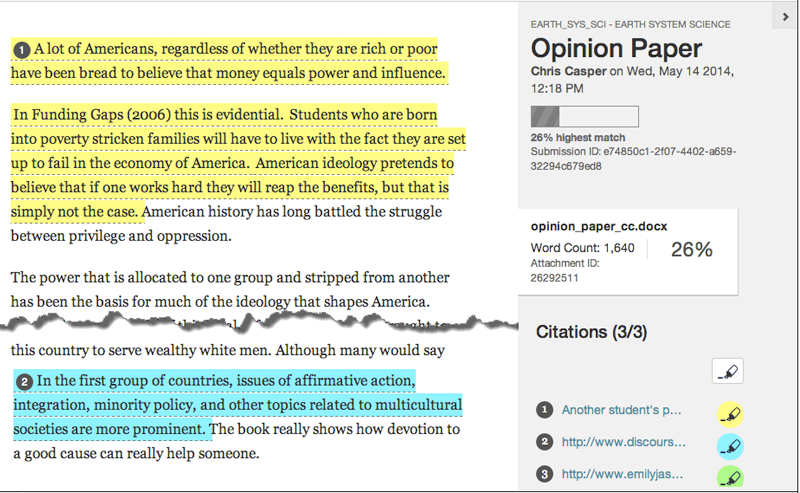
The SafeAssign plagiarism plugin (plagiarism_safeassign) provides
settings and integration that enable the usage of SafeAssign with Moodle assignments. SafeAssign compares submitted
assignments against a set of sources to identify areas of overlap between the submitted assignment and existing works.
Installation
You can download the plagiarism plugin from:
https://github.com/blackboard-open-source/moodle-plagiarism_safeassign
This plugin should be located and named as:
[yourmoodledir]/plagiarism/safeassign
Configuring the SafeAssign plagiarism plugin
To open SafeAssign settings, you'll need to setup a url in Moodle
configuration as so.
$CFG->plagiarism_safeassign_urls = [

    [ 'url' => '<SafeAssign host url>', 'type' => 'production']

];
Where <SafeAssign host url> is the url to the SafeAssign server that will score your assignments.
The SafeAssign host url, should be populated with values provided to you by a
SafeAssign representative.
Open the settings for the SafeAssign plagiarism plugin:
Site Administration > Plugins > Plagiarism > SafeAssign plagiarism plugin
The Instructor and Student Role Credentials should be populated with values provided to you by a SafeAssign
representative.
You can fill up the rest of the form with the information pertaining your institution's interests.
Upon saving, the Test connection button will be availiable for you to test the saved connection information
(Credentials and Service URL section).
License for SafeAssign plagiarism plugin
© Open LMS 2017
This program is free software: you can redistribute it and/or modify it under
the terms of the GNU General Public License as published by the Free Software
Foundation, either version 3 of the License, or (at your option) any later
version.
This program is distributed in the hope that it will be useful, but WITHOUT ANY
WARRANTY; without even the implied warranty of MERCHANTABILITY or FITNESS FOR A
PARTICULAR PURPOSE. See the GNU General Public License for more details.
You should have received a copy of the GNU General Public License along with
this program. If not, see http://www.gnu.org/licenses/.
4.0.5 (2023012400)
4.0.5
Plugin type: Plagiarism
Frankenstyle component name: plagiarism_safeassign
Version build number: 2023012400
Version release name: 4.0.5
Maturity: Stable
Supported Moodle versions: 4.0
Repository URL (Git): https://github.com/open-lms-open-source/moodle-plagiarism_safeassign
Repository branch:
Repository tag:
Issue/bug tracker URL: https://github.com/open-lms-open-source/moodle-plagiarism_safeassign/issues
SafeAssign plagiarism plugin
The SafeAssign plagiarism plugin (plagiarism_safeassign) provides
settings and integration that enable the usage of SafeAssign with Moodle assignments. SafeAssign compares submitted
assignments against a set of sources to identify areas of overlap between the submitted assignment and existing works.
Installation
You can download the plagiarism plugin from:
https://github.com/blackboard-open-source/moodle-plagiarism_safeassign
This plugin should be located and named as:
[yourmoodledir]/plagiarism/safeassign
Configuring the SafeAssign plagiarism plugin
To open SafeAssign settings, you'll need to setup a url in Moodle
configuration as so.
$CFG->plagiarism_safeassign_urls = [

    [ 'url' => '<SafeAssign host url>', 'type' => 'production']

];
Where <SafeAssign host url> is the url to the SafeAssign server that will score your assignments.
The SafeAssign host url, should be populated with values provided to you by a
SafeAssign representative.
Open the settings for the SafeAssign plagiarism plugin:
Site Administration > Plugins > Plagiarism > SafeAssign plagiarism plugin
The Instructor and Student Role Credentials should be populated with values provided to you by a SafeAssign
representative.
You can fill up the rest of the form with the information pertaining your institution's interests.
Upon saving, the Test connection button will be availiable for you to test the saved connection information
(Credentials and Service URL section).
License for SafeAssign plagiarism plugin
© Open LMS 2017
This program is free software: you can redistribute it and/or modify it under
the terms of the GNU General Public License as published by the Free Software
Foundation, either version 3 of the License, or (at your option) any later
version.
This program is distributed in the hope that it will be useful, but WITHOUT ANY
WARRANTY; without even the implied warranty of MERCHANTABILITY or FITNESS FOR A
PARTICULAR PURPOSE. See the GNU General Public License for more details.
You should have received a copy of the GNU General Public License along with
this program. If not, see http://www.gnu.org/licenses/.
4.0.5 (2022122100)
4.0.5
Plugin type: Plagiarism
Frankenstyle component name: plagiarism_safeassign
Version build number: 2022122100
Version release name: 4.0.5
Maturity: Stable
Supported Moodle versions: 4.0
Repository URL (Git): https://github.com/open-lms-open-source/moodle-plagiarism_safeassign
Repository branch:
Repository tag:
Issue/bug tracker URL: https://github.com/open-lms-open-source/moodle-plagiarism_safeassign/issues
SafeAssign plagiarism plugin
The SafeAssign plagiarism plugin (plagiarism_safeassign) provides
settings and integration that enable the usage of SafeAssign with Moodle assignments. SafeAssign compares submitted
assignments against a set of sources to identify areas of overlap between the submitted assignment and existing works.
Installation
You can download the plagiarism plugin from:
https://github.com/blackboard-open-source/moodle-plagiarism_safeassign
This plugin should be located and named as:
[yourmoodledir]/plagiarism/safeassign
Configuring the SafeAssign plagiarism plugin
To open SafeAssign settings, you'll need to setup a url in Moodle
configuration as so.
$CFG->plagiarism_safeassign_urls = [

    [ 'url' => '', 'type' => 'production']

];
Where `````` is the url to the SafeAssign server that will score your assignments.
The SafeAssign host url, should be populated with values provided to you by a
SafeAssign representative.
Open the settings for the SafeAssign plagiarism plugin:
Site Administration > Plugins > Plagiarism > SafeAssign plagiarism plugin
The Instructor and Student Role Credentials should be populated with values provided to you by a SafeAssign
representative.
You can fill up the rest of the form with the information pertaining your institution's interests.
Upon saving, the Test connection button will be availiable for you to test the saved connection information
(Credentials and Service URL section).
License for SafeAssign plagiarism plugin
© Open LMS 2017
This program is free software: you can redistribute it and/or modify it under
the terms of the GNU General Public License as published by the Free Software
Foundation, either version 3 of the License, or (at your option) any later
version.
This program is distributed in the hope that it will be useful, but WITHOUT ANY
WARRANTY; without even the implied warranty of MERCHANTABILITY or FITNESS FOR A
PARTICULAR PURPOSE. See the GNU General Public License for more details.
You should have received a copy of the GNU General Public License along with
this program. If not, see .
3.11.6 (2022101200)
3.11.6
Plugin type: Plagiarism
Frankenstyle component name: plagiarism_safeassign
Version build number: 2022101200
Version release name: 3.11.6
Maturity: Stable
Supported Moodle versions: 3.11
Repository URL (Git): https://github.com/open-lms-open-source/moodle-plagiarism_safeassign
Repository branch:
Repository tag:
Issue/bug tracker URL: https://github.com/open-lms-open-source/moodle-plagiarism_safeassign/issues
SafeAssign plagiarism plugin
The SafeAssign plagiarism plugin (plagiarism_safeassign) provides
settings and integration that enable the usage of SafeAssign with Moodle assignments. SafeAssign compares submitted
assignments against a set of sources to identify areas of overlap between the submitted assignment and existing works.
Installation
You can download the plagiarism plugin from:
https://github.com/blackboard-open-source/moodle-plagiarism_safeassign
This plugin should be located and named as:
[yourmoodledir]/plagiarism/safeassign
Configuring the SafeAssign plagiarism plugin
To open SafeAssign settings, you'll need to setup a url in Moodle
configuration as so.
$CFG->plagiarism_safeassign_urls = [

    [ 'url' => '<SafeAssign host url>', 'type' => 'production']

];
Where <SafeAssign host url> is the url to the SafeAssign server that will score your assignments.
The SafeAssign host url, should be populated with values provided to you by a
SafeAssign representative.
Open the settings for the SafeAssign plagiarism plugin:
Site Administration > Plugins > Plagiarism > SafeAssign plagiarism plugin
The Instructor and Student Role Credentials should be populated with values provided to you by a SafeAssign
representative.
You can fill up the rest of the form with the information pertaining your institution's interests.
Upon saving, the Test connection button will be availiable for you to test the saved connection information
(Credentials and Service URL section).
License for SafeAssign plagiarism plugin
© Open LMS 2017
This program is free software: you can redistribute it and/or modify it under
the terms of the GNU General Public License as published by the Free Software
Foundation, either version 3 of the License, or (at your option) any later
version.
This program is distributed in the hope that it will be useful, but WITHOUT ANY
WARRANTY; without even the implied warranty of MERCHANTABILITY or FITNESS FOR A
PARTICULAR PURPOSE. See the GNU General Public License for more details.
You should have received a copy of the GNU General Public License along with
this program. If not, see http://www.gnu.org/licenses/.
3.11.6 (2022072900)
3.11.6
Plugin type: Plagiarism
Frankenstyle component name: plagiarism_safeassign
Version build number: 2022072900
Version release name: 3.11.6
Maturity: Stable
Supported Moodle versions: 3.11
Repository URL (Git): https://github.com/open-lms-open-source/moodle-plagiarism_safeassign
Repository branch:
Repository tag:
Issue/bug tracker URL: https://github.com/open-lms-open-source/moodle-plagiarism_safeassign/issues
SafeAssign plagiarism plugin
The SafeAssign plagiarism plugin (plagiarism_safeassign) provides
settings and integration that enable the usage of SafeAssign with Moodle assignments. SafeAssign compares submitted
assignments against a set of sources to identify areas of overlap between the submitted assignment and existing works.
Installation
You can download the plagiarism plugin from:
https://github.com/blackboard-open-source/moodle-plagiarism_safeassign
This plugin should be located and named as:
[yourmoodledir]/plagiarism/safeassign
Configuring the SafeAssign plagiarism plugin
To open SafeAssign settings, you'll need to setup a url in Moodle
configuration as so.
$CFG->plagiarism_safeassign_urls = [

    [ 'url' => '<SafeAssign host url>', 'type' => 'production']

];
Where <SafeAssign host url> is the url to the SafeAssign server that will score your assignments.
The SafeAssign host url, should be populated with values provided to you by a
SafeAssign representative.
Open the settings for the SafeAssign plagiarism plugin:
Site Administration > Plugins > Plagiarism > SafeAssign plagiarism plugin
The Instructor and Student Role Credentials should be populated with values provided to you by a SafeAssign
representative.
You can fill up the rest of the form with the information pertaining your institution's interests.
Upon saving, the Test connection button will be availiable for you to test the saved connection information
(Credentials and Service URL section).
License for SafeAssign plagiarism plugin
© Open LMS 2017
This program is free software: you can redistribute it and/or modify it under
the terms of the GNU General Public License as published by the Free Software
Foundation, either version 3 of the License, or (at your option) any later
version.
This program is distributed in the hope that it will be useful, but WITHOUT ANY
WARRANTY; without even the implied warranty of MERCHANTABILITY or FITNESS FOR A
PARTICULAR PURPOSE. See the GNU General Public License for more details.
You should have received a copy of the GNU General Public License along with
this program. If not, see http://www.gnu.org/licenses/.
3.11.5 (2022041300)
3.11.5
Plugin type: Plagiarism
Frankenstyle component name: plagiarism_safeassign
Version build number: 2022041300
Version release name: 3.11.5
Maturity: Stable
Supported Moodle versions: 3.11
Repository URL (Git): https://github.com/open-lms-open-source/moodle-plagiarism_safeassign
Repository branch:
Repository tag:
Issue/bug tracker URL: https://github.com/open-lms-open-source/moodle-plagiarism_safeassign/issues
SafeAssign plagiarism plugin
The SafeAssign plagiarism plugin (plagiarism_safeassign) provides
settings and integration that enable the usage of SafeAssign with Moodle assignments. SafeAssign compares submitted
assignments against a set of sources to identify areas of overlap between the submitted assignment and existing works.
Installation
You can download the plagiarism plugin from:
https://github.com/blackboard-open-source/moodle-plagiarism_safeassign
This plugin should be located and named as:
[yourmoodledir]/plagiarism/safeassign
Configuring the SafeAssign plagiarism plugin
To open SafeAssign settings, you'll need to setup a url in Moodle
configuration as so.
$CFG->plagiarism_safeassign_urls = [

    [ 'url' => '<SafeAssign host url>', 'type' => 'production']

];
Where <SafeAssign host url> is the url to the SafeAssign server that will score your assignments.
The SafeAssign host url, should be populated with values provided to you by a
SafeAssign representative.
Open the settings for the SafeAssign plagiarism plugin:
Site Administration > Plugins > Plagiarism > SafeAssign plagiarism plugin
The Instructor and Student Role Credentials should be populated with values provided to you by a SafeAssign
representative.
You can fill up the rest of the form with the information pertaining your institution's interests.
Upon saving, the Test connection button will be availiable for you to test the saved connection information
(Credentials and Service URL section).
License for SafeAssign plagiarism plugin
© Open LMS 2017
This program is free software: you can redistribute it and/or modify it under
the terms of the GNU General Public License as published by the Free Software
Foundation, either version 3 of the License, or (at your option) any later
version.
This program is distributed in the hope that it will be useful, but WITHOUT ANY
WARRANTY; without even the implied warranty of MERCHANTABILITY or FITNESS FOR A
PARTICULAR PURPOSE. See the GNU General Public License for more details.
You should have received a copy of the GNU General Public License along with
this program. If not, see http://www.gnu.org/licenses/.
3.11.3 (2021112600)
3.11.3
Plugin type: Plagiarism
Frankenstyle component name: plagiarism_safeassign
Version build number: 2021112600
Version release name: 3.11.3
Maturity: Stable
Supported Moodle versions: 3.11
Repository URL (Git): https://github.com/open-lms-open-source/moodle-plagiarism_safeassign
Repository branch:
Repository tag:
Issue/bug tracker URL: https://github.com/open-lms-open-source/moodle-plagiarism_safeassign/issues
SafeAssign plagiarism plugin
The SafeAssign plagiarism plugin (plagiarism_safeassign) provides
settings and integration that enable the usage of SafeAssign with Moodle assignments. SafeAssign compares submitted
assignments against a set of sources to identify areas of overlap between the submitted assignment and existing works.
Installation
You can download the plagiarism plugin from:
https://github.com/blackboard-open-source/moodle-plagiarism_safeassign
This plugin should be located and named as:
[yourmoodledir]/plagiarism/safeassign
Configuring the SafeAssign plagiarism plugin
To open SafeAssign settings, you'll need to setup a url in Moodle
configuration as so.
$CFG->plagiarism_safeassign_urls = [

    [ 'url' => '<SafeAssign host url>', 'type' => 'production']

];
Where <SafeAssign host url> is the url to the SafeAssign server that will score your assignments.
The SafeAssign host url, should be populated with values provided to you by a
SafeAssign representative.
Open the settings for the SafeAssign plagiarism plugin:
Site Administration > Plugins > Plagiarism > SafeAssign plagiarism plugin
The Instructor and Student Role Credentials should be populated with values provided to you by a SafeAssign
representative.
You can fill up the rest of the form with the information pertaining your institution's interests.
Upon saving, the Test connection button will be availiable for you to test the saved connection information
(Credentials and Service URL section).
License for SafeAssign plagiarism plugin
© Open LMS 2017
This program is free software: you can redistribute it and/or modify it under
the terms of the GNU General Public License as published by the Free Software
Foundation, either version 3 of the License, or (at your option) any later
version.
This program is distributed in the hope that it will be useful, but WITHOUT ANY
WARRANTY; without even the implied warranty of MERCHANTABILITY or FITNESS FOR A
PARTICULAR PURPOSE. See the GNU General Public License for more details.
You should have received a copy of the GNU General Public License along with
this program. If not, see http://www.gnu.org/licenses/.
3.10.3 (2021060101)
3.10.3
Plugin type: Plagiarism
Frankenstyle component name: plagiarism_safeassign
Version build number: 2021060101
Version release name: 3.10.3
Maturity: Stable
Supported Moodle versions: 3.10
Repository URL (Git): https://github.com/open-lms-open-source/moodle-plagiarism_safeassign
Repository branch:
Repository tag:
Issue/bug tracker URL: https://github.com/open-lms-open-source/moodle-plagiarism_safeassign/issues
SafeAssign plagiarism plugin
The SafeAssign plagiarism plugin (plagiarism_safeassign) provides
settings and integration that enable the usage of SafeAssign with Moodle assignments. SafeAssign compares submitted
assignments against a set of sources to identify areas of overlap between the submitted assignment and existing works.
Installation
You can download the plagiarism plugin from:
https://github.com/blackboard-open-source/moodle-plagiarism_safeassign
This plugin should be located and named as:
[yourmoodledir]/plagiarism/safeassign
Configuring the SafeAssign plagiarism plugin
To open SafeAssign settings, you'll need to setup a url in Moodle
configuration as so.
$CFG->plagiarism_safeassign_urls = [

    [ 'url' => '<SafeAssign host url>', 'type' => 'production']

];
Where <SafeAssign host url> is the url to the SafeAssign server that will score your assignments.
The SafeAssign host url, should be populated with values provided to you by a
SafeAssign representative.
Open the settings for the SafeAssign plagiarism plugin:
Site Administration > Plugins > Plagiarism > SafeAssign plagiarism plugin
The Instructor and Student Role Credentials should be populated with values provided to you by a SafeAssign
representative.
You can fill up the rest of the form with the information pertaining your institution's interests.
Upon saving, the Test connection button will be availiable for you to test the saved connection information
(Credentials and Service URL section).
License for SafeAssign plagiarism plugin
© Open LMS 2017
This program is free software: you can redistribute it and/or modify it under
the terms of the GNU General Public License as published by the Free Software
Foundation, either version 3 of the License, or (at your option) any later
version.
This program is distributed in the hope that it will be useful, but WITHOUT ANY
WARRANTY; without even the implied warranty of MERCHANTABILITY or FITNESS FOR A
PARTICULAR PURPOSE. See the GNU General Public License for more details.
You should have received a copy of the GNU General Public License along with
this program. If not, see http://www.gnu.org/licenses/.
3.10.3 (2021060100)
3.10.3
Plugin type: Plagiarism
Frankenstyle component name: plagiarism_safeassign
Version build number: 2021060100
Version release name: 3.10.3
Maturity: Stable
Supported Moodle versions: 3.10
Repository URL (Git): https://github.com/open-lms-open-source/moodle-plagiarism_safeassign
Repository branch:
Repository tag:
Issue/bug tracker URL: https://github.com/open-lms-open-source/moodle-plagiarism_safeassign/issues
SafeAssign plagiarism plugin
The SafeAssign plagiarism plugin (plagiarism_safeassign) provides
settings and integration that enable the usage of SafeAssign with Moodle assignments. SafeAssign compares submitted
assignments against a set of sources to identify areas of overlap between the submitted assignment and existing works.
Installation
You can download the plagiarism plugin from:
https://github.com/blackboard-open-source/moodle-plagiarism_safeassign
This plugin should be located and named as:
[yourmoodledir]/plagiarism/safeassign
Configuring the SafeAssign plagiarism plugin
To open SafeAssign settings, you'll need to setup a url in Moodle
configuration as so.
$CFG->plagiarism_safeassign_urls = [

    [ 'url' => '<SafeAssign host url>', 'type' => 'production']

];
Where <SafeAssign host url> is the url to the SafeAssign server that will score your assignments.
The SafeAssign host url, should be populated with values provided to you by a
SafeAssign representative.
Open the settings for the SafeAssign plagiarism plugin:
Site Administration > Plugins > Plagiarism > SafeAssign plagiarism plugin
The Instructor and Student Role Credentials should be populated with values provided to you by a SafeAssign
representative.
You can fill up the rest of the form with the information pertaining your institution's interests.
Upon saving, the Test connection button will be availiable for you to test the saved connection information
(Credentials and Service URL section).
License for SafeAssign plagiarism plugin
© Open LMS 2017
This program is free software: you can redistribute it and/or modify it under
the terms of the GNU General Public License as published by the Free Software
Foundation, either version 3 of the License, or (at your option) any later
version.
This program is distributed in the hope that it will be useful, but WITHOUT ANY
WARRANTY; without even the implied warranty of MERCHANTABILITY or FITNESS FOR A
PARTICULAR PURPOSE. See the GNU General Public License for more details.
You should have received a copy of the GNU General Public License along with
this program. If not, see http://www.gnu.org/licenses/.
3.9.3 (2020101603)
3.9.3
Plugin type: Plagiarism
Frankenstyle component name: plagiarism_safeassign
Version build number: 2020101603
Version release name: 3.9.3
Maturity: Stable
Supported Moodle versions: 3.9
Repository URL (Git): https://github.com/open-lms-open-source/moodle-plagiarism_safeassign
Repository branch:
Repository tag:
Issue/bug tracker URL: https://github.com/open-lms-open-source/moodle-plagiarism_safeassign/issues
SafeAssign plagiarism plugin
The SafeAssign plagiarism plugin (plagiarism_safeassign) provides
settings and integration that enable the usage of SafeAssign with Moodle assignments. SafeAssign compares submitted
assignments against a set of sources to identify areas of overlap between the submitted assignment and existing works.
Installation
You can download the plagiarism plugin from:
https://github.com/blackboard-open-source/moodle-plagiarism_safeassign
This plugin should be located and named as:
[yourmoodledir]/plagiarism/safeassign
Configuring the SafeAssign plagiarism plugin
To open SafeAssign settings, you'll need to setup a url in Moodle
configuration as so.
$CFG->plagiarism_safeassign_urls = [

    [ 'url' => '<SafeAssign host url>', 'type' => 'production']

];
Where <SafeAssign host url> is the url to the SafeAssign server that will score your assignments.
The SafeAssign host url, should be populated with values provided to you by a
SafeAssign representative.
Open the settings for the SafeAssign plagiarism plugin:
Site Administration > Plugins > Plagiarism > SafeAssign plagiarism plugin
The Instructor and Student Role Credentials should be populated with values provided to you by a SafeAssign
representative.
You can fill up the rest of the form with the information pertaining your institution's interests.
Upon saving, the Test connection button will be availiable for you to test the saved connection information
(Credentials and Service URL section).
License for SafeAssign plagiarism plugin
© Open LMS 2017
This program is free software: you can redistribute it and/or modify it under
the terms of the GNU General Public License as published by the Free Software
Foundation, either version 3 of the License, or (at your option) any later
version.
This program is distributed in the hope that it will be useful, but WITHOUT ANY
WARRANTY; without even the implied warranty of MERCHANTABILITY or FITNESS FOR A
PARTICULAR PURPOSE. See the GNU General Public License for more details.
You should have received a copy of the GNU General Public License along with
this program. If not, see http://www.gnu.org/licenses/.
3.8.3 (2020061100)
3.8.3
Plugin type: Plagiarism
Frankenstyle component name: plagiarism_safeassign
Version build number: 2020061100
Version release name: 3.8.3
Maturity: Stable
Supported Moodle versions: 3.8
Repository URL (Git): https://github.com/blackboard-open-source/moodle-plagiarism_safeassign
Repository branch:
Repository tag:
Issue/bug tracker URL: https://github.com/open-lms-open-source/moodle-plagiarism_safeassign/issues
SafeAssign plagiarism plugin
The SafeAssign plagiarism plugin (plagiarism_safeassign) provides
settings and integration that enable the usage of SafeAssign with Moodle assignments. SafeAssign compares submitted
assignments against a set of sources to identify areas of overlap between the submitted assignment and existing works.
Installation
You can download the plagiarism plugin from:
https://github.com/blackboard-open-source/moodle-plagiarism_safeassign
This plugin should be located and named as:
[yourmoodledir]/plagiarism/safeassign
Configuring the SafeAssign plagiarism plugin
To open SafeAssign settings, you'll need to setup a url in Moodle
configuration as so.
$CFG->plagiarism_safeassign_urls = [

    [ 'url' => '<SafeAssign host url>', 'type' => 'production']

];
Where <SafeAssign host url> is the url to the SafeAssign server that will score your assignments.
The SafeAssign host url, should be populated with values provided to you by a
SafeAssign representative.
Open the settings for the SafeAssign plagiarism plugin:
Site Administration > Plugins > Plagiarism > SafeAssign plagiarism plugin
The Instructor and Student Role Credentials should be populated with values provided to you by a SafeAssign
representative.
You can fill up the rest of the form with the information pertaining your institution's interests.
Upon saving, the Test connection button will be availiable for you to test the saved connection information
(Credentials and Service URL section).
License for SafeAssign plagiarism plugin
© Blackboard Inc 2017
This program is free software: you can redistribute it and/or modify it under
the terms of the GNU General Public License as published by the Free Software
Foundation, either version 3 of the License, or (at your option) any later
version.
This program is distributed in the hope that it will be useful, but WITHOUT ANY
WARRANTY; without even the implied warranty of MERCHANTABILITY or FITNESS FOR A
PARTICULAR PURPOSE. See the GNU General Public License for more details.
You should have received a copy of the GNU General Public License along with
this program. If not, see http://www.gnu.org/licenses/.
3.7.3 (2019092401)
3.7.3
Plugin type: Plagiarism
Frankenstyle component name: plagiarism_safeassign
Version build number: 2019092401
Version release name: 3.7.3
Maturity: Stable
Supported Moodle versions: 3.7
Repository URL (Git): https://github.com/blackboard-open-source/moodle-plagiarism_safeassign
Repository branch:
Repository tag:
Issue/bug tracker URL: https://github.com/open-lms-open-source/moodle-plagiarism_safeassign/issues
SafeAssign plagiarism plugin
The SafeAssign plagiarism plugin (plagiarism_safeassign) provides
settings and integration that enable the usage of SafeAssign with Moodle assignments. SafeAssign compares submitted
assignments against a set of sources to identify areas of overlap between the submitted assignment and existing works.
Installation
You can download the plagiarism plugin from:
https://github.com/blackboard-open-source/moodle-plagiarism_safeassign
This plugin should be located and named as:
[yourmoodledir]/plagiarism/safeassign
Configuring the SafeAssign plagiarism plugin
To open SafeAssign settings, you'll need to setup a url in Moodle
configuration as so.
$CFG->plagiarism_safeassign_urls = [

    [ 'url' => '<SafeAssign host url>', 'type' => 'production']

];
Where <SafeAssign host url> is the url to the SafeAssign server that will score your assignments.
The SafeAssign host url, should be populated with values provided to you by a
SafeAssign representative.
Open the settings for the SafeAssign plagiarism plugin:
Site Administration > Plugins > Plagiarism > SafeAssign plagiarism plugin
The Instructor and Student Role Credentials should be populated with values provided to you by a SafeAssign
representative.
You can fill up the rest of the form with the information pertaining your institution's interests.
Upon saving, the Test connection button will be availiable for you to test the saved connection information
(Credentials and Service URL section).
License for SafeAssign plagiarism plugin
© Blackboard Inc 2017
This program is free software: you can redistribute it and/or modify it under
the terms of the GNU General Public License as published by the Free Software
Foundation, either version 3 of the License, or (at your option) any later
version.
This program is distributed in the hope that it will be useful, but WITHOUT ANY
WARRANTY; without even the implied warranty of MERCHANTABILITY or FITNESS FOR A
PARTICULAR PURPOSE. See the GNU General Public License for more details.
You should have received a copy of the GNU General Public License along with
this program. If not, see http://www.gnu.org/licenses/.
3.6.3 (2019040100)
3.6.3
Plugin type: Plagiarism
Frankenstyle component name: plagiarism_safeassign
Version build number: 2019040100
Version release name: 3.6.3
Maturity: Stable
Supported Moodle versions: 3.6
Repository URL (Git): https://github.com/blackboard-open-source/moodle-plagiarism_safeassign
Repository branch:
Repository tag:
Issue/bug tracker URL: https://github.com/open-lms-open-source/moodle-plagiarism_safeassign/issues
SafeAssign plagiarism plugin
The SafeAssign plagiarism plugin (plagiarism_safeassign) provides
settings and integration that enable the usage of SafeAssign with Moodle assignments. SafeAssign compares submitted
assignments against a set of sources to identify areas of overlap between the submitted assignment and existing works.
Installation
You can download the plagiarism plugin from:
https://github.com/blackboard-open-source/moodle-plagiarism_safeassign
This plugin should be located and named as:
[yourmoodledir]/plagiarism/safeassign
Configuring the SafeAssign plagiarism plugin
To open SafeAssign settings, you'll need to setup a url in Moodle
configuration as so.
$CFG->plagiarism_safeassign_urls = [

    [ 'url' => '<SafeAssign host url>', 'type' => 'production']

];
Where <SafeAssign host url> is the url to the SafeAssign server that will score your assignments.
The SafeAssign host url, should be populated with values provided to you by a
SafeAssign representative.
Open the settings for the SafeAssign plagiarism plugin:
Site Administration > Plugins > Plagiarism > SafeAssign plagiarism plugin
The Instructor and Student Role Credentials should be populated with values provided to you by a SafeAssign
representative.
You can fill up the rest of the form with the information pertaining your institution's interests.
Upon saving, the Test connection button will be availiable for you to test the saved connection information
(Credentials and Service URL section).
License for SafeAssign plagiarism plugin
© Blackboard Inc 2017
This program is free software: you can redistribute it and/or modify it under
the terms of the GNU General Public License as published by the Free Software
Foundation, either version 3 of the License, or (at your option) any later
version.
This program is distributed in the hope that it will be useful, but WITHOUT ANY
WARRANTY; without even the implied warranty of MERCHANTABILITY or FITNESS FOR A
PARTICULAR PURPOSE. See the GNU General Public License for more details.
You should have received a copy of the GNU General Public License along with
this program. If not, see http://www.gnu.org/licenses/.
3.5.2 (2018080800)
3.5.2
Plugin type: Plagiarism
Frankenstyle component name: plagiarism_safeassign
Version build number: 2018080800
Version release name: 3.5.2
Maturity: Stable
Supported Moodle versions: 3.5
Repository URL (Git): https://github.com/blackboard-open-source/moodle-plagiarism_safeassign
Repository branch:
Repository tag:
Issue/bug tracker URL: https://github.com/open-lms-open-source/moodle-plagiarism_safeassign/issues
SafeAssign plagiarism plugin
The SafeAssign plagiarism plugin (plagiarism_safeassign) provides
settings and integration that enable the usage of SafeAssign with Moodle assignments. SafeAssign compares submitted
assignments against a set of sources to identify areas of overlap between the submitted assignment and existing works.
Installation
You can download the plagiarism plugin from:
https://github.com/blackboard-open-source/moodle-plagiarism_safeassign
This plugin should be located and named as:
[yourmoodledir]/plagiarism/safeassign
Configuring the SafeAssign plagiarism plugin
To open SafeAssign settings, you'll need to setup a url in Moodle
configuration as so.
$CFG->plagiarism_safeassign_urls = [

    [ 'url' => '<SafeAssign host url>', 'type' => 'production']

];
Where <SafeAssign host url> is the url to the SafeAssign server that will score your assignments.
The SafeAssign host url, should be populated with values provided to you by a
SafeAssign representative.
Open the settings for the SafeAssign plagiarism plugin:
Site Administration > Plugins > Plagiarism > SafeAssign plagiarism plugin
The Instructor and Student Role Credentials should be populated with values provided to you by a SafeAssign
representative.
You can fill up the rest of the form with the information pertaining your institution's interests.
Upon saving, the Test connection button will be availiable for you to test the saved connection information
(Credentials and Service URL section).
License for SafeAssign plagiarism plugin
© Blackboard Inc 2017
This program is free software: you can redistribute it and/or modify it under
the terms of the GNU General Public License as published by the Free Software
Foundation, either version 3 of the License, or (at your option) any later
version.
This program is distributed in the hope that it will be useful, but WITHOUT ANY
WARRANTY; without even the implied warranty of MERCHANTABILITY or FITNESS FOR A
PARTICULAR PURPOSE. See the GNU General Public License for more details.
You should have received a copy of the GNU General Public License along with
this program. If not, see http://www.gnu.org/licenses/.
3.2+ (2017111558)
3.2+
Plugin type: Plagiarism
Frankenstyle component name: plagiarism_safeassign
Version build number: 2017111558
Version release name: 3.2+
Maturity: Stable
Supported Moodle versions: 3.3
Repository URL (Git): https://github.com/moodlerooms/moodle-plagiarism_safeassign
Repository branch: MOODLE_33_STABLE
Repository tag:
Issue/bug tracker URL: https://github.com/open-lms-open-source/moodle-plagiarism_safeassign/issues
SafeAssign plagiarism plugin
The SafeAssign plagiarism plugin (plagiarism_safeassign) provides
settings and integration that enable the usage of SafeAssign with Moodle assignments. SafeAssign compares submitted
assignments against a set of sources to identify areas of overlap between the submitted assignment and existing works.
Installation
You can download the plagiarism plugin from:
https://github.com/moodlerooms/moodle-plagiarism_safeassign
This plugin should be located and named as:
[yourmoodledir]/plagiarism/safeassign
Configuring the SafeAssign plagiarism plugin
To open SafeAssign settings, you'll need to setup a url in Moodle
configuration as so.
$CFG->plagiarism_safeassign_urls = [

    [ 'url' => '<SafeAssign host url>', 'type' => 'production']

];
Where <SafeAssign host url> is the url to the SafeAssign server that will score your assignments.
The SafeAssign host url, should be populated with values provided to you by a
SafeAssign representative.
Open the settings for the SafeAssign plagiarism plugin:
Site Administration > Plugins > Plagiarism > SafeAssign plagiarism plugin
The Instructor and Student Role Credentials should be populated with values provided to you by a SafeAssign
representative.
You can fill up the rest of the form with the information pertaining your institution's interests.
Upon saving, the Test connection button will be availiable for you to test the saved connection information
(Credentials and Service URL section).
License for SafeAssign plagiarism plugin
© Blackboard Inc 2017
This program is free software: you can redistribute it and/or modify it under
the terms of the GNU General Public License as published by the Free Software
Foundation, either version 3 of the License, or (at your option) any later
version.
This program is distributed in the hope that it will be useful, but WITHOUT ANY
WARRANTY; without even the implied warranty of MERCHANTABILITY or FITNESS FOR A
PARTICULAR PURPOSE. See the GNU General Public License for more details.
You should have received a copy of the GNU General Public License along with
this program. If not, see http://www.gnu.org/licenses/.