
Accessibility Report
Versions
Current version
4.5.1 (2026032500)
4.5.1
Plugin type: Reports
Frankenstyle component name: report_allylti
Version build number: 2026032500
Version release name: 4.5.1
Maturity: Alpha
Supported Moodle versions: 4.5
Repository URL (Git): https://github.com/anthology-ally/moodle-report_allylti
Repository branch:
Repository tag: AY-405-R3
Issue/bug tracker URL: https://github.com/open-lms-open-source/moodle-report_allylti/issues
Ally accessibility reporting tool
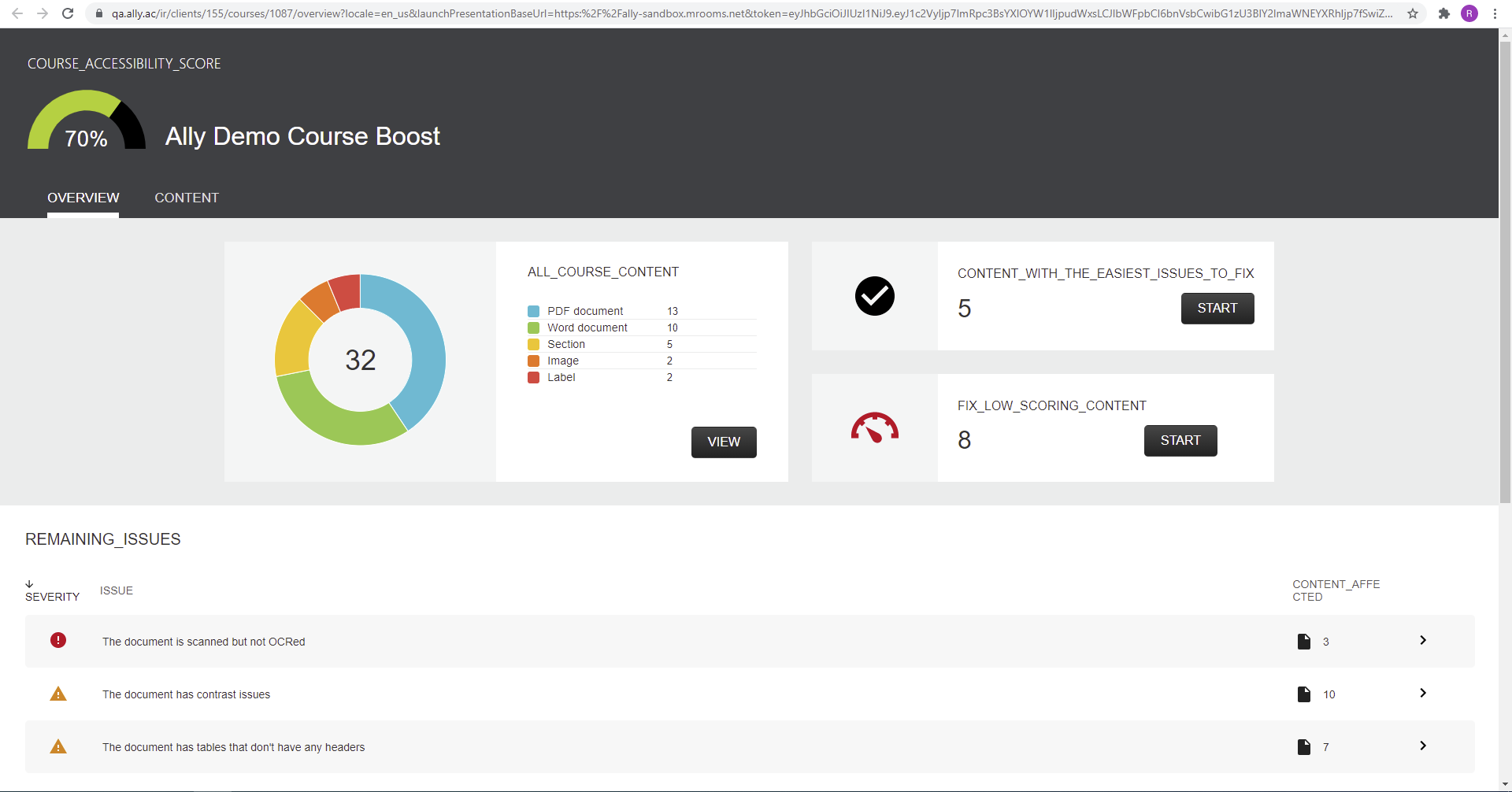
The Ally reporting tool (report_allylti) provides a site wide accessibility report which can be broken down by course.
Installation
The Ally accessibility report can be downloaded from:
https://github.com/anthology-ally/moodle-report_allylti
The reporting tool should be located and named as:
[yourmoodledir]/report/allylti
Configuration
For the reporting tool to function it is necessary to download and configure the Ally admin tool:
https://github.com/anthology-ally/moodle-tool_ally
Instructions on how to do so are available in the README.md file for the admin tool.
Usage
After the successful installation and configuration of Ally, the reporting tool is accessible via the Site
Administration menu:
Site administration > Reports > Accessibility
Uninstall
- Remove the
tool_ally,filter_allyandreport_allyltiplugins from the Moodle folder:
- [yourmoodledir]/admin/tool/ally
- [yourmoodledir]/filter/ally
- [yourmoodledir]/report/allylti
- Access the plugin uninstall page: Site Administration > Plugins > Plugins overview
- Look up for the removed plugins then click on uninstall for each plugin.
License for Ally accessibility report
© 2017 Open LMS (https://www.openlms.net) / 2023 Anthology Inc. and its affiliates
This program is free software: you can redistribute it and/or modify it under
the terms of the GNU General Public License as published by the Free Software
Foundation, either version 3 of the License, or (at your option) any later
version.
This program is distributed in the hope that it will be useful, but WITHOUT ANY
WARRANTY; without even the implied warranty of MERCHANTABILITY or FITNESS FOR A
PARTICULAR PURPOSE. See the GNU General Public License for more details.
You should have received a copy of the GNU General Public License along with
this program. If not, see http://www.gnu.org/licenses/.
4.5.1 (2026012800)
4.5.1
Plugin type: Reports
Frankenstyle component name: report_allylti
Version build number: 2026012800
Version release name: 4.5.1
Maturity: Alpha
Supported Moodle versions: 4.5
Repository URL (Git): https://github.com/anthology-ally/moodle-report_allylti
Repository branch:
Repository tag: AY-405-R2
Issue/bug tracker URL: https://github.com/open-lms-open-source/moodle-report_allylti/issues
Ally accessibility reporting tool
The Ally reporting tool (report_allylti) provides a site wide accessibility report which can be broken down by course.
Installation
The Ally accessibility report can be downloaded from:
https://github.com/anthology-ally/moodle-report_allylti
The reporting tool should be located and named as:
[yourmoodledir]/report/allylti
Configuration
For the reporting tool to function it is necessary to download and configure the Ally admin tool:
https://github.com/anthology-ally/moodle-tool_ally
Instructions on how to do so are available in the README.md file for the admin tool.
Usage
After the successful installation and configuration of Ally, the reporting tool is accessible via the Site
Administration menu:
Site administration > Reports > Accessibility
Uninstall
- Remove the
tool_ally,filter_allyandreport_allyltiplugins from the Moodle folder:
- [yourmoodledir]/admin/tool/ally
- [yourmoodledir]/filter/ally
- [yourmoodledir]/report/allylti
- Access the plugin uninstall page: Site Administration > Plugins > Plugins overview
- Look up for the removed plugins then click on uninstall for each plugin.
License for Ally accessibility report
© 2017 Open LMS (https://www.openlms.net) / 2023 Anthology Inc. and its affiliates
This program is free software: you can redistribute it and/or modify it under
the terms of the GNU General Public License as published by the Free Software
Foundation, either version 3 of the License, or (at your option) any later
version.
This program is distributed in the hope that it will be useful, but WITHOUT ANY
WARRANTY; without even the implied warranty of MERCHANTABILITY or FITNESS FOR A
PARTICULAR PURPOSE. See the GNU General Public License for more details.
You should have received a copy of the GNU General Public License along with
this program. If not, see http://www.gnu.org/licenses/.
5.1.0 (2026032550)
5.1.0
Plugin type: Reports
Frankenstyle component name: report_allylti
Version build number: 2026032550
Version release name: 5.1.0
Maturity: Stable
Supported Moodle versions: 5.1
Repository URL (Git): https://github.com/anthology-ally/moodle-report_allylti
Repository branch:
Repository tag: AY-501-R2
Issue/bug tracker URL: https://github.com/open-lms-open-source/moodle-report_allylti/issues
Ally accessibility reporting tool
The Ally reporting tool (report_allylti) provides a site wide accessibility report which can be broken down by course.
Installation
The Ally accessibility report can be downloaded from:
https://github.com/anthology-ally/moodle-report_allylti
The reporting tool should be located and named as:
[yourmoodledir]/report/allylti
Configuration
For the reporting tool to function it is necessary to download and configure the Ally admin tool:
https://github.com/anthology-ally/moodle-tool_ally
Instructions on how to do so are available in the README.md file for the admin tool.
Usage
After the successful installation and configuration of Ally, the reporting tool is accessible via the Site
Administration menu:
Site administration > Reports > Accessibility
Uninstall
- Remove the
tool_ally,filter_allyandreport_allyltiplugins from the Moodle folder:
- [yourmoodledir]/admin/tool/ally
- [yourmoodledir]/filter/ally
- [yourmoodledir]/report/allylti
- Access the plugin uninstall page: Site Administration > Plugins > Plugins overview
- Look up for the removed plugins then click on uninstall for each plugin.
License for Ally accessibility report
© 2017 Open LMS (https://www.openlms.net) / 2023 Anthology Inc. and its affiliates
This program is free software: you can redistribute it and/or modify it under
the terms of the GNU General Public License as published by the Free Software
Foundation, either version 3 of the License, or (at your option) any later
version.
This program is distributed in the hope that it will be useful, but WITHOUT ANY
WARRANTY; without even the implied warranty of MERCHANTABILITY or FITNESS FOR A
PARTICULAR PURPOSE. See the GNU General Public License for more details.
You should have received a copy of the GNU General Public License along with
this program. If not, see http://www.gnu.org/licenses/.
5.0.1 (2026032535)
5.0.1
Plugin type: Reports
Frankenstyle component name: report_allylti
Version build number: 2026032535
Version release name: 5.0.1
Maturity: Stable
Supported Moodle versions: 5.0
Repository URL (Git): https://github.com/anthology-ally/moodle-report_allylti
Repository branch:
Repository tag: AY-500-R4
Issue/bug tracker URL: https://github.com/open-lms-open-source/moodle-report_allylti/issues
Ally accessibility reporting tool
The Ally reporting tool (report_allylti) provides a site wide accessibility report which can be broken down by course.
Installation
The Ally accessibility report can be downloaded from:
https://github.com/anthology-ally/moodle-report_allylti
The reporting tool should be located and named as:
[yourmoodledir]/report/allylti
Configuration
For the reporting tool to function it is necessary to download and configure the Ally admin tool:
https://github.com/anthology-ally/moodle-tool_ally
Instructions on how to do so are available in the README.md file for the admin tool.
Usage
After the successful installation and configuration of Ally, the reporting tool is accessible via the Site
Administration menu:
Site administration > Reports > Accessibility
Uninstall
- Remove the
tool_ally,filter_allyandreport_allyltiplugins from the Moodle folder:
- [yourmoodledir]/admin/tool/ally
- [yourmoodledir]/filter/ally
- [yourmoodledir]/report/allylti
- Access the plugin uninstall page: Site Administration > Plugins > Plugins overview
- Look up for the removed plugins then click on uninstall for each plugin.
License for Ally accessibility report
© 2017 Open LMS (https://www.openlms.net) / 2023 Anthology Inc. and its affiliates
This program is free software: you can redistribute it and/or modify it under
the terms of the GNU General Public License as published by the Free Software
Foundation, either version 3 of the License, or (at your option) any later
version.
This program is distributed in the hope that it will be useful, but WITHOUT ANY
WARRANTY; without even the implied warranty of MERCHANTABILITY or FITNESS FOR A
PARTICULAR PURPOSE. See the GNU General Public License for more details.
You should have received a copy of the GNU General Public License along with
this program. If not, see http://www.gnu.org/licenses/.
5.0.1 (2026012825)
5.0.1
Plugin type: Reports
Frankenstyle component name: report_allylti
Version build number: 2026012825
Version release name: 5.0.1
Maturity: Stable
Supported Moodle versions: 4.5, 5.0, 5.1
Repository URL (Git): https://github.com/anthology-ally/moodle-report_allylti
Repository branch:
Repository tag: AY-500-R2
Issue/bug tracker URL: https://github.com/open-lms-open-source/moodle-report_allylti/issues
Ally accessibility reporting tool
The Ally reporting tool (report_allylti) provides a site wide accessibility report which can be broken down by course.
Installation
The Ally accessibility report can be downloaded from:
https://github.com/anthology-ally/moodle-report_allylti
The reporting tool should be located and named as:
[yourmoodledir]/report/allylti
Configuration
For the reporting tool to function it is necessary to download and configure the Ally admin tool:
https://github.com/anthology-ally/moodle-tool_ally
Instructions on how to do so are available in the README.md file for the admin tool.
Usage
After the successful installation and configuration of Ally, the reporting tool is accessible via the Site
Administration menu:
Site administration > Reports > Accessibility
Uninstall
- Remove the
tool_ally,filter_allyandreport_allyltiplugins from the Moodle folder:
- [yourmoodledir]/admin/tool/ally
- [yourmoodledir]/filter/ally
- [yourmoodledir]/report/allylti
- Access the plugin uninstall page: Site Administration > Plugins > Plugins overview
- Look up for the removed plugins then click on uninstall for each plugin.
License for Ally accessibility report
© 2017 Open LMS (https://www.openlms.net) / 2023 Anthology Inc. and its affiliates
This program is free software: you can redistribute it and/or modify it under
the terms of the GNU General Public License as published by the Free Software
Foundation, either version 3 of the License, or (at your option) any later
version.
This program is distributed in the hope that it will be useful, but WITHOUT ANY
WARRANTY; without even the implied warranty of MERCHANTABILITY or FITNESS FOR A
PARTICULAR PURPOSE. See the GNU General Public License for more details.
You should have received a copy of the GNU General Public License along with
this program. If not, see http://www.gnu.org/licenses/.
5.1.0 (2026012850)
5.1.0
Plugin type: Reports
Frankenstyle component name: report_allylti
Version build number: 2026012850
Version release name: 5.1.0
Maturity: Stable
Supported Moodle versions: 5.1
Repository URL (Git): https://github.com/anthology-ally/moodle-report_allylti
Repository branch:
Repository tag: AY-501-R1
Issue/bug tracker URL: https://github.com/open-lms-open-source/moodle-report_allylti/issues
Ally accessibility reporting tool
The Ally reporting tool (report_allylti) provides a site wide accessibility report which can be broken down by course.
Installation
The Ally accessibility report can be downloaded from:
https://github.com/anthology-ally/moodle-report_allylti
The reporting tool should be located and named as:
[yourmoodledir]/report/allylti
Configuration
For the reporting tool to function it is necessary to download and configure the Ally admin tool:
https://github.com/anthology-ally/moodle-tool_ally
Instructions on how to do so are available in the README.md file for the admin tool.
Usage
After the successful installation and configuration of Ally, the reporting tool is accessible via the Site
Administration menu:
Site administration > Reports > Accessibility
Uninstall
- Remove the
tool_ally,filter_allyandreport_allyltiplugins from the Moodle folder:
- [yourmoodledir]/admin/tool/ally
- [yourmoodledir]/filter/ally
- [yourmoodledir]/report/allylti
- Access the plugin uninstall page: Site Administration > Plugins > Plugins overview
- Look up for the removed plugins then click on uninstall for each plugin.
License for Ally accessibility report
© 2017 Open LMS (https://www.openlms.net) / 2023 Anthology Inc. and its affiliates
This program is free software: you can redistribute it and/or modify it under
the terms of the GNU General Public License as published by the Free Software
Foundation, either version 3 of the License, or (at your option) any later
version.
This program is distributed in the hope that it will be useful, but WITHOUT ANY
WARRANTY; without even the implied warranty of MERCHANTABILITY or FITNESS FOR A
PARTICULAR PURPOSE. See the GNU General Public License for more details.
You should have received a copy of the GNU General Public License along with
this program. If not, see http://www.gnu.org/licenses/.
5.0.0 (2025072400)
5.0.0
Plugin type: Reports
Frankenstyle component name: report_allylti
Version build number: 2025072400
Version release name: 5.0.0
Maturity: Stable
Supported Moodle versions: 5.0
Repository URL (Git): https://github.com/open-lms-open-source/moodle-report_allylti
Repository branch:
Repository tag:
Issue/bug tracker URL: https://github.com/open-lms-open-source/moodle-report_allylti/issues
Ally accessibility reporting tool
The Ally reporting tool (report_allylti) provides a site wide accessibility report which can be broken down by course.
Installation
The Ally accessibility report can be downloaded from:
https://github.com/anthology-ally/moodle-report_allylti
The reporting tool should be located and named as:
[yourmoodledir]/report/allylti
Configuration
For the reporting tool to function it is necessary to download and configure the Ally admin tool:
https://github.com/anthology-ally/moodle-tool_ally
Instructions on how to do so are available in the README.md file for the admin tool.
Usage
After the successful installation and configuration of Ally, the reporting tool is accessible via the Site
Administration menu:
Site administration > Reports > Accessibility
Uninstall
- Remove the
tool_ally,filter_allyandreport_allyltiplugins from the Moodle folder:
- [yourmoodledir]/admin/tool/ally
- [yourmoodledir]/filter/ally
- [yourmoodledir]/report/allylti
- Access the plugin uninstall page: Site Administration > Plugins > Plugins overview
- Look up for the removed plugins then click on uninstall for each plugin.
License for Ally accessibility report
© 2017 Open LMS (https://www.openlms.net) / 2023 Anthology Inc. and its affiliates
This program is free software: you can redistribute it and/or modify it under
the terms of the GNU General Public License as published by the Free Software
Foundation, either version 3 of the License, or (at your option) any later
version.
This program is distributed in the hope that it will be useful, but WITHOUT ANY
WARRANTY; without even the implied warranty of MERCHANTABILITY or FITNESS FOR A
PARTICULAR PURPOSE. See the GNU General Public License for more details.
You should have received a copy of the GNU General Public License along with
this program. If not, see http://www.gnu.org/licenses/.
4.5.0 (2025032300)
4.5.0
Plugin type: Reports
Frankenstyle component name: report_allylti
Version build number: 2025032300
Version release name: 4.5.0
Maturity: Stable
Supported Moodle versions: 4.5
Repository URL (Git): https://github.com/open-lms-open-source/moodle-report_allylti
Repository branch:
Repository tag:
Issue/bug tracker URL: https://github.com/open-lms-open-source/moodle-report_allylti/issues
Ally accessibility reporting tool
The Ally reporting tool (report_allylti) provides a site wide accessibility report which can be broken down by course.
Installation
The Ally accessibility report can be downloaded from:
https://github.com/anthology-ally/moodle-report_allylti
The reporting tool should be located and named as:
[yourmoodledir]/report/allylti
Configuration
For the reporting tool to function it is necessary to download and configure the Ally admin tool:
https://github.com/anthology-ally/moodle-tool_ally
Instructions on how to do so are available in the README.md file for the admin tool.
Usage
After the successful installation and configuration of Ally, the reporting tool is accessible via the Site
Administration menu:
Site administration > Reports > Accessibility
Uninstall
- Remove the
tool_ally,filter_allyandreport_allyltiplugins from the Moodle folder:
- [yourmoodledir]/admin/tool/ally
- [yourmoodledir]/filter/ally
- [yourmoodledir]/report/allylti
- Access the plugin uninstall page: Site Administration > Plugins > Plugins overview
- Look up for the removed plugins then click on uninstall for each plugin.
License for Ally accessibility report
© 2017 Open LMS (https://www.openlms.net) / 2023 Anthology Inc. and its affiliates
This program is free software: you can redistribute it and/or modify it under
the terms of the GNU General Public License as published by the Free Software
Foundation, either version 3 of the License, or (at your option) any later
version.
This program is distributed in the hope that it will be useful, but WITHOUT ANY
WARRANTY; without even the implied warranty of MERCHANTABILITY or FITNESS FOR A
PARTICULAR PURPOSE. See the GNU General Public License for more details.
You should have received a copy of the GNU General Public License along with
this program. If not, see http://www.gnu.org/licenses/.
4.4.3 (2024112200)
4.4.3
Plugin type: Reports
Frankenstyle component name: report_allylti
Version build number: 2024112200
Version release name: 4.4.3
Maturity: Stable
Supported Moodle versions: 4.4, 4.5
Repository URL (Git): https://github.com/open-lms-open-source/moodle-report_allylti
Repository branch:
Repository tag:
Issue/bug tracker URL: https://github.com/open-lms-open-source/moodle-report_allylti/issues
Ally accessibility reporting tool
The Ally reporting tool (report_allylti) provides a site wide accessibility report which can be broken down by course.
Installation
The Ally accessibility report can be downloaded from:
https://github.com/anthology-ally/moodle-report_allylti
The reporting tool should be located and named as:
[yourmoodledir]/report/allylti
Configuration
For the reporting tool to function it is necessary to download and configure the Ally admin tool:
https://github.com/anthology-ally/moodle-tool_ally
Instructions on how to do so are available in the README.md file for the admin tool.
Usage
After the successful installation and configuration of Ally, the reporting tool is accessible via the Site
Administration menu:
Site administration > Reports > Accessibility
Uninstall
- Remove the
tool_ally,filter_allyandreport_allyltiplugins from the Moodle folder:
- [yourmoodledir]/admin/tool/ally
- [yourmoodledir]/filter/ally
- [yourmoodledir]/report/allylti
- Access the plugin uninstall page: Site Administration > Plugins > Plugins overview
- Look up for the removed plugins then click on uninstall for each plugin.
License for Ally accessibility report
© 2017 Open LMS (https://www.openlms.net) / 2023 Anthology Inc. and its affiliates
This program is free software: you can redistribute it and/or modify it under
the terms of the GNU General Public License as published by the Free Software
Foundation, either version 3 of the License, or (at your option) any later
version.
This program is distributed in the hope that it will be useful, but WITHOUT ANY
WARRANTY; without even the implied warranty of MERCHANTABILITY or FITNESS FOR A
PARTICULAR PURPOSE. See the GNU General Public License for more details.
You should have received a copy of the GNU General Public License along with
this program. If not, see http://www.gnu.org/licenses/.
4.3.0 (2024060300)
4.3.0
Plugin type: Reports
Frankenstyle component name: report_allylti
Version build number: 2024060300
Version release name: 4.3.0
Maturity: Stable
Supported Moodle versions: 4.3
Repository URL (Git): https://github.com/open-lms-open-source/moodle-report_allylti
Repository branch:
Repository tag:
Issue/bug tracker URL: https://github.com/open-lms-open-source/moodle-report_allylti/issues
Ally accessibility reporting tool
The Ally reporting tool (report_allylti) provides a site wide accessibility report which can be broken down by course.
Installation
The Ally accessibility report can be downloaded from:
https://github.com/anthology-ally/moodle-report_allylti
The reporting tool should be located and named as:
[yourmoodledir]/report/allylti
Configuration
For the reporting tool to function it is necessary to download and configure the Ally admin tool:
https://github.com/anthology-ally/moodle-tool_ally
Instructions on how to do so are available in the README.md file for the admin tool.
Usage
After the successful installation and configuration of Ally, the reporting tool is accessible via the Site
Administration menu:
Site administration > Reports > Accessibility
Uninstall
- Remove the
tool_ally,filter_allyandreport_allyltiplugins from the Moodle folder:
- [yourmoodledir]/admin/tool/ally
- [yourmoodledir]/filter/ally
- [yourmoodledir]/report/allylti
- Access the plugin uninstall page: Site Administration > Plugins > Plugins overview
- Look up for the removed plugins then click on uninstall for each plugin.
License for Ally accessibility report
© 2017 Open LMS (https://www.openlms.net) / 2023 Anthology Inc. and its affiliates
This program is free software: you can redistribute it and/or modify it under
the terms of the GNU General Public License as published by the Free Software
Foundation, either version 3 of the License, or (at your option) any later
version.
This program is distributed in the hope that it will be useful, but WITHOUT ANY
WARRANTY; without even the implied warranty of MERCHANTABILITY or FITNESS FOR A
PARTICULAR PURPOSE. See the GNU General Public License for more details.
You should have received a copy of the GNU General Public License along with
this program. If not, see http://www.gnu.org/licenses/.
4.2.0 (2023111500)
4.2.0
Plugin type: Reports
Frankenstyle component name: report_allylti
Version build number: 2023111500
Version release name: 4.2.0
Maturity: Alpha
Supported Moodle versions: 4.2
Repository URL (Git): https://github.com/open-lms-open-source/moodle-report_allylti
Repository branch:
Repository tag:
Issue/bug tracker URL: https://github.com/open-lms-open-source/moodle-report_allylti/issues
Ally accessibility reporting tool
The Ally reporting tool (report_allylti) provides a site wide accessibility report which can be broken down by course.
Installation
The Ally accessibility report can be downloaded from:
https://github.com/anthology-ally/moodle-report_allylti
The reporting tool should be located and named as:
[yourmoodledir]/report/allylti
Configuration
For the reporting tool to function it is necessary to download and configure the Ally admin tool:
https://github.com/anthology-ally/moodle-tool_ally
Instructions on how to do so are available in the README.md file for the admin tool.
Usage
After the successful installation and configuration of Ally, the reporting tool is accessible via the Site
Administration menu:
Site administration > Reports > Accessibility
Uninstall
- Remove the
tool_ally,filter_allyandreport_allyltiplugins from the Moodle folder:
- [yourmoodledir]/admin/tool/ally
- [yourmoodledir]/filter/ally
- [yourmoodledir]/report/allylti
- Access the plugin uninstall page: Site Administration > Plugins > Plugins overview
- Look up for the removed plugins then click on uninstall for each plugin.
License for Ally accessibility report
© 2017 Open LMS (https://www.openlms.net) / 2023 Anthology Inc. and its affiliates
This program is free software: you can redistribute it and/or modify it under
the terms of the GNU General Public License as published by the Free Software
Foundation, either version 3 of the License, or (at your option) any later
version.
This program is distributed in the hope that it will be useful, but WITHOUT ANY
WARRANTY; without even the implied warranty of MERCHANTABILITY or FITNESS FOR A
PARTICULAR PURPOSE. See the GNU General Public License for more details.
You should have received a copy of the GNU General Public License along with
this program. If not, see http://www.gnu.org/licenses/.
4.1.0 (2023061500)
4.1.0
Plugin type: Reports
Frankenstyle component name: report_allylti
Version build number: 2023061500
Version release name: 4.1.0
Maturity: Alpha
Supported Moodle versions: 4.1
Repository URL (Git): https://github.com/open-lms-open-source/moodle-report_allylti
Repository branch:
Repository tag:
Issue/bug tracker URL: https://github.com/open-lms-open-source/moodle-report_allylti/issues
Ally accessibility reporting tool
The Ally reporting tool (report_allylti) provides a site wide accessibility report which can be broken down by course.
Installation
The Ally accessibility report can be downloaded from:
https://github.com/anthology-ally/moodle-report_allylti
The reporting tool should be located and named as:
[yourmoodledir]/report/allylti
Configuration
For the reporting tool to function it is necessary to download and configure the Ally admin tool:
https://github.com/anthology-ally/moodle-tool_ally
Instructions on how to do so are available in the README.md file for the admin tool.
Usage
After the successful installation and configuration of Ally, the reporting tool is accessible via the Site
Administration menu:
Site administration > Reports > Accessibility
Uninstall
- Remove the
tool_ally,filter_allyandreport_allyltiplugins from the Moodle folder:
- [yourmoodledir]/admin/tool/ally
- [yourmoodledir]/filter/ally
- [yourmoodledir]/report/allylti
- Access the plugin uninstall page: Site Administration > Plugins > Plugins overview
- Look up for the removed plugins then click on uninstall for each plugin.
License for Ally accessibility report
© 2017 Open LMS (https://www.openlms.net) / 2023 Anthology Inc. and its affiliates
This program is free software: you can redistribute it and/or modify it under
the terms of the GNU General Public License as published by the Free Software
Foundation, either version 3 of the License, or (at your option) any later
version.
This program is distributed in the hope that it will be useful, but WITHOUT ANY
WARRANTY; without even the implied warranty of MERCHANTABILITY or FITNESS FOR A
PARTICULAR PURPOSE. See the GNU General Public License for more details.
You should have received a copy of the GNU General Public License along with
this program. If not, see http://www.gnu.org/licenses/.
4.0.7 (2023041100)
4.0.7
Plugin type: Reports
Frankenstyle component name: report_allylti
Version build number: 2023041100
Version release name: 4.0.7
Maturity: Alpha
Supported Moodle versions: 4.0
Repository URL (Git): https://github.com/open-lms-open-source/moodle-report_allylti
Repository branch:
Repository tag:
Issue/bug tracker URL: https://github.com/open-lms-open-source/moodle-report_allylti/issues
Ally accessibility reporting tool
The Ally reporting tool (report_allylti) provides a site wide accessibility report which can be broken down by course.
Installation
The Ally accessibility report can be downloaded from:
https://github.com/blackboard-open-source/moodle-report_allylti
The reporting tool should be located and named as:
[yourmoodledir]/report/allylti
Configuration
For the reporting tool to function it is necessary to download and configure the Ally admin tool:
https://github.com/blackboard-open-source/moodle-tool_ally
Instructions on how to do so are available in the README.md file for the admin tool.
Usage
After the successful installation and configuration of Ally, the reporting tool is accessible via the Site
Administration menu:
Site administration > Reports > Accessibility
Uninstall
- Remove the
tool_ally,filter_allyandreport_allyltiplugins from the Moodle folder:
- [yourmoodledir]/admin/tool/ally
- [yourmoodledir]/filter/ally
- [yourmoodledir]/report/allylti
- Access the plugin uninstall page: Site Administration > Plugins > Plugins overview
- Look up for the removed plugins then click on uninstall for each plugin.
License for Ally accessibility report
© Open LMS 2017
This program is free software: you can redistribute it and/or modify it under
the terms of the GNU General Public License as published by the Free Software
Foundation, either version 3 of the License, or (at your option) any later
version.
This program is distributed in the hope that it will be useful, but WITHOUT ANY
WARRANTY; without even the implied warranty of MERCHANTABILITY or FITNESS FOR A
PARTICULAR PURPOSE. See the GNU General Public License for more details.
You should have received a copy of the GNU General Public License along with
this program. If not, see http://www.gnu.org/licenses/.
4.0.5 (2023012400)
4.0.5
Plugin type: Reports
Frankenstyle component name: report_allylti
Version build number: 2023012400
Version release name: 4.0.5
Maturity: Alpha
Supported Moodle versions: 4.0
Repository URL (Git): https://github.com/open-lms-open-source/moodle-report_allylti
Repository branch:
Repository tag:
Issue/bug tracker URL: https://github.com/open-lms-open-source/moodle-report_allylti/issues
Ally accessibility reporting tool
The Ally reporting tool (report_allylti) provides a site wide accessibility report which can be broken down by course.
Installation
The Ally accessibility report can be downloaded from:
https://github.com/blackboard-open-source/moodle-report_allylti
The reporting tool should be located and named as:
[yourmoodledir]/report/allylti
Configuration
For the reporting tool to function it is necessary to download and configure the Ally admin tool:
https://github.com/blackboard-open-source/moodle-tool_ally
Instructions on how to do so are available in the README.md file for the admin tool.
Usage
After the successful installation and configuration of Ally, the reporting tool is accessible via the Site
Administration menu:
Site administration > Reports > Accessibility
Uninstall
- Remove the
tool_ally,filter_allyandreport_allyltiplugins from the Moodle folder:
- [yourmoodledir]/admin/tool/ally
- [yourmoodledir]/filter/ally
- [yourmoodledir]/report/allylti
- Access the plugin uninstall page: Site Administration > Plugins > Plugins overview
- Look up for the removed plugins then click on uninstall for each plugin.
License for Ally accessibility report
© Open LMS 2017
This program is free software: you can redistribute it and/or modify it under
the terms of the GNU General Public License as published by the Free Software
Foundation, either version 3 of the License, or (at your option) any later
version.
This program is distributed in the hope that it will be useful, but WITHOUT ANY
WARRANTY; without even the implied warranty of MERCHANTABILITY or FITNESS FOR A
PARTICULAR PURPOSE. See the GNU General Public License for more details.
You should have received a copy of the GNU General Public License along with
this program. If not, see http://www.gnu.org/licenses/.
4.0.5 (2022122100)
4.0.5
Plugin type: Reports
Frankenstyle component name: report_allylti
Version build number: 2022122100
Version release name: 4.0.5
Maturity: Alpha
Supported Moodle versions: 4.0
Repository URL (Git): https://github.com/open-lms-open-source/moodle-report_allylti
Repository branch:
Repository tag:
Issue/bug tracker URL: https://github.com/open-lms-open-source/moodle-report_allylti/issues
Ally accessibility reporting tool
The Ally reporting tool (report_allylti) provides a site wide accessibility report which can be broken down by course.
Installation
The Ally accessibility report can be downloaded from:
https://github.com/blackboard-open-source/moodle-report_allylti
The reporting tool should be located and named as:
[yourmoodledir]/report/allylti
Configuration
For the reporting tool to function it is necessary to download and configure the Ally admin tool:
https://github.com/blackboard-open-source/moodle-tool_ally
Instructions on how to do so are available in the README.md file for the admin tool.
Usage
After the successful installation and configuration of Ally, the reporting tool is accessible via the Site
Administration menu:
Site administration > Reports > Accessibility
Uninstall
- Remove the
tool_ally,filter_allyandreport_allyltiplugins from the Moodle folder:
- [yourmoodledir]/admin/tool/ally
- [yourmoodledir]/filter/ally
- [yourmoodledir]/report/allylti
- Access the plugin uninstall page: Site Administration > Plugins > Plugins overview
- Look up for the removed plugins then click on uninstall for each plugin.
License for Ally accessibility report
© Open LMS 2017
This program is free software: you can redistribute it and/or modify it under
the terms of the GNU General Public License as published by the Free Software
Foundation, either version 3 of the License, or (at your option) any later
version.
This program is distributed in the hope that it will be useful, but WITHOUT ANY
WARRANTY; without even the implied warranty of MERCHANTABILITY or FITNESS FOR A
PARTICULAR PURPOSE. See the GNU General Public License for more details.
You should have received a copy of the GNU General Public License along with
this program. If not, see http://www.gnu.org/licenses/.
4.0.1 (2022101800)
4.0.1
Plugin type: Reports
Frankenstyle component name: report_allylti
Version build number: 2022101800
Version release name: 4.0.1
Maturity: Alpha
Supported Moodle versions: 4.0
Repository URL (Git): https://github.com/open-lms-open-source/moodle-report_allylti
Repository branch:
Repository tag:
Issue/bug tracker URL: https://github.com/open-lms-open-source/moodle-report_allylti/issues
Ally accessibility reporting tool
The Ally reporting tool (report_allylti) provides a site wide accessibility report which can be broken down by course.
Installation
The Ally accessibility report can be downloaded from:
https://github.com/blackboard-open-source/moodle-report_allylti
The reporting tool should be located and named as:
[yourmoodledir]/report/allylti
Configuration
For the reporting tool to function it is necessary to download and configure the Ally admin tool:
https://github.com/blackboard-open-source/moodle-tool_ally
Instructions on how to do so are available in the README.md file for the admin tool.
Usage
After the successful installation and configuration of Ally, the reporting tool is accessible via the Site
Administration menu:
Site administration > Reports > Accessibility
Uninstall
- Remove the
tool_ally,filter_allyandreport_allyltiplugins from the Moodle folder:
- [yourmoodledir]/admin/tool/ally
- [yourmoodledir]/filter/ally
- [yourmoodledir]/report/allylti
- Access the plugin uninstall page: Site Administration > Plugins > Plugins overview
- Look up for the removed plugins then click on uninstall for each plugin.
License for Ally accessibility report
© Open LMS 2017
This program is free software: you can redistribute it and/or modify it under
the terms of the GNU General Public License as published by the Free Software
Foundation, either version 3 of the License, or (at your option) any later
version.
This program is distributed in the hope that it will be useful, but WITHOUT ANY
WARRANTY; without even the implied warranty of MERCHANTABILITY or FITNESS FOR A
PARTICULAR PURPOSE. See the GNU General Public License for more details.
You should have received a copy of the GNU General Public License along with
this program. If not, see http://www.gnu.org/licenses/.
3.11.6 (2022101200)
3.11.6
Plugin type: Reports
Frankenstyle component name: report_allylti
Version build number: 2022101200
Version release name: 3.11.6
Maturity: Alpha
Supported Moodle versions: 3.11
Repository URL (Git): https://github.com/open-lms-open-source/moodle-report_allylti
Repository branch:
Repository tag:
Issue/bug tracker URL: https://github.com/open-lms-open-source/moodle-report_allylti/issues
Ally accessibility reporting tool
The Ally reporting tool (report_allylti) provides a site wide accessibility report which can be broken down by course.
Installation
The Ally accessibility report can be downloaded from:
https://github.com/blackboard-open-source/moodle-report_allylti
The reporting tool should be located and named as:
[yourmoodledir]/report/allylti
Configuration
For the reporting tool to function it is necessary to download and configure the Ally admin tool:
https://github.com/blackboard-open-source/moodle-tool_ally
Instructions on how to do so are available in the README.md file for the admin tool.
Usage
After the successful installation and configuration of Ally, the reporting tool is accessible via the Site
Administration menu:
Site administration > Reports > Accessibility
Uninstall
- Remove the
tool_ally,filter_allyandreport_allyltiplugins from the Moodle folder:
- [yourmoodledir]/admin/tool/ally
- [yourmoodledir]/filter/ally
- [yourmoodledir]/report/allylti
- Access the plugin uninstall page: Site Administration > Plugins > Plugins overview
- Look up for the removed plugins then click on uninstall for each plugin.
License for Ally accessibility report
© Open LMS 2017
This program is free software: you can redistribute it and/or modify it under
the terms of the GNU General Public License as published by the Free Software
Foundation, either version 3 of the License, or (at your option) any later
version.
This program is distributed in the hope that it will be useful, but WITHOUT ANY
WARRANTY; without even the implied warranty of MERCHANTABILITY or FITNESS FOR A
PARTICULAR PURPOSE. See the GNU General Public License for more details.
You should have received a copy of the GNU General Public License along with
this program. If not, see http://www.gnu.org/licenses/.
3.11.6 (2022072900)
3.11.6
Plugin type: Reports
Frankenstyle component name: report_allylti
Version build number: 2022072900
Version release name: 3.11.6
Maturity: Alpha
Supported Moodle versions: 3.11
Repository URL (Git): https://github.com/open-lms-open-source/moodle-report_allylti
Repository branch:
Repository tag:
Issue/bug tracker URL: https://github.com/open-lms-open-source/moodle-report_allylti/issues
Ally accessibility reporting tool
The Ally reporting tool (report_allylti) provides a site wide accessibility report which can be broken down by course.
Installation
The Ally accessibility report can be downloaded from:
https://github.com/blackboard-open-source/moodle-report_allylti
The reporting tool should be located and named as:
[yourmoodledir]/report/allylti
Configuration
For the reporting tool to function it is necessary to download and configure the Ally admin tool:
https://github.com/blackboard-open-source/moodle-tool_ally
Instructions on how to do so are available in the README.md file for the admin tool.
Usage
After the successful installation and configuration of Ally, the reporting tool is accessible via the Site
Administration menu:
Site administration > Reports > Accessibility
Uninstall
- Remove the
tool_ally,filter_allyandreport_allyltiplugins from the Moodle folder:
- [yourmoodledir]/admin/tool/ally
- [yourmoodledir]/filter/ally
- [yourmoodledir]/report/allylti
- Access the plugin uninstall page: Site Administration > Plugins > Plugins overview
- Look up for the removed plugins then click on uninstall for each plugin.
License for Ally accessibility report
© Open LMS 2017
This program is free software: you can redistribute it and/or modify it under
the terms of the GNU General Public License as published by the Free Software
Foundation, either version 3 of the License, or (at your option) any later
version.
This program is distributed in the hope that it will be useful, but WITHOUT ANY
WARRANTY; without even the implied warranty of MERCHANTABILITY or FITNESS FOR A
PARTICULAR PURPOSE. See the GNU General Public License for more details.
You should have received a copy of the GNU General Public License along with
this program. If not, see http://www.gnu.org/licenses/.
3.11.3 (2022060600)
3.11.3
Plugin type: Reports
Frankenstyle component name: report_allylti
Version build number: 2022060600
Version release name: 3.11.3
Maturity: Alpha
Supported Moodle versions: 3.11
Repository URL (Git): https://github.com/open-lms-open-source/moodle-report_allylti
Repository branch:
Repository tag:
Issue/bug tracker URL: https://github.com/open-lms-open-source/moodle-report_allylti/issues
Ally accessibility reporting tool
The Ally reporting tool (report_allylti) provides a site wide accessibility report which can be broken down by course.
Installation
The Ally accessibility report can be downloaded from:
https://github.com/blackboard-open-source/moodle-report_allylti
The reporting tool should be located and named as:
[yourmoodledir]/report/allylti
Configuration
For the reporting tool to function it is necessary to download and configure the Ally admin tool:
https://github.com/blackboard-open-source/moodle-tool_ally
Instructions on how to do so are available in the README.md file for the admin tool.
Usage
After the successful installation and configuration of Ally, the reporting tool is accessible via the Site
Administration menu:
Site administration > Reports > Accessibility
Uninstall
- Remove the
tool_ally,filter_allyandreport_allyltiplugins from the Moodle folder:
- [yourmoodledir]/admin/tool/ally
- [yourmoodledir]/filter/ally
- [yourmoodledir]/report/allylti
- Access the plugin uninstall page: Site Administration > Plugins > Plugins overview
- Look up for the removed plugins then click on uninstall for each plugin.
License for Ally accessibility report
© Open LMS 2017
This program is free software: you can redistribute it and/or modify it under
the terms of the GNU General Public License as published by the Free Software
Foundation, either version 3 of the License, or (at your option) any later
version.
This program is distributed in the hope that it will be useful, but WITHOUT ANY
WARRANTY; without even the implied warranty of MERCHANTABILITY or FITNESS FOR A
PARTICULAR PURPOSE. See the GNU General Public License for more details.
You should have received a copy of the GNU General Public License along with
this program. If not, see http://www.gnu.org/licenses/.
3.11.5 (2022041300)
3.11.5
Plugin type: Reports
Frankenstyle component name: report_allylti
Version build number: 2022041300
Version release name: 3.11.5
Maturity: Alpha
Supported Moodle versions: 3.11
Repository URL (Git): https://github.com/open-lms-open-source/moodle-report_allylti
Repository branch:
Repository tag:
Issue/bug tracker URL: https://github.com/open-lms-open-source/moodle-report_allylti/issues
Ally accessibility reporting tool
The Ally reporting tool (report_allylti) provides a site wide accessibility report which can be broken down by course.
Installation
The Ally accessibility report can be downloaded from:
https://github.com/blackboard-open-source/moodle-report_allylti
The reporting tool should be located and named as:
[yourmoodledir]/report/allylti
Configuration
For the reporting tool to function it is necessary to download and configure the Ally admin tool:
https://github.com/blackboard-open-source/moodle-tool_ally
Instructions on how to do so are available in the README.md file for the admin tool.
Usage
After the successful installation and configuration of Ally, the reporting tool is accessible via the Site
Administration menu:
Site administration > Reports > Accessibility
Uninstall
- Remove the
tool_ally,filter_allyandreport_allyltiplugins from the Moodle folder:
- [yourmoodledir]/admin/tool/ally
- [yourmoodledir]/filter/ally
- [yourmoodledir]/report/allylti
- Access the plugin uninstall page: Site Administration > Plugins > Plugins overview
- Look up for the removed plugins then click on uninstall for each plugin.
License for Ally accessibility report
© Open LMS 2017
This program is free software: you can redistribute it and/or modify it under
the terms of the GNU General Public License as published by the Free Software
Foundation, either version 3 of the License, or (at your option) any later
version.
This program is distributed in the hope that it will be useful, but WITHOUT ANY
WARRANTY; without even the implied warranty of MERCHANTABILITY or FITNESS FOR A
PARTICULAR PURPOSE. See the GNU General Public License for more details.
You should have received a copy of the GNU General Public License along with
this program. If not, see http://www.gnu.org/licenses/.
3.11.3 (2021112600)
3.11.3
Plugin type: Reports
Frankenstyle component name: report_allylti
Version build number: 2021112600
Version release name: 3.11.3
Maturity: Alpha
Supported Moodle versions: 3.11
Repository URL (Git): https://github.com/open-lms-open-source/moodle-report_allylti
Repository branch:
Repository tag:
Issue/bug tracker URL: https://github.com/open-lms-open-source/moodle-report_allylti/issues
Ally accessibility reporting tool
The Ally reporting tool (report_allylti) provides a site wide accessibility report which can be broken down by course.
Installation
The Ally accessibility report can be downloaded from:
https://github.com/blackboard-open-source/moodle-report_allylti
The reporting tool should be located and named as:
[yourmoodledir]/report/allylti
Configuration
For the reporting tool to function it is necessary to download and configure the Ally admin tool:
https://github.com/blackboard-open-source/moodle-tool_ally
Instructions on how to do so are available in the README.md file for the admin tool.
Usage
After the successful installation and configuration of Ally, the reporting tool is accessible via the Site
Administration menu:
Site administration > Reports > Accessibility
Uninstall
- Remove the
tool_ally,filter_allyandreport_allyltiplugins from the Moodle folder:
- [yourmoodledir]/admin/tool/ally
- [yourmoodledir]/filter/ally
- [yourmoodledir]/report/allylti
- Access the plugin uninstall page: Site Administration > Plugins > Plugins overview
- Look up for the removed plugins then click on uninstall for each plugin.
License for Ally accessibility report
© Open LMS 2017
This program is free software: you can redistribute it and/or modify it under
the terms of the GNU General Public License as published by the Free Software
Foundation, either version 3 of the License, or (at your option) any later
version.
This program is distributed in the hope that it will be useful, but WITHOUT ANY
WARRANTY; without even the implied warranty of MERCHANTABILITY or FITNESS FOR A
PARTICULAR PURPOSE. See the GNU General Public License for more details.
You should have received a copy of the GNU General Public License along with
this program. If not, see http://www.gnu.org/licenses/.
3.10.3 (2021060100)
3.10.3
Plugin type: Reports
Frankenstyle component name: report_allylti
Version build number: 2021060100
Version release name: 3.10.3
Maturity: Alpha
Supported Moodle versions: 3.10
Repository URL (Git): https://github.com/open-lms-open-source/moodle-report_allylti
Repository branch:
Repository tag:
Issue/bug tracker URL: https://github.com/open-lms-open-source/moodle-report_allylti/issues
Ally accessibility reporting tool
The Ally reporting tool (report_allylti) provides a site wide accessibility report which can be broken down by course.
Installation
The Ally accessibility report can be downloaded from:
https://github.com/blackboard-open-source/moodle-report_allylti
The reporting tool should be located and named as:
[yourmoodledir]/report/allylti
Configuration
For the reporting tool to function it is necessary to download and configure the Ally admin tool:
https://github.com/blackboard-open-source/moodle-tool_ally
Instructions on how to do so are available in the README.md file for the admin tool.
Usage
After the successful installation and configuration of Ally, the reporting tool is accessible via the Site
Administration menu:
Site administration > Reports > Accessibility
Uninstall
- Remove the
tool_ally,filter_allyandreport_allyltiplugins from the Moodle folder:
- [yourmoodledir]/admin/tool/ally
- [yourmoodledir]/filter/ally
- [yourmoodledir]/report/allylti
- Access the plugin uninstall page: Site Administration > Plugins > Plugins overview
- Look up for the removed plugins then click on uninstall for each plugin.
License for Ally accessibility report
© Open LMS 2017
This program is free software: you can redistribute it and/or modify it under
the terms of the GNU General Public License as published by the Free Software
Foundation, either version 3 of the License, or (at your option) any later
version.
This program is distributed in the hope that it will be useful, but WITHOUT ANY
WARRANTY; without even the implied warranty of MERCHANTABILITY or FITNESS FOR A
PARTICULAR PURPOSE. See the GNU General Public License for more details.
You should have received a copy of the GNU General Public License along with
this program. If not, see http://www.gnu.org/licenses/.
3.9.3 (2020061100)
3.9.3
Plugin type: Reports
Frankenstyle component name: report_allylti
Version build number: 2020061100
Version release name: 3.9.3
Maturity: Alpha
Supported Moodle versions: 3.9
Repository URL (Git): https://github.com/open-lms-open-source/moodle-report_allylti
Repository branch:
Repository tag:
Issue/bug tracker URL: https://github.com/open-lms-open-source/moodle-report_allylti/issues
Ally accessibility reporting tool
The Ally reporting tool (report_allylti) provides a site wide accessibility report which can be broken down by course.
Installation
The Ally accessibility report can be downloaded from:
https://github.com/blackboard-open-source/moodle-report_allylti
The reporting tool should be located and named as:
[yourmoodledir]/report/allylti
Configuration
For the reporting tool to function it is necessary to download and configure the Ally admin tool:
https://github.com/blackboard-open-source/moodle-tool_ally
Instructions on how to do so are available in the README.md file for the admin tool.
Usage
After the successful installation and configuration of Ally, the reporting tool is accessible via the Site
Administration menu:
Site administration > Reports > Accessibility
Uninstall
- Remove the
tool_ally,filter_allyandreport_allyltiplugins from the Moodle folder:
- [yourmoodledir]/admin/tool/ally
- [yourmoodledir]/filter/ally
- [yourmoodledir]/report/allylti
- Access the plugin uninstall page: Site Administration > Plugins > Plugins overview
- Look up for the removed plugins then click on uninstall for each plugin.
License for Ally accessibility report
© Open LMS 2017
This program is free software: you can redistribute it and/or modify it under
the terms of the GNU General Public License as published by the Free Software
Foundation, either version 3 of the License, or (at your option) any later
version.
This program is distributed in the hope that it will be useful, but WITHOUT ANY
WARRANTY; without even the implied warranty of MERCHANTABILITY or FITNESS FOR A
PARTICULAR PURPOSE. See the GNU General Public License for more details.
You should have received a copy of the GNU General Public License along with
this program. If not, see http://www.gnu.org/licenses/.
3.6.4 (2018080801)
3.6.4
Plugin type: Reports
Frankenstyle component name: report_allylti
Version build number: 2018080801
Version release name: 3.6.4
Maturity: Stable
Supported Moodle versions: 3.6
Repository URL (Git): https://github.com/blackboard-open-source/moodle-report_allylti
Repository branch: MOODLE_36_STABLE
Repository tag:
Issue/bug tracker URL: https://github.com/open-lms-open-source/moodle-report_allylti/issues
Ally accessibility reporting tool
The Ally reporting tool (report_allylti) provides a site wide accessibility report which can be broken down by course.
Installation
The Ally accessibility report can be downloaded from:
https://github.com/blackboard-open-source/moodle-report_allylti
The reporting tool should be located and named as:
[yourmoodledir]/report/allylti
Configuration
For the reporting tool to function it is necessary to download and configure the Ally admin tool:
https://github.com/blackboard-open-source/moodle-tool_ally
Instructions on how to do so are available in the README.md file for the admin tool.
Usage
After the successful installation and configuration of Ally, the reporting tool is accessible via the Site
Administration menu:
Site administration > Reports > Accessibility
Uninstall
- Remove the
tool_ally,filter_allyandreport_allyltiplugins from the Moodle folder:
- [yourmoodledir]/admin/tool/ally
- [yourmoodledir]/filter/ally
- [yourmoodledir]/report/allylti
- Access the plugin uninstall page: Site Administration > Plugins > Plugins overview
- Look up for the removed plugins then click on uninstall for each plugin.
License for Ally accessibility report
© Blackboard Inc 2017
This program is free software: you can redistribute it and/or modify it under
the terms of the GNU General Public License as published by the Free Software
Foundation, either version 3 of the License, or (at your option) any later
version.
This program is distributed in the hope that it will be useful, but WITHOUT ANY
WARRANTY; without even the implied warranty of MERCHANTABILITY or FITNESS FOR A
PARTICULAR PURPOSE. See the GNU General Public License for more details.
You should have received a copy of the GNU General Public License along with
this program. If not, see http://www.gnu.org/licenses/.
3.6.3 (2018080800)
3.6.3
Plugin type: Reports
Frankenstyle component name: report_allylti
Version build number: 2018080800
Version release name: 3.6.3
Maturity: Stable
Supported Moodle versions: 3.6
Repository URL (Git): https://github.com/blackboard-open-source/moodle-report_allylti
Repository branch:
Repository tag:
Issue/bug tracker URL: https://github.com/open-lms-open-source/moodle-report_allylti/issues
Ally accessibility reporting tool
The Ally reporting tool (report_allylti) provides a site wide accessibility report which can be broken down by course.
Installation
The Ally accessibility report can be downloaded from:
https://github.com/blackboard-open-source/moodle-report_allylti
The reporting tool should be located and named as:
[yourmoodledir]/report/allylti
Configuration
For the reporting tool to function it is necessary to download and configure the Ally admin tool:
https://github.com/blackboard-open-source/moodle-tool_ally
Instructions on how to do so are available in the README.md file for the admin tool.
Usage
After the successful installation and configuration of Ally, the reporting tool is accessible via the Site
Administration menu:
Site administration > Reports > Accessibility
License for Ally accessibility report
© Blackboard Inc 2017
This program is free software: you can redistribute it and/or modify it under
the terms of the GNU General Public License as published by the Free Software
Foundation, either version 3 of the License, or (at your option) any later
version.
This program is distributed in the hope that it will be useful, but WITHOUT ANY
WARRANTY; without even the implied warranty of MERCHANTABILITY or FITNESS FOR A
PARTICULAR PURPOSE. See the GNU General Public License for more details.
You should have received a copy of the GNU General Public License along with
this program. If not, see http://www.gnu.org/licenses/.
3.4.1 (2017120801)
3.4.1
Plugin type: Reports
Frankenstyle component name: report_allylti
Version build number: 2017120801
Version release name: 3.4.1
Maturity: Stable
Supported Moodle versions: 3.4
Repository URL (Git): https://github.com/moodlerooms/moodle-report_allylti
Repository branch:
Repository tag:
Issue/bug tracker URL: https://github.com/open-lms-open-source/moodle-report_allylti/issues
Ally accessibility reporting tool
The Ally reporting tool (report_allylti) provides a site wide accessibility report which can be broken down by course.
Installation
The Ally accessibility report can be downloaded from:
https://github.com/moodlerooms/moodle-report_allylti
The reporting tool should be located and named as:
[yourmoodledir]/report/allylti
Configuration
For the reporting tool to function it is necessary to download and configure the Ally admin tool:
https://github.com/moodlerooms/moodle-tool_ally
Instructions on how to do so are available in the README.md file for the admin tool.
Usage
After the successful installation and configuration of Ally, the reporting tool is accessible via the Site
Administration menu:
Site administration > Reports > Accessibility
License for Ally accessibility report
© Blackboard Inc 2017
This program is free software: you can redistribute it and/or modify it under
the terms of the GNU General Public License as published by the Free Software
Foundation, either version 3 of the License, or (at your option) any later
version.
This program is distributed in the hope that it will be useful, but WITHOUT ANY
WARRANTY; without even the implied warranty of MERCHANTABILITY or FITNESS FOR A
PARTICULAR PURPOSE. See the GNU General Public License for more details.
You should have received a copy of the GNU General Public License along with
this program. If not, see http://www.gnu.org/licenses/.
3.3.3 (2017120800)
3.3.3
Plugin type: Reports
Frankenstyle component name: report_allylti
Version build number: 2017120800
Version release name: 3.3.3
Maturity: Alpha
Supported Moodle versions: 3.3
Repository URL (Git): https://github.com/moodlerooms/moodle-report_allylti
Repository branch:
Repository tag:
Issue/bug tracker URL: https://github.com/open-lms-open-source/moodle-report_allylti/issues
Ally accessibility reporting tool
The Ally reporting tool (report_allylti) provides a site wide accessibility report which can be broken down by course.
Installation
The Ally accessibility report can be downloaded from:
https://github.com/moodlerooms/moodle-report_allylti
The reporting tool should be located and named as:
[yourmoodledir]/report/allylti
Configuration
For the reporting tool to function it is necessary to download and configure the Ally admin tool:
https://github.com/moodlerooms/moodle-tool_ally
Instructions on how to do so are available in the README.md file for the admin tool.
Usage
After the successful installation and configuration of Ally, the reporting tool is accessible via the Site
Administration menu:
Site administration > Reports > Accessibility
License for Ally accessibility report
© Blackboard Inc 2017
This program is free software: you can redistribute it and/or modify it under
the terms of the GNU General Public License as published by the Free Software
Foundation, either version 3 of the License, or (at your option) any later
version.
This program is distributed in the hope that it will be useful, but WITHOUT ANY
WARRANTY; without even the implied warranty of MERCHANTABILITY or FITNESS FOR A
PARTICULAR PURPOSE. See the GNU General Public License for more details.
You should have received a copy of the GNU General Public License along with
this program. If not, see .