Hide inactive courses
Versions
Current version
1.1.2-36.0 (2018112636)
1.1.2-36.0
Plugin type: Local plugins
Frankenstyle component name: local_hide_inactive_courses
Version build number: 2018112636
Version release name: 1.1.2-36.0
Maturity: Alpha
Supported Moodle versions: 3.6
Repository URL (Git): https://github.com/LafColITS/moodle-local_hide_inactive_courses
Repository branch:
Repository tag: v1.1.2-36.0
Issue/bug tracker URL: https://github.com/LafColITS/moodle-local_hide_inactive_courses/issues
Moodle Local Hide Inactive Courses
This plugin adds a scheduled task which automatically hides any courses which have not been accessed for a configurable time period. It also sends an email alert to any Teachers in a course when that course is auto-hidden.
Installation
Simply add the plugin to your Moodle install. Remember to enable the scheduled task to turn on plugin functionality.
Settings
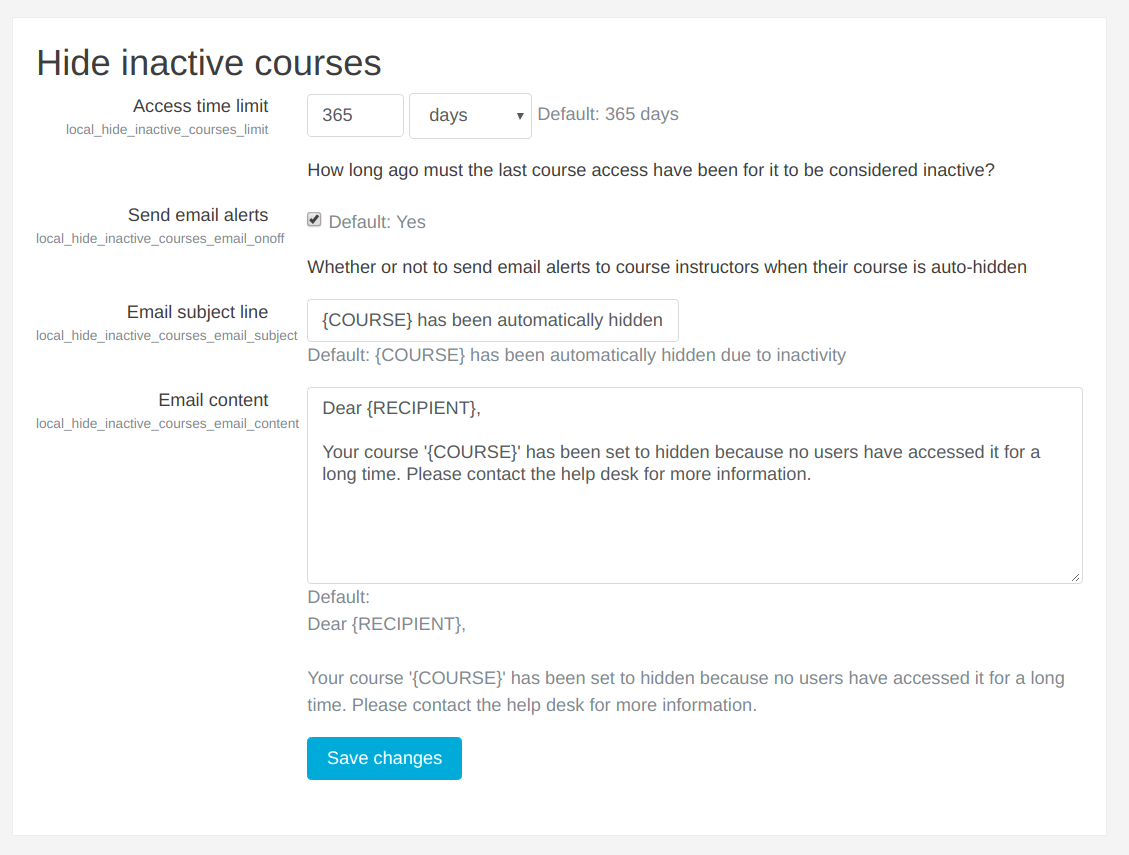
You can configure the following aspects of the plugin:
- The time limit for course inactivity, i.e., how long ago the last course access must have been for the course to count as inactive (default 1 year)
- Whether or not to send email alerts to teachers in auto-hidden courses
- The content of email alerts, including dynamic replacement flags (see default email content for example)
Details
- The plugin only counts course accesses from users who are enrolled in the course
- The cron task is set to run once every day by default
- The time limit config represents a minimum 'time ago' value for course accesses. For example, with the default time limit of 1 year, a course will be considered inactive if the most recent course access is from a year ago or more; or to put it another way, if there are no course accesses within the last year.
1.1.2-35.0 (2018112635)
1.1.2-35.0
Plugin type: Local plugins
Frankenstyle component name: local_hide_inactive_courses
Version build number: 2018112635
Version release name: 1.1.2-35.0
Maturity: Alpha
Supported Moodle versions: 3.5
Repository URL (Git): https://github.com/LafColITS/moodle-local_hide_inactive_courses
Repository branch:
Repository tag: v1.1.2-35.0
Issue/bug tracker URL: https://github.com/LafColITS/moodle-local_hide_inactive_courses/issues
Moodle Local Hide Inactive Courses
This plugin adds a scheduled task which automatically hides any courses which have not been accessed for a configurable time period. It also sends an email alert to any Teachers in a course when that course is auto-hidden.
Installation
Simply add the plugin to your Moodle install. Remember to enable the scheduled task to turn on plugin functionality.
Settings
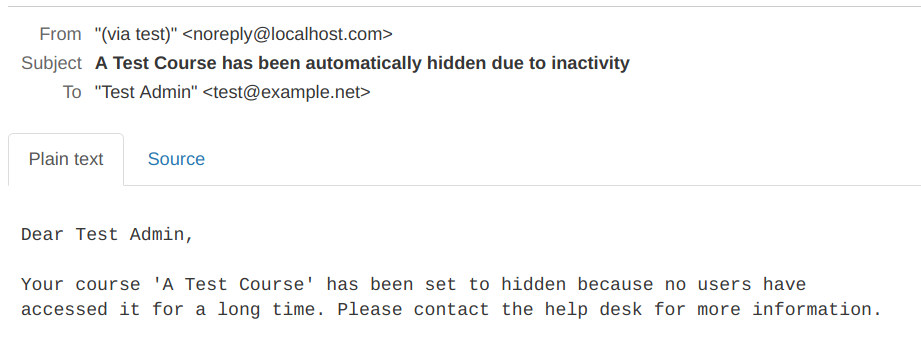
You can configure the following aspects of the plugin:
- The time limit for course inactivity, i.e., how long ago the last course access must have been for the course to count as inactive (default 1 year)
- Whether or not to send email alerts to teachers in auto-hidden courses
- The content of email alerts, including dynamic replacement flags (see default email content for example)
Details
- The plugin only counts course accesses from users who are enrolled in the course
- The cron task is set to run once every day by default
- The time limit config represents a minimum 'time ago' value for course accesses. For example, with the default time limit of 1 year, a course will be considered inactive if the most recent course access is from a year ago or more; or to put it another way, if there are no course accesses within the last year.
1.1.2-34.0 (2018112634)
1.1.2-34.0
Plugin type: Local plugins
Frankenstyle component name: local_hide_inactive_courses
Version build number: 2018112634
Version release name: 1.1.2-34.0
Maturity: Alpha
Supported Moodle versions: 3.4
Repository URL (Git): https://github.com/LafColITS/moodle-local_hide_inactive_courses
Repository branch:
Repository tag: v1.1.2-34.0
Issue/bug tracker URL: https://github.com/LafColITS/moodle-local_hide_inactive_courses/issues
Moodle Local Hide Inactive Courses
This plugin adds a scheduled task which automatically hides any courses which have not been accessed for a configurable time period. It also sends an email alert to any Teachers in a course when that course is auto-hidden.
Installation
Simply add the plugin to your Moodle install. Remember to enable the scheduled task to turn on plugin functionality.
Settings
You can configure the following aspects of the plugin:
- The time limit for course inactivity, i.e., how long ago the last course access must have been for the course to count as inactive (default 1 year)
- Whether or not to send email alerts to teachers in auto-hidden courses
- The content of email alerts, including dynamic replacement flags (see default email content for example)
Details
- The plugin only counts course accesses from users who are enrolled in the course
- The cron task is set to run once every day by default
- The time limit config represents a minimum 'time ago' value for course accesses. For example, with the default time limit of 1 year, a course will be considered inactive if the most recent course access is from a year ago or more; or to put it another way, if there are no course accesses within the last year.
1.1.2-33.0 (2018112633)
1.1.2-33.0
Plugin type: Local plugins
Frankenstyle component name: local_hide_inactive_courses
Version build number: 2018112633
Version release name: 1.1.2-33.0
Maturity: Alpha
Supported Moodle versions: 3.3
Repository URL (Git): https://github.com/LafColITS/moodle-local_hide_inactive_courses
Repository branch:
Repository tag: v1.1.2-33.0
Issue/bug tracker URL: https://github.com/LafColITS/moodle-local_hide_inactive_courses/issues
Moodle Local Hide Inactive Courses
This plugin adds a scheduled task which automatically hides any courses which have not been accessed for a configurable time period. It also sends an email alert to any Teachers in a course when that course is auto-hidden.
Installation
Simply add the plugin to your Moodle install. Remember to enable the scheduled task to turn on plugin functionality.
Settings
You can configure the following aspects of the plugin:
- The time limit for course inactivity, i.e., how long ago the last course access must have been for the course to count as inactive (default 1 year)
- Whether or not to send email alerts to teachers in auto-hidden courses
- The content of email alerts, including dynamic replacement flags (see default email content for example)
Details
- The plugin only counts course accesses from users who are enrolled in the course
- The cron task is set to run once every day by default
- The time limit config represents a minimum 'time ago' value for course accesses. For example, with the default time limit of 1 year, a course will be considered inactive if the most recent course access is from a year ago or more; or to put it another way, if there are no course accesses within the last year.
1.1.0-35 (2018072535)
1.1.0-35
Plugin type: Local plugins
Frankenstyle component name: local_hide_inactive_courses
Version build number: 2018072535
Version release name: 1.1.0-35
Maturity: Alpha
Supported Moodle versions: 3.5
Repository URL (Git): https://github.com/LafColITS/moodle-local_hide_inactive_courses
Repository branch: MOODLE_35_STABLE
Repository tag: v1.1.0-35
Issue/bug tracker URL: https://github.com/LafColITS/moodle-local_hide_inactive_courses/issues
Moodle Local Hide Inactive Courses
This plugin adds a scheduled task which automatically hides any courses which have not been accessed for a configurable time period. It also sends an email alert to any Teachers in a course when that course is auto-hidden.
Installation
Simply add the plugin to your Moodle install. Remember to enable the scheduled task to turn on plugin functionality.
Settings
You can configure the following aspects of the plugin:
- The time limit for course inactivity, i.e., how long ago the last course access must have been for the course to count as inactive (default 1 year)
- Whether or not to send email alerts to teachers in auto-hidden courses
- The content of email alerts, including dynamic replacement flags (see default email content for example)
Details
- The plugin only counts course accesses from users who are enrolled in the course
- The cron task is set to run once every day by default
- The time limit config represents a minimum 'time ago' value for course accesses. For example, with the default time limit of 1 year, a course will be considered inactive if the most recent course access is from a year ago or more; or to put it another way, if there are no course accesses within the last year.
1.1.0-34 (2018072534)
1.1.0-34
Plugin type: Local plugins
Frankenstyle component name: local_hide_inactive_courses
Version build number: 2018072534
Version release name: 1.1.0-34
Maturity: Alpha
Supported Moodle versions: 3.4
Repository URL (Git): https://github.com/LafColITS/moodle-local_hide_inactive_courses
Repository branch: MOODLE_34_STABLE
Repository tag: v1.1.0-34
Issue/bug tracker URL: https://github.com/LafColITS/moodle-local_hide_inactive_courses/issues
Moodle Local Hide Inactive Courses
This plugin adds a scheduled task which automatically hides any courses which have not been accessed for a configurable time period. It also sends an email alert to any Teachers in a course when that course is auto-hidden.
Installation
Simply add the plugin to your Moodle install. Remember to enable the scheduled task to turn on plugin functionality.
Settings
You can configure the following aspects of the plugin:
- The time limit for course inactivity, i.e., how long ago the last course access must have been for the course to count as inactive (default 1 year)
- Whether or not to send email alerts to teachers in auto-hidden courses
- The content of email alerts, including dynamic replacement flags (see default email content for example)
Details
- The plugin only counts course accesses from users who are enrolled in the course
- The cron task is set to run once every day by default
- The time limit config represents a minimum 'time ago' value for course accesses. For example, with the default time limit of 1 year, a course will be considered inactive if the most recent course access is from a year ago or more; or to put it another way, if there are no course accesses within the last year.
1.1.0-33 (2018072533)
1.1.0-33
Plugin type: Local plugins
Frankenstyle component name: local_hide_inactive_courses
Version build number: 2018072533
Version release name: 1.1.0-33
Maturity: Alpha
Supported Moodle versions: 3.3
Repository URL (Git): https://github.com/LafColITS/moodle-local_hide_inactive_courses
Repository branch: MOODLE_33_STABLE
Repository tag: v1.0.5-33
Issue/bug tracker URL: https://github.com/LafColITS/moodle-local_hide_inactive_courses/issues
Moodle Local Hide Inactive Courses
This plugin adds a scheduled task which automatically hides any courses which have not been accessed for a configurable time period. It also sends an email alert to any Teachers in a course when that course is auto-hidden.
Installation
Simply add the plugin to your Moodle install. Remember to enable the scheduled task to turn on plugin functionality.
Settings
You can configure the following aspects of the plugin:
- The time limit for course inactivity, i.e., how long ago the last course access must have been for the course to count as inactive (default 1 year)
- Whether or not to send email alerts to teachers in auto-hidden courses
- The content of email alerts, including dynamic replacement flags (see default email content for example)
Details
- The plugin only counts course accesses from users who are enrolled in the course
- The cron task is set to run once every day by default
- The time limit config represents a minimum 'time ago' value for course accesses. For example, with the default time limit of 1 year, a course will be considered inactive if the most recent course access is from a year ago or more; or to put it another way, if there are no course accesses within the last year.
1.0.5-35 (2018042735)
1.0.5-35
Plugin type: Local plugins
Frankenstyle component name: local_hide_inactive_courses
Version build number: 2018042735
Version release name: 1.0.5-35
Maturity: Alpha
Supported Moodle versions: 3.5
Repository URL (Git): https://github.com/LafColITS/moodle-local_hide_inactive_courses
Repository branch: https://github.com/LafColITS/moodle-local_hide_inactive_courses/tree/MOODLE_35_STABLE
Repository tag: https://github.com/LafColITS/moodle-local_hide_inactive_courses/releases/tag/v1.0.5-35
Issue/bug tracker URL: https://github.com/LafColITS/moodle-local_hide_inactive_courses/issues
Moodle Local Hide Inactive Courses
This plugin adds a scheduled task which automatically hides any courses which have not been accessed for a configurable time period. It also sends an email alert to any Teachers in a course when that course is auto-hidden.
Installation
Simply add the plugin to your Moodle install. Remember to enable the scheduled task to turn on plugin functionality.
Settings
You can configure the following aspects of the plugin:
- The time limit for course inactivity, i.e., how long ago the last course access must have been for the course to count as inactive (default 1 year)
- Whether or not to send email alerts to teachers in auto-hidden courses
- The content of email alerts, including dynamic replacement flags (see default email content for example)
Details
- The plugin only counts course accesses from users who are enrolled in the course
- The cron task is set to run once every day by default
- The time limit config represents a minimum 'time ago' value for course accesses. For example, with the default time limit of 1 year, a course will be considered inactive if the most recent course access is from a year ago or more; or to put it another way, if there are no course accesses within the last year.
1.0.5-33 (2018042700)
1.0.5-33
Plugin type: Local plugins
Frankenstyle component name: local_hide_inactive_courses
Version build number: 2018042700
Version release name: 1.0.5-33
Maturity: Alpha
Supported Moodle versions: 3.3
Repository URL (Git): https://github.com/LafColITS/moodle-local_hide_inactive_courses
Repository branch: MOODLE_33_STABLE
Repository tag: v1.0.5-33
Issue/bug tracker URL: https://github.com/LafColITS/moodle-local_hide_inactive_courses/issues
Moodle Local Hide Inactive Courses
This plugin adds a scheduled task which automatically hides any courses which have not been accessed for a configurable time period. It also sends an email alert to any Teachers in a course when that course is auto-hidden.
Installation
Simply add the plugin to your Moodle install. Remember to enable the scheduled task to turn on plugin functionality.
Settings
You can configure the following aspects of the plugin:
- The time limit for course inactivity, i.e., how long ago the last course access must have been for the course to count as inactive (default 1 year)
- Whether or not to send email alerts to teachers in auto-hidden courses
- The content of email alerts, including dynamic replacement flags (see default email content for example)
Details
- The plugin only counts course accesses from users who are enrolled in the course
- The cron task is set to run once every day by default
- The time limit config represents a minimum 'time ago' value for course accesses. For example, with the default time limit of 1 year, a course will be considered inactive if the most recent course access is from a year ago or more; or to put it another way, if there are no course accesses within the last year.