Course discuss
Versions
Current version
1.5 (2019021404)
1.5
Plugin type: Blocks
Frankenstyle component name: block_course_discuss
Version build number: 2019021404
Version release name: 1.5
Maturity: Stable
Supported Moodle versions: 3.4, 3.5, 3.6
Repository URL (Git): https://bitbucket.org/covuni/moodle-block_course_discuss
Repository branch: https://bitbucket.org/covuni/moodle-block_course_discuss/branch/version-1.5-2019021404
Repository tag:
Issue/bug tracker URL: https://bitbucket.org/covuni/moodle-block_course_discuss/issues
Moodle Course Discuss
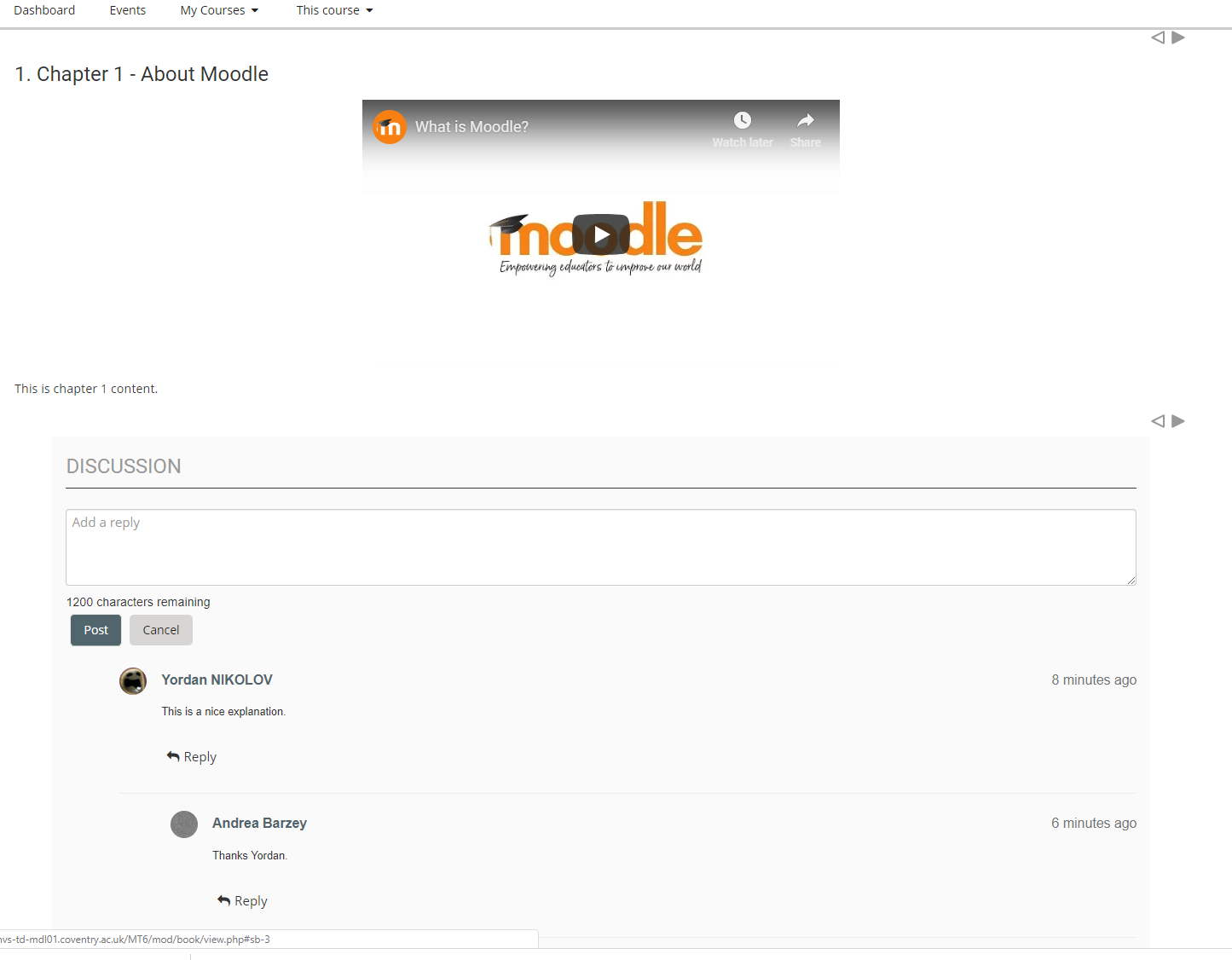
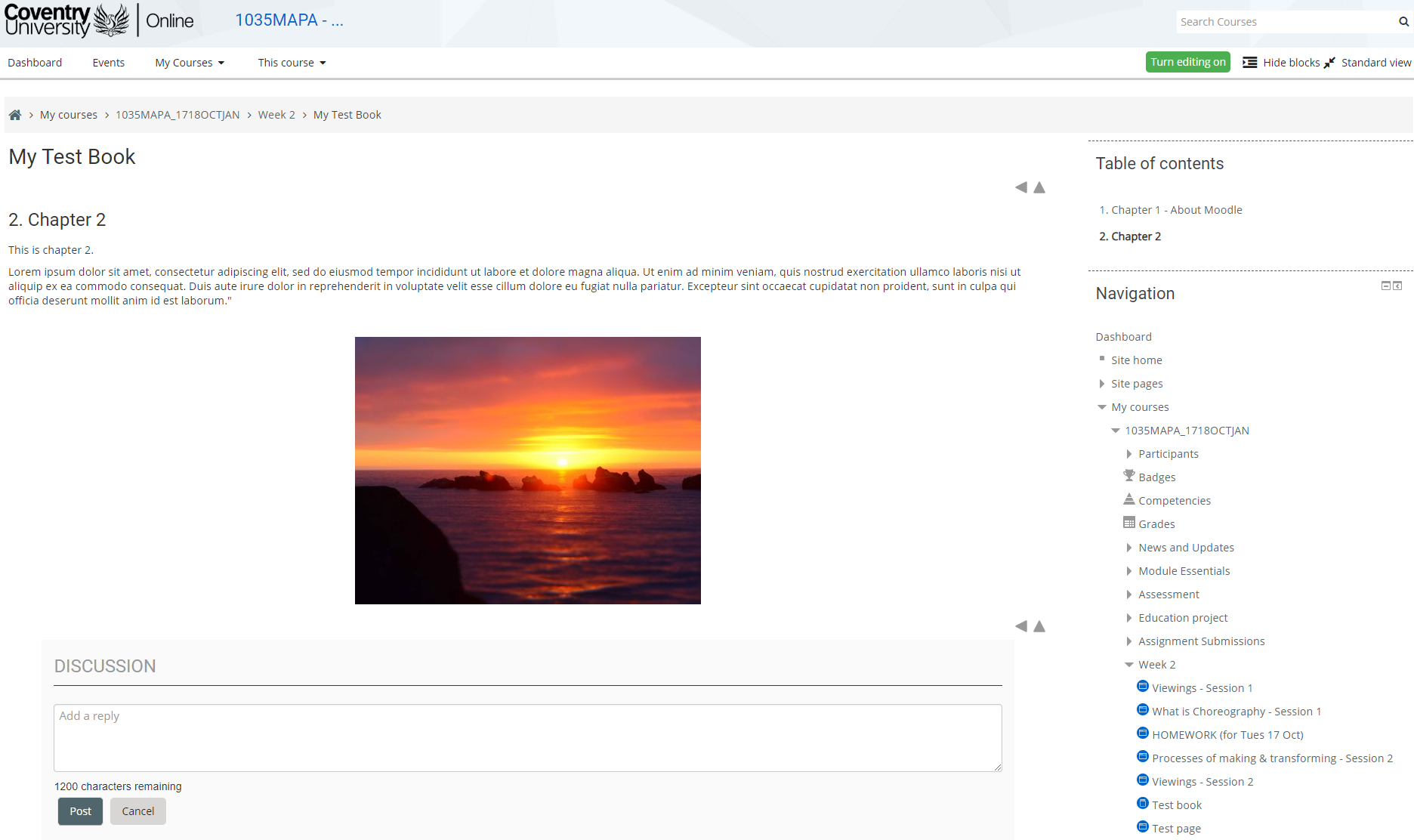
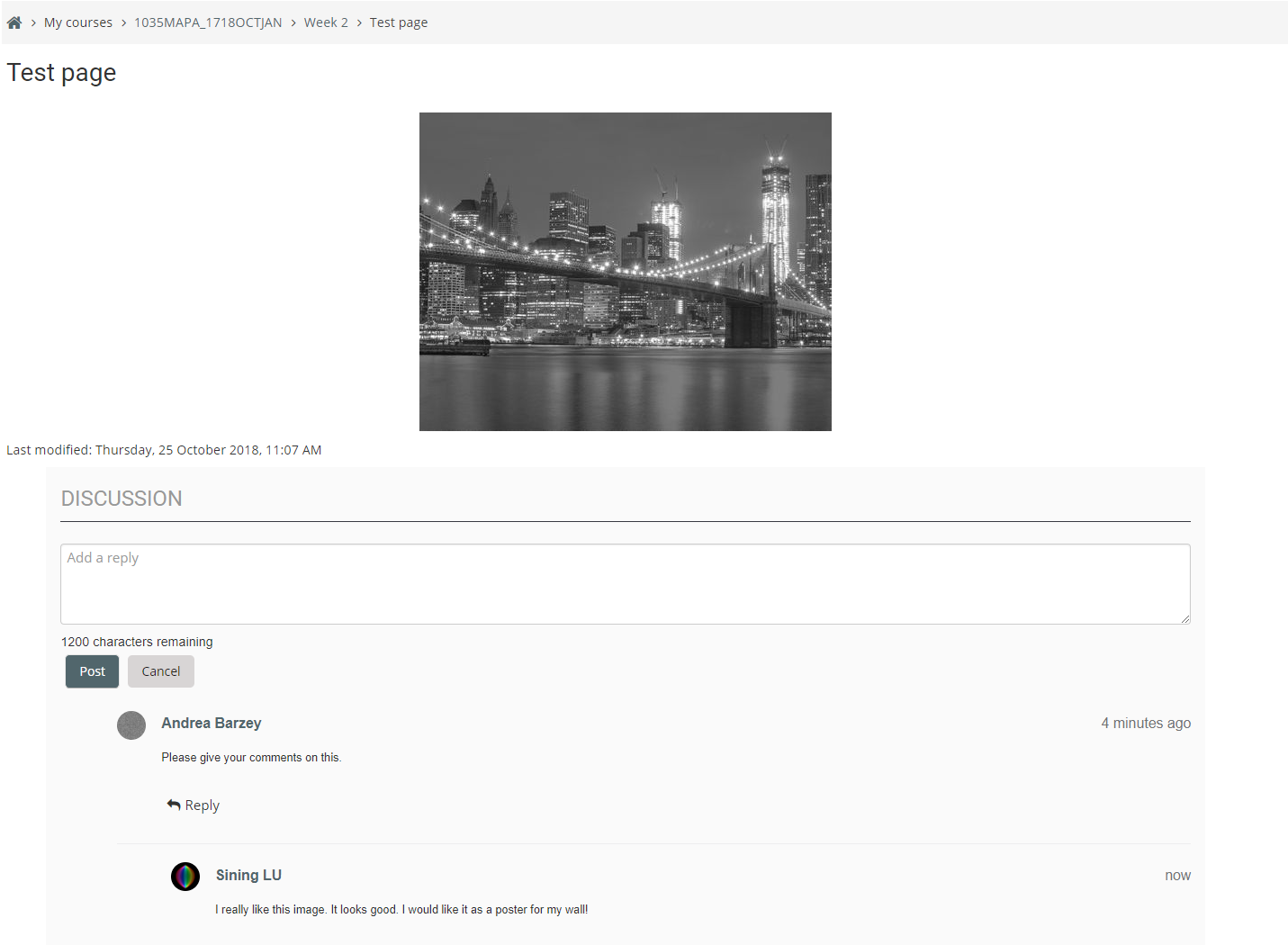
This block allows discussion on a section page, page or book chapter activity. Add this block to a block region that appears on a page of this type, to allow comments to be posted. This plugin has been
designed to work with the Adaptable theme, as Adaptable contains block regions that appear on the relevant course pages for sections, books and pages. It may work with other themes that can support the same features.
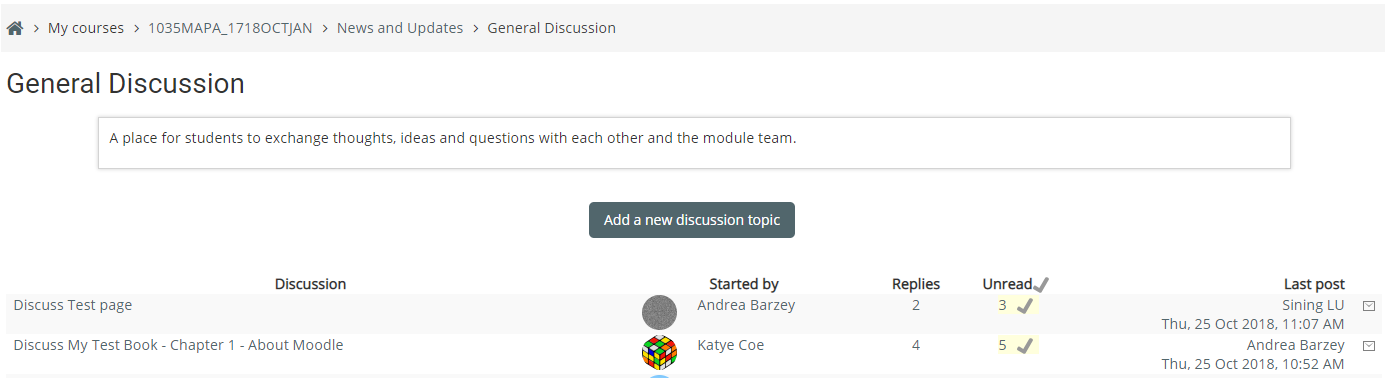
It utilises the core Moodle forum to store any discussions and will require a forum module to be added to the course to allow this. This forum must be of type "Standard forum for general use".
All discussions created on any relevant pages will then be available when viewing that forum.
Post creation
When a post is first created for a page, there are always 2 posts from the same user. An initial general post that starts the discussion (e.g. with generic text such as "Discuss Section 1", and the actual post from the user as a reply to this. This is so other users can reply to the same discussion without replying to the original user's first post.
Guidelines for use
Note: Each course will require a valid forum module
For the discussions to work on a course, there MUST be a forum in the relevant course, of type "Standard forum for general use". The block plugin will silently assign itself to a relevant forum in the course to use when the block is first rendered on a page, if it can.
There is an optional setting called "Forum name pattern for Forum to use for discussion". Use this for forum name pattern matching on the name of a forum when doing this. This is useful if you are using course templates when creating courses that contain a forum with a certain name.
If it is to be used, it is recommended that this setting is populated BEFORE switching the block on.
It also allows a comma separated list of potential names to match against. This allows matching on a particular name of forum as a preference when assigning a forum.
If the block can't find a suitable match, then the block will use any valid forum with the lowest database id for the particular course. This is the default mode of operation when there is nothing in the setting to match against.
The block should be added to a block region that will appear on a section, page or book chapter. When using Adaptable, this can be achieved by adding the block to the block region "Course page activity end bottom region" that appears on the frontpage in the admin section. Then configure this block to appear on all pages.
Each post has an edit link next to it for a post, if the current user has permission to edit and the edit time allowed (from main settings) has not been exceeded. A view thread link
also can appear at the top of any discussion that is present. Both of these options can be turned off or on in settings.
Other points to note when using this plugin
If this plugin is uninstalled, all links to discussions for pages will be removed. Hence, no previous discussions will appear for pages where they were present before uninstalling. The discussions themselves will still be available in the forum itself for a course however.
If a forum type that is being used by this block in a specific course, is changed from being one of "Standard forum for general use" to a different type in the forum settings. E.g. If it is changed to a single page discussion, this could make discussions behave incorrectly for that course and posting may fail.
Version 1.5 (2019021404)
How do I get set up?
Installs at /blocks/course_discuss
Settings
Site-wide configuration options are available under: Site Administration -> Plugins -> Blocks -> Course Discuss
The following settings are available:
Display Error if no valid Forum of type "General" exists. Toggle to display a message if no valid forum found in a course.
Error message to display if no Forum exists. Allows to display a specific message in conjunction with the above setting.
Forum name pattern for Forum to use for discussion. Choose a forum name pattern if desired, to assist in how to choose which forum is used for discussions in a module. Pattern will look for a case insensitive match. E.g. By using "General Discussion", it would match "General Discussion" and "This is a General Discussion forum. This can contain a comma separated list of potential matches.
User id for discussion. Allows specifying a user id of a user that will post the initial discussion. This should be populated, otherwise the author of the discussion will be the first user who comments.
Link to relevant page in initial general post. When the first general post is created (i.e. a new discussion), the general text such as "Discuss Section 1", can be a link to the page. This is so that when viewing the post in a forum page, the user can navigate to the relevant page for the discussion.
Optional tagline to display below the header title. Styling can be customised through the css class block_course_discuss_header_tagline, if custom css inclusion is available in the theme.
Settings to show the "View thread" link and "Edit post" links
Currently no per Instance block settings are available.
Compatibility
- Moodle 3.4, 3.5, 3.6
This block has been developed and tested with Adaptable 1.7.2 onwards, which includes a block region that will specifically appear on the relevant course pages. As such, it is likely to require this theme. It may work with other themes that have block regions that can appear on relevant course pages, such as a section, page and book chapter.
Contribution
Developed by:
- Manoj Solanki (Coventry University)
Co-maintained by:
- Jeremy Hopkins (Coventry University)
Licenses
Licensed under: GPL v3 (GNU General Public License) - http://www.gnu.org/licenses
1.4.5 (2019012100)
1.4.5
Plugin type: Blocks
Frankenstyle component name: block_course_discuss
Version build number: 2019012100
Version release name: 1.4.5
Maturity: Stable
Supported Moodle versions: 3.4, 3.5, 3.6
Repository URL (Git): https://bitbucket.org/covuni/moodle-block_course_discuss
Repository branch: https://bitbucket.org/covuni/moodle-block_course_discuss/branch/version-1.4.5-2019012100
Repository tag:
Issue/bug tracker URL: https://bitbucket.org/covuni/moodle-block_course_discuss/issues
Moodle Course Discuss
This block allows discussion on a section page, page or book chapter activity. Add this block to a block region that appears on a page of this type, to allow comments to be posted. This plugin has been
designed to work with the Adaptable theme, as Adaptable contains block regions that appear on the relevant course pages for sections, books and pages. It may work with other themes that can support the same features.
It utilises the core Moodle forum to store any discussions and will require a forum module to be added to the course to allow this. This forum must be of type "Standard forum for general use".
All discussions created on any relevant pages will then be available when viewing that forum.
Guidelines for use
Note: Each course will require a valid forum module
For the discussions to work on a course, there MUST be a forum in the relevant course, of type "Standard forum for general use". The block plugin will silently assign itself to a relevant forum in the course to use when the block is first rendered on a page, if it can.
There is an optional setting called "Forum name pattern for Forum to use for discussion". Use this for forum name pattern matching on the name of a forum when doing this. This is useful if you are using course templates when creating courses that contain a forum with a certain name.
If it is to be used, it is recommended that this setting is populated BEFORE switching the block on.
It also allows a comma separated list of potential names to match against. This allows matching on a particular name of forum as a preference when assigning a forum.
If the block can't find a suitable match, then the block will use any valid forum with the lowest database id for the particular course. This is the default mode of operation when there is nothing in the setting to match against.
The block should be added to a block region that will appear on a section, page or book chapter. When using Adaptable, this can be achieved by adding the block to the block region "Course page activity end bottom region" that appears on the frontpage in the admin section. Then configure this block to appear on all pages.
Other points to note when using this plugin
If this plugin is uninstalled, all links to discussions for pages will be removed. Hence, no previous discussions will appear for pages where they were present before uninstalling. The discussions themselves will still be available in the forum itself for a course however.
If a forum type that is being used by this block in a specific course, is changed from being one of "Standard forum for general use" to a different type in the forum settings. E.g. If it is changed to a single page discussion, this could make discussions behave incorrectly for that course and posting may fail.
Version 1.4.5 (2019012100)
How do I get set up?
Installs at /blocks/course_discuss
Settings
Site-wide configuration options are available under: Site Administration -> Plugins -> Blocks -> Course Discuss
The following settings are available:
Display Error if no valid Forum of type "General" exists. Toggle to display a message if no valid forum found in a course.
Error message to display if no Forum exists. Allows to display a specific message in conjunction with the above setting.
Forum name pattern for Forum to use for discussion. Choose a forum name pattern if desired, to assist in how to choose which forum is used for discussions in a module. Pattern will look for a case insensitive match. E.g. By using "General Discussion", it would match "General Discussion" and "This is a General Discussion forum. This can contain a comma separated list of potential matches.
User id for discussion. Allows specifying a user id of a user that will post the initial discussion. This should be populated, otherwise the author of the discussion will be the first user who comments.
Currently no per Instance block settings are available.
Compatibility
- Moodle 3.4, 3.5, 3.6
This block has been developed and tested with Adaptable 1.7.2 onwards, which includes a block region that will specifically appear on the relevant course pages. As such, it is likely to require this theme. It may work with other themes that have block regions that can appear on relevant course pages, such as a section, page and book chapter.
Contribution
Developed by:
- Manoj Solanki (Coventry University)
Co-maintained by:
- Jeremy Hopkins (Coventry University)
Licenses
Licensed under: GPL v3 (GNU General Public License) - http://www.gnu.org/licenses
1.4.3 (2018111600)
1.4.3
Plugin type: Blocks
Frankenstyle component name: block_course_discuss
Version build number: 2018111600
Version release name: 1.4.3
Maturity: Stable
Supported Moodle versions: 3.4, 3.5
Repository URL (Git): https://bitbucket.org/covuni/moodle-block_course_discuss
Repository branch:
Repository tag:
Issue/bug tracker URL: https://bitbucket.org/covuni/moodle-block_course_discuss/issues
Moodle Course Discuss
This block allows discussion on a section page, page or book chapter activity. Add this block to a block region that appears on a page of this type, to allow comments to be posted.
It utilises the core Moodle forum to store any discussions and will require a forum module to be added to the course to allow this. This forum must be of type "Standard forum for general use".
All discussions created on any relevant pages will then be available when viewing that forum.
Guidelines for use
Note: Each course will require a valid forum module
For the discussions to work on a course, there MUST be a forum in the relevant course, of type "Standard forum for general use". The block plugin will silently assign itself to a relevant forum in the course to use when the block is first rendered on a page, if it can.
There is an optional setting called "Forum name pattern for Forum to use for discussion". Use this for forum name pattern matching on the name of a forum when doing this. This is useful if you are using course templates when creating courses that contain a forum with a certain name.
If it is to be used, it is recommended that this setting is populated BEFORE switching the block on.
It also allows a comma separated list of potential names to match against. This allows matching on a particular name of forum as a preference when assigning a forum.
If the block can't find a suitable match, then the block will use any valid forum with the lowest database id for the particular course. This is the default mode of operation when there is nothing in the setting to match against.
The block should be added to a block region that will appear on a section, page or book chapter. When using Adaptable, this can be achieved by adding the block to the block region "Course page activity end bottom region" that appears on the frontpage in the admin section. Then configure this block to appear on all pages.
Other points to note when using this plugin
If this plugin is uninstalled, all links to discussions for pages will be removed. Hence, no previous discussions will appear for pages where they were present before uninstalling. The discussions themselves will still be available in the forum itself for a course however.
If a forum type that is being used by this block in a specific course, is changed from being one of "Standard forum for general use" to a different type in the forum settings. E.g. If it is changed to a single page discussion, this could make discussions behave incorrectly for that course and posting may fail.
Web services must
Version 1.4.3 (2018111600)
How do I get set up?
Installs at /blocks/course_discuss
Settings
Site-wide configuration options are available under: Site Administration -> Plugins -> Blocks -> Course Discuss
The following settings are available:
Display Error if no valid Forum of type "General" exists. Toggle to display a message if no valid forum found in a course.
Error message to display if no Forum exists. Allows to display a specific message in conjunction with the above setting.
Forum name pattern for Forum to use for discussion. Choose a forum name pattern if desired, to assist in how to choose which forum is used for discussions in a module. Pattern will look for a case insensitive match. E.g. By using "General Discussion", it would match "General Discussion" and "This is a General Discussion forum. This can contain a comma separated list of potential matches.
User id for discussion. Allows specifying a user id of a user that will post the initial discussion. This should be populated, otherwise the author of the discussion will be the first user who comments.
Currently no per Instance block settings are available.
Compatibility
- Moodle 3.4, 3.5
This block has been developed and tested with Adaptable 1.7.2 onwards, which includes a block region that will specifically appear on the relevant course pages. It will probably work with other themes, however the CSS styling may need customising and it will need to appear in an appropriate block region that renders on a section, page and book chapter.
Contribution
Developed by:
- Manoj Solanki (Coventry University)
Co-maintained by:
- Jeremy Hopkins (Coventry University)
Licenses
Licensed under: GPL v3 (GNU General Public License) - http://www.gnu.org/licenses
1.4.2 (2018103100)
1.4.2
Plugin type: Blocks
Frankenstyle component name: block_course_discuss
Version build number: 2018103100
Version release name: 1.4.2
Maturity: Stable
Supported Moodle versions: 3.4, 3.5
Repository URL (Git): https://bitbucket.org/covuni/moodle-block_course_discuss
Repository branch: https://bitbucket.org/covuni/moodle-block_course_discuss/branch/version-1.4.2-2018103100
Repository tag:
Issue/bug tracker URL: https://bitbucket.org/covuni/moodle-block_course_discuss/issues
Moodle Course Discuss
This block allows discussion on a section page, page or book chapter activity. Add this block to a block region that appears on a page of this type, to allow comments to be posted.
It utilises the core Moodle forum to store any discussions and will require a forum module to be added to the course to allow this. This forum must be of type "Standard forum for general use".
All discussions created on any relevant pages will then be available when viewing that forum.
Guidelines for use
Note: Each course will require a valid forum module
For the discussions to work on a course, there MUST be a forum in the relevant course, of type "Standard forum for general use". The block plugin will silently assign itself to a relevant forum in the course to use when the block is first rendered on a page, if it can.
There is an optional setting called "Forum name pattern for Forum to use for discussion". Use this for forum name pattern matching on the name of a forum when doing this. This is useful if you are using course templates when creating courses that contain a forum with a certain name.
If it is to be used, it is recommended that this setting is populated BEFORE switching the block on.
It also allows a comma separated list of potential names to match against. This allows matching on a particular name of forum as a preference when assigning a forum.
If the block can't find a suitable match, then the block will use any valid forum with the lowest database id for the particular course. This is the default mode of operation when there is nothing in the setting to match against.
The block should be added to a block region that will appear on a section, page or book chapter. When using Adaptable, this can be achieved by adding the block to the block region "Course page activity end bottom region" that appears on the frontpage in the admin section. Then configure this block to appear on all pages.
Other points to note when using this plugin
If this plugin is uninstalled, all links to discussions for pages will be removed. Hence, no previous discussions will appear for pages where they were present before uninstalling. The discussions themselves will still be available in the forum itself for a course however.
If a forum type that is being used by this block in a specific course, is changed from being one of "Standard forum for general use" to a different type in the forum settings. E.g. If it is changed to a single page discussion, this could make discussions behave incorrectly for that course and posting may fail.
Version 1.4.2 (2018103100)
How do I get set up?
Installs at /blocks/course_discuss
Settings
Site-wide configuration options are available under: Site Administration -> Plugins -> Blocks -> Course Discuss
The following settings are available:
Display Error if no valid Forum of type "General" exists. Toggle to display a message if no valid forum found in a course.
Error message to display if no Forum exists. Allows to display a specific message in conjunction with the above setting.
Forum name pattern for Forum to use for discussion. Choose a forum name pattern if desired, to assist in how to choose which forum is used for discussions in a module. Pattern will look for a case insensitive match. E.g. By using "General Discussion", it would match "General Discussion" and "This is a General Discussion forum. This can contain a comma separated list of potential matches.
User id for discussion. Allows specifying a user id of a user that will post the initial discussion. This should be populated, otherwise the author of the discussion will be the first user who comments.
Currently no per Instance block settings are available.
Compatibility
- Moodle 3.4, 3.5
This block has been developed and tested with Adaptable 1.7.2 onwards, which includes a block region that will specifically appear on the relevant course pages. It will probably work with other themes, however the CSS styling may need customising and it will need to appear in an appropriate block region that renders on a section, page and book chapter.
Contribution
Developed by:
- Manoj Solanki (Coventry University)
Co-maintained by:
- Jeremy Hopkins (Coventry University)
Licenses
Licensed under: GPL v3 (GNU General Public License) - http://www.gnu.org/licenses
1.4.1 (2018102401)
1.4.1
Plugin type: Blocks
Frankenstyle component name: block_course_discuss
Version build number: 2018102401
Version release name: 1.4.1
Maturity: Stable
Supported Moodle versions: 3.4, 3.5
Repository URL (Git): https://bitbucket.org/covuni/moodle-block_course_discuss
Repository branch:
Repository tag:
Issue/bug tracker URL: https://bitbucket.org/covuni/moodle-block_course_discuss/issues
Moodle Course Discuss
This block allows discussion on a section page, page or book chapter activity. Add this block to a block region that appears on a page of this type, to allow comments to be posted.
It utilises the core Moodle forum to store any discussions and will require a forum module to be added to the course to allow this. This forum must be of type "Standard forum for general use".
All discussions created on any relevant pages will then be available when viewing that forum.
Guidelines for use
Note: Each course will require a valid forum module
For the discussions to work on that course, there MUST be a forum in the relevant course, of type "Standard forum for general use". The block plugin will silently assign itself to a relevant forum in the course to use when the block is first rendered on a page. There is an optional setting for forum name pattern matching on the name of a forum when doing this.
It also allows a comma separated list of potential names to match against. This allows matching on a particular name of forum as a preference when assigning a forum.
If the block can't find a suitable match, then the block will use any valid forum with the lowest database id for the particular course. This is the default mode of operation when there is nothing in the setting to match against.
The block should be added to a block region that will appear on a section, page or book chapter. When using Adaptable, this can be achieved by adding the block to the block region "Course page activity end bottom region" that appears on the frontpage in the admin section. Then configure this block to appear on all pages.
Other points to note when using this plugin
If this plugin is uninstalled, all links to discussions for pages will be removed. Hence, no previous discussions will appear for pages where they were present before uninstalling. The discussions themselves will still be available in the forum itself for a course however.
If a forum type that is being used by this block in a specific course, is changed from being one of "Standard forum for general use" to a different type in the forum settings. E.g. If it is changed to a single page discussion, this could make discussions behave incorrectly for that course and posting may fail.
Version 1.4.1 (2018102401)
How do I get set up?
Installs at /blocks/course_discuss
Settings
Site-wide configuration options are available under: Site Administration -> Plugins -> Blocks -> Course Discuss
The following settings are available:
Display Error if no valid Forum of type "General" exists. Toggle to display a message if no valid forum found in a course.
Error message to display if no Forum exists. Allows to display a specific message in conjunction with the above setting.
Forum name pattern for Forum to use for discussion. Choose a forum name pattern if desired, to assist in how to choose which forum is used for discussions in a module. Pattern will look for a case insensitive match. E.g. By using "General Discussion", it would match "General Discussion" and "This is a General Discussion forum. This can contain a comma separated list of potential matches.
Currently no per Instance block settings are available.
Compatibility
- Moodle 3.4, 3.5
This block has been developed and tested with Adaptable 1.7.2 onwards, which includes a block region that will specifically appear on the relevant course pages. It will probably work with other themes, however the CSS styling may need customising and it will need to appear in an appropriate block region that renders on a section, page and book chapter.
Contribution
Developed by:
- Manoj Solanki (Coventry University)
Co-maintained by:
- Jeremy Hopkins (Coventry University)
Licenses
Licensed under: GPL v3 (GNU General Public License) - http://www.gnu.org/licenses
1.4 (2018102400)
1.4
Plugin type: Blocks
Frankenstyle component name: block_course_discuss
Version build number: 2018102400
Version release name: 1.4
Maturity: Stable
Supported Moodle versions: 3.4, 3.5
Repository URL (Git): https://bitbucket.org/covuni/moodle-block_course_discuss
Repository branch:
Repository tag:
Issue/bug tracker URL: https://bitbucket.org/covuni/moodle-block_course_discuss/issues
README
moodle-block_course_discuss
Moodle Course Discuss
This block allows discussion on a section page, page or book chapter activity. Add this block to a block region that appears on a page of this type, to allow comments to be posted.
It utilises the core Moodle forum to store any discussions and will require a forum module to be added to the course to allow this. This forum must be of type "Standard forum for general use".
All discussions created on any relevant pages will then be available when viewing that forum.
Guidelines for use
Each course will require a valid forum module
For the discussions to work on that course, there MUST be a forum in the relevant course, of type "Standard forum for general use". The block plugin will silently assign itself to a relevant forum in the course to use when the block is first rendered on a page. There is an optional setting for forum name pattern matching on the name of a forum when doing this.
It also allows a comma separated list of potential names to match against. This allows matching on a particular name of forum as a preference when assigning a forum.
If the block can't find a suitable match, then the block will use any valid forum with the lowest database id for the particular course. This is the default mode of operation when there is nothing in the setting to match against.
The block should be added to a block region that will appear on a section, page or book chapter.
Other points to note when using this plugin
If this plugin is uninstalled, all links to discussions for pages will be removed. Hence, nothing will appear for pages where discussions were present. The discussions themselves will still be available in the forum itself for a course however.
If a forum type that is being used by this block in a specific course, is changed from being one of "Standard forum for general use" to a different type in the forum settings.
E.g. It is changed to a single page discussion, this could make discussions behave incorrectly for that course and posting may fail
Version 1.4 (2018102400)
How do I get set up?
Installs at
Settings
Site-wide configuration options are available under: Site Administration -> Plugins -> Blocks -> Course Discuss
The following settings are available:
Display Error if no valid Forum of type "General" exists. Toggle to display a message if no valid forum found in a course.
Error message to display if no Forum exists. Allows to display a specific message in conjunction with the above setting.
Forum name pattern for Forum to use for discussion. Choose a forum name pattern if desired, to assist in how to choose which forum is used for discussions in a module. Pattern will look for a case insensitve match. E.g. By using "General Discussion", it would match "General Discussion" and "This is a General Discussion forum. This can contain a comma separated list of potential matches.
Currently no per Instance block settings are available.
Compatibility
- Moodle 3.4, 3.5
This block has been developed and tested with Adaptable 1.7.2 onwards, which includes a block region that will specifically appear on the relevant course pages. It will probably work with other themes, however the CSS styling may need customising and it will need the ability to appear in an appropriate block region that renders on a section page, page or book chapter.
Contribution
Developed by:
- Manoj Solanki (Coventry University)
Co-maintained by:
- Jeremy Hopkins (Coventry University)
Licenses
Licensed under: GPL v3 (GNU General Public License) - http://www.gnu.org/licenses