
Course completed enrolment
Maintained by
Renaat Debleu
Enrol users upon completion of a course.
Comments
Comments are no longer open for new posts. Existing comments remain available to read.
I found that Site administration > Advanced features > Enable completion tracking was already switched to "yes".
Also, Site administration > Courses > Course default settings is also "yes".
And for the course Enable completion tracking and Show activity completion conditions are both "yes".
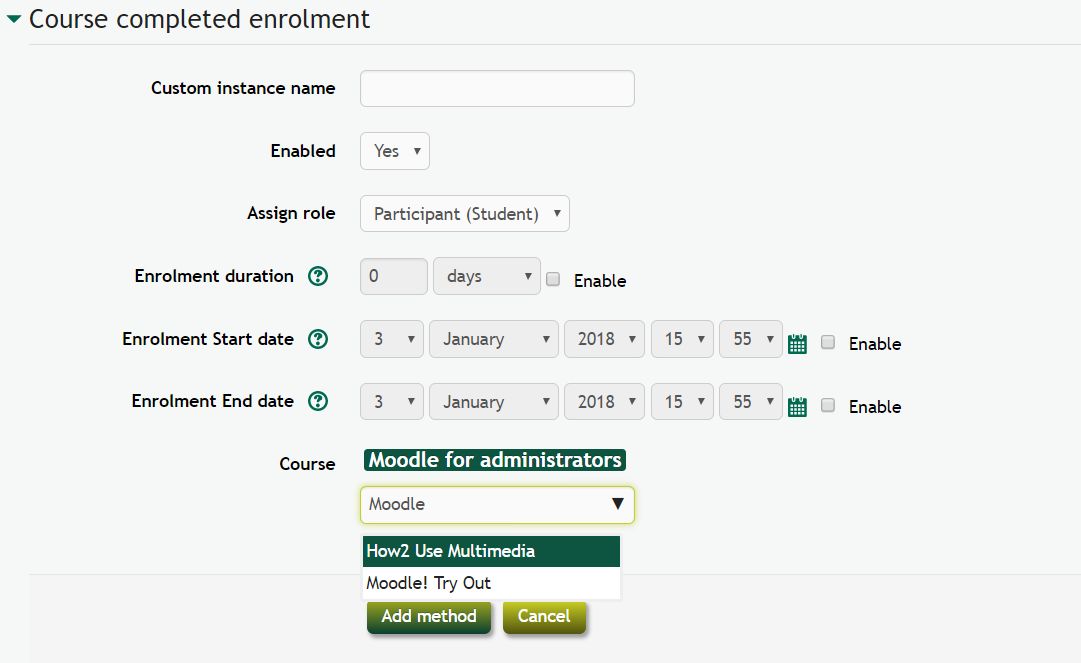
I think the issue is that I cannot even see the section that should display "course" and the box to select which courses I would like to add as pre-requisite. I believe based on the 2nd screenshot for the plugin that it should display under "enrolment end date" however, it does not show at all on my course page.
Regards,
D
Only the courses that have course completion enabled are shown. Read the documentation about course completion first.
The pre-requisite course must generate course completion events so users get enrolled into the a course.
R
We have installed the plugin and enabled it
Made it visible
Checked the cron job is running
However, when creating a new course, the option for the pre-requisite "course" does not show?
Could you please let us know what we have done wrong?
Regards,
Duong
The Moodle cron page (https://docs.moodle.org/311/en/Cron) is clear:
IMPORTANT: Do not skip setting up the cron process on your server for your Moodle. Your site will not work properly without it.
R
I asked my IT colleagues in the company if they have Cron (because IT was written in the documentation that if activities or criteria are automatically met, such as passing/completing tests, the status will be updated in the next Moodle Cron run). The answer I received from IT is that this is not installed in Moodle. Is IT related to this? Because all activities are automatically completed according to conditions.
Best regards
ZhuHua
Does your course completion report (report/completion/index.php?course=X) has users who completed the course?
If yes - scroll over the checkbox to detect the day and time when this happened. Confirm this moment is after you configured the enrolment plugin.
Go digging in to the logs and find the events of the day and time, you should find an entry about this course completion, and 1 or 2 minutes after an entry about the enrolment. If an error happened you should see why the user was not enrolled.
R
Thank you very much for your reply!
I also set up the course "if any condition is met, the course is complete", but that doesn't work either.
The initial state is default and cannot be used without any other conditions. I can't find out if there are any other problems right now. I look forward to your advice! Thank you very much!
Best regards
ZhuHua
100% progress means 100% activity completion. This is NOT the same as completing the course. Read the docs on https://docs.moodle.org/en/Using_Course_completion first!
R
Thank you for developing the feature.
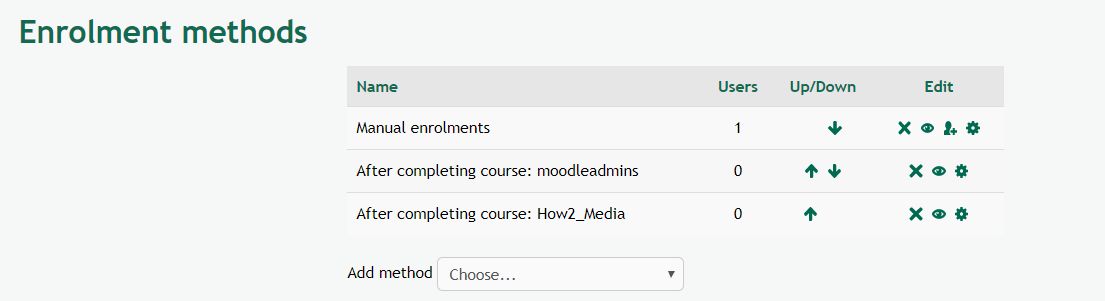
I would like to know that I have added this function in course B and set the registration method to complete course A (no mistake), but my student account cannot be automatically registered in course B after completing course A. (A course added A SCORM courseware, set browse and get grades automatically complete this activity. The course shows 100% progress after completion.)Now my guess may be that my course is not finished, do I need to set up other courses?
I am looking forward to your reply~
Best regards
ZhuHua
Thank you for your feedback.
Please submit an feature request in the bug tracker (https://github.com/ewallah/moodle-enrol_coursecompleted/issues). Provide a full storyboard of how it could be implemented. But also find a good solution how a date change should be handled.
R
Thanks for this nice plugin. It really make a difference for us!
I was wondering about the 'enrolment Start date'...
Is there a way to set it to the 'course Start date'? (just like for the manual enrollment method).
This will allow us to only update the course Start date instead of going into the enrolment method.
Best regards
Maxime
As far as I can remember, Greenwich is located next to London, so changing the Europe/London into GMT (Greenwich Mean Time) will not work. One you can change the Moodle timezone, but also the PHP timezone and the Operating System timezone. But this is far too complex and to early in the problem solving process.
I still do not know what you mean by "Many students in MEASA and APAC regions are having trouble accessing the next course in the sequence", What do they see? Which errors are in the logs? Why are some students enrolled and others not?
R
Do you think setting the server time to UTC would help?
I cannot reproduce the problem, not in a test environment (https://github.com/ewallah/moodle-enrol_coursecompleted/blob/main/tests/behat/enrol_coursecompleted.feature#L17), but also not in real life. First I thought that users from time zones before the server timezone perhaps could have issues, but in my Moodle environments this is not happening.
R
I just had a look at the server time zone. It is not configured to GMT (UTC). It's configured to Europe/London. Do you think that this could be the problem?
Paul