
Event Reminders
Versions
Current version
2.7.4 (2025082400)
2.7.4
Plugin type: Local plugins
Frankenstyle component name: local_reminders
Version build number: 2025082400
Version release name: 2.7.4
Maturity: Stable
Supported Moodle versions: 3.10, 3.11, 3.5, 3.6, 3.7, 3.8, 3.9, 4.0, 4.1, 4.2, 4.3, 4.4, 4.5, 5.0
Repository URL (Git): https://github.com/isuru89/moodle-local_reminders
Repository branch:
Repository tag: v2.7.4
Issue/bug tracker URL: http://tracker.moodle.org/browse/CONTRIB-3647
Moodle - Local Reminders






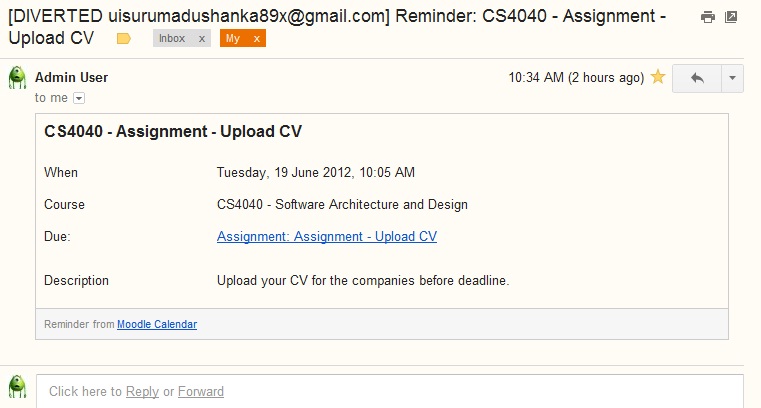
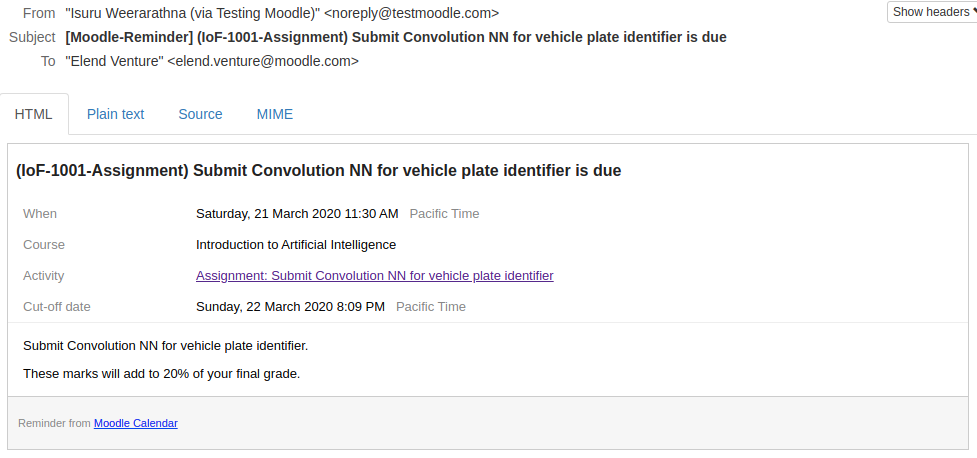
This plugin will send email reminders for Moodle calendar events.
Reminders are very useful for both students as well as teachers to recall their scheduled events and activities before the actual moment.
Features
General Features:
- Ability to send reminders for site, user, course, group and activity calendar events.
- Pre-defined and customizable reminders schedule (1, 3 and 7 days in-advance).
- Ability to select roles eligible for receiving reminder emails.
In addition to that, there are lot of new features introduced in v2 of the plugin which is required to have Moodle 3.5 or later.
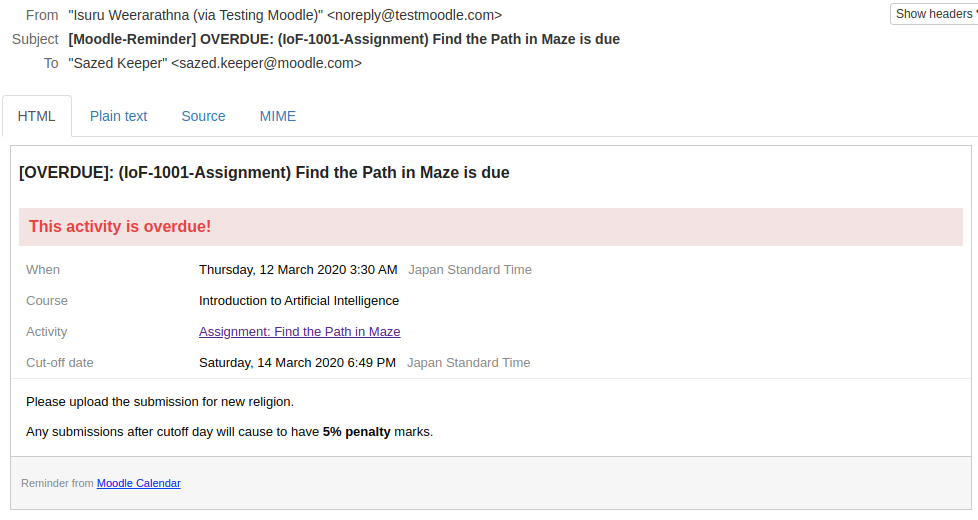
- Send reminders to users who unable to complete an expired activity.
- Send email reminders when a calendar event is created, updated or removed.
- Ability to enable/disable and scheduling reminders per activity basis.
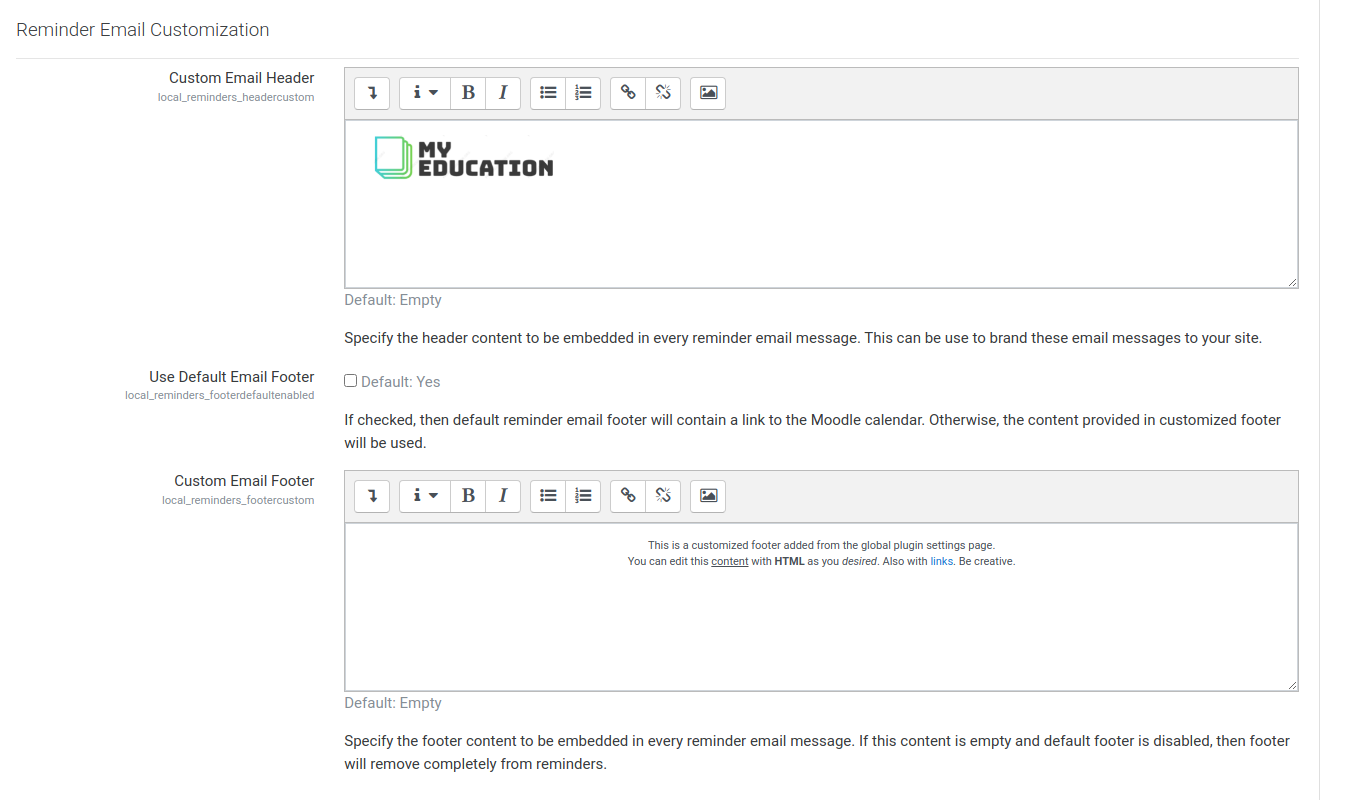
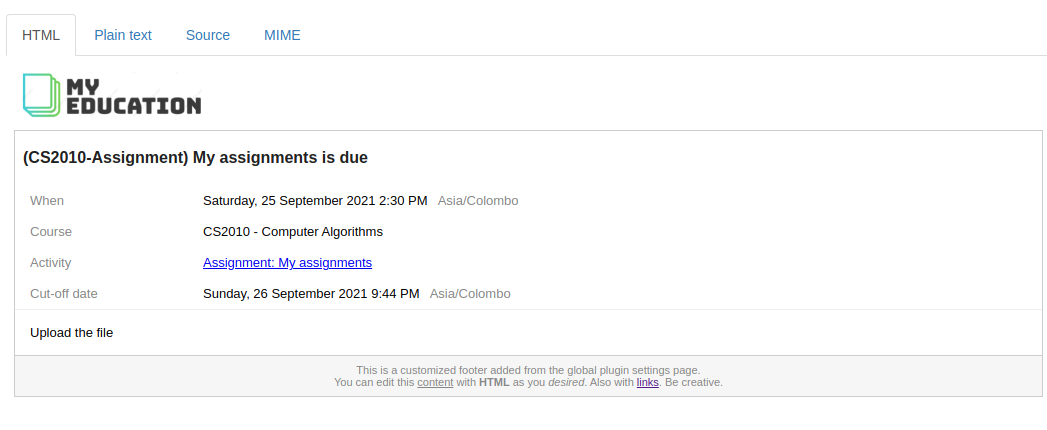
- Ability to customize email header and footer contents
- Ability to exclude specific set of activity types from sending reminders.
- No reminders after a user has completed activity.
- Added event location / timezone information to the reminder email.
- New category event type support.
- Honours activity overriddes and extensions.
And many bug fixes too.
Compatibility
Plugin v2+ works in any Moodle versin 3.5 or above.
Installation
To install this plugin, you must be an administrator of your Moodle site.
- Downlod an appropriate version from here based on your installed Moodle version.
- Go to Moodle
Site administration>Plugins>Install plugins - Upload the downloaded zip file to the provided box.
- Click
Show more...and selectLocal plugin (local)under plugin type. - Click
Install plugin from ZIP file - Provide your reminders settings once asked.
- That's it!
Also don't forget to show your love for this plugin in here by clicking Add to favourites.
Plugin Settings
Reminders are sent using Moodle's Scheduled tasks (since v3.5), and you can specify the running interval in Site administration > Server > Scheduled tasks > Local Reminders. By default, it has set to run in every 15 minutes.
Note: If you are using a Moodle version before 3.5, then you must edit $plugin->cron value in version.php file before uploading it for installation. This value is indicated in seconds.
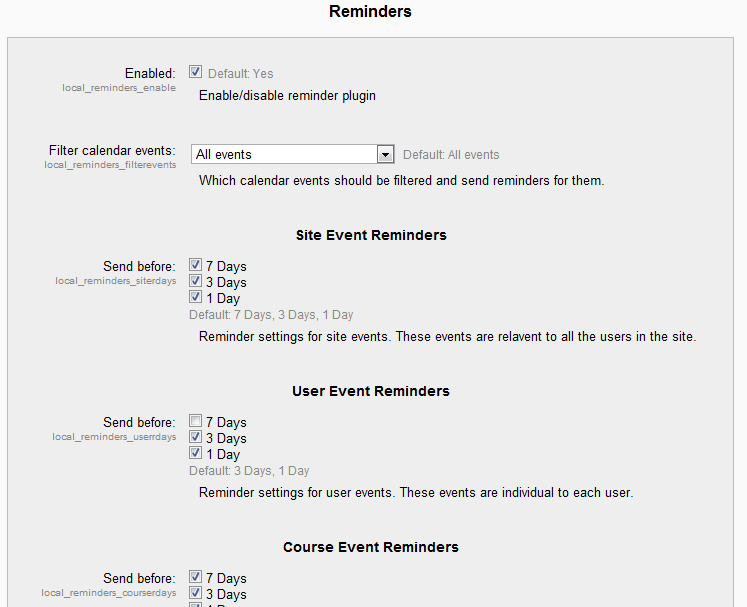
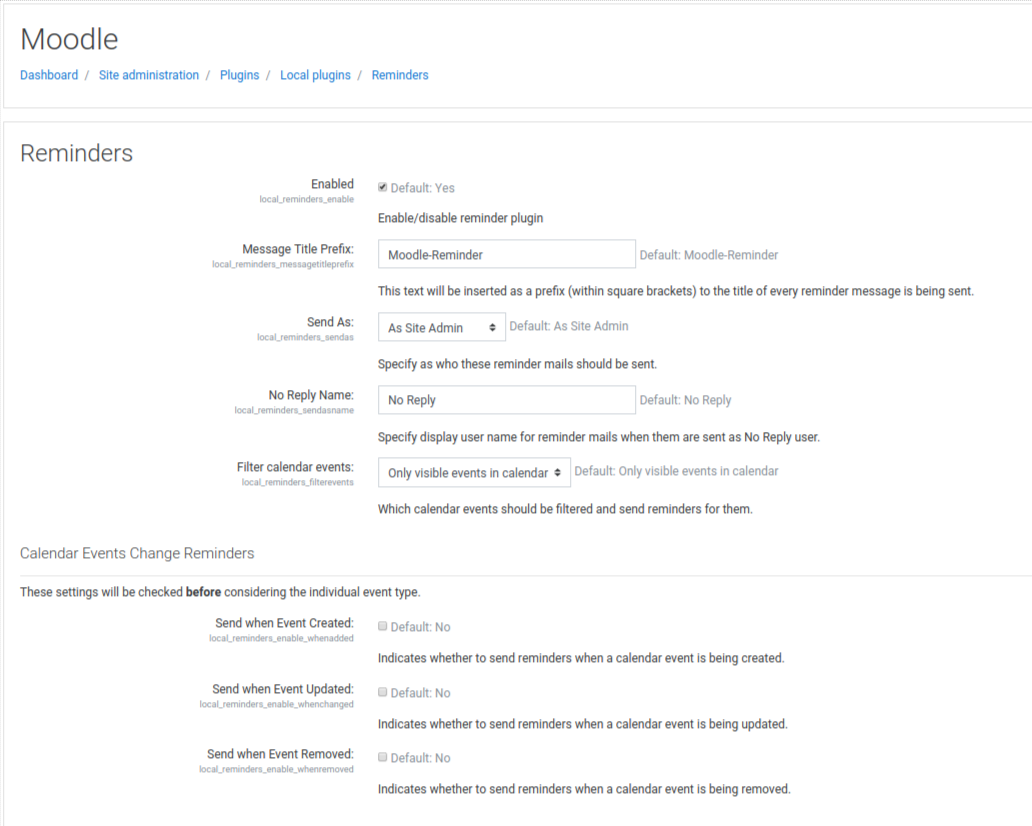
To customize the plugin settings, go to Site administration > Plugins > Reminders.
Each setting and its functionality is described below.
- Common Settings
| Setting | Description | Default |
|---|---|---|
| Enabled | enable/disable reminder plugin. Not a single reminder will be sent. This is provided to temporary disable plugin without uninstalling it. | yes |
| Message Title Prefix | The text to prepend for each and every reminder email subject. Email subject will take format of [${TITLE_PREFIX}] ${Subject} | Moodle-Reminder |
| Send As | Indicated the from user field of every reminder. You could use either as Moodle admin user or No reply address. | Site Admin |
| No Reply Name | This will indicate No reply user name for email when you chose the option No Reply Address for Send As option. | No Reply |
| Filter Calendar Events | Which calendar events to be filtered | Only visible events |
- Changelog Events Change Reminders
| Setting | Description | Default |
|---|---|---|
| Send when Event Created | If checked, then a reminder will sent for the newly created calendar events immediately. | false |
| Send when Event Updated | If checked, then a reminder will sent for the updated calendar events immediately. | false |
| Send when Event Removed | If checked, then a reminder will sent for the removed calendar events immediately. | false |
In addition to above, user can control reminders for calendar event changes per event type. Under each event type, there is an option called Enable for calendar change events which allows user to enable/disable based on the event type.
Note: per event type settings are considered only after above change type setting considered.
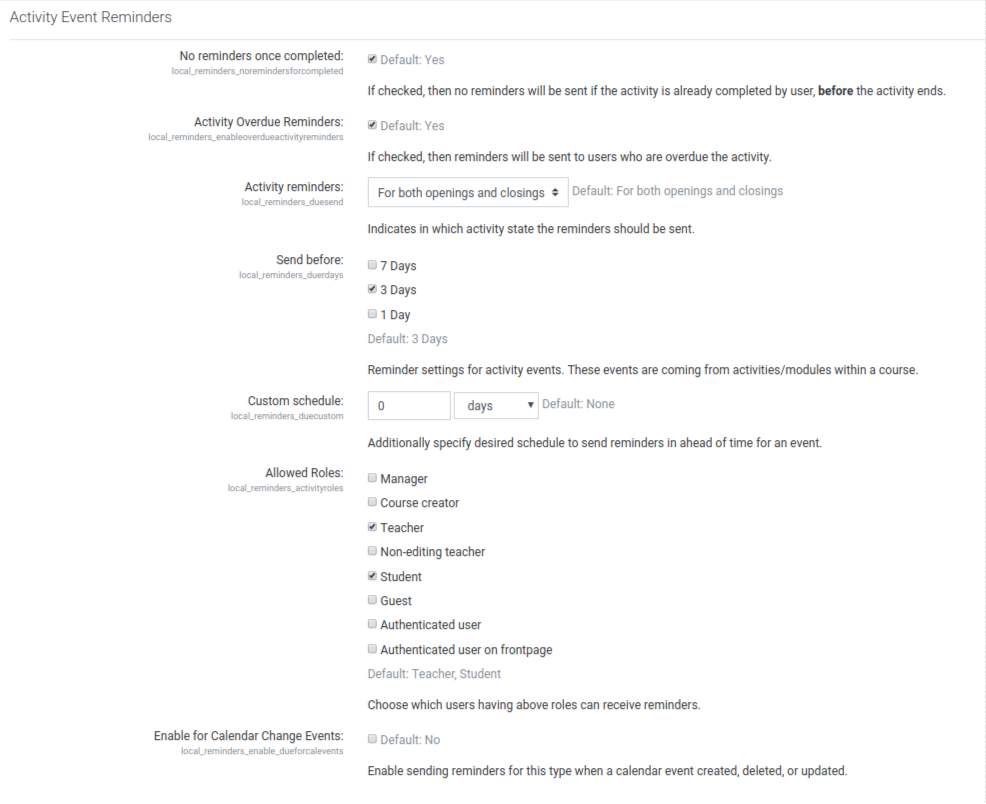
- Activity Event Reminders
| Setting | Description | Default |
|---|---|---|
| No reminders once completed | enable/disable sending reminders if a user has completed activity. If checked, he/she won't receive reminders anymore once completed. | true |
| Activity Overdue Reminders | enable/disable sending reminders for users who still have not completed expired events | true |
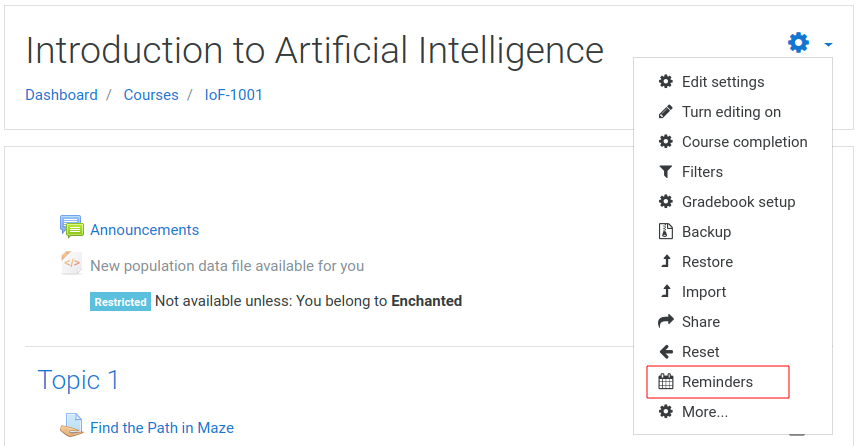
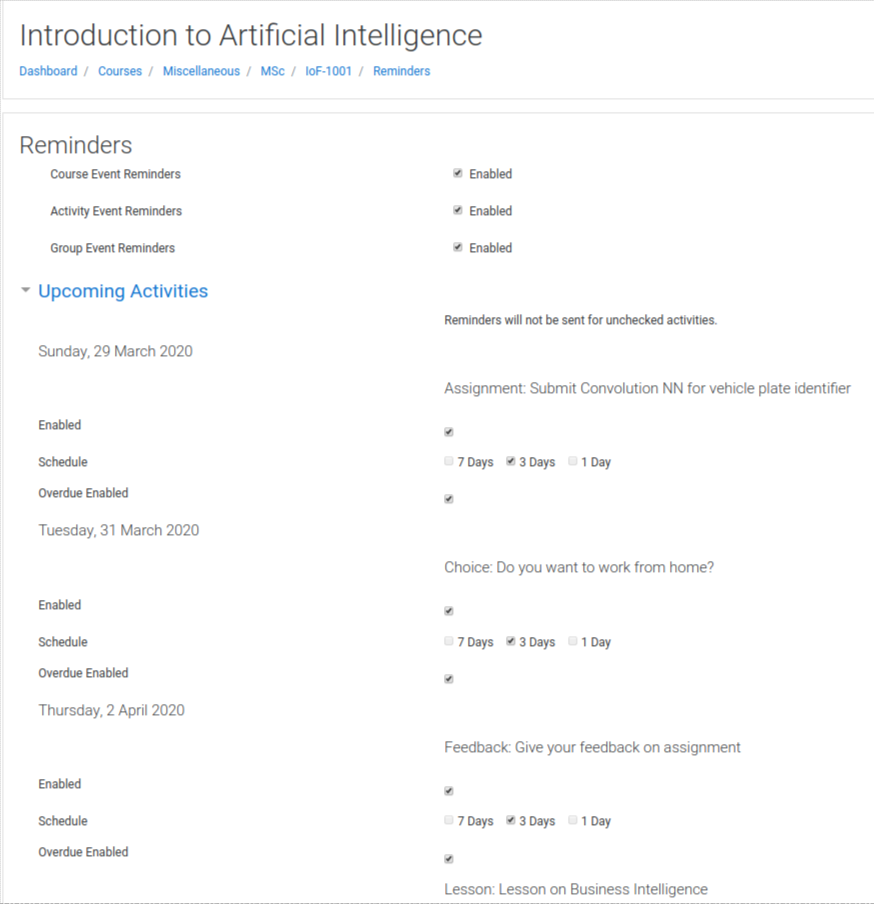
| Explicit Reminder Activation | If checked, teachers or relevant authorities must explicitly enable reminders for each activity under course reminders settings page. | false |
Changelog
v2.7.4
- Moodle v5 support
- Fix: Group reminder gets sent despite student being not current or suspended #192 (@djarran)
- New lang: CA and ES (@sorydi3)
- Fix: code check issue in install.xml file (@aneno-m-e)
v2.7.3
- Add plugin disabled message to course page #181
- Prevent duplicate reminders for recurring events #184
v2.7.2
- Plugin runs not on time #179
- Custom schedule for activity does not play nice with Explicit Reminder Activation #167
- Activity reminders for Zoom not working #158
- Make moodle code checker happy #177
v2.7.1
- Support for moodle 4.1, 4.2 and 4.3
- Fix: Object of class stdClass could not be converted to string #170
v2.7
- Moodle v4 support #162
- Fix: invalid db column migration #141
- Plugin uses user preference timezone rather than server timezone #159 (@doiphode)
v2.6
- Decouple activity start from activity end reminders #151
- Fix: Description of event for group activity reminders missing in email message #150 #109
- Fix: Duplicate reminder emails when a user has two or more roles in a course #149
v2.5
- Ability to customize reminder email header and footer #137 #135
- Bug fix on user and group overrides and extensions #134
- Minor bug fixes #136
v2.4
- Ability to explicitly turn on reminders instead of enabling by default for all (#129, #130)
v2.3.1
- Removed hard coded string in course settings page (#124)
- Fixed incorrect argument pass in calendar update events (#126)
v2.3
- No reminders once completed settings will support all modules which integrated with Moodle Core Completion API (#113)
- Should honour empty prefix when title prefix is set to empty in settings (#115)
- Ability to exclude reminders for a selected set of modules globally (#75)
- Ability to customize overdue texts in reminders (#118)
- Inconsistent code between reminders and overdue implementation fixed (#119)
- User reminders will be sent only to active users (#20)
v2.2.4
- Removed hardcoded strings (overdue text and moodle calendar name) #105
v2.2.3
- Added privacy provider for the plugin (#99)
v2.2.2
- Fixed plain text message format for notifications in mobile device (#87)
- Fixed legacy cron duplication issue (#91)
- Added missing language string (#94)
v2.2.1
- No reminders for hidden courses (#78)
- Fixed coursecat deprecation warning (#76)
- Fixed no-reply address not correctly being in the reminder emails (#77)
- Fixed disabled course reminders are still sending issue (#84)
v2.2
- Option to show/hide activity plugin name in reminder email subject (#71)
- Support reminder customization for course and BigBlueButton events (#69, #70)
v2.1.2
- Php 7.0 compatibility (#66)
v2.1.1
- Check for custom completion status of activities (#62)
v2.1
- Reminder interval customization per activity instance (#57)
- Support for course category events (#40)
v2.0
- Ability to send reminders after event completed for overdue students (#3)
- Ability to enable/disable reminders per activity (#48)
- Reminder email messages when calendar event created/changed/removed (#21)
- Prevent sending more email reminders once a student has completed the activity
- Added timezone/location to the email due dates (#32)
- Improved email style (#31)
- Additional cron task to clean old reminder data (#37)
- Send reminders only to students who can submit assignment (#47)
v1.7
- Excluded suspended users from course/activity events (#27)
- Renamed admin cron function so that conflicting with legacy (#26)
- Totara conflicting class name issue fixed (#25)
- Support for moodle v3.8
v1.6.2
- Fixed issue of conflicting class name
v1.6.1
- Fix login redirect loop in Moodle v3.5, 3.6 and 3.7.
v1.6
- Support for Moodle v3.5 and above.
- Migrated to new Moodle task API.
v1.5.1
- Fixed a bug where group reminders are not assigned when the event instance is empty
v1.5
- support for moodle 3.0+
- Ability to change mail sent user through configurations (#14)
- Notice: undefined variable when opening admin settings page in Moodle 2.9 (#12)
- Event reminders sent for individual quiz overrides (#11)
- Fix time formatting when user has set 24hour format in calendar preferences
- Fix cron errors resulting from new role (thanks to [colin-umn]: https://github.com/colin-umn)
- Fix cron error caused by $courseroleids (thanks to [cdsmith-umn]: https://github.com/cdsmith-umn)
v1.4.2
- support for moodle 2.9+
- ability to specify a custom schedule for sending reminders for any event type.
v1.4.1
- support for moodle 2.8 (thanks to [jojoob]: https://github.com/jojoob)
- course specific settings added for reminders (thanks to [jojoob]: https://github.com/jojoob)
v1.4
- now works in Moodle 2.7.*
- fixed bug sending reminders repeatedly to users.
v1.3.1
- bug fixes
- prevent users receiving alerts for an activity that they can't see. (Contributed by Julian Boulen)
- exception handling
v1.3
- now works in Moodle 2.5.*
- time zone adjustment based on recipient of the reminder
- reminder messages for activities (such as quizes, assignments, etc) are enhanced and visibility of some fields are restricted according to the constraints of such activities (eg: showing description field)
v1.2
- now works in Moodle 2.4.*
- fixed bug when sending reminders based on groups
- group reminder message content has been made richer by including course and activity details.
- added a setting to define the prefix for messages being sent, and added another setting to define to show/hide group name in the group reminder message.
- cron cycle interval for this plugin has been reduced from 1-hour to 15-minutes.
v1.1
- fixed bug of repeatedly sending reminders for same event.
- removed 'Only hidden events from calendar' option from the settings page.
- removed unused constants from the plugin.
- improved cron trace of the plugin for ignored events.
v1.0.1
- changed default settings
- removed usage of deprecated functions
License
2.7.3 (2024082400)
2.7.3
Plugin type: Local plugins
Frankenstyle component name: local_reminders
Version build number: 2024082400
Version release name: 2.7.3
Maturity: Stable
Supported Moodle versions: 3.10, 3.11, 3.5, 3.6, 3.7, 3.8, 3.9, 4.0, 4.1, 4.2, 4.3, 4.4
Repository URL (Git): https://github.com/isuru89/moodle-local_reminders
Repository branch:
Repository tag: v2.7.3
Issue/bug tracker URL: http://tracker.moodle.org/browse/CONTRIB-3647
Moodle - Local Reminders


This plugin will send email reminders for Moodle calendar events.
Reminders are very useful for both students as well as teachers to recall their scheduled events and activities before the actual moment.
Features
General Features:
- Ability to send reminders for site, user, course, group and activity calendar events.
- Pre-defined and customizable reminders schedule (1, 3 and 7 days in-advance).
- Ability to select roles eligible for receiving reminder emails.
In addition to that, there are lot of new features introduced in v2 of the plugin which is required to have Moodle 3.5 or later.
- Send reminders to users who unable to complete an expired activity.
- Send email reminders when a calendar event is created, updated or removed.
- Ability to enable/disable and scheduling reminders per activity basis.
- Ability to customize email header and footer contents
- Ability to exclude specific set of activity types from sending reminders.
- No reminders after a user has completed activity.
- Added event location / timezone information to the reminder email.
- New category event type support.
- Honours activity overriddes and extensions.
And many bug fixes too.
Compatibility
Plugin v2+ works in any Moodle versin 3.5 or above.
Installation
To install this plugin, you must be an administrator of your Moodle site.
- Downlod an appropriate version from here based on your installed Moodle version.
- Go to Moodle
Site administration>Plugins>Install plugins - Upload the downloaded zip file to the provided box.
- Click
Show more...and selectLocal plugin (local)under plugin type. - Click
Install plugin from ZIP file - Provide your reminders settings once asked.
- That's it!
Also don't forget to show your love for this plugin in here by clicking Add to favourites.
Plugin Settings
Reminders are sent using Moodle's Scheduled tasks (since v3.5), and you can specify the running interval in Site administration > Server > Scheduled tasks > Local Reminders. By default, it has set to run in every 15 minutes.
Note: If you are using a Moodle version before 3.5, then you must edit $plugin->cron value in version.php file before uploading it for installation. This value is indicated in seconds.
To customize the plugin settings, go to Site administration > Plugins > Reminders.
Each setting and its functionality is described below.
- Common Settings
| Setting | Description | Default |
|---|---|---|
| Enabled | enable/disable reminder plugin. Not a single reminder will be sent. This is provided to temporary disable plugin without uninstalling it. | yes |
| Message Title Prefix | The text to prepend for each and every reminder email subject. Email subject will take format of [${TITLE_PREFIX}] ${Subject} | Moodle-Reminder |
| Send As | Indicated the from user field of every reminder. You could use either as Moodle admin user or No reply address. | Site Admin |
| No Reply Name | This will indicate No reply user name for email when you chose the option No Reply Address for Send As option. | No Reply |
| Filter Calendar Events | Which calendar events to be filtered | Only visible events |
- Changelog Events Change Reminders
| Setting | Description | Default |
|---|---|---|
| Send when Event Created | If checked, then a reminder will sent for the newly created calendar events immediately. | false |
| Send when Event Updated | If checked, then a reminder will sent for the updated calendar events immediately. | false |
| Send when Event Removed | If checked, then a reminder will sent for the removed calendar events immediately. | false |
In addition to above, user can control reminders for calendar event changes per event type. Under each event type, there is an option called Enable for calendar change events which allows user to enable/disable based on the event type.
Note: per event type settings are considered only after above change type setting considered.
- Activity Event Reminders
| Setting | Description | Default |
|---|---|---|
| No reminders once completed | enable/disable sending reminders if a user has completed activity. If checked, he/she won't receive reminders anymore once completed. | true |
| Activity Overdue Reminders | enable/disable sending reminders for users who still have not completed expired events | true |
| Explicit Reminder Activation | If checked, teachers or relevant authorities must explicitly enable reminders for each activity under course reminders settings page. | false |
Changelog
v2.7.3
- Add plugin disabled message to course page #181
- Prevent duplicate reminders for recurring events #184
v2.7.2
- Plugin runs not on time #179
- Custom schedule for activity does not play nice with Explicit Reminder Activation #167
- Activity reminders for Zoom not working #158
- Make moodle code checker happy #177
v2.7.1
- Support for moodle 4.1, 4.2 and 4.3
- Fix: Object of class stdClass could not be converted to string #170
v2.7
- Moodle v4 support #162
- Fix: invalid db column migration #141
- Plugin uses user preference timezone rather than server timezone #159 (@doiphode)
v2.6
- Decouple activity start from activity end reminders #151
- Fix: Description of event for group activity reminders missing in email message #150 #109
- Fix: Duplicate reminder emails when a user has two or more roles in a course #149
v2.5
- Ability to customize reminder email header and footer #137 #135
- Bug fix on user and group overrides and extensions #134
- Minor bug fixes #136
v2.4
- Ability to explicitly turn on reminders instead of enabling by default for all (#129, #130)
v2.3.1
- Removed hard coded string in course settings page (#124)
- Fixed incorrect argument pass in calendar update events (#126)
v2.3
- No reminders once completed settings will support all modules which integrated with Moodle Core Completion API (#113)
- Should honour empty prefix when title prefix is set to empty in settings (#115)
- Ability to exclude reminders for a selected set of modules globally (#75)
- Ability to customize overdue texts in reminders (#118)
- Inconsistent code between reminders and overdue implementation fixed (#119)
- User reminders will be sent only to active users (#20)
v2.2.4
- Removed hardcoded strings (overdue text and moodle calendar name) #105
v2.2.3
- Added privacy provider for the plugin (#99)
v2.2.2
- Fixed plain text message format for notifications in mobile device (#87)
- Fixed legacy cron duplication issue (#91)
- Added missing language string (#94)
v2.2.1
- No reminders for hidden courses (#78)
- Fixed coursecat deprecation warning (#76)
- Fixed no-reply address not correctly being in the reminder emails (#77)
- Fixed disabled course reminders are still sending issue (#84)
v2.2
- Option to show/hide activity plugin name in reminder email subject (#71)
- Support reminder customization for course and BigBlueButton events (#69, #70)
v2.1.2
- Php 7.0 compatibility (#66)
v2.1.1
- Check for custom completion status of activities (#62)
v2.1
- Reminder interval customization per activity instance (#57)
- Support for course category events (#40)
v2.0
- Ability to send reminders after event completed for overdue students (#3)
- Ability to enable/disable reminders per activity (#48)
- Reminder email messages when calendar event created/changed/removed (#21)
- Prevent sending more email reminders once a student has completed the activity
- Added timezone/location to the email due dates (#32)
- Improved email style (#31)
- Additional cron task to clean old reminder data (#37)
- Send reminders only to students who can submit assignment (#47)
v1.7
- Excluded suspended users from course/activity events (#27)
- Renamed admin cron function so that conflicting with legacy (#26)
- Totara conflicting class name issue fixed (#25)
- Support for moodle v3.8
v1.6.2
- Fixed issue of conflicting class name
v1.6.1
- Fix login redirect loop in Moodle v3.5, 3.6 and 3.7.
v1.6
- Support for Moodle v3.5 and above.
- Migrated to new Moodle task API.
v1.5.1
- Fixed a bug where group reminders are not assigned when the event instance is empty
v1.5
- support for moodle 3.0+
- Ability to change mail sent user through configurations (#14)
- Notice: undefined variable when opening admin settings page in Moodle 2.9 (#12)
- Event reminders sent for individual quiz overrides (#11)
- Fix time formatting when user has set 24hour format in calendar preferences
- Fix cron errors resulting from new role (thanks to [colin-umn]: https://github.com/colin-umn)
- Fix cron error caused by $courseroleids (thanks to [cdsmith-umn]: https://github.com/cdsmith-umn)
v1.4.2
- support for moodle 2.9+
- ability to specify a custom schedule for sending reminders for any event type.
v1.4.1
- support for moodle 2.8 (thanks to [jojoob]: https://github.com/jojoob)
- course specific settings added for reminders (thanks to [jojoob]: https://github.com/jojoob)
v1.4
- now works in Moodle 2.7.*
- fixed bug sending reminders repeatedly to users.
v1.3.1
- bug fixes
- prevent users receiving alerts for an activity that they can't see. (Contributed by Julian Boulen)
- exception handling
v1.3
- now works in Moodle 2.5.*
- time zone adjustment based on recipient of the reminder
- reminder messages for activities (such as quizes, assignments, etc) are enhanced and visibility of some fields are restricted according to the constraints of such activities (eg: showing description field)
v1.2
- now works in Moodle 2.4.*
- fixed bug when sending reminders based on groups
- group reminder message content has been made richer by including course and activity details.
- added a setting to define the prefix for messages being sent, and added another setting to define to show/hide group name in the group reminder message.
- cron cycle interval for this plugin has been reduced from 1-hour to 15-minutes.
v1.1
- fixed bug of repeatedly sending reminders for same event.
- removed 'Only hidden events from calendar' option from the settings page.
- removed unused constants from the plugin.
- improved cron trace of the plugin for ignored events.
v1.0.1
- changed default settings
- removed usage of deprecated functions
License
2.7.2 (2024040200)
2.7.2
Plugin type: Local plugins
Frankenstyle component name: local_reminders
Version build number: 2024040200
Version release name: 2.7.2
Maturity: Stable
Supported Moodle versions: 3.10, 3.11, 3.5, 3.6, 3.7, 3.8, 3.9, 4.0, 4.1, 4.2, 4.3
Repository URL (Git): https://github.com/isuru89/moodle-local_reminders
Repository branch: master
Repository tag: v2.7.2
Issue/bug tracker URL: http://tracker.moodle.org/browse/CONTRIB-3647
Moodle - Local Reminders

This plugin will send email reminders for Moodle calendar events.
Reminders are very useful for both students as well as teachers to recall their scheduled events and activities before the actual moment.
Features
General Features:
- Ability to send reminders for site, user, course, group and activity calendar events.
- Pre-defined and customizable reminders schedule (1, 3 and 7 days in-advance).
- Ability to select roles eligible for receiving reminder emails.
In addition to that, there are lot of new features introduced in v2 of the plugin which is required to have Moodle 3.5 or later.
- Send reminders to users who unable to complete an expired activity.
- Send email reminders when a calendar event is created, updated or removed.
- Ability to enable/disable and scheduling reminders per activity basis.
- Ability to customize email header and footer contents
- Ability to exclude specific set of activity types from sending reminders.
- No reminders after a user has completed activity.
- Added event location / timezone information to the reminder email.
- New category event type support.
- Honours activity overriddes and extensions.
And many bug fixes too.
Compatibility
Plugin v2+ works in any Moodle versin 3.5 or above.
Installation
To install this plugin, you must be an administrator of your Moodle site.
- Downlod an appropriate version from here based on your installed Moodle version.
- Go to Moodle
Site administration>Plugins>Install plugins - Upload the downloaded zip file to the provided box.
- Click
Show more...and selectLocal plugin (local)under plugin type. - Click
Install plugin from ZIP file - Provide your reminders settings once asked.
- That's it!
Also don't forget to show your love for this plugin in here by clicking Add to favourites.
Plugin Settings
Reminders are sent using Moodle's Scheduled tasks (since v3.5), and you can specify the running interval in Site administration > Server > Scheduled tasks > Local Reminders. By default, it has set to run in every 15 minutes.
Note: If you are using a Moodle version before 3.5, then you must edit $plugin->cron value in version.php file before uploading it for installation. This value is indicated in seconds.
To customize the plugin settings, go to Site administration > Plugins > Reminders.
Each setting and its functionality is described below.
- Common Settings
| Setting | Description | Default |
|---|---|---|
| Enabled | enable/disable reminder plugin. Not a single reminder will be sent. This is provided to temporary disable plugin without uninstalling it. | yes |
| Message Title Prefix | The text to prepend for each and every reminder email subject. Email subject will take format of [${TITLE_PREFIX}] ${Subject} | Moodle-Reminder |
| Send As | Indicated the from user field of every reminder. You could use either as Moodle admin user or No reply address. | Site Admin |
| No Reply Name | This will indicate No reply user name for email when you chose the option No Reply Address for Send As option. | No Reply |
| Filter Calendar Events | Which calendar events to be filtered | Only visible events |
- Changelog Events Change Reminders
| Setting | Description | Default |
|---|---|---|
| Send when Event Created | If checked, then a reminder will sent for the newly created calendar events immediately. | false |
| Send when Event Updated | If checked, then a reminder will sent for the updated calendar events immediately. | false |
| Send when Event Removed | If checked, then a reminder will sent for the removed calendar events immediately. | false |
In addition to above, user can control reminders for calendar event changes per event type. Under each event type, there is an option called Enable for calendar change events which allows user to enable/disable based on the event type.
Note: per event type settings are considered only after above change type setting considered.
- Activity Event Reminders
| Setting | Description | Default |
|---|---|---|
| No reminders once completed | enable/disable sending reminders if a user has completed activity. If checked, he/she won't receive reminders anymore once completed. | true |
| Activity Overdue Reminders | enable/disable sending reminders for users who still have not completed expired events | true |
| Explicit Reminder Activation | If checked, teachers or relevant authorities must explicitly enable reminders for each activity under course reminders settings page. | false |
Changelog
v2.7.2
- Plugin runs not on time #179
- Custom schedule for activity does not play nice with Explicit Reminder Activation #167
- Activity reminders for Zoom not working #158
- Make moodle code checker happy #177
v2.7.1
- Support for moodle 4.1, 4.2 and 4.3
- Fix: Object of class stdClass could not be converted to string #170
v2.7
- Moodle v4 support #162
- Fix: invalid db column migration #141
- Plugin uses user preference timezone rather than server timezone #159 (@doiphode)
v2.6
- Decouple activity start from activity end reminders #151
- Fix: Description of event for group activity reminders missing in email message #150 #109
- Fix: Duplicate reminder emails when a user has two or more roles in a course #149
v2.5
- Ability to customize reminder email header and footer #137 #135
- Bug fix on user and group overrides and extensions #134
- Minor bug fixes #136
v2.4
- Ability to explicitly turn on reminders instead of enabling by default for all (#129, #130)
v2.3.1
- Removed hard coded string in course settings page (#124)
- Fixed incorrect argument pass in calendar update events (#126)
v2.3
- No reminders once completed settings will support all modules which integrated with Moodle Core Completion API (#113)
- Should honour empty prefix when title prefix is set to empty in settings (#115)
- Ability to exclude reminders for a selected set of modules globally (#75)
- Ability to customize overdue texts in reminders (#118)
- Inconsistent code between reminders and overdue implementation fixed (#119)
- User reminders will be sent only to active users (#20)
v2.2.4
- Removed hardcoded strings (overdue text and moodle calendar name) #105
v2.2.3
- Added privacy provider for the plugin (#99)
v2.2.2
- Fixed plain text message format for notifications in mobile device (#87)
- Fixed legacy cron duplication issue (#91)
- Added missing language string (#94)
v2.2.1
- No reminders for hidden courses (#78)
- Fixed coursecat deprecation warning (#76)
- Fixed no-reply address not correctly being in the reminder emails (#77)
- Fixed disabled course reminders are still sending issue (#84)
v2.2
- Option to show/hide activity plugin name in reminder email subject (#71)
- Support reminder customization for course and BigBlueButton events (#69, #70)
v2.1.2
- Php 7.0 compatibility (#66)
v2.1.1
- Check for custom completion status of activities (#62)
v2.1
- Reminder interval customization per activity instance (#57)
- Support for course category events (#40)
v2.0
- Ability to send reminders after event completed for overdue students (#3)
- Ability to enable/disable reminders per activity (#48)
- Reminder email messages when calendar event created/changed/removed (#21)
- Prevent sending more email reminders once a student has completed the activity
- Added timezone/location to the email due dates (#32)
- Improved email style (#31)
- Additional cron task to clean old reminder data (#37)
- Send reminders only to students who can submit assignment (#47)
v1.7
- Excluded suspended users from course/activity events (#27)
- Renamed admin cron function so that conflicting with legacy (#26)
- Totara conflicting class name issue fixed (#25)
- Support for moodle v3.8
v1.6.2
- Fixed issue of conflicting class name
v1.6.1
- Fix login redirect loop in Moodle v3.5, 3.6 and 3.7.
v1.6
- Support for Moodle v3.5 and above.
- Migrated to new Moodle task API.
v1.5.1
- Fixed a bug where group reminders are not assigned when the event instance is empty
v1.5
- support for moodle 3.0+
- Ability to change mail sent user through configurations (#14)
- Notice: undefined variable when opening admin settings page in Moodle 2.9 (#12)
- Event reminders sent for individual quiz overrides (#11)
- Fix time formatting when user has set 24hour format in calendar preferences
- Fix cron errors resulting from new role (thanks to [colin-umn]: https://github.com/colin-umn)
- Fix cron error caused by $courseroleids (thanks to [cdsmith-umn]: https://github.com/cdsmith-umn)
v1.4.2
- support for moodle 2.9+
- ability to specify a custom schedule for sending reminders for any event type.
v1.4.1
- support for moodle 2.8 (thanks to [jojoob]: https://github.com/jojoob)
- course specific settings added for reminders (thanks to [jojoob]: https://github.com/jojoob)
v1.4
- now works in Moodle 2.7.*
- fixed bug sending reminders repeatedly to users.
v1.3.1
- bug fixes
- prevent users receiving alerts for an activity that they can't see. (Contributed by Julian Boulen)
- exception handling
v1.3
- now works in Moodle 2.5.*
- time zone adjustment based on recipient of the reminder
- reminder messages for activities (such as quizes, assignments, etc) are enhanced and visibility of some fields are restricted according to the constraints of such activities (eg: showing description field)
v1.2
- now works in Moodle 2.4.*
- fixed bug when sending reminders based on groups
- group reminder message content has been made richer by including course and activity details.
- added a setting to define the prefix for messages being sent, and added another setting to define to show/hide group name in the group reminder message.
- cron cycle interval for this plugin has been reduced from 1-hour to 15-minutes.
v1.1
- fixed bug of repeatedly sending reminders for same event.
- removed 'Only hidden events from calendar' option from the settings page.
- removed unused constants from the plugin.
- improved cron trace of the plugin for ignored events.
v1.0.1
- changed default settings
- removed usage of deprecated functions
License
2.7.1 (2023110400)
2.7.1
Plugin type: Local plugins
Frankenstyle component name: local_reminders
Version build number: 2023110400
Version release name: 2.7.1
Maturity: Stable
Supported Moodle versions: 3.10, 3.11, 3.5, 3.6, 3.7, 3.8, 3.9, 4.0, 4.1, 4.2, 4.3
Repository URL (Git): https://github.com/isuru89/moodle-local_reminders
Repository branch:
Repository tag: v2.7.1
Issue/bug tracker URL: http://tracker.moodle.org/browse/CONTRIB-3647
Moodle - Local Reminders



This plugin will send email reminders for Moodle calendar events.
Reminders are very useful for both students as well as teachers to recall their scheduled events and activities before the actual moment.
Features
General Features:
- Ability to send reminders for site, user, course, group and activity calendar events.
- Pre-defined and customizable reminders schedule (1, 3 and 7 days in-advance).
- Ability to select roles eligible for receiving reminder emails.
In addition to that, there are lot of new features introduced in v2 of the plugin which is required to have Moodle 3.5 or later.
- Send reminders to users who unable to complete an expired activity.
- Send email reminders when a calendar event is created, updated or removed.
- Ability to enable/disable and scheduling reminders per activity basis.
- Ability to customize email header and footer contents
- Ability to exclude specific set of activity types from sending reminders.
- No reminders after a user has completed activity.
- Added event location / timezone information to the reminder email.
- New category event type support.
- Honours activity overriddes and extensions.
And many bug fixes too.
Compatibility
Plugin v2+ works in any Moodle versin 3.5 or above.
Installation
To install this plugin, you must be an administrator of your Moodle site.
- Downlod an appropriate version from here based on your installed Moodle version.
- Go to Moodle
Site administration>Plugins>Install plugins - Upload the downloaded zip file to the provided box.
- Click
Show more...and selectLocal plugin (local)under plugin type. - Click
Install plugin from ZIP file - Provide your reminders settings once asked.
- That's it!
Also don't forget to show your love for this plugin in here by clicking Add to favourites.
Plugin Settings
Reminders are sent using Moodle's Scheduled tasks (since v3.5), and you can specify the running interval in Site administration > Server > Scheduled tasks > Local Reminders. By default, it has set to run in every 15 minutes.
Note: If you are using a Moodle version before 3.5, then you must edit $plugin->cron value in version.php file before uploading it for installation. This value is indicated in seconds.
To customize the plugin settings, go to Site administration > Plugins > Reminders.
Each setting and its functionality is described below.
- Common Settings
| Setting | Description | Default |
|---|---|---|
| Enabled | enable/disable reminder plugin. Not a single reminder will be sent. This is provided to temporary disable plugin without uninstalling it. | yes |
| Message Title Prefix | The text to prepend for each and every reminder email subject. Email subject will take format of [${TITLE_PREFIX}] ${Subject} | Moodle-Reminder |
| Send As | Indicated the from user field of every reminder. You could use either as Moodle admin user or No reply address. | Site Admin |
| No Reply Name | This will indicate No reply user name for email when you chose the option No Reply Address for Send As option. | No Reply |
| Filter Calendar Events | Which calendar events to be filtered | Only visible events |
- Changelog Events Change Reminders
| Setting | Description | Default |
|---|---|---|
| Send when Event Created | If checked, then a reminder will sent for the newly created calendar events immediately. | false |
| Send when Event Updated | If checked, then a reminder will sent for the updated calendar events immediately. | false |
| Send when Event Removed | If checked, then a reminder will sent for the removed calendar events immediately. | false |
In addition to above, user can control reminders for calendar event changes per event type. Under each event type, there is an option called Enable for calendar change events which allows user to enable/disable based on the event type.
Note: per event type settings are considered only after above change type setting considered.
- Activity Event Reminders
| Setting | Description | Default |
|---|---|---|
| No reminders once completed | enable/disable sending reminders if a user has completed activity. If checked, he/she won't receive reminders anymore once completed. | true |
| Activity Overdue Reminders | enable/disable sending reminders for users who still have not completed expired events | true |
| Explicit Reminder Activation | If checked, teachers or relevant authorities must explicitly enable reminders for each activity under course reminders settings page. | false |
Changelog
v2.7.1
- Support for moodle 4.1, 4.2 and 4.3
- Fix: Object of class stdClass could not be converted to string #170
v2.7
- Moodle v4 support #162
- Fix: invalid db column migration #141
- Plugin uses user preference timezone rather than server timezone #159 (@doiphode)
v2.6
- Decouple activity start from activity end reminders #151
- Fix: Description of event for group activity reminders missing in email message #150 #109
- Fix: Duplicate reminder emails when a user has two or more roles in a course #149
v2.5
- Ability to customize reminder email header and footer #137 #135
- Bug fix on user and group overrides and extensions #134
- Minor bug fixes #136
v2.4
- Ability to explicitly turn on reminders instead of enabling by default for all (#129, #130)
v2.3.1
- Removed hard coded string in course settings page (#124)
- Fixed incorrect argument pass in calendar update events (#126)
v2.3
- No reminders once completed settings will support all modules which integrated with Moodle Core Completion API (#113)
- Should honour empty prefix when title prefix is set to empty in settings (#115)
- Ability to exclude reminders for a selected set of modules globally (#75)
- Ability to customize overdue texts in reminders (#118)
- Inconsistent code between reminders and overdue implementation fixed (#119)
- User reminders will be sent only to active users (#20)
v2.2.4
- Removed hardcoded strings (overdue text and moodle calendar name) #105
v2.2.3
- Added privacy provider for the plugin (#99)
v2.2.2
- Fixed plain text message format for notifications in mobile device (#87)
- Fixed legacy cron duplication issue (#91)
- Added missing language string (#94)
v2.2.1
- No reminders for hidden courses (#78)
- Fixed coursecat deprecation warning (#76)
- Fixed no-reply address not correctly being in the reminder emails (#77)
- Fixed disabled course reminders are still sending issue (#84)
v2.2
- Option to show/hide activity plugin name in reminder email subject (#71)
- Support reminder customization for course and BigBlueButton events (#69, #70)
v2.1.2
- Php 7.0 compatibility (#66)
v2.1.1
- Check for custom completion status of activities (#62)
v2.1
- Reminder interval customization per activity instance (#57)
- Support for course category events (#40)
v2.0
- Ability to send reminders after event completed for overdue students (#3)
- Ability to enable/disable reminders per activity (#48)
- Reminder email messages when calendar event created/changed/removed (#21)
- Prevent sending more email reminders once a student has completed the activity
- Added timezone/location to the email due dates (#32)
- Improved email style (#31)
- Additional cron task to clean old reminder data (#37)
- Send reminders only to students who can submit assignment (#47)
v1.7
- Excluded suspended users from course/activity events (#27)
- Renamed admin cron function so that conflicting with legacy (#26)
- Totara conflicting class name issue fixed (#25)
- Support for moodle v3.8
v1.6.2
- Fixed issue of conflicting class name
v1.6.1
- Fix login redirect loop in Moodle v3.5, 3.6 and 3.7.
v1.6
- Support for Moodle v3.5 and above.
- Migrated to new Moodle task API.
v1.5.1
- Fixed a bug where group reminders are not assigned when the event instance is empty
v1.5
- support for moodle 3.0+
- Ability to change mail sent user through configurations (#14)
- Notice: undefined variable when opening admin settings page in Moodle 2.9 (#12)
- Event reminders sent for individual quiz overrides (#11)
- Fix time formatting when user has set 24hour format in calendar preferences
- Fix cron errors resulting from new role (thanks to [colin-umn]: https://github.com/colin-umn)
- Fix cron error caused by $courseroleids (thanks to [cdsmith-umn]: https://github.com/cdsmith-umn)
v1.4.2
- support for moodle 2.9+
- ability to specify a custom schedule for sending reminders for any event type.
v1.4.1
- support for moodle 2.8 (thanks to [jojoob]: https://github.com/jojoob)
- course specific settings added for reminders (thanks to [jojoob]: https://github.com/jojoob)
v1.4
- now works in Moodle 2.7.*
- fixed bug sending reminders repeatedly to users.
v1.3.1
- bug fixes
- prevent users receiving alerts for an activity that they can't see. (Contributed by Julian Boulen)
- exception handling
v1.3
- now works in Moodle 2.5.*
- time zone adjustment based on recipient of the reminder
- reminder messages for activities (such as quizes, assignments, etc) are enhanced and visibility of some fields are restricted according to the constraints of such activities (eg: showing description field)
v1.2
- now works in Moodle 2.4.*
- fixed bug when sending reminders based on groups
- group reminder message content has been made richer by including course and activity details.
- added a setting to define the prefix for messages being sent, and added another setting to define to show/hide group name in the group reminder message.
- cron cycle interval for this plugin has been reduced from 1-hour to 15-minutes.
v1.1
- fixed bug of repeatedly sending reminders for same event.
- removed 'Only hidden events from calendar' option from the settings page.
- removed unused constants from the plugin.
- improved cron trace of the plugin for ignored events.
v1.0.1
- changed default settings
- removed usage of deprecated functions
License
2.7 (2022110700)
2.7
Plugin type: Local plugins
Frankenstyle component name: local_reminders
Version build number: 2022110700
Version release name: 2.7
Maturity: Stable
Supported Moodle versions: 3.10, 3.11, 3.5, 3.6, 3.7, 3.8, 3.9, 4.0
Repository URL (Git): https://github.com/isuru89/moodle-local_reminders
Repository branch:
Repository tag: https://github.com/isuru89/moodle-local_reminders/releases/tag/v2.7
Issue/bug tracker URL: http://tracker.moodle.org/browse/CONTRIB-3647
Moodle - Local Reminders

This plugin will send email reminders for Moodle calendar events.
Reminders are very useful for both students as well as teachers to recall their scheduled events and activities before the actual moment.
Features
General Features:
- Ability to send reminders for site, user, course, group and activity calendar events.
- Pre-defined and customizable reminders schedule (1, 3 and 7 days in-advance).
- Ability to select roles eligible for receiving reminder emails.
In addition to that, there are lot of new features introduced in v2 of the plugin which is required to have Moodle 3.5 or later.
- Send reminders to users who unable to complete an expired activity.
- Send email reminders when a calendar event is created, updated or removed.
- Ability to enable/disable and scheduling reminders per activity basis.
- Ability to customize email header and footer contents
- Ability to exclude specific set of activity types from sending reminders.
- No reminders after a user has completed activity.
- Added event location / timezone information to the reminder email.
- New category event type support.
- Honours activity overriddes and extensions.
And many bug fixes too.
Compatibility
Plugin v2+ works in any Moodle versin 3.5 or above.
Installation
To install this plugin, you must be an administrator of your Moodle site.
- Downlod an appropriate version from here based on your installed Moodle version.
- Go to Moodle
Site administration>Plugins>Install plugins - Upload the downloaded zip file to the provided box.
- Click
Show more...and selectLocal plugin (local)under plugin type. - Click
Install plugin from ZIP file - Provide your reminders settings once asked.
- That's it!
Also don't forget to show your love for this plugin in here by clicking Add to favourites.
Plugin Settings
Reminders are sent using Moodle's Scheduled tasks (since v3.5), and you can specify the running interval in Site administration > Server > Scheduled tasks > Local Reminders. By default, it has set to run in every 15 minutes.
Note: If you are using a Moodle version before 3.5, then you must edit $plugin->cron value in version.php file before uploading it for installation. This value is indicated in seconds.
To customize the plugin settings, go to Site administration > Plugins > Reminders.
Each setting and its functionality is described below.
- Common Settings
| Setting | Description | Default |
|---|---|---|
| Enabled | enable/disable reminder plugin. Not a single reminder will be sent. This is provided to temporary disable plugin without uninstalling it. | yes |
| Message Title Prefix | The text to prepend for each and every reminder email subject. Email subject will take format of [${TITLE_PREFIX}] ${Subject} | Moodle-Reminder |
| Send As | Indicated the from user field of every reminder. You could use either as Moodle admin user or No reply address. | Site Admin |
| No Reply Name | This will indicate No reply user name for email when you chose the option No Reply Address for Send As option. | No Reply |
| Filter Calendar Events | Which calendar events to be filtered | Only visible events |
- Changelog Events Change Reminders
| Setting | Description | Default |
|---|---|---|
| Send when Event Created | If checked, then a reminder will sent for the newly created calendar events immediately. | false |
| Send when Event Updated | If checked, then a reminder will sent for the updated calendar events immediately. | false |
| Send when Event Removed | If checked, then a reminder will sent for the removed calendar events immediately. | false |
In addition to above, user can control reminders for calendar event changes per event type. Under each event type, there is an option called Enable for calendar change events which allows user to enable/disable based on the event type.
Note: per event type settings are considered only after above change type setting considered.
- Activity Event Reminders
| Setting | Description | Default |
|---|---|---|
| No reminders once completed | enable/disable sending reminders if a user has completed activity. If checked, he/she won't receive reminders anymore once completed. | true |
| Activity Overdue Reminders | enable/disable sending reminders for users who still have not completed expired events | true |
| Explicit Reminder Activation | If checked, teachers or relevant authorities must explicitly enable reminders for each activity under course reminders settings page. | false |
Changelog
v2.7
- Moodle v4 support #162
- Fix: invalid db column migration #141
- Plugin uses user preference timezone rather than server timezone #159 (@doiphode)
v2.6
- Decouple activity start from activity end reminders #151
- Fix: Description of event for group activity reminders missing in email message #150 #109
- Fix: Duplicate reminder emails when a user has two or more roles in a course #149
v2.5
- Ability to customize reminder email header and footer #137 #135
- Bug fix on user and group overrides and extensions #134
- Minor bug fixes #136
v2.4
- Ability to explicitly turn on reminders instead of enabling by default for all (#129, #130)
v2.3.1
- Removed hard coded string in course settings page (#124)
- Fixed incorrect argument pass in calendar update events (#126)
v2.3
- No reminders once completed settings will support all modules which integrated with Moodle Core Completion API (#113)
- Should honour empty prefix when title prefix is set to empty in settings (#115)
- Ability to exclude reminders for a selected set of modules globally (#75)
- Ability to customize overdue texts in reminders (#118)
- Inconsistent code between reminders and overdue implementation fixed (#119)
- User reminders will be sent only to active users (#20)
v2.2.4
- Removed hardcoded strings (overdue text and moodle calendar name) #105
v2.2.3
- Added privacy provider for the plugin (#99)
v2.2.2
- Fixed plain text message format for notifications in mobile device (#87)
- Fixed legacy cron duplication issue (#91)
- Added missing language string (#94)
v2.2.1
- No reminders for hidden courses (#78)
- Fixed coursecat deprecation warning (#76)
- Fixed no-reply address not correctly being in the reminder emails (#77)
- Fixed disabled course reminders are still sending issue (#84)
v2.2
- Option to show/hide activity plugin name in reminder email subject (#71)
- Support reminder customization for course and BigBlueButton events (#69, #70)
v2.1.2
- Php 7.0 compatibility (#66)
v2.1.1
- Check for custom completion status of activities (#62)
v2.1
- Reminder interval customization per activity instance (#57)
- Support for course category events (#40)
v2.0
- Ability to send reminders after event completed for overdue students (#3)
- Ability to enable/disable reminders per activity (#48)
- Reminder email messages when calendar event created/changed/removed (#21)
- Prevent sending more email reminders once a student has completed the activity
- Added timezone/location to the email due dates (#32)
- Improved email style (#31)
- Additional cron task to clean old reminder data (#37)
- Send reminders only to students who can submit assignment (#47)
v1.7
- Excluded suspended users from course/activity events (#27)
- Renamed admin cron function so that conflicting with legacy (#26)
- Totara conflicting class name issue fixed (#25)
- Support for moodle v3.8
v1.6.2
- Fixed issue of conflicting class name
v1.6.1
- Fix login redirect loop in Moodle v3.5, 3.6 and 3.7.
v1.6
- Support for Moodle v3.5 and above.
- Migrated to new Moodle task API.
v1.5.1
- Fixed a bug where group reminders are not assigned when the event instance is empty
v1.5
- support for moodle 3.0+
- Ability to change mail sent user through configurations (#14)
- Notice: undefined variable when opening admin settings page in Moodle 2.9 (#12)
- Event reminders sent for individual quiz overrides (#11)
- Fix time formatting when user has set 24hour format in calendar preferences
- Fix cron errors resulting from new role (thanks to [colin-umn]: https://github.com/colin-umn)
- Fix cron error caused by $courseroleids (thanks to [cdsmith-umn]: https://github.com/cdsmith-umn)
v1.4.2
- support for moodle 2.9+
- ability to specify a custom schedule for sending reminders for any event type.
v1.4.1
- support for moodle 2.8 (thanks to [jojoob]: https://github.com/jojoob)
- course specific settings added for reminders (thanks to [jojoob]: https://github.com/jojoob)
v1.4
- now works in Moodle 2.7.*
- fixed bug sending reminders repeatedly to users.
v1.3.1
- bug fixes
- prevent users receiving alerts for an activity that they can't see. (Contributed by Julian Boulen)
- exception handling
v1.3
- now works in Moodle 2.5.*
- time zone adjustment based on recipient of the reminder
- reminder messages for activities (such as quizes, assignments, etc) are enhanced and visibility of some fields are restricted according to the constraints of such activities (eg: showing description field)
v1.2
- now works in Moodle 2.4.*
- fixed bug when sending reminders based on groups
- group reminder message content has been made richer by including course and activity details.
- added a setting to define the prefix for messages being sent, and added another setting to define to show/hide group name in the group reminder message.
- cron cycle interval for this plugin has been reduced from 1-hour to 15-minutes.
v1.1
- fixed bug of repeatedly sending reminders for same event.
- removed 'Only hidden events from calendar' option from the settings page.
- removed unused constants from the plugin.
- improved cron trace of the plugin for ignored events.
v1.0.1
- changed default settings
- removed usage of deprecated functions
License
2.6 (2022051800)
2.6
Plugin type: Local plugins
Frankenstyle component name: local_reminders
Version build number: 2022051800
Version release name: 2.6
Maturity: Stable
Supported Moodle versions: 3.10, 3.11, 3.5, 3.6, 3.7, 3.8, 3.9
Repository URL (Git): https://github.com/isuru89/moodle-local_reminders
Repository branch:
Repository tag:
Issue/bug tracker URL: http://tracker.moodle.org/browse/CONTRIB-3647
Moodle - Local Reminders

This plugin will send email reminders for Moodle calendar events.
Reminders are very useful for both students as well as teachers to recall their scheduled events and activities before the actual moment.
Features
General Features:
- Ability to send reminders for site, user, course, group and activity calendar events.
- Pre-defined and customizable reminders schedule (1, 3 and 7 days in-advance).
- Ability to select roles eligible for receiving reminder emails.
In addition to that, there are lot of new features introduced in v2 of the plugin which is required to have Moodle 3.5 or later.
- Send reminders to users who unable to complete an expired activity.
- Send email reminders when a calendar event is created, updated or removed.
- Ability to enable/disable and scheduling reminders per activity basis.
- Ability to customize email header and footer contents
- Ability to exclude specific set of activity types from sending reminders.
- No reminders after a user has completed activity.
- Added event location / timezone information to the reminder email.
- New category event type support.
- Honours activity overriddes and extensions.
And many bug fixes too.
Compatibility
Plugin v2+ works in any Moodle versin 3.5 or above.
Installation
To install this plugin, you must be an administrator of your Moodle site.
- Downlod an appropriate version from here based on your installed Moodle version.
- Go to Moodle
Site administration>Plugins>Install plugins - Upload the downloaded zip file to the provided box.
- Click
Show more...and selectLocal plugin (local)under plugin type. - Click
Install plugin from ZIP file - Provide your reminders settings once asked.
- That's it!
Also don't forget to show your love for this plugin in here by clicking Add to favourites.
Plugin Settings
Reminders are sent using Moodle's Scheduled tasks (since v3.5), and you can specify the running interval in Site administration > Server > Scheduled tasks > Local Reminders. By default, it has set to run in every 15 minutes.
Note: If you are using a Moodle version before 3.5, then you must edit $plugin->cron value in version.php file before uploading it for installation. This value is indicated in seconds.
To customize the plugin settings, go to Site administration > Plugins > Reminders.
Each setting and its functionality is described below.
- Common Settings
| Setting | Description | Default |
|---|---|---|
| Enabled | enable/disable reminder plugin. Not a single reminder will be sent. This is provided to temporary disable plugin without uninstalling it. | yes |
| Message Title Prefix | The text to prepend for each and every reminder email subject. Email subject will take format of [${TITLE_PREFIX}] ${Subject} | Moodle-Reminder |
| Send As | Indicated the from user field of every reminder. You could use either as Moodle admin user or No reply address. | Site Admin |
| No Reply Name | This will indicate No reply user name for email when you chose the option No Reply Address for Send As option. | No Reply |
| Filter Calendar Events | Which calendar events to be filtered | Only visible events |
- Changelog Events Change Reminders
| Setting | Description | Default |
|---|---|---|
| Send when Event Created | If checked, then a reminder will sent for the newly created calendar events immediately. | false |
| Send when Event Updated | If checked, then a reminder will sent for the updated calendar events immediately. | false |
| Send when Event Removed | If checked, then a reminder will sent for the removed calendar events immediately. | false |
In addition to above, user can control reminders for calendar event changes per event type. Under each event type, there is an option called Enable for calendar change events which allows user to enable/disable based on the event type.
Note: per event type settings are considered only after above change type setting considered.
- Activity Event Reminders
| Setting | Description | Default |
|---|---|---|
| No reminders once completed | enable/disable sending reminders if a user has completed activity. If checked, he/she won't receive reminders anymore once completed. | true |
| Activity Overdue Reminders | enable/disable sending reminders for users who still have not completed expired events | true |
| Explicit Reminder Activation | If checked, teachers or relevant authorities must explicitly enable reminders for each activity under course reminders settings page. | false |
Changelog
v2.6
- Decouple activity start from activity end reminders #151
- Fix: Description of event for group activity reminders missing in email message #150 #109
- Fix: Duplicate reminder emails when a user has two or more roles in a course #149
v2.5
- Ability to customize reminder email header and footer #137 #135
- Bug fix on user and group overrides and extensions #134
- Minor bug fixes #136
v2.4
- Ability to explicitly turn on reminders instead of enabling by default for all (#129, #130)
v2.3.1
- Removed hard coded string in course settings page (#124)
- Fixed incorrect argument pass in calendar update events (#126)
v2.3
- No reminders once completed settings will support all modules which integrated with Moodle Core Completion API (#113)
- Should honour empty prefix when title prefix is set to empty in settings (#115)
- Ability to exclude reminders for a selected set of modules globally (#75)
- Ability to customize overdue texts in reminders (#118)
- Inconsistent code between reminders and overdue implementation fixed (#119)
- User reminders will be sent only to active users (#20)
v2.2.4
- Removed hardcoded strings (overdue text and moodle calendar name) #105
v2.2.3
- Added privacy provider for the plugin (#99)
v2.2.2
- Fixed plain text message format for notifications in mobile device (#87)
- Fixed legacy cron duplication issue (#91)
- Added missing language string (#94)
v2.2.1
- No reminders for hidden courses (#78)
- Fixed coursecat deprecation warning (#76)
- Fixed no-reply address not correctly being in the reminder emails (#77)
- Fixed disabled course reminders are still sending issue (#84)
v2.2
- Option to show/hide activity plugin name in reminder email subject (#71)
- Support reminder customization for course and BigBlueButton events (#69, #70)
v2.1.2
- Php 7.0 compatibility (#66)
v2.1.1
- Check for custom completion status of activities (#62)
v2.1
- Reminder interval customization per activity instance (#57)
- Support for course category events (#40)
v2.0
- Ability to send reminders after event completed for overdue students (#3)
- Ability to enable/disable reminders per activity (#48)
- Reminder email messages when calendar event created/changed/removed (#21)
- Prevent sending more email reminders once a student has completed the activity
- Added timezone/location to the email due dates (#32)
- Improved email style (#31)
- Additional cron task to clean old reminder data (#37)
- Send reminders only to students who can submit assignment (#47)
v1.7
- Excluded suspended users from course/activity events (#27)
- Renamed admin cron function so that conflicting with legacy (#26)
- Totara conflicting class name issue fixed (#25)
- Support for moodle v3.8
v1.6.2
- Fixed issue of conflicting class name
v1.6.1
- Fix login redirect loop in Moodle v3.5, 3.6 and 3.7.
v1.6
- Support for Moodle v3.5 and above.
- Migrated to new Moodle task API.
v1.5.1
- Fixed a bug where group reminders are not assigned when the event instance is empty
v1.5
- support for moodle 3.0+
- Ability to change mail sent user through configurations (#14)
- Notice: undefined variable when opening admin settings page in Moodle 2.9 (#12)
- Event reminders sent for individual quiz overrides (#11)
- Fix time formatting when user has set 24hour format in calendar preferences
- Fix cron errors resulting from new role (thanks to [colin-umn]: https://github.com/colin-umn)
- Fix cron error caused by $courseroleids (thanks to [cdsmith-umn]: https://github.com/cdsmith-umn)
v1.4.2
- support for moodle 2.9+
- ability to specify a custom schedule for sending reminders for any event type.
v1.4.1
- support for moodle 2.8 (thanks to [jojoob]: https://github.com/jojoob)
- course specific settings added for reminders (thanks to [jojoob]: https://github.com/jojoob)
v1.4
- now works in Moodle 2.7.*
- fixed bug sending reminders repeatedly to users.
v1.3.1
- bug fixes
- prevent users receiving alerts for an activity that they can't see. (Contributed by Julian Boulen)
- exception handling
v1.3
- now works in Moodle 2.5.*
- time zone adjustment based on recipient of the reminder
- reminder messages for activities (such as quizes, assignments, etc) are enhanced and visibility of some fields are restricted according to the constraints of such activities (eg: showing description field)
v1.2
- now works in Moodle 2.4.*
- fixed bug when sending reminders based on groups
- group reminder message content has been made richer by including course and activity details.
- added a setting to define the prefix for messages being sent, and added another setting to define to show/hide group name in the group reminder message.
- cron cycle interval for this plugin has been reduced from 1-hour to 15-minutes.
v1.1
- fixed bug of repeatedly sending reminders for same event.
- removed 'Only hidden events from calendar' option from the settings page.
- removed unused constants from the plugin.
- improved cron trace of the plugin for ignored events.
v1.0.1
- changed default settings
- removed usage of deprecated functions
License
2.5 (2021092600)
2.5
Plugin type: Local plugins
Frankenstyle component name: local_reminders
Version build number: 2021092600
Version release name: 2.5
Maturity: Stable
Supported Moodle versions: 3.10, 3.11, 3.5, 3.6, 3.7, 3.8, 3.9
Repository URL (Git): https://github.com/isuru89/moodle-local_reminders
Repository branch:
Repository tag: https://github.com/isuru89/moodle-local_reminders/releases/tag/v2.5
Issue/bug tracker URL: http://tracker.moodle.org/browse/CONTRIB-3647
Moodle - Local Reminders

This plugin will send email reminders for Moodle calendar events.
Reminders are very useful for both students as well as teachers to recall their scheduled events and activities before the actual moment.
Features
General Features:
- Ability to send reminders for site, user, course, group and activity calendar events.
- Pre-defined and customizable reminders schedule (1, 3 and 7 days in-advance).
- Ability to select roles eligible for receiving reminder emails.
In addition to that, there are lot of new features introduced in v2 of the plugin which is required to have Moodle 3.5 or later.
- Send reminders to users who unable to complete an expired activity.
- Send email reminders when a calendar event is created, updated or removed.
- Ability to enable/disable and scheduling reminders per activity basis.
- Ability to customize email header and footer contents
- Ability to exclude specific set of activity types from sending reminders.
- No reminders after a user has completed activity.
- Added event location / timezone information to the reminder email.
- New category event type support.
- Honours activity overriddes and extensions.
And many bug fixes too.
Compatibility
Plugin v2+ works in any Moodle versin 3.5 or above.
Installation
To install this plugin, you must be an administrator of your Moodle site.
- Downlod an appropriate version from here based on your installed Moodle version.
- Go to Moodle
Site administration>Plugins>Install plugins - Upload the downloaded zip file to the provided box.
- Click
Show more...and selectLocal plugin (local)under plugin type. - Click
Install plugin from ZIP file - Provide your reminders settings once asked.
- That's it!
Also don't forget to show your love for this plugin in here by clicking Add to favourites.
Plugin Settings
Reminders are sent using Moodle's Scheduled tasks (since v3.5), and you can specify the running interval in Site administration > Server > Scheduled tasks > Local Reminders. By default, it has set to run in every 15 minutes.
Note: If you are using a Moodle version before 3.5, then you must edit $plugin->cron value in version.php file before uploading it for installation. This value is indicated in seconds.
To customize the plugin settings, go to Site administration > Plugins > Reminders.
Each setting and its functionality is described below.
- Common Settings
| Setting | Description | Default |
|---|---|---|
| Enabled | enable/disable reminder plugin. Not a single reminder will be sent. This is provided to temporary disable plugin without uninstalling it. | yes |
| Message Title Prefix | The text to prepend for each and every reminder email subject. Email subject will take format of [${TITLE_PREFIX}] ${Subject} | Moodle-Reminder |
| Send As | Indicated the from user field of every reminder. You could use either as Moodle admin user or No reply address. | Site Admin |
| No Reply Name | This will indicate No reply user name for email when you chose the option No Reply Address for Send As option. | No Reply |
| Filter Calendar Events | Which calendar events to be filtered | Only visible events |
- Changelog Events Change Reminders
| Setting | Description | Default |
|---|---|---|
| Send when Event Created | If checked, then a reminder will sent for the newly created calendar events immediately. | false |
| Send when Event Updated | If checked, then a reminder will sent for the updated calendar events immediately. | false |
| Send when Event Removed | If checked, then a reminder will sent for the removed calendar events immediately. | false |
In addition to above, user can control reminders for calendar event changes per event type. Under each event type, there is an option called Enable for calendar change events which allows user to enable/disable based on the event type.
Note: per event type settings are considered only after above change type setting considered.
- Activity Event Reminders
| Setting | Description | Default |
|---|---|---|
| No reminders once completed | enable/disable sending reminders if a user has completed activity. If checked, he/she won't receive reminders anymore once completed. | true |
| Activity Overdue Reminders | enable/disable sending reminders for users who still have not completed expired events | true |
| Explicit Reminder Activation | If checked, teachers or relevant authorities must explicitly enable reminders for each activity under course reminders settings page. | false |
Changelog
v2.5
- Ability to customize reminder email header and footer #137 #135
- Bug fix on user and group overrides and extensions #134
- Minor bug fixes #136
v2.4
- Ability to explicitly turn on reminders instead of enabling by default for all (#129, #130)
v2.3.1
- Removed hard coded string in course settings page (#124)
- Fixed incorrect argument pass in calendar update events (#126)
v2.3
- No reminders once completed settings will support all modules which integrated with Moodle Core Completion API (#113)
- Should honour empty prefix when title prefix is set to empty in settings (#115)
- Ability to exclude reminders for a selected set of modules globally (#75)
- Ability to customize overdue texts in reminders (#118)
- Inconsistent code between reminders and overdue implementation fixed (#119)
- User reminders will be sent only to active users (#20)
v2.2.4
- Removed hardcoded strings (overdue text and moodle calendar name) #105
v2.2.3
- Added privacy provider for the plugin (#99)
v2.2.2
- Fixed plain text message format for notifications in mobile device (#87)
- Fixed legacy cron duplication issue (#91)
- Added missing language string (#94)
v2.2.1
- No reminders for hidden courses (#78)
- Fixed coursecat deprecation warning (#76)
- Fixed no-reply address not correctly being in the reminder emails (#77)
- Fixed disabled course reminders are still sending issue (#84)
v2.2
- Option to show/hide activity plugin name in reminder email subject (#71)
- Support reminder customization for course and BigBlueButton events (#69, #70)
v2.1.2
- Php 7.0 compatibility (#66)
v2.1.1
- Check for custom completion status of activities (#62)
v2.1
- Reminder interval customization per activity instance (#57)
- Support for course category events (#40)
v2.0
- Ability to send reminders after event completed for overdue students (#3)
- Ability to enable/disable reminders per activity (#48)
- Reminder email messages when calendar event created/changed/removed (#21)
- Prevent sending more email reminders once a student has completed the activity
- Added timezone/location to the email due dates (#32)
- Improved email style (#31)
- Additional cron task to clean old reminder data (#37)
- Send reminders only to students who can submit assignment (#47)
v1.7
- Excluded suspended users from course/activity events (#27)
- Renamed admin cron function so that conflicting with legacy (#26)
- Totara conflicting class name issue fixed (#25)
- Support for moodle v3.8
v1.6.2
- Fixed issue of conflicting class name
v1.6.1
- Fix login redirect loop in Moodle v3.5, 3.6 and 3.7.
v1.6
- Support for Moodle v3.5 and above.
- Migrated to new Moodle task API.
v1.5.1
- Fixed a bug where group reminders are not assigned when the event instance is empty
v1.5
- support for moodle 3.0+
- Ability to change mail sent user through configurations (#14)
- Notice: undefined variable when opening admin settings page in Moodle 2.9 (#12)
- Event reminders sent for individual quiz overrides (#11)
- Fix time formatting when user has set 24hour format in calendar preferences
- Fix cron errors resulting from new role (thanks to [colin-umn]: https://github.com/colin-umn)
- Fix cron error caused by $courseroleids (thanks to [cdsmith-umn]: https://github.com/cdsmith-umn)
v1.4.2
- support for moodle 2.9+
- ability to specify a custom schedule for sending reminders for any event type.
v1.4.1
- support for moodle 2.8 (thanks to [jojoob]: https://github.com/jojoob)
- course specific settings added for reminders (thanks to [jojoob]: https://github.com/jojoob)
v1.4
- now works in Moodle 2.7.*
- fixed bug sending reminders repeatedly to users.
v1.3.1
- bug fixes
- prevent users receiving alerts for an activity that they can't see. (Contributed by Julian Boulen)
- exception handling
v1.3
- now works in Moodle 2.5.*
- time zone adjustment based on recipient of the reminder
- reminder messages for activities (such as quizes, assignments, etc) are enhanced and visibility of some fields are restricted according to the constraints of such activities (eg: showing description field)
v1.2
- now works in Moodle 2.4.*
- fixed bug when sending reminders based on groups
- group reminder message content has been made richer by including course and activity details.
- added a setting to define the prefix for messages being sent, and added another setting to define to show/hide group name in the group reminder message.
- cron cycle interval for this plugin has been reduced from 1-hour to 15-minutes.
v1.1
- fixed bug of repeatedly sending reminders for same event.
- removed 'Only hidden events from calendar' option from the settings page.
- removed unused constants from the plugin.
- improved cron trace of the plugin for ignored events.
v1.0.1
- changed default settings
- removed usage of deprecated functions
License
2.4 (2021062000)
2.4
Plugin type: Local plugins
Frankenstyle component name: local_reminders
Version build number: 2021062000
Version release name: 2.4
Maturity: Release Candidate
Supported Moodle versions: 3.10, 3.5, 3.6, 3.7, 3.8, 3.9
Repository URL (Git): https://github.com/isuru89/moodle-local_reminders
Repository branch:
Repository tag:
Issue/bug tracker URL: http://tracker.moodle.org/browse/CONTRIB-3647
Moodle - Local Reminders

This plugin will send email reminders for Moodle calendar events.
Reminders are very useful for both students as well as teachers to recall their scheduled events and activities before the actual moment.
Features
General Features:
- Ability to send reminders for site, user, course, group and activity calendar events.
- Pre-defined and customizable reminders schedule (1, 3 and 7 days in-advance).
- Ability to select roles eligible for receiving reminder emails.
In addition to that, there are lot of new features introduced in v2 of the plugin which is required to have Moodle 3.5 or later.
- Send reminders to users who unable to complete an expired activity.
- Send email reminders when a calendar event is created, updated or removed.
- Ability to enable/disable and scheduling reminders per activity basis.
- Ability to exclude specific set of activity types from sending reminders.
- No reminders after a user has completed activity.
- Added event location / timezone information to the reminder email.
- New category event type support
- Improved email style
And many bug fixes too.
Compatibility
Plugin v2+ works in any Moodle versin 3.5 or above.
Installation
To install this plugin, you must be an administrator of your Moodle site.
- Downlod an appropriate version from here based on your installed Moodle version.
- Go to Moodle
Site administration>Plugins>Install plugins - Upload the downloaded zip file to the provided box.
- Click
Show more...and selectLocal plugin (local)under plugin type. - Click
Install plugin from ZIP file - Provide your reminders settings once asked.
- That's it!
Also don't forget to show your love for this plugin in here by clicking Add to favourites.
Plugin Settings
Reminders are sent using Moodle's Scheduled tasks (since v3.5), and you can specify the running interval in Site administration > Server > Scheduled tasks > Local Reminders. By default, it has set to run in every 15 minutes.
Note: If you are using a Moodle version before 3.5, then you must edit $plugin->cron value in version.php file before uploading it for installation. This value is indicated in seconds.
To customize the plugin settings, go to Site administration > Plugins > Reminders.
Each setting and its functionality is described below.
- Common Settings
| Setting | Description | Default |
|---|---|---|
| Enabled | enable/disable reminder plugin. Not a single reminder will be sent. This is provided to temporary disable plugin without uninstalling it. | yes |
| Message Title Prefix | The text to prepend for each and every reminder email subject. Email subject will take format of [${TITLE_PREFIX}] ${Subject} | Moodle-Reminder |
| Send As | Indicated the from user field of every reminder. You could use either as Moodle admin user or No reply address. | Site Admin |
| No Reply Name | This will indicate No reply user name for email when you chose the option No Reply Address for Send As option. | No Reply |
| Filter Calendar Events | Which calendar events to be filtered | Only visible events |
- Changelog Events Change Reminders
| Setting | Description | Default |
|---|---|---|
| Send when Event Created | If checked, then a reminder will sent for the newly created calendar events immediately. | false |
| Send when Event Updated | If checked, then a reminder will sent for the updated calendar events immediately. | false |
| Send when Event Removed | If checked, then a reminder will sent for the removed calendar events immediately. | false |
In addition to above, user can control reminders for calendar event changes per event type. Under each event type, there is an option called Enable for calendar change events which allows user to enable/disable based on the event type.
Note: per event type settings are considered only after above change type setting considered.
- Activity Event Reminders
| Setting | Description | Default |
|---|---|---|
| No reminders once completed | enable/disable sending reminders if a user has completed activity. If checked, he/she won't receive reminders anymore once completed. | true |
| Activity Overdue Reminders | enable/disable sending reminders for users who still have not completed expired events | true |
| Explicit Reminder Activation | If checked, teachers or relevant authorities must explicitly enable reminders for each activity under course reminders settings page. | false |
Changelog
v2.4
- Ability to explicitly turn on reminders instead of enabling by default for all (#129, #130)
v2.3.1
- Removed hard coded string in course settings page (#124)
- Fixed incorrect argument pass in calendar update events (#126)
v2.3
- No reminders once completed settings will support all modules which integrated with Moodle Core Completion API (#113)
- Should honour empty prefix when title prefix is set to empty in settings (#115)
- Ability to exclude reminders for a selected set of modules globally (#75)
- Ability to customize overdue texts in reminders (#118)
- Inconsistent code between reminders and overdue implementation fixed (#119)
- User reminders will be sent only to active users (#20)
v2.2.4
- Removed hardcoded strings (overdue text and moodle calendar name) #105
v2.2.3
- Added privacy provider for the plugin (#99)
v2.2.2
- Fixed plain text message format for notifications in mobile device (#87)
- Fixed legacy cron duplication issue (#91)
- Added missing language string (#94)
v2.2.1
- No reminders for hidden courses (#78)
- Fixed coursecat deprecation warning (#76)
- Fixed no-reply address not correctly being in the reminder emails (#77)
- Fixed disabled course reminders are still sending issue (#84)
v2.2
- Option to show/hide activity plugin name in reminder email subject (#71)
- Support reminder customization for course and BigBlueButton events (#69, #70)
v2.1.2
- Php 7.0 compatibility (#66)
v2.1.1
- Check for custom completion status of activities (#62)
v2.1
- Reminder interval customization per activity instance (#57)
- Support for course category events (#40)
v2.0
- Ability to send reminders after event completed for overdue students (#3)
- Ability to enable/disable reminders per activity (#48)
- Reminder email messages when calendar event created/changed/removed (#21)
- Prevent sending more email reminders once a student has completed the activity
- Added timezone/location to the email due dates (#32)
- Improved email style (#31)
- Additional cron task to clean old reminder data (#37)
- Send reminders only to students who can submit assignment (#47)
v1.7
- Excluded suspended users from course/activity events (#27)
- Renamed admin cron function so that conflicting with legacy (#26)
- Totara conflicting class name issue fixed (#25)
- Support for moodle v3.8
v1.6.2
- Fixed issue of conflicting class name
v1.6.1
- Fix login redirect loop in Moodle v3.5, 3.6 and 3.7.
v1.6
- Support for Moodle v3.5 and above.
- Migrated to new Moodle task API.
v1.5.1
- Fixed a bug where group reminders are not assigned when the event instance is empty
v1.5
- support for moodle 3.0+
- Ability to change mail sent user through configurations (#14)
- Notice: undefined variable when opening admin settings page in Moodle 2.9 (#12)
- Event reminders sent for individual quiz overrides (#11)
- Fix time formatting when user has set 24hour format in calendar preferences
- Fix cron errors resulting from new role (thanks to [colin-umn]: https://github.com/colin-umn)
- Fix cron error caused by $courseroleids (thanks to [cdsmith-umn]: https://github.com/cdsmith-umn)
v1.4.2
- support for moodle 2.9+
- ability to specify a custom schedule for sending reminders for any event type.
v1.4.1
- support for moodle 2.8 (thanks to [jojoob]: https://github.com/jojoob)
- course specific settings added for reminders (thanks to [jojoob]: https://github.com/jojoob)
v1.4
- now works in Moodle 2.7.*
- fixed bug sending reminders repeatedly to users.
v1.3.1
- bug fixes
- prevent users receiving alerts for an activity that they can't see. (Contributed by Julian Boulen)
- exception handling
v1.3
- now works in Moodle 2.5.*
- time zone adjustment based on recipient of the reminder
- reminder messages for activities (such as quizes, assignments, etc) are enhanced and visibility of some fields are restricted according to the constraints of such activities (eg: showing description field)
v1.2
- now works in Moodle 2.4.*
- fixed bug when sending reminders based on groups
- group reminder message content has been made richer by including course and activity details.
- added a setting to define the prefix for messages being sent, and added another setting to define to show/hide group name in the group reminder message.
- cron cycle interval for this plugin has been reduced from 1-hour to 15-minutes.
v1.1
- fixed bug of repeatedly sending reminders for same event.
- removed 'Only hidden events from calendar' option from the settings page.
- removed unused constants from the plugin.
- improved cron trace of the plugin for ignored events.
v1.0.1
- changed default settings
- removed usage of deprecated functions
License
2.3.1 (2021052500)
2.3.1
Plugin type: Local plugins
Frankenstyle component name: local_reminders
Version build number: 2021052500
Version release name: 2.3.1
Maturity: Release Candidate
Supported Moodle versions: 3.10, 3.5, 3.6, 3.7, 3.8, 3.9
Repository URL (Git): https://github.com/isuru89/moodle-local_reminders
Repository branch:
Repository tag:
Issue/bug tracker URL: http://tracker.moodle.org/browse/CONTRIB-3647
Moodle - Local Reminders

This plugin will send email reminders for Moodle calendar events.
Reminders are very useful for both students as well as teachers to recall their scheduled events and activities before the actual moment.
Features
General Features:
- Ability to send reminders for site, user, course, group and activity calendar events.
- Pre-defined and customizable reminders schedule (1, 3 and 7 days in-advance).
- Ability to select roles eligible for receiving reminder emails.
In addition to that, there are lot of new features introduced in v2 of the plugin which is required to have Moodle 3.5 or later.
- Send reminders to users who unable to complete an expired activity.
- Send email reminders when a calendar event is created, updated or removed.
- Ability to enable/disable and scheduling reminders per activity basis.
- Ability to exclude specific set of activity types from sending reminders.
- No reminders after a user has completed activity.
- Added event location / timezone information to the reminder email.
- New category event type support
- Improved email style
And many bug fixes too.
Compatibility
Plugin v2+ works in any Moodle versin 3.5 or above.
Installation
To install this plugin, you must be an administrator of your Moodle site.
- Downlod an appropriate version from here based on your installed Moodle version.
- Go to Moodle
Site administration>Plugins>Install plugins - Upload the downloaded zip file to the provided box.
- Click
Show more...and selectLocal plugin (local)under plugin type. - Click
Install plugin from ZIP file - Provide your reminders settings once asked.
- That's it!
Also don't forget to show your love for this plugin in here by clicking Add to favourites.
Plugin Settings
Reminders are sent using Moodle's Scheduled tasks (since v3.5), and you can specify the running interval in Site administration > Server > Scheduled tasks > Local Reminders. By default, it has set to run in every 15 minutes.
Note: If you are using a Moodle version before 3.5, then you must edit $plugin->cron value in version.php file before uploading it for installation. This value is indicated in seconds.
To customize the plugin settings, go to Site administration > Plugins > Reminders.
Each setting and its functionality is described below.
- Common Settings
| Setting | Description | Default |
|---|---|---|
| Enabled | enable/disable reminder plugin. Not a single reminder will be sent. This is provided to temporary disable plugin without uninstalling it. | yes |
| Message Title Prefix | The text to prepend for each and every reminder email subject. Email subject will take format of [${TITLE_PREFIX}] ${Subject} | Moodle-Reminder |
| Send As | Indicated the from user field of every reminder. You could use either as Moodle admin user or No reply address. | Site Admin |
| No Reply Name | This will indicate No reply user name for email when you chose the option No Reply Address for Send As option. | No Reply |
| Filter Calendar Events | Which calendar events to be filtered | Only visible events |
- Changelog Events Change Reminders
| Setting | Description | Default |
|---|---|---|
| Send when Event Created | If checked, then a reminder will sent for the newly created calendar events immediately. | false |
| Send when Event Updated | If checked, then a reminder will sent for the updated calendar events immediately. | false |
| Send when Event Removed | If checked, then a reminder will sent for the removed calendar events immediately. | false |
In addition to above, user can control reminders for calendar event changes per event type. Under each event type, there is an option called Enable for calendar change events which allows user to enable/disable based on the event type.
Note: per event type settings are considered only after above change type setting considered.
- Activity Event Reminders
| Setting | Description | Default |
|---|---|---|
| No reminders once completed | enable/disable sending reminders if a user has completed activity. If checked, he/she won't receive reminders anymore once completed. | true |
| Activity Overdue Reminders | enable/disable sending reminders for users who still have not completed expired events | true |
Changelog
v2.3.1
- Removed hard coded string in course settings page (#124)
- Fixed incorrect argument pass in calendar update events (#126)
v2.3
- No reminders once completed settings will support all modules which integrated with Moodle Core Completion API (#113)
- Should honour empty prefix when title prefix is set to empty in settings (#115)
- Ability to exclude reminders for a selected set of modules globally (#75)
- Ability to customize overdue texts in reminders (#118)
- Inconsistent code between reminders and overdue implementation fixed (#119)
- User reminders will be sent only to active users (#20)
v2.2.4
- Removed hardcoded strings (overdue text and moodle calendar name) #105
v2.2.3
- Added privacy provider for the plugin (#99)
v2.2.2
- Fixed plain text message format for notifications in mobile device (#87)
- Fixed legacy cron duplication issue (#91)
- Added missing language string (#94)
v2.2.1
- No reminders for hidden courses (#78)
- Fixed coursecat deprecation warning (#76)
- Fixed no-reply address not correctly being in the reminder emails (#77)
- Fixed disabled course reminders are still sending issue (#84)
v2.2
- Option to show/hide activity plugin name in reminder email subject (#71)
- Support reminder customization for course and BigBlueButton events (#69, #70)
v2.1.2
- Php 7.0 compatibility (#66)
v2.1.1
- Check for custom completion status of activities (#62)
v2.1
- Reminder interval customization per activity instance (#57)
- Support for course category events (#40)
v2.0
- Ability to send reminders after event completed for overdue students (#3)
- Ability to enable/disable reminders per activity (#48)
- Reminder email messages when calendar event created/changed/removed (#21)
- Prevent sending more email reminders once a student has completed the activity
- Added timezone/location to the email due dates (#32)
- Improved email style (#31)
- Additional cron task to clean old reminder data (#37)
- Send reminders only to students who can submit assignment (#47)
v1.7
- Excluded suspended users from course/activity events (#27)
- Renamed admin cron function so that conflicting with legacy (#26)
- Totara conflicting class name issue fixed (#25)
- Support for moodle v3.8
v1.6.2
- Fixed issue of conflicting class name
v1.6.1
- Fix login redirect loop in Moodle v3.5, 3.6 and 3.7.
v1.6
- Support for Moodle v3.5 and above.
- Migrated to new Moodle task API.
v1.5.1
- Fixed a bug where group reminders are not assigned when the event instance is empty
v1.5
- support for moodle 3.0+
- Ability to change mail sent user through configurations (#14)
- Notice: undefined variable when opening admin settings page in Moodle 2.9 (#12)
- Event reminders sent for individual quiz overrides (#11)
- Fix time formatting when user has set 24hour format in calendar preferences
- Fix cron errors resulting from new role (thanks to [colin-umn]: https://github.com/colin-umn)
- Fix cron error caused by $courseroleids (thanks to [cdsmith-umn]: https://github.com/cdsmith-umn)
v1.4.2
- support for moodle 2.9+
- ability to specify a custom schedule for sending reminders for any event type.
v1.4.1
- support for moodle 2.8 (thanks to [jojoob]: https://github.com/jojoob)
- course specific settings added for reminders (thanks to [jojoob]: https://github.com/jojoob)
v1.4
- now works in Moodle 2.7.*
- fixed bug sending reminders repeatedly to users.
v1.3.1
- bug fixes
- prevent users receiving alerts for an activity that they can't see. (Contributed by Julian Boulen)
- exception handling
v1.3
- now works in Moodle 2.5.*
- time zone adjustment based on recipient of the reminder
- reminder messages for activities (such as quizes, assignments, etc) are enhanced and visibility of some fields are restricted according to the constraints of such activities (eg: showing description field)
v1.2
- now works in Moodle 2.4.*
- fixed bug when sending reminders based on groups
- group reminder message content has been made richer by including course and activity details.
- added a setting to define the prefix for messages being sent, and added another setting to define to show/hide group name in the group reminder message.
- cron cycle interval for this plugin has been reduced from 1-hour to 15-minutes.
v1.1
- fixed bug of repeatedly sending reminders for same event.
- removed 'Only hidden events from calendar' option from the settings page.
- removed unused constants from the plugin.
- improved cron trace of the plugin for ignored events.
v1.0.1
- changed default settings
- removed usage of deprecated functions
License
2.3 (2021050100)
2.3
Plugin type: Local plugins
Frankenstyle component name: local_reminders
Version build number: 2021050100
Version release name: 2.3
Maturity: Release Candidate
Supported Moodle versions: 3.10, 3.5, 3.6, 3.7, 3.8, 3.9
Repository URL (Git): https://github.com/isuru89/moodle-local_reminders
Repository branch:
Repository tag:
Issue/bug tracker URL: http://tracker.moodle.org/browse/CONTRIB-3647
Moodle - Local Reminders

This plugin will send email reminders for Moodle calendar events.
Reminders are very useful for both students as well as teachers to recall their scheduled events and activities before the actual moment.
Features
General Features:
- Ability to send reminders for site, user, course, group and activity calendar events.
- Pre-defined and customizable reminders schedule (1, 3 and 7 days in-advance).
- Ability to select roles eligible for receiving reminder emails.
In addition to that, there are lot of new features introduced in v2 of the plugin which is required to have Moodle 3.5 or later.
- Send reminders to users who unable to complete an expired activity.
- Send email reminders when a calendar event is created, updated or removed.
- Ability to enable/disable and scheduling reminders per activity basis.
- Ability to exclude specific set of activity types from sending reminders.
- No reminders after a user has completed activity.
- Added event location / timezone information to the reminder email.
- New category event type support
- Improved email style
And many bug fixes too.
Compatibility
Plugin v2+ works in any Moodle versin 3.5 or above.
Installation
To install this plugin, you must be an administrator of your Moodle site.
- Downlod an appropriate version from here based on your installed Moodle version.
- Go to Moodle
Site administration>Plugins>Install plugins - Upload the downloaded zip file to the provided box.
- Click
Show more...and selectLocal plugin (local)under plugin type. - Click
Install plugin from ZIP file - Provide your reminders settings once asked.
- That's it!
Also don't forget to show your love for this plugin in here by clicking Add to favourites.
Plugin Settings
Reminders are sent using Moodle's Scheduled tasks (since v3.5), and you can specify the running interval in Site administration > Server > Scheduled tasks > Local Reminders. By default, it has set to run in every 15 minutes.
Note: If you are using a Moodle version before 3.5, then you must edit $plugin->cron value in version.php file before uploading it for installation. This value is indicated in seconds.
To customize the plugin settings, go to Site administration > Plugins > Reminders.
Each setting and its functionality is described below.
- Common Settings
| Setting | Description | Default |
|---|---|---|
| Enabled | enable/disable reminder plugin. Not a single reminder will be sent. This is provided to temporary disable plugin without uninstalling it. | yes |
| Message Title Prefix | The text to prepend for each and every reminder email subject. Email subject will take format of [${TITLE_PREFIX}] ${Subject} | Moodle-Reminder |
| Send As | Indicated the from user field of every reminder. You could use either as Moodle admin user or No reply address. | Site Admin |
| No Reply Name | This will indicate No reply user name for email when you chose the option No Reply Address for Send As option. | No Reply |
| Filter Calendar Events | Which calendar events to be filtered | Only visible events |
- Changelog Events Change Reminders
| Setting | Description | Default |
|---|---|---|
| Send when Event Created | If checked, then a reminder will sent for the newly created calendar events immediately. | false |
| Send when Event Updated | If checked, then a reminder will sent for the updated calendar events immediately. | false |
| Send when Event Removed | If checked, then a reminder will sent for the removed calendar events immediately. | false |
In addition to above, user can control reminders for calendar event changes per event type. Under each event type, there is an option called Enable for calendar change events which allows user to enable/disable based on the event type.
Note: per event type settings are considered only after above change type setting considered.
- Activity Event Reminders
| Setting | Description | Default |
|---|---|---|
| No reminders once completed | enable/disable sending reminders if a user has completed activity. If checked, he/she won't receive reminders anymore once completed. | true |
| Activity Overdue Reminders | enable/disable sending reminders for users who still have not completed expired events | true |
Changelog
v2.3
- No reminders once completed settings will support all modules which integrated with Moodle Core Completion API (#113)
- Should honour empty prefix when title prefix is set to empty in settings (#115)
- Ability to exclude reminders for a selected set of modules globally (#75)
- Ability to customize overdue texts in reminders (#118)
- Inconsistent code between reminders and overdue implementation fixed (#119)
- User reminders will be sent only to active users (#20)
v2.2.4
- Removed hardcoded strings (overdue text and moodle calendar name) #105
v2.2.3
- Added privacy provider for the plugin (#99)
v2.2.2
- Fixed plain text message format for notifications in mobile device (#87)
- Fixed legacy cron duplication issue (#91)
- Added missing language string (#94)
v2.2.1
- No reminders for hidden courses (#78)
- Fixed coursecat deprecation warning (#76)
- Fixed no-reply address not correctly being in the reminder emails (#77)
- Fixed disabled course reminders are still sending issue (#84)
v2.2
- Option to show/hide activity plugin name in reminder email subject (#71)
- Support reminder customization for course and BigBlueButton events (#69, #70)
v2.1.2
- Php 7.0 compatibility (#66)
v2.1.1
- Check for custom completion status of activities (#62)
v2.1
- Reminder interval customization per activity instance (#57)
- Support for course category events (#40)
v2.0
- Ability to send reminders after event completed for overdue students (#3)
- Ability to enable/disable reminders per activity (#48)
- Reminder email messages when calendar event created/changed/removed (#21)
- Prevent sending more email reminders once a student has completed the activity
- Added timezone/location to the email due dates (#32)
- Improved email style (#31)
- Additional cron task to clean old reminder data (#37)
- Send reminders only to students who can submit assignment (#47)
v1.7
- Excluded suspended users from course/activity events (#27)
- Renamed admin cron function so that conflicting with legacy (#26)
- Totara conflicting class name issue fixed (#25)
- Support for moodle v3.8
v1.6.2
- Fixed issue of conflicting class name
v1.6.1
- Fix login redirect loop in Moodle v3.5, 3.6 and 3.7.
v1.6
- Support for Moodle v3.5 and above.
- Migrated to new Moodle task API.
v1.5.1
- Fixed a bug where group reminders are not assigned when the event instance is empty
v1.5
- support for moodle 3.0+
- Ability to change mail sent user through configurations (#14)
- Notice: undefined variable when opening admin settings page in Moodle 2.9 (#12)
- Event reminders sent for individual quiz overrides (#11)
- Fix time formatting when user has set 24hour format in calendar preferences
- Fix cron errors resulting from new role (thanks to [colin-umn]: https://github.com/colin-umn)
- Fix cron error caused by $courseroleids (thanks to [cdsmith-umn]: https://github.com/cdsmith-umn)
v1.4.2
- support for moodle 2.9+
- ability to specify a custom schedule for sending reminders for any event type.
v1.4.1
- support for moodle 2.8 (thanks to [jojoob]: https://github.com/jojoob)
- course specific settings added for reminders (thanks to [jojoob]: https://github.com/jojoob)
v1.4
- now works in Moodle 2.7.*
- fixed bug sending reminders repeatedly to users.
v1.3.1
- bug fixes
- prevent users receiving alerts for an activity that they can't see. (Contributed by Julian Boulen)
- exception handling
v1.3
- now works in Moodle 2.5.*
- time zone adjustment based on recipient of the reminder
- reminder messages for activities (such as quizes, assignments, etc) are enhanced and visibility of some fields are restricted according to the constraints of such activities (eg: showing description field)
v1.2
- now works in Moodle 2.4.*
- fixed bug when sending reminders based on groups
- group reminder message content has been made richer by including course and activity details.
- added a setting to define the prefix for messages being sent, and added another setting to define to show/hide group name in the group reminder message.
- cron cycle interval for this plugin has been reduced from 1-hour to 15-minutes.
v1.1
- fixed bug of repeatedly sending reminders for same event.
- removed 'Only hidden events from calendar' option from the settings page.
- removed unused constants from the plugin.
- improved cron trace of the plugin for ignored events.
v1.0.1
- changed default settings
- removed usage of deprecated functions
License
2.2.4 (2021030800)
2.2.4
Plugin type: Local plugins
Frankenstyle component name: local_reminders
Version build number: 2021030800
Version release name: 2.2.4
Maturity: Release Candidate
Supported Moodle versions: 3.5, 3.6, 3.7, 3.8, 3.9
Repository URL (Git): https://github.com/isuru89/moodle-local_reminders
Repository branch:
Repository tag:
Issue/bug tracker URL: http://tracker.moodle.org/browse/CONTRIB-3647
Moodle - Local Reminders


This plugin will send email reminders for Moodle calendar events.
Reminders are very useful for both students as well as teachers to recall their scheduled events and activities before the actual moment.
Features
General Features:
- Ability to send reminders for site, user, course, group and activity calendar events.
- Pre-defined and customizable reminders schedule (1, 3 and 7 days in-advance).
- Ability to select roles eligible for receiving reminder emails.
In addition to that, there are lot of new features introduced in v2 of the plugin which is required to have Moodle 3.5 or later.
- Send reminders to users who unable to complete an expired activity.
- Send email reminders when a calendar event is created, updated or removed.
- Ability to enable/disable and scheduling reminders per activity basis.
- No reminders after a user has completed activity.
- Added event location / timezone information to the reminder email.
- New category event type support
- Improved email style
And many bug fixes too.
Compatibility
Plugin v2+ works in any Moodle versin 3.5 or above.
Installation
To install this plugin, you must be an administrator of your Moodle site.
- Downlod an appropriate version from here based on your installed Moodle version.
- Go to Moodle
Site administration>Plugins>Install plugins - Upload the downloaded zip file to the provided box.
- Click
Show more...and selectLocal plugin (local)under plugin type. - Click
Install plugin from ZIP file - Provide your reminders settings once asked.
- That's it!
Also don't forget to show your love for this plugin in here by clicking Add to favourites.
Plugin Settings
Reminders are sent using Moodle's Scheduled tasks (since v3.5), and you can specify the running interval in Site administration > Server > Scheduled tasks > Local Reminders. By default, it has set to run in every 15 minutes.
Note: If you are using a Moodle version before 3.5, then you must edit $plugin->cron value in version.php file before uploading it for installation. This value is indicated in seconds.
To customize the plugin settings, go to Site administration > Plugins > Reminders.
Each setting and its functionality is described below.
- Common Settings
| Setting | Description | Default |
|---|---|---|
| Enabled | enable/disable reminder plugin. Not a single reminder will be sent. This is provided to temporary disable plugin without uninstalling it. | yes |
| Message Title Prefix | The text to prepend for each and every reminder email subject. Email subject will take format of [${TITLE_PREFIX}] ${Subject} | Moodle-Reminder |
| Send As | Indicated the from user field of every reminder. You could use either as Moodle admin user or No reply address. | Site Admin |
| No Reply Name | This will indicate No reply user name for email when you chose the option No Reply Address for Send As option. | No Reply |
| Filter Calendar Events | Which calendar events to be filtered | Only visible events |
- Changelog Events Change Reminders
| Setting | Description | Default |
|---|---|---|
| Send when Event Created | If checked, then a reminder will sent for the newly created calendar events immediately. | false |
| Send when Event Updated | If checked, then a reminder will sent for the updated calendar events immediately. | false |
| Send when Event Removed | If checked, then a reminder will sent for the removed calendar events immediately. | false |
In addition to above, user can control reminders for calendar event changes per event type. Under each event type, there is an option called Enable for calendar change events which allows user to enable/disable based on the event type.
Note: per event type settings are considered only after above change type setting considered.
- Activity Event Reminders
| Setting | Description | Default |
|---|---|---|
| No reminders once completed | enable/disable sending reminders if a user has completed activity. If checked, he/she won't receive reminders anymore once completed. | true |
| Activity Overdue Reminders | enable/disable sending reminders for users who still have not completed expired events | true |
Changelog
v2.2.4
- Removed hardcoded strings (overdue text and moodle calendar name) #105
v2.2.3
- Added privacy provider for the plugin (#99)
v2.2.2
- Fixed plain text message format for notifications in mobile device (#87)
- Fixed legacy cron duplication issue (#91)
- Added missing language string (#94)
v2.2.1
- No reminders for hidden courses (#78)
- Fixed coursecat deprecation warning (#76)
- Fixed no-reply address not correctly being in the reminder emails (#77)
- Fixed disabled course reminders are still sending issue (#84)
v2.2
- Option to show/hide activity plugin name in reminder email subject (#71)
- Support reminder customization for course and BigBlueButton events (#69, #70)
v2.1.2
- Php 7.0 compatibility (#66)
v2.1.1
- Check for custom completion status of activities (#62)
v2.1
- Reminder interval customization per activity instance (#57)
- Support for course category events (#40)
v2.0
- Ability to send reminders after event completed for overdue students (#3)
- Ability to enable/disable reminders per activity (#48)
- Reminder email messages when calendar event created/changed/removed (#21)
- Prevent sending more email reminders once a student has completed the activity
- Added timezone/location to the email due dates (#32)
- Improved email style (#31)
- Additional cron task to clean old reminder data (#37)
- Send reminders only to students who can submit assignment (#47)
v1.7
- Excluded suspended users from course/activity events (#27)
- Renamed admin cron function so that conflicting with legacy (#26)
- Totara conflicting class name issue fixed (#25)
- Support for moodle v3.8
v1.6.2
- Fixed issue of conflicting class name
v1.6.1
- Fix login redirect loop in Moodle v3.5, 3.6 and 3.7.
v1.6
- Support for Moodle v3.5 and above.
- Migrated to new Moodle task API.
v1.5.1
- Fixed a bug where group reminders are not assigned when the event instance is empty
v1.5
- support for moodle 3.0+
- Ability to change mail sent user through configurations (#14)
- Notice: undefined variable when opening admin settings page in Moodle 2.9 (#12)
- Event reminders sent for individual quiz overrides (#11)
- Fix time formatting when user has set 24hour format in calendar preferences
- Fix cron errors resulting from new role (thanks to [colin-umn]: https://github.com/colin-umn)
- Fix cron error caused by $courseroleids (thanks to [cdsmith-umn]: https://github.com/cdsmith-umn)
v1.4.2
- support for moodle 2.9+
- ability to specify a custom schedule for sending reminders for any event type.
v1.4.1
- support for moodle 2.8 (thanks to [jojoob]: https://github.com/jojoob)
- course specific settings added for reminders (thanks to [jojoob]: https://github.com/jojoob)
v1.4
- now works in Moodle 2.7.*
- fixed bug sending reminders repeatedly to users.
v1.3.1
- bug fixes
- prevent users receiving alerts for an activity that they can't see. (Contributed by Julian Boulen)
- exception handling
v1.3
- now works in Moodle 2.5.*
- time zone adjustment based on recipient of the reminder
- reminder messages for activities (such as quizes, assignments, etc) are enhanced and visibility of some fields are restricted according to the constraints of such activities (eg: showing description field)
v1.2
- now works in Moodle 2.4.*
- fixed bug when sending reminders based on groups
- group reminder message content has been made richer by including course and activity details.
- added a setting to define the prefix for messages being sent, and added another setting to define to show/hide group name in the group reminder message.
- cron cycle interval for this plugin has been reduced from 1-hour to 15-minutes.
v1.1
- fixed bug of repeatedly sending reminders for same event.
- removed 'Only hidden events from calendar' option from the settings page.
- removed unused constants from the plugin.
- improved cron trace of the plugin for ignored events.
v1.0.1
- changed default settings
- removed usage of deprecated functions
License
2.2.3 (2021010800)
2.2.3
Plugin type: Local plugins
Frankenstyle component name: local_reminders
Version build number: 2021010800
Version release name: 2.2.3
Maturity: Release Candidate
Supported Moodle versions: 3.5, 3.6, 3.7, 3.8, 3.9
Repository URL (Git): https://github.com/isuru89/moodle-reminders-for-calendar-events
Repository branch:
Repository tag:
Issue/bug tracker URL: http://tracker.moodle.org/browse/CONTRIB-3647
Moodle - Local Reminders

This plugin will send email reminders for Moodle calendar events.
Reminders are very useful for both students as well as teachers to recall their scheduled events and activities before the actual moment.
Features
General Features:
- Ability to send reminders for site, user, course, group and activity calendar events.
- Pre-defined and customizable reminders schedule (1, 3 and 7 days in-advance).
- Ability to select roles eligible for receiving reminder emails.
In addition to that, there are lot of new features introduced in v2 of the plugin which is required to have Moodle 3.5 or later.
- Send reminders to users who unable to complete an expired activity.
- Send email reminders when a calendar event is created, updated or removed.
- Ability to enable/disable and scheduling reminders per activity basis.
- No reminders after a user has completed activity.
- Added event location / timezone information to the reminder email.
- New category event type support
- Improved email style
And many bug fixes too.
Compatibility
Plugin v2+ works in any Moodle versin 3.5 or above.
Installation
To install this plugin, you must be an administrator of your Moodle site.
- Downlod an appropriate version from here based on your installed Moodle version.
- Go to Moodle
Site administration>Plugins>Install plugins - Upload the downloaded zip file to the provided box.
- Click
Show more...and selectLocal plugin (local)under plugin type. - Click
Install plugin from ZIP file - Provide your reminders settings once asked.
- That's it!
Also don't forget to show your love for this plugin in here by clicking Add to favourites.
Plugin Settings
Reminders are sent using Moodle's Scheduled tasks (since v3.5), and you can specify the running interval in Site administration > Server > Scheduled tasks > Local Reminders. By default, it has set to run in every 15 minutes.
Note: If you are using a Moodle version before 3.5, then you must edit $plugin->cron value in version.php file before uploading it for installation. This value is indicated in seconds.
To customize the plugin settings, go to Site administration > Plugins > Reminders.
Each setting and its functionality is described below.
- Common Settings
| Setting | Description | Default |
|---|---|---|
| Enabled | enable/disable reminder plugin. Not a single reminder will be sent. This is provided to temporary disable plugin without uninstalling it. | yes |
| Message Title Prefix | The text to prepend for each and every reminder email subject. Email subject will take format of [${TITLE_PREFIX}] ${Subject} | Moodle-Reminder |
| Send As | Indicated the from user field of every reminder. You could use either as Moodle admin user or No reply address. | Site Admin |
| No Reply Name | This will indicate No reply user name for email when you chose the option No Reply Address for Send As option. | No Reply |
| Filter Calendar Events | Which calendar events to be filtered | Only visible events |
- Changelog Events Change Reminders
| Setting | Description | Default |
|---|---|---|
| Send when Event Created | If checked, then a reminder will sent for the newly created calendar events immediately. | false |
| Send when Event Updated | If checked, then a reminder will sent for the updated calendar events immediately. | false |
| Send when Event Removed | If checked, then a reminder will sent for the removed calendar events immediately. | false |
In addition to above, user can control reminders for calendar event changes per event type. Under each event type, there is an option called Enable for calendar change events which allows user to enable/disable based on the event type.
Note: per event type settings are considered only after above change type setting considered.
- Activity Event Reminders
| Setting | Description | Default |
|---|---|---|
| No reminders once completed | enable/disable sending reminders if a user has completed activity. If checked, he/she won't receive reminders anymore once completed. | true |
| Activity Overdue Reminders | enable/disable sending reminders for users who still have not completed expired events | true |
Changelog
v2.2.3
- Added privacy provider for the plugin (#99)
v2.2.2
- Fixed plain text message format for notifications in mobile device (#87)
- Fixed legacy cron duplication issue (#91)
- Added missing language string (#94)
v2.2.1
- No reminders for hidden courses (#78)
- Fixed coursecat deprecation warning (#76)
- Fixed no-reply address not correctly being in the reminder emails (#77)
- Fixed disabled course reminders are still sending issue (#84)
v2.2
- Option to show/hide activity plugin name in reminder email subject (#71)
- Support reminder customization for course and BigBlueButton events (#69, #70)
v2.1.2
- Php 7.0 compatibility (#66)
v2.1.1
- Check for custom completion status of activities (#62)
v2.1
- Reminder interval customization per activity instance (#57)
- Support for course category events (#40)
v2.0
- Ability to send reminders after event completed for overdue students (#3)
- Ability to enable/disable reminders per activity (#48)
- Reminder email messages when calendar event created/changed/removed (#21)
- Prevent sending more email reminders once a student has completed the activity
- Added timezone/location to the email due dates (#32)
- Improved email style (#31)
- Additional cron task to clean old reminder data (#37)
- Send reminders only to students who can submit assignment (#47)
v1.7
- Excluded suspended users from course/activity events (#27)
- Renamed admin cron function so that conflicting with legacy (#26)
- Totara conflicting class name issue fixed (#25)
- Support for moodle v3.8
v1.6.2
- Fixed issue of conflicting class name
v1.6.1
- Fix login redirect loop in Moodle v3.5, 3.6 and 3.7.
v1.6
- Support for Moodle v3.5 and above.
- Migrated to new Moodle task API.
v1.5.1
- Fixed a bug where group reminders are not assigned when the event instance is empty
v1.5
- support for moodle 3.0+
- Ability to change mail sent user through configurations (#14)
- Notice: undefined variable when opening admin settings page in Moodle 2.9 (#12)
- Event reminders sent for individual quiz overrides (#11)
- Fix time formatting when user has set 24hour format in calendar preferences
- Fix cron errors resulting from new role (thanks to [colin-umn]: https://github.com/colin-umn)
- Fix cron error caused by $courseroleids (thanks to [cdsmith-umn]: https://github.com/cdsmith-umn)
v1.4.2
- support for moodle 2.9+
- ability to specify a custom schedule for sending reminders for any event type.
v1.4.1
- support for moodle 2.8 (thanks to [jojoob]: https://github.com/jojoob)
- course specific settings added for reminders (thanks to [jojoob]: https://github.com/jojoob)
v1.4
- now works in Moodle 2.7.*
- fixed bug sending reminders repeatedly to users.
v1.3.1
- bug fixes
- prevent users receiving alerts for an activity that they can't see. (Contributed by Julian Boulen)
- exception handling
v1.3
- now works in Moodle 2.5.*
- time zone adjustment based on recipient of the reminder
- reminder messages for activities (such as quizes, assignments, etc) are enhanced and visibility of some fields are restricted according to the constraints of such activities (eg: showing description field)
v1.2
- now works in Moodle 2.4.*
- fixed bug when sending reminders based on groups
- group reminder message content has been made richer by including course and activity details.
- added a setting to define the prefix for messages being sent, and added another setting to define to show/hide group name in the group reminder message.
- cron cycle interval for this plugin has been reduced from 1-hour to 15-minutes.
v1.1
- fixed bug of repeatedly sending reminders for same event.
- removed 'Only hidden events from calendar' option from the settings page.
- removed unused constants from the plugin.
- improved cron trace of the plugin for ignored events.
v1.0.1
- changed default settings
- removed usage of deprecated functions
License
2.2.2 (2020071700)
2.2.2
Plugin type: Local plugins
Frankenstyle component name: local_reminders
Version build number: 2020071700
Version release name: 2.2.2
Maturity: Release Candidate
Supported Moodle versions: 3.5, 3.6, 3.7, 3.8, 3.9
Repository URL (Git): https://github.com/isuru89/moodle-reminders-for-calendar-events
Repository branch:
Repository tag:
Issue/bug tracker URL: http://tracker.moodle.org/browse/CONTRIB-3647
Moodle - Local Reminders

This plugin will send email reminders for Moodle calendar events.
Reminders are very useful for both students as well as teachers to recall their scheduled events and activities before the actual moment.
Features
General Features:
- Ability to send reminders for site, user, course, group and activity calendar events.
- Pre-defined and customizable reminders schedule (1, 3 and 7 days in-advance).
- Ability to select roles eligible for receiving reminder emails.
In addition to that, there are lot of new features introduced in v2 of the plugin which is required to have Moodle 3.5 or later.
- Send reminders to users who unable to complete an expired activity.
- Send email reminders when a calendar event is created, updated or removed.
- Ability to enable/disable and scheduling reminders per activity basis.
- No reminders after a user has completed activity.
- Added event location / timezone information to the reminder email.
- New category event type support
- Improved email style
And many bug fixes too.
Compatibility
Plugin v2+ works in any Moodle versin 3.5 or above.
Installation
To install this plugin, you must be an administrator of your Moodle site.
- Downlod an appropriate version from here based on your installed Moodle version.
- Go to Moodle
Site administration>Plugins>Install plugins - Upload the downloaded zip file to the provided box.
- Click
Show more...and selectLocal plugin (local)under plugin type. - Click
Install plugin from ZIP file - Provide your reminders settings once asked.
- That's it!
Also don't forget to show your love for this plugin in here by clicking Add to favourites.
Plugin Settings
Reminders are sent using Moodle's Scheduled tasks (since v3.5), and you can specify the running interval in Site administration > Server > Scheduled tasks > Local Reminders. By default, it has set to run in every 15 minutes.
Note: If you are using a Moodle version before 3.5, then you must edit $plugin->cron value in version.php file before uploading it for installation. This value is indicated in seconds.
To customize the plugin settings, go to Site administration > Plugins > Reminders.
Each setting and its functionality is described below.
- Common Settings
| Setting | Description | Default |
|---|---|---|
| Enabled | enable/disable reminder plugin. Not a single reminder will be sent. This is provided to temporary disable plugin without uninstalling it. | yes |
| Message Title Prefix | The text to prepend for each and every reminder email subject. Email subject will take format of [${TITLE_PREFIX}] ${Subject} | Moodle-Reminder |
| Send As | Indicated the from user field of every reminder. You could use either as Moodle admin user or No reply address. | Site Admin |
| No Reply Name | This will indicate No reply user name for email when you chose the option No Reply Address for Send As option. | No Reply |
| Filter Calendar Events | Which calendar events to be filtered | Only visible events |
- Changelog Events Change Reminders
| Setting | Description | Default |
|---|---|---|
| Send when Event Created | If checked, then a reminder will sent for the newly created calendar events immediately. | false |
| Send when Event Updated | If checked, then a reminder will sent for the updated calendar events immediately. | false |
| Send when Event Removed | If checked, then a reminder will sent for the removed calendar events immediately. | false |
In addition to above, user can control reminders for calendar event changes per event type. Under each event type, there is an option called Enable for calendar change events which allows user to enable/disable based on the event type.
Note: per event type settings are considered only after above change type setting considered.
- Activity Event Reminders
| Setting | Description | Default |
|---|---|---|
| No reminders once completed | enable/disable sending reminders if a user has completed activity. If checked, he/she won't receive reminders anymore once completed. | true |
| Activity Overdue Reminders | enable/disable sending reminders for users who still have not completed expired events | true |
Changelog
v2.2.2
- Fixed plain text message format for notifications in mobile device (#94)
- Added missing language string (#94)
v2.2.1
- No reminders for hidden courses (#78)
- Fixed coursecat deprecation warning (#76)
- Fixed no-reply address not correctly being in the reminder emails (#77)
- Fixed disabled course reminders are still sending issue (#84)
v2.2
- Option to show/hide activity plugin name in reminder email subject (#71)
- Support reminder customization for course and BigBlueButton events (#69, #70)
v2.1.2
- Php 7.0 compatibility (#66)
v2.1.1
- Check for custom completion status of activities (#62)
v2.1
- Reminder interval customization per activity instance (#57)
- Support for course category events (#40)
v2.0
- Ability to send reminders after event completed for overdue students (#3)
- Ability to enable/disable reminders per activity (#48)
- Reminder email messages when calendar event created/changed/removed (#21)
- Prevent sending more email reminders once a student has completed the activity
- Added timezone/location to the email due dates (#32)
- Improved email style (#31)
- Additional cron task to clean old reminder data (#37)
- Send reminders only to students who can submit assignment (#47)
v1.7
- Excluded suspended users from course/activity events (#27)
- Renamed admin cron function so that conflicting with legacy (#26)
- Totara conflicting class name issue fixed (#25)
- Support for moodle v3.8
v1.6.2
- Fixed issue of conflicting class name
v1.6.1
- Fix login redirect loop in Moodle v3.5, 3.6 and 3.7.
v1.6
- Support for Moodle v3.5 and above.
- Migrated to new Moodle task API.
v1.5.1
- Fixed a bug where group reminders are not assigned when the event instance is empty
v1.5
- support for moodle 3.0+
- Ability to change mail sent user through configurations (#14)
- Notice: undefined variable when opening admin settings page in Moodle 2.9 (#12)
- Event reminders sent for individual quiz overrides (#11)
- Fix time formatting when user has set 24hour format in calendar preferences
- Fix cron errors resulting from new role (thanks to [colin-umn]: https://github.com/colin-umn)
- Fix cron error caused by $courseroleids (thanks to [cdsmith-umn]: https://github.com/cdsmith-umn)
v1.4.2
- support for moodle 2.9+
- ability to specify a custom schedule for sending reminders for any event type.
v1.4.1
- support for moodle 2.8 (thanks to [jojoob]: https://github.com/jojoob)
- course specific settings added for reminders (thanks to [jojoob]: https://github.com/jojoob)
v1.4
- now works in Moodle 2.7.*
- fixed bug sending reminders repeatedly to users.
v1.3.1
- bug fixes
- prevent users receiving alerts for an activity that they can't see. (Contributed by Julian Boulen)
- exception handling
v1.3
- now works in Moodle 2.5.*
- time zone adjustment based on recipient of the reminder
- reminder messages for activities (such as quizes, assignments, etc) are enhanced and visibility of some fields are restricted according to the constraints of such activities (eg: showing description field)
v1.2
- now works in Moodle 2.4.*
- fixed bug when sending reminders based on groups
- group reminder message content has been made richer by including course and activity details.
- added a setting to define the prefix for messages being sent, and added another setting to define to show/hide group name in the group reminder message.
- cron cycle interval for this plugin has been reduced from 1-hour to 15-minutes.
v1.1
- fixed bug of repeatedly sending reminders for same event.
- removed 'Only hidden events from calendar' option from the settings page.
- removed unused constants from the plugin.
- improved cron trace of the plugin for ignored events.
v1.0.1
- changed default settings
- removed usage of deprecated functions
License
2.2.1 (2020051400)
2.2.1
Plugin type: Local plugins
Frankenstyle component name: local_reminders
Version build number: 2020051400
Version release name: 2.2.1
Maturity: Release Candidate
Supported Moodle versions: 3.5, 3.6, 3.7, 3.8
Repository URL (Git): https://github.com/isuru89/moodle-reminders-for-calendar-events
Repository branch:
Repository tag:
Issue/bug tracker URL: http://tracker.moodle.org/browse/CONTRIB-3647
Moodle - Local Reminders
This plugin will send email reminders for Moodle calendar events.
Reminders are very useful for both students as well as teachers to recall their scheduled events and activities before the actual moment.
Features
General Features:
- Ability to send reminders for site, user, course, group and activity calendar events.
- Pre-defined and customizable reminders schedule (1, 3 and 7 days in-advance).
- Ability to select roles eligible for receiving reminder emails.
In addition to that, there are lot of new features introduced in v2 of the plugin which is required to have Moodle 3.5 or later.
- Send reminders to users who unable to complete an expired activity.
- Send email reminders when a calendar event is created, updated or removed.
- Ability to enable/disable and scheduling reminders per activity basis.
- No reminders after a user has completed activity.
- Added event location / timezone information to the reminder email.
- New category event type support
- Improved email style
And many bug fixes too.
Compatibility
Plugin v2+ works in any Moodle versin 3.5 or above.
Installation
To install this plugin, you must be an administrator of your Moodle site.
- Downlod an appropriate version from here based on your installed Moodle version.
- Go to Moodle
Site administration>Plugins>Install plugins - Upload the downloaded zip file to the provided box.
- Click
Show more...and selectLocal plugin (local)under plugin type. - Click
Install plugin from ZIP file - Provide your reminders settings once asked.
- That's it!
Also don't forget to show your love for this plugin in here by clicking Add to favourites.
Plugin Settings
Reminders are sent using Moodle's Scheduled tasks (since v3.5), and you can specify the running interval in Site administration > Server > Scheduled tasks > Local Reminders. By default, it has set to run in every 15 minutes.
Note: If you are using a Moodle version before 3.5, then you must edit $plugin->cron value in version.php file before uploading it for installation. This value is indicated in seconds.
To customize the plugin settings, go to Site administration > Plugins > Reminders.
Each setting and its functionality is described below.
- Common Settings
| Setting | Description | Default |
|---|---|---|
| Enabled | enable/disable reminder plugin. Not a single reminder will be sent. This is provided to temporary disable plugin without uninstalling it. | yes |
| Message Title Prefix | The text to prepend for each and every reminder email subject. Email subject will take format of [${TITLE_PREFIX}] ${Subject} | Moodle-Reminder |
| Send As | Indicated the from user field of every reminder. You could use either as Moodle admin user or No reply address. | Site Admin |
| No Reply Name | This will indicate No reply user name for email when you chose the option No Reply Address for Send As option. | No Reply |
| Filter Calendar Events | Which calendar events to be filtered | Only visible events |
- Changelog Events Change Reminders
| Setting | Description | Default |
|---|---|---|
| Send when Event Created | If checked, then a reminder will sent for the newly created calendar events immediately. | false |
| Send when Event Updated | If checked, then a reminder will sent for the updated calendar events immediately. | false |
| Send when Event Removed | If checked, then a reminder will sent for the removed calendar events immediately. | false |
In addition to above, user can control reminders for calendar event changes per event type. Under each event type, there is an option called Enable for calendar change events which allows user to enable/disable based on the event type.
Note: per event type settings are considered only after above change type setting considered.
- Activity Event Reminders
| Setting | Description | Default |
|---|---|---|
| No reminders once completed | enable/disable sending reminders if a user has completed activity. If checked, he/she won't receive reminders anymore once completed. | true |
| Activity Overdue Reminders | enable/disable sending reminders for users who still have not completed expired events | true |
Changelog
v2.2.1
- No reminders for hidden courses (#78)
- Fixed coursecat deprecation warning (#76)
- Fixed no-reply address not correctly being in the reminder emails (#77)
- Fixed disabled course reminders are still sending issue (#84)
v2.2
- Option to show/hide activity plugin name in reminder email subject (#71)
- Support reminder customization for course and BigBlueButton events (#69, #70)
v2.1.2
- Php 7.0 compatibility (#66)
v2.1.1
- Check for custom completion status of activities (#62)
v2.1
- Reminder interval customization per activity instance (#57)
- Support for course category events (#40)
v2.0
- Ability to send reminders after event completed for overdue students (#3)
- Ability to enable/disable reminders per activity (#48)
- Reminder email messages when calendar event created/changed/removed (#21)
- Prevent sending more email reminders once a student has completed the activity
- Added timezone/location to the email due dates (#32)
- Improved email style (#31)
- Additional cron task to clean old reminder data (#37)
- Send reminders only to students who can submit assignment (#47)
v1.7
- Excluded suspended users from course/activity events (#27)
- Renamed admin cron function so that conflicting with legacy (#26)
- Totara conflicting class name issue fixed (#25)
- Support for moodle v3.8
v1.6.2
- Fixed issue of conflicting class name
v1.6.1
- Fix login redirect loop in Moodle v3.5, 3.6 and 3.7.
v1.6
- Support for Moodle v3.5 and above.
- Migrated to new Moodle task API.
v1.5.1
- Fixed a bug where group reminders are not assigned when the event instance is empty
v1.5
- support for moodle 3.0+
- Ability to change mail sent user through configurations (#14)
- Notice: undefined variable when opening admin settings page in Moodle 2.9 (#12)
- Event reminders sent for individual quiz overrides (#11)
- Fix time formatting when user has set 24hour format in calendar preferences
- Fix cron errors resulting from new role (thanks to [colin-umn]: https://github.com/colin-umn)
- Fix cron error caused by $courseroleids (thanks to [cdsmith-umn]: https://github.com/cdsmith-umn)
v1.4.2
- support for moodle 2.9+
- ability to specify a custom schedule for sending reminders for any event type.
v1.4.1
- support for moodle 2.8 (thanks to [jojoob]: https://github.com/jojoob)
- course specific settings added for reminders (thanks to [jojoob]: https://github.com/jojoob)
v1.4
- now works in Moodle 2.7.*
- fixed bug sending reminders repeatedly to users.
v1.3.1
- bug fixes
- prevent users receiving alerts for an activity that they can't see. (Contributed by Julian Boulen)
- exception handling
v1.3
- now works in Moodle 2.5.*
- time zone adjustment based on recipient of the reminder
- reminder messages for activities (such as quizes, assignments, etc) are enhanced and visibility of some fields are restricted according to the constraints of such activities (eg: showing description field)
v1.2
- now works in Moodle 2.4.*
- fixed bug when sending reminders based on groups
- group reminder message content has been made richer by including course and activity details.
- added a setting to define the prefix for messages being sent, and added another setting to define to show/hide group name in the group reminder message.
- cron cycle interval for this plugin has been reduced from 1-hour to 15-minutes.
v1.1
- fixed bug of repeatedly sending reminders for same event.
- removed 'Only hidden events from calendar' option from the settings page.
- removed unused constants from the plugin.
- improved cron trace of the plugin for ignored events.
v1.0.1
- changed default settings
- removed usage of deprecated functions
License
2.2 (2020042100)
2.2
Plugin type: Local plugins
Frankenstyle component name: local_reminders
Version build number: 2020042100
Version release name: 2.2
Maturity: Release Candidate
Supported Moodle versions: 3.5, 3.6, 3.7, 3.8
Repository URL (Git): https://github.com/isuru89/moodle-reminders-for-calendar-events
Repository branch:
Repository tag:
Issue/bug tracker URL: http://tracker.moodle.org/browse/CONTRIB-3647
Moodle - Local Reminders

This plugin will send email reminders for Moodle calendar events.
Reminders are very useful for both students as well as teachers to recall their scheduled events and activities before the actual moment.
Features
General Features:
- Ability to send reminders for site, user, course, group and activity calendar events.
- Pre-defined and customizable reminders schedule (1, 3 and 7 days in-advance).
- Ability to select roles eligible for receiving reminder emails.
In addition to that, there are lot of new features introduced in v2 of the plugin which is required to have Moodle 3.5 or later.
- Send reminders to users who unable to complete an expired activity.
- Send email reminders when a calendar event is created, updated or removed.
- Ability to enable/disable and scheduling reminders per activity basis.
- No reminders after a user has completed activity.
- Added event location / timezone information to the reminder email.
- New category event type support
- Improved email style
And many bug fixes too.
Compatibility
Plugin v2+ works in any Moodle versin 3.5 or above.
Installation
To install this plugin, you must be an administrator of your Moodle site.
- Downlod an appropriate version from here based on your installed Moodle version.
- Go to Moodle
Site administration>Plugins>Install plugins - Upload the downloaded zip file to the provided box.
- Click
Show more...and selectLocal plugin (local)under plugin type. - Click
Install plugin from ZIP file - Provide your reminders settings once asked.
- That's it!
Also don't forget to show your love for this plugin in here by clicking Add to favourites.
Plugin Settings
Reminders are sent using Moodle's Scheduled tasks (since v3.5), and you can specify the running interval in Site administration > Server > Scheduled tasks > Local Reminders. By default, it has set to run in every 15 minutes.
Note: If you are using a Moodle version before 3.5, then you must edit $plugin->cron value in version.php file before uploading it for installation. This value is indicated in seconds.
To customize the plugin settings, go to Site administration > Plugins > Reminders.
Each setting and its functionality is described below.
- Common Settings
| Setting | Description | Default |
|---|---|---|
| Enabled | enable/disable reminder plugin. Not a single reminder will be sent. This is provided to temporary disable plugin without uninstalling it. | yes |
| Message Title Prefix | The text to prepend for each and every reminder email subject. Email subject will take format of [${TITLE_PREFIX}] ${Subject} | Moodle-Reminder |
| Send As | Indicated the from user field of every reminder. You could use either as Moodle admin user or No reply address. | Site Admin |
| No Reply Name | This will indicate No reply user name for email when you chose the option No Reply Address for Send As option. | No Reply |
| Filter Calendar Events | Which calendar events to be filtered | Only visible events |
- Changelog Events Change Reminders
| Setting | Description | Default |
|---|---|---|
| Send when Event Created | If checked, then a reminder will sent for the newly created calendar events immediately. | false |
| Send when Event Updated | If checked, then a reminder will sent for the updated calendar events immediately. | false |
| Send when Event Removed | If checked, then a reminder will sent for the removed calendar events immediately. | false |
In addition to above, user can control reminders for calendar event changes per event type. Under each event type, there is an option called Enable for calendar change events which allows user to enable/disable based on the event type.
Note: per event type settings are considered only after above change type setting considered.
- Activity Event Reminders
| Setting | Description | Default |
|---|---|---|
| No reminders once completed | enable/disable sending reminders if a user has completed activity. If checked, he/she won't receive reminders anymore once completed. | true |
| Activity Overdue Reminders | enable/disable sending reminders for users who still have not completed expired events | true |
Changelog
v2.2
- Option to show/hide activity plugin name in reminder email subject (#71)
- Support reminder customization for course and BigBlueButton events (#69, #70)
v2.1.2
- Php 7.0 compatibility (#66)
v2.1.1
- Check for custom completion status of activities (#62)
v2.1
- Reminder interval customization per activity instance (#57)
- Support for course category events (#40)
v2.0
- Ability to send reminders after event completed for overdue students (#3)
- Ability to enable/disable reminders per activity (#48)
- Reminder email messages when calendar event created/changed/removed (#21)
- Prevent sending more email reminders once a student has completed the activity
- Added timezone/location to the email due dates (#32)
- Improved email style (#31)
- Additional cron task to clean old reminder data (#37)
- Send reminders only to students who can submit assignment (#47)
v1.7
- Excluded suspended users from course/activity events (#27)
- Renamed admin cron function so that conflicting with legacy (#26)
- Totara conflicting class name issue fixed (#25)
- Support for moodle v3.8
v1.6.2
- Fixed issue of conflicting class name
v1.6.1
- Fix login redirect loop in Moodle v3.5, 3.6 and 3.7.
v1.6
- Support for Moodle v3.5 and above.
- Migrated to new Moodle task API.
v1.5.1
- Fixed a bug where group reminders are not assigned when the event instance is empty
v1.5
- support for moodle 3.0+
- Ability to change mail sent user through configurations (#14)
- Notice: undefined variable when opening admin settings page in Moodle 2.9 (#12)
- Event reminders sent for individual quiz overrides (#11)
- Fix time formatting when user has set 24hour format in calendar preferences
- Fix cron errors resulting from new role (thanks to [colin-umn]: https://github.com/colin-umn)
- Fix cron error caused by $courseroleids (thanks to [cdsmith-umn]: https://github.com/cdsmith-umn)
v1.4.2
- support for moodle 2.9+
- ability to specify a custom schedule for sending reminders for any event type.
v1.4.1
- support for moodle 2.8 (thanks to [jojoob]: https://github.com/jojoob)
- course specific settings added for reminders (thanks to [jojoob]: https://github.com/jojoob)
v1.4
- now works in Moodle 2.7.*
- fixed bug sending reminders repeatedly to users.
v1.3.1
- bug fixes
- prevent users receiving alerts for an activity that they can't see. (Contributed by Julian Boulen)
- exception handling
v1.3
- now works in Moodle 2.5.*
- time zone adjustment based on recipient of the reminder
- reminder messages for activities (such as quizes, assignments, etc) are enhanced and visibility of some fields are restricted according to the constraints of such activities (eg: showing description field)
v1.2
- now works in Moodle 2.4.*
- fixed bug when sending reminders based on groups
- group reminder message content has been made richer by including course and activity details.
- added a setting to define the prefix for messages being sent, and added another setting to define to show/hide group name in the group reminder message.
- cron cycle interval for this plugin has been reduced from 1-hour to 15-minutes.
v1.1
- fixed bug of repeatedly sending reminders for same event.
- removed 'Only hidden events from calendar' option from the settings page.
- removed unused constants from the plugin.
- improved cron trace of the plugin for ignored events.
v1.0.1
- changed default settings
- removed usage of deprecated functions
License
2.1.2 (2020041500)
2.1.2
Plugin type: Local plugins
Frankenstyle component name: local_reminders
Version build number: 2020041500
Version release name: 2.1.2
Maturity: Release Candidate
Supported Moodle versions: 3.5, 3.6, 3.7, 3.8
Repository URL (Git): https://github.com/isuru89/moodle-reminders-for-calendar-events
Repository branch:
Repository tag:
Issue/bug tracker URL: http://tracker.moodle.org/browse/CONTRIB-3647
Moodle - Local Reminders

This plugin will send email reminders for Moodle calendar events.
Reminders are very useful for both students as well as teachers to recall their scheduled events and activities before the actual moment.
Features
General Features:
- Ability to send reminders for site, user, course, group and activity calendar events.
- Pre-defined and customizable reminders schedule (1, 3 and 7 days in-advance).
- Ability to select roles eligible for receiving reminder emails.
In addition to that, there are lot of new features introduced in v2 of the plugin which is required to have Moodle 3.5 or later.
- Send reminders to users who unable to complete an expired activity.
- Send email reminders when a calendar event is created, updated or removed.
- Ability to enable/disable and scheduling reminders per activity basis.
- No reminders after a user has completed activity.
- Added event location / timezone information to the reminder email.
- New category event type support
- Improved email style
And many bug fixes too.
Compatibility
Plugin v2+ works in any Moodle versin 3.5 or above.
Installation
To install this plugin, you must be an administrator of your Moodle site.
- Downlod an appropriate version from here based on your installed Moodle version.
- Go to Moodle
Site administration>Plugins>Install plugins - Upload the downloaded zip file to the provided box.
- Click
Show more...and selectLocal plugin (local)under plugin type. - Click
Install plugin from ZIP file - Provide your reminders settings once asked.
- That's it!
Also don't forget to show your love for this plugin in here by clicking Add to favourites.
Plugin Settings
Reminders are sent using Moodle's Scheduled tasks (since v3.5), and you can specify the running interval in Site administration > Server > Scheduled tasks > Local Reminders. By default, it has set to run in every 15 minutes.
Note: If you are using a Moodle version before 3.5, then you must edit $plugin->cron value in version.php file before uploading it for installation. This value is indicated in seconds.
To customize the plugin settings, go to Site administration > Plugins > Reminders.
Each setting and its functionality is described below.
- Common Settings
| Setting | Description | Default |
|---|---|---|
| Enabled | enable/disable reminder plugin. Not a single reminder will be sent. This is provided to temporary disable plugin without uninstalling it. | yes |
| Message Title Prefix | The text to prepend for each and every reminder email subject. Email subject will take format of [${TITLE_PREFIX}] ${Subject} | Moodle-Reminder |
| Send As | Indicated the from user field of every reminder. You could use either as Moodle admin user or No reply address. | Site Admin |
| No Reply Name | This will indicate No reply user name for email when you chose the option No Reply Address for Send As option. | No Reply |
| Filter Calendar Events | Which calendar events to be filtered | Only visible events |
- Changelog Events Change Reminders
| Setting | Description | Default |
|---|---|---|
| Send when Event Created | If checked, then a reminder will sent for the newly created calendar events immediately. | false |
| Send when Event Updated | If checked, then a reminder will sent for the updated calendar events immediately. | false |
| Send when Event Removed | If checked, then a reminder will sent for the removed calendar events immediately. | false |
In addition to above, user can control reminders for calendar event changes per event type. Under each event type, there is an option called Enable for calendar change events which allows user to enable/disable based on the event type.
Note: per event type settings are considered only after above change type setting considered.
- Activity Event Reminders
| Setting | Description | Default |
|---|---|---|
| No reminders once completed | enable/disable sending reminders if a user has completed activity. If checked, he/she won't receive reminders anymore once completed. | true |
| Activity Overdue Reminders | enable/disable sending reminders for users who still have not completed expired events | true |
Changelog
v2.1.2
- Php 7.0 compatibility (#66)
v2.1.1
- Check for custom completion status of activities (#62)
v2.1
- Reminder interval customization per activity instance (#57)
- Support for course category events (#40)
v2.0
- Ability to send reminders after event completed for overdue students (#3)
- Ability to enable/disable reminders per activity (#48)
- Reminder email messages when calendar event created/changed/removed (#21)
- Prevent sending more email reminders once a student has completed the activity
- Added timezone/location to the email due dates (#32)
- Improved email style (#31)
- Additional cron task to clean old reminder data (#37)
- Send reminders only to students who can submit assignment (#47)
v1.7
- Excluded suspended users from course/activity events (#27)
- Renamed admin cron function so that conflicting with legacy (#26)
- Totara conflicting class name issue fixed (#25)
- Support for moodle v3.8
v1.6.2
- Fixed issue of conflicting class name
v1.6.1
- Fix login redirect loop in Moodle v3.5, 3.6 and 3.7.
v1.6
- Support for Moodle v3.5 and above.
- Migrated to new Moodle task API.
v1.5.1
- Fixed a bug where group reminders are not assigned when the event instance is empty
v1.5
- support for moodle 3.0+
- Ability to change mail sent user through configurations (#14)
- Notice: undefined variable when opening admin settings page in Moodle 2.9 (#12)
- Event reminders sent for individual quiz overrides (#11)
- Fix time formatting when user has set 24hour format in calendar preferences
- Fix cron errors resulting from new role (thanks to [colin-umn]: https://github.com/colin-umn)
- Fix cron error caused by $courseroleids (thanks to [cdsmith-umn]: https://github.com/cdsmith-umn)
v1.4.2
- support for moodle 2.9+
- ability to specify a custom schedule for sending reminders for any event type.
v1.4.1
- support for moodle 2.8 (thanks to [jojoob]: https://github.com/jojoob)
- course specific settings added for reminders (thanks to [jojoob]: https://github.com/jojoob)
v1.4
- now works in Moodle 2.7.*
- fixed bug sending reminders repeatedly to users.
v1.3.1
- bug fixes
- prevent users receiving alerts for an activity that they can't see. (Contributed by Julian Boulen)
- exception handling
v1.3
- now works in Moodle 2.5.*
- time zone adjustment based on recipient of the reminder
- reminder messages for activities (such as quizes, assignments, etc) are enhanced and visibility of some fields are restricted according to the constraints of such activities (eg: showing description field)
v1.2
- now works in Moodle 2.4.*
- fixed bug when sending reminders based on groups
- group reminder message content has been made richer by including course and activity details.
- added a setting to define the prefix for messages being sent, and added another setting to define to show/hide group name in the group reminder message.
- cron cycle interval for this plugin has been reduced from 1-hour to 15-minutes.
v1.1
- fixed bug of repeatedly sending reminders for same event.
- removed 'Only hidden events from calendar' option from the settings page.
- removed unused constants from the plugin.
- improved cron trace of the plugin for ignored events.
v1.0.1
- changed default settings
- removed usage of deprecated functions
License
2.1.1 (2020041200)
2.1.1
Plugin type: Local plugins
Frankenstyle component name: local_reminders
Version build number: 2020041200
Version release name: 2.1.1
Maturity: Release Candidate
Supported Moodle versions: 3.5, 3.6, 3.7, 3.8
Repository URL (Git): https://github.com/isuru89/moodle-reminders-for-calendar-events
Repository branch:
Repository tag:
Issue/bug tracker URL: http://tracker.moodle.org/browse/CONTRIB-3647
Moodle - Local Reminders

This plugin will send email reminders for Moodle calendar events.
Reminders are very useful for both students as well as teachers to recall their scheduled events and activities before the actual moment.
Features
General Features:
- Ability to send reminders for site, user, course, group and activity calendar events.
- Pre-defined and customizable reminders schedule (1, 3 and 7 days in-advance).
- Ability to select roles eligible for receiving reminder emails.
In addition to that, there are lot of new features introduced in v2 of the plugin which is required to have Moodle 3.5 or later.
- Send reminders to users who unable to complete an expired activity.
- Send email reminders when a calendar event is created, updated or removed.
- Ability to enable/disable and scheduling reminders per activity basis.
- No reminders after a user has completed activity.
- Added event location / timezone information to the reminder email.
- New category event type support
- Improved email style
And many bug fixes too.
Compatibility
Plugin v2+ works in any Moodle versin 3.5 or above.
Installation
To install this plugin, you must be an administrator of your Moodle site.
- Downlod an appropriate version from here based on your installed Moodle version.
- Go to Moodle
Site administration>Plugins>Install plugins - Upload the downloaded zip file to the provided box.
- Click
Show more...and selectLocal plugin (local)under plugin type. - Click
Install plugin from ZIP file - Provide your reminders settings once asked.
- That's it!
Also don't forget to show your love for this plugin in here by clicking Add to favourites.
Plugin Settings
Reminders are sent using Moodle's Scheduled tasks (since v3.5), and you can specify the running interval in Site administration > Server > Scheduled tasks > Local Reminders. By default, it has set to run in every 15 minutes.
Note: If you are using a Moodle version before 3.5, then you must edit $plugin->cron value in version.php file before uploading it for installation. This value is indicated in seconds.
To customize the plugin settings, go to Site administration > Plugins > Reminders.
Each setting and its functionality is described below.
- Common Settings
| Setting | Description | Default |
|---|---|---|
| Enabled | enable/disable reminder plugin. Not a single reminder will be sent. This is provided to temporary disable plugin without uninstalling it. | yes |
| Message Title Prefix | The text to prepend for each and every reminder email subject. Email subject will take format of [${TITLE_PREFIX}] ${Subject} | Moodle-Reminder |
| Send As | Indicated the from user field of every reminder. You could use either as Moodle admin user or No reply address. | Site Admin |
| No Reply Name | This will indicate No reply user name for email when you chose the option No Reply Address for Send As option. | No Reply |
| Filter Calendar Events | Which calendar events to be filtered | Only visible events |
- Changelog Events Change Reminders
| Setting | Description | Default |
|---|---|---|
| Send when Event Created | If checked, then a reminder will sent for the newly created calendar events immediately. | false |
| Send when Event Updated | If checked, then a reminder will sent for the updated calendar events immediately. | false |
| Send when Event Removed | If checked, then a reminder will sent for the removed calendar events immediately. | false |
In addition to above, user can control reminders for calendar event changes per event type. Under each event type, there is an option called Enable for calendar change events which allows user to enable/disable based on the event type.
Note: per event type settings are considered only after above change type setting considered.
- Activity Event Reminders
| Setting | Description | Default |
|---|---|---|
| No reminders once completed | enable/disable sending reminders if a user has completed activity. If checked, he/she won't receive reminders anymore once completed. | true |
| Activity Overdue Reminders | enable/disable sending reminders for users who still have not completed expired events | true |
Changelog
v2.1.1
- Check for custom completion status of activities (#62)
v2.1
- Reminder interval customization per activity instance (#57)
- Support for course category events (#40)
v2.0
- Ability to send reminders after event completed for overdue students (#3)
- Ability to enable/disable reminders per activity (#48)
- Reminder email messages when calendar event created/changed/removed (#21)
- Prevent sending more email reminders once a student has completed the activity
- Added timezone/location to the email due dates (#32)
- Improved email style (#31)
- Additional cron task to clean old reminder data (#37)
- Send reminders only to students who can submit assignment (#47)
v1.7
- Excluded suspended users from course/activity events (#27)
- Renamed admin cron function so that conflicting with legacy (#26)
- Totara conflicting class name issue fixed (#25)
- Support for moodle v3.8
v1.6.2
- Fixed issue of conflicting class name
v1.6.1
- Fix login redirect loop in Moodle v3.5, 3.6 and 3.7.
v1.6
- Support for Moodle v3.5 and above.
- Migrated to new Moodle task API.
v1.5.1
- Fixed a bug where group reminders are not assigned when the event instance is empty
v1.5
- support for moodle 3.0+
- Ability to change mail sent user through configurations (#14)
- Notice: undefined variable when opening admin settings page in Moodle 2.9 (#12)
- Event reminders sent for individual quiz overrides (#11)
- Fix time formatting when user has set 24hour format in calendar preferences
- Fix cron errors resulting from new role (thanks to [colin-umn]: https://github.com/colin-umn)
- Fix cron error caused by $courseroleids (thanks to [cdsmith-umn]: https://github.com/cdsmith-umn)
v1.4.2
- support for moodle 2.9+
- ability to specify a custom schedule for sending reminders for any event type.
v1.4.1
- support for moodle 2.8 (thanks to [jojoob]: https://github.com/jojoob)
- course specific settings added for reminders (thanks to [jojoob]: https://github.com/jojoob)
v1.4
- now works in Moodle 2.7.*
- fixed bug sending reminders repeatedly to users.
v1.3.1
- bug fixes
- prevent users receiving alerts for an activity that they can't see. (Contributed by Julian Boulen)
- exception handling
v1.3
- now works in Moodle 2.5.*
- time zone adjustment based on recipient of the reminder
- reminder messages for activities (such as quizes, assignments, etc) are enhanced and visibility of some fields are restricted according to the constraints of such activities (eg: showing description field)
v1.2
- now works in Moodle 2.4.*
- fixed bug when sending reminders based on groups
- group reminder message content has been made richer by including course and activity details.
- added a setting to define the prefix for messages being sent, and added another setting to define to show/hide group name in the group reminder message.
- cron cycle interval for this plugin has been reduced from 1-hour to 15-minutes.
v1.1
- fixed bug of repeatedly sending reminders for same event.
- removed 'Only hidden events from calendar' option from the settings page.
- removed unused constants from the plugin.
- improved cron trace of the plugin for ignored events.
v1.0.1
- changed default settings
- removed usage of deprecated functions
License
2.1 (2020032300)
2.1
Plugin type: Local plugins
Frankenstyle component name: local_reminders
Version build number: 2020032300
Version release name: 2.1
Maturity: Release Candidate
Supported Moodle versions: 3.5, 3.6, 3.7, 3.8
Repository URL (Git): https://github.com/isuru89/moodle-reminders-for-calendar-events
Repository branch:
Repository tag:
Issue/bug tracker URL: http://tracker.moodle.org/browse/CONTRIB-3647
Moodle - Local Reminders

This plugin will send email reminders for Moodle calendar events.
Reminders are very useful for both students as well as teachers to recall their scheduled events and activities before the actual moment.
Features
General Features:
- Ability to send reminders for site, user, course, group and activity calendar events.
- Pre-defined and customizable reminders schedule (1, 3 and 7 days in-advance).
- Ability to select roles eligible for receiving reminder emails.
In addition to that, there are lot of new features introduced in v2 of the plugin which is required to have Moodle 3.5 or later.
- Send reminders to users who unable to complete an expired activity.
- Send email reminders when a calendar event is created, updated or removed.
- Ability to enable/disable and scheduling reminders per activity basis.
- No reminders after a user has completed activity.
- Added event location / timezone information to the reminder email.
- New category event type support
- Improved email style
And many bug fixes too.
Compatibility
Plugin v2+ works in any Moodle versin 3.5 or above.
Installation
To install this plugin, you must be an administrator of your Moodle site.
- Downlod an appropriate version from here based on your installed Moodle version.
- Go to Moodle
Site administration>Plugins>Install plugins - Upload the downloaded zip file to the provided box.
- Click
Show more...and selectLocal plugin (local)under plugin type. - Click
Install plugin from ZIP file - Provide your reminders settings once asked.
- That's it!
Also don't forget to show your love for this plugin in here by clicking Add to favourites.
Plugin Settings
Reminders are sent using Moodle's Scheduled tasks (since v3.5), and you can specify the running interval in Site administration > Server > Scheduled tasks > Local Reminders. By default, it has set to run in every 15 minutes.
Note: If you are using a Moodle version before 3.5, then you must edit $plugin->cron value in version.php file before uploading it for installation. This value is indicated in seconds.
To customize the plugin settings, go to Site administration > Plugins > Reminders.
Each setting and its functionality is described below.
- Common Settings
| Setting | Description | Default |
|---|---|---|
| Enabled | enable/disable reminder plugin. Not a single reminder will be sent. This is provided to temporary disable plugin without uninstalling it. | yes |
| Message Title Prefix | The text to prepend for each and every reminder email subject. Email subject will take format of [${TITLE_PREFIX}] ${Subject} | Moodle-Reminder |
| Send As | Indicated the from user field of every reminder. You could use either as Moodle admin user or No reply address. | Site Admin |
| No Reply Name | This will indicate No reply user name for email when you chose the option No Reply Address for Send As option. | No Reply |
| Filter Calendar Events | Which calendar events to be filtered | Only visible events |
- Changelog Events Change Reminders
| Setting | Description | Default |
|---|---|---|
| Send when Event Created | If checked, then a reminder will sent for the newly created calendar events immediately. | false |
| Send when Event Updated | If checked, then a reminder will sent for the updated calendar events immediately. | false |
| Send when Event Removed | If checked, then a reminder will sent for the removed calendar events immediately. | false |
In addition to above, user can control reminders for calendar event changes per event type. Under each event type, there is an option called Enable for calendar change events which allows user to enable/disable based on the event type.
Note: per event type settings are considered only after above change type setting considered.
- Activity Event Reminders
| Setting | Description | Default |
|---|---|---|
| No reminders once completed | enable/disable sending reminders if a user has completed activity. If checked, he/she won't receive reminders anymore once completed. | true |
| Activity Overdue Reminders | enable/disable sending reminders for users who still have not completed expired events | true |
Changelog
v2.1
- Reminder interval customization per activity instance (#57)
- Support for course category events (#40)
v2.0
- Ability to send reminders after event completed for overdue students (#3)
- Ability to enable/disable reminders per activity (#48)
- Reminder email messages when calendar event created/changed/removed (#21)
- Prevent sending more email reminders once a student has completed the activity
- Added timezone/location to the email due dates (#32)
- Improved email style (#31)
- Additional cron task to clean old reminder data (#37)
- Send reminders only to students who can submit assignment (#47)
v1.7
- Excluded suspended users from course/activity events (#27)
- Renamed admin cron function so that conflicting with legacy (#26)
- Totara conflicting class name issue fixed (#25)
- Support for moodle v3.8
v1.6.2
- Fixed issue of conflicting class name
v1.6.1
- Fix login redirect loop in Moodle v3.5, 3.6 and 3.7.
v1.6
- Support for Moodle v3.5 and above.
- Migrated to new Moodle task API.
v1.5.1
- Fixed a bug where group reminders are not assigned when the event instance is empty
v1.5
- support for moodle 3.0+
- Ability to change mail sent user through configurations (#14)
- Notice: undefined variable when opening admin settings page in Moodle 2.9 (#12)
- Event reminders sent for individual quiz overrides (#11)
- Fix time formatting when user has set 24hour format in calendar preferences
- Fix cron errors resulting from new role (thanks to [colin-umn]: https://github.com/colin-umn)
- Fix cron error caused by $courseroleids (thanks to [cdsmith-umn]: https://github.com/cdsmith-umn)
v1.4.2
- support for moodle 2.9+
- ability to specify a custom schedule for sending reminders for any event type.
v1.4.1
- support for moodle 2.8 (thanks to [jojoob]: https://github.com/jojoob)
- course specific settings added for reminders (thanks to [jojoob]: https://github.com/jojoob)
v1.4
- now works in Moodle 2.7.*
- fixed bug sending reminders repeatedly to users.
v1.3.1
- bug fixes
- prevent users receiving alerts for an activity that they can't see. (Contributed by Julian Boulen)
- exception handling
v1.3
- now works in Moodle 2.5.*
- time zone adjustment based on recipient of the reminder
- reminder messages for activities (such as quizes, assignments, etc) are enhanced and visibility of some fields are restricted according to the constraints of such activities (eg: showing description field)
v1.2
- now works in Moodle 2.4.*
- fixed bug when sending reminders based on groups
- group reminder message content has been made richer by including course and activity details.
- added a setting to define the prefix for messages being sent, and added another setting to define to show/hide group name in the group reminder message.
- cron cycle interval for this plugin has been reduced from 1-hour to 15-minutes.
v1.1
- fixed bug of repeatedly sending reminders for same event.
- removed 'Only hidden events from calendar' option from the settings page.
- removed unused constants from the plugin.
- improved cron trace of the plugin for ignored events.
v1.0.1
- changed default settings
- removed usage of deprecated functions
License
2.0 (2020032000)
2.0
Plugin type: Local plugins
Frankenstyle component name: local_reminders
Version build number: 2020032000
Version release name: 2.0
Maturity: Release Candidate
Supported Moodle versions: 3.5, 3.6, 3.7, 3.8
Repository URL (Git): https://github.com/isuru89/moodle-reminders-for-calendar-events
Repository branch:
Repository tag:
Issue/bug tracker URL: http://tracker.moodle.org/browse/CONTRIB-3647
Moodle - Local Reminders

This plugin will send email reminders for Moodle calendar events.
Reminders are very useful for both students as well as teachers to recall their scheduled events and activities before the actual moment.
Features
General Features:
- Ability to send reminders for site, user, course, group and activity calendar events.
- Pre-defined and customizable reminders schedule (1, 3 and 7 days in-advance).
- Ability to select roles eligible for receiving reminder emails.
In addition to that, there are lot of new features introduced in v2 of the plugin which is required to have Moodle 3.5 or later.
- Send reminders to users who unable to complete an expired activity.
- Send email reminders when a calendar event is created, updated or removed.
- Ability to enable/disable reminder per activity basis.
- No reminders after a user has completed activity.
- Added event location / timezone information to the reminder email.
- Improved email style
And many bug fixes too.
Compatibility
Plugin v2 works in any Moodle versin 3.5 or above.
Installation
To install this plugin, you must be an administrator of your Moodle site.
- Downlod an appropriate version from here based on your installed Moodle version.
- Go to Moodle
Site administration>Plugins>Install plugins - Upload the downloaded zip file to the provided box.
- Click
Show more...and selectLocal plugin (local)under plugin type. - Click
Install plugin from ZIP file - Provide your reminders settings once asked.
- That's it!
Also don't forget to show your love for this plugin in here by clicking Add to favourites.
Plugin Settings
Reminders are sent using Moodle's Scheduled tasks (since v3.5), and you can specify the running interval in Site administration > Server > Scheduled tasks > Local Reminders. By default, it has set to run in every 15 minutes.
Note: If you are using a Moodle version before 3.5, then you must edit $plugin->cron value in version.php file before uploading it for installation. This value is indicated in seconds.
To customize the plugin settings, go to Site administration > Plugins > Reminders.
Each setting and its functionality is described below.
- Common Settings
| Setting | Description | Default |
|---|---|---|
| Enabled | enable/disable reminder plugin. Not a single reminder will be sent. This is provided to temporary disable plugin without uninstalling it. | yes |
| Message Title Prefix | The text to prepend for each and every reminder email subject. Email subject will take format of [${TITLE_PREFIX}] ${Subject} | Moodle-Reminder |
| Send As | Indicated the from user field of every reminder. You could use either as Moodle admin user or No reply address. | Site Admin |
| No Reply Name | This will indicate No reply user name for email when you chose the option No Reply Address for Send As option. | No Reply |
| Filter Calendar Events | Which calendar events to be filtered | Only visible events |
- Changelog Events Change Reminders
| Setting | Description | Default |
|---|---|---|
| Send when Event Created | If checked, then a reminder will sent for the newly created calendar events immediately. | false |
| Send when Event Updated | If checked, then a reminder will sent for the updated calendar events immediately. | false |
| Send when Event Removed | If checked, then a reminder will sent for the removed calendar events immediately. | false |
In addition to above, user can control reminders for calendar event changes per event type. Under each event type, there is an option called Enable for calendar change events which allows user to enable/disable based on the event type.
Note: per event type settings are considered only after above change type setting considered.
- Activity Event Reminders
| Setting | Description | Default |
|---|---|---|
| No reminders once completed | enable/disable sending reminders if a user has completed activity. If checked, he/she won't receive reminders anymore once completed. | true |
| Activity Overdue Reminders | enable/disable sending reminders for users who still have not completed expired events | true |
Changelog
v2.0
- Ability to send reminders after event completed for overdue students (#3)
- Ability to enable/disable reminders per activity (#48)
- Reminder email messages when calendar event created/changed/removed (#21)
- Prevent sending more email reminders once a student has completed the activity
- Added timezone/location to the email due dates (#32)
- Improved email style (#31)
- Additional cron task to clean old reminder data (#37)
- Send reminders only to students who can submit assignment (#47)
v1.7
- Excluded suspended users from course/activity events (#27)
- Renamed admin cron function so that conflicting with legacy (#26)
- Totara conflicting class name issue fixed (#25)
- Support for moodle v3.8
v1.6.2
- Fixed issue of conflicting class name
v1.6.1
- Fix login redirect loop in Moodle v3.5, 3.6 and 3.7.
v1.6
- Support for Moodle v3.5 and above.
- Migrated to new Moodle task API.
v1.5.1
- Fixed a bug where group reminders are not assigned when the event instance is empty
v1.5
- support for moodle 3.0+
- Ability to change mail sent user through configurations (#14)
- Notice: undefined variable when opening admin settings page in Moodle 2.9 (#12)
- Event reminders sent for individual quiz overrides (#11)
- Fix time formatting when user has set 24hour format in calendar preferences
- Fix cron errors resulting from new role (thanks to [colin-umn]: https://github.com/colin-umn)
- Fix cron error caused by $courseroleids (thanks to [cdsmith-umn]: https://github.com/cdsmith-umn)
v1.4.2
- support for moodle 2.9+
- ability to specify a custom schedule for sending reminders for any event type.
v1.4.1
- support for moodle 2.8 (thanks to [jojoob]: https://github.com/jojoob)
- course specific settings added for reminders (thanks to [jojoob]: https://github.com/jojoob)
v1.4
- now works in Moodle 2.7.*
- fixed bug sending reminders repeatedly to users.
v1.3.1
- bug fixes
- prevent users receiving alerts for an activity that they can't see. (Contributed by Julian Boulen)
- exception handling
v1.3
- now works in Moodle 2.5.*
- time zone adjustment based on recipient of the reminder
- reminder messages for activities (such as quizes, assignments, etc) are enhanced and visibility of some fields are restricted according to the constraints of such activities (eg: showing description field)
v1.2
- now works in Moodle 2.4.*
- fixed bug when sending reminders based on groups
- group reminder message content has been made richer by including course and activity details.
- added a setting to define the prefix for messages being sent, and added another setting to define to show/hide group name in the group reminder message.
- cron cycle interval for this plugin has been reduced from 1-hour to 15-minutes.
v1.1
- fixed bug of repeatedly sending reminders for same event.
- removed 'Only hidden events from calendar' option from the settings page.
- removed unused constants from the plugin.
- improved cron trace of the plugin for ignored events.
v1.0.1
- changed default settings
- removed usage of deprecated functions
License
1.7 (2020022600)
1.7
Plugin type: Local plugins
Frankenstyle component name: local_reminders
Version build number: 2020022600
Version release name: 1.7
Maturity: Release Candidate
Supported Moodle versions: 3.5, 3.6, 3.7, 3.8
Repository URL (Git): https://github.com/isuru89/moodle-reminders-for-calendar-events
Repository branch:
Repository tag:
Issue/bug tracker URL: http://tracker.moodle.org/browse/CONTRIB-3647
=== Reminders "Local Plugin" ===
Author: Isuru Madushanka Weerarathna (uisurumadushanka89@gmail.com)
Blog: https://medium.com/@isuru89
Copyright: 2020 Isuru Madushanka Weerarathna
License: http://www.gnu.org/copyleft/gpl.html GNU GPL v3 or later
Version: 1.7
== Introduction ==
This plugin will create a set of reminders for Moodle calendar events and will send them automatically
to relevant users in timely manner. Reminders are very useful for both students as well as teachers
to recall their scheduled event before the actual moment.
== Requirements ==
This plugin has been developed in Moodle 2.2,2.3,2.4,2.5,2.6,2.7,2.8, 2.9 and 3.0 and successfully tested on a simple local server.
This plugin should be working any Moodle version greater than or equal to v2.0.
Moodle logging must be enabled to operate properly. (Only if you are using a version 2.6 or below)
== Installation ==
- Fetch the plug-in from following location.
- https://moodle.org/plugins/view.php?plugin=local_reminders
- Download a suitable version compatible with your Moodle server.
- Goto the Moodle root directory and go inside 'local' directory.
- Create a folder named 'reminders'.
- Now extract the downloaded zip file inside to this folder. After it is extracted,
all files and folders must compliance with given structure as shown in below. - Log into the Moodle site as the admin user. Usually the new plug-in must be identified
and notified you when logged-in. If not then goto Site Administration -> Notifications
to install the local plug-in. - Now you can change the plug-in specific settings via Site Administration -> Plugins -> Local Plugins -> Reminders.
== Change Log ==
v1.7
+ Excluded suspended users from course/activity events (#27)
+ Renamed admin cron function so that conflicting with legacy (#26)
+ Totara conflicting class name issue fixed (#25)
+ Support for moodle v3.8
v1.6.2
+ Fixed issue of conflicting class name
v1.6.1
+ Fix login redirect loop in Moodle v3.5, 3.6 and 3.7.
v1.6
+ Support for Moodle v3.5 and above.
+ Migrated to new Moodle task API.
v1.5.1
+ Fixed a bug where group reminders are not assigned when the event instance is empty
v1.5
+ support for moodle 3.0+
+ Ability to change mail sent user through configurations (#14)
+ Notice: undefined variable when opening admin settings page in Moodle 2.9 (#12)
+ Event reminders sent for individual quiz overrides (#11)
+ Fix time formatting when user has set 24hour format in calendar preferences
+ Fix cron errors resulting from new role (thanks to [colin-umn]: https://github.com/colin-umn)
+ Fix cron error caused by $courseroleids (thanks to [cdsmith-umn]: https://github.com/cdsmith-umn)
v1.4.2
+ support for moodle 2.9+
+ ability to specify a custom schedule for sending reminders for any event type.
v1.4.1
+ support for moodle 2.8 (thanks to [jojoob]: https://github.com/jojoob)
+ course specific settings added for reminders (thanks to [jojoob]: https://github.com/jojoob)
v1.4
+ now works in Moodle 2.7.*
+ fixed bug sending reminders repeatedly to users.
v1.3.1
+ bug fixes
+ prevent users receiving alerts for an activity that they can't see. (Contributed by Julian Boulen)
+ exception handling
v1.3
+ now works in Moodle 2.5.*
+ time zone adjustment based on recipient of the reminder
+ reminder messages for activities (such as quizes, assignments, etc) are enhanced and
visibility of some fields are restricted according to the constraints of such activities
(eg: showing description field)
v1.2
+ now works in Moodle 2.4.*
+ fixed bug when sending reminders based on groups
+ group reminder message content has been made richer by including course and activity details.
+ added a setting to define the prefix for messages being sent, and
added another setting to define to show/hide group name in the group reminder message.
+ cron cycle interval for this plugin has been reduced from 1-hour to 15-minutes.
v1.1
+ fixed bug of repeatedly sending reminders for same event.
+ removed 'Only hidden events from calendar' option from the settings page.
+ removed unused constants from the plugin.
+ improved cron trace of the plugin for ignored events.
v1.0.1
+ changed default settings
+ removed usage of deprecated functions
== Configurations ==
Since Moodle v3.5
To change the schedule of this plugin, go to Site administration -> Server -> Scheduled tasks,
and find the Local Reminders item from the list.
Click the settings icon, and change the cron expression as desired.
Before Moodle v3.5:
If you want to change the cron cycle frequency, open the version.php file in the plug-in's root
directory and change the value for $plugin->cron. This value must be indicated by seconds. The
default value is 3600 seconds (i.e. 1 hour).
This frequency will be affected to the performance of Moodle cron system. Too much small value
will be an additional overhead while large value will be a problem of flooding the message
interface because of trying to send too many reminders at once.
== Folder Structure ==
All following folders/files must be put in to the local directory of Moodle root folder to work properly.
/reminders/classes/task/send_reminders.php

/reminders/contents/activity_formatter.class.php

/reminders/contents/course_reminder.class.php

/reminders/contents/due_reminder.class.php

/reminders/contents/group_reminder.class.php

/reminders/contents/site_reminder.class.php

/reminders/contents/user_reminder.class.php

/reminders/db/access.php

/reminders/db/install.php

/reminders/db/install.xml

/reminders/db/messages.php

/reminders/db/tasks.php

/reminders/db/upgrade.php

/reminders/lang/en/local_reminders.php

/reminders/lang/de/local_reminders.php

/reminders/lang/fr/local_reminders.php

/reminders/coursesettings_form.php

/reminders/coursesettings.php

/reminders/lib.php

/reminders/reminder.class.php

/reminders/settings.php

/reminders/version.php

/reminders/README.txt
== Feedback ==
You can tell about this plug-in directly to me (uisurumadushanka89@gmail.com) or
to the Moodle contributed tracker (http://tracker.moodle.org/browse/CONTRIB-3647).
-Good Luck!-
1.6.2 (2019060201)
1.6.2
Plugin type: Local plugins
Frankenstyle component name: local_reminders
Version build number: 2019060201
Version release name: 1.6.2
Maturity: Release Candidate
Supported Moodle versions: 3.5, 3.6, 3.7
Repository URL (Git): https://github.com/isuru89/moodle-reminders-for-calendar-events
Repository branch:
Repository tag:
Issue/bug tracker URL: http://tracker.moodle.org/browse/CONTRIB-3647
=== Reminders "Local Plugin" ===
Author: Isuru Madushanka Weerarathna (uisurumadushanka89@gmail.com)
Blog: http://uisurumadushanka89.blogspot.com
Copyright: 2016 Isuru Madushanka Weerarathna
License: http://www.gnu.org/copyleft/gpl.html GNU GPL v3 or later
Version: 1.6.1
== Introduction ==
This plugin will create a set of reminders for Moodle calendar events and will send them automatically
to relevant users in timely manner. Reminders are very useful for both students as well as teachers
to recall their scheduled event before the actual moment.
== Requirements ==
This plugin has been developed in Moodle 2.2,2.3,2.4,2.5,2.6,2.7,2.8, 2.9 and 3.0 and successfully tested on a simple local server.
This plugin should be working any Moodle version greater than or equal to v2.0.
Moodle logging must be enabled to operate properly. (Only if you are using a version 2.6 or below)
== Installation ==
- Fetch the plug-in from following location.
- https://moodle.org/plugins/view.php?plugin=local_reminders
- Download a suitable version compatible with your Moodle server.
- Goto the Moodle root directory and go inside 'local' directory.
- Create a folder named 'reminders'.
- Now extract the downloaded zip file inside to this folder. After it is extracted,
all files and folders must compliance with given structure as shown in below. - Log into the Moodle site as the admin user. Usually the new plug-in must be identified
and notified you when logged-in. If not then goto Site Administration -> Notifications
to install the local plug-in. - Now you can change the plug-in specific settings via Site Administration -> Plugins -> Local Plugins -> Reminders.
== Change Log ==
v1.6.2
+ Added check for Moodle internals
v1.6.1
+ Fix login redirect loop in Moodle v3.5, 3.6 and 3.7.
v1.6
+ Support for Moodle v3.5 and above.
+ Migrated to new Moodle task API.
v1.5.1
+ Fixed a bug where group reminders are not assigned when the event instance is empty
v1.5
+ support for moodle 3.0+
+ Ability to change mail sent user through configurations (#14)
+ Notice: undefined variable when opening admin settings page in Moodle 2.9 (#12)
+ Event reminders sent for individual quiz overrides (#11)
+ Fix time formatting when user has set 24hour format in calendar preferences
+ Fix cron errors resulting from new role (thanks to [colin-umn]: https://github.com/colin-umn)
+ Fix cron error caused by $courseroleids (thanks to [cdsmith-umn]: https://github.com/cdsmith-umn)
v1.4.2
+ support for moodle 2.9+
+ ability to specify a custom schedule for sending reminders for any event type.
v1.4.1
+ support for moodle 2.8 (thanks to [jojoob]: https://github.com/jojoob)
+ course specific settings added for reminders (thanks to [jojoob]: https://github.com/jojoob)
v1.4
+ now works in Moodle 2.7.*
+ fixed bug sending reminders repeatedly to users.
v1.3.1
+ bug fixes
+ prevent users receiving alerts for an activity that they can't see. (Contributed by Julian Boulen)
+ exception handling
v1.3
+ now works in Moodle 2.5.*
+ time zone adjustment based on recipient of the reminder
+ reminder messages for activities (such as quizes, assignments, etc) are enhanced and
visibility of some fields are restricted according to the constraints of such activities
(eg: showing description field)
v1.2
+ now works in Moodle 2.4.*
+ fixed bug when sending reminders based on groups
+ group reminder message content has been made richer by including course and activity details.
+ added a setting to define the prefix for messages being sent, and
added another setting to define to show/hide group name in the group reminder message.
+ cron cycle interval for this plugin has been reduced from 1-hour to 15-minutes.
v1.1
+ fixed bug of repeatedly sending reminders for same event.
+ removed 'Only hidden events from calendar' option from the settings page.
+ removed unused constants from the plugin.
+ improved cron trace of the plugin for ignored events.
v1.0.1
+ changed default settings
+ removed usage of deprecated functions
== Configurations ==
Since Moodle v3.5
To change the schedule of this plugin, go to Site administration -> Server -> Scheduled tasks,
and find the Local Reminders item from the list.
Click the settings icon, and change the cron expression as desired.
Before Moodle v3.5:
If you want to change the cron cycle frequency, open the version.php file in the plug-in's root
directory and change the value for $plugin->cron. This value must be indicated by seconds. The
default value is 3600 seconds (i.e. 1 hour).
This frequency will be affected to the performance of Moodle cron system. Too much small value
will be an additional overhead while large value will be a problem of flooding the message
interface because of trying to send too many reminders at once.
== Folder Structure ==
All following folders/files must be put in to the local directory of Moodle root folder to work properly.
/reminders/classes/task/send_reminders.php

/reminders/contents/activity_formatter.class.php

/reminders/contents/course_reminder.class.php

/reminders/contents/due_reminder.class.php

/reminders/contents/group_reminder.class.php

/reminders/contents/site_reminder.class.php

/reminders/contents/user_reminder.class.php

/reminders/db/access.php

/reminders/db/install.php

/reminders/db/install.xml

/reminders/db/messages.php

/reminders/db/tasks.php

/reminders/db/upgrade.php

/reminders/lang/en/local_reminders.php

/reminders/lang/de/local_reminders.php

/reminders/lang/fr/local_reminders.php

/reminders/coursesettings_form.php

/reminders/coursesettings.php

/reminders/lib.php

/reminders/reminder.class.php

/reminders/settings.php

/reminders/version.php

/reminders/README.txt
== Feedback ==
You can tell about this plug-in directly to me (uisurumadushanka89@gmail.com) or
to the Moodle contributed tracker (http://tracker.moodle.org/browse/CONTRIB-3647).
-Good Luck!-
1.6.1 (2019060200)
1.6.1
Plugin type: Local plugins
Frankenstyle component name: local_reminders
Version build number: 2019060200
Version release name: 1.6.1
Maturity: Release Candidate
Supported Moodle versions: 3.5, 3.6, 3.7
Repository URL (Git): https://github.com/isuru89/moodle-reminders-for-calendar-events
Repository branch:
Repository tag:
Issue/bug tracker URL: http://tracker.moodle.org/browse/CONTRIB-3647
=== Reminders "Local Plugin" ===
Author: Isuru Madushanka Weerarathna (uisurumadushanka89@gmail.com)
Blog: http://uisurumadushanka89.blogspot.com
Copyright: 2016 Isuru Madushanka Weerarathna
License: http://www.gnu.org/copyleft/gpl.html GNU GPL v3 or later
Version: 1.6.1
== Introduction ==
This plugin will create a set of reminders for Moodle calendar events and will send them automatically
to relevant users in timely manner. Reminders are very useful for both students as well as teachers
to recall their scheduled event before the actual moment.
== Requirements ==
This plugin has been developed in Moodle 2.2,2.3,2.4,2.5,2.6,2.7,2.8, 2.9 and 3.0 and successfully tested on a simple local server.
This plugin should be working any Moodle version greater than or equal to v2.0.
Moodle logging must be enabled to operate properly. (Only if you are using a version 2.6 or below)
== Installation ==
- Fetch the plug-in from following location.
- https://moodle.org/plugins/view.php?plugin=local_reminders
- Download a suitable version compatible with your Moodle server.
- Goto the Moodle root directory and go inside 'local' directory.
- Create a folder named 'reminders'.
- Now extract the downloaded zip file inside to this folder. After it is extracted,
all files and folders must compliance with given structure as shown in below. - Log into the Moodle site as the admin user. Usually the new plug-in must be identified
and notified you when logged-in. If not then goto Site Administration -> Notifications
to install the local plug-in. - Now you can change the plug-in specific settings via Site Administration -> Plugins -> Local Plugins -> Reminders.
== Change Log ==
v1.6.1
+ Fix login redirect loop in Moodle v3.5, 3.6 and 3.7.
v1.6
+ Support for Moodle v3.5 and above.
+ Migrated to new Moodle task API.
v1.5.1
+ Fixed a bug where group reminders are not assigned when the event instance is empty
v1.5
+ support for moodle 3.0+
+ Ability to change mail sent user through configurations (#14)
+ Notice: undefined variable when opening admin settings page in Moodle 2.9 (#12)
+ Event reminders sent for individual quiz overrides (#11)
+ Fix time formatting when user has set 24hour format in calendar preferences
+ Fix cron errors resulting from new role (thanks to [colin-umn]: https://github.com/colin-umn)
+ Fix cron error caused by $courseroleids (thanks to [cdsmith-umn]: https://github.com/cdsmith-umn)
v1.4.2
+ support for moodle 2.9+
+ ability to specify a custom schedule for sending reminders for any event type.
v1.4.1
+ support for moodle 2.8 (thanks to [jojoob]: https://github.com/jojoob)
+ course specific settings added for reminders (thanks to [jojoob]: https://github.com/jojoob)
v1.4
+ now works in Moodle 2.7.*
+ fixed bug sending reminders repeatedly to users.
v1.3.1
+ bug fixes
+ prevent users receiving alerts for an activity that they can't see. (Contributed by Julian Boulen)
+ exception handling
v1.3
+ now works in Moodle 2.5.*
+ time zone adjustment based on recipient of the reminder
+ reminder messages for activities (such as quizes, assignments, etc) are enhanced and
visibility of some fields are restricted according to the constraints of such activities
(eg: showing description field)
v1.2
+ now works in Moodle 2.4.*
+ fixed bug when sending reminders based on groups
+ group reminder message content has been made richer by including course and activity details.
+ added a setting to define the prefix for messages being sent, and
added another setting to define to show/hide group name in the group reminder message.
+ cron cycle interval for this plugin has been reduced from 1-hour to 15-minutes.
v1.1
+ fixed bug of repeatedly sending reminders for same event.
+ removed 'Only hidden events from calendar' option from the settings page.
+ removed unused constants from the plugin.
+ improved cron trace of the plugin for ignored events.
v1.0.1
+ changed default settings
+ removed usage of deprecated functions
== Configurations ==
Since Moodle v3.5
To change the schedule of this plugin, go to Site administration -> Server -> Scheduled tasks,
and find the Local Reminders item from the list.
Click the settings icon, and change the cron expression as desired.
Before Moodle v3.5:
If you want to change the cron cycle frequency, open the version.php file in the plug-in's root
directory and change the value for $plugin->cron. This value must be indicated by seconds. The
default value is 3600 seconds (i.e. 1 hour).
This frequency will be affected to the performance of Moodle cron system. Too much small value
will be an additional overhead while large value will be a problem of flooding the message
interface because of trying to send too many reminders at once.
== Folder Structure ==
All following folders/files must be put in to the local directory of Moodle root folder to work properly.
/reminders/classes/task/send_reminders.php

/reminders/contents/activity_formatter.class.php

/reminders/contents/course_reminder.class.php

/reminders/contents/due_reminder.class.php

/reminders/contents/group_reminder.class.php

/reminders/contents/site_reminder.class.php

/reminders/contents/user_reminder.class.php

/reminders/db/access.php

/reminders/db/install.php

/reminders/db/install.xml

/reminders/db/messages.php

/reminders/db/tasks.php

/reminders/db/upgrade.php

/reminders/lang/en/local_reminders.php

/reminders/lang/de/local_reminders.php

/reminders/lang/fr/local_reminders.php

/reminders/coursesettings_form.php

/reminders/coursesettings.php

/reminders/lib.php

/reminders/reminder.class.php

/reminders/settings.php

/reminders/version.php

/reminders/README.txt
== Feedback ==
You can tell about this plug-in directly to me (uisurumadushanka89@gmail.com) or
to the Moodle contributed tracker (http://tracker.moodle.org/browse/CONTRIB-3647).
-Good Luck!-
1.6 (2019041300)
1.6
Plugin type: Local plugins
Frankenstyle component name: local_reminders
Version build number: 2019041300
Version release name: 1.6
Maturity: Release Candidate
Supported Moodle versions: 3.5, 3.6
Repository URL (Git): https://github.com/isuru89/moodle-reminders-for-calendar-events
Repository branch:
Repository tag:
Issue/bug tracker URL: http://tracker.moodle.org/browse/CONTRIB-3647
=== Reminders "Local Plugin" ===
Author: Isuru Madushanka Weerarathna (uisurumadushanka89@gmail.com)
Blog: http://uisurumadushanka89.blogspot.com
Copyright: 2016 Isuru Madushanka Weerarathna
License: http://www.gnu.org/copyleft/gpl.html GNU GPL v3 or later
Version: 1.6
== Introduction ==
This plugin will create a set of reminders for Moodle calendar events and will send them automatically
to relevant users in timely manner. Reminders are very useful for both students as well as teachers
to recall their scheduled event before the actual moment.
== Requirements ==
This plugin has been developed in Moodle 2.2,2.3,2.4,2.5,2.6,2.7,2.8, 2.9 and 3.0 and successfully tested on a simple local server.
This plugin should be working any Moodle version greater than or equal to v2.0.
Moodle logging must be enabled to operate properly. (Only if you are using a version 2.6 or below)
== Installation ==
- Fetch the plug-in from following location.
- https://moodle.org/plugins/view.php?plugin=local_reminders
- Download a suitable version compatible with your Moodle server.
- Goto the Moodle root directory and go inside 'local' directory.
- Create a folder named 'reminders'.
- Now extract the downloaded zip file inside to this folder. After it is extracted,
all files and folders must compliance with given structure as shown in below. - Log into the Moodle site as the admin user. Usually the new plug-in must be identified
and notified you when logged-in. If not then goto Site Administration -> Notifications
to install the local plug-in. - Now you can change the plug-in specific settings via Site Administration -> Plugins -> Local Plugins -> Reminders.
== Change Log ==
v1.6
+ Support for Moodle v3.5 and above.
+ Migrated to new Moodle task API.
v1.5.1
+ Fixed a bug where group reminders are not assigned when the event instance is empty
v1.5
+ support for moodle 3.0+
+ Ability to change mail sent user through configurations (#14)
+ Notice: undefined variable when opening admin settings page in Moodle 2.9 (#12)
+ Event reminders sent for individual quiz overrides (#11)
+ Fix time formatting when user has set 24hour format in calendar preferences
+ Fix cron errors resulting from new role (thanks to [colin-umn]: https://github.com/colin-umn)
+ Fix cron error caused by $courseroleids (thanks to [cdsmith-umn]: https://github.com/cdsmith-umn)
v1.4.2
+ support for moodle 2.9+
+ ability to specify a custom schedule for sending reminders for any event type.
v1.4.1
+ support for moodle 2.8 (thanks to [jojoob]: https://github.com/jojoob)
+ course specific settings added for reminders (thanks to [jojoob]: https://github.com/jojoob)
v1.4
+ now works in Moodle 2.7.*
+ fixed bug sending reminders repeatedly to users.
v1.3.1
+ bug fixes
+ prevent users receiving alerts for an activity that they can't see. (Contributed by Julian Boulen)
+ exception handling
v1.3
+ now works in Moodle 2.5.*
+ time zone adjustment based on recipient of the reminder
+ reminder messages for activities (such as quizes, assignments, etc) are enhanced and
visibility of some fields are restricted according to the constraints of such activities
(eg: showing description field)
v1.2
+ now works in Moodle 2.4.*
+ fixed bug when sending reminders based on groups
+ group reminder message content has been made richer by including course and activity details.
+ added a setting to define the prefix for messages being sent, and
added another setting to define to show/hide group name in the group reminder message.
+ cron cycle interval for this plugin has been reduced from 1-hour to 15-minutes.
v1.1
+ fixed bug of repeatedly sending reminders for same event.
+ removed 'Only hidden events from calendar' option from the settings page.
+ removed unused constants from the plugin.
+ improved cron trace of the plugin for ignored events.
v1.0.1
+ changed default settings
+ removed usage of deprecated functions
== Configurations ==
Since Moodle v3.5
To change the schedule of this plugin, go to Site administration -> Server -> Scheduled tasks,
and find the Local Reminders item from the list.
Click the settings icon, and change the cron expression as desired.
Before Moodle v3.5:
If you want to change the cron cycle frequency, open the version.php file in the plug-in's root
directory and change the value for $plugin->cron. This value must be indicated by seconds. The
default value is 3600 seconds (i.e. 1 hour).
This frequency will be affected to the performance of Moodle cron system. Too much small value
will be an additional overhead while large value will be a problem of flooding the message
interface because of trying to send too many reminders at once.
== Folder Structure ==
All following folders/files must be put in to the local directory of Moodle root folder to work properly.
/reminders/classes/task/send_reminders.php

/reminders/contents/activity_formatter.class.php

/reminders/contents/course_reminder.class.php

/reminders/contents/due_reminder.class.php

/reminders/contents/group_reminder.class.php

/reminders/contents/site_reminder.class.php

/reminders/contents/user_reminder.class.php

/reminders/db/access.php

/reminders/db/install.php

/reminders/db/install.xml

/reminders/db/messages.php

/reminders/db/tasks.php

/reminders/db/upgrade.php

/reminders/lang/en/local_reminders.php

/reminders/lang/de/local_reminders.php

/reminders/lang/fr/local_reminders.php

/reminders/coursesettings_form.php

/reminders/coursesettings.php

/reminders/lib.php

/reminders/reminder.class.php

/reminders/settings.php

/reminders/version.php

/reminders/README.txt
== Feedback ==
You can tell about this plug-in directly to me (uisurumadushanka89@gmail.com) or
to the Moodle contributed tracker (http://tracker.moodle.org/browse/CONTRIB-3647).
-Good Luck!-