
Live poll
Versions
Current version
5.1.4 (2026060900)
5.1.4
Plugin type: Activities
Frankenstyle component name: mod_livepoll
Version build number: 2026060900
Version release name: 5.1.4
Maturity: Stable
Supported Moodle versions: 5.1
Repository URL (Git): https://github.com/open-lms-open-source/moodle-mod_livepoll
Repository branch:
Repository tag:
Issue/bug tracker URL: https://github.com/open-lms-open-source/moodle-mod_livepoll/issues
4.5.4 (2026032600)
4.5.4
Plugin type: Activities
Frankenstyle component name: mod_livepoll
Version build number: 2026032600
Version release name: 4.5.4
Maturity: Stable
Supported Moodle versions: 4.5
Repository URL (Git): https://github.com/open-lms-open-source/moodle-mod_livepoll
Repository branch:
Repository tag:
Issue/bug tracker URL: https://github.com/open-lms-open-source/moodle-mod_livepoll/issues
Live poll
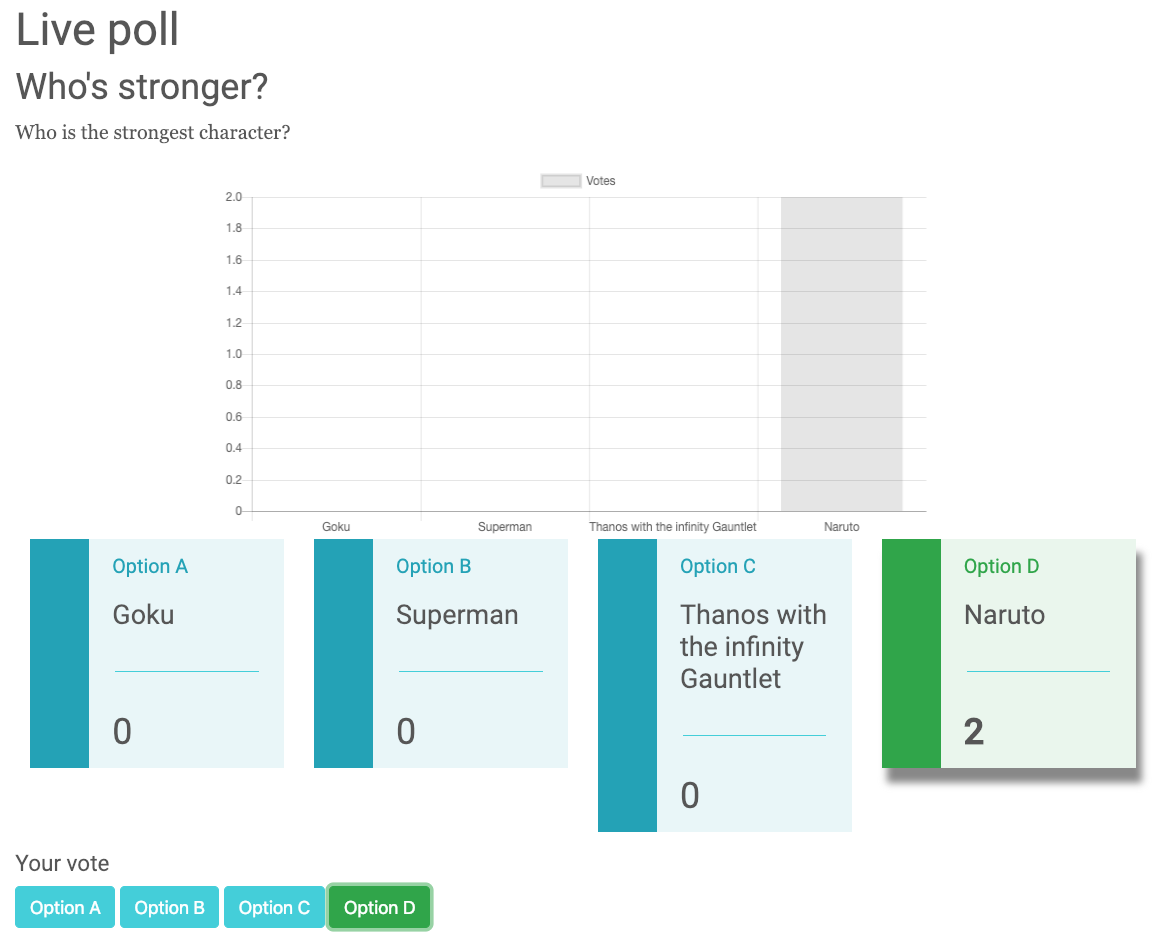
This module allows having a live updating poll.
It uses Firebase to push the updates and stores the data anonymously, so no GDPR
concerns there.
Configuration
- Go to Firebase and create an account
- Once in the Firebase console, create a project
- We're using the real time database for this project. So, create a database.
- A popup will appear to configure Cloud Firestore, select any type of security (Locked/Test) mode.
- Switch from Cloud firestore to Realtime database (Top part of the page)
- Access Rules and set these rules:

{

    "rules": {

        ".read": "auth != null",

        ".write": "auth != null"

    }

}
- Enable anonymous authentication, if anonymous authentication is not setup, the poll will not work.
- From the project overview page in the Firebase console,
click Add Firebase to your web app. If your project already has an app, select Add App
from the project overview page. - You can copy and paste the API Key, Auth Domain, Database URL and the Project ID to add
them to the Moodle plugin settings page. Site administration > Plugins > Activity modules > Live poll
Usage
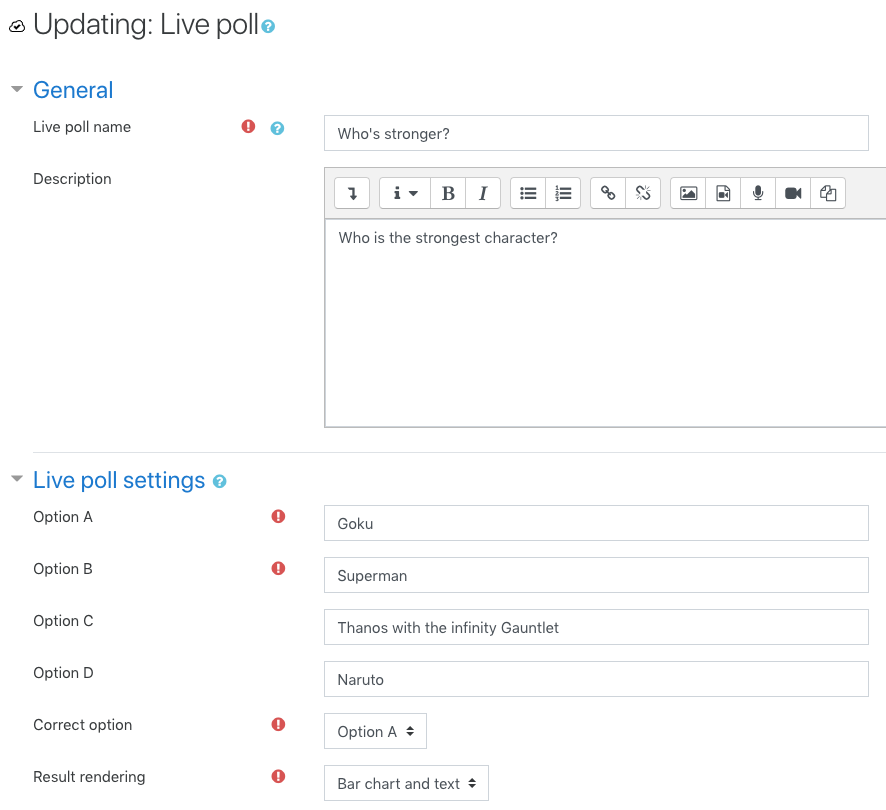
Just use it like a normal activity. You can create a poll in a course and configure the voting options and what to render.
It is suggested you use this when performing live classes so students and instructors can interact with the charts and controls live.
This will not store any of the responses into Moodle.

Mobile support

License
Copyright (c) 2018 Open LMS (https://www.openlms.net)
This program is free software: you can redistribute it and/or modify it under
the terms of the GNU General Public License as published by the Free Software
Foundation, either version 3 of the License, or (at your option) any later
version.
This program is distributed in the hope that it will be useful, but WITHOUT ANY
WARRANTY; without even the implied warranty of MERCHANTABILITY or FITNESS FOR A
PARTICULAR PURPOSE. See the GNU General Public License for more details.
You should have received a copy of the GNU General Public License along with
this program. If not, see http://www.gnu.org/licenses/.
4.5.4 (2025092400)
4.5.4
Plugin type: Activities
Frankenstyle component name: mod_livepoll
Version build number: 2025092400
Version release name: 4.5.4
Maturity: Stable
Supported Moodle versions: 4.5
Repository URL (Git): https://github.com/open-lms-open-source/moodle-mod_livepoll
Repository branch:
Repository tag:
Issue/bug tracker URL: https://github.com/open-lms-open-source/moodle-mod_livepoll/issues
Live poll
This module allows having a live updating poll.
It uses Firebase to push the updates and stores the data anonymously, so no GDPR
concerns there.
Configuration
- Go to Firebase and create an account
- Once in the Firebase console, create a project
- We're using the real time database for this project. So, create a database.
- A popup will appear to configure Cloud Firestore, select any type of security (Locked/Test) mode.
- Switch from Cloud firestore to Realtime database (Top part of the page)
- Access Rules and set these rules:
{

    "rules": {

        ".read": "auth != null",

        ".write": "auth != null"

    }

}
- Enable anonymous authentication, if anonymous authentication is not setup, the poll will not work.
- From the project overview page in the Firebase console,
click Add Firebase to your web app. If your project already has an app, select Add App
from the project overview page. - You can copy and paste the API Key, Auth Domain, Database URL and the Project ID to add
them to the Moodle plugin settings page. Site administration > Plugins > Activity modules > Live poll
Usage
Just use it like a normal activity. You can create a poll in a course and configure the voting options and what to render.
It is suggested you use this when performing live classes so students and instructors can interact with the charts and controls live.
This will not store any of the responses into Moodle.
Mobile support
License
Copyright (c) 2018 Open LMS (https://www.openlms.net)
This program is free software: you can redistribute it and/or modify it under
the terms of the GNU General Public License as published by the Free Software
Foundation, either version 3 of the License, or (at your option) any later
version.
This program is distributed in the hope that it will be useful, but WITHOUT ANY
WARRANTY; without even the implied warranty of MERCHANTABILITY or FITNESS FOR A
PARTICULAR PURPOSE. See the GNU General Public License for more details.
You should have received a copy of the GNU General Public License along with
this program. If not, see http://www.gnu.org/licenses/.
4.5.4 (2025060500)
4.5.4
Plugin type: Activities
Frankenstyle component name: mod_livepoll
Version build number: 2025060500
Version release name: 4.5.4
Maturity: Stable
Supported Moodle versions: 4.5
Repository URL (Git): https://github.com/open-lms-open-source/moodle-mod_livepoll
Repository branch:
Repository tag: MR-4.5
Issue/bug tracker URL: https://github.com/open-lms-open-source/moodle-mod_livepoll/issues
Live poll
This module allows having a live updating poll.
It uses Firebase to push the updates and stores the data anonymously, so no GDPR
concerns there.
Configuration
- Go to Firebase and create an account
- Once in the Firebase console, create a project
- We're using the real time database for this project. So, create a database.
- A popup will appear to configure Cloud Firestore, select any type of security (Locked/Test) mode.
- Switch from Cloud firestore to Realtime database (Top part of the page)
- Access Rules and set these rules:
{

    "rules": {

        ".read": "auth != null",

        ".write": "auth != null"

    }

}
- Enable anonymous authentication, if anonymous authentication is not setup, the poll will not work.
- From the project overview page in the Firebase console,
click Add Firebase to your web app. If your project already has an app, select Add App
from the project overview page. - You can copy and paste the API Key, Auth Domain, Database URL and the Project ID to add
them to the Moodle plugin settings page. Site administration > Plugins > Activity modules > Live poll
Usage
Just use it like a normal activity. You can create a poll in a course and configure the voting options and what to render.
It is suggested you use this when performing live classes so students and instructors can interact with the charts and controls live.
This will not store any of the responses into Moodle.
Mobile support
License
Copyright (c) 2018 Open LMS (https://www.openlms.net)
This program is free software: you can redistribute it and/or modify it under
the terms of the GNU General Public License as published by the Free Software
Foundation, either version 3 of the License, or (at your option) any later
version.
This program is distributed in the hope that it will be useful, but WITHOUT ANY
WARRANTY; without even the implied warranty of MERCHANTABILITY or FITNESS FOR A
PARTICULAR PURPOSE. See the GNU General Public License for more details.
You should have received a copy of the GNU General Public License along with
this program. If not, see http://www.gnu.org/licenses/.
4.4.4 (2025031800)
4.4.4
Plugin type: Activities
Frankenstyle component name: mod_livepoll
Version build number: 2025031800
Version release name: 4.4.4
Maturity: Stable
Supported Moodle versions: 4.4
Repository URL (Git): https://github.com/open-lms-open-source/moodle-mod_livepoll
Repository branch:
Repository tag:
Issue/bug tracker URL: https://github.com/open-lms-open-source/moodle-mod_livepoll/issues
Live poll
This module allows having a live updating poll.
It uses Firebase to push the updates and stores the data anonymously, so no GDPR
concerns there.
Configuration
- Go to Firebase and create an account
- Once in the Firebase console, create a project
- We're using the real time database for this project. So, create a database.
- A popup will appear to configure Cloud Firestore, select any type of security (Locked/Test) mode.
- Switch from Cloud firestore to Realtime database (Top part of the page)
- Access Rules and set these rules:
{

    "rules": {

        ".read": "auth != null",

        ".write": "auth != null"

    }

}
- Enable anonymous authentication, if anonymous authentication is not setup, the poll will not work.
- From the project overview page in the Firebase console,
click Add Firebase to your web app. If your project already has an app, select Add App
from the project overview page. - You can copy and paste the API Key, Auth Domain, Database URL and the Project ID to add
them to the Moodle plugin settings page. Site administration > Plugins > Activity modules > Live poll
Usage
Just use it like a normal activity. You can create a poll in a course and configure the voting options and what to render.
It is suggested you use this when performing live classes so students and instructors can interact with the charts and controls live.
This will not store any of the responses into Moodle.
Mobile support
License
Copyright (c) 2018 Open LMS (https://www.openlms.net)
This program is free software: you can redistribute it and/or modify it under
the terms of the GNU General Public License as published by the Free Software
Foundation, either version 3 of the License, or (at your option) any later
version.
This program is distributed in the hope that it will be useful, but WITHOUT ANY
WARRANTY; without even the implied warranty of MERCHANTABILITY or FITNESS FOR A
PARTICULAR PURPOSE. See the GNU General Public License for more details.
You should have received a copy of the GNU General Public License along with
this program. If not, see http://www.gnu.org/licenses/.
4.4.4 (2025011000)
4.4.4
Plugin type: Activities
Frankenstyle component name: mod_livepoll
Version build number: 2025011000
Version release name: 4.4.4
Maturity: Stable
Supported Moodle versions: 4.4
Repository URL (Git): https://github.com/open-lms-open-source/moodle-mod_livepoll
Repository branch:
Repository tag:
Issue/bug tracker URL: https://github.com/open-lms-open-source/moodle-mod_livepoll/issues
Live poll
This module allows having a live updating poll.
It uses Firebase to push the updates and stores the data anonymously, so no GDPR
concerns there.
Configuration
- Go to Firebase and create an account
- Once in the Firebase console, create a project
- We're using the real time database for this project. So, create a database.
- A popup will appear to configure Cloud Firestore, select any type of security (Locked/Test) mode.
- Switch from Cloud firestore to Realtime database (Top part of the page)
- Access Rules and set these rules:
{

    "rules": {

        ".read": "auth != null",

        ".write": "auth != null"

    }

}
- Enable anonymous authentication, if anonymous authentication is not setup, the poll will not work.
- From the project overview page in the Firebase console,
click Add Firebase to your web app. If your project already has an app, select Add App
from the project overview page. - You can copy and paste the API Key, Auth Domain, Database URL and the Project ID to add
them to the Moodle plugin settings page. Site administration > Plugins > Activity modules > Live poll
Usage
Just use it like a normal activity. You can create a poll in a course and configure the voting options and what to render.
It is suggested you use this when performing live classes so students and instructors can interact with the charts and controls live.
This will not store any of the responses into Moodle.
Mobile support
License
Copyright (c) 2018 Open LMS (https://www.openlms.net)
This program is free software: you can redistribute it and/or modify it under
the terms of the GNU General Public License as published by the Free Software
Foundation, either version 3 of the License, or (at your option) any later
version.
This program is distributed in the hope that it will be useful, but WITHOUT ANY
WARRANTY; without even the implied warranty of MERCHANTABILITY or FITNESS FOR A
PARTICULAR PURPOSE. See the GNU General Public License for more details.
You should have received a copy of the GNU General Public License along with
this program. If not, see http://www.gnu.org/licenses/.
4.4.4 (2024121800)
4.4.4
Plugin type: Activities
Frankenstyle component name: mod_livepoll
Version build number: 2024121800
Version release name: 4.4.4
Maturity: Stable
Supported Moodle versions: 4.4
Repository URL (Git): https://github.com/open-lms-open-source/moodle-mod_livepoll
Repository branch:
Repository tag: MR-4.4
Issue/bug tracker URL: https://github.com/open-lms-open-source/moodle-mod_livepoll/issues
Live poll
This module allows having a live updating poll.
It uses Firebase to push the updates and stores the data anonymously, so no GDPR
concerns there.
Configuration
- Go to Firebase and create an account
- Once in the Firebase console, create a project
- We're using the real time database for this project. So, create a database.
- A popup will appear to configure Cloud Firestore, select any type of security (Locked/Test) mode.
- Switch from Cloud firestore to Realtime database (Top part of the page)
- Access Rules and set these rules:
{

    "rules": {

        ".read": "auth != null",

        ".write": "auth != null"

    }

}
- Enable anonymous authentication, if anonymous authentication is not setup, the poll will not work.
- From the project overview page in the Firebase console,
click Add Firebase to your web app. If your project already has an app, select Add App
from the project overview page. - You can copy and paste the API Key, Auth Domain, Database URL and the Project ID to add
them to the Moodle plugin settings page. Site administration > Plugins > Activity modules > Live poll
Usage
Just use it like a normal activity. You can create a poll in a course and configure the voting options and what to render.
It is suggested you use this when performing live classes so students and instructors can interact with the charts and controls live.
This will not store any of the responses into Moodle.
Mobile support
License
Copyright (c) 2018 Open LMS (https://www.openlms.net)
This program is free software: you can redistribute it and/or modify it under
the terms of the GNU General Public License as published by the Free Software
Foundation, either version 3 of the License, or (at your option) any later
version.
This program is distributed in the hope that it will be useful, but WITHOUT ANY
WARRANTY; without even the implied warranty of MERCHANTABILITY or FITNESS FOR A
PARTICULAR PURPOSE. See the GNU General Public License for more details.
You should have received a copy of the GNU General Public License along with
this program. If not, see http://www.gnu.org/licenses/.
4.3.4 (2024091700)
4.3.4
Plugin type: Activities
Frankenstyle component name: mod_livepoll
Version build number: 2024091700
Version release name: 4.3.4
Maturity: Stable
Supported Moodle versions: 4.3
Repository URL (Git): https://github.com/open-lms-open-source/moodle-mod_livepoll
Repository branch:
Repository tag: MR-4.3-MP2
Issue/bug tracker URL: https://github.com/open-lms-open-source/moodle-mod_livepoll/issues
Live poll
This module allows having a live updating poll.
It uses Firebase to push the updates and stores the data anonymously, so no GDPR
concerns there.
Configuration
- Go to Firebase and create an account
- Once in the Firebase console, create a project
- We're using the real time database for this project. So, create a database.
- A popup will appear to configure Cloud Firestore, select any type of security (Locked/Test) mode.
- Switch from Cloud firestore to Realtime database (Top part of the page)
- Access Rules and set these rules:
{

    "rules": {

        ".read": "auth != null",

        ".write": "auth != null"

    }

}
- Enable anonymous authentication, if anonymous authentication is not setup, the poll will not work.
- From the project overview page in the Firebase console,
click Add Firebase to your web app. If your project already has an app, select Add App
from the project overview page. - You can copy and paste the API Key, Auth Domain, Database URL and the Project ID to add
them to the Moodle plugin settings page. Site administration > Plugins > Activity modules > Live poll
Usage
Just use it like a normal activity. You can create a poll in a course and configure the voting options and what to render.
It is suggested you use this when performing live classes so students and instructors can interact with the charts and controls live.
This will not store any of the responses into Moodle.
Mobile support
License
Copyright (c) 2018 Open LMS (https://www.openlms.net)
This program is free software: you can redistribute it and/or modify it under
the terms of the GNU General Public License as published by the Free Software
Foundation, either version 3 of the License, or (at your option) any later
version.
This program is distributed in the hope that it will be useful, but WITHOUT ANY
WARRANTY; without even the implied warranty of MERCHANTABILITY or FITNESS FOR A
PARTICULAR PURPOSE. See the GNU General Public License for more details.
You should have received a copy of the GNU General Public License along with
this program. If not, see http://www.gnu.org/licenses/.
4.3.4 (2024072700)
4.3.4
Plugin type: Activities
Frankenstyle component name: mod_livepoll
Version build number: 2024072700
Version release name: 4.3.4
Maturity: Stable
Supported Moodle versions: 4.3
Repository URL (Git): https://github.com/open-lms-open-source/moodle-mod_livepoll
Repository branch:
Repository tag: MR-4.3-MP1
Issue/bug tracker URL: https://github.com/open-lms-open-source/moodle-mod_livepoll/issues
Live poll
This module allows having a live updating poll.
It uses Firebase to push the updates and stores the data anonymously, so no GDPR
concerns there.
Configuration
- Go to Firebase and create an account
- Once in the Firebase console, create a project
- We're using the real time database for this project. So, create a database.
- A popup will appear to configure Cloud Firestore, select any type of security (Locked/Test) mode.
- Switch from Cloud firestore to Realtime database (Top part of the page)
- Access Rules and set these rules:
{

    "rules": {

        ".read": "auth != null",

        ".write": "auth != null"

    }

}
- Enable anonymous authentication, if anonymous authentication is not setup, the poll will not work.
- From the project overview page in the Firebase console,
click Add Firebase to your web app. If your project already has an app, select Add App
from the project overview page. - You can copy and paste the API Key, Auth Domain, Database URL and the Project ID to add
them to the Moodle plugin settings page. Site administration > Plugins > Activity modules > Live poll
Usage
Just use it like a normal activity. You can create a poll in a course and configure the voting options and what to render.
It is suggested you use this when performing live classes so students and instructors can interact with the charts and controls live.
This will not store any of the responses into Moodle.
Mobile support
License
Copyright (c) 2018 Open LMS (https://www.openlms.net)
This program is free software: you can redistribute it and/or modify it under
the terms of the GNU General Public License as published by the Free Software
Foundation, either version 3 of the License, or (at your option) any later
version.
This program is distributed in the hope that it will be useful, but WITHOUT ANY
WARRANTY; without even the implied warranty of MERCHANTABILITY or FITNESS FOR A
PARTICULAR PURPOSE. See the GNU General Public License for more details.
You should have received a copy of the GNU General Public License along with
this program. If not, see http://www.gnu.org/licenses/.
4.3.4 (2024061700)
4.3.4
Plugin type: Activities
Frankenstyle component name: mod_livepoll
Version build number: 2024061700
Version release name: 4.3.4
Maturity: Stable
Supported Moodle versions: 4.3
Repository URL (Git): https://github.com/open-lms-open-source/moodle-mod_livepoll
Repository branch:
Repository tag:
Issue/bug tracker URL: https://github.com/open-lms-open-source/moodle-mod_livepoll/issues
Live poll
This module allows having a live updating poll.
It uses Firebase to push the updates and stores the data anonymously, so no GDPR
concerns there.
Configuration
- Go to Firebase and create an account
- Once in the Firebase console, create a project
- We're using the real time database for this project. So, create a database.
- A popup will appear to configure Cloud Firestore, select any type of security (Locked/Test) mode.
- Switch from Cloud firestore to Realtime database (Top part of the page)
- Access Rules and set these rules:
{

    "rules": {

        ".read": "auth != null",

        ".write": "auth != null"

    }

}
- Enable anonymous authentication, if anonymous authentication is not setup, the poll will not work.
- From the project overview page in the Firebase console,
click Add Firebase to your web app. If your project already has an app, select Add App
from the project overview page. - You can copy and paste the API Key, Auth Domain, Database URL and the Project ID to add
them to the Moodle plugin settings page. Site administration > Plugins > Activity modules > Live poll
Usage
Just use it like a normal activity. You can create a poll in a course and configure the voting options and what to render.
It is suggested you use this when performing live classes so students and instructors can interact with the charts and controls live.
This will not store any of the responses into Moodle.
Mobile support
License
Copyright (c) 2018 Open LMS (https://www.openlms.net)
This program is free software: you can redistribute it and/or modify it under
the terms of the GNU General Public License as published by the Free Software
Foundation, either version 3 of the License, or (at your option) any later
version.
This program is distributed in the hope that it will be useful, but WITHOUT ANY
WARRANTY; without even the implied warranty of MERCHANTABILITY or FITNESS FOR A
PARTICULAR PURPOSE. See the GNU General Public License for more details.
You should have received a copy of the GNU General Public License along with
this program. If not, see http://www.gnu.org/licenses/.
4.1.3 (2024040200)
4.1.3
Plugin type: Activities
Frankenstyle component name: mod_livepoll
Version build number: 2024040200
Version release name: 4.1.3
Maturity: Stable
Supported Moodle versions: 4.1
Repository URL (Git): https://github.com/open-lms-open-source/moodle-mod_livepoll
Repository branch:
Repository tag:
Issue/bug tracker URL: https://github.com/open-lms-open-source/moodle-mod_livepoll/issues
Live poll
This module allows having a live updating poll.
It uses Firebase to push the updates and stores the data anonymously, so no GDPR
concerns there.
Configuration
- Go to Firebase and create an account
- Once in the Firebase console, create a project
- We're using the real time database for this project. So, create a database.
- A popup will appear to configure Cloud Firestore, select any type of security (Locked/Test) mode.
- Switch from Cloud firestore to Realtime database (Top part of the page)
- Access Rules and set these rules:
{

    "rules": {

        ".read": "auth != null",

        ".write": "auth != null"

    }

}
- Enable anonymous authentication, if anonymous authentication is not setup, the poll will not work.
- From the project overview page in the Firebase console,
click Add Firebase to your web app. If your project already has an app, select Add App
from the project overview page. - You can copy and paste the API Key, Auth Domain, Database URL and the Project ID to add
them to the Moodle plugin settings page. Site administration > Plugins > Activity modules > Live poll
Usage
Just use it like a normal activity. You can create a poll in a course and configure the voting options and what to render.
It is suggested you use this when performing live classes so students and instructors can interact with the charts and controls live.
This will not store any of the responses into Moodle.
License
Copyright (c) 2018 Open LMS (https://www.openlms.net)
This program is free software: you can redistribute it and/or modify it under
the terms of the GNU General Public License as published by the Free Software
Foundation, either version 3 of the License, or (at your option) any later
version.
This program is distributed in the hope that it will be useful, but WITHOUT ANY
WARRANTY; without even the implied warranty of MERCHANTABILITY or FITNESS FOR A
PARTICULAR PURPOSE. See the GNU General Public License for more details.
You should have received a copy of the GNU General Public License along with
this program. If not, see http://www.gnu.org/licenses/.
4.1.3 (2024012900)
4.1.3
Plugin type: Activities
Frankenstyle component name: mod_livepoll
Version build number: 2024012900
Version release name: 4.1.3
Maturity: Stable
Supported Moodle versions: 4.1
Repository URL (Git): https://github.com/open-lms-open-source/moodle-mod_livepoll
Repository branch:
Repository tag:
Issue/bug tracker URL: https://github.com/open-lms-open-source/moodle-mod_livepoll/issues
Live poll
This module allows having a live updating poll.
It uses Firebase to push the updates and stores the data anonymously, so no GDPR
concerns there.
Configuration
- Go to Firebase and create an account
- Once in the Firebase console, create a project
- We're using the real time database for this project. So, create a database.
- A popup will appear to configure Cloud Firestore, select any type of security (Locked/Test) mode.
- Switch from Cloud firestore to Realtime database (Top part of the page)
- Access Rules and set these rules:
{

    "rules": {

        ".read": "auth != null",

        ".write": "auth != null"

    }

}
- Enable anonymous authentication, if anonymous authentication is not setup, the poll will not work.
- From the project overview page in the Firebase console,
click Add Firebase to your web app. If your project already has an app, select Add App
from the project overview page. - You can copy and paste the API Key, Auth Domain, Database URL and the Project ID to add
them to the Moodle plugin settings page. Site administration > Plugins > Activity modules > Live poll
Usage
Just use it like a normal activity. You can create a poll in a course and configure the voting options and what to render.
It is suggested you use this when performing live classes so students and instructors can interact with the charts and controls live.
This will not store any of the responses into Moodle.
License
Copyright (c) 2018 Open LMS (https://www.openlms.net)
This program is free software: you can redistribute it and/or modify it under
the terms of the GNU General Public License as published by the Free Software
Foundation, either version 3 of the License, or (at your option) any later
version.
This program is distributed in the hope that it will be useful, but WITHOUT ANY
WARRANTY; without even the implied warranty of MERCHANTABILITY or FITNESS FOR A
PARTICULAR PURPOSE. See the GNU General Public License for more details.
You should have received a copy of the GNU General Public License along with
this program. If not, see http://www.gnu.org/licenses/.
4.1.3 (2023121800)
4.1.3
Plugin type: Activities
Frankenstyle component name: mod_livepoll
Version build number: 2023121800
Version release name: 4.1.3
Maturity: Stable
Supported Moodle versions: 4.1
Repository URL (Git): https://github.com/open-lms-open-source/moodle-mod_livepoll
Repository branch:
Repository tag:
Issue/bug tracker URL: https://github.com/open-lms-open-source/moodle-mod_livepoll/issues
Live poll
This module allows having a live updating poll.
It uses Firebase to push the updates and stores the data anonymously, so no GDPR
concerns there.
Configuration
- Go to Firebase and create an account
- Once in the Firebase console, create a project
- We're using the real time database for this project. So, create a database.
- A popup will appear to configure Cloud Firestore, select any type of security (Locked/Test) mode.
- Switch from Cloud firestore to Realtime database (Top part of the page)
- Access Rules and set these rules:
{

    "rules": {

        ".read": "auth != null",

        ".write": "auth != null"

    }

}
- Enable anonymous authentication, if anonymous authentication is not setup, the poll will not work.
- From the project overview page in the Firebase console,
click Add Firebase to your web app. If your project already has an app, select Add App
from the project overview page. - You can copy and paste the API Key, Auth Domain, Database URL and the Project ID to add
them to the Moodle plugin settings page. Site administration > Plugins > Activity modules > Live poll
Usage
Just use it like a normal activity. You can create a poll in a course and configure the voting options and what to render.
It is suggested you use this when performing live classes so students and instructors can interact with the charts and controls live.
This will not store any of the responses into Moodle.
License
Copyright (c) 2018 Open LMS (https://www.openlms.net)
This program is free software: you can redistribute it and/or modify it under
the terms of the GNU General Public License as published by the Free Software
Foundation, either version 3 of the License, or (at your option) any later
version.
This program is distributed in the hope that it will be useful, but WITHOUT ANY
WARRANTY; without even the implied warranty of MERCHANTABILITY or FITNESS FOR A
PARTICULAR PURPOSE. See the GNU General Public License for more details.
You should have received a copy of the GNU General Public License along with
this program. If not, see http://www.gnu.org/licenses/.
4.1.3 (2023100400)
4.1.3
Plugin type: Activities
Frankenstyle component name: mod_livepoll
Version build number: 2023100400
Version release name: 4.1.3
Maturity: Stable
Supported Moodle versions: 4.1
Repository URL (Git): https://github.com/open-lms-open-source/moodle-mod_livepoll
Repository branch:
Repository tag: MR-4.1-MP2
Issue/bug tracker URL: https://github.com/open-lms-open-source/moodle-mod_livepoll/issues
Live poll
This module allows having a live updating poll.
It uses Firebase to push the updates and stores the data anonymously, so no GDPR
concerns there.
Configuration
- Go to Firebase and create an account
- Once in the Firebase console, create a project
- We're using the real time database for this project. So, create a database.
- A popup will appear to configure Cloud Firestore, select any type of security (Locked/Test) mode.
- Switch from Cloud firestore to Realtime database (Top part of the page)
- Access Rules and set these rules:
{

    "rules": {

        ".read": "auth != null",

        ".write": "auth != null"

    }

}
- Enable anonymous authentication, if anonymous authentication is not setup, the poll will not work.
- From the project overview page in the Firebase console,
click Add Firebase to your web app. If your project already has an app, select Add App
from the project overview page. - You can copy and paste the API Key, Auth Domain, Database URL and the Project ID to add
them to the Moodle plugin settings page. Site administration > Plugins > Activity modules > Live poll
Usage
Just use it like a normal activity. You can create a poll in a course and configure the voting options and what to render.
It is suggested you use this when performing live classes so students and instructors can interact with the charts and controls live.
This will not store any of the responses into Moodle.
License
Copyright (c) 2018 Open LMS (https://www.openlms.net)
This program is free software: you can redistribute it and/or modify it under
the terms of the GNU General Public License as published by the Free Software
Foundation, either version 3 of the License, or (at your option) any later
version.
This program is distributed in the hope that it will be useful, but WITHOUT ANY
WARRANTY; without even the implied warranty of MERCHANTABILITY or FITNESS FOR A
PARTICULAR PURPOSE. See the GNU General Public License for more details.
You should have received a copy of the GNU General Public License along with
this program. If not, see http://www.gnu.org/licenses/.
4.1.3 (2023073100)
4.1.3
Plugin type: Activities
Frankenstyle component name: mod_livepoll
Version build number: 2023073100
Version release name: 4.1.3
Maturity: Stable
Supported Moodle versions: 4.1
Repository URL (Git): https://github.com/open-lms-open-source/moodle-mod_livepoll
Repository branch:
Repository tag: MR-4.1-MP1
Issue/bug tracker URL: https://github.com/open-lms-open-source/moodle-mod_livepoll/issues
Live poll
This module allows having a live updating poll.
It uses Firebase to push the updates and stores the data anonymously, so no GDPR
concerns there.
Configuration
- Go to Firebase and create an account
- Once in the Firebase console, create a project
- We're using the real time database for this project. So, create a database.
- A popup will appear to configure Cloud Firestore, select any type of security (Locked/Test) mode.
- Switch from Cloud firestore to Realtime database (Top part of the page)
- Access Rules and set these rules:
{

    "rules": {

        ".read": "auth != null",

        ".write": "auth != null"

    }

}
- Enable anonymous authentication, if anonymous authentication is not setup, the poll will not work.
- From the project overview page in the Firebase console,
click Add Firebase to your web app. If your project already has an app, select Add App
from the project overview page. - You can copy and paste the API Key, Auth Domain, Database URL and the Project ID to add
them to the Moodle plugin settings page. Site administration > Plugins > Activity modules > Live poll
Usage
Just use it like a normal activity. You can create a poll in a course and configure the voting options and what to render.
It is suggested you use this when performing live classes so students and instructors can interact with the charts and controls live.
This will not store any of the responses into Moodle.
License
Copyright (c) 2018 Open LMS (https://www.openlms.net)
This program is free software: you can redistribute it and/or modify it under
the terms of the GNU General Public License as published by the Free Software
Foundation, either version 3 of the License, or (at your option) any later
version.
This program is distributed in the hope that it will be useful, but WITHOUT ANY
WARRANTY; without even the implied warranty of MERCHANTABILITY or FITNESS FOR A
PARTICULAR PURPOSE. See the GNU General Public License for more details.
You should have received a copy of the GNU General Public License along with
this program. If not, see http://www.gnu.org/licenses/.
4.1.3 (2023061500)
4.1.3
Plugin type: Activities
Frankenstyle component name: mod_livepoll
Version build number: 2023061500
Version release name: 4.1.3
Maturity: Stable
Supported Moodle versions: 4.1
Repository URL (Git): https://github.com/open-lms-open-source/moodle-mod_livepoll
Repository branch:
Repository tag:
Issue/bug tracker URL: https://github.com/open-lms-open-source/moodle-mod_livepoll/issues
Live poll
This module allows having a live updating poll.
It uses Firebase to push the updates and stores the data anonymously, so no GDPR
concerns there.
Configuration
- Go to Firebase and create an account
- Once in the Firebase console, create a project
- We're using the real time database for this project. So, create a database.
- A popup will appear to configure Cloud Firestore, select any type of security (Locked/Test) mode.
- Switch from Cloud firestore to Realtime database (Top part of the page)
- Access Rules and set these rules:
{

    "rules": {

        ".read": "auth != null",

        ".write": "auth != null"

    }

}
- Enable anonymous authentication, if anonymous authentication is not setup, the poll will not work.
- From the project overview page in the Firebase console,
click Add Firebase to your web app. If your project already has an app, select Add App
from the project overview page. - You can copy and paste the API Key, Auth Domain, Database URL and the Project ID to add
them to the Moodle plugin settings page. Site administration > Plugins > Activity modules > Live poll
Usage
Just use it like a normal activity. You can create a poll in a course and configure the voting options and what to render.
It is suggested you use this when performing live classes so students and instructors can interact with the charts and controls live.
This will not store any of the responses into Moodle.
License
Copyright (c) 2018 Open LMS (https://www.openlms.net)
This program is free software: you can redistribute it and/or modify it under
the terms of the GNU General Public License as published by the Free Software
Foundation, either version 3 of the License, or (at your option) any later
version.
This program is distributed in the hope that it will be useful, but WITHOUT ANY
WARRANTY; without even the implied warranty of MERCHANTABILITY or FITNESS FOR A
PARTICULAR PURPOSE. See the GNU General Public License for more details.
You should have received a copy of the GNU General Public License along with
this program. If not, see http://www.gnu.org/licenses/.
4.0.7 (2023041100)
4.0.7
Plugin type: Activities
Frankenstyle component name: mod_livepoll
Version build number: 2023041100
Version release name: 4.0.7
Maturity: Stable
Supported Moodle versions: 4.0
Repository URL (Git): https://github.com/open-lms-open-source/moodle-mod_livepoll
Repository branch:
Repository tag:
Issue/bug tracker URL: https://github.com/open-lms-open-source/moodle-mod_livepoll/issues
Live poll
This module allows having a live updating poll.
It uses Firebase to push the updates and stores the data anonymously, so no GDPR
concerns there.
Configuration
- Go to Firebase and create an account
- Once in the Firebase console, create a project
- We're using the real time database for this project. So, create a database.
- A popup will appear to configure Cloud Firestore, select any type of security (Locked/Test) mode.
- Switch from Cloud firestore to Realtime database (Top part of the page)
- Access Rules and set these rules:
{

    "rules": {

        ".read": "auth != null",

        ".write": "auth != null"

    }

}
- Enable anonymous authentication, if anonymous authentication is not setup, the poll will not work.
- From the project overview page in the Firebase console,
click Add Firebase to your web app. If your project already has an app, select Add App
from the project overview page. - You can copy and paste the API Key, Auth Domain, Database URL and the Project ID to add
them to the Moodle plugin settings page. Site administration > Plugins > Activity modules > Live poll
Usage
Just use it like a normal activity. You can create a poll in a course and configure the voting options and what to render.
It is suggested you use this when performing live classes so students and instructors can interact with the charts and controls live.
This will not store any of the responses into Moodle.
License
Copyright (c) 2018 Open LMS (https://www.openlms.net)
This program is free software: you can redistribute it and/or modify it under
the terms of the GNU General Public License as published by the Free Software
Foundation, either version 3 of the License, or (at your option) any later
version.
This program is distributed in the hope that it will be useful, but WITHOUT ANY
WARRANTY; without even the implied warranty of MERCHANTABILITY or FITNESS FOR A
PARTICULAR PURPOSE. See the GNU General Public License for more details.
You should have received a copy of the GNU General Public License along with
this program. If not, see http://www.gnu.org/licenses/.
4.0.5 (2023012400)
4.0.5
Plugin type: Activities
Frankenstyle component name: mod_livepoll
Version build number: 2023012400
Version release name: 4.0.5
Maturity: Stable
Supported Moodle versions: 4.0
Repository URL (Git): https://github.com/open-lms-open-source/moodle-mod_livepoll
Repository branch:
Repository tag:
Issue/bug tracker URL: https://github.com/open-lms-open-source/moodle-mod_livepoll/issues
Live poll
This module allows having a live updating poll.
It uses Firebase to push the updates and stores the data anonymously, so no GDPR
concerns there.
Configuration
- Go to Firebase and create an account
- Once in the Firebase console, create a project
- We're using the real time database for this project. So, create a database.
- A popup will appear to configure Cloud Firestore, select any type of security (Locked/Test) mode.
- Switch from Cloud firestore to Realtime database (Top part of the page)
- Access Rules and set these rules:
{

    "rules": {

        ".read": "auth != null",

        ".write": "auth != null"

    }

}
- Enable anonymous authentication, if anonymous authentication is not setup, the poll will not work.
- From the project overview page in the Firebase console,
click Add Firebase to your web app. If your project already has an app, select Add App
from the project overview page. - You can copy and paste the API Key, Auth Domain, Database URL and the Project ID to add
them to the Moodle plugin settings page. Site administration > Plugins > Activity modules > Live poll
Usage
Just use it like a normal activity. You can create a poll in a course and configure the voting options and what to render.
It is suggested you use this when performing live classes so students and instructors can interact with the charts and controls live.
This will not store any of the responses into Moodle.
License
Copyright (c) 2018 Open LMS (https://www.openlms.net)
This program is free software: you can redistribute it and/or modify it under
the terms of the GNU General Public License as published by the Free Software
Foundation, either version 3 of the License, or (at your option) any later
version.
This program is distributed in the hope that it will be useful, but WITHOUT ANY
WARRANTY; without even the implied warranty of MERCHANTABILITY or FITNESS FOR A
PARTICULAR PURPOSE. See the GNU General Public License for more details.
You should have received a copy of the GNU General Public License along with
this program. If not, see http://www.gnu.org/licenses/.
4.0.5 (2022122100)
4.0.5
Plugin type: Activities
Frankenstyle component name: mod_livepoll
Version build number: 2022122100
Version release name: 4.0.5
Maturity: Stable
Supported Moodle versions: 4.0
Repository URL (Git): https://github.com/open-lms-open-source/moodle-mod_livepoll
Repository branch:
Repository tag:
Issue/bug tracker URL: https://github.com/open-lms-open-source/moodle-mod_livepoll/issues
Live poll
This module allows having a live updating poll.
It uses Firebase to push the updates and stores the data anonymously, so no GDPR
concerns there.
Configuration
- Go to Firebase and create an account
- Once in the Firebase console, create a project
- We're using the real time database for this project. So, create a database.
- A popup will appear to configure Cloud Firestore, select any type of security (Locked/Test) mode.
- Switch from Cloud firestore to Realtime database (Top part of the page)
- Access Rules and set these rules:
{

    "rules": {

        ".read": "auth != null",

        ".write": "auth != null"

    }

}
- Enable anonymous authentication, if anonymous authentication is not setup, the poll will not work.
- From the project overview page in the Firebase console,
click Add Firebase to your web app. If your project already has an app, select Add App
from the project overview page. - You can copy and paste the API Key, Auth Domain, Database URL and the Project ID to add
them to the Moodle plugin settings page. Site administration > Plugins > Activity modules > Live poll
Usage
Just use it like a normal activity. You can create a poll in a course and configure the voting options and what to render.
It is suggested you use this when performing live classes so students and instructors can interact with the charts and controls live.
This will not store any of the responses into Moodle.
License
Copyright (c) 2018 Open LMS (https://www.openlms.net)
This program is free software: you can redistribute it and/or modify it under
the terms of the GNU General Public License as published by the Free Software
Foundation, either version 3 of the License, or (at your option) any later
version.
This program is distributed in the hope that it will be useful, but WITHOUT ANY
WARRANTY; without even the implied warranty of MERCHANTABILITY or FITNESS FOR A
PARTICULAR PURPOSE. See the GNU General Public License for more details.
You should have received a copy of the GNU General Public License along with
this program. If not, see http://www.gnu.org/licenses/.
3.11.6 (2022101200)
3.11.6
Plugin type: Activities
Frankenstyle component name: mod_livepoll
Version build number: 2022101200
Version release name: 3.11.6
Maturity: Stable
Supported Moodle versions: 3.11
Repository URL (Git): https://github.com/open-lms-open-source/moodle-mod_livepoll
Repository branch:
Repository tag:
Issue/bug tracker URL: https://github.com/open-lms-open-source/moodle-mod_livepoll/issues
Live poll
This module allows having a live updating poll.
It uses Firebase to push the updates and stores the data anonymously, so no GDPR
concerns there.
Configuration
- Go to Firebase and create an account
- Once in the Firebase console, create a project
- We're using the real time database for this project. So, create a database.
- A popup will appear to configure Cloud Firestore, select any type of security (Locked/Test) mode.
- Switch from Cloud firestore to Realtime database (Top part of the page)
- Access Rules and set these rules:
{

    "rules": {

        ".read": "auth != null",

        ".write": "auth != null"

    }

}
- Enable anonymous authentication, if anonymous authentication is not setup, the poll will not work.
- From the project overview page in the Firebase console,
click Add Firebase to your web app. If your project already has an app, select Add App
from the project overview page. - You can copy and paste the API Key, Auth Domain, Database URL and the Project ID to add
them to the Moodle plugin settings page. Site administration > Plugins > Activity modules > Live poll
Usage
Just use it like a normal activity. You can create a poll in a course and configure the voting options and what to render.
It is suggested you use this when performing live classes so students and instructors can interact with the charts and controls live.
This will not store any of the responses into Moodle.
License
Copyright (c) 2018 Open LMS (https://www.openlms.net)
This program is free software: you can redistribute it and/or modify it under
the terms of the GNU General Public License as published by the Free Software
Foundation, either version 3 of the License, or (at your option) any later
version.
This program is distributed in the hope that it will be useful, but WITHOUT ANY
WARRANTY; without even the implied warranty of MERCHANTABILITY or FITNESS FOR A
PARTICULAR PURPOSE. See the GNU General Public License for more details.
You should have received a copy of the GNU General Public License along with
this program. If not, see http://www.gnu.org/licenses/.
3.11.6 (2022072900)
3.11.6
Plugin type: Activities
Frankenstyle component name: mod_livepoll
Version build number: 2022072900
Version release name: 3.11.6
Maturity: Stable
Supported Moodle versions: 3.11
Repository URL (Git): https://github.com/open-lms-open-source/moodle-mod_livepoll
Repository branch:
Repository tag:
Issue/bug tracker URL: https://github.com/open-lms-open-source/moodle-mod_livepoll/issues
Live poll
This module allows having a live updating poll.
It uses Firebase to push the updates and stores the data anonymously, so no GDPR
concerns there.
Configuration
- Go to Firebase and create an account
- Once in the Firebase console, create a project
- We're using the real time database for this project. So, create a database.
- A popup will appear to configure Cloud Firestore, select any type of security (Locked/Test) mode.
- Switch from Cloud firestore to Realtime database (Top part of the page)
- Access Rules and set these rules:
{

    "rules": {

        ".read": "auth != null",

        ".write": "auth != null"

    }

}
- Enable anonymous authentication, if anonymous authentication is not setup, the poll will not work.
- From the project overview page in the Firebase console,
click Add Firebase to your web app. If your project already has an app, select Add App
from the project overview page. - You can copy and paste the API Key, Auth Domain, Database URL and the Project ID to add
them to the Moodle plugin settings page. Site administration > Plugins > Activity modules > Live poll
Usage
Just use it like a normal activity. You can create a poll in a course and configure the voting options and what to render.
It is suggested you use this when performing live classes so students and instructors can interact with the charts and controls live.
This will not store any of the responses into Moodle.
License
Copyright (c) 2018 Open LMS (https://www.openlms.net)
This program is free software: you can redistribute it and/or modify it under
the terms of the GNU General Public License as published by the Free Software
Foundation, either version 3 of the License, or (at your option) any later
version.
This program is distributed in the hope that it will be useful, but WITHOUT ANY
WARRANTY; without even the implied warranty of MERCHANTABILITY or FITNESS FOR A
PARTICULAR PURPOSE. See the GNU General Public License for more details.
You should have received a copy of the GNU General Public License along with
this program. If not, see http://www.gnu.org/licenses/.
3.11.5 (2022041300)
3.11.5
Plugin type: Activities
Frankenstyle component name: mod_livepoll
Version build number: 2022041300
Version release name: 3.11.5
Maturity: Stable
Supported Moodle versions: 3.11
Repository URL (Git): https://github.com/open-lms-open-source/moodle-mod_livepoll
Repository branch:
Repository tag:
Issue/bug tracker URL: https://github.com/open-lms-open-source/moodle-mod_livepoll/issues
Live poll
This module allows having a live updating poll.
It uses Firebase to push the updates and stores the data anonymously, so no GDPR
concerns there.
Configuration
- Go to Firebase and create an account
- Once in the Firebase console, create a project
- We're using the real time database for this project. So, create a database.
- A popup will appear to configure Cloud Firestore, select any type of security (Locked/Test) mode.
- Switch from Cloud firestore to Realtime database (Top part of the page)
- Access Rules and set these rules:
{

    "rules": {

        ".read": "auth != null",

        ".write": "auth != null"

    }

}
- Enable anonymous authentication, if anonymous authentication is not setup, the poll will not work.
- From the project overview page in the Firebase console,
click Add Firebase to your web app. If your project already has an app, select Add App
from the project overview page. - You can copy and paste the API Key, Auth Domain, Database URL and the Project ID to add
them to the Moodle plugin settings page. Site administration > Plugins > Activity modules > Live poll
Usage
Just use it like a normal activity. You can create a poll in a course and configure the voting options and what to render.
It is suggested you use this when performing live classes so students and instructors can interact with the charts and controls live.
This will not store any of the responses into Moodle.
License
Copyright (c) 2018 Open LMS (https://www.openlms.net)
This program is free software: you can redistribute it and/or modify it under
the terms of the GNU General Public License as published by the Free Software
Foundation, either version 3 of the License, or (at your option) any later
version.
This program is distributed in the hope that it will be useful, but WITHOUT ANY
WARRANTY; without even the implied warranty of MERCHANTABILITY or FITNESS FOR A
PARTICULAR PURPOSE. See the GNU General Public License for more details.
You should have received a copy of the GNU General Public License along with
this program. If not, see http://www.gnu.org/licenses/.
3.11.3 (2021112600)
3.11.3
Plugin type: Activities
Frankenstyle component name: mod_livepoll
Version build number: 2021112600
Version release name: 3.11.3
Maturity: Stable
Supported Moodle versions: 3.11
Repository URL (Git): https://github.com/open-lms-open-source/moodle-mod_livepoll
Repository branch:
Repository tag: MR-3.11-MP1
Issue/bug tracker URL: https://github.com/open-lms-open-source/moodle-mod_livepoll/issues
Live poll
This module allows having a live updating poll.
It uses Firebase to push the updates and stores the data anonymously, so no GDPR
concerns there.
Configuration
- Go to Firebase and create an account
- Once in the Firebase console, create a project
- We're using the real time database for this project. So, create a database.
- A popup will appear to configure Cloud Firestore, select any type of security (Locked/Test) mode.
- Switch from Cloud firestore to Realtime database (Top part of the page)
- Access Rules and set these rules:
{

    "rules": {

        ".read": "auth != null",

        ".write": "auth != null"

    }

}
- Enable anonymous authentication, if anonymous authentication is not setup, the poll will not work.
- From the project overview page in the Firebase console,
click Add Firebase to your web app. If your project already has an app, select Add App
from the project overview page. - You can copy and paste the API Key, Auth Domain, Database URL and the Project ID to add
them to the Moodle plugin settings page. Site administration > Plugins > Activity modules > Live poll
Usage
Just use it like a normal activity. You can create a poll in a course and configure the voting options and what to render.
It is suggested you use this when performing live classes so students and instructors can interact with the charts and controls live.
This will not store any of the responses into Moodle.
License
Copyright (c) 2018 Open LMS (https://www.openlms.net)
This program is free software: you can redistribute it and/or modify it under
the terms of the GNU General Public License as published by the Free Software
Foundation, either version 3 of the License, or (at your option) any later
version.
This program is distributed in the hope that it will be useful, but WITHOUT ANY
WARRANTY; without even the implied warranty of MERCHANTABILITY or FITNESS FOR A
PARTICULAR PURPOSE. See the GNU General Public License for more details.
You should have received a copy of the GNU General Public License along with
this program. If not, see http://www.gnu.org/licenses/.
0.1.4 (2018071304)
0.1.4
Plugin type: Activities
Frankenstyle component name: mod_livepoll
Version build number: 2018071304
Version release name: 0.1.4
Maturity: Stable
Supported Moodle versions: 3.10, 3.7, 3.8, 3.9
Repository URL (Git): https://github.com/open-lms-open-source/moodle-mod_livepoll
Repository branch:
Repository tag:
Issue/bug tracker URL: https://github.com/open-lms-open-source/moodle-mod_livepoll/issues
Live poll
This module allows having a live updating poll.
It uses Firebase to push the updates and stores the data anonymously, so no GDPR
concerns there.
Configuration
- Go to Firebase and create an account
- Once in the Firebase console, create a project
- We're using the real time database for this project. So, create a database.
- A popup will appear to configure Cloud Firestore, select any type of security (Locked/Test) mode.
- Switch from Cloud firestore to Realtime database (Top part of the page)
- Access Rules and set these rules:
{

    "rules": {

        ".read": "auth != null",

        ".write": "auth != null"

    }

}
- Enable anonymous authentication, if anonymous authentication is not setup, the poll will not work.
- From the project overview page in the Firebase console,
click Add Firebase to your web app. If your project already has an app, select Add App
from the project overview page. - You can copy and paste the API Key, Auth Domain, Database URL and the Project ID to add
them to the Moodle plugin settings page. Site administration > Plugins > Activity modules > Live poll
Usage
Just use it like a normal activity. You can create a poll in a course and configure the voting options and what to render.
It is suggested you use this when performing live classes so students and instructors can interact with the charts and controls live.
This will not store any of the responses into Moodle.
License
Copyright (c) 2018 Open LMS (https://www.openlms.net)
This program is free software: you can redistribute it and/or modify it under
the terms of the GNU General Public License as published by the Free Software
Foundation, either version 3 of the License, or (at your option) any later
version.
This program is distributed in the hope that it will be useful, but WITHOUT ANY
WARRANTY; without even the implied warranty of MERCHANTABILITY or FITNESS FOR A
PARTICULAR PURPOSE. See the GNU General Public License for more details.
You should have received a copy of the GNU General Public License along with
this program. If not, see http://www.gnu.org/licenses/.
0.1.4 (2018071303)
0.1.4
Plugin type: Activities
Frankenstyle component name: mod_livepoll
Version build number: 2018071303
Version release name: 0.1.4
Maturity: Stable
Supported Moodle versions: 3.10, 3.4, 3.5, 3.6, 3.7, 3.8, 3.9
Repository URL (Git): https://github.com/dvdcastro/moodle-mod_livepoll
Repository branch: master
Repository tag: v0.1.4
Issue/bug tracker URL: https://github.com/open-lms-open-source/moodle-mod_livepoll/issues
Live poll

This module allows having a live updating poll.
It uses Firebase to push the updates and stores the data anonymously, so no GDPR
concerns there.
Configuration
Go to Firebase and create an account
Once in the Firebase console, create a project
We're using the real time database for this project. So, create a database.
A popup will appear to configure Cloud Firestore, select any type of security (Locked/Test) mode.
Switch from Cloud firestore to Realtime database (Top part of the page)
Access Rules and set these rules:
{

    "rules": {

        ".read": "auth != null",

        ".write": "auth != null"

    }

}
Enable anonymous authentication, if anonymous authentication is not setup, the poll will not work.
From the project overview page in the Firebase console,
click Add Firebase to your web app. If your project already has an app, select Add App
from the project overview page.
You can copy and paste the Project ID and API Key to add
them to the Moodle plugin settings page. Site administration > Plugins > Activity modules > Live poll
Usage
Just use it like a normal activity. You can create a poll in a course and configure the voting options and what to render.
It is suggested you use this when performing live classes so students and instructors can interact with the charts and controls live.
This will not store any of the responses into Moodle.
License
Copyright (c) 2018 Blackboard Inc. (http://www.blackboard.com)
This program is free software: you can redistribute it and/or modify it under
the terms of the GNU General Public License as published by the Free Software
Foundation, either version 3 of the License, or (at your option) any later
version.
This program is distributed in the hope that it will be useful, but WITHOUT ANY
WARRANTY; without even the implied warranty of MERCHANTABILITY or FITNESS FOR A
PARTICULAR PURPOSE. See the GNU General Public License for more details.
You should have received a copy of the GNU General Public License along with
this program. If not, see .