Course Archiver
Versions
Current version
5.2.1 (2026050700)
5.2.1
Plugin type: Administration tools
Frankenstyle component name: tool_coursearchiver
Version build number: 2026050700
Version release name: 5.2.1
Maturity: Stable
Supported Moodle versions: 5.0, 5.1, 5.2
Repository URL (Git): https://github.com/Syxton/moodle-tool_coursearchiver
Repository branch:
Repository tag: v2026050700
Issue/bug tracker URL: https://github.com/Syxton/moodle-tool_coursearchiver/issues
Course Archiver
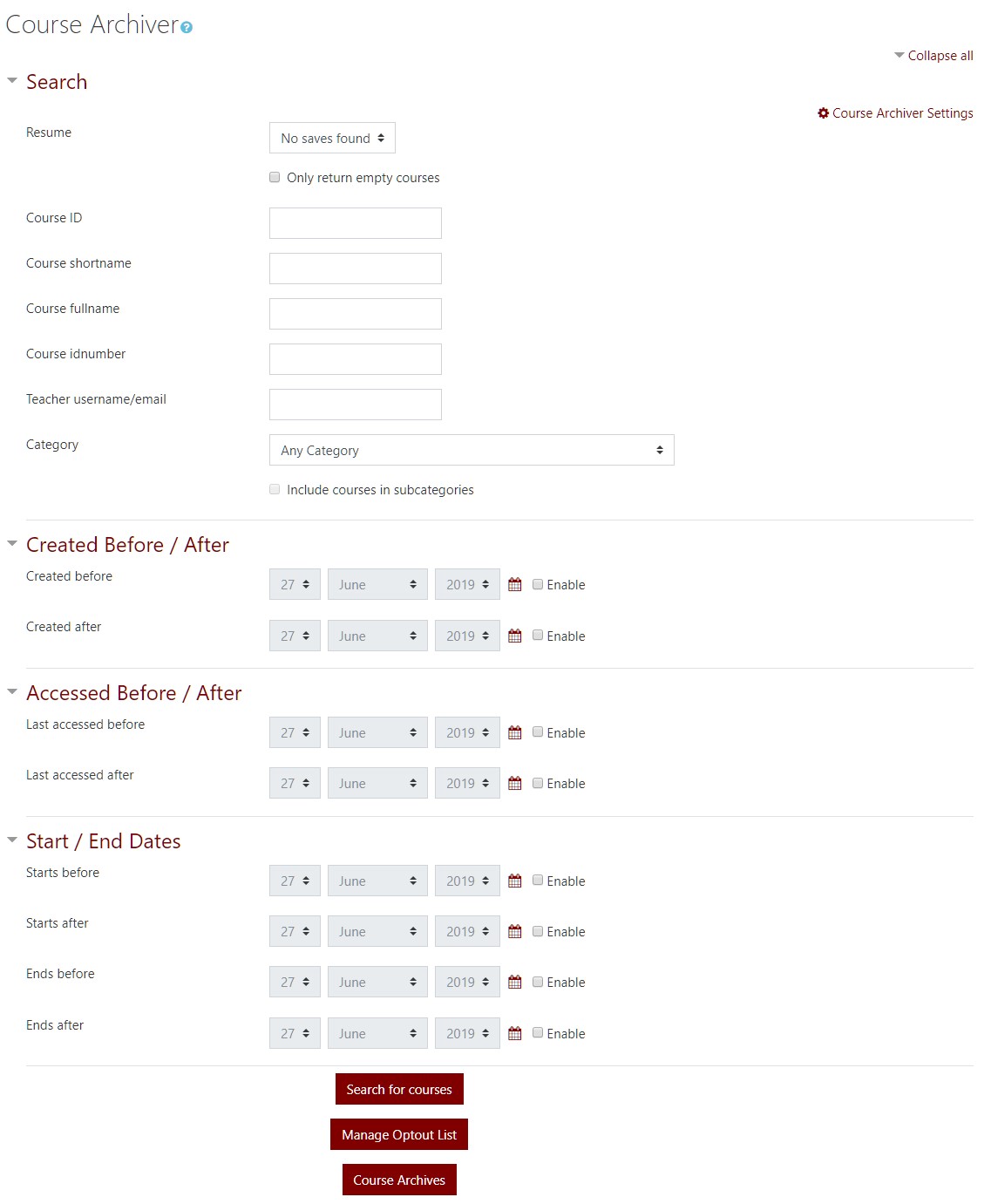
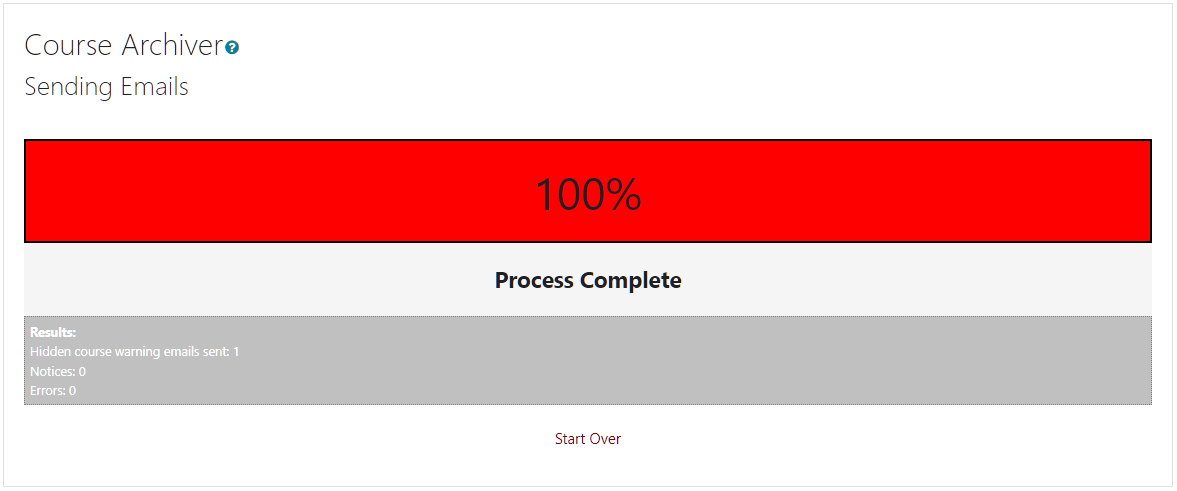
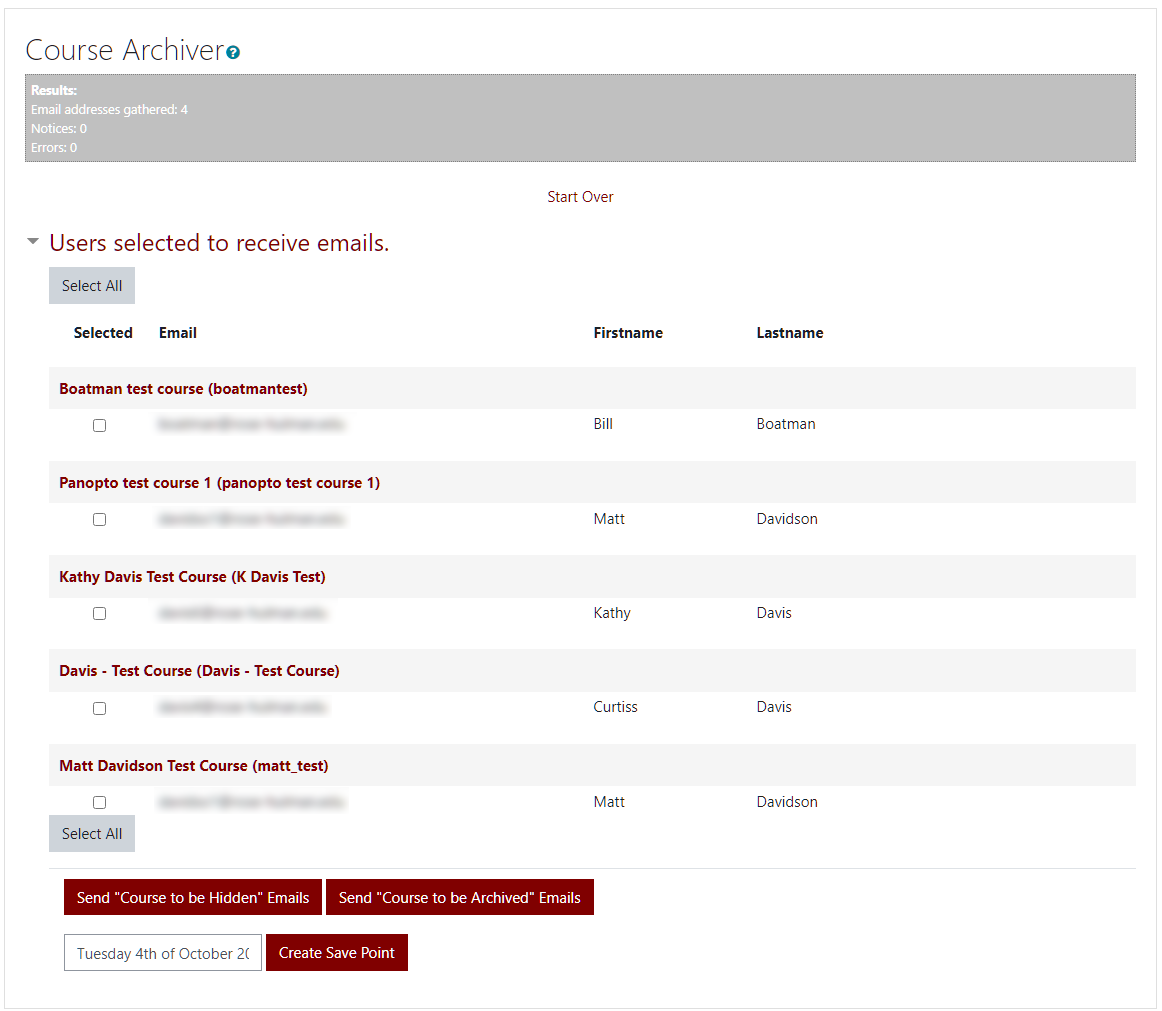
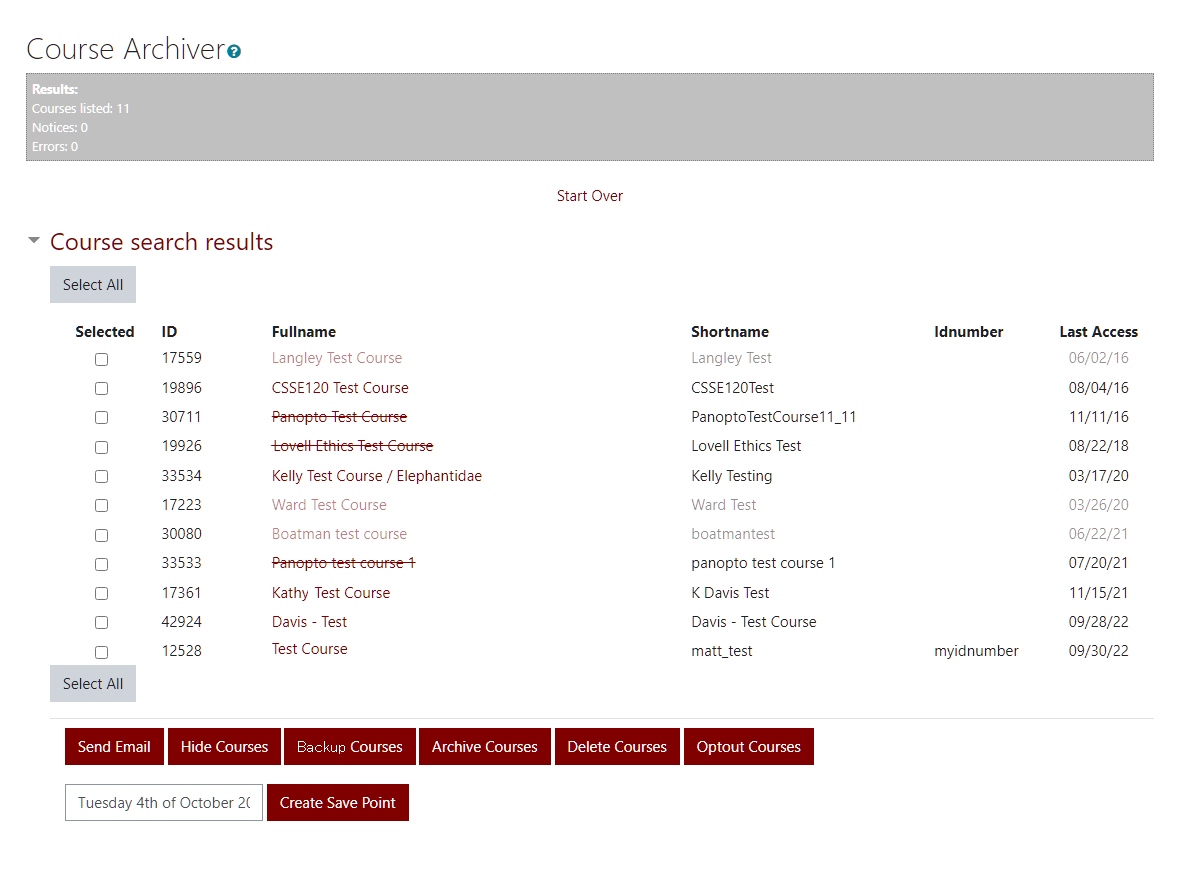
This tool is used to search for courses, notify the course owners, and mass hide or archive (backup and remove) courses.
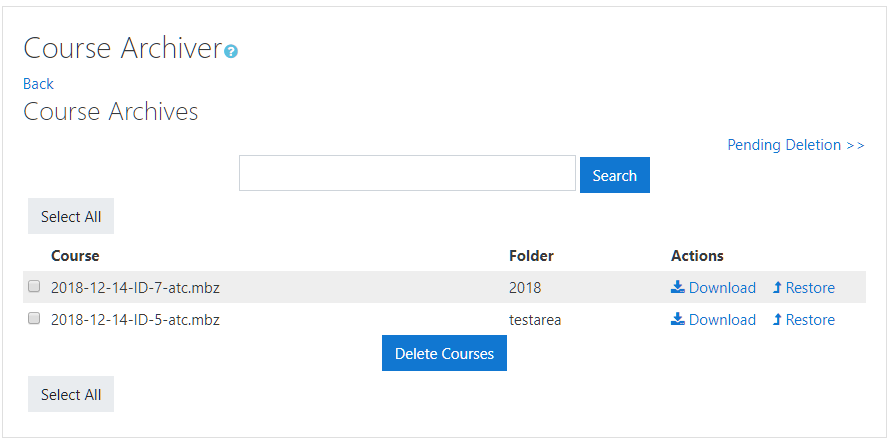
The courses are stored with Moodle's backup file extension ".mbz". These files can then be manually found in the user defined folder and can be restored using Moodle's built in restore feature.
Install
copy the coursearchiver folder into the admin/tool folder.
Settings
Folder path
A folder created within the moodledata folder. The tool will create this folder, however it is recommended that the folder be created outside the moodledata folder, and a shortcut be placed in the moodledata folder.
Course Hide Email
This is the template email that will be sent to the owners of the selected courses to notify them that their course(s) will be hidden. There are two required variables in the email %to (name of the recipient) and %courses (a list of courses with mailto hyperlinks to notify the site administrator that the user wishes to opt out) or if you do not want to have the opt out link use %courses_nolink instead.
Course Archive Email
This is the template email that will be sent to the owners of the selected courses to notify them that their course(s) will be archived. There are two required variables in the email %to (name of the recipient) and %courses (a list of courses with mailto hyperlinks to notify the site administrator that the user wishes to opt out) or if you do not want to have the opt out link use %courses_nolink instead.
Course opt out persistence
A course can be opted out of the archival process and future archiver searches. This setting determines how many months the opt out with last.
Archive deletion delay
When an archived file is selected for deletion, the actual removal of the file will be delayed by x days.
Archive search limiter
Archives can get very large. This limits the amount of records returned to screen at one time.
5.0.1 (2025102100)
5.0.1
Plugin type: Administration tools
Frankenstyle component name: tool_coursearchiver
Version build number: 2025102100
Version release name: 5.0.1
Maturity: Stable
Supported Moodle versions: 5.0, 5.1
Repository URL (Git): https://github.com/Syxton/moodle-tool_coursearchiver
Repository branch:
Repository tag: v2025102100
Issue/bug tracker URL: https://github.com/Syxton/moodle-tool_coursearchiver/issues
Course Archiver
This tool is used to search for courses, notify the course owners, and mass hide or archive (backup and remove) courses.
The courses are stored with Moodle's backup file extension ".mbz". These files can then be manually found in the user defined folder and can be restored using Moodle's built in restore feature.
Install
copy the coursearchiver folder into the admin/tool folder.
Settings
Folder path
A folder created within the moodledata folder. The tool will create this folder, however it is recommended that the folder be created outside the moodledata folder, and a shortcut be placed in the moodledata folder.
Course Hide Email
This is the template email that will be sent to the owners of the selected courses to notify them that their course(s) will be hidden. There are two required variables in the email %to (name of the recipient) and %courses (a list of courses with mailto hyperlinks to notify the site administrator that the user wishes to opt out) or if you do not want to have the opt out link use %courses_nolink instead.
Course Archive Email
This is the template email that will be sent to the owners of the selected courses to notify them that their course(s) will be archived. There are two required variables in the email %to (name of the recipient) and %courses (a list of courses with mailto hyperlinks to notify the site administrator that the user wishes to opt out) or if you do not want to have the opt out link use %courses_nolink instead.
Course opt out persistence
A course can be opted out of the archival process and future archiver searches. This setting determines how many months the opt out with last.
Archive deletion delay
When an archived file is selected for deletion, the actual removal of the file will be delayed by x days.
Archive search limiter
Archives can get very large. This limits the amount of records returned to screen at one time.
5.0.0 (2025070102)
5.0.0
Plugin type: Administration tools
Frankenstyle component name: tool_coursearchiver
Version build number: 2025070102
Version release name: 5.0.0
Maturity: Stable
Supported Moodle versions: 5.0
Repository URL (Git): https://github.com/Syxton/moodle-tool_coursearchiver
Repository branch:
Repository tag: v2025070102
Issue/bug tracker URL: https://github.com/Syxton/moodle-tool_coursearchiver/issues
Course Archiver
This tool is used to search for courses, notify the course owners, and mass hide or archive (backup and remove) courses.
The courses are stored with Moodle's backup file extension ".mbz". These files can then be manually found in the user defined folder and can be restored using Moodle's built in restore feature.
Install
copy the coursearchiver folder into the admin/tool folder.
Settings
Folder path
A folder created within the moodledata folder. The tool will create this folder, however it is recommended that the folder be created outside the moodledata folder, and a shortcut be placed in the moodledata folder.
Course Hide Email
This is the template email that will be sent to the owners of the selected courses to notify them that their course(s) will be hidden. There are two required variables in the email %to (name of the recipient) and %courses (a list of courses with mailto hyperlinks to notify the site administrator that the user wishes to opt out) or if you do not want to have the opt out link use %courses_nolink instead.
Course Archive Email
This is the template email that will be sent to the owners of the selected courses to notify them that their course(s) will be archived. There are two required variables in the email %to (name of the recipient) and %courses (a list of courses with mailto hyperlinks to notify the site administrator that the user wishes to opt out) or if you do not want to have the opt out link use %courses_nolink instead.
Course opt out persistence
A course can be opted out of the archival process and future archiver searches. This setting determines how many months the opt out with last.
Archive deletion delay
When an archived file is selected for deletion, the actual removal of the file will be delayed by x days.
Archive search limiter
Archives can get very large. This limits the amount of records returned to screen at one time.
4.5.0 (Build: 2016090200) (2025060200)
4.5.0 (Build: 2016090200)
Plugin type: Administration tools
Frankenstyle component name: tool_coursearchiver
Version build number: 2025060200
Version release name: 4.5.0 (Build: 2016090200)
Maturity: Stable
Supported Moodle versions: 2.8, 2.9, 3.0, 3.1, 3.10, 3.11, 3.2, 3.3, 3.4, 3.5, 3.6, 3.7, 3.8, 3.9, 4.0, 4.1, 4.2, 4.3, 4.4, 4.5
Repository URL (Git): https://github.com/Syxton/moodle-tool_coursearchiver
Repository branch:
Repository tag: v2025060200
Issue/bug tracker URL: https://github.com/Syxton/moodle-tool_coursearchiver/issues
Course Archiver
This tool is used to search for courses, notify the course owners, and mass hide or archive (backup and remove) courses.
The courses are stored with Moodle's backup file extension ".mbz". These files can then be manually found in the user defined folder and can be restored using Moodle's built in restore feature.
Install
copy the coursearchiver folder into the admin/tool folder.
Settings
Folder path
A folder created within the moodledata folder. The tool will create this folder, however it is recommended that the folder be created outside the moodledata folder, and a shortcut be placed in the moodledata folder.
Course Hide Email
This is the template email that will be sent to the owners of the selected courses to notify them that their course(s) will be hidden. There are two required variables in the email %to (name of the recipient) and %courses (a list of courses with mailto hyperlinks to notify the site administrator that the user wishes to opt out) or if you do not want to have the opt out link use %courses_nolink instead.
Course Archive Email
This is the template email that will be sent to the owners of the selected courses to notify them that their course(s) will be archived. There are two required variables in the email %to (name of the recipient) and %courses (a list of courses with mailto hyperlinks to notify the site administrator that the user wishes to opt out) or if you do not want to have the opt out link use %courses_nolink instead.
Course Delete Email
This is the template email that will be sent to the owners of the selected courses to notify them that their course(s) will be deleted. There are two required variables in the email %to (name of the recipient) and %courses (a list of courses with mailto hyperlinks to notify the site administrator that the user wishes to opt out) or if you do not want to have the opt out link use %courses_nolink instead.
Enable Course opt out email links
By default, this setting adds opt out links to the course lists in the emails sent to notify users of actions on their course.
Course opt out persistence
A course can be opted out of the archival process and future archiver searches. This setting determines how many months the opt out with last.
Archive deletion delay
When an archived file is selected for deletion, the actual removal of the file will be delayed by x days.
Archive search limiter
Archives can get very large. This limits the amount of records returned to screen at one time.
4.1.9 (Build: 2016090200) (2023122100)
4.1.9 (Build: 2016090200)
Plugin type: Administration tools
Frankenstyle component name: tool_coursearchiver
Version build number: 2023122100
Version release name: 4.1.9 (Build: 2016090200)
Maturity: Stable
Supported Moodle versions: 2.8, 2.9, 3.0, 3.1, 3.10, 3.11, 3.2, 3.3, 3.4, 3.5, 3.6, 3.7, 3.8, 3.9, 4.0, 4.1, 4.2, 4.3, 4.4
Repository URL (Git): https://github.com/Syxton/moodle-tool_coursearchiver
Repository branch:
Repository tag: v2023122100
Issue/bug tracker URL: https://github.com/Syxton/moodle-tool_coursearchiver/issues
Course Archiver
This tool is used to search for courses, notify the course owners, and mass hide or archive (backup and remove) courses.
The courses are stored with Moodle's backup file extension ".mbz". These files can then be manually found in the user defined folder and can be restored using Moodle's built in restore feature.
Install
copy the coursearchiver folder into the admin/tool folder.
Settings
Folder path
A folder created within the moodledata folder. The tool will create this folder, however it is recommended that the folder be created outside the moodledata folder, and a shortcut be placed in the moodledata folder.
Course Hide Email
This is the template email that will be sent to the owners of the selected courses to notify them that their course(s) will be hidden. There are two required variables in the email %to (name of the recipient) and %courses (a list of courses with mailto hyperlinks to notify the site administrator that the user wishes to opt out) or if you do not want to have the opt out link use %courses_nolink instead.
Course Archive Email
This is the template email that will be sent to the owners of the selected courses to notify them that their course(s) will be archived. There are two required variables in the email %to (name of the recipient) and %courses (a list of courses with mailto hyperlinks to notify the site administrator that the user wishes to opt out) or if you do not want to have the opt out link use %courses_nolink instead.
Course opt out persistence
A course can be opted out of the archival process and future archiver searches. This setting determines how many months the opt out with last.
Archive deletion delay
When an archived file is selected for deletion, the actual removal of the file will be delayed by x days.
Archive search limiter
Archives can get very large. This limits the amount of records returned to screen at one time.
4.1.8 (Build: 2016090200) (2023100400)
4.1.8 (Build: 2016090200)
Plugin type: Administration tools
Frankenstyle component name: tool_coursearchiver
Version build number: 2023100400
Version release name: 4.1.8 (Build: 2016090200)
Maturity: Stable
Supported Moodle versions: 2.8, 2.9, 3.0, 3.1, 3.10, 3.11, 3.2, 3.3, 3.4, 3.5, 3.6, 3.7, 3.8, 3.9, 4.0, 4.1, 4.2, 4.3
Repository URL (Git): https://github.com/Syxton/moodle-tool_coursearchiver
Repository branch:
Repository tag: v2023100400
Issue/bug tracker URL: https://github.com/Syxton/moodle-tool_coursearchiver/issues
Course Archiver
This tool is used to search for courses, notify the course owners, and mass hide or archive (backup and remove) courses.
The courses are stored with Moodle's backup file extension ".mbz". These files can then be manually found in the user defined folder and can be restored using Moodle's built in restore feature.
Release Notes
4.1.8 -----------
Changes the backup type to BACKUP_GENERAL. Please be advised that the settings that were previously used (BACKUP_AUTOMATED) are no longer used.
Better selection of default course owner role.
Long running processes will now keep sessions alive so that logout does not occur.
Install
copy the coursearchiver folder into the admin/tool folder.
Settings
Folder path
A folder created within the moodledata folder. The tool will create this folder, however it is recommended that the folder be created outside the moodledata folder, and a shortcut be placed in the moodledata folder.
Course Hide Email
This is the template email that will be sent to the owners of the selected courses to notify them that their course(s) will be hidden. There are two required variables in the email %to (name of the recipient) and %courses (a list of courses with mailto hyperlinks to notify the site administrator that the user wishes to opt out) or if you do not want to have the opt out link use %courses_nolink instead.
Course Archive Email
This is the template email that will be sent to the owners of the selected courses to notify them that their course(s) will be archived. There are two required variables in the email %to (name of the recipient) and %courses (a list of courses with mailto hyperlinks to notify the site administrator that the user wishes to opt out) or if you do not want to have the opt out link use %courses_nolink instead.
Course opt out persistence
A course can be opted out of the archival process and future archiver searches. This setting determines how many months the opt out with last.
Archive deletion delay
When an archived file is selected for deletion, the actual removal of the file will be delayed by x days.
Archive search limiter
Archives can get very large. This limits the amount of records returned to screen at one time.
4.1.7 (Build: 2016090200) (2023090500)
4.1.7 (Build: 2016090200)
Plugin type: Administration tools
Frankenstyle component name: tool_coursearchiver
Version build number: 2023090500
Version release name: 4.1.7 (Build: 2016090200)
Maturity: Stable
Supported Moodle versions: 2.8, 2.9, 3.0, 3.1, 3.10, 3.11, 3.2, 3.3, 3.4, 3.5, 3.6, 3.7, 3.8, 3.9, 4.0, 4.1, 4.2
Repository URL (Git): https://github.com/Syxton/moodle-tool_coursearchiver
Repository branch:
Repository tag: v2023090500
Issue/bug tracker URL: https://github.com/Syxton/moodle-tool_coursearchiver/issues
Release Changes
Configurable course owner role(s) instead of hardcoded to editingteacher role.
Course Archiver
This tool is used to search for courses, notify the course owners, and mass hide or archive (backup and remove) courses.
The courses are stored with Moodle's backup file extension ".mbz". These files can then be manually found in the user defined folder and can be restored using Moodle's built in restore feature.
Install
copy the coursearchiver folder into the admin/tool folder.
Settings
Folder path
A folder created within the moodledata folder. The tool will create this folder, however it is recommended that the folder be created outside the moodledata folder, and a shortcut be placed in the moodledata folder.
Course Hide Email
This is the template email that will be sent to the owners of the selected courses to notify them that their course(s) will be hidden. There are two required variables in the email %to (name of the recipient) and %courses (a list of courses with mailto hyperlinks to notify the site administrator that the user wishes to opt out) or if you do not want to have the opt out link use %courses_nolink instead.
Course Archive Email
This is the template email that will be sent to the owners of the selected courses to notify them that their course(s) will be archived. There are two required variables in the email %to (name of the recipient) and %courses (a list of courses with mailto hyperlinks to notify the site administrator that the user wishes to opt out) or if you do not want to have the opt out link use %courses_nolink instead.
Course opt out persistence
A course can be opted out of the archival process and future archiver searches. This setting determines how many months the opt out with last.
Archive deletion delay
When an archived file is selected for deletion, the actual removal of the file will be delayed by x days.
Archive search limiter
Archives can get very large. This limits the amount of records returned to screen at one time.
4.1.6 (Build: 2016090200) (2023090400)
4.1.6 (Build: 2016090200)
Plugin type: Administration tools
Frankenstyle component name: tool_coursearchiver
Version build number: 2023090400
Version release name: 4.1.6 (Build: 2016090200)
Maturity: Stable
Supported Moodle versions: 2.8, 2.9, 3.0, 3.1, 3.10, 3.11, 3.2, 3.3, 3.4, 3.5, 3.6, 3.7, 3.8, 3.9, 4.0, 4.1, 4.2
Repository URL (Git): https://github.com/Syxton/moodle-tool_coursearchiver
Repository branch:
Repository tag: v2023090400
Issue/bug tracker URL: https://github.com/Syxton/moodle-tool_coursearchiver/issues
#Release Fixes
courses with unsafe filename characters in the idnumber were breaking backup
Course Archiver
This tool is used to search for courses, notify the course owners, and mass hide or archive (backup and remove) courses.
The courses are stored with Moodle's backup file extension ".mbz". These files can then be manually found in the user defined folder and can be restored using Moodle's built in restore feature.
Install
copy the coursearchiver folder into the admin/tool folder.
Settings
Folder path
A folder created within the moodledata folder. The tool will create this folder, however it is recommended that the folder be created outside the moodledata folder, and a shortcut be placed in the moodledata folder.
Course Hide Email
This is the template email that will be sent to the owners of the selected courses to notify them that their course(s) will be hidden. There are two required variables in the email %to (name of the recipient) and %courses (a list of courses with mailto hyperlinks to notify the site administrator that the user wishes to opt out) or if you do not want to have the opt out link use %courses_nolink instead.
Course Archive Email
This is the template email that will be sent to the owners of the selected courses to notify them that their course(s) will be archived. There are two required variables in the email %to (name of the recipient) and %courses (a list of courses with mailto hyperlinks to notify the site administrator that the user wishes to opt out) or if you do not want to have the opt out link use %courses_nolink instead.
Course opt out persistence
A course can be opted out of the archival process and future archiver searches. This setting determines how many months the opt out with last.
Archive deletion delay
When an archived file is selected for deletion, the actual removal of the file will be delayed by x days.
Archive search limiter
Archives can get very large. This limits the amount of records returned to screen at one time.
4.1.5 (Build: 2016090200) (2023083001)
4.1.5 (Build: 2016090200)
Plugin type: Administration tools
Frankenstyle component name: tool_coursearchiver
Version build number: 2023083001
Version release name: 4.1.5 (Build: 2016090200)
Maturity: Stable
Supported Moodle versions: 2.8, 2.9, 3.0, 3.1, 3.10, 3.11, 3.2, 3.3, 3.4, 3.5, 3.6, 3.7, 3.8, 3.9, 4.0, 4.1, 4.2
Repository URL (Git): https://github.com/Syxton/moodle-tool_coursearchiver
Repository branch:
Repository tag: v2023083001
Issue/bug tracker URL: https://github.com/Syxton/moodle-tool_coursearchiver/issues
Course Archiver
This tool is used to search for courses, notify the course owners, and mass hide or archive (backup and remove) courses.
The courses are stored with Moodle's backup file extension ".mbz". These files can then be manually found in the user defined folder and can be restored using Moodle's built in restore feature.
Install
copy the coursearchiver folder into the admin/tool folder.
Settings
Folder path
A folder created within the moodledata folder. The tool will create this folder, however it is recommended that the folder be created outside the moodledata folder, and a shortcut be placed in the moodledata folder.
Course Hide Email
This is the template email that will be sent to the owners of the selected courses to notify them that their course(s) will be hidden. There are two required variables in the email %to (name of the recipient) and %courses (a list of courses with mailto hyperlinks to notify the site administrator that the user wishes to opt out) or if you do not want to have the opt out link use %courses_nolink instead.
Course Archive Email
This is the template email that will be sent to the owners of the selected courses to notify them that their course(s) will be archived. There are two required variables in the email %to (name of the recipient) and %courses (a list of courses with mailto hyperlinks to notify the site administrator that the user wishes to opt out) or if you do not want to have the opt out link use %courses_nolink instead.
Course opt out persistence
A course can be opted out of the archival process and future archiver searches. This setting determines how many months the opt out with last.
Archive deletion delay
When an archived file is selected for deletion, the actual removal of the file will be delayed by x days.
Archive search limiter
Archives can get very large. This limits the amount of records returned to screen at one time.
4.1.4 (Build: 2016090200) (2023071200)
4.1.4 (Build: 2016090200)
Plugin type: Administration tools
Frankenstyle component name: tool_coursearchiver
Version build number: 2023071200
Version release name: 4.1.4 (Build: 2016090200)
Maturity: Stable
Supported Moodle versions: 4.0, 4.1, 4.2
Repository URL (Git): https://github.com/Syxton/moodle-tool_coursearchiver
Repository branch:
Repository tag: v2023071200
Issue/bug tracker URL: https://github.com/Syxton/moodle-tool_coursearchiver/issues
Course Archiver
This tool is used to search for courses, notify the course owners, and mass hide or archive (backup and remove) courses.
The courses are stored with Moodle's backup file extension ".mbz". These files can then be manually found in the user defined folder and can be restored using Moodle's built in restore feature.
Install
copy the coursearchiver folder into the admin/tool folder.
Settings
Folder path
A folder created within the moodledata folder. The tool will create this folder, however it is recommended that the folder be created outside the moodledata folder, and a shortcut be placed in the moodledata folder.
Course Hide Email
This is the template email that will be sent to the owners of the selected courses to notify them that their course(s) will be hidden. There are two required variables in the email %to (name of the recipient) and %courses (a list of courses with mailto hyperlinks to notify the site administrator that the user wishes to opt out) or if you do not want to have the opt out link use %courses_nolink instead.
Course Archive Email
This is the template email that will be sent to the owners of the selected courses to notify them that their course(s) will be archived. There are two required variables in the email %to (name of the recipient) and %courses (a list of courses with mailto hyperlinks to notify the site administrator that the user wishes to opt out) or if you do not want to have the opt out link use %courses_nolink instead.
Course opt out persistence
A course can be opted out of the archival process and future archiver searches. This setting determines how many months the opt out with last.
Archive deletion delay
When an archived file is selected for deletion, the actual removal of the file will be delayed by x days.
Archive search limiter
Archives can get very large. This limits the amount of records returned to screen at one time.
4.1.3 (Build: 2016090200) (2023040400)
4.1.3 (Build: 2016090200)
Plugin type: Administration tools
Frankenstyle component name: tool_coursearchiver
Version build number: 2023040400
Version release name: 4.1.3 (Build: 2016090200)
Maturity: Stable
Supported Moodle versions: 2.8, 2.9, 3.0, 3.1, 3.10, 3.11, 3.2, 3.3, 3.4, 3.5, 3.6, 3.7, 3.8, 3.9, 4.0, 4.1, 4.2
Repository URL (Git): https://github.com/Syxton/moodle-tool_coursearchiver
Repository branch:
Repository tag: v2023040400
Issue/bug tracker URL: https://github.com/Syxton/moodle-tool_coursearchiver/issues
Course Archiver
This tool is used to search for courses, notify the course owners, and mass hide or archive (backup and remove) courses.
The courses are stored with Moodle's backup file extension ".mbz". These files can then be manually found in the user defined folder and can be restored using Moodle's built in restore feature.
Install
copy the coursearchiver folder into the admin/tool folder.
Settings
Folder path
A folder created within the moodledata folder. The tool will create this folder, however it is recommended that the folder be created outside the moodledata folder, and a shortcut be placed in the moodledata folder.
Course Hide Email
This is the template email that will be sent to the owners of the selected courses to notify them that their course(s) will be hidden. There are two required variables in the email %to (name of the recipient) and %courses (a list of courses with mailto hyperlinks to notify the site administrator that the user wishes to opt out) or if you do not want to have the opt out link use %courses_nolink instead.
Course Archive Email
This is the template email that will be sent to the owners of the selected courses to notify them that their course(s) will be archived. There are two required variables in the email %to (name of the recipient) and %courses (a list of courses with mailto hyperlinks to notify the site administrator that the user wishes to opt out) or if you do not want to have the opt out link use %courses_nolink instead.
Course opt out persistence
A course can be opted out of the archival process and future archiver searches. This setting determines how many months the opt out with last.
Archive deletion delay
When an archived file is selected for deletion, the actual removal of the file will be delayed by x days.
Archive search limiter
Archives can get very large. This limits the amount of records returned to screen at one time.
4.1.2 (Build: 2016090200) (2023032100)
4.1.2 (Build: 2016090200)
Plugin type: Administration tools
Frankenstyle component name: tool_coursearchiver
Version build number: 2023032100
Version release name: 4.1.2 (Build: 2016090200)
Maturity: Stable
Supported Moodle versions: 2.8, 2.9, 3.0, 3.1, 3.10, 3.11, 3.2, 3.3, 3.4, 3.5, 3.6, 3.7, 3.8, 3.9, 4.0, 4.1
Repository URL (Git): https://github.com/Syxton/moodle-tool_coursearchiver
Repository branch:
Repository tag: v2023032100
Issue/bug tracker URL: https://github.com/Syxton/moodle-tool_coursearchiver/issues
Course Archiver
This tool is used to search for courses, notify the course owners, and mass hide or archive (backup and remove) courses.
The courses are stored with Moodle's backup file extension ".mbz". These files can then be manually found in the user defined folder and can be restored using Moodle's built in restore feature.
Install
copy the coursearchiver folder into the admin/tool folder.
Settings
Folder path
A folder created within the moodledata folder. The tool will create this folder, however it is recommended that the folder be created outside the moodledata folder, and a shortcut be placed in the moodledata folder.
Course Hide Email
This is the template email that will be sent to the owners of the selected courses to notify them that their course(s) will be hidden. There are two required variables in the email %to (name of the recipient) and %courses (a list of courses with mailto hyperlinks to notify the site administrator that the user wishes to opt out) or if you do not want to have the opt out link use %courses_nolink instead.
Course Archive Email
This is the template email that will be sent to the owners of the selected courses to notify them that their course(s) will be archived. There are two required variables in the email %to (name of the recipient) and %courses (a list of courses with mailto hyperlinks to notify the site administrator that the user wishes to opt out) or if you do not want to have the opt out link use %courses_nolink instead.
Course opt out persistence
A course can be opted out of the archival process and future archiver searches. This setting determines how many months the opt out with last.
Archive deletion delay
When an archived file is selected for deletion, the actual removal of the file will be delayed by x days.
Archive search limiter
Archives can get very large. This limits the amount of records returned to screen at one time.
4.1.1 (Build: 2016090200) (2023021700)
4.1.1 (Build: 2016090200)
Plugin type: Administration tools
Frankenstyle component name: tool_coursearchiver
Version build number: 2023021700
Version release name: 4.1.1 (Build: 2016090200)
Maturity: Stable
Supported Moodle versions: 2.8, 2.9, 3.0, 3.1, 3.10, 3.11, 3.2, 3.3, 3.4, 3.5, 3.6, 3.7, 3.8, 3.9, 4.0, 4.1
Repository URL (Git): https://github.com/Syxton/moodle-tool_coursearchiver
Repository branch:
Repository tag: v2023021700
Issue/bug tracker URL: https://github.com/Syxton/moodle-tool_coursearchiver/issues
Course Archiver
This tool is used to search for courses, notify the course owners, and mass hide or archive (backup and remove) courses.
The courses are stored with Moodle's backup file extension ".mbz". These files can then be manually found in the user defined folder and can be restored using Moodle's built in restore feature.
4.1.1 Release Notes
Added savepoint management area (delete savepoints)
Install
copy the coursearchiver folder into the admin/tool folder.
Settings
Folder path
A folder created within the moodledata folder. The tool will create this folder, however it is recommended that the folder be created outside the moodledata folder, and a shortcut be placed in the moodledata folder.
Course Hide Email
This is the template email that will be sent to the owners of the selected courses to notify them that their course(s) will be hidden. There are two required variables in the email %to (name of the recipient) and %courses (a list of courses with mailto hyperlinks to notify the site administrator that the user wishes to opt out) or if you do not want to have the opt out link use %courses_nolink instead.
Course Archive Email
This is the template email that will be sent to the owners of the selected courses to notify them that their course(s) will be archived. There are two required variables in the email %to (name of the recipient) and %courses (a list of courses with mailto hyperlinks to notify the site administrator that the user wishes to opt out) or if you do not want to have the opt out link use %courses_nolink instead.
Course opt out persistence
A course can be opted out of the archival process and future archiver searches. This setting determines how many months the opt out with last.
Archive deletion delay
When an archived file is selected for deletion, the actual removal of the file will be delayed by x days.
Archive search limiter
Archives can get very large. This limits the amount of records returned to screen at one time.
4.0.1 (Build: 2016090200) (2022100400)
4.0.1 (Build: 2016090200)
Plugin type: Administration tools
Frankenstyle component name: tool_coursearchiver
Version build number: 2022100400
Version release name: 4.0.1 (Build: 2016090200)
Maturity: Stable
Supported Moodle versions: 2.8, 2.9, 3.0, 3.1, 3.10, 3.11, 3.2, 3.3, 3.4, 3.5, 3.6, 3.7, 3.8, 3.9, 4.0, 4.1
Repository URL (Git): https://github.com/Syxton/moodle-tool_coursearchiver
Repository branch:
Repository tag: v2022100400
Issue/bug tracker URL: https://github.com/Syxton/moodle-tool_coursearchiver/issues
Course Archiver
This tool is used to search for courses, notify the course owners, and mass hide or archive (backup and remove) courses.
The courses are stored with Moodle's backup file extension ".mbz". These files can then be manually found in the user defined folder and can be restored using Moodle's built in restore feature.
Install
copy the coursearchiver folder into the admin/tool folder.
Settings
Folder path
A folder created within the moodledata folder. The tool will create this folder, however it is recommended that the folder be created outside the moodledata folder, and a shortcut be placed in the moodledata folder.
Course Hide Email
This is the template email that will be sent to the owners of the selected courses to notify them that their course(s) will be hidden. There are two required variables in the email %to (name of the recipient) and %courses (a list of courses with mailto hyperlinks to notify the site administrator that the user wishes to opt out) or if you do not want to have the opt out link use %courses_nolink instead.
Course Archive Email
This is the template email that will be sent to the owners of the selected courses to notify them that their course(s) will be archived. There are two required variables in the email %to (name of the recipient) and %courses (a list of courses with mailto hyperlinks to notify the site administrator that the user wishes to opt out) or if you do not want to have the opt out link use %courses_nolink instead.
Course opt out persistence
A course can be opted out of the archival process and future archiver searches. This setting determines how many months the opt out with last.
Archive deletion delay
When an archived file is selected for deletion, the actual removal of the file will be delayed by x days.
Archive search limiter
Archives can get very large. This limits the amount of records returned to screen at one time.
4.0.0 (Build: 2016090200) (2022042200)
4.0.0 (Build: 2016090200)
Plugin type: Administration tools
Frankenstyle component name: tool_coursearchiver
Version build number: 2022042200
Version release name: 4.0.0 (Build: 2016090200)
Maturity: Stable
Supported Moodle versions: 2.8, 2.9, 3.0, 3.1, 3.10, 3.11, 3.2, 3.3, 3.4, 3.5, 3.6, 3.7, 3.8, 3.9, 4.0
Repository URL (Git): https://github.com/Syxton/moodle-tool_coursearchiver
Repository branch:
Repository tag: 2022042200
Issue/bug tracker URL: https://github.com/Syxton/moodle-tool_coursearchiver/issues
Course Archiver
This tool is used to search for courses, notify the course owners, and mass hide or archive (backup and remove) courses.
The courses are stored with Moodle's backup file extension ".mbz". These files can then be manually found in the user defined folder and can be restored using Moodle's built in restore feature.
Install
copy the coursearchiver folder into the admin/tool folder.
Settings
Folder path
A folder created within the moodledata folder. The tool will create this folder, however it is recommended that the folder be created outside the moodledata folder, and a shortcut be placed in the moodledata folder.
Course Hide Email
This is the template email that will be sent to the owners of the selected courses to notify them that their course(s) will be hidden. There are two required variables in the email %to (name of the recipient) and %courses (a list of courses with mailto hyperlinks to notify the site administrator that the user wishes to opt out) or if you do not want to have the opt out link use %courses_nolink instead.
Course Archive Email
This is the template email that will be sent to the owners of the selected courses to notify them that their course(s) will be archived. There are two required variables in the email %to (name of the recipient) and %courses (a list of courses with mailto hyperlinks to notify the site administrator that the user wishes to opt out) or if you do not want to have the opt out link use %courses_nolink instead.
Course opt out persistence
A course can be opted out of the archival process and future archiver searches. This setting determines how many months the opt out with last.
Archive deletion delay
When an archived file is selected for deletion, the actual removal of the file will be delayed by x days.
Archive search limiter
Archives can get very large. This limits the amount of records returned to screen at one time.
3.7.3 (Build: 2016090200) (2019062700)
3.7.3 (Build: 2016090200)
Plugin type: Administration tools
Frankenstyle component name: tool_coursearchiver
Version build number: 2019062700
Version release name: 3.7.3 (Build: 2016090200)
Maturity: Stable
Supported Moodle versions: 2.8, 2.9, 3.0, 3.1, 3.10, 3.11, 3.2, 3.3, 3.4, 3.5, 3.6, 3.7, 3.8, 3.9
Repository URL (Git): https://github.com/Syxton/moodle-tool_coursearchiver
Repository branch:
Repository tag:
Issue/bug tracker URL: https://github.com/Syxton/moodle-tool_coursearchiver/issues
Course Archiver
This tool is used to search for courses, notify the course owners, and mass hide or archive (backup and remove) courses.
The courses are stored with Moodle's backup file extension ".mbz". These files can then be manually found in the user defined folder and can be restored using Moodle's built in restore feature.
Install
copy the coursearchiver folder into the admin/tool folder.
Settings
Folder path
A folder created within the moodledata folder. The tool will create this folder, however it is recommended that the folder be created outside the moodledata folder, and a shortcut be placed in the moodledata folder.
Course Hide Email
This is the template email that will be sent to the owners of the selected courses to notify them that their course(s) will be hidden. There are two required variables in the email %to (name of the recipient) and %courses (a list of courses with mailto hyperlinks to notify the site administrator that the user wishes to opt out)
Course Archive Email
This is the template email that will be sent to the owners of the selected courses to notify them that their course(s) will be archived. There are two required variables in the email %to (name of the recipient) and %courses (a list of courses with mailto hyperlinks to notify the site administrator that the user wishes to opt out)
Course opt out persistence
A course can be opted out of the archival process and future archiver searches. This setting determines how many months the opt out with last.
Archive deletion delay
When an archived file is selected for deletion, the actual removal of the file will be delayed by x days.
Archive search limiter
Archives can get very large. This limits the amount of records returned to screen at one time.