
WIMS Course
Versions
Current version
0.5.9 (2026041000)
0.5.9
Plugin type: Activities
Frankenstyle component name: mod_wims
Version build number: 2026041000
Version release name: 0.5.9
Maturity: Stable
Supported Moodle versions: 4.3, 4.4, 4.5, 5.0, 5.1, 5.2
Repository URL (Git): https://github.com/suipnice/moodle-mod_wims
Repository branch:
Repository tag: v0.5.9
Issue/bug tracker URL: https://github.com/suipnice/moodle-mod_wims/issues
WIMS classroom as Moodle activity


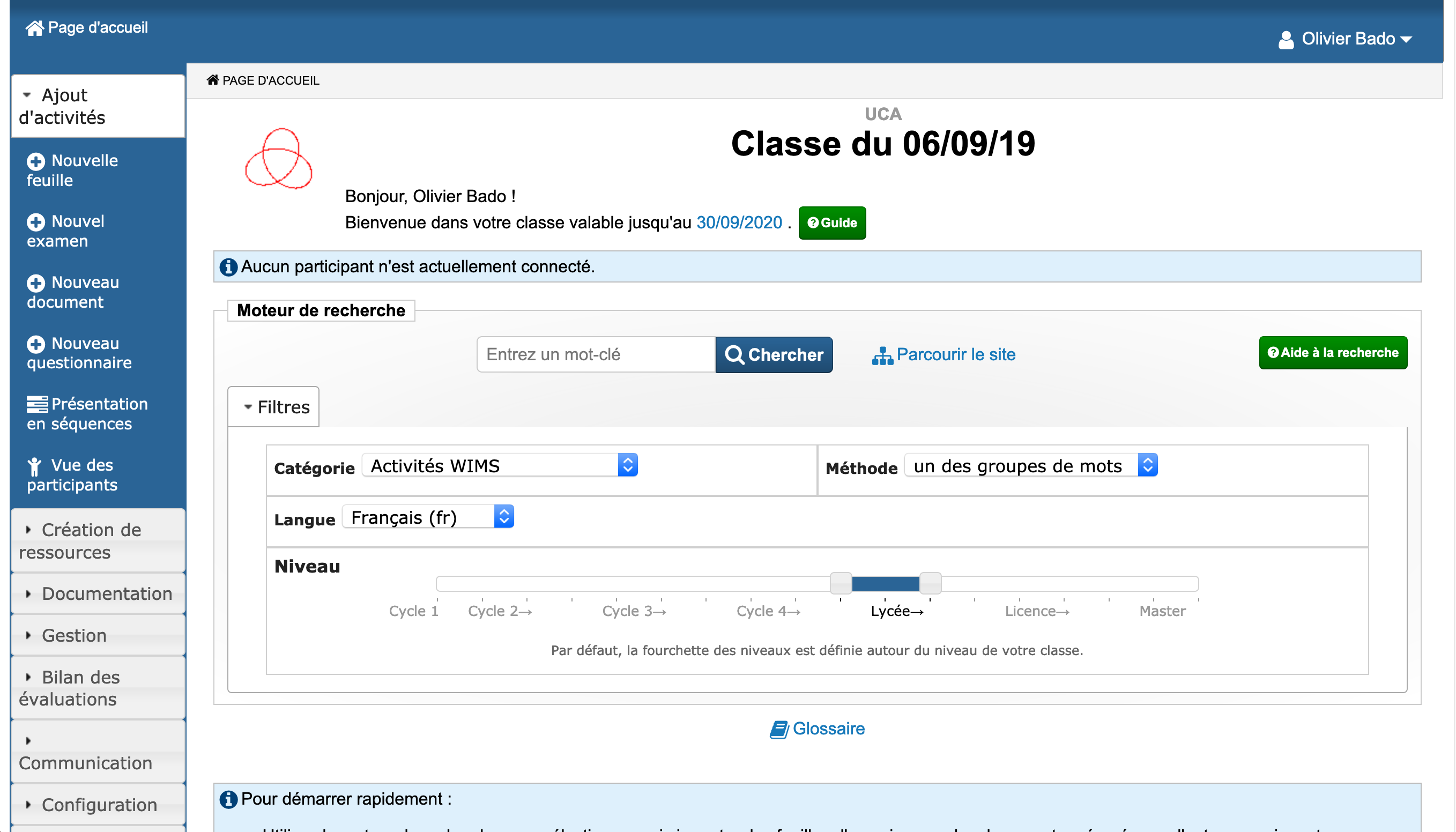
This plugin allows one to insert WIMS classes in Moodle courses.
It requires a WIMS server to have been setup and correctly configured.
Information regarding extended configuration for the WIMS server required for this plugin to work can be found below:
WIMS Configuration files
You will find in the "wims-config-templates" directory a set of 2 configuration files that need to be setup on the WIMS server to enable connections from Moodle.
The configuration files must be put in the WIMS server in the directory:
../wims/log/classes/.connections/
The files are called:
- moodlejson
- moodlejsonhttps
In these files, one needs to specify a number of parameters by hand including:
- ident_site => which must include the ip address that the Moodle server connects from
- ident_password => which should be a real password and will need to be provided as a parameter to the Moodle plugin
Moodle Configuration
- Login as administration to install the plugin.
- Go to: Site administration ' Plugins ' Install plugins
- Install plugin from ZIP file by dropping the zip file
moodle-mod_wims-master.zip - Click
continuein the verification window - Click
upgrade Moodle database nowto finish the process. - Confirm the upgrade procedure by click in
Continue
Now, some plugin parameters need to be changed to indicate the associated WIMS server.
- Go to: Site administration ' Plugins ' Plugins overview
- find the
WIMSplugin and click onSettings
In the settings window, modify the following parameters:
- WIMS Server URL: put your WIMS server URL (example:
wims-deq.urv.cat/wims/wims.cgi) - WIMS Server connection password: the password you decide (the same you put in ident_password in WIMS config files
Now the administrator tasks are finished.
How works the plugin
You must know that the WIMS classroom is created and maintained from the Moodle server.
If you log in Moodle as teacher, then you will have teacher permisions in the WIMS classroom.
In the same way, if you are student in Moodle, you will connect in the WIMS classroom as student.
Add an activity and choose WIMS Course. Then choose the value for the Activity Name and this will be the name of the new classroom created in WIMS.
If you create an exam in your WIMS classroom, the marks will be imported automaticaly by the Moodle server.
If you want also the sheets marks to be exported, you have to select the specific sheets in the activity parameters in Moodle.
All marks (exams + selected sheets) will automatically be imported in Moodle every nights.
License
- 2015 Edunao SAS contact@edunao.com
- 2018-2019 Université Nice Sophia Antipolis pi@unice.fr
- 2020-2026 Université Côte d’Azur dsi.adm-lms@univ-cotedazur.fr
This program is free software:
you can redistribute it and/or modify it under the terms of the GNU General Public License as published by the Free Software Foundation,
either version 3 of the License, or (at your option) any later version.
This program is distributed in the hope that it will be useful, but WITHOUT ANY WARRANTY;
without even the implied warranty of MERCHANTABILITY or FITNESS FOR A PARTICULAR PURPOSE.
See the GNU General Public License for more details.
You should have received a copy of the GNU General Public License along with this program.
If not, see http://www.gnu.org/licenses/.
0.5.8 (2025100800)
0.5.8
Plugin type: Activities
Frankenstyle component name: mod_wims
Version build number: 2025100800
Version release name: 0.5.8
Maturity: Stable
Supported Moodle versions: 4.3, 4.4, 4.5, 5.0, 5.1
Repository URL (Git): https://github.com/suipnice/moodle-mod_wims
Repository branch:
Repository tag: v0.5.8
Issue/bug tracker URL: https://github.com/suipnice/moodle-mod_wims/issues
WIMS classroom as Moodle activity
This plugin allows one to insert WIMS classes in Moodle courses.
It requires a WIMS server to have been setup and correctly configured.
Information regarding extended configuration for the WIMS server required for this plugin to work can be found below:
WIMS Configuration files
You will find in the "wims-config-templates" directory a set of 2 configuration files that need to be setup on the WIMS server to enable connections from Moodle.
The configuration files must be put in the WIMS server in the directory:
../wims/log/classes/.connections/
The files are called:
- moodlejson
- moodlejsonhttps
In these files, one needs to specify a number of parameters by hand including:
- ident_site => which must include the ip address that the Moodle server connects from
- ident_password => which should be a real password and will need to be provided as a parameter to the Moodle plugin
Moodle Configuration
- Login as administration to install the plugin.
- Go to: Site administration ' Plugins ' Install plugins
- Install plugin from ZIP file by dropping the zip file
moodle-mod_wims-master.zip - Click
continuein the verification window - Click
upgrade Moodle database nowto finish the process. - Confirm the upgrade procedure by click in
Continue
Now, some plugin parameters need to be changed to indicate the associated WIMS server.
- Go to: Site administration ' Plugins ' Plugins overview
- find the
WIMSplugin and click onSettings
In the settings window, modify the following parameters:
- WIMS Server URL: put your WIMS server URL (example:
wims-deq.urv.cat/wims/wims.cgi) - WIMS Server connection password: the password you decide (the same you put in ident_password in WIMS config files
Now the administrator tasks are finished.
How works the plugin
You must know that the WIMS classroom is created and maintained from the Moodle server.
If you log in Moodle as teacher, then you will have teacher permisions in the WIMS classroom.
In the same way, if you are student in Moodle, you will connect in the WIMS classroom as student.
Add an activity and choose WIMS Course. Then choose the value for the Activity Name and this will be the name of the new classroom created in WIMS.
If you create an exam in your WIMS classroom, the marks will be imported automaticaly by the Moodle server.
If you want also the sheets marks to be exported, you have to select the specific sheets in the activity parameters in Moodle.
All marks (exams + selected sheets) will automatically be imported in Moodle every nights.
License
- 2015 Edunao SAS contact@edunao.com
- 2018-2019 Université Nice Sophia Antipolis pi@unice.fr
- 2020-2025 Université Côte d’Azur dsi.adm-lms@univ-cotedazur.fr
This program is free software:
you can redistribute it and/or modify it under the terms of the GNU General Public License as published by the Free Software Foundation,
either version 3 of the License, or (at your option) any later version.
This program is distributed in the hope that it will be useful, but WITHOUT ANY WARRANTY;
without even the implied warranty of MERCHANTABILITY or FITNESS FOR A PARTICULAR PURPOSE.
See the GNU General Public License for more details.
You should have received a copy of the GNU General Public License along with this program.
If not, see http://www.gnu.org/licenses/.
0.5.7 (2025041700)
0.5.7
Plugin type: Activities
Frankenstyle component name: mod_wims
Version build number: 2025041700
Version release name: 0.5.7
Maturity: Stable
Supported Moodle versions: 4.3, 4.4, 4.5, 5.0
Repository URL (Git): https://github.com/suipnice/moodle-mod_wims
Repository branch:
Repository tag: v0.5.7
Issue/bug tracker URL: https://github.com/suipnice/moodle-mod_wims/issues
WIMS classroom as Moodle activity
This plugin allows one to insert WIMS classes in Moodle courses.
It requires a WIMS server to have been setup and correctly configured.
Information regarding extended configuration for the WIMS server required for this plugin to work can be found below:
WIMS Configuration files
You will find in the "wims-config-templates" directory a set of 2 configuration files that need to be setup on the WIMS server to enable connections from Moodle.
The configuration files must be put in the WIMS server in the directory:
../wims/log/classes/.connections/
The files are called:
- moodlejson
- moodlejsonhttps
In these files, one needs to specify a number of parameters by hand including:
- ident_site => which must include the ip address that the Moodle server connects from
- ident_password => which should be a real password and will need to be provided as a parameter to the Moodle plugin
Moodle Configuration
- Login as administration to install the plugin.
- Go to: Site administration ' Plugins ' Install plugins
- Install plugin from ZIP file by dropping the zip file
moodle-mod_wims-master.zip - Click
continuein the verification window - Click
upgrade Moodle database nowto finish the process. - Confirm the upgrade procedure by click in
Continue
Now, some plugin parameters need to be changed to indicate the associated WIMS server.
- Go to: Site administration ' Plugins ' Plugins overview
- find the
WIMSplugin and click onSettings
In the settings window, modify the following parameters:
- WIMS Server URL: put your WIMS server URL (example:
wims-deq.urv.cat/wims/wims.cgi) - WIMS Server connection password: the password you decide (the same you put in ident_password in WIMS config files
Now the administrator tasks are finished.
How works the plugin
You must know that the WIMS classroom is created and maintained from the Moodle server.
If you log in Moodle as teacher, then you will have teacher permisions in the WIMS classroom.
In the same way, if you are student in Moodle, you will connect in the WIMS classroom as student.
Add an activity and choose WIMS Course. Then choose the value for the Activity Name and this will be the name of the new classroom created in WIMS.
If you create an exam in your WIMS classroom, the marks will be imported automaticaly by the Moodle server.
If you want also the sheets marks to be exported, you have to select the specific sheets in the activity parameters in Moodle.
All marks (exams + selected sheets) will automatically be imported in Moodle every nights.
License
- 2015 Edunao SAS contact@edunao.com
- 2018-2019 Université Nice Sophia Antipolis pi@unice.fr
- 2020-2025 Université Côte d’Azur dsi.adm-lms@univ-cotedazur.fr
This program is free software:
you can redistribute it and/or modify it under the terms of the GNU General Public License as published by the Free Software Foundation,
either version 3 of the License, or (at your option) any later version.
This program is distributed in the hope that it will be useful, but WITHOUT ANY WARRANTY;
without even the implied warranty of MERCHANTABILITY or FITNESS FOR A PARTICULAR PURPOSE.
See the GNU General Public License for more details.
You should have received a copy of the GNU General Public License along with this program.
If not, see http://www.gnu.org/licenses/.
0.5.6 (2024100900)
0.5.6
Plugin type: Activities
Frankenstyle component name: mod_wims
Version build number: 2024100900
Version release name: 0.5.6
Maturity: Stable
Supported Moodle versions: 4.3, 4.4, 4.5
Repository URL (Git): https://github.com/suipnice/moodle-mod_wims
Repository branch:
Repository tag: v0.5.6
Issue/bug tracker URL: https://github.com/suipnice/moodle-mod_wims/issues
Compatibility with Moodle 4.5
- Code formatting : add space before Boilerplate comments
- Upgrade CI actions (rename Moodle "master" branch to "main")
- replace
moodle_exceptionby\moodle_exception - remove comment in en lang strings
- call to parent::setup and parent::teradown in provider_test.php
0.5.5 (2024042300)
0.5.5
Plugin type: Activities
Frankenstyle component name: mod_wims
Version build number: 2024042300
Version release name: 0.5.5
Maturity: Stable
Supported Moodle versions: 4.3, 4.4
Repository URL (Git): https://github.com/suipnice/moodle-mod_wims
Repository branch:
Repository tag: v0.5.5
Issue/bug tracker URL: https://github.com/suipnice/moodle-mod_wims/issues
WIMS classroom as Moodle activity
This plugin allows one to insert WIMS classes in Moodle courses.
It requires a WIMS server to have been setup and correctly configured.
Information regarding extended configuration for the WIMS server required for this plugin to work can be found below:
WIMS Configuration files
You will find in the "wims-config-templates" directory a set of 2 configuration files that need to be setup on the WIMS server to enable connections from Moodle.
The configuration files must be put in the WIMS server in the directory:
../wims/log/classes/.connections/
The files are called:
- moodlejson
- moodlejsonhttps
In these files, one needs to specify a number of parameters by hand including:
- ident_site => which must include the ip address that the Moodle server connects from
- ident_password => which should be a real password and will need to be provided as a parameter to the Moodle plugin
Moodle Configuration
- Login as administration to install the plugin.
- Go to: Site administration ' Plugins ' Install plugins
- Install plugin from ZIP file by dropping the zip file
moodle-mod_wims-master.zip - Click
continuein the verification window - Click
upgrade Moodle database nowto finish the process. - Confirm the upgrade procedure by click in
Continue
Now, some plugin parameters need to be changed to indicate the associated WIMS server.
- Go to: Site administration ' Plugins ' Plugins overview
- find the
WIMSplugin and click onSettings
In the settings window, modify the following parameters:
- WIMS Server URL: put your WIMS server URL (example:
wims-deq.urv.cat/wims/wims.cgi) - WIMS Server connection password: the password you decide (the same you put in ident_password in WIMS config files
Now the administrator tasks are finished.
How works the plugin:
You must know that the WIMS classroom is created and maintained from the Moodle server.
If you log in Moodle as teacher, then you will have teacher permisions in the WIMS classroom.
In the same way, if you are student in Moodle, you will connect in the WIMS classroom as student.
Add an activity and choose WIMS Course. Then choose the value for the Activity Name and this will be the name of the new classroom created in WIMS.
If you create an exam in your WIMS classroom, the marks will be imported automaticaly by the Moodle server.
If you want also the sheets marks to be exported, you have to select the specific sheets in the activity parameters in Moodle.
All marks (exams + selected sheets) will automatically be imported in Moodle every nights.
License
- 2015 Edunao SAS contact@edunao.com
- 2018-2019 Université Nice Sophia Antipolis pi@unice.fr
- 2020-2022 Université Côte d’Azur dsi.adm-lms@univ-cotedazur.fr
This program is free software:
you can redistribute it and/or modify it under the terms of the GNU General Public License as published by the Free Software Foundation,
either version 3 of the License, or (at your option) any later version.
This program is distributed in the hope that it will be useful, but WITHOUT ANY WARRANTY;
without even the implied warranty of MERCHANTABILITY or FITNESS FOR A PARTICULAR PURPOSE.
See the GNU General Public License for more details.
You should have received a copy of the GNU General Public License along with this program.
If not, see http://www.gnu.org/licenses/.
0.5.4 (2023101100)
0.5.4
Plugin type: Activities
Frankenstyle component name: mod_wims
Version build number: 2023101100
Version release name: 0.5.4
Maturity: Stable
Supported Moodle versions: 3.10, 3.11, 3.9, 4.0, 4.1, 4.2, 4.3
Repository URL (Git): https://github.com/suipnice/moodle-mod_wims
Repository branch:
Repository tag: v0.5.4
Issue/bug tracker URL: https://github.com/suipnice/moodle-mod_wims/issues
WIMS classroom as Moodle activity
This plugin allows one to insert WIMS classes in Moodle courses.
It requires a WIMS server to have been setup and correctly configured.
Information regarding extended configuration for the WIMS server required for this plugin to work can be found below:
WIMS Configuration files
You will find in the "wims-config-templates" directory a set of 2 configuration files that need to be setup on the WIMS server to enable connections from Moodle.
The configuration files must be put in the WIMS server in the directory:
../wims/log/classes/.connections/
The files are called:
- moodlejson
- moodlejsonhttps
In these files, one needs to specify a number of parameters by hand including:
- ident_site => which must include the ip address that the Moodle server connects from
- ident_password => which should be a real password and will need to be provided as a parameter to the Moodle plugin
Moodle Configuration
- Login as administration to install the plugin.
- Go to: Site administration ' Plugins ' Install plugins
- Install plugin from ZIP file by dropping the zip file
moodle-mod_wims-master.zip - Click
continuein the verification window - Click
upgrade Moodle database nowto finish the process. - Confirm the upgrade procedure by click in
Continue
Now, some plugin parameters need to be changed to indicate the associated WIMS server.
- Go to: Site administration ' Plugins ' Plugins overview
- find the
WIMSplugin and click onSettings
In the settings window, modify the following parameters:
- WIMS Server URL: put your WIMS server URL (example:
wims-deq.urv.cat/wims/wims.cgi) - WIMS Server connection password: the password you decide (the same you put in ident_password in WIMS config files
Now the administrator tasks are finished.
How works the plugin:
You must know that the WIMS classroom is created and maintained from the Moodle server.
If you log in Moodle as teacher, then you will have teacher permisions in the WIMS classroom.
In the same way, if you are student in Moodle, you will connect in the WIMS classroom as student.
Add an activity and choose WIMS Course. Then choose the value for the Activity Name and this will be the name of the new classroom created in WIMS.
If you create an exam in your WIMS classroom, the marks will be imported automaticaly by the Moodle server.
If you want also the sheets marks to be exported, you have to select the specific sheets in the activity parameters in Moodle.
All marks (exams + selected sheets) will automatically be imported in Moodle every nights.
License
- 2015 Edunao SAS
- 2018-2019 Université Nice Sophia Antipolis
- 2020-2023 Université Côte d’Azur
This program is free software:
you can redistribute it and/or modify it under the terms of the GNU General Public License as published by the Free Software Foundation,
either version 3 of the License, or (at your option) any later version.
This program is distributed in the hope that it will be useful, but WITHOUT ANY WARRANTY;
without even the implied warranty of MERCHANTABILITY or FITNESS FOR A PARTICULAR PURPOSE.
See the GNU General Public License for more details.
You should have received a copy of the GNU General Public License along with this program.
If not, see .
0.5.3 (2023042000)
0.5.3
Plugin type: Activities
Frankenstyle component name: mod_wims
Version build number: 2023042000
Version release name: 0.5.3
Maturity: Stable
Supported Moodle versions: 3.10, 3.11, 3.9, 4.0, 4.1, 4.2
Repository URL (Git): https://github.com/suipnice/moodle-mod_wims
Repository branch:
Repository tag: v0.5.3
Issue/bug tracker URL: https://github.com/suipnice/moodle-mod_wims/issues
WIMS classroom as Moodle activity
This plugin allows one to insert WIMS classes in Moodle courses.
It requires a WIMS server to have been setup and correctly configured.
Information regarding extended configuration for the WIMS server required for this plugin to work can be found below:
WIMS Configuration files
You will find in the "wims-config-templates" directory a set of 2 configuration files that need to be setup on the WIMS server to enable connections from Moodle.
The configuration files must be put in the WIMS server in the directory:
../wims/log/classes/.connections/
The files are called:
- moodlejson
- moodlejsonhttps
In these files, one needs to specify a number of parameters by hand including:
- ident_site => which must include the ip address that the Moodle server connects from
- ident_password => which should be a real password and will need to be provided as a parameter to the Moodle plugin
Moodle Configuration
- Login as administration to install the plugin.
- Go to: Site administration ' Plugins ' Install plugins
- Install plugin from ZIP file by dropping the zip file
moodle-mod_wims-master.zip - Click
continuein the verification window - Click
upgrade Moodle database nowto finish the process. - Confirm the upgrade procedure by click in
Continue
Now, some plugin parameters need to be changed to indicate the associated WIMS server.
- Go to: Site administration ' Plugins ' Plugins overview
- find the
WIMSplugin and click onSettings
In the settings window, modify the following parameters:
- WIMS Server URL: put your WIMS server URL (example:
wims-deq.urv.cat/wims/wims.cgi) - WIMS Server connection password: the password you decide (the same you put in ident_password in WIMS config files
Now the administrator tasks are finished.
How works the plugin:
You must know that the WIMS classroom is created and maintained from the Moodle server.
If you log in Moodle as teacher, then you will have teacher permisions in the WIMS classroom.
In the same way, if you are student in Moodle, you will connect in the WIMS classroom as student.
Add an activity and choose WIMS Course. Then choose the value for the Activity Name and this will be the name of the new classroom created in WIMS.
If you create an exam in your WIMS classroom, the marks will be imported automaticaly by the Moodle server.
If you want also the sheets marks to be exported, you have to select the specific sheets in the activity parameters in Moodle.
All marks (exams + selected sheets) will automatically be imported in Moodle every nights.
License
- 2015 Edunao SAS contact@edunao.com
- 2018-2019 Université Nice Sophia Antipolis pi@unice.fr
- 2020-2022 Université Côte d’Azur dsi.adm-lms@univ-cotedazur.fr
This program is free software:
you can redistribute it and/or modify it under the terms of the GNU General Public License as published by the Free Software Foundation,
either version 3 of the License, or (at your option) any later version.
This program is distributed in the hope that it will be useful, but WITHOUT ANY WARRANTY;
without even the implied warranty of MERCHANTABILITY or FITNESS FOR A PARTICULAR PURPOSE.
See the GNU General Public License for more details.
You should have received a copy of the GNU General Public License along with this program.
If not, see http://www.gnu.org/licenses/.
0.5.1 (2022112500)
0.5.1
Plugin type: Activities
Frankenstyle component name: mod_wims
Version build number: 2022112500
Version release name: 0.5.1
Maturity: Release Candidate
Supported Moodle versions: 3.10, 3.11, 3.9, 4.0, 4.1
Repository URL (Git): https://github.com/suipnice/moodle-mod_wims
Repository branch:
Repository tag: v0.5.1
Issue/bug tracker URL: https://github.com/suipnice/moodle-mod_wims/issues
WIMS classroom as Moodle activity
This plugin allows one to insert WIMS classes in Moodle courses.
It requires a WIMS server to have been setup and correctly configured.
Information regarding extended configuration for the WIMS server required for this plugin to work can be found below:
WIMS Configuration files
You will find in the "wims-config-templates" directory a set of 2 configuration files that need to be setup on the WIMS server to enable connections from Moodle.
The configuration files must be put in the WIMS server in the directory:
../wims/log/classes/.connections/
The files are called:
- moodlejson
- moodlejsonhttps
In these files, one needs to specify a number of parameters by hand including:
- ident_site => which must include the ip address that the Moodle server connects from
- ident_password => which should be a real password and will need to be provided as a parameter to the Moodle plugin
Moodle Configuration
- Login as administration to install the plugin.
- Go to: Site administration ' Plugins ' Install plugins
- Install plugin from ZIP file by dropping the zip file
moodle-mod_wims-master.zip - Click
continuein the verification window - Click
upgrade Moodle database nowto finish the process. - Confirm the upgrade procedure by click in
Continue
Now, some plugin parameters need to be changed to indicate the associated WIMS server.
- Go to: Site administration ' Plugins ' Plugins overview
- find the
WIMSplugin and click onSettings
In the settings window, modify the following parameters:
- WIMS Server URL: put your WIMS server URL (example:
wims-deq.urv.cat/wims/wims.cgi) - WIMS Server connection password: the password you decide (the same you put in ident_password in WIMS config files
Now the administrator tasks are finished.
How works the plugin:
You must know that the WIMS classroom is created and maintained from the Moodle server.
If you log in Moodle as teacher, then you will have teacher permisions in the WIMS classroom.
In the same way, if you are student in Moodle, you will connect in the WIMS classroom as student.
Add an activity and choose WIMS Course. Then choose the value for the Activity Name and this will be the name of the new classroom created in WIMS.
If you create an exam in your WIMS classroom, the marks will be imported automaticaly by the Moodle server.
If you want also the sheets marks to be exported, you have to select the specific sheets in the activity parameters in Moodle.
All marks (exams + selected sheets) will automatically be imported in Moodle every nights.
License
- 2015 Edunao SAS contact@edunao.com
- 2018-2019 Université Nice Sophia Antipolis pi@unice.fr
- 2020-2022 Université Côte d’Azur dsi.adm-lms@univ-cotedazur.fr
This program is free software:
you can redistribute it and/or modify it under the terms of the GNU General Public License as published by the Free Software Foundation,
either version 3 of the License, or (at your option) any later version.
This program is distributed in the hope that it will be useful, but WITHOUT ANY WARRANTY;
without even the implied warranty of MERCHANTABILITY or FITNESS FOR A PARTICULAR PURPOSE.
See the GNU General Public License for more details.
You should have received a copy of the GNU General Public License along with this program.
If not, see http://www.gnu.org/licenses/.
0.5.0 (2022042100)
0.5.0
Plugin type: Activities
Frankenstyle component name: mod_wims
Version build number: 2022042100
Version release name: 0.5.0
Maturity: Stable
Supported Moodle versions: 3.10, 3.11, 3.9, 4.0
Repository URL (Git): https://github.com/suipnice/moodle-mod_wims
Repository branch:
Repository tag: v0.5.0
Issue/bug tracker URL: https://github.com/suipnice/moodle-mod_wims/issues
- Add new Moodle 4.0 icon style (monologo.svg)
- Now user can choose to create a brand new class or restore a previous backup when the class has been deleted on the wims server.
- Errors in update_scores tasks will no more being ignored by Moodle (Now throws a moodle_exception on failure).
- Error Messages from view.php are now displayed inside Moodle template for better UI integration
- Store WIMS class_id inside plugin data on class creation, no more force WIMS to use an id generated by Moodle
- Codechecker + PHPDoc compliance :
- Correct the "Unexpected MOODLE_INTERNAL check. No side effects or multiple artifacts detected."
- Remove underscore prefix in some private functions (it should not be used to indicate visibility for phpCS)
0.4.2 (2021041500)
0.4.2
Plugin type: Activities
Frankenstyle component name: mod_wims
Version build number: 2021041500
Version release name: 0.4.2
Maturity: Beta
Supported Moodle versions: 3.10, 3.7, 3.8, 3.9
Repository URL (Git): https://github.com/suipnice/moodle-mod_wims
Repository branch:
Repository tag: v0.4.2
Issue/bug tracker URL: https://github.com/suipnice/moodle-mod_wims/issues
Bugfix of v0.4.1, correcting mod_form and handling Moodle proxy.
0.4.1 (2021031900)
0.4.1
Plugin type: Activities
Frankenstyle component name: mod_wims
Version build number: 2021031900
Version release name: 0.4.1
Maturity: Beta
Supported Moodle versions: 3.10, 3.7, 3.8, 3.9
Repository URL (Git): https://github.com/suipnice/moodle-mod_wims
Repository branch:
Repository tag: v0.4.1
Issue/bug tracker URL: https://github.com/suipnice/moodle-mod_wims/issues
Minor upgrade of v0.4.0, adding missing language strings.
0.4.0 (2021031600)
0.4.0
Plugin type: Activities
Frankenstyle component name: mod_wims
Version build number: 2021031600
Version release name: 0.4.0
Maturity: Beta
Supported Moodle versions: 3.10, 3.7, 3.8, 3.9
Repository URL (Git): https://github.com/suipnice/moodle-mod_wims
Repository branch:
Repository tag:
Issue/bug tracker URL: https://github.com/suipnice/moodle-mod_wims/issues
WIMS classroom as Moodle activity
Now compatible with Moodle 3.9 & 3.10, and with Privacy API.
0.3.1 (2020072300)
0.3.1
Plugin type: Activities
Frankenstyle component name: mod_wims
Version build number: 2020072300
Version release name: 0.3.1
Maturity: Beta
Supported Moodle versions: 3.6, 3.7, 3.8
Repository URL (Git): https://github.com/suipnice/moodle-mod_wims
Repository branch:
Repository tag: v0.3.1
Issue/bug tracker URL: https://github.com/suipnice/moodle-mod_wims/issues
correct 2 small bugs introduced in 0.3.0
0.3.0 (2020062900)
0.3.0
Plugin type: Activities
Frankenstyle component name: mod_wims
Version build number: 2020062900
Version release name: 0.3.0
Maturity: Beta
Supported Moodle versions: 3.6, 3.7, 3.8
Repository URL (Git): https://github.com/suipnice/moodle-mod_wims
Repository branch:
Repository tag: v0.3.0
Issue/bug tracker URL: https://github.com/suipnice/moodle-mod_wims/issues
Maximize compatibility with Moodle 3.8:
- Grade items now use the itemnumber name mapping
Optimizations :
- drop one useless 'username' field from DB
- Remove a "return null" to allow getting Exam scores even if a previous exam was empty in get scores task
- Remove Moodlehttp and Moodlehttps config files as they are useless now
- Replace old "line" WIMS adm/raw api calls by JSON
Debug:
- Tasks display more verbose infos
- improve error displayed when WIMS server is unavailable.
++ some code formatting (phpdoc + CodeChecker)
0.2.3 (2020060500)
0.2.3
Plugin type: Activities
Frankenstyle component name: mod_wims
Version build number: 2020060500
Version release name: 0.2.3
Maturity: Beta
Supported Moodle versions: 3.6, 3.7, 3.8
Repository URL (Git): https://github.com/suipnice/moodle-mod_wims
Repository branch:
Repository tag: v0.2.3
Issue/bug tracker URL: https://github.com/suipnice/moodle-mod_wims/issues
Some bug fixes :
- Grades not showing proper sheet titles (in update_scores task)
- As WIMS do not use "scale" grade type, wims_scale_used() and wims_scale_used_anywhere() now return always "false" in lib.php
... and code formatting for PhpDoc
0.2.2 (2020021900)
0.2.2
Plugin type: Activities
Frankenstyle component name: mod_wims
Version build number: 2020021900
Version release name: 0.2.2
Maturity: Beta
Supported Moodle versions: 3.6, 3.7, 3.8
Repository URL (Git): https://github.com/suipnice/moodle-mod_wims
Repository branch:
Repository tag: v0.2.2
Issue/bug tracker URL: https://github.com/suipnice/moodle-mod_wims/issues
WIMS
This plugin allows one to insert WIMS classes in Moodle classes.
It requires a WIMS server to have been setup and correctly configured.
Information regarding extended configuration for the WIMS server required for this plugin to work can be found below:
WIMS Configuration files
You will find in the "wims-config-templates" directory a set of 4 configuration files that need to be setup on the WIMS server to enable connections from Moodle.
The configuration files must be put in the WIMS server in the directory:
../wims/log/classes/.connections/
The files are called:
- moodle
- moodlehttps
- moodlejson
- moodlejsonhttps
In these files, one needs to specify a number of parameters by hand including:
- ident_site => which must include the ip address that the Moodle server connects from
- ident_password => which should be a real password and will need to be provided as a parameter to the moodle plugin
MOODLE Configuration
- Login as administration to install the plugin.
- Go to: Site administration ' Plugins ' Install plugins
- Install plugin from ZIP file by dropping the zip file
moodle-mod_wims-master.zip - Click
continuein the verification window - Click
upgrade Moodle database nowto finish the process. - Confirm the upgrade procedure by click in
Continue
Now, some plugin parameters need to be changed to indicate the associated WIMS server.
- Go to: Site administration ' Plugins ' Plugins overview
- find the
WIMSplugin and click onSettings
In the settings window, modify the following parameters:
- WIMS Server URL: put your WIMS server URL (example:
wims-deq.urv.cat/wims/wims.cgi) - WIMS Server connection password: the password you decide (the same you put in ident_password in WIMS config files
Now the administrator tasks are finished.
How works the plugin:
You must know that the WIMS classroom is created and maintained from the Moodle server. If you log in Moodle as teacher, then you will have teacher permisions in the WIMS classroom. In the same way, if you are student in Moodle, you will connect in the WIMS classroom as student.
Add an activity and choose WIMS Course. Then choose the value for the Activity Name and this will be the name of the new classroom created in WIMS.
If you create an exam in your WIMS classroom, the marks will be imported automaticaly by the Moodle server.
If you want also the sheets marks to be exported, you have to select the specific sheets in the activity parameters in Moodle.
All marks (exams + selected sheets) will automatically be imported in Moodle every nights.
License
- 2015 Edunao SAS contact@edunao.com
- 2018 Université Nice Sophia Antipolis pi@unice.fr
This program is free software: you can redistribute it and/or modify it under
the terms of the GNU General Public License as published by the Free Software
Foundation, either version 3 of the License, or (at your option) any later
version.
This program is distributed in the hope that it will be useful, but WITHOUT ANY
WARRANTY; without even the implied warranty of MERCHANTABILITY or FITNESS FOR A
PARTICULAR PURPOSE. See the GNU General Public License for more details.
You should have received a copy of the GNU General Public License along with
this program. If not, see http://www.gnu.org/licenses/.