
Enrolment key based self-registration
Premium Certified Partner
Maintained by
Brendan Heywood, Catalyst IT, Nicholas Hoobin
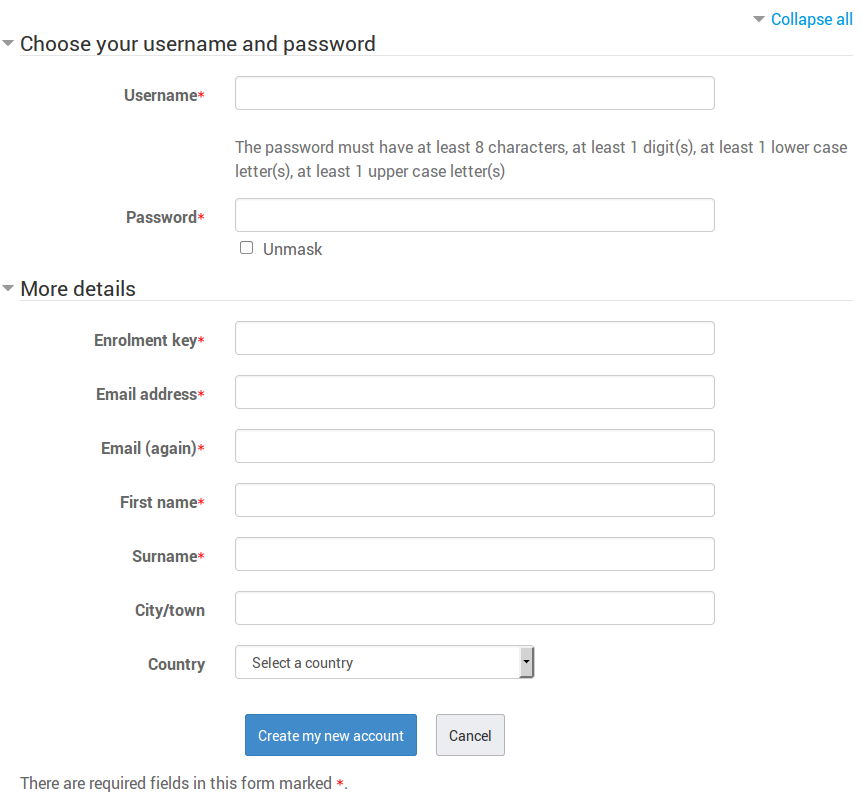
This auth plugin combines the best of both email based signup and self enrolment keys into a streamlined process making it much faster for students to get into a course. For the student it saves around 9-10 clicks and avoids context switching between a browser and their email client where they can become easily become disengaged or run into issues if their email is unavailable.
Comments
Comments are no longer open for new posts. Existing comments remain available to read.
after creating the user with the course code to enroll. notifies me the following error: "exception - Class 'course_enrolment_manager' not found"
my moodle version 3.1.1.
how can I solve that?
I am using the latest version which includes the group enrollment key feature - 2016070600. I followed the install and configure instructions to a tee and it worked the first time. Created the account and enrolled the student in the course - perfectly. I then tried to use the group enrollment key function and since then nothing seems to work. I am unable to get past the initial new user form. I have gone through the process of setting everything up at least ten times with the same result. I even reinstalled the plugin to see if that would make a difference. At one point, I disabled the plugin and tried the regular self-enrollment plugin and that worked fine so the issue is with this plugin, I think. I really need some help so if you have any suggestions as to what I can do to problem solve this, please please let me know.
Thanks works nicely!
Posted an issue in Gitthub about password reset not working.
Compliments for this very nice and customerfriendly plugin!
If not then please log them in the github issues list with more details. Thanks!
Thanks for this plugin. I found it useful, specially for my course which is for busy physicians.
One question: I registered as a user, but I couldn't see the course content (only title). I checked "Enrolled users" in the course and this new user had NO roles assigned.
Could you please help me how to resolve it?
Thanks
Bert: we haven't forgotten you and we should have a fix soonish
Rex: Sorry that looks unrelated, but if you keep having issues could provide a full test case to reproduce in a github issue. Also the use case for multiple keys for different courses is handled, the student is shown both courses and gets access to them all.
Leaving enrolment key open (not required): I end up in a blanc screen. On refreshment I see that I'm logged in. Account remains unconfirmed (that should be the case)
Using the enrolment key: I end up with a nice message that I'm enrolled in the course, but without role! So I do not see the learning activities (e.q. questionnaire).
I do like this plugin, but I uninstalled it, waiting for a slution for the abovemented two issues
Notice: Undefined index: enrolpassword in /enrol/self/locallib.php on line 130
Related to your plugin?
See https://github.com/nhoobin/moodle-auth_enrolkey/blob/master/view.php#L59
This should be changed to use moodle_url. My test moodle instance is http://localhost:8888/moodle, but the link tries to go to http://localhost:8888/course/view.php?id=2
Some concerns:
* The step up instruction "On the same page that you manage authentication options, scroll down to the common settings and select Enrolment key based self-registration in the Self Registration drop down list for registerauth." was a little confusing. I had to read it 3 times over to understand what I had to do next.
* On large installs, the chance that two or more courses will inadvertently share an enrollment key is high. Maybe a warning to site admins before they install this plugin? Or a step after registration that confirms to the user what course they actually want to sign up for?
But works as advertised, the code is great, and should be okay to be released.