Auto assign cohort (deprecated for local_cohortauto)
Versions
Current version
3.1 (2016022900)
3.1
Plugin type: Authentication
Frankenstyle component name: auth_mcae
Version build number: 2016022900
Version release name: 3.1
Maturity: Stable
Supported Moodle versions: 3.0
Repository URL (Git): https://github.com/kamat/moodle-auth_mcae
Repository branch:
Repository tag: v3.1
Issue/bug tracker URL: https://github.com/danmarsden/moodle-auth_mcae/issues
Autoenrol cohort authentication plugin for moodle 3.x
This authentication plugin automatically enrolls users into cohorts.
Cohort name depends on user profile field.
Cohorts are created in CONTEXT_SYSTEM.
Installation
- Download the archive and extract the files, or clone the repository from GitHub
- Copy the 'mcae' folder into your_moodle/auth
- Visit Site administration - Notifications page and follow the instructions
If you use an Email based self registration or similar plugin and users enrolls into cohort after second login copy/paste this code into moodle/themes/your_theme/layout/general.php (or default.php)
NOTE: Enable and configure mcae plugin first!
<?php


global $SESSION, $USER;


if ($USER->id != 0) { // Only for autenticated users

    $mcae = get_auth_plugin('mcae'); //Get mcae plugin


    if (isset($SESSION->mcautoenrolled)) {

        if (!$SESSION->mcautoenrolled) {

            $mcae->user_authenticated_hook($USER,$USER->username,""); //Autoenrol if mcautoenrolled FALSE

        }

    } else {

        $mcae->user_authenticated_hook($USER,$USER->username,""); //Autoenrol if mcautoenrolled NOT SET

    }

}


?>
Upgrade
- Replace the your_moodle/auth/mcae folder with the new version
- Visit Site administration - Notifications page and follow the instructions
- !!! If you update to version 2.9 you must rewrite templates! See configuration section.
Configuration
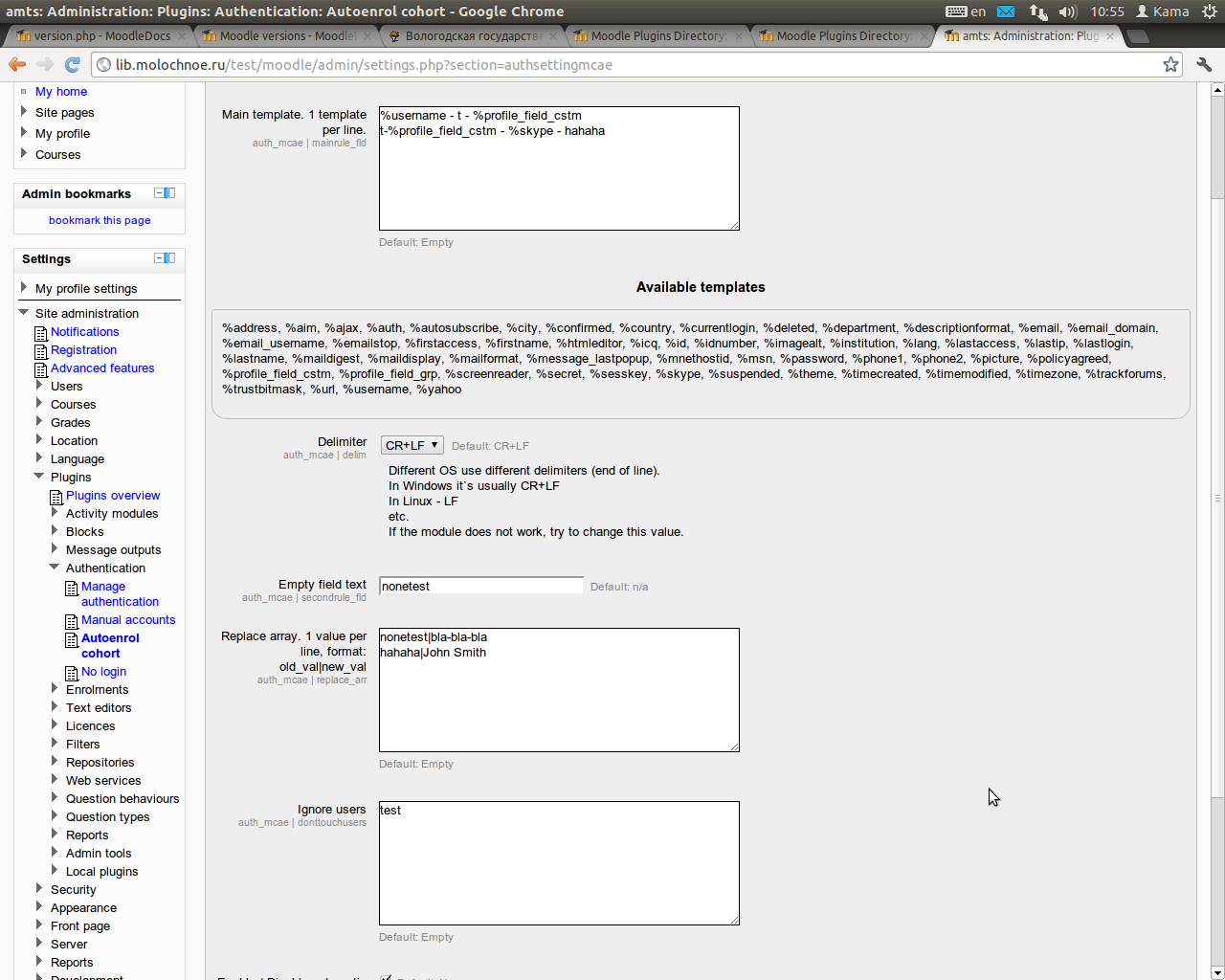
Template for cohort name
1 template per line.
In the template you may use any characters (except '{' and '}') and profile field values. To insert a profile field value, use {{ field_name }} tag.
An email fields have 4 variants:
{{ email.full }}- full email{{ email.username }}- only username{{ email.domain }}- only domain{{ email.rootdomain }}- root domain
By default moodle provides this fields
{{ id }}, {{ auth }}, {{ confirmed }}, {{ policyagreed }}, {{ deleted }}, {{ suspended }}, {{ mnethostid }}, {{ username }}, {{ idnumber }}, {{ firstname }}, {{ lastname }},
{{ email.full }}, {{ email.username }}, {{ email.domain }}, {{ email.rootdomain }}, {{ emailstop }},
{{ icq }}, {{ skype }}, {{ yahoo }}, {{ aim }}, {{ msn }}, {{ phone1 }}, {{ phone2 }},
{{ institution }}, {{ department }}, {{ address }}, {{ city }}, {{ country }}, {{ lang }},
{{ calendartype }}, {{ theme }}, {{ timezone }}, {{ firstaccess }}, {{ lastaccess }}, {{ lastlogin }}, {{ currentlogin }}, {{ lastip }},
{{ secret }}, {{ picture }}, {{ url }}, {{ descriptionformat }}, {{ mailformat }}, {{ maildigest }}, {{ maildisplay }}, {{ autosubscribe }}, {{ trackforums }},
{{ timecreated }}, {{ timemodified }}, {{ trustbitmask }}, {{ imagealt }}, {{ lastnamephonetic }}, {{ firstnamephonetic }}, {{ middlename }}, {{ alternatename }},
{{ lastcourseaccess }}, {{ currentcourseaccess }}, {{ groupmember }}
Additional tags become available if you have some custom profile fields.
For example if you create custom profile fields
checkboxtest- type Checkboxdatetimetest- type Date/Timedroptest- type Dropdown menutextinputtext- type Text input- and
textareatest- type Text area
You are able to use these tags:
{{ profile.checkboxtest }}, {{ profile.datetimetest }}, {{ profile.droptest }}, {{ profile.textinputtext }}, {{ profile_field_checkboxtest }},
{{ profile_field_datetimetest }}, {{ profile_field_droptest }}, {{ profile_field_textareatest.text }}, {{ profile_field_textareatest.format }},
{{ profile_field_textinputtext }}
Note: Profile field templates are case sensitive.
{{ username }}and{{ UserName }}are two different fields!
Split arguments:
Synopsis: %split(fieldname|delimiter)
Returns multiple cohorts, each of which is formed by splitting field on boundaries formed by the delimiter.
Arguments:
- fieldname - Profile field name. The same as tag, but without '{{' and '}}'
- delimiter - The boundary string. 1 - 5 characters.
Example:
User John fills the custom profile field "Known languages" with the value "English, Spanish, Chinese"
Main template contains string "Language - %split(knownlanguage|, )"
John will be enrolled in 3 cohorts: Language - English, Language - Spanish and Language - Chinese
Replace empty field
If profile field is empty then it's replaced with this value.
Replacement array
You can change the cohort name after it's generation.
1 replacement per line, format - old value|new value
very long cohort name|shortname
Note: The name must not be longer than 100 characters or it will be truncated
Unenroll
Unenroll users from cohorts after profile change.
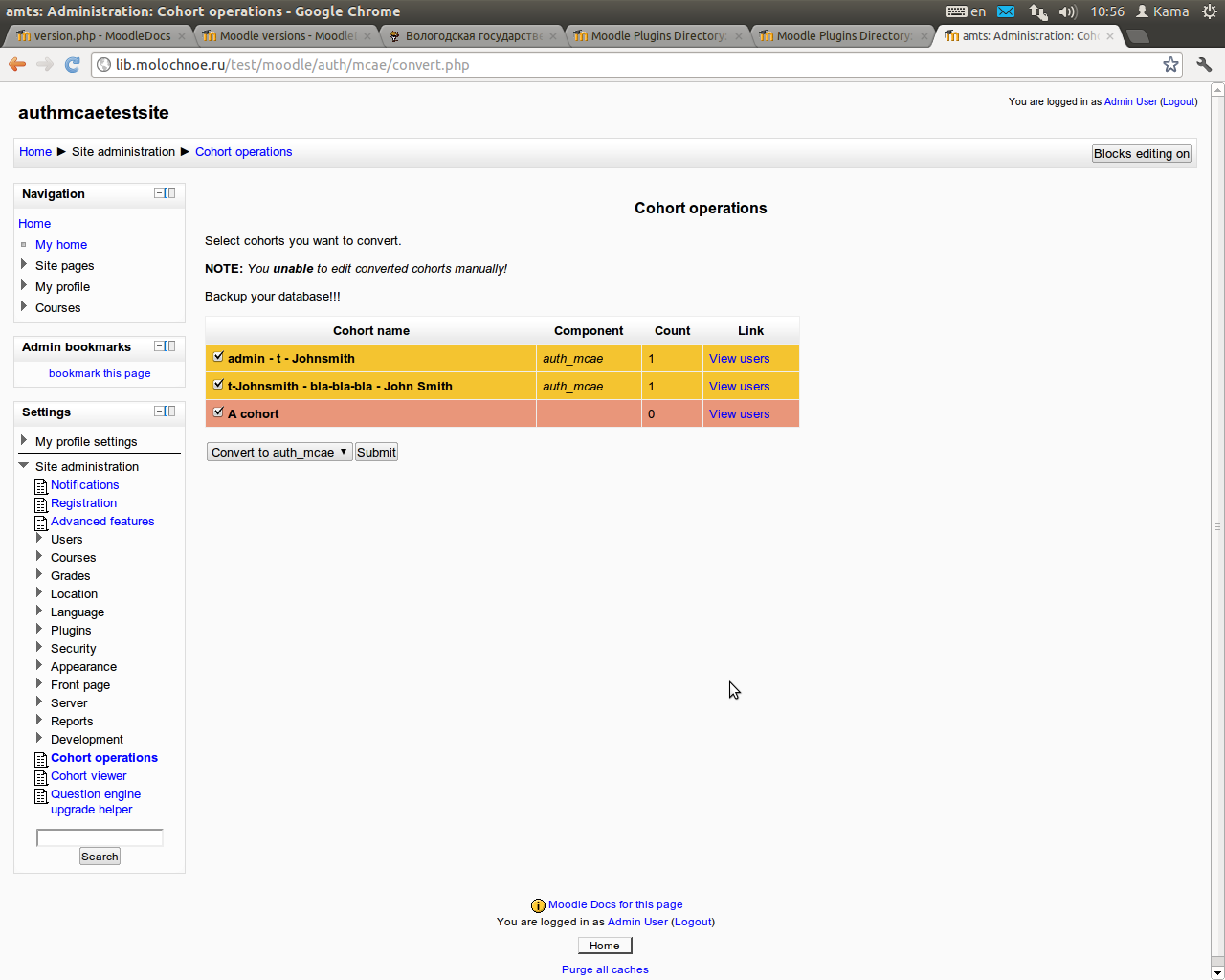
To use an unenroll feature:
- Go to Plugins - Authentication - Autoenrol cohort and enable unenrol function
- Go to yourmoodle/auth/mcae/convert.php and convert cohorts you want to "auth_mcae".
Convert only cohorts that are created by the "auth_mcae" module!
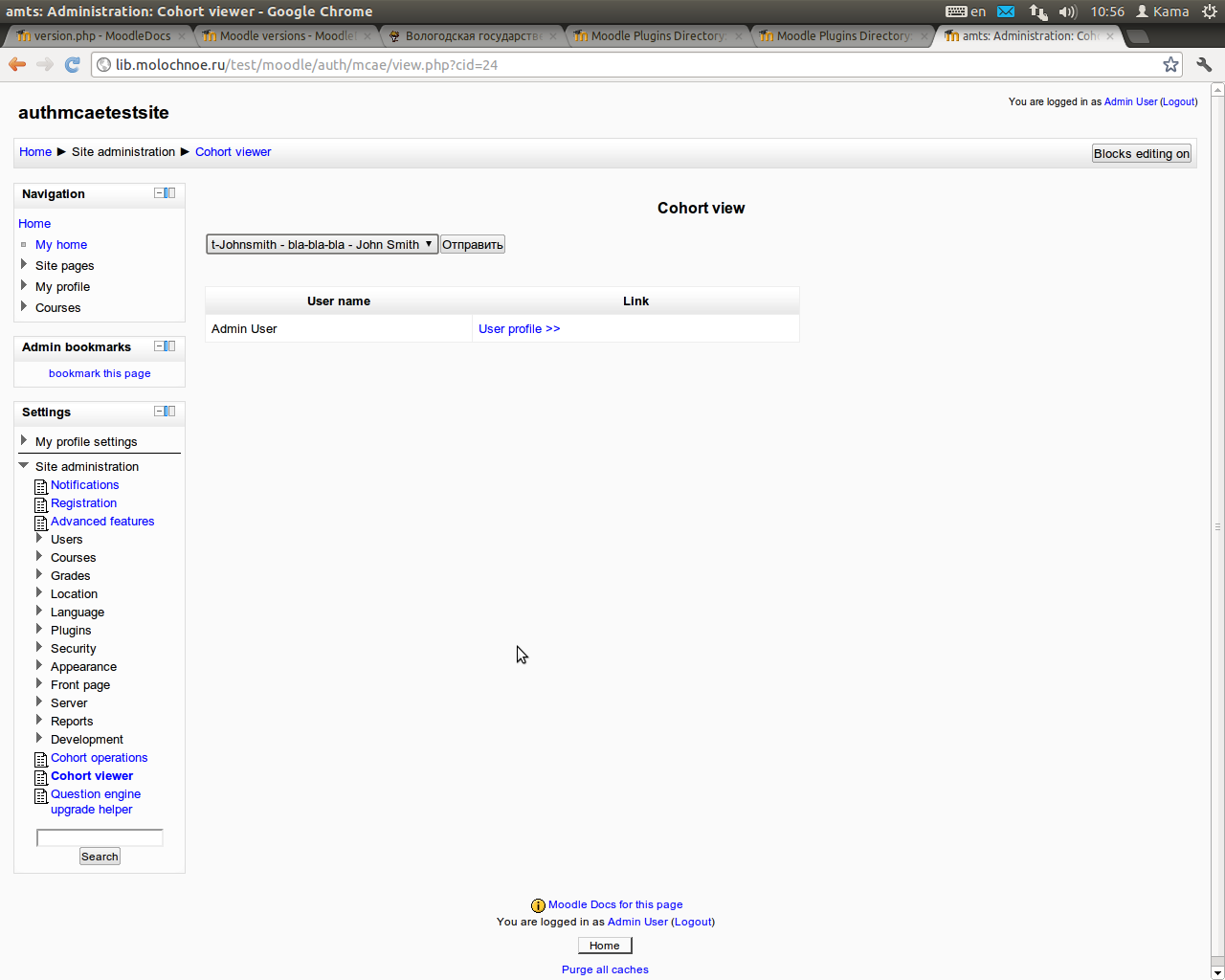
At yourmoodle/auth/mcae/convert.php page you may view, delete or convert cohorts into "manual" or "auth_mcae" mode.
Ignore users
List of users to ignore. Comma separated usernames.
admin,test,manager,teacher1,teacher2
Usage example
You have a custom profile fields "status" (student, teacher or admin) and "course".
You wnat to enrol many users into cohorts like "course - status" than enrol cohorts into courses.
At configuration page set:
Main template to {{ profile_field_course }} - {{ profile_field_status }}
Empty field text to none
Result:
- When 1st course student logs in, he's enrolled in a cohort named "1 - student"
- When 1st course teacher logs in, he's enrolled in a cohort named "1 - teacher"
- When admin logins, he's enrolled in a cohort named "none - admin" (Course not set, status - admin)
To rename "none - admin" cohort to "Administration" you must set a replacement array field at the configuration page
In our case: none - admin|Administrator
Result:
When admin logins, he's enrolled in a cohort named "Administrator"
3.0 (2015112819)
3.0
Plugin type: Authentication
Frankenstyle component name: auth_mcae
Version build number: 2015112819
Version release name: 3.0
Maturity: Stable
Supported Moodle versions: 3.0
Repository URL (Git): https://github.com/kamat/mcae
Repository branch: MOODLE_30_STABLE
Repository tag:
Issue/bug tracker URL: https://github.com/danmarsden/moodle-auth_mcae/issues
Autoenrol cohort authentication plugin for moodle 3.x
This authentication plugin automatically enrol users into cohorts.
Cohort name depends on user profile field.
Cohorts are created in CONTEXT_SYSTEM.
Installation
- Download the archive and extract the files, or clone the repository from GitHub
- Copy the 'mcae' folder into your_moodle/auth
- Visit Site administration - Notifications page and follow the instructions
If you use an Email based self registration or similar plugin and users enrolls into cohort after second login copy/paste this code into moodle/themes/your_theme/layout/general.php (or default.php)
NOTE: Enable and configure mcae plugin first!
<?php


global $SESSION, $USER;


if ($USER->id != 0) { // Only for autenticated users

    $mcae = get_auth_plugin('mcae'); //Get mcae plugin


    if (isset($SESSION->mcautoenrolled)) {

        if (!$SESSION->mcautoenrolled) {

            $mcae->user_authenticated_hook($USER,$USER->username,""); //Autoenrol if mcautoenrolled FALSE

        }

    } else {

        $mcae->user_authenticated_hook($USER,$USER->username,""); //Autoenrol if mcautoenrolled NOT SET

    }

}


?>
Upgrade
- Replace the your_moodle/auth/mcae folder with new one
- Visit Site administration - Notifications page and follow the instructions
- !!! If you update to version 2.9 you must rewrite templates! See configuration section.
Configuration
Template for cohort name
1 template per line.
In the template you may use any characters (except '{' and '}') and profile field values. To insert a profile field value, use {{ field_name }} tag.
An email field have 3 variants:
{{ email.full }}- full email{{ email.username }}- only username{{ email.domain }}- only domain{{ email.rootdomain }}- root domain
By default moodle provides this fields
{{ id }}, {{ auth }}, {{ confirmed }}, {{ policyagreed }}, {{ deleted }}, {{ suspended }}, {{ mnethostid }}, {{ username }}, {{ idnumber }}, {{ firstname }}, {{ lastname }},
{{ email.full }}, {{ email.username }}, {{ email.domain }}, {{ email.rootdomain }}, {{ emailstop }},
{{ icq }}, {{ skype }}, {{ yahoo }}, {{ aim }}, {{ msn }}, {{ phone1 }}, {{ phone2 }},
{{ institution }}, {{ department }}, {{ address }}, {{ city }}, {{ country }}, {{ lang }},
{{ calendartype }}, {{ theme }}, {{ timezone }}, {{ firstaccess }}, {{ lastaccess }}, {{ lastlogin }}, {{ currentlogin }}, {{ lastip }},
{{ secret }}, {{ picture }}, {{ url }}, {{ descriptionformat }}, {{ mailformat }}, {{ maildigest }}, {{ maildisplay }}, {{ autosubscribe }}, {{ trackforums }},
{{ timecreated }}, {{ timemodified }}, {{ trustbitmask }}, {{ imagealt }}, {{ lastnamephonetic }}, {{ firstnamephonetic }}, {{ middlename }}, {{ alternatename }},
{{ lastcourseaccess }}, {{ currentcourseaccess }}, {{ groupmember }}
Additional tags become available if you have some custom profile fields.
For example if you create custom profile fields
checkboxtest- type Checkboxdatetimetest- type Date/Timedroptest- type Dropdown menutextinputtext- type Text input- and
textareatest- type Text area
You be able to use this tags:
{{ profile.checkboxtest }}, {{ profile.datetimetest }}, {{ profile.droptest }}, {{ profile.textinputtext }}, {{ profile_field_checkboxtest }},
{{ profile_field_datetimetest }}, {{ profile_field_droptest }}, {{ profile_field_textareatest.text }}, {{ profile_field_textareatest.format }},
{{ profile_field_textinputtext }}
Note: Profile field templates is case sensitive.
{{ username }}and{{ UserName }}are two different fields!
Split arguments:
Synopsis: %split(fieldname|delimiter)
Returns multiple cohorts, each of which is formed by splitting field on boundaries formed by the delimiter.
Arguments:
- fieldname - Profile field name. The same as tag, but without '{{' and '}}'
- delimiter - The boundary string. 1 - 5 signs.
Example:
User John set custom profile field "Known languages" to "English, Spanish, Chinese"
Main template contains string "Language - %split(knownlanguage|, )"
John will be enrolled in 3 cohorts: Language - English, Language - Spanish and Language - Chinese
Replace empty field
If profile field is empty then it's replaced with this value.
Replacement array
You can change the cohort name after it's generation.
1 replacement per line, format - old value|new value
very long cohort name|shortname
Note: The name must not be longer than 100 characters or it will be stripped
Unenrol
Unenrol users from cohorts after profile change.
To use an unenrol feature:
- Go to Plugins - Authentication - Autoenrol cohort and enable unenrol function
- Go to yourmoodle/auth/mcae/convert.php and convert cohorts you want to "auth_mcae".
Convert only cohorts that are created by the "auth_mcae" module!
At yourmoodle/auth/mcae/convert.php page you may view, delete or convert cohorts into "manual" or "auth_mcae" mode.
Ignore users
List of users to ignore. Comma separated usernames.
admin,test,manager,teacher1,teacher2
Usage example
You have a custom profile fields "status" (student, teacher or admin) and "course".
You wnat to enrol many users into cohorts like "course - status" than enrol cohorts into courses.
At configuration page set:
Main template to {{ profile_field_course }} - {{ profile_field_status }}
Empty field text to none
Result:
- When 1st course student logins, he enrol to cohort named "1 - student"
- When 1st course teacher logins, he enrol to cohort named "1 - teacher"
- When admin logins, he enrol to cohort named "none - admin" (Course not set, status - admin)
To rename "none - admin" cohort to "Administration" you must set a replacement array field at the configuration page
In our case: none - admin|Administrator
Result:
When admin logins, he enrol to cohort named "Administrator"
2.9.4 (2015112818)
2.9.4
Plugin type: Authentication
Frankenstyle component name: auth_mcae
Version build number: 2015112818
Version release name: 2.9.4
Maturity: Stable
Supported Moodle versions: 2.9
Repository URL (Git): https://github.com/kamat/mcae
Repository branch: MOODLE_29_STABLE
Repository tag:
Issue/bug tracker URL: https://github.com/danmarsden/moodle-auth_mcae/issues
Autoenrol cohort authentication plugin for moodle 2.x
This authentication plugin automatically enrol users into cohorts.
Cohort name depends on user profile field.
Cohorts are created in CONTEXT_SYSTEM.
Installation
- Download the archive and extract the files, or clone the repository from GitHub
- Copy the 'mcae' folder into your_moodle/auth
- Visit Site administration - Notifications page and follow the instructions
If you use an Email based self registration or similar plugin and users enrolls into cohort after second login copy/paste this code into moodle/themes/your_theme/layout/general.php (or default.php)
NOTE: Enable and configure mcae plugin first!
<?php


global $SESSION, $USER;


if ($USER->id != 0) { // Only for autenticated users

    $mcae = get_auth_plugin('mcae'); //Get mcae plugin


    if (isset($SESSION->mcautoenrolled)) {

        if (!$SESSION->mcautoenrolled) {

            $mcae->user_authenticated_hook($USER,$USER->username,""); //Autoenrol if mcautoenrolled FALSE

        }

    } else {

        $mcae->user_authenticated_hook($USER,$USER->username,""); //Autoenrol if mcautoenrolled NOT SET

    }

}


?>
Upgrade
- Replace the your_moodle/auth/mcae folder with new one
- Visit Site administration - Notifications page and follow the instructions
- !!! If you update to version 2.9 you must rewrite templates! See configuration section.
Configuration
Template for cohort name
1 template per line.
In the template you may use any characters (except '{' and '}') and profile field values. To insert a profile field value, use {{ field_name }} tag.
An email field have 3 variants:
{{ email.full }}- full email{{ email.username }}- only username{{ email.domain }}- only domain{{ email.rootdomain }}- root domain
By default moodle provides this fields
{{ id }}, {{ auth }}, {{ confirmed }}, {{ policyagreed }}, {{ deleted }}, {{ suspended }}, {{ mnethostid }}, {{ username }}, {{ idnumber }}, {{ firstname }}, {{ lastname }},
{{ email.full }}, {{ email.username }}, {{ email.domain }}, {{ email.rootdomain }}, {{ emailstop }},
{{ icq }}, {{ skype }}, {{ yahoo }}, {{ aim }}, {{ msn }}, {{ phone1 }}, {{ phone2 }},
{{ institution }}, {{ department }}, {{ address }}, {{ city }}, {{ country }}, {{ lang }},
{{ calendartype }}, {{ theme }}, {{ timezone }}, {{ firstaccess }}, {{ lastaccess }}, {{ lastlogin }}, {{ currentlogin }}, {{ lastip }},
{{ secret }}, {{ picture }}, {{ url }}, {{ descriptionformat }}, {{ mailformat }}, {{ maildigest }}, {{ maildisplay }}, {{ autosubscribe }}, {{ trackforums }},
{{ timecreated }}, {{ timemodified }}, {{ trustbitmask }}, {{ imagealt }}, {{ lastnamephonetic }}, {{ firstnamephonetic }}, {{ middlename }}, {{ alternatename }},
{{ lastcourseaccess }}, {{ currentcourseaccess }}, {{ groupmember }}
Additional tags become available if you have some custom profile fields.
For example if you create custom profile fields
checkboxtest- type Checkboxdatetimetest- type Date/Timedroptest- type Dropdown menutextinputtext- type Text input- and
textareatest- type Text area
You be able to use this tags:
{{ profile.checkboxtest }}, {{ profile.datetimetest }}, {{ profile.droptest }}, {{ profile.textinputtext }}, {{ profile_field_checkboxtest }},
{{ profile_field_datetimetest }}, {{ profile_field_droptest }}, {{ profile_field_textareatest.text }}, {{ profile_field_textareatest.format }},
{{ profile_field_textinputtext }}
Note: Profile field templates is case sensitive.
{{ username }}and{{ UserName }}are two different fields!
Split arguments:
Synopsis: %split(fieldname|delimiter)
Returns multiple cohorts, each of which is formed by splitting field on boundaries formed by the delimiter.
Arguments:
- fieldname - Profile field name. The same as tag, but without '{{' and '}}'
- delimiter - The boundary string. 1 - 5 signs.
Example:
User John set custom profile field "Known languages" to "English, Spanish, Chinese"
Main template contains string "Language - %split(knownlanguage|, )"
John will be enrolled in 3 cohorts: Language - English, Language - Spanish and Language - Chinese
Replace empty field
If profile field is empty then it's replaced with this value.
Replacement array
You can change the cohort name after it's generation.
1 replacement per line, format - old value|new value
very long cohort name|shortname
Note: The name must not be longer than 100 characters or it will be stripped
Unenrol
Unenrol users from cohorts after profile change.
To use an unenrol feature:
- Go to Plugins - Authentication - Autoenrol cohort and enable unenrol function
- Go to yourmoodle/auth/mcae/convert.php and convert cohorts you want to "auth_mcae".
Convert only cohorts that are created by the "auth_mcae" module!
At yourmoodle/auth/mcae/convert.php page you may view, delete or convert cohorts into "manual" or "auth_mcae" mode.
Ignore users
List of users to ignore. Comma separated usernames.
admin,test,manager,teacher1,teacher2
Usage example
You have a custom profile fields "status" (student, teacher or admin) and "course".
You wnat to enrol many users into cohorts like "course - status" than enrol cohorts into courses.
At configuration page set:
Main template to {{ profile_field_course }} - {{ profile_field_status }}
Empty field text to none
Result:
- When 1st course student logins, he enrol to cohort named "1 - student"
- When 1st course teacher logins, he enrol to cohort named "1 - teacher"
- When admin logins, he enrol to cohort named "none - admin" (Course not set, status - admin)
To rename "none - admin" cohort to "Administration" you must set a replacement array field at the configuration page
In our case: none - admin|Administrator
Result:
When admin logins, he enrol to cohort named "Administrator"
2.9.3 (2015112815)
2.9.3
Plugin type: Authentication
Frankenstyle component name: auth_mcae
Version build number: 2015112815
Version release name: 2.9.3
Maturity: Stable
Supported Moodle versions: 2.9
Repository URL (Git): https://github.com/kamat/mcae
Repository branch: MOODLE_29_STABLE
Repository tag:
Issue/bug tracker URL: https://github.com/danmarsden/moodle-auth_mcae/issues
Autoenrol cohort authentication plugin for moodle 2.x
This authentication plugin automatically enrol users into cohorts.
Cohort name depends on user profile field.
Cohorts are created in CONTEXT_SYSTEM.
Installation
- Download the archive and extract the files, or clone the repository from GitHub
- Copy the 'mcae' folder into your_moodle/auth
- Visit Site administration - Notifications page and follow the instructions
If you use an Email based self registration or similar plugin and users enrolls into cohort after second login copy/paste this code into moodle/themes/your_theme/layout/general.php (or default.php)
> NOTE: Enable and configure mcae plugin first!
<?php


global $SESSION, $USER;


if ($USER->id != 0) { // Only for autenticated users

    $mcae = get_auth_plugin('mcae'); //Get mcae plugin


    if (isset($SESSION->mcautoenrolled)) {

        if (!$SESSION->mcautoenrolled) {

            $mcae->user_authenticated_hook($USER,$USER->username,""); //Autoenrol if mcautoenrolled FALSE

        }

    } else {

        $mcae->user_authenticated_hook($USER,$USER->username,""); //Autoenrol if mcautoenrolled NOT SET

    }

}


?>
Upgrade
- Replace the your_moodle/auth/mcae folder with new one
- Visit Site administration - Notifications page and follow the instructions
- !!! If you update to version 2.9 you must rewrite templates! See configuration section.
Configuration
Template for cohort name
1 template per line.
In the template you may use any characters (except '{' and '}') and profile field values. To insert a profile field value, use {{ field_name }} tag.
An email field have 3 variants:
{{ email.full }}- full email{{ email.username }}- only username{{ email.domain }}- only domain{{ email.rootdomain }}- root domain
By default moodle provides this fields
{{ id }}, {{ auth }}, {{ confirmed }}, {{ policyagreed }}, {{ deleted }}, {{ suspended }}, {{ mnethostid }}, {{ username }}, {{ idnumber }}, {{ firstname }}, {{ lastname }},
{{ email.full }}, {{ email.username }}, {{ email.domain }}, {{ email.rootdomain }}, {{ emailstop }},
{{ icq }}, {{ skype }}, {{ yahoo }}, {{ aim }}, {{ msn }}, {{ phone1 }}, {{ phone2 }},
{{ institution }}, {{ department }}, {{ address }}, {{ city }}, {{ country }}, {{ lang }},
{{ calendartype }}, {{ theme }}, {{ timezone }}, {{ firstaccess }}, {{ lastaccess }}, {{ lastlogin }}, {{ currentlogin }}, {{ lastip }},
{{ secret }}, {{ picture }}, {{ url }}, {{ descriptionformat }}, {{ mailformat }}, {{ maildigest }}, {{ maildisplay }}, {{ autosubscribe }}, {{ trackforums }},
{{ timecreated }}, {{ timemodified }}, {{ trustbitmask }}, {{ imagealt }}, {{ lastnamephonetic }}, {{ firstnamephonetic }}, {{ middlename }}, {{ alternatename }},
{{ lastcourseaccess }}, {{ currentcourseaccess }}, {{ groupmember }}
Additional tags become available if you have some custom profile fields.
For example if you create custom profile fields
checkboxtest- type Checkboxdatetimetest- type Date/Timedroptest- type Dropdown menutextinputtext- type Text input- and
textareatest- type Text area
You be able to use this tags:
{{ profile.checkboxtest }}, {{ profile.datetimetest }}, {{ profile.droptest }}, {{ profile.textinputtext }}, {{ profile_field_checkboxtest }},
{{ profile_field_datetimetest }}, {{ profile_field_droptest }}, {{ profile_field_textareatest.text }}, {{ profile_field_textareatest.format }},
{{ profile_field_textinputtext }}
> Note: Profile field templates is case sensitive. {{ username }} and {{ UserName }} are two different fields!
Split arguments:
Synopsis: %split(fieldname|delimiter)
Returns multiple cohorts, each of which is formed by splitting field on boundaries formed by the delimiter.
Arguments:
- fieldname - Profile field name. The same as tag, but without '{{' and '}}'
- delimiter - The boundary string. 1 - 5 signs.
Example:
User John set custom profile field "Known languages" to "English, Spanish, Chinese"
Main template contains string "Language - %split(knownlanguage|, )"
John will be enrolled in 3 cohorts: Language - English, Language - Spanish and Language - Chinese
Replace empty field
If profile field is empty then it's replaced with this value.
Replacement array
You can change the cohort name after it's generation.
1 replacement per line, format - old value|new value
very long cohort name|shortname
Note: The name must not be longer than 100 characters or it will be stripped
Unenrol
Unenrol users from cohorts after profile change.
To use an unenrol feature:
- Go to Plugins - Authentication - Autoenrol cohort and enable unenrol function
- Go to yourmoodle/auth/mcae/convert.php and convert cohorts you want to "auth_mcae".
Convert only cohorts that are created by the "auth_mcae" module!
At yourmoodle/auth/mcae/convert.php page you may view, delete or convert cohorts into "manual" or "auth_mcae" mode.
Ignore users
List of users to ignore. Comma separated usernames.
admin,test,manager,teacher1,teacher2
Usage example
You have a custom profile fields "status" (student, teacher or admin) and "course".
You wnat to enrol many users into cohorts like "course - status" than enrol cohorts into courses.
At configuration page set:
Main template to {{ profile_field_course }} - {{ profile_field_status }}
Empty field text to none
Result:
- When 1st course student logins, he enrol to cohort named "1 - student"
- When 1st course teacher logins, he enrol to cohort named "1 - teacher"
- When admin logins, he enrol to cohort named "none - admin" (Course not set, status - admin)
To rename "none - admin" cohort to "Administration" you must set a replacement array field at the configuration page
In our case: none - admin|Administrator
Result:
When admin logins, he enrol to cohort named "Administrator"
1.1 (2013072314)
1.1
Plugin type: Authentication
Frankenstyle component name: auth_mcae
Version build number: 2013072314
Version release name: 1.1
Maturity: Stable
Supported Moodle versions: 2.5
Repository URL (Git): https://github.com/kamat/mcae
Repository branch:
Repository tag:
Issue/bug tracker URL: https://github.com/danmarsden/moodle-auth_mcae/issues
Autoenrol cohort authentication plugin for moodle 2.x
This authentication plugin automatically enrol users into cohorts.
Cohort name depends on user profile field.
Cohorts are created in CONTEXT_SYSTEM.
Installation
- Download the archive and extract the files, or clone the repository from GitHub
- Copy the 'mcae' folder into your_moodle/auth
- Visit Site administration - Notifications page and follow the instructions
If you use an Email based self registration or similar plugin and users enrolls into cohort after second login copy/paste this code into moodle/themes/your_theme/layout/general.php (or default.php)
> NOTE: Enable and configure mcae plugin first!
<?php


global $SESSION, $USER;


if ($USER->id != 0) { // Only for autenticated users

    $mcae = get_auth_plugin('mcae'); //Get mcae plugin


    if (isset($SESSION->mcautoenrolled)) {

        if (!$SESSION->mcautoenrolled) {

            $mcae->user_authenticated_hook($USER,$USER->username,""); //Autoenrol if mcautoenrolled FALSE

        }

    } else {

        $mcae->user_authenticated_hook($USER,$USER->username,""); //Autoenrol if mcautoenrolled NOT SET

    }

}


?>
Upgrade
- Replace the your_moodle/auth/mcae folder with new one
- Visit Site administration - Notifications page and follow the instructions
Configuration
Template for cohort name
1 template per line.
In the template you may use any characters (except '%') and profile field values. To insert a profile field value, use '%' sign and name of the field (%lastname, %firstname, etc).
Custom profile fields have two templates: %profile_field_name and %profile_field_raw_name. It's useful with fields like 'menu of choices':
- %profile_field_raw_name - number of the selected value
- %profile_field_name - selected value
An email field have 3 variants:
- %email - full email
- %email_username - only username
- %email_domain - only domain
Note: Profile field templates is case sensitive. %username and %UserName are two different fields!
Custom profile field types:
'Textarea' type have only 'raw' variant. All HTML tags is removed.
'Text input' returns the same value in both variants
Checkboxes returns 1 or 0 in both variants.
Date/time fields returns unix timestamp
Split arguments:
Usage: %split(fieldname|delimiter)
Returns multiple cohorts, each of which is formed by splitting field on boundaries formed by the delimiter.
Arguments:
- fieldname - Profile field name with '%' sign.
- delimiter - The boundary string. 1 - 5 signs.
Example:
User John set custom profile field "Known languages" to "English, Spanish, Chinese"
Main template contains string "Language - %split(%knownlanguage|, )"
John will be enrolled in 3 cohorts: Language - English, Language - Spanish and Language - Chinese
Replace empty field
If profile field is empty then it's replaced with this value.
Replacement array
You can change the cohort name after it's generation.
1 replacement per line, format - old value|new value
very long cohort name|shortname
Unenrol
Unenrol users from cohorts after profile change.
To use an unenrol feature:
- Go to Plugins - Authentication - Autoenrol cohort and enable unenrol function
- Go to yourmoodle/auth/mcae/convert.php and convert cohorts you want to "auth_mcae".
Convert only cohorts that are created by the "auth_mcae" module!
At yourmoodle/auth/mcae/convert.php page you may view, delete or convert cohorts into "manual" or "auth_mcae" mode.
Ignore users
List of users to ignore. Comma separated usernames.
admin,test,manager,teacher1,teacher2
Usage example
You have a custom profile fields "status" (student, teacher or admin) and "course".
You wnat to enrol many users into cohorts like "course - status" than enrol cohorts into courses.
At configuration page set:
Main template to %profile_field_course - %profile_field_status
Empty field text to 'none'
Result:
- When 1st course student logins, he enrol to cohort named "1 - student"
- When 1st course teacher logins, he enrol to cohort named "1 - teacher"
- When admin logins, he enrol to cohort named "none - admin" (Course not set, status - admin)
To rename "none - admin" cohort to "Administration" you must set a replacement array field at the configuration page
In our case: none - admin|Administrator
Result:
When admin logins, he enrol to cohort named "Administrator"
1.0 (2013051812)
1.0
Plugin type: Authentication
Frankenstyle component name: auth_mcae
Version build number: 2013051812
Version release name: 1.0
Maturity: Stable
Supported Moodle versions: 2.5
Repository URL (Git): https://github.com/kamat/mcae
Repository branch:
Repository tag:
Issue/bug tracker URL: https://github.com/danmarsden/moodle-auth_mcae/issues
Autoenrol cohort authentication plugin for moodle 2.x
This authentication plugin automatically enrol users into cohorts.
Cohort name depends on user profile field.
Cohorts are created in CONTEXT_SYSTEM.
Installation
- Download the archive and extract the files, or clone the repository from GitHub
- Copy the 'mcae' folder into your_moodle/auth
- Visit Site administration - Notifications page and follow the instructions
If you use an Email based self registration or similar plugin and users enrolls into cohort after second login copy/paste this code into moodle/themes/your_theme/layout/general.php (or default.php)
> NOTE: Enable and configure mcae plugin first!
<?php


global $SESSION, $USER;


if ($USER->id != 0) { // Only for autenticated users

    $mcae = get_auth_plugin('mcae'); //Get mcae plugin


    if (isset($SESSION->mcautoenrolled)) {

        if (!$SESSION->mcautoenrolled) {

            $mcae->user_authenticated_hook($USER,$USER->username,""); //Autoenrol if mcautoenrolled FALSE

        }

    } else {

        $mcae->user_authenticated_hook($USER,$USER->username,""); //Autoenrol if mcautoenrolled NOT SET

    }

}


?>
Upgrade
- Replace the your_moodle/auth/mcae folder with new one
- Visit Site administration - Notifications page and follow the instructions
Configuration
Template for cohort name
1 template per line.
In the template you may use any characters (except '%') and profile field values. To insert a profile field value, use '%' sign and name of the field (%lastname, %firstname, etc).
Custom profile fields have two templates: %profile_field_name and %profile_field_raw_name. It's useful with fields like 'menu of choices':
- %profile_field_raw_name - number of the selected value
- %profile_field_name - selected value
An email field have 3 variants:
- %email - full email
- %email_username - only username
- %email_domain - only domain
> Note: Profile field templates is case sensitive. %username and %UserName are two different fields!
> Custom profile field types:
> 'Textarea' type have only 'raw' variant. All HTML tags is removed.
> 'Text input' returns the same value in both variants
> Checkboxes returns 1 or 0 in both variants.
> Date/time fields returns unix timestamp
Replace empty field
If profile field is empty then it's replaced with this value.
Replacement array
You can change the cohort name after it's generation.
1 replacement per line, format - old value|new value
very long cohort name|shortname
Unenrol
Unenrol users from cohorts after profile change.
To use an unenrol feature:
- Go to Plugins - Authentication - Autoenrol cohort and enable unenrol function
- Go to yourmoodle/auth/mcae/convert.php and convert cohorts you want to "auth_mcae".
Convert only cohorts that are created by the "auth_mcae" module!
At yourmoodle/auth/mcae/convert.php page you may view, delete or convert cohorts into "manual" or "auth_mcae" mode.
Ignore users
List of users to ignore. Comma separated usernames.
admin,test,manager,teacher1,teacher2
Usage example
You have a custom profile fields "status" (student, teacher or admin) and "course".
You wnat to enrol many users into cohorts like "course - status" than enrol cohorts into courses.
At configuration page set:
Main template to %profile_field_course - %profile_field_status
Empty field text to 'none'
Result:
- When 1st course student logins, he enrol to cohort named "1 - student"
- When 1st course teacher logins, he enrol to cohort named "1 - teacher"
- When admin logins, he enrol to cohort named "none - admin" (Course not set, status - admin)
To rename "none - admin" cohort to "Administration" you must set a replacement array field at the configuration page
In our case: none - admin|Administrator
Result:
When admin logins, he enrol to cohort named "Administrator"
0.5 (2012071912)
0.5
Plugin type: Authentication
Frankenstyle component name: auth_mcae
Version build number: 2012071912
Version release name: 0.5
Maturity: Release Candidate
Supported Moodle versions: 2.2, 2.3
Repository URL (Git): https://github.com/kamat/mcae
Repository branch:
Repository tag:
Issue/bug tracker URL: https://github.com/danmarsden/moodle-auth_mcae/issues
Autoenrol cohort authentication plugin for moodle 2.x
This authentication plugin automatically enrol users into cohorts.
Cohort name depends on user profile field.
Cohorts are created in CONTEXT_SYSTEM.
Installation
- Download the archive and extract the files, or clone the repository from GitHub
- Copy the 'mcae' folder into your_moodle/auth
- Visit Site administration - Notifications page and follow the instructions
If you use an Email based self registration or similar plugin and users enrolls into cohort after second login copy/paste this code into moodle/themes/your_theme/layout/general.php (or default.php)
NOTE: Enable and configure mcae plugin first!
<?php


global $SESSION, $USER;


if ($USER->id != 0) { // Only for autenticated users

    $mcae = get_auth_plugin('mcae'); //Get mcae plugin


    if (isset($SESSION->mcautoenrolled)) {

        if (!$SESSION->mcautoenrolled) {

            $mcae->user_authenticated_hook($USER,$USER->username,""); //Autoenrol if mcautoenrolled FALSE

        }

    } else {

        $mcae->user_authenticated_hook($USER,$USER->username,""); //Autoenrol if mcautoenrolled NOT SET

    }

}


?>
Upgrade
- Replace the your_moodle/auth/mcae folder with new one
- Visit Site administration - Notifications page and follow the instructions
Configuration
Template for cohort name
1 template per line.
In the template you may use any characters (except '%') and profile field values. To insert a profile field value, use '%' sign and name of the field (%lastname, %firstname, etc).
Custom profile fields have two templates: %profile_field_name and %profile_field_raw_name. It's useful with fields like 'menu of choices':
- %profile_field_raw_name - number of the selected value
- %profile_field_name - selected value
An email field have 3 variants:
- %email - full email
- %email_username - only username
- %email_domain - only domain
Note: Profile field templates is case sensitive. %username and %UserName are two different fields!
Custom profile field types:
'Textarea' type have only 'raw' variant. All HTML tags is removed.
'Text input' returns the same value in both variants
Checkboxes returns 1 or 0 in both variants.
Date/time fields returns unix timestamp
Replace empty field
If profile field is empty then it's replaced with this value.
Replacement array
You can change the cohort name after it's generation.
1 replacement per line, format - old value|new value
very long cohort name|shortname
Unenrol
Unenrol users from cohorts after profile change.
To use an unenrol feature:
- Go to Plugins - Authentication - Autoenrol cohort and enable unenrol function
- Go to yourmoodle/auth/mcae/convert.php and convert cohorts you want to "auth_mcae".
Convert only cohorts that are created by the "auth_mcae" module!
At yourmoodle/auth/mcae/convert.php page you may view, delete or convert cohorts into "manual" or "auth_mcae" mode.
Ignore users
List of users to ignore. Comma separated usernames.
admin,test,manager,teacher1,teacher2
Usage example
You have a custom profile fields "status" (student, teacher or admin) and "course".
You wnat to enrol many users into cohorts like "course - status" than enrol cohorts into courses.
At configuration page set:
Main template to %profile_field_course - %profile_field_status
Empty field text to 'none'
Result:
- When 1st course student logins, he enrol to cohort named "1 - student"
- When 1st course teacher logins, he enrol to cohort named "1 - teacher"
- When admin logins, he enrol to cohort named "none - admin" (Course not set, status - admin)
To rename "none - admin" cohort to "Administration" you must set a replacement array field at the configuration page
In our case: none - admin|Administrator
Result:
When admin logins, he enrol to cohort named "Administrator"
0.4 (2012050512)
0.4
Plugin type: Authentication
Frankenstyle component name: auth_mcae
Version build number: 2012050512
Version release name: 0.4
Maturity: Release Candidate
Supported Moodle versions: 2.1, 2.2
Repository URL (Git): https://github.com/kamat/mcae
Repository branch:
Repository tag:
Issue/bug tracker URL: https://github.com/danmarsden/moodle-auth_mcae/issues
Autoenrol cohort authentication plugin for moodle 2.x
This authentication plugin automatically enrol users into cohorts.
Cohort name depends on user profile field.
Cohorts are created in CONTEXT_SYSTEM.
Installation
- Download the archive and extract the files, or clone the repository from GitHub
- Copy the 'mcae' folder into your_moodle/auth
- Visit Site administration - Notifications page and follow the instructions
If you use an Email based self registration or similar plugin and users enrolls into cohort after second login copy/paste this code into moodle/themes/your_theme/layout/general.php (or default.php)
NOTE: Enable and configure mcae plugin first!
<?php


global $SESSION, $USER;


if ($USER->id != 0) { // Only for autenticated users

    $mcae = get_auth_plugin('mcae'); //Get mcae plugin


    if (isset($SESSION->mcautoenrolled)) {

        if (!$SESSION->mcautoenrolled) {

            $mcae->user_authenticated_hook($USER,$USER->username,""); //Autoenrol if mcautoenrolled FALSE

        }

    } else {

        $mcae->user_authenticated_hook($USER,$USER->username,""); //Autoenrol if mcautoenrolled NOT SET

    }

}


?>
Upgrade
- Replace the your_moodle/auth/mcae folder with new one
- Visit Site administration - Notifications page and follow the instructions
Configuration
Template for cohort name
1 template per line.
In the template you may use any characters (except '%') and profile field values. To insert a profile field value, use '%' sign and name of the field (%lastname, %firstname, etc).
Custom profile fields have two templates: %profile_field_name and %profile_field_raw_name. It's useful with fields like 'menu of choices':
- %profile_field_raw_name - number of the selected value
- %profile_field_name - selected value
An email field have 3 variants:
- %email - full email
- %email_username - only username
- %email_domain - only domain
Note: Profile field templates is case sensitive. %username and %UserName are two different fields!
Custom profile field types:
'Textarea' type have only 'raw' variant. All HTML tags is removed.
'Text input' returns the same value in both variants
Checkboxes returns 1 or 0 in both variants.
Date/time fields returns unix timestamp
Replace empty field
If profile field is empty then it's replaced with this value.
Replacement array
You can change the cohort name after it's generation.
1 replacement per line, format - old value|new value
very long cohort name|shortname
Unenrol
Unenrol users from cohorts after profile change.
To use an unenrol feature:
- Go to Plugins - Authentication - Autoenrol cohort and enable unenrol function
- Go to yourmoodle/auth/mcae/convert.php and convert cohorts you want to "auth_mcae".
Convert only cohorts that are created by the "auth_mcae" module!
At yourmoodle/auth/mcae/convert.php page you may view, delete or convert cohorts into "manual" or "auth_mcae" mode.
Ignore users
List of users to ignore. Comma separated usernames.
admin,test,manager,teacher1,teacher2
Usage example
You have a custom profile fields "status" (student, teacher or admin) and "course".
You wnat to enrol many users into cohorts like "course - status" than enrol cohorts into courses.
At configuration page set:
Main template to %profile_field_course - %profile_field_status
Empty field text to 'none'
Result:
- When 1st course student logins, he enrol to cohort named "1 - student"
- When 1st course teacher logins, he enrol to cohort named "1 - teacher"
- When admin logins, he enrol to cohort named "none - admin" (Course not set, status - admin)
To rename "none - admin" cohort to "Administration" you must set a replacement array field at the configuration page
In our case: none - admin|Administrator
Result:
When admin logins, he enrol to cohort named "Administrator"
0.31 (2012040219)
0.31
Plugin type: Authentication
Frankenstyle component name: auth_mcae
Version build number: 2012040219
Version release name: 0.31
Maturity: Release Candidate
Supported Moodle versions: 2.1, 2.2
Repository URL (Git): https://github.com/kamat/mcae
Repository branch:
Repository tag:
Issue/bug tracker URL: https://github.com/danmarsden/moodle-auth_mcae/issues
This Authentication plugin automatically enrol users into cohorts.
Cohort name depends on user profile field.
How to use:
- Copy plugin into /moodle/auth directory
- Go to Site administration - Notifications page and install it
- Go to Plugins - Authentication and enable plugin
- Configure main rules (template for cohort name)
second rule (replace empty field)
and replacement array - ???
- PROFIT
UPGRADE:
Visit Site administration - Notifications page and follow the instructions.
Cohorts are created in CONTEXT_SYSTEM
EXAMPLE:
You have a custom profile fields "status" (student, teacher or admin) and "course".
You wnat to enrol many users into cohorts like "course - status" than enrol cohorts into courses.
At configuration page set:
Main template to %profile_field_course - %profile_field_status (1 template per line, before profile fields type %)
Empty field text (When field is empty this value used) to none
Result:
When 1st course student logins, he enrol to cohort named "1 - student"
When 1st course teacher logins, he enrol to cohort named "1 - teacher"
When admin logins, he enrol to cohort named "none - admin" (Course not set, status - admin)
To rename "none - admin" cohort to "Administration" you must set a replacement array field at the configuration page (1 replacement per line, old_value|new_value)
In our case: none - admin|Administrator
Result:
When admin logins, he enrol to cohort named "Administrator"
This plugin only create cohorts and enrol users to it.
To find the list of profile fields go to User - > User bulk operation and download 1-2 users.
=== Version 0.3 changes ===
- Unenrol user from cohort after profile change.
How to use this function:
a) Go to Plugins - Authentication - Autoenrol cohort and enable unenrol function,
b) Go to yourmoodle/auth/mcae/convert.php and convert cohorts to "auth_mcae". Convert only cohorts that are created by the "auth_mcae" module!
At yourmoodle/auth/mcae/convert.php page you may view, delete or convert cohorts into "manual" or "auth_mcae" mode.
Add "%email_username" and "%email_domain" variables to use in main rule.
"Ignore users" list.
EXAMPLE: admin,test,manager,teacher1,teacher2
0.2 (2011121500)
0.2
Plugin type: Authentication
Frankenstyle component name: auth_mcae
Version build number: 2011121500
Version release name: 0.2
Maturity: Release Candidate
Supported Moodle versions: 2.0, 2.1, 2.2
Repository URL (Git):
Repository branch:
Repository tag:
Issue/bug tracker URL: https://github.com/danmarsden/moodle-auth_mcae/issues
This Authentication plugin automatically enrol users into cohorts.
Cohort name depends on user profile field.
How to use:
- Copy plugin into /moodle/auth directory
- Go to Site administration - Notifications page and install it
- Go to Plugins - Authentication and enable plugin
- Configure main rules (template for cohort name)
second rule (replace empty field)
and replacement array - ???
- PROFIT
Cohorts are created in CONTEXT_SYSTEM
EXAMPLE:
You have a custom profile fields "status" (student, teacher or admin) and "course".
You wnat to enrol many users into cohorts like "course - status" than enrol cohorts into courses.
At configuration page set:
Main template to %profile_field_course - %profile_field_status (1 template per line, before profile fields type %)
Empty field text (When field is empty this value used) to none
Result:
When 1st course student logins, he enrol to cohort named "1 - student"
When 1st course teacher logins, he enrol to cohort named "1 - teacher"
When admin logins, he enrol to cohort named "none - admin" (Course not set, status - admin)
To rename "none - admin" cohort to "Administration" you must set a replacement array field at the configuration page (1 replacement per line, old_value|new_value)
In our case: none - admin|Administrator
Result:
When admin logins, he enrol to cohort named "Administrator"
This plugin only create cohorts and enrol users to it.
To find the list of profile fields go to User - > User bulk operation and download 1-2 users.
0.1 (2011112700)
0.1
Plugin type: Authentication
Frankenstyle component name: auth_mcae
Version build number: 2011112700
Version release name: 0.1
Maturity: Release Candidate
Supported Moodle versions: 2.0, 2.1
Repository URL (Git):
Repository branch:
Repository tag:
Issue/bug tracker URL: https://github.com/danmarsden/moodle-auth_mcae/issues
This Authentication plugin automatically enrol users into cohorts.
Cohort name depends on user profile field.
How to use:
- Copy plugin into /moodle/auth directory
- Go to Site administration - Notifications page and install it
- Go to Plugins - Authentication and enable plugin
- Configure main rules (template for cohort name)
second rule (replace empty field)
and replacement array - ???
- PROFIT
Cohorts are created in CONTEXT_SYSTEM
EXAMPLE:
You have a custom profile fields "status" (student, teacher or admin) and "course".
You wnat to enrol many users into cohorts like "course - status" than enrol cohorts into courses.
At configuration page set:
Main template to %profile_field_course - %profile_field_status (1 template per line, before profile fields type %)
Empty field text (When field is empty this value used) to none
Result:
When 1st course student logins, he enrol to cohort named "1 - student"
When 1st course teacher logins, he enrol to cohort named "1 - teacher"
When admin logins, he enrol to cohort named "none - admin" (Course not set, status - admin)
To rename "none - admin" cohort to "Administration" you must set a replacement array field at the configuration page (1 replacement per line, old_value|new_value)
In our case: none - admin|Administrator
Result:
When admin logins, he enrol to cohort named "Administrator"
This plugin only create cohorts and enrol users to it.
To find the list of profile fields go to User - > User bulk operation and download 1-2 users.