QuizExport
Versions
Current version
4.5.3 (Build 2026050614) (2026050620)
4.5.3 (Build 2026050614)
Plugin type: Quiz reports
Frankenstyle component name: quiz_export
Version build number: 2026050620
Version release name: 4.5.3 (Build 2026050614)
Maturity: Stable
Supported Moodle versions: 4.4, 4.5, 5.0, 5.1, 5.2
Repository URL (Git): https://github.com/cbluesprl/moodle-quiz_export
Repository branch:
Repository tag: v4.5.3
Issue/bug tracker URL: https://github.com/cbluesprl/moodle-quiz_export/issues
moodle-quiz_export
This is a quiz report plugin for moodle to export quiz attempts as pdf. Single quiz attempt exports are possible as well as bulk exports as zip files.
It has been designed to work with mpdf package.
Dependencies:
- mpdf (https://mpdf.github.io/). The package is included in the plugin
Installation:
- switch to /path/to/moodle/mod/quiz/report/
- execute
git clone <this_github_link> export - on moodle page go to "Site Administration" -> "Notifications" and follow the instructions
Technical Information:
- this plugin saves html, pdf and zip files temporary in the folder returned by sys_get_temp_dir() PHP function.
- zip archives are generated with the ZipArchive class
Practical information:
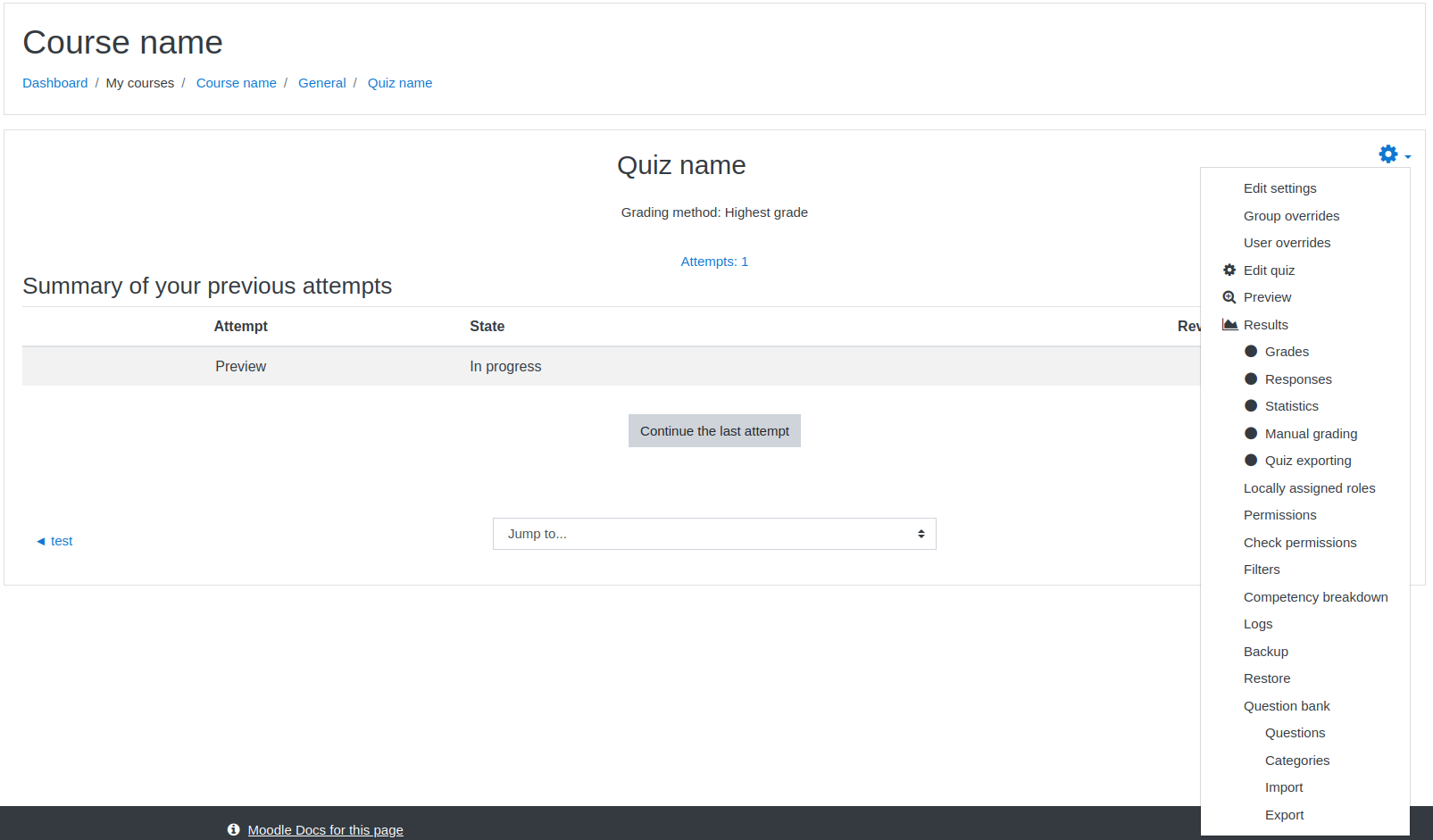
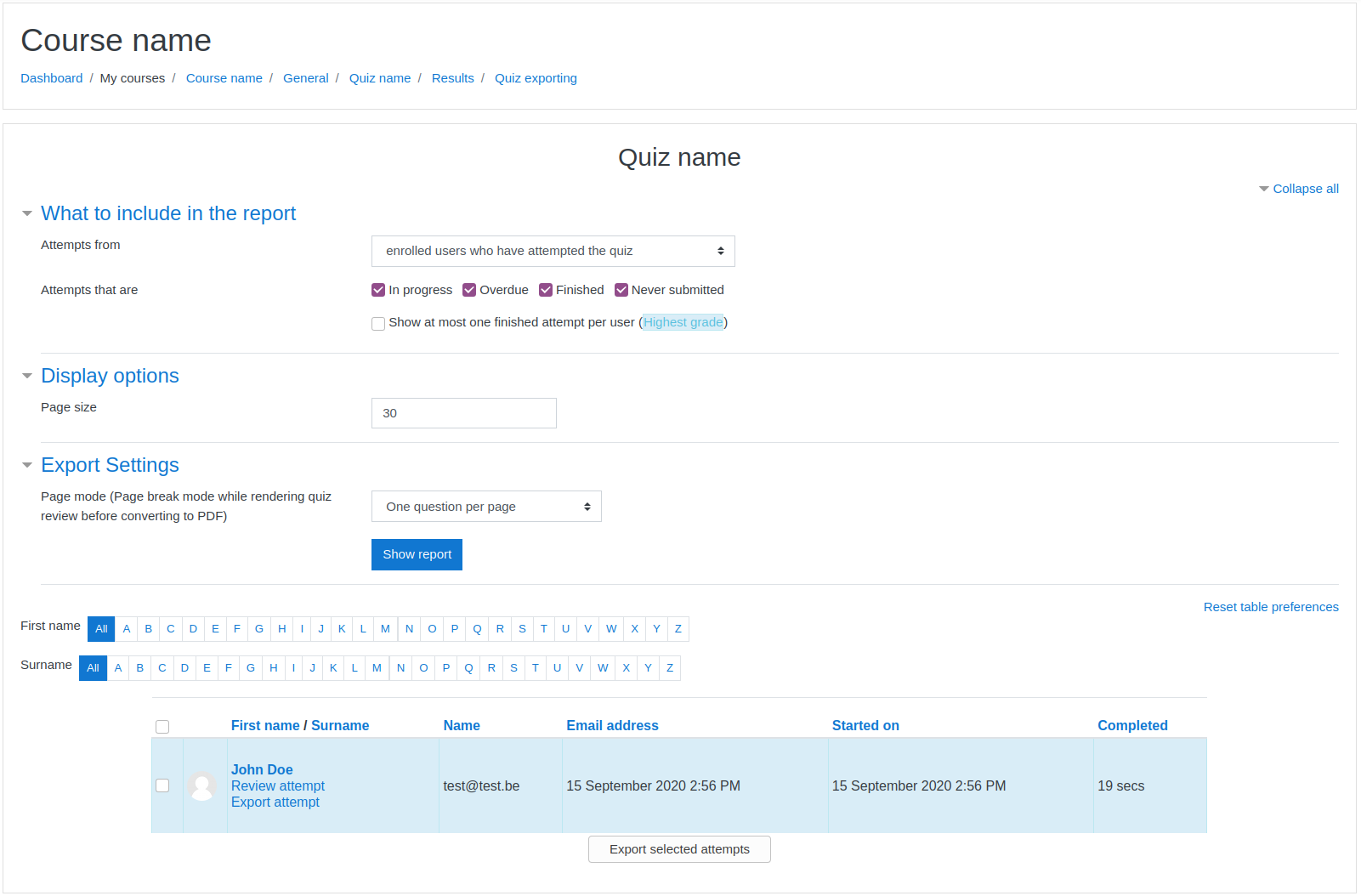
- Open a quiz page. Then click on the "Results" tab and choose "Quiz exporting" (or "Export de quiz" in french) in the select menu
- On this page, you can choose the export options, then select one (or more) attempts to export in a zip file containing one or more pdfs depending on selection
Copyright
This plugin is strongly based on this plugin. It has been modified to use mpdf instead of wkhtmltopdf.
4.5.2 (Build 2026050400) (2026050400)
4.5.2 (Build 2026050400)
Plugin type: Quiz reports
Frankenstyle component name: quiz_export
Version build number: 2026050400
Version release name: 4.5.2 (Build 2026050400)
Maturity: Stable
Supported Moodle versions: 4.4, 4.5, 5.0, 5.1, 5.2
Repository URL (Git): https://github.com/cbluesprl/moodle-quiz_export
Repository branch:
Repository tag: v4.5.2
Issue/bug tracker URL: https://github.com/cbluesprl/moodle-quiz_export/issues
moodle-quiz_export
This is a quiz report plugin for moodle to export quiz attempts as pdf. Single quiz attempt exports are possible as well as bulk exports as zip files.
It has been designed to work with mpdf package.
Dependencies:
- mpdf (https://mpdf.github.io/). The package is included in the plugin
Installation:
- switch to /path/to/moodle/mod/quiz/report/
- execute
git clone <this_github_link> export - on moodle page go to "Site Administration" -> "Notifications" and follow the instructions
Technical Information:
- this plugin saves html, pdf and zip files temporary in the folder returned by sys_get_temp_dir() PHP function.
- zip archives are generated with the ZipArchive class
Practical information:
- Open a quiz page. Then click on the "Results" tab and choose "Quiz exporting" (or "Export de quiz" in french) in the select menu
- On this page, you can choose the export options, then select one (or more) attempts to export in a zip file containing one or more pdfs depending on selection
Copyright
This plugin is strongly based on this plugin. It has been modified to use mpdf instead of wkhtmltopdf.
4.0.3 (Build 2026021703) (2026021703)
4.0.3 (Build 2026021703)
Plugin type: Quiz reports
Frankenstyle component name: quiz_export
Version build number: 2026021703
Version release name: 4.0.3 (Build 2026021703)
Maturity: Stable
Supported Moodle versions: 4.5, 5.0, 5.1
Repository URL (Git): https://github.com/cbluesprl/moodle-quiz_export
Repository branch:
Repository tag: 4.x.3
Issue/bug tracker URL: https://github.com/cbluesprl/moodle-quiz_export/issues
moodle-quiz_export
This is a quiz report plugin for moodle to export quiz attempts as pdf. Single quiz attempt exports are possible as well as bulk exports as zip files.
It has been designed to work with mpdf package.
Dependencies:
- mpdf (https://mpdf.github.io/). The package is included in the plugin
Installation:
- switch to /path/to/moodle/mod/quiz/report/
- execute
git clone <this_github_link> export - on moodle page go to "Site Administration" -> "Notifications" and follow the instructions
Technical Information:
- this plugin saves html, pdf and zip files temporary in the folder returned by sys_get_temp_dir() PHP function.
- zip archives are generated with the ZipArchive class
Practical information:
- Open a quiz page. Then click on the "Results" tab and choose "Quiz exporting" (or "Export de quiz" in french) in the select menu
- On this page, you can choose the export options, then select one (or more) attempts to export in a zip file containing one or more pdfs depending on selection
Copyright
This plugin is strongly based on this plugin. It has been modified to use mpdf instead of wkhtmltopdf.
4.0.0 (Build 2024081600) (2025061800)
4.0.0 (Build 2024081600)
Plugin type: Quiz reports
Frankenstyle component name: quiz_export
Version build number: 2025061800
Version release name: 4.0.0 (Build 2024081600)
Maturity: Stable
Supported Moodle versions: 4.0, 4.1, 4.2, 4.3, 4.4, 4.5
Repository URL (Git): https://github.com/cbluesprl/moodle-quiz_export
Repository branch:
Repository tag: 4.x.2
Issue/bug tracker URL: https://github.com/cbluesprl/moodle-quiz_export/issues
moodle-quiz_export
This is a quiz report plugin for moodle to export quiz attempts as pdf. Single quiz attempt exports are possible as well as bulk exports as zip files.
It has been designed to work with mpdf package.
Dependencies:
- mpdf (https://mpdf.github.io/). The package is included in the plugin
Installation:
- switch to /path/to/moodle/mod/quiz/report/
- execute
git clone <this_github_link> export - on moodle page go to "Site Administration" -> "Notifications" and follow the instructions
Technical Information:
- this plugin saves html, pdf and zip files temporary in the folder returned by sys_get_temp_dir() PHP function.
- zip archives are generated with the ZipArchive class
Practical information:
- Open a quiz page. Then click on the "Results" tab and choose "Quiz exporting" (or "Export de quiz" in french) in the select menu
- On this page, you can choose the export options, then select one (or more) attempts to export in a zip file containing one or more pdfs depending on selection
Copyright
This plugin is strongly based on this plugin. It has been modified to use mpdf instead of wkhtmltopdf.
4.0.0 (Build 2024081600) (2024112702)
4.0.0 (Build 2024081600)
Plugin type: Quiz reports
Frankenstyle component name: quiz_export
Version build number: 2024112702
Version release name: 4.0.0 (Build 2024081600)
Maturity: Stable
Supported Moodle versions: 4.4, 4.5
Repository URL (Git): https://github.com/cbluesprl/moodle-quiz_export
Repository branch: MOODLE_404_405
Repository tag:
Issue/bug tracker URL: https://github.com/cbluesprl/moodle-quiz_export/issues
moodle-quiz_export
This is a quiz report plugin for moodle to export quiz attempts as pdf. Single quiz attempt exports are possible as well as bulk exports as zip files.
It has been designed to work with mpdf package.
Dependencies:
- mpdf (https://mpdf.github.io/). The package is included in the plugin
Installation:
- switch to /path/to/moodle/mod/quiz/report/
- execute
git clone <this_github_link> export - on moodle page go to "Site Administration" -> "Notifications" and follow the instructions
Technical Information:
- this plugin saves html, pdf and zip files temporary in the folder returned by sys_get_temp_dir() PHP function.
- zip archives are generated with the ZipArchive class
Practical information:
- Open a quiz page. Then click on the "Results" tab and choose "Quiz exporting" (or "Export de quiz" in french) in the select menu
- On this page, you can choose the export options, then select one (or more) attempts to export in a zip file containing one or more pdfs depending on selection
Copyright
This plugin is strongly based on this plugin. It has been modified to use mpdf instead of wkhtmltopdf.
4.0.0 (Build 2024081600) (2024112701)
4.0.0 (Build 2024081600)
Plugin type: Quiz reports
Frankenstyle component name: quiz_export
Version build number: 2024112701
Version release name: 4.0.0 (Build 2024081600)
Maturity: Stable
Supported Moodle versions: 4.2, 4.3
Repository URL (Git): https://github.com/cbluesprl/moodle-quiz_export
Repository branch: MOODLE_402_403
Repository tag:
Issue/bug tracker URL: https://github.com/cbluesprl/moodle-quiz_export/issues
moodle-quiz_export
This is a quiz report plugin for moodle to export quiz attempts as pdf. Single quiz attempt exports are possible as well as bulk exports as zip files.
It has been designed to work with mpdf package.
Dependencies:
- mpdf (https://mpdf.github.io/). The package is included in the plugin
Installation:
- switch to /path/to/moodle/mod/quiz/report/
- execute
git clone <this_github_link> export - on moodle page go to "Site Administration" -> "Notifications" and follow the instructions
Technical Information:
- this plugin saves html, pdf and zip files temporary in the folder returned by sys_get_temp_dir() PHP function.
- zip archives are generated with the ZipArchive class
Practical information:
- Open a quiz page. Then click on the "Results" tab and choose "Quiz exporting" (or "Export de quiz" in french) in the select menu
- On this page, you can choose the export options, then select one (or more) attempts to export in a zip file containing one or more pdfs depending on selection
Copyright
This plugin is strongly based on this plugin. It has been modified to use mpdf instead of wkhtmltopdf.
4.0.0 (Build 2024081600) (2024112700)
4.0.0 (Build 2024081600)
Plugin type: Quiz reports
Frankenstyle component name: quiz_export
Version build number: 2024112700
Version release name: 4.0.0 (Build 2024081600)
Maturity: Stable
Supported Moodle versions: 4.0, 4.1
Repository URL (Git): https://github.com/cbluesprl/moodle-quiz_export
Repository branch: MOODLE_400_401
Repository tag:
Issue/bug tracker URL: https://github.com/cbluesprl/moodle-quiz_export/issues
moodle-quiz_export
This is a quiz report plugin for moodle to export quiz attempts as pdf. Single quiz attempt exports are possible as well as bulk exports as zip files.
It has been designed to work with mpdf package.
Dependencies:
- mpdf (https://mpdf.github.io/). The package is included in the plugin
Installation:
- switch to /path/to/moodle/mod/quiz/report/
- execute
git clone <this_github_link> export - on moodle page go to "Site Administration" -> "Notifications" and follow the instructions
Technical Information:
- this plugin saves html, pdf and zip files temporary in the folder returned by sys_get_temp_dir() PHP function.
- zip archives are generated with the ZipArchive class
Practical information:
- Open a quiz page. Then click on the "Results" tab and choose "Quiz exporting" (or "Export de quiz" in french) in the select menu
- On this page, you can choose the export options, then select one (or more) attempts to export in a zip file containing one or more pdfs depending on selection
Copyright
This plugin is strongly based on this plugin. It has been modified to use mpdf instead of wkhtmltopdf.
4.0.0 (Build 2024081600) (2024082000)
4.0.0 (Build 2024081600)
Plugin type: Quiz reports
Frankenstyle component name: quiz_export
Version build number: 2024082000
Version release name: 4.0.0 (Build 2024081600)
Maturity: Stable
Supported Moodle versions: 4.0, 4.1, 4.2, 4.3, 4.4
Repository URL (Git): https://github.com/cbluesprl/moodle-quiz_export
Repository branch:
Repository tag:
Issue/bug tracker URL: https://github.com/cbluesprl/moodle-quiz_export/issues
moodle-quiz_export
This is a quiz report plugin for moodle to export quiz attempts as pdf. Single quiz attempt exports are possible as well as bulk exports as zip files.
It has been designed to work with mpdf package.
Dependencies:
- mpdf (https://mpdf.github.io/) must be installed. Run "composer install" in the plugin's path to install it.
Installation:
- switch to /path/to/moodle/mod/quiz/report/
- execute git clone <this_github_link> export
- composer install
- on moodle page go to "Site Administration" -> "Notifications" and follow the instructions
Technical Information:
- this plugin saves html, pdf and zip files temporary in the folder returned by sys_get_temp_dir() PHP function.
- zip archives are generated with the ZipArchive class
Practical information:
- Open a quiz page. Then click on the cog and choose "Quiz exporting" (or "Export de quiz" in french)
- On this page, you can choose the export options, then select one (or more) attempts to export (it will be downloaded as zip if more than one attempt has been selected)
Copyright
This plugin is strongly based on this plugin. It has been modified to use mpdf instead of wkhtmltopdf.
4.0.0 (Build 2024081600) (2024081600)
4.0.0 (Build 2024081600)
Plugin type: Quiz reports
Frankenstyle component name: quiz_export
Version build number: 2024081600
Version release name: 4.0.0 (Build 2024081600)
Maturity: Stable
Supported Moodle versions: 4.0, 4.1, 4.2, 4.3, 4.4
Repository URL (Git): https://github.com/cbluesprl/moodle-quiz_export
Repository branch: MOODLE_4X
Repository tag:
Issue/bug tracker URL: https://github.com/cbluesprl/moodle-quiz_export/issues
moodle-quiz_export
This is a quiz report plugin for moodle to export quiz attempts as pdf. Single quiz attempt exports are possible as well as bulk exports as zip files.
It has been designed to work with mpdf package.
Dependencies:
- mpdf (https://mpdf.github.io/) must be installed. Run "composer install" in the plugin's path to install it.
Installation:
- switch to /path/to/moodle/mod/quiz/report/
- execute git clone <this_github_link> export
- composer install
- on moodle page go to "Site Administration" -> "Notifications" and follow the instructions
Technical Information:
- this plugin saves html, pdf and zip files temporary in the folder returned by sys_get_temp_dir() PHP function.
- zip archives are generated with the ZipArchive class
Practical information:
- Open a quiz page. Then click on the cog and choose "Quiz exporting" (or "Export de quiz" in french)
- On this page, you can choose the export options, then select one (or more) attempts to export (it will be downloaded as zip if more than one attempt has been selected)
Copyright
This plugin is strongly based on this plugin. It has been modified to use mpdf instead of wkhtmltopdf.
3.9.0 (Build 2021110300) (2021110300)
3.9.0 (Build 2021110300)
Plugin type: Quiz reports
Frankenstyle component name: quiz_export
Version build number: 2021110300
Version release name: 3.9.0 (Build 2021110300)
Maturity: Stable
Supported Moodle versions: 3.10, 3.11, 3.9
Repository URL (Git): https://github.com/cbluesprl/moodle-quiz_export
Repository branch:
Repository tag:
Issue/bug tracker URL: https://github.com/cbluesprl/moodle-quiz_export/issues
moodle-quiz_export
This is a quiz report plugin for moodle to export quiz attempts as pdf. Single quiz attempt exports are possible as well as bulk exports as zip files.
It has been designed to work with mpdf package.
Dependencies:
- mpdf (https://mpdf.github.io/) must be installed. Run "composer install" in the plugin's path to install it if you install it with git.
Installation:
- switch to /path/to/moodle/mod/quiz/report/
- execute git clone <this_github_link> export
- composer install
- on moodle page go to "Site Administration" -> "Notifications" and follow the instructions
Technical Information:
- this plugin saves html, pdf and zip files temporary in the folder returned by sys_get_temp_dir() PHP function.
- zip archives are generated with the ZipArchive class
Practical information:
- Open a quiz page. Then click on the cog and choose "Quiz exporting" (or "Export de quiz" in french)
- On this page, you can choose the export options, then select one (or more) attempts to export (it will be downloaded as zip if more than one attempt has been selected)
Copyright
This plugin is strongly based on this plugin. It has been modified to use mpdf instead of wkhtmltopdf.
2.2.0 (Build 2021110207) (2021110207)
2.2.0 (Build 2021110207)
Plugin type: Quiz reports
Frankenstyle component name: quiz_export
Version build number: 2021110207
Version release name: 2.2.0 (Build 2021110207)
Maturity: Stable
Supported Moodle versions: 2.7, 2.8, 2.9, 3.0, 3.1, 3.2, 3.3, 3.4, 3.5, 3.6, 3.7, 3.8
Repository URL (Git): https://github.com/cbluesprl/moodle-quiz_export
Repository branch:
Repository tag:
Issue/bug tracker URL: https://github.com/cbluesprl/moodle-quiz_export/issues
moodle-quiz_export
This is a quiz report plugin for moodle to export quiz attempts as pdf. Single quiz attempt exports are possible as well as bulk exports as zip files.
It has been designed to work with mpdf package.
Dependencies:
- mpdf (https://mpdf.github.io/) must be installed. Run "composer install" in the plugin's path to install it.
Installation:
- switch to /path/to/moodle/mod/quiz/report/
- execute git clone <this_github_link> export
- composer install
- on moodle page go to "Site Administration" -> "Notifications" and follow the instructions
Technical Information:
- this plugin saves html, pdf and zip files temporary in the folder returned by sys_get_temp_dir() PHP function.
- zip archives are generated with the ZipArchive class
Practical information:
- Open a quiz page. Then click on the cog and choose "Quiz exporting" (or "Export de quiz" in french)
- On this page, you can choose the export options, then select one (or more) attempts to export (it will be downloaded as zip if more than one attempt has been selected)
Copyright
This plugin is strongly based on this plugin. It has been modified to use mpdf instead of wkhtmltopdf.
3.9.0 (Build 2021110206) (2021110206)
3.9.0 (Build 2021110206)
Plugin type: Quiz reports
Frankenstyle component name: quiz_export
Version build number: 2021110206
Version release name: 3.9.0 (Build 2021110206)
Maturity: Stable
Supported Moodle versions: 3.10, 3.11, 3.9
Repository URL (Git): https://github.com/cbluesprl/moodle-quiz_export
Repository branch:
Repository tag:
Issue/bug tracker URL: https://github.com/cbluesprl/moodle-quiz_export/issues
moodle-quiz_export
This is a quiz report plugin for moodle to export quiz attempts as pdf. Single quiz attempt exports are possible as well as bulk exports as zip files.
It has been designed to work with mpdf package.
Dependencies:
- mpdf (https://mpdf.github.io/) must be installed. Run "composer install" in the plugin's path to install it.
Installation:
- switch to /path/to/moodle/mod/quiz/report/
- execute git clone <this_github_link> export
- composer install
- on moodle page go to "Site Administration" -> "Notifications" and follow the instructions
Technical Information:
- this plugin saves html, pdf and zip files temporary in the folder returned by sys_get_temp_dir() PHP function.
- zip archives are generated with the ZipArchive class
Practical information:
- Open a quiz page. Then click on the cog and choose "Quiz exporting" (or "Export de quiz" in french)
- On this page, you can choose the export options, then select one (or more) attempts to export (it will be downloaded as zip if more than one attempt has been selected)
Copyright
This plugin is strongly based on this plugin. It has been modified to use mpdf instead of wkhtmltopdf.
3.11.0 (Build 2021051700) (2021080900)
3.11.0 (Build 2021051700)
Plugin type: Quiz reports
Frankenstyle component name: quiz_export
Version build number: 2021080900
Version release name: 3.11.0 (Build 2021051700)
Maturity: Stable
Supported Moodle versions: 3.10, 3.11
Repository URL (Git): https://github.com/cbluesprl/moodle-quiz_export
Repository branch:
Repository tag:
Issue/bug tracker URL: https://github.com/cbluesprl/moodle-quiz_export/issues
moodle-quiz_export
This is a quiz report plugin for moodle to export quiz attempts as pdf. Single quiz attempt exports are possible as well as bulk exports as zip files.
It has been designed to work with mpdf package.
Dependencies:
- mpdf (https://mpdf.github.io/) must be installed. Run "composer install" in the plugin's path to install it.
Installation:
- switch to /path/to/moodle/mod/quiz/report/
- execute git clone <this_github_link> export
- composer install
- on moodle page go to "Site Administration" -> "Notifications" and follow the instructions
Technical Information:
- this plugin saves html, pdf and zip files temporary in the folder returned by sys_get_temp_dir() PHP function.
- zip archives are generated with the ZipArchive class
Practical information:
- Open a quiz page. Then click on the cog and choose "Quiz exporting" (or "Export de quiz" in french)
- On this page, you can choose the export options, then select one (or more) attempts to export (it will be downloaded as zip if more than one attempt has been selected)
Copyright
This plugin is strongly based on this plugin. It has been modified to use mpdf instead of wkhtmltopdf.
3.9.0.1 (Build 2021110203) (2021110203)
3.9.0.1 (Build 2021110203)
Plugin type: Quiz reports
Frankenstyle component name: quiz_export
Version build number: 2021110203
Version release name: 3.9.0.1 (Build 2021110203)
Maturity: Stable
Supported Moodle versions: 3.9
Repository URL (Git): https://github.com/cbluesprl/moodle-quiz_export
Repository branch:
Repository tag: 3.9.0.1
Issue/bug tracker URL: https://github.com/cbluesprl/moodle-quiz_export/issues
moodle-quiz_export
This is a quiz report plugin for moodle to export quiz attempts as pdf. Single quiz attempt exports are possible as well as bulk exports as zip files.
It has been designed to work with mpdf package.
Dependencies:
- mpdf (https://mpdf.github.io/) must be installed. Run "composer install" in the plugin's path to install it.
Installation:
- switch to /path/to/moodle/mod/quiz/report/
- execute git clone <this_github_link> export
- composer install
- on moodle page go to "Site Administration" -> "Notifications" and follow the instructions
Technical Information:
- this plugin saves html, pdf and zip files temporary in the folder returned by sys_get_temp_dir() PHP function.
- zip archives are generated with the ZipArchive class
Practical information:
- Open a quiz page. Then click on the cog and choose "Quiz exporting" (or "Export de quiz" in french)
- On this page, you can choose the export options, then select one (or more) attempts to export (it will be downloaded as zip if more than one attempt has been selected)
Copyright
This plugin is strongly based on this plugin. It has been modified to use mpdf instead of wkhtmltopdf.
2.2.0 (Build 2021110200) (2021110200)
2.2.0 (Build 2021110200)
Plugin type: Quiz reports
Frankenstyle component name: quiz_export
Version build number: 2021110200
Version release name: 2.2.0 (Build 2021110200)
Maturity: Stable
Supported Moodle versions: 2.7, 2.8, 2.9, 3.0, 3.1, 3.2, 3.3, 3.4, 3.5, 3.6, 3.7, 3.8
Repository URL (Git): https://github.com/cbluesprl/moodle-quiz_export
Repository branch:
Repository tag:
Issue/bug tracker URL: https://github.com/cbluesprl/moodle-quiz_export/issues
moodle-quiz_export
This is a quiz report plugin for moodle to export quiz attempts as pdf. Single quiz attempt exports are possible as well as bulk exports as zip files.
It has been designed to work with mpdf package.
Dependencies:
- mpdf (https://mpdf.github.io/) must be installed. Run "composer install" in the plugin's path to install it.
Installation:
- switch to /path/to/moodle/mod/quiz/report/
- execute git clone export
- composer install
- on moodle page go to "Site Administration" -> "Notifications" and follow the instructions
Technical Information:
- this plugin saves html, pdf and zip files temporary in the folder returned by sys_get_temp_dir() PHP function.
- zip archives are generated with the ZipArchive class
Practical information:
- Open a quiz page. Then click on the cog and choose "Quiz exporting" (or "Export de quiz" in french)
- On this page, you can choose the export options, then select one (or more) attempts to export (it will be downloaded as zip if more than one attempt has been selected)
Copyright
This plugin is strongly based on this plugin. It has been modified to use mpdf instead of wkhtmltopdf.