
Checklist
Versions
Current version
4.1.0.8 (2026042400)
4.1.0.8
Plugin type: Activities
Frankenstyle component name: mod_checklist
Version build number: 2026042400
Version release name: 4.1.0.8
Maturity: Stable
Supported Moodle versions: 4.1, 4.2, 4.3, 4.4, 4.5, 5.0, 5.1, 5.2
Repository URL (Git): https://github.com/davosmith/moodle-checklist
Repository branch: MOODLE_500_STABLE
Repository tag: 4.1.0.8
Issue/bug tracker URL: https://tracker.moodle.org/issues/?jql=project%20%3D%20CONTRIB%20AND%20component%20%3D%20%22Package%3A+Checklist%22
Checklist module
==Introduction==
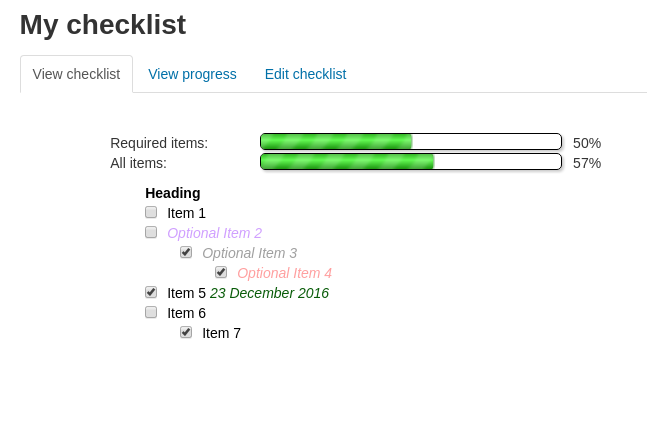
This is a Moodle plugin that allows a teacher to create a checklist for their students to work through.
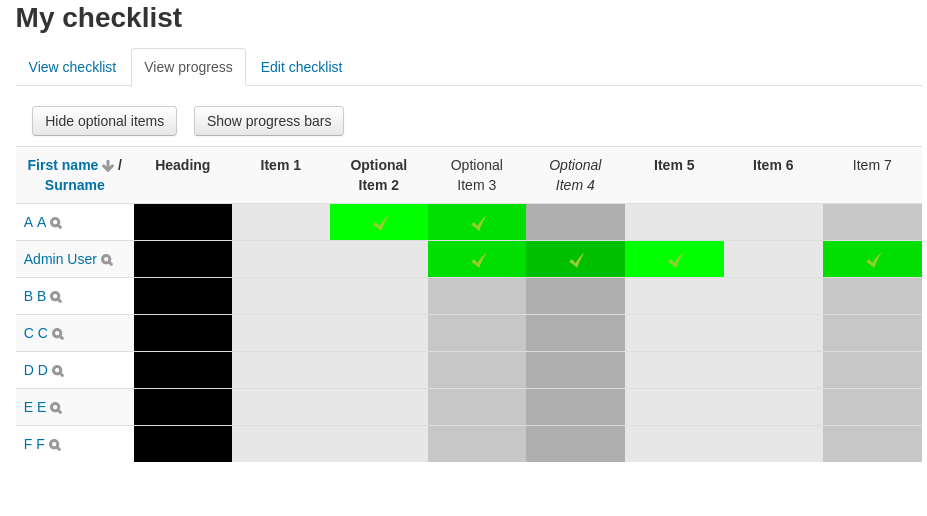
The teacher can monitor all the student's progress, as they tick off each of the items in the list.
Note: This is the Moodle 3.9+ version (other versions are available for Moodle 1.9 and above).
Items can be indented and marked as optional or turned into headings; a range of different colours can be used for the items.
Students are presented with a simple chart showing how far they have progressed through the required/optional items and can add their own, private, items to the list.
==Changes==
- 2026-04-24 - 4.1.0.8 - M5.2 compatibility fixes
- 2025-10-18 - 4.1.0.7 - M5.1 compatibility fixes, add missing AJAX_SCRIPT define (thanks to Julia M Jenkins)
- 2025-07-25 - 4.1.0.6 - Fix for students updating their own checklist items
- 2025-04-19 - 4.1.0.5 - Fix for animation bug when toggling checklist items quickly, CONTRIB-9880; fix deprecated styling warnings
- 2025-04-19 - 4.1.0.4 - M5.0 compatibility fixes, CONTRIB-9548 iOS display issues (thanks to Aaron Wells), icon fix (thanks to Luca Bösch)
- 2024-10-19 - 4.1.0.3 - M4.5 compatibility fixes
- 2024-05-18 - 4.1.0.2 - fix error when showing a forum activity without completion enabled
- 2024-04-02 - 4.1.0.0 - M4.4 compatibility fixes + drop maintenance of versions compatible with M4.0 and below
- 2024-04-02 - 3.9.5.0 - adds new "checklist updated" event, for when a teacher has made changes - thanks to Andrew Hancox
- 2024-02-02 - 3.9.4.1 - fix compatibility issue with M3.9 - M4.1 introduced in previous commit
- 2024-01-20 - 3.9.4.0 - now works with Moodle Mobile App, thanks to Dani & Pau from Moodle HQ your help with this at the Global Moodle Moot and Dani for finishing this work off afterwards!
- 2023-11-27 - 3.9.3.6 - fix completion rule handling for M4.3. Thanks to opitz for the fix.
- 2023-10-02 - 3.9.3.5 - update GitHub actions ready for 4.3 release, fix PHP8.2 compatibility issue and M4.3 compatibility issue
- 2023-04-14 - 3.9.3.4 - Minor M4.2 compatibility fixes
- 2023-03-11 - 3.9.3.3 - Fix 'open link in new window' inclusion in backup + restore
- 2022-11-19 - 3.9.3.2 - Minor M4.1 compatibility fixes
- 2022-10-15 - 3.9.3.1 - Convert Javascript to AMD module + support multiple checklists on the page (thanks to alexmorrisnz); fix display of group selector (thanks to wiktorwandochowicz)
- 2022-09-24 - 3.9.3.0 - Allow embedding checklists, styling of student comments, extend privacy coverage, fix layout in M4.0, fix PHP8.0 compatibility in Behat tests.
- 2022-05-28 - 3.9.2.0 - Fix for bug that incorrectly emailed all previously-complete users when the checklist maxgrade was changed. This upgrade will create a one-off background task that will check the grades and completion states for all users/checklists on the site.
- 2022-01-22 - 3.9.1.2 - Update checklist items to match renamed activities when being viewed by students (who do not have permission to edit checklist items themselves)
- 2021-10-23 - 3.9.1.1 - If a checklist is edited (add/delete item, mark item as required/optional) then grades will be recalculated (as a background task, to avoid slowing down the editing)
- 2021-10-23 - 3.9.1.0 - New feature from Kristian to allow students to add comments to items which are visible to the teacher
- 2021-10-13 - Fix Behat tests in M4.0
- 2021-06-30 - 3.9.0.2 - Fix completion debugging error when no checklist items in M3.11
- 2021-06-12 - 3.9.0.1 - Fix completion sort order error in M3.11
- 2021-05-15 - Further M3.11 compatibility fixes, new setting to disable colour picker (from Peter Mayer)
- 2021-04-09 - M3.11 compatibility fixes + work with github actions
- 2020-11-14 - Minor bug fix: remove unwanted warning from student view when 'lock teacher marks' is set + minor layout fix.
- 2020-11-04 - Fix bug preventing 'save and next' from working
- 2020-06-15 - Add 'complete by number of items' option
- 2020-01-29 - "open link in new window" option from Stefan Topfstedt
- 2019-04-26 - Fix bug with autocompletion updating grades during unenrolment. Autocompletion now only updates checkmarks if the user has capability 'mod/checklist:updateown'.
- 2018-11-16 - Support new privacy features in M3.4.6, M3.5.3, M3.6+
- 2018-04-21 - Fix bug when editing items with dates when date editing is disabled
- 2018-04-02 - Add support for GDPR
- 2018-02-24 - Fix import/export, backup/restore of course + url links; fix recycle bin compatibility
- 2017-11-09 - Minor behat fix for Moodle 3.4 compatibility
- 2017-08-30 - Switch to only showing enrolled users in lists (instead of all users with the 'updateown' capability)
- 2017-08-30 - Fix bug with groupmembersonly call
- 2017-06-08 - Fix bug when saving completion settings (where students had already completed)
- 2017-06-05 - Fix bug in teacher marking with 'Save and show next' functionality
- 2017-05-12 - Moodle 3.3 compatibility fixes
- 2016-11-21 - Minor M3.2 compatibility fix (only behat affected)
- 2016-10-30 - Make item import/export work more reliably
- 2016-09-09 - Major restructuring of checklist code, to aid future maintenance; dropping of pre-Moodle 2.7 support.
Support for linking items to courses (with automatic check-off on course completion) OR external URLs.
Support for linking items to groupings (only shown to users who are members of groups within the item's grouping)
For 'teacher only' checklists, automatic check-off now affects teacher marks, instead of student marks - 2016-05-20 - Minor behat fixes for Moodle 3.1 compatibility
- 2016-03-15 - Show/hide multiple activity items at once when editing the checklist (Tony Butler)
- 2015-12-23 - Handle missing calendar events + fix deprecated 'get_referer' warning.
- 2015-11-08 - M3.0 compatibility fixes
- 2015-10-02 - Better forum completion support + Hotpot completion support
- 2015-09-13 - M2.7+ cron not needed at all for automatic update of checklist (Moodle completion + 'complete from logs' both handled via events).
- 2015-06-19 - In M2.7+ automatic update from logs now happens immediately (via the new events system), cron still needed for updates from completion.
- 2015-05-09 - Moodle 2.9 compatibility fixes
- 2015-04-28 - Autoupdate now works with Moodle 2.7+ logs, as well as legacy logs (for activities which do not have completion enabled)
- 2015-03-02 - Fix item output so that multilang filters will work
- 2015-02-21 - Add automated testing. Fix code to prevent multiple emails when same checklist completed multiple times by the same student within an hour.
- 2015-02-19 - Setting 'max grade' to 0 in the checklist removes it from the gradebook
- 2014-10-26 - Option to hide checklists you cannot update from 'My home' (thanks to Syxton); fix PostgreSQL compatibility with autoupdate.
- 2014-07-06 - Fix toggle row/column buttons. Update version.php.
- 2014-05-31 - Add toggle row / toggle column buttons to report view - developed by Simon Bertoli
- 2014-05-31 - Add Moodle 2.7 event logging; fix Postgres compatibility (Tony Butler); prevent teachers seeing student reports when they cannot access any groups; fix centering of report headings (Syxton).
- 2014-01-15 - Fix compatibility of MS SQL with 2.6 version of plugin.
- 2013-19-11 - Moodle 2.6 compatibility fixes (+ correction to this fix)
- 2013-11-11 - Cope with empty section names
- 2013-07-30 - Fix editing of item indents
- 2013-05-22 - 'Display description on course page' + (old)IE compatibility fix
- 2013-05-06 - Fix Moodle 2.4 compatibility regression
- 2013-04-24 - Minor fixes for Moodle 2.5 compatibility
- 2013-04-09 - Allow checklists to import current section when they are located in an 'orphaned' section, add 'questionnaire' + 'assign' to autoupdate list
- 2013-03-01 - Fixed the backup & restore of items linked to course modules.
- 2013-01-04 - Option to email students when their checklists are complete - added by Andriy Semenets
- 2013-01-03 - Fixed the 'show course modules in checklist' feature in Moodle 2.4
- 2012-12-07 - Moodle 2.4 compatibility fixes
- 2012-10-09 - Fixed email sending when checklists are complete (thanks to Longfei Yu for the bug report + fix)
- 2012-09-20 - CONTRIB-3921: broken images in intro text; CONTRIB-3904: error when resetting courses; CONTRIB-3916: checklists can be hidden from 'My Moodle' (either all checklists, or just completed checklists); issue with checklists updating from 'completion' fixed; CONTRIB-3897: teachers able to see who last updated the teacher mark
- 2012-09-19 - Split the 3 plugins (mod / block / grade report) into separate repos for better maintenance; added 'spinner' when updating server
- 2012-08-25 - Minor fix to grade update function
- 2012-08-06 - Minor fix to reduce chance of hitting max_input_vars limits when updated all student's checkmarks
- 2012-07-07 - Improved progress bar styling; Improved debugging of automatic updates (see below); Fixed minor debug warnings
- 2012-04-07 - mod/checklist:addinstance capability added (for M2.3); Russian / Ukranian translations from Andriy Semenets
- 2012-03-05 - Bug fix: grades not updating when new items added to a course (with 'import course activities' on)
- 2012-01-27 - French translation from Luiggi Sansonetti
- 2012-01-02 - Minor tweaks to improve Moodle 2.2+ compatibility (optional_param_array / context_module::instance )
- 2012-01-02 - CONTRIB-2979: remembers report settings (sort order, etc.) until you log out; CONTRIB-3308 - 'viewmenteereport' capability, allowing users to view reports of users they are mentors for
==Installation==
The checklist block and grade report are separate, optional plugins that can be downloaded from:
http://moodle.org/plugins/view.php?plugin=block_checklist
http://moodle.org/plugins/view.php?plugin=gradeexport_checklist
- Unzip the contents of file you downloaded to a temporary folder.
- Upload the files to the your moodle server, placing the 'mod/checklist' files in the '[moodlefolder]/mod/checklist', (optionally) the 'blocks/checklist' files in the '[moodlefolder]/blocks/checklist' folder and (optionally) the 'grade/export/checklist' files in the '[moodlefolder]/grade/export/checklist' folder.
- Log in as administrator and click on 'Notifications' in the admin area to update the Moodle database, ready to use this plugin.
==Problems with automatic update?==
Whilst automatic updates are working fine in all situations I have tested, there have been some reports of these not updating check-marks correctly on some sites.
If this is the case on your site, one thing to try, before contacting me:
- Make sure the checklist is set to 'Student only' - it is the student mark that is automatically updated, if this is not displayed, you won't see any changes.
==Adding a checklist block==
(Optional plugin)
- Click 'Turn editing on', in a course view.
- Under 'blocks', choose 'Checklist'
- Click on the 'Edit' icon in the new block to set which checklist to display and (optionally) which group of users to display.
==Exporting checklist progress (Excel)==
(Optional plugin)
- In a course, click 'Grades'
- From the dropdown menu, choose 'Export => Checklist Export'
- Choose the checklist you want to export and click 'Export Excel'
If you want to change the user information that is included in the export ('First name', 'Surname', etc.), then edit the file 'grade/export/checklist/columns.php' - instructions can be found inside the file itself.
==Usage==
Click on 'Add an activity' and choose 'Checklist'.
Enter all the usual information.
You can optionally allow students to add their own, private items to the list (this will not affect the overall progress, but may help students to keep note of anything extra they need to do).
You can then add items to the list.
Click on the 'tick' to toggle an item between required, optional and heading
Click on the 'edit' icon to change the text.
Click on the 'indent' icons to change the level of indent.
Click on the 'move' icons to move the item up/down one place.
Click on the 'delete' icon to delete the item.
Click on the '+' icon to insert a new item immediately below the current item.
Click on 'Preview', to get some idea of how this will look to students.
Click on 'Results', to see a chart of how the students are currently progressing through the checklist.
Students can now log in, click on the checklist, tick any items they have completed and then click 'Save' to update the database.
If you have allowed them to do so, they can click on 'Start Adding Items', then click on the green '+' icons to insert their own, private items to the list.
If you allow a checklist to be updated by teachers (either exclusively, or in addition to students), it can be updated by doing the following:
- Click 'Results'
- Click on the little 'Magnifying glass' icon, beside the student's name
- Choose Yes / No for each item
- Click 'Save'
- (Optional) Click 'Add comments', enter/update/delete a comment against each item, Click 'Save'
- Click 'View all Progress' to go back to the view with all the students shown.
==Further information==
Moodle plugins database entry: http://moodle.org/plugins/view.php?plugin=mod_checklist
Report a bug, or suggest an improvement: http://tracker.moodle.org/browse/CONTRIB/component/10608
==Contact details==
Any questions, suggested improvements to:
Davo Smith - moodle@davosmith.co.uk
Any enquiries about custom development to Synergy Learning: http://www.synergy-learning.com
4.1.0.7 (2025101800)
4.1.0.7
Plugin type: Activities
Frankenstyle component name: mod_checklist
Version build number: 2025101800
Version release name: 4.1.0.7
Maturity: Stable
Supported Moodle versions: 4.1, 4.2, 4.3, 4.4, 4.5, 5.0, 5.1
Repository URL (Git): https://github.com/davosmith/moodle-checklist
Repository branch: MOODLE_500_STABLE
Repository tag: 4.1.0.7
Issue/bug tracker URL: https://tracker.moodle.org/issues/?jql=project%20%3D%20CONTRIB%20AND%20component%20%3D%20%22Package%3A+Checklist%22
Checklist module
==Introduction==
This is a Moodle plugin that allows a teacher to create a checklist for their students to work through.
The teacher can monitor all the student's progress, as they tick off each of the items in the list.
Note: This is the Moodle 3.9+ version (other versions are available for Moodle 1.9 and above).
Items can be indented and marked as optional or turned into headings; a range of different colours can be used for the items.
Students are presented with a simple chart showing how far they have progressed through the required/optional items and can add their own, private, items to the list.
==Changes==
- 2025-10-18 - 4.1.0.7 - M5.1 compatibility fixes, add missing AJAX_SCRIPT define (thanks to Julia M Jenkins)
- 2025-07-25 - 4.1.0.6 - Fix for students updating their own checklist items
- 2025-04-19 - 4.1.0.5 - Fix for animation bug when toggling checklist items quickly, CONTRIB-9880; fix deprecated styling warnings
- 2025-04-19 - 4.1.0.4 - M5.0 compatibility fixes, CONTRIB-9548 iOS display issues (thanks to Aaron Wells), icon fix (thanks to Luca Bösch)
- 2024-10-19 - 4.1.0.3 - M4.5 compatibility fixes
- 2024-05-18 - 4.1.0.2 - fix error when showing a forum activity without completion enabled
- 2024-04-02 - 4.1.0.0 - M4.4 compatibility fixes + drop maintenance of versions compatible with M4.0 and below
- 2024-04-02 - 3.9.5.0 - adds new "checklist updated" event, for when a teacher has made changes - thanks to Andrew Hancox
- 2024-02-02 - 3.9.4.1 - fix compatibility issue with M3.9 - M4.1 introduced in previous commit
- 2024-01-20 - 3.9.4.0 - now works with Moodle Mobile App, thanks to Dani & Pau from Moodle HQ your help with this at the Global Moodle Moot and Dani for finishing this work off afterwards!
- 2023-11-27 - 3.9.3.6 - fix completion rule handling for M4.3. Thanks to opitz for the fix.
- 2023-10-02 - 3.9.3.5 - update GitHub actions ready for 4.3 release, fix PHP8.2 compatibility issue and M4.3 compatibility issue
- 2023-04-14 - 3.9.3.4 - Minor M4.2 compatibility fixes
- 2023-03-11 - 3.9.3.3 - Fix 'open link in new window' inclusion in backup + restore
- 2022-11-19 - 3.9.3.2 - Minor M4.1 compatibility fixes
- 2022-10-15 - 3.9.3.1 - Convert Javascript to AMD module + support multiple checklists on the page (thanks to alexmorrisnz); fix display of group selector (thanks to wiktorwandochowicz)
- 2022-09-24 - 3.9.3.0 - Allow embedding checklists, styling of student comments, extend privacy coverage, fix layout in M4.0, fix PHP8.0 compatibility in Behat tests.
- 2022-05-28 - 3.9.2.0 - Fix for bug that incorrectly emailed all previously-complete users when the checklist maxgrade was changed. This upgrade will create a one-off background task that will check the grades and completion states for all users/checklists on the site.
- 2022-01-22 - 3.9.1.2 - Update checklist items to match renamed activities when being viewed by students (who do not have permission to edit checklist items themselves)
- 2021-10-23 - 3.9.1.1 - If a checklist is edited (add/delete item, mark item as required/optional) then grades will be recalculated (as a background task, to avoid slowing down the editing)
- 2021-10-23 - 3.9.1.0 - New feature from Kristian to allow students to add comments to items which are visible to the teacher
- 2021-10-13 - Fix Behat tests in M4.0
- 2021-06-30 - 3.9.0.2 - Fix completion debugging error when no checklist items in M3.11
- 2021-06-12 - 3.9.0.1 - Fix completion sort order error in M3.11
- 2021-05-15 - Further M3.11 compatibility fixes, new setting to disable colour picker (from Peter Mayer)
- 2021-04-09 - M3.11 compatibility fixes + work with github actions
- 2020-11-14 - Minor bug fix: remove unwanted warning from student view when 'lock teacher marks' is set + minor layout fix.
- 2020-11-04 - Fix bug preventing 'save and next' from working
- 2020-06-15 - Add 'complete by number of items' option
- 2020-01-29 - "open link in new window" option from Stefan Topfstedt
- 2019-04-26 - Fix bug with autocompletion updating grades during unenrolment. Autocompletion now only updates checkmarks if the user has capability 'mod/checklist:updateown'.
- 2018-11-16 - Support new privacy features in M3.4.6, M3.5.3, M3.6+
- 2018-04-21 - Fix bug when editing items with dates when date editing is disabled
- 2018-04-02 - Add support for GDPR
- 2018-02-24 - Fix import/export, backup/restore of course + url links; fix recycle bin compatibility
- 2017-11-09 - Minor behat fix for Moodle 3.4 compatibility
- 2017-08-30 - Switch to only showing enrolled users in lists (instead of all users with the 'updateown' capability)
- 2017-08-30 - Fix bug with groupmembersonly call
- 2017-06-08 - Fix bug when saving completion settings (where students had already completed)
- 2017-06-05 - Fix bug in teacher marking with 'Save and show next' functionality
- 2017-05-12 - Moodle 3.3 compatibility fixes
- 2016-11-21 - Minor M3.2 compatibility fix (only behat affected)
- 2016-10-30 - Make item import/export work more reliably
- 2016-09-09 - Major restructuring of checklist code, to aid future maintenance; dropping of pre-Moodle 2.7 support.
Support for linking items to courses (with automatic check-off on course completion) OR external URLs.
Support for linking items to groupings (only shown to users who are members of groups within the item's grouping)
For 'teacher only' checklists, automatic check-off now affects teacher marks, instead of student marks - 2016-05-20 - Minor behat fixes for Moodle 3.1 compatibility
- 2016-03-15 - Show/hide multiple activity items at once when editing the checklist (Tony Butler)
- 2015-12-23 - Handle missing calendar events + fix deprecated 'get_referer' warning.
- 2015-11-08 - M3.0 compatibility fixes
- 2015-10-02 - Better forum completion support + Hotpot completion support
- 2015-09-13 - M2.7+ cron not needed at all for automatic update of checklist (Moodle completion + 'complete from logs' both handled via events).
- 2015-06-19 - In M2.7+ automatic update from logs now happens immediately (via the new events system), cron still needed for updates from completion.
- 2015-05-09 - Moodle 2.9 compatibility fixes
- 2015-04-28 - Autoupdate now works with Moodle 2.7+ logs, as well as legacy logs (for activities which do not have completion enabled)
- 2015-03-02 - Fix item output so that multilang filters will work
- 2015-02-21 - Add automated testing. Fix code to prevent multiple emails when same checklist completed multiple times by the same student within an hour.
- 2015-02-19 - Setting 'max grade' to 0 in the checklist removes it from the gradebook
- 2014-10-26 - Option to hide checklists you cannot update from 'My home' (thanks to Syxton); fix PostgreSQL compatibility with autoupdate.
- 2014-07-06 - Fix toggle row/column buttons. Update version.php.
- 2014-05-31 - Add toggle row / toggle column buttons to report view - developed by Simon Bertoli
- 2014-05-31 - Add Moodle 2.7 event logging; fix Postgres compatibility (Tony Butler); prevent teachers seeing student reports when they cannot access any groups; fix centering of report headings (Syxton).
- 2014-01-15 - Fix compatibility of MS SQL with 2.6 version of plugin.
- 2013-19-11 - Moodle 2.6 compatibility fixes (+ correction to this fix)
- 2013-11-11 - Cope with empty section names
- 2013-07-30 - Fix editing of item indents
- 2013-05-22 - 'Display description on course page' + (old)IE compatibility fix
- 2013-05-06 - Fix Moodle 2.4 compatibility regression
- 2013-04-24 - Minor fixes for Moodle 2.5 compatibility
- 2013-04-09 - Allow checklists to import current section when they are located in an 'orphaned' section, add 'questionnaire' + 'assign' to autoupdate list
- 2013-03-01 - Fixed the backup & restore of items linked to course modules.
- 2013-01-04 - Option to email students when their checklists are complete - added by Andriy Semenets
- 2013-01-03 - Fixed the 'show course modules in checklist' feature in Moodle 2.4
- 2012-12-07 - Moodle 2.4 compatibility fixes
- 2012-10-09 - Fixed email sending when checklists are complete (thanks to Longfei Yu for the bug report + fix)
- 2012-09-20 - CONTRIB-3921: broken images in intro text; CONTRIB-3904: error when resetting courses; CONTRIB-3916: checklists can be hidden from 'My Moodle' (either all checklists, or just completed checklists); issue with checklists updating from 'completion' fixed; CONTRIB-3897: teachers able to see who last updated the teacher mark
- 2012-09-19 - Split the 3 plugins (mod / block / grade report) into separate repos for better maintenance; added 'spinner' when updating server
- 2012-08-25 - Minor fix to grade update function
- 2012-08-06 - Minor fix to reduce chance of hitting max_input_vars limits when updated all student's checkmarks
- 2012-07-07 - Improved progress bar styling; Improved debugging of automatic updates (see below); Fixed minor debug warnings
- 2012-04-07 - mod/checklist:addinstance capability added (for M2.3); Russian / Ukranian translations from Andriy Semenets
- 2012-03-05 - Bug fix: grades not updating when new items added to a course (with 'import course activities' on)
- 2012-01-27 - French translation from Luiggi Sansonetti
- 2012-01-02 - Minor tweaks to improve Moodle 2.2+ compatibility (optional_param_array / context_module::instance )
- 2012-01-02 - CONTRIB-2979: remembers report settings (sort order, etc.) until you log out; CONTRIB-3308 - 'viewmenteereport' capability, allowing users to view reports of users they are mentors for
==Installation==
The checklist block and grade report are separate, optional plugins that can be downloaded from:
http://moodle.org/plugins/view.php?plugin=block_checklist
http://moodle.org/plugins/view.php?plugin=gradeexport_checklist
- Unzip the contents of file you downloaded to a temporary folder.
- Upload the files to the your moodle server, placing the 'mod/checklist' files in the '[moodlefolder]/mod/checklist', (optionally) the 'blocks/checklist' files in the '[moodlefolder]/blocks/checklist' folder and (optionally) the 'grade/export/checklist' files in the '[moodlefolder]/grade/export/checklist' folder.
- Log in as administrator and click on 'Notifications' in the admin area to update the Moodle database, ready to use this plugin.
==Problems with automatic update?==
Whilst automatic updates are working fine in all situations I have tested, there have been some reports of these not updating check-marks correctly on some sites.
If this is the case on your site, one thing to try, before contacting me:
- Make sure the checklist is set to 'Student only' - it is the student mark that is automatically updated, if this is not displayed, you won't see any changes.
==Adding a checklist block==
(Optional plugin)
- Click 'Turn editing on', in a course view.
- Under 'blocks', choose 'Checklist'
- Click on the 'Edit' icon in the new block to set which checklist to display and (optionally) which group of users to display.
==Exporting checklist progress (Excel)==
(Optional plugin)
- In a course, click 'Grades'
- From the dropdown menu, choose 'Export => Checklist Export'
- Choose the checklist you want to export and click 'Export Excel'
If you want to change the user information that is included in the export ('First name', 'Surname', etc.), then edit the file 'grade/export/checklist/columns.php' - instructions can be found inside the file itself.
==Usage==
Click on 'Add an activity' and choose 'Checklist'.
Enter all the usual information.
You can optionally allow students to add their own, private items to the list (this will not affect the overall progress, but may help students to keep note of anything extra they need to do).
You can then add items to the list.
Click on the 'tick' to toggle an item between required, optional and heading
Click on the 'edit' icon to change the text.
Click on the 'indent' icons to change the level of indent.
Click on the 'move' icons to move the item up/down one place.
Click on the 'delete' icon to delete the item.
Click on the '+' icon to insert a new item immediately below the current item.
Click on 'Preview', to get some idea of how this will look to students.
Click on 'Results', to see a chart of how the students are currently progressing through the checklist.
Students can now log in, click on the checklist, tick any items they have completed and then click 'Save' to update the database.
If you have allowed them to do so, they can click on 'Start Adding Items', then click on the green '+' icons to insert their own, private items to the list.
If you allow a checklist to be updated by teachers (either exclusively, or in addition to students), it can be updated by doing the following:
- Click 'Results'
- Click on the little 'Magnifying glass' icon, beside the student's name
- Choose Yes / No for each item
- Click 'Save'
- (Optional) Click 'Add comments', enter/update/delete a comment against each item, Click 'Save'
- Click 'View all Progress' to go back to the view with all the students shown.
==Further information==
Moodle plugins database entry: http://moodle.org/plugins/view.php?plugin=mod_checklist
Report a bug, or suggest an improvement: http://tracker.moodle.org/browse/CONTRIB/component/10608
==Contact details==
Any questions, suggested improvements to:
Davo Smith - moodle@davosmith.co.uk
Any enquiries about custom development to Synergy Learning: http://www.synergy-learning.com
4.1.0.6 (2025041902)
4.1.0.6
Plugin type: Activities
Frankenstyle component name: mod_checklist
Version build number: 2025041902
Version release name: 4.1.0.6
Maturity: Stable
Supported Moodle versions: 4.1, 4.2, 4.3, 4.4, 4.5, 5.0
Repository URL (Git): https://github.com/davosmith/moodle-checklist
Repository branch: master
Repository tag: 4.1.0.6
Issue/bug tracker URL: https://tracker.moodle.org/issues/?jql=project%20%3D%20CONTRIB%20AND%20component%20%3D%20%22Package%3A+Checklist%22
Checklist module
==Introduction==
This is a Moodle plugin that allows a teacher to create a checklist for their students to work through.
The teacher can monitor all the student's progress, as they tick off each of the items in the list.
Note: This is the Moodle 3.9+ version (other versions are available for Moodle 1.9 and above).
Items can be indented and marked as optional or turned into headings; a range of different colours can be used for the items.
Students are presented with a simple chart showing how far they have progressed through the required/optional items and can add their own, private, items to the list.
==Changes==
- 2025-07-25 - 4.1.0.6 - Fix for students updating their own checklist items
- 2025-04-19 - 4.1.0.5 - Fix for animation bug when toggling checklist items quickly, CONTRIB-9880; fix deprecated styling warnings
- 2025-04-19 - 4.1.0.4 - M5.0 compatibility fixes, CONTRIB-9548 iOS display issues (thanks to Aaron Wells), icon fix (thanks to Luca Bösch)
- 2024-10-19 - 4.1.0.3 - M4.5 compatibility fixes
- 2024-05-18 - 4.1.0.2 - fix error when showing a forum activity without completion enabled
- 2024-04-02 - 4.1.0.0 - M4.4 compatibility fixes + drop maintenance of versions compatible with M4.0 and below
- 2024-04-02 - 3.9.5.0 - adds new "checklist updated" event, for when a teacher has made changes - thanks to Andrew Hancox
- 2024-02-02 - 3.9.4.1 - fix compatibility issue with M3.9 - M4.1 introduced in previous commit
- 2024-01-20 - 3.9.4.0 - now works with Moodle Mobile App, thanks to Dani & Pau from Moodle HQ your help with this at the Global Moodle Moot and Dani for finishing this work off afterwards!
- 2023-11-27 - 3.9.3.6 - fix completion rule handling for M4.3. Thanks to opitz for the fix.
- 2023-10-02 - 3.9.3.5 - update GitHub actions ready for 4.3 release, fix PHP8.2 compatibility issue and M4.3 compatibility issue
- 2023-04-14 - 3.9.3.4 - Minor M4.2 compatibility fixes
- 2023-03-11 - 3.9.3.3 - Fix 'open link in new window' inclusion in backup + restore
- 2022-11-19 - 3.9.3.2 - Minor M4.1 compatibility fixes
- 2022-10-15 - 3.9.3.1 - Convert Javascript to AMD module + support multiple checklists on the page (thanks to alexmorrisnz); fix display of group selector (thanks to wiktorwandochowicz)
- 2022-09-24 - 3.9.3.0 - Allow embedding checklists, styling of student comments, extend privacy coverage, fix layout in M4.0, fix PHP8.0 compatibility in Behat tests.
- 2022-05-28 - 3.9.2.0 - Fix for bug that incorrectly emailed all previously-complete users when the checklist maxgrade was changed. This upgrade will create a one-off background task that will check the grades and completion states for all users/checklists on the site.
- 2022-01-22 - 3.9.1.2 - Update checklist items to match renamed activities when being viewed by students (who do not have permission to edit checklist items themselves)
- 2021-10-23 - 3.9.1.1 - If a checklist is edited (add/delete item, mark item as required/optional) then grades will be recalculated (as a background task, to avoid slowing down the editing)
- 2021-10-23 - 3.9.1.0 - New feature from Kristian to allow students to add comments to items which are visible to the teacher
- 2021-10-13 - Fix Behat tests in M4.0
- 2021-06-30 - 3.9.0.2 - Fix completion debugging error when no checklist items in M3.11
- 2021-06-12 - 3.9.0.1 - Fix completion sort order error in M3.11
- 2021-05-15 - Further M3.11 compatibility fixes, new setting to disable colour picker (from Peter Mayer)
- 2021-04-09 - M3.11 compatibility fixes + work with github actions
- 2020-11-14 - Minor bug fix: remove unwanted warning from student view when 'lock teacher marks' is set + minor layout fix.
- 2020-11-04 - Fix bug preventing 'save and next' from working
- 2020-06-15 - Add 'complete by number of items' option
- 2020-01-29 - "open link in new window" option from Stefan Topfstedt
- 2019-04-26 - Fix bug with autocompletion updating grades during unenrolment. Autocompletion now only updates checkmarks if the user has capability 'mod/checklist:updateown'.
- 2018-11-16 - Support new privacy features in M3.4.6, M3.5.3, M3.6+
- 2018-04-21 - Fix bug when editing items with dates when date editing is disabled
- 2018-04-02 - Add support for GDPR
- 2018-02-24 - Fix import/export, backup/restore of course + url links; fix recycle bin compatibility
- 2017-11-09 - Minor behat fix for Moodle 3.4 compatibility
- 2017-08-30 - Switch to only showing enrolled users in lists (instead of all users with the 'updateown' capability)
- 2017-08-30 - Fix bug with groupmembersonly call
- 2017-06-08 - Fix bug when saving completion settings (where students had already completed)
- 2017-06-05 - Fix bug in teacher marking with 'Save and show next' functionality
- 2017-05-12 - Moodle 3.3 compatibility fixes
- 2016-11-21 - Minor M3.2 compatibility fix (only behat affected)
- 2016-10-30 - Make item import/export work more reliably
- 2016-09-09 - Major restructuring of checklist code, to aid future maintenance; dropping of pre-Moodle 2.7 support.
Support for linking items to courses (with automatic check-off on course completion) OR external URLs.
Support for linking items to groupings (only shown to users who are members of groups within the item's grouping)
For 'teacher only' checklists, automatic check-off now affects teacher marks, instead of student marks - 2016-05-20 - Minor behat fixes for Moodle 3.1 compatibility
- 2016-03-15 - Show/hide multiple activity items at once when editing the checklist (Tony Butler)
- 2015-12-23 - Handle missing calendar events + fix deprecated 'get_referer' warning.
- 2015-11-08 - M3.0 compatibility fixes
- 2015-10-02 - Better forum completion support + Hotpot completion support
- 2015-09-13 - M2.7+ cron not needed at all for automatic update of checklist (Moodle completion + 'complete from logs' both handled via events).
- 2015-06-19 - In M2.7+ automatic update from logs now happens immediately (via the new events system), cron still needed for updates from completion.
- 2015-05-09 - Moodle 2.9 compatibility fixes
- 2015-04-28 - Autoupdate now works with Moodle 2.7+ logs, as well as legacy logs (for activities which do not have completion enabled)
- 2015-03-02 - Fix item output so that multilang filters will work
- 2015-02-21 - Add automated testing. Fix code to prevent multiple emails when same checklist completed multiple times by the same student within an hour.
- 2015-02-19 - Setting 'max grade' to 0 in the checklist removes it from the gradebook
- 2014-10-26 - Option to hide checklists you cannot update from 'My home' (thanks to Syxton); fix PostgreSQL compatibility with autoupdate.
- 2014-07-06 - Fix toggle row/column buttons. Update version.php.
- 2014-05-31 - Add toggle row / toggle column buttons to report view - developed by Simon Bertoli
- 2014-05-31 - Add Moodle 2.7 event logging; fix Postgres compatibility (Tony Butler); prevent teachers seeing student reports when they cannot access any groups; fix centering of report headings (Syxton).
- 2014-01-15 - Fix compatibility of MS SQL with 2.6 version of plugin.
- 2013-19-11 - Moodle 2.6 compatibility fixes (+ correction to this fix)
- 2013-11-11 - Cope with empty section names
- 2013-07-30 - Fix editing of item indents
- 2013-05-22 - 'Display description on course page' + (old)IE compatibility fix
- 2013-05-06 - Fix Moodle 2.4 compatibility regression
- 2013-04-24 - Minor fixes for Moodle 2.5 compatibility
- 2013-04-09 - Allow checklists to import current section when they are located in an 'orphaned' section, add 'questionnaire' + 'assign' to autoupdate list
- 2013-03-01 - Fixed the backup & restore of items linked to course modules.
- 2013-01-04 - Option to email students when their checklists are complete - added by Andriy Semenets
- 2013-01-03 - Fixed the 'show course modules in checklist' feature in Moodle 2.4
- 2012-12-07 - Moodle 2.4 compatibility fixes
- 2012-10-09 - Fixed email sending when checklists are complete (thanks to Longfei Yu for the bug report + fix)
- 2012-09-20 - CONTRIB-3921: broken images in intro text; CONTRIB-3904: error when resetting courses; CONTRIB-3916: checklists can be hidden from 'My Moodle' (either all checklists, or just completed checklists); issue with checklists updating from 'completion' fixed; CONTRIB-3897: teachers able to see who last updated the teacher mark
- 2012-09-19 - Split the 3 plugins (mod / block / grade report) into separate repos for better maintenance; added 'spinner' when updating server
- 2012-08-25 - Minor fix to grade update function
- 2012-08-06 - Minor fix to reduce chance of hitting max_input_vars limits when updated all student's checkmarks
- 2012-07-07 - Improved progress bar styling; Improved debugging of automatic updates (see below); Fixed minor debug warnings
- 2012-04-07 - mod/checklist:addinstance capability added (for M2.3); Russian / Ukranian translations from Andriy Semenets
- 2012-03-05 - Bug fix: grades not updating when new items added to a course (with 'import course activities' on)
- 2012-01-27 - French translation from Luiggi Sansonetti
- 2012-01-02 - Minor tweaks to improve Moodle 2.2+ compatibility (optional_param_array / context_module::instance )
- 2012-01-02 - CONTRIB-2979: remembers report settings (sort order, etc.) until you log out; CONTRIB-3308 - 'viewmenteereport' capability, allowing users to view reports of users they are mentors for
==Installation==
The checklist block and grade report are separate, optional plugins that can be downloaded from:
http://moodle.org/plugins/view.php?plugin=block_checklist
http://moodle.org/plugins/view.php?plugin=gradeexport_checklist
- Unzip the contents of file you downloaded to a temporary folder.
- Upload the files to the your moodle server, placing the 'mod/checklist' files in the '[moodlefolder]/mod/checklist', (optionally) the 'blocks/checklist' files in the '[moodlefolder]/blocks/checklist' folder and (optionally) the 'grade/export/checklist' files in the '[moodlefolder]/grade/export/checklist' folder.
- Log in as administrator and click on 'Notifications' in the admin area to update the Moodle database, ready to use this plugin.
==Problems with automatic update?==
Whilst automatic updates are working fine in all situations I have tested, there have been some reports of these not updating check-marks correctly on some sites.
If this is the case on your site, one thing to try, before contacting me:
- Make sure the checklist is set to 'Student only' - it is the student mark that is automatically updated, if this is not displayed, you won't see any changes.
==Adding a checklist block==
(Optional plugin)
- Click 'Turn editing on', in a course view.
- Under 'blocks', choose 'Checklist'
- Click on the 'Edit' icon in the new block to set which checklist to display and (optionally) which group of users to display.
==Exporting checklist progress (Excel)==
(Optional plugin)
- In a course, click 'Grades'
- From the dropdown menu, choose 'Export => Checklist Export'
- Choose the checklist you want to export and click 'Export Excel'
If you want to change the user information that is included in the export ('First name', 'Surname', etc.), then edit the file 'grade/export/checklist/columns.php' - instructions can be found inside the file itself.
==Usage==
Click on 'Add an activity' and choose 'Checklist'.
Enter all the usual information.
You can optionally allow students to add their own, private items to the list (this will not affect the overall progress, but may help students to keep note of anything extra they need to do).
You can then add items to the list.
Click on the 'tick' to toggle an item between required, optional and heading
Click on the 'edit' icon to change the text.
Click on the 'indent' icons to change the level of indent.
Click on the 'move' icons to move the item up/down one place.
Click on the 'delete' icon to delete the item.
Click on the '+' icon to insert a new item immediately below the current item.
Click on 'Preview', to get some idea of how this will look to students.
Click on 'Results', to see a chart of how the students are currently progressing through the checklist.
Students can now log in, click on the checklist, tick any items they have completed and then click 'Save' to update the database.
If you have allowed them to do so, they can click on 'Start Adding Items', then click on the green '+' icons to insert their own, private items to the list.
If you allow a checklist to be updated by teachers (either exclusively, or in addition to students), it can be updated by doing the following:
- Click 'Results'
- Click on the little 'Magnifying glass' icon, beside the student's name
- Choose Yes / No for each item
- Click 'Save'
- (Optional) Click 'Add comments', enter/update/delete a comment against each item, Click 'Save'
- Click 'View all Progress' to go back to the view with all the students shown.
==Further information==
Moodle plugins database entry: http://moodle.org/plugins/view.php?plugin=mod_checklist
Report a bug, or suggest an improvement: http://tracker.moodle.org/browse/CONTRIB/component/10608
==Contact details==
Any questions, suggested improvements to:
Davo Smith - moodle@davosmith.co.uk
Any enquiries about custom development to Synergy Learning: http://www.synergy-learning.com
4.1.0.5 (2025041901)
4.1.0.5
Plugin type: Activities
Frankenstyle component name: mod_checklist
Version build number: 2025041901
Version release name: 4.1.0.5
Maturity: Stable
Supported Moodle versions: 4.1, 4.2, 4.3, 4.4, 4.5, 5.0
Repository URL (Git): https://github.com/davosmith/moodle-checklist
Repository branch: MOODLE_500_STABLE
Repository tag: 4.1.0.5
Issue/bug tracker URL: https://tracker.moodle.org/issues/?jql=project%20%3D%20CONTRIB%20AND%20component%20%3D%20%22Package%3A+Checklist%22
Checklist module
==Introduction==
This is a Moodle plugin that allows a teacher to create a checklist for their students to work through.
The teacher can monitor all the student's progress, as they tick off each of the items in the list.
Note: This is the Moodle 3.9+ version (other versions are available for Moodle 1.9 and above).
Items can be indented and marked as optional or turned into headings; a range of different colours can be used for the items.
Students are presented with a simple chart showing how far they have progressed through the required/optional items and can add their own, private, items to the list.
==Changes==
- 2025-04-19 - 4.1.0.5 - Fix for animation bug when toggling checklist items quickly, CONTRIB-9880; fix deprecated styling warnings
- 2025-04-19 - 4.1.0.4 - M5.0 compatibility fixes, CONTRIB-9548 iOS display issues (thanks to Aaron Wells), icon fix (thanks to Luca Bösch)
- 2024-10-19 - 4.1.0.3 - M4.5 compatibility fixes
- 2024-05-18 - 4.1.0.2 - fix error when showing a forum activity without completion enabled
- 2024-04-02 - 4.1.0.0 - M4.4 compatibility fixes + drop maintenance of versions compatible with M4.0 and below
- 2024-04-02 - 3.9.5.0 - adds new "checklist updated" event, for when a teacher has made changes - thanks to Andrew Hancox
- 2024-02-02 - 3.9.4.1 - fix compatibility issue with M3.9 - M4.1 introduced in previous commit
- 2024-01-20 - 3.9.4.0 - now works with Moodle Mobile App, thanks to Dani & Pau from Moodle HQ your help with this at the Global Moodle Moot and Dani for finishing this work off afterwards!
- 2023-11-27 - 3.9.3.6 - fix completion rule handling for M4.3. Thanks to opitz for the fix.
- 2023-10-02 - 3.9.3.5 - update GitHub actions ready for 4.3 release, fix PHP8.2 compatibility issue and M4.3 compatibility issue
- 2023-04-14 - 3.9.3.4 - Minor M4.2 compatibility fixes
- 2023-03-11 - 3.9.3.3 - Fix 'open link in new window' inclusion in backup + restore
- 2022-11-19 - 3.9.3.2 - Minor M4.1 compatibility fixes
- 2022-10-15 - 3.9.3.1 - Convert Javascript to AMD module + support multiple checklists on the page (thanks to alexmorrisnz); fix display of group selector (thanks to wiktorwandochowicz)
- 2022-09-24 - 3.9.3.0 - Allow embedding checklists, styling of student comments, extend privacy coverage, fix layout in M4.0, fix PHP8.0 compatibility in Behat tests.
- 2022-05-28 - 3.9.2.0 - Fix for bug that incorrectly emailed all previously-complete users when the checklist maxgrade was changed. This upgrade will create a one-off background task that will check the grades and completion states for all users/checklists on the site.
- 2022-01-22 - 3.9.1.2 - Update checklist items to match renamed activities when being viewed by students (who do not have permission to edit checklist items themselves)
- 2021-10-23 - 3.9.1.1 - If a checklist is edited (add/delete item, mark item as required/optional) then grades will be recalculated (as a background task, to avoid slowing down the editing)
- 2021-10-23 - 3.9.1.0 - New feature from Kristian to allow students to add comments to items which are visible to the teacher
- 2021-10-13 - Fix Behat tests in M4.0
- 2021-06-30 - 3.9.0.2 - Fix completion debugging error when no checklist items in M3.11
- 2021-06-12 - 3.9.0.1 - Fix completion sort order error in M3.11
- 2021-05-15 - Further M3.11 compatibility fixes, new setting to disable colour picker (from Peter Mayer)
- 2021-04-09 - M3.11 compatibility fixes + work with github actions
- 2020-11-14 - Minor bug fix: remove unwanted warning from student view when 'lock teacher marks' is set + minor layout fix.
- 2020-11-04 - Fix bug preventing 'save and next' from working
- 2020-06-15 - Add 'complete by number of items' option
- 2020-01-29 - "open link in new window" option from Stefan Topfstedt
- 2019-04-26 - Fix bug with autocompletion updating grades during unenrolment. Autocompletion now only updates checkmarks if the user has capability 'mod/checklist:updateown'.
- 2018-11-16 - Support new privacy features in M3.4.6, M3.5.3, M3.6+
- 2018-04-21 - Fix bug when editing items with dates when date editing is disabled
- 2018-04-02 - Add support for GDPR
- 2018-02-24 - Fix import/export, backup/restore of course + url links; fix recycle bin compatibility
- 2017-11-09 - Minor behat fix for Moodle 3.4 compatibility
- 2017-08-30 - Switch to only showing enrolled users in lists (instead of all users with the 'updateown' capability)
- 2017-08-30 - Fix bug with groupmembersonly call
- 2017-06-08 - Fix bug when saving completion settings (where students had already completed)
- 2017-06-05 - Fix bug in teacher marking with 'Save and show next' functionality
- 2017-05-12 - Moodle 3.3 compatibility fixes
- 2016-11-21 - Minor M3.2 compatibility fix (only behat affected)
- 2016-10-30 - Make item import/export work more reliably
- 2016-09-09 - Major restructuring of checklist code, to aid future maintenance; dropping of pre-Moodle 2.7 support.
Support for linking items to courses (with automatic check-off on course completion) OR external URLs.
Support for linking items to groupings (only shown to users who are members of groups within the item's grouping)
For 'teacher only' checklists, automatic check-off now affects teacher marks, instead of student marks - 2016-05-20 - Minor behat fixes for Moodle 3.1 compatibility
- 2016-03-15 - Show/hide multiple activity items at once when editing the checklist (Tony Butler)
- 2015-12-23 - Handle missing calendar events + fix deprecated 'get_referer' warning.
- 2015-11-08 - M3.0 compatibility fixes
- 2015-10-02 - Better forum completion support + Hotpot completion support
- 2015-09-13 - M2.7+ cron not needed at all for automatic update of checklist (Moodle completion + 'complete from logs' both handled via events).
- 2015-06-19 - In M2.7+ automatic update from logs now happens immediately (via the new events system), cron still needed for updates from completion.
- 2015-05-09 - Moodle 2.9 compatibility fixes
- 2015-04-28 - Autoupdate now works with Moodle 2.7+ logs, as well as legacy logs (for activities which do not have completion enabled)
- 2015-03-02 - Fix item output so that multilang filters will work
- 2015-02-21 - Add automated testing. Fix code to prevent multiple emails when same checklist completed multiple times by the same student within an hour.
- 2015-02-19 - Setting 'max grade' to 0 in the checklist removes it from the gradebook
- 2014-10-26 - Option to hide checklists you cannot update from 'My home' (thanks to Syxton); fix PostgreSQL compatibility with autoupdate.
- 2014-07-06 - Fix toggle row/column buttons. Update version.php.
- 2014-05-31 - Add toggle row / toggle column buttons to report view - developed by Simon Bertoli
- 2014-05-31 - Add Moodle 2.7 event logging; fix Postgres compatibility (Tony Butler); prevent teachers seeing student reports when they cannot access any groups; fix centering of report headings (Syxton).
- 2014-01-15 - Fix compatibility of MS SQL with 2.6 version of plugin.
- 2013-19-11 - Moodle 2.6 compatibility fixes (+ correction to this fix)
- 2013-11-11 - Cope with empty section names
- 2013-07-30 - Fix editing of item indents
- 2013-05-22 - 'Display description on course page' + (old)IE compatibility fix
- 2013-05-06 - Fix Moodle 2.4 compatibility regression
- 2013-04-24 - Minor fixes for Moodle 2.5 compatibility
- 2013-04-09 - Allow checklists to import current section when they are located in an 'orphaned' section, add 'questionnaire' + 'assign' to autoupdate list
- 2013-03-01 - Fixed the backup & restore of items linked to course modules.
- 2013-01-04 - Option to email students when their checklists are complete - added by Andriy Semenets
- 2013-01-03 - Fixed the 'show course modules in checklist' feature in Moodle 2.4
- 2012-12-07 - Moodle 2.4 compatibility fixes
- 2012-10-09 - Fixed email sending when checklists are complete (thanks to Longfei Yu for the bug report + fix)
- 2012-09-20 - CONTRIB-3921: broken images in intro text; CONTRIB-3904: error when resetting courses; CONTRIB-3916: checklists can be hidden from 'My Moodle' (either all checklists, or just completed checklists); issue with checklists updating from 'completion' fixed; CONTRIB-3897: teachers able to see who last updated the teacher mark
- 2012-09-19 - Split the 3 plugins (mod / block / grade report) into separate repos for better maintenance; added 'spinner' when updating server
- 2012-08-25 - Minor fix to grade update function
- 2012-08-06 - Minor fix to reduce chance of hitting max_input_vars limits when updated all student's checkmarks
- 2012-07-07 - Improved progress bar styling; Improved debugging of automatic updates (see below); Fixed minor debug warnings
- 2012-04-07 - mod/checklist:addinstance capability added (for M2.3); Russian / Ukranian translations from Andriy Semenets
- 2012-03-05 - Bug fix: grades not updating when new items added to a course (with 'import course activities' on)
- 2012-01-27 - French translation from Luiggi Sansonetti
- 2012-01-02 - Minor tweaks to improve Moodle 2.2+ compatibility (optional_param_array / context_module::instance )
- 2012-01-02 - CONTRIB-2979: remembers report settings (sort order, etc.) until you log out; CONTRIB-3308 - 'viewmenteereport' capability, allowing users to view reports of users they are mentors for
==Installation==
The checklist block and grade report are separate, optional plugins that can be downloaded from:
http://moodle.org/plugins/view.php?plugin=block_checklist
http://moodle.org/plugins/view.php?plugin=gradeexport_checklist
- Unzip the contents of file you downloaded to a temporary folder.
- Upload the files to the your moodle server, placing the 'mod/checklist' files in the '[moodlefolder]/mod/checklist', (optionally) the 'blocks/checklist' files in the '[moodlefolder]/blocks/checklist' folder and (optionally) the 'grade/export/checklist' files in the '[moodlefolder]/grade/export/checklist' folder.
- Log in as administrator and click on 'Notifications' in the admin area to update the Moodle database, ready to use this plugin.
==Problems with automatic update?==
Whilst automatic updates are working fine in all situations I have tested, there have been some reports of these not updating check-marks correctly on some sites.
If this is the case on your site, one thing to try, before contacting me:
- Make sure the checklist is set to 'Student only' - it is the student mark that is automatically updated, if this is not displayed, you won't see any changes.
==Adding a checklist block==
(Optional plugin)
- Click 'Turn editing on', in a course view.
- Under 'blocks', choose 'Checklist'
- Click on the 'Edit' icon in the new block to set which checklist to display and (optionally) which group of users to display.
==Exporting checklist progress (Excel)==
(Optional plugin)
- In a course, click 'Grades'
- From the dropdown menu, choose 'Export => Checklist Export'
- Choose the checklist you want to export and click 'Export Excel'
If you want to change the user information that is included in the export ('First name', 'Surname', etc.), then edit the file 'grade/export/checklist/columns.php' - instructions can be found inside the file itself.
==Usage==
Click on 'Add an activity' and choose 'Checklist'.
Enter all the usual information.
You can optionally allow students to add their own, private items to the list (this will not affect the overall progress, but may help students to keep note of anything extra they need to do).
You can then add items to the list.
Click on the 'tick' to toggle an item between required, optional and heading
Click on the 'edit' icon to change the text.
Click on the 'indent' icons to change the level of indent.
Click on the 'move' icons to move the item up/down one place.
Click on the 'delete' icon to delete the item.
Click on the '+' icon to insert a new item immediately below the current item.
Click on 'Preview', to get some idea of how this will look to students.
Click on 'Results', to see a chart of how the students are currently progressing through the checklist.
Students can now log in, click on the checklist, tick any items they have completed and then click 'Save' to update the database.
If you have allowed them to do so, they can click on 'Start Adding Items', then click on the green '+' icons to insert their own, private items to the list.
If you allow a checklist to be updated by teachers (either exclusively, or in addition to students), it can be updated by doing the following:
- Click 'Results'
- Click on the little 'Magnifying glass' icon, beside the student's name
- Choose Yes / No for each item
- Click 'Save'
- (Optional) Click 'Add comments', enter/update/delete a comment against each item, Click 'Save'
- Click 'View all Progress' to go back to the view with all the students shown.
==Further information==
Moodle plugins database entry: http://moodle.org/plugins/view.php?plugin=mod_checklist
Report a bug, or suggest an improvement: http://tracker.moodle.org/browse/CONTRIB/component/10608
==Contact details==
Any questions, suggested improvements to:
Davo Smith - moodle@davosmith.co.uk
Any enquiries about custom development to Synergy Learning: http://www.synergy-learning.com
4.1.0.4 (2025041900)
4.1.0.4
Plugin type: Activities
Frankenstyle component name: mod_checklist
Version build number: 2025041900
Version release name: 4.1.0.4
Maturity: Stable
Supported Moodle versions: 4.1, 4.2, 4.3, 4.4, 4.5, 5.0
Repository URL (Git): https://github.com/davosmith/moodle-checklist
Repository branch: MOODLE_500_STABLE
Repository tag: 4.1.0.4
Issue/bug tracker URL: https://tracker.moodle.org/issues/?jql=project%20%3D%20CONTRIB%20AND%20component%20%3D%20%22Package%3A+Checklist%22
Checklist module
==Introduction==
This is a Moodle plugin that allows a teacher to create a checklist for their students to work through.
The teacher can monitor all the student's progress, as they tick off each of the items in the list.
Note: This is the Moodle 3.9+ version (other versions are available for Moodle 1.9 and above).
Items can be indented and marked as optional or turned into headings; a range of different colours can be used for the items.
Students are presented with a simple chart showing how far they have progressed through the required/optional items and can add their own, private, items to the list.
==Changes==
- 2025-04-19 - 4.1.0.4 - M5.0 compatibility fixes, CONTRIB-9548 iOS display issues (thanks to Aaron Wells), icon fix (thanks to Luca Bösch)
- 2024-10-19 - 4.1.0.3 - M4.5 compatibility fixes
- 2024-05-18 - 4.1.0.2 - fix error when showing a forum activity without completion enabled
- 2024-04-02 - 4.1.0.0 - M4.4 compatibility fixes + drop maintenance of versions compatible with M4.0 and below
- 2024-04-02 - 3.9.5.0 - adds new "checklist updated" event, for when a teacher has made changes - thanks to Andrew Hancox
- 2024-02-02 - 3.9.4.1 - fix compatibility issue with M3.9 - M4.1 introduced in previous commit
- 2024-01-20 - 3.9.4.0 - now works with Moodle Mobile App, thanks to Dani & Pau from Moodle HQ your help with this at the Global Moodle Moot and Dani for finishing this work off afterwards!
- 2023-11-27 - 3.9.3.6 - fix completion rule handling for M4.3. Thanks to opitz for the fix.
- 2023-10-02 - 3.9.3.5 - update GitHub actions ready for 4.3 release, fix PHP8.2 compatibility issue and M4.3 compatibility issue
- 2023-04-14 - 3.9.3.4 - Minor M4.2 compatibility fixes
- 2023-03-11 - 3.9.3.3 - Fix 'open link in new window' inclusion in backup + restore
- 2022-11-19 - 3.9.3.2 - Minor M4.1 compatibility fixes
- 2022-10-15 - 3.9.3.1 - Convert Javascript to AMD module + support multiple checklists on the page (thanks to alexmorrisnz); fix display of group selector (thanks to wiktorwandochowicz)
- 2022-09-24 - 3.9.3.0 - Allow embedding checklists, styling of student comments, extend privacy coverage, fix layout in M4.0, fix PHP8.0 compatibility in Behat tests.
- 2022-05-28 - 3.9.2.0 - Fix for bug that incorrectly emailed all previously-complete users when the checklist maxgrade was changed. This upgrade will create a one-off background task that will check the grades and completion states for all users/checklists on the site.
- 2022-01-22 - 3.9.1.2 - Update checklist items to match renamed activities when being viewed by students (who do not have permission to edit checklist items themselves)
- 2021-10-23 - 3.9.1.1 - If a checklist is edited (add/delete item, mark item as required/optional) then grades will be recalculated (as a background task, to avoid slowing down the editing)
- 2021-10-23 - 3.9.1.0 - New feature from Kristian to allow students to add comments to items which are visible to the teacher
- 2021-10-13 - Fix Behat tests in M4.0
- 2021-06-30 - 3.9.0.2 - Fix completion debugging error when no checklist items in M3.11
- 2021-06-12 - 3.9.0.1 - Fix completion sort order error in M3.11
- 2021-05-15 - Further M3.11 compatibility fixes, new setting to disable colour picker (from Peter Mayer)
- 2021-04-09 - M3.11 compatibility fixes + work with github actions
- 2020-11-14 - Minor bug fix: remove unwanted warning from student view when 'lock teacher marks' is set + minor layout fix.
- 2020-11-04 - Fix bug preventing 'save and next' from working
- 2020-06-15 - Add 'complete by number of items' option
- 2020-01-29 - "open link in new window" option from Stefan Topfstedt
- 2019-04-26 - Fix bug with autocompletion updating grades during unenrolment. Autocompletion now only updates checkmarks if the user has capability 'mod/checklist:updateown'.
- 2018-11-16 - Support new privacy features in M3.4.6, M3.5.3, M3.6+
- 2018-04-21 - Fix bug when editing items with dates when date editing is disabled
- 2018-04-02 - Add support for GDPR
- 2018-02-24 - Fix import/export, backup/restore of course + url links; fix recycle bin compatibility
- 2017-11-09 - Minor behat fix for Moodle 3.4 compatibility
- 2017-08-30 - Switch to only showing enrolled users in lists (instead of all users with the 'updateown' capability)
- 2017-08-30 - Fix bug with groupmembersonly call
- 2017-06-08 - Fix bug when saving completion settings (where students had already completed)
- 2017-06-05 - Fix bug in teacher marking with 'Save and show next' functionality
- 2017-05-12 - Moodle 3.3 compatibility fixes
- 2016-11-21 - Minor M3.2 compatibility fix (only behat affected)
- 2016-10-30 - Make item import/export work more reliably
- 2016-09-09 - Major restructuring of checklist code, to aid future maintenance; dropping of pre-Moodle 2.7 support.
Support for linking items to courses (with automatic check-off on course completion) OR external URLs.
Support for linking items to groupings (only shown to users who are members of groups within the item's grouping)
For 'teacher only' checklists, automatic check-off now affects teacher marks, instead of student marks - 2016-05-20 - Minor behat fixes for Moodle 3.1 compatibility
- 2016-03-15 - Show/hide multiple activity items at once when editing the checklist (Tony Butler)
- 2015-12-23 - Handle missing calendar events + fix deprecated 'get_referer' warning.
- 2015-11-08 - M3.0 compatibility fixes
- 2015-10-02 - Better forum completion support + Hotpot completion support
- 2015-09-13 - M2.7+ cron not needed at all for automatic update of checklist (Moodle completion + 'complete from logs' both handled via events).
- 2015-06-19 - In M2.7+ automatic update from logs now happens immediately (via the new events system), cron still needed for updates from completion.
- 2015-05-09 - Moodle 2.9 compatibility fixes
- 2015-04-28 - Autoupdate now works with Moodle 2.7+ logs, as well as legacy logs (for activities which do not have completion enabled)
- 2015-03-02 - Fix item output so that multilang filters will work
- 2015-02-21 - Add automated testing. Fix code to prevent multiple emails when same checklist completed multiple times by the same student within an hour.
- 2015-02-19 - Setting 'max grade' to 0 in the checklist removes it from the gradebook
- 2014-10-26 - Option to hide checklists you cannot update from 'My home' (thanks to Syxton); fix PostgreSQL compatibility with autoupdate.
- 2014-07-06 - Fix toggle row/column buttons. Update version.php.
- 2014-05-31 - Add toggle row / toggle column buttons to report view - developed by Simon Bertoli
- 2014-05-31 - Add Moodle 2.7 event logging; fix Postgres compatibility (Tony Butler); prevent teachers seeing student reports when they cannot access any groups; fix centering of report headings (Syxton).
- 2014-01-15 - Fix compatibility of MS SQL with 2.6 version of plugin.
- 2013-19-11 - Moodle 2.6 compatibility fixes (+ correction to this fix)
- 2013-11-11 - Cope with empty section names
- 2013-07-30 - Fix editing of item indents
- 2013-05-22 - 'Display description on course page' + (old)IE compatibility fix
- 2013-05-06 - Fix Moodle 2.4 compatibility regression
- 2013-04-24 - Minor fixes for Moodle 2.5 compatibility
- 2013-04-09 - Allow checklists to import current section when they are located in an 'orphaned' section, add 'questionnaire' + 'assign' to autoupdate list
- 2013-03-01 - Fixed the backup & restore of items linked to course modules.
- 2013-01-04 - Option to email students when their checklists are complete - added by Andriy Semenets
- 2013-01-03 - Fixed the 'show course modules in checklist' feature in Moodle 2.4
- 2012-12-07 - Moodle 2.4 compatibility fixes
- 2012-10-09 - Fixed email sending when checklists are complete (thanks to Longfei Yu for the bug report + fix)
- 2012-09-20 - CONTRIB-3921: broken images in intro text; CONTRIB-3904: error when resetting courses; CONTRIB-3916: checklists can be hidden from 'My Moodle' (either all checklists, or just completed checklists); issue with checklists updating from 'completion' fixed; CONTRIB-3897: teachers able to see who last updated the teacher mark
- 2012-09-19 - Split the 3 plugins (mod / block / grade report) into separate repos for better maintenance; added 'spinner' when updating server
- 2012-08-25 - Minor fix to grade update function
- 2012-08-06 - Minor fix to reduce chance of hitting max_input_vars limits when updated all student's checkmarks
- 2012-07-07 - Improved progress bar styling; Improved debugging of automatic updates (see below); Fixed minor debug warnings
- 2012-04-07 - mod/checklist:addinstance capability added (for M2.3); Russian / Ukranian translations from Andriy Semenets
- 2012-03-05 - Bug fix: grades not updating when new items added to a course (with 'import course activities' on)
- 2012-01-27 - French translation from Luiggi Sansonetti
- 2012-01-02 - Minor tweaks to improve Moodle 2.2+ compatibility (optional_param_array / context_module::instance )
- 2012-01-02 - CONTRIB-2979: remembers report settings (sort order, etc.) until you log out; CONTRIB-3308 - 'viewmenteereport' capability, allowing users to view reports of users they are mentors for
==Installation==
The checklist block and grade report are separate, optional plugins that can be downloaded from:
http://moodle.org/plugins/view.php?plugin=block_checklist
http://moodle.org/plugins/view.php?plugin=gradeexport_checklist
- Unzip the contents of file you downloaded to a temporary folder.
- Upload the files to the your moodle server, placing the 'mod/checklist' files in the '[moodlefolder]/mod/checklist', (optionally) the 'blocks/checklist' files in the '[moodlefolder]/blocks/checklist' folder and (optionally) the 'grade/export/checklist' files in the '[moodlefolder]/grade/export/checklist' folder.
- Log in as administrator and click on 'Notifications' in the admin area to update the Moodle database, ready to use this plugin.
==Problems with automatic update?==
Whilst automatic updates are working fine in all situations I have tested, there have been some reports of these not updating check-marks correctly on some sites.
If this is the case on your site, one thing to try, before contacting me:
- Make sure the checklist is set to 'Student only' - it is the student mark that is automatically updated, if this is not displayed, you won't see any changes.
==Adding a checklist block==
(Optional plugin)
- Click 'Turn editing on', in a course view.
- Under 'blocks', choose 'Checklist'
- Click on the 'Edit' icon in the new block to set which checklist to display and (optionally) which group of users to display.
==Exporting checklist progress (Excel)==
(Optional plugin)
- In a course, click 'Grades'
- From the dropdown menu, choose 'Export => Checklist Export'
- Choose the checklist you want to export and click 'Export Excel'
If you want to change the user information that is included in the export ('First name', 'Surname', etc.), then edit the file 'grade/export/checklist/columns.php' - instructions can be found inside the file itself.
==Usage==
Click on 'Add an activity' and choose 'Checklist'.
Enter all the usual information.
You can optionally allow students to add their own, private items to the list (this will not affect the overall progress, but may help students to keep note of anything extra they need to do).
You can then add items to the list.
Click on the 'tick' to toggle an item between required, optional and heading
Click on the 'edit' icon to change the text.
Click on the 'indent' icons to change the level of indent.
Click on the 'move' icons to move the item up/down one place.
Click on the 'delete' icon to delete the item.
Click on the '+' icon to insert a new item immediately below the current item.
Click on 'Preview', to get some idea of how this will look to students.
Click on 'Results', to see a chart of how the students are currently progressing through the checklist.
Students can now log in, click on the checklist, tick any items they have completed and then click 'Save' to update the database.
If you have allowed them to do so, they can click on 'Start Adding Items', then click on the green '+' icons to insert their own, private items to the list.
If you allow a checklist to be updated by teachers (either exclusively, or in addition to students), it can be updated by doing the following:
- Click 'Results'
- Click on the little 'Magnifying glass' icon, beside the student's name
- Choose Yes / No for each item
- Click 'Save'
- (Optional) Click 'Add comments', enter/update/delete a comment against each item, Click 'Save'
- Click 'View all Progress' to go back to the view with all the students shown.
==Further information==
Moodle plugins database entry: http://moodle.org/plugins/view.php?plugin=mod_checklist
Report a bug, or suggest an improvement: http://tracker.moodle.org/browse/CONTRIB/component/10608
==Contact details==
Any questions, suggested improvements to:
Davo Smith - moodle@davosmith.co.uk
Any enquiries about custom development to Synergy Learning: http://www.synergy-learning.com
4.1.0.3 (2024101900)
4.1.0.3
Plugin type: Activities
Frankenstyle component name: mod_checklist
Version build number: 2024101900
Version release name: 4.1.0.3
Maturity: Stable
Supported Moodle versions: 4.1, 4.2, 4.3, 4.4, 4.5
Repository URL (Git): https://github.com/davosmith/moodle-checklist
Repository branch: master
Repository tag: 4.1.0.3
Issue/bug tracker URL: https://tracker.moodle.org/issues/?jql=project%20%3D%20CONTRIB%20AND%20component%20%3D%20%22Package%3A+Checklist%22
Checklist module
==Introduction==
This is a Moodle plugin that allows a teacher to create a checklist for their students to work through.
The teacher can monitor all the student's progress, as they tick off each of the items in the list.
Note: This is the Moodle 3.9+ version (other versions are available for Moodle 1.9 and above).
Items can be indented and marked as optional or turned into headings; a range of different colours can be used for the items.
Students are presented with a simple chart showing how far they have progressed through the required/optional items and can add their own, private, items to the list.
==Changes==
- 2024-05-18 - 4.1.0.2 - fix error when showing a forum activity without completion enabled
- 2024-04-02 - 4.1.0.0 - M4.4 compatibility fixes + drop maintenance of versions compatible with M4.0 and below
- 2024-04-02 - 3.9.5.0 - adds new "checklist updated" event, for when a teacher has made changes - thanks to Andrew Hancox
- 2024-02-02 - 3.9.4.1 - fix compatibility issue with M3.9 - M4.1 introduced in previous commit
- 2024-01-20 - 3.9.4.0 - now works with Moodle Mobile App, thanks to Dani & Pau from Moodle HQ your help with this at the Global Moodle Moot and Dani for finishing this work off afterwards!
- 2023-11-27 - 3.9.3.6 - fix completion rule handling for M4.3. Thanks to opitz for the fix.
- 2023-10-02 - 3.9.3.5 - update GitHub actions ready for 4.3 release, fix PHP8.2 compatibility issue and M4.3 compatibility issue
- 2023-04-14 - 3.9.3.4 - Minor M4.2 compatibility fixes
- 2023-03-11 - 3.9.3.3 - Fix 'open link in new window' inclusion in backup + restore
- 2022-11-19 - 3.9.3.2 - Minor M4.1 compatibility fixes
- 2022-10-15 - 3.9.3.1 - Convert Javascript to AMD module + support multiple checklists on the page (thanks to alexmorrisnz); fix display of group selector (thanks to wiktorwandochowicz)
- 2022-09-24 - 3.9.3.0 - Allow embedding checklists, styling of student comments, extend privacy coverage, fix layout in M4.0, fix PHP8.0 compatibility in Behat tests.
- 2022-05-28 - 3.9.2.0 - Fix for bug that incorrectly emailed all previously-complete users when the checklist maxgrade was changed. This upgrade will create a one-off background task that will check the grades and completion states for all users/checklists on the site.
- 2022-01-22 - 3.9.1.2 - Update checklist items to match renamed activities when being viewed by students (who do not have permission to edit checklist items themselves)
- 2021-10-23 - 3.9.1.1 - If a checklist is edited (add/delete item, mark item as required/optional) then grades will be recalculated (as a background task, to avoid slowing down the editing)
- 2021-10-23 - 3.9.1.0 - New feature from Kristian to allow students to add comments to items which are visible to the teacher
- 2021-10-13 - Fix Behat tests in M4.0
- 2021-06-30 - 3.9.0.2 - Fix completion debugging error when no checklist items in M3.11
- 2021-06-12 - 3.9.0.1 - Fix completion sort order error in M3.11
- 2021-05-15 - Further M3.11 compatibility fixes, new setting to disable colour picker (from Peter Mayer)
- 2021-04-09 - M3.11 compatibility fixes + work with github actions
- 2020-11-14 - Minor bug fix: remove unwanted warning from student view when 'lock teacher marks' is set + minor layout fix.
- 2020-11-04 - Fix bug preventing 'save and next' from working
- 2020-06-15 - Add 'complete by number of items' option
- 2020-01-29 - "open link in new window" option from Stefan Topfstedt
- 2019-04-26 - Fix bug with autocompletion updating grades during unenrolment. Autocompletion now only updates checkmarks if the user has capability 'mod/checklist:updateown'.
- 2018-11-16 - Support new privacy features in M3.4.6, M3.5.3, M3.6+
- 2018-04-21 - Fix bug when editing items with dates when date editing is disabled
- 2018-04-02 - Add support for GDPR
- 2018-02-24 - Fix import/export, backup/restore of course + url links; fix recycle bin compatibility
- 2017-11-09 - Minor behat fix for Moodle 3.4 compatibility
- 2017-08-30 - Switch to only showing enrolled users in lists (instead of all users with the 'updateown' capability)
- 2017-08-30 - Fix bug with groupmembersonly call
- 2017-06-08 - Fix bug when saving completion settings (where students had already completed)
- 2017-06-05 - Fix bug in teacher marking with 'Save and show next' functionality
- 2017-05-12 - Moodle 3.3 compatibility fixes
- 2016-11-21 - Minor M3.2 compatibility fix (only behat affected)
- 2016-10-30 - Make item import/export work more reliably
- 2016-09-09 - Major restructuring of checklist code, to aid future maintenance; dropping of pre-Moodle 2.7 support.
Support for linking items to courses (with automatic check-off on course completion) OR external URLs.
Support for linking items to groupings (only shown to users who are members of groups within the item's grouping)
For 'teacher only' checklists, automatic check-off now affects teacher marks, instead of student marks - 2016-05-20 - Minor behat fixes for Moodle 3.1 compatibility
- 2016-03-15 - Show/hide multiple activity items at once when editing the checklist (Tony Butler)
- 2015-12-23 - Handle missing calendar events + fix deprecated 'get_referer' warning.
- 2015-11-08 - M3.0 compatibility fixes
- 2015-10-02 - Better forum completion support + Hotpot completion support
- 2015-09-13 - M2.7+ cron not needed at all for automatic update of checklist (Moodle completion + 'complete from logs' both handled via events).
- 2015-06-19 - In M2.7+ automatic update from logs now happens immediately (via the new events system), cron still needed for updates from completion.
- 2015-05-09 - Moodle 2.9 compatibility fixes
- 2015-04-28 - Autoupdate now works with Moodle 2.7+ logs, as well as legacy logs (for activities which do not have completion enabled)
- 2015-03-02 - Fix item output so that multilang filters will work
- 2015-02-21 - Add automated testing. Fix code to prevent multiple emails when same checklist completed multiple times by the same student within an hour.
- 2015-02-19 - Setting 'max grade' to 0 in the checklist removes it from the gradebook
- 2014-10-26 - Option to hide checklists you cannot update from 'My home' (thanks to Syxton); fix PostgreSQL compatibility with autoupdate.
- 2014-07-06 - Fix toggle row/column buttons. Update version.php.
- 2014-05-31 - Add toggle row / toggle column buttons to report view - developed by Simon Bertoli
- 2014-05-31 - Add Moodle 2.7 event logging; fix Postgres compatibility (Tony Butler); prevent teachers seeing student reports when they cannot access any groups; fix centering of report headings (Syxton).
- 2014-01-15 - Fix compatibility of MS SQL with 2.6 version of plugin.
- 2013-19-11 - Moodle 2.6 compatibility fixes (+ correction to this fix)
- 2013-11-11 - Cope with empty section names
- 2013-07-30 - Fix editing of item indents
- 2013-05-22 - 'Display description on course page' + (old)IE compatibility fix
- 2013-05-06 - Fix Moodle 2.4 compatibility regression
- 2013-04-24 - Minor fixes for Moodle 2.5 compatibility
- 2013-04-09 - Allow checklists to import current section when they are located in an 'orphaned' section, add 'questionnaire' + 'assign' to autoupdate list
- 2013-03-01 - Fixed the backup & restore of items linked to course modules.
- 2013-01-04 - Option to email students when their checklists are complete - added by Andriy Semenets
- 2013-01-03 - Fixed the 'show course modules in checklist' feature in Moodle 2.4
- 2012-12-07 - Moodle 2.4 compatibility fixes
- 2012-10-09 - Fixed email sending when checklists are complete (thanks to Longfei Yu for the bug report + fix)
- 2012-09-20 - CONTRIB-3921: broken images in intro text; CONTRIB-3904: error when resetting courses; CONTRIB-3916: checklists can be hidden from 'My Moodle' (either all checklists, or just completed checklists); issue with checklists updating from 'completion' fixed; CONTRIB-3897: teachers able to see who last updated the teacher mark
- 2012-09-19 - Split the 3 plugins (mod / block / grade report) into separate repos for better maintenance; added 'spinner' when updating server
- 2012-08-25 - Minor fix to grade update function
- 2012-08-06 - Minor fix to reduce chance of hitting max_input_vars limits when updated all student's checkmarks
- 2012-07-07 - Improved progress bar styling; Improved debugging of automatic updates (see below); Fixed minor debug warnings
- 2012-04-07 - mod/checklist:addinstance capability added (for M2.3); Russian / Ukranian translations from Andriy Semenets
- 2012-03-05 - Bug fix: grades not updating when new items added to a course (with 'import course activities' on)
- 2012-01-27 - French translation from Luiggi Sansonetti
- 2012-01-02 - Minor tweaks to improve Moodle 2.2+ compatibility (optional_param_array / context_module::instance )
- 2012-01-02 - CONTRIB-2979: remembers report settings (sort order, etc.) until you log out; CONTRIB-3308 - 'viewmenteereport' capability, allowing users to view reports of users they are mentors for
==Installation==
The checklist block and grade report are separate, optional plugins that can be downloaded from:
http://moodle.org/plugins/view.php?plugin=block_checklist
http://moodle.org/plugins/view.php?plugin=gradeexport_checklist
- Unzip the contents of file you downloaded to a temporary folder.
- Upload the files to the your moodle server, placing the 'mod/checklist' files in the '[moodlefolder]/mod/checklist', (optionally) the 'blocks/checklist' files in the '[moodlefolder]/blocks/checklist' folder and (optionally) the 'grade/export/checklist' files in the '[moodlefolder]/grade/export/checklist' folder.
- Log in as administrator and click on 'Notifications' in the admin area to update the Moodle database, ready to use this plugin.
==Problems with automatic update?==
Whilst automatic updates are working fine in all situations I have tested, there have been some reports of these not updating check-marks correctly on some sites.
If this is the case on your site, one thing to try, before contacting me:
- Make sure the checklist is set to 'Student only' - it is the student mark that is automatically updated, if this is not displayed, you won't see any changes.
==Adding a checklist block==
(Optional plugin)
- Click 'Turn editing on', in a course view.
- Under 'blocks', choose 'Checklist'
- Click on the 'Edit' icon in the new block to set which checklist to display and (optionally) which group of users to display.
==Exporting checklist progress (Excel)==
(Optional plugin)
- In a course, click 'Grades'
- From the dropdown menu, choose 'Export => Checklist Export'
- Choose the checklist you want to export and click 'Export Excel'
If you want to change the user information that is included in the export ('First name', 'Surname', etc.), then edit the file 'grade/export/checklist/columns.php' - instructions can be found inside the file itself.
==Usage==
Click on 'Add an activity' and choose 'Checklist'.
Enter all the usual information.
You can optionally allow students to add their own, private items to the list (this will not affect the overall progress, but may help students to keep note of anything extra they need to do).
You can then add items to the list.
Click on the 'tick' to toggle an item between required, optional and heading
Click on the 'edit' icon to change the text.
Click on the 'indent' icons to change the level of indent.
Click on the 'move' icons to move the item up/down one place.
Click on the 'delete' icon to delete the item.
Click on the '+' icon to insert a new item immediately below the current item.
Click on 'Preview', to get some idea of how this will look to students.
Click on 'Results', to see a chart of how the students are currently progressing through the checklist.
Students can now log in, click on the checklist, tick any items they have completed and then click 'Save' to update the database.
If you have allowed them to do so, they can click on 'Start Adding Items', then click on the green '+' icons to insert their own, private items to the list.
If you allow a checklist to be updated by teachers (either exclusively, or in addition to students), it can be updated by doing the following:
- Click 'Results'
- Click on the little 'Magnifying glass' icon, beside the student's name
- Choose Yes / No for each item
- Click 'Save'
- (Optional) Click 'Add comments', enter/update/delete a comment against each item, Click 'Save'
- Click 'View all Progress' to go back to the view with all the students shown.
==Further information==
Moodle plugins database entry: http://moodle.org/plugins/view.php?plugin=mod_checklist
Report a bug, or suggest an improvement: http://tracker.moodle.org/browse/CONTRIB/component/10608
==Contact details==
Any questions, suggested improvements to:
Davo Smith - moodle@davosmith.co.uk
Any enquiries about custom development to Synergy Learning: http://www.synergy-learning.com
4.1.0.2 (2024051800)
4.1.0.2
Plugin type: Activities
Frankenstyle component name: mod_checklist
Version build number: 2024051800
Version release name: 4.1.0.2
Maturity: Stable
Supported Moodle versions: 4.1, 4.2, 4.3, 4.4
Repository URL (Git): https://github.com/davosmith/moodle-checklist
Repository branch: master
Repository tag: 4.1.0.2
Issue/bug tracker URL: https://tracker.moodle.org/issues/?jql=project%20%3D%20CONTRIB%20AND%20component%20%3D%20%22Package%3A+Checklist%22
Checklist module
==Introduction==
This is a Moodle plugin that allows a teacher to create a checklist for their students to work through.
The teacher can monitor all the student's progress, as they tick off each of the items in the list.
Note: This is the Moodle 3.9+ version (other versions are available for Moodle 1.9 and above).
Items can be indented and marked as optional or turned into headings; a range of different colours can be used for the items.
Students are presented with a simple chart showing how far they have progressed through the required/optional items and can add their own, private, items to the list.
==Changes==
- 2024-05-18 - 4.1.0.2 - fix error when showing a forum activity without completion enabled
- 2024-04-02 - 4.1.0.0 - M4.4 compatibility fixes + drop maintenance of versions compatible with M4.0 and below
- 2024-04-02 - 3.9.5.0 - adds new "checklist updated" event, for when a teacher has made changes - thanks to Andrew Hancox
- 2024-02-02 - 3.9.4.1 - fix compatibility issue with M3.9 - M4.1 introduced in previous commit
- 2024-01-20 - 3.9.4.0 - now works with Moodle Mobile App, thanks to Dani & Pau from Moodle HQ your help with this at the Global Moodle Moot and Dani for finishing this work off afterwards!
- 2023-11-27 - 3.9.3.6 - fix completion rule handling for M4.3. Thanks to opitz for the fix.
- 2023-10-02 - 3.9.3.5 - update GitHub actions ready for 4.3 release, fix PHP8.2 compatibility issue and M4.3 compatibility issue
- 2023-04-14 - 3.9.3.4 - Minor M4.2 compatibility fixes
- 2023-03-11 - 3.9.3.3 - Fix 'open link in new window' inclusion in backup + restore
- 2022-11-19 - 3.9.3.2 - Minor M4.1 compatibility fixes
- 2022-10-15 - 3.9.3.1 - Convert Javascript to AMD module + support multiple checklists on the page (thanks to alexmorrisnz); fix display of group selector (thanks to wiktorwandochowicz)
- 2022-09-24 - 3.9.3.0 - Allow embedding checklists, styling of student comments, extend privacy coverage, fix layout in M4.0, fix PHP8.0 compatibility in Behat tests.
- 2022-05-28 - 3.9.2.0 - Fix for bug that incorrectly emailed all previously-complete users when the checklist maxgrade was changed. This upgrade will create a one-off background task that will check the grades and completion states for all users/checklists on the site.
- 2022-01-22 - 3.9.1.2 - Update checklist items to match renamed activities when being viewed by students (who do not have permission to edit checklist items themselves)
- 2021-10-23 - 3.9.1.1 - If a checklist is edited (add/delete item, mark item as required/optional) then grades will be recalculated (as a background task, to avoid slowing down the editing)
- 2021-10-23 - 3.9.1.0 - New feature from Kristian to allow students to add comments to items which are visible to the teacher
- 2021-10-13 - Fix Behat tests in M4.0
- 2021-06-30 - 3.9.0.2 - Fix completion debugging error when no checklist items in M3.11
- 2021-06-12 - 3.9.0.1 - Fix completion sort order error in M3.11
- 2021-05-15 - Further M3.11 compatibility fixes, new setting to disable colour picker (from Peter Mayer)
- 2021-04-09 - M3.11 compatibility fixes + work with github actions
- 2020-11-14 - Minor bug fix: remove unwanted warning from student view when 'lock teacher marks' is set + minor layout fix.
- 2020-11-04 - Fix bug preventing 'save and next' from working
- 2020-06-15 - Add 'complete by number of items' option
- 2020-01-29 - "open link in new window" option from Stefan Topfstedt
- 2019-04-26 - Fix bug with autocompletion updating grades during unenrolment. Autocompletion now only updates checkmarks if the user has capability 'mod/checklist:updateown'.
- 2018-11-16 - Support new privacy features in M3.4.6, M3.5.3, M3.6+
- 2018-04-21 - Fix bug when editing items with dates when date editing is disabled
- 2018-04-02 - Add support for GDPR
- 2018-02-24 - Fix import/export, backup/restore of course + url links; fix recycle bin compatibility
- 2017-11-09 - Minor behat fix for Moodle 3.4 compatibility
- 2017-08-30 - Switch to only showing enrolled users in lists (instead of all users with the 'updateown' capability)
- 2017-08-30 - Fix bug with groupmembersonly call
- 2017-06-08 - Fix bug when saving completion settings (where students had already completed)
- 2017-06-05 - Fix bug in teacher marking with 'Save and show next' functionality
- 2017-05-12 - Moodle 3.3 compatibility fixes
- 2016-11-21 - Minor M3.2 compatibility fix (only behat affected)
- 2016-10-30 - Make item import/export work more reliably
- 2016-09-09 - Major restructuring of checklist code, to aid future maintenance; dropping of pre-Moodle 2.7 support.
Support for linking items to courses (with automatic check-off on course completion) OR external URLs.
Support for linking items to groupings (only shown to users who are members of groups within the item's grouping)
For 'teacher only' checklists, automatic check-off now affects teacher marks, instead of student marks - 2016-05-20 - Minor behat fixes for Moodle 3.1 compatibility
- 2016-03-15 - Show/hide multiple activity items at once when editing the checklist (Tony Butler)
- 2015-12-23 - Handle missing calendar events + fix deprecated 'get_referer' warning.
- 2015-11-08 - M3.0 compatibility fixes
- 2015-10-02 - Better forum completion support + Hotpot completion support
- 2015-09-13 - M2.7+ cron not needed at all for automatic update of checklist (Moodle completion + 'complete from logs' both handled via events).
- 2015-06-19 - In M2.7+ automatic update from logs now happens immediately (via the new events system), cron still needed for updates from completion.
- 2015-05-09 - Moodle 2.9 compatibility fixes
- 2015-04-28 - Autoupdate now works with Moodle 2.7+ logs, as well as legacy logs (for activities which do not have completion enabled)
- 2015-03-02 - Fix item output so that multilang filters will work
- 2015-02-21 - Add automated testing. Fix code to prevent multiple emails when same checklist completed multiple times by the same student within an hour.
- 2015-02-19 - Setting 'max grade' to 0 in the checklist removes it from the gradebook
- 2014-10-26 - Option to hide checklists you cannot update from 'My home' (thanks to Syxton); fix PostgreSQL compatibility with autoupdate.
- 2014-07-06 - Fix toggle row/column buttons. Update version.php.
- 2014-05-31 - Add toggle row / toggle column buttons to report view - developed by Simon Bertoli
- 2014-05-31 - Add Moodle 2.7 event logging; fix Postgres compatibility (Tony Butler); prevent teachers seeing student reports when they cannot access any groups; fix centering of report headings (Syxton).
- 2014-01-15 - Fix compatibility of MS SQL with 2.6 version of plugin.
- 2013-19-11 - Moodle 2.6 compatibility fixes (+ correction to this fix)
- 2013-11-11 - Cope with empty section names
- 2013-07-30 - Fix editing of item indents
- 2013-05-22 - 'Display description on course page' + (old)IE compatibility fix
- 2013-05-06 - Fix Moodle 2.4 compatibility regression
- 2013-04-24 - Minor fixes for Moodle 2.5 compatibility
- 2013-04-09 - Allow checklists to import current section when they are located in an 'orphaned' section, add 'questionnaire' + 'assign' to autoupdate list
- 2013-03-01 - Fixed the backup & restore of items linked to course modules.
- 2013-01-04 - Option to email students when their checklists are complete - added by Andriy Semenets
- 2013-01-03 - Fixed the 'show course modules in checklist' feature in Moodle 2.4
- 2012-12-07 - Moodle 2.4 compatibility fixes
- 2012-10-09 - Fixed email sending when checklists are complete (thanks to Longfei Yu for the bug report + fix)
- 2012-09-20 - CONTRIB-3921: broken images in intro text; CONTRIB-3904: error when resetting courses; CONTRIB-3916: checklists can be hidden from 'My Moodle' (either all checklists, or just completed checklists); issue with checklists updating from 'completion' fixed; CONTRIB-3897: teachers able to see who last updated the teacher mark
- 2012-09-19 - Split the 3 plugins (mod / block / grade report) into separate repos for better maintenance; added 'spinner' when updating server
- 2012-08-25 - Minor fix to grade update function
- 2012-08-06 - Minor fix to reduce chance of hitting max_input_vars limits when updated all student's checkmarks
- 2012-07-07 - Improved progress bar styling; Improved debugging of automatic updates (see below); Fixed minor debug warnings
- 2012-04-07 - mod/checklist:addinstance capability added (for M2.3); Russian / Ukranian translations from Andriy Semenets
- 2012-03-05 - Bug fix: grades not updating when new items added to a course (with 'import course activities' on)
- 2012-01-27 - French translation from Luiggi Sansonetti
- 2012-01-02 - Minor tweaks to improve Moodle 2.2+ compatibility (optional_param_array / context_module::instance )
- 2012-01-02 - CONTRIB-2979: remembers report settings (sort order, etc.) until you log out; CONTRIB-3308 - 'viewmenteereport' capability, allowing users to view reports of users they are mentors for
==Installation==
The checklist block and grade report are separate, optional plugins that can be downloaded from:
http://moodle.org/plugins/view.php?plugin=block_checklist
http://moodle.org/plugins/view.php?plugin=gradeexport_checklist
- Unzip the contents of file you downloaded to a temporary folder.
- Upload the files to the your moodle server, placing the 'mod/checklist' files in the '[moodlefolder]/mod/checklist', (optionally) the 'blocks/checklist' files in the '[moodlefolder]/blocks/checklist' folder and (optionally) the 'grade/export/checklist' files in the '[moodlefolder]/grade/export/checklist' folder.
- Log in as administrator and click on 'Notifications' in the admin area to update the Moodle database, ready to use this plugin.
==Problems with automatic update?==
Whilst automatic updates are working fine in all situations I have tested, there have been some reports of these not updating check-marks correctly on some sites.
If this is the case on your site, one thing to try, before contacting me:
- Make sure the checklist is set to 'Student only' - it is the student mark that is automatically updated, if this is not displayed, you won't see any changes.
==Adding a checklist block==
(Optional plugin)
- Click 'Turn editing on', in a course view.
- Under 'blocks', choose 'Checklist'
- Click on the 'Edit' icon in the new block to set which checklist to display and (optionally) which group of users to display.
==Exporting checklist progress (Excel)==
(Optional plugin)
- In a course, click 'Grades'
- From the dropdown menu, choose 'Export => Checklist Export'
- Choose the checklist you want to export and click 'Export Excel'
If you want to change the user information that is included in the export ('First name', 'Surname', etc.), then edit the file 'grade/export/checklist/columns.php' - instructions can be found inside the file itself.
==Usage==
Click on 'Add an activity' and choose 'Checklist'.
Enter all the usual information.
You can optionally allow students to add their own, private items to the list (this will not affect the overall progress, but may help students to keep note of anything extra they need to do).
You can then add items to the list.
Click on the 'tick' to toggle an item between required, optional and heading
Click on the 'edit' icon to change the text.
Click on the 'indent' icons to change the level of indent.
Click on the 'move' icons to move the item up/down one place.
Click on the 'delete' icon to delete the item.
Click on the '+' icon to insert a new item immediately below the current item.
Click on 'Preview', to get some idea of how this will look to students.
Click on 'Results', to see a chart of how the students are currently progressing through the checklist.
Students can now log in, click on the checklist, tick any items they have completed and then click 'Save' to update the database.
If you have allowed them to do so, they can click on 'Start Adding Items', then click on the green '+' icons to insert their own, private items to the list.
If you allow a checklist to be updated by teachers (either exclusively, or in addition to students), it can be updated by doing the following:
- Click 'Results'
- Click on the little 'Magnifying glass' icon, beside the student's name
- Choose Yes / No for each item
- Click 'Save'
- (Optional) Click 'Add comments', enter/update/delete a comment against each item, Click 'Save'
- Click 'View all Progress' to go back to the view with all the students shown.
==Further information==
Moodle plugins database entry: http://moodle.org/plugins/view.php?plugin=mod_checklist
Report a bug, or suggest an improvement: http://tracker.moodle.org/browse/CONTRIB/component/10608
==Contact details==
Any questions, suggested improvements to:
Davo Smith - moodle@davosmith.co.uk
Any enquiries about custom development to Synergy Learning: http://www.synergy-learning.com
3.9.5.3 (2024040202)
3.9.5.3
Plugin type: Activities
Frankenstyle component name: mod_checklist
Version build number: 2024040202
Version release name: 3.9.5.3
Maturity: Stable
Supported Moodle versions: 3.10, 3.11, 3.9, 4.0, 4.1, 4.2, 4.3
Repository URL (Git): https://github.com/davosmith/moodle-checklist
Repository branch: MOODLE_39_STABLE
Repository tag: 3.9.5.3
Issue/bug tracker URL: https://tracker.moodle.org/issues/?jql=project%20%3D%20CONTRIB%20AND%20component%20%3D%20%22Package%3A+Checklist%22
Checklist module
==Introduction==
This is a Moodle plugin that allows a teacher to create a checklist for their students to work through.
The teacher can monitor all the student's progress, as they tick off each of the items in the list.
Note: This is the Moodle 3.9+ version (other versions are available for Moodle 1.9 and above).
Items can be indented and marked as optional or turned into headings; a range of different colours can be used for the items.
Students are presented with a simple chart showing how far they have progressed through the required/optional items and can add their own, private, items to the list.
==Changes==
- 2024-05-18 - 3.9.5.2 - fix error when showing a forum activity without completion enabled
- 2024-04-02 - 3.9.5.0 - adds new "checklist updated" event, for when a teacher has made changes - thanks to Andrew Hancox
- 2024-02-02 - 3.9.4.1 - fix compatibility issue with M3.9 - M4.1 introduced in previous commit
- 2024-01-20 - 3.9.4.0 - now works with Moodle Mobile App, thanks to Dani & Pau from Moodle HQ your help with this at the Global Moodle Moot and Dani for finishing this work off afterwards!
- 2023-11-27 - 3.9.3.6 - fix completion rule handling for M4.3. Thanks to opitz for the fix.
- 2023-10-02 - 3.9.3.5 - update GitHub actions ready for 4.3 release, fix PHP8.2 compatibility issue and M4.3 compatibility issue
- 2023-04-14 - 3.9.3.4 - Minor M4.2 compatibility fixes
- 2023-03-11 - 3.9.3.3 - Fix 'open link in new window' inclusion in backup + restore
- 2022-11-19 - 3.9.3.2 - Minor M4.1 compatibility fixes
- 2022-10-15 - 3.9.3.1 - Convert Javascript to AMD module + support multiple checklists on the page (thanks to alexmorrisnz); fix display of group selector (thanks to wiktorwandochowicz)
- 2022-09-24 - 3.9.3.0 - Allow embedding checklists, styling of student comments, extend privacy coverage, fix layout in M4.0, fix PHP8.0 compatibility in Behat tests.
- 2022-05-28 - 3.9.2.0 - Fix for bug that incorrectly emailed all previously-complete users when the checklist maxgrade was changed. This upgrade will create a one-off background task that will check the grades and completion states for all users/checklists on the site.
- 2022-01-22 - 3.9.1.2 - Update checklist items to match renamed activities when being viewed by students (who do not have permission to edit checklist items themselves)
- 2021-10-23 - 3.9.1.1 - If a checklist is edited (add/delete item, mark item as required/optional) then grades will be recalculated (as a background task, to avoid slowing down the editing)
- 2021-10-23 - 3.9.1.0 - New feature from Kristian to allow students to add comments to items which are visible to the teacher
- 2021-10-13 - Fix Behat tests in M4.0
- 2021-06-30 - 3.9.0.2 - Fix completion debugging error when no checklist items in M3.11
- 2021-06-12 - 3.9.0.1 - Fix completion sort order error in M3.11
- 2021-05-15 - Further M3.11 compatibility fixes, new setting to disable colour picker (from Peter Mayer)
- 2021-04-09 - M3.11 compatibility fixes + work with github actions
- 2020-11-14 - Minor bug fix: remove unwanted warning from student view when 'lock teacher marks' is set + minor layout fix.
- 2020-11-04 - Fix bug preventing 'save and next' from working
- 2020-06-15 - Add 'complete by number of items' option
- 2020-01-29 - "open link in new window" option from Stefan Topfstedt
- 2019-04-26 - Fix bug with autocompletion updating grades during unenrolment. Autocompletion now only updates checkmarks if the user has capability 'mod/checklist:updateown'.
- 2018-11-16 - Support new privacy features in M3.4.6, M3.5.3, M3.6+
- 2018-04-21 - Fix bug when editing items with dates when date editing is disabled
- 2018-04-02 - Add support for GDPR
- 2018-02-24 - Fix import/export, backup/restore of course + url links; fix recycle bin compatibility
- 2017-11-09 - Minor behat fix for Moodle 3.4 compatibility
- 2017-08-30 - Switch to only showing enrolled users in lists (instead of all users with the 'updateown' capability)
- 2017-08-30 - Fix bug with groupmembersonly call
- 2017-06-08 - Fix bug when saving completion settings (where students had already completed)
- 2017-06-05 - Fix bug in teacher marking with 'Save and show next' functionality
- 2017-05-12 - Moodle 3.3 compatibility fixes
- 2016-11-21 - Minor M3.2 compatibility fix (only behat affected)
- 2016-10-30 - Make item import/export work more reliably
- 2016-09-09 - Major restructuring of checklist code, to aid future maintenance; dropping of pre-Moodle 2.7 support.
Support for linking items to courses (with automatic check-off on course completion) OR external URLs.
Support for linking items to groupings (only shown to users who are members of groups within the item's grouping)
For 'teacher only' checklists, automatic check-off now affects teacher marks, instead of student marks - 2016-05-20 - Minor behat fixes for Moodle 3.1 compatibility
- 2016-03-15 - Show/hide multiple activity items at once when editing the checklist (Tony Butler)
- 2015-12-23 - Handle missing calendar events + fix deprecated 'get_referer' warning.
- 2015-11-08 - M3.0 compatibility fixes
- 2015-10-02 - Better forum completion support + Hotpot completion support
- 2015-09-13 - M2.7+ cron not needed at all for automatic update of checklist (Moodle completion + 'complete from logs' both handled via events).
- 2015-06-19 - In M2.7+ automatic update from logs now happens immediately (via the new events system), cron still needed for updates from completion.
- 2015-05-09 - Moodle 2.9 compatibility fixes
- 2015-04-28 - Autoupdate now works with Moodle 2.7+ logs, as well as legacy logs (for activities which do not have completion enabled)
- 2015-03-02 - Fix item output so that multilang filters will work
- 2015-02-21 - Add automated testing. Fix code to prevent multiple emails when same checklist completed multiple times by the same student within an hour.
- 2015-02-19 - Setting 'max grade' to 0 in the checklist removes it from the gradebook
- 2014-10-26 - Option to hide checklists you cannot update from 'My home' (thanks to Syxton); fix PostgreSQL compatibility with autoupdate.
- 2014-07-06 - Fix toggle row/column buttons. Update version.php.
- 2014-05-31 - Add toggle row / toggle column buttons to report view - developed by Simon Bertoli
- 2014-05-31 - Add Moodle 2.7 event logging; fix Postgres compatibility (Tony Butler); prevent teachers seeing student reports when they cannot access any groups; fix centering of report headings (Syxton).
- 2014-01-15 - Fix compatibility of MS SQL with 2.6 version of plugin.
- 2013-19-11 - Moodle 2.6 compatibility fixes (+ correction to this fix)
- 2013-11-11 - Cope with empty section names
- 2013-07-30 - Fix editing of item indents
- 2013-05-22 - 'Display description on course page' + (old)IE compatibility fix
- 2013-05-06 - Fix Moodle 2.4 compatibility regression
- 2013-04-24 - Minor fixes for Moodle 2.5 compatibility
- 2013-04-09 - Allow checklists to import current section when they are located in an 'orphaned' section, add 'questionnaire' + 'assign' to autoupdate list
- 2013-03-01 - Fixed the backup & restore of items linked to course modules.
- 2013-01-04 - Option to email students when their checklists are complete - added by Andriy Semenets
- 2013-01-03 - Fixed the 'show course modules in checklist' feature in Moodle 2.4
- 2012-12-07 - Moodle 2.4 compatibility fixes
- 2012-10-09 - Fixed email sending when checklists are complete (thanks to Longfei Yu for the bug report + fix)
- 2012-09-20 - CONTRIB-3921: broken images in intro text; CONTRIB-3904: error when resetting courses; CONTRIB-3916: checklists can be hidden from 'My Moodle' (either all checklists, or just completed checklists); issue with checklists updating from 'completion' fixed; CONTRIB-3897: teachers able to see who last updated the teacher mark
- 2012-09-19 - Split the 3 plugins (mod / block / grade report) into separate repos for better maintenance; added 'spinner' when updating server
- 2012-08-25 - Minor fix to grade update function
- 2012-08-06 - Minor fix to reduce chance of hitting max_input_vars limits when updated all student's checkmarks
- 2012-07-07 - Improved progress bar styling; Improved debugging of automatic updates (see below); Fixed minor debug warnings
- 2012-04-07 - mod/checklist:addinstance capability added (for M2.3); Russian / Ukranian translations from Andriy Semenets
- 2012-03-05 - Bug fix: grades not updating when new items added to a course (with 'import course activities' on)
- 2012-01-27 - French translation from Luiggi Sansonetti
- 2012-01-02 - Minor tweaks to improve Moodle 2.2+ compatibility (optional_param_array / context_module::instance )
- 2012-01-02 - CONTRIB-2979: remembers report settings (sort order, etc.) until you log out; CONTRIB-3308 - 'viewmenteereport' capability, allowing users to view reports of users they are mentors for
==Installation==
The checklist block and grade report are separate, optional plugins that can be downloaded from:
http://moodle.org/plugins/view.php?plugin=block_checklist
http://moodle.org/plugins/view.php?plugin=gradeexport_checklist
- Unzip the contents of file you downloaded to a temporary folder.
- Upload the files to the your moodle server, placing the 'mod/checklist' files in the '[moodlefolder]/mod/checklist', (optionally) the 'blocks/checklist' files in the '[moodlefolder]/blocks/checklist' folder and (optionally) the 'grade/export/checklist' files in the '[moodlefolder]/grade/export/checklist' folder.
- Log in as administrator and click on 'Notifications' in the admin area to update the Moodle database, ready to use this plugin.
==Problems with automatic update?==
Whilst automatic updates are working fine in all situations I have tested, there have been some reports of these not updating check-marks correctly on some sites.
If this is the case on your site, one thing to try, before contacting me:
- Make sure the checklist is set to 'Student only' - it is the student mark that is automatically updated, if this is not displayed, you won't see any changes.
==Adding a checklist block==
(Optional plugin)
- Click 'Turn editing on', in a course view.
- Under 'blocks', choose 'Checklist'
- Click on the 'Edit' icon in the new block to set which checklist to display and (optionally) which group of users to display.
==Exporting checklist progress (Excel)==
(Optional plugin)
- In a course, click 'Grades'
- From the dropdown menu, choose 'Export => Checklist Export'
- Choose the checklist you want to export and click 'Export Excel'
If you want to change the user information that is included in the export ('First name', 'Surname', etc.), then edit the file 'grade/export/checklist/columns.php' - instructions can be found inside the file itself.
==Usage==
Click on 'Add an activity' and choose 'Checklist'.
Enter all the usual information.
You can optionally allow students to add their own, private items to the list (this will not affect the overall progress, but may help students to keep note of anything extra they need to do).
You can then add items to the list.
Click on the 'tick' to toggle an item between required, optional and heading
Click on the 'edit' icon to change the text.
Click on the 'indent' icons to change the level of indent.
Click on the 'move' icons to move the item up/down one place.
Click on the 'delete' icon to delete the item.
Click on the '+' icon to insert a new item immediately below the current item.
Click on 'Preview', to get some idea of how this will look to students.
Click on 'Results', to see a chart of how the students are currently progressing through the checklist.
Students can now log in, click on the checklist, tick any items they have completed and then click 'Save' to update the database.
If you have allowed them to do so, they can click on 'Start Adding Items', then click on the green '+' icons to insert their own, private items to the list.
If you allow a checklist to be updated by teachers (either exclusively, or in addition to students), it can be updated by doing the following:
- Click 'Results'
- Click on the little 'Magnifying glass' icon, beside the student's name
- Choose Yes / No for each item
- Click 'Save'
- (Optional) Click 'Add comments', enter/update/delete a comment against each item, Click 'Save'
- Click 'View all Progress' to go back to the view with all the students shown.
==Further information==
Moodle plugins database entry: http://moodle.org/plugins/view.php?plugin=mod_checklist
Report a bug, or suggest an improvement: http://tracker.moodle.org/browse/CONTRIB/component/10608
==Contact details==
Any questions, suggested improvements to:
Davo Smith - moodle@davosmith.co.uk
Any enquiries about custom development to Synergy Learning: http://www.synergy-learning.com
4.1.0.1 (2024040201)
4.1.0.1
Plugin type: Activities
Frankenstyle component name: mod_checklist
Version build number: 2024040201
Version release name: 4.1.0.1
Maturity: Stable
Supported Moodle versions: 4.1, 4.2, 4.3, 4.4
Repository URL (Git): https://github.com/davosmith/moodle-checklist
Repository branch:
Repository tag: 4.1.0.1
Issue/bug tracker URL: https://tracker.moodle.org/issues/?jql=project%20%3D%20CONTRIB%20AND%20component%20%3D%20%22Package%3A+Checklist%22
Checklist module
==Introduction==
This is a Moodle plugin that allows a teacher to create a checklist for their students to work through.
The teacher can monitor all the student's progress, as they tick off each of the items in the list.
Note: This is the Moodle 3.9+ version (other versions are available for Moodle 1.9 and above).
Items can be indented and marked as optional or turned into headings; a range of different colours can be used for the items.
Students are presented with a simple chart showing how far they have progressed through the required/optional items and can add their own, private, items to the list.
==Changes==
- 2024-04-02 - 4.1.0.0 - M4.4 compatibility fixes + drop maintenance of versions compatible with M4.0 and below
- 2024-04-02 - 3.9.5.0 - adds new "checklist updated" event, for when a teacher has made changes - thanks to Andrew Hancox
- 2024-02-02 - 3.9.4.1 - fix compatibility issue with M3.9 - M4.1 introduced in previous commit
- 2024-01-20 - 3.9.4.0 - now works with Moodle Mobile App, thanks to Dani & Pau from Moodle HQ your help with this at the Global Moodle Moot and Dani for finishing this work off afterwards!
- 2023-11-27 - 3.9.3.6 - fix completion rule handling for M4.3. Thanks to opitz for the fix.
- 2023-10-02 - 3.9.3.5 - update GitHub actions ready for 4.3 release, fix PHP8.2 compatibility issue and M4.3 compatibility issue
- 2023-04-14 - 3.9.3.4 - Minor M4.2 compatibility fixes
- 2023-03-11 - 3.9.3.3 - Fix 'open link in new window' inclusion in backup + restore
- 2022-11-19 - 3.9.3.2 - Minor M4.1 compatibility fixes
- 2022-10-15 - 3.9.3.1 - Convert Javascript to AMD module + support multiple checklists on the page (thanks to alexmorrisnz); fix display of group selector (thanks to wiktorwandochowicz)
- 2022-09-24 - 3.9.3.0 - Allow embedding checklists, styling of student comments, extend privacy coverage, fix layout in M4.0, fix PHP8.0 compatibility in Behat tests.
- 2022-05-28 - 3.9.2.0 - Fix for bug that incorrectly emailed all previously-complete users when the checklist maxgrade was changed. This upgrade will create a one-off background task that will check the grades and completion states for all users/checklists on the site.
- 2022-01-22 - 3.9.1.2 - Update checklist items to match renamed activities when being viewed by students (who do not have permission to edit checklist items themselves)
- 2021-10-23 - 3.9.1.1 - If a checklist is edited (add/delete item, mark item as required/optional) then grades will be recalculated (as a background task, to avoid slowing down the editing)
- 2021-10-23 - 3.9.1.0 - New feature from Kristian to allow students to add comments to items which are visible to the teacher
- 2021-10-13 - Fix Behat tests in M4.0
- 2021-06-30 - 3.9.0.2 - Fix completion debugging error when no checklist items in M3.11
- 2021-06-12 - 3.9.0.1 - Fix completion sort order error in M3.11
- 2021-05-15 - Further M3.11 compatibility fixes, new setting to disable colour picker (from Peter Mayer)
- 2021-04-09 - M3.11 compatibility fixes + work with github actions
- 2020-11-14 - Minor bug fix: remove unwanted warning from student view when 'lock teacher marks' is set + minor layout fix.
- 2020-11-04 - Fix bug preventing 'save and next' from working
- 2020-06-15 - Add 'complete by number of items' option
- 2020-01-29 - "open link in new window" option from Stefan Topfstedt
- 2019-04-26 - Fix bug with autocompletion updating grades during unenrolment. Autocompletion now only updates checkmarks if the user has capability 'mod/checklist:updateown'.
- 2018-11-16 - Support new privacy features in M3.4.6, M3.5.3, M3.6+
- 2018-04-21 - Fix bug when editing items with dates when date editing is disabled
- 2018-04-02 - Add support for GDPR
- 2018-02-24 - Fix import/export, backup/restore of course + url links; fix recycle bin compatibility
- 2017-11-09 - Minor behat fix for Moodle 3.4 compatibility
- 2017-08-30 - Switch to only showing enrolled users in lists (instead of all users with the 'updateown' capability)
- 2017-08-30 - Fix bug with groupmembersonly call
- 2017-06-08 - Fix bug when saving completion settings (where students had already completed)
- 2017-06-05 - Fix bug in teacher marking with 'Save and show next' functionality
- 2017-05-12 - Moodle 3.3 compatibility fixes
- 2016-11-21 - Minor M3.2 compatibility fix (only behat affected)
- 2016-10-30 - Make item import/export work more reliably
- 2016-09-09 - Major restructuring of checklist code, to aid future maintenance; dropping of pre-Moodle 2.7 support.
Support for linking items to courses (with automatic check-off on course completion) OR external URLs.
Support for linking items to groupings (only shown to users who are members of groups within the item's grouping)
For 'teacher only' checklists, automatic check-off now affects teacher marks, instead of student marks - 2016-05-20 - Minor behat fixes for Moodle 3.1 compatibility
- 2016-03-15 - Show/hide multiple activity items at once when editing the checklist (Tony Butler)
- 2015-12-23 - Handle missing calendar events + fix deprecated 'get_referer' warning.
- 2015-11-08 - M3.0 compatibility fixes
- 2015-10-02 - Better forum completion support + Hotpot completion support
- 2015-09-13 - M2.7+ cron not needed at all for automatic update of checklist (Moodle completion + 'complete from logs' both handled via events).
- 2015-06-19 - In M2.7+ automatic update from logs now happens immediately (via the new events system), cron still needed for updates from completion.
- 2015-05-09 - Moodle 2.9 compatibility fixes
- 2015-04-28 - Autoupdate now works with Moodle 2.7+ logs, as well as legacy logs (for activities which do not have completion enabled)
- 2015-03-02 - Fix item output so that multilang filters will work
- 2015-02-21 - Add automated testing. Fix code to prevent multiple emails when same checklist completed multiple times by the same student within an hour.
- 2015-02-19 - Setting 'max grade' to 0 in the checklist removes it from the gradebook
- 2014-10-26 - Option to hide checklists you cannot update from 'My home' (thanks to Syxton); fix PostgreSQL compatibility with autoupdate.
- 2014-07-06 - Fix toggle row/column buttons. Update version.php.
- 2014-05-31 - Add toggle row / toggle column buttons to report view - developed by Simon Bertoli
- 2014-05-31 - Add Moodle 2.7 event logging; fix Postgres compatibility (Tony Butler); prevent teachers seeing student reports when they cannot access any groups; fix centering of report headings (Syxton).
- 2014-01-15 - Fix compatibility of MS SQL with 2.6 version of plugin.
- 2013-19-11 - Moodle 2.6 compatibility fixes (+ correction to this fix)
- 2013-11-11 - Cope with empty section names
- 2013-07-30 - Fix editing of item indents
- 2013-05-22 - 'Display description on course page' + (old)IE compatibility fix
- 2013-05-06 - Fix Moodle 2.4 compatibility regression
- 2013-04-24 - Minor fixes for Moodle 2.5 compatibility
- 2013-04-09 - Allow checklists to import current section when they are located in an 'orphaned' section, add 'questionnaire' + 'assign' to autoupdate list
- 2013-03-01 - Fixed the backup & restore of items linked to course modules.
- 2013-01-04 - Option to email students when their checklists are complete - added by Andriy Semenets
- 2013-01-03 - Fixed the 'show course modules in checklist' feature in Moodle 2.4
- 2012-12-07 - Moodle 2.4 compatibility fixes
- 2012-10-09 - Fixed email sending when checklists are complete (thanks to Longfei Yu for the bug report + fix)
- 2012-09-20 - CONTRIB-3921: broken images in intro text; CONTRIB-3904: error when resetting courses; CONTRIB-3916: checklists can be hidden from 'My Moodle' (either all checklists, or just completed checklists); issue with checklists updating from 'completion' fixed; CONTRIB-3897: teachers able to see who last updated the teacher mark
- 2012-09-19 - Split the 3 plugins (mod / block / grade report) into separate repos for better maintenance; added 'spinner' when updating server
- 2012-08-25 - Minor fix to grade update function
- 2012-08-06 - Minor fix to reduce chance of hitting max_input_vars limits when updated all student's checkmarks
- 2012-07-07 - Improved progress bar styling; Improved debugging of automatic updates (see below); Fixed minor debug warnings
- 2012-04-07 - mod/checklist:addinstance capability added (for M2.3); Russian / Ukranian translations from Andriy Semenets
- 2012-03-05 - Bug fix: grades not updating when new items added to a course (with 'import course activities' on)
- 2012-01-27 - French translation from Luiggi Sansonetti
- 2012-01-02 - Minor tweaks to improve Moodle 2.2+ compatibility (optional_param_array / context_module::instance )
- 2012-01-02 - CONTRIB-2979: remembers report settings (sort order, etc.) until you log out; CONTRIB-3308 - 'viewmenteereport' capability, allowing users to view reports of users they are mentors for
==Installation==
The checklist block and grade report are separate, optional plugins that can be downloaded from:
http://moodle.org/plugins/view.php?plugin=block_checklist
http://moodle.org/plugins/view.php?plugin=gradeexport_checklist
- Unzip the contents of file you downloaded to a temporary folder.
- Upload the files to the your moodle server, placing the 'mod/checklist' files in the '[moodlefolder]/mod/checklist', (optionally) the 'blocks/checklist' files in the '[moodlefolder]/blocks/checklist' folder and (optionally) the 'grade/export/checklist' files in the '[moodlefolder]/grade/export/checklist' folder.
- Log in as administrator and click on 'Notifications' in the admin area to update the Moodle database, ready to use this plugin.
==Problems with automatic update?==
Whilst automatic updates are working fine in all situations I have tested, there have been some reports of these not updating check-marks correctly on some sites.
If this is the case on your site, one thing to try, before contacting me:
- Make sure the checklist is set to 'Student only' - it is the student mark that is automatically updated, if this is not displayed, you won't see any changes.
==Adding a checklist block==
(Optional plugin)
- Click 'Turn editing on', in a course view.
- Under 'blocks', choose 'Checklist'
- Click on the 'Edit' icon in the new block to set which checklist to display and (optionally) which group of users to display.
==Exporting checklist progress (Excel)==
(Optional plugin)
- In a course, click 'Grades'
- From the dropdown menu, choose 'Export => Checklist Export'
- Choose the checklist you want to export and click 'Export Excel'
If you want to change the user information that is included in the export ('First name', 'Surname', etc.), then edit the file 'grade/export/checklist/columns.php' - instructions can be found inside the file itself.
==Usage==
Click on 'Add an activity' and choose 'Checklist'.
Enter all the usual information.
You can optionally allow students to add their own, private items to the list (this will not affect the overall progress, but may help students to keep note of anything extra they need to do).
You can then add items to the list.
Click on the 'tick' to toggle an item between required, optional and heading
Click on the 'edit' icon to change the text.
Click on the 'indent' icons to change the level of indent.
Click on the 'move' icons to move the item up/down one place.
Click on the 'delete' icon to delete the item.
Click on the '+' icon to insert a new item immediately below the current item.
Click on 'Preview', to get some idea of how this will look to students.
Click on 'Results', to see a chart of how the students are currently progressing through the checklist.
Students can now log in, click on the checklist, tick any items they have completed and then click 'Save' to update the database.
If you have allowed them to do so, they can click on 'Start Adding Items', then click on the green '+' icons to insert their own, private items to the list.
If you allow a checklist to be updated by teachers (either exclusively, or in addition to students), it can be updated by doing the following:
- Click 'Results'
- Click on the little 'Magnifying glass' icon, beside the student's name
- Choose Yes / No for each item
- Click 'Save'
- (Optional) Click 'Add comments', enter/update/delete a comment against each item, Click 'Save'
- Click 'View all Progress' to go back to the view with all the students shown.
==Further information==
Moodle plugins database entry: http://moodle.org/plugins/view.php?plugin=mod_checklist
Report a bug, or suggest an improvement: http://tracker.moodle.org/browse/CONTRIB/component/10608
==Contact details==
Any questions, suggested improvements to:
Davo Smith - moodle@davosmith.co.uk
Any enquiries about custom development to Synergy Learning: http://www.synergy-learning.com
3.9.5.1 (2024040200)
3.9.5.1
Plugin type: Activities
Frankenstyle component name: mod_checklist
Version build number: 2024040200
Version release name: 3.9.5.1
Maturity: Stable
Supported Moodle versions: 3.10, 3.11, 3.9, 4.0, 4.1, 4.2, 4.3
Repository URL (Git): https://github.com/davosmith/moodle-checklist
Repository branch:
Repository tag: 3.9.5.1
Issue/bug tracker URL: https://tracker.moodle.org/issues/?jql=project%20%3D%20CONTRIB%20AND%20component%20%3D%20%22Package%3A+Checklist%22
Checklist module
==Introduction==
This is a Moodle plugin that allows a teacher to create a checklist for their students to work through.
The teacher can monitor all the student's progress, as they tick off each of the items in the list.
Note: This is the Moodle 3.9+ version (other versions are available for Moodle 1.9 and above).
Items can be indented and marked as optional or turned into headings; a range of different colours can be used for the items.
Students are presented with a simple chart showing how far they have progressed through the required/optional items and can add their own, private, items to the list.
==Changes==
- 2024-04-02 - 3.9.5.0 - adds new "checklist updated" event, for when a teacher has made changes - thanks to Andrew Hancox
- 2024-02-02 - 3.9.4.1 - fix compatibility issue with M3.9 - M4.1 introduced in previous commit
- 2024-01-20 - 3.9.4.0 - now works with Moodle Mobile App, thanks to Dani & Pau from Moodle HQ your help with this at the Global Moodle Moot and Dani for finishing this work off afterwards!
- 2023-11-27 - 3.9.3.6 - fix completion rule handling for M4.3. Thanks to opitz for the fix.
- 2023-10-02 - 3.9.3.5 - update GitHub actions ready for 4.3 release, fix PHP8.2 compatibility issue and M4.3 compatibility issue
- 2023-04-14 - 3.9.3.4 - Minor M4.2 compatibility fixes
- 2023-03-11 - 3.9.3.3 - Fix 'open link in new window' inclusion in backup + restore
- 2022-11-19 - 3.9.3.2 - Minor M4.1 compatibility fixes
- 2022-10-15 - 3.9.3.1 - Convert Javascript to AMD module + support multiple checklists on the page (thanks to alexmorrisnz); fix display of group selector (thanks to wiktorwandochowicz)
- 2022-09-24 - 3.9.3.0 - Allow embedding checklists, styling of student comments, extend privacy coverage, fix layout in M4.0, fix PHP8.0 compatibility in Behat tests.
- 2022-05-28 - 3.9.2.0 - Fix for bug that incorrectly emailed all previously-complete users when the checklist maxgrade was changed. This upgrade will create a one-off background task that will check the grades and completion states for all users/checklists on the site.
- 2022-01-22 - 3.9.1.2 - Update checklist items to match renamed activities when being viewed by students (who do not have permission to edit checklist items themselves)
- 2021-10-23 - 3.9.1.1 - If a checklist is edited (add/delete item, mark item as required/optional) then grades will be recalculated (as a background task, to avoid slowing down the editing)
- 2021-10-23 - 3.9.1.0 - New feature from Kristian to allow students to add comments to items which are visible to the teacher
- 2021-10-13 - Fix Behat tests in M4.0
- 2021-06-30 - 3.9.0.2 - Fix completion debugging error when no checklist items in M3.11
- 2021-06-12 - 3.9.0.1 - Fix completion sort order error in M3.11
- 2021-05-15 - Further M3.11 compatibility fixes, new setting to disable colour picker (from Peter Mayer)
- 2021-04-09 - M3.11 compatibility fixes + work with github actions
- 2020-11-14 - Minor bug fix: remove unwanted warning from student view when 'lock teacher marks' is set + minor layout fix.
- 2020-11-04 - Fix bug preventing 'save and next' from working
- 2020-06-15 - Add 'complete by number of items' option
- 2020-01-29 - "open link in new window" option from Stefan Topfstedt
- 2019-04-26 - Fix bug with autocompletion updating grades during unenrolment. Autocompletion now only updates checkmarks if the user has capability 'mod/checklist:updateown'.
- 2018-11-16 - Support new privacy features in M3.4.6, M3.5.3, M3.6+
- 2018-04-21 - Fix bug when editing items with dates when date editing is disabled
- 2018-04-02 - Add support for GDPR
- 2018-02-24 - Fix import/export, backup/restore of course + url links; fix recycle bin compatibility
- 2017-11-09 - Minor behat fix for Moodle 3.4 compatibility
- 2017-08-30 - Switch to only showing enrolled users in lists (instead of all users with the 'updateown' capability)
- 2017-08-30 - Fix bug with groupmembersonly call
- 2017-06-08 - Fix bug when saving completion settings (where students had already completed)
- 2017-06-05 - Fix bug in teacher marking with 'Save and show next' functionality
- 2017-05-12 - Moodle 3.3 compatibility fixes
- 2016-11-21 - Minor M3.2 compatibility fix (only behat affected)
- 2016-10-30 - Make item import/export work more reliably
- 2016-09-09 - Major restructuring of checklist code, to aid future maintenance; dropping of pre-Moodle 2.7 support.
Support for linking items to courses (with automatic check-off on course completion) OR external URLs.
Support for linking items to groupings (only shown to users who are members of groups within the item's grouping)
For 'teacher only' checklists, automatic check-off now affects teacher marks, instead of student marks - 2016-05-20 - Minor behat fixes for Moodle 3.1 compatibility
- 2016-03-15 - Show/hide multiple activity items at once when editing the checklist (Tony Butler)
- 2015-12-23 - Handle missing calendar events + fix deprecated 'get_referer' warning.
- 2015-11-08 - M3.0 compatibility fixes
- 2015-10-02 - Better forum completion support + Hotpot completion support
- 2015-09-13 - M2.7+ cron not needed at all for automatic update of checklist (Moodle completion + 'complete from logs' both handled via events).
- 2015-06-19 - In M2.7+ automatic update from logs now happens immediately (via the new events system), cron still needed for updates from completion.
- 2015-05-09 - Moodle 2.9 compatibility fixes
- 2015-04-28 - Autoupdate now works with Moodle 2.7+ logs, as well as legacy logs (for activities which do not have completion enabled)
- 2015-03-02 - Fix item output so that multilang filters will work
- 2015-02-21 - Add automated testing. Fix code to prevent multiple emails when same checklist completed multiple times by the same student within an hour.
- 2015-02-19 - Setting 'max grade' to 0 in the checklist removes it from the gradebook
- 2014-10-26 - Option to hide checklists you cannot update from 'My home' (thanks to Syxton); fix PostgreSQL compatibility with autoupdate.
- 2014-07-06 - Fix toggle row/column buttons. Update version.php.
- 2014-05-31 - Add toggle row / toggle column buttons to report view - developed by Simon Bertoli
- 2014-05-31 - Add Moodle 2.7 event logging; fix Postgres compatibility (Tony Butler); prevent teachers seeing student reports when they cannot access any groups; fix centering of report headings (Syxton).
- 2014-01-15 - Fix compatibility of MS SQL with 2.6 version of plugin.
- 2013-19-11 - Moodle 2.6 compatibility fixes (+ correction to this fix)
- 2013-11-11 - Cope with empty section names
- 2013-07-30 - Fix editing of item indents
- 2013-05-22 - 'Display description on course page' + (old)IE compatibility fix
- 2013-05-06 - Fix Moodle 2.4 compatibility regression
- 2013-04-24 - Minor fixes for Moodle 2.5 compatibility
- 2013-04-09 - Allow checklists to import current section when they are located in an 'orphaned' section, add 'questionnaire' + 'assign' to autoupdate list
- 2013-03-01 - Fixed the backup & restore of items linked to course modules.
- 2013-01-04 - Option to email students when their checklists are complete - added by Andriy Semenets
- 2013-01-03 - Fixed the 'show course modules in checklist' feature in Moodle 2.4
- 2012-12-07 - Moodle 2.4 compatibility fixes
- 2012-10-09 - Fixed email sending when checklists are complete (thanks to Longfei Yu for the bug report + fix)
- 2012-09-20 - CONTRIB-3921: broken images in intro text; CONTRIB-3904: error when resetting courses; CONTRIB-3916: checklists can be hidden from 'My Moodle' (either all checklists, or just completed checklists); issue with checklists updating from 'completion' fixed; CONTRIB-3897: teachers able to see who last updated the teacher mark
- 2012-09-19 - Split the 3 plugins (mod / block / grade report) into separate repos for better maintenance; added 'spinner' when updating server
- 2012-08-25 - Minor fix to grade update function
- 2012-08-06 - Minor fix to reduce chance of hitting max_input_vars limits when updated all student's checkmarks
- 2012-07-07 - Improved progress bar styling; Improved debugging of automatic updates (see below); Fixed minor debug warnings
- 2012-04-07 - mod/checklist:addinstance capability added (for M2.3); Russian / Ukranian translations from Andriy Semenets
- 2012-03-05 - Bug fix: grades not updating when new items added to a course (with 'import course activities' on)
- 2012-01-27 - French translation from Luiggi Sansonetti
- 2012-01-02 - Minor tweaks to improve Moodle 2.2+ compatibility (optional_param_array / context_module::instance )
- 2012-01-02 - CONTRIB-2979: remembers report settings (sort order, etc.) until you log out; CONTRIB-3308 - 'viewmenteereport' capability, allowing users to view reports of users they are mentors for
==Installation==
The checklist block and grade report are separate, optional plugins that can be downloaded from:
http://moodle.org/plugins/view.php?plugin=block_checklist
http://moodle.org/plugins/view.php?plugin=gradeexport_checklist
- Unzip the contents of file you downloaded to a temporary folder.
- Upload the files to the your moodle server, placing the 'mod/checklist' files in the '[moodlefolder]/mod/checklist', (optionally) the 'blocks/checklist' files in the '[moodlefolder]/blocks/checklist' folder and (optionally) the 'grade/export/checklist' files in the '[moodlefolder]/grade/export/checklist' folder.
- Log in as administrator and click on 'Notifications' in the admin area to update the Moodle database, ready to use this plugin.
==Problems with automatic update?==
Whilst automatic updates are working fine in all situations I have tested, there have been some reports of these not updating check-marks correctly on some sites.
If this is the case on your site, one thing to try, before contacting me:
- Make sure the checklist is set to 'Student only' - it is the student mark that is automatically updated, if this is not displayed, you won't see any changes.
==Adding a checklist block==
(Optional plugin)
- Click 'Turn editing on', in a course view.
- Under 'blocks', choose 'Checklist'
- Click on the 'Edit' icon in the new block to set which checklist to display and (optionally) which group of users to display.
==Exporting checklist progress (Excel)==
(Optional plugin)
- In a course, click 'Grades'
- From the dropdown menu, choose 'Export => Checklist Export'
- Choose the checklist you want to export and click 'Export Excel'
If you want to change the user information that is included in the export ('First name', 'Surname', etc.), then edit the file 'grade/export/checklist/columns.php' - instructions can be found inside the file itself.
==Usage==
Click on 'Add an activity' and choose 'Checklist'.
Enter all the usual information.
You can optionally allow students to add their own, private items to the list (this will not affect the overall progress, but may help students to keep note of anything extra they need to do).
You can then add items to the list.
Click on the 'tick' to toggle an item between required, optional and heading
Click on the 'edit' icon to change the text.
Click on the 'indent' icons to change the level of indent.
Click on the 'move' icons to move the item up/down one place.
Click on the 'delete' icon to delete the item.
Click on the '+' icon to insert a new item immediately below the current item.
Click on 'Preview', to get some idea of how this will look to students.
Click on 'Results', to see a chart of how the students are currently progressing through the checklist.
Students can now log in, click on the checklist, tick any items they have completed and then click 'Save' to update the database.
If you have allowed them to do so, they can click on 'Start Adding Items', then click on the green '+' icons to insert their own, private items to the list.
If you allow a checklist to be updated by teachers (either exclusively, or in addition to students), it can be updated by doing the following:
- Click 'Results'
- Click on the little 'Magnifying glass' icon, beside the student's name
- Choose Yes / No for each item
- Click 'Save'
- (Optional) Click 'Add comments', enter/update/delete a comment against each item, Click 'Save'
- Click 'View all Progress' to go back to the view with all the students shown.
==Further information==
Moodle plugins database entry: http://moodle.org/plugins/view.php?plugin=mod_checklist
Report a bug, or suggest an improvement: http://tracker.moodle.org/browse/CONTRIB/component/10608
==Contact details==
Any questions, suggested improvements to:
Davo Smith - moodle@davosmith.co.uk
Any enquiries about custom development to Synergy Learning: http://www.synergy-learning.com
3.9.4.1 (2024020200)
3.9.4.1
Plugin type: Activities
Frankenstyle component name: mod_checklist
Version build number: 2024020200
Version release name: 3.9.4.1
Maturity: Stable
Supported Moodle versions: 3.10, 3.11, 3.9, 4.0, 4.1, 4.2, 4.3
Repository URL (Git): https://github.com/davosmith/moodle-checklist
Repository branch: master
Repository tag: 3.9.4.1
Issue/bug tracker URL: https://tracker.moodle.org/issues/?jql=project%20%3D%20CONTRIB%20AND%20component%20%3D%20%22Package%3A+Checklist%22
Checklist module
==Introduction==
This is a Moodle plugin that allows a teacher to create a checklist for their students to work through.
The teacher can monitor all the student's progress, as they tick off each of the items in the list.
Note: This is the Moodle 3.9+ version (other versions are available for Moodle 1.9 and above).
Items can be indented and marked as optional or turned into headings; a range of different colours can be used for the items.
Students are presented with a simple chart showing how far they have progressed through the required/optional items and can add their own, private, items to the list.
==Changes==
- 2024-02-02 - 3.9.4.1 - fix compatibility issue with M3.9 - M4.1 introduced in previous commit
- 2024-01-20 - 3.9.4.0 - now works with Moodle Mobile App, thanks to Dani & Pau from Moodle HQ your help with this at the Global Moodle Moot and Dani for finishing this work off afterwards!
- 2023-11-27 - 3.9.3.6 - fix completion rule handling for M4.3. Thanks to opitz for the fix.
- 2023-10-02 - 3.9.3.5 - update GitHub actions ready for 4.3 release, fix PHP8.2 compatibility issue and M4.3 compatibility issue
- 2023-04-14 - 3.9.3.4 - Minor M4.2 compatibility fixes
- 2023-03-11 - 3.9.3.3 - Fix 'open link in new window' inclusion in backup + restore
- 2022-11-19 - 3.9.3.2 - Minor M4.1 compatibility fixes
- 2022-10-15 - 3.9.3.1 - Convert Javascript to AMD module + support multiple checklists on the page (thanks to alexmorrisnz); fix display of group selector (thanks to wiktorwandochowicz)
- 2022-09-24 - 3.9.3.0 - Allow embedding checklists, styling of student comments, extend privacy coverage, fix layout in M4.0, fix PHP8.0 compatibility in Behat tests.
- 2022-05-28 - 3.9.2.0 - Fix for bug that incorrectly emailed all previously-complete users when the checklist maxgrade was changed. This upgrade will create a one-off background task that will check the grades and completion states for all users/checklists on the site.
- 2022-01-22 - 3.9.1.2 - Update checklist items to match renamed activities when being viewed by students (who do not have permission to edit checklist items themselves)
- 2021-10-23 - 3.9.1.1 - If a checklist is edited (add/delete item, mark item as required/optional) then grades will be recalculated (as a background task, to avoid slowing down the editing)
- 2021-10-23 - 3.9.1.0 - New feature from Kristian to allow students to add comments to items which are visible to the teacher
- 2021-10-13 - Fix Behat tests in M4.0
- 2021-06-30 - 3.9.0.2 - Fix completion debugging error when no checklist items in M3.11
- 2021-06-12 - 3.9.0.1 - Fix completion sort order error in M3.11
- 2021-05-15 - Further M3.11 compatibility fixes, new setting to disable colour picker (from Peter Mayer)
- 2021-04-09 - M3.11 compatibility fixes + work with github actions
- 2020-11-14 - Minor bug fix: remove unwanted warning from student view when 'lock teacher marks' is set + minor layout fix.
- 2020-11-04 - Fix bug preventing 'save and next' from working
- 2020-06-15 - Add 'complete by number of items' option
- 2020-01-29 - "open link in new window" option from Stefan Topfstedt
- 2019-04-26 - Fix bug with autocompletion updating grades during unenrolment. Autocompletion now only updates checkmarks if the user has capability 'mod/checklist:updateown'.
- 2018-11-16 - Support new privacy features in M3.4.6, M3.5.3, M3.6+
- 2018-04-21 - Fix bug when editing items with dates when date editing is disabled
- 2018-04-02 - Add support for GDPR
- 2018-02-24 - Fix import/export, backup/restore of course + url links; fix recycle bin compatibility
- 2017-11-09 - Minor behat fix for Moodle 3.4 compatibility
- 2017-08-30 - Switch to only showing enrolled users in lists (instead of all users with the 'updateown' capability)
- 2017-08-30 - Fix bug with groupmembersonly call
- 2017-06-08 - Fix bug when saving completion settings (where students had already completed)
- 2017-06-05 - Fix bug in teacher marking with 'Save and show next' functionality
- 2017-05-12 - Moodle 3.3 compatibility fixes
- 2016-11-21 - Minor M3.2 compatibility fix (only behat affected)
- 2016-10-30 - Make item import/export work more reliably
- 2016-09-09 - Major restructuring of checklist code, to aid future maintenance; dropping of pre-Moodle 2.7 support.
Support for linking items to courses (with automatic check-off on course completion) OR external URLs.
Support for linking items to groupings (only shown to users who are members of groups within the item's grouping)
For 'teacher only' checklists, automatic check-off now affects teacher marks, instead of student marks - 2016-05-20 - Minor behat fixes for Moodle 3.1 compatibility
- 2016-03-15 - Show/hide multiple activity items at once when editing the checklist (Tony Butler)
- 2015-12-23 - Handle missing calendar events + fix deprecated 'get_referer' warning.
- 2015-11-08 - M3.0 compatibility fixes
- 2015-10-02 - Better forum completion support + Hotpot completion support
- 2015-09-13 - M2.7+ cron not needed at all for automatic update of checklist (Moodle completion + 'complete from logs' both handled via events).
- 2015-06-19 - In M2.7+ automatic update from logs now happens immediately (via the new events system), cron still needed for updates from completion.
- 2015-05-09 - Moodle 2.9 compatibility fixes
- 2015-04-28 - Autoupdate now works with Moodle 2.7+ logs, as well as legacy logs (for activities which do not have completion enabled)
- 2015-03-02 - Fix item output so that multilang filters will work
- 2015-02-21 - Add automated testing. Fix code to prevent multiple emails when same checklist completed multiple times by the same student within an hour.
- 2015-02-19 - Setting 'max grade' to 0 in the checklist removes it from the gradebook
- 2014-10-26 - Option to hide checklists you cannot update from 'My home' (thanks to Syxton); fix PostgreSQL compatibility with autoupdate.
- 2014-07-06 - Fix toggle row/column buttons. Update version.php.
- 2014-05-31 - Add toggle row / toggle column buttons to report view - developed by Simon Bertoli
- 2014-05-31 - Add Moodle 2.7 event logging; fix Postgres compatibility (Tony Butler); prevent teachers seeing student reports when they cannot access any groups; fix centering of report headings (Syxton).
- 2014-01-15 - Fix compatibility of MS SQL with 2.6 version of plugin.
- 2013-19-11 - Moodle 2.6 compatibility fixes (+ correction to this fix)
- 2013-11-11 - Cope with empty section names
- 2013-07-30 - Fix editing of item indents
- 2013-05-22 - 'Display description on course page' + (old)IE compatibility fix
- 2013-05-06 - Fix Moodle 2.4 compatibility regression
- 2013-04-24 - Minor fixes for Moodle 2.5 compatibility
- 2013-04-09 - Allow checklists to import current section when they are located in an 'orphaned' section, add 'questionnaire' + 'assign' to autoupdate list
- 2013-03-01 - Fixed the backup & restore of items linked to course modules.
- 2013-01-04 - Option to email students when their checklists are complete - added by Andriy Semenets
- 2013-01-03 - Fixed the 'show course modules in checklist' feature in Moodle 2.4
- 2012-12-07 - Moodle 2.4 compatibility fixes
- 2012-10-09 - Fixed email sending when checklists are complete (thanks to Longfei Yu for the bug report + fix)
- 2012-09-20 - CONTRIB-3921: broken images in intro text; CONTRIB-3904: error when resetting courses; CONTRIB-3916: checklists can be hidden from 'My Moodle' (either all checklists, or just completed checklists); issue with checklists updating from 'completion' fixed; CONTRIB-3897: teachers able to see who last updated the teacher mark
- 2012-09-19 - Split the 3 plugins (mod / block / grade report) into separate repos for better maintenance; added 'spinner' when updating server
- 2012-08-25 - Minor fix to grade update function
- 2012-08-06 - Minor fix to reduce chance of hitting max_input_vars limits when updated all student's checkmarks
- 2012-07-07 - Improved progress bar styling; Improved debugging of automatic updates (see below); Fixed minor debug warnings
- 2012-04-07 - mod/checklist:addinstance capability added (for M2.3); Russian / Ukranian translations from Andriy Semenets
- 2012-03-05 - Bug fix: grades not updating when new items added to a course (with 'import course activities' on)
- 2012-01-27 - French translation from Luiggi Sansonetti
- 2012-01-02 - Minor tweaks to improve Moodle 2.2+ compatibility (optional_param_array / context_module::instance )
- 2012-01-02 - CONTRIB-2979: remembers report settings (sort order, etc.) until you log out; CONTRIB-3308 - 'viewmenteereport' capability, allowing users to view reports of users they are mentors for
==Installation==
The checklist block and grade report are separate, optional plugins that can be downloaded from:
http://moodle.org/plugins/view.php?plugin=block_checklist
http://moodle.org/plugins/view.php?plugin=gradeexport_checklist
- Unzip the contents of file you downloaded to a temporary folder.
- Upload the files to the your moodle server, placing the 'mod/checklist' files in the '[moodlefolder]/mod/checklist', (optionally) the 'blocks/checklist' files in the '[moodlefolder]/blocks/checklist' folder and (optionally) the 'grade/export/checklist' files in the '[moodlefolder]/grade/export/checklist' folder.
- Log in as administrator and click on 'Notifications' in the admin area to update the Moodle database, ready to use this plugin.
==Problems with automatic update?==
Whilst automatic updates are working fine in all situations I have tested, there have been some reports of these not updating check-marks correctly on some sites.
If this is the case on your site, one thing to try, before contacting me:
- Make sure the checklist is set to 'Student only' - it is the student mark that is automatically updated, if this is not displayed, you won't see any changes.
==Adding a checklist block==
(Optional plugin)
- Click 'Turn editing on', in a course view.
- Under 'blocks', choose 'Checklist'
- Click on the 'Edit' icon in the new block to set which checklist to display and (optionally) which group of users to display.
==Exporting checklist progress (Excel)==
(Optional plugin)
- In a course, click 'Grades'
- From the dropdown menu, choose 'Export => Checklist Export'
- Choose the checklist you want to export and click 'Export Excel'
If you want to change the user information that is included in the export ('First name', 'Surname', etc.), then edit the file 'grade/export/checklist/columns.php' - instructions can be found inside the file itself.
==Usage==
Click on 'Add an activity' and choose 'Checklist'.
Enter all the usual information.
You can optionally allow students to add their own, private items to the list (this will not affect the overall progress, but may help students to keep note of anything extra they need to do).
You can then add items to the list.
Click on the 'tick' to toggle an item between required, optional and heading
Click on the 'edit' icon to change the text.
Click on the 'indent' icons to change the level of indent.
Click on the 'move' icons to move the item up/down one place.
Click on the 'delete' icon to delete the item.
Click on the '+' icon to insert a new item immediately below the current item.
Click on 'Preview', to get some idea of how this will look to students.
Click on 'Results', to see a chart of how the students are currently progressing through the checklist.
Students can now log in, click on the checklist, tick any items they have completed and then click 'Save' to update the database.
If you have allowed them to do so, they can click on 'Start Adding Items', then click on the green '+' icons to insert their own, private items to the list.
If you allow a checklist to be updated by teachers (either exclusively, or in addition to students), it can be updated by doing the following:
- Click 'Results'
- Click on the little 'Magnifying glass' icon, beside the student's name
- Choose Yes / No for each item
- Click 'Save'
- (Optional) Click 'Add comments', enter/update/delete a comment against each item, Click 'Save'
- Click 'View all Progress' to go back to the view with all the students shown.
==Further information==
Moodle plugins database entry: http://moodle.org/plugins/view.php?plugin=mod_checklist
Report a bug, or suggest an improvement: http://tracker.moodle.org/browse/CONTRIB/component/10608
==Contact details==
Any questions, suggested improvements to:
Davo Smith - moodle@davosmith.co.uk
Any enquiries about custom development to Synergy Learning: http://www.synergy-learning.com
3.9.4.0 (2024012000)
3.9.4.0
Plugin type: Activities
Frankenstyle component name: mod_checklist
Version build number: 2024012000
Version release name: 3.9.4.0
Maturity: Stable
Supported Moodle versions: 3.10, 3.11, 3.9, 4.0, 4.1, 4.2, 4.3
Repository URL (Git): https://github.com/davosmith/moodle-checklist
Repository branch: master
Repository tag:
Issue/bug tracker URL: https://tracker.moodle.org/issues/?jql=project%20%3D%20CONTRIB%20AND%20component%20%3D%20%22Package%3A+Checklist%22
Checklist module
==Introduction==
This is a Moodle plugin that allows a teacher to create a checklist for their students to work through.
The teacher can monitor all the student's progress, as they tick off each of the items in the list.
Note: This is the Moodle 3.9+ version (other versions are available for Moodle 1.9 and above).
Items can be indented and marked as optional or turned into headings; a range of different colours can be used for the items.
Students are presented with a simple chart showing how far they have progressed through the required/optional items and can add their own, private, items to the list.
==Changes==
- 2024-01-20 - 3.9.4.0 - now works with Moodle Mobile App, thanks to Dani & Pau from Moodle HQ your help with this at the Global Moodle Moot and Dani for finishing this work off afterwards!
- 2023-11-27 - 3.9.3.6 - fix completion rule handling for M4.3. Thanks to opitz for the fix.
- 2023-10-02 - 3.9.3.5 - update GitHub actions ready for 4.3 release, fix PHP8.2 compatibility issue and M4.3 compatibility issue
- 2023-04-14 - 3.9.3.4 - Minor M4.2 compatibility fixes
- 2023-03-11 - 3.9.3.3 - Fix 'open link in new window' inclusion in backup + restore
- 2022-11-19 - 3.9.3.2 - Minor M4.1 compatibility fixes
- 2022-10-15 - 3.9.3.1 - Convert Javascript to AMD module + support multiple checklists on the page (thanks to alexmorrisnz); fix display of group selector (thanks to wiktorwandochowicz)
- 2022-09-24 - 3.9.3.0 - Allow embedding checklists, styling of student comments, extend privacy coverage, fix layout in M4.0, fix PHP8.0 compatibility in Behat tests.
- 2022-05-28 - 3.9.2.0 - Fix for bug that incorrectly emailed all previously-complete users when the checklist maxgrade was changed. This upgrade will create a one-off background task that will check the grades and completion states for all users/checklists on the site.
- 2022-01-22 - 3.9.1.2 - Update checklist items to match renamed activities when being viewed by students (who do not have permission to edit checklist items themselves)
- 2021-10-23 - 3.9.1.1 - If a checklist is edited (add/delete item, mark item as required/optional) then grades will be recalculated (as a background task, to avoid slowing down the editing)
- 2021-10-23 - 3.9.1.0 - New feature from Kristian to allow students to add comments to items which are visible to the teacher
- 2021-10-13 - Fix Behat tests in M4.0
- 2021-06-30 - 3.9.0.2 - Fix completion debugging error when no checklist items in M3.11
- 2021-06-12 - 3.9.0.1 - Fix completion sort order error in M3.11
- 2021-05-15 - Further M3.11 compatibility fixes, new setting to disable colour picker (from Peter Mayer)
- 2021-04-09 - M3.11 compatibility fixes + work with github actions
- 2020-11-14 - Minor bug fix: remove unwanted warning from student view when 'lock teacher marks' is set + minor layout fix.
- 2020-11-04 - Fix bug preventing 'save and next' from working
- 2020-06-15 - Add 'complete by number of items' option
- 2020-01-29 - "open link in new window" option from Stefan Topfstedt
- 2019-04-26 - Fix bug with autocompletion updating grades during unenrolment. Autocompletion now only updates checkmarks if the user has capability 'mod/checklist:updateown'.
- 2018-11-16 - Support new privacy features in M3.4.6, M3.5.3, M3.6+
- 2018-04-21 - Fix bug when editing items with dates when date editing is disabled
- 2018-04-02 - Add support for GDPR
- 2018-02-24 - Fix import/export, backup/restore of course + url links; fix recycle bin compatibility
- 2017-11-09 - Minor behat fix for Moodle 3.4 compatibility
- 2017-08-30 - Switch to only showing enrolled users in lists (instead of all users with the 'updateown' capability)
- 2017-08-30 - Fix bug with groupmembersonly call
- 2017-06-08 - Fix bug when saving completion settings (where students had already completed)
- 2017-06-05 - Fix bug in teacher marking with 'Save and show next' functionality
- 2017-05-12 - Moodle 3.3 compatibility fixes
- 2016-11-21 - Minor M3.2 compatibility fix (only behat affected)
- 2016-10-30 - Make item import/export work more reliably
- 2016-09-09 - Major restructuring of checklist code, to aid future maintenance; dropping of pre-Moodle 2.7 support.
Support for linking items to courses (with automatic check-off on course completion) OR external URLs.
Support for linking items to groupings (only shown to users who are members of groups within the item's grouping)
For 'teacher only' checklists, automatic check-off now affects teacher marks, instead of student marks - 2016-05-20 - Minor behat fixes for Moodle 3.1 compatibility
- 2016-03-15 - Show/hide multiple activity items at once when editing the checklist (Tony Butler)
- 2015-12-23 - Handle missing calendar events + fix deprecated 'get_referer' warning.
- 2015-11-08 - M3.0 compatibility fixes
- 2015-10-02 - Better forum completion support + Hotpot completion support
- 2015-09-13 - M2.7+ cron not needed at all for automatic update of checklist (Moodle completion + 'complete from logs' both handled via events).
- 2015-06-19 - In M2.7+ automatic update from logs now happens immediately (via the new events system), cron still needed for updates from completion.
- 2015-05-09 - Moodle 2.9 compatibility fixes
- 2015-04-28 - Autoupdate now works with Moodle 2.7+ logs, as well as legacy logs (for activities which do not have completion enabled)
- 2015-03-02 - Fix item output so that multilang filters will work
- 2015-02-21 - Add automated testing. Fix code to prevent multiple emails when same checklist completed multiple times by the same student within an hour.
- 2015-02-19 - Setting 'max grade' to 0 in the checklist removes it from the gradebook
- 2014-10-26 - Option to hide checklists you cannot update from 'My home' (thanks to Syxton); fix PostgreSQL compatibility with autoupdate.
- 2014-07-06 - Fix toggle row/column buttons. Update version.php.
- 2014-05-31 - Add toggle row / toggle column buttons to report view - developed by Simon Bertoli
- 2014-05-31 - Add Moodle 2.7 event logging; fix Postgres compatibility (Tony Butler); prevent teachers seeing student reports when they cannot access any groups; fix centering of report headings (Syxton).
- 2014-01-15 - Fix compatibility of MS SQL with 2.6 version of plugin.
- 2013-19-11 - Moodle 2.6 compatibility fixes (+ correction to this fix)
- 2013-11-11 - Cope with empty section names
- 2013-07-30 - Fix editing of item indents
- 2013-05-22 - 'Display description on course page' + (old)IE compatibility fix
- 2013-05-06 - Fix Moodle 2.4 compatibility regression
- 2013-04-24 - Minor fixes for Moodle 2.5 compatibility
- 2013-04-09 - Allow checklists to import current section when they are located in an 'orphaned' section, add 'questionnaire' + 'assign' to autoupdate list
- 2013-03-01 - Fixed the backup & restore of items linked to course modules.
- 2013-01-04 - Option to email students when their checklists are complete - added by Andriy Semenets
- 2013-01-03 - Fixed the 'show course modules in checklist' feature in Moodle 2.4
- 2012-12-07 - Moodle 2.4 compatibility fixes
- 2012-10-09 - Fixed email sending when checklists are complete (thanks to Longfei Yu for the bug report + fix)
- 2012-09-20 - CONTRIB-3921: broken images in intro text; CONTRIB-3904: error when resetting courses; CONTRIB-3916: checklists can be hidden from 'My Moodle' (either all checklists, or just completed checklists); issue with checklists updating from 'completion' fixed; CONTRIB-3897: teachers able to see who last updated the teacher mark
- 2012-09-19 - Split the 3 plugins (mod / block / grade report) into separate repos for better maintenance; added 'spinner' when updating server
- 2012-08-25 - Minor fix to grade update function
- 2012-08-06 - Minor fix to reduce chance of hitting max_input_vars limits when updated all student's checkmarks
- 2012-07-07 - Improved progress bar styling; Improved debugging of automatic updates (see below); Fixed minor debug warnings
- 2012-04-07 - mod/checklist:addinstance capability added (for M2.3); Russian / Ukranian translations from Andriy Semenets
- 2012-03-05 - Bug fix: grades not updating when new items added to a course (with 'import course activities' on)
- 2012-01-27 - French translation from Luiggi Sansonetti
- 2012-01-02 - Minor tweaks to improve Moodle 2.2+ compatibility (optional_param_array / context_module::instance )
- 2012-01-02 - CONTRIB-2979: remembers report settings (sort order, etc.) until you log out; CONTRIB-3308 - 'viewmenteereport' capability, allowing users to view reports of users they are mentors for
==Installation==
The checklist block and grade report are separate, optional plugins that can be downloaded from:
http://moodle.org/plugins/view.php?plugin=block_checklist
http://moodle.org/plugins/view.php?plugin=gradeexport_checklist
- Unzip the contents of file you downloaded to a temporary folder.
- Upload the files to the your moodle server, placing the 'mod/checklist' files in the '[moodlefolder]/mod/checklist', (optionally) the 'blocks/checklist' files in the '[moodlefolder]/blocks/checklist' folder and (optionally) the 'grade/export/checklist' files in the '[moodlefolder]/grade/export/checklist' folder.
- Log in as administrator and click on 'Notifications' in the admin area to update the Moodle database, ready to use this plugin.
==Problems with automatic update?==
Whilst automatic updates are working fine in all situations I have tested, there have been some reports of these not updating check-marks correctly on some sites.
If this is the case on your site, one thing to try, before contacting me:
- Make sure the checklist is set to 'Student only' - it is the student mark that is automatically updated, if this is not displayed, you won't see any changes.
==Adding a checklist block==
(Optional plugin)
- Click 'Turn editing on', in a course view.
- Under 'blocks', choose 'Checklist'
- Click on the 'Edit' icon in the new block to set which checklist to display and (optionally) which group of users to display.
==Exporting checklist progress (Excel)==
(Optional plugin)
- In a course, click 'Grades'
- From the dropdown menu, choose 'Export => Checklist Export'
- Choose the checklist you want to export and click 'Export Excel'
If you want to change the user information that is included in the export ('First name', 'Surname', etc.), then edit the file 'grade/export/checklist/columns.php' - instructions can be found inside the file itself.
==Usage==
Click on 'Add an activity' and choose 'Checklist'.
Enter all the usual information.
You can optionally allow students to add their own, private items to the list (this will not affect the overall progress, but may help students to keep note of anything extra they need to do).
You can then add items to the list.
Click on the 'tick' to toggle an item between required, optional and heading
Click on the 'edit' icon to change the text.
Click on the 'indent' icons to change the level of indent.
Click on the 'move' icons to move the item up/down one place.
Click on the 'delete' icon to delete the item.
Click on the '+' icon to insert a new item immediately below the current item.
Click on 'Preview', to get some idea of how this will look to students.
Click on 'Results', to see a chart of how the students are currently progressing through the checklist.
Students can now log in, click on the checklist, tick any items they have completed and then click 'Save' to update the database.
If you have allowed them to do so, they can click on 'Start Adding Items', then click on the green '+' icons to insert their own, private items to the list.
If you allow a checklist to be updated by teachers (either exclusively, or in addition to students), it can be updated by doing the following:
- Click 'Results'
- Click on the little 'Magnifying glass' icon, beside the student's name
- Choose Yes / No for each item
- Click 'Save'
- (Optional) Click 'Add comments', enter/update/delete a comment against each item, Click 'Save'
- Click 'View all Progress' to go back to the view with all the students shown.
==Further information==
Moodle plugins database entry: http://moodle.org/plugins/view.php?plugin=mod_checklist
Report a bug, or suggest an improvement: http://tracker.moodle.org/browse/CONTRIB/component/10608
==Contact details==
Any questions, suggested improvements to:
Davo Smith - moodle@davosmith.co.uk
Any enquiries about custom development to Synergy Learning: http://www.synergy-learning.com
3.9.3.5 (2023100200)
3.9.3.5
Plugin type: Activities
Frankenstyle component name: mod_checklist
Version build number: 2023100200
Version release name: 3.9.3.5
Maturity: Stable
Supported Moodle versions: 3.10, 3.11, 3.9, 4.0, 4.1, 4.2, 4.3
Repository URL (Git): https://github.com/davosmith/moodle-checklist
Repository branch:
Repository tag: 3.9.3.5
Issue/bug tracker URL: https://tracker.moodle.org/issues/?jql=project%20%3D%20CONTRIB%20AND%20component%20%3D%20%22Package%3A+Checklist%22
Checklist module
==Introduction==
This is a Moodle plugin that allows a teacher to create a checklist for their students to work through.
The teacher can monitor all the student's progress, as they tick off each of the items in the list.
Note: This is the Moodle 3.9+ version (other versions are available for Moodle 1.9 and above).
Items can be indented and marked as optional or turned into headings; a range of different colours can be used for the items.
Students are presented with a simple chart showing how far they have progressed through the required/optional items and can add their own, private, items to the list.
==Changes==
- 2023-10-02 - 3.9.3.5 - update GitHub actions ready for 4.3 release, fix PHP8.2 compatibility issue and M4.3 compatibility issue
- 2023-04-14 - 3.9.3.4 - Minor M4.2 compatibility fixes
- 2023-03-11 - 3.9.3.3 - Fix 'open link in new window' inclusion in backup + restore
- 2022-11-19 - 3.9.3.2 - Minor M4.1 compatibility fixes
- 2022-10-15 - 3.9.3.1 - Convert Javascript to AMD module + support multiple checklists on the page (thanks to alexmorrisnz); fix display of group selector (thanks to wiktorwandochowicz)
- 2022-09-24 - 3.9.3.0 - Allow embedding checklists, styling of student comments, extend privacy coverage, fix layout in M4.0, fix PHP8.0 compatibility in Behat tests.
- 2022-05-28 - 3.9.2.0 - Fix for bug that incorrectly emailed all previously-complete users when the checklist maxgrade was changed. This upgrade will create a one-off background task that will check the grades and completion states for all users/checklists on the site.
- 2022-01-22 - 3.9.1.2 - Update checklist items to match renamed activities when being viewed by students (who do not have permission to edit checklist items themselves)
- 2021-10-23 - 3.9.1.1 - If a checklist is edited (add/delete item, mark item as required/optional) then grades will be recalculated (as a background task, to avoid slowing down the editing)
- 2021-10-23 - 3.9.1.0 - New feature from Kristian to allow students to add comments to items which are visible to the teacher
- 2021-10-13 - Fix Behat tests in M4.0
- 2021-06-30 - 3.9.0.2 - Fix completion debugging error when no checklist items in M3.11
- 2021-06-12 - 3.9.0.1 - Fix completion sort order error in M3.11
- 2021-05-15 - Further M3.11 compatibility fixes, new setting to disable colour picker (from Peter Mayer)
- 2021-04-09 - M3.11 compatibility fixes + work with github actions
- 2020-11-14 - Minor bug fix: remove unwanted warning from student view when 'lock teacher marks' is set + minor layout fix.
- 2020-11-04 - Fix bug preventing 'save and next' from working
- 2020-06-15 - Add 'complete by number of items' option
- 2020-01-29 - "open link in new window" option from Stefan Topfstedt
- 2019-04-26 - Fix bug with autocompletion updating grades during unenrolment. Autocompletion now only updates checkmarks if the user has capability 'mod/checklist:updateown'.
- 2018-11-16 - Support new privacy features in M3.4.6, M3.5.3, M3.6+
- 2018-04-21 - Fix bug when editing items with dates when date editing is disabled
- 2018-04-02 - Add support for GDPR
- 2018-02-24 - Fix import/export, backup/restore of course + url links; fix recycle bin compatibility
- 2017-11-09 - Minor behat fix for Moodle 3.4 compatibility
- 2017-08-30 - Switch to only showing enrolled users in lists (instead of all users with the 'updateown' capability)
- 2017-08-30 - Fix bug with groupmembersonly call
- 2017-06-08 - Fix bug when saving completion settings (where students had already completed)
- 2017-06-05 - Fix bug in teacher marking with 'Save and show next' functionality
- 2017-05-12 - Moodle 3.3 compatibility fixes
- 2016-11-21 - Minor M3.2 compatibility fix (only behat affected)
- 2016-10-30 - Make item import/export work more reliably
- 2016-09-09 - Major restructuring of checklist code, to aid future maintenance; dropping of pre-Moodle 2.7 support.
Support for linking items to courses (with automatic check-off on course completion) OR external URLs.
Support for linking items to groupings (only shown to users who are members of groups within the item's grouping)
For 'teacher only' checklists, automatic check-off now affects teacher marks, instead of student marks - 2016-05-20 - Minor behat fixes for Moodle 3.1 compatibility
- 2016-03-15 - Show/hide multiple activity items at once when editing the checklist (Tony Butler)
- 2015-12-23 - Handle missing calendar events + fix deprecated 'get_referer' warning.
- 2015-11-08 - M3.0 compatibility fixes
- 2015-10-02 - Better forum completion support + Hotpot completion support
- 2015-09-13 - M2.7+ cron not needed at all for automatic update of checklist (Moodle completion + 'complete from logs' both handled via events).
- 2015-06-19 - In M2.7+ automatic update from logs now happens immediately (via the new events system), cron still needed for updates from completion.
- 2015-05-09 - Moodle 2.9 compatibility fixes
- 2015-04-28 - Autoupdate now works with Moodle 2.7+ logs, as well as legacy logs (for activities which do not have completion enabled)
- 2015-03-02 - Fix item output so that multilang filters will work
- 2015-02-21 - Add automated testing. Fix code to prevent multiple emails when same checklist completed multiple times by the same student within an hour.
- 2015-02-19 - Setting 'max grade' to 0 in the checklist removes it from the gradebook
- 2014-10-26 - Option to hide checklists you cannot update from 'My home' (thanks to Syxton); fix PostgreSQL compatibility with autoupdate.
- 2014-07-06 - Fix toggle row/column buttons. Update version.php.
- 2014-05-31 - Add toggle row / toggle column buttons to report view - developed by Simon Bertoli
- 2014-05-31 - Add Moodle 2.7 event logging; fix Postgres compatibility (Tony Butler); prevent teachers seeing student reports when they cannot access any groups; fix centering of report headings (Syxton).
- 2014-01-15 - Fix compatibility of MS SQL with 2.6 version of plugin.
- 2013-19-11 - Moodle 2.6 compatibility fixes (+ correction to this fix)
- 2013-11-11 - Cope with empty section names
- 2013-07-30 - Fix editing of item indents
- 2013-05-22 - 'Display description on course page' + (old)IE compatibility fix
- 2013-05-06 - Fix Moodle 2.4 compatibility regression
- 2013-04-24 - Minor fixes for Moodle 2.5 compatibility
- 2013-04-09 - Allow checklists to import current section when they are located in an 'orphaned' section, add 'questionnaire' + 'assign' to autoupdate list
- 2013-03-01 - Fixed the backup & restore of items linked to course modules.
- 2013-01-04 - Option to email students when their checklists are complete - added by Andriy Semenets
- 2013-01-03 - Fixed the 'show course modules in checklist' feature in Moodle 2.4
- 2012-12-07 - Moodle 2.4 compatibility fixes
- 2012-10-09 - Fixed email sending when checklists are complete (thanks to Longfei Yu for the bug report + fix)
- 2012-09-20 - CONTRIB-3921: broken images in intro text; CONTRIB-3904: error when resetting courses; CONTRIB-3916: checklists can be hidden from 'My Moodle' (either all checklists, or just completed checklists); issue with checklists updating from 'completion' fixed; CONTRIB-3897: teachers able to see who last updated the teacher mark
- 2012-09-19 - Split the 3 plugins (mod / block / grade report) into separate repos for better maintenance; added 'spinner' when updating server
- 2012-08-25 - Minor fix to grade update function
- 2012-08-06 - Minor fix to reduce chance of hitting max_input_vars limits when updated all student's checkmarks
- 2012-07-07 - Improved progress bar styling; Improved debugging of automatic updates (see below); Fixed minor debug warnings
- 2012-04-07 - mod/checklist:addinstance capability added (for M2.3); Russian / Ukranian translations from Andriy Semenets
- 2012-03-05 - Bug fix: grades not updating when new items added to a course (with 'import course activities' on)
- 2012-01-27 - French translation from Luiggi Sansonetti
- 2012-01-02 - Minor tweaks to improve Moodle 2.2+ compatibility (optional_param_array / context_module::instance )
- 2012-01-02 - CONTRIB-2979: remembers report settings (sort order, etc.) until you log out; CONTRIB-3308 - 'viewmenteereport' capability, allowing users to view reports of users they are mentors for
==Installation==
The checklist block and grade report are separate, optional plugins that can be downloaded from:
http://moodle.org/plugins/view.php?plugin=block_checklist
http://moodle.org/plugins/view.php?plugin=gradeexport_checklist
- Unzip the contents of file you downloaded to a temporary folder.
- Upload the files to the your moodle server, placing the 'mod/checklist' files in the '[moodlefolder]/mod/checklist', (optionally) the 'blocks/checklist' files in the '[moodlefolder]/blocks/checklist' folder and (optionally) the 'grade/export/checklist' files in the '[moodlefolder]/grade/export/checklist' folder.
- Log in as administrator and click on 'Notifications' in the admin area to update the Moodle database, ready to use this plugin.
==Problems with automatic update?==
Whilst automatic updates are working fine in all situations I have tested, there have been some reports of these not updating check-marks correctly on some sites.
If this is the case on your site, one thing to try, before contacting me:
- Make sure the checklist is set to 'Student only' - it is the student mark that is automatically updated, if this is not displayed, you won't see any changes.
==Adding a checklist block==
(Optional plugin)
- Click 'Turn editing on', in a course view.
- Under 'blocks', choose 'Checklist'
- Click on the 'Edit' icon in the new block to set which checklist to display and (optionally) which group of users to display.
==Exporting checklist progress (Excel)==
(Optional plugin)
- In a course, click 'Grades'
- From the dropdown menu, choose 'Export => Checklist Export'
- Choose the checklist you want to export and click 'Export Excel'
If you want to change the user information that is included in the export ('First name', 'Surname', etc.), then edit the file 'grade/export/checklist/columns.php' - instructions can be found inside the file itself.
==Usage==
Click on 'Add an activity' and choose 'Checklist'.
Enter all the usual information.
You can optionally allow students to add their own, private items to the list (this will not affect the overall progress, but may help students to keep note of anything extra they need to do).
You can then add items to the list.
Click on the 'tick' to toggle an item between required, optional and heading
Click on the 'edit' icon to change the text.
Click on the 'indent' icons to change the level of indent.
Click on the 'move' icons to move the item up/down one place.
Click on the 'delete' icon to delete the item.
Click on the '+' icon to insert a new item immediately below the current item.
Click on 'Preview', to get some idea of how this will look to students.
Click on 'Results', to see a chart of how the students are currently progressing through the checklist.
Students can now log in, click on the checklist, tick any items they have completed and then click 'Save' to update the database.
If you have allowed them to do so, they can click on 'Start Adding Items', then click on the green '+' icons to insert their own, private items to the list.
If you allow a checklist to be updated by teachers (either exclusively, or in addition to students), it can be updated by doing the following:
- Click 'Results'
- Click on the little 'Magnifying glass' icon, beside the student's name
- Choose Yes / No for each item
- Click 'Save'
- (Optional) Click 'Add comments', enter/update/delete a comment against each item, Click 'Save'
- Click 'View all Progress' to go back to the view with all the students shown.
==Further information==
Moodle plugins database entry: http://moodle.org/plugins/view.php?plugin=mod_checklist
Report a bug, or suggest an improvement: http://tracker.moodle.org/browse/CONTRIB/component/10608
==Contact details==
Any questions, suggested improvements to:
Davo Smith - moodle@davosmith.co.uk
Any enquiries about custom development to Synergy Learning: http://www.synergy-learning.com
3.9.3.4 (2023041400)
3.9.3.4
Plugin type: Activities
Frankenstyle component name: mod_checklist
Version build number: 2023041400
Version release name: 3.9.3.4
Maturity: Stable
Supported Moodle versions: 3.10, 3.11, 3.9, 4.0, 4.1, 4.2
Repository URL (Git): https://github.com/davosmith/moodle-checklist
Repository branch: master
Repository tag: 3.9.3.4
Issue/bug tracker URL: https://tracker.moodle.org/issues/?jql=project%20%3D%20CONTRIB%20AND%20component%20%3D%20%22Package%3A+Checklist%22
Checklist module
==Introduction==
This is a Moodle plugin that allows a teacher to create a checklist for their students to work through.
The teacher can monitor all the student's progress, as they tick off each of the items in the list.
Note: This is the Moodle 3.9+ version (other versions are available for Moodle 1.9 and above).
Items can be indented and marked as optional or turned into headings; a range of different colours can be used for the items.
Students are presented with a simple chart showing how far they have progressed through the required/optional items and can add their own, private, items to the list.
==Changes==
- 2023-04-14 - 3.9.3.4 - Minor M4.2 compatibility fixes
- 2023-03-11 - 3.9.3.3 - Fix 'open link in new window' inclusion in backup + restore
- 2022-11-19 - 3.9.3.2 - Minor M4.1 compatibility fixes
- 2022-10-15 - 3.9.3.1 - Convert Javascript to AMD module + support multiple checklists on the page (thanks to alexmorrisnz); fix display of group selector (thanks to wiktorwandochowicz)
- 2022-09-24 - 3.9.3.0 - Allow embedding checklists, styling of student comments, extend privacy coverage, fix layout in M4.0, fix PHP8.0 compatibility in Behat tests.
- 2022-05-28 - 3.9.2.0 - Fix for bug that incorrectly emailed all previously-complete users when the checklist maxgrade was changed. This upgrade will create a one-off background task that will check the grades and completion states for all users/checklists on the site.
- 2022-01-22 - 3.9.1.2 - Update checklist items to match renamed activities when being viewed by students (who do not have permission to edit checklist items themselves)
- 2021-10-23 - 3.9.1.1 - If a checklist is edited (add/delete item, mark item as required/optional) then grades will be recalculated (as a background task, to avoid slowing down the editing)
- 2021-10-23 - 3.9.1.0 - New feature from Kristian to allow students to add comments to items which are visible to the teacher
- 2021-10-13 - Fix Behat tests in M4.0
- 2021-06-30 - 3.9.0.2 - Fix completion debugging error when no checklist items in M3.11
- 2021-06-12 - 3.9.0.1 - Fix completion sort order error in M3.11
- 2021-05-15 - Further M3.11 compatibility fixes, new setting to disable colour picker (from Peter Mayer)
- 2021-04-09 - M3.11 compatibility fixes + work with github actions
- 2020-11-14 - Minor bug fix: remove unwanted warning from student view when 'lock teacher marks' is set + minor layout fix.
- 2020-11-04 - Fix bug preventing 'save and next' from working
- 2020-06-15 - Add 'complete by number of items' option
- 2020-01-29 - "open link in new window" option from Stefan Topfstedt
- 2019-04-26 - Fix bug with autocompletion updating grades during unenrolment. Autocompletion now only updates checkmarks if the user has capability 'mod/checklist:updateown'.
- 2018-11-16 - Support new privacy features in M3.4.6, M3.5.3, M3.6+
- 2018-04-21 - Fix bug when editing items with dates when date editing is disabled
- 2018-04-02 - Add support for GDPR
- 2018-02-24 - Fix import/export, backup/restore of course + url links; fix recycle bin compatibility
- 2017-11-09 - Minor behat fix for Moodle 3.4 compatibility
- 2017-08-30 - Switch to only showing enrolled users in lists (instead of all users with the 'updateown' capability)
- 2017-08-30 - Fix bug with groupmembersonly call
- 2017-06-08 - Fix bug when saving completion settings (where students had already completed)
- 2017-06-05 - Fix bug in teacher marking with 'Save and show next' functionality
- 2017-05-12 - Moodle 3.3 compatibility fixes
- 2016-11-21 - Minor M3.2 compatibility fix (only behat affected)
- 2016-10-30 - Make item import/export work more reliably
- 2016-09-09 - Major restructuring of checklist code, to aid future maintenance; dropping of pre-Moodle 2.7 support.
Support for linking items to courses (with automatic check-off on course completion) OR external URLs.
Support for linking items to groupings (only shown to users who are members of groups within the item's grouping)
For 'teacher only' checklists, automatic check-off now affects teacher marks, instead of student marks - 2016-05-20 - Minor behat fixes for Moodle 3.1 compatibility
- 2016-03-15 - Show/hide multiple activity items at once when editing the checklist (Tony Butler)
- 2015-12-23 - Handle missing calendar events + fix deprecated 'get_referer' warning.
- 2015-11-08 - M3.0 compatibility fixes
- 2015-10-02 - Better forum completion support + Hotpot completion support
- 2015-09-13 - M2.7+ cron not needed at all for automatic update of checklist (Moodle completion + 'complete from logs' both handled via events).
- 2015-06-19 - In M2.7+ automatic update from logs now happens immediately (via the new events system), cron still needed for updates from completion.
- 2015-05-09 - Moodle 2.9 compatibility fixes
- 2015-04-28 - Autoupdate now works with Moodle 2.7+ logs, as well as legacy logs (for activities which do not have completion enabled)
- 2015-03-02 - Fix item output so that multilang filters will work
- 2015-02-21 - Add automated testing. Fix code to prevent multiple emails when same checklist completed multiple times by the same student within an hour.
- 2015-02-19 - Setting 'max grade' to 0 in the checklist removes it from the gradebook
- 2014-10-26 - Option to hide checklists you cannot update from 'My home' (thanks to Syxton); fix PostgreSQL compatibility with autoupdate.
- 2014-07-06 - Fix toggle row/column buttons. Update version.php.
- 2014-05-31 - Add toggle row / toggle column buttons to report view - developed by Simon Bertoli
- 2014-05-31 - Add Moodle 2.7 event logging; fix Postgres compatibility (Tony Butler); prevent teachers seeing student reports when they cannot access any groups; fix centering of report headings (Syxton).
- 2014-01-15 - Fix compatibility of MS SQL with 2.6 version of plugin.
- 2013-19-11 - Moodle 2.6 compatibility fixes (+ correction to this fix)
- 2013-11-11 - Cope with empty section names
- 2013-07-30 - Fix editing of item indents
- 2013-05-22 - 'Display description on course page' + (old)IE compatibility fix
- 2013-05-06 - Fix Moodle 2.4 compatibility regression
- 2013-04-24 - Minor fixes for Moodle 2.5 compatibility
- 2013-04-09 - Allow checklists to import current section when they are located in an 'orphaned' section, add 'questionnaire' + 'assign' to autoupdate list
- 2013-03-01 - Fixed the backup & restore of items linked to course modules.
- 2013-01-04 - Option to email students when their checklists are complete - added by Andriy Semenets
- 2013-01-03 - Fixed the 'show course modules in checklist' feature in Moodle 2.4
- 2012-12-07 - Moodle 2.4 compatibility fixes
- 2012-10-09 - Fixed email sending when checklists are complete (thanks to Longfei Yu for the bug report + fix)
- 2012-09-20 - CONTRIB-3921: broken images in intro text; CONTRIB-3904: error when resetting courses; CONTRIB-3916: checklists can be hidden from 'My Moodle' (either all checklists, or just completed checklists); issue with checklists updating from 'completion' fixed; CONTRIB-3897: teachers able to see who last updated the teacher mark
- 2012-09-19 - Split the 3 plugins (mod / block / grade report) into separate repos for better maintenance; added 'spinner' when updating server
- 2012-08-25 - Minor fix to grade update function
- 2012-08-06 - Minor fix to reduce chance of hitting max_input_vars limits when updated all student's checkmarks
- 2012-07-07 - Improved progress bar styling; Improved debugging of automatic updates (see below); Fixed minor debug warnings
- 2012-04-07 - mod/checklist:addinstance capability added (for M2.3); Russian / Ukranian translations from Andriy Semenets
- 2012-03-05 - Bug fix: grades not updating when new items added to a course (with 'import course activities' on)
- 2012-01-27 - French translation from Luiggi Sansonetti
- 2012-01-02 - Minor tweaks to improve Moodle 2.2+ compatibility (optional_param_array / context_module::instance )
- 2012-01-02 - CONTRIB-2979: remembers report settings (sort order, etc.) until you log out; CONTRIB-3308 - 'viewmenteereport' capability, allowing users to view reports of users they are mentors for
==Installation==
The checklist block and grade report are separate, optional plugins that can be downloaded from:
http://moodle.org/plugins/view.php?plugin=block_checklist
http://moodle.org/plugins/view.php?plugin=gradeexport_checklist
- Unzip the contents of file you downloaded to a temporary folder.
- Upload the files to the your moodle server, placing the 'mod/checklist' files in the '[moodlefolder]/mod/checklist', (optionally) the 'blocks/checklist' files in the '[moodlefolder]/blocks/checklist' folder and (optionally) the 'grade/export/checklist' files in the '[moodlefolder]/grade/export/checklist' folder.
- Log in as administrator and click on 'Notifications' in the admin area to update the Moodle database, ready to use this plugin.
==Problems with automatic update?==
Whilst automatic updates are working fine in all situations I have tested, there have been some reports of these not updating check-marks correctly on some sites.
If this is the case on your site, one thing to try, before contacting me:
- Make sure the checklist is set to 'Student only' - it is the student mark that is automatically updated, if this is not displayed, you won't see any changes.
==Adding a checklist block==
(Optional plugin)
- Click 'Turn editing on', in a course view.
- Under 'blocks', choose 'Checklist'
- Click on the 'Edit' icon in the new block to set which checklist to display and (optionally) which group of users to display.
==Exporting checklist progress (Excel)==
(Optional plugin)
- In a course, click 'Grades'
- From the dropdown menu, choose 'Export => Checklist Export'
- Choose the checklist you want to export and click 'Export Excel'
If you want to change the user information that is included in the export ('First name', 'Surname', etc.), then edit the file 'grade/export/checklist/columns.php' - instructions can be found inside the file itself.
==Usage==
Click on 'Add an activity' and choose 'Checklist'.
Enter all the usual information.
You can optionally allow students to add their own, private items to the list (this will not affect the overall progress, but may help students to keep note of anything extra they need to do).
You can then add items to the list.
Click on the 'tick' to toggle an item between required, optional and heading
Click on the 'edit' icon to change the text.
Click on the 'indent' icons to change the level of indent.
Click on the 'move' icons to move the item up/down one place.
Click on the 'delete' icon to delete the item.
Click on the '+' icon to insert a new item immediately below the current item.
Click on 'Preview', to get some idea of how this will look to students.
Click on 'Results', to see a chart of how the students are currently progressing through the checklist.
Students can now log in, click on the checklist, tick any items they have completed and then click 'Save' to update the database.
If you have allowed them to do so, they can click on 'Start Adding Items', then click on the green '+' icons to insert their own, private items to the list.
If you allow a checklist to be updated by teachers (either exclusively, or in addition to students), it can be updated by doing the following:
- Click 'Results'
- Click on the little 'Magnifying glass' icon, beside the student's name
- Choose Yes / No for each item
- Click 'Save'
- (Optional) Click 'Add comments', enter/update/delete a comment against each item, Click 'Save'
- Click 'View all Progress' to go back to the view with all the students shown.
==Further information==
Moodle plugins database entry: http://moodle.org/plugins/view.php?plugin=mod_checklist
Report a bug, or suggest an improvement: http://tracker.moodle.org/browse/CONTRIB/component/10608
==Contact details==
Any questions, suggested improvements to:
Davo Smith - moodle@davosmith.co.uk
Any enquiries about custom development to Synergy Learning: http://www.synergy-learning.com
3.9.3.2 (2022111900)
3.9.3.2
Plugin type: Activities
Frankenstyle component name: mod_checklist
Version build number: 2022111900
Version release name: 3.9.3.2
Maturity: Stable
Supported Moodle versions: 3.10, 3.11, 3.9, 4.0, 4.1
Repository URL (Git): https://github.com/davosmith/moodle-checklist
Repository branch:
Repository tag: 3.9.3.2
Issue/bug tracker URL: https://tracker.moodle.org/issues/?jql=project%20%3D%20CONTRIB%20AND%20component%20%3D%20%22Package%3A+Checklist%22
Checklist module
==Introduction==
This is a Moodle plugin that allows a teacher to create a checklist for their students to work through.
The teacher can monitor all the student's progress, as they tick off each of the items in the list.
Note: This is the Moodle 3.9+ version (other versions are available for Moodle 1.9 and above).
Items can be indented and marked as optional or turned into headings; a range of different colours can be used for the items.
Students are presented with a simple chart showing how far they have progressed through the required/optional items and can add their own, private, items to the list.
==Changes==
- 2022-11-19 - 3.9.3.2 - Minor M4.1 compatibility fixes
- 2022-10-15 - 3.9.3.1 - Convert Javascript to AMD module + support multiple checklists on the page (thanks to alexmorrisnz); fix display of group selector (thanks to wiktorwandochowicz)
- 2022-09-24 - 3.9.3.0 - Allow embedding checklists, styling of student comments, extend privacy coverage, fix layout in M4.0, fix PHP8.0 compatibility in Behat tests.
- 2022-05-28 - 3.9.2.0 - Fix for bug that incorrectly emailed all previously-complete users when the checklist maxgrade was changed. This upgrade will create a one-off background task that will check the grades and completion states for all users/checklists on the site.
- 2022-01-22 - 3.9.1.2 - Update checklist items to match renamed activities when being viewed by students (who do not have permission to edit checklist items themselves)
- 2021-10-23 - 3.9.1.1 - If a checklist is edited (add/delete item, mark item as required/optional) then grades will be recalculated (as a background task, to avoid slowing down the editing)
- 2021-10-23 - 3.9.1.0 - New feature from Kristian to allow students to add comments to items which are visible to the teacher
- 2021-10-13 - Fix Behat tests in M4.0
- 2021-06-30 - 3.9.0.2 - Fix completion debugging error when no checklist items in M3.11
- 2021-06-12 - 3.9.0.1 - Fix completion sort order error in M3.11
- 2021-05-15 - Further M3.11 compatibility fixes, new setting to disable colour picker (from Peter Mayer)
- 2021-04-09 - M3.11 compatibility fixes + work with github actions
- 2020-11-14 - Minor bug fix: remove unwanted warning from student view when 'lock teacher marks' is set + minor layout fix.
- 2020-11-04 - Fix bug preventing 'save and next' from working
- 2020-06-15 - Add 'complete by number of items' option
- 2020-01-29 - "open link in new window" option from Stefan Topfstedt
- 2019-04-26 - Fix bug with autocompletion updating grades during unenrolment. Autocompletion now only updates checkmarks if the user has capability 'mod/checklist:updateown'.
- 2018-11-16 - Support new privacy features in M3.4.6, M3.5.3, M3.6+
- 2018-04-21 - Fix bug when editing items with dates when date editing is disabled
- 2018-04-02 - Add support for GDPR
- 2018-02-24 - Fix import/export, backup/restore of course + url links; fix recycle bin compatibility
- 2017-11-09 - Minor behat fix for Moodle 3.4 compatibility
- 2017-08-30 - Switch to only showing enrolled users in lists (instead of all users with the 'updateown' capability)
- 2017-08-30 - Fix bug with groupmembersonly call
- 2017-06-08 - Fix bug when saving completion settings (where students had already completed)
- 2017-06-05 - Fix bug in teacher marking with 'Save and show next' functionality
- 2017-05-12 - Moodle 3.3 compatibility fixes
- 2016-11-21 - Minor M3.2 compatibility fix (only behat affected)
- 2016-10-30 - Make item import/export work more reliably
- 2016-09-09 - Major restructuring of checklist code, to aid future maintenance; dropping of pre-Moodle 2.7 support.
Support for linking items to courses (with automatic check-off on course completion) OR external URLs.
Support for linking items to groupings (only shown to users who are members of groups within the item's grouping)
For 'teacher only' checklists, automatic check-off now affects teacher marks, instead of student marks - 2016-05-20 - Minor behat fixes for Moodle 3.1 compatibility
- 2016-03-15 - Show/hide multiple activity items at once when editing the checklist (Tony Butler)
- 2015-12-23 - Handle missing calendar events + fix deprecated 'get_referer' warning.
- 2015-11-08 - M3.0 compatibility fixes
- 2015-10-02 - Better forum completion support + Hotpot completion support
- 2015-09-13 - M2.7+ cron not needed at all for automatic update of checklist (Moodle completion + 'complete from logs' both handled via events).
- 2015-06-19 - In M2.7+ automatic update from logs now happens immediately (via the new events system), cron still needed for updates from completion.
- 2015-05-09 - Moodle 2.9 compatibility fixes
- 2015-04-28 - Autoupdate now works with Moodle 2.7+ logs, as well as legacy logs (for activities which do not have completion enabled)
- 2015-03-02 - Fix item output so that multilang filters will work
- 2015-02-21 - Add automated testing. Fix code to prevent multiple emails when same checklist completed multiple times by the same student within an hour.
- 2015-02-19 - Setting 'max grade' to 0 in the checklist removes it from the gradebook
- 2014-10-26 - Option to hide checklists you cannot update from 'My home' (thanks to Syxton); fix PostgreSQL compatibility with autoupdate.
- 2014-07-06 - Fix toggle row/column buttons. Update version.php.
- 2014-05-31 - Add toggle row / toggle column buttons to report view - developed by Simon Bertoli
- 2014-05-31 - Add Moodle 2.7 event logging; fix Postgres compatibility (Tony Butler); prevent teachers seeing student reports when they cannot access any groups; fix centering of report headings (Syxton).
- 2014-01-15 - Fix compatibility of MS SQL with 2.6 version of plugin.
- 2013-19-11 - Moodle 2.6 compatibility fixes (+ correction to this fix)
- 2013-11-11 - Cope with empty section names
- 2013-07-30 - Fix editing of item indents
- 2013-05-22 - 'Display description on course page' + (old)IE compatibility fix
- 2013-05-06 - Fix Moodle 2.4 compatibility regression
- 2013-04-24 - Minor fixes for Moodle 2.5 compatibility
- 2013-04-09 - Allow checklists to import current section when they are located in an 'orphaned' section, add 'questionnaire' + 'assign' to autoupdate list
- 2013-03-01 - Fixed the backup & restore of items linked to course modules.
- 2013-01-04 - Option to email students when their checklists are complete - added by Andriy Semenets
- 2013-01-03 - Fixed the 'show course modules in checklist' feature in Moodle 2.4
- 2012-12-07 - Moodle 2.4 compatibility fixes
- 2012-10-09 - Fixed email sending when checklists are complete (thanks to Longfei Yu for the bug report + fix)
- 2012-09-20 - CONTRIB-3921: broken images in intro text; CONTRIB-3904: error when resetting courses; CONTRIB-3916: checklists can be hidden from 'My Moodle' (either all checklists, or just completed checklists); issue with checklists updating from 'completion' fixed; CONTRIB-3897: teachers able to see who last updated the teacher mark
- 2012-09-19 - Split the 3 plugins (mod / block / grade report) into separate repos for better maintenance; added 'spinner' when updating server
- 2012-08-25 - Minor fix to grade update function
- 2012-08-06 - Minor fix to reduce chance of hitting max_input_vars limits when updated all student's checkmarks
- 2012-07-07 - Improved progress bar styling; Improved debugging of automatic updates (see below); Fixed minor debug warnings
- 2012-04-07 - mod/checklist:addinstance capability added (for M2.3); Russian / Ukranian translations from Andriy Semenets
- 2012-03-05 - Bug fix: grades not updating when new items added to a course (with 'import course activities' on)
- 2012-01-27 - French translation from Luiggi Sansonetti
- 2012-01-02 - Minor tweaks to improve Moodle 2.2+ compatibility (optional_param_array / context_module::instance )
- 2012-01-02 - CONTRIB-2979: remembers report settings (sort order, etc.) until you log out; CONTRIB-3308 - 'viewmenteereport' capability, allowing users to view reports of users they are mentors for
==Installation==
The checklist block and grade report are separate, optional plugins that can be downloaded from:
http://moodle.org/plugins/view.php?plugin=block_checklist
http://moodle.org/plugins/view.php?plugin=gradeexport_checklist
- Unzip the contents of file you downloaded to a temporary folder.
- Upload the files to the your moodle server, placing the 'mod/checklist' files in the '[moodlefolder]/mod/checklist', (optionally) the 'blocks/checklist' files in the '[moodlefolder]/blocks/checklist' folder and (optionally) the 'grade/export/checklist' files in the '[moodlefolder]/grade/export/checklist' folder.
- Log in as administrator and click on 'Notifications' in the admin area to update the Moodle database, ready to use this plugin.
==Problems with automatic update?==
Whilst automatic updates are working fine in all situations I have tested, there have been some reports of these not updating check-marks correctly on some sites.
If this is the case on your site, one thing to try, before contacting me:
- Make sure the checklist is set to 'Student only' - it is the student mark that is automatically updated, if this is not displayed, you won't see any changes.
==Adding a checklist block==
(Optional plugin)
- Click 'Turn editing on', in a course view.
- Under 'blocks', choose 'Checklist'
- Click on the 'Edit' icon in the new block to set which checklist to display and (optionally) which group of users to display.
==Exporting checklist progress (Excel)==
(Optional plugin)
- In a course, click 'Grades'
- From the dropdown menu, choose 'Export => Checklist Export'
- Choose the checklist you want to export and click 'Export Excel'
If you want to change the user information that is included in the export ('First name', 'Surname', etc.), then edit the file 'grade/export/checklist/columns.php' - instructions can be found inside the file itself.
==Usage==
Click on 'Add an activity' and choose 'Checklist'.
Enter all the usual information.
You can optionally allow students to add their own, private items to the list (this will not affect the overall progress, but may help students to keep note of anything extra they need to do).
You can then add items to the list.
Click on the 'tick' to toggle an item between required, optional and heading
Click on the 'edit' icon to change the text.
Click on the 'indent' icons to change the level of indent.
Click on the 'move' icons to move the item up/down one place.
Click on the 'delete' icon to delete the item.
Click on the '+' icon to insert a new item immediately below the current item.
Click on 'Preview', to get some idea of how this will look to students.
Click on 'Results', to see a chart of how the students are currently progressing through the checklist.
Students can now log in, click on the checklist, tick any items they have completed and then click 'Save' to update the database.
If you have allowed them to do so, they can click on 'Start Adding Items', then click on the green '+' icons to insert their own, private items to the list.
If you allow a checklist to be updated by teachers (either exclusively, or in addition to students), it can be updated by doing the following:
- Click 'Results'
- Click on the little 'Magnifying glass' icon, beside the student's name
- Choose Yes / No for each item
- Click 'Save'
- (Optional) Click 'Add comments', enter/update/delete a comment against each item, Click 'Save'
- Click 'View all Progress' to go back to the view with all the students shown.
==Further information==
Moodle plugins database entry: http://moodle.org/plugins/view.php?plugin=mod_checklist
Report a bug, or suggest an improvement: http://tracker.moodle.org/browse/CONTRIB/component/10608
==Contact details==
Any questions, suggested improvements to:
Davo Smith - moodle@davosmith.co.uk
Any enquiries about custom development to Synergy Learning: http://www.synergy-learning.com
3.9.3.1 (2022101500)
3.9.3.1
Plugin type: Activities
Frankenstyle component name: mod_checklist
Version build number: 2022101500
Version release name: 3.9.3.1
Maturity: Stable
Supported Moodle versions: 3.10, 3.11, 3.9, 4.0
Repository URL (Git): https://github.com/davosmith/moodle-checklist
Repository branch:
Repository tag: 3.9.3.1
Issue/bug tracker URL: https://tracker.moodle.org/issues/?jql=project%20%3D%20CONTRIB%20AND%20component%20%3D%20%22Package%3A+Checklist%22
Checklist module
==Introduction==
This is a Moodle plugin that allows a teacher to create a checklist for their students to work through.
The teacher can monitor all the student's progress, as they tick off each of the items in the list.
Note: This is the Moodle 3.9+ version (other versions are available for Moodle 1.9 and above).
Items can be indented and marked as optional or turned into headings; a range of different colours can be used for the items.
Students are presented with a simple chart showing how far they have progressed through the required/optional items and can add their own, private, items to the list.
==Changes==
- 2022-10-15 - 3.9.3.1 - Convert Javascript to AMD module + support multiple checklists on the page (thanks to alexmorrisnz); fix display of group selector (thanks to wiktorwandochowicz)
- 2022-09-24 - 3.9.3.0 - Allow embedding checklists, styling of student comments, extend privacy coverage, fix layout in M4.0, fix PHP8.0 compatibility in Behat tests.
- 2022-05-28 - 3.9.2.0 - Fix for bug that incorrectly emailed all previously-complete users when the checklist maxgrade was changed. This upgrade will create a one-off background task that will check the grades and completion states for all users/checklists on the site.
- 2022-01-22 - 3.9.1.2 - Update checklist items to match renamed activities when being viewed by students (who do not have permission to edit checklist items themselves)
- 2021-10-23 - 3.9.1.1 - If a checklist is edited (add/delete item, mark item as required/optional) then grades will be recalculated (as a background task, to avoid slowing down the editing)
- 2021-10-23 - 3.9.1.0 - New feature from Kristian to allow students to add comments to items which are visible to the teacher
- 2021-10-13 - Fix Behat tests in M4.0
- 2021-06-30 - 3.9.0.2 - Fix completion debugging error when no checklist items in M3.11
- 2021-06-12 - 3.9.0.1 - Fix completion sort order error in M3.11
- 2021-05-15 - Further M3.11 compatibility fixes, new setting to disable colour picker (from Peter Mayer)
- 2021-04-09 - M3.11 compatibility fixes + work with github actions
- 2020-11-14 - Minor bug fix: remove unwanted warning from student view when 'lock teacher marks' is set + minor layout fix.
- 2020-11-04 - Fix bug preventing 'save and next' from working
- 2020-06-15 - Add 'complete by number of items' option
- 2020-01-29 - "open link in new window" option from Stefan Topfstedt
- 2019-04-26 - Fix bug with autocompletion updating grades during unenrolment. Autocompletion now only updates checkmarks if the user has capability 'mod/checklist:updateown'.
- 2018-11-16 - Support new privacy features in M3.4.6, M3.5.3, M3.6+
- 2018-04-21 - Fix bug when editing items with dates when date editing is disabled
- 2018-04-02 - Add support for GDPR
- 2018-02-24 - Fix import/export, backup/restore of course + url links; fix recycle bin compatibility
- 2017-11-09 - Minor behat fix for Moodle 3.4 compatibility
- 2017-08-30 - Switch to only showing enrolled users in lists (instead of all users with the 'updateown' capability)
- 2017-08-30 - Fix bug with groupmembersonly call
- 2017-06-08 - Fix bug when saving completion settings (where students had already completed)
- 2017-06-05 - Fix bug in teacher marking with 'Save and show next' functionality
- 2017-05-12 - Moodle 3.3 compatibility fixes
- 2016-11-21 - Minor M3.2 compatibility fix (only behat affected)
- 2016-10-30 - Make item import/export work more reliably
- 2016-09-09 - Major restructuring of checklist code, to aid future maintenance; dropping of pre-Moodle 2.7 support.
Support for linking items to courses (with automatic check-off on course completion) OR external URLs.
Support for linking items to groupings (only shown to users who are members of groups within the item's grouping)
For 'teacher only' checklists, automatic check-off now affects teacher marks, instead of student marks - 2016-05-20 - Minor behat fixes for Moodle 3.1 compatibility
- 2016-03-15 - Show/hide multiple activity items at once when editing the checklist (Tony Butler)
- 2015-12-23 - Handle missing calendar events + fix deprecated 'get_referer' warning.
- 2015-11-08 - M3.0 compatibility fixes
- 2015-10-02 - Better forum completion support + Hotpot completion support
- 2015-09-13 - M2.7+ cron not needed at all for automatic update of checklist (Moodle completion + 'complete from logs' both handled via events).
- 2015-06-19 - In M2.7+ automatic update from logs now happens immediately (via the new events system), cron still needed for updates from completion.
- 2015-05-09 - Moodle 2.9 compatibility fixes
- 2015-04-28 - Autoupdate now works with Moodle 2.7+ logs, as well as legacy logs (for activities which do not have completion enabled)
- 2015-03-02 - Fix item output so that multilang filters will work
- 2015-02-21 - Add automated testing. Fix code to prevent multiple emails when same checklist completed multiple times by the same student within an hour.
- 2015-02-19 - Setting 'max grade' to 0 in the checklist removes it from the gradebook
- 2014-10-26 - Option to hide checklists you cannot update from 'My home' (thanks to Syxton); fix PostgreSQL compatibility with autoupdate.
- 2014-07-06 - Fix toggle row/column buttons. Update version.php.
- 2014-05-31 - Add toggle row / toggle column buttons to report view - developed by Simon Bertoli
- 2014-05-31 - Add Moodle 2.7 event logging; fix Postgres compatibility (Tony Butler); prevent teachers seeing student reports when they cannot access any groups; fix centering of report headings (Syxton).
- 2014-01-15 - Fix compatibility of MS SQL with 2.6 version of plugin.
- 2013-19-11 - Moodle 2.6 compatibility fixes (+ correction to this fix)
- 2013-11-11 - Cope with empty section names
- 2013-07-30 - Fix editing of item indents
- 2013-05-22 - 'Display description on course page' + (old)IE compatibility fix
- 2013-05-06 - Fix Moodle 2.4 compatibility regression
- 2013-04-24 - Minor fixes for Moodle 2.5 compatibility
- 2013-04-09 - Allow checklists to import current section when they are located in an 'orphaned' section, add 'questionnaire' + 'assign' to autoupdate list
- 2013-03-01 - Fixed the backup & restore of items linked to course modules.
- 2013-01-04 - Option to email students when their checklists are complete - added by Andriy Semenets
- 2013-01-03 - Fixed the 'show course modules in checklist' feature in Moodle 2.4
- 2012-12-07 - Moodle 2.4 compatibility fixes
- 2012-10-09 - Fixed email sending when checklists are complete (thanks to Longfei Yu for the bug report + fix)
- 2012-09-20 - CONTRIB-3921: broken images in intro text; CONTRIB-3904: error when resetting courses; CONTRIB-3916: checklists can be hidden from 'My Moodle' (either all checklists, or just completed checklists); issue with checklists updating from 'completion' fixed; CONTRIB-3897: teachers able to see who last updated the teacher mark
- 2012-09-19 - Split the 3 plugins (mod / block / grade report) into separate repos for better maintenance; added 'spinner' when updating server
- 2012-08-25 - Minor fix to grade update function
- 2012-08-06 - Minor fix to reduce chance of hitting max_input_vars limits when updated all student's checkmarks
- 2012-07-07 - Improved progress bar styling; Improved debugging of automatic updates (see below); Fixed minor debug warnings
- 2012-04-07 - mod/checklist:addinstance capability added (for M2.3); Russian / Ukranian translations from Andriy Semenets
- 2012-03-05 - Bug fix: grades not updating when new items added to a course (with 'import course activities' on)
- 2012-01-27 - French translation from Luiggi Sansonetti
- 2012-01-02 - Minor tweaks to improve Moodle 2.2+ compatibility (optional_param_array / context_module::instance )
- 2012-01-02 - CONTRIB-2979: remembers report settings (sort order, etc.) until you log out; CONTRIB-3308 - 'viewmenteereport' capability, allowing users to view reports of users they are mentors for
==Installation==
The checklist block and grade report are separate, optional plugins that can be downloaded from:
http://moodle.org/plugins/view.php?plugin=block_checklist
http://moodle.org/plugins/view.php?plugin=gradeexport_checklist
- Unzip the contents of file you downloaded to a temporary folder.
- Upload the files to the your moodle server, placing the 'mod/checklist' files in the '[moodlefolder]/mod/checklist', (optionally) the 'blocks/checklist' files in the '[moodlefolder]/blocks/checklist' folder and (optionally) the 'grade/export/checklist' files in the '[moodlefolder]/grade/export/checklist' folder.
- Log in as administrator and click on 'Notifications' in the admin area to update the Moodle database, ready to use this plugin.
==Problems with automatic update?==
Whilst automatic updates are working fine in all situations I have tested, there have been some reports of these not updating check-marks correctly on some sites.
If this is the case on your site, one thing to try, before contacting me:
- Make sure the checklist is set to 'Student only' - it is the student mark that is automatically updated, if this is not displayed, you won't see any changes.
==Adding a checklist block==
(Optional plugin)
- Click 'Turn editing on', in a course view.
- Under 'blocks', choose 'Checklist'
- Click on the 'Edit' icon in the new block to set which checklist to display and (optionally) which group of users to display.
==Exporting checklist progress (Excel)==
(Optional plugin)
- In a course, click 'Grades'
- From the dropdown menu, choose 'Export => Checklist Export'
- Choose the checklist you want to export and click 'Export Excel'
If you want to change the user information that is included in the export ('First name', 'Surname', etc.), then edit the file 'grade/export/checklist/columns.php' - instructions can be found inside the file itself.
==Usage==
Click on 'Add an activity' and choose 'Checklist'.
Enter all the usual information.
You can optionally allow students to add their own, private items to the list (this will not affect the overall progress, but may help students to keep note of anything extra they need to do).
You can then add items to the list.
Click on the 'tick' to toggle an item between required, optional and heading
Click on the 'edit' icon to change the text.
Click on the 'indent' icons to change the level of indent.
Click on the 'move' icons to move the item up/down one place.
Click on the 'delete' icon to delete the item.
Click on the '+' icon to insert a new item immediately below the current item.
Click on 'Preview', to get some idea of how this will look to students.
Click on 'Results', to see a chart of how the students are currently progressing through the checklist.
Students can now log in, click on the checklist, tick any items they have completed and then click 'Save' to update the database.
If you have allowed them to do so, they can click on 'Start Adding Items', then click on the green '+' icons to insert their own, private items to the list.
If you allow a checklist to be updated by teachers (either exclusively, or in addition to students), it can be updated by doing the following:
- Click 'Results'
- Click on the little 'Magnifying glass' icon, beside the student's name
- Choose Yes / No for each item
- Click 'Save'
- (Optional) Click 'Add comments', enter/update/delete a comment against each item, Click 'Save'
- Click 'View all Progress' to go back to the view with all the students shown.
==Further information==
Moodle plugins database entry: http://moodle.org/plugins/view.php?plugin=mod_checklist
Report a bug, or suggest an improvement: http://tracker.moodle.org/browse/CONTRIB/component/10608
==Contact details==
Any questions, suggested improvements to:
Davo Smith - moodle@davosmith.co.uk
Any enquiries about custom development to Synergy Learning: http://www.synergy-learning.com
3.9.1.2 (2022012200)
3.9.1.2
Plugin type: Activities
Frankenstyle component name: mod_checklist
Version build number: 2022012200
Version release name: 3.9.1.2
Maturity: Stable
Supported Moodle versions: 3.10, 3.11, 3.9, 4.0
Repository URL (Git): https://github.com/davosmith/moodle-checklist
Repository branch: master
Repository tag:
Issue/bug tracker URL: https://tracker.moodle.org/issues/?jql=project%20%3D%20CONTRIB%20AND%20component%20%3D%20%22Package%3A+Checklist%22
Checklist module
==Introduction==
This is a Moodle plugin that allows a teacher to create a checklist for their students to work through.
The teacher can monitor all the student's progress, as they tick off each of the items in the list.
Note: This is the Moodle 3.9+ version (other versions are available for Moodle 1.9 and above).
Items can be indented and marked as optional or turned into headings; a range of different colours can be used for the items.
Students are presented with a simple chart showing how far they have progressed through the required/optional items and can add their own, private, items to the list.
==Changes==
- 2022-01-22 - 3.9.1.2 - Update checklist items to match renamed activities when being viewed by students (who do not have permission to edit checklist items themselves)
- 2021-10-23 - 3.9.1.1 - If a checklist is edited (add/delete item, mark item as required/optional) then grades will be recalculated (as a background task, to avoid slowing down the editing)
- 2021-10-23 - 3.9.1.0 - New feature from Kristian to allow students to add comments to items which are visible to the teacher
- 2021-10-13 - Fix Behat tests in M4.0
- 2021-06-30 - 3.9.0.2 - Fix completion debugging error when no checklist items in M3.11
- 2021-06-12 - 3.9.0.1 - Fix completion sort order error in M3.11
- 2021-05-15 - Further M3.11 compatibility fixes, new setting to disable colour picker (from Peter Mayer)
- 2021-04-09 - M3.11 compatibility fixes + work with github actions
- 2020-11-14 - Minor bug fix: remove unwanted warning from student view when 'lock teacher marks' is set + minor layout fix.
- 2020-11-04 - Fix bug preventing 'save and next' from working
- 2020-06-15 - Add 'complete by number of items' option
- 2020-01-29 - "open link in new window" option from Stefan Topfstedt
- 2019-04-26 - Fix bug with autocompletion updating grades during unenrolment. Autocompletion now only updates checkmarks if the user has capability 'mod/checklist:updateown'.
- 2018-11-16 - Support new privacy features in M3.4.6, M3.5.3, M3.6+
- 2018-04-21 - Fix bug when editing items with dates when date editing is disabled
- 2018-04-02 - Add support for GDPR
- 2018-02-24 - Fix import/export, backup/restore of course + url links; fix recycle bin compatibility
- 2017-11-09 - Minor behat fix for Moodle 3.4 compatibility
- 2017-08-30 - Switch to only showing enrolled users in lists (instead of all users with the 'updateown' capability)
- 2017-08-30 - Fix bug with groupmembersonly call
- 2017-06-08 - Fix bug when saving completion settings (where students had already completed)
- 2017-06-05 - Fix bug in teacher marking with 'Save and show next' functionality
- 2017-05-12 - Moodle 3.3 compatibility fixes
- 2016-11-21 - Minor M3.2 compatibility fix (only behat affected)
- 2016-10-30 - Make item import/export work more reliably
- 2016-09-09 - Major restructuring of checklist code, to aid future maintenance; dropping of pre-Moodle 2.7 support.
Support for linking items to courses (with automatic check-off on course completion) OR external URLs.
Support for linking items to groupings (only shown to users who are members of groups within the item's grouping)
For 'teacher only' checklists, automatic check-off now affects teacher marks, instead of student marks - 2016-05-20 - Minor behat fixes for Moodle 3.1 compatibility
- 2016-03-15 - Show/hide multiple activity items at once when editing the checklist (Tony Butler)
- 2015-12-23 - Handle missing calendar events + fix deprecated 'get_referer' warning.
- 2015-11-08 - M3.0 compatibility fixes
- 2015-10-02 - Better forum completion support + Hotpot completion support
- 2015-09-13 - M2.7+ cron not needed at all for automatic update of checklist (Moodle completion + 'complete from logs' both handled via events).
- 2015-06-19 - In M2.7+ automatic update from logs now happens immediately (via the new events system), cron still needed for updates from completion.
- 2015-05-09 - Moodle 2.9 compatibility fixes
- 2015-04-28 - Autoupdate now works with Moodle 2.7+ logs, as well as legacy logs (for activities which do not have completion enabled)
- 2015-03-02 - Fix item output so that multilang filters will work
- 2015-02-21 - Add automated testing. Fix code to prevent multiple emails when same checklist completed multiple times by the same student within an hour.
- 2015-02-19 - Setting 'max grade' to 0 in the checklist removes it from the gradebook
- 2014-10-26 - Option to hide checklists you cannot update from 'My home' (thanks to Syxton); fix PostgreSQL compatibility with autoupdate.
- 2014-07-06 - Fix toggle row/column buttons. Update version.php.
- 2014-05-31 - Add toggle row / toggle column buttons to report view - developed by Simon Bertoli
- 2014-05-31 - Add Moodle 2.7 event logging; fix Postgres compatibility (Tony Butler); prevent teachers seeing student reports when they cannot access any groups; fix centering of report headings (Syxton).
- 2014-01-15 - Fix compatibility of MS SQL with 2.6 version of plugin.
- 2013-19-11 - Moodle 2.6 compatibility fixes (+ correction to this fix)
- 2013-11-11 - Cope with empty section names
- 2013-07-30 - Fix editing of item indents
- 2013-05-22 - 'Display description on course page' + (old)IE compatibility fix
- 2013-05-06 - Fix Moodle 2.4 compatibility regression
- 2013-04-24 - Minor fixes for Moodle 2.5 compatibility
- 2013-04-09 - Allow checklists to import current section when they are located in an 'orphaned' section, add 'questionnaire' + 'assign' to autoupdate list
- 2013-03-01 - Fixed the backup & restore of items linked to course modules.
- 2013-01-04 - Option to email students when their checklists are complete - added by Andriy Semenets
- 2013-01-03 - Fixed the 'show course modules in checklist' feature in Moodle 2.4
- 2012-12-07 - Moodle 2.4 compatibility fixes
- 2012-10-09 - Fixed email sending when checklists are complete (thanks to Longfei Yu for the bug report + fix)
- 2012-09-20 - CONTRIB-3921: broken images in intro text; CONTRIB-3904: error when resetting courses; CONTRIB-3916: checklists can be hidden from 'My Moodle' (either all checklists, or just completed checklists); issue with checklists updating from 'completion' fixed; CONTRIB-3897: teachers able to see who last updated the teacher mark
- 2012-09-19 - Split the 3 plugins (mod / block / grade report) into separate repos for better maintenance; added 'spinner' when updating server
- 2012-08-25 - Minor fix to grade update function
- 2012-08-06 - Minor fix to reduce chance of hitting max_input_vars limits when updated all student's checkmarks
- 2012-07-07 - Improved progress bar styling; Improved debugging of automatic updates (see below); Fixed minor debug warnings
- 2012-04-07 - mod/checklist:addinstance capability added (for M2.3); Russian / Ukranian translations from Andriy Semenets
- 2012-03-05 - Bug fix: grades not updating when new items added to a course (with 'import course activities' on)
- 2012-01-27 - French translation from Luiggi Sansonetti
- 2012-01-02 - Minor tweaks to improve Moodle 2.2+ compatibility (optional_param_array / context_module::instance )
- 2012-01-02 - CONTRIB-2979: remembers report settings (sort order, etc.) until you log out; CONTRIB-3308 - 'viewmenteereport' capability, allowing users to view reports of users they are mentors for
==Installation==
The checklist block and grade report are separate, optional plugins that can be downloaded from:
http://moodle.org/plugins/view.php?plugin=block_checklist
http://moodle.org/plugins/view.php?plugin=gradeexport_checklist
- Unzip the contents of file you downloaded to a temporary folder.
- Upload the files to the your moodle server, placing the 'mod/checklist' files in the '[moodlefolder]/mod/checklist', (optionally) the 'blocks/checklist' files in the '[moodlefolder]/blocks/checklist' folder and (optionally) the 'grade/export/checklist' files in the '[moodlefolder]/grade/export/checklist' folder.
- Log in as administrator and click on 'Notifications' in the admin area to update the Moodle database, ready to use this plugin.
==Problems with automatic update?==
Whilst automatic updates are working fine in all situations I have tested, there have been some reports of these not updating check-marks correctly on some sites.
If this is the case on your site, one thing to try, before contacting me:
- Make sure the checklist is set to 'Student only' - it is the student mark that is automatically updated, if this is not displayed, you won't see any changes.
==Adding a checklist block==
(Optional plugin)
- Click 'Turn editing on', in a course view.
- Under 'blocks', choose 'Checklist'
- Click on the 'Edit' icon in the new block to set which checklist to display and (optionally) which group of users to display.
==Exporting checklist progress (Excel)==
(Optional plugin)
- In a course, click 'Grades'
- From the dropdown menu, choose 'Export => Checklist Export'
- Choose the checklist you want to export and click 'Export Excel'
If you want to change the user information that is included in the export ('First name', 'Surname', etc.), then edit the file 'grade/export/checklist/columns.php' - instructions can be found inside the file itself.
==Usage==
Click on 'Add an activity' and choose 'Checklist'.
Enter all the usual information.
You can optionally allow students to add their own, private items to the list (this will not affect the overall progress, but may help students to keep note of anything extra they need to do).
You can then add items to the list.
Click on the 'tick' to toggle an item between required, optional and heading
Click on the 'edit' icon to change the text.
Click on the 'indent' icons to change the level of indent.
Click on the 'move' icons to move the item up/down one place.
Click on the 'delete' icon to delete the item.
Click on the '+' icon to insert a new item immediately below the current item.
Click on 'Preview', to get some idea of how this will look to students.
Click on 'Results', to see a chart of how the students are currently progressing through the checklist.
Students can now log in, click on the checklist, tick any items they have completed and then click 'Save' to update the database.
If you have allowed them to do so, they can click on 'Start Adding Items', then click on the green '+' icons to insert their own, private items to the list.
If you allow a checklist to be updated by teachers (either exclusively, or in addition to students), it can be updated by doing the following:
- Click 'Results'
- Click on the little 'Magnifying glass' icon, beside the student's name
- Choose Yes / No for each item
- Click 'Save'
- (Optional) Click 'Add comments', enter/update/delete a comment against each item, Click 'Save'
- Click 'View all Progress' to go back to the view with all the students shown.
==Further information==
Moodle plugins database entry: http://moodle.org/plugins/view.php?plugin=mod_checklist
Report a bug, or suggest an improvement: http://tracker.moodle.org/browse/CONTRIB/component/10608
==Contact details==
Any questions, suggested improvements to:
Davo Smith - moodle@davosmith.co.uk
Any enquiries about custom development to Synergy Learning: http://www.synergy-learning.com
3.9.0.2 (2021063000)
3.9.0.2
Plugin type: Activities
Frankenstyle component name: mod_checklist
Version build number: 2021063000
Version release name: 3.9.0.2
Maturity: Stable
Supported Moodle versions: 3.10, 3.11, 3.9
Repository URL (Git): https://github.com/davosmith/moodle-checklist
Repository branch: master
Repository tag: 3.9.0.2
Issue/bug tracker URL: https://tracker.moodle.org/issues/?jql=project%20%3D%20CONTRIB%20AND%20component%20%3D%20%22Package%3A+Checklist%22
Checklist module
==Introduction==
This is a Moodle plugin that allows a teacher to create a checklist for their students to work through.
The teacher can monitor all the student's progress, as they tick off each of the items in the list.
Note: This is the Moodle 3.4+ version (other versions are available for Moodle 1.9 & 2.0-2.6, 2.7-3.3).
Items can be indented and marked as optional or turned into headings; a range of different colours can be used for the items.
Students are presented with a simple chart showing how far they have progressed through the required/optional items and can add their own, private, items to the list.
==Changes==
- 2021-06-30 - 3.9.0.2 - Fix completion debugging error when no checklist items in M3.11
- 2021-06-12 - 3.9.0.1 - Fix completion sort order error in M3.11
- 2021-05-15 - Further M3.11 compatibility fixes, new setting to disable colour picker (from Peter Mayer)
- 2021-04-09 - M3.11 compatibility fixes + work with github actions
- 2020-11-14 - Minor bug fix: remove unwanted warning from student view when 'lock teacher marks' is set + minor layout fix.
- 2020-11-04 - Fix bug preventing 'save and next' from working
- 2020-06-15 - Add 'complete by number of items' option
- 2020-01-29 - "open link in new window" option from Stefan Topfstedt
- 2019-04-26 - Fix bug with autocompletion updating grades during unenrolment. Autocompletion now only updates checkmarks if the user has capability 'mod/checklist:updateown'.
- 2018-11-16 - Support new privacy features in M3.4.6, M3.5.3, M3.6+
- 2018-04-21 - Fix bug when editing items with dates when date editing is disabled
- 2018-04-02 - Add support for GDPR
- 2018-02-24 - Fix import/export, backup/restore of course + url links; fix recycle bin compatibility
- 2017-11-09 - Minor behat fix for Moodle 3.4 compatibility
- 2017-08-30 - Switch to only showing enrolled users in lists (instead of all users with the 'updateown' capability)
- 2017-08-30 - Fix bug with groupmembersonly call
- 2017-06-08 - Fix bug when saving completion settings (where students had already completed)
- 2017-06-05 - Fix bug in teacher marking with 'Save and show next' functionality
- 2017-05-12 - Moodle 3.3 compatibility fixes
- 2016-11-21 - Minor M3.2 compatibility fix (only behat affected)
- 2016-10-30 - Make item import/export work more reliably
- 2016-09-09 - Major restructuring of checklist code, to aid future maintenance; dropping of pre-Moodle 2.7 support.
Support for linking items to courses (with automatic check-off on course completion) OR external URLs.
Support for linking items to groupings (only shown to users who are members of groups within the item's grouping)
For 'teacher only' checklists, automatic check-off now affects teacher marks, instead of student marks - 2016-05-20 - Minor behat fixes for Moodle 3.1 compatibility
- 2016-03-15 - Show/hide multiple activity items at once when editing the checklist (Tony Butler)
- 2015-12-23 - Handle missing calendar events + fix deprecated 'get_referer' warning.
- 2015-11-08 - M3.0 compatibility fixes
- 2015-10-02 - Better forum completion support + Hotpot completion support
- 2015-09-13 - M2.7+ cron not needed at all for automatic update of checklist (Moodle completion + 'complete from logs' both handled via events).
- 2015-06-19 - In M2.7+ automatic update from logs now happens immediately (via the new events system), cron still needed for updates from completion.
- 2015-05-09 - Moodle 2.9 compatibility fixes
- 2015-04-28 - Autoupdate now works with Moodle 2.7+ logs, as well as legacy logs (for activities which do not have completion enabled)
- 2015-03-02 - Fix item output so that multilang filters will work
- 2015-02-21 - Add automated testing. Fix code to prevent multiple emails when same checklist completed multiple times by the same student within an hour.
- 2015-02-19 - Setting 'max grade' to 0 in the checklist removes it from the gradebook
- 2014-10-26 - Option to hide checklists you cannot update from 'My home' (thanks to Syxton); fix PostgreSQL compatibility with autoupdate.
- 2014-07-06 - Fix toggle row/column buttons. Update version.php.
- 2014-05-31 - Add toggle row / toggle column buttons to report view - developed by Simon Bertoli
- 2014-05-31 - Add Moodle 2.7 event logging; fix Postgres compatibility (Tony Butler); prevent teachers seeing student reports when they cannot access any groups; fix centering of report headings (Syxton).
- 2014-01-15 - Fix compatibility of MS SQL with 2.6 version of plugin.
- 2013-19-11 - Moodle 2.6 compatibility fixes (+ correction to this fix)
- 2013-11-11 - Cope with empty section names
- 2013-07-30 - Fix editing of item indents
- 2013-05-22 - 'Display description on course page' + (old)IE compatibility fix
- 2013-05-06 - Fix Moodle 2.4 compatibility regression
- 2013-04-24 - Minor fixes for Moodle 2.5 compatibility
- 2013-04-09 - Allow checklists to import current section when they are located in an 'orphaned' section, add 'questionnaire' + 'assign' to autoupdate list
- 2013-03-01 - Fixed the backup & restore of items linked to course modules.
- 2013-01-04 - Option to email students when their checklists are complete - added by Andriy Semenets
- 2013-01-03 - Fixed the 'show course modules in checklist' feature in Moodle 2.4
- 2012-12-07 - Moodle 2.4 compatibility fixes
- 2012-10-09 - Fixed email sending when checklists are complete (thanks to Longfei Yu for the bug report + fix)
- 2012-09-20 - CONTRIB-3921: broken images in intro text; CONTRIB-3904: error when resetting courses; CONTRIB-3916: checklists can be hidden from 'My Moodle' (either all checklists, or just completed checklists); issue with checklists updating from 'completion' fixed; CONTRIB-3897: teachers able to see who last updated the teacher mark
- 2012-09-19 - Split the 3 plugins (mod / block / grade report) into separate repos for better maintenance; added 'spinner' when updating server
- 2012-08-25 - Minor fix to grade update function
- 2012-08-06 - Minor fix to reduce chance of hitting max_input_vars limits when updated all student's checkmarks
- 2012-07-07 - Improved progress bar styling; Improved debugging of automatic updates (see below); Fixed minor debug warnings
- 2012-04-07 - mod/checklist:addinstance capability added (for M2.3); Russian / Ukranian translations from Andriy Semenets
- 2012-03-05 - Bug fix: grades not updating when new items added to a course (with 'import course activities' on)
- 2012-01-27 - French translation from Luiggi Sansonetti
- 2012-01-02 - Minor tweaks to improve Moodle 2.2+ compatibility (optional_param_array / context_module::instance )
- 2012-01-02 - CONTRIB-2979: remembers report settings (sort order, etc.) until you log out; CONTRIB-3308 - 'viewmenteereport' capability, allowing users to view reports of users they are mentors for
==Installation==
The checklist block and grade report are separate, optional plugins that can be downloaded from:
http://moodle.org/plugins/view.php?plugin=block_checklist
http://moodle.org/plugins/view.php?plugin=gradeexport_checklist
- Unzip the contents of file you downloaded to a temporary folder.
- Upload the files to the your moodle server, placing the 'mod/checklist' files in the '[moodlefolder]/mod/checklist', (optionally) the 'blocks/checklist' files in the '[moodlefolder]/blocks/checklist' folder and (optionally) the 'grade/export/checklist' files in the '[moodlefolder]/grade/export/checklist' folder.
- Log in as administrator and click on 'Notifications' in the admin area to update the Moodle database, ready to use this plugin.
==Problems with automatic update?==
Whilst automatic updates are working fine in all situations I have tested, there have been some reports of these not updating check-marks correctly on some sites.
If this is the case on your site, one thing to try, before contacting me:
- Make sure the checklist is set to 'Student only' - it is the student mark that is automatically updated, if this is not displayed, you won't see any changes.
==Adding a checklist block==
(Optional plugin)
- Click 'Turn editing on', in a course view.
- Under 'blocks', choose 'Checklist'
- Click on the 'Edit' icon in the new block to set which checklist to display and (optionally) which group of users to display.
==Exporting checklist progress (Excel)==
(Optional plugin)
- In a course, click 'Grades'
- From the dropdown menu, choose 'Export => Checklist Export'
- Choose the checklist you want to export and click 'Export Excel'
If you want to change the user information that is included in the export ('First name', 'Surname', etc.), then edit the file 'grade/export/checklist/columns.php' - instructions can be found inside the file itself.
==Usage==
Click on 'Add an activity' and choose 'Checklist'.
Enter all the usual information.
You can optionally allow students to add their own, private items to the list (this will not affect the overall progress, but may help students to keep note of anything extra they need to do).
You can then add items to the list.
Click on the 'tick' to toggle an item between required, optional and heading
Click on the 'edit' icon to change the text.
Click on the 'indent' icons to change the level of indent.
Click on the 'move' icons to move the item up/down one place.
Click on the 'delete' icon to delete the item.
Click on the '+' icon to insert a new item immediately below the current item.
Click on 'Preview', to get some idea of how this will look to students.
Click on 'Results', to see a chart of how the students are currently progressing through the checklist.
Students can now log in, click on the checklist, tick any items they have completed and then click 'Save' to update the database.
If you have allowed them to do so, they can click on 'Start Adding Items', then click on the green '+' icons to insert their own, private items to the list.
If you allow a checklist to be updated by teachers (either exclusively, or in addition to students), it can be updated by doing the following:
- Click 'Results'
- Click on the little 'Magnifying glass' icon, beside the student's name
- Choose Yes / No for each item
- Click 'Save'
- (Optional) Click 'Add comments', enter/update/delete a comment against each item, Click 'Save'
- Click 'View all Progress' to go back to the view with all the students shown.
==Further information==
Moodle plugins database entry: http://moodle.org/plugins/view.php?plugin=mod_checklist
Report a bug, or suggest an improvement: http://tracker.moodle.org/browse/CONTRIB/component/10608
==Contact details==
Any questions, suggested improvements to:
Davo Smith - moodle@davosmith.co.uk
Any enquiries about custom development to Synergy Learning: http://www.synergy-learning.com
3.9.0.1 (2021061200)
3.9.0.1
Plugin type: Activities
Frankenstyle component name: mod_checklist
Version build number: 2021061200
Version release name: 3.9.0.1
Maturity: Stable
Supported Moodle versions: 3.10, 3.11, 3.9
Repository URL (Git): https://github.com/davosmith/moodle-checklist
Repository branch: master
Repository tag: 3.9.0.1
Issue/bug tracker URL: https://tracker.moodle.org/issues/?jql=project%20%3D%20CONTRIB%20AND%20component%20%3D%20%22Package%3A+Checklist%22
Checklist module
==Introduction==
This is a Moodle plugin that allows a teacher to create a checklist for their students to work through.
The teacher can monitor all the student's progress, as they tick off each of the items in the list.
Note: This is the Moodle 3.4+ version (other versions are available for Moodle 1.9 & 2.0-2.6, 2.7-3.3).
Items can be indented and marked as optional or turned into headings; a range of different colours can be used for the items.
Students are presented with a simple chart showing how far they have progressed through the required/optional items and can add their own, private, items to the list.
==Changes==
- 2021-06-12 - 3.9.0.1 - Fix completion sort order error in M3.11
- 2021-05-15 - Further M3.11 compatibility fixes, new setting to disable colour picker (from Peter Mayer)
- 2021-04-09 - M3.11 compatibility fixes + work with github actions
- 2020-11-14 - Minor bug fix: remove unwanted warning from student view when 'lock teacher marks' is set + minor layout fix.
- 2020-11-04 - Fix bug preventing 'save and next' from working
- 2020-06-15 - Add 'complete by number of items' option
- 2020-01-29 - "open link in new window" option from Stefan Topfstedt
- 2019-04-26 - Fix bug with autocompletion updating grades during unenrolment. Autocompletion now only updates checkmarks if the user has capability 'mod/checklist:updateown'.
- 2018-11-16 - Support new privacy features in M3.4.6, M3.5.3, M3.6+
- 2018-04-21 - Fix bug when editing items with dates when date editing is disabled
- 2018-04-02 - Add support for GDPR
- 2018-02-24 - Fix import/export, backup/restore of course + url links; fix recycle bin compatibility
- 2017-11-09 - Minor behat fix for Moodle 3.4 compatibility
- 2017-08-30 - Switch to only showing enrolled users in lists (instead of all users with the 'updateown' capability)
- 2017-08-30 - Fix bug with groupmembersonly call
- 2017-06-08 - Fix bug when saving completion settings (where students had already completed)
- 2017-06-05 - Fix bug in teacher marking with 'Save and show next' functionality
- 2017-05-12 - Moodle 3.3 compatibility fixes
- 2016-11-21 - Minor M3.2 compatibility fix (only behat affected)
- 2016-10-30 - Make item import/export work more reliably
- 2016-09-09 - Major restructuring of checklist code, to aid future maintenance; dropping of pre-Moodle 2.7 support.
Support for linking items to courses (with automatic check-off on course completion) OR external URLs.
Support for linking items to groupings (only shown to users who are members of groups within the item's grouping)
For 'teacher only' checklists, automatic check-off now affects teacher marks, instead of student marks - 2016-05-20 - Minor behat fixes for Moodle 3.1 compatibility
- 2016-03-15 - Show/hide multiple activity items at once when editing the checklist (Tony Butler)
- 2015-12-23 - Handle missing calendar events + fix deprecated 'get_referer' warning.
- 2015-11-08 - M3.0 compatibility fixes
- 2015-10-02 - Better forum completion support + Hotpot completion support
- 2015-09-13 - M2.7+ cron not needed at all for automatic update of checklist (Moodle completion + 'complete from logs' both handled via events).
- 2015-06-19 - In M2.7+ automatic update from logs now happens immediately (via the new events system), cron still needed for updates from completion.
- 2015-05-09 - Moodle 2.9 compatibility fixes
- 2015-04-28 - Autoupdate now works with Moodle 2.7+ logs, as well as legacy logs (for activities which do not have completion enabled)
- 2015-03-02 - Fix item output so that multilang filters will work
- 2015-02-21 - Add automated testing. Fix code to prevent multiple emails when same checklist completed multiple times by the same student within an hour.
- 2015-02-19 - Setting 'max grade' to 0 in the checklist removes it from the gradebook
- 2014-10-26 - Option to hide checklists you cannot update from 'My home' (thanks to Syxton); fix PostgreSQL compatibility with autoupdate.
- 2014-07-06 - Fix toggle row/column buttons. Update version.php.
- 2014-05-31 - Add toggle row / toggle column buttons to report view - developed by Simon Bertoli
- 2014-05-31 - Add Moodle 2.7 event logging; fix Postgres compatibility (Tony Butler); prevent teachers seeing student reports when they cannot access any groups; fix centering of report headings (Syxton).
- 2014-01-15 - Fix compatibility of MS SQL with 2.6 version of plugin.
- 2013-19-11 - Moodle 2.6 compatibility fixes (+ correction to this fix)
- 2013-11-11 - Cope with empty section names
- 2013-07-30 - Fix editing of item indents
- 2013-05-22 - 'Display description on course page' + (old)IE compatibility fix
- 2013-05-06 - Fix Moodle 2.4 compatibility regression
- 2013-04-24 - Minor fixes for Moodle 2.5 compatibility
- 2013-04-09 - Allow checklists to import current section when they are located in an 'orphaned' section, add 'questionnaire' + 'assign' to autoupdate list
- 2013-03-01 - Fixed the backup & restore of items linked to course modules.
- 2013-01-04 - Option to email students when their checklists are complete - added by Andriy Semenets
- 2013-01-03 - Fixed the 'show course modules in checklist' feature in Moodle 2.4
- 2012-12-07 - Moodle 2.4 compatibility fixes
- 2012-10-09 - Fixed email sending when checklists are complete (thanks to Longfei Yu for the bug report + fix)
- 2012-09-20 - CONTRIB-3921: broken images in intro text; CONTRIB-3904: error when resetting courses; CONTRIB-3916: checklists can be hidden from 'My Moodle' (either all checklists, or just completed checklists); issue with checklists updating from 'completion' fixed; CONTRIB-3897: teachers able to see who last updated the teacher mark
- 2012-09-19 - Split the 3 plugins (mod / block / grade report) into separate repos for better maintenance; added 'spinner' when updating server
- 2012-08-25 - Minor fix to grade update function
- 2012-08-06 - Minor fix to reduce chance of hitting max_input_vars limits when updated all student's checkmarks
- 2012-07-07 - Improved progress bar styling; Improved debugging of automatic updates (see below); Fixed minor debug warnings
- 2012-04-07 - mod/checklist:addinstance capability added (for M2.3); Russian / Ukranian translations from Andriy Semenets
- 2012-03-05 - Bug fix: grades not updating when new items added to a course (with 'import course activities' on)
- 2012-01-27 - French translation from Luiggi Sansonetti
- 2012-01-02 - Minor tweaks to improve Moodle 2.2+ compatibility (optional_param_array / context_module::instance )
- 2012-01-02 - CONTRIB-2979: remembers report settings (sort order, etc.) until you log out; CONTRIB-3308 - 'viewmenteereport' capability, allowing users to view reports of users they are mentors for
==Installation==
The checklist block and grade report are separate, optional plugins that can be downloaded from:
http://moodle.org/plugins/view.php?plugin=block_checklist
http://moodle.org/plugins/view.php?plugin=gradeexport_checklist
- Unzip the contents of file you downloaded to a temporary folder.
- Upload the files to the your moodle server, placing the 'mod/checklist' files in the '[moodlefolder]/mod/checklist', (optionally) the 'blocks/checklist' files in the '[moodlefolder]/blocks/checklist' folder and (optionally) the 'grade/export/checklist' files in the '[moodlefolder]/grade/export/checklist' folder.
- Log in as administrator and click on 'Notifications' in the admin area to update the Moodle database, ready to use this plugin.
==Problems with automatic update?==
Whilst automatic updates are working fine in all situations I have tested, there have been some reports of these not updating check-marks correctly on some sites.
If this is the case on your site, one thing to try, before contacting me:
- Make sure the checklist is set to 'Student only' - it is the student mark that is automatically updated, if this is not displayed, you won't see any changes.
==Adding a checklist block==
(Optional plugin)
- Click 'Turn editing on', in a course view.
- Under 'blocks', choose 'Checklist'
- Click on the 'Edit' icon in the new block to set which checklist to display and (optionally) which group of users to display.
==Exporting checklist progress (Excel)==
(Optional plugin)
- In a course, click 'Grades'
- From the dropdown menu, choose 'Export => Checklist Export'
- Choose the checklist you want to export and click 'Export Excel'
If you want to change the user information that is included in the export ('First name', 'Surname', etc.), then edit the file 'grade/export/checklist/columns.php' - instructions can be found inside the file itself.
==Usage==
Click on 'Add an activity' and choose 'Checklist'.
Enter all the usual information.
You can optionally allow students to add their own, private items to the list (this will not affect the overall progress, but may help students to keep note of anything extra they need to do).
You can then add items to the list.
Click on the 'tick' to toggle an item between required, optional and heading
Click on the 'edit' icon to change the text.
Click on the 'indent' icons to change the level of indent.
Click on the 'move' icons to move the item up/down one place.
Click on the 'delete' icon to delete the item.
Click on the '+' icon to insert a new item immediately below the current item.
Click on 'Preview', to get some idea of how this will look to students.
Click on 'Results', to see a chart of how the students are currently progressing through the checklist.
Students can now log in, click on the checklist, tick any items they have completed and then click 'Save' to update the database.
If you have allowed them to do so, they can click on 'Start Adding Items', then click on the green '+' icons to insert their own, private items to the list.
If you allow a checklist to be updated by teachers (either exclusively, or in addition to students), it can be updated by doing the following:
- Click 'Results'
- Click on the little 'Magnifying glass' icon, beside the student's name
- Choose Yes / No for each item
- Click 'Save'
- (Optional) Click 'Add comments', enter/update/delete a comment against each item, Click 'Save'
- Click 'View all Progress' to go back to the view with all the students shown.
==Further information==
Moodle plugins database entry: http://moodle.org/plugins/view.php?plugin=mod_checklist
Report a bug, or suggest an improvement: http://tracker.moodle.org/browse/CONTRIB/component/10608
==Contact details==
Any questions, suggested improvements to:
Davo Smith - moodle@davosmith.co.uk
Any enquiries about custom development to Synergy Learning: http://www.synergy-learning.com
3.9+ (Build: 2021051500) (2021051500)
3.9+ (Build: 2021051500)
Plugin type: Activities
Frankenstyle component name: mod_checklist
Version build number: 2021051500
Version release name: 3.9+ (Build: 2021051500)
Maturity: Stable
Supported Moodle versions: 3.10, 3.11, 3.9
Repository URL (Git): https://github.com/davosmith/moodle-checklist
Repository branch: master
Repository tag:
Issue/bug tracker URL: https://tracker.moodle.org/issues/?jql=project%20%3D%20CONTRIB%20AND%20component%20%3D%20%22Package%3A+Checklist%22
Checklist module
==Introduction==
This is a Moodle plugin that allows a teacher to create a checklist for their students to work through.
The teacher can monitor all the student's progress, as they tick off each of the items in the list.
Note: This is the Moodle 3.4+ version (other versions are available for Moodle 1.9 & 2.0-2.6, 2.7-3.3).
Items can be indented and marked as optional or turned into headings; a range of different colours can be used for the items.
Students are presented with a simple chart showing how far they have progressed through the required/optional items and can add their own, private, items to the list.
==Changes==
- 2021-05-15 - Further M3.11 compatibility fixes, new setting to disable colour picker (from Peter Mayer)
- 2021-04-09 - M3.11 compatibility fixes + work with github actions
- 2020-11-14 - Minor bug fix: remove unwanted warning from student view when 'lock teacher marks' is set + minor layout fix.
- 2020-11-04 - Fix bug preventing 'save and next' from working
- 2020-06-15 - Add 'complete by number of items' option
- 2020-01-29 - "open link in new window" option from Stefan Topfstedt
- 2019-04-26 - Fix bug with autocompletion updating grades during unenrolment. Autocompletion now only updates checkmarks if the user has capability 'mod/checklist:updateown'.
- 2018-11-16 - Support new privacy features in M3.4.6, M3.5.3, M3.6+
- 2018-04-21 - Fix bug when editing items with dates when date editing is disabled
- 2018-04-02 - Add support for GDPR
- 2018-02-24 - Fix import/export, backup/restore of course + url links; fix recycle bin compatibility
- 2017-11-09 - Minor behat fix for Moodle 3.4 compatibility
- 2017-08-30 - Switch to only showing enrolled users in lists (instead of all users with the 'updateown' capability)
- 2017-08-30 - Fix bug with groupmembersonly call
- 2017-06-08 - Fix bug when saving completion settings (where students had already completed)
- 2017-06-05 - Fix bug in teacher marking with 'Save and show next' functionality
- 2017-05-12 - Moodle 3.3 compatibility fixes
- 2016-11-21 - Minor M3.2 compatibility fix (only behat affected)
- 2016-10-30 - Make item import/export work more reliably
- 2016-09-09 - Major restructuring of checklist code, to aid future maintenance; dropping of pre-Moodle 2.7 support.
Support for linking items to courses (with automatic check-off on course completion) OR external URLs.
Support for linking items to groupings (only shown to users who are members of groups within the item's grouping)
For 'teacher only' checklists, automatic check-off now affects teacher marks, instead of student marks - 2016-05-20 - Minor behat fixes for Moodle 3.1 compatibility
- 2016-03-15 - Show/hide multiple activity items at once when editing the checklist (Tony Butler)
- 2015-12-23 - Handle missing calendar events + fix deprecated 'get_referer' warning.
- 2015-11-08 - M3.0 compatibility fixes
- 2015-10-02 - Better forum completion support + Hotpot completion support
- 2015-09-13 - M2.7+ cron not needed at all for automatic update of checklist (Moodle completion + 'complete from logs' both handled via events).
- 2015-06-19 - In M2.7+ automatic update from logs now happens immediately (via the new events system), cron still needed for updates from completion.
- 2015-05-09 - Moodle 2.9 compatibility fixes
- 2015-04-28 - Autoupdate now works with Moodle 2.7+ logs, as well as legacy logs (for activities which do not have completion enabled)
- 2015-03-02 - Fix item output so that multilang filters will work
- 2015-02-21 - Add automated testing. Fix code to prevent multiple emails when same checklist completed multiple times by the same student within an hour.
- 2015-02-19 - Setting 'max grade' to 0 in the checklist removes it from the gradebook
- 2014-10-26 - Option to hide checklists you cannot update from 'My home' (thanks to Syxton); fix PostgreSQL compatibility with autoupdate.
- 2014-07-06 - Fix toggle row/column buttons. Update version.php.
- 2014-05-31 - Add toggle row / toggle column buttons to report view - developed by Simon Bertoli
- 2014-05-31 - Add Moodle 2.7 event logging; fix Postgres compatibility (Tony Butler); prevent teachers seeing student reports when they cannot access any groups; fix centering of report headings (Syxton).
- 2014-01-15 - Fix compatibility of MS SQL with 2.6 version of plugin.
- 2013-19-11 - Moodle 2.6 compatibility fixes (+ correction to this fix)
- 2013-11-11 - Cope with empty section names
- 2013-07-30 - Fix editing of item indents
- 2013-05-22 - 'Display description on course page' + (old)IE compatibility fix
- 2013-05-06 - Fix Moodle 2.4 compatibility regression
- 2013-04-24 - Minor fixes for Moodle 2.5 compatibility
- 2013-04-09 - Allow checklists to import current section when they are located in an 'orphaned' section, add 'questionnaire' + 'assign' to autoupdate list
- 2013-03-01 - Fixed the backup & restore of items linked to course modules.
- 2013-01-04 - Option to email students when their checklists are complete - added by Andriy Semenets
- 2013-01-03 - Fixed the 'show course modules in checklist' feature in Moodle 2.4
- 2012-12-07 - Moodle 2.4 compatibility fixes
- 2012-10-09 - Fixed email sending when checklists are complete (thanks to Longfei Yu for the bug report + fix)
- 2012-09-20 - CONTRIB-3921: broken images in intro text; CONTRIB-3904: error when resetting courses; CONTRIB-3916: checklists can be hidden from 'My Moodle' (either all checklists, or just completed checklists); issue with checklists updating from 'completion' fixed; CONTRIB-3897: teachers able to see who last updated the teacher mark
- 2012-09-19 - Split the 3 plugins (mod / block / grade report) into separate repos for better maintenance; added 'spinner' when updating server
- 2012-08-25 - Minor fix to grade update function
- 2012-08-06 - Minor fix to reduce chance of hitting max_input_vars limits when updated all student's checkmarks
- 2012-07-07 - Improved progress bar styling; Improved debugging of automatic updates (see below); Fixed minor debug warnings
- 2012-04-07 - mod/checklist:addinstance capability added (for M2.3); Russian / Ukranian translations from Andriy Semenets
- 2012-03-05 - Bug fix: grades not updating when new items added to a course (with 'import course activities' on)
- 2012-01-27 - French translation from Luiggi Sansonetti
- 2012-01-02 - Minor tweaks to improve Moodle 2.2+ compatibility (optional_param_array / context_module::instance )
- 2012-01-02 - CONTRIB-2979: remembers report settings (sort order, etc.) until you log out; CONTRIB-3308 - 'viewmenteereport' capability, allowing users to view reports of users they are mentors for
==Installation==
The checklist block and grade report are separate, optional plugins that can be downloaded from:
http://moodle.org/plugins/view.php?plugin=block_checklist
http://moodle.org/plugins/view.php?plugin=gradeexport_checklist
- Unzip the contents of file you downloaded to a temporary folder.
- Upload the files to the your moodle server, placing the 'mod/checklist' files in the '[moodlefolder]/mod/checklist', (optionally) the 'blocks/checklist' files in the '[moodlefolder]/blocks/checklist' folder and (optionally) the 'grade/export/checklist' files in the '[moodlefolder]/grade/export/checklist' folder.
- Log in as administrator and click on 'Notifications' in the admin area to update the Moodle database, ready to use this plugin.
==Problems with automatic update?==
Whilst automatic updates are working fine in all situations I have tested, there have been some reports of these not updating check-marks correctly on some sites.
If this is the case on your site, one thing to try, before contacting me:
- Make sure the checklist is set to 'Student only' - it is the student mark that is automatically updated, if this is not displayed, you won't see any changes.
==Adding a checklist block==
(Optional plugin)
- Click 'Turn editing on', in a course view.
- Under 'blocks', choose 'Checklist'
- Click on the 'Edit' icon in the new block to set which checklist to display and (optionally) which group of users to display.
==Exporting checklist progress (Excel)==
(Optional plugin)
- In a course, click 'Grades'
- From the dropdown menu, choose 'Export => Checklist Export'
- Choose the checklist you want to export and click 'Export Excel'
If you want to change the user information that is included in the export ('First name', 'Surname', etc.), then edit the file 'grade/export/checklist/columns.php' - instructions can be found inside the file itself.
==Usage==
Click on 'Add an activity' and choose 'Checklist'.
Enter all the usual information.
You can optionally allow students to add their own, private items to the list (this will not affect the overall progress, but may help students to keep note of anything extra they need to do).
You can then add items to the list.
Click on the 'tick' to toggle an item between required, optional and heading
Click on the 'edit' icon to change the text.
Click on the 'indent' icons to change the level of indent.
Click on the 'move' icons to move the item up/down one place.
Click on the 'delete' icon to delete the item.
Click on the '+' icon to insert a new item immediately below the current item.
Click on 'Preview', to get some idea of how this will look to students.
Click on 'Results', to see a chart of how the students are currently progressing through the checklist.
Students can now log in, click on the checklist, tick any items they have completed and then click 'Save' to update the database.
If you have allowed them to do so, they can click on 'Start Adding Items', then click on the green '+' icons to insert their own, private items to the list.
If you allow a checklist to be updated by teachers (either exclusively, or in addition to students), it can be updated by doing the following:
- Click 'Results'
- Click on the little 'Magnifying glass' icon, beside the student's name
- Choose Yes / No for each item
- Click 'Save'
- (Optional) Click 'Add comments', enter/update/delete a comment against each item, Click 'Save'
- Click 'View all Progress' to go back to the view with all the students shown.
==Further information==
Moodle plugins database entry: http://moodle.org/plugins/view.php?plugin=mod_checklist
Report a bug, or suggest an improvement: http://tracker.moodle.org/browse/CONTRIB/component/10608
==Contact details==
Any questions, suggested improvements to:
Davo Smith - moodle@davosmith.co.uk
Any enquiries about custom development to Synergy Learning: http://www.synergy-learning.com
3.9+ (Build: 2020111400) (2020111400)
3.9+ (Build: 2020111400)
Plugin type: Activities
Frankenstyle component name: mod_checklist
Version build number: 2020111400
Version release name: 3.9+ (Build: 2020111400)
Maturity: Stable
Supported Moodle versions: 3.10, 3.9
Repository URL (Git): https://github.com/davosmith/moodle-checklist
Repository branch: master
Repository tag:
Issue/bug tracker URL: https://tracker.moodle.org/issues/?jql=project%20%3D%20CONTRIB%20AND%20component%20%3D%20%22Package%3A+Checklist%22
Checklist module
==Introduction==
This is a Moodle plugin that allows a teacher to create a checklist for their students to work through.
The teacher can monitor all the student's progress, as they tick off each of the items in the list.
Note: This is the Moodle 3.4+ version (other versions are available for Moodle 1.9 & 2.0-2.6, 2.7-3.3).
Items can be indented and marked as optional or turned into headings; a range of different colours can be used for the items.
Students are presented with a simple chart showing how far they have progressed through the required/optional items and can add their own, private, items to the list.
==Changes==
- 2020-11-14 - Minor bug fix: remove unwanted warning from student view when 'lock teacher marks' is set + minor layout fix.
- 2020-11-04 - Fix bug preventing 'save and next' from working
- 2020-06-15 - Add 'complete by number of items' option
- 2020-01-29 - "open link in new window" option from Stefan Topfstedt
- 2019-04-26 - Fix bug with autocompletion updating grades during unenrolment. Autocompletion now only updates checkmarks if the user has capability 'mod/checklist:updateown'.
- 2018-11-16 - Support new privacy features in M3.4.6, M3.5.3, M3.6+
- 2018-04-21 - Fix bug when editing items with dates when date editing is disabled
- 2018-04-02 - Add support for GDPR
- 2018-02-24 - Fix import/export, backup/restore of course + url links; fix recycle bin compatibility
- 2017-11-09 - Minor behat fix for Moodle 3.4 compatibility
- 2017-08-30 - Switch to only showing enrolled users in lists (instead of all users with the 'updateown' capability)
- 2017-08-30 - Fix bug with groupmembersonly call
- 2017-06-08 - Fix bug when saving completion settings (where students had already completed)
- 2017-06-05 - Fix bug in teacher marking with 'Save and show next' functionality
- 2017-05-12 - Moodle 3.3 compatibility fixes
- 2016-11-21 - Minor M3.2 compatibility fix (only behat affected)
- 2016-10-30 - Make item import/export work more reliably
- 2016-09-09 - Major restructuring of checklist code, to aid future maintenance; dropping of pre-Moodle 2.7 support.
Support for linking items to courses (with automatic check-off on course completion) OR external URLs.
Support for linking items to groupings (only shown to users who are members of groups within the item's grouping)
For 'teacher only' checklists, automatic check-off now affects teacher marks, instead of student marks - 2016-05-20 - Minor behat fixes for Moodle 3.1 compatibility
- 2016-03-15 - Show/hide multiple activity items at once when editing the checklist (Tony Butler)
- 2015-12-23 - Handle missing calendar events + fix deprecated 'get_referer' warning.
- 2015-11-08 - M3.0 compatibility fixes
- 2015-10-02 - Better forum completion support + Hotpot completion support
- 2015-09-13 - M2.7+ cron not needed at all for automatic update of checklist (Moodle completion + 'complete from logs' both handled via events).
- 2015-06-19 - In M2.7+ automatic update from logs now happens immediately (via the new events system), cron still needed for updates from completion.
- 2015-05-09 - Moodle 2.9 compatibility fixes
- 2015-04-28 - Autoupdate now works with Moodle 2.7+ logs, as well as legacy logs (for activities which do not have completion enabled)
- 2015-03-02 - Fix item output so that multilang filters will work
- 2015-02-21 - Add automated testing. Fix code to prevent multiple emails when same checklist completed multiple times by the same student within an hour.
- 2015-02-19 - Setting 'max grade' to 0 in the checklist removes it from the gradebook
- 2014-10-26 - Option to hide checklists you cannot update from 'My home' (thanks to Syxton); fix PostgreSQL compatibility with autoupdate.
- 2014-07-06 - Fix toggle row/column buttons. Update version.php.
- 2014-05-31 - Add toggle row / toggle column buttons to report view - developed by Simon Bertoli
- 2014-05-31 - Add Moodle 2.7 event logging; fix Postgres compatibility (Tony Butler); prevent teachers seeing student reports when they cannot access any groups; fix centering of report headings (Syxton).
- 2014-01-15 - Fix compatibility of MS SQL with 2.6 version of plugin.
- 2013-19-11 - Moodle 2.6 compatibility fixes (+ correction to this fix)
- 2013-11-11 - Cope with empty section names
- 2013-07-30 - Fix editing of item indents
- 2013-05-22 - 'Display description on course page' + (old)IE compatibility fix
- 2013-05-06 - Fix Moodle 2.4 compatibility regression
- 2013-04-24 - Minor fixes for Moodle 2.5 compatibility
- 2013-04-09 - Allow checklists to import current section when they are located in an 'orphaned' section, add 'questionnaire' + 'assign' to autoupdate list
- 2013-03-01 - Fixed the backup & restore of items linked to course modules.
- 2013-01-04 - Option to email students when their checklists are complete - added by Andriy Semenets
- 2013-01-03 - Fixed the 'show course modules in checklist' feature in Moodle 2.4
- 2012-12-07 - Moodle 2.4 compatibility fixes
- 2012-10-09 - Fixed email sending when checklists are complete (thanks to Longfei Yu for the bug report + fix)
- 2012-09-20 - CONTRIB-3921: broken images in intro text; CONTRIB-3904: error when resetting courses; CONTRIB-3916: checklists can be hidden from 'My Moodle' (either all checklists, or just completed checklists); issue with checklists updating from 'completion' fixed; CONTRIB-3897: teachers able to see who last updated the teacher mark
- 2012-09-19 - Split the 3 plugins (mod / block / grade report) into separate repos for better maintenance; added 'spinner' when updating server
- 2012-08-25 - Minor fix to grade update function
- 2012-08-06 - Minor fix to reduce chance of hitting max_input_vars limits when updated all student's checkmarks
- 2012-07-07 - Improved progress bar styling; Improved debugging of automatic updates (see below); Fixed minor debug warnings
- 2012-04-07 - mod/checklist:addinstance capability added (for M2.3); Russian / Ukranian translations from Andriy Semenets
- 2012-03-05 - Bug fix: grades not updating when new items added to a course (with 'import course activities' on)
- 2012-01-27 - French translation from Luiggi Sansonetti
- 2012-01-02 - Minor tweaks to improve Moodle 2.2+ compatibility (optional_param_array / context_module::instance )
- 2012-01-02 - CONTRIB-2979: remembers report settings (sort order, etc.) until you log out; CONTRIB-3308 - 'viewmenteereport' capability, allowing users to view reports of users they are mentors for
==Installation==
The checklist block and grade report are separate, optional plugins that can be downloaded from:
http://moodle.org/plugins/view.php?plugin=block_checklist
http://moodle.org/plugins/view.php?plugin=gradeexport_checklist
- Unzip the contents of file you downloaded to a temporary folder.
- Upload the files to the your moodle server, placing the 'mod/checklist' files in the '[moodlefolder]/mod/checklist', (optionally) the 'blocks/checklist' files in the '[moodlefolder]/blocks/checklist' folder and (optionally) the 'grade/export/checklist' files in the '[moodlefolder]/grade/export/checklist' folder.
- Log in as administrator and click on 'Notifications' in the admin area to update the Moodle database, ready to use this plugin.
==Problems with automatic update?==
Whilst automatic updates are working fine in all situations I have tested, there have been some reports of these not updating check-marks correctly on some sites.
If this is the case on your site, one thing to try, before contacting me:
- Make sure the checklist is set to 'Student only' - it is the student mark that is automatically updated, if this is not displayed, you won't see any changes.
==Adding a checklist block==
(Optional plugin)
- Click 'Turn editing on', in a course view.
- Under 'blocks', choose 'Checklist'
- Click on the 'Edit' icon in the new block to set which checklist to display and (optionally) which group of users to display.
==Exporting checklist progress (Excel)==
(Optional plugin)
- In a course, click 'Grades'
- From the dropdown menu, choose 'Export => Checklist Export'
- Choose the checklist you want to export and click 'Export Excel'
If you want to change the user information that is included in the export ('First name', 'Surname', etc.), then edit the file 'grade/export/checklist/columns.php' - instructions can be found inside the file itself.
==Usage==
Click on 'Add an activity' and choose 'Checklist'.
Enter all the usual information.
You can optionally allow students to add their own, private items to the list (this will not affect the overall progress, but may help students to keep note of anything extra they need to do).
You can then add items to the list.
Click on the 'tick' to toggle an item between required, optional and heading
Click on the 'edit' icon to change the text.
Click on the 'indent' icons to change the level of indent.
Click on the 'move' icons to move the item up/down one place.
Click on the 'delete' icon to delete the item.
Click on the '+' icon to insert a new item immediately below the current item.
Click on 'Preview', to get some idea of how this will look to students.
Click on 'Results', to see a chart of how the students are currently progressing through the checklist.
Students can now log in, click on the checklist, tick any items they have completed and then click 'Save' to update the database.
If you have allowed them to do so, they can click on 'Start Adding Items', then click on the green '+' icons to insert their own, private items to the list.
If you allow a checklist to be updated by teachers (either exclusively, or in addition to students), it can be updated by doing the following:
- Click 'Results'
- Click on the little 'Magnifying glass' icon, beside the student's name
- Choose Yes / No for each item
- Click 'Save'
- (Optional) Click 'Add comments', enter/update/delete a comment against each item, Click 'Save'
- Click 'View all Progress' to go back to the view with all the students shown.
==Further information==
Moodle plugins database entry: http://moodle.org/plugins/view.php?plugin=mod_checklist
Report a bug, or suggest an improvement: http://tracker.moodle.org/browse/CONTRIB/component/10608
==Contact details==
Any questions, suggested improvements to:
Davo Smith - moodle@davosmith.co.uk
Any enquiries about custom development to Synergy Learning: http://www.synergy-learning.com
3.9+ (Build: 2020110700) (2020110700)
3.9+ (Build: 2020110700)
Plugin type: Activities
Frankenstyle component name: mod_checklist
Version build number: 2020110700
Version release name: 3.9+ (Build: 2020110700)
Maturity: Stable
Supported Moodle versions: 3.10, 3.9
Repository URL (Git): https://github.com/davosmith/moodle-checklist
Repository branch: master
Repository tag:
Issue/bug tracker URL: https://tracker.moodle.org/issues/?jql=project%20%3D%20CONTRIB%20AND%20component%20%3D%20%22Package%3A+Checklist%22
Checklist module
==Introduction==
This is a Moodle plugin that allows a teacher to create a checklist for their students to work through.
The teacher can monitor all the student's progress, as they tick off each of the items in the list.
Note: This is the Moodle 3.4+ version (other versions are available for Moodle 1.9 & 2.0-2.6, 2.7-3.3).
Items can be indented and marked as optional or turned into headings; a range of different colours can be used for the items.
Students are presented with a simple chart showing how far they have progressed through the required/optional items and can add their own, private, items to the list.
==Changes==
- 2020-11-04 - Fix bug preventing 'save and next' from working
- 2020-06-15 - Add 'complete by number of items' option
- 2020-01-29 - "open link in new window" option from Stefan Topfstedt
- 2019-04-26 - Fix bug with autocompletion updating grades during unenrolment. Autocompletion now only updates checkmarks if the user has capability 'mod/checklist:updateown'.
- 2018-11-16 - Support new privacy features in M3.4.6, M3.5.3, M3.6+
- 2018-04-21 - Fix bug when editing items with dates when date editing is disabled
- 2018-04-02 - Add support for GDPR
- 2018-02-24 - Fix import/export, backup/restore of course + url links; fix recycle bin compatibility
- 2017-11-09 - Minor behat fix for Moodle 3.4 compatibility
- 2017-08-30 - Switch to only showing enrolled users in lists (instead of all users with the 'updateown' capability)
- 2017-08-30 - Fix bug with groupmembersonly call
- 2017-06-08 - Fix bug when saving completion settings (where students had already completed)
- 2017-06-05 - Fix bug in teacher marking with 'Save and show next' functionality
- 2017-05-12 - Moodle 3.3 compatibility fixes
- 2016-11-21 - Minor M3.2 compatibility fix (only behat affected)
- 2016-10-30 - Make item import/export work more reliably
- 2016-09-09 - Major restructuring of checklist code, to aid future maintenance; dropping of pre-Moodle 2.7 support.
Support for linking items to courses (with automatic check-off on course completion) OR external URLs.
Support for linking items to groupings (only shown to users who are members of groups within the item's grouping)
For 'teacher only' checklists, automatic check-off now affects teacher marks, instead of student marks - 2016-05-20 - Minor behat fixes for Moodle 3.1 compatibility
- 2016-03-15 - Show/hide multiple activity items at once when editing the checklist (Tony Butler)
- 2015-12-23 - Handle missing calendar events + fix deprecated 'get_referer' warning.
- 2015-11-08 - M3.0 compatibility fixes
- 2015-10-02 - Better forum completion support + Hotpot completion support
- 2015-09-13 - M2.7+ cron not needed at all for automatic update of checklist (Moodle completion + 'complete from logs' both handled via events).
- 2015-06-19 - In M2.7+ automatic update from logs now happens immediately (via the new events system), cron still needed for updates from completion.
- 2015-05-09 - Moodle 2.9 compatibility fixes
- 2015-04-28 - Autoupdate now works with Moodle 2.7+ logs, as well as legacy logs (for activities which do not have completion enabled)
- 2015-03-02 - Fix item output so that multilang filters will work
- 2015-02-21 - Add automated testing. Fix code to prevent multiple emails when same checklist completed multiple times by the same student within an hour.
- 2015-02-19 - Setting 'max grade' to 0 in the checklist removes it from the gradebook
- 2014-10-26 - Option to hide checklists you cannot update from 'My home' (thanks to Syxton); fix PostgreSQL compatibility with autoupdate.
- 2014-07-06 - Fix toggle row/column buttons. Update version.php.
- 2014-05-31 - Add toggle row / toggle column buttons to report view - developed by Simon Bertoli
- 2014-05-31 - Add Moodle 2.7 event logging; fix Postgres compatibility (Tony Butler); prevent teachers seeing student reports when they cannot access any groups; fix centering of report headings (Syxton).
- 2014-01-15 - Fix compatibility of MS SQL with 2.6 version of plugin.
- 2013-19-11 - Moodle 2.6 compatibility fixes (+ correction to this fix)
- 2013-11-11 - Cope with empty section names
- 2013-07-30 - Fix editing of item indents
- 2013-05-22 - 'Display description on course page' + (old)IE compatibility fix
- 2013-05-06 - Fix Moodle 2.4 compatibility regression
- 2013-04-24 - Minor fixes for Moodle 2.5 compatibility
- 2013-04-09 - Allow checklists to import current section when they are located in an 'orphaned' section, add 'questionnaire' + 'assign' to autoupdate list
- 2013-03-01 - Fixed the backup & restore of items linked to course modules.
- 2013-01-04 - Option to email students when their checklists are complete - added by Andriy Semenets
- 2013-01-03 - Fixed the 'show course modules in checklist' feature in Moodle 2.4
- 2012-12-07 - Moodle 2.4 compatibility fixes
- 2012-10-09 - Fixed email sending when checklists are complete (thanks to Longfei Yu for the bug report + fix)
- 2012-09-20 - CONTRIB-3921: broken images in intro text; CONTRIB-3904: error when resetting courses; CONTRIB-3916: checklists can be hidden from 'My Moodle' (either all checklists, or just completed checklists); issue with checklists updating from 'completion' fixed; CONTRIB-3897: teachers able to see who last updated the teacher mark
- 2012-09-19 - Split the 3 plugins (mod / block / grade report) into separate repos for better maintenance; added 'spinner' when updating server
- 2012-08-25 - Minor fix to grade update function
- 2012-08-06 - Minor fix to reduce chance of hitting max_input_vars limits when updated all student's checkmarks
- 2012-07-07 - Improved progress bar styling; Improved debugging of automatic updates (see below); Fixed minor debug warnings
- 2012-04-07 - mod/checklist:addinstance capability added (for M2.3); Russian / Ukranian translations from Andriy Semenets
- 2012-03-05 - Bug fix: grades not updating when new items added to a course (with 'import course activities' on)
- 2012-01-27 - French translation from Luiggi Sansonetti
- 2012-01-02 - Minor tweaks to improve Moodle 2.2+ compatibility (optional_param_array / context_module::instance )
- 2012-01-02 - CONTRIB-2979: remembers report settings (sort order, etc.) until you log out; CONTRIB-3308 - 'viewmenteereport' capability, allowing users to view reports of users they are mentors for
==Installation==
The checklist block and grade report are separate, optional plugins that can be downloaded from:
http://moodle.org/plugins/view.php?plugin=block_checklist
http://moodle.org/plugins/view.php?plugin=gradeexport_checklist
- Unzip the contents of file you downloaded to a temporary folder.
- Upload the files to the your moodle server, placing the 'mod/checklist' files in the '[moodlefolder]/mod/checklist', (optionally) the 'blocks/checklist' files in the '[moodlefolder]/blocks/checklist' folder and (optionally) the 'grade/export/checklist' files in the '[moodlefolder]/grade/export/checklist' folder.
- Log in as administrator and click on 'Notifications' in the admin area to update the Moodle database, ready to use this plugin.
==Problems with automatic update?==
Whilst automatic updates are working fine in all situations I have tested, there have been some reports of these not updating check-marks correctly on some sites.
If this is the case on your site, one thing to try, before contacting me:
- Make sure the checklist is set to 'Student only' - it is the student mark that is automatically updated, if this is not displayed, you won't see any changes.
==Adding a checklist block==
(Optional plugin)
- Click 'Turn editing on', in a course view.
- Under 'blocks', choose 'Checklist'
- Click on the 'Edit' icon in the new block to set which checklist to display and (optionally) which group of users to display.
==Exporting checklist progress (Excel)==
(Optional plugin)
- In a course, click 'Grades'
- From the dropdown menu, choose 'Export => Checklist Export'
- Choose the checklist you want to export and click 'Export Excel'
If you want to change the user information that is included in the export ('First name', 'Surname', etc.), then edit the file 'grade/export/checklist/columns.php' - instructions can be found inside the file itself.
==Usage==
Click on 'Add an activity' and choose 'Checklist'.
Enter all the usual information.
You can optionally allow students to add their own, private items to the list (this will not affect the overall progress, but may help students to keep note of anything extra they need to do).
You can then add items to the list.
Click on the 'tick' to toggle an item between required, optional and heading
Click on the 'edit' icon to change the text.
Click on the 'indent' icons to change the level of indent.
Click on the 'move' icons to move the item up/down one place.
Click on the 'delete' icon to delete the item.
Click on the '+' icon to insert a new item immediately below the current item.
Click on 'Preview', to get some idea of how this will look to students.
Click on 'Results', to see a chart of how the students are currently progressing through the checklist.
Students can now log in, click on the checklist, tick any items they have completed and then click 'Save' to update the database.
If you have allowed them to do so, they can click on 'Start Adding Items', then click on the green '+' icons to insert their own, private items to the list.
If you allow a checklist to be updated by teachers (either exclusively, or in addition to students), it can be updated by doing the following:
- Click 'Results'
- Click on the little 'Magnifying glass' icon, beside the student's name
- Choose Yes / No for each item
- Click 'Save'
- (Optional) Click 'Add comments', enter/update/delete a comment against each item, Click 'Save'
- Click 'View all Progress' to go back to the view with all the students shown.
==Further information==
Moodle plugins database entry: http://moodle.org/plugins/view.php?plugin=mod_checklist
Report a bug, or suggest an improvement: http://tracker.moodle.org/browse/CONTRIB/component/10608
==Contact details==
Any questions, suggested improvements to:
Davo Smith - moodle@davosmith.co.uk
Any enquiries about custom development to Synergy Learning: http://www.synergy-learning.com
3.9+ (Build: 2020012900) (2020012900)
3.9+ (Build: 2020012900)
Plugin type: Activities
Frankenstyle component name: mod_checklist
Version build number: 2020012900
Version release name: 3.9+ (Build: 2020012900)
Maturity: Stable
Supported Moodle versions: 3.9
Repository URL (Git): https://github.com/davosmith/moodle-checklist
Repository branch: master
Repository tag:
Issue/bug tracker URL: https://tracker.moodle.org/issues/?jql=project%20%3D%20CONTRIB%20AND%20component%20%3D%20%22Package%3A+Checklist%22
Checklist module
==Introduction==
This is a Moodle plugin that allows a teacher to create a checklist for their students to work through.
The teacher can monitor all the student's progress, as they tick off each of the items in the list.
Note: This is the Moodle 3.4+ version (other versions are available for Moodle 1.9 & 2.0-2.6, 2.7-3.3).
Items can be indented and marked as optional or turned into headings; a range of different colours can be used for the items.
Students are presented with a simple chart showing how far they have progressed through the required/optional items and can add their own, private, items to the list.
==Changes==
- 2020-01-29 - "open link in new window" option from Stefan Topfstedt
- 2019-04-26 - Fix bug with autocompletion updating grades during unenrolment. Autocompletion now only updates checkmarks if the user has capability 'mod/checklist:updateown'.
- 2018-11-16 - Support new privacy features in M3.4.6, M3.5.3, M3.6+
- 2018-04-21 - Fix bug when editing items with dates when date editing is disabled
- 2018-04-02 - Add support for GDPR
- 2018-02-24 - Fix import/export, backup/restore of course + url links; fix recycle bin compatibility
- 2017-11-09 - Minor behat fix for Moodle 3.4 compatibility
- 2017-08-30 - Switch to only showing enrolled users in lists (instead of all users with the 'updateown' capability)
- 2017-08-30 - Fix bug with groupmembersonly call
- 2017-06-08 - Fix bug when saving completion settings (where students had already completed)
- 2017-06-05 - Fix bug in teacher marking with 'Save and show next' functionality
- 2017-05-12 - Moodle 3.3 compatibility fixes
- 2016-11-21 - Minor M3.2 compatibility fix (only behat affected)
- 2016-10-30 - Make item import/export work more reliably
- 2016-09-09 - Major restructuring of checklist code, to aid future maintenance; dropping of pre-Moodle 2.7 support.
Support for linking items to courses (with automatic check-off on course completion) OR external URLs.
Support for linking items to groupings (only shown to users who are members of groups within the item's grouping)
For 'teacher only' checklists, automatic check-off now affects teacher marks, instead of student marks - 2016-05-20 - Minor behat fixes for Moodle 3.1 compatibility
- 2016-03-15 - Show/hide multiple activity items at once when editing the checklist (Tony Butler)
- 2015-12-23 - Handle missing calendar events + fix deprecated 'get_referer' warning.
- 2015-11-08 - M3.0 compatibility fixes
- 2015-10-02 - Better forum completion support + Hotpot completion support
- 2015-09-13 - M2.7+ cron not needed at all for automatic update of checklist (Moodle completion + 'complete from logs' both handled via events).
- 2015-06-19 - In M2.7+ automatic update from logs now happens immediately (via the new events system), cron still needed for updates from completion.
- 2015-05-09 - Moodle 2.9 compatibility fixes
- 2015-04-28 - Autoupdate now works with Moodle 2.7+ logs, as well as legacy logs (for activities which do not have completion enabled)
- 2015-03-02 - Fix item output so that multilang filters will work
- 2015-02-21 - Add automated testing. Fix code to prevent multiple emails when same checklist completed multiple times by the same student within an hour.
- 2015-02-19 - Setting 'max grade' to 0 in the checklist removes it from the gradebook
- 2014-10-26 - Option to hide checklists you cannot update from 'My home' (thanks to Syxton); fix PostgreSQL compatibility with autoupdate.
- 2014-07-06 - Fix toggle row/column buttons. Update version.php.
- 2014-05-31 - Add toggle row / toggle column buttons to report view - developed by Simon Bertoli
- 2014-05-31 - Add Moodle 2.7 event logging; fix Postgres compatibility (Tony Butler); prevent teachers seeing student reports when they cannot access any groups; fix centering of report headings (Syxton).
- 2014-01-15 - Fix compatibility of MS SQL with 2.6 version of plugin.
- 2013-19-11 - Moodle 2.6 compatibility fixes (+ correction to this fix)
- 2013-11-11 - Cope with empty section names
- 2013-07-30 - Fix editing of item indents
- 2013-05-22 - 'Display description on course page' + (old)IE compatibility fix
- 2013-05-06 - Fix Moodle 2.4 compatibility regression
- 2013-04-24 - Minor fixes for Moodle 2.5 compatibility
- 2013-04-09 - Allow checklists to import current section when they are located in an 'orphaned' section, add 'questionnaire' + 'assign' to autoupdate list
- 2013-03-01 - Fixed the backup & restore of items linked to course modules.
- 2013-01-04 - Option to email students when their checklists are complete - added by Andriy Semenets
- 2013-01-03 - Fixed the 'show course modules in checklist' feature in Moodle 2.4
- 2012-12-07 - Moodle 2.4 compatibility fixes
- 2012-10-09 - Fixed email sending when checklists are complete (thanks to Longfei Yu for the bug report + fix)
- 2012-09-20 - CONTRIB-3921: broken images in intro text; CONTRIB-3904: error when resetting courses; CONTRIB-3916: checklists can be hidden from 'My Moodle' (either all checklists, or just completed checklists); issue with checklists updating from 'completion' fixed; CONTRIB-3897: teachers able to see who last updated the teacher mark
- 2012-09-19 - Split the 3 plugins (mod / block / grade report) into separate repos for better maintenance; added 'spinner' when updating server
- 2012-08-25 - Minor fix to grade update function
- 2012-08-06 - Minor fix to reduce chance of hitting max_input_vars limits when updated all student's checkmarks
- 2012-07-07 - Improved progress bar styling; Improved debugging of automatic updates (see below); Fixed minor debug warnings
- 2012-04-07 - mod/checklist:addinstance capability added (for M2.3); Russian / Ukranian translations from Andriy Semenets
- 2012-03-05 - Bug fix: grades not updating when new items added to a course (with 'import course activities' on)
- 2012-01-27 - French translation from Luiggi Sansonetti
- 2012-01-02 - Minor tweaks to improve Moodle 2.2+ compatibility (optional_param_array / context_module::instance )
- 2012-01-02 - CONTRIB-2979: remembers report settings (sort order, etc.) until you log out; CONTRIB-3308 - 'viewmenteereport' capability, allowing users to view reports of users they are mentors for
==Installation==
The checklist block and grade report are separate, optional plugins that can be downloaded from:
http://moodle.org/plugins/view.php?plugin=block_checklist
http://moodle.org/plugins/view.php?plugin=gradeexport_checklist
- Unzip the contents of file you downloaded to a temporary folder.
- Upload the files to the your moodle server, placing the 'mod/checklist' files in the '[moodlefolder]/mod/checklist', (optionally) the 'blocks/checklist' files in the '[moodlefolder]/blocks/checklist' folder and (optionally) the 'grade/export/checklist' files in the '[moodlefolder]/grade/export/checklist' folder.
- Log in as administrator and click on 'Notifications' in the admin area to update the Moodle database, ready to use this plugin.
==Problems with automatic update?==
Whilst automatic updates are working fine in all situations I have tested, there have been some reports of these not updating check-marks correctly on some sites.
If this is the case on your site, one thing to try, before contacting me:
- Make sure the checklist is set to 'Student only' - it is the student mark that is automatically updated, if this is not displayed, you won't see any changes.
==Adding a checklist block==
(Optional plugin)
- Click 'Turn editing on', in a course view.
- Under 'blocks', choose 'Checklist'
- Click on the 'Edit' icon in the new block to set which checklist to display and (optionally) which group of users to display.
==Exporting checklist progress (Excel)==
(Optional plugin)
- In a course, click 'Grades'
- From the dropdown menu, choose 'Export => Checklist Export'
- Choose the checklist you want to export and click 'Export Excel'
If you want to change the user information that is included in the export ('First name', 'Surname', etc.), then edit the file 'grade/export/checklist/columns.php' - instructions can be found inside the file itself.
==Usage==
Click on 'Add an activity' and choose 'Checklist'.
Enter all the usual information.
You can optionally allow students to add their own, private items to the list (this will not affect the overall progress, but may help students to keep note of anything extra they need to do).
You can then add items to the list.
Click on the 'tick' to toggle an item between required, optional and heading
Click on the 'edit' icon to change the text.
Click on the 'indent' icons to change the level of indent.
Click on the 'move' icons to move the item up/down one place.
Click on the 'delete' icon to delete the item.
Click on the '+' icon to insert a new item immediately below the current item.
Click on 'Preview', to get some idea of how this will look to students.
Click on 'Results', to see a chart of how the students are currently progressing through the checklist.
Students can now log in, click on the checklist, tick any items they have completed and then click 'Save' to update the database.
If you have allowed them to do so, they can click on 'Start Adding Items', then click on the green '+' icons to insert their own, private items to the list.
If you allow a checklist to be updated by teachers (either exclusively, or in addition to students), it can be updated by doing the following:
- Click 'Results'
- Click on the little 'Magnifying glass' icon, beside the student's name
- Choose Yes / No for each item
- Click 'Save'
- (Optional) Click 'Add comments', enter/update/delete a comment against each item, Click 'Save'
- Click 'View all Progress' to go back to the view with all the students shown.
==Further information==
Moodle plugins database entry: http://moodle.org/plugins/view.php?plugin=mod_checklist
Report a bug, or suggest an improvement: http://tracker.moodle.org/browse/CONTRIB/component/10608
==Contact details==
Any questions, suggested improvements to:
Davo Smith - moodle@davosmith.co.uk
Any enquiries about custom development to Synergy Learning: http://www.synergy-learning.com
3.4+ (Build: 2019111500) (2019111500)
3.4+ (Build: 2019111500)
Plugin type: Activities
Frankenstyle component name: mod_checklist
Version build number: 2019111500
Version release name: 3.4+ (Build: 2019111500)
Maturity: Stable
Supported Moodle versions: 3.4, 3.5, 3.6, 3.7, 3.8
Repository URL (Git): https://github.com/davosmith/moodle-checklist
Repository branch: master
Repository tag:
Issue/bug tracker URL: https://tracker.moodle.org/issues/?jql=project%20%3D%20CONTRIB%20AND%20component%20%3D%20%22Package%3A+Checklist%22
Checklist module
==Introduction==
This is a Moodle plugin that allows a teacher to create a checklist for their students to work through.
The teacher can monitor all the student's progress, as they tick off each of the items in the list.
Note: This is the Moodle 3.4+ version (other versions are available for Moodle 1.9 & 2.0-2.6, 2.7-3.3).
Items can be indented and marked as optional or turned into headings; a range of different colours can be used for the items.
Students are presented with a simple chart showing how far they have progressed through the required/optional items and can add their own, private, items to the list.
==Changes==
- 2019-04-26 - Fix bug with autocompletion updating grades during unenrolment. Autocompletion now only updates checkmarks if the user has capability 'mod/checklist:updateown'.
- 2018-11-16 - Support new privacy features in M3.4.6, M3.5.3, M3.6+
- 2018-04-21 - Fix bug when editing items with dates when date editing is disabled
- 2018-04-02 - Add support for GDPR
- 2018-02-24 - Fix import/export, backup/restore of course + url links; fix recycle bin compatibility
- 2017-11-09 - Minor behat fix for Moodle 3.4 compatibility
- 2017-08-30 - Switch to only showing enrolled users in lists (instead of all users with the 'updateown' capability)
- 2017-08-30 - Fix bug with groupmembersonly call
- 2017-06-08 - Fix bug when saving completion settings (where students had already completed)
- 2017-06-05 - Fix bug in teacher marking with 'Save and show next' functionality
- 2017-05-12 - Moodle 3.3 compatibility fixes
- 2016-11-21 - Minor M3.2 compatibility fix (only behat affected)
- 2016-10-30 - Make item import/export work more reliably
- 2016-09-09 - Major restructuring of checklist code, to aid future maintenance; dropping of pre-Moodle 2.7 support.
Support for linking items to courses (with automatic check-off on course completion) OR external URLs.
Support for linking items to groupings (only shown to users who are members of groups within the item's grouping)
For 'teacher only' checklists, automatic check-off now affects teacher marks, instead of student marks - 2016-05-20 - Minor behat fixes for Moodle 3.1 compatibility
- 2016-03-15 - Show/hide multiple activity items at once when editing the checklist (Tony Butler)
- 2015-12-23 - Handle missing calendar events + fix deprecated 'get_referer' warning.
- 2015-11-08 - M3.0 compatibility fixes
- 2015-10-02 - Better forum completion support + Hotpot completion support
- 2015-09-13 - M2.7+ cron not needed at all for automatic update of checklist (Moodle completion + 'complete from logs' both handled via events).
- 2015-06-19 - In M2.7+ automatic update from logs now happens immediately (via the new events system), cron still needed for updates from completion.
- 2015-05-09 - Moodle 2.9 compatibility fixes
- 2015-04-28 - Autoupdate now works with Moodle 2.7+ logs, as well as legacy logs (for activities which do not have completion enabled)
- 2015-03-02 - Fix item output so that multilang filters will work
- 2015-02-21 - Add automated testing. Fix code to prevent multiple emails when same checklist completed multiple times by the same student within an hour.
- 2015-02-19 - Setting 'max grade' to 0 in the checklist removes it from the gradebook
- 2014-10-26 - Option to hide checklists you cannot update from 'My home' (thanks to Syxton); fix PostgreSQL compatibility with autoupdate.
- 2014-07-06 - Fix toggle row/column buttons. Update version.php.
- 2014-05-31 - Add toggle row / toggle column buttons to report view - developed by Simon Bertoli
- 2014-05-31 - Add Moodle 2.7 event logging; fix Postgres compatibility (Tony Butler); prevent teachers seeing student reports when they cannot access any groups; fix centering of report headings (Syxton).
- 2014-01-15 - Fix compatibility of MS SQL with 2.6 version of plugin.
- 2013-19-11 - Moodle 2.6 compatibility fixes (+ correction to this fix)
- 2013-11-11 - Cope with empty section names
- 2013-07-30 - Fix editing of item indents
- 2013-05-22 - 'Display description on course page' + (old)IE compatibility fix
- 2013-05-06 - Fix Moodle 2.4 compatibility regression
- 2013-04-24 - Minor fixes for Moodle 2.5 compatibility
- 2013-04-09 - Allow checklists to import current section when they are located in an 'orphaned' section, add 'questionnaire' + 'assign' to autoupdate list
- 2013-03-01 - Fixed the backup & restore of items linked to course modules.
- 2013-01-04 - Option to email students when their checklists are complete - added by Andriy Semenets
- 2013-01-03 - Fixed the 'show course modules in checklist' feature in Moodle 2.4
- 2012-12-07 - Moodle 2.4 compatibility fixes
- 2012-10-09 - Fixed email sending when checklists are complete (thanks to Longfei Yu for the bug report + fix)
- 2012-09-20 - CONTRIB-3921: broken images in intro text; CONTRIB-3904: error when resetting courses; CONTRIB-3916: checklists can be hidden from 'My Moodle' (either all checklists, or just completed checklists); issue with checklists updating from 'completion' fixed; CONTRIB-3897: teachers able to see who last updated the teacher mark
- 2012-09-19 - Split the 3 plugins (mod / block / grade report) into separate repos for better maintenance; added 'spinner' when updating server
- 2012-08-25 - Minor fix to grade update function
- 2012-08-06 - Minor fix to reduce chance of hitting max_input_vars limits when updated all student's checkmarks
- 2012-07-07 - Improved progress bar styling; Improved debugging of automatic updates (see below); Fixed minor debug warnings
- 2012-04-07 - mod/checklist:addinstance capability added (for M2.3); Russian / Ukranian translations from Andriy Semenets
- 2012-03-05 - Bug fix: grades not updating when new items added to a course (with 'import course activities' on)
- 2012-01-27 - French translation from Luiggi Sansonetti
- 2012-01-02 - Minor tweaks to improve Moodle 2.2+ compatibility (optional_param_array / context_module::instance )
- 2012-01-02 - CONTRIB-2979: remembers report settings (sort order, etc.) until you log out; CONTRIB-3308 - 'viewmenteereport' capability, allowing users to view reports of users they are mentors for
==Installation==
The checklist block and grade report are separate, optional plugins that can be downloaded from:
http://moodle.org/plugins/view.php?plugin=block_checklist
http://moodle.org/plugins/view.php?plugin=gradeexport_checklist
- Unzip the contents of file you downloaded to a temporary folder.
- Upload the files to the your moodle server, placing the 'mod/checklist' files in the '[moodlefolder]/mod/checklist', (optionally) the 'blocks/checklist' files in the '[moodlefolder]/blocks/checklist' folder and (optionally) the 'grade/export/checklist' files in the '[moodlefolder]/grade/export/checklist' folder.
- Log in as administrator and click on 'Notifications' in the admin area to update the Moodle database, ready to use this plugin.
==Problems with automatic update?==
Whilst automatic updates are working fine in all situations I have tested, there have been some reports of these not updating check-marks correctly on some sites.
If this is the case on your site, one thing to try, before contacting me:
- Make sure the checklist is set to 'Student only' - it is the student mark that is automatically updated, if this is not displayed, you won't see any changes.
==Adding a checklist block==
(Optional plugin)
- Click 'Turn editing on', in a course view.
- Under 'blocks', choose 'Checklist'
- Click on the 'Edit' icon in the new block to set which checklist to display and (optionally) which group of users to display.
==Exporting checklist progress (Excel)==
(Optional plugin)
- In a course, click 'Grades'
- From the dropdown menu, choose 'Export => Checklist Export'
- Choose the checklist you want to export and click 'Export Excel'
If you want to change the user information that is included in the export ('First name', 'Surname', etc.), then edit the file 'grade/export/checklist/columns.php' - instructions can be found inside the file itself.
==Usage==
Click on 'Add an activity' and choose 'Checklist'.
Enter all the usual information.
You can optionally allow students to add their own, private items to the list (this will not affect the overall progress, but may help students to keep note of anything extra they need to do).
You can then add items to the list.
Click on the 'tick' to toggle an item between required, optional and heading
Click on the 'edit' icon to change the text.
Click on the 'indent' icons to change the level of indent.
Click on the 'move' icons to move the item up/down one place.
Click on the 'delete' icon to delete the item.
Click on the '+' icon to insert a new item immediately below the current item.
Click on 'Preview', to get some idea of how this will look to students.
Click on 'Results', to see a chart of how the students are currently progressing through the checklist.
Students can now log in, click on the checklist, tick any items they have completed and then click 'Save' to update the database.
If you have allowed them to do so, they can click on 'Start Adding Items', then click on the green '+' icons to insert their own, private items to the list.
If you allow a checklist to be updated by teachers (either exclusively, or in addition to students), it can be updated by doing the following:
- Click 'Results'
- Click on the little 'Magnifying glass' icon, beside the student's name
- Choose Yes / No for each item
- Click 'Save'
- (Optional) Click 'Add comments', enter/update/delete a comment against each item, Click 'Save'
- Click 'View all Progress' to go back to the view with all the students shown.
==Further information==
Moodle plugins database entry: http://moodle.org/plugins/view.php?plugin=mod_checklist
Report a bug, or suggest an improvement: http://tracker.moodle.org/browse/CONTRIB/component/10608
==Contact details==
Any questions, suggested improvements to:
Davo Smith - moodle@davosmith.co.uk
Any enquiries about custom development to Synergy Learning: http://www.synergy-learning.com
3.4+ (Build: 2019061900) (2019061900)
3.4+ (Build: 2019061900)
Plugin type: Activities
Frankenstyle component name: mod_checklist
Version build number: 2019061900
Version release name: 3.4+ (Build: 2019061900)
Maturity: Stable
Supported Moodle versions: 3.4, 3.5, 3.6, 3.7
Repository URL (Git): https://github.com/davosmith/moodle-checklist
Repository branch:
Repository tag:
Issue/bug tracker URL: https://tracker.moodle.org/issues/?jql=project%20%3D%20CONTRIB%20AND%20component%20%3D%20%22Package%3A+Checklist%22
Checklist module
==Introduction==
This is a Moodle plugin that allows a teacher to create a checklist for their students to work through.
The teacher can monitor all the student's progress, as they tick off each of the items in the list.
Note: This is the Moodle 3.4+ version (other versions are available for Moodle 1.9 & 2.0-2.6, 2.7-3.3).
Items can be indented and marked as optional or turned into headings; a range of different colours can be used for the items.
Students are presented with a simple chart showing how far they have progressed through the required/optional items and can add their own, private, items to the list.
==Changes==
- 2019-04-26 - Fix bug with autocompletion updating grades during unenrolment. Autocompletion now only updates checkmarks if the user has capability 'mod/checklist:updateown'.
- 2018-11-16 - Support new privacy features in M3.4.6, M3.5.3, M3.6+
- 2018-04-21 - Fix bug when editing items with dates when date editing is disabled
- 2018-04-02 - Add support for GDPR
- 2018-02-24 - Fix import/export, backup/restore of course + url links; fix recycle bin compatibility
- 2017-11-09 - Minor behat fix for Moodle 3.4 compatibility
- 2017-08-30 - Switch to only showing enrolled users in lists (instead of all users with the 'updateown' capability)
- 2017-08-30 - Fix bug with groupmembersonly call
- 2017-06-08 - Fix bug when saving completion settings (where students had already completed)
- 2017-06-05 - Fix bug in teacher marking with 'Save and show next' functionality
- 2017-05-12 - Moodle 3.3 compatibility fixes
- 2016-11-21 - Minor M3.2 compatibility fix (only behat affected)
- 2016-10-30 - Make item import/export work more reliably
- 2016-09-09 - Major restructuring of checklist code, to aid future maintenance; dropping of pre-Moodle 2.7 support.
Support for linking items to courses (with automatic check-off on course completion) OR external URLs.
Support for linking items to groupings (only shown to users who are members of groups within the item's grouping)
For 'teacher only' checklists, automatic check-off now affects teacher marks, instead of student marks - 2016-05-20 - Minor behat fixes for Moodle 3.1 compatibility
- 2016-03-15 - Show/hide multiple activity items at once when editing the checklist (Tony Butler)
- 2015-12-23 - Handle missing calendar events + fix deprecated 'get_referer' warning.
- 2015-11-08 - M3.0 compatibility fixes
- 2015-10-02 - Better forum completion support + Hotpot completion support
- 2015-09-13 - M2.7+ cron not needed at all for automatic update of checklist (Moodle completion + 'complete from logs' both handled via events).
- 2015-06-19 - In M2.7+ automatic update from logs now happens immediately (via the new events system), cron still needed for updates from completion.
- 2015-05-09 - Moodle 2.9 compatibility fixes
- 2015-04-28 - Autoupdate now works with Moodle 2.7+ logs, as well as legacy logs (for activities which do not have completion enabled)
- 2015-03-02 - Fix item output so that multilang filters will work
- 2015-02-21 - Add automated testing. Fix code to prevent multiple emails when same checklist completed multiple times by the same student within an hour.
- 2015-02-19 - Setting 'max grade' to 0 in the checklist removes it from the gradebook
- 2014-10-26 - Option to hide checklists you cannot update from 'My home' (thanks to Syxton); fix PostgreSQL compatibility with autoupdate.
- 2014-07-06 - Fix toggle row/column buttons. Update version.php.
- 2014-05-31 - Add toggle row / toggle column buttons to report view - developed by Simon Bertoli
- 2014-05-31 - Add Moodle 2.7 event logging; fix Postgres compatibility (Tony Butler); prevent teachers seeing student reports when they cannot access any groups; fix centering of report headings (Syxton).
- 2014-01-15 - Fix compatibility of MS SQL with 2.6 version of plugin.
- 2013-19-11 - Moodle 2.6 compatibility fixes (+ correction to this fix)
- 2013-11-11 - Cope with empty section names
- 2013-07-30 - Fix editing of item indents
- 2013-05-22 - 'Display description on course page' + (old)IE compatibility fix
- 2013-05-06 - Fix Moodle 2.4 compatibility regression
- 2013-04-24 - Minor fixes for Moodle 2.5 compatibility
- 2013-04-09 - Allow checklists to import current section when they are located in an 'orphaned' section, add 'questionnaire' + 'assign' to autoupdate list
- 2013-03-01 - Fixed the backup & restore of items linked to course modules.
- 2013-01-04 - Option to email students when their checklists are complete - added by Andriy Semenets
- 2013-01-03 - Fixed the 'show course modules in checklist' feature in Moodle 2.4
- 2012-12-07 - Moodle 2.4 compatibility fixes
- 2012-10-09 - Fixed email sending when checklists are complete (thanks to Longfei Yu for the bug report + fix)
- 2012-09-20 - CONTRIB-3921: broken images in intro text; CONTRIB-3904: error when resetting courses; CONTRIB-3916: checklists can be hidden from 'My Moodle' (either all checklists, or just completed checklists); issue with checklists updating from 'completion' fixed; CONTRIB-3897: teachers able to see who last updated the teacher mark
- 2012-09-19 - Split the 3 plugins (mod / block / grade report) into separate repos for better maintenance; added 'spinner' when updating server
- 2012-08-25 - Minor fix to grade update function
- 2012-08-06 - Minor fix to reduce chance of hitting max_input_vars limits when updated all student's checkmarks
- 2012-07-07 - Improved progress bar styling; Improved debugging of automatic updates (see below); Fixed minor debug warnings
- 2012-04-07 - mod/checklist:addinstance capability added (for M2.3); Russian / Ukranian translations from Andriy Semenets
- 2012-03-05 - Bug fix: grades not updating when new items added to a course (with 'import course activities' on)
- 2012-01-27 - French translation from Luiggi Sansonetti
- 2012-01-02 - Minor tweaks to improve Moodle 2.2+ compatibility (optional_param_array / context_module::instance )
- 2012-01-02 - CONTRIB-2979: remembers report settings (sort order, etc.) until you log out; CONTRIB-3308 - 'viewmenteereport' capability, allowing users to view reports of users they are mentors for
==Installation==
The checklist block and grade report are separate, optional plugins that can be downloaded from:
http://moodle.org/plugins/view.php?plugin=block_checklist
http://moodle.org/plugins/view.php?plugin=gradeexport_checklist
- Unzip the contents of file you downloaded to a temporary folder.
- Upload the files to the your moodle server, placing the 'mod/checklist' files in the '[moodlefolder]/mod/checklist', (optionally) the 'blocks/checklist' files in the '[moodlefolder]/blocks/checklist' folder and (optionally) the 'grade/export/checklist' files in the '[moodlefolder]/grade/export/checklist' folder.
- Log in as administrator and click on 'Notifications' in the admin area to update the Moodle database, ready to use this plugin.
==Problems with automatic update?==
Whilst automatic updates are working fine in all situations I have tested, there have been some reports of these not updating check-marks correctly on some sites.
If this is the case on your site, one thing to try, before contacting me:
- Make sure the checklist is set to 'Student only' - it is the student mark that is automatically updated, if this is not displayed, you won't see any changes.
==Adding a checklist block==
(Optional plugin)
- Click 'Turn editing on', in a course view.
- Under 'blocks', choose 'Checklist'
- Click on the 'Edit' icon in the new block to set which checklist to display and (optionally) which group of users to display.
==Exporting checklist progress (Excel)==
(Optional plugin)
- In a course, click 'Grades'
- From the dropdown menu, choose 'Export => Checklist Export'
- Choose the checklist you want to export and click 'Export Excel'
If you want to change the user information that is included in the export ('First name', 'Surname', etc.), then edit the file 'grade/export/checklist/columns.php' - instructions can be found inside the file itself.
==Usage==
Click on 'Add an activity' and choose 'Checklist'.
Enter all the usual information.
You can optionally allow students to add their own, private items to the list (this will not affect the overall progress, but may help students to keep note of anything extra they need to do).
You can then add items to the list.
Click on the 'tick' to toggle an item between required, optional and heading
Click on the 'edit' icon to change the text.
Click on the 'indent' icons to change the level of indent.
Click on the 'move' icons to move the item up/down one place.
Click on the 'delete' icon to delete the item.
Click on the '+' icon to insert a new item immediately below the current item.
Click on 'Preview', to get some idea of how this will look to students.
Click on 'Results', to see a chart of how the students are currently progressing through the checklist.
Students can now log in, click on the checklist, tick any items they have completed and then click 'Save' to update the database.
If you have allowed them to do so, they can click on 'Start Adding Items', then click on the green '+' icons to insert their own, private items to the list.
If you allow a checklist to be updated by teachers (either exclusively, or in addition to students), it can be updated by doing the following:
- Click 'Results'
- Click on the little 'Magnifying glass' icon, beside the student's name
- Choose Yes / No for each item
- Click 'Save'
- (Optional) Click 'Add comments', enter/update/delete a comment against each item, Click 'Save'
- Click 'View all Progress' to go back to the view with all the students shown.
==Further information==
Moodle plugins database entry: http://moodle.org/plugins/view.php?plugin=mod_checklist
Report a bug, or suggest an improvement: http://tracker.moodle.org/browse/CONTRIB/component/10608
==Contact details==
Any questions, suggested improvements to:
Davo Smith - moodle@davosmith.co.uk
Any enquiries about custom development to Synergy Learning: http://www.synergy-learning.com
3.4+ (Build: 2018051500) (2019042600)
3.4+ (Build: 2018051500)
Plugin type: Activities
Frankenstyle component name: mod_checklist
Version build number: 2019042600
Version release name: 3.4+ (Build: 2018051500)
Maturity: Stable
Supported Moodle versions: 3.4, 3.5, 3.6, 3.7
Repository URL (Git): https://github.com/davosmith/moodle-checklist
Repository branch: master
Repository tag:
Issue/bug tracker URL: https://tracker.moodle.org/issues/?jql=project%20%3D%20CONTRIB%20AND%20component%20%3D%20%22Package%3A+Checklist%22
Checklist module
==Introduction==
This is a Moodle plugin that allows a teacher to create a checklist for their students to work through.
The teacher can monitor all the student's progress, as they tick off each of the items in the list.
Note: This is the Moodle 3.4+ version (other versions are available for Moodle 1.9 & 2.0-2.6, 2.7-3.3).
Items can be indented and marked as optional or turned into headings; a range of different colours can be used for the items.
Students are presented with a simple chart showing how far they have progressed through the required/optional items and can add their own, private, items to the list.
==Changes==
- 2019-04-26 - Fix bug with autocompletion updating grades during unenrolment. Autocompletion now only updates checkmarks if the user has capability 'mod/checklist:updateown'.
- 2018-11-16 - Support new privacy features in M3.4.6, M3.5.3, M3.6+
- 2018-04-21 - Fix bug when editing items with dates when date editing is disabled
- 2018-04-02 - Add support for GDPR
- 2018-02-24 - Fix import/export, backup/restore of course + url links; fix recycle bin compatibility
- 2017-11-09 - Minor behat fix for Moodle 3.4 compatibility
- 2017-08-30 - Switch to only showing enrolled users in lists (instead of all users with the 'updateown' capability)
- 2017-08-30 - Fix bug with groupmembersonly call
- 2017-06-08 - Fix bug when saving completion settings (where students had already completed)
- 2017-06-05 - Fix bug in teacher marking with 'Save and show next' functionality
- 2017-05-12 - Moodle 3.3 compatibility fixes
- 2016-11-21 - Minor M3.2 compatibility fix (only behat affected)
- 2016-10-30 - Make item import/export work more reliably
- 2016-09-09 - Major restructuring of checklist code, to aid future maintenance; dropping of pre-Moodle 2.7 support.
Support for linking items to courses (with automatic check-off on course completion) OR external URLs.
Support for linking items to groupings (only shown to users who are members of groups within the item's grouping)
For 'teacher only' checklists, automatic check-off now affects teacher marks, instead of student marks - 2016-05-20 - Minor behat fixes for Moodle 3.1 compatibility
- 2016-03-15 - Show/hide multiple activity items at once when editing the checklist (Tony Butler)
- 2015-12-23 - Handle missing calendar events + fix deprecated 'get_referer' warning.
- 2015-11-08 - M3.0 compatibility fixes
- 2015-10-02 - Better forum completion support + Hotpot completion support
- 2015-09-13 - M2.7+ cron not needed at all for automatic update of checklist (Moodle completion + 'complete from logs' both handled via events).
- 2015-06-19 - In M2.7+ automatic update from logs now happens immediately (via the new events system), cron still needed for updates from completion.
- 2015-05-09 - Moodle 2.9 compatibility fixes
- 2015-04-28 - Autoupdate now works with Moodle 2.7+ logs, as well as legacy logs (for activities which do not have completion enabled)
- 2015-03-02 - Fix item output so that multilang filters will work
- 2015-02-21 - Add automated testing. Fix code to prevent multiple emails when same checklist completed multiple times by the same student within an hour.
- 2015-02-19 - Setting 'max grade' to 0 in the checklist removes it from the gradebook
- 2014-10-26 - Option to hide checklists you cannot update from 'My home' (thanks to Syxton); fix PostgreSQL compatibility with autoupdate.
- 2014-07-06 - Fix toggle row/column buttons. Update version.php.
- 2014-05-31 - Add toggle row / toggle column buttons to report view - developed by Simon Bertoli
- 2014-05-31 - Add Moodle 2.7 event logging; fix Postgres compatibility (Tony Butler); prevent teachers seeing student reports when they cannot access any groups; fix centering of report headings (Syxton).
- 2014-01-15 - Fix compatibility of MS SQL with 2.6 version of plugin.
- 2013-19-11 - Moodle 2.6 compatibility fixes (+ correction to this fix)
- 2013-11-11 - Cope with empty section names
- 2013-07-30 - Fix editing of item indents
- 2013-05-22 - 'Display description on course page' + (old)IE compatibility fix
- 2013-05-06 - Fix Moodle 2.4 compatibility regression
- 2013-04-24 - Minor fixes for Moodle 2.5 compatibility
- 2013-04-09 - Allow checklists to import current section when they are located in an 'orphaned' section, add 'questionnaire' + 'assign' to autoupdate list
- 2013-03-01 - Fixed the backup & restore of items linked to course modules.
- 2013-01-04 - Option to email students when their checklists are complete - added by Andriy Semenets
- 2013-01-03 - Fixed the 'show course modules in checklist' feature in Moodle 2.4
- 2012-12-07 - Moodle 2.4 compatibility fixes
- 2012-10-09 - Fixed email sending when checklists are complete (thanks to Longfei Yu for the bug report + fix)
- 2012-09-20 - CONTRIB-3921: broken images in intro text; CONTRIB-3904: error when resetting courses; CONTRIB-3916: checklists can be hidden from 'My Moodle' (either all checklists, or just completed checklists); issue with checklists updating from 'completion' fixed; CONTRIB-3897: teachers able to see who last updated the teacher mark
- 2012-09-19 - Split the 3 plugins (mod / block / grade report) into separate repos for better maintenance; added 'spinner' when updating server
- 2012-08-25 - Minor fix to grade update function
- 2012-08-06 - Minor fix to reduce chance of hitting max_input_vars limits when updated all student's checkmarks
- 2012-07-07 - Improved progress bar styling; Improved debugging of automatic updates (see below); Fixed minor debug warnings
- 2012-04-07 - mod/checklist:addinstance capability added (for M2.3); Russian / Ukranian translations from Andriy Semenets
- 2012-03-05 - Bug fix: grades not updating when new items added to a course (with 'import course activities' on)
- 2012-01-27 - French translation from Luiggi Sansonetti
- 2012-01-02 - Minor tweaks to improve Moodle 2.2+ compatibility (optional_param_array / context_module::instance )
- 2012-01-02 - CONTRIB-2979: remembers report settings (sort order, etc.) until you log out; CONTRIB-3308 - 'viewmenteereport' capability, allowing users to view reports of users they are mentors for
==Installation==
The checklist block and grade report are separate, optional plugins that can be downloaded from:
http://moodle.org/plugins/view.php?plugin=block_checklist
http://moodle.org/plugins/view.php?plugin=gradeexport_checklist
- Unzip the contents of file you downloaded to a temporary folder.
- Upload the files to the your moodle server, placing the 'mod/checklist' files in the '[moodlefolder]/mod/checklist', (optionally) the 'blocks/checklist' files in the '[moodlefolder]/blocks/checklist' folder and (optionally) the 'grade/export/checklist' files in the '[moodlefolder]/grade/export/checklist' folder.
- Log in as administrator and click on 'Notifications' in the admin area to update the Moodle database, ready to use this plugin.
==Problems with automatic update?==
Whilst automatic updates are working fine in all situations I have tested, there have been some reports of these not updating check-marks correctly on some sites.
If this is the case on your site, one thing to try, before contacting me:
- Make sure the checklist is set to 'Student only' - it is the student mark that is automatically updated, if this is not displayed, you won't see any changes.
==Adding a checklist block==
(Optional plugin)
- Click 'Turn editing on', in a course view.
- Under 'blocks', choose 'Checklist'
- Click on the 'Edit' icon in the new block to set which checklist to display and (optionally) which group of users to display.
==Exporting checklist progress (Excel)==
(Optional plugin)
- In a course, click 'Grades'
- From the dropdown menu, choose 'Export => Checklist Export'
- Choose the checklist you want to export and click 'Export Excel'
If you want to change the user information that is included in the export ('First name', 'Surname', etc.), then edit the file 'grade/export/checklist/columns.php' - instructions can be found inside the file itself.
==Usage==
Click on 'Add an activity' and choose 'Checklist'.
Enter all the usual information.
You can optionally allow students to add their own, private items to the list (this will not affect the overall progress, but may help students to keep note of anything extra they need to do).
You can then add items to the list.
Click on the 'tick' to toggle an item between required, optional and heading
Click on the 'edit' icon to change the text.
Click on the 'indent' icons to change the level of indent.
Click on the 'move' icons to move the item up/down one place.
Click on the 'delete' icon to delete the item.
Click on the '+' icon to insert a new item immediately below the current item.
Click on 'Preview', to get some idea of how this will look to students.
Click on 'Results', to see a chart of how the students are currently progressing through the checklist.
Students can now log in, click on the checklist, tick any items they have completed and then click 'Save' to update the database.
If you have allowed them to do so, they can click on 'Start Adding Items', then click on the green '+' icons to insert their own, private items to the list.
If you allow a checklist to be updated by teachers (either exclusively, or in addition to students), it can be updated by doing the following:
- Click 'Results'
- Click on the little 'Magnifying glass' icon, beside the student's name
- Choose Yes / No for each item
- Click 'Save'
- (Optional) Click 'Add comments', enter/update/delete a comment against each item, Click 'Save'
- Click 'View all Progress' to go back to the view with all the students shown.
==Further information==
Moodle plugins database entry: http://moodle.org/plugins/view.php?plugin=mod_checklist
Report a bug, or suggest an improvement: http://tracker.moodle.org/browse/CONTRIB/component/10608
==Contact details==
Any questions, suggested improvements to:
Davo Smith - moodle@davosmith.co.uk
Any enquiries about custom development to Synergy Learning: http://www.synergy-learning.com
3.4+ (Build: 2018051500) (2018051500)
3.4+ (Build: 2018051500)
Plugin type: Activities
Frankenstyle component name: mod_checklist
Version build number: 2018051500
Version release name: 3.4+ (Build: 2018051500)
Maturity: Stable
Supported Moodle versions: 3.4, 3.5, 3.6
Repository URL (Git): https://github.com/davosmith/moodle-checklist
Repository branch: master
Repository tag:
Issue/bug tracker URL: https://tracker.moodle.org/issues/?jql=project%20%3D%20CONTRIB%20AND%20component%20%3D%20%22Package%3A+Checklist%22
Checklist module
==Introduction==
This is a Moodle plugin that allows a teacher to create a checklist for their students to work through.
The teacher can monitor all the student's progress, as they tick off each of the items in the list.
Note: This is the Moodle 3.4+ version (other versions are available for Moodle 1.9 & 2.0-2.6, 2.7-3.3).
Items can be indented and marked as optional or turned into headings; a range of different colours can be used for the items.
Students are presented with a simple chart showing how far they have progressed through the required/optional items and can add their own, private, items to the list.
==Changes==
- 2018-11-16 - Support new privacy features in M3.4.6, M3.5.3, M3.6+
- 2018-04-21 - Fix bug when editing items with dates when date editing is disabled
- 2018-04-02 - Add support for GDPR
- 2018-02-24 - Fix import/export, backup/restore of course + url links; fix recycle bin compatibility
- 2017-11-09 - Minor behat fix for Moodle 3.4 compatibility
- 2017-08-30 - Switch to only showing enrolled users in lists (instead of all users with the 'updateown' capability)
- 2017-08-30 - Fix bug with groupmembersonly call
- 2017-06-08 - Fix bug when saving completion settings (where students had already completed)
- 2017-06-05 - Fix bug in teacher marking with 'Save and show next' functionality
- 2017-05-12 - Moodle 3.3 compatibility fixes
- 2016-11-21 - Minor M3.2 compatibility fix (only behat affected)
- 2016-10-30 - Make item import/export work more reliably
- 2016-09-09 - Major restructuring of checklist code, to aid future maintenance; dropping of pre-Moodle 2.7 support.
Support for linking items to courses (with automatic check-off on course completion) OR external URLs.
Support for linking items to groupings (only shown to users who are members of groups within the item's grouping)
For 'teacher only' checklists, automatic check-off now affects teacher marks, instead of student marks - 2016-05-20 - Minor behat fixes for Moodle 3.1 compatibility
- 2016-03-15 - Show/hide multiple activity items at once when editing the checklist (Tony Butler)
- 2015-12-23 - Handle missing calendar events + fix deprecated 'get_referer' warning.
- 2015-11-08 - M3.0 compatibility fixes
- 2015-10-02 - Better forum completion support + Hotpot completion support
- 2015-09-13 - M2.7+ cron not needed at all for automatic update of checklist (Moodle completion + 'complete from logs' both handled via events).
- 2015-06-19 - In M2.7+ automatic update from logs now happens immediately (via the new events system), cron still needed for updates from completion.
- 2015-05-09 - Moodle 2.9 compatibility fixes
- 2015-04-28 - Autoupdate now works with Moodle 2.7+ logs, as well as legacy logs (for activities which do not have completion enabled)
- 2015-03-02 - Fix item output so that multilang filters will work
- 2015-02-21 - Add automated testing. Fix code to prevent multiple emails when same checklist completed multiple times by the same student within an hour.
- 2015-02-19 - Setting 'max grade' to 0 in the checklist removes it from the gradebook
- 2014-10-26 - Option to hide checklists you cannot update from 'My home' (thanks to Syxton); fix PostgreSQL compatibility with autoupdate.
- 2014-07-06 - Fix toggle row/column buttons. Update version.php.
- 2014-05-31 - Add toggle row / toggle column buttons to report view - developed by Simon Bertoli
- 2014-05-31 - Add Moodle 2.7 event logging; fix Postgres compatibility (Tony Butler); prevent teachers seeing student reports when they cannot access any groups; fix centering of report headings (Syxton).
- 2014-01-15 - Fix compatibility of MS SQL with 2.6 version of plugin.
- 2013-19-11 - Moodle 2.6 compatibility fixes (+ correction to this fix)
- 2013-11-11 - Cope with empty section names
- 2013-07-30 - Fix editing of item indents
- 2013-05-22 - 'Display description on course page' + (old)IE compatibility fix
- 2013-05-06 - Fix Moodle 2.4 compatibility regression
- 2013-04-24 - Minor fixes for Moodle 2.5 compatibility
- 2013-04-09 - Allow checklists to import current section when they are located in an 'orphaned' section, add 'questionnaire' + 'assign' to autoupdate list
- 2013-03-01 - Fixed the backup & restore of items linked to course modules.
- 2013-01-04 - Option to email students when their checklists are complete - added by Andriy Semenets
- 2013-01-03 - Fixed the 'show course modules in checklist' feature in Moodle 2.4
- 2012-12-07 - Moodle 2.4 compatibility fixes
- 2012-10-09 - Fixed email sending when checklists are complete (thanks to Longfei Yu for the bug report + fix)
- 2012-09-20 - CONTRIB-3921: broken images in intro text; CONTRIB-3904: error when resetting courses; CONTRIB-3916: checklists can be hidden from 'My Moodle' (either all checklists, or just completed checklists); issue with checklists updating from 'completion' fixed; CONTRIB-3897: teachers able to see who last updated the teacher mark
- 2012-09-19 - Split the 3 plugins (mod / block / grade report) into separate repos for better maintenance; added 'spinner' when updating server
- 2012-08-25 - Minor fix to grade update function
- 2012-08-06 - Minor fix to reduce chance of hitting max_input_vars limits when updated all student's checkmarks
- 2012-07-07 - Improved progress bar styling; Improved debugging of automatic updates (see below); Fixed minor debug warnings
- 2012-04-07 - mod/checklist:addinstance capability added (for M2.3); Russian / Ukranian translations from Andriy Semenets
- 2012-03-05 - Bug fix: grades not updating when new items added to a course (with 'import course activities' on)
- 2012-01-27 - French translation from Luiggi Sansonetti
- 2012-01-02 - Minor tweaks to improve Moodle 2.2+ compatibility (optional_param_array / context_module::instance )
- 2012-01-02 - CONTRIB-2979: remembers report settings (sort order, etc.) until you log out; CONTRIB-3308 - 'viewmenteereport' capability, allowing users to view reports of users they are mentors for
==Installation==
The checklist block and grade report are separate, optional plugins that can be downloaded from:
http://moodle.org/plugins/view.php?plugin=block_checklist
http://moodle.org/plugins/view.php?plugin=gradeexport_checklist
- Unzip the contents of file you downloaded to a temporary folder.
- Upload the files to the your moodle server, placing the 'mod/checklist' files in the '[moodlefolder]/mod/checklist', (optionally) the 'blocks/checklist' files in the '[moodlefolder]/blocks/checklist' folder and (optionally) the 'grade/export/checklist' files in the '[moodlefolder]/grade/export/checklist' folder.
- Log in as administrator and click on 'Notifications' in the admin area to update the Moodle database, ready to use this plugin.
==Problems with automatic update?==
Whilst automatic updates are working fine in all situations I have tested, there have been some reports of these not updating check-marks correctly on some sites.
If this is the case on your site, one thing to try, before contacting me:
- Make sure the checklist is set to 'Student only' - it is the student mark that is automatically updated, if this is not displayed, you won't see any changes.
==Adding a checklist block==
(Optional plugin)
- Click 'Turn editing on', in a course view.
- Under 'blocks', choose 'Checklist'
- Click on the 'Edit' icon in the new block to set which checklist to display and (optionally) which group of users to display.
==Exporting checklist progress (Excel)==
(Optional plugin)
- In a course, click 'Grades'
- From the dropdown menu, choose 'Export => Checklist Export'
- Choose the checklist you want to export and click 'Export Excel'
If you want to change the user information that is included in the export ('First name', 'Surname', etc.), then edit the file 'grade/export/checklist/columns.php' - instructions can be found inside the file itself.
==Usage==
Click on 'Add an activity' and choose 'Checklist'.
Enter all the usual information.
You can optionally allow students to add their own, private items to the list (this will not affect the overall progress, but may help students to keep note of anything extra they need to do).
You can then add items to the list.
Click on the 'tick' to toggle an item between required, optional and heading
Click on the 'edit' icon to change the text.
Click on the 'indent' icons to change the level of indent.
Click on the 'move' icons to move the item up/down one place.
Click on the 'delete' icon to delete the item.
Click on the '+' icon to insert a new item immediately below the current item.
Click on 'Preview', to get some idea of how this will look to students.
Click on 'Results', to see a chart of how the students are currently progressing through the checklist.
Students can now log in, click on the checklist, tick any items they have completed and then click 'Save' to update the database.
If you have allowed them to do so, they can click on 'Start Adding Items', then click on the green '+' icons to insert their own, private items to the list.
If you allow a checklist to be updated by teachers (either exclusively, or in addition to students), it can be updated by doing the following:
- Click 'Results'
- Click on the little 'Magnifying glass' icon, beside the student's name
- Choose Yes / No for each item
- Click 'Save'
- (Optional) Click 'Add comments', enter/update/delete a comment against each item, Click 'Save'
- Click 'View all Progress' to go back to the view with all the students shown.
==Further information==
Moodle plugins database entry: http://moodle.org/plugins/view.php?plugin=mod_checklist
Report a bug, or suggest an improvement: http://tracker.moodle.org/browse/CONTRIB/component/10608
==Contact details==
Any questions, suggested improvements to:
Davo Smith - moodle@davosmith.co.uk
Any enquiries about custom development to Synergy Learning: http://www.synergy-learning.com
3.4+ (Build: 2018042100) (2018042100)
3.4+ (Build: 2018042100)
Plugin type: Activities
Frankenstyle component name: mod_checklist
Version build number: 2018042100
Version release name: 3.4+ (Build: 2018042100)
Maturity: Stable
Supported Moodle versions: 3.4, 3.5
Repository URL (Git): https://github.com/davosmith/moodle-checklist
Repository branch: master
Repository tag:
Issue/bug tracker URL: https://tracker.moodle.org/issues/?jql=project%20%3D%20CONTRIB%20AND%20component%20%3D%20%22Package%3A+Checklist%22
Checklist module
==Introduction==
This is a Moodle plugin that allows a teacher to create a checklist for their students to work through.
The teacher can monitor all the student's progress, as they tick off each of the items in the list.
Note: This is the Moodle 3.4+ version (other versions are available for Moodle 1.9 & 2.0-2.6, 2.7-3.3).
Items can be indented and marked as optional or turned into headings; a range of different colours can be used for the items.
Students are presented with a simple chart showing how far they have progressed through the required/optional items and can add their own, private, items to the list.
==Changes==
- 2018-04-21 - Fix bug when editing items with dates when date editing is disabled
- 2018-04-02 - Add support for GDPR
- 2018-02-24 - Fix import/export, backup/restore of course + url links; fix recycle bin compatibility
- 2017-11-09 - Minor behat fix for Moodle 3.4 compatibility
- 2017-08-30 - Switch to only showing enrolled users in lists (instead of all users with the 'updateown' capability)
- 2017-08-30 - Fix bug with groupmembersonly call
- 2017-06-08 - Fix bug when saving completion settings (where students had already completed)
- 2017-06-05 - Fix bug in teacher marking with 'Save and show next' functionality
- 2017-05-12 - Moodle 3.3 compatibility fixes
- 2016-11-21 - Minor M3.2 compatibility fix (only behat affected)
- 2016-10-30 - Make item import/export work more reliably
- 2016-09-09 - Major restructuring of checklist code, to aid future maintenance; dropping of pre-Moodle 2.7 support.
Support for linking items to courses (with automatic check-off on course completion) OR external URLs.
Support for linking items to groupings (only shown to users who are members of groups within the item's grouping)
For 'teacher only' checklists, automatic check-off now affects teacher marks, instead of student marks - 2016-05-20 - Minor behat fixes for Moodle 3.1 compatibility
- 2016-03-15 - Show/hide multiple activity items at once when editing the checklist (Tony Butler)
- 2015-12-23 - Handle missing calendar events + fix deprecated 'get_referer' warning.
- 2015-11-08 - M3.0 compatibility fixes
- 2015-10-02 - Better forum completion support + Hotpot completion support
- 2015-09-13 - M2.7+ cron not needed at all for automatic update of checklist (Moodle completion + 'complete from logs' both handled via events).
- 2015-06-19 - In M2.7+ automatic update from logs now happens immediately (via the new events system), cron still needed for updates from completion.
- 2015-05-09 - Moodle 2.9 compatibility fixes
- 2015-04-28 - Autoupdate now works with Moodle 2.7+ logs, as well as legacy logs (for activities which do not have completion enabled)
- 2015-03-02 - Fix item output so that multilang filters will work
- 2015-02-21 - Add automated testing. Fix code to prevent multiple emails when same checklist completed multiple times by the same student within an hour.
- 2015-02-19 - Setting 'max grade' to 0 in the checklist removes it from the gradebook
- 2014-10-26 - Option to hide checklists you cannot update from 'My home' (thanks to Syxton); fix PostgreSQL compatibility with autoupdate.
- 2014-07-06 - Fix toggle row/column buttons. Update version.php.
- 2014-05-31 - Add toggle row / toggle column buttons to report view - developed by Simon Bertoli
- 2014-05-31 - Add Moodle 2.7 event logging; fix Postgres compatibility (Tony Butler); prevent teachers seeing student reports when they cannot access any groups; fix centering of report headings (Syxton).
- 2014-01-15 - Fix compatibility of MS SQL with 2.6 version of plugin.
- 2013-19-11 - Moodle 2.6 compatibility fixes (+ correction to this fix)
- 2013-11-11 - Cope with empty section names
- 2013-07-30 - Fix editing of item indents
- 2013-05-22 - 'Display description on course page' + (old)IE compatibility fix
- 2013-05-06 - Fix Moodle 2.4 compatibility regression
- 2013-04-24 - Minor fixes for Moodle 2.5 compatibility
- 2013-04-09 - Allow checklists to import current section when they are located in an 'orphaned' section, add 'questionnaire' + 'assign' to autoupdate list
- 2013-03-01 - Fixed the backup & restore of items linked to course modules.
- 2013-01-04 - Option to email students when their checklists are complete - added by Andriy Semenets
- 2013-01-03 - Fixed the 'show course modules in checklist' feature in Moodle 2.4
- 2012-12-07 - Moodle 2.4 compatibility fixes
- 2012-10-09 - Fixed email sending when checklists are complete (thanks to Longfei Yu for the bug report + fix)
- 2012-09-20 - CONTRIB-3921: broken images in intro text; CONTRIB-3904: error when resetting courses; CONTRIB-3916: checklists can be hidden from 'My Moodle' (either all checklists, or just completed checklists); issue with checklists updating from 'completion' fixed; CONTRIB-3897: teachers able to see who last updated the teacher mark
- 2012-09-19 - Split the 3 plugins (mod / block / grade report) into separate repos for better maintenance; added 'spinner' when updating server
- 2012-08-25 - Minor fix to grade update function
- 2012-08-06 - Minor fix to reduce chance of hitting max_input_vars limits when updated all student's checkmarks
- 2012-07-07 - Improved progress bar styling; Improved debugging of automatic updates (see below); Fixed minor debug warnings
- 2012-04-07 - mod/checklist:addinstance capability added (for M2.3); Russian / Ukranian translations from Andriy Semenets
- 2012-03-05 - Bug fix: grades not updating when new items added to a course (with 'import course activities' on)
- 2012-01-27 - French translation from Luiggi Sansonetti
- 2012-01-02 - Minor tweaks to improve Moodle 2.2+ compatibility (optional_param_array / context_module::instance )
- 2012-01-02 - CONTRIB-2979: remembers report settings (sort order, etc.) until you log out; CONTRIB-3308 - 'viewmenteereport' capability, allowing users to view reports of users they are mentors for
==Installation==
The checklist block and grade report are separate, optional plugins that can be downloaded from:
http://moodle.org/plugins/view.php?plugin=block_checklist
http://moodle.org/plugins/view.php?plugin=gradeexport_checklist
- Unzip the contents of file you downloaded to a temporary folder.
- Upload the files to the your moodle server, placing the 'mod/checklist' files in the '[moodlefolder]/mod/checklist', (optionally) the 'blocks/checklist' files in the '[moodlefolder]/blocks/checklist' folder and (optionally) the 'grade/export/checklist' files in the '[moodlefolder]/grade/export/checklist' folder.
- Log in as administrator and click on 'Notifications' in the admin area to update the Moodle database, ready to use this plugin.
==Problems with automatic update?==
Whilst automatic updates are working fine in all situations I have tested, there have been some reports of these not updating check-marks correctly on some sites.
If this is the case on your site, one thing to try, before contacting me:
- Make sure the checklist is set to 'Student only' - it is the student mark that is automatically updated, if this is not displayed, you won't see any changes.
==Adding a checklist block==
(Optional plugin)
- Click 'Turn editing on', in a course view.
- Under 'blocks', choose 'Checklist'
- Click on the 'Edit' icon in the new block to set which checklist to display and (optionally) which group of users to display.
==Exporting checklist progress (Excel)==
(Optional plugin)
- In a course, click 'Grades'
- From the dropdown menu, choose 'Export => Checklist Export'
- Choose the checklist you want to export and click 'Export Excel'
If you want to change the user information that is included in the export ('First name', 'Surname', etc.), then edit the file 'grade/export/checklist/columns.php' - instructions can be found inside the file itself.
==Usage==
Click on 'Add an activity' and choose 'Checklist'.
Enter all the usual information.
You can optionally allow students to add their own, private items to the list (this will not affect the overall progress, but may help students to keep note of anything extra they need to do).
You can then add items to the list.
Click on the 'tick' to toggle an item between required, optional and heading
Click on the 'edit' icon to change the text.
Click on the 'indent' icons to change the level of indent.
Click on the 'move' icons to move the item up/down one place.
Click on the 'delete' icon to delete the item.
Click on the '+' icon to insert a new item immediately below the current item.
Click on 'Preview', to get some idea of how this will look to students.
Click on 'Results', to see a chart of how the students are currently progressing through the checklist.
Students can now log in, click on the checklist, tick any items they have completed and then click 'Save' to update the database.
If you have allowed them to do so, they can click on 'Start Adding Items', then click on the green '+' icons to insert their own, private items to the list.
If you allow a checklist to be updated by teachers (either exclusively, or in addition to students), it can be updated by doing the following:
- Click 'Results'
- Click on the little 'Magnifying glass' icon, beside the student's name
- Choose Yes / No for each item
- Click 'Save'
- (Optional) Click 'Add comments', enter/update/delete a comment against each item, Click 'Save'
- Click 'View all Progress' to go back to the view with all the students shown.
==Further information==
Moodle plugins database entry: http://moodle.org/plugins/view.php?plugin=mod_checklist
Report a bug, or suggest an improvement: http://tracker.moodle.org/browse/CONTRIB/component/10608
==Contact details==
Any questions, suggested improvements to:
Davo Smith - moodle@davosmith.co.uk
Any enquiries about custom development to Synergy Learning: http://www.synergy-learning.com
2.7+ (Build: 2017110900) (2017110900)
2.7+ (Build: 2017110900)
Plugin type: Activities
Frankenstyle component name: mod_checklist
Version build number: 2017110900
Version release name: 2.7+ (Build: 2017110900)
Maturity: Stable
Supported Moodle versions: 2.7, 2.8, 2.9, 3.0, 3.1, 3.2, 3.3, 3.4
Repository URL (Git): https://github.com/davosmith/moodle-checklist
Repository branch: master
Repository tag:
Issue/bug tracker URL: https://tracker.moodle.org/issues/?jql=project%20%3D%20CONTRIB%20AND%20component%20%3D%20%22Package%3A+Checklist%22
Checklist module
==Introduction==
This is a Moodle plugin that allows a teacher to create a checklist for their students to work through.
The teacher can monitor all the student's progress, as they tick off each of the items in the list.
Note: This is the Moodle 2.7+ version (other versions are available for Moodle 1.9 & 2.0-2.6).
Items can be indented and marked as optional or turned into headings; a range of different colours can be used for the items.
Students are presented with a simple chart showing how far they have progressed through the required/optional items and can add their own, private, items to the list.
==Changes==
- 2017-11-09 - Minor behat fix for Moodle 3.4 compatibility
- 2017-08-30 - Switch to only showing enrolled users in lists (instead of all users with the 'updateown' capability)
- 2017-08-30 - Fix bug with groupmembersonly call
- 2017-06-08 - Fix bug when saving completion settings (where students had already completed)
- 2017-06-05 - Fix bug in teacher marking with 'Save and show next' functionality
- 2017-05-12 - Moodle 3.3 compatibility fixes
- 2016-11-21 - Minor M3.2 compatibility fix (only behat affected)
- 2016-10-30 - Make item import/export work more reliably
- 2016-09-09 - Major restructuring of checklist code, to aid future maintenance; dropping of pre-Moodle 2.7 support.
Support for linking items to courses (with automatic check-off on course completion) OR external URLs.
Support for linking items to groupings (only shown to users who are members of groups within the item's grouping)
For 'teacher only' checklists, automatic check-off now affects teacher marks, instead of student marks - 2016-05-20 - Minor behat fixes for Moodle 3.1 compatibility
- 2016-03-15 - Show/hide multiple activity items at once when editing the checklist (Tony Butler)
- 2015-12-23 - Handle missing calendar events + fix deprecated 'get_referer' warning.
- 2015-11-08 - M3.0 compatibility fixes
- 2015-10-02 - Better forum completion support + Hotpot completion support
- 2015-09-13 - M2.7+ cron not needed at all for automatic update of checklist (Moodle completion + 'complete from logs' both handled via events).
- 2015-06-19 - In M2.7+ automatic update from logs now happens immediately (via the new events system), cron still needed for updates from completion.
- 2015-05-09 - Moodle 2.9 compatibility fixes
- 2015-04-28 - Autoupdate now works with Moodle 2.7+ logs, as well as legacy logs (for activities which do not have completion enabled)
- 2015-03-02 - Fix item output so that multilang filters will work
- 2015-02-21 - Add automated testing. Fix code to prevent multiple emails when same checklist completed multiple times by the same student within an hour.
- 2015-02-19 - Setting 'max grade' to 0 in the checklist removes it from the gradebook
- 2014-10-26 - Option to hide checklists you cannot update from 'My home' (thanks to Syxton); fix PostgreSQL compatibility with autoupdate.
- 2014-07-06 - Fix toggle row/column buttons. Update version.php.
- 2014-05-31 - Add toggle row / toggle column buttons to report view - developed by Simon Bertoli
- 2014-05-31 - Add Moodle 2.7 event logging; fix Postgres compatibility (Tony Butler); prevent teachers seeing student reports when they cannot access any groups; fix centering of report headings (Syxton).
- 2014-01-15 - Fix compatibility of MS SQL with 2.6 version of plugin.
- 2013-19-11 - Moodle 2.6 compatibility fixes (+ correction to this fix)
- 2013-11-11 - Cope with empty section names
- 2013-07-30 - Fix editing of item indents
- 2013-05-22 - 'Display description on course page' + (old)IE compatibility fix
- 2013-05-06 - Fix Moodle 2.4 compatibility regression
- 2013-04-24 - Minor fixes for Moodle 2.5 compatibility
- 2013-04-09 - Allow checklists to import current section when they are located in an 'orphaned' section, add 'questionnaire' + 'assign' to autoupdate list
- 2013-03-01 - Fixed the backup & restore of items linked to course modules.
- 2013-01-04 - Option to email students when their checklists are complete - added by Andriy Semenets
- 2013-01-03 - Fixed the 'show course modules in checklist' feature in Moodle 2.4
- 2012-12-07 - Moodle 2.4 compatibility fixes
- 2012-10-09 - Fixed email sending when checklists are complete (thanks to Longfei Yu for the bug report + fix)
- 2012-09-20 - CONTRIB-3921: broken images in intro text; CONTRIB-3904: error when resetting courses; CONTRIB-3916: checklists can be hidden from 'My Moodle' (either all checklists, or just completed checklists); issue with checklists updating from 'completion' fixed; CONTRIB-3897: teachers able to see who last updated the teacher mark
- 2012-09-19 - Split the 3 plugins (mod / block / grade report) into separate repos for better maintenance; added 'spinner' when updating server
- 2012-08-25 - Minor fix to grade update function
- 2012-08-06 - Minor fix to reduce chance of hitting max_input_vars limits when updated all student's checkmarks
- 2012-07-07 - Improved progress bar styling; Improved debugging of automatic updates (see below); Fixed minor debug warnings
- 2012-04-07 - mod/checklist:addinstance capability added (for M2.3); Russian / Ukranian translations from Andriy Semenets
- 2012-03-05 - Bug fix: grades not updating when new items added to a course (with 'import course activities' on)
- 2012-01-27 - French translation from Luiggi Sansonetti
- 2012-01-02 - Minor tweaks to improve Moodle 2.2+ compatibility (optional_param_array / context_module::instance )
- 2012-01-02 - CONTRIB-2979: remembers report settings (sort order, etc.) until you log out; CONTRIB-3308 - 'viewmenteereport' capability, allowing users to view reports of users they are mentors for
==Installation==
The checklist block and grade report are separate, optional plugins that can be downloaded from:
http://moodle.org/plugins/view.php?plugin=block_checklist
http://moodle.org/plugins/view.php?plugin=gradeexport_checklist
- Unzip the contents of file you downloaded to a temporary folder.
- Upload the files to the your moodle server, placing the 'mod/checklist' files in the '[moodlefolder]/mod/checklist', (optionally) the 'blocks/checklist' files in the '[moodlefolder]/blocks/checklist' folder and (optionally) the 'grade/export/checklist' files in the '[moodlefolder]/grade/export/checklist' folder.
- Log in as administrator and click on 'Notifications' in the admin area to update the Moodle database, ready to use this plugin.
==Problems with automatic update?==
Whilst automatic updates are working fine in all situations I have tested, there have been some reports of these not updating check-marks correctly on some sites.
If this is the case on your site, one thing to try, before contacting me:
- Make sure the checklist is set to 'Student only' - it is the student mark that is automatically updated, if this is not displayed, you won't see any changes.
==Adding a checklist block==
(Optional plugin)
- Click 'Turn editing on', in a course view.
- Under 'blocks', choose 'Checklist'
- Click on the 'Edit' icon in the new block to set which checklist to display and (optionally) which group of users to display.
==Exporting checklist progress (Excel)==
(Optional plugin)
- In a course, click 'Grades'
- From the dropdown menu, choose 'Export => Checklist Export'
- Choose the checklist you want to export and click 'Export Excel'
If you want to change the user information that is included in the export ('First name', 'Surname', etc.), then edit the file 'grade/export/checklist/columns.php' - instructions can be found inside the file itself.
==Usage==
Click on 'Add an activity' and choose 'Checklist'.
Enter all the usual information.
You can optionally allow students to add their own, private items to the list (this will not affect the overall progress, but may help students to keep note of anything extra they need to do).
You can then add items to the list.
Click on the 'tick' to toggle an item between required, optional and heading
Click on the 'edit' icon to change the text.
Click on the 'indent' icons to change the level of indent.
Click on the 'move' icons to move the item up/down one place.
Click on the 'delete' icon to delete the item.
Click on the '+' icon to insert a new item immediately below the current item.
Click on 'Preview', to get some idea of how this will look to students.
Click on 'Results', to see a chart of how the students are currently progressing through the checklist.
Students can now log in, click on the checklist, tick any items they have completed and then click 'Save' to update the database.
If you have allowed them to do so, they can click on 'Start Adding Items', then click on the green '+' icons to insert their own, private items to the list.
If you allow a checklist to be updated by teachers (either exclusively, or in addition to students), it can be updated by doing the following:
- Click 'Results'
- Click on the little 'Magnifying glass' icon, beside the student's name
- Choose Yes / No for each item
- Click 'Save'
- (Optional) Click 'Add comments', enter/update/delete a comment against each item, Click 'Save'
- Click 'View all Progress' to go back to the view with all the students shown.
==Further information==
Moodle plugins database entry: http://moodle.org/plugins/view.php?plugin=mod_checklist
Report a bug, or suggest an improvement: http://tracker.moodle.org/browse/CONTRIB/component/10608
==Contact details==
Any questions, suggested improvements to:
Davo Smith - moodle@davosmith.co.uk
Any enquiries about custom development to Synergy Learning: http://www.synergy-learning.com
2.7+ (Build: 2017060800) (2017060800)
2.7+ (Build: 2017060800)
Plugin type: Activities
Frankenstyle component name: mod_checklist
Version build number: 2017060800
Version release name: 2.7+ (Build: 2017060800)
Maturity: Stable
Supported Moodle versions: 2.7, 2.8, 2.9, 3.0, 3.1, 3.2, 3.3
Repository URL (Git): https://github.com/davosmith/moodle-checklist
Repository branch: master
Repository tag:
Issue/bug tracker URL: https://tracker.moodle.org/issues/?jql=project%20%3D%20CONTRIB%20AND%20component%20%3D%20%22Package%3A+Checklist%22
Checklist module
==Introduction==
This is a Moodle plugin that allows a teacher to create a checklist for their students to work through.
The teacher can monitor all the student's progress, as they tick off each of the items in the list.
Note: This is the Moodle 2.7+ version (other versions are available for Moodle 1.9 & 2.0-2.6).
Items can be indented and marked as optional or turned into headings; a range of different colours can be used for the items.
Students are presented with a simple chart showing how far they have progressed through the required/optional items and can add their own, private, items to the list.
==Changes==
- 2017-06-08 - Fix bug when saving completion settings (where students had already completed)
- 2017-06-05 - Fix bug in teacher marking with 'Save and show next' functionality
- 2017-05-12 - Moodle 3.3 compatibility fixes
- 2016-11-21 - Minor M3.2 compatibility fix (only behat affected)
- 2016-10-30 - Make item import/export work more reliably
- 2016-09-09 - Major restructuring of checklist code, to aid future maintenance; dropping of pre-Moodle 2.7 support.
Support for linking items to courses (with automatic check-off on course completion) OR external URLs.
Support for linking items to groupings (only shown to users who are members of groups within the item's grouping)
For 'teacher only' checklists, automatic check-off now affects teacher marks, instead of student marks - 2016-05-20 - Minor behat fixes for Moodle 3.1 compatibility
- 2016-03-15 - Show/hide multiple activity items at once when editing the checklist (Tony Butler)
- 2015-12-23 - Handle missing calendar events + fix deprecated 'get_referer' warning.
- 2015-11-08 - M3.0 compatibility fixes
- 2015-10-02 - Better forum completion support + Hotpot completion support
- 2015-09-13 - M2.7+ cron not needed at all for automatic update of checklist (Moodle completion + 'complete from logs' both handled via events).
- 2015-06-19 - In M2.7+ automatic update from logs now happens immediately (via the new events system), cron still needed for updates from completion.
- 2015-05-09 - Moodle 2.9 compatibility fixes
- 2015-04-28 - Autoupdate now works with Moodle 2.7+ logs, as well as legacy logs (for activities which do not have completion enabled)
- 2015-03-02 - Fix item output so that multilang filters will work
- 2015-02-21 - Add automated testing. Fix code to prevent multiple emails when same checklist completed multiple times by the same student within an hour.
- 2015-02-19 - Setting 'max grade' to 0 in the checklist removes it from the gradebook
- 2014-10-26 - Option to hide checklists you cannot update from 'My home' (thanks to Syxton); fix PostgreSQL compatibility with autoupdate.
- 2014-07-06 - Fix toggle row/column buttons. Update version.php.
- 2014-05-31 - Add toggle row / toggle column buttons to report view - developed by Simon Bertoli
- 2014-05-31 - Add Moodle 2.7 event logging; fix Postgres compatibility (Tony Butler); prevent teachers seeing student reports when they cannot access any groups; fix centering of report headings (Syxton).
- 2014-01-15 - Fix compatibility of MS SQL with 2.6 version of plugin.
- 2013-19-11 - Moodle 2.6 compatibility fixes (+ correction to this fix)
- 2013-11-11 - Cope with empty section names
- 2013-07-30 - Fix editing of item indents
- 2013-05-22 - 'Display description on course page' + (old)IE compatibility fix
- 2013-05-06 - Fix Moodle 2.4 compatibility regression
- 2013-04-24 - Minor fixes for Moodle 2.5 compatibility
- 2013-04-09 - Allow checklists to import current section when they are located in an 'orphaned' section, add 'questionnaire' + 'assign' to autoupdate list
- 2013-03-01 - Fixed the backup & restore of items linked to course modules.
- 2013-01-04 - Option to email students when their checklists are complete - added by Andriy Semenets
- 2013-01-03 - Fixed the 'show course modules in checklist' feature in Moodle 2.4
- 2012-12-07 - Moodle 2.4 compatibility fixes
- 2012-10-09 - Fixed email sending when checklists are complete (thanks to Longfei Yu for the bug report + fix)
- 2012-09-20 - CONTRIB-3921: broken images in intro text; CONTRIB-3904: error when resetting courses; CONTRIB-3916: checklists can be hidden from 'My Moodle' (either all checklists, or just completed checklists); issue with checklists updating from 'completion' fixed; CONTRIB-3897: teachers able to see who last updated the teacher mark
- 2012-09-19 - Split the 3 plugins (mod / block / grade report) into separate repos for better maintenance; added 'spinner' when updating server
- 2012-08-25 - Minor fix to grade update function
- 2012-08-06 - Minor fix to reduce chance of hitting max_input_vars limits when updated all student's checkmarks
- 2012-07-07 - Improved progress bar styling; Improved debugging of automatic updates (see below); Fixed minor debug warnings
- 2012-04-07 - mod/checklist:addinstance capability added (for M2.3); Russian / Ukranian translations from Andriy Semenets
- 2012-03-05 - Bug fix: grades not updating when new items added to a course (with 'import course activities' on)
- 2012-01-27 - French translation from Luiggi Sansonetti
- 2012-01-02 - Minor tweaks to improve Moodle 2.2+ compatibility (optional_param_array / context_module::instance )
- 2012-01-02 - CONTRIB-2979: remembers report settings (sort order, etc.) until you log out; CONTRIB-3308 - 'viewmenteereport' capability, allowing users to view reports of users they are mentors for
==Installation==
The checklist block and grade report are separate, optional plugins that can be downloaded from:
http://moodle.org/plugins/view.php?plugin=block_checklist
http://moodle.org/plugins/view.php?plugin=gradeexport_checklist
- Unzip the contents of file you downloaded to a temporary folder.
- Upload the files to the your moodle server, placing the 'mod/checklist' files in the '[moodlefolder]/mod/checklist', (optionally) the 'blocks/checklist' files in the '[moodlefolder]/blocks/checklist' folder and (optionally) the 'grade/export/checklist' files in the '[moodlefolder]/grade/export/checklist' folder.
- Log in as administrator and click on 'Notifications' in the admin area to update the Moodle database, ready to use this plugin.
==Problems with automatic update?==
Whilst automatic updates are working fine in all situations I have tested, there have been some reports of these not updating check-marks correctly on some sites.
If this is the case on your site, one thing to try, before contacting me:
- Make sure the checklist is set to 'Student only' - it is the student mark that is automatically updated, if this is not displayed, you won't see any changes.
==Adding a checklist block==
(Optional plugin)
- Click 'Turn editing on', in a course view.
- Under 'blocks', choose 'Checklist'
- Click on the 'Edit' icon in the new block to set which checklist to display and (optionally) which group of users to display.
==Exporting checklist progress (Excel)==
(Optional plugin)
- In a course, click 'Grades'
- From the dropdown menu, choose 'Export => Checklist Export'
- Choose the checklist you want to export and click 'Export Excel'
If you want to change the user information that is included in the export ('First name', 'Surname', etc.), then edit the file 'grade/export/checklist/columns.php' - instructions can be found inside the file itself.
==Usage==
Click on 'Add an activity' and choose 'Checklist'.
Enter all the usual information.
You can optionally allow students to add their own, private items to the list (this will not affect the overall progress, but may help students to keep note of anything extra they need to do).
You can then add items to the list.
Click on the 'tick' to toggle an item between required, optional and heading
Click on the 'edit' icon to change the text.
Click on the 'indent' icons to change the level of indent.
Click on the 'move' icons to move the item up/down one place.
Click on the 'delete' icon to delete the item.
Click on the '+' icon to insert a new item immediately below the current item.
Click on 'Preview', to get some idea of how this will look to students.
Click on 'Results', to see a chart of how the students are currently progressing through the checklist.
Students can now log in, click on the checklist, tick any items they have completed and then click 'Save' to update the database.
If you have allowed them to do so, they can click on 'Start Adding Items', then click on the green '+' icons to insert their own, private items to the list.
If you allow a checklist to be updated by teachers (either exclusively, or in addition to students), it can be updated by doing the following:
- Click 'Results'
- Click on the little 'Magnifying glass' icon, beside the student's name
- Choose Yes / No for each item
- Click 'Save'
- (Optional) Click 'Add comments', enter/update/delete a comment against each item, Click 'Save'
- Click 'View all Progress' to go back to the view with all the students shown.
==Further information==
Moodle plugins database entry: http://moodle.org/plugins/view.php?plugin=mod_checklist
Report a bug, or suggest an improvement: http://tracker.moodle.org/browse/CONTRIB/component/10608
==Contact details==
Any questions, suggested improvements to:
Davo Smith - moodle@davosmith.co.uk
Any enquiries about custom development to Synergy Learning: http://www.synergy-learning.com
2.7+ (Build: 2017060500) (2017060500)
2.7+ (Build: 2017060500)
Plugin type: Activities
Frankenstyle component name: mod_checklist
Version build number: 2017060500
Version release name: 2.7+ (Build: 2017060500)
Maturity: Stable
Supported Moodle versions: 2.7, 2.8, 2.9, 3.0, 3.1, 3.2, 3.3
Repository URL (Git): https://github.com/davosmith/moodle-checklist
Repository branch: master
Repository tag:
Issue/bug tracker URL: https://tracker.moodle.org/issues/?jql=project%20%3D%20CONTRIB%20AND%20component%20%3D%20%22Package%3A+Checklist%22
Checklist module
==Introduction==
This is a Moodle plugin that allows a teacher to create a checklist for their students to work through.
The teacher can monitor all the student's progress, as they tick off each of the items in the list.
Note: This is the Moodle 2.7+ version (other versions are available for Moodle 1.9 & 2.0-2.6).
Items can be indented and marked as optional or turned into headings; a range of different colours can be used for the items.
Students are presented with a simple chart showing how far they have progressed through the required/optional items and can add their own, private, items to the list.
==Changes==
- 2017-06-05 - Fix bug in teacher marking with 'Save and show next' functionality
- 2017-05-12 - Moodle 3.3 compatibility fixes
- 2016-11-21 - Minor M3.2 compatibility fix (only behat affected)
- 2016-10-30 - Make item import/export work more reliably
- 2016-09-09 - Major restructuring of checklist code, to aid future maintenance; dropping of pre-Moodle 2.7 support.
Support for linking items to courses (with automatic check-off on course completion) OR external URLs.
Support for linking items to groupings (only shown to users who are members of groups within the item's grouping)
For 'teacher only' checklists, automatic check-off now affects teacher marks, instead of student marks - 2016-05-20 - Minor behat fixes for Moodle 3.1 compatibility
- 2016-03-15 - Show/hide multiple activity items at once when editing the checklist (Tony Butler)
- 2015-12-23 - Handle missing calendar events + fix deprecated 'get_referer' warning.
- 2015-11-08 - M3.0 compatibility fixes
- 2015-10-02 - Better forum completion support + Hotpot completion support
- 2015-09-13 - M2.7+ cron not needed at all for automatic update of checklist (Moodle completion + 'complete from logs' both handled via events).
- 2015-06-19 - In M2.7+ automatic update from logs now happens immediately (via the new events system), cron still needed for updates from completion.
- 2015-05-09 - Moodle 2.9 compatibility fixes
- 2015-04-28 - Autoupdate now works with Moodle 2.7+ logs, as well as legacy logs (for activities which do not have completion enabled)
- 2015-03-02 - Fix item output so that multilang filters will work
- 2015-02-21 - Add automated testing. Fix code to prevent multiple emails when same checklist completed multiple times by the same student within an hour.
- 2015-02-19 - Setting 'max grade' to 0 in the checklist removes it from the gradebook
- 2014-10-26 - Option to hide checklists you cannot update from 'My home' (thanks to Syxton); fix PostgreSQL compatibility with autoupdate.
- 2014-07-06 - Fix toggle row/column buttons. Update version.php.
- 2014-05-31 - Add toggle row / toggle column buttons to report view - developed by Simon Bertoli
- 2014-05-31 - Add Moodle 2.7 event logging; fix Postgres compatibility (Tony Butler); prevent teachers seeing student reports when they cannot access any groups; fix centering of report headings (Syxton).
- 2014-01-15 - Fix compatibility of MS SQL with 2.6 version of plugin.
- 2013-19-11 - Moodle 2.6 compatibility fixes (+ correction to this fix)
- 2013-11-11 - Cope with empty section names
- 2013-07-30 - Fix editing of item indents
- 2013-05-22 - 'Display description on course page' + (old)IE compatibility fix
- 2013-05-06 - Fix Moodle 2.4 compatibility regression
- 2013-04-24 - Minor fixes for Moodle 2.5 compatibility
- 2013-04-09 - Allow checklists to import current section when they are located in an 'orphaned' section, add 'questionnaire' + 'assign' to autoupdate list
- 2013-03-01 - Fixed the backup & restore of items linked to course modules.
- 2013-01-04 - Option to email students when their checklists are complete - added by Andriy Semenets
- 2013-01-03 - Fixed the 'show course modules in checklist' feature in Moodle 2.4
- 2012-12-07 - Moodle 2.4 compatibility fixes
- 2012-10-09 - Fixed email sending when checklists are complete (thanks to Longfei Yu for the bug report + fix)
- 2012-09-20 - CONTRIB-3921: broken images in intro text; CONTRIB-3904: error when resetting courses; CONTRIB-3916: checklists can be hidden from 'My Moodle' (either all checklists, or just completed checklists); issue with checklists updating from 'completion' fixed; CONTRIB-3897: teachers able to see who last updated the teacher mark
- 2012-09-19 - Split the 3 plugins (mod / block / grade report) into separate repos for better maintenance; added 'spinner' when updating server
- 2012-08-25 - Minor fix to grade update function
- 2012-08-06 - Minor fix to reduce chance of hitting max_input_vars limits when updated all student's checkmarks
- 2012-07-07 - Improved progress bar styling; Improved debugging of automatic updates (see below); Fixed minor debug warnings
- 2012-04-07 - mod/checklist:addinstance capability added (for M2.3); Russian / Ukranian translations from Andriy Semenets
- 2012-03-05 - Bug fix: grades not updating when new items added to a course (with 'import course activities' on)
- 2012-01-27 - French translation from Luiggi Sansonetti
- 2012-01-02 - Minor tweaks to improve Moodle 2.2+ compatibility (optional_param_array / context_module::instance )
- 2012-01-02 - CONTRIB-2979: remembers report settings (sort order, etc.) until you log out; CONTRIB-3308 - 'viewmenteereport' capability, allowing users to view reports of users they are mentors for
==Installation==
The checklist block and grade report are separate, optional plugins that can be downloaded from:
http://moodle.org/plugins/view.php?plugin=block_checklist
http://moodle.org/plugins/view.php?plugin=gradeexport_checklist
- Unzip the contents of file you downloaded to a temporary folder.
- Upload the files to the your moodle server, placing the 'mod/checklist' files in the '[moodlefolder]/mod/checklist', (optionally) the 'blocks/checklist' files in the '[moodlefolder]/blocks/checklist' folder and (optionally) the 'grade/export/checklist' files in the '[moodlefolder]/grade/export/checklist' folder.
- Log in as administrator and click on 'Notifications' in the admin area to update the Moodle database, ready to use this plugin.
==Problems with automatic update?==
Whilst automatic updates are working fine in all situations I have tested, there have been some reports of these not updating check-marks correctly on some sites.
If this is the case on your site, one thing to try, before contacting me:
- Make sure the checklist is set to 'Student only' - it is the student mark that is automatically updated, if this is not displayed, you won't see any changes.
==Adding a checklist block==
(Optional plugin)
- Click 'Turn editing on', in a course view.
- Under 'blocks', choose 'Checklist'
- Click on the 'Edit' icon in the new block to set which checklist to display and (optionally) which group of users to display.
==Exporting checklist progress (Excel)==
(Optional plugin)
- In a course, click 'Grades'
- From the dropdown menu, choose 'Export => Checklist Export'
- Choose the checklist you want to export and click 'Export Excel'
If you want to change the user information that is included in the export ('First name', 'Surname', etc.), then edit the file 'grade/export/checklist/columns.php' - instructions can be found inside the file itself.
==Usage==
Click on 'Add an activity' and choose 'Checklist'.
Enter all the usual information.
You can optionally allow students to add their own, private items to the list (this will not affect the overall progress, but may help students to keep note of anything extra they need to do).
You can then add items to the list.
Click on the 'tick' to toggle an item between required, optional and heading
Click on the 'edit' icon to change the text.
Click on the 'indent' icons to change the level of indent.
Click on the 'move' icons to move the item up/down one place.
Click on the 'delete' icon to delete the item.
Click on the '+' icon to insert a new item immediately below the current item.
Click on 'Preview', to get some idea of how this will look to students.
Click on 'Results', to see a chart of how the students are currently progressing through the checklist.
Students can now log in, click on the checklist, tick any items they have completed and then click 'Save' to update the database.
If you have allowed them to do so, they can click on 'Start Adding Items', then click on the green '+' icons to insert their own, private items to the list.
If you allow a checklist to be updated by teachers (either exclusively, or in addition to students), it can be updated by doing the following:
- Click 'Results'
- Click on the little 'Magnifying glass' icon, beside the student's name
- Choose Yes / No for each item
- Click 'Save'
- (Optional) Click 'Add comments', enter/update/delete a comment against each item, Click 'Save'
- Click 'View all Progress' to go back to the view with all the students shown.
==Further information==
Moodle plugins database entry: http://moodle.org/plugins/view.php?plugin=mod_checklist
Report a bug, or suggest an improvement: http://tracker.moodle.org/browse/CONTRIB/component/10608
==Contact details==
Any questions, suggested improvements to:
Davo Smith - moodle@davosmith.co.uk
Any enquiries about custom development to Synergy Learning: http://www.synergy-learning.com
2.7+ (Build: 2017051202) (2017051202)
2.7+ (Build: 2017051202)
Plugin type: Activities
Frankenstyle component name: mod_checklist
Version build number: 2017051202
Version release name: 2.7+ (Build: 2017051202)
Maturity: Stable
Supported Moodle versions: 2.7, 2.8, 2.9, 3.0, 3.1, 3.2, 3.3
Repository URL (Git): https://github.com/davosmith/moodle-checklist
Repository branch: master
Repository tag:
Issue/bug tracker URL: https://tracker.moodle.org/issues/?jql=project%20%3D%20CONTRIB%20AND%20component%20%3D%20%22Package%3A+Checklist%22
Checklist module
==Introduction==
This is a Moodle plugin that allows a teacher to create a checklist for their students to work through.
The teacher can monitor all the student's progress, as they tick off each of the items in the list.
Note: This is the Moodle 2.7+ version (other versions are available for Moodle 1.9 & 2.0-2.6).
Items can be indented and marked as optional or turned into headings; a range of different colours can be used for the items.
Students are presented with a simple chart showing how far they have progressed through the required/optional items and can add their own, private, items to the list.
==Changes==
- 2017-05-12 - Moodle 3.3 compatibility fixes
- 2016-11-21 - Minor M3.2 compatibility fix (only behat affected)
- 2016-10-30 - Make item import/export work more reliably
- 2016-09-09 - Major restructuring of checklist code, to aid future maintenance; dropping of pre-Moodle 2.7 support.
Support for linking items to courses (with automatic check-off on course completion) OR external URLs.
Support for linking items to groupings (only shown to users who are members of groups within the item's grouping)
For 'teacher only' checklists, automatic check-off now affects teacher marks, instead of student marks - 2016-05-20 - Minor behat fixes for Moodle 3.1 compatibility
- 2016-03-15 - Show/hide multiple activity items at once when editing the checklist (Tony Butler)
- 2015-12-23 - Handle missing calendar events + fix deprecated 'get_referer' warning.
- 2015-11-08 - M3.0 compatibility fixes
- 2015-10-02 - Better forum completion support + Hotpot completion support
- 2015-09-13 - M2.7+ cron not needed at all for automatic update of checklist (Moodle completion + 'complete from logs' both handled via events).
- 2015-06-19 - In M2.7+ automatic update from logs now happens immediately (via the new events system), cron still needed for updates from completion.
- 2015-05-09 - Moodle 2.9 compatibility fixes
- 2015-04-28 - Autoupdate now works with Moodle 2.7+ logs, as well as legacy logs (for activities which do not have completion enabled)
- 2015-03-02 - Fix item output so that multilang filters will work
- 2015-02-21 - Add automated testing. Fix code to prevent multiple emails when same checklist completed multiple times by the same student within an hour.
- 2015-02-19 - Setting 'max grade' to 0 in the checklist removes it from the gradebook
- 2014-10-26 - Option to hide checklists you cannot update from 'My home' (thanks to Syxton); fix PostgreSQL compatibility with autoupdate.
- 2014-07-06 - Fix toggle row/column buttons. Update version.php.
- 2014-05-31 - Add toggle row / toggle column buttons to report view - developed by Simon Bertoli
- 2014-05-31 - Add Moodle 2.7 event logging; fix Postgres compatibility (Tony Butler); prevent teachers seeing student reports when they cannot access any groups; fix centering of report headings (Syxton).
- 2014-01-15 - Fix compatibility of MS SQL with 2.6 version of plugin.
- 2013-19-11 - Moodle 2.6 compatibility fixes (+ correction to this fix)
- 2013-11-11 - Cope with empty section names
- 2013-07-30 - Fix editing of item indents
- 2013-05-22 - 'Display description on course page' + (old)IE compatibility fix
- 2013-05-06 - Fix Moodle 2.4 compatibility regression
- 2013-04-24 - Minor fixes for Moodle 2.5 compatibility
- 2013-04-09 - Allow checklists to import current section when they are located in an 'orphaned' section, add 'questionnaire' + 'assign' to autoupdate list
- 2013-03-01 - Fixed the backup & restore of items linked to course modules.
- 2013-01-04 - Option to email students when their checklists are complete - added by Andriy Semenets
- 2013-01-03 - Fixed the 'show course modules in checklist' feature in Moodle 2.4
- 2012-12-07 - Moodle 2.4 compatibility fixes
- 2012-10-09 - Fixed email sending when checklists are complete (thanks to Longfei Yu for the bug report + fix)
- 2012-09-20 - CONTRIB-3921: broken images in intro text; CONTRIB-3904: error when resetting courses; CONTRIB-3916: checklists can be hidden from 'My Moodle' (either all checklists, or just completed checklists); issue with checklists updating from 'completion' fixed; CONTRIB-3897: teachers able to see who last updated the teacher mark
- 2012-09-19 - Split the 3 plugins (mod / block / grade report) into separate repos for better maintenance; added 'spinner' when updating server
- 2012-08-25 - Minor fix to grade update function
- 2012-08-06 - Minor fix to reduce chance of hitting max_input_vars limits when updated all student's checkmarks
- 2012-07-07 - Improved progress bar styling; Improved debugging of automatic updates (see below); Fixed minor debug warnings
- 2012-04-07 - mod/checklist:addinstance capability added (for M2.3); Russian / Ukranian translations from Andriy Semenets
- 2012-03-05 - Bug fix: grades not updating when new items added to a course (with 'import course activities' on)
- 2012-01-27 - French translation from Luiggi Sansonetti
- 2012-01-02 - Minor tweaks to improve Moodle 2.2+ compatibility (optional_param_array / context_module::instance )
- 2012-01-02 - CONTRIB-2979: remembers report settings (sort order, etc.) until you log out; CONTRIB-3308 - 'viewmenteereport' capability, allowing users to view reports of users they are mentors for
==Installation==
The checklist block and grade report are separate, optional plugins that can be downloaded from:
http://moodle.org/plugins/view.php?plugin=block_checklist
http://moodle.org/plugins/view.php?plugin=gradeexport_checklist
- Unzip the contents of file you downloaded to a temporary folder.
- Upload the files to the your moodle server, placing the 'mod/checklist' files in the '[moodlefolder]/mod/checklist', (optionally) the 'blocks/checklist' files in the '[moodlefolder]/blocks/checklist' folder and (optionally) the 'grade/export/checklist' files in the '[moodlefolder]/grade/export/checklist' folder.
- Log in as administrator and click on 'Notifications' in the admin area to update the Moodle database, ready to use this plugin.
==Problems with automatic update?==
Whilst automatic updates are working fine in all situations I have tested, there have been some reports of these not updating check-marks correctly on some sites.
If this is the case on your site, one thing to try, before contacting me:
- Make sure the checklist is set to 'Student only' - it is the student mark that is automatically updated, if this is not displayed, you won't see any changes.
==Adding a checklist block==
(Optional plugin)
- Click 'Turn editing on', in a course view.
- Under 'blocks', choose 'Checklist'
- Click on the 'Edit' icon in the new block to set which checklist to display and (optionally) which group of users to display.
==Exporting checklist progress (Excel)==
(Optional plugin)
- In a course, click 'Grades'
- From the dropdown menu, choose 'Export => Checklist Export'
- Choose the checklist you want to export and click 'Export Excel'
If you want to change the user information that is included in the export ('First name', 'Surname', etc.), then edit the file 'grade/export/checklist/columns.php' - instructions can be found inside the file itself.
==Usage==
Click on 'Add an activity' and choose 'Checklist'.
Enter all the usual information.
You can optionally allow students to add their own, private items to the list (this will not affect the overall progress, but may help students to keep note of anything extra they need to do).
You can then add items to the list.
Click on the 'tick' to toggle an item between required, optional and heading
Click on the 'edit' icon to change the text.
Click on the 'indent' icons to change the level of indent.
Click on the 'move' icons to move the item up/down one place.
Click on the 'delete' icon to delete the item.
Click on the '+' icon to insert a new item immediately below the current item.
Click on 'Preview', to get some idea of how this will look to students.
Click on 'Results', to see a chart of how the students are currently progressing through the checklist.
Students can now log in, click on the checklist, tick any items they have completed and then click 'Save' to update the database.
If you have allowed them to do so, they can click on 'Start Adding Items', then click on the green '+' icons to insert their own, private items to the list.
If you allow a checklist to be updated by teachers (either exclusively, or in addition to students), it can be updated by doing the following:
- Click 'Results'
- Click on the little 'Magnifying glass' icon, beside the student's name
- Choose Yes / No for each item
- Click 'Save'
- (Optional) Click 'Add comments', enter/update/delete a comment against each item, Click 'Save'
- Click 'View all Progress' to go back to the view with all the students shown.
==Further information==
Moodle plugins database entry: http://moodle.org/plugins/view.php?plugin=mod_checklist
Report a bug, or suggest an improvement: http://tracker.moodle.org/browse/CONTRIB/component/10608
==Contact details==
Any questions, suggested improvements to:
Davo Smith - moodle@davosmith.co.uk
Any enquiries about custom development to Synergy Learning: http://www.synergy-learning.com
2.7+ (Build: 2017051201) (2017051201)
2.7+ (Build: 2017051201)
Plugin type: Activities
Frankenstyle component name: mod_checklist
Version build number: 2017051201
Version release name: 2.7+ (Build: 2017051201)
Maturity: Stable
Supported Moodle versions: 2.7, 2.8, 2.9, 3.0, 3.1, 3.2, 3.3
Repository URL (Git): https://github.com/davosmith/moodle-checklist
Repository branch: master
Repository tag:
Issue/bug tracker URL: https://tracker.moodle.org/issues/?jql=project%20%3D%20CONTRIB%20AND%20component%20%3D%20%22Package%3A+Checklist%22
Checklist module
==Introduction==
This is a Moodle plugin that allows a teacher to create a checklist for their students to work through.
The teacher can monitor all the student's progress, as they tick off each of the items in the list.
Note: This is the Moodle 2.7+ version (other versions are available for Moodle 1.9 & 2.0-2.6).
Items can be indented and marked as optional or turned into headings; a range of different colours can be used for the items.
Students are presented with a simple chart showing how far they have progressed through the required/optional items and can add their own, private, items to the list.
==Changes==
- 2017-05-12 - Moodle 3.3 compatibility fixes
- 2016-11-21 - Minor M3.2 compatibility fix (only behat affected)
- 2016-10-30 - Make item import/export work more reliably
- 2016-09-09 - Major restructuring of checklist code, to aid future maintenance; dropping of pre-Moodle 2.7 support.
Support for linking items to courses (with automatic check-off on course completion) OR external URLs.
Support for linking items to groupings (only shown to users who are members of groups within the item's grouping)
For 'teacher only' checklists, automatic check-off now affects teacher marks, instead of student marks - 2016-05-20 - Minor behat fixes for Moodle 3.1 compatibility
- 2016-03-15 - Show/hide multiple activity items at once when editing the checklist (Tony Butler)
- 2015-12-23 - Handle missing calendar events + fix deprecated 'get_referer' warning.
- 2015-11-08 - M3.0 compatibility fixes
- 2015-10-02 - Better forum completion support + Hotpot completion support
- 2015-09-13 - M2.7+ cron not needed at all for automatic update of checklist (Moodle completion + 'complete from logs' both handled via events).
- 2015-06-19 - In M2.7+ automatic update from logs now happens immediately (via the new events system), cron still needed for updates from completion.
- 2015-05-09 - Moodle 2.9 compatibility fixes
- 2015-04-28 - Autoupdate now works with Moodle 2.7+ logs, as well as legacy logs (for activities which do not have completion enabled)
- 2015-03-02 - Fix item output so that multilang filters will work
- 2015-02-21 - Add automated testing. Fix code to prevent multiple emails when same checklist completed multiple times by the same student within an hour.
- 2015-02-19 - Setting 'max grade' to 0 in the checklist removes it from the gradebook
- 2014-10-26 - Option to hide checklists you cannot update from 'My home' (thanks to Syxton); fix PostgreSQL compatibility with autoupdate.
- 2014-07-06 - Fix toggle row/column buttons. Update version.php.
- 2014-05-31 - Add toggle row / toggle column buttons to report view - developed by Simon Bertoli
- 2014-05-31 - Add Moodle 2.7 event logging; fix Postgres compatibility (Tony Butler); prevent teachers seeing student reports when they cannot access any groups; fix centering of report headings (Syxton).
- 2014-01-15 - Fix compatibility of MS SQL with 2.6 version of plugin.
- 2013-19-11 - Moodle 2.6 compatibility fixes (+ correction to this fix)
- 2013-11-11 - Cope with empty section names
- 2013-07-30 - Fix editing of item indents
- 2013-05-22 - 'Display description on course page' + (old)IE compatibility fix
- 2013-05-06 - Fix Moodle 2.4 compatibility regression
- 2013-04-24 - Minor fixes for Moodle 2.5 compatibility
- 2013-04-09 - Allow checklists to import current section when they are located in an 'orphaned' section, add 'questionnaire' + 'assign' to autoupdate list
- 2013-03-01 - Fixed the backup & restore of items linked to course modules.
- 2013-01-04 - Option to email students when their checklists are complete - added by Andriy Semenets
- 2013-01-03 - Fixed the 'show course modules in checklist' feature in Moodle 2.4
- 2012-12-07 - Moodle 2.4 compatibility fixes
- 2012-10-09 - Fixed email sending when checklists are complete (thanks to Longfei Yu for the bug report + fix)
- 2012-09-20 - CONTRIB-3921: broken images in intro text; CONTRIB-3904: error when resetting courses; CONTRIB-3916: checklists can be hidden from 'My Moodle' (either all checklists, or just completed checklists); issue with checklists updating from 'completion' fixed; CONTRIB-3897: teachers able to see who last updated the teacher mark
- 2012-09-19 - Split the 3 plugins (mod / block / grade report) into separate repos for better maintenance; added 'spinner' when updating server
- 2012-08-25 - Minor fix to grade update function
- 2012-08-06 - Minor fix to reduce chance of hitting max_input_vars limits when updated all student's checkmarks
- 2012-07-07 - Improved progress bar styling; Improved debugging of automatic updates (see below); Fixed minor debug warnings
- 2012-04-07 - mod/checklist:addinstance capability added (for M2.3); Russian / Ukranian translations from Andriy Semenets
- 2012-03-05 - Bug fix: grades not updating when new items added to a course (with 'import course activities' on)
- 2012-01-27 - French translation from Luiggi Sansonetti
- 2012-01-02 - Minor tweaks to improve Moodle 2.2+ compatibility (optional_param_array / context_module::instance )
- 2012-01-02 - CONTRIB-2979: remembers report settings (sort order, etc.) until you log out; CONTRIB-3308 - 'viewmenteereport' capability, allowing users to view reports of users they are mentors for
==Installation==
The checklist block and grade report are separate, optional plugins that can be downloaded from:
http://moodle.org/plugins/view.php?plugin=block_checklist
http://moodle.org/plugins/view.php?plugin=gradeexport_checklist
- Unzip the contents of file you downloaded to a temporary folder.
- Upload the files to the your moodle server, placing the 'mod/checklist' files in the '[moodlefolder]/mod/checklist', (optionally) the 'blocks/checklist' files in the '[moodlefolder]/blocks/checklist' folder and (optionally) the 'grade/export/checklist' files in the '[moodlefolder]/grade/export/checklist' folder.
- Log in as administrator and click on 'Notifications' in the admin area to update the Moodle database, ready to use this plugin.
==Problems with automatic update?==
Whilst automatic updates are working fine in all situations I have tested, there have been some reports of these not updating check-marks correctly on some sites.
If this is the case on your site, one thing to try, before contacting me:
- Make sure the checklist is set to 'Student only' - it is the student mark that is automatically updated, if this is not displayed, you won't see any changes.
==Adding a checklist block==
(Optional plugin)
- Click 'Turn editing on', in a course view.
- Under 'blocks', choose 'Checklist'
- Click on the 'Edit' icon in the new block to set which checklist to display and (optionally) which group of users to display.
==Exporting checklist progress (Excel)==
(Optional plugin)
- In a course, click 'Grades'
- From the dropdown menu, choose 'Export => Checklist Export'
- Choose the checklist you want to export and click 'Export Excel'
If you want to change the user information that is included in the export ('First name', 'Surname', etc.), then edit the file 'grade/export/checklist/columns.php' - instructions can be found inside the file itself.
==Usage==
Click on 'Add an activity' and choose 'Checklist'.
Enter all the usual information.
You can optionally allow students to add their own, private items to the list (this will not affect the overall progress, but may help students to keep note of anything extra they need to do).
You can then add items to the list.
Click on the 'tick' to toggle an item between required, optional and heading
Click on the 'edit' icon to change the text.
Click on the 'indent' icons to change the level of indent.
Click on the 'move' icons to move the item up/down one place.
Click on the 'delete' icon to delete the item.
Click on the '+' icon to insert a new item immediately below the current item.
Click on 'Preview', to get some idea of how this will look to students.
Click on 'Results', to see a chart of how the students are currently progressing through the checklist.
Students can now log in, click on the checklist, tick any items they have completed and then click 'Save' to update the database.
If you have allowed them to do so, they can click on 'Start Adding Items', then click on the green '+' icons to insert their own, private items to the list.
If you allow a checklist to be updated by teachers (either exclusively, or in addition to students), it can be updated by doing the following:
- Click 'Results'
- Click on the little 'Magnifying glass' icon, beside the student's name
- Choose Yes / No for each item
- Click 'Save'
- (Optional) Click 'Add comments', enter/update/delete a comment against each item, Click 'Save'
- Click 'View all Progress' to go back to the view with all the students shown.
==Further information==
Moodle plugins database entry: http://moodle.org/plugins/view.php?plugin=mod_checklist
Report a bug, or suggest an improvement: http://tracker.moodle.org/browse/CONTRIB/component/10608
==Contact details==
Any questions, suggested improvements to:
Davo Smith - moodle@davosmith.co.uk
Any enquiries about custom development to Synergy Learning: http://www.synergy-learning.com
2.7+ (Build: 2017051200) (2017051200)
2.7+ (Build: 2017051200)
Plugin type: Activities
Frankenstyle component name: mod_checklist
Version build number: 2017051200
Version release name: 2.7+ (Build: 2017051200)
Maturity: Stable
Supported Moodle versions: 2.7, 2.8, 2.9, 3.0, 3.1, 3.2, 3.3
Repository URL (Git): https://github.com/davosmith/moodle-checklist
Repository branch: master
Repository tag:
Issue/bug tracker URL: https://tracker.moodle.org/issues/?jql=project%20%3D%20CONTRIB%20AND%20component%20%3D%20%22Package%3A+Checklist%22
Checklist module
==Introduction==
This is a Moodle plugin that allows a teacher to create a checklist for their students to work through.
The teacher can monitor all the student's progress, as they tick off each of the items in the list.
Note: This is the Moodle 2.7+ version (other versions are available for Moodle 1.9 & 2.0-2.6).
Items can be indented and marked as optional or turned into headings; a range of different colours can be used for the items.
Students are presented with a simple chart showing how far they have progressed through the required/optional items and can add their own, private, items to the list.
==Changes==
- 2017-05-12 - Moodle 3.3 compatibility fixes
- 2016-11-21 - Minor M3.2 compatibility fix (only behat affected)
- 2016-10-30 - Make item import/export work more reliably
- 2016-09-09 - Major restructuring of checklist code, to aid future maintenance; dropping of pre-Moodle 2.7 support.
Support for linking items to courses (with automatic check-off on course completion) OR external URLs.
Support for linking items to groupings (only shown to users who are members of groups within the item's grouping)
For 'teacher only' checklists, automatic check-off now affects teacher marks, instead of student marks - 2016-05-20 - Minor behat fixes for Moodle 3.1 compatibility
- 2016-03-15 - Show/hide multiple activity items at once when editing the checklist (Tony Butler)
- 2015-12-23 - Handle missing calendar events + fix deprecated 'get_referer' warning.
- 2015-11-08 - M3.0 compatibility fixes
- 2015-10-02 - Better forum completion support + Hotpot completion support
- 2015-09-13 - M2.7+ cron not needed at all for automatic update of checklist (Moodle completion + 'complete from logs' both handled via events).
- 2015-06-19 - In M2.7+ automatic update from logs now happens immediately (via the new events system), cron still needed for updates from completion.
- 2015-05-09 - Moodle 2.9 compatibility fixes
- 2015-04-28 - Autoupdate now works with Moodle 2.7+ logs, as well as legacy logs (for activities which do not have completion enabled)
- 2015-03-02 - Fix item output so that multilang filters will work
- 2015-02-21 - Add automated testing. Fix code to prevent multiple emails when same checklist completed multiple times by the same student within an hour.
- 2015-02-19 - Setting 'max grade' to 0 in the checklist removes it from the gradebook
- 2014-10-26 - Option to hide checklists you cannot update from 'My home' (thanks to Syxton); fix PostgreSQL compatibility with autoupdate.
- 2014-07-06 - Fix toggle row/column buttons. Update version.php.
- 2014-05-31 - Add toggle row / toggle column buttons to report view - developed by Simon Bertoli
- 2014-05-31 - Add Moodle 2.7 event logging; fix Postgres compatibility (Tony Butler); prevent teachers seeing student reports when they cannot access any groups; fix centering of report headings (Syxton).
- 2014-01-15 - Fix compatibility of MS SQL with 2.6 version of plugin.
- 2013-19-11 - Moodle 2.6 compatibility fixes (+ correction to this fix)
- 2013-11-11 - Cope with empty section names
- 2013-07-30 - Fix editing of item indents
- 2013-05-22 - 'Display description on course page' + (old)IE compatibility fix
- 2013-05-06 - Fix Moodle 2.4 compatibility regression
- 2013-04-24 - Minor fixes for Moodle 2.5 compatibility
- 2013-04-09 - Allow checklists to import current section when they are located in an 'orphaned' section, add 'questionnaire' + 'assign' to autoupdate list
- 2013-03-01 - Fixed the backup & restore of items linked to course modules.
- 2013-01-04 - Option to email students when their checklists are complete - added by Andriy Semenets
- 2013-01-03 - Fixed the 'show course modules in checklist' feature in Moodle 2.4
- 2012-12-07 - Moodle 2.4 compatibility fixes
- 2012-10-09 - Fixed email sending when checklists are complete (thanks to Longfei Yu for the bug report + fix)
- 2012-09-20 - CONTRIB-3921: broken images in intro text; CONTRIB-3904: error when resetting courses; CONTRIB-3916: checklists can be hidden from 'My Moodle' (either all checklists, or just completed checklists); issue with checklists updating from 'completion' fixed; CONTRIB-3897: teachers able to see who last updated the teacher mark
- 2012-09-19 - Split the 3 plugins (mod / block / grade report) into separate repos for better maintenance; added 'spinner' when updating server
- 2012-08-25 - Minor fix to grade update function
- 2012-08-06 - Minor fix to reduce chance of hitting max_input_vars limits when updated all student's checkmarks
- 2012-07-07 - Improved progress bar styling; Improved debugging of automatic updates (see below); Fixed minor debug warnings
- 2012-04-07 - mod/checklist:addinstance capability added (for M2.3); Russian / Ukranian translations from Andriy Semenets
- 2012-03-05 - Bug fix: grades not updating when new items added to a course (with 'import course activities' on)
- 2012-01-27 - French translation from Luiggi Sansonetti
- 2012-01-02 - Minor tweaks to improve Moodle 2.2+ compatibility (optional_param_array / context_module::instance )
- 2012-01-02 - CONTRIB-2979: remembers report settings (sort order, etc.) until you log out; CONTRIB-3308 - 'viewmenteereport' capability, allowing users to view reports of users they are mentors for
==Installation==
The checklist block and grade report are separate, optional plugins that can be downloaded from:
http://moodle.org/plugins/view.php?plugin=block_checklist
http://moodle.org/plugins/view.php?plugin=gradeexport_checklist
- Unzip the contents of file you downloaded to a temporary folder.
- Upload the files to the your moodle server, placing the 'mod/checklist' files in the '[moodlefolder]/mod/checklist', (optionally) the 'blocks/checklist' files in the '[moodlefolder]/blocks/checklist' folder and (optionally) the 'grade/export/checklist' files in the '[moodlefolder]/grade/export/checklist' folder.
- Log in as administrator and click on 'Notifications' in the admin area to update the Moodle database, ready to use this plugin.
==Problems with automatic update?==
Whilst automatic updates are working fine in all situations I have tested, there have been some reports of these not updating check-marks correctly on some sites.
If this is the case on your site, one thing to try, before contacting me:
- Make sure the checklist is set to 'Student only' - it is the student mark that is automatically updated, if this is not displayed, you won't see any changes.
==Adding a checklist block==
(Optional plugin)
- Click 'Turn editing on', in a course view.
- Under 'blocks', choose 'Checklist'
- Click on the 'Edit' icon in the new block to set which checklist to display and (optionally) which group of users to display.
==Exporting checklist progress (Excel)==
(Optional plugin)
- In a course, click 'Grades'
- From the dropdown menu, choose 'Export => Checklist Export'
- Choose the checklist you want to export and click 'Export Excel'
If you want to change the user information that is included in the export ('First name', 'Surname', etc.), then edit the file 'grade/export/checklist/columns.php' - instructions can be found inside the file itself.
==Usage==
Click on 'Add an activity' and choose 'Checklist'.
Enter all the usual information.
You can optionally allow students to add their own, private items to the list (this will not affect the overall progress, but may help students to keep note of anything extra they need to do).
You can then add items to the list.
Click on the 'tick' to toggle an item between required, optional and heading
Click on the 'edit' icon to change the text.
Click on the 'indent' icons to change the level of indent.
Click on the 'move' icons to move the item up/down one place.
Click on the 'delete' icon to delete the item.
Click on the '+' icon to insert a new item immediately below the current item.
Click on 'Preview', to get some idea of how this will look to students.
Click on 'Results', to see a chart of how the students are currently progressing through the checklist.
Students can now log in, click on the checklist, tick any items they have completed and then click 'Save' to update the database.
If you have allowed them to do so, they can click on 'Start Adding Items', then click on the green '+' icons to insert their own, private items to the list.
If you allow a checklist to be updated by teachers (either exclusively, or in addition to students), it can be updated by doing the following:
- Click 'Results'
- Click on the little 'Magnifying glass' icon, beside the student's name
- Choose Yes / No for each item
- Click 'Save'
- (Optional) Click 'Add comments', enter/update/delete a comment against each item, Click 'Save'
- Click 'View all Progress' to go back to the view with all the students shown.
==Further information==
Moodle plugins database entry: http://moodle.org/plugins/view.php?plugin=mod_checklist
Report a bug, or suggest an improvement: http://tracker.moodle.org/browse/CONTRIB/component/10608
==Contact details==
Any questions, suggested improvements to:
Davo Smith - moodle@davosmith.co.uk
Any enquiries about custom development to Synergy Learning: http://www.synergy-learning.com
2.7+ (Build: 2016112100) (2016112100)
2.7+ (Build: 2016112100)
Plugin type: Activities
Frankenstyle component name: mod_checklist
Version build number: 2016112100
Version release name: 2.7+ (Build: 2016112100)
Maturity: Beta
Supported Moodle versions: 2.7, 2.8, 2.9, 3.0, 3.1, 3.2
Repository URL (Git): https://github.com/davosmith/moodle-checklist
Repository branch: master
Repository tag:
Issue/bug tracker URL: https://tracker.moodle.org/issues/?jql=project%20%3D%20CONTRIB%20AND%20component%20%3D%20%22Package%3A+Checklist%22
Checklist module
==Introduction==
This is a Moodle plugin that allows a teacher to create a checklist for their students to work through.
The teacher can monitor all the student's progress, as they tick off each of the items in the list.
Note: This is the Moodle 2.7+ version (other versions are available for Moodle 1.9 & 2.0-2.6).
Items can be indented and marked as optional or turned into headings; a range of different colours can be used for the items.
Students are presented with a simple chart showing how far they have progressed through the required/optional items and can add their own, private, items to the list.
==Changes==
- 2016-11-21 - Minor M3.2 compatibility fix (only behat affected)
- 2016-10-30 - Make item import/export work more reliably
- 2016-09-09 - Major restructuring of checklist code, to aid future maintenance; dropping of pre-Moodle 2.7 support.
Support for linking items to courses (with automatic check-off on course completion) OR external URLs.
Support for linking items to groupings (only shown to users who are members of groups within the item's grouping)
For 'teacher only' checklists, automatic check-off now affects teacher marks, instead of student marks - 2016-05-20 - Minor behat fixes for Moodle 3.1 compatibility
- 2016-03-15 - Show/hide multiple activity items at once when editing the checklist (Tony Butler)
- 2015-12-23 - Handle missing calendar events + fix deprecated 'get_referer' warning.
- 2015-11-08 - M3.0 compatibility fixes
- 2015-10-02 - Better forum completion support + Hotpot completion support
- 2015-09-13 - M2.7+ cron not needed at all for automatic update of checklist (Moodle completion + 'complete from logs' both handled via events).
- 2015-06-19 - In M2.7+ automatic update from logs now happens immediately (via the new events system), cron still needed for updates from completion.
- 2015-05-09 - Moodle 2.9 compatibility fixes
- 2015-04-28 - Autoupdate now works with Moodle 2.7+ logs, as well as legacy logs (for activities which do not have completion enabled)
- 2015-03-02 - Fix item output so that multilang filters will work
- 2015-02-21 - Add automated testing. Fix code to prevent multiple emails when same checklist completed multiple times by the same student within an hour.
- 2015-02-19 - Setting 'max grade' to 0 in the checklist removes it from the gradebook
- 2014-10-26 - Option to hide checklists you cannot update from 'My home' (thanks to Syxton); fix PostgreSQL compatibility with autoupdate.
- 2014-07-06 - Fix toggle row/column buttons. Update version.php.
- 2014-05-31 - Add toggle row / toggle column buttons to report view - developed by Simon Bertoli
- 2014-05-31 - Add Moodle 2.7 event logging; fix Postgres compatibility (Tony Butler); prevent teachers seeing student reports when they cannot access any groups; fix centering of report headings (Syxton).
- 2014-01-15 - Fix compatibility of MS SQL with 2.6 version of plugin.
- 2013-19-11 - Moodle 2.6 compatibility fixes (+ correction to this fix)
- 2013-11-11 - Cope with empty section names
- 2013-07-30 - Fix editing of item indents
- 2013-05-22 - 'Display description on course page' + (old)IE compatibility fix
- 2013-05-06 - Fix Moodle 2.4 compatibility regression
- 2013-04-24 - Minor fixes for Moodle 2.5 compatibility
- 2013-04-09 - Allow checklists to import current section when they are located in an 'orphaned' section, add 'questionnaire' + 'assign' to autoupdate list
- 2013-03-01 - Fixed the backup & restore of items linked to course modules.
- 2013-01-04 - Option to email students when their checklists are complete - added by Andriy Semenets
- 2013-01-03 - Fixed the 'show course modules in checklist' feature in Moodle 2.4
- 2012-12-07 - Moodle 2.4 compatibility fixes
- 2012-10-09 - Fixed email sending when checklists are complete (thanks to Longfei Yu for the bug report + fix)
- 2012-09-20 - CONTRIB-3921: broken images in intro text; CONTRIB-3904: error when resetting courses; CONTRIB-3916: checklists can be hidden from 'My Moodle' (either all checklists, or just completed checklists); issue with checklists updating from 'completion' fixed; CONTRIB-3897: teachers able to see who last updated the teacher mark
- 2012-09-19 - Split the 3 plugins (mod / block / grade report) into separate repos for better maintenance; added 'spinner' when updating server
- 2012-08-25 - Minor fix to grade update function
- 2012-08-06 - Minor fix to reduce chance of hitting max_input_vars limits when updated all student's checkmarks
- 2012-07-07 - Improved progress bar styling; Improved debugging of automatic updates (see below); Fixed minor debug warnings
- 2012-04-07 - mod/checklist:addinstance capability added (for M2.3); Russian / Ukranian translations from Andriy Semenets
- 2012-03-05 - Bug fix: grades not updating when new items added to a course (with 'import course activities' on)
- 2012-01-27 - French translation from Luiggi Sansonetti
- 2012-01-02 - Minor tweaks to improve Moodle 2.2+ compatibility (optional_param_array / context_module::instance )
- 2012-01-02 - CONTRIB-2979: remembers report settings (sort order, etc.) until you log out; CONTRIB-3308 - 'viewmenteereport' capability, allowing users to view reports of users they are mentors for
==Installation==
The checklist block and grade report are separate, optional plugins that can be downloaded from:
http://moodle.org/plugins/view.php?plugin=block_checklist
http://moodle.org/plugins/view.php?plugin=gradeexport_checklist
- Unzip the contents of file you downloaded to a temporary folder.
- Upload the files to the your moodle server, placing the 'mod/checklist' files in the '[moodlefolder]/mod/checklist', (optionally) the 'blocks/checklist' files in the '[moodlefolder]/blocks/checklist' folder and (optionally) the 'grade/export/checklist' files in the '[moodlefolder]/grade/export/checklist' folder.
- Log in as administrator and click on 'Notifications' in the admin area to update the Moodle database, ready to use this plugin.
==Problems with automatic update?==
Whilst automatic updates are working fine in all situations I have tested, there have been some reports of these not updating check-marks correctly on some sites.
If this is the case on your site, one thing to try, before contacting me:
- Make sure the checklist is set to 'Student only' - it is the student mark that is automatically updated, if this is not displayed, you won't see any changes.
==Adding a checklist block==
(Optional plugin)
- Click 'Turn editing on', in a course view.
- Under 'blocks', choose 'Checklist'
- Click on the 'Edit' icon in the new block to set which checklist to display and (optionally) which group of users to display.
==Exporting checklist progress (Excel)==
(Optional plugin)
- In a course, click 'Grades'
- From the dropdown menu, choose 'Export => Checklist Export'
- Choose the checklist you want to export and click 'Export Excel'
If you want to change the user information that is included in the export ('First name', 'Surname', etc.), then edit the file 'grade/export/checklist/columns.php' - instructions can be found inside the file itself.
==Usage==
Click on 'Add an activity' and choose 'Checklist'.
Enter all the usual information.
You can optionally allow students to add their own, private items to the list (this will not affect the overall progress, but may help students to keep note of anything extra they need to do).
You can then add items to the list.
Click on the 'tick' to toggle an item between required, optional and heading
Click on the 'edit' icon to change the text.
Click on the 'indent' icons to change the level of indent.
Click on the 'move' icons to move the item up/down one place.
Click on the 'delete' icon to delete the item.
Click on the '+' icon to insert a new item immediately below the current item.
Click on 'Preview', to get some idea of how this will look to students.
Click on 'Results', to see a chart of how the students are currently progressing through the checklist.
Students can now log in, click on the checklist, tick any items they have completed and then click 'Save' to update the database.
If you have allowed them to do so, they can click on 'Start Adding Items', then click on the green '+' icons to insert their own, private items to the list.
If you allow a checklist to be updated by teachers (either exclusively, or in addition to students), it can be updated by doing the following:
- Click 'Results'
- Click on the little 'Magnifying glass' icon, beside the student's name
- Choose Yes / No for each item
- Click 'Save'
- (Optional) Click 'Add comments', enter/update/delete a comment against each item, Click 'Save'
- Click 'View all Progress' to go back to the view with all the students shown.
==Further information==
Moodle plugins database entry: http://moodle.org/plugins/view.php?plugin=mod_checklist
Report a bug, or suggest an improvement: http://tracker.moodle.org/browse/CONTRIB/component/10608
==Contact details==
Any questions, suggested improvements to:
Davo Smith - moodle@davosmith.co.uk
Any enquiries about custom development to Synergy Learning: http://www.synergy-learning.com
2.7+ (Build: 2016090904) (2016090904)
2.7+ (Build: 2016090904)
Plugin type: Activities
Frankenstyle component name: mod_checklist
Version build number: 2016090904
Version release name: 2.7+ (Build: 2016090904)
Maturity: Beta
Supported Moodle versions: 2.7, 2.8, 2.9, 3.0, 3.1
Repository URL (Git): https://github.com/davosmith/moodle-checklist
Repository branch: master
Repository tag:
Issue/bug tracker URL: https://tracker.moodle.org/issues/?jql=project%20%3D%20CONTRIB%20AND%20component%20%3D%20%22Package%3A+Checklist%22
Checklist module
==Introduction==
This is a Moodle plugin that allows a teacher to create a checklist for their students to work through.
The teacher can monitor all the student's progress, as they tick off each of the items in the list.
Note: This is the Moodle 2.7+ version (other versions are available for Moodle 1.9 & 2.0-2.6).
Items can be indented and marked as optional or turned into headings; a range of different colours can be used for the items.
Students are presented with a simple chart showing how far they have progressed through the required/optional items and can add their own, private, items to the list.
==Changes==
- 2016-09-09 - Major restructuring of checklist code, to aid future maintenance; dropping of pre-Moodle 2.7 support.
Support for linking items to courses (with automatic check-off on course completion) OR external URLs.
Support for linking items to groupings (only shown to users who are members of groups within the item's grouping)
For 'teacher only' checklists, automatic check-off now affects teacher marks, instead of student marks - 2016-05-20 - Minor behat fixes for Moodle 3.1 compatibility
- 2016-03-15 - Show/hide multiple activity items at once when editing the checklist (Tony Butler)
- 2015-12-23 - Handle missing calendar events + fix deprecated 'get_referer' warning.
- 2015-11-08 - M3.0 compatibility fixes
- 2015-10-02 - Better forum completion support + Hotpot completion support
- 2015-09-13 - M2.7+ cron not needed at all for automatic update of checklist (Moodle completion + 'complete from logs' both handled via events).
- 2015-06-19 - In M2.7+ automatic update from logs now happens immediately (via the new events system), cron still needed for updates from completion.
- 2015-05-09 - Moodle 2.9 compatibility fixes
- 2015-04-28 - Autoupdate now works with Moodle 2.7+ logs, as well as legacy logs (for activities which do not have completion enabled)
- 2015-03-02 - Fix item output so that multilang filters will work
- 2015-02-21 - Add automated testing. Fix code to prevent multiple emails when same checklist completed multiple times by the same student within an hour.
- 2015-02-19 - Setting 'max grade' to 0 in the checklist removes it from the gradebook
- 2014-10-26 - Option to hide checklists you cannot update from 'My home' (thanks to Syxton); fix PostgreSQL compatibility with autoupdate.
- 2014-07-06 - Fix toggle row/column buttons. Update version.php.
- 2014-05-31 - Add toggle row / toggle column buttons to report view - developed by Simon Bertoli
- 2014-05-31 - Add Moodle 2.7 event logging; fix Postgres compatibility (Tony Butler); prevent teachers seeing student reports when they cannot access any groups; fix centering of report headings (Syxton).
- 2014-01-15 - Fix compatibility of MS SQL with 2.6 version of plugin.
- 2013-19-11 - Moodle 2.6 compatibility fixes (+ correction to this fix)
- 2013-11-11 - Cope with empty section names
- 2013-07-30 - Fix editing of item indents
- 2013-05-22 - 'Display description on course page' + (old)IE compatibility fix
- 2013-05-06 - Fix Moodle 2.4 compatibility regression
- 2013-04-24 - Minor fixes for Moodle 2.5 compatibility
- 2013-04-09 - Allow checklists to import current section when they are located in an 'orphaned' section, add 'questionnaire' + 'assign' to autoupdate list
- 2013-03-01 - Fixed the backup & restore of items linked to course modules.
- 2013-01-04 - Option to email students when their checklists are complete - added by Andriy Semenets
- 2013-01-03 - Fixed the 'show course modules in checklist' feature in Moodle 2.4
- 2012-12-07 - Moodle 2.4 compatibility fixes
- 2012-10-09 - Fixed email sending when checklists are complete (thanks to Longfei Yu for the bug report + fix)
- 2012-09-20 - CONTRIB-3921: broken images in intro text; CONTRIB-3904: error when resetting courses; CONTRIB-3916: checklists can be hidden from 'My Moodle' (either all checklists, or just completed checklists); issue with checklists updating from 'completion' fixed; CONTRIB-3897: teachers able to see who last updated the teacher mark
- 2012-09-19 - Split the 3 plugins (mod / block / grade report) into separate repos for better maintenance; added 'spinner' when updating server
- 2012-08-25 - Minor fix to grade update function
- 2012-08-06 - Minor fix to reduce chance of hitting max_input_vars limits when updated all student's checkmarks
- 2012-07-07 - Improved progress bar styling; Improved debugging of automatic updates (see below); Fixed minor debug warnings
- 2012-04-07 - mod/checklist:addinstance capability added (for M2.3); Russian / Ukranian translations from Andriy Semenets
- 2012-03-05 - Bug fix: grades not updating when new items added to a course (with 'import course activities' on)
- 2012-01-27 - French translation from Luiggi Sansonetti
- 2012-01-02 - Minor tweaks to improve Moodle 2.2+ compatibility (optional_param_array / context_module::instance )
- 2012-01-02 - CONTRIB-2979: remembers report settings (sort order, etc.) until you log out; CONTRIB-3308 - 'viewmenteereport' capability, allowing users to view reports of users they are mentors for
==Installation==
The checklist block and grade report are separate, optional plugins that can be downloaded from:
http://moodle.org/plugins/view.php?plugin=block_checklist
http://moodle.org/plugins/view.php?plugin=gradeexport_checklist
- Unzip the contents of file you downloaded to a temporary folder.
- Upload the files to the your moodle server, placing the 'mod/checklist' files in the '[moodlefolder]/mod/checklist', (optionally) the 'blocks/checklist' files in the '[moodlefolder]/blocks/checklist' folder and (optionally) the 'grade/export/checklist' files in the '[moodlefolder]/grade/export/checklist' folder.
- Log in as administrator and click on 'Notifications' in the admin area to update the Moodle database, ready to use this plugin.
==Problems with automatic update?==
Whilst automatic updates are working fine in all situations I have tested, there have been some reports of these not updating check-marks correctly on some sites.
If this is the case on your site, one thing to try, before contacting me:
- Make sure the checklist is set to 'Student only' - it is the student mark that is automatically updated, if this is not displayed, you won't see any changes.
==Adding a checklist block==
(Optional plugin)
- Click 'Turn editing on', in a course view.
- Under 'blocks', choose 'Checklist'
- Click on the 'Edit' icon in the new block to set which checklist to display and (optionally) which group of users to display.
==Exporting checklist progress (Excel)==
(Optional plugin)
- In a course, click 'Grades'
- From the dropdown menu, choose 'Export => Checklist Export'
- Choose the checklist you want to export and click 'Export Excel'
If you want to change the user information that is included in the export ('First name', 'Surname', etc.), then edit the file 'grade/export/checklist/columns.php' - instructions can be found inside the file itself.
==Usage==
Click on 'Add an activity' and choose 'Checklist'.
Enter all the usual information.
You can optionally allow students to add their own, private items to the list (this will not affect the overall progress, but may help students to keep note of anything extra they need to do).
You can then add items to the list.
Click on the 'tick' to toggle an item between required, optional and heading
Click on the 'edit' icon to change the text.
Click on the 'indent' icons to change the level of indent.
Click on the 'move' icons to move the item up/down one place.
Click on the 'delete' icon to delete the item.
Click on the '+' icon to insert a new item immediately below the current item.
Click on 'Preview', to get some idea of how this will look to students.
Click on 'Results', to see a chart of how the students are currently progressing through the checklist.
Students can now log in, click on the checklist, tick any items they have completed and then click 'Save' to update the database.
If you have allowed them to do so, they can click on 'Start Adding Items', then click on the green '+' icons to insert their own, private items to the list.
If you allow a checklist to be updated by teachers (either exclusively, or in addition to students), it can be updated by doing the following:
- Click 'Results'
- Click on the little 'Magnifying glass' icon, beside the student's name
- Choose Yes / No for each item
- Click 'Save'
- (Optional) Click 'Add comments', enter/update/delete a comment against each item, Click 'Save'
- Click 'View all Progress' to go back to the view with all the students shown.
==Further information==
Moodle plugins database entry: http://moodle.org/plugins/view.php?plugin=mod_checklist
Report a bug, or suggest an improvement: http://tracker.moodle.org/browse/CONTRIB/component/10608
==Contact details==
Any questions, suggested improvements to:
Davo Smith - moodle@davosmith.co.uk
Any enquiries about custom development to Synergy Learning: http://www.synergy-learning.com
2.x (Build: 2016052000) (2016052000)
2.x (Build: 2016052000)
Plugin type: Activities
Frankenstyle component name: mod_checklist
Version build number: 2016052000
Version release name: 2.x (Build: 2016052000)
Maturity: Stable
Supported Moodle versions: 2.0, 2.1, 2.2, 2.3, 2.4, 2.5, 2.6, 2.7, 2.8, 2.9, 3.0, 3.1
Repository URL (Git): https://github.com/davosmith/moodle-checklist
Repository branch: master
Repository tag:
Issue/bug tracker URL: https://tracker.moodle.org/issues/?jql=project%20%3D%20CONTRIB%20AND%20component%20%3D%20%22Package%3A+Checklist%22
Checklist module
==Introduction==
This is a Moodle plugin for Moodle 1.9 & 2.x that allows a teacher to create a checklist for their students to work through.
The teacher can monitor all the student's progress, as they tick off each of the items in the list.
Note: This is the Moodle 2.x version.
Items can be indented and marked as optional or turned into headings; a range of different colours can be used for the items.
Students are presented with a simple chart showing how far they have progressed through the required/optional items and can add their own, private, items to the list.
==Changes==
- 2016-05-20 - Minor behat fixes for Moodle 3.1 compatibility
- 2016-03-15 - Show/hide multiple activity items at once when editing the checklist (Tony Butler)
- 2015-12-23 - Handle missing calendar events + fix deprecated 'get_referer' warning.
- 2015-11-08 - M3.0 compatibility fixes
- 2015-10-02 - Better forum completion support + Hotpot completion support
- 2015-09-13 - M2.7+ cron not needed at all for automatic update of checklist (Moodle completion + 'complete from logs' both handled via events).
- 2015-06-19 - In M2.7+ automatic update from logs now happens immediately (via the new events system), cron still needed for updates from completion.
- 2015-05-09 - Moodle 2.9 compatibility fixes
- 2015-04-28 - Autoupdate now works with Moodle 2.7+ logs, as well as legacy logs (for activities which do not have completion enabled)
- 2015-03-02 - Fix item output so that multilang filters will work
- 2015-02-21 - Add automated testing. Fix code to prevent multiple emails when same checklist completed multiple times by the same student within an hour.
- 2015-02-19 - Setting 'max grade' to 0 in the checklist removes it from the gradebook
- 2014-10-26 - Option to hide checklists you cannot update from 'My home' (thanks to Syxton); fix PostgreSQL compatibility with autoupdate.
- 2014-07-06 - Fix toggle row/column buttons. Update version.php.
- 2014-05-31 - Add toggle row / toggle column buttons to report view - developed by Simon Bertoli
- 2014-05-31 - Add Moodle 2.7 event logging; fix Postgres compatibility (Tony Butler); prevent teachers seeing student reports when they cannot access any groups; fix centering of report headings (Syxton).
- 2014-01-15 - Fix compatibility of MS SQL with 2.6 version of plugin.
- 2013-19-11 - Moodle 2.6 compatibility fixes (+ correction to this fix)
- 2013-11-11 - Cope with empty section names
- 2013-07-30 - Fix editing of item indents
- 2013-05-22 - 'Display description on course page' + (old)IE compatibility fix
- 2013-05-06 - Fix Moodle 2.4 compatibility regression
- 2013-04-24 - Minor fixes for Moodle 2.5 compatibility
- 2013-04-09 - Allow checklists to import current section when they are located in an 'orphaned' section, add 'questionnaire' + 'assign' to autoupdate list
- 2013-03-01 - Fixed the backup & restore of items linked to course modules.
- 2013-01-04 - Option to email students when their checklists are complete - added by Andriy Semenets
- 2013-01-03 - Fixed the 'show course modules in checklist' feature in Moodle 2.4
- 2012-12-07 - Moodle 2.4 compatibility fixes
- 2012-10-09 - Fixed email sending when checklists are complete (thanks to Longfei Yu for the bug report + fix)
- 2012-09-20 - CONTRIB-3921: broken images in intro text; CONTRIB-3904: error when resetting courses; CONTRIB-3916: checklists can be hidden from 'My Moodle' (either all checklists, or just completed checklists); issue with checklists updating from 'completion' fixed; CONTRIB-3897: teachers able to see who last updated the teacher mark
- 2012-09-19 - Split the 3 plugins (mod / block / grade report) into separate repos for better maintenance; added 'spinner' when updating server
- 2012-08-25 - Minor fix to grade update function
- 2012-08-06 - Minor fix to reduce chance of hitting max_input_vars limits when updated all student's checkmarks
- 2012-07-07 - Improved progress bar styling; Improved debugging of automatic updates (see below); Fixed minor debug warnings
- 2012-04-07 - mod/checklist:addinstance capability added (for M2.3); Russian / Ukranian translations from Andriy Semenets
- 2012-03-05 - Bug fix: grades not updating when new items added to a course (with 'import course activities' on)
- 2012-01-27 - French translation from Luiggi Sansonetti
- 2012-01-02 - Minor tweaks to improve Moodle 2.2+ compatibility (optional_param_array / context_module::instance )
- 2012-01-02 - CONTRIB-2979: remembers report settings (sort order, etc.) until you log out; CONTRIB-3308 - 'viewmenteereport' capability, allowing users to view reports of users they are mentors for
==Installation==
The checklist block and grade report are separate, optional plugins that can be downloaded from:
http://moodle.org/plugins/view.php?plugin=block_checklist
http://moodle.org/plugins/view.php?plugin=gradeexport_checklist
- Unzip the contents of file you downloaded to a temporary folder.
- Upload the files to the your moodle server, placing the 'mod/checklist' files in the '[moodlefolder]/mod/checklist', (optionally) the 'blocks/checklist' files in the '[moodlefolder]/blocks/checklist' folder and (optionally) the 'grade/export/checklist' files in the '[moodlefolder]/grade/export/checklist' folder.
- Log in as administrator and click on 'Notifications' in the admin area to update the Moodle database, ready to use this plugin.
IMPORTANT: The 'Check-off modules when complete' option now works via cron, by default. This means that there can be a delay of up to 60 seconds (or more - depending on how often your site runs 'cron' updates), between a student completing an activity and their checklist being updated.
If you are not happy with this delay, then make the changes found in the file core_modifications.txt
==Problems with automatic update?==
Whilst automatic updates are working fine in all situations I have tested, there have been some reports of these not updating check-marks correctly on some sites.
If this is the case on your site, there are a couple of things to try, before contacting me:
- Make sure the checklist is set to 'Student only' - it is the student mark that is automatically updated, if this is not displayed, you won't see any changes.
- Make sure cron updates are running on your Moodle server.
- Edit [moodledir]/mod/checklist/autoupdate.php and remove the '//' from the start of the line 'define("DEBUG_CHECKLIST_AUTOUPDATE", 1)'. Run a manual cron update ( http://[siteurl]/admin/cron.php ) and check the detailed feedback for the checklist module.
==Adding a checklist block==
(Optional plugin)
- Click 'Turn editing on', in a course view.
- Under 'blocks', choose 'Checklist'
- Click on the 'Edit' icon in the new block to set which checklist to display and (optionally) which group of users to display.
==Exporting checklist progress (Excel)==
(Optional plugin)
- In a course, click 'Grades'
- From the dropdown menu, choose 'Export => Checklist Export'
- Choose the checklist you want to export and click 'Export Excel'
If you want to change the user information that is included in the export ('First name', 'Surname', etc.), then edit the file 'grade/export/checklist/columns.php' - instructions can be found inside the file itself.
==Usage==
Click on 'Add an activity' and choose 'Checklist'.
Enter all the usual information.
You can optionally allow students to add their own, private items to the list (this will not affect the overall progress, but may help students to keep note of anything extra they need to do).
You can then add items to the list.
Click on the 'tick' to toggle an item between required, optional and heading
Click on the 'edit' icon to change the text.
Click on the 'indent' icons to change the level of indent.
Click on the 'move' icons to move the item up/down one place.
Click on the 'delete' icon to delete the item.
Click on the '+' icon to insert a new item immediately below the current item.
Click on 'Preview', to get some idea of how this will look to students.
Click on 'Results', to see a chart of how the students are currently progressing through the checklist.
Students can now log in, click on the checklist, tick any items they have completed and then click 'Save' to update the database.
If you have allowed them to do so, they can click on 'Start Adding Items', then click on the green '+' icons to insert their own, private items to the list.
If you allow a checklist to be updated by teachers (either exclusively, or in addition to students), it can be updated by doing the following:
- Click 'Results'
- Click on the little 'Magnifying glass' icon, beside the student's name
- Choose Yes / No for each item
- Click 'Save'
- (Optional) Click 'Add comments', enter/update/delete a comment against each item, Click 'Save'
- Click 'View all Progress' to go back to the view with all the students shown.
==Further information==
Moodle plugins database entry: http://moodle.org/plugins/view.php?plugin=mod_checklist
Report a bug, or suggest an improvement: http://tracker.moodle.org/browse/CONTRIB/component/10608
==Contact details==
Any questions, suggested improvements to:
Davo Smith - moodle@davosmith.co.uk
Any enquiries about custom development to Synergy Learning: http://www.synergy-learning.com
2.x (Build: 2016031400) (2016031400)
2.x (Build: 2016031400)
Plugin type: Activities
Frankenstyle component name: mod_checklist
Version build number: 2016031400
Version release name: 2.x (Build: 2016031400)
Maturity: Stable
Supported Moodle versions: 2.0, 2.1, 2.2, 2.3, 2.4, 2.5, 2.6, 2.7, 2.8, 2.9, 3.0
Repository URL (Git): https://github.com/davosmith/moodle-checklist
Repository branch: master
Repository tag:
Issue/bug tracker URL: https://tracker.moodle.org/issues/?jql=project%20%3D%20CONTRIB%20AND%20component%20%3D%20%22Package%3A+Checklist%22
Checklist module
==Introduction==
This is a Moodle plugin for Moodle 1.9 & 2.x that allows a teacher to create a checklist for their students to work through.
The teacher can monitor all the student's progress, as they tick off each of the items in the list.
Note: This is the Moodle 2.x version.
Items can be indented and marked as optional or turned into headings; a range of different colours can be used for the items.
Students are presented with a simple chart showing how far they have progressed through the required/optional items and can add their own, private, items to the list.
==Changes==
- 2016-03-15 - Show/hide multiple activity items at once when editing the checklist (Tony Butler)
- 2015-12-23 - Handle missing calendar events + fix deprecated 'get_referer' warning.
- 2015-11-08 - M3.0 compatibility fixes
- 2015-10-02 - Better forum completion support + Hotpot completion support
- 2015-09-13 - M2.7+ cron not needed at all for automatic update of checklist (Moodle completion + 'complete from logs' both handled via events).
- 2015-06-19 - In M2.7+ automatic update from logs now happens immediately (via the new events system), cron still needed for updates from completion.
- 2015-05-09 - Moodle 2.9 compatibility fixes
- 2015-04-28 - Autoupdate now works with Moodle 2.7+ logs, as well as legacy logs (for activities which do not have completion enabled)
- 2015-03-02 - Fix item output so that multilang filters will work
- 2015-02-21 - Add automated testing. Fix code to prevent multiple emails when same checklist completed multiple times by the same student within an hour.
- 2015-02-19 - Setting 'max grade' to 0 in the checklist removes it from the gradebook
- 2014-10-26 - Option to hide checklists you cannot update from 'My home' (thanks to Syxton); fix PostgreSQL compatibility with autoupdate.
- 2014-07-06 - Fix toggle row/column buttons. Update version.php.
- 2014-05-31 - Add toggle row / toggle column buttons to report view - developed by Simon Bertoli
- 2014-05-31 - Add Moodle 2.7 event logging; fix Postgres compatibility (Tony Butler); prevent teachers seeing student reports when they cannot access any groups; fix centering of report headings (Syxton).
- 2014-01-15 - Fix compatibility of MS SQL with 2.6 version of plugin.
- 2013-19-11 - Moodle 2.6 compatibility fixes (+ correction to this fix)
- 2013-11-11 - Cope with empty section names
- 2013-07-30 - Fix editing of item indents
- 2013-05-22 - 'Display description on course page' + (old)IE compatibility fix
- 2013-05-06 - Fix Moodle 2.4 compatibility regression
- 2013-04-24 - Minor fixes for Moodle 2.5 compatibility
- 2013-04-09 - Allow checklists to import current section when they are located in an 'orphaned' section, add 'questionnaire' + 'assign' to autoupdate list
- 2013-03-01 - Fixed the backup & restore of items linked to course modules.
- 2013-01-04 - Option to email students when their checklists are complete - added by Andriy Semenets
- 2013-01-03 - Fixed the 'show course modules in checklist' feature in Moodle 2.4
- 2012-12-07 - Moodle 2.4 compatibility fixes
- 2012-10-09 - Fixed email sending when checklists are complete (thanks to Longfei Yu for the bug report + fix)
- 2012-09-20 - CONTRIB-3921: broken images in intro text; CONTRIB-3904: error when resetting courses; CONTRIB-3916: checklists can be hidden from 'My Moodle' (either all checklists, or just completed checklists); issue with checklists updating from 'completion' fixed; CONTRIB-3897: teachers able to see who last updated the teacher mark
- 2012-09-19 - Split the 3 plugins (mod / block / grade report) into separate repos for better maintenance; added 'spinner' when updating server
- 2012-08-25 - Minor fix to grade update function
- 2012-08-06 - Minor fix to reduce chance of hitting max_input_vars limits when updated all student's checkmarks
- 2012-07-07 - Improved progress bar styling; Improved debugging of automatic updates (see below); Fixed minor debug warnings
- 2012-04-07 - mod/checklist:addinstance capability added (for M2.3); Russian / Ukranian translations from Andriy Semenets
- 2012-03-05 - Bug fix: grades not updating when new items added to a course (with 'import course activities' on)
- 2012-01-27 - French translation from Luiggi Sansonetti
- 2012-01-02 - Minor tweaks to improve Moodle 2.2+ compatibility (optional_param_array / context_module::instance )
- 2012-01-02 - CONTRIB-2979: remembers report settings (sort order, etc.) until you log out; CONTRIB-3308 - 'viewmenteereport' capability, allowing users to view reports of users they are mentors for
==Installation==
The checklist block and grade report are separate, optional plugins that can be downloaded from:
http://moodle.org/plugins/view.php?plugin=block_checklist
http://moodle.org/plugins/view.php?plugin=gradeexport_checklist
- Unzip the contents of file you downloaded to a temporary folder.
- Upload the files to the your moodle server, placing the 'mod/checklist' files in the '[moodlefolder]/mod/checklist', (optionally) the 'blocks/checklist' files in the '[moodlefolder]/blocks/checklist' folder and (optionally) the 'grade/export/checklist' files in the '[moodlefolder]/grade/export/checklist' folder.
- Log in as administrator and click on 'Notifications' in the admin area to update the Moodle database, ready to use this plugin.
IMPORTANT: The 'Check-off modules when complete' option now works via cron, by default. This means that there can be a delay of up to 60 seconds (or more - depending on how often your site runs 'cron' updates), between a student completing an activity and their checklist being updated.
If you are not happy with this delay, then make the changes found in the file core_modifications.txt
==Problems with automatic update?==
Whilst automatic updates are working fine in all situations I have tested, there have been some reports of these not updating check-marks correctly on some sites.
If this is the case on your site, there are a couple of things to try, before contacting me:
- Make sure the checklist is set to 'Student only' - it is the student mark that is automatically updated, if this is not displayed, you won't see any changes.
- Make sure cron updates are running on your Moodle server.
- Edit [moodledir]/mod/checklist/autoupdate.php and remove the '//' from the start of the line 'define("DEBUG_CHECKLIST_AUTOUPDATE", 1)'. Run a manual cron update ( http://[siteurl]/admin/cron.php ) and check the detailed feedback for the checklist module.
==Adding a checklist block==
(Optional plugin)
- Click 'Turn editing on', in a course view.
- Under 'blocks', choose 'Checklist'
- Click on the 'Edit' icon in the new block to set which checklist to display and (optionally) which group of users to display.
==Exporting checklist progress (Excel)==
(Optional plugin)
- In a course, click 'Grades'
- From the dropdown menu, choose 'Export => Checklist Export'
- Choose the checklist you want to export and click 'Export Excel'
If you want to change the user information that is included in the export ('First name', 'Surname', etc.), then edit the file 'grade/export/checklist/columns.php' - instructions can be found inside the file itself.
==Usage==
Click on 'Add an activity' and choose 'Checklist'.
Enter all the usual information.
You can optionally allow students to add their own, private items to the list (this will not affect the overall progress, but may help students to keep note of anything extra they need to do).
You can then add items to the list.
Click on the 'tick' to toggle an item between required, optional and heading
Click on the 'edit' icon to change the text.
Click on the 'indent' icons to change the level of indent.
Click on the 'move' icons to move the item up/down one place.
Click on the 'delete' icon to delete the item.
Click on the '+' icon to insert a new item immediately below the current item.
Click on 'Preview', to get some idea of how this will look to students.
Click on 'Results', to see a chart of how the students are currently progressing through the checklist.
Students can now log in, click on the checklist, tick any items they have completed and then click 'Save' to update the database.
If you have allowed them to do so, they can click on 'Start Adding Items', then click on the green '+' icons to insert their own, private items to the list.
If you allow a checklist to be updated by teachers (either exclusively, or in addition to students), it can be updated by doing the following:
- Click 'Results'
- Click on the little 'Magnifying glass' icon, beside the student's name
- Choose Yes / No for each item
- Click 'Save'
- (Optional) Click 'Add comments', enter/update/delete a comment against each item, Click 'Save'
- Click 'View all Progress' to go back to the view with all the students shown.
==Further information==
Moodle plugins database entry: http://moodle.org/plugins/view.php?plugin=mod_checklist
Report a bug, or suggest an improvement: http://tracker.moodle.org/browse/CONTRIB/component/10608
==Contact details==
Any questions, suggested improvements to:
Davo Smith - moodle@davosmith.co.uk
Any enquiries about custom development to Synergy Learning: http://www.synergy-learning.com
2.x (Build: 2015110800) (2015110800)
2.x (Build: 2015110800)
Plugin type: Activities
Frankenstyle component name: mod_checklist
Version build number: 2015110800
Version release name: 2.x (Build: 2015110800)
Maturity: Stable
Supported Moodle versions: 2.0, 2.1, 2.2, 2.3, 2.4, 2.5, 2.6, 2.7, 2.8, 2.9, 3.0
Repository URL (Git): https://github.com/davosmith/moodle-checklist
Repository branch: master
Repository tag:
Issue/bug tracker URL: https://tracker.moodle.org/issues/?jql=project%20%3D%20CONTRIB%20AND%20component%20%3D%20%22Package%3A+Checklist%22
Checklist module
==Introduction==
This is a Moodle plugin for Moodle 1.9 & 2.x that allows a teacher to create a checklist for their students to work through.
The teacher can monitor all the student's progress, as they tick off each of the items in the list.
Note: This is the Moodle 2.x version.
Items can be indented and marked as optional or turned into headings; a range of different colours can be used for the items.
Students are presented with a simple chart showing how far they have progressed through the required/optional items and can add their own, private, items to the list.
==Changes==
- 2015-11-08 - M3.0 compatibility fixes
- 2015-10-02 - Better forum completion support + Hotpot completion support
- 2015-09-13 - M2.7+ cron not needed at all for automatic update of checklist (Moodle completion + 'complete from logs' both handled via events).
- 2015-06-19 - In M2.7+ automatic update from logs now happens immediately (via the new events system), cron still needed for updates from completion.
- 2015-05-09 - Moodle 2.9 compatibility fixes
- 2015-04-28 - Autoupdate now works with Moodle 2.7+ logs, as well as legacy logs (for activities which do not have completion enabled)
- 2015-03-02 - Fix item output so that multilang filters will work
- 2015-02-21 - Add automated testing. Fix code to prevent multiple emails when same checklist completed multiple times by the same student within an hour.
- 2015-02-19 - Setting 'max grade' to 0 in the checklist removes it from the gradebook
- 2014-10-26 - Option to hide checklists you cannot update from 'My home' (thanks to Syxton); fix PostgreSQL compatibility with autoupdate.
- 2014-07-06 - Fix toggle row/column buttons. Update version.php.
- 2014-05-31 - Add toggle row / toggle column buttons to report view - developed by Simon Bertoli
- 2014-05-31 - Add Moodle 2.7 event logging; fix Postgres compatibility (Tony Butler); prevent teachers seeing student reports when they cannot access any groups; fix centering of report headings (Syxton).
- 2014-01-15 - Fix compatibility of MS SQL with 2.6 version of plugin.
- 2013-19-11 - Moodle 2.6 compatibility fixes (+ correction to this fix)
- 2013-11-11 - Cope with empty section names
- 2013-07-30 - Fix editing of item indents
- 2013-05-22 - 'Display description on course page' + (old)IE compatibility fix
- 2013-05-06 - Fix Moodle 2.4 compatibility regression
- 2013-04-24 - Minor fixes for Moodle 2.5 compatibility
- 2013-04-09 - Allow checklists to import current section when they are located in an 'orphaned' section, add 'questionnaire' + 'assign' to autoupdate list
- 2013-03-01 - Fixed the backup & restore of items linked to course modules.
- 2013-01-04 - Option to email students when their checklists are complete - added by Andriy Semenets
- 2013-01-03 - Fixed the 'show course modules in checklist' feature in Moodle 2.4
- 2012-12-07 - Moodle 2.4 compatibility fixes
- 2012-10-09 - Fixed email sending when checklists are complete (thanks to Longfei Yu for the bug report + fix)
- 2012-09-20 - CONTRIB-3921: broken images in intro text; CONTRIB-3904: error when resetting courses; CONTRIB-3916: checklists can be hidden from 'My Moodle' (either all checklists, or just completed checklists); issue with checklists updating from 'completion' fixed; CONTRIB-3897: teachers able to see who last updated the teacher mark
- 2012-09-19 - Split the 3 plugins (mod / block / grade report) into separate repos for better maintenance; added 'spinner' when updating server
- 2012-08-25 - Minor fix to grade update function
- 2012-08-06 - Minor fix to reduce chance of hitting max_input_vars limits when updated all student's checkmarks
- 2012-07-07 - Improved progress bar styling; Improved debugging of automatic updates (see below); Fixed minor debug warnings
- 2012-04-07 - mod/checklist:addinstance capability added (for M2.3); Russian / Ukranian translations from Andriy Semenets
- 2012-03-05 - Bug fix: grades not updating when new items added to a course (with 'import course activities' on)
- 2012-01-27 - French translation from Luiggi Sansonetti
- 2012-01-02 - Minor tweaks to improve Moodle 2.2+ compatibility (optional_param_array / context_module::instance )
- 2012-01-02 - CONTRIB-2979: remembers report settings (sort order, etc.) until you log out; CONTRIB-3308 - 'viewmenteereport' capability, allowing users to view reports of users they are mentors for
==Installation==
The checklist block and grade report are separate, optional plugins that can be downloaded from:
http://moodle.org/plugins/view.php?plugin=block_checklist
http://moodle.org/plugins/view.php?plugin=gradeexport_checklist
- Unzip the contents of file you downloaded to a temporary folder.
- Upload the files to the your moodle server, placing the 'mod/checklist' files in the '[moodlefolder]/mod/checklist', (optionally) the 'blocks/checklist' files in the '[moodlefolder]/blocks/checklist' folder and (optionally) the 'grade/export/checklist' files in the '[moodlefolder]/grade/export/checklist' folder.
- Log in as administrator and click on 'Notifications' in the admin area to update the Moodle database, ready to use this plugin.
IMPORTANT: The 'Check-off modules when complete' option now works via cron, by default. This means that there can be a delay of up to 60 seconds (or more - depending on how often your site runs 'cron' updates), between a student completing an activity and their checklist being updated.
If you are not happy with this delay, then make the changes found in the file core_modifications.txt
==Problems with automatic update?==
Whilst automatic updates are working fine in all situations I have tested, there have been some reports of these not updating check-marks correctly on some sites.
If this is the case on your site, there are a couple of things to try, before contacting me:
- Make sure the checklist is set to 'Student only' - it is the student mark that is automatically updated, if this is not displayed, you won't see any changes.
- Make sure cron updates are running on your Moodle server.
- Edit [moodledir]/mod/checklist/autoupdate.php and remove the '//' from the start of the line 'define("DEBUG_CHECKLIST_AUTOUPDATE", 1)'. Run a manual cron update ( http://[siteurl]/admin/cron.php ) and check the detailed feedback for the checklist module.
==Adding a checklist block==
(Optional plugin)
- Click 'Turn editing on', in a course view.
- Under 'blocks', choose 'Checklist'
- Click on the 'Edit' icon in the new block to set which checklist to display and (optionally) which group of users to display.
==Exporting checklist progress (Excel)==
(Optional plugin)
- In a course, click 'Grades'
- From the dropdown menu, choose 'Export => Checklist Export'
- Choose the checklist you want to export and click 'Export Excel'
If you want to change the user information that is included in the export ('First name', 'Surname', etc.), then edit the file 'grade/export/checklist/columns.php' - instructions can be found inside the file itself.
==Usage==
Click on 'Add an activity' and choose 'Checklist'.
Enter all the usual information.
You can optionally allow students to add their own, private items to the list (this will not affect the overall progress, but may help students to keep note of anything extra they need to do).
You can then add items to the list.
Click on the 'tick' to toggle an item between required, optional and heading
Click on the 'edit' icon to change the text.
Click on the 'indent' icons to change the level of indent.
Click on the 'move' icons to move the item up/down one place.
Click on the 'delete' icon to delete the item.
Click on the '+' icon to insert a new item immediately below the current item.
Click on 'Preview', to get some idea of how this will look to students.
Click on 'Results', to see a chart of how the students are currently progressing through the checklist.
Students can now log in, click on the checklist, tick any items they have completed and then click 'Save' to update the database.
If you have allowed them to do so, they can click on 'Start Adding Items', then click on the green '+' icons to insert their own, private items to the list.
If you allow a checklist to be updated by teachers (either exclusively, or in addition to students), it can be updated by doing the following:
- Click 'Results'
- Click on the little 'Magnifying glass' icon, beside the student's name
- Choose Yes / No for each item
- Click 'Save'
- (Optional) Click 'Add comments', enter/update/delete a comment against each item, Click 'Save'
- Click 'View all Progress' to go back to the view with all the students shown.
==Further information==
Moodle plugins database entry: http://moodle.org/plugins/view.php?plugin=mod_checklist
Report a bug, or suggest an improvement: http://tracker.moodle.org/browse/CONTRIB/component/10608
==Contact details==
Any questions, suggested improvements to:
Davo Smith - moodle@davosmith.co.uk
Any enquiries about custom development to Synergy Learning: http://www.synergy-learning.com
2.x (Build: 2015100200) (2015100200)
2.x (Build: 2015100200)
Plugin type: Activities
Frankenstyle component name: mod_checklist
Version build number: 2015100200
Version release name: 2.x (Build: 2015100200)
Maturity: Stable
Supported Moodle versions: 2.0, 2.1, 2.2, 2.3, 2.4, 2.5, 2.6, 2.7, 2.8, 2.9
Repository URL (Git): https://github.com/davosmith/moodle-checklist
Repository branch: master
Repository tag:
Issue/bug tracker URL: https://tracker.moodle.org/issues/?jql=project%20%3D%20CONTRIB%20AND%20component%20%3D%20%22Package%3A+Checklist%22
Checklist module
==Introduction==
This is a Moodle plugin for Moodle 1.9 & 2.x that allows a teacher to create a checklist for their students to work through.
The teacher can monitor all the student's progress, as they tick off each of the items in the list.
Note: This is the Moodle 2.x version.
Items can be indented and marked as optional or turned into headings; a range of different colours can be used for the items.
Students are presented with a simple chart showing how far they have progressed through the required/optional items and can add their own, private, items to the list.
==Changes==
- 2015-10-02 - Better forum completion support + Hotpot completion support
- 2015-09-13 - M2.7+ cron not needed at all for automatic update of checklist (Moodle completion + 'complete from logs' both handled via events).
- 2015-06-19 - In M2.7+ automatic update from logs now happens immediately (via the new events system), cron still needed for updates from completion.
- 2015-05-09 - Moodle 2.9 compatibility fixes
- 2015-04-28 - Autoupdate now works with Moodle 2.7+ logs, as well as legacy logs (for activities which do not have completion enabled)
- 2015-03-02 - Fix item output so that multilang filters will work
- 2015-02-21 - Add automated testing. Fix code to prevent multiple emails when same checklist completed multiple times by the same student within an hour.
- 2015-02-19 - Setting 'max grade' to 0 in the checklist removes it from the gradebook
- 2014-10-26 - Option to hide checklists you cannot update from 'My home' (thanks to Syxton); fix PostgreSQL compatibility with autoupdate.
- 2014-07-06 - Fix toggle row/column buttons. Update version.php.
- 2014-05-31 - Add toggle row / toggle column buttons to report view - developed by Simon Bertoli
- 2014-05-31 - Add Moodle 2.7 event logging; fix Postgres compatibility (Tony Butler); prevent teachers seeing student reports when they cannot access any groups; fix centering of report headings (Syxton).
- 2014-01-15 - Fix compatibility of MS SQL with 2.6 version of plugin.
- 2013-19-11 - Moodle 2.6 compatibility fixes (+ correction to this fix)
- 2013-11-11 - Cope with empty section names
- 2013-07-30 - Fix editing of item indents
- 2013-05-22 - 'Display description on course page' + (old)IE compatibility fix
- 2013-05-06 - Fix Moodle 2.4 compatibility regression
- 2013-04-24 - Minor fixes for Moodle 2.5 compatibility
- 2013-04-09 - Allow checklists to import current section when they are located in an 'orphaned' section, add 'questionnaire' + 'assign' to autoupdate list
- 2013-03-01 - Fixed the backup & restore of items linked to course modules.
- 2013-01-04 - Option to email students when their checklists are complete - added by Andriy Semenets
- 2013-01-03 - Fixed the 'show course modules in checklist' feature in Moodle 2.4
- 2012-12-07 - Moodle 2.4 compatibility fixes
- 2012-10-09 - Fixed email sending when checklists are complete (thanks to Longfei Yu for the bug report + fix)
- 2012-09-20 - CONTRIB-3921: broken images in intro text; CONTRIB-3904: error when resetting courses; CONTRIB-3916: checklists can be hidden from 'My Moodle' (either all checklists, or just completed checklists); issue with checklists updating from 'completion' fixed; CONTRIB-3897: teachers able to see who last updated the teacher mark
- 2012-09-19 - Split the 3 plugins (mod / block / grade report) into separate repos for better maintenance; added 'spinner' when updating server
- 2012-08-25 - Minor fix to grade update function
- 2012-08-06 - Minor fix to reduce chance of hitting max_input_vars limits when updated all student's checkmarks
- 2012-07-07 - Improved progress bar styling; Improved debugging of automatic updates (see below); Fixed minor debug warnings
- 2012-04-07 - mod/checklist:addinstance capability added (for M2.3); Russian / Ukranian translations from Andriy Semenets
- 2012-03-05 - Bug fix: grades not updating when new items added to a course (with 'import course activities' on)
- 2012-01-27 - French translation from Luiggi Sansonetti
- 2012-01-02 - Minor tweaks to improve Moodle 2.2+ compatibility (optional_param_array / context_module::instance )
- 2012-01-02 - CONTRIB-2979: remembers report settings (sort order, etc.) until you log out; CONTRIB-3308 - 'viewmenteereport' capability, allowing users to view reports of users they are mentors for
==Installation==
The checklist block and grade report are separate, optional plugins that can be downloaded from:
http://moodle.org/plugins/view.php?plugin=block_checklist
http://moodle.org/plugins/view.php?plugin=gradeexport_checklist
- Unzip the contents of file you downloaded to a temporary folder.
- Upload the files to the your moodle server, placing the 'mod/checklist' files in the '[moodlefolder]/mod/checklist', (optionally) the 'blocks/checklist' files in the '[moodlefolder]/blocks/checklist' folder and (optionally) the 'grade/export/checklist' files in the '[moodlefolder]/grade/export/checklist' folder.
- Log in as administrator and click on 'Notifications' in the admin area to update the Moodle database, ready to use this plugin.
IMPORTANT: The 'Check-off modules when complete' option now works via cron, by default. This means that there can be a delay of up to 60 seconds (or more - depending on how often your site runs 'cron' updates), between a student completing an activity and their checklist being updated.
If you are not happy with this delay, then make the changes found in the file core_modifications.txt
==Problems with automatic update?==
Whilst automatic updates are working fine in all situations I have tested, there have been some reports of these not updating check-marks correctly on some sites.
If this is the case on your site, there are a couple of things to try, before contacting me:
- Make sure the checklist is set to 'Student only' - it is the student mark that is automatically updated, if this is not displayed, you won't see any changes.
- Make sure cron updates are running on your Moodle server.
- Edit [moodledir]/mod/checklist/autoupdate.php and remove the '//' from the start of the line 'define("DEBUG_CHECKLIST_AUTOUPDATE", 1)'. Run a manual cron update ( http://[siteurl]/admin/cron.php ) and check the detailed feedback for the checklist module.
==Adding a checklist block==
(Optional plugin)
- Click 'Turn editing on', in a course view.
- Under 'blocks', choose 'Checklist'
- Click on the 'Edit' icon in the new block to set which checklist to display and (optionally) which group of users to display.
==Exporting checklist progress (Excel)==
(Optional plugin)
- In a course, click 'Grades'
- From the dropdown menu, choose 'Export => Checklist Export'
- Choose the checklist you want to export and click 'Export Excel'
If you want to change the user information that is included in the export ('First name', 'Surname', etc.), then edit the file 'grade/export/checklist/columns.php' - instructions can be found inside the file itself.
==Usage==
Click on 'Add an activity' and choose 'Checklist'.
Enter all the usual information.
You can optionally allow students to add their own, private items to the list (this will not affect the overall progress, but may help students to keep note of anything extra they need to do).
You can then add items to the list.
Click on the 'tick' to toggle an item between required, optional and heading
Click on the 'edit' icon to change the text.
Click on the 'indent' icons to change the level of indent.
Click on the 'move' icons to move the item up/down one place.
Click on the 'delete' icon to delete the item.
Click on the '+' icon to insert a new item immediately below the current item.
Click on 'Preview', to get some idea of how this will look to students.
Click on 'Results', to see a chart of how the students are currently progressing through the checklist.
Students can now log in, click on the checklist, tick any items they have completed and then click 'Save' to update the database.
If you have allowed them to do so, they can click on 'Start Adding Items', then click on the green '+' icons to insert their own, private items to the list.
If you allow a checklist to be updated by teachers (either exclusively, or in addition to students), it can be updated by doing the following:
- Click 'Results'
- Click on the little 'Magnifying glass' icon, beside the student's name
- Choose Yes / No for each item
- Click 'Save'
- (Optional) Click 'Add comments', enter/update/delete a comment against each item, Click 'Save'
- Click 'View all Progress' to go back to the view with all the students shown.
==Further information==
Moodle plugins database entry: http://moodle.org/plugins/view.php?plugin=mod_checklist
Report a bug, or suggest an improvement: http://tracker.moodle.org/browse/CONTRIB/component/10608
==Contact details==
Any questions, suggested improvements to:
Davo Smith - moodle@davosmith.co.uk
Any enquiries about custom development to Synergy Learning: http://www.synergy-learning.com
2.x (Build: 2015091300) (2015091300)
2.x (Build: 2015091300)
Plugin type: Activities
Frankenstyle component name: mod_checklist
Version build number: 2015091300
Version release name: 2.x (Build: 2015091300)
Maturity: Stable
Supported Moodle versions: 2.0, 2.1, 2.2, 2.3, 2.4, 2.5, 2.6, 2.7, 2.8, 2.9
Repository URL (Git): https://github.com/davosmith/moodle-checklist
Repository branch: master
Repository tag:
Issue/bug tracker URL: https://tracker.moodle.org/issues/?jql=project%20%3D%20CONTRIB%20AND%20component%20%3D%20%22Package%3A+Checklist%22
Checklist module
==Introduction==
This is a Moodle plugin for Moodle 1.9 & 2.x that allows a teacher to create a checklist for their students to work through.
The teacher can monitor all the student's progress, as they tick off each of the items in the list.
Note: This is the Moodle 2.x version.
Items can be indented and marked as optional or turned into headings; a range of different colours can be used for the items.
Students are presented with a simple chart showing how far they have progressed through the required/optional items and can add their own, private, items to the list.
==Changes==
- 2015-09-13 - M2.7+ cron not needed at all for automatic update of checklist (Moodle completion + 'complete from logs' both handled via events).
- 2015-06-19 - In M2.7+ automatic update from logs now happens immediately (via the new events system), cron still needed for updates from completion.
- 2015-05-09 - Moodle 2.9 compatibility fixes
- 2015-04-28 - Autoupdate now works with Moodle 2.7+ logs, as well as legacy logs (for activities which do not have completion enabled)
- 2015-03-02 - Fix item output so that multilang filters will work
- 2015-02-21 - Add automated testing. Fix code to prevent multiple emails when same checklist completed multiple times by the same student within an hour.
- 2015-02-19 - Setting 'max grade' to 0 in the checklist removes it from the gradebook
- 2014-10-26 - Option to hide checklists you cannot update from 'My home' (thanks to Syxton); fix PostgreSQL compatibility with autoupdate.
- 2014-07-06 - Fix toggle row/column buttons. Update version.php.
- 2014-05-31 - Add toggle row / toggle column buttons to report view - developed by Simon Bertoli
- 2014-05-31 - Add Moodle 2.7 event logging; fix Postgres compatibility (Tony Butler); prevent teachers seeing student reports when they cannot access any groups; fix centering of report headings (Syxton).
- 2014-01-15 - Fix compatibility of MS SQL with 2.6 version of plugin.
- 2013-19-11 - Moodle 2.6 compatibility fixes (+ correction to this fix)
- 2013-11-11 - Cope with empty section names
- 2013-07-30 - Fix editing of item indents
- 2013-05-22 - 'Display description on course page' + (old)IE compatibility fix
- 2013-05-06 - Fix Moodle 2.4 compatibility regression
- 2013-04-24 - Minor fixes for Moodle 2.5 compatibility
- 2013-04-09 - Allow checklists to import current section when they are located in an 'orphaned' section, add 'questionnaire' + 'assign' to autoupdate list
- 2013-03-01 - Fixed the backup & restore of items linked to course modules.
- 2013-01-04 - Option to email students when their checklists are complete - added by Andriy Semenets
- 2013-01-03 - Fixed the 'show course modules in checklist' feature in Moodle 2.4
- 2012-12-07 - Moodle 2.4 compatibility fixes
- 2012-10-09 - Fixed email sending when checklists are complete (thanks to Longfei Yu for the bug report + fix)
- 2012-09-20 - CONTRIB-3921: broken images in intro text; CONTRIB-3904: error when resetting courses; CONTRIB-3916: checklists can be hidden from 'My Moodle' (either all checklists, or just completed checklists); issue with checklists updating from 'completion' fixed; CONTRIB-3897: teachers able to see who last updated the teacher mark
- 2012-09-19 - Split the 3 plugins (mod / block / grade report) into separate repos for better maintenance; added 'spinner' when updating server
- 2012-08-25 - Minor fix to grade update function
- 2012-08-06 - Minor fix to reduce chance of hitting max_input_vars limits when updated all student's checkmarks
- 2012-07-07 - Improved progress bar styling; Improved debugging of automatic updates (see below); Fixed minor debug warnings
- 2012-04-07 - mod/checklist:addinstance capability added (for M2.3); Russian / Ukranian translations from Andriy Semenets
- 2012-03-05 - Bug fix: grades not updating when new items added to a course (with 'import course activities' on)
- 2012-01-27 - French translation from Luiggi Sansonetti
- 2012-01-02 - Minor tweaks to improve Moodle 2.2+ compatibility (optional_param_array / context_module::instance )
- 2012-01-02 - CONTRIB-2979: remembers report settings (sort order, etc.) until you log out; CONTRIB-3308 - 'viewmenteereport' capability, allowing users to view reports of users they are mentors for
==Installation==
The checklist block and grade report are separate, optional plugins that can be downloaded from:
http://moodle.org/plugins/view.php?plugin=block_checklist
http://moodle.org/plugins/view.php?plugin=gradeexport_checklist
- Unzip the contents of file you downloaded to a temporary folder.
- Upload the files to the your moodle server, placing the 'mod/checklist' files in the '[moodlefolder]/mod/checklist', (optionally) the 'blocks/checklist' files in the '[moodlefolder]/blocks/checklist' folder and (optionally) the 'grade/export/checklist' files in the '[moodlefolder]/grade/export/checklist' folder.
- Log in as administrator and click on 'Notifications' in the admin area to update the Moodle database, ready to use this plugin.
IMPORTANT: The 'Check-off modules when complete' option now works via cron, by default. This means that there can be a delay of up to 60 seconds (or more - depending on how often your site runs 'cron' updates), between a student completing an activity and their checklist being updated.
If you are not happy with this delay, then make the changes found in the file core_modifications.txt
==Problems with automatic update?==
Whilst automatic updates are working fine in all situations I have tested, there have been some reports of these not updating check-marks correctly on some sites.
If this is the case on your site, there are a couple of things to try, before contacting me:
- Make sure the checklist is set to 'Student only' - it is the student mark that is automatically updated, if this is not displayed, you won't see any changes.
- Make sure cron updates are running on your Moodle server.
- Edit [moodledir]/mod/checklist/autoupdate.php and remove the '//' from the start of the line 'define("DEBUG_CHECKLIST_AUTOUPDATE", 1)'. Run a manual cron update ( http://[siteurl]/admin/cron.php ) and check the detailed feedback for the checklist module.
==Adding a checklist block==
(Optional plugin)
- Click 'Turn editing on', in a course view.
- Under 'blocks', choose 'Checklist'
- Click on the 'Edit' icon in the new block to set which checklist to display and (optionally) which group of users to display.
==Exporting checklist progress (Excel)==
(Optional plugin)
- In a course, click 'Grades'
- From the dropdown menu, choose 'Export => Checklist Export'
- Choose the checklist you want to export and click 'Export Excel'
If you want to change the user information that is included in the export ('First name', 'Surname', etc.), then edit the file 'grade/export/checklist/columns.php' - instructions can be found inside the file itself.
==Usage==
Click on 'Add an activity' and choose 'Checklist'.
Enter all the usual information.
You can optionally allow students to add their own, private items to the list (this will not affect the overall progress, but may help students to keep note of anything extra they need to do).
You can then add items to the list.
Click on the 'tick' to toggle an item between required, optional and heading
Click on the 'edit' icon to change the text.
Click on the 'indent' icons to change the level of indent.
Click on the 'move' icons to move the item up/down one place.
Click on the 'delete' icon to delete the item.
Click on the '+' icon to insert a new item immediately below the current item.
Click on 'Preview', to get some idea of how this will look to students.
Click on 'Results', to see a chart of how the students are currently progressing through the checklist.
Students can now log in, click on the checklist, tick any items they have completed and then click 'Save' to update the database.
If you have allowed them to do so, they can click on 'Start Adding Items', then click on the green '+' icons to insert their own, private items to the list.
If you allow a checklist to be updated by teachers (either exclusively, or in addition to students), it can be updated by doing the following:
- Click 'Results'
- Click on the little 'Magnifying glass' icon, beside the student's name
- Choose Yes / No for each item
- Click 'Save'
- (Optional) Click 'Add comments', enter/update/delete a comment against each item, Click 'Save'
- Click 'View all Progress' to go back to the view with all the students shown.
==Further information==
Moodle plugins database entry: http://moodle.org/plugins/view.php?plugin=mod_checklist
Report a bug, or suggest an improvement: http://tracker.moodle.org/browse/CONTRIB/component/10608
==Contact details==
Any questions, suggested improvements to:
Davo Smith - moodle@davosmith.co.uk
Any enquiries about custom development to Synergy Learning: http://www.synergy-learning.com
2.x (Build: 2015050901) (2015050901)
2.x (Build: 2015050901)
Plugin type: Activities
Frankenstyle component name: mod_checklist
Version build number: 2015050901
Version release name: 2.x (Build: 2015050901)
Maturity: Stable
Supported Moodle versions: 2.0, 2.1, 2.2, 2.3, 2.4, 2.5, 2.6, 2.7, 2.8, 2.9
Repository URL (Git): https://github.com/davosmith/moodle-checklist
Repository branch: master
Repository tag:
Issue/bug tracker URL: https://tracker.moodle.org/issues/?jql=project%20%3D%20CONTRIB%20AND%20component%20%3D%20%22Package%3A+Checklist%22
Checklist module
==Introduction==
This is a Moodle plugin for Moodle 1.9 & 2.x that allows a teacher to create a checklist for their students to work through.
The teacher can monitor all the student's progress, as they tick off each of the items in the list.
Note: This is the Moodle 2.x version.
Items can be indented and marked as optional or turned into headings; a range of different colours can be used for the items.
Students are presented with a simple chart showing how far they have progressed through the required/optional items and can add their own, private, items to the list.
==Changes==
- 2015-05-09 - Moodle 2.9 compatibility fixes
- 2015-04-28 - Autoupdate now works with Moodle 2.7+ logs, as well as legacy logs (for activities which do not have completion enabled)
- 2015-03-02 - Fix item output so that multilang filters will work
- 2015-02-21 - Add automated testing. Fix code to prevent multiple emails when same checklist completed multiple times by the same student within an hour.
- 2015-02-19 - Setting 'max grade' to 0 in the checklist removes it from the gradebook
- 2014-10-26 - Option to hide checklists you cannot update from 'My home' (thanks to Syxton); fix PostgreSQL compatibility with autoupdate.
- 2014-07-06 - Fix toggle row/column buttons. Update version.php.
- 2014-05-31 - Add toggle row / toggle column buttons to report view - developed by Simon Bertoli
- 2014-05-31 - Add Moodle 2.7 event logging; fix Postgres compatibility (Tony Butler); prevent teachers seeing student reports when they cannot access any groups; fix centering of report headings (Syxton).
- 2014-01-15 - Fix compatibility of MS SQL with 2.6 version of plugin.
- 2013-19-11 - Moodle 2.6 compatibility fixes (+ correction to this fix)
- 2013-11-11 - Cope with empty section names
- 2013-07-30 - Fix editing of item indents
- 2013-05-22 - 'Display description on course page' + (old)IE compatibility fix
- 2013-05-06 - Fix Moodle 2.4 compatibility regression
- 2013-04-24 - Minor fixes for Moodle 2.5 compatibility
- 2013-04-09 - Allow checklists to import current section when they are located in an 'orphaned' section, add 'questionnaire' + 'assign' to autoupdate list
- 2013-03-01 - Fixed the backup & restore of items linked to course modules.
- 2013-01-04 - Option to email students when their checklists are complete - added by Andriy Semenets
- 2013-01-03 - Fixed the 'show course modules in checklist' feature in Moodle 2.4
- 2012-12-07 - Moodle 2.4 compatibility fixes
- 2012-10-09 - Fixed email sending when checklists are complete (thanks to Longfei Yu for the bug report + fix)
- 2012-09-20 - CONTRIB-3921: broken images in intro text; CONTRIB-3904: error when resetting courses; CONTRIB-3916: checklists can be hidden from 'My Moodle' (either all checklists, or just completed checklists); issue with checklists updating from 'completion' fixed; CONTRIB-3897: teachers able to see who last updated the teacher mark
- 2012-09-19 - Split the 3 plugins (mod / block / grade report) into separate repos for better maintenance; added 'spinner' when updating server
- 2012-08-25 - Minor fix to grade update function
- 2012-08-06 - Minor fix to reduce chance of hitting max_input_vars limits when updated all student's checkmarks
- 2012-07-07 - Improved progress bar styling; Improved debugging of automatic updates (see below); Fixed minor debug warnings
- 2012-04-07 - mod/checklist:addinstance capability added (for M2.3); Russian / Ukranian translations from Andriy Semenets
- 2012-03-05 - Bug fix: grades not updating when new items added to a course (with 'import course activities' on)
- 2012-01-27 - French translation from Luiggi Sansonetti
- 2012-01-02 - Minor tweaks to improve Moodle 2.2+ compatibility (optional_param_array / context_module::instance )
- 2012-01-02 - CONTRIB-2979: remembers report settings (sort order, etc.) until you log out; CONTRIB-3308 - 'viewmenteereport' capability, allowing users to view reports of users they are mentors for
==Installation==
The checklist block and grade report are separate, optional plugins that can be downloaded from:
http://moodle.org/plugins/view.php?plugin=block_checklist
http://moodle.org/plugins/view.php?plugin=gradeexport_checklist
- Unzip the contents of file you downloaded to a temporary folder.
- Upload the files to the your moodle server, placing the 'mod/checklist' files in the '[moodlefolder]/mod/checklist', (optionally) the 'blocks/checklist' files in the '[moodlefolder]/blocks/checklist' folder and (optionally) the 'grade/export/checklist' files in the '[moodlefolder]/grade/export/checklist' folder.
- Log in as administrator and click on 'Notifications' in the admin area to update the Moodle database, ready to use this plugin.
IMPORTANT: The 'Check-off modules when complete' option now works via cron, by default. This means that there can be a delay of up to 60 seconds (or more - depending on how often your site runs 'cron' updates), between a student completing an activity and their checklist being updated.
If you are not happy with this delay, then make the changes found in the file core_modifications.txt
Note: if you are upgrading from a previous version, please delete the file 'mod/checklist/settings.php' from the server, as it is no longer needed.
==Problems with automatic update?==
Whilst automatic updates are working fine in all situations I have tested, there have been some reports of these not updating check-marks correctly on some sites.
If this is the case on your site, there are a couple of things to try, before contacting me:
- Make sure the checklist is set to 'Student only' - it is the student mark that is automatically updated, if this is not displayed, you won't see any changes.
- Make sure cron updates are running on your Moodle server.
- Edit [moodledir]/mod/checklist/autoupdate.php and remove the '//' from the start of the line 'define("DEBUG_CHECKLIST_AUTOUPDATE", 1)'. Run a manual cron update ( http://[siteurl]/admin/cron.php ) and check the detailed feedback for the checklist module.
==Adding a checklist block==
(Optional plugin)
- Click 'Turn editing on', in a course view.
- Under 'blocks', choose 'Checklist'
- Click on the 'Edit' icon in the new block to set which checklist to display and (optionally) which group of users to display.
==Exporting checklist progress (Excel)==
(Optional plugin)
- In a course, click 'Grades'
- From the dropdown menu, choose 'Export => Checklist Export'
- Choose the checklist you want to export and click 'Export Excel'
If you want to change the user information that is included in the export ('First name', 'Surname', etc.), then edit the file 'grade/export/checklist/columns.php' - instructions can be found inside the file itself.
==Usage==
Click on 'Add an activity' and choose 'Checklist'.
Enter all the usual information.
You can optionally allow students to add their own, private items to the list (this will not affect the overall progress, but may help students to keep note of anything extra they need to do).
You can then add items to the list.
Click on the 'tick' to toggle an item between required, optional and heading
Click on the 'edit' icon to change the text.
Click on the 'indent' icons to change the level of indent.
Click on the 'move' icons to move the item up/down one place.
Click on the 'delete' icon to delete the item.
Click on the '+' icon to insert a new item immediately below the current item.
Click on 'Preview', to get some idea of how this will look to students.
Click on 'Results', to see a chart of how the students are currently progressing through the checklist.
Students can now log in, click on the checklist, tick any items they have completed and then click 'Save' to update the database.
If you have allowed them to do so, they can click on 'Start Adding Items', then click on the green '+' icons to insert their own, private items to the list.
If you allow a checklist to be updated by teachers (either exclusively, or in addition to students), it can be updated by doing the following:
- Click 'Results'
- Click on the little 'Magnifying glass' icon, beside the student's name
- Choose Yes / No for each item
- Click 'Save'
- (Optional) Click 'Add comments', enter/update/delete a comment against each item, Click 'Save'
- Click 'View all Progress' to go back to the view with all the students shown.
==Further information==
Moodle plugins database entry: http://moodle.org/plugins/view.php?plugin=mod_checklist
Report a bug, or suggest an improvement: http://tracker.moodle.org/browse/CONTRIB/component/10608
==Contact details==
Any questions, suggested improvements to:
Davo Smith - moodle@davosmith.co.uk
Any enquiries about custom development to Synergy Learning: http://www.synergy-learning.com
2.x (Build: 2015050900) (2015050900)
2.x (Build: 2015050900)
Plugin type: Activities
Frankenstyle component name: mod_checklist
Version build number: 2015050900
Version release name: 2.x (Build: 2015050900)
Maturity: Stable
Supported Moodle versions: 2.0, 2.1, 2.2, 2.3, 2.4, 2.5, 2.6, 2.7, 2.8, 2.9
Repository URL (Git): https://github.com/davosmith/moodle-checklist
Repository branch: master
Repository tag:
Issue/bug tracker URL: https://tracker.moodle.org/issues/?jql=project%20%3D%20CONTRIB%20AND%20component%20%3D%20%22Package%3A+Checklist%22
Checklist module
==Introduction==
This is a Moodle plugin for Moodle 1.9 & 2.x that allows a teacher to create a checklist for their students to work through.
The teacher can monitor all the student's progress, as they tick off each of the items in the list.
Note: This is the Moodle 2.x version.
Items can be indented and marked as optional or turned into headings; a range of different colours can be used for the items.
Students are presented with a simple chart showing how far they have progressed through the required/optional items and can add their own, private, items to the list.
==Changes==
- 2015-05-09 - Moodle 2.9 compatibility fixes
- 2015-03-02 - Fix item output so that multilang filters will work
- 2015-02-21 - Add automated testing. Fix code to prevent multiple emails when same checklist completed multiple times by the same student within an hour.
- 2015-02-19 - Setting 'max grade' to 0 in the checklist removes it from the gradebook
- 2014-10-26 - Option to hide checklists you cannot update from 'My home' (thanks to Syxton); fix PostgreSQL compatibility with autoupdate.
- 2014-07-06 - Fix toggle row/column buttons. Update version.php.
- 2014-05-31 - Add toggle row / toggle column buttons to report view - developed by Simon Bertoli
- 2014-05-31 - Add Moodle 2.7 event logging; fix Postgres compatibility (Tony Butler); prevent teachers seeing student reports when they cannot access any groups; fix centering of report headings (Syxton).
- 2014-01-15 - Fix compatibility of MS SQL with 2.6 version of plugin.
- 2013-19-11 - Moodle 2.6 compatibility fixes (+ correction to this fix)
- 2013-11-11 - Cope with empty section names
- 2013-07-30 - Fix editing of item indents
- 2013-05-22 - 'Display description on course page' + (old)IE compatibility fix
- 2013-05-06 - Fix Moodle 2.4 compatibility regression
- 2013-04-24 - Minor fixes for Moodle 2.5 compatibility
- 2013-04-09 - Allow checklists to import current section when they are located in an 'orphaned' section, add 'questionnaire' + 'assign' to autoupdate list
- 2013-03-01 - Fixed the backup & restore of items linked to course modules.
- 2013-01-04 - Option to email students when their checklists are complete - added by Andriy Semenets
- 2013-01-03 - Fixed the 'show course modules in checklist' feature in Moodle 2.4
- 2012-12-07 - Moodle 2.4 compatibility fixes
- 2012-10-09 - Fixed email sending when checklists are complete (thanks to Longfei Yu for the bug report + fix)
- 2012-09-20 - CONTRIB-3921: broken images in intro text; CONTRIB-3904: error when resetting courses; CONTRIB-3916: checklists can be hidden from 'My Moodle' (either all checklists, or just completed checklists); issue with checklists updating from 'completion' fixed; CONTRIB-3897: teachers able to see who last updated the teacher mark
- 2012-09-19 - Split the 3 plugins (mod / block / grade report) into separate repos for better maintenance; added 'spinner' when updating server
- 2012-08-25 - Minor fix to grade update function
- 2012-08-06 - Minor fix to reduce chance of hitting max_input_vars limits when updated all student's checkmarks
- 2012-07-07 - Improved progress bar styling; Improved debugging of automatic updates (see below); Fixed minor debug warnings
- 2012-04-07 - mod/checklist:addinstance capability added (for M2.3); Russian / Ukranian translations from Andriy Semenets
- 2012-03-05 - Bug fix: grades not updating when new items added to a course (with 'import course activities' on)
- 2012-01-27 - French translation from Luiggi Sansonetti
- 2012-01-02 - Minor tweaks to improve Moodle 2.2+ compatibility (optional_param_array / context_module::instance )
- 2012-01-02 - CONTRIB-2979: remembers report settings (sort order, etc.) until you log out; CONTRIB-3308 - 'viewmenteereport' capability, allowing users to view reports of users they are mentors for
==Installation==
The checklist block and grade report are separate, optional plugins that can be downloaded from:
http://moodle.org/plugins/view.php?plugin=block_checklist
http://moodle.org/plugins/view.php?plugin=gradeexport_checklist
- Unzip the contents of file you downloaded to a temporary folder.
- Upload the files to the your moodle server, placing the 'mod/checklist' files in the '[moodlefolder]/mod/checklist', (optionally) the 'blocks/checklist' files in the '[moodlefolder]/blocks/checklist' folder and (optionally) the 'grade/export/checklist' files in the '[moodlefolder]/grade/export/checklist' folder.
- Log in as administrator and click on 'Notifications' in the admin area to update the Moodle database, ready to use this plugin.
IMPORTANT: The 'Check-off modules when complete' option now works via cron, by default. This means that there can be a delay of up to 60 seconds (or more - depending on how often your site runs 'cron' updates), between a student completing an activity and their checklist being updated.
If you are not happy with this delay, then make the changes found in the file core_modifications.txt
Note: if you are upgrading from a previous version, please delete the file 'mod/checklist/settings.php' from the server, as it is no longer needed.
==Problems with automatic update?==
Whilst automatic updates are working fine in all situations I have tested, there have been some reports of these not updating check-marks correctly on some sites.
If this is the case on your site, there are a couple of things to try, before contacting me:
- Make sure the checklist is set to 'Student only' - it is the student mark that is automatically updated, if this is not displayed, you won't see any changes.
- Make sure cron updates are running on your Moodle server.
- Edit [moodledir]/mod/checklist/autoupdate.php and remove the '//' from the start of the line 'define("DEBUG_CHECKLIST_AUTOUPDATE", 1)'. Run a manual cron update ( http://[siteurl]/admin/cron.php ) and check the detailed feedback for the checklist module.
==Adding a checklist block==
(Optional plugin)
- Click 'Turn editing on', in a course view.
- Under 'blocks', choose 'Checklist'
- Click on the 'Edit' icon in the new block to set which checklist to display and (optionally) which group of users to display.
==Exporting checklist progress (Excel)==
(Optional plugin)
- In a course, click 'Grades'
- From the dropdown menu, choose 'Export => Checklist Export'
- Choose the checklist you want to export and click 'Export Excel'
If you want to change the user information that is included in the export ('First name', 'Surname', etc.), then edit the file 'grade/export/checklist/columns.php' - instructions can be found inside the file itself.
==Usage==
Click on 'Add an activity' and choose 'Checklist'.
Enter all the usual information.
You can optionally allow students to add their own, private items to the list (this will not affect the overall progress, but may help students to keep note of anything extra they need to do).
You can then add items to the list.
Click on the 'tick' to toggle an item between required, optional and heading
Click on the 'edit' icon to change the text.
Click on the 'indent' icons to change the level of indent.
Click on the 'move' icons to move the item up/down one place.
Click on the 'delete' icon to delete the item.
Click on the '+' icon to insert a new item immediately below the current item.
Click on 'Preview', to get some idea of how this will look to students.
Click on 'Results', to see a chart of how the students are currently progressing through the checklist.
Students can now log in, click on the checklist, tick any items they have completed and then click 'Save' to update the database.
If you have allowed them to do so, they can click on 'Start Adding Items', then click on the green '+' icons to insert their own, private items to the list.
If you allow a checklist to be updated by teachers (either exclusively, or in addition to students), it can be updated by doing the following:
- Click 'Results'
- Click on the little 'Magnifying glass' icon, beside the student's name
- Choose Yes / No for each item
- Click 'Save'
- (Optional) Click 'Add comments', enter/update/delete a comment against each item, Click 'Save'
- Click 'View all Progress' to go back to the view with all the students shown.
==Further information==
Moodle plugins database entry: http://moodle.org/plugins/view.php?plugin=mod_checklist
Report a bug, or suggest an improvement: http://tracker.moodle.org/browse/CONTRIB/component/10608
==Contact details==
Any questions, suggested improvements to:
Davo Smith - moodle@davosmith.co.uk
Any enquiries about custom development to Synergy Learning: http://www.synergy-learning.com
2.x (Build: 2014080601) (2015021902)
2.x (Build: 2014080601)
Plugin type: Activities
Frankenstyle component name: mod_checklist
Version build number: 2015021902
Version release name: 2.x (Build: 2014080601)
Maturity: Stable
Supported Moodle versions: 2.0, 2.1, 2.2, 2.3, 2.4, 2.5, 2.6, 2.7, 2.8
Repository URL (Git): https://github.com/davosmith/moodle-checklist
Repository branch: master
Repository tag:
Issue/bug tracker URL: https://tracker.moodle.org/issues/?jql=project%20%3D%20CONTRIB%20AND%20component%20%3D%20%22Package%3A+Checklist%22
Checklist module
==Introduction==
This is a Moodle plugin for Moodle 1.9 & 2.x that allows a teacher to create a checklist for their students to work through.
The teacher can monitor all the student's progress, as they tick off each of the items in the list.
Note: This is the Moodle 2.x version.
Items can be indented and marked as optional or turned into headings; a range of different colours can be used for the items.
Students are presented with a simple chart showing how far they have progressed through the required/optional items and can add their own, private, items to the list.
==Changes==
- 2015-03-02 - Fix item output so that multilang filters will work
- 2015-02-21 - Add automated testing. Fix code to prevent multiple emails when same checklist completed multiple times by the same student within an hour.
- 2015-02-19 - Setting 'max grade' to 0 in the checklist removes it from the gradebook
- 2014-10-26 - Option to hide checklists you cannot update from 'My home' (thanks to Syxton); fix PostgreSQL compatibility with autoupdate.
- 2014-07-06 - Fix toggle row/column buttons. Update version.php.
- 2014-05-31 - Add toggle row / toggle column buttons to report view - developed by Simon Bertoli
- 2014-05-31 - Add Moodle 2.7 event logging; fix Postgres compatibility (Tony Butler); prevent teachers seeing student reports when they cannot access any groups; fix centering of report headings (Syxton).
- 2014-01-15 - Fix compatibility of MS SQL with 2.6 version of plugin.
- 2013-19-11 - Moodle 2.6 compatibility fixes (+ correction to this fix)
- 2013-11-11 - Cope with empty section names
- 2013-07-30 - Fix editing of item indents
- 2013-05-22 - 'Display description on course page' + (old)IE compatibility fix
- 2013-05-06 - Fix Moodle 2.4 compatibility regression
- 2013-04-24 - Minor fixes for Moodle 2.5 compatibility
- 2013-04-09 - Allow checklists to import current section when they are located in an 'orphaned' section, add 'questionnaire' + 'assign' to autoupdate list
- 2013-03-01 - Fixed the backup & restore of items linked to course modules.
- 2013-01-04 - Option to email students when their checklists are complete - added by Andriy Semenets
- 2013-01-03 - Fixed the 'show course modules in checklist' feature in Moodle 2.4
- 2012-12-07 - Moodle 2.4 compatibility fixes
- 2012-10-09 - Fixed email sending when checklists are complete (thanks to Longfei Yu for the bug report + fix)
- 2012-09-20 - CONTRIB-3921: broken images in intro text; CONTRIB-3904: error when resetting courses; CONTRIB-3916: checklists can be hidden from 'My Moodle' (either all checklists, or just completed checklists); issue with checklists updating from 'completion' fixed; CONTRIB-3897: teachers able to see who last updated the teacher mark
- 2012-09-19 - Split the 3 plugins (mod / block / grade report) into separate repos for better maintenance; added 'spinner' when updating server
- 2012-08-25 - Minor fix to grade update function
- 2012-08-06 - Minor fix to reduce chance of hitting max_input_vars limits when updated all student's checkmarks
- 2012-07-07 - Improved progress bar styling; Improved debugging of automatic updates (see below); Fixed minor debug warnings
- 2012-04-07 - mod/checklist:addinstance capability added (for M2.3); Russian / Ukranian translations from Andriy Semenets
- 2012-03-05 - Bug fix: grades not updating when new items added to a course (with 'import course activities' on)
- 2012-01-27 - French translation from Luiggi Sansonetti
- 2012-01-02 - Minor tweaks to improve Moodle 2.2+ compatibility (optional_param_array / context_module::instance )
- 2012-01-02 - CONTRIB-2979: remembers report settings (sort order, etc.) until you log out; CONTRIB-3308 - 'viewmenteereport' capability, allowing users to view reports of users they are mentors for
==Installation==
The checklist block and grade report are separate, optional plugins that can be downloaded from:
http://moodle.org/plugins/view.php?plugin=block_checklist
http://moodle.org/plugins/view.php?plugin=gradeexport_checklist
- Unzip the contents of file you downloaded to a temporary folder.
- Upload the files to the your moodle server, placing the 'mod/checklist' files in the '[moodlefolder]/mod/checklist', (optionally) the 'blocks/checklist' files in the '[moodlefolder]/blocks/checklist' folder and (optionally) the 'grade/export/checklist' files in the '[moodlefolder]/grade/export/checklist' folder.
- Log in as administrator and click on 'Notifications' in the admin area to update the Moodle database, ready to use this plugin.
IMPORTANT: The 'Check-off modules when complete' option now works via cron, by default. This means that there can be a delay of up to 60 seconds (or more - depending on how often your site runs 'cron' updates), between a student completing an activity and their checklist being updated.
If you are not happy with this delay, then make the changes found in the file core_modifications.txt
Note: if you are upgrading from a previous version, please delete the file 'mod/checklist/settings.php' from the server, as it is no longer needed.
==Problems with automatic update?==
Whilst automatic updates are working fine in all situations I have tested, there have been some reports of these not updating check-marks correctly on some sites.
If this is the case on your site, there are a couple of things to try, before contacting me:
- Make sure the checklist is set to 'Student only' - it is the student mark that is automatically updated, if this is not displayed, you won't see any changes.
- Make sure cron updates are running on your Moodle server.
- Edit [moodledir]/mod/checklist/autoupdate.php and remove the '//' from the start of the line 'define("DEBUG_CHECKLIST_AUTOUPDATE", 1)'. Run a manual cron update ( http://[siteurl]/admin/cron.php ) and check the detailed feedback for the checklist module.
==Adding a checklist block==
(Optional plugin)
- Click 'Turn editing on', in a course view.
- Under 'blocks', choose 'Checklist'
- Click on the 'Edit' icon in the new block to set which checklist to display and (optionally) which group of users to display.
==Exporting checklist progress (Excel)==
(Optional plugin)
- In a course, click 'Grades'
- From the dropdown menu, choose 'Export => Checklist Export'
- Choose the checklist you want to export and click 'Export Excel'
If you want to change the user information that is included in the export ('First name', 'Surname', etc.), then edit the file 'grade/export/checklist/columns.php' - instructions can be found inside the file itself.
==Usage==
Click on 'Add an activity' and choose 'Checklist'.
Enter all the usual information.
You can optionally allow students to add their own, private items to the list (this will not affect the overall progress, but may help students to keep note of anything extra they need to do).
You can then add items to the list.
Click on the 'tick' to toggle an item between required, optional and heading
Click on the 'edit' icon to change the text.
Click on the 'indent' icons to change the level of indent.
Click on the 'move' icons to move the item up/down one place.
Click on the 'delete' icon to delete the item.
Click on the '+' icon to insert a new item immediately below the current item.
Click on 'Preview', to get some idea of how this will look to students.
Click on 'Results', to see a chart of how the students are currently progressing through the checklist.
Students can now log in, click on the checklist, tick any items they have completed and then click 'Save' to update the database.
If you have allowed them to do so, they can click on 'Start Adding Items', then click on the green '+' icons to insert their own, private items to the list.
If you allow a checklist to be updated by teachers (either exclusively, or in addition to students), it can be updated by doing the following:
- Click 'Results'
- Click on the little 'Magnifying glass' icon, beside the student's name
- Choose Yes / No for each item
- Click 'Save'
- (Optional) Click 'Add comments', enter/update/delete a comment against each item, Click 'Save'
- Click 'View all Progress' to go back to the view with all the students shown.
==Further information==
Moodle plugins database entry: http://moodle.org/plugins/view.php?plugin=mod_checklist
Report a bug, or suggest an improvement: http://tracker.moodle.org/browse/CONTRIB/component/10608
==Contact details==
Any questions, suggested improvements to:
Davo Smith - moodle@davosmith.co.uk
Any enquiries about custom development to Synergy Learning: http://www.synergy-learning.com
2.x (Build: 2014080601) (2014080601)
2.x (Build: 2014080601)
Plugin type: Activities
Frankenstyle component name: mod_checklist
Version build number: 2014080601
Version release name: 2.x (Build: 2014080601)
Maturity: Stable
Supported Moodle versions: 2.0, 2.1, 2.2, 2.3, 2.4, 2.5, 2.6, 2.7
Repository URL (Git): https://github.com/davosmith/moodle-checklist
Repository branch: master
Repository tag:
Issue/bug tracker URL: https://tracker.moodle.org/issues/?jql=project%20%3D%20CONTRIB%20AND%20component%20%3D%20%22Package%3A+Checklist%22
Checklist module
==Introduction==
This is a Moodle plugin for Moodle 1.9 & 2.x that allows a teacher to create a checklist for their students to work through.
The teacher can monitor all the student's progress, as they tick off each of the items in the list.
Note: This is the Moodle 2.x version.
Items can be indented and marked as optional or turned into headings; a range of different colours can be used for the items.
Students are presented with a simple chart showing how far they have progressed through the required/optional items and can add their own, private, items to the list.
==Changes==
- 2014-07-06 - Fix toggle row/column buttons. Update version.php.
- 2014-05-31 - Add toggle row / toggle column buttons to report view - developed by Simon Bertoli
- 2014-05-31 - Add Moodle 2.7 event logging; fix Postgres compatibility (Tony Butler); prevent teachers seeing student reports when they cannot access any groups; fix centering of report headings (Syxton).
- 2014-01-15 - Fix compatibility of MS SQL with 2.6 version of plugin.
- 2013-19-11 - Moodle 2.6 compatibility fixes (+ correction to this fix)
- 2013-11-11 - Cope with empty section names
- 2013-07-30 - Fix editing of item indents
- 2013-05-22 - 'Display description on course page' + (old)IE compatibility fix
- 2013-05-06 - Fix Moodle 2.4 compatibility regression
- 2013-04-24 - Minor fixes for Moodle 2.5 compatibility
- 2013-04-09 - Allow checklists to import current section when they are located in an 'orphaned' section, add 'questionnaire' + 'assign' to autoupdate list
- 2013-03-01 - Fixed the backup & restore of items linked to course modules.
- 2013-01-04 - Option to email students when their checklists are complete - added by Andriy Semenets
- 2013-01-03 - Fixed the 'show course modules in checklist' feature in Moodle 2.4
- 2012-12-07 - Moodle 2.4 compatibility fixes
- 2012-10-09 - Fixed email sending when checklists are complete (thanks to Longfei Yu for the bug report + fix)
- 2012-09-20 - CONTRIB-3921: broken images in intro text; CONTRIB-3904: error when resetting courses; CONTRIB-3916: checklists can be hidden from 'My Moodle' (either all checklists, or just completed checklists); issue with checklists updating from 'completion' fixed; CONTRIB-3897: teachers able to see who last updated the teacher mark
- 2012-09-19 - Split the 3 plugins (mod / block / grade report) into separate repos for better maintenance; added 'spinner' when updating server
- 2012-08-25 - Minor fix to grade update function
- 2012-08-06 - Minor fix to reduce chance of hitting max_input_vars limits when updated all student's checkmarks
- 2012-07-07 - Improved progress bar styling; Improved debugging of automatic updates (see below); Fixed minor debug warnings
- 2012-04-07 - mod/checklist:addinstance capability added (for M2.3); Russian / Ukranian translations from Andriy Semenets
- 2012-03-05 - Bug fix: grades not updating when new items added to a course (with 'import course activities' on)
- 2012-01-27 - French translation from Luiggi Sansonetti
- 2012-01-02 - Minor tweaks to improve Moodle 2.2+ compatibility (optional_param_array / context_module::instance )
- 2012-01-02 - CONTRIB-2979: remembers report settings (sort order, etc.) until you log out; CONTRIB-3308 - 'viewmenteereport' capability, allowing users to view reports of users they are mentors for
==Installation==
The checklist block and grade report are separate, optional plugins that can be downloaded from:
http://moodle.org/plugins/view.php?plugin=block_checklist
http://moodle.org/plugins/view.php?plugin=gradeexport_checklist
- Unzip the contents of file you downloaded to a temporary folder.
- Upload the files to the your moodle server, placing the 'mod/checklist' files in the '[moodlefolder]/mod/checklist', (optionally) the 'blocks/checklist' files in the '[moodlefolder]/blocks/checklist' folder and (optionally) the 'grade/export/checklist' files in the '[moodlefolder]/grade/export/checklist' folder.
- Log in as administrator and click on 'Notifications' in the admin area to update the Moodle database, ready to use this plugin.
IMPORTANT: The 'Check-off modules when complete' option now works via cron, by default. This means that there can be a delay of up to 60 seconds (or more - depending on how often your site runs 'cron' updates), between a student completing an activity and their checklist being updated.
If you are not happy with this delay, then make the changes found in the file core_modifications.txt
Note: if you are upgrading from a previous version, please delete the file 'mod/checklist/settings.php' from the server, as it is no longer needed.
==Problems with automatic update?==
Whilst automatic updates are working fine in all situations I have tested, there have been some reports of these not updating check-marks correctly on some sites.
If this is the case on your site, there are a couple of things to try, before contacting me:
- Make sure the checklist is set to 'Student only' - it is the student mark that is automatically updated, if this is not displayed, you won't see any changes.
- Make sure cron updates are running on your Moodle server.
- Edit [moodledir]/mod/checklist/autoupdate.php and remove the '//' from the start of the line 'define("DEBUG_CHECKLIST_AUTOUPDATE", 1)'. Run a manual cron update ( http://[siteurl]/admin/cron.php ) and check the detailed feedback for the checklist module.
==Adding a checklist block==
(Optional plugin)
- Click 'Turn editing on', in a course view.
- Under 'blocks', choose 'Checklist'
- Click on the 'Edit' icon in the new block to set which checklist to display and (optionally) which group of users to display.
==Exporting checklist progress (Excel)==
(Optional plugin)
- In a course, click 'Grades'
- From the dropdown menu, choose 'Export => Checklist Export'
- Choose the checklist you want to export and click 'Export Excel'
If you want to change the user information that is included in the export ('First name', 'Surname', etc.), then edit the file 'grade/export/checklist/columns.php' - instructions can be found inside the file itself.
==Usage==
Click on 'Add an activity' and choose 'Checklist'.
Enter all the usual information.
You can optionally allow students to add their own, private items to the list (this will not affect the overall progress, but may help students to keep note of anything extra they need to do).
You can then add items to the list.
Click on the 'tick' to toggle an item between required, optional and heading
Click on the 'edit' icon to change the text.
Click on the 'indent' icons to change the level of indent.
Click on the 'move' icons to move the item up/down one place.
Click on the 'delete' icon to delete the item.
Click on the '+' icon to insert a new item immediately below the current item.
Click on 'Preview', to get some idea of how this will look to students.
Click on 'Results', to see a chart of how the students are currently progressing through the checklist.
Students can now log in, click on the checklist, tick any items they have completed and then click 'Save' to update the database.
If you have allowed them to do so, they can click on 'Start Adding Items', then click on the green '+' icons to insert their own, private items to the list.
If you allow a checklist to be updated by teachers (either exclusively, or in addition to students), it can be updated by doing the following:
- Click 'Results'
- Click on the little 'Magnifying glass' icon, beside the student's name
- Choose Yes / No for each item
- Click 'Save'
- (Optional) Click 'Add comments', enter/update/delete a comment against each item, Click 'Save'
- Click 'View all Progress' to go back to the view with all the students shown.
==Further information==
Moodle plugins database entry: http://moodle.org/plugins/view.php?plugin=mod_checklist
Report a bug, or suggest an improvement: http://tracker.moodle.org/browse/CONTRIB/component/10608
==Contact details==
Any questions, suggested improvements to:
Davo Smith - moodle@davosmith.co.uk
Any enquiries about custom development to Synergy Learning: http://www.synergy-learning.com
2.x (Build: 2014080600) (2014080600)
2.x (Build: 2014080600)
Plugin type: Activities
Frankenstyle component name: mod_checklist
Version build number: 2014080600
Version release name: 2.x (Build: 2014080600)
Maturity: Stable
Supported Moodle versions: 2.0, 2.1, 2.2, 2.3, 2.4, 2.5, 2.6, 2.7
Repository URL (Git): https://github.com/davosmith/moodle-checklist
Repository branch: master
Repository tag:
Issue/bug tracker URL: https://tracker.moodle.org/issues/?jql=project%20%3D%20CONTRIB%20AND%20component%20%3D%20%22Package%3A+Checklist%22
Checklist module
==Introduction==
This is a Moodle plugin for Moodle 1.9 & 2.x that allows a teacher to create a checklist for their students to work through.
The teacher can monitor all the student's progress, as they tick off each of the items in the list.
Note: This is the Moodle 2.x version.
Items can be indented and marked as optional or turned into headings; a range of different colours can be used for the items.
Students are presented with a simple chart showing how far they have progressed through the required/optional items and can add their own, private, items to the list.
==Changes==
- 2014-07-06 - Fix toggle row/column buttons. Update version.php.
- 2014-05-31 - Add toggle row / toggle column buttons to report view - developed by Simon Bertoli
- 2014-05-31 - Add Moodle 2.7 event logging; fix Postgres compatibility (Tony Butler); prevent teachers seeing student reports when they cannot access any groups; fix centering of report headings (Syxton).
- 2014-01-15 - Fix compatibility of MS SQL with 2.6 version of plugin.
- 2013-19-11 - Moodle 2.6 compatibility fixes (+ correction to this fix)
- 2013-11-11 - Cope with empty section names
- 2013-07-30 - Fix editing of item indents
- 2013-05-22 - 'Display description on course page' + (old)IE compatibility fix
- 2013-05-06 - Fix Moodle 2.4 compatibility regression
- 2013-04-24 - Minor fixes for Moodle 2.5 compatibility
- 2013-04-09 - Allow checklists to import current section when they are located in an 'orphaned' section, add 'questionnaire' + 'assign' to autoupdate list
- 2013-03-01 - Fixed the backup & restore of items linked to course modules.
- 2013-01-04 - Option to email students when their checklists are complete - added by Andriy Semenets
- 2013-01-03 - Fixed the 'show course modules in checklist' feature in Moodle 2.4
- 2012-12-07 - Moodle 2.4 compatibility fixes
- 2012-10-09 - Fixed email sending when checklists are complete (thanks to Longfei Yu for the bug report + fix)
- 2012-09-20 - CONTRIB-3921: broken images in intro text; CONTRIB-3904: error when resetting courses; CONTRIB-3916: checklists can be hidden from 'My Moodle' (either all checklists, or just completed checklists); issue with checklists updating from 'completion' fixed; CONTRIB-3897: teachers able to see who last updated the teacher mark
- 2012-09-19 - Split the 3 plugins (mod / block / grade report) into separate repos for better maintenance; added 'spinner' when updating server
- 2012-08-25 - Minor fix to grade update function
- 2012-08-06 - Minor fix to reduce chance of hitting max_input_vars limits when updated all student's checkmarks
- 2012-07-07 - Improved progress bar styling; Improved debugging of automatic updates (see below); Fixed minor debug warnings
- 2012-04-07 - mod/checklist:addinstance capability added (for M2.3); Russian / Ukranian translations from Andriy Semenets
- 2012-03-05 - Bug fix: grades not updating when new items added to a course (with 'import course activities' on)
- 2012-01-27 - French translation from Luiggi Sansonetti
- 2012-01-02 - Minor tweaks to improve Moodle 2.2+ compatibility (optional_param_array / context_module::instance )
- 2012-01-02 - CONTRIB-2979: remembers report settings (sort order, etc.) until you log out; CONTRIB-3308 - 'viewmenteereport' capability, allowing users to view reports of users they are mentors for
==Installation==
The checklist block and grade report are separate, optional plugins that can be downloaded from:
http://moodle.org/plugins/view.php?plugin=block_checklist
http://moodle.org/plugins/view.php?plugin=gradeexport_checklist
- Unzip the contents of file you downloaded to a temporary folder.
- Upload the files to the your moodle server, placing the 'mod/checklist' files in the '[moodlefolder]/mod/checklist', (optionally) the 'blocks/checklist' files in the '[moodlefolder]/blocks/checklist' folder and (optionally) the 'grade/export/checklist' files in the '[moodlefolder]/grade/export/checklist' folder.
- Log in as administrator and click on 'Notifications' in the admin area to update the Moodle database, ready to use this plugin.
IMPORTANT: The 'Check-off modules when complete' option now works via cron, by default. This means that there can be a delay of up to 60 seconds (or more - depending on how often your site runs 'cron' updates), between a student completing an activity and their checklist being updated.
If you are not happy with this delay, then make the changes found in the file core_modifications.txt
Note: if you are upgrading from a previous version, please delete the file 'mod/checklist/settings.php' from the server, as it is no longer needed.
==Problems with automatic update?==
Whilst automatic updates are working fine in all situations I have tested, there have been some reports of these not updating check-marks correctly on some sites.
If this is the case on your site, there are a couple of things to try, before contacting me:
- Make sure the checklist is set to 'Student only' - it is the student mark that is automatically updated, if this is not displayed, you won't see any changes.
- Make sure cron updates are running on your Moodle server.
- Edit [moodledir]/mod/checklist/autoupdate.php and remove the '//' from the start of the line 'define("DEBUG_CHECKLIST_AUTOUPDATE", 1)'. Run a manual cron update ( http://[siteurl]/admin/cron.php ) and check the detailed feedback for the checklist module.
==Adding a checklist block==
(Optional plugin)
- Click 'Turn editing on', in a course view.
- Under 'blocks', choose 'Checklist'
- Click on the 'Edit' icon in the new block to set which checklist to display and (optionally) which group of users to display.
==Exporting checklist progress (Excel)==
(Optional plugin)
- In a course, click 'Grades'
- From the dropdown menu, choose 'Export => Checklist Export'
- Choose the checklist you want to export and click 'Export Excel'
If you want to change the user information that is included in the export ('First name', 'Surname', etc.), then edit the file 'grade/export/checklist/columns.php' - instructions can be found inside the file itself.
==Usage==
Click on 'Add an activity' and choose 'Checklist'.
Enter all the usual information.
You can optionally allow students to add their own, private items to the list (this will not affect the overall progress, but may help students to keep note of anything extra they need to do).
You can then add items to the list.
Click on the 'tick' to toggle an item between required, optional and heading
Click on the 'edit' icon to change the text.
Click on the 'indent' icons to change the level of indent.
Click on the 'move' icons to move the item up/down one place.
Click on the 'delete' icon to delete the item.
Click on the '+' icon to insert a new item immediately below the current item.
Click on 'Preview', to get some idea of how this will look to students.
Click on 'Results', to see a chart of how the students are currently progressing through the checklist.
Students can now log in, click on the checklist, tick any items they have completed and then click 'Save' to update the database.
If you have allowed them to do so, they can click on 'Start Adding Items', then click on the green '+' icons to insert their own, private items to the list.
If you allow a checklist to be updated by teachers (either exclusively, or in addition to students), it can be updated by doing the following:
- Click 'Results'
- Click on the little 'Magnifying glass' icon, beside the student's name
- Choose Yes / No for each item
- Click 'Save'
- (Optional) Click 'Add comments', enter/update/delete a comment against each item, Click 'Save'
- Click 'View all Progress' to go back to the view with all the students shown.
==Further information==
Moodle plugins database entry: http://moodle.org/plugins/view.php?plugin=mod_checklist
Report a bug, or suggest an improvement: http://tracker.moodle.org/browse/CONTRIB/component/10608
==Contact details==
Any questions, suggested improvements to:
Davo Smith - moodle@davosmith.co.uk
Any enquiries about custom development to Synergy Learning: http://www.synergy-learning.com
2.x (Build: 2014070600) (2014070600)
2.x (Build: 2014070600)
Plugin type: Activities
Frankenstyle component name: mod_checklist
Version build number: 2014070600
Version release name: 2.x (Build: 2014070600)
Maturity: Stable
Supported Moodle versions: 2.0, 2.1, 2.2, 2.3, 2.4, 2.5, 2.6, 2.7
Repository URL (Git): https://github.com/davosmith/moodle-checklist
Repository branch: master
Repository tag:
Issue/bug tracker URL: https://tracker.moodle.org/issues/?jql=project%20%3D%20CONTRIB%20AND%20component%20%3D%20%22Package%3A+Checklist%22
Checklist module
==Introduction==
This is a Moodle plugin for Moodle 1.9 & 2.x that allows a teacher to create a checklist for their students to work through.
The teacher can monitor all the student's progress, as they tick off each of the items in the list.
Note: This is the Moodle 2.x version.
Items can be indented and marked as optional or turned into headings; a range of different colours can be used for the items.
Students are presented with a simple chart showing how far they have progressed through the required/optional items and can add their own, private, items to the list.
==Changes==
- 2014-07-06 - Fix toggle row/column buttons. Update version.php.
- 2014-05-31 - Add toggle row / toggle column buttons to report view - developed by Simon Bertoli
- 2014-05-31 - Add Moodle 2.7 event logging; fix Postgres compatibility (Tony Butler); prevent teachers seeing student reports when they cannot access any groups; fix centering of report headings (Syxton).
- 2014-01-15 - Fix compatibility of MS SQL with 2.6 version of plugin.
- 2013-19-11 - Moodle 2.6 compatibility fixes (+ correction to this fix)
- 2013-11-11 - Cope with empty section names
- 2013-07-30 - Fix editing of item indents
- 2013-05-22 - 'Display description on course page' + (old)IE compatibility fix
- 2013-05-06 - Fix Moodle 2.4 compatibility regression
- 2013-04-24 - Minor fixes for Moodle 2.5 compatibility
- 2013-04-09 - Allow checklists to import current section when they are located in an 'orphaned' section, add 'questionnaire' + 'assign' to autoupdate list
- 2013-03-01 - Fixed the backup & restore of items linked to course modules.
- 2013-01-04 - Option to email students when their checklists are complete - added by Andriy Semenets
- 2013-01-03 - Fixed the 'show course modules in checklist' feature in Moodle 2.4
- 2012-12-07 - Moodle 2.4 compatibility fixes
- 2012-10-09 - Fixed email sending when checklists are complete (thanks to Longfei Yu for the bug report + fix)
- 2012-09-20 - CONTRIB-3921: broken images in intro text; CONTRIB-3904: error when resetting courses; CONTRIB-3916: checklists can be hidden from 'My Moodle' (either all checklists, or just completed checklists); issue with checklists updating from 'completion' fixed; CONTRIB-3897: teachers able to see who last updated the teacher mark
- 2012-09-19 - Split the 3 plugins (mod / block / grade report) into separate repos for better maintenance; added 'spinner' when updating server
- 2012-08-25 - Minor fix to grade update function
- 2012-08-06 - Minor fix to reduce chance of hitting max_input_vars limits when updated all student's checkmarks
- 2012-07-07 - Improved progress bar styling; Improved debugging of automatic updates (see below); Fixed minor debug warnings
- 2012-04-07 - mod/checklist:addinstance capability added (for M2.3); Russian / Ukranian translations from Andriy Semenets
- 2012-03-05 - Bug fix: grades not updating when new items added to a course (with 'import course activities' on)
- 2012-01-27 - French translation from Luiggi Sansonetti
- 2012-01-02 - Minor tweaks to improve Moodle 2.2+ compatibility (optional_param_array / context_module::instance )
- 2012-01-02 - CONTRIB-2979: remembers report settings (sort order, etc.) until you log out; CONTRIB-3308 - 'viewmenteereport' capability, allowing users to view reports of users they are mentors for
==Installation==
The checklist block and grade report are separate, optional plugins that can be downloaded from:
http://moodle.org/plugins/view.php?plugin=block_checklist
http://moodle.org/plugins/view.php?plugin=gradeexport_checklist
- Unzip the contents of file you downloaded to a temporary folder.
- Upload the files to the your moodle server, placing the 'mod/checklist' files in the '[moodlefolder]/mod/checklist', (optionally) the 'blocks/checklist' files in the '[moodlefolder]/blocks/checklist' folder and (optionally) the 'grade/export/checklist' files in the '[moodlefolder]/grade/export/checklist' folder.
- Log in as administrator and click on 'Notifications' in the admin area to update the Moodle database, ready to use this plugin.
IMPORTANT: The 'Check-off modules when complete' option now works via cron, by default. This means that there can be a delay of up to 60 seconds (or more - depending on how often your site runs 'cron' updates), between a student completing an activity and their checklist being updated.
If you are not happy with this delay, then make the changes found in the file core_modifications.txt
Note: if you are upgrading from a previous version, please delete the file 'mod/checklist/settings.php' from the server, as it is no longer needed.
==Problems with automatic update?==
Whilst automatic updates are working fine in all situations I have tested, there have been some reports of these not updating check-marks correctly on some sites.
If this is the case on your site, there are a couple of things to try, before contacting me:
- Make sure the checklist is set to 'Student only' - it is the student mark that is automatically updated, if this is not displayed, you won't see any changes.
- Make sure cron updates are running on your Moodle server.
- Edit [moodledir]/mod/checklist/autoupdate.php and remove the '//' from the start of the line 'define("DEBUG_CHECKLIST_AUTOUPDATE", 1)'. Run a manual cron update ( http://[siteurl]/admin/cron.php ) and check the detailed feedback for the checklist module.
==Adding a checklist block==
(Optional plugin)
- Click 'Turn editing on', in a course view.
- Under 'blocks', choose 'Checklist'
- Click on the 'Edit' icon in the new block to set which checklist to display and (optionally) which group of users to display.
==Exporting checklist progress (Excel)==
(Optional plugin)
- In a course, click 'Grades'
- From the dropdown menu, choose 'Export => Checklist Export'
- Choose the checklist you want to export and click 'Export Excel'
If you want to change the user information that is included in the export ('First name', 'Surname', etc.), then edit the file 'grade/export/checklist/columns.php' - instructions can be found inside the file itself.
==Usage==
Click on 'Add an activity' and choose 'Checklist'.
Enter all the usual information.
You can optionally allow students to add their own, private items to the list (this will not affect the overall progress, but may help students to keep note of anything extra they need to do).
You can then add items to the list.
Click on the 'tick' to toggle an item between required, optional and heading
Click on the 'edit' icon to change the text.
Click on the 'indent' icons to change the level of indent.
Click on the 'move' icons to move the item up/down one place.
Click on the 'delete' icon to delete the item.
Click on the '+' icon to insert a new item immediately below the current item.
Click on 'Preview', to get some idea of how this will look to students.
Click on 'Results', to see a chart of how the students are currently progressing through the checklist.
Students can now log in, click on the checklist, tick any items they have completed and then click 'Save' to update the database.
If you have allowed them to do so, they can click on 'Start Adding Items', then click on the green '+' icons to insert their own, private items to the list.
If you allow a checklist to be updated by teachers (either exclusively, or in addition to students), it can be updated by doing the following:
- Click 'Results'
- Click on the little 'Magnifying glass' icon, beside the student's name
- Choose Yes / No for each item
- Click 'Save'
- (Optional) Click 'Add comments', enter/update/delete a comment against each item, Click 'Save'
- Click 'View all Progress' to go back to the view with all the students shown.
==Further information==
Moodle plugins database entry: http://moodle.org/plugins/view.php?plugin=mod_checklist
Report a bug, or suggest an improvement: http://tracker.moodle.org/browse/CONTRIB/component/10608
==Contact details==
Any questions, suggested improvements to:
Davo Smith - moodle@davosmith.co.uk
Any enquiries about custom development to Synergy Learning: http://www.synergy-learning.com
2.x (Build: 2014053101) (2014053101)
2.x (Build: 2014053101)
Plugin type: Activities
Frankenstyle component name: mod_checklist
Version build number: 2014053101
Version release name: 2.x (Build: 2014053101)
Maturity: Stable
Supported Moodle versions: 2.0, 2.1, 2.2, 2.3, 2.4, 2.5, 2.6, 2.7
Repository URL (Git): https://github.com/davosmith/moodle-checklist
Repository branch: master
Repository tag:
Issue/bug tracker URL: https://tracker.moodle.org/issues/?jql=project%20%3D%20CONTRIB%20AND%20component%20%3D%20%22Package%3A+Checklist%22
Checklist module
==Introduction==
This is a Moodle plugin for Moodle 1.9 & 2.x that allows a teacher to create a checklist for their students to work through.
The teacher can monitor all the student's progress, as they tick off each of the items in the list.
Note: This is the Moodle 2.x version.
Items can be indented and marked as optional or turned into headings; a range of different colours can be used for the items.
Students are presented with a simple chart showing how far they have progressed through the required/optional items and can add their own, private, items to the list.
==Changes==
- 2014-05-31 - Add toggle row / toggle column buttons to report view - developed by Simon Bertoli
- 2014-05-31 - Add Moodle 2.7 event logging; fix Postgres compatibility (Tony Butler); prevent teachers seeing student reports when they cannot access any groups; fix centering of report headings (Syxton).
- 2014-01-15 - Fix compatibility of MS SQL with 2.6 version of plugin.
- 2013-19-11 - Moodle 2.6 compatibility fixes (+ correction to this fix)
- 2013-11-11 - Cope with empty section names
- 2013-07-30 - Fix editing of item indents
- 2013-05-22 - 'Display description on course page' + (old)IE compatibility fix
- 2013-05-06 - Fix Moodle 2.4 compatibility regression
- 2013-04-24 - Minor fixes for Moodle 2.5 compatibility
- 2013-04-09 - Allow checklists to import current section when they are located in an 'orphaned' section, add 'questionnaire' + 'assign' to autoupdate list
- 2013-03-01 - Fixed the backup & restore of items linked to course modules.
- 2013-01-04 - Option to email students when their checklists are complete - added by Andriy Semenets
- 2013-01-03 - Fixed the 'show course modules in checklist' feature in Moodle 2.4
- 2012-12-07 - Moodle 2.4 compatibility fixes
- 2012-10-09 - Fixed email sending when checklists are complete (thanks to Longfei Yu for the bug report + fix)
- 2012-09-20 - CONTRIB-3921: broken images in intro text; CONTRIB-3904: error when resetting courses; CONTRIB-3916: checklists can be hidden from 'My Moodle' (either all checklists, or just completed checklists); issue with checklists updating from 'completion' fixed; CONTRIB-3897: teachers able to see who last updated the teacher mark
- 2012-09-19 - Split the 3 plugins (mod / block / grade report) into separate repos for better maintenance; added 'spinner' when updating server
- 2012-08-25 - Minor fix to grade update function
- 2012-08-06 - Minor fix to reduce chance of hitting max_input_vars limits when updated all student's checkmarks
- 2012-07-07 - Improved progress bar styling; Improved debugging of automatic updates (see below); Fixed minor debug warnings
- 2012-04-07 - mod/checklist:addinstance capability added (for M2.3); Russian / Ukranian translations from Andriy Semenets
- 2012-03-05 - Bug fix: grades not updating when new items added to a course (with 'import course activities' on)
- 2012-01-27 - French translation from Luiggi Sansonetti
- 2012-01-02 - Minor tweaks to improve Moodle 2.2+ compatibility (optional_param_array / context_module::instance )
- 2012-01-02 - CONTRIB-2979: remembers report settings (sort order, etc.) until you log out; CONTRIB-3308 - 'viewmenteereport' capability, allowing users to view reports of users they are mentors for
==Installation==
The checklist block and grade report are separate, optional plugins that can be downloaded from:
http://moodle.org/plugins/view.php?plugin=block_checklist
http://moodle.org/plugins/view.php?plugin=gradeexport_checklist
- Unzip the contents of file you downloaded to a temporary folder.
- Upload the files to the your moodle server, placing the 'mod/checklist' files in the '[moodlefolder]/mod/checklist', (optionally) the 'blocks/checklist' files in the '[moodlefolder]/blocks/checklist' folder and (optionally) the 'grade/export/checklist' files in the '[moodlefolder]/grade/export/checklist' folder.
- Log in as administrator and click on 'Notifications' in the admin area to update the Moodle database, ready to use this plugin.
IMPORTANT: The 'Check-off modules when complete' option now works via cron, by default. This means that there can be a delay of up to 60 seconds (or more - depending on how often your site runs 'cron' updates), between a student completing an activity and their checklist being updated.
If you are not happy with this delay, then make the changes found in the file core_modifications.txt
Note: if you are upgrading from a previous version, please delete the file 'mod/checklist/settings.php' from the server, as it is no longer needed.
==Problems with automatic update?==
Whilst automatic updates are working fine in all situations I have tested, there have been some reports of these not updating check-marks correctly on some sites.
If this is the case on your site, there are a couple of things to try, before contacting me:
- Make sure the checklist is set to 'Student only' - it is the student mark that is automatically updated, if this is not displayed, you won't see any changes.
- Make sure cron updates are running on your Moodle server.
- Edit [moodledir]/mod/checklist/autoupdate.php and remove the '//' from the start of the line 'define("DEBUG_CHECKLIST_AUTOUPDATE", 1)'. Run a manual cron update ( http://[siteurl]/admin/cron.php ) and check the detailed feedback for the checklist module.
==Adding a checklist block==
(Optional plugin)
- Click 'Turn editing on', in a course view.
- Under 'blocks', choose 'Checklist'
- Click on the 'Edit' icon in the new block to set which checklist to display and (optionally) which group of users to display.
==Exporting checklist progress (Excel)==
(Optional plugin)
- In a course, click 'Grades'
- From the dropdown menu, choose 'Export => Checklist Export'
- Choose the checklist you want to export and click 'Export Excel'
If you want to change the user information that is included in the export ('First name', 'Surname', etc.), then edit the file 'grade/export/checklist/columns.php' - instructions can be found inside the file itself.
==Usage==
Click on 'Add an activity' and choose 'Checklist'.
Enter all the usual information.
You can optionally allow students to add their own, private items to the list (this will not affect the overall progress, but may help students to keep note of anything extra they need to do).
You can then add items to the list.
Click on the 'tick' to toggle an item between required, optional and heading
Click on the 'edit' icon to change the text.
Click on the 'indent' icons to change the level of indent.
Click on the 'move' icons to move the item up/down one place.
Click on the 'delete' icon to delete the item.
Click on the '+' icon to insert a new item immediately below the current item.
Click on 'Preview', to get some idea of how this will look to students.
Click on 'Results', to see a chart of how the students are currently progressing through the checklist.
Students can now log in, click on the checklist, tick any items they have completed and then click 'Save' to update the database.
If you have allowed them to do so, they can click on 'Start Adding Items', then click on the green '+' icons to insert their own, private items to the list.
If you allow a checklist to be updated by teachers (either exclusively, or in addition to students), it can be updated by doing the following:
- Click 'Results'
- Click on the little 'Magnifying glass' icon, beside the student's name
- Choose Yes / No for each item
- Click 'Save'
- (Optional) Click 'Add comments', enter/update/delete a comment against each item, Click 'Save'
- Click 'View all Progress' to go back to the view with all the students shown.
==Further information==
Moodle plugins database entry: http://moodle.org/plugins/view.php?plugin=mod_checklist
Report a bug, or suggest an improvement: http://tracker.moodle.org/browse/CONTRIB/component/10608
==Contact details==
Any questions, suggested improvements to:
Davo Smith - moodle@davosmith.co.uk
Any enquiries about custom development to Synergy Learning: http://www.synergy-learning.com
2.x (Build: 2014011500) (2014011500)
2.x (Build: 2014011500)
Plugin type: Activities
Frankenstyle component name: mod_checklist
Version build number: 2014011500
Version release name: 2.x (Build: 2014011500)
Maturity: Stable
Supported Moodle versions: 2.0, 2.1, 2.2, 2.3, 2.4, 2.5, 2.6
Repository URL (Git): https://github.com/davosmith/moodle-checklist
Repository branch: master
Repository tag:
Issue/bug tracker URL: https://tracker.moodle.org/issues/?jql=project%20%3D%20CONTRIB%20AND%20component%20%3D%20%22Package%3A+Checklist%22
Checklist module
==Introduction==
This is a Moodle plugin for Moodle 1.9 & 2.x that allows a teacher to create a checklist for their students to work through.
The teacher can monitor all the student's progress, as they tick off each of the items in the list.
Note: This is the Moodle 2.x version.
Items can be indented and marked as optional or turned into headings; a range of different colours can be used for the items.
Students are presented with a simple chart showing how far they have progressed through the required/optional items and can add their own, private, items to the list.
==Changes==
- 2014-01-15 - Fix compatibility of MS SQL with 2.6 version of plugin.
- 2013-19-11 - Moodle 2.6 compatibility fixes (+ correction to this fix)
- 2013-11-11 - Cope with empty section names
- 2013-07-30 - Fix editing of item indents
- 2013-05-22 - 'Display description on course page' + (old)IE compatibility fix
- 2013-05-06 - Fix Moodle 2.4 compatibility regression
- 2013-04-24 - Minor fixes for Moodle 2.5 compatibility
- 2013-04-09 - Allow checklists to import current section when they are located in an 'orphaned' section, add 'questionnaire' + 'assign' to autoupdate list
- 2013-03-01 - Fixed the backup & restore of items linked to course modules.
- 2013-01-04 - Option to email students when their checklists are complete - added by Andriy Semenets
- 2013-01-03 - Fixed the 'show course modules in checklist' feature in Moodle 2.4
- 2012-12-07 - Moodle 2.4 compatibility fixes
- 2012-10-09 - Fixed email sending when checklists are complete (thanks to Longfei Yu for the bug report + fix)
- 2012-09-20 - CONTRIB-3921: broken images in intro text; CONTRIB-3904: error when resetting courses; CONTRIB-3916: checklists can be hidden from 'My Moodle' (either all checklists, or just completed checklists); issue with checklists updating from 'completion' fixed; CONTRIB-3897: teachers able to see who last updated the teacher mark
- 2012-09-19 - Split the 3 plugins (mod / block / grade report) into separate repos for better maintenance; added 'spinner' when updating server
- 2012-08-25 - Minor fix to grade update function
- 2012-08-06 - Minor fix to reduce chance of hitting max_input_vars limits when updated all student's checkmarks
- 2012-07-07 - Improved progress bar styling; Improved debugging of automatic updates (see below); Fixed minor debug warnings
- 2012-04-07 - mod/checklist:addinstance capability added (for M2.3); Russian / Ukranian translations from Andriy Semenets
- 2012-03-05 - Bug fix: grades not updating when new items added to a course (with 'import course activities' on)
- 2012-01-27 - French translation from Luiggi Sansonetti
- 2012-01-02 - Minor tweaks to improve Moodle 2.2+ compatibility (optional_param_array / context_module::instance )
- 2012-01-02 - CONTRIB-2979: remembers report settings (sort order, etc.) until you log out; CONTRIB-3308 - 'viewmenteereport' capability, allowing users to view reports of users they are mentors for
==Installation==
The checklist block and grade report are separate, optional plugins that can be downloaded from:
http://moodle.org/plugins/view.php?plugin=block_checklist
http://moodle.org/plugins/view.php?plugin=gradeexport_checklist
- Unzip the contents of file you downloaded to a temporary folder.
- Upload the files to the your moodle server, placing the 'mod/checklist' files in the '[moodlefolder]/mod/checklist', (optionally) the 'blocks/checklist' files in the '[moodlefolder]/blocks/checklist' folder and (optionally) the 'grade/export/checklist' files in the '[moodlefolder]/grade/export/checklist' folder.
- Log in as administrator and click on 'Notifications' in the admin area to update the Moodle database, ready to use this plugin.
IMPORTANT: The 'Check-off modules when complete' option now works via cron, by default. This means that there can be a delay of up to 60 seconds (or more - depending on how often your site runs 'cron' updates), between a student completing an activity and their checklist being updated.
If you are not happy with this delay, then make the changes found in the file core_modifications.txt
Note: if you are upgrading from a previous version, please delete the file 'mod/checklist/settings.php' from the server, as it is no longer needed.
==Problems with automatic update?==
Whilst automatic updates are working fine in all situations I have tested, there have been some reports of these not updating check-marks correctly on some sites.
If this is the case on your site, there are a couple of things to try, before contacting me:
- Make sure the checklist is set to 'Student only' - it is the student mark that is automatically updated, if this is not displayed, you won't see any changes.
- Make sure cron updates are running on your Moodle server.
- Edit [moodledir]/mod/checklist/autoupdate.php and remove the '//' from the start of the line 'define("DEBUG_CHECKLIST_AUTOUPDATE", 1)'. Run a manual cron update ( http://[siteurl]/admin/cron.php ) and check the detailed feedback for the checklist module.
==Adding a checklist block==
(Optional plugin)
- Click 'Turn editing on', in a course view.
- Under 'blocks', choose 'Checklist'
- Click on the 'Edit' icon in the new block to set which checklist to display and (optionally) which group of users to display.
==Exporting checklist progress (Excel)==
(Optional plugin)
- In a course, click 'Grades'
- From the dropdown menu, choose 'Export => Checklist Export'
- Choose the checklist you want to export and click 'Export Excel'
If you want to change the user information that is included in the export ('First name', 'Surname', etc.), then edit the file 'grade/export/checklist/columns.php' - instructions can be found inside the file itself.
==Usage==
Click on 'Add an activity' and choose 'Checklist'.
Enter all the usual information.
You can optionally allow students to add their own, private items to the list (this will not affect the overall progress, but may help students to keep note of anything extra they need to do).
You can then add items to the list.
Click on the 'tick' to toggle an item between required, optional and heading
Click on the 'edit' icon to change the text.
Click on the 'indent' icons to change the level of indent.
Click on the 'move' icons to move the item up/down one place.
Click on the 'delete' icon to delete the item.
Click on the '+' icon to insert a new item immediately below the current item.
Click on 'Preview', to get some idea of how this will look to students.
Click on 'Results', to see a chart of how the students are currently progressing through the checklist.
Students can now log in, click on the checklist, tick any items they have completed and then click 'Save' to update the database.
If you have allowed them to do so, they can click on 'Start Adding Items', then click on the green '+' icons to insert their own, private items to the list.
If you allow a checklist to be updated by teachers (either exclusively, or in addition to students), it can be updated by doing the following:
- Click 'Results'
- Click on the little 'Magnifying glass' icon, beside the student's name
- Choose Yes / No for each item
- Click 'Save'
- (Optional) Click 'Add comments', enter/update/delete a comment against each item, Click 'Save'
- Click 'View all Progress' to go back to the view with all the students shown.
==Further information==
Moodle plugins database entry: http://moodle.org/plugins/view.php?plugin=mod_checklist
Report a bug, or suggest an improvement: http://tracker.moodle.org/browse/CONTRIB/component/10608
==Contact details==
Any questions, suggested improvements to:
Davo Smith - moodle@davosmith.co.uk
Any enquiries about custom development to Synergy Learning: http://www.synergy-learning.com
2.x (Build: 2013111901) (2013111901)
2.x (Build: 2013111901)
Plugin type: Activities
Frankenstyle component name: mod_checklist
Version build number: 2013111901
Version release name: 2.x (Build: 2013111901)
Maturity: Stable
Supported Moodle versions: 2.0, 2.1, 2.2, 2.3, 2.4, 2.5, 2.6
Repository URL (Git): https://github.com/davosmith/moodle-checklist
Repository branch: master
Repository tag:
Issue/bug tracker URL: https://tracker.moodle.org/issues/?jql=project%20%3D%20CONTRIB%20AND%20component%20%3D%20%22Package%3A+Checklist%22
Checklist module
==Introduction==
This is a Moodle plugin for Moodle 1.9 & 2.x that allows a teacher to create a checklist for their students to work through.
The teacher can monitor all the student's progress, as they tick off each of the items in the list.
Note: This is the Moodle 2.x version.
Items can be indented and marked as optional or turned into headings; a range of different colours can be used for the items.
Students are presented with a simple chart showing how far they have progressed through the required/optional items and can add their own, private, items to the list.
==Changes==
- 2013-19-11 - Moodle 2.6 compatibility fixes (+ correction to this fix)
- 2013-11-11 - Cope with empty section names
- 2013-07-30 - Fix editing of item indents
- 2013-05-22 - 'Display description on course page' + (old)IE compatibility fix
- 2013-05-06 - Fix Moodle 2.4 compatibility regression
- 2013-04-24 - Minor fixes for Moodle 2.5 compatibility
- 2013-04-09 - Allow checklists to import current section when they are located in an 'orphaned' section, add 'questionnaire' + 'assign' to autoupdate list
- 2013-03-01 - Fixed the backup & restore of items linked to course modules.
- 2013-01-04 - Option to email students when their checklists are complete - added by Andriy Semenets
- 2013-01-03 - Fixed the 'show course modules in checklist' feature in Moodle 2.4
- 2012-12-07 - Moodle 2.4 compatibility fixes
- 2012-10-09 - Fixed email sending when checklists are complete (thanks to Longfei Yu for the bug report + fix)
- 2012-09-20 - CONTRIB-3921: broken images in intro text; CONTRIB-3904: error when resetting courses; CONTRIB-3916: checklists can be hidden from 'My Moodle' (either all checklists, or just completed checklists); issue with checklists updating from 'completion' fixed; CONTRIB-3897: teachers able to see who last updated the teacher mark
- 2012-09-19 - Split the 3 plugins (mod / block / grade report) into separate repos for better maintenance; added 'spinner' when updating server
- 2012-08-25 - Minor fix to grade update function
- 2012-08-06 - Minor fix to reduce chance of hitting max_input_vars limits when updated all student's checkmarks
- 2012-07-07 - Improved progress bar styling; Improved debugging of automatic updates (see below); Fixed minor debug warnings
- 2012-04-07 - mod/checklist:addinstance capability added (for M2.3); Russian / Ukranian translations from Andriy Semenets
- 2012-03-05 - Bug fix: grades not updating when new items added to a course (with 'import course activities' on)
- 2012-01-27 - French translation from Luiggi Sansonetti
- 2012-01-02 - Minor tweaks to improve Moodle 2.2+ compatibility (optional_param_array / context_module::instance )
- 2012-01-02 - CONTRIB-2979: remembers report settings (sort order, etc.) until you log out; CONTRIB-3308 - 'viewmenteereport' capability, allowing users to view reports of users they are mentors for
==Installation==
The checklist block and grade report are separate, optional plugins that can be downloaded from:
http://moodle.org/plugins/view.php?plugin=block_checklist
http://moodle.org/plugins/view.php?plugin=gradeexport_checklist
- Unzip the contents of file you downloaded to a temporary folder.
- Upload the files to the your moodle server, placing the 'mod/checklist' files in the '[moodlefolder]/mod/checklist', (optionally) the 'blocks/checklist' files in the '[moodlefolder]/blocks/checklist' folder and (optionally) the 'grade/export/checklist' files in the '[moodlefolder]/grade/export/checklist' folder.
- Log in as administrator and click on 'Notifications' in the admin area to update the Moodle database, ready to use this plugin.
IMPORTANT: The 'Check-off modules when complete' option now works via cron, by default. This means that there can be a delay of up to 60 seconds (or more - depending on how often your site runs 'cron' updates), between a student completing an activity and their checklist being updated.
If you are not happy with this delay, then make the changes found in the file core_modifications.txt
Note: if you are upgrading from a previous version, please delete the file 'mod/checklist/settings.php' from the server, as it is no longer needed.
==Problems with automatic update?==
Whilst automatic updates are working fine in all situations I have tested, there have been some reports of these not updating check-marks correctly on some sites.
If this is the case on your site, there are a couple of things to try, before contacting me:
- Make sure the checklist is set to 'Student only' - it is the student mark that is automatically updated, if this is not displayed, you won't see any changes.
- Make sure cron updates are running on your Moodle server.
- Edit [moodledir]/mod/checklist/autoupdate.php and remove the '//' from the start of the line 'define("DEBUG_CHECKLIST_AUTOUPDATE", 1)'. Run a manual cron update ( http://[siteurl]/admin/cron.php ) and check the detailed feedback for the checklist module.
==Adding a checklist block==
(Optional plugin)
- Click 'Turn editing on', in a course view.
- Under 'blocks', choose 'Checklist'
- Click on the 'Edit' icon in the new block to set which checklist to display and (optionally) which group of users to display.
==Exporting checklist progress (Excel)==
(Optional plugin)
- In a course, click 'Grades'
- From the dropdown menu, choose 'Export => Checklist Export'
- Choose the checklist you want to export and click 'Export Excel'
If you want to change the user information that is included in the export ('First name', 'Surname', etc.), then edit the file 'grade/export/checklist/columns.php' - instructions can be found inside the file itself.
==Usage==
Click on 'Add an activity' and choose 'Checklist'.
Enter all the usual information.
You can optionally allow students to add their own, private items to the list (this will not affect the overall progress, but may help students to keep note of anything extra they need to do).
You can then add items to the list.
Click on the 'tick' to toggle an item between required, optional and heading
Click on the 'edit' icon to change the text.
Click on the 'indent' icons to change the level of indent.
Click on the 'move' icons to move the item up/down one place.
Click on the 'delete' icon to delete the item.
Click on the '+' icon to insert a new item immediately below the current item.
Click on 'Preview', to get some idea of how this will look to students.
Click on 'Results', to see a chart of how the students are currently progressing through the checklist.
Students can now log in, click on the checklist, tick any items they have completed and then click 'Save' to update the database.
If you have allowed them to do so, they can click on 'Start Adding Items', then click on the green '+' icons to insert their own, private items to the list.
If you allow a checklist to be updated by teachers (either exclusively, or in addition to students), it can be updated by doing the following:
- Click 'Results'
- Click on the little 'Magnifying glass' icon, beside the student's name
- Choose Yes / No for each item
- Click 'Save'
- (Optional) Click 'Add comments', enter/update/delete a comment against each item, Click 'Save'
- Click 'View all Progress' to go back to the view with all the students shown.
==Further information==
Moodle plugins database entry: http://moodle.org/plugins/view.php?plugin=mod_checklist
Report a bug, or suggest an improvement: http://tracker.moodle.org/browse/CONTRIB/component/10608
==Contact details==
Any questions, suggested improvements to:
Davo Smith - moodle@davosmith.co.uk
Any enquiries about custom development to Synergy Learning: http://www.synergy-learning.com
2.x (Build: 2013111900) (2013111900)
2.x (Build: 2013111900)
Plugin type: Activities
Frankenstyle component name: mod_checklist
Version build number: 2013111900
Version release name: 2.x (Build: 2013111900)
Maturity: Stable
Supported Moodle versions: 2.0, 2.1, 2.2, 2.3, 2.4, 2.5, 2.6
Repository URL (Git): https://github.com/davosmith/moodle-checklist
Repository branch: master
Repository tag:
Issue/bug tracker URL: https://tracker.moodle.org/issues/?jql=project%20%3D%20CONTRIB%20AND%20component%20%3D%20%22Package%3A+Checklist%22
Checklist module
==Introduction==
This is a Moodle plugin for Moodle 1.9 & 2.x that allows a teacher to create a checklist for their students to work through.
The teacher can monitor all the student's progress, as they tick off each of the items in the list.
Note: This is the Moodle 2.x version.
Items can be indented and marked as optional or turned into headings; a range of different colours can be used for the items.
Students are presented with a simple chart showing how far they have progressed through the required/optional items and can add their own, private, items to the list.
==Changes==
- 2013-19-11 - Moodle 2.6 compatibility fixes
- 2013-11-11 - Cope with empty section names
- 2013-07-30 - Fix editing of item indents
- 2013-05-22 - 'Display description on course page' + (old)IE compatibility fix
- 2013-05-06 - Fix Moodle 2.4 compatibility regression
- 2013-04-24 - Minor fixes for Moodle 2.5 compatibility
- 2013-04-09 - Allow checklists to import current section when they are located in an 'orphaned' section, add 'questionnaire' + 'assign' to autoupdate list
- 2013-03-01 - Fixed the backup & restore of items linked to course modules.
- 2013-01-04 - Option to email students when their checklists are complete - added by Andriy Semenets
- 2013-01-03 - Fixed the 'show course modules in checklist' feature in Moodle 2.4
- 2012-12-07 - Moodle 2.4 compatibility fixes
- 2012-10-09 - Fixed email sending when checklists are complete (thanks to Longfei Yu for the bug report + fix)
- 2012-09-20 - CONTRIB-3921: broken images in intro text; CONTRIB-3904: error when resetting courses; CONTRIB-3916: checklists can be hidden from 'My Moodle' (either all checklists, or just completed checklists); issue with checklists updating from 'completion' fixed; CONTRIB-3897: teachers able to see who last updated the teacher mark
- 2012-09-19 - Split the 3 plugins (mod / block / grade report) into separate repos for better maintenance; added 'spinner' when updating server
- 2012-08-25 - Minor fix to grade update function
- 2012-08-06 - Minor fix to reduce chance of hitting max_input_vars limits when updated all student's checkmarks
- 2012-07-07 - Improved progress bar styling; Improved debugging of automatic updates (see below); Fixed minor debug warnings
- 2012-04-07 - mod/checklist:addinstance capability added (for M2.3); Russian / Ukranian translations from Andriy Semenets
- 2012-03-05 - Bug fix: grades not updating when new items added to a course (with 'import course activities' on)
- 2012-01-27 - French translation from Luiggi Sansonetti
- 2012-01-02 - Minor tweaks to improve Moodle 2.2+ compatibility (optional_param_array / context_module::instance )
- 2012-01-02 - CONTRIB-2979: remembers report settings (sort order, etc.) until you log out; CONTRIB-3308 - 'viewmenteereport' capability, allowing users to view reports of users they are mentors for
==Installation==
The checklist block and grade report are separate, optional plugins that can be downloaded from:
http://moodle.org/plugins/view.php?plugin=block_checklist
http://moodle.org/plugins/view.php?plugin=gradeexport_checklist
- Unzip the contents of file you downloaded to a temporary folder.
- Upload the files to the your moodle server, placing the 'mod/checklist' files in the '[moodlefolder]/mod/checklist', (optionally) the 'blocks/checklist' files in the '[moodlefolder]/blocks/checklist' folder and (optionally) the 'grade/export/checklist' files in the '[moodlefolder]/grade/export/checklist' folder.
- Log in as administrator and click on 'Notifications' in the admin area to update the Moodle database, ready to use this plugin.
IMPORTANT: The 'Check-off modules when complete' option now works via cron, by default. This means that there can be a delay of up to 60 seconds (or more - depending on how often your site runs 'cron' updates), between a student completing an activity and their checklist being updated.
If you are not happy with this delay, then make the changes found in the file core_modifications.txt
Note: if you are upgrading from a previous version, please delete the file 'mod/checklist/settings.php' from the server, as it is no longer needed.
==Problems with automatic update?==
Whilst automatic updates are working fine in all situations I have tested, there have been some reports of these not updating check-marks correctly on some sites.
If this is the case on your site, there are a couple of things to try, before contacting me:
- Make sure the checklist is set to 'Student only' - it is the student mark that is automatically updated, if this is not displayed, you won't see any changes.
- Make sure cron updates are running on your Moodle server.
- Edit [moodledir]/mod/checklist/autoupdate.php and remove the '//' from the start of the line 'define("DEBUG_CHECKLIST_AUTOUPDATE", 1)'. Run a manual cron update ( http://[siteurl]/admin/cron.php ) and check the detailed feedback for the checklist module.
==Adding a checklist block==
(Optional plugin)
- Click 'Turn editing on', in a course view.
- Under 'blocks', choose 'Checklist'
- Click on the 'Edit' icon in the new block to set which checklist to display and (optionally) which group of users to display.
==Exporting checklist progress (Excel)==
(Optional plugin)
- In a course, click 'Grades'
- From the dropdown menu, choose 'Export => Checklist Export'
- Choose the checklist you want to export and click 'Export Excel'
If you want to change the user information that is included in the export ('First name', 'Surname', etc.), then edit the file 'grade/export/checklist/columns.php' - instructions can be found inside the file itself.
==Usage==
Click on 'Add an activity' and choose 'Checklist'.
Enter all the usual information.
You can optionally allow students to add their own, private items to the list (this will not affect the overall progress, but may help students to keep note of anything extra they need to do).
You can then add items to the list.
Click on the 'tick' to toggle an item between required, optional and heading
Click on the 'edit' icon to change the text.
Click on the 'indent' icons to change the level of indent.
Click on the 'move' icons to move the item up/down one place.
Click on the 'delete' icon to delete the item.
Click on the '+' icon to insert a new item immediately below the current item.
Click on 'Preview', to get some idea of how this will look to students.
Click on 'Results', to see a chart of how the students are currently progressing through the checklist.
Students can now log in, click on the checklist, tick any items they have completed and then click 'Save' to update the database.
If you have allowed them to do so, they can click on 'Start Adding Items', then click on the green '+' icons to insert their own, private items to the list.
If you allow a checklist to be updated by teachers (either exclusively, or in addition to students), it can be updated by doing the following:
- Click 'Results'
- Click on the little 'Magnifying glass' icon, beside the student's name
- Choose Yes / No for each item
- Click 'Save'
- (Optional) Click 'Add comments', enter/update/delete a comment against each item, Click 'Save'
- Click 'View all Progress' to go back to the view with all the students shown.
==Further information==
Moodle plugins database entry: http://moodle.org/plugins/view.php?plugin=mod_checklist
Report a bug, or suggest an improvement: http://tracker.moodle.org/browse/CONTRIB/component/10608
==Contact details==
Any questions, suggested improvements to:
Davo Smith - moodle@davosmith.co.uk
Any enquiries about custom development to Synergy Learning: http://www.synergy-learning.com
2.x (Build: 2013073000) (2013073000)
2.x (Build: 2013073000)
Plugin type: Activities
Frankenstyle component name: mod_checklist
Version build number: 2013073000
Version release name: 2.x (Build: 2013073000)
Maturity: Stable
Supported Moodle versions: 2.0, 2.1, 2.2, 2.3, 2.4, 2.5
Repository URL (Git): https://github.com/davosmith/moodle-checklist
Repository branch: master
Repository tag:
Issue/bug tracker URL: https://tracker.moodle.org/issues/?jql=project%20%3D%20CONTRIB%20AND%20component%20%3D%20%22Package%3A+Checklist%22
Checklist module
==Introduction==
This is a Moodle plugin for Moodle 1.9 & 2.x that allows a teacher to create a checklist for their students to work through.
The teacher can monitor all the student's progress, as they tick off each of the items in the list.
Note: This is the Moodle 2.x version.
Items can be indented and marked as optional or turned into headings; a range of different colours can be used for the items.
Students are presented with a simple chart showing how far they have progressed through the required/optional items and can add their own, private, items to the list.
==Changes==
- 2013-07-30 - Fix editing of item indents
- 2013-05-22 - 'Display description on course page' + (old)IE compatibility fix
- 2013-05-06 - Fix Moodle 2.4 compatibility regression
- 2013-04-24 - Minor fixes for Moodle 2.5 compatibility
- 2013-04-09 - Allow checklists to import current section when they are located in an 'orphaned' section, add 'questionnaire' + 'assign' to autoupdate list
- 2013-03-01 - Fixed the backup & restore of items linked to course modules.
- 2013-01-04 - Option to email students when their checklists are complete - added by Andriy Semenets
- 2013-01-03 - Fixed the 'show course modules in checklist' feature in Moodle 2.4
- 2012-12-07 - Moodle 2.4 compatibility fixes
- 2012-10-09 - Fixed email sending when checklists are complete (thanks to Longfei Yu for the bug report + fix)
- 2012-09-20 - CONTRIB-3921: broken images in intro text; CONTRIB-3904: error when resetting courses; CONTRIB-3916: checklists can be hidden from 'My Moodle' (either all checklists, or just completed checklists); issue with checklists updating from 'completion' fixed; CONTRIB-3897: teachers able to see who last updated the teacher mark
- 2012-09-19 - Split the 3 plugins (mod / block / grade report) into separate repos for better maintenance; added 'spinner' when updating server
- 2012-08-25 - Minor fix to grade update function
- 2012-08-06 - Minor fix to reduce chance of hitting max_input_vars limits when updated all student's checkmarks
- 2012-07-07 - Improved progress bar styling; Improved debugging of automatic updates (see below); Fixed minor debug warnings
- 2012-04-07 - mod/checklist:addinstance capability added (for M2.3); Russian / Ukranian translations from Andriy Semenets
- 2012-03-05 - Bug fix: grades not updating when new items added to a course (with 'import course activities' on)
- 2012-01-27 - French translation from Luiggi Sansonetti
- 2012-01-02 - Minor tweaks to improve Moodle 2.2+ compatibility (optional_param_array / context_module::instance )
- 2012-01-02 - CONTRIB-2979: remembers report settings (sort order, etc.) until you log out; CONTRIB-3308 - 'viewmenteereport' capability, allowing users to view reports of users they are mentors for
==Installation==
The checklist block and grade report are separate, optional plugins that can be downloaded from:
http://moodle.org/plugins/view.php?plugin=block_checklist
http://moodle.org/plugins/view.php?plugin=gradeexport_checklist
- Unzip the contents of file you downloaded to a temporary folder.
- Upload the files to the your moodle server, placing the 'mod/checklist' files in the '[moodlefolder]/mod/checklist', (optionally) the 'blocks/checklist' files in the '[moodlefolder]/blocks/checklist' folder and (optionally) the 'grade/export/checklist' files in the '[moodlefolder]/grade/export/checklist' folder.
- Log in as administrator and click on 'Notifications' in the admin area to update the Moodle database, ready to use this plugin.
IMPORTANT: The 'Check-off modules when complete' option now works via cron, by default. This means that there can be a delay of up to 60 seconds (or more - depending on how often your site runs 'cron' updates), between a student completing an activity and their checklist being updated.
If you are not happy with this delay, then make the changes found in the file core_modifications.txt
Note: if you are upgrading from a previous version, please delete the file 'mod/checklist/settings.php' from the server, as it is no longer needed.
==Problems with automatic update?==
Whilst automatic updates are working fine in all situations I have tested, there have been some reports of these not updating check-marks correctly on some sites.
If this is the case on your site, there are a couple of things to try, before contacting me:
- Make sure the checklist is set to 'Student only' - it is the student mark that is automatically updated, if this is not displayed, you won't see any changes.
- Make sure cron updates are running on your Moodle server.
- Edit [moodledir]/mod/checklist/autoupdate.php and remove the '//' from the start of the line 'define("DEBUG_CHECKLIST_AUTOUPDATE", 1)'. Run a manual cron update ( http://[siteurl]/admin/cron.php ) and check the detailed feedback for the checklist module.
==Adding a checklist block==
(Optional plugin)
- Click 'Turn editing on', in a course view.
- Under 'blocks', choose 'Checklist'
- Click on the 'Edit' icon in the new block to set which checklist to display and (optionally) which group of users to display.
==Exporting checklist progress (Excel)==
(Optional plugin)
- In a course, click 'Grades'
- From the dropdown menu, choose 'Export => Checklist Export'
- Choose the checklist you want to export and click 'Export Excel'
If you want to change the user information that is included in the export ('First name', 'Surname', etc.), then edit the file 'grade/export/checklist/columns.php' - instructions can be found inside the file itself.
==Usage==
Click on 'Add an activity' and choose 'Checklist'.
Enter all the usual information.
You can optionally allow students to add their own, private items to the list (this will not affect the overall progress, but may help students to keep note of anything extra they need to do).
You can then add items to the list.
Click on the 'tick' to toggle an item between required, optional and heading
Click on the 'edit' icon to change the text.
Click on the 'indent' icons to change the level of indent.
Click on the 'move' icons to move the item up/down one place.
Click on the 'delete' icon to delete the item.
Click on the '+' icon to insert a new item immediately below the current item.
Click on 'Preview', to get some idea of how this will look to students.
Click on 'Results', to see a chart of how the students are currently progressing through the checklist.
Students can now log in, click on the checklist, tick any items they have completed and then click 'Save' to update the database.
If you have allowed them to do so, they can click on 'Start Adding Items', then click on the green '+' icons to insert their own, private items to the list.
If you allow a checklist to be updated by teachers (either exclusively, or in addition to students), it can be updated by doing the following:
- Click 'Results'
- Click on the little 'Magnifying glass' icon, beside the student's name
- Choose Yes / No for each item
- Click 'Save'
- (Optional) Click 'Add comments', enter/update/delete a comment against each item, Click 'Save'
- Click 'View all Progress' to go back to the view with all the students shown.
==Further information==
Moodle plugins database entry: http://moodle.org/plugins/view.php?plugin=mod_checklist
Report a bug, or suggest an improvement: http://tracker.moodle.org/browse/CONTRIB/component/10608
==Contact details==
Any questions, suggested improvements to:
Davo Smith - moodle@davosmith.co.uk
Any enquiries about custom development to Synergy Learning: http://www.synergy-learning.com
2.x (Build: 2013052200) (2013052200)
2.x (Build: 2013052200)
Plugin type: Activities
Frankenstyle component name: mod_checklist
Version build number: 2013052200
Version release name: 2.x (Build: 2013052200)
Maturity: Stable
Supported Moodle versions: 2.0, 2.1, 2.2, 2.3, 2.4, 2.5
Repository URL (Git): https://github.com/davosmith/moodle-checklist
Repository branch:
Repository tag:
Issue/bug tracker URL: https://tracker.moodle.org/issues/?jql=project%20%3D%20CONTRIB%20AND%20component%20%3D%20%22Package%3A+Checklist%22
Checklist module
==Introduction==
This is a Moodle plugin for Moodle 1.9 & 2.x that allows a teacher to create a checklist for their students to work through.
The teacher can monitor all the student's progress, as they tick off each of the items in the list.
Note: This is the Moodle 2.x version.
Items can be indented and marked as optional or turned into headings; a range of different colours can be used for the items.
Students are presented with a simple chart showing how far they have progressed through the required/optional items and can add their own, private, items to the list.
==Changes==
- 2013-05-22 - 'Display description on course page' + (old)IE compatibility fix
- 2013-05-06 - Fix Moodle 2.4 compatibility regression
- 2013-04-24 - Minor fixes for Moodle 2.5 compatibility
- 2013-04-09 - Allow checklists to import current section when they are located in an 'orphaned' section, add 'questionnaire' + 'assign' to autoupdate list
- 2013-03-01 - Fixed the backup & restore of items linked to course modules.
- 2013-01-04 - Option to email students when their checklists are complete - added by Andriy Semenets
- 2013-01-03 - Fixed the 'show course modules in checklist' feature in Moodle 2.4
- 2012-12-07 - Moodle 2.4 compatibility fixes
- 2012-10-09 - Fixed email sending when checklists are complete (thanks to Longfei Yu for the bug report + fix)
- 2012-09-20 - CONTRIB-3921: broken images in intro text; CONTRIB-3904: error when resetting courses; CONTRIB-3916: checklists can be hidden from 'My Moodle' (either all checklists, or just completed checklists); issue with checklists updating from 'completion' fixed; CONTRIB-3897: teachers able to see who last updated the teacher mark
- 2012-09-19 - Split the 3 plugins (mod / block / grade report) into separate repos for better maintenance; added 'spinner' when updating server
- 2012-08-25 - Minor fix to grade update function
- 2012-08-06 - Minor fix to reduce chance of hitting max_input_vars limits when updated all student's checkmarks
- 2012-07-07 - Improved progress bar styling; Improved debugging of automatic updates (see below); Fixed minor debug warnings
- 2012-04-07 - mod/checklist:addinstance capability added (for M2.3); Russian / Ukranian translations from Andriy Semenets
- 2012-03-05 - Bug fix: grades not updating when new items added to a course (with 'import course activities' on)
- 2012-01-27 - French translation from Luiggi Sansonetti
- 2012-01-02 - Minor tweaks to improve Moodle 2.2+ compatibility (optional_param_array / context_module::instance )
- 2012-01-02 - CONTRIB-2979: remembers report settings (sort order, etc.) until you log out; CONTRIB-3308 - 'viewmenteereport' capability, allowing users to view reports of users they are mentors for
==Installation==
The checklist block and grade report are separate, optional plugins that can be downloaded from:
http://moodle.org/plugins/view.php?plugin=block_checklist
http://moodle.org/plugins/view.php?plugin=gradeexport_checklist
- Unzip the contents of file you downloaded to a temporary folder.
- Upload the files to the your moodle server, placing the 'mod/checklist' files in the '[moodlefolder]/mod/checklist', (optionally) the 'blocks/checklist' files in the '[moodlefolder]/blocks/checklist' folder and (optionally) the 'grade/export/checklist' files in the '[moodlefolder]/grade/export/checklist' folder.
- Log in as administrator and click on 'Notifications' in the admin area to update the Moodle database, ready to use this plugin.
IMPORTANT: The 'Check-off modules when complete' option now works via cron, by default. This means that there can be a delay of up to 60 seconds (or more - depending on how often your site runs 'cron' updates), between a student completing an activity and their checklist being updated.
If you are not happy with this delay, then make the changes found in the file core_modifications.txt
Note: if you are upgrading from a previous version, please delete the file 'mod/checklist/settings.php' from the server, as it is no longer needed.
==Problems with automatic update?==
Whilst automatic updates are working fine in all situations I have tested, there have been some reports of these not updating check-marks correctly on some sites.
If this is the case on your site, there are a couple of things to try, before contacting me:
- Make sure the checklist is set to 'Student only' - it is the student mark that is automatically updated, if this is not displayed, you won't see any changes.
- Make sure cron updates are running on your Moodle server.
- Edit [moodledir]/mod/checklist/autoupdate.php and remove the '//' from the start of the line 'define("DEBUG_CHECKLIST_AUTOUPDATE", 1)'. Run a manual cron update ( http://[siteurl]/admin/cron.php ) and check the detailed feedback for the checklist module.
==Adding a checklist block==
(Optional plugin)
- Click 'Turn editing on', in a course view.
- Under 'blocks', choose 'Checklist'
- Click on the 'Edit' icon in the new block to set which checklist to display and (optionally) which group of users to display.
==Exporting checklist progress (Excel)==
(Optional plugin)
- In a course, click 'Grades'
- From the dropdown menu, choose 'Export => Checklist Export'
- Choose the checklist you want to export and click 'Export Excel'
If you want to change the user information that is included in the export ('First name', 'Surname', etc.), then edit the file 'grade/export/checklist/columns.php' - instructions can be found inside the file itself.
==Usage==
Click on 'Add an activity' and choose 'Checklist'.
Enter all the usual information.
You can optionally allow students to add their own, private items to the list (this will not affect the overall progress, but may help students to keep note of anything extra they need to do).
You can then add items to the list.
Click on the 'tick' to toggle an item between required, optional and heading
Click on the 'edit' icon to change the text.
Click on the 'indent' icons to change the level of indent.
Click on the 'move' icons to move the item up/down one place.
Click on the 'delete' icon to delete the item.
Click on the '+' icon to insert a new item immediately below the current item.
Click on 'Preview', to get some idea of how this will look to students.
Click on 'Results', to see a chart of how the students are currently progressing through the checklist.
Students can now log in, click on the checklist, tick any items they have completed and then click 'Save' to update the database.
If you have allowed them to do so, they can click on 'Start Adding Items', then click on the green '+' icons to insert their own, private items to the list.
If you allow a checklist to be updated by teachers (either exclusively, or in addition to students), it can be updated by doing the following:
- Click 'Results'
- Click on the little 'Magnifying glass' icon, beside the student's name
- Choose Yes / No for each item
- Click 'Save'
- (Optional) Click 'Add comments', enter/update/delete a comment against each item, Click 'Save'
- Click 'View all Progress' to go back to the view with all the students shown.
==Further information==
Moodle plugins database entry: http://moodle.org/plugins/view.php?plugin=mod_checklist
Report a bug, or suggest an improvement: http://tracker.moodle.org/browse/CONTRIB/component/10608
==Contact details==
Any questions, suggested improvements to:
Davo Smith - moodle@davosmith.co.uk
Any enquiries about custom development to Synergy Learning: http://www.synergy-learning.com
2.x (Build: 2013050600) (2013050600)
2.x (Build: 2013050600)
Plugin type: Activities
Frankenstyle component name: mod_checklist
Version build number: 2013050600
Version release name: 2.x (Build: 2013050600)
Maturity: Stable
Supported Moodle versions: 2.0, 2.1, 2.2, 2.3, 2.4, 2.5
Repository URL (Git): https://github.com/davosmith/moodle-checklist
Repository branch: master
Repository tag:
Issue/bug tracker URL: https://tracker.moodle.org/issues/?jql=project%20%3D%20CONTRIB%20AND%20component%20%3D%20%22Package%3A+Checklist%22
Checklist module
==Introduction==
This is a Moodle plugin for Moodle 1.9 & 2.x that allows a teacher to create a checklist for their students to work through.
The teacher can monitor all the student's progress, as they tick off each of the items in the list.
Note: This is the Moodle 2.x version.
Items can be indented and marked as optional or turned into headings; a range of different colours can be used for the items.
Students are presented with a simple chart showing how far they have progressed through the required/optional items and can add their own, private, items to the list.
==Changes==
- 2013-05-06 - Fix Moodle 2.4 compatibility regression
- 2013-04-24 - Minor fixes for Moodle 2.5 compatibility
- 2013-04-09 - Allow checklists to import current section when they are located in an 'orphaned' section, add 'questionnaire' + 'assign' to autoupdate list
- 2013-03-01 - Fixed the backup & restore of items linked to course modules.
- 2013-01-04 - Option to email students when their checklists are complete - added by Andriy Semenets
- 2013-01-03 - Fixed the 'show course modules in checklist' feature in Moodle 2.4
- 2012-12-07 - Moodle 2.4 compatibility fixes
- 2012-10-09 - Fixed email sending when checklists are complete (thanks to Longfei Yu for the bug report + fix)
- 2012-09-20 - CONTRIB-3921: broken images in intro text; CONTRIB-3904: error when resetting courses; CONTRIB-3916: checklists can be hidden from 'My Moodle' (either all checklists, or just completed checklists); issue with checklists updating from 'completion' fixed; CONTRIB-3897: teachers able to see who last updated the teacher mark
- 2012-09-19 - Split the 3 plugins (mod / block / grade report) into separate repos for better maintenance; added 'spinner' when updating server
- 2012-08-25 - Minor fix to grade update function
- 2012-08-06 - Minor fix to reduce chance of hitting max_input_vars limits when updated all student's checkmarks
- 2012-07-07 - Improved progress bar styling; Improved debugging of automatic updates (see below); Fixed minor debug warnings
- 2012-04-07 - mod/checklist:addinstance capability added (for M2.3); Russian / Ukranian translations from Andriy Semenets
- 2012-03-05 - Bug fix: grades not updating when new items added to a course (with 'import course activities' on)
- 2012-01-27 - French translation from Luiggi Sansonetti
- 2012-01-02 - Minor tweaks to improve Moodle 2.2+ compatibility (optional_param_array / context_module::instance )
- 2012-01-02 - CONTRIB-2979: remembers report settings (sort order, etc.) until you log out; CONTRIB-3308 - 'viewmenteereport' capability, allowing users to view reports of users they are mentors for
==Installation==
The checklist block and grade report are separate, optional plugins that can be downloaded from:
http://moodle.org/plugins/view.php?plugin=block_checklist
http://moodle.org/plugins/view.php?plugin=gradeexport_checklist
- Unzip the contents of file you downloaded to a temporary folder.
- Upload the files to the your moodle server, placing the 'mod/checklist' files in the '[moodlefolder]/mod/checklist', (optionally) the 'blocks/checklist' files in the '[moodlefolder]/blocks/checklist' folder and (optionally) the 'grade/export/checklist' files in the '[moodlefolder]/grade/export/checklist' folder.
- Log in as administrator and click on 'Notifications' in the admin area to update the Moodle database, ready to use this plugin.
IMPORTANT: The 'Check-off modules when complete' option now works via cron, by default. This means that there can be a delay of up to 60 seconds (or more - depending on how often your site runs 'cron' updates), between a student completing an activity and their checklist being updated.
If you are not happy with this delay, then make the changes found in the file core_modifications.txt
Note: if you are upgrading from a previous version, please delete the file 'mod/checklist/settings.php' from the server, as it is no longer needed.
==Problems with automatic update?==
Whilst automatic updates are working fine in all situations I have tested, there have been some reports of these not updating check-marks correctly on some sites.
If this is the case on your site, there are a couple of things to try, before contacting me:
- Make sure the checklist is set to 'Student only' - it is the student mark that is automatically updated, if this is not displayed, you won't see any changes.
- Make sure cron updates are running on your Moodle server.
- Edit [moodledir]/mod/checklist/autoupdate.php and remove the '//' from the start of the line 'define("DEBUG_CHECKLIST_AUTOUPDATE", 1)'. Run a manual cron update ( http://[siteurl]/admin/cron.php ) and check the detailed feedback for the checklist module.
==Adding a checklist block==
(Optional plugin)
- Click 'Turn editing on', in a course view.
- Under 'blocks', choose 'Checklist'
- Click on the 'Edit' icon in the new block to set which checklist to display and (optionally) which group of users to display.
==Exporting checklist progress (Excel)==
(Optional plugin)
- In a course, click 'Grades'
- From the dropdown menu, choose 'Export => Checklist Export'
- Choose the checklist you want to export and click 'Export Excel'
If you want to change the user information that is included in the export ('First name', 'Surname', etc.), then edit the file 'grade/export/checklist/columns.php' - instructions can be found inside the file itself.
==Usage==
Click on 'Add an activity' and choose 'Checklist'.
Enter all the usual information.
You can optionally allow students to add their own, private items to the list (this will not affect the overall progress, but may help students to keep note of anything extra they need to do).
You can then add items to the list.
Click on the 'tick' to toggle an item between required, optional and heading
Click on the 'edit' icon to change the text.
Click on the 'indent' icons to change the level of indent.
Click on the 'move' icons to move the item up/down one place.
Click on the 'delete' icon to delete the item.
Click on the '+' icon to insert a new item immediately below the current item.
Click on 'Preview', to get some idea of how this will look to students.
Click on 'Results', to see a chart of how the students are currently progressing through the checklist.
Students can now log in, click on the checklist, tick any items they have completed and then click 'Save' to update the database.
If you have allowed them to do so, they can click on 'Start Adding Items', then click on the green '+' icons to insert their own, private items to the list.
If you allow a checklist to be updated by teachers (either exclusively, or in addition to students), it can be updated by doing the following:
- Click 'Results'
- Click on the little 'Magnifying glass' icon, beside the student's name
- Choose Yes / No for each item
- Click 'Save'
- (Optional) Click 'Add comments', enter/update/delete a comment against each item, Click 'Save'
- Click 'View all Progress' to go back to the view with all the students shown.
==Further information==
Moodle plugins database entry: http://moodle.org/plugins/view.php?plugin=mod_checklist
Report a bug, or suggest an improvement: http://tracker.moodle.org/browse/CONTRIB/component/10608
==Contact details==
Any questions, suggested improvements to:
Davo Smith - moodle@davosmith.co.uk
Any enquiries about custom development to Synergy Learning: http://www.synergy-learning.com
2.x (Build: 2013042400) (2013042400)
2.x (Build: 2013042400)
Plugin type: Activities
Frankenstyle component name: mod_checklist
Version build number: 2013042400
Version release name: 2.x (Build: 2013042400)
Maturity: Stable
Supported Moodle versions: 2.0, 2.1, 2.2, 2.3, 2.4, 2.5
Repository URL (Git): https://github.com/davosmith/moodle-checklist
Repository branch:
Repository tag:
Issue/bug tracker URL: https://tracker.moodle.org/issues/?jql=project%20%3D%20CONTRIB%20AND%20component%20%3D%20%22Package%3A+Checklist%22
Checklist module
==Introduction==
This is a Moodle plugin for Moodle 1.9 & 2.x that allows a teacher to create a checklist for their students to work through.
The teacher can monitor all the student's progress, as they tick off each of the items in the list.
Note: This is the Moodle 2.x version.
Items can be indented and marked as optional or turned into headings; a range of different colours can be used for the items.
Students are presented with a simple chart showing how far they have progressed through the required/optional items and can add their own, private, items to the list.
==Changes==
- 2013-04-24 - Minor fixes for Moodle 2.5 compatibility
- 2013-04-09 - Allow checklists to import current section when they are located in an 'orphaned' section, add 'questionnaire' + 'assign' to autoupdate list
- 2013-03-01 - Fixed the backup & restore of items linked to course modules.
- 2013-01-04 - Option to email students when their checklists are complete - added by Andriy Semenets
- 2013-01-03 - Fixed the 'show course modules in checklist' feature in Moodle 2.4
- 2012-12-07 - Moodle 2.4 compatibility fixes
- 2012-10-09 - Fixed email sending when checklists are complete (thanks to Longfei Yu for the bug report + fix)
- 2012-09-20 - CONTRIB-3921: broken images in intro text; CONTRIB-3904: error when resetting courses; CONTRIB-3916: checklists can be hidden from 'My Moodle' (either all checklists, or just completed checklists); issue with checklists updating from 'completion' fixed; CONTRIB-3897: teachers able to see who last updated the teacher mark
- 2012-09-19 - Split the 3 plugins (mod / block / grade report) into separate repos for better maintenance; added 'spinner' when updating server
- 2012-08-25 - Minor fix to grade update function
- 2012-08-06 - Minor fix to reduce chance of hitting max_input_vars limits when updated all student's checkmarks
- 2012-07-07 - Improved progress bar styling; Improved debugging of automatic updates (see below); Fixed minor debug warnings
- 2012-04-07 - mod/checklist:addinstance capability added (for M2.3); Russian / Ukranian translations from Andriy Semenets
- 2012-03-05 - Bug fix: grades not updating when new items added to a course (with 'import course activities' on)
- 2012-01-27 - French translation from Luiggi Sansonetti
- 2012-01-02 - Minor tweaks to improve Moodle 2.2+ compatibility (optional_param_array / context_module::instance )
- 2012-01-02 - CONTRIB-2979: remembers report settings (sort order, etc.) until you log out; CONTRIB-3308 - 'viewmenteereport' capability, allowing users to view reports of users they are mentors for
==Installation==
The checklist block and grade report are separate, optional plugins that can be downloaded from:
http://moodle.org/plugins/view.php?plugin=block_checklist
http://moodle.org/plugins/view.php?plugin=gradeexport_checklist
- Unzip the contents of file you downloaded to a temporary folder.
- Upload the files to the your moodle server, placing the 'mod/checklist' files in the '[moodlefolder]/mod/checklist', (optionally) the 'blocks/checklist' files in the '[moodlefolder]/blocks/checklist' folder and (optionally) the 'grade/export/checklist' files in the '[moodlefolder]/grade/export/checklist' folder.
- Log in as administrator and click on 'Notifications' in the admin area to update the Moodle database, ready to use this plugin.
IMPORTANT: The 'Check-off modules when complete' option now works via cron, by default. This means that there can be a delay of up to 60 seconds (or more - depending on how often your site runs 'cron' updates), between a student completing an activity and their checklist being updated.
If you are not happy with this delay, then make the changes found in the file core_modifications.txt
Note: if you are upgrading from a previous version, please delete the file 'mod/checklist/settings.php' from the server, as it is no longer needed.
==Problems with automatic update?==
Whilst automatic updates are working fine in all situations I have tested, there have been some reports of these not updating check-marks correctly on some sites.
If this is the case on your site, there are a couple of things to try, before contacting me:
- Make sure the checklist is set to 'Student only' - it is the student mark that is automatically updated, if this is not displayed, you won't see any changes.
- Make sure cron updates are running on your Moodle server.
- Edit [moodledir]/mod/checklist/autoupdate.php and remove the '//' from the start of the line 'define("DEBUG_CHECKLIST_AUTOUPDATE", 1)'. Run a manual cron update ( http://[siteurl]/admin/cron.php ) and check the detailed feedback for the checklist module.
==Adding a checklist block==
(Optional plugin)
- Click 'Turn editing on', in a course view.
- Under 'blocks', choose 'Checklist'
- Click on the 'Edit' icon in the new block to set which checklist to display and (optionally) which group of users to display.
==Exporting checklist progress (Excel)==
(Optional plugin)
- In a course, click 'Grades'
- From the dropdown menu, choose 'Export => Checklist Export'
- Choose the checklist you want to export and click 'Export Excel'
If you want to change the user information that is included in the export ('First name', 'Surname', etc.), then edit the file 'grade/export/checklist/columns.php' - instructions can be found inside the file itself.
==Usage==
Click on 'Add an activity' and choose 'Checklist'.
Enter all the usual information.
You can optionally allow students to add their own, private items to the list (this will not affect the overall progress, but may help students to keep note of anything extra they need to do).
You can then add items to the list.
Click on the 'tick' to toggle an item between required, optional and heading
Click on the 'edit' icon to change the text.
Click on the 'indent' icons to change the level of indent.
Click on the 'move' icons to move the item up/down one place.
Click on the 'delete' icon to delete the item.
Click on the '+' icon to insert a new item immediately below the current item.
Click on 'Preview', to get some idea of how this will look to students.
Click on 'Results', to see a chart of how the students are currently progressing through the checklist.
Students can now log in, click on the checklist, tick any items they have completed and then click 'Save' to update the database.
If you have allowed them to do so, they can click on 'Start Adding Items', then click on the green '+' icons to insert their own, private items to the list.
If you allow a checklist to be updated by teachers (either exclusively, or in addition to students), it can be updated by doing the following:
- Click 'Results'
- Click on the little 'Magnifying glass' icon, beside the student's name
- Choose Yes / No for each item
- Click 'Save'
- (Optional) Click 'Add comments', enter/update/delete a comment against each item, Click 'Save'
- Click 'View all Progress' to go back to the view with all the students shown.
==Further information==
Moodle plugins database entry: http://moodle.org/plugins/view.php?plugin=mod_checklist
Report a bug, or suggest an improvement: http://tracker.moodle.org/browse/CONTRIB/component/10608
==Contact details==
Any questions, suggested improvements to:
Davo Smith - moodle@davosmith.co.uk
Any enquiries about custom development to Synergy Learning: http://www.synergy-learning.com
2.x (Build: 2013040900) (2013040900)
2.x (Build: 2013040900)
Plugin type: Activities
Frankenstyle component name: mod_checklist
Version build number: 2013040900
Version release name: 2.x (Build: 2013040900)
Maturity: Stable
Supported Moodle versions: 2.0, 2.1, 2.2, 2.3, 2.4, 2.5
Repository URL (Git): https://github.com/davosmith/moodle-checklist
Repository branch: master
Repository tag:
Issue/bug tracker URL: https://tracker.moodle.org/issues/?jql=project%20%3D%20CONTRIB%20AND%20component%20%3D%20%22Package%3A+Checklist%22
Checklist module
==Introduction==
This is a Moodle plugin for Moodle 1.9 & 2.x that allows a teacher to create a checklist for their students to work through.
The teacher can monitor all the student's progress, as they tick off each of the items in the list.
Note: This is the Moodle 2.x version.
Items can be indented and marked as optional or turned into headings; a range of different colours can be used for the items.
Students are presented with a simple chart showing how far they have progressed through the required/optional items and can add their own, private, items to the list.
==Changes==
- 2013-04-09 - Allow checklists to import current section when they are located in an 'orphaned' section, add 'questionnaire' + 'assign' to autoupdate list
- 2013-03-01 - Fixed the backup & restore of items linked to course modules.
- 2013-01-04 - Option to email students when their checklists are complete - added by Andriy Semenets
- 2013-01-03 - Fixed the 'show course modules in checklist' feature in Moodle 2.4
- 2012-12-07 - Moodle 2.4 compatibility fixes
- 2012-10-09 - Fixed email sending when checklists are complete (thanks to Longfei Yu for the bug report + fix)
- 2012-09-20 - CONTRIB-3921: broken images in intro text; CONTRIB-3904: error when resetting courses; CONTRIB-3916: checklists can be hidden from 'My Moodle' (either all checklists, or just completed checklists); issue with checklists updating from 'completion' fixed; CONTRIB-3897: teachers able to see who last updated the teacher mark
- 2012-09-19 - Split the 3 plugins (mod / block / grade report) into separate repos for better maintenance; added 'spinner' when updating server
- 2012-08-25 - Minor fix to grade update function
- 2012-08-06 - Minor fix to reduce chance of hitting max_input_vars limits when updated all student's checkmarks
- 2012-07-07 - Improved progress bar styling; Improved debugging of automatic updates (see below); Fixed minor debug warnings
- 2012-04-07 - mod/checklist:addinstance capability added (for M2.3); Russian / Ukranian translations from Andriy Semenets
- 2012-03-05 - Bug fix: grades not updating when new items added to a course (with 'import course activities' on)
- 2012-01-27 - French translation from Luiggi Sansonetti
- 2012-01-02 - Minor tweaks to improve Moodle 2.2+ compatibility (optional_param_array / context_module::instance )
- 2012-01-02 - CONTRIB-2979: remembers report settings (sort order, etc.) until you log out; CONTRIB-3308 - 'viewmenteereport' capability, allowing users to view reports of users they are mentors for
==Installation==
The checklist block and grade report are separate, optional plugins that can be downloaded from:
http://moodle.org/plugins/view.php?plugin=block_checklist
http://moodle.org/plugins/view.php?plugin=gradeexport_checklist
- Unzip the contents of file you downloaded to a temporary folder.
- Upload the files to the your moodle server, placing the 'mod/checklist' files in the '[moodlefolder]/mod/checklist', (optionally) the 'blocks/checklist' files in the '[moodlefolder]/blocks/checklist' folder and (optionally) the 'grade/export/checklist' files in the '[moodlefolder]/grade/export/checklist' folder.
- Log in as administrator and click on 'Notifications' in the admin area to update the Moodle database, ready to use this plugin.
IMPORTANT: The 'Check-off modules when complete' option now works via cron, by default. This means that there can be a delay of up to 60 seconds (or more - depending on how often your site runs 'cron' updates), between a student completing an activity and their checklist being updated.
If you are not happy with this delay, then make the changes found in the file core_modifications.txt
Note: if you are upgrading from a previous version, please delete the file 'mod/checklist/settings.php' from the server, as it is no longer needed.
==Problems with automatic update?==
Whilst automatic updates are working fine in all situations I have tested, there have been some reports of these not updating check-marks correctly on some sites.
If this is the case on your site, there are a couple of things to try, before contacting me:
- Make sure the checklist is set to 'Student only' - it is the student mark that is automatically updated, if this is not displayed, you won't see any changes.
- Make sure cron updates are running on your Moodle server.
- Edit [moodledir]/mod/checklist/autoupdate.php and remove the '//' from the start of the line 'define("DEBUG_CHECKLIST_AUTOUPDATE", 1)'. Run a manual cron update ( http://[siteurl]/admin/cron.php ) and check the detailed feedback for the checklist module.
==Adding a checklist block==
(Optional plugin)
- Click 'Turn editing on', in a course view.
- Under 'blocks', choose 'Checklist'
- Click on the 'Edit' icon in the new block to set which checklist to display and (optionally) which group of users to display.
==Exporting checklist progress (Excel)==
(Optional plugin)
- In a course, click 'Grades'
- From the dropdown menu, choose 'Export => Checklist Export'
- Choose the checklist you want to export and click 'Export Excel'
If you want to change the user information that is included in the export ('First name', 'Surname', etc.), then edit the file 'grade/export/checklist/columns.php' - instructions can be found inside the file itself.
==Usage==
Click on 'Add an activity' and choose 'Checklist'.
Enter all the usual information.
You can optionally allow students to add their own, private items to the list (this will not affect the overall progress, but may help students to keep note of anything extra they need to do).
You can then add items to the list.
Click on the 'tick' to toggle an item between required, optional and heading
Click on the 'edit' icon to change the text.
Click on the 'indent' icons to change the level of indent.
Click on the 'move' icons to move the item up/down one place.
Click on the 'delete' icon to delete the item.
Click on the '+' icon to insert a new item immediately below the current item.
Click on 'Preview', to get some idea of how this will look to students.
Click on 'Results', to see a chart of how the students are currently progressing through the checklist.
Students can now log in, click on the checklist, tick any items they have completed and then click 'Save' to update the database.
If you have allowed them to do so, they can click on 'Start Adding Items', then click on the green '+' icons to insert their own, private items to the list.
If you allow a checklist to be updated by teachers (either exclusively, or in addition to students), it can be updated by doing the following:
- Click 'Results'
- Click on the little 'Magnifying glass' icon, beside the student's name
- Choose Yes / No for each item
- Click 'Save'
- (Optional) Click 'Add comments', enter/update/delete a comment against each item, Click 'Save'
- Click 'View all Progress' to go back to the view with all the students shown.
==Further information==
Moodle plugins database entry: http://moodle.org/plugins/view.php?plugin=mod_checklist
Report a bug, or suggest an improvement: http://tracker.moodle.org/browse/CONTRIB/component/10608
==Contact details==
Any questions, suggested improvements to:
Davo Smith - moodle@davosmith.co.uk
Any enquiries about custom development to Synergy Learning: http://www.synergy-learning.com
2.x (Build: 2013030100) (2013030100)
2.x (Build: 2013030100)
Plugin type: Activities
Frankenstyle component name: mod_checklist
Version build number: 2013030100
Version release name: 2.x (Build: 2013030100)
Maturity: Stable
Supported Moodle versions: 2.0, 2.1, 2.2, 2.3, 2.4
Repository URL (Git): https://github.com/davosmith/moodle-checklist
Repository branch:
Repository tag:
Issue/bug tracker URL: https://tracker.moodle.org/issues/?jql=project%20%3D%20CONTRIB%20AND%20component%20%3D%20%22Package%3A+Checklist%22
Checklist module
==Introduction==
This is a Moodle plugin for Moodle 1.9 & 2.x that allows a teacher to create a checklist for their students to work through.
The teacher can monitor all the student's progress, as they tick off each of the items in the list.
Note: This is the Moodle 2.x version.
Items can be indented and marked as optional or turned into headings; a range of different colours can be used for the items.
Students are presented with a simple chart showing how far they have progressed through the required/optional items and can add their own, private, items to the list.
==Changes==
- 2013-03-01 - Fixed the backup & restore of items linked to course modules.
- 2013-01-04 - Option to email students when their checklists are complete - added by Andriy Semenets
- 2013-01-03 - Fixed the 'show course modules in checklist' feature in Moodle 2.4
- 2012-12-07 - Moodle 2.4 compatibility fixes
- 2012-10-09 - Fixed email sending when checklists are complete (thanks to Longfei Yu for the bug report + fix)
- 2012-09-20 - CONTRIB-3921: broken images in intro text; CONTRIB-3904: error when resetting courses; CONTRIB-3916: checklists can be hidden from 'My Moodle' (either all checklists, or just completed checklists); issue with checklists updating from 'completion' fixed; CONTRIB-3897: teachers able to see who last updated the teacher mark
- 2012-09-19 - Split the 3 plugins (mod / block / grade report) into separate repos for better maintenance; added 'spinner' when updating server
- 2012-08-25 - Minor fix to grade update function
- 2012-08-06 - Minor fix to reduce chance of hitting max_input_vars limits when updated all student's checkmarks
- 2012-07-07 - Improved progress bar styling; Improved debugging of automatic updates (see below); Fixed minor debug warnings
- 2012-04-07 - mod/checklist:addinstance capability added (for M2.3); Russian / Ukranian translations from Andriy Semenets
- 2012-03-05 - Bug fix: grades not updating when new items added to a course (with 'import course activities' on)
- 2012-01-27 - French translation from Luiggi Sansonetti
- 2012-01-02 - Minor tweaks to improve Moodle 2.2+ compatibility (optional_param_array / context_module::instance )
- 2012-01-02 - CONTRIB-2979: remembers report settings (sort order, etc.) until you log out; CONTRIB-3308 - 'viewmenteereport' capability, allowing users to view reports of users they are mentors for
==Installation==
The checklist block and grade report are separate, optional plugins that can be downloaded from:
http://moodle.org/plugins/view.php?plugin=block_checklist
http://moodle.org/plugins/view.php?plugin=gradeexport_checklist
- Unzip the contents of file you downloaded to a temporary folder.
- Upload the files to the your moodle server, placing the 'mod/checklist' files in the '[moodlefolder]/mod/checklist', (optionally) the 'blocks/checklist' files in the '[moodlefolder]/blocks/checklist' folder and (optionally) the 'grade/export/checklist' files in the '[moodlefolder]/grade/export/checklist' folder.
- Log in as administrator and click on 'Notifications' in the admin area to update the Moodle database, ready to use this plugin.
IMPORTANT: The 'Check-off modules when complete' option now works via cron, by default. This means that there can be a delay of up to 60 seconds (or more - depending on how often your site runs 'cron' updates), between a student completing an activity and their checklist being updated.
If you are not happy with this delay, then make the changes found in the file core_modifications.txt
Note: if you are upgrading from a previous version, please delete the file 'mod/checklist/settings.php' from the server, as it is no longer needed.
==Problems with automatic update?==
Whilst automatic updates are working fine in all situations I have tested, there have been some reports of these not updating check-marks correctly on some sites.
If this is the case on your site, there are a couple of things to try, before contacting me:
- Make sure the checklist is set to 'Student only' - it is the student mark that is automatically updated, if this is not displayed, you won't see any changes.
- Make sure cron updates are running on your Moodle server.
- Edit [moodledir]/mod/checklist/autoupdate.php and remove the '//' from the start of the line 'define("DEBUG_CHECKLIST_AUTOUPDATE", 1)'. Run a manual cron update ( http://[siteurl]/admin/cron.php ) and check the detailed feedback for the checklist module.
==Adding a checklist block==
(Optional plugin)
- Click 'Turn editing on', in a course view.
- Under 'blocks', choose 'Checklist'
- Click on the 'Edit' icon in the new block to set which checklist to display and (optionally) which group of users to display.
==Exporting checklist progress (Excel)==
(Optional plugin)
- In a course, click 'Grades'
- From the dropdown menu, choose 'Export => Checklist Export'
- Choose the checklist you want to export and click 'Export Excel'
If you want to change the user information that is included in the export ('First name', 'Surname', etc.), then edit the file 'grade/export/checklist/columns.php' - instructions can be found inside the file itself.
==Usage==
Click on 'Add an activity' and choose 'Checklist'.
Enter all the usual information.
You can optionally allow students to add their own, private items to the list (this will not affect the overall progress, but may help students to keep note of anything extra they need to do).
You can then add items to the list.
Click on the 'tick' to toggle an item between required, optional and heading
Click on the 'edit' icon to change the text.
Click on the 'indent' icons to change the level of indent.
Click on the 'move' icons to move the item up/down one place.
Click on the 'delete' icon to delete the item.
Click on the '+' icon to insert a new item immediately below the current item.
Click on 'Preview', to get some idea of how this will look to students.
Click on 'Results', to see a chart of how the students are currently progressing through the checklist.
Students can now log in, click on the checklist, tick any items they have completed and then click 'Save' to update the database.
If you have allowed them to do so, they can click on 'Start Adding Items', then click on the green '+' icons to insert their own, private items to the list.
If you allow a checklist to be updated by teachers (either exclusively, or in addition to students), it can be updated by doing the following:
- Click 'Results'
- Click on the little 'Magnifying glass' icon, beside the student's name
- Choose Yes / No for each item
- Click 'Save'
- (Optional) Click 'Add comments', enter/update/delete a comment against each item, Click 'Save'
- Click 'View all Progress' to go back to the view with all the students shown.
==Further information==
Moodle plugins database entry: http://moodle.org/plugins/view.php?plugin=mod_checklist
Report a bug, or suggest an improvement: http://tracker.moodle.org/browse/CONTRIB/component/10608
==Contact details==
Any questions, suggested improvements to:
Davo Smith - moodle@davosmith.co.uk
Any enquiries about custom development to Synergy Learning: http://www.synergy-learning.com
2.x (Build: 2013010400) (2013010400)
2.x (Build: 2013010400)
Plugin type: Activities
Frankenstyle component name: mod_checklist
Version build number: 2013010400
Version release name: 2.x (Build: 2013010400)
Maturity: Stable
Supported Moodle versions: 2.0, 2.1, 2.2, 2.3, 2.4
Repository URL (Git): https://github.com/davosmith/moodle-checklist
Repository branch: master
Repository tag:
Issue/bug tracker URL: https://tracker.moodle.org/issues/?jql=project%20%3D%20CONTRIB%20AND%20component%20%3D%20%22Package%3A+Checklist%22
Checklist module
==Introduction==
This is a Moodle plugin for Moodle 1.9 & 2.x that allows a teacher to create a checklist for their students to work through.
The teacher can monitor all the student's progress, as they tick off each of the items in the list.
Note: This is the Moodle 2.x version.
Items can be indented and marked as optional or turned into headings; a range of different colours can be used for the items.
Students are presented with a simple chart showing how far they have progressed through the required/optional items and can add their own, private, items to the list.
==Changes==
- 2013-01-04 - Option to email students when their checklists are complete - added by Andriy Semenets
- 2013-01-03 - Fixed the 'show course modules in checklist' feature in Moodle 2.4
- 2012-12-07 - Moodle 2.4 compatibility fixes
- 2012-10-09 - Fixed email sending when checklists are complete (thanks to Longfei Yu for the bug report + fix)
- 2012-09-20 - CONTRIB-3921: broken images in intro text; CONTRIB-3904: error when resetting courses; CONTRIB-3916: checklists can be hidden from 'My Moodle' (either all checklists, or just completed checklists); issue with checklists updating from 'completion' fixed; CONTRIB-3897: teachers able to see who last updated the teacher mark
- 2012-09-19 - Split the 3 plugins (mod / block / grade report) into separate repos for better maintenance; added 'spinner' when updating server
- 2012-08-25 - Minor fix to grade update function
- 2012-08-06 - Minor fix to reduce chance of hitting max_input_vars limits when updated all student's checkmarks
- 2012-07-07 - Improved progress bar styling; Improved debugging of automatic updates (see below); Fixed minor debug warnings
- 2012-04-07 - mod/checklist:addinstance capability added (for M2.3); Russian / Ukranian translations from Andriy Semenets
- 2012-03-05 - Bug fix: grades not updating when new items added to a course (with 'import course activities' on)
- 2012-01-27 - French translation from Luiggi Sansonetti
- 2012-01-02 - Minor tweaks to improve Moodle 2.2+ compatibility (optional_param_array / context_module::instance )
- 2012-01-02 - CONTRIB-2979: remembers report settings (sort order, etc.) until you log out; CONTRIB-3308 - 'viewmenteereport' capability, allowing users to view reports of users they are mentors for
==Installation==
The checklist block and grade report are separate, optional plugins that can be downloaded from:
http://moodle.org/plugins/view.php?plugin=block_checklist
http://moodle.org/plugins/view.php?plugin=gradeexport_checklist
- Unzip the contents of file you downloaded to a temporary folder.
- Upload the files to the your moodle server, placing the 'mod/checklist' files in the '[moodlefolder]/mod/checklist', (optionally) the 'blocks/checklist' files in the '[moodlefolder]/blocks/checklist' folder and (optionally) the 'grade/export/checklist' files in the '[moodlefolder]/grade/export/checklist' folder.
- Log in as administrator and click on 'Notifications' in the admin area to update the Moodle database, ready to use this plugin.
IMPORTANT: The 'Check-off modules when complete' option now works via cron, by default. This means that there can be a delay of up to 60 seconds (or more - depending on how often your site runs 'cron' updates), between a student completing an activity and their checklist being updated.
If you are not happy with this delay, then make the changes found in the file core_modifications.txt
Note: if you are upgrading from a previous version, please delete the file 'mod/checklist/settings.php' from the server, as it is no longer needed.
==Problems with automatic update?==
Whilst automatic updates are working fine in all situations I have tested, there have been some reports of these not updating check-marks correctly on some sites.
If this is the case on your site, there are a couple of things to try, before contacting me:
- Make sure the checklist is set to 'Student only' - it is the student mark that is automatically updated, if this is not displayed, you won't see any changes.
- Make sure cron updates are running on your Moodle server.
- Edit [moodledir]/mod/checklist/autoupdate.php and remove the '//' from the start of the line 'define("DEBUG_CHECKLIST_AUTOUPDATE", 1)'. Run a manual cron update ( http://[siteurl]/admin/cron.php ) and check the detailed feedback for the checklist module.
==Adding a checklist block==
(Optional plugin)
- Click 'Turn editing on', in a course view.
- Under 'blocks', choose 'Checklist'
- Click on the 'Edit' icon in the new block to set which checklist to display and (optionally) which group of users to display.
==Exporting checklist progress (Excel)==
(Optional plugin)
- In a course, click 'Grades'
- From the dropdown menu, choose 'Export => Checklist Export'
- Choose the checklist you want to export and click 'Export Excel'
If you want to change the user information that is included in the export ('First name', 'Surname', etc.), then edit the file 'grade/export/checklist/columns.php' - instructions can be found inside the file itself.
==Usage==
Click on 'Add an activity' and choose 'Checklist'.
Enter all the usual information.
You can optionally allow students to add their own, private items to the list (this will not affect the overall progress, but may help students to keep note of anything extra they need to do).
You can then add items to the list.
Click on the 'tick' to toggle an item between required, optional and heading
Click on the 'edit' icon to change the text.
Click on the 'indent' icons to change the level of indent.
Click on the 'move' icons to move the item up/down one place.
Click on the 'delete' icon to delete the item.
Click on the '+' icon to insert a new item immediately below the current item.
Click on 'Preview', to get some idea of how this will look to students.
Click on 'Results', to see a chart of how the students are currently progressing through the checklist.
Students can now log in, click on the checklist, tick any items they have completed and then click 'Save' to update the database.
If you have allowed them to do so, they can click on 'Start Adding Items', then click on the green '+' icons to insert their own, private items to the list.
If you allow a checklist to be updated by teachers (either exclusively, or in addition to students), it can be updated by doing the following:
- Click 'Results'
- Click on the little 'Magnifying glass' icon, beside the student's name
- Choose Yes / No for each item
- Click 'Save'
- (Optional) Click 'Add comments', enter/update/delete a comment against each item, Click 'Save'
- Click 'View all Progress' to go back to the view with all the students shown.
==Further information==
Moodle plugins database entry: http://moodle.org/plugins/view.php?plugin=mod_checklist
Report a bug, or suggest an improvement: http://tracker.moodle.org/browse/CONTRIB/component/10608
==Contact details==
Any questions, suggested improvements to:
Davo Smith - moodle@davosmith.co.uk
Any enquiries about custom development to Synergy Learning: http://www.synergy-learning.com
2.x (Build: 2013010300) (2013010300)
2.x (Build: 2013010300)
Plugin type: Activities
Frankenstyle component name: mod_checklist
Version build number: 2013010300
Version release name: 2.x (Build: 2013010300)
Maturity: Stable
Supported Moodle versions: 2.0, 2.1, 2.2, 2.3, 2.4
Repository URL (Git): https://github.com/davosmith/moodle-checklist
Repository branch: master
Repository tag:
Issue/bug tracker URL: https://tracker.moodle.org/issues/?jql=project%20%3D%20CONTRIB%20AND%20component%20%3D%20%22Package%3A+Checklist%22
Checklist module
==Introduction==
This is a Moodle plugin for Moodle 1.9 & 2.x that allows a teacher to create a checklist for their students to work through.
The teacher can monitor all the student's progress, as they tick off each of the items in the list.
Note: This is the Moodle 2.x version.
Items can be indented and marked as optional or turned into headings; a range of different colours can be used for the items.
Students are presented with a simple chart showing how far they have progressed through the required/optional items and can add their own, private, items to the list.
==Changes==
- 2013-01-03 - Fixed the 'show course modules in checklist' feature in Moodle 2.4
- 2012-12-07 - Moodle 2.4 compatibility fixes
- 2012-10-09 - Fixed email sending when checklists are complete (thanks to Longfei Yu for the bug report + fix)
- 2012-09-20 - CONTRIB-3921: broken images in intro text; CONTRIB-3904: error when resetting courses; CONTRIB-3916: checklists can be hidden from 'My Moodle' (either all checklists, or just completed checklists); issue with checklists updating from 'completion' fixed; CONTRIB-3897: teachers able to see who last updated the teacher mark
- 2012-09-19 - Split the 3 plugins (mod / block / grade report) into separate repos for better maintenance; added 'spinner' when updating server
- 2012-08-25 - Minor fix to grade update function
- 2012-08-06 - Minor fix to reduce chance of hitting max_input_vars limits when updated all student's checkmarks
- 2012-07-07 - Improved progress bar styling; Improved debugging of automatic updates (see below); Fixed minor debug warnings
- 2012-04-07 - mod/checklist:addinstance capability added (for M2.3); Russian / Ukranian translations from Andriy Semenets
- 2012-03-05 - Bug fix: grades not updating when new items added to a course (with 'import course activities' on)
- 2012-01-27 - French translation from Luiggi Sansonetti
- 2012-01-02 - Minor tweaks to improve Moodle 2.2+ compatibility (optional_param_array / context_module::instance )
- 2012-01-02 - CONTRIB-2979: remembers report settings (sort order, etc.) until you log out; CONTRIB-3308 - 'viewmenteereport' capability, allowing users to view reports of users they are mentors for
==Installation==
The checklist block and grade report are separate, optional plugins that can be downloaded from:
http://moodle.org/plugins/view.php?plugin=block_checklist
http://moodle.org/plugins/view.php?plugin=gradeexport_checklist
- Unzip the contents of file you downloaded to a temporary folder.
- Upload the files to the your moodle server, placing the 'mod/checklist' files in the '[moodlefolder]/mod/checklist', (optionally) the 'blocks/checklist' files in the '[moodlefolder]/blocks/checklist' folder and (optionally) the 'grade/export/checklist' files in the '[moodlefolder]/grade/export/checklist' folder.
- Log in as administrator and click on 'Notifications' in the admin area to update the Moodle database, ready to use this plugin.
IMPORTANT: The 'Check-off modules when complete' option now works via cron, by default. This means that there can be a delay of up to 60 seconds (or more - depending on how often your site runs 'cron' updates), between a student completing an activity and their checklist being updated.
If you are not happy with this delay, then make the changes found in the file core_modifications.txt
Note: if you are upgrading from a previous version, please delete the file 'mod/checklist/settings.php' from the server, as it is no longer needed.
==Problems with automatic update?==
Whilst automatic updates are working fine in all situations I have tested, there have been some reports of these not updating check-marks correctly on some sites.
If this is the case on your site, there are a couple of things to try, before contacting me:
- Make sure the checklist is set to 'Student only' - it is the student mark that is automatically updated, if this is not displayed, you won't see any changes.
- Make sure cron updates are running on your Moodle server.
- Edit [moodledir]/mod/checklist/autoupdate.php and remove the '//' from the start of the line 'define("DEBUG_CHECKLIST_AUTOUPDATE", 1)'. Run a manual cron update ( http://[siteurl]/admin/cron.php ) and check the detailed feedback for the checklist module.
==Adding a checklist block==
(Optional plugin)
- Click 'Turn editing on', in a course view.
- Under 'blocks', choose 'Checklist'
- Click on the 'Edit' icon in the new block to set which checklist to display and (optionally) which group of users to display.
==Exporting checklist progress (Excel)==
(Optional plugin)
- In a course, click 'Grades'
- From the dropdown menu, choose 'Export => Checklist Export'
- Choose the checklist you want to export and click 'Export Excel'
If you want to change the user information that is included in the export ('First name', 'Surname', etc.), then edit the file 'grade/export/checklist/columns.php' - instructions can be found inside the file itself.
==Usage==
Click on 'Add an activity' and choose 'Checklist'.
Enter all the usual information.
You can optionally allow students to add their own, private items to the list (this will not affect the overall progress, but may help students to keep note of anything extra they need to do).
You can then add items to the list.
Click on the 'tick' to toggle an item between required, optional and heading
Click on the 'edit' icon to change the text.
Click on the 'indent' icons to change the level of indent.
Click on the 'move' icons to move the item up/down one place.
Click on the 'delete' icon to delete the item.
Click on the '+' icon to insert a new item immediately below the current item.
Click on 'Preview', to get some idea of how this will look to students.
Click on 'Results', to see a chart of how the students are currently progressing through the checklist.
Students can now log in, click on the checklist, tick any items they have completed and then click 'Save' to update the database.
If you have allowed them to do so, they can click on 'Start Adding Items', then click on the green '+' icons to insert their own, private items to the list.
If you allow a checklist to be updated by teachers (either exclusively, or in addition to students), it can be updated by doing the following:
- Click 'Results'
- Click on the little 'Magnifying glass' icon, beside the student's name
- Choose Yes / No for each item
- Click 'Save'
- (Optional) Click 'Add comments', enter/update/delete a comment against each item, Click 'Save'
- Click 'View all Progress' to go back to the view with all the students shown.
==Further information==
Moodle plugins database entry: http://moodle.org/plugins/view.php?plugin=mod_checklist
Report a bug, or suggest an improvement: http://tracker.moodle.org/browse/CONTRIB/component/10608
==Contact details==
Any questions, suggested improvements to:
Davo Smith - moodle@davosmith.co.uk
Any enquiries about custom development to Synergy Learning: http://www.synergy-learning.com
2.x (Build: 2012120700) (2012120700)
2.x (Build: 2012120700)
Plugin type: Activities
Frankenstyle component name: mod_checklist
Version build number: 2012120700
Version release name: 2.x (Build: 2012120700)
Maturity: Stable
Supported Moodle versions: 2.0, 2.1, 2.2, 2.3, 2.4
Repository URL (Git): https://github.com/davosmith/moodle-checklist
Repository branch: master
Repository tag:
Issue/bug tracker URL: https://tracker.moodle.org/issues/?jql=project%20%3D%20CONTRIB%20AND%20component%20%3D%20%22Package%3A+Checklist%22
Checklist module
==Introduction==
This is a Moodle plugin for Moodle 1.9 & 2.x that allows a teacher to create a checklist for their students to work through.
The teacher can monitor all the student's progress, as they tick off each of the items in the list.
Note: This is the Moodle 2.x version.
Items can be indented and marked as optional or turned into headings; a range of different colours can be used for the items.
Students are presented with a simple chart showing how far they have progressed through the required/optional items and can add their own, private, items to the list.
==Changes==
- 2012-12-07 - Moodle 2.4 compatibility fixes
- 2012-10-09 - Fixed email sending when checklists are complete (thanks to Longfei Yu for the bug report + fix)
- 2012-09-20 - CONTRIB-3921: broken images in intro text; CONTRIB-3904: error when resetting courses; CONTRIB-3916: checklists can be hidden from 'My Moodle' (either all checklists, or just completed checklists); issue with checklists updating from 'completion' fixed; CONTRIB-3897: teachers able to see who last updated the teacher mark
- 2012-09-19 - Split the 3 plugins (mod / block / grade report) into separate repos for better maintenance; added 'spinner' when updating server
- 2012-08-25 - Minor fix to grade update function
- 2012-08-06 - Minor fix to reduce chance of hitting max_input_vars limits when updated all student's checkmarks
- 2012-07-07 - Improved progress bar styling; Improved debugging of automatic updates (see below); Fixed minor debug warnings
- 2012-04-07 - mod/checklist:addinstance capability added (for M2.3); Russian / Ukranian translations from Andriy Semenets
- 2012-03-05 - Bug fix: grades not updating when new items added to a course (with 'import course activities' on)
- 2012-01-27 - French translation from Luiggi Sansonetti
- 2012-01-02 - Minor tweaks to improve Moodle 2.2+ compatibility (optional_param_array / context_module::instance )
- 2012-01-02 - CONTRIB-2979: remembers report settings (sort order, etc.) until you log out; CONTRIB-3308 - 'viewmenteereport' capability, allowing users to view reports of users they are mentors for
==Installation==
The checklist block and grade report are separate, optional plugins that can be downloaded from:
http://moodle.org/plugins/view.php?plugin=block_checklist
http://moodle.org/plugins/view.php?plugin=gradeexport_checklist
- Unzip the contents of file you downloaded to a temporary folder.
- Upload the files to the your moodle server, placing the 'mod/checklist' files in the '[moodlefolder]/mod/checklist', (optionally) the 'blocks/checklist' files in the '[moodlefolder]/blocks/checklist' folder and (optionally) the 'grade/export/checklist' files in the '[moodlefolder]/grade/export/checklist' folder.
- Log in as administrator and click on 'Notifications' in the admin area to update the Moodle database, ready to use this plugin.
IMPORTANT: The 'Check-off modules when complete' option now works via cron, by default. This means that there can be a delay of up to 60 seconds (or more - depending on how often your site runs 'cron' updates), between a student completing an activity and their checklist being updated.
If you are not happy with this delay, then make the changes found in the file core_modifications.txt
Note: if you are upgrading from a previous version, please delete the file 'mod/checklist/settings.php' from the server, as it is no longer needed.
==Problems with automatic update?==
Whilst automatic updates are working fine in all situations I have tested, there have been some reports of these not updating check-marks correctly on some sites.
If this is the case on your site, there are a couple of things to try, before contacting me:
- Make sure the checklist is set to 'Student only' - it is the student mark that is automatically updated, if this is not displayed, you won't see any changes.
- Make sure cron updates are running on your Moodle server.
- Edit [moodledir]/mod/checklist/autoupdate.php and remove the '//' from the start of the line 'define("DEBUG_CHECKLIST_AUTOUPDATE", 1)'. Run a manual cron update ( http://[siteurl]/admin/cron.php ) and check the detailed feedback for the checklist module.
==Adding a checklist block==
(Optional plugin)
- Click 'Turn editing on', in a course view.
- Under 'blocks', choose 'Checklist'
- Click on the 'Edit' icon in the new block to set which checklist to display and (optionally) which group of users to display.
==Exporting checklist progress (Excel)==
(Optional plugin)
- In a course, click 'Grades'
- From the dropdown menu, choose 'Export => Checklist Export'
- Choose the checklist you want to export and click 'Export Excel'
If you want to change the user information that is included in the export ('First name', 'Surname', etc.), then edit the file 'grade/export/checklist/columns.php' - instructions can be found inside the file itself.
==Usage==
Click on 'Add an activity' and choose 'Checklist'.
Enter all the usual information.
You can optionally allow students to add their own, private items to the list (this will not affect the overall progress, but may help students to keep note of anything extra they need to do).
You can then add items to the list.
Click on the 'tick' to toggle an item between required, optional and heading
Click on the 'edit' icon to change the text.
Click on the 'indent' icons to change the level of indent.
Click on the 'move' icons to move the item up/down one place.
Click on the 'delete' icon to delete the item.
Click on the '+' icon to insert a new item immediately below the current item.
Click on 'Preview', to get some idea of how this will look to students.
Click on 'Results', to see a chart of how the students are currently progressing through the checklist.
Students can now log in, click on the checklist, tick any items they have completed and then click 'Save' to update the database.
If you have allowed them to do so, they can click on 'Start Adding Items', then click on the green '+' icons to insert their own, private items to the list.
If you allow a checklist to be updated by teachers (either exclusively, or in addition to students), it can be updated by doing the following:
- Click 'Results'
- Click on the little 'Magnifying glass' icon, beside the student's name
- Choose Yes / No for each item
- Click 'Save'
- (Optional) Click 'Add comments', enter/update/delete a comment against each item, Click 'Save'
- Click 'View all Progress' to go back to the view with all the students shown.
==Further information==
Moodle plugins database entry: http://moodle.org/plugins/view.php?plugin=mod_checklist
Report a bug, or suggest an improvement: http://tracker.moodle.org/browse/CONTRIB/component/10608
==Contact details==
Any questions, suggested improvements to:
Davo Smith - moodle@davosmith.co.uk
Any enquiries about custom development to Synergy Learning: http://www.synergy-learning.com
2.x (Build: 2012092002) (2012092002)
2.x (Build: 2012092002)
Plugin type: Activities
Frankenstyle component name: mod_checklist
Version build number: 2012092002
Version release name: 2.x (Build: 2012092002)
Maturity: Stable
Supported Moodle versions: 2.0, 2.1, 2.2, 2.3
Repository URL (Git): https://github.com/davosmith/moodle-checklist
Repository branch:
Repository tag:
Issue/bug tracker URL: https://tracker.moodle.org/issues/?jql=project%20%3D%20CONTRIB%20AND%20component%20%3D%20%22Package%3A+Checklist%22
Checklist module
==Introduction==
This is a Moodle plugin for Moodle 1.9 & 2.x that allows a teacher to create a checklist for their students to work through.
The teacher can monitor all the student's progress, as they tick off each of the items in the list.
Note: This is the Moodle 2.x version.
Items can be indented and marked as optional or turned into headings; a range of different colours can be used for the items.
Students are presented with a simple chart showing how far they have progressed through the required/optional items and can add their own, private, items to the list.
==Changes==
- 2012-09-20 - CONTRIB-3921: broken images in intro text; CONTRIB-3904: error when resetting courses; CONTRIB-3916: checklists can be hidden from 'My Moodle' (either all checklists, or just completed checklists); issue with checklists updating from 'completion' fixed; CONTRIB-3897: teachers able to see who last updated the teacher mark
- 2012-09-19 - Split the 3 plugins (mod / block / grade report) into separate repos for better maintenance; added 'spinner' when updating server
- 2012-08-25 - Minor fix to grade update function
- 2012-08-06 - Minor fix to reduce chance of hitting max_input_vars limits when updated all student's checkmarks
- 2012-07-07 - Improved progress bar styling; Improved debugging of automatic updates (see below); Fixed minor debug warnings
- 2012-04-07 - mod/checklist:addinstance capability added (for M2.3); Russian / Ukranian translations from Andriy Semenets
- 2012-03-05 - Bug fix: grades not updating when new items added to a course (with 'import course activities' on)
- 2012-01-27 - French translation from Luiggi Sansonetti
- 2012-01-02 - Minor tweaks to improve Moodle 2.2+ compatibility (optional_param_array / context_module::instance )
- 2012-01-02 - CONTRIB-2979: remembers report settings (sort order, etc.) until you log out; CONTRIB-3308 - 'viewmenteereport' capability, allowing users to view reports of users they are mentors for
==Installation==
The checklist block and grade report are separate, optional plugins that can be downloaded from:
http://moodle.org/plugins/view.php?plugin=block_checklist
http://moodle.org/plugins/view.php?plugin=gradeexport_checklist
- Unzip the contents of file you downloaded to a temporary folder.
- Upload the files to the your moodle server, placing the 'mod/checklist' files in the '[moodlefolder]/mod/checklist', (optionally) the 'blocks/checklist' files in the '[moodlefolder]/blocks/checklist' folder and (optionally) the 'grade/export/checklist' files in the '[moodlefolder]/grade/export/checklist' folder.
- Log in as administrator and click on 'Notifications' in the admin area to update the Moodle database, ready to use this plugin.
IMPORTANT: The 'Check-off modules when complete' option now works via cron, by default. This means that there can be a delay of up to 60 seconds (or more - depending on how often your site runs 'cron' updates), between a student completing an activity and their checklist being updated.
If you are not happy with this delay, then make the changes found in the file core_modifications.txt
Note: if you are upgrading from a previous version, please delete the file 'mod/checklist/settings.php' from the server, as it is no longer needed.
==Problems with automatic update?==
Whilst automatic updates are working fine in all situations I have tested, there have been some reports of these not updating check-marks correctly on some sites.
If this is the case on your site, there are a couple of things to try, before contacting me:
- Make sure the checklist is set to 'Student only' - it is the student mark that is automatically updated, if this is not displayed, you won't see any changes.
- Make sure cron updates are running on your Moodle server.
- Edit [moodledir]/mod/checklist/autoupdate.php and remove the '//' from the start of the line 'define("DEBUG_CHECKLIST_AUTOUPDATE", 1)'. Run a manual cron update ( http://[siteurl]/admin/cron.php ) and check the detailed feedback for the checklist module.
==Adding a checklist block==
(Optional plugin)
- Click 'Turn editing on', in a course view.
- Under 'blocks', choose 'Checklist'
- Click on the 'Edit' icon in the new block to set which checklist to display and (optionally) which group of users to display.
==Exporting checklist progress (Excel)==
(Optional plugin)
- In a course, click 'Grades'
- From the dropdown menu, choose 'Export => Checklist Export'
- Choose the checklist you want to export and click 'Export Excel'
If you want to change the user information that is included in the export ('First name', 'Surname', etc.), then edit the file 'grade/export/checklist/columns.php' - instructions can be found inside the file itself.
==Usage==
Click on 'Add an activity' and choose 'Checklist'.
Enter all the usual information.
You can optionally allow students to add their own, private items to the list (this will not affect the overall progress, but may help students to keep note of anything extra they need to do).
You can then add items to the list.
Click on the 'tick' to toggle an item between required, optional and heading
Click on the 'edit' icon to change the text.
Click on the 'indent' icons to change the level of indent.
Click on the 'move' icons to move the item up/down one place.
Click on the 'delete' icon to delete the item.
Click on the '+' icon to insert a new item immediately below the current item.
Click on 'Preview', to get some idea of how this will look to students.
Click on 'Results', to see a chart of how the students are currently progressing through the checklist.
Students can now log in, click on the checklist, tick any items they have completed and then click 'Save' to update the database.
If you have allowed them to do so, they can click on 'Start Adding Items', then click on the green '+' icons to insert their own, private items to the list.
If you allow a checklist to be updated by teachers (either exclusively, or in addition to students), it can be updated by doing the following:
- Click 'Results'
- Click on the little 'Magnifying glass' icon, beside the student's name
- Choose Yes / No for each item
- Click 'Save'
- (Optional) Click 'Add comments', enter/update/delete a comment against each item, Click 'Save'
- Click 'View all Progress' to go back to the view with all the students shown.
==Further information==
Moodle plugins database entry: http://moodle.org/plugins/view.php?plugin=mod_checklist
Report a bug, or suggest an improvement: http://tracker.moodle.org/browse/CONTRIB/component/10608
==Contact details==
Any questions, suggested improvements to:
Davo Smith - moodle@davosmith.co.uk
Any enquiries about custom development to Synergy Learning: http://www.synergy-learning.com
2.x (Build: 2012091900) (2012091900)
2.x (Build: 2012091900)
Plugin type: Activities
Frankenstyle component name: mod_checklist
Version build number: 2012091900
Version release name: 2.x (Build: 2012091900)
Maturity: Stable
Supported Moodle versions: 2.0, 2.1, 2.2, 2.3
Repository URL (Git): https://github.com/davosmith/moodle-checklist
Repository branch:
Repository tag:
Issue/bug tracker URL: https://tracker.moodle.org/issues/?jql=project%20%3D%20CONTRIB%20AND%20component%20%3D%20%22Package%3A+Checklist%22
Checklist module
==Introduction==
This is a Moodle plugin for Moodle 1.9 & 2.x that allows a teacher to create a checklist for their students to work through.
The teacher can monitor all the student's progress, as they tick off each of the items in the list.
Note: This is the Moodle 2.x version.
Items can be indented and marked as optional or turned into headings; a range of different colours can be used for the items.
Students are presented with a simple chart showing how far they have progressed through the required/optional items and can add their own, private, items to the list.
==Changes==
- 2012-09-19 - Split the 3 plugins (mod / block / grade report) into separate repos for better maintenance
- 2012-08-25 - Minor fix to grade update function
- 2012-08-06 - Minor fix to reduce chance of hitting max_input_vars limits when updated all student's checkmarks
- 2012-07-07 - Improved progress bar styling; Improved debugging of automatic updates (see below); Fixed minor debug warnings
- 2012-04-07 - mod/checklist:addinstance capability added (for M2.3); Russian / Ukranian translations from Andriy Semenets
- 2012-03-05 - Bug fix: grades not updating when new items added to a course (with 'import course activities' on)
- 2012-01-27 - French translation from Luiggi Sansonetti
- 2012-01-02 - Minor tweaks to improve Moodle 2.2+ compatibility (optional_param_array / context_module::instance )
- 2012-01-02 - CONTRIB-2979: remembers report settings (sort order, etc.) until you log out; CONTRIB-3308 - 'viewmenteereport' capability, allowing users to view reports of users they are mentors for
==Installation==
The checklist block and grade report are separate, optional plugins that can be downloaded from:
http://moodle.org/plugins/view.php?plugin=block_checklist
http://moodle.org/plugins/view.php?plugin=gradeexport_checklist
- Unzip the contents of file you downloaded to a temporary folder.
- Upload the files to the your moodle server, placing the 'mod/checklist' files in the '[moodlefolder]/mod/checklist', (optionally) the 'blocks/checklist' files in the '[moodlefolder]/blocks/checklist' folder and (optionally) the 'grade/export/checklist' files in the '[moodlefolder]/grade/export/checklist' folder.
- Log in as administrator and click on 'Notifications' in the admin area to update the Moodle database, ready to use this plugin.
IMPORTANT: The 'Check-off modules when complete' option now works via cron, by default. This means that there can be a delay of up to 60 seconds (or more - depending on how often your site runs 'cron' updates), between a student completing an activity and their checklist being updated.
If you are not happy with this delay, then make the changes found in the file core_modifications.txt
Note: if you are upgrading from a previous version, please delete the file 'mod/checklist/settings.php' from the server, as it is no longer needed.
==Problems with automatic update?==
Whilst automatic updates are working fine in all situations I have tested, there have been some reports of these not updating check-marks correctly on some sites.
If this is the case on your site, there are a couple of things to try, before contacting me:
- Make sure the checklist is set to 'Student only' - it is the student mark that is automatically updated, if this is not displayed, you won't see any changes.
- Make sure cron updates are running on your Moodle server.
- Edit [moodledir]/mod/checklist/autoupdate.php and remove the '//' from the start of the line 'define("DEBUG_CHECKLIST_AUTOUPDATE", 1)'. Run a manual cron update ( http://[siteurl]/admin/cron.php ) and check the detailed feedback for the checklist module.
==Adding a checklist block==
(Optional plugin)
- Click 'Turn editing on', in a course view.
- Under 'blocks', choose 'Checklist'
- Click on the 'Edit' icon in the new block to set which checklist to display and (optionally) which group of users to display.
==Exporting checklist progress (Excel)==
(Optional plugin)
- In a course, click 'Grades'
- From the dropdown menu, choose 'Export => Checklist Export'
- Choose the checklist you want to export and click 'Export Excel'
If you want to change the user information that is included in the export ('First name', 'Surname', etc.), then edit the file 'grade/export/checklist/columns.php' - instructions can be found inside the file itself.
==Usage==
Click on 'Add an activity' and choose 'Checklist'.
Enter all the usual information.
You can optionally allow students to add their own, private items to the list (this will not affect the overall progress, but may help students to keep note of anything extra they need to do).
You can then add items to the list.
Click on the 'tick' to toggle an item between required, optional and heading
Click on the 'edit' icon to change the text.
Click on the 'indent' icons to change the level of indent.
Click on the 'move' icons to move the item up/down one place.
Click on the 'delete' icon to delete the item.
Click on the '+' icon to insert a new item immediately below the current item.
Click on 'Preview', to get some idea of how this will look to students.
Click on 'Results', to see a chart of how the students are currently progressing through the checklist.
Students can now log in, click on the checklist, tick any items they have completed and then click 'Save' to update the database.
If you have allowed them to do so, they can click on 'Start Adding Items', then click on the green '+' icons to insert their own, private items to the list.
If you allow a checklist to be updated by teachers (either exclusively, or in addition to students), it can be updated by doing the following:
- Click 'Results'
- Click on the little 'Magnifying glass' icon, beside the student's name
- Choose Yes / No for each item
- Click 'Save'
- (Optional) Click 'Add comments', enter/update/delete a comment against each item, Click 'Save'
- Click 'View all Progress' to go back to the view with all the students shown.
==Further information==
Moodle plugins database entry: http://moodle.org/plugins/view.php?plugin=mod_checklist
Report a bug, or suggest an improvement: http://tracker.moodle.org/browse/CONTRIB/component/10608
==Contact details==
Any questions, suggested improvements to:
Davo Smith - moodle@davosmith.co.uk
Any enquiries about custom development to Synergy Learning: http://www.synergy-learning.com
2.x (Build: 2012070700) (2012070700)
2.x (Build: 2012070700)
Plugin type: Activities
Frankenstyle component name: mod_checklist
Version build number: 2012070700
Version release name: 2.x (Build: 2012070700)
Maturity: Stable
Supported Moodle versions: 2.0, 2.1, 2.2, 2.3
Repository URL (Git): https://github.com/davosmith/moodle-checklist
Repository branch:
Repository tag:
Issue/bug tracker URL: https://tracker.moodle.org/issues/?jql=project%20%3D%20CONTRIB%20AND%20component%20%3D%20%22Package%3A+Checklist%22
Checklist module
==Introduction==
This is a Moodle plugin for Moodle 1.9 & 2.x that allows a teacher to create a checklist for their students to work through.
The teacher can monitor all the student's progress, as they tick off each of the items in the list.
Note: This is the Moodle 2.x version.
Items can be indented and marked as optional or turned into headings; a range of different colours can be used for the items.
Students are presented with a simple chart showing how far they have progressed through the required/optional items and can add their own, private, items to the list.
==Changes==
- 2012-07-07 - Improved progress bar styling; Improved debugging of automatic updates (see below); Fixed minor debug warnings
- 2012-04-07 - mod/checklist:addinstance capability added (for M2.3); Russian / Ukranian translations from Andriy Semenets
- 2012-03-05 - Bug fix: grades not updating when new items added to a course (with 'import course activities' on)
- 2012-01-27 - French translation from Luiggi Sansonetti
- 2012-01-02 - Minor tweaks to improve Moodle 2.2+ compatibility (optional_param_array / context_module::instance )
- 2012-01-02 - CONTRIB-2979: remembers report settings (sort order, etc.) until you log out; CONTRIB-3308 - 'viewmenteereport' capability, allowing users to view reports of users they are mentors for
==Installation==
(Note, due to the way the new plugins database works, if you are downloading this from the Moodle.org website, you will need to download the 'checklist block' and 'checklist grade export' plugins separately)
- Unzip the contents of file you downloaded to a temporary folder.
- Upload the files to the your moodle server, placing the 'mod/checklist' files in the '[moodlefolder]/mod/checklist', (optionally) the 'blocks/checklist' files in the '[moodlefolder]/blocks/checklist' folder and (optionally) the 'grade/export/checklist' files in the '[moodlefolder]/grade/export/checklist' folder.
- Log in as administrator and click on 'Notifications' in the admin area to update the Moodle database, ready to use this plugin.
IMPORTANT: The 'Check-off modules when complete' option now works via cron, by default. This means that there can be a delay of up to 60 seconds (or more - depending on how often your site runs 'cron' updates), between a student completing an activity and their checklist being updated.
If you are not happy with this delay, then make the changes found in the file core_modifications.txt
Note: if you are upgrading from a previous version, please delete the file 'mod/checklist/settings.php' from the server, as it is no longer needed.
==Problems with automatic update?==
Whilst automatic updates are working fine in all situations I have tested, there have been some reports of these not updating check-marks correctly on some sites.
If this is the case on your site, there are a couple of things to try, before contacting me:
- Make sure the checklist is set to 'Student only' - it is the student mark that is automatically updated, if this is not displayed, you won't see any changes.
- Make sure cron updates are running on your Moodle server.
- Edit [moodledir]/mod/checklist/autoupdate.php and remove the '//' from the start of the line 'define("DEBUG_CHECKLIST_AUTOUPDATE", 1)'. Run a manual cron update ( http://[siteurl]/admin/cron.php ) and check the detailed feedback for the checklist module.
==Adding a checklist block==
(Optional plugin)
- Click 'Turn editing on', in a course view.
- Under 'blocks', choose 'Checklist'
- Click on the 'Edit' icon in the new block to set which checklist to display and (optionally) which group of users to display.
==Exporting checklist progress (Excel)==
(Optional plugin)
- In a course, click 'Grades'
- From the dropdown menu, choose 'Export => Checklist Export'
- Choose the checklist you want to export and click 'Export Excel'
If you want to change the user information that is included in the export ('First name', 'Surname', etc.), then edit the file 'grade/export/checklist/columns.php' - instructions can be found inside the file itself.
==Usage==
Click on 'Add an activity' and choose 'Checklist'.
Enter all the usual information.
You can optionally allow students to add their own, private items to the list (this will not affect the overall progress, but may help students to keep note of anything extra they need to do).
You can then add items to the list.
Click on the 'tick' to toggle an item between required, optional and heading
Click on the 'edit' icon to change the text.
Click on the 'indent' icons to change the level of indent.
Click on the 'move' icons to move the item up/down one place.
Click on the 'delete' icon to delete the item.
Click on the '+' icon to insert a new item immediately below the current item.
Click on 'Preview', to get some idea of how this will look to students.
Click on 'Results', to see a chart of how the students are currently progressing through the checklist.
Students can now log in, click on the checklist, tick any items they have completed and then click 'Save' to update the database.
If you have allowed them to do so, they can click on 'Start Adding Items', then click on the green '+' icons to insert their own, private items to the list.
If you allow a checklist to be updated by teachers (either exclusively, or in addition to students), it can be updated by doing the following:
- Click 'Results'
- Click on the little 'Magnifying glass' icon, beside the student's name
- Choose Yes / No for each item
- Click 'Save'
- (Optional) Click 'Add comments', enter/update/delete a comment against each item, Click 'Save'
- Click 'View all Progress' to go back to the view with all the students shown.
==Further information==
Moodle plugins database entry: http://moodle.org/mod/data/view.php?d=13&rid=3582
Report a bug, or suggest an improvement: http://tracker.moodle.org/browse/CONTRIB/component/10608
==Contact details==
Any questions, suggested improvements to:
Davo Smith - moodle@davosmith.co.uk
Any enquiries about custom development to Synergy Learning: http://www.synergy-learning.com
2.x (Build: 2012012700) (2012012700)
2.x (Build: 2012012700)
Plugin type: Activities
Frankenstyle component name: mod_checklist
Version build number: 2012012700
Version release name: 2.x (Build: 2012012700)
Maturity: Stable
Supported Moodle versions: 2.0, 2.1, 2.2
Repository URL (Git): https://github.com/davosmith/moodle-checklist
Repository branch: master
Repository tag:
Issue/bug tracker URL: https://tracker.moodle.org/issues/?jql=project%20%3D%20CONTRIB%20AND%20component%20%3D%20%22Package%3A+Checklist%22
Checklist module
==Introduction==
This is a Moodle plugin for Moodle 1.9 & 2.0+ that allows a teacher to create a checklist for their students to work through.
The teacher can monitor all the student's progress, as they tick off each of the items in the list.
Note: This is the Moodle 2.0+ version.
Items can be indented and marked as optional or turned into headings; a range of different colours can be used for the items.
Students are presented with a simple chart showing how far they have progressed through the required/optional items and can add their own, private, items to the list.
==Changes==
- 2012-01-27 - French translation from Luiggi Sansonetti
- 2012-01-02 - Minor tweaks to improve Moodle 2.2+ compatibility (optional_param_array / context_module::instance )
- 2012-01-02 - CONTRIB-2979: remembers report settings (sort order, etc.) until you log out; CONTRIB-3308 - 'viewmenteereport' capability, allowing users to view reports of users they are mentors for
==Installation==
(Note, due to the way the new plugins database works, if you are downloading this from the Moodle.org website, you will need to download the 'checklist block' and 'checklist grade export' plugins separately)
- Unzip the contents of file you downloaded to a temporary folder.
- Upload the files to the your moodle server, placing the 'mod/checklist' files in the '[moodlefolder]/mod/checklist', (optionally) the 'blocks/checklist' files in the '[moodlefolder]/blocks/checklist' folder and (optionally) the 'grade/export/checklist' files in the '[moodlefolder]/grade/export/checklist' folder.
- Log in as administrator and click on 'Notifications' in the admin area to update the Moodle database, ready to use this plugin.
IMPORTANT: The 'Check-off modules when complete' option now works via cron, by default. This means that there can be a delay of up to 60 seconds (or more - depending on how often your site runs 'cron' updates), between a student completing an activity and their checklist being updated.
If you are not happy with this delay, then make the changes found in the file core_modifications.txt
Note: if you are upgrading from a previous version, please delete the file 'mod/checklist/settings.php' from the server, as it is no longer needed.
==Adding a checklist block==
- Click 'Turn editing on', in a course view.
- Under 'blocks', choose 'Checklist'
- Click on the 'Edit' icon in the new block to set which checklist to display and (optionally) which group of users to display.
==Exporting checklist progress (Excel)==
- In a course, click 'Grades'
- From the dropdown menu, choose 'Export => Checklist Export'
- Choose the checklist you want to export and click 'Export Excel'
If you want to change the user information that is included in the export ('First name', 'Surname', etc.), then edit the file 'grade/export/checklist/columns.php' - instructions can be found inside the file itself.
==Usage==
Click on 'Add an activity' and choose 'Checklist'.
Enter all the usual information.
You can optionally allow students to add their own, private items to the list (this will not affect the overall progress, but may help students to keep note of anything extra they need to do).
You can then add items to the list.
Click on the 'tick' to toggle an item between required, optional and heading
Click on the 'edit' icon to change the text.
Click on the 'indent' icons to change the level of indent.
Click on the 'move' icons to move the item up/down one place.
Click on the 'delete' icon to delete the item.
Click on the '+' icon to insert a new item immediately below the current item.
Click on 'Preview', to get some idea of how this will look to students.
Click on 'Results', to see a chart of how the students are currently progressing through the checklist.
Students can now log in, click on the checklist, tick any items they have completed and then click 'Save' to update the database.
If you have allowed them to do so, they can click on 'Start Adding Items', then click on the green '+' icons to insert their own, private items to the list.
If you allow a checklist to be updated by teachers (either exclusively, or in addition to students), it can be updated by doing the following:
- Click 'Results'
- Click on the little 'Magnifying glass' icon, beside the student's name
- Choose Yes / No for each item
- Click 'Save'
- (Optional) Click 'Add comments', enter/update/delete a comment against each item, Click 'Save'
- Click 'View all Progress' to go back to the view with all the students shown.
==Further information==
Moodle plugins database entry: http://moodle.org/mod/data/view.php?d=13&rid=3582
Report a bug, or suggest an improvement: http://tracker.moodle.org/browse/CONTRIB/component/10608
==Contact details==
Any questions, suggested improvements (or offers to pay for specific customisations) to:
Davo Smith - davo@davodev.co.uk
http://www.davodev.co.uk
2.x (Build: 2012010200) (2012010200)
2.x (Build: 2012010200)
Plugin type: Activities
Frankenstyle component name: mod_checklist
Version build number: 2012010200
Version release name: 2.x (Build: 2012010200)
Maturity: Stable
Supported Moodle versions: 2.0, 2.1, 2.2
Repository URL (Git): https://github.com/davosmith/moodle-checklist.git
Repository branch: master
Repository tag:
Issue/bug tracker URL: https://tracker.moodle.org/issues/?jql=project%20%3D%20CONTRIB%20AND%20component%20%3D%20%22Package%3A+Checklist%22
Checklist module
==Introduction==
This is a Moodle plugin for Moodle 1.9 & 2.0+ that allows a teacher to create a checklist for their students to work through.
The teacher can monitor all the student's progress, as they tick off each of the items in the list.
Note: This is the Moodle 2.0+ version.
Items can be indented and marked as optional or turned into headings; a range of different colours can be used for the items.
Students are presented with a simple chart showing how far they have progressed through the required/optional items and can add their own, private, items to the list.
==Changes==
- 2012-01-02 - Minor tweaks to improve Moodle 2.2+ compatibility (optional_param_array / context_module::instance )
- 2012-01-02 - CONTRIB-2979: remembers report settings (sort order, etc.) until you log out; CONTRIB-3308 - 'viewmenteereport' capability, allowing users to view reports of users they are mentors for
==Installation==
(Note, due to the way the new plugins database works, if you are downloading this from the Moodle.org website, you will need to download the 'checklist block' and 'checklist grade export' plugins separately)
- Unzip the contents of file you downloaded to a temporary folder.
- Upload the files to the your moodle server, placing the 'mod/checklist' files in the '[moodlefolder]/mod/checklist', (optionally) the 'blocks/checklist' files in the '[moodlefolder]/blocks/checklist' folder and (optionally) the 'grade/export/checklist' files in the '[moodlefolder]/grade/export/checklist' folder.
- Log in as administrator and click on 'Notifications' in the admin area to update the Moodle database, ready to use this plugin.
IMPORTANT: The 'Check-off modules when complete' option now works via cron, by default. This means that there can be a delay of up to 60 seconds (or more - depending on how often your site runs 'cron' updates), between a student completing an activity and their checklist being updated.
If you are not happy with this delay, then make the changes found in the file core_modifications.txt
Note: if you are upgrading from a previous version, please delete the file 'mod/checklist/settings.php' from the server, as it is no longer needed.
==Adding a checklist block==
- Click 'Turn editing on', in a course view.
- Under 'blocks', choose 'Checklist'
- Click on the 'Edit' icon in the new block to set which checklist to display and (optionally) which group of users to display.
==Exporting checklist progress (Excel)==
- In a course, click 'Grades'
- From the dropdown menu, choose 'Export => Checklist Export'
- Choose the checklist you want to export and click 'Export Excel'
If you want to change the user information that is included in the export ('First name', 'Surname', etc.), then edit the file 'grade/export/checklist/columns.php' - instructions can be found inside the file itself.
==Usage==
Click on 'Add an activity' and choose 'Checklist'.
Enter all the usual information.
You can optionally allow students to add their own, private items to the list (this will not affect the overall progress, but may help students to keep note of anything extra they need to do).
You can then add items to the list.
Click on the 'tick' to toggle an item between required, optional and heading
Click on the 'edit' icon to change the text.
Click on the 'indent' icons to change the level of indent.
Click on the 'move' icons to move the item up/down one place.
Click on the 'delete' icon to delete the item.
Click on the '+' icon to insert a new item immediately below the current item.
Click on 'Preview', to get some idea of how this will look to students.
Click on 'Results', to see a chart of how the students are currently progressing through the checklist.
Students can now log in, click on the checklist, tick any items they have completed and then click 'Save' to update the database.
If you have allowed them to do so, they can click on 'Start Adding Items', then click on the green '+' icons to insert their own, private items to the list.
If you allow a checklist to be updated by teachers (either exclusively, or in addition to students), it can be updated by doing the following:
- Click 'Results'
- Click on the little 'Magnifying glass' icon, beside the student's name
- Choose Yes / No for each item
- Click 'Save'
- (Optional) Click 'Add comments', enter/update/delete a comment against each item, Click 'Save'
- Click 'View all Progress' to go back to the view with all the students shown.
==Further information==
Moodle plugins database entry: http://moodle.org/mod/data/view.php?d=13&rid=3582
Report a bug, or suggest an improvement: http://tracker.moodle.org/browse/CONTRIB/component/10608
==Contact details==
Any questions, suggested improvements (or offers to pay for specific customisations) to:
Davo Smith - davo@davodev.co.uk
http://www.davodev.co.uk
2.x (Build: 2011120300) (2011120300)
2.x (Build: 2011120300)
Plugin type: Activities
Frankenstyle component name: mod_checklist
Version build number: 2011120300
Version release name: 2.x (Build: 2011120300)
Maturity: Stable
Supported Moodle versions: 2.0, 2.1
Repository URL (Git): https://github.com/davosmith/moodle-checklist
Repository branch: master
Repository tag:
Issue/bug tracker URL: https://tracker.moodle.org/issues/?jql=project%20%3D%20CONTRIB%20AND%20component%20%3D%20%22Package%3A+Checklist%22
Checklist module
==Introduction==
This is a Moodle plugin for Moodle 1.9 & 2.0+ that allows a teacher to create a checklist for their students to work through.
The teacher can monitor all the student's progress, as they tick off each of the items in the list.
Note: This is the Moodle 2.0+ version.
Items can be indented and marked as optional or turned into headings; a range of different colours can be used for the items.
Students are presented with a simple chart showing how far they have progressed through the required/optional items and can add their own, private, items to the list.
==Installation==
(Note, due to the way the new plugins database works, if you are downloading this from the Moodle.org website, you will need to download the 'checklist block' and 'checklist grade export' plugins separately)
- Unzip the contents of file you downloaded to a temporary folder.
- Upload the files to the your moodle server, placing the 'mod/checklist' files in the '[moodlefolder]/mod/checklist', (optionally) the 'blocks/checklist' files in the '[moodlefolder]/blocks/checklist' folder and (optionally) the 'grade/export/checklist' files in the '[moodlefolder]/grade/export/checklist' folder.
- Log in as administrator and click on 'Notifications' in the admin area to update the Moodle database, ready to use this plugin.
IMPORTANT: The 'Check-off modules when complete' option now works via cron, by default. This means that there can be a delay of up to 60 seconds, between a student completing an activity and their checklist being updated.
If you are not happy with this delay, then make the changes found in the file core_modifications.txt
Note: if you are upgrading from a previous version, please delete the file 'mod/checklist/settings.php' from the server, as it is no longer needed.
==Adding a checklist block==
- Click 'Turn editing on', in a course view.
- Under 'blocks', choose 'Checklist'
- Click on the 'Edit' icon in the new block to set which checklist to display and (optionally) which group of users to display.
==Exporting checklist progress (Excel)==
- In a course, click 'Grades'
- From the dropdown menu, choose 'Export => Checklist Export'
- Choose the checklist you want to export and click 'Export Excel'
If you want to change the user information that is included in the export ('First name', 'Surname', etc.), then edit the file 'grade/export/checklist/columns.php' - instructions can be found inside the file itself.
==Usage==
Click on 'Add an activity' and choose 'Checklist'.
Enter all the usual information.
You can optionally allow students to add their own, private items to the list (this will not affect the overall progress, but may help students to keep note of anything extra they need to do).
You can then add items to the list.
Click on the 'tick' to toggle an item between required, optional and heading
Click on the 'edit' icon to change the text.
Click on the 'indent' icons to change the level of indent.
Click on the 'move' icons to move the item up/down one place.
Click on the 'delete' icon to delete the item.
Click on the '+' icon to insert a new item immediately below the current item.
Click on 'Preview', to get some idea of how this will look to students.
Click on 'Results', to see a chart of how the students are currently progressing through the checklist.
Students can now log in, click on the checklist, tick any items they have completed and then click 'Save' to update the database.
If you have allowed them to do so, they can click on 'Start Adding Items', then click on the green '+' icons to insert their own, private items to the list.
If you allow a checklist to be updated by teachers (either exclusively, or in addition to students), it can be updated by doing the following:
- Click 'Results'
- Click on the little 'Magnifying glass' icon, beside the student's name
- Choose Yes / No for each item
- Click 'Save'
- (Optional) Click 'Add comments', enter/update/delete a comment against each item, Click 'Save'
- Click 'View all Progress' to go back to the view with all the students shown.
==Further information==
Moodle plugins database entry: http://moodle.org/mod/data/view.php?d=13&rid=3582
Report a bug, or suggest an improvement: http://tracker.moodle.org/browse/CONTRIB/component/10608
==Contact details==
Any questions or suggested improvements:
Davo Smith - moodle@davosmith.co.uk
If you are looking for any custom Moodle development (including changes to this plugin),
please contact Moodle Partner - Synergy Learning:
http://www.synergy-learning.com
info@synergy-learning.com