Single choice (ETH)
Versions
Current version
5.2 (2026072400)
5.2
Plugin type: Question types
Frankenstyle component name: qtype_sc
Version build number: 2026072400
Version release name: 5.2
Maturity: Stable
Supported Moodle versions: 5.0, 5.1, 5.2
Repository URL (Git): https://github.com/ethz-let/moodle-qtype_sc
Repository branch:
Repository tag:
Issue/bug tracker URL: https://github.com/ethz-let/moodle-qtype_sc/issues
5.0 (2025052100)
5.0
Plugin type: Question types
Frankenstyle component name: qtype_sc
Version build number: 2025052100
Version release name: 5.0
Maturity: Stable
Supported Moodle versions: 4.5, 5.0, 5.1
Repository URL (Git): https://github.com/ethz-let/moodle-qtype_sc
Repository branch:
Repository tag:
Issue/bug tracker URL: https://github.com/ethz-let/moodle-qtype_sc/issues
Single Choice (ETH)

What it is:
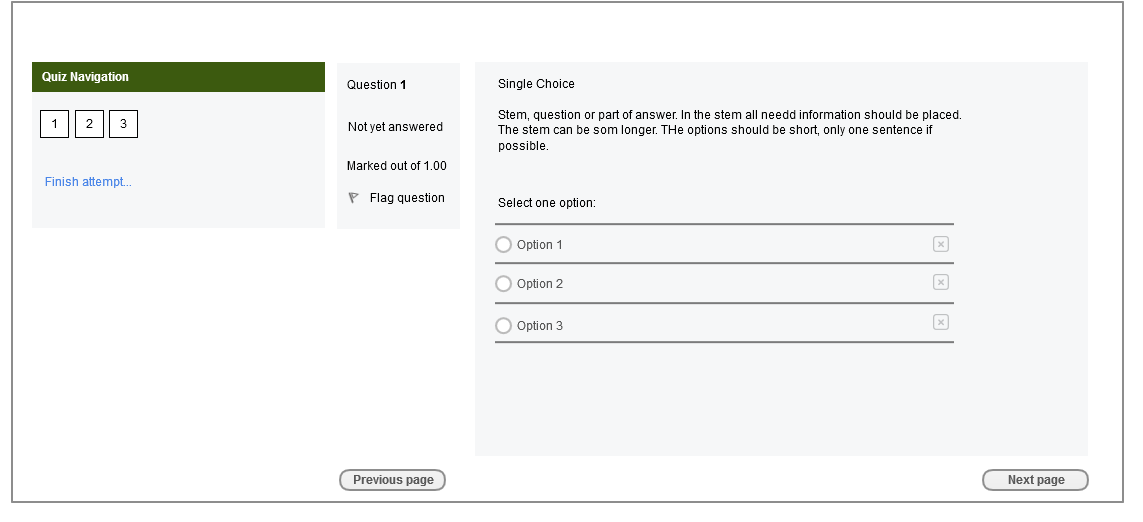
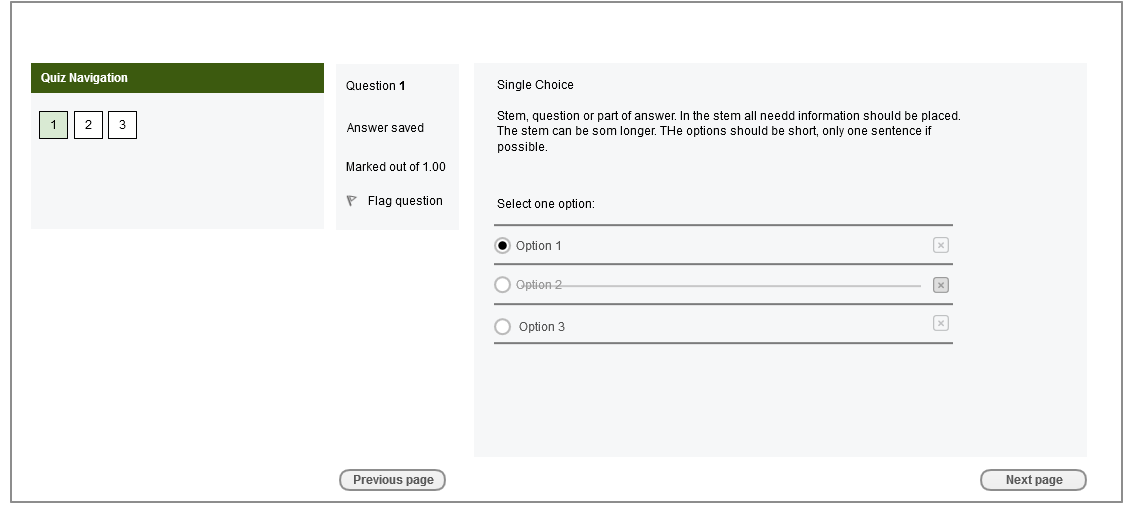
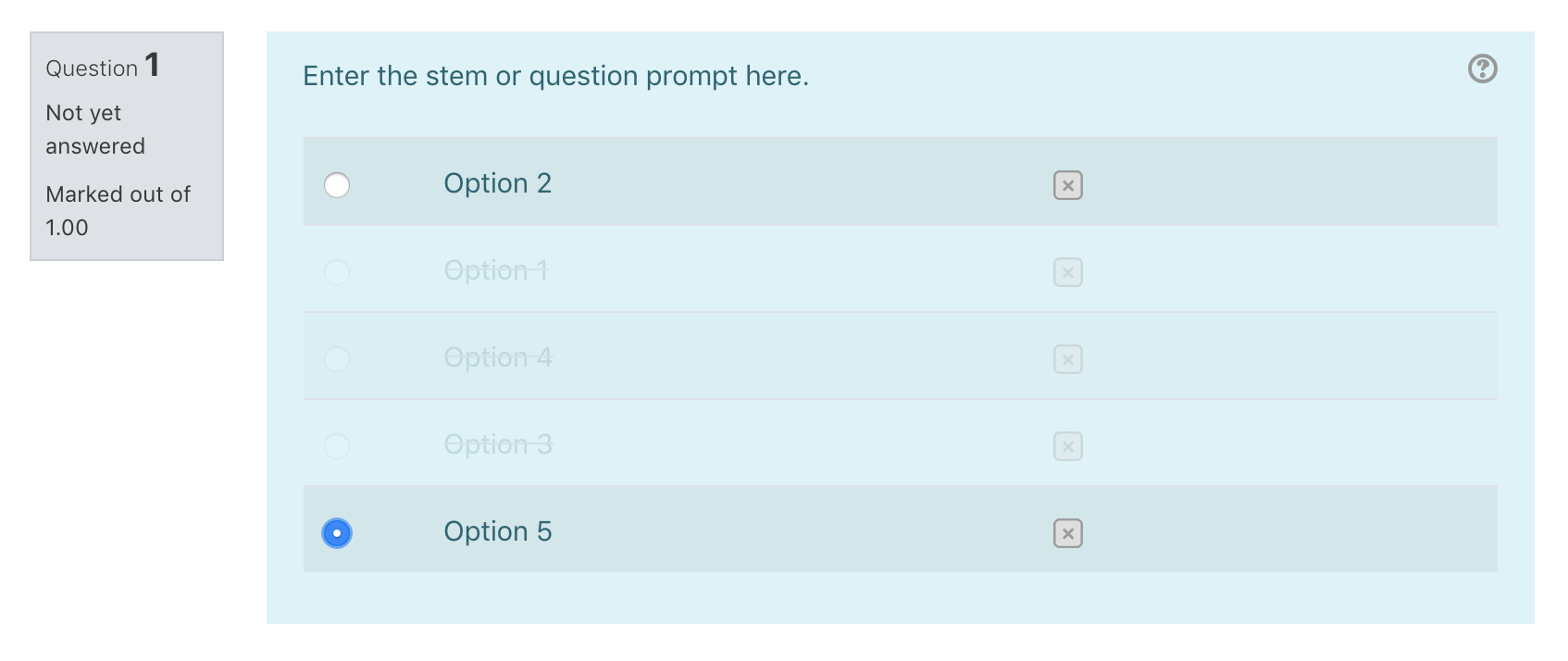
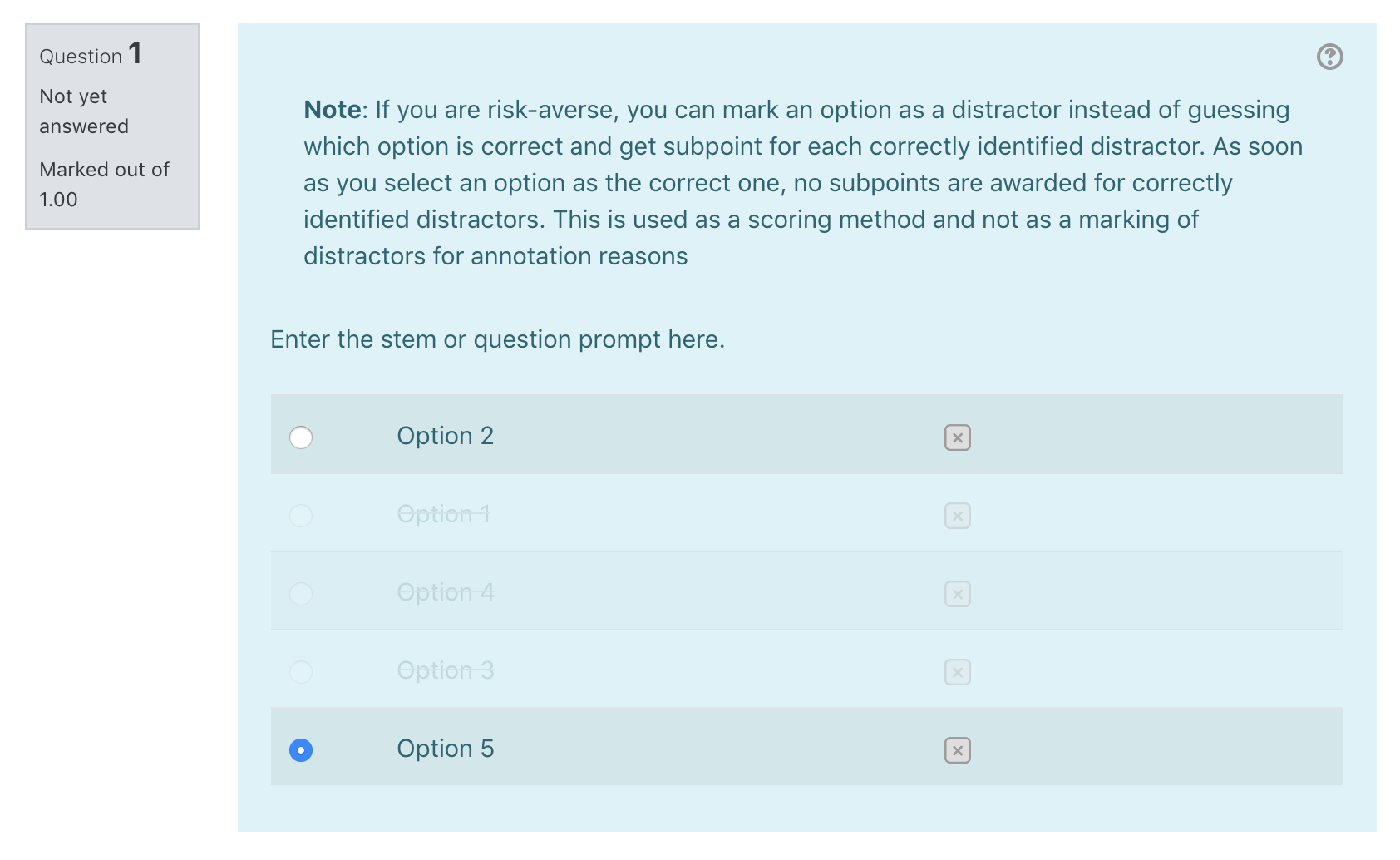
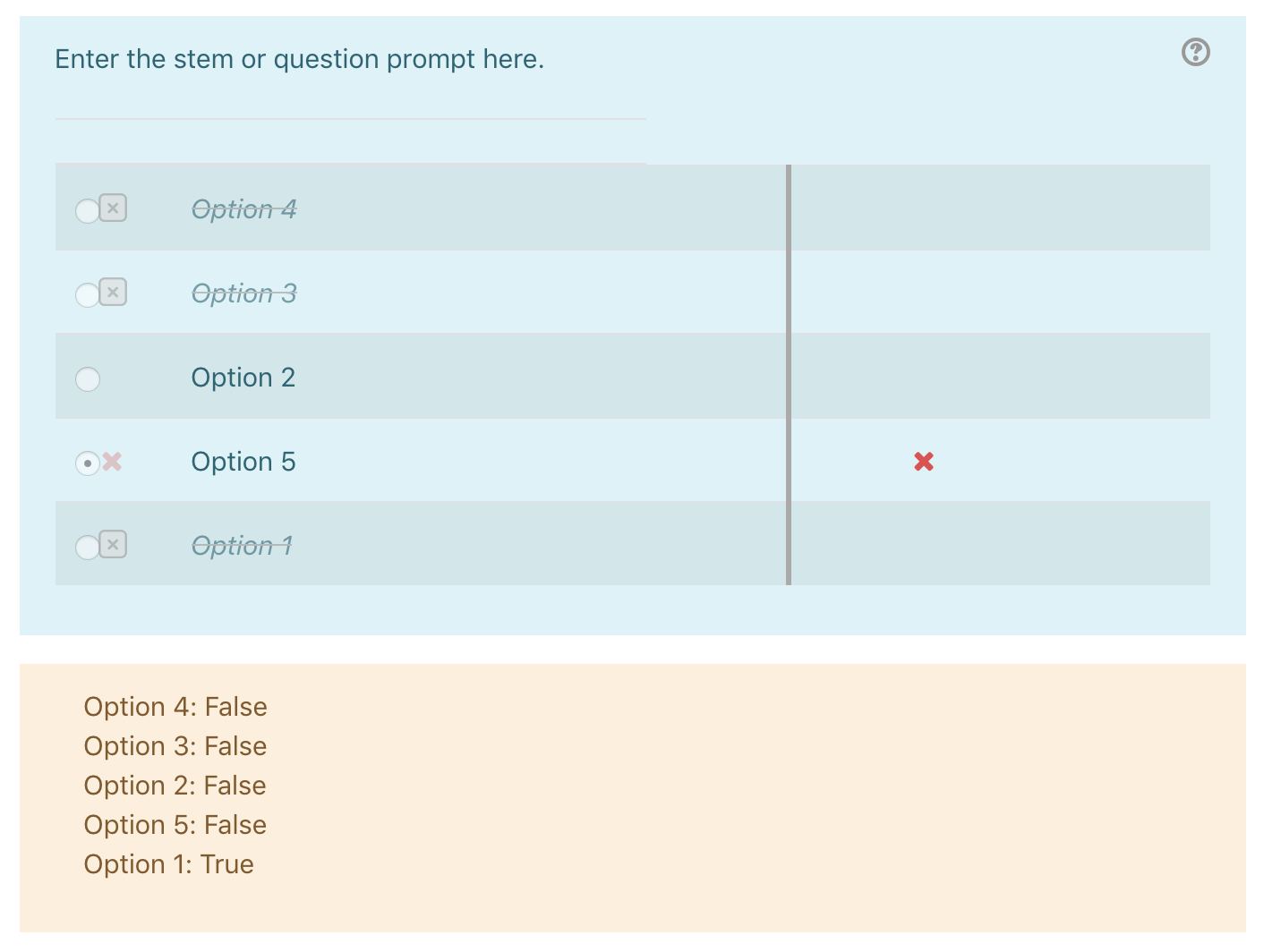
Single Choice (ETH) is a Moodle questiontype, it can most likely be compared to Multichoice but with a difference. In contrary to Multichoice students do not only have the choice to give the right answer by selecting the correct option row but also by marking incorrect option rows (distractors) as wrong. Therefore Single Choice (ETH) comes with three different grading methods which make more or less use of the distractor mechanics. While SC 1/0 is almost identical to Multichoice in terms of question mechanics the other two grading methods also include distractors but handle results slightly different.
The Scoringmethods explained:
Scoring method: SC1/0
The student receives full points for selecting the correct answer, and zero points otherwise.
Scoringmethod: Aprime
The student receives full points for selecting the correct answer or for selecting all distractors correctly, half of the points if one correct distractor remains unchecked and zero points otherwise.
Scoringmethod: Subpoints
The student receives full points for selecting the correct answer or for selecting all distractors correctly, half of the points if one correct distractor remains unchecked and a fraction of points otherwise.
Installation:
- Extract the contents of the downloaded zip to
question/type/. - Rename the extracted folder to
sc. - Start the Moodle upgrade procedure.
Migration Scripts:
qtype_multichoice to qtype_sc
Description:
The Script bin/mig_multichoice_to_sc.php migrates questions of the type
qtype_multichoice to the questiontype qtype_sc. No questions will
be overwritten or deleted, the script will solely create new questions.
Required Parameters (choose 1):
- courseid (values: a valid course ID)
- categoryid (values: a valid category ID)
- all (values: 1)
Conditional Parameters (choose 0-n):
dryrun (values: 0,1)
includesubcategories (values: 0,1)
The Dryrun Option is enabled (1) by default.
With Dryrun enabled no changes will be made to the database.
Use Dryrun to receive information about possible issues before
migrating.
includesubcategories can only be used in combination with the
migration by "categoryid".
If activated (1) subcategories will be included in migration.
Examples
- Migrate Multichoice Questions in a specific course:
MOODLE_URL/question/type/sc/bin/mig_multichoice_to_sc.php?courseid=55
- Migrate Multichoice Questions in a specific category:
MOODLE_URL/question/type/sc/bin/mig_multichoice_to_sc.php?categoryid=1
- Migrate all Multichoice Questions:
MOODLE_URL/question/type/sc/bin/mig_multichoice_to_sc.php?all=1
- Disable Dryrun:
MOODLE_URL/question/type/sc/bin/mig_multichoice_to_sc.php?all=1&dryrun=0
qtype_sc to qtype_multichoice
Description:
The Script bin/mig_sc_to_multichoice.php migrates questions of the type
qtype_sc to the questiontype qtype_multichoice. No questions will be overwritten
or deleted, the script will solely create new questions.
Required Parameters (choose 1):
- courseid (values: a valid course ID)
- categoryid (values: a valid category ID)
- all (values: 1)
Conditional Parameters (choose 0-n):
dryrun (values: 0,1)
includesubcategories (values: 0,1)
The Dryrun Option is enabled (1) by default.
With Dryrun enabled no changes will be made to the database.
Use Dryrun to receive information about possible issues before
migrating.
includesubcategories can only be used in combination with the
migration by "categoryid".
If activated (1) subcategories will be included in migration.
Examples
- Migrate SC Questions in a specific course:
MOODLE_URL/question/type/sc/bin/mig_sc_to_multichoice.php?courseid=55
- Migrate SC Questions in a specific category:
MOODLE_URL/question/type/sc/bin/mig_sc_to_multichoice.php?categoryid=1
- Migrate all SC Questions:
MOODLE_URL/question/type/sc/bin/mig_sc_to_multichoice.php?all=1
- Disable Dryrun:
MOODLE_URL/question/type/sc/bin/mig_sc_to_multichoice.php?all=1&dryrun=0
Further information:
Behat- and Unit tests:
Behat tests are included but scenarios are designed explicitly for ETH Zürich testcases.
Some of the included Test steps are designed to work with the ETH Zürich Moodle setup.
However Unit tests can be used genetically in combination with any Moodle setup.
Contributors:
ETH Zürich (Lead maintainer)
Antonia Bonaccorso (Service owner, antonia.bonaccorso@id.ethz.ch)
4.4 and 4.5 (2024100100)
4.4 and 4.5
Plugin type: Question types
Frankenstyle component name: qtype_sc
Version build number: 2024100100
Version release name: 4.4 and 4.5
Maturity: Stable
Supported Moodle versions: 4.4, 4.5
Repository URL (Git): https://github.com/ethz-let/moodle-qtype_sc
Repository branch:
Repository tag:
Issue/bug tracker URL: https://github.com/ethz-let/moodle-qtype_sc/issues
Single Choice (ETH)
What it is:
Single Choice (ETH) is a Moodle questiontype, it can most likely be compared to Multichoice but with a difference. In contrary to Multichoice students do not only have the choice to give the right answer by selecting the correct option row but also by marking incorrect option rows (distractors) as wrong. Therefore Single Choice (ETH) comes with three different grading methods which make more or less use of the distractor mechanics. While SC 1/0 is almost identical to Multichoice in terms of question mechanics the other two grading methods also include distractors but handle results slightly different.
The Scoringmethods explained:
Scoring method: SC1/0
The student receives full points for selecting the correct answer, and zero points otherwise.
Scoringmethod: Aprime
The student receives full points for selecting the correct answer or for selecting all distractors correctly, half of the points if one correct distractor remains unchecked and zero points otherwise.
Scoringmethod: Subpoints
The student receives full points for selecting the correct answer or for selecting all distractors correctly, half of the points if one correct distractor remains unchecked and a fraction of points otherwise.
Installation:
- Extract the contents of the downloaded zip to
question/type/. - Rename the extracted folder to
sc. - Start the Moodle upgrade procedure.
Migration Scripts:
qtype_multichoice to qtype_sc
Description:
The Script bin/mig_multichoice_to_sc.php migrates questions of the type
qtype_multichoice to the questiontype qtype_sc. No questions will
be overwritten or deleted, the script will solely create new questions.
Required Parameters (choose 1):
- courseid (values: a valid course ID)
- categoryid (values: a valid category ID)
- all (values: 1)
Conditional Parameters (choose 0-n):
dryrun (values: 0,1)
includesubcategories (values: 0,1)
The Dryrun Option is enabled (1) by default.
With Dryrun enabled no changes will be made to the database.
Use Dryrun to receive information about possible issues before
migrating.
includesubcategories can only be used in combination with the
migration by "categoryid".
If activated (1) subcategories will be included in migration.
Examples
- Migrate Multichoice Questions in a specific course:
MOODLE_URL/question/type/sc/bin/mig_multichoice_to_sc.php?courseid=55
- Migrate Multichoice Questions in a specific category:
MOODLE_URL/question/type/sc/bin/mig_multichoice_to_sc.php?categoryid=1
- Migrate all Multichoice Questions:
MOODLE_URL/question/type/sc/bin/mig_multichoice_to_sc.php?all=1
- Disable Dryrun:
MOODLE_URL/question/type/sc/bin/mig_multichoice_to_sc.php?all=1&dryrun=0
qtype_sc to qtype_multichoice
Description:
The Script bin/mig_sc_to_multichoice.php migrates questions of the type
qtype_sc to the questiontype qtype_multichoice. No questions will be overwritten
or deleted, the script will solely create new questions.
Required Parameters (choose 1):
- courseid (values: a valid course ID)
- categoryid (values: a valid category ID)
- all (values: 1)
Conditional Parameters (choose 0-n):
dryrun (values: 0,1)
includesubcategories (values: 0,1)
The Dryrun Option is enabled (1) by default.
With Dryrun enabled no changes will be made to the database.
Use Dryrun to receive information about possible issues before
migrating.
includesubcategories can only be used in combination with the
migration by "categoryid".
If activated (1) subcategories will be included in migration.
Examples
- Migrate SC Questions in a specific course:
MOODLE_URL/question/type/sc/bin/mig_sc_to_multichoice.php?courseid=55
- Migrate SC Questions in a specific category:
MOODLE_URL/question/type/sc/bin/mig_sc_to_multichoice.php?categoryid=1
- Migrate all SC Questions:
MOODLE_URL/question/type/sc/bin/mig_sc_to_multichoice.php?all=1
- Disable Dryrun:
MOODLE_URL/question/type/sc/bin/mig_sc_to_multichoice.php?all=1&dryrun=0
Further information:
Behat- and Unit tests:
Behat tests are included but scenarios are designed explicitly for ETH Zürich testcases.
Some of the included Test steps are designed to work with the ETH Zürich Moodle setup.
However Unit tests can be used genetically in combination with any Moodle setup.
Contributors:
ETH Zürich (Lead maintainer)
Antonia Bonaccorso (Service owner, antonia.bonaccorso@id.ethz.ch)
4 possible from Moodle 3.11 (Transitional) (2023060400)
4 possible from Moodle 3.11 (Transitional)
Plugin type: Question types
Frankenstyle component name: qtype_sc
Version build number: 2023060400
Version release name: 4 possible from Moodle 3.11 (Transitional)
Maturity: Stable
Supported Moodle versions: 4.1, 4.2, 4.3
Repository URL (Git): https://github.com/ethz-let/moodle-qtype_sc
Repository branch:
Repository tag:
Issue/bug tracker URL: https://github.com/ethz-let/moodle-qtype_sc/issues
Single Choice (ETH)
What it is:
Single Choice (ETH) is a Moodle questiontype, it can most likely be compared to Multichoice but with a difference. In contrary to Multichoice students do not only have the choice to give the right answer by selecting the correct option row but also by marking incorrect option rows (distractors) as wrong. Therefore Single Choice (ETH) comes with three different grading methods which make more or less use of the distractor mechanics. While SC 1/0 is almost identical to Multichoice in terms of question mechanics the other two grading methods also include distractors but handle results slightly different.
The Scoringmethods explained:
Scoring method: SC1/0
The student receives full points for selecting the correct answer, and zero points otherwise.
Scoringmethod: Aprime
The student receives full points for selecting the correct answer or for selecting all distractors correctly, half of the points if one correct distractor remains unchecked and zero points otherwise.
Scoringmethod: Subpoints
The student receives full points for selecting the correct answer or for selecting all distractors correctly, half of the points if one correct distractor remains unchecked and a fraction of points otherwise.
Installation:
- Extract the contents of the downloaded zip to
question/type/. - Rename the extracted folder to
sc. - Start the Moodle upgrade procedure.
Migration Scripts:
qtype_multichoice to qtype_sc
Description:
The Script bin/mig_multichoice_to_sc.php migrates questions of the type
qtype_multichoice to the questiontype qtype_sc. No questions will
be overwritten or deleted, the script will solely create new questions.
Required Parameters (choose 1):
- courseid (values: a valid course ID)
- categoryid (values: a valid category ID)
- all (values: 1)
Conditional Parameters (choose 0-n):
dryrun (values: 0,1)
includesubcategories (values: 0,1)
The Dryrun Option is enabled (1) by default.
With Dryrun enabled no changes will be made to the database.
Use Dryrun to receive information about possible issues before
migrating.
includesubcategories can only be used in combination with the
migration by "categoryid".
If activated (1) subcategories will be included in migration.
Examples
- Migrate Multichoice Questions in a specific course:
MOODLE_URL/question/type/sc/bin/mig_multichoice_to_sc.php?courseid=55
- Migrate Multichoice Questions in a specific category:
MOODLE_URL/question/type/sc/bin/mig_multichoice_to_sc.php?categoryid=1
- Migrate all Multichoice Questions:
MOODLE_URL/question/type/sc/bin/mig_multichoice_to_sc.php?all=1
- Disable Dryrun:
MOODLE_URL/question/type/sc/bin/mig_multichoice_to_sc.php?all=1&dryrun=0
qtype_sc to qtype_multichoice
Description:
The Script bin/mig_sc_to_multichoice.php migrates questions of the type
qtype_sc to the questiontype qtype_multichoice. No questions will be overwritten
or deleted, the script will solely create new questions.
Required Parameters (choose 1):
- courseid (values: a valid course ID)
- categoryid (values: a valid category ID)
- all (values: 1)
Conditional Parameters (choose 0-n):
dryrun (values: 0,1)
includesubcategories (values: 0,1)
The Dryrun Option is enabled (1) by default.
With Dryrun enabled no changes will be made to the database.
Use Dryrun to receive information about possible issues before
migrating.
includesubcategories can only be used in combination with the
migration by "categoryid".
If activated (1) subcategories will be included in migration.
Examples
- Migrate SC Questions in a specific course:
MOODLE_URL/question/type/sc/bin/mig_sc_to_multichoice.php?courseid=55
- Migrate SC Questions in a specific category:
MOODLE_URL/question/type/sc/bin/mig_sc_to_multichoice.php?categoryid=1
- Migrate all SC Questions:
MOODLE_URL/question/type/sc/bin/mig_sc_to_multichoice.php?all=1
- Disable Dryrun:
MOODLE_URL/question/type/sc/bin/mig_sc_to_multichoice.php?all=1&dryrun=0
Further information:
Behat- and Unit tests:
Behat tests are included but scenarios are designed explicitly for ETH Zürich testcases.
Some of the included Test steps are designed to work with the ETH Zürich Moodle setup.
However Unit tests can be used genetically in combination with any Moodle setup.
Contributors:
ETH Zürich (Lead maintainer)
Thomas Korner (Service owner, thomas.korner@let.ethz.ch)
4 possible from Moodle 3.11 (Transitional) (2022091500)
4 possible from Moodle 3.11 (Transitional)
Plugin type: Question types
Frankenstyle component name: qtype_sc
Version build number: 2022091500
Version release name: 4 possible from Moodle 3.11 (Transitional)
Maturity: Stable
Supported Moodle versions: 3.11, 4.0
Repository URL (Git): https://github.com/ethz-let/moodle-qtype_sc
Repository branch:
Repository tag:
Issue/bug tracker URL: https://github.com/ethz-let/moodle-qtype_sc/issues
Single Choice (ETH)
What it is:
Single Choice (ETH) is a Moodle questiontype, it can most likely be compared to Multichoice but with a difference. In contrary to Multichoice students do not only have the choice to give the right answer by selecting the correct option row but also by marking incorrect option rows (distractors) as wrong. Therefore Single Choice (ETH) comes with three different grading methods which make more or less use of the distractor mechanics. While SC 1/0 is almost identical to Multichoice in terms of question mechanics the other two grading methods also include distractors but handle results slightly different.
The Scoringmethods explained:
Scoring method: SC1/0
The student receives full points for selecting the correct answer, and zero points otherwise.
Scoringmethod: Aprime
The student receives full points for selecting the correct answer or for selecting all distractors correctly, half of the points if one correct distractor remains unchecked and zero points otherwise.
Scoringmethod: Subpoints
The student receives full points for selecting the correct answer or for selecting all distractors correctly, half of the points if one correct distractor remains unchecked and a fraction of points otherwise.
Installation:
- Extract the contents of the downloaded zip to
question/type/. - Rename the extracted folder to
sc. - Start the Moodle upgrade procedure.
Migration Scripts:
qtype_multichoice to qtype_sc
Description:
The Script bin/mig_multichoice_to_sc.php migrates questions of the type
qtype_multichoice to the questiontype qtype_sc. No questions will
be overwritten or deleted, the script will solely create new questions.
Required Parameters (choose 1):
- courseid (values: a valid course ID)
- categoryid (values: a valid category ID)
- all (values: 1)
Conditional Parameters (choose 0-n):
dryrun (values: 0,1)
includesubcategories (values: 0,1)
The Dryrun Option is enabled (1) by default.
With Dryrun enabled no changes will be made to the database.
Use Dryrun to receive information about possible issues before
migrating.
includesubcategories can only be used in combination with the
migration by "categoryid".
If activated (1) subcategories will be included in migration.
Examples
- Migrate Multichoice Questions in a specific course:
MOODLE_URL/question/type/sc/bin/mig_multichoice_to_sc.php?courseid=55
- Migrate Multichoice Questions in a specific category:
MOODLE_URL/question/type/sc/bin/mig_multichoice_to_sc.php?categoryid=1
- Migrate all Multichoice Questions:
MOODLE_URL/question/type/sc/bin/mig_multichoice_to_sc.php?all=1
- Disable Dryrun:
MOODLE_URL/question/type/sc/bin/mig_multichoice_to_sc.php?all=1&dryrun=0
qtype_sc to qtype_multichoice
Description:
The Script bin/mig_sc_to_multichoice.php migrates questions of the type
qtype_sc to the questiontype qtype_multichoice. No questions will be overwritten
or deleted, the script will solely create new questions.
Required Parameters (choose 1):
- courseid (values: a valid course ID)
- categoryid (values: a valid category ID)
- all (values: 1)
Conditional Parameters (choose 0-n):
dryrun (values: 0,1)
includesubcategories (values: 0,1)
The Dryrun Option is enabled (1) by default.
With Dryrun enabled no changes will be made to the database.
Use Dryrun to receive information about possible issues before
migrating.
includesubcategories can only be used in combination with the
migration by "categoryid".
If activated (1) subcategories will be included in migration.
Examples
- Migrate SC Questions in a specific course:
MOODLE_URL/question/type/sc/bin/mig_sc_to_multichoice.php?courseid=55
- Migrate SC Questions in a specific category:
MOODLE_URL/question/type/sc/bin/mig_sc_to_multichoice.php?categoryid=1
- Migrate all SC Questions:
MOODLE_URL/question/type/sc/bin/mig_sc_to_multichoice.php?all=1
- Disable Dryrun:
MOODLE_URL/question/type/sc/bin/mig_sc_to_multichoice.php?all=1&dryrun=0
Further information:
Behat- and Unit tests:
Behat tests are included but scenarios are designed explicitly for ETH Zürich testcases.
Some of the included Test steps are designed to work with the ETH Zürich Moodle setup.
However Unit tests can be used genetically in combination with any Moodle setup.
Contributors:
ETH Zürich (Lead maintainer)
Thomas Korner (Service owner, thomas.korner@let.ethz.ch)
1.1 for Moodle 3.3+ (2021092202)
1.1 for Moodle 3.3+
Plugin type: Question types
Frankenstyle component name: qtype_sc
Version build number: 2021092202
Version release name: 1.1 for Moodle 3.3+
Maturity: Stable
Supported Moodle versions: 3.3, 3.4, 3.5, 3.6, 3.7, 3.8, 3.9, 3.10, 3.11
Repository URL (Git): https://github.com/ethz-let/moodle-qtype_sc
Repository branch:
Repository tag:
Issue/bug tracker URL: https://github.com/ethz-let/moodle-qtype_sc/issues
Single Choice (ETH)
What it is:
Single Choice (ETH) is a Moodle questiontype, it can most likely be compared to Multichoice but with a difference. In contrary to Multichoice students do not only have the choice to give the right answer by selecting the correct option row but also by marking incorrect option rows (distractors) as wrong. Therefore Single Choice (ETH) comes with three different grading methods which make more or less use of the distractor mechanics. While SC 1/0 is almost identical to Multichoice in terms of question mechanics the other two grading methods also include distractors but handle results slightly different.
The Scoringmethods explained:
Scoring method: SC1/0
The student receives full points for selecting the correct answer, and zero points otherwise.
Scoringmethod: Aprime
The student receives full points for selecting the correct answer or for selecting all distractors correctly, half of the points if one correct distractor remains unchecked and zero points otherwise.
Scoringmethod: Subpoints
The student receives full points for selecting the correct answer or for selecting all distractors correctly, half of the points if one correct distractor remains unchecked and a fraction of points otherwise.
Installation:
- Extract the contents of the downloaded zip to
question/type/. - Rename the extracted folder to
sc. - Start the Moodle upgrade procedure.
Migration Scripts:
qtype_multichoice to qtype_sc
Description:
The Script bin/mig_multichoice_to_sc.php migrates questions of the type
qtype_multichoice to the questiontype qtype_sc. No questions will
be overwritten or deleted, the script will solely create new questions.
Required Parameters (choose 1):
- courseid (values: a valid course ID)
- categoryid (values: a valid category ID)
- all (values: 1)
Conditional Parameters (choose 0-n):
dryrun (values: 0,1)
includesubcategories (values: 0,1)
The Dryrun Option is enabled (1) by default.
With Dryrun enabled no changes will be made to the database.
Use Dryrun to receive information about possible issues before
migrating.
includesubcategories can only be used in combination with the
migration by "categoryid".
If activated (1) subcategories will be included in migration.
Examples
- Migrate Multichoice Questions in a specific course:
MOODLE_URL/question/type/sc/bin/mig_multichoice_to_sc.php?courseid=55
- Migrate Multichoice Questions in a specific category:
MOODLE_URL/question/type/sc/bin/mig_multichoice_to_sc.php?categoryid=1
- Migrate all Multichoice Questions:
MOODLE_URL/question/type/sc/bin/mig_multichoice_to_sc.php?all=1
- Disable Dryrun:
MOODLE_URL/question/type/sc/bin/mig_multichoice_to_sc.php?all=1&dryrun=0
qtype_sc to qtype_multichoice
Description:
The Script bin/mig_sc_to_multichoice.php migrates questions of the type
qtype_sc to the questiontype qtype_multichoice. No questions will be overwritten
or deleted, the script will solely create new questions.
Required Parameters (choose 1):
- courseid (values: a valid course ID)
- categoryid (values: a valid category ID)
- all (values: 1)
Conditional Parameters (choose 0-n):
dryrun (values: 0,1)
includesubcategories (values: 0,1)
The Dryrun Option is enabled (1) by default.
With Dryrun enabled no changes will be made to the database.
Use Dryrun to receive information about possible issues before
migrating.
includesubcategories can only be used in combination with the
migration by "categoryid".
If activated (1) subcategories will be included in migration.
Examples
- Migrate SC Questions in a specific course:
MOODLE_URL/question/type/sc/bin/mig_sc_to_multichoice.php?courseid=55
- Migrate SC Questions in a specific category:
MOODLE_URL/question/type/sc/bin/mig_sc_to_multichoice.php?categoryid=1
- Migrate all SC Questions:
MOODLE_URL/question/type/sc/bin/mig_sc_to_multichoice.php?all=1
- Disable Dryrun:
MOODLE_URL/question/type/sc/bin/mig_sc_to_multichoice.php?all=1&dryrun=0
Further information:
Behat- and Unit tests:
Behat tests are included but scenarios are designed explicitly for ETH Zürich testcases.
Some of the included Test steps are designed to work with the ETH Zürich Moodle setup.
However Unit tests can be used genetically in combination with any Moodle setup.
Contributors:
ETH Zürich (Lead maintainer)
Thomas Korner (Service owner, thomas.korner@let.ethz.ch)
1.1 for Moodle 3.3+ (2021022500)
1.1 for Moodle 3.3+
Plugin type: Question types
Frankenstyle component name: qtype_sc
Version build number: 2021022500
Version release name: 1.1 for Moodle 3.3+
Maturity: Stable
Supported Moodle versions: 3.6, 3.7, 3.8, 3.9, 3.10
Repository URL (Git): https://github.com/ethz-let/moodle-qtype_sc
Repository branch:
Repository tag:
Issue/bug tracker URL: https://github.com/ethz-let/moodle-qtype_sc/issues
Single Choice (ETH)
What it is:
The MC question type as it exists in Moodle is not very ideal, since you can configure questions which are not very well designed regarding best practices of MC questions. Therefore two question types the Mutliple True/False and the Single Choice will be developed. Creating a SC question teachers will have the possibility of choosing between three scoring methods:
- SC 1/0
- Subpoints
- Aprime
Aprime is a new scoring method designed to find a solution for a fairer scoring if students are risk averse.
The Scoringmethods explained:
Scoring method: SC1/0
A student solving a SC question clicks on the distractor icon to select distractors. In this way she or he can cross out the options, which she/he is sure are not the correct answers and doing this she/he can focus on finding the correct option between the remaining not crossed out options. This selection has to be saved for the duration of the exam and in the results.
SC run mode with distractor cross out (scoring methods: SC1/0)
This feature allows the student to cross out options he or she is sure are wrong so that he or she only has to look at the reminding options coming back again to solve the question. This allows what student can do on paper exams, when marking distractors with a pencil.
Scoringmethod: Aprime or Subpoints
In the contrary to SC1/0 for the scoring method Aprime and Subpoints the crossing-out-distractors-function is combined with scoring. A student can cross out an option as a distractor instead of guessing which option is correct and gets subpoints for each correctly identified distractor. As soon she or he selects an option as the correct one, no subpoints are awarded for correctly identified distractors. The layout here has to show that this is used as a scoring method and not as a crossing out of distractors for annotation reasons.
Installation:
- Extract the contents of the downloaded zip to
question/type/. - Rename the extracted folder to
sc. - Start the Moodle upgrade procedure.
Migration Scripts:
qtype_multichoice to qtype_sc
Description:
The Script bin/mig_multichoice_to_sc.php migrates questions of the type
qtype_multichoice to the questiontype qtype_sc. No questions will
be overwritten or deleted, the script will solely create new questions.
Required Parameters (choose 1):
- courseid (values: a valid course ID)
- categoryid (values: a valid category ID)
- all (values: 1)
Conditional Parameters (choose 0-n):
dryrun (values: 0,1)
includesubcategories (values: 0,1)
The Dryrun Option is enabled (1) by default.
With Dryrun enabled no changes will be made to the database.
Use Dryrun to receive information about possible issues before
migrating.
includesubcategories wird in Kombination mit Migration by
"categoryid" verwendet.
Falls aktiviert (1) werden Unterkategorien mit migriert.
Examples
- Migrate Multichoice Questions in a specific course:
MOODLE_URL/question/type/sc/bin/mig_multichoice_to_sc.php?courseid=55
- Migrate Multichoice Questions in a specific category:
MOODLE_URL/question/type/sc/bin/mig_multichoice_to_sc.php?categoryid=1
- Migrate all Multichoice Questions:
MOODLE_URL/question/type/sc/bin/mig_multichoice_to_sc.php?all=1
- Disable Dryrun:
MOODLE_URL/question/type/sc/bin/mig_multichoice_to_sc.php?all=1&dryrun=0
qtype_sc to qtype_multichoice
Description:
The Script bin/mig_sc_to_multichoice.php migrates questions of the type
qtype_sc to the questiontype qtype_multichoice. No questions will be overwritten
or deleted, the script will solely create new questions.
Required Parameters (choose 1):
- courseid (values: a valid course ID)
- categoryid (values: a valid category ID)
- all (values: 1)
Conditional Parameters (choose 0-n):
dryrun (values: 0,1)
includesubcategories (values: 0,1)
The Dryrun Option is enabled (1) by default.
With Dryrun enabled no changes will be made to the database.
Use Dryrun to receive information about possible issues before
migrating.
includesubcategories is used in combination with migration by categoryid.
If enabled all subcategories will be migrated as well.
Examples
- Migrate SC Questions in a specific course:
MOODLE_URL/question/type/sc/bin/mig_sc_to_multichoice.php?courseid=55
- Migrate SC Questions in a specific category:
MOODLE_URL/question/type/sc/bin/mig_sc_to_multichoice.php?categoryid=1
- Migrate all SC Questions:
MOODLE_URL/question/type/sc/bin/mig_sc_to_multichoice.php?all=1
- Disable Dryrun:
MOODLE_URL/question/type/sc/bin/mig_sc_to_multichoice.php?all=1&dryrun=0
Further information:
Behat- and Unit tests:
Behat tests are included but scenarios are designed explicitly for ETH Zürich testcases.
Some of the included Test steps are designed to work with the ETH Zürich Moodle setup.
However Unit tests can be used genetically in combination with any Moodle setup.
Contributors:
ETH Zürich (Lead maintainer)
Thomas Korner (Service owner, thomas.korner@let.ethz.ch)