
Grade overview
Versions
Current version
Version for Moodle 3.4 onwards (2022071311)
Version for Moodle 3.4 onwards
Plugin type: Blocks
Frankenstyle component name: block_grade_overview
Version build number: 2022071311
Version release name: Version for Moodle 3.4 onwards
Maturity: Stable
Supported Moodle versions: 3.10, 3.11, 3.4, 3.5, 3.6, 3.7, 3.8, 3.9, 4.0, 4.1
Repository URL (Git): https://github.com/JotaDF/moodle-block_grade_overview
Repository branch: master
Repository tag:
Issue/bug tracker URL: https://github.com/JotaDF/moodle-block_grade_overview/issues
moodle-block_game
Changes
Changes Version 1.1 Version for Moodle 3.4 onwards
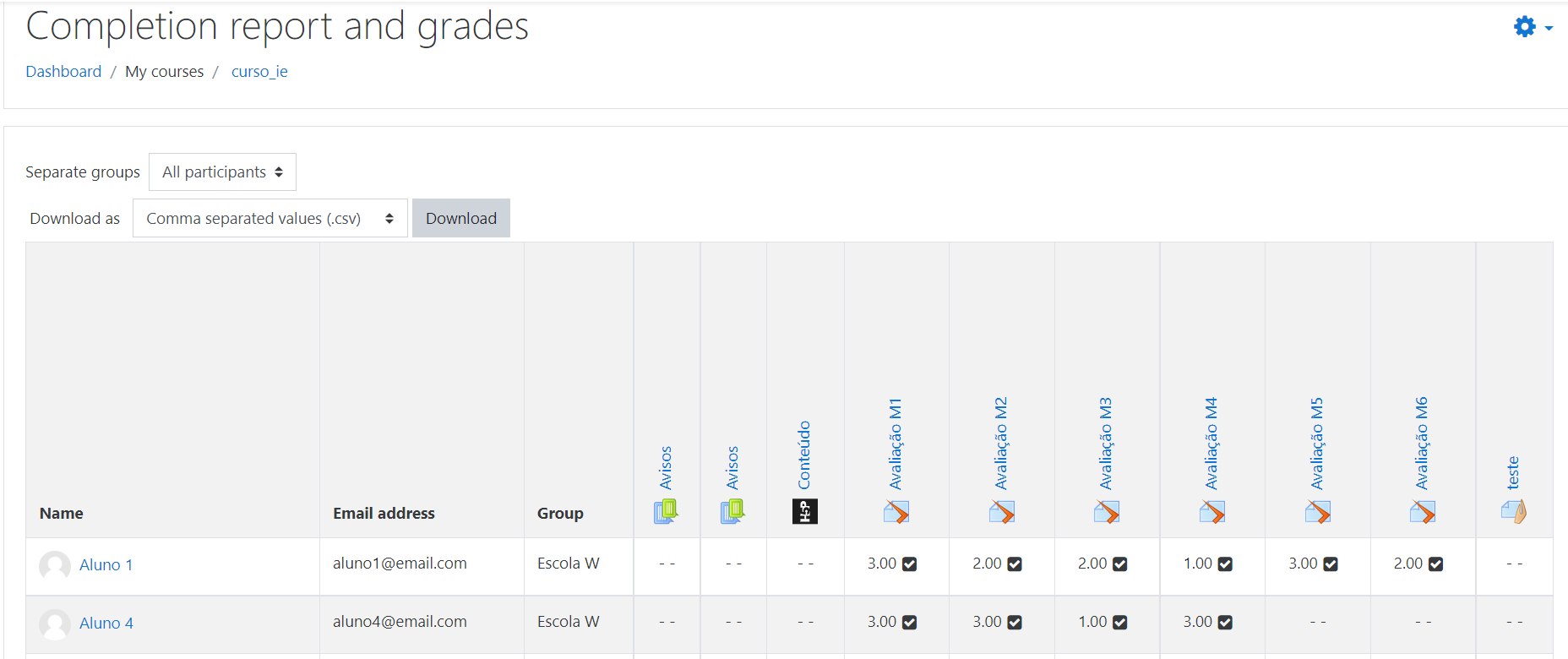
- 2022-04-25 - New completion report
- 2022-04-25 - Option to export reports
- 2022-04-04 - group view in reports
Changes Version 1.0 for Moodle 3.4 onwards (2021040849)
- 2021-04-08 - Change plugin version and release scheme to the scheme promoted by moodle.org, no functionality change
- 2021-01-05 - Initial version
Version for Moodle 3.4 onwards (2022071310)
Version for Moodle 3.4 onwards
Plugin type: Blocks
Frankenstyle component name: block_grade_overview
Version build number: 2022071310
Version release name: Version for Moodle 3.4 onwards
Maturity: Stable
Supported Moodle versions: 3.10, 3.11, 3.4, 3.5, 3.6, 3.7, 3.8, 3.9, 4.0
Repository URL (Git): https://github.com/JotaDF/moodle-block_grade_overview
Repository branch: master
Repository tag:
Issue/bug tracker URL: https://github.com/JotaDF/moodle-block_grade_overview/issues
moodle-block_game
Changes
Changes Version 1.1 Version for Moodle 3.4 onwards
- 2022-04-25 - New completion report
- 2022-04-25 - Option to export reports
- 2022-04-04 - group view in reports
Changes Version 1.0 for Moodle 3.4 onwards (2021040849)
- 2021-04-08 - Change plugin version and release scheme to the scheme promoted by moodle.org, no functionality change
- 2021-01-05 - Initial version
Version for Moodle 3.4 onwards (2022071300)
Version for Moodle 3.4 onwards
Plugin type: Blocks
Frankenstyle component name: block_grade_overview
Version build number: 2022071300
Version release name: Version for Moodle 3.4 onwards
Maturity: Stable
Supported Moodle versions: 3.10, 3.11, 3.4, 3.5, 3.6, 3.7, 3.8, 3.9, 4.0
Repository URL (Git): https://github.com/JotaDF/moodle-block_grade_overview
Repository branch: master
Repository tag:
Issue/bug tracker URL: https://github.com/JotaDF/moodle-block_grade_overview/issues
moodle-block_game
Changes
Changes Version 1.1 Version for Moodle 3.4 onwards
- 2022-04-25 - New completion report
- 2022-04-25 - Option to export reports
- 2022-04-04 - group view in reports
Changes Version 1.0 for Moodle 3.4 onwards (2021040849)
- 2021-04-08 - Change plugin version and release scheme to the scheme promoted by moodle.org, no functionality change
- 2021-01-05 - Initial version
Version for Moodle 3.4 onwards (2022042500)
Version for Moodle 3.4 onwards
Plugin type: Blocks
Frankenstyle component name: block_grade_overview
Version build number: 2022042500
Version release name: Version for Moodle 3.4 onwards
Maturity: Stable
Supported Moodle versions: 3.10, 3.11, 3.4, 3.5, 3.6, 3.7, 3.8, 3.9, 4.0
Repository URL (Git): https://github.com/JotaDF/moodle-block_grade_overview
Repository branch: master
Repository tag:
Issue/bug tracker URL: https://github.com/JotaDF/moodle-block_grade_overview/issues
moodle-block_game
Changes
Changes Version 1.1 Version for Moodle 3.4 onwards
- 2022-04-25 - New completion report
- 2022-04-25 - Option to export reports
- 2022-04-04 - group view in reports
Changes Version 1.0 for Moodle 3.4 onwards (2021040849)
- 2021-04-08 - Change plugin version and release scheme to the scheme promoted by moodle.org, no functionality change
- 2021-01-05 - Initial version
Version for Moodle 3.4 onwards (2021040849)
Version for Moodle 3.4 onwards
Plugin type: Blocks
Frankenstyle component name: block_grade_overview
Version build number: 2021040849
Version release name: Version for Moodle 3.4 onwards
Maturity: Stable
Supported Moodle versions: 3.10, 3.11, 3.4, 3.5, 3.6, 3.7, 3.8, 3.9
Repository URL (Git): https://github.com/JotaDF/moodle-block_grade_overview
Repository branch: master
Repository tag:
Issue/bug tracker URL: https://github.com/JotaDF/moodle-block_grade_overview/issues

Moodle Block Grade Overview
VERSION 1.0
The purpose of the Block Grade Overview plugin is to allow the teacher to set up a personalized overview of the notes of the activities that make up the assessment in a block that is already visible to the student, enabling him to monitor his progress in the course evaluations.
The plugin allows the following actions:
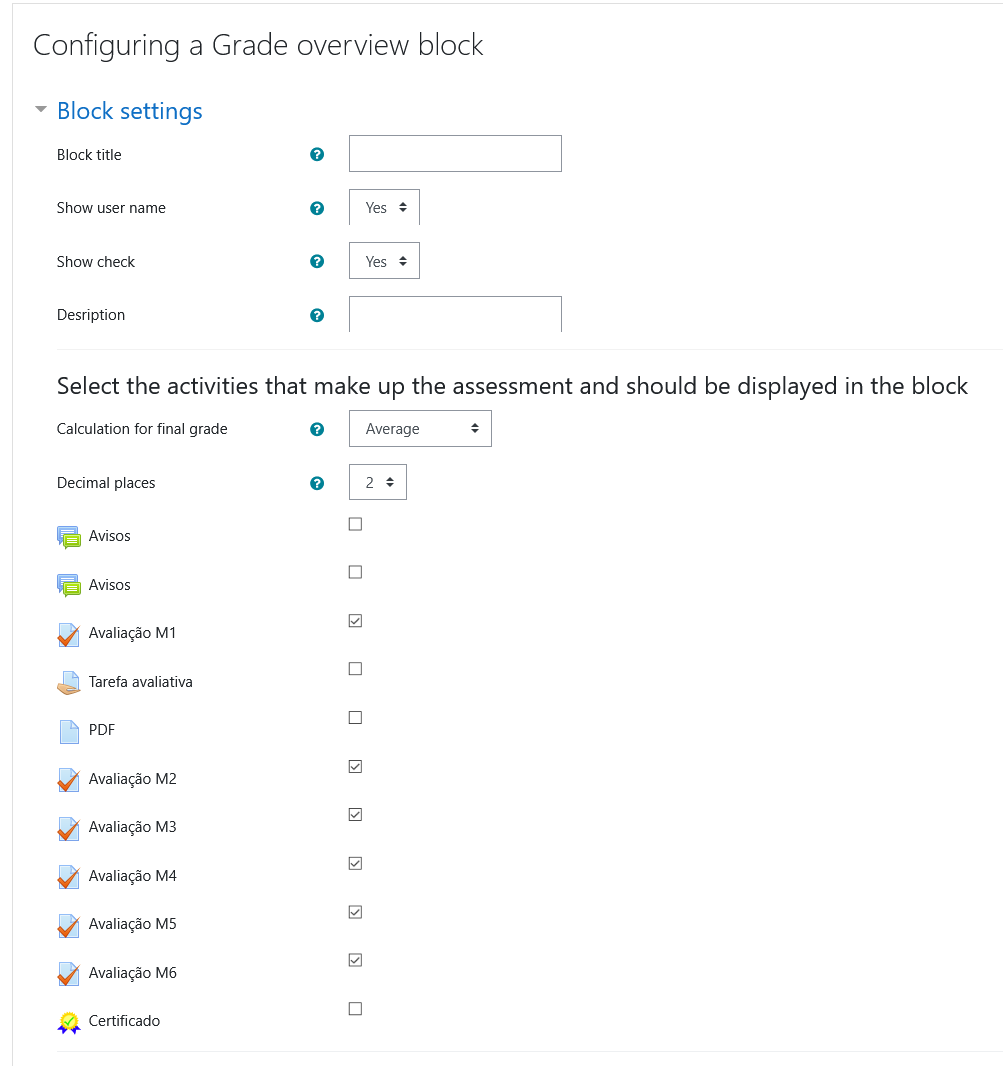
Select the activities to be displayed in the block:
In the block settings, the teacher can select, among all the course activities, which will be displayed in the block, and configure how the notes are displayed.
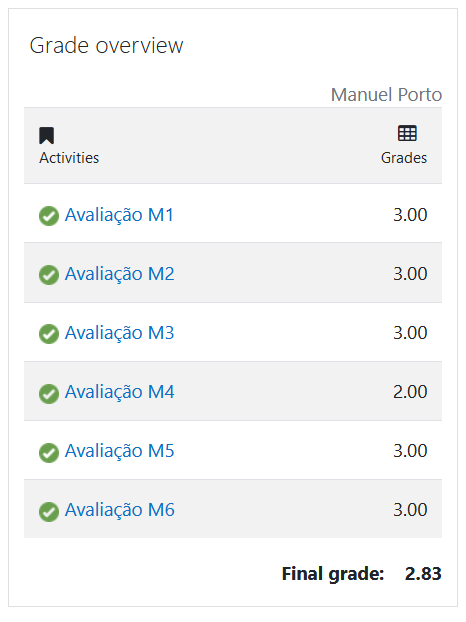
Show the final note:
The plugin allows the calculation and display of a final grade, calculated from the selected activities! The calculation possibilities are: Sum, Average or Highest score.
Show a vision to the student that allows the monitoring of the evaluations that received grade:
The teacher can configure the display of a check for the student to follow up on the evaluations that have already been given a grade. A progress bar is also displayed showing the percentage of completion of the evaluations. (Only in the student's view)
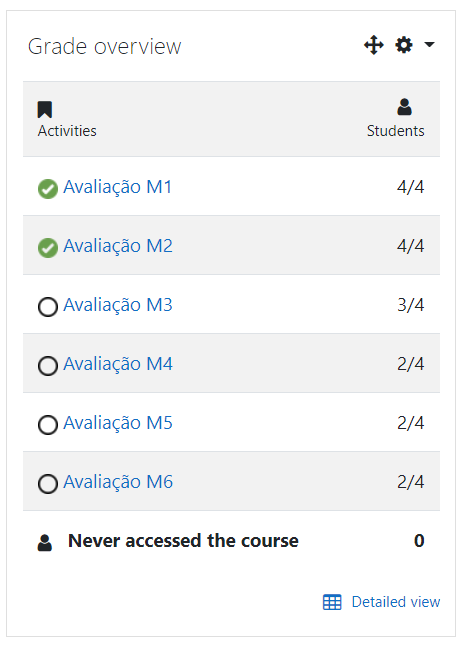
A vision for the teacher to monitor the evaluations made by the students:
The block shows a vision for the teacher, different from that of the student, where it allows the teacher to monitor the number of students who have already carried out each assessment and at the end displays the number of students who have not yet accessed the course.
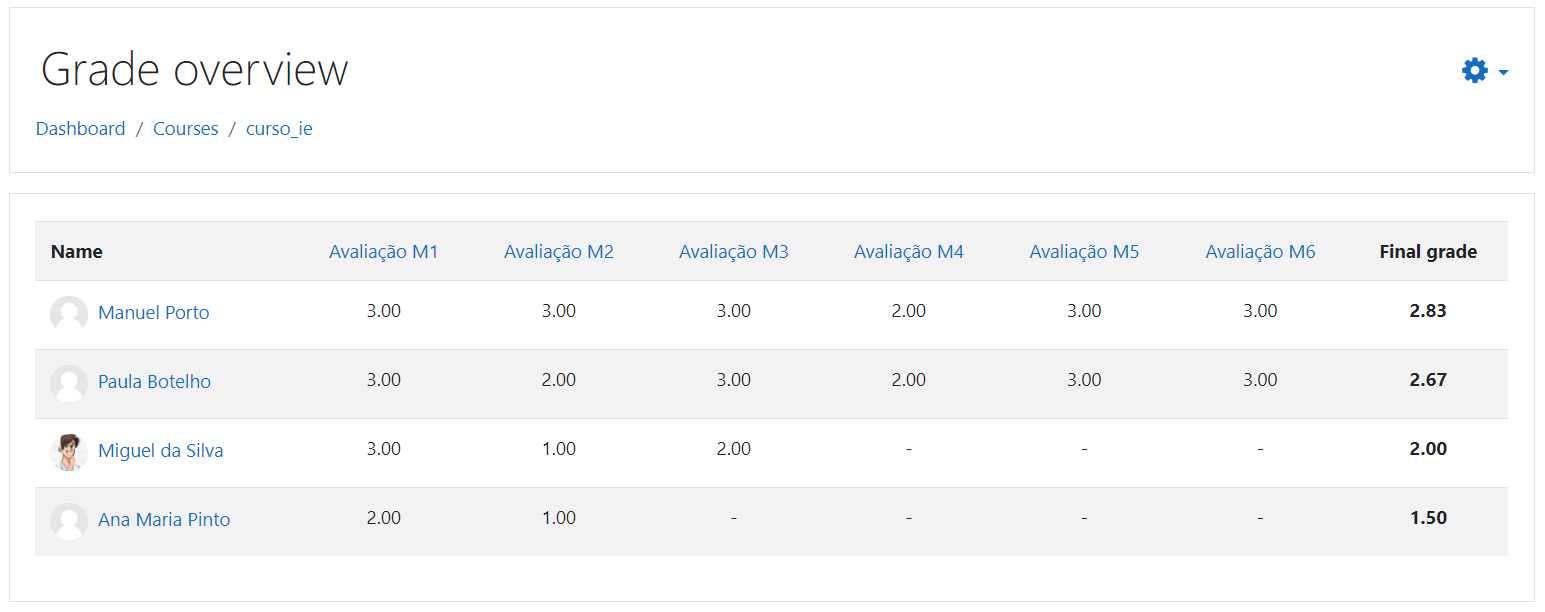
Detailed report of the nostas overview for the teacher:
The teacher can view a detailed report of the overview of the grades, shown according to the configuration made in the Grade Overview block.
All images used in the plugin are under the Creative Commons license.
Installation
First way
- Download this repository
- Access the administration area-> plugins-> install plugin, upload the file and click install.
Second way
- Download this repository
- Extract the content
- Put the folder into the folder blocks of your moodle
- Access the notification area in moodle and install
Post instalation
After installing the block, simply add it to the course and / or in the main page of moodle.
The entire configuration of the plugin is in the configuration of the block.
Version for Moodle 3.4 onwards (2021040848)
Version for Moodle 3.4 onwards
Plugin type: Blocks
Frankenstyle component name: block_grade_overview
Version build number: 2021040848
Version release name: Version for Moodle 3.4 onwards
Maturity: Stable
Supported Moodle versions: 3.10, 3.11, 3.4, 3.5, 3.6, 3.7, 3.8, 3.9
Repository URL (Git): https://github.com/JotaDF/moodle-block_grade_overview
Repository branch: master
Repository tag:
Issue/bug tracker URL: https://github.com/JotaDF/moodle-block_grade_overview/issues
Moodle Block Grade Overview
VERSION 1.0
The purpose of the Block Grade Overview plugin is to allow the teacher to set up a personalized overview of the notes of the activities that make up the assessment in a block that is already visible to the student, enabling him to monitor his progress in the course evaluations.
The plugin allows the following actions:
Select the activities to be displayed in the block:
In the block settings, the teacher can select, among all the course activities, which will be displayed in the block, and configure how the notes are displayed.
Show the final note:
The plugin allows the calculation and display of a final grade, calculated from the selected activities! The calculation possibilities are: Sum, Average or Highest score.
Show a vision to the student that allows the monitoring of the evaluations that received grade:
The teacher can configure the display of a check for the student to follow up on the evaluations that have already been given a grade. A progress bar is also displayed showing the percentage of completion of the evaluations. (Only in the student's view)
A vision for the teacher to monitor the evaluations made by the students:
The block shows a vision for the teacher, different from that of the student, where it allows the teacher to monitor the number of students who have already carried out each assessment and at the end displays the number of students who have not yet accessed the course.
Detailed report of the nostas overview for the teacher:
The teacher can view a detailed report of the overview of the grades, shown according to the configuration made in the Grade Overview block.
All images used in the plugin are under the Creative Commons license.
Installation
First way
- Download this repository
- Access the administration area-> plugins-> install plugin, upload the file and click install.
Second way
- Download this repository
- Extract the content
- Put the folder into the folder blocks of your moodle
- Access the notification area in moodle and install
Post instalation
After installing the block, simply add it to the course and / or in the main page of moodle.
The entire configuration of the plugin is in the configuration of the block.
Version for Moodle 3.4 onwards (2021040847)
Version for Moodle 3.4 onwards
Plugin type: Blocks
Frankenstyle component name: block_grade_overview
Version build number: 2021040847
Version release name: Version for Moodle 3.4 onwards
Maturity: Stable
Supported Moodle versions: 3.10, 3.11, 3.4, 3.5, 3.6, 3.7, 3.8, 3.9
Repository URL (Git): https://github.com/JotaDF/moodle-block_grade_overview
Repository branch: master
Repository tag:
Issue/bug tracker URL: https://github.com/JotaDF/moodle-block_grade_overview/issues
Moodle Block Grade Overview
VERSION 1.0
The purpose of the Block Grade Overview plugin is to allow the teacher to set up a personalized overview of the notes of the activities that make up the assessment in a block that is already visible to the student, enabling him to monitor his progress in the course evaluations.
The plugin allows the following actions:
Select the activities to be displayed in the block:
In the block settings, the teacher can select, among all the course activities, which will be displayed in the block, and configure how the notes are displayed.
Show the final note:
The plugin allows the calculation and display of a final grade, calculated from the selected activities! The calculation possibilities are: Sum, Average or Highest score.
Show a vision to the student that allows the monitoring of the evaluations that received grade:
The teacher can configure the display of a check for the student to follow up on the evaluations that have already been given a grade. A progress bar is also displayed showing the percentage of completion of the evaluations. (Only in the student's view)
A vision for the teacher to monitor the evaluations made by the students:
The block shows a vision for the teacher, different from that of the student, where it allows the teacher to monitor the number of students who have already carried out each assessment and at the end displays the number of students who have not yet accessed the course.
Detailed report of the nostas overview for the teacher:
The teacher can view a detailed report of the overview of the grades, shown according to the configuration made in the Grade Overview block.
All images used in the plugin are under the Creative Commons license.
Installation
First way
- Download this repository
- Access the administration area-> plugins-> install plugin, upload the file and click install.
Second way
- Download this repository
- Extract the content
- Put the folder into the folder blocks of your moodle
- Access the notification area in moodle and install
Post instalation
After installing the block, simply add it to the course and / or in the main page of moodle.
The entire configuration of the plugin is in the configuration of the block.
Version for Moodle 3.4 onwards (2021040845)
Version for Moodle 3.4 onwards
Plugin type: Blocks
Frankenstyle component name: block_grade_overview
Version build number: 2021040845
Version release name: Version for Moodle 3.4 onwards
Maturity: Stable
Supported Moodle versions: 3.10, 3.11, 3.4, 3.5, 3.6, 3.7, 3.8, 3.9
Repository URL (Git): https://github.com/JotaDF/moodle-block_grade_overview
Repository branch: master
Repository tag:
Issue/bug tracker URL: https://github.com/JotaDF/moodle-block_grade_overview/issues
Moodle Block Grade Overview
VERSION 1.0
The purpose of the Block Grade Overview plugin is to allow the teacher to set up a personalized overview of the notes of the activities that make up the assessment in a block that is already visible to the student, enabling him to monitor his progress in the course evaluations.
The plugin allows the following actions:
Select the activities to be displayed in the block:
In the block settings, the teacher can select, among all the course activities, which will be displayed in the block, and configure how the notes are displayed.
Show the final note:
The plugin allows the calculation and display of a final grade, calculated from the selected activities! The calculation possibilities are: Sum, Average or Highest score.
Show a vision to the student that allows the monitoring of the evaluations that received grade:
The teacher can configure the display of a check for the student to follow up on the evaluations that have already been given a grade. A progress bar is also displayed showing the percentage of completion of the evaluations. (Only in the student's view)
A vision for the teacher to monitor the evaluations made by the students:
The block shows a vision for the teacher, different from that of the student, where it allows the teacher to monitor the number of students who have already carried out each assessment and at the end displays the number of students who have not yet accessed the course.
Detailed report of the nostas overview for the teacher:
The teacher can view a detailed report of the overview of the grades, shown according to the configuration made in the Grade Overview block.
All images used in the plugin are under the Creative Commons license.
Installation
First way
- Download this repository
- Access the administration area-> plugins-> install plugin, upload the file and click install.
Second way
- Download this repository
- Extract the content
- Put the folder into the folder blocks of your moodle
- Access the notification area in moodle and install
Post instalation
After installing the block, simply add it to the course and / or in the main page of moodle.
The entire configuration of the plugin is in the configuration of the block.
Version for Moodle 3.4 onwards (2021040844)
Version for Moodle 3.4 onwards
Plugin type: Blocks
Frankenstyle component name: block_grade_overview
Version build number: 2021040844
Version release name: Version for Moodle 3.4 onwards
Maturity: Stable
Supported Moodle versions: 3.10, 3.4, 3.5, 3.6, 3.7, 3.8, 3.9
Repository URL (Git): https://github.com/JotaDF/moodle-block_grade_overview
Repository branch: master
Repository tag:
Issue/bug tracker URL: https://github.com/JotaDF/moodle-block_grade_overview/issues
Moodle Block Grade Overview
VERSION 1.0
The purpose of the Block Grade Overview plugin is to allow the teacher to set up a personalized overview of the notes of the activities that make up the assessment in a block that is already visible to the student, enabling him to monitor his progress in the course evaluations.
The plugin allows the following actions:
Select the activities to be displayed in the block:
In the block settings, the teacher can select, among all the course activities, which will be displayed in the block, and configure how the notes are displayed.
Show the final note:
The plugin allows the calculation and display of a final grade, calculated from the selected activities! The calculation possibilities are: Sum, Average or Highest score.
Show a vision to the student that allows the monitoring of the evaluations that received grade:
The teacher can configure the display of a check for the student to follow up on the evaluations that have already been given a grade. A progress bar is also displayed showing the percentage of completion of the evaluations. (Only in the student's view)
A vision for the teacher to monitor the evaluations made by the students:
The block shows a vision for the teacher, different from that of the student, where it allows the teacher to monitor the number of students who have already carried out each assessment and at the end displays the number of students who have not yet accessed the course.
Detailed report of the nostas overview for the teacher:
The teacher can view a detailed report of the overview of the grades, shown according to the configuration made in the Grade Overview block.
All images used in the plugin are under the Creative Commons license.
Installation
First way
- Download this repository
- Access the administration area-> plugins-> install plugin, upload the file and click install.
Second way
- Download this repository
- Extract the content
- Put the folder into the folder blocks of your moodle
- Access the notification area in moodle and install
Post instalation
After installing the block, simply add it to the course and / or in the main page of moodle.
The entire configuration of the plugin is in the configuration of the block.
Version for Moodle 3.4 onwards (2021040843)
Version for Moodle 3.4 onwards
Plugin type: Blocks
Frankenstyle component name: block_grade_overview
Version build number: 2021040843
Version release name: Version for Moodle 3.4 onwards
Maturity: Stable
Supported Moodle versions: 3.10, 3.4, 3.5, 3.6, 3.7, 3.8, 3.9
Repository URL (Git): https://github.com/JotaDF/moodle-block_grade_overview
Repository branch: master
Repository tag:
Issue/bug tracker URL: https://github.com/JotaDF/moodle-block_grade_overview/issues
Moodle Block Grade Overview
VERSION 1.0
The purpose of the Block Grade Overview plugin is to allow the teacher to set up a personalized overview of the notes of the activities that make up the assessment in a block that is already visible to the student, enabling him to monitor his progress in the course evaluations.
The plugin allows the following actions:
Select the activities to be displayed in the block:
In the block settings, the teacher can select, among all the course activities, which will be displayed in the block, and configure how the notes are displayed.
Show the final note:
The plugin allows the calculation and display of a final grade, calculated from the selected activities! The calculation possibilities are: Sum, Average or Highest score.
Show a vision to the student that allows the monitoring of the evaluations that received grade:
The teacher can configure the display of a check for the student to follow up on the evaluations that have already been given a grade. A progress bar is also displayed showing the percentage of completion of the evaluations. (Only in the student's view)
A vision for the teacher to monitor the evaluations made by the students:
The block shows a vision for the teacher, different from that of the student, where it allows the teacher to monitor the number of students who have already carried out each assessment and at the end displays the number of students who have not yet accessed the course.
Detailed report of the nostas overview for the teacher:
The teacher can view a detailed report of the overview of the grades, shown according to the configuration made in the Grade Overview block.
All images used in the plugin are under the Creative Commons license.
Installation
First way
- Download this repository
- Access the administration area-> plugins-> install plugin, upload the file and click install.
Second way
- Download this repository
- Extract the content
- Put the folder into the folder blocks of your moodle
- Access the notification area in moodle and install
Post instalation
After installing the block, simply add it to the course and / or in the main page of moodle.
The entire configuration of the plugin is in the configuration of the block.
Version for Moodle 3.4 onwards (2021040840)
Version for Moodle 3.4 onwards
Plugin type: Blocks
Frankenstyle component name: block_grade_overview
Version build number: 2021040840
Version release name: Version for Moodle 3.4 onwards
Maturity: Stable
Supported Moodle versions: 3.10, 3.4, 3.5, 3.6, 3.7, 3.8, 3.9
Repository URL (Git): https://github.com/JotaDF/moodle-block_grade_overview
Repository branch: master
Repository tag:
Issue/bug tracker URL: https://github.com/JotaDF/moodle-block_grade_overview/issues
Moodle Block Grade Overview
VERSION 1.0
The purpose of the Block Grade Overview plugin is to allow the teacher to set up a personalized overview of the notes of the activities that make up the assessment in a block that is already visible to the student, enabling him to monitor his progress in the course evaluations.
The plugin allows the following actions:
Select the activities to be displayed in the block:
In the block settings, the teacher can select, among all the course activities, which will be displayed in the block, and configure how the notes are displayed.
Show the final note:
The plugin allows the calculation and display of a final grade, calculated from the selected activities! The calculation possibilities are: Sum, Average or Highest score.
Show a vision to the student that allows the monitoring of the evaluations that received grade:
The teacher can configure the display of a check for the student to follow up on the evaluations that have already been given a grade. A progress bar is also displayed showing the percentage of completion of the evaluations. (Only in the student's view)
A vision for the teacher to monitor the evaluations made by the students:
The block shows a vision for the teacher, different from that of the student, where it allows the teacher to monitor the number of students who have already carried out each assessment and at the end displays the number of students who have not yet accessed the course.
Detailed report of the nostas overview for the teacher:
The teacher can view a detailed report of the overview of the grades, shown according to the configuration made in the Grade Overview block.
All images used in the plugin are under the Creative Commons license.
Installation
First way
- Download this repository
- Access the administration area-> plugins-> install plugin, upload the file and click install.
Second way
- Download this repository
- Extract the content
- Put the folder into the folder blocks of your moodle
- Access the notification area in moodle and install
Post instalation
After installing the block, simply add it to the course and / or in the main page of moodle.
The entire configuration of the plugin is in the configuration of the block.
Version for Moodle 3.4 onwards (2021040839)
Version for Moodle 3.4 onwards
Plugin type: Blocks
Frankenstyle component name: block_grade_overview
Version build number: 2021040839
Version release name: Version for Moodle 3.4 onwards
Maturity: Stable
Supported Moodle versions: 3.10, 3.4, 3.5, 3.6, 3.7, 3.8, 3.9
Repository URL (Git): https://github.com/JotaDF/moodle-block_grade_overview
Repository branch: master
Repository tag:
Issue/bug tracker URL: https://github.com/JotaDF/moodle-block_grade_overview/issues
Moodle Block Grade Overview
VERSION 1.0
The purpose of the Block Grade Overview plugin is to allow the teacher to set up a personalized overview of the notes of the activities that make up the assessment in a block that is already visible to the student, enabling him to monitor his progress in the course evaluations.
The plugin allows the following actions:
Select the activities to be displayed in the block:
In the block settings, the teacher can select, among all the course activities, which will be displayed in the block, and configure how the notes are displayed.
Show the final note:
The plugin allows the calculation and display of a final grade, calculated from the selected activities! The calculation possibilities are: Sum, Average or Highest score.
Show a vision to the student that allows the monitoring of the evaluations that received grade:
The teacher can configure the display of a check for the student to follow up on the evaluations that have already been given a grade. A progress bar is also displayed showing the percentage of completion of the evaluations. (Only in the student's view)
A vision for the teacher to monitor the evaluations made by the students:
The block shows a vision for the teacher, different from that of the student, where it allows the teacher to monitor the number of students who have already carried out each assessment and at the end displays the number of students who have not yet accessed the course.
Detailed report of the nostas overview for the teacher:
The teacher can view a detailed report of the overview of the grades, shown according to the configuration made in the Grade Overview block.
All images used in the plugin are under the Creative Commons license.
Installation
First way
- Download this repository
- Access the administration area-> plugins-> install plugin, upload the file and click install.
Second way
- Download this repository
- Extract the content
- Put the folder into the folder blocks of your moodle
- Access the notification area in moodle and install
Post instalation
After installing the block, simply add it to the course and / or in the main page of moodle.
The entire configuration of the plugin is in the configuration of the block.
Version for Moodle 3.4 onwards (2021040838)
Version for Moodle 3.4 onwards
Plugin type: Blocks
Frankenstyle component name: block_grade_overview
Version build number: 2021040838
Version release name: Version for Moodle 3.4 onwards
Maturity: Stable
Supported Moodle versions: 3.10, 3.4, 3.5, 3.6, 3.7, 3.8, 3.9
Repository URL (Git): https://github.com/JotaDF/moodle-block_grade_overview
Repository branch: master
Repository tag:
Issue/bug tracker URL: https://github.com/JotaDF/moodle-block_grade_overview/issues
Moodle Block Grade Overview
VERSION 1.0
The purpose of the Block Grade Overview plugin is to allow the teacher to set up a personalized overview of the notes of the activities that make up the assessment in a block that is already visible to the student, enabling him to monitor his progress in the course evaluations.
The plugin allows the following actions:
Select the activities to be displayed in the block:
In the block settings, the teacher can select, among all the course activities, which will be displayed in the block, and configure how the notes are displayed.
Show the final note:
The plugin allows the calculation and display of a final grade, calculated from the selected activities! The calculation possibilities are: Sum, Average or Highest score.
Show a vision to the student that allows the monitoring of the evaluations that received grade:
The teacher can configure the display of a check for the student to follow up on the evaluations that have already been given a grade. A progress bar is also displayed showing the percentage of completion of the evaluations. (Only in the student's view)
A vision for the teacher to monitor the evaluations made by the students:
The block shows a vision for the teacher, different from that of the student, where it allows the teacher to monitor the number of students who have already carried out each assessment and at the end displays the number of students who have not yet accessed the course.
Detailed report of the nostas overview for the teacher:
The teacher can view a detailed report of the overview of the grades, shown according to the configuration made in the Grade Overview block.
All images used in the plugin are under the Creative Commons license.
Installation
First way
- Download this repository
- Access the administration area-> plugins-> install plugin, upload the file and click install.
Second way
- Download this repository
- Extract the content
- Put the folder into the folder blocks of your moodle
- Access the notification area in moodle and install
Post instalation
After installing the block, simply add it to the course and / or in the main page of moodle.
The entire configuration of the plugin is in the configuration of the block.
Version for Moodle 3.4 onwards (2021040836)
Version for Moodle 3.4 onwards
Plugin type: Blocks
Frankenstyle component name: block_grade_overview
Version build number: 2021040836
Version release name: Version for Moodle 3.4 onwards
Maturity: Stable
Supported Moodle versions: 3.10, 3.4, 3.5, 3.6, 3.7, 3.8, 3.9
Repository URL (Git): https://github.com/JotaDF/moodle-block_grade_overview
Repository branch: master
Repository tag:
Issue/bug tracker URL: https://github.com/JotaDF/moodle-block_grade_overview/issues
Moodle Block Grade Overview
VERSION 1.0
The purpose of the Block Grade Overview plugin is to allow the teacher to set up a personalized overview of the notes of the activities that make up the assessment in a block that is already visible to the student, enabling him to monitor his progress in the course evaluations.
The plugin allows the following actions:
Select the activities to be displayed in the block:
In the block settings, the teacher can select, among all the course activities, which will be displayed in the block, and configure how the notes are displayed.
Show the final note:
The plugin allows the calculation and display of a final grade, calculated from the selected activities! The calculation possibilities are: Sum, Average or Highest score.
Show a vision to the student that allows the monitoring of the evaluations that received grade:
The teacher can configure the display of a check for the student to follow up on the evaluations that have already been given a grade. A progress bar is also displayed showing the percentage of completion of the evaluations. (Only in the student's view)
A vision for the teacher to monitor the evaluations made by the students:
The block shows a vision for the teacher, different from that of the student, where it allows the teacher to monitor the number of students who have already carried out each assessment and at the end displays the number of students who have not yet accessed the course.
Detailed report of the nostas overview for the teacher:
The teacher can view a detailed report of the overview of the grades, shown according to the configuration made in the Grade Overview block.
All images used in the plugin are under the Creative Commons license.
Installation
First way
- Download this repository
- Access the administration area-> plugins-> install plugin, upload the file and click install.
Second way
- Download this repository
- Extract the content
- Put the folder into the folder blocks of your moodle
- Access the notification area in moodle and install
Post instalation
After installing the block, simply add it to the course and / or in the main page of moodle.
The entire configuration of the plugin is in the configuration of the block.
Version for Moodle 3.4 onwards (2021040833)
Version for Moodle 3.4 onwards
Plugin type: Blocks
Frankenstyle component name: block_grade_overview
Version build number: 2021040833
Version release name: Version for Moodle 3.4 onwards
Maturity: Stable
Supported Moodle versions: 3.10, 3.4, 3.5, 3.6, 3.7, 3.8, 3.9
Repository URL (Git): https://github.com/JotaDF/moodle-block_grade_overview
Repository branch: master
Repository tag:
Issue/bug tracker URL: https://github.com/JotaDF/moodle-block_grade_overview/issues
Moodle Block Grade Overview
VERSION 1.0
The purpose of the Block Grade Overview plugin is to allow the teacher to set up a personalized overview of the notes of the activities that make up the assessment in a block that is already visible to the student, enabling him to monitor his progress in the course evaluations.
The plugin allows the following actions:
Select the activities to be displayed in the block:
In the block settings, the teacher can select, among all the course activities, which will be displayed in the block, and configure how the notes are displayed.
Show the final note:
The plugin allows the calculation and display of a final grade, calculated from the selected activities! The calculation possibilities are: Sum, Average or Highest score.
Show a vision to the student that allows the monitoring of the evaluations that received grade:
The teacher can configure the display of a check for the student to follow up on the evaluations that have already been given a grade. A progress bar is also displayed showing the percentage of completion of the evaluations. (Only in the student's view)
A vision for the teacher to monitor the evaluations made by the students:
The block shows a vision for the teacher, different from that of the student, where it allows the teacher to monitor the number of students who have already carried out each assessment and at the end displays the number of students who have not yet accessed the course.
Detailed report of the nostas overview for the teacher:
The teacher can view a detailed report of the overview of the grades, shown according to the configuration made in the Grade Overview block.
All images used in the plugin are under the Creative Commons license.
Installation
First way
- Download this repository
- Access the administration area-> plugins-> install plugin, upload the file and click install.
Second way
- Download this repository
- Extract the content
- Put the folder into the folder blocks of your moodle
- Access the notification area in moodle and install
Post instalation
After installing the block, simply add it to the course and / or in the main page of moodle.
The entire configuration of the plugin is in the configuration of the block.
Version for Moodle 3.4 onwards (2021040821)
Version for Moodle 3.4 onwards
Plugin type: Blocks
Frankenstyle component name: block_grade_overview
Version build number: 2021040821
Version release name: Version for Moodle 3.4 onwards
Maturity: Stable
Supported Moodle versions: 3.10, 3.4, 3.5, 3.6, 3.7, 3.8, 3.9
Repository URL (Git): https://github.com/JotaDF/moodle-block_grade_overview
Repository branch: master
Repository tag: grade, overview
Issue/bug tracker URL: https://github.com/JotaDF/moodle-block_grade_overview/issues
Moodle Block Grade Overview
VERSION 1.0
The purpose of the Block Grade Overview plugin is to allow the teacher to set up a personalized overview of the notes of the activities that make up the assessment in a block that is already visible to the student, enabling him to monitor his progress in the course evaluations.
The plugin allows the following actions:
Select the activities to be displayed in the block:
In the block settings, the teacher can select, among all the course activities, which will be displayed in the block, and configure how the notes are displayed.
Show the final note:
The plugin allows the calculation and display of a final grade, calculated from the selected activities! The calculation possibilities are: Sum, Average or Highest score.
Show a vision to the student that allows the monitoring of the evaluations that received grade:
The teacher can configure the display of a check for the student to follow up on the evaluations that have already been given a grade. A progress bar is also displayed showing the percentage of completion of the evaluations. (Only in the student's view)
A vision for the teacher to monitor the evaluations made by the students:
The block shows a vision for the teacher, different from that of the student, where it allows the teacher to monitor the number of students who have already carried out each assessment and at the end displays the number of students who have not yet accessed the course.
Detailed report of the nostas overview for the teacher:
The teacher can view a detailed report of the overview of the grades, shown according to the configuration made in the Grade Overview block.
All images used in the plugin are under the Creative Commons license.
Installation
First way
- Download this repository
- Access the administration area-> plugins-> install plugin, upload the file and click install.
Second way
- Download this repository
- Extract the content
- Put the folder into the folder blocks of your moodle
- Access the notification area in moodle and install
Post instalation
After installing the block, simply add it to the course and / or in the main page of moodle.
The entire configuration of the plugin is in the configuration of the block.
Version for Moodle 3.4 onwards (2021040818)
Version for Moodle 3.4 onwards
Plugin type: Blocks
Frankenstyle component name: block_grade_overview
Version build number: 2021040818
Version release name: Version for Moodle 3.4 onwards
Maturity: Stable
Supported Moodle versions: 3.10, 3.4, 3.5, 3.6, 3.7, 3.8, 3.9
Repository URL (Git): https://github.com/JotaDF/moodle-block_grade_overview
Repository branch: master
Repository tag: grade overview
Issue/bug tracker URL: https://github.com/JotaDF/moodle-block_grade_overview/issues
Moodle Block Grade Overview
VERSION 1.0
The purpose of the Block Grade Overview plugin is to allow the teacher to set up a personalized overview of the notes of the activities that make up the assessment in a block that is already visible to the student, enabling him to monitor his progress in the course evaluations.
The plugin allows the following actions:
Select the activities to be displayed in the block:
In the block settings, the teacher can select, among all the course activities, which will be displayed in the block, and configure how the notes are displayed.
Show the final note:
The plugin allows the calculation and display of a final grade, calculated from the selected activities! The calculation possibilities are: Sum, Average or Highest score.
Show a vision to the student that allows the monitoring of the evaluations that received grade:
The teacher can configure the display of a check for the student to follow up on the evaluations that have already been given a grade. A progress bar is also displayed showing the percentage of completion of the evaluations. (Only in the student's view)
A vision for the teacher to monitor the evaluations made by the students:
The block shows a vision for the teacher, different from that of the student, where it allows the teacher to monitor the number of students who have already carried out each assessment and at the end displays the number of students who have not yet accessed the course.
Detailed report of the nostas overview for the teacher:
The teacher can view a detailed report of the overview of the grades, shown according to the configuration made in the Grade Overview block.
All images used in the plugin are under the Creative Commons license.
Installation
First way
- Download this repository
- Access the administration area-> plugins-> install plugin, upload the file and click install.
Second way
- Download this repository
- Extract the content
- Put the folder into the folder blocks of your moodle
- Access the notification area in moodle and install
Post instalation
After installing the block, simply add it to the course and / or in the main page of moodle.
The entire configuration of the plugin is in the configuration of the block.
Version for Moodle 3.4 onwards (2021040815)
Version for Moodle 3.4 onwards
Plugin type: Blocks
Frankenstyle component name: block_grade_overview
Version build number: 2021040815
Version release name: Version for Moodle 3.4 onwards
Maturity: Stable
Supported Moodle versions: 3.10, 3.4, 3.5, 3.6, 3.7, 3.8, 3.9
Repository URL (Git): https://github.com/JotaDF/moodle-block_grade_overview
Repository branch: master
Repository tag: master
Issue/bug tracker URL: https://github.com/JotaDF/moodle-block_grade_overview/issues
Moodle Block Grade Overview
VERSION 1.0
The purpose of the Block Grade Overview plugin is to allow the teacher to set up a personalized overview of the notes of the activities that make up the assessment in a block that is already visible to the student, enabling him to monitor his progress in the course evaluations.
The plugin allows the following actions:
Select the activities to be displayed in the block:
In the block settings, the teacher can select, among all the course activities, which will be displayed in the block, and configure how the notes are displayed.
Show the final note:
The plugin allows the calculation and display of a final grade, calculated from the selected activities! The calculation possibilities are: Sum, Average or Highest score.
Show a vision to the student that allows the monitoring of the evaluations that received grade:
The teacher can configure the display of a check for the student to follow up on the evaluations that have already been given a grade. A progress bar is also displayed showing the percentage of completion of the evaluations. (Only in the student's view)
A vision for the teacher to monitor the evaluations made by the students:
The block shows a vision for the teacher, different from that of the student, where it allows the teacher to monitor the number of students who have already carried out each assessment and at the end displays the number of students who have not yet accessed the course.
Detailed report of the nostas overview for the teacher:
The teacher can view a detailed report of the overview of the grades, shown according to the configuration made in the Grade Overview block.
All images used in the plugin are under the Creative Commons license.
Installation
First way
- Download this repository
- Access the administration area-> plugins-> install plugin, upload the file and click install.
Second way
- Download this repository
- Extract the content
- Put the folder into the folder blocks of your moodle
- Access the notification area in moodle and install
Post instalation
After installing the block, simply add it to the course and / or in the main page of moodle.
The entire configuration of the plugin is in the configuration of the block.
Version for Moodle 3.4 onwards (2021040814)
Version for Moodle 3.4 onwards
Plugin type: Blocks
Frankenstyle component name: block_grade_overview
Version build number: 2021040814
Version release name: Version for Moodle 3.4 onwards
Maturity: Stable
Supported Moodle versions: 3.10, 3.4, 3.5, 3.6, 3.7, 3.8, 3.9
Repository URL (Git): https://github.com/JotaDF/moodle-block_grade_overview
Repository branch: master
Repository tag:
Issue/bug tracker URL: https://github.com/JotaDF/moodle-block_grade_overview/issues
Moodle Block Grade Overview
VERSION 1.0
The purpose of the Block Grade Overview plugin is to allow the teacher to set up a personalized overview of the notes of the activities that make up the assessment in a block that is already visible to the student, enabling him to monitor his progress in the course evaluations.
The plugin allows the following actions:
Select the activities to be displayed in the block:
In the block settings, the teacher can select, among all the course activities, which will be displayed in the block, and configure how the notes are displayed.
Show the final note:
The plugin allows the calculation and display of a final grade, calculated from the selected activities! The calculation possibilities are: Sum, Average or Highest score.
Show a vision to the student that allows the monitoring of the evaluations that received grade:
The teacher can configure the display of a check for the student to follow up on the evaluations that have already been given a grade. A progress bar is also displayed showing the percentage of completion of the evaluations. (Only in the student's view)
A vision for the teacher to monitor the evaluations made by the students:
The block shows a vision for the teacher, different from that of the student, where it allows the teacher to monitor the number of students who have already carried out each assessment and at the end displays the number of students who have not yet accessed the course.
Detailed report of the nostas overview for the teacher:
The teacher can view a detailed report of the overview of the grades, shown according to the configuration made in the Grade Overview block.
All images used in the plugin are under the Creative Commons license.
Installation
First way
- Download this repository
- Access the administration area-> plugins-> install plugin, upload the file and click install.
Second way
- Download this repository
- Extract the content
- Put the folder into the folder blocks of your moodle
- Access the notification area in moodle and install
Post instalation
After installing the block, simply add it to the course and / or in the main page of moodle.
The entire configuration of the plugin is in the configuration of the block.
Version for Moodle 3.4 onwards (2021040813)
Version for Moodle 3.4 onwards
Plugin type: Blocks
Frankenstyle component name: block_grade_overview
Version build number: 2021040813
Version release name: Version for Moodle 3.4 onwards
Maturity: Stable
Supported Moodle versions: 3.10, 3.4, 3.5, 3.6, 3.7, 3.8, 3.9
Repository URL (Git): https://github.com/JotaDF/moodle-block_grade_overview
Repository branch: master
Repository tag: moodle-block_grade_overview
Issue/bug tracker URL: https://github.com/JotaDF/moodle-block_grade_overview/issues
Moodle Block Grade Overview
VERSION 1.0
The purpose of the Block Grade Overview plugin is to allow the teacher to set up a personalized overview of the notes of the activities that make up the assessment in a block that is already visible to the student, enabling him to monitor his progress in the course evaluations.
The plugin allows the following actions:
Select the activities to be displayed in the block:
In the block settings, the teacher can select, among all the course activities, which will be displayed in the block, and configure how the notes are displayed.
Show the final note:
The plugin allows the calculation and display of a final grade, calculated from the selected activities! The calculation possibilities are: Sum, Average or Highest score.
Show a vision to the student that allows the monitoring of the evaluations that received grade:
The teacher can configure the display of a check for the student to follow up on the evaluations that have already been given a grade. A progress bar is also displayed showing the percentage of completion of the evaluations. (Only in the student's view)
A vision for the teacher to monitor the evaluations made by the students:
The block shows a vision for the teacher, different from that of the student, where it allows the teacher to monitor the number of students who have already carried out each assessment and at the end displays the number of students who have not yet accessed the course.
Detailed report of the nostas overview for the teacher:
The teacher can view a detailed report of the overview of the grades, shown according to the configuration made in the Grade Overview block.
All images used in the plugin are under the Creative Commons license.
Installation
First way
- Download this repository
- Access the administration area-> plugins-> install plugin, upload the file and click install.
Second way
- Download this repository
- Extract the content
- Put the folder into the folder blocks of your moodle
- Access the notification area in moodle and install
Post instalation
After installing the block, simply add it to the course and / or in the main page of moodle.
The entire configuration of the plugin is in the configuration of the block.