Rocket.Chat Integration (Local)
Versions
Current version
v5.1-r3 (2026061200)
v5.1-r3
Plugin type: Local plugins
Frankenstyle component name: local_rocketchat
Version build number: 2026061200
Version release name: v5.1-r3
Maturity: Stable
Supported Moodle versions: 4.5, 5.0, 5.1, 5.2
Repository URL (Git): https://github.com/adpe/moodle-local_rocketchat
Repository branch:
Repository tag: v5.1-r3
Issue/bug tracker URL: https://github.com/adpe/moodle-local_rocketchat/issues
Changelog
All notable changes to the Rocket.Chat local plugin are documented in this file.
Releases use Moodle-style names (e.g. v5.1-r3); see the Git tags for the full history.
v5.1-r3
Requires Moodle 5.1 (2025041400).
Changed
- Security: the
local_rocketchat_*web service functions (course/role/event based sync toggles and
the manual sync trigger) now validate the system context and require thelocal/rocketchat:manage
capability. Previously any logged-in user could call them via AJAX.
Fixed
- The scheduled "Sync students" task crashed on every run after the first one (wrong class name), so
the periodic sync never actually ran. - A sync with an unreachable Rocket.Chat server is now recorded as a sync error on the course instead
of crashing the whole sync task. - Toggling the course, role or event based sync no longer fails on PHP 8 when the helper record is
created for the first time (accidental variable variables). - User, channel and subscription sync are now null-safe on failed API responses: transport errors are
recorded as sync errors ("no response from server") instead of aborting with a crash. - Enrolment suspensions are propagated again: the user activity update called
users.updatewith an
invalid user id and never took effect. - Adding or removing a group member whose channel or user does not exist on Rocket.Chat no longer
raises a type error during event based sync. - The link account form no longer accepts credentials unverified when the Rocket.Chat server returns
no parseable response; it now shows a validation error. - Three web service functions returned an
external_valueobject instead of the confirmation string,
failing the return value validation of the web service layer.
Developer
- Extensive PHPUnit coverage for the API client, sync, channels, users, subscriptions, event observers,
external functions, link account form, navigation hook and privacy provider. All Rocket.Chat traffic is
simulated through\curl::mock_response(), so the suite runs without a Rocket.Chat instance. - Test metadata uses PHPUnit attributes (
#[CoversClass],#[DataProvider]) instead of the deprecated
doc-comment annotations (removed in PHPUnit 12). - CI uploads PHPUnit coverage to Codecov (badge in the README).
- The web service functions are built on the
core_externalclasses instead of the deprecated
externallib.phpincludes.
Earlier releases
- v5.1-r1 / v5.1-r2 (2026-01-18) - Moodle 5.1 support; Bootstrap 5 markup and improved settings tables.
- v4.0 - v4.5 (2022-2026) - Moodle 4.x support.
- v3.9 - v3.11 (2021-2022) - initial public releases.
v5.1-r2 (2026011802)
v5.1-r2
Plugin type: Local plugins
Frankenstyle component name: local_rocketchat
Version build number: 2026011802
Version release name: v5.1-r2
Maturity: Stable
Supported Moodle versions: 5.0, 5.1
Repository URL (Git): https://github.com/adpe/moodle-local_rocketchat
Repository branch:
Repository tag: v5.1-r2
Issue/bug tracker URL: https://github.com/adpe/moodle-local_rocketchat/issues
Moodle Rocket.Chat Sync Plugin 
The Rocket.Chat plugin is an integration between Moodle that allows users to push students from Moodle into channels on Rocket.Chat. These channels correspond to their groups in
Moodle.
Main features
- Channel creation (private groups) for each Moodle group per course (Regex filter available)
- User creation in Rocket.Chat based on role in Moodle (Filter available)
- Subscribe all users based on group in course
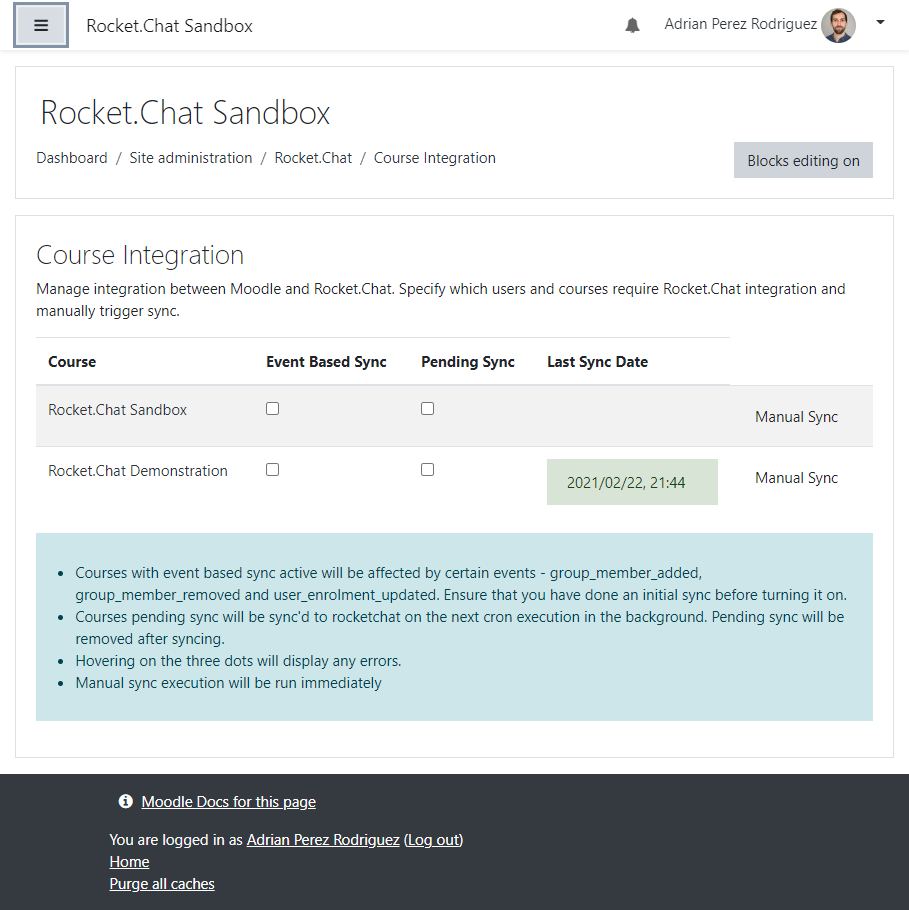
- Manual sync: Trigger manually by clicking the button on
Course integrationpage - Background task sync: Activate pending sync checkbox on
Course integrationpage - User activation/deactivation based on
user_enrolment_updatedMoodle event - User subscription/unsubscription based on
user_group_enrolment_updatedMoodle event
Installation
- Copy this Rocket.Chat plugin to the
localdirectory of your Moodle instance:git clone https://github.com/adpe/moodle-local_rocketchat.git public/local/rocketchat - Visit the notifications' page to complete the installation process
For more information, visit documentation for installing contributed modules and plugins.
Note - you need a running Rocket.Chat server that you can point the plugin to. If you aren't sure how to do this, checkout
the documentation on Rocket.Chat.
Usage
Settings
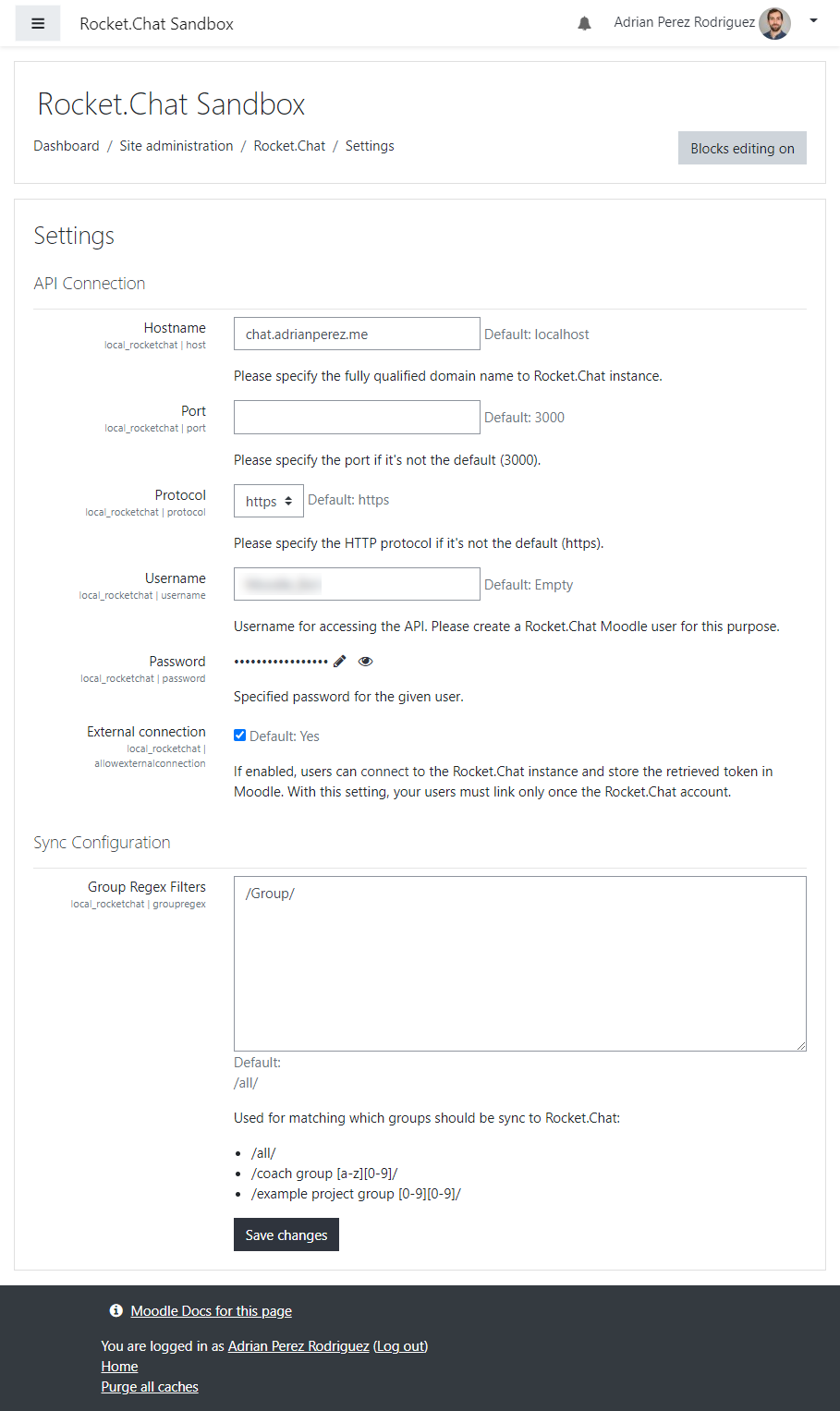
A new Site Adminstration section has been added under Rocket.Chat. The Settings page allows administrators to enter the host, port, username and password for the Rocket.Chat
connection. To get these settings you need to create a user on Rocket.Chat with whatever credentials you want and paste them into Moodle.
The regex block allows you to add group regex filters. When a sync between Moodle and Rocket.Chat happens, channels are created for each group that matches your regex expression.
You can have multiple expressions on new lines. If you don't want any groups, don't add any regex expressions.
Integration
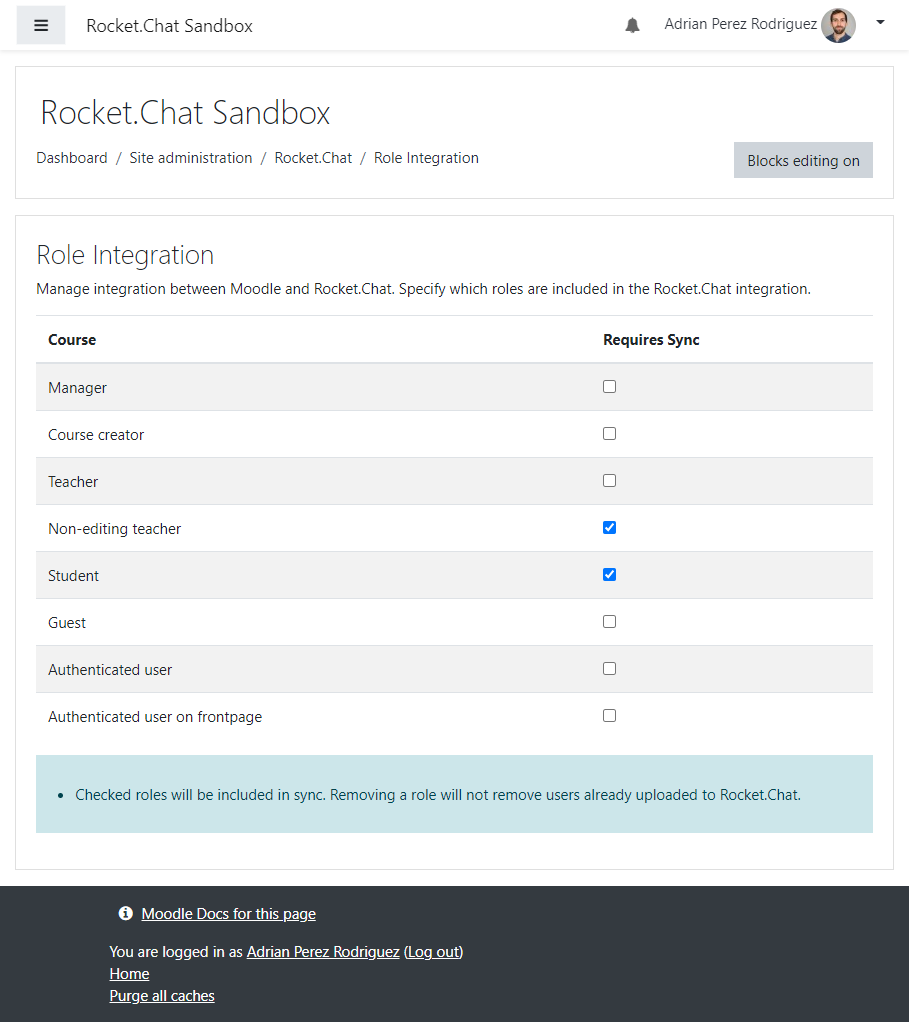
There are two tables that help control what data is pushed to Rocket.Chat.
- Roles Included in Sync: Determines what user roles can be pushed to Rocket.Chat
- Integrated Courses: allows setting of a course to sync in the background (task and cron based) or a manual sync that is executed immediately.
v5.1-r1 (2026011801)
v5.1-r1
Plugin type: Local plugins
Frankenstyle component name: local_rocketchat
Version build number: 2026011801
Version release name: v5.1-r1
Maturity: Stable
Supported Moodle versions: 5.0, 5.1
Repository URL (Git): https://github.com/adpe/moodle-local_rocketchat
Repository branch:
Repository tag: v5.1-r1
Issue/bug tracker URL: https://github.com/adpe/moodle-local_rocketchat/issues
Moodle Rocket.Chat Sync Plugin
The Rocket.Chat plugin is an integration between Moodle that allows users to push students from Moodle into channels on Rocket.Chat. These channels correspond to their groups in
Moodle.
Main features
- Channel creation (private groups) for each Moodle group per course (Regex filter available)
- User creation in Rocket.Chat based on role in Moodle (Filter available)
- Subscribe all users based on group in course
- Manual sync: Trigger manually by clicking the button on
Course integrationpage - Background task sync: Activate pending sync checkbox on
Course integrationpage - User activation/deactivation based on
user_enrolment_updatedMoodle event - User subscription/unsubscription based on
user_group_enrolment_updatedMoodle event
Installation
- Copy this Rocket.Chat plugin to the
localdirectory of your Moodle instance:git clone https://github.com/adpe/moodle-local_rocketchat.git local/rocketchat - Visit the notifications' page to complete the installation process
For more information, visit documentation for installing contributed modules and plugins.
Note - you need a running Rocket.Chat server that you can point the plugin to. If you aren't sure how to do this, checkout
the documentation on Rocket.Chat.
Usage
Settings
A new Site Adminstration section has been added under Rocket.Chat. The Settings page allows administrators to enter the host, port, username and password for the Rocket.Chat
connection. To get these settings you need to create a user on Rocket.Chat with whatever credentials you want and paste them into Moodle.
The regex block allows you to add group regex filters. When a sync between Moodle and Rocket.Chat happens, channels are created for each group that matches your regex expression.
You can have multiple expressions on new lines. If you don't want any groups, don't add any regex expressions.
Integration
There are two tables that help control what data is pushed to Rocket.Chat.
- Roles Included in Sync: Determines what user roles can be pushed to Rocket.Chat
- Integrated Courses: allows setting of a course to sync in the background (task and cron based) or a manual sync that is executed immediately.
v4.5-r1 (2026011800)
v4.5-r1
Plugin type: Local plugins
Frankenstyle component name: local_rocketchat
Version build number: 2026011800
Version release name: v4.5-r1
Maturity: Stable
Supported Moodle versions: 4.5
Repository URL (Git): https://github.com/adpe/moodle-local_rocketchat
Repository branch:
Repository tag: v4.5-r1
Issue/bug tracker URL: https://github.com/adpe/moodle-local_rocketchat/issues
Moodle Rocket.Chat Sync Plugin
The Rocket.Chat plugin is an integration between Moodle that allows users to push students from Moodle into channels on Rocket.Chat. These channels correspond to their groups in
Moodle.
Main features
- Channel creation (private groups) for each Moodle group per course (Regex filter available)
- User creation in Rocket.Chat based on role in Moodle (Filter available)
- Subscribe all users based on group in course
- Manual sync: Trigger manually by clicking the button on
Course integrationpage - Background task sync: Activate pending sync checkbox on
Course integrationpage - User activation/deactivation based on
user_enrolment_updatedMoodle event - User subscription/unsubscription based on
user_group_enrolment_updatedMoodle event
Installation
- Copy this Rocket.Chat plugin to the
localdirectory of your Moodle instance:git clone https://github.com/adpe/moodle-local_rocketchat.git local/rocketchat - Visit the notifications' page to complete the installation process
For more information, visit documentation for installing contributed modules and plugins.
Note - you need a running Rocket.Chat server that you can point the plugin to. If you aren't sure how to do this, checkout
the documentation on Rocket.Chat.
Usage
Settings
A new Site Adminstration section has been added under Rocket.Chat. The Settings page allows administrators to enter the host, port, username and password for the Rocket.Chat
connection. To get these settings you need to create a user on Rocket.Chat with whatever credentials you want and paste them into Moodle.
The regex block allows you to add group regex filters. When a sync between Moodle and Rocket.Chat happens, channels are created for each group that matches your regex expression.
You can have multiple expressions on new lines. If you don't want any groups, don't add any regex expressions.
Integration
There are two tables that help control what data is pushed to Rocket.Chat.
- Roles Included in Sync: Determines what user roles can be pushed to Rocket.Chat
- Integrated Courses: allows setting of a course to sync in the background (task and cron based) or a manual sync that is executed immediately.
v4.4-r2 (2024091601)
v4.4-r2
Plugin type: Local plugins
Frankenstyle component name: local_rocketchat
Version build number: 2024091601
Version release name: v4.4-r2
Maturity: Stable
Supported Moodle versions: 4.4
Repository URL (Git): https://github.com/adpe/moodle-local_rocketchat
Repository branch:
Repository tag: v4.4-r2
Issue/bug tracker URL: https://github.com/adpe/moodle-local_rocketchat/issues
Moodle Rocket.Chat Sync Plugin
The Rocket.Chat plugin is an integration between Moodle that allows users to push students from Moodle into channels on Rocket.Chat. These channels correspond to their groups in
Moodle.
Main features
- Channel creation (private groups) for each Moodle group per course (Regex filter available)
- User creation in Rocket.Chat based on role in Moodle (Filter available)
- Subscribe all users based on group in course
- Manual sync: Trigger manually by clicking the button on
Course integrationpage - Background task sync: Activate pending sync checkbox on
Course integrationpage - User activation/deactivation based on
user_enrolment_updatedMoodle event - User subscription/unsubscription based on
user_group_enrolment_updatedMoodle event
Installation
- Copy this Rocket.Chat plugin to the
localdirectory of your Moodle instance:git clone https://github.com/adpe/moodle-local_rocketchat.git local/rocketchat - Visit the notifications' page to complete the installation process
For more information, visit documentation for installing contributed modules and plugins.
Note - you need a running Rocket.Chat server that you can point the plugin to. If you aren't sure how to do this, checkout
the documentation on Rocket.Chat.
Usage
Settings
A new Site Adminstration section has been added under Rocket.Chat. The Settings page allows administrators to enter the host, port, username and password for the Rocket.Chat
connection. To get these settings you need to create a user on Rocket.Chat with whatever credentials you want and paste them into Moodle.
The regex block allows you to add group regex filters. When a sync between Moodle and Rocket.Chat happens, channels are created for each group that matches your regex expression.
You can have multiple expressions on new lines. If you don't want any groups, don't add any regex expressions.
Integration
There are two tables that help control what data is pushed to Rocket.Chat.
- Roles Included in Sync: Determines what user roles can be pushed to Rocket.Chat
- Integrated Courses: allows setting of a course to sync in the background (task and cron based) or a manual sync that is executed immediately.
v4.4-r1 (2024091600)
v4.4-r1
Plugin type: Local plugins
Frankenstyle component name: local_rocketchat
Version build number: 2024091600
Version release name: v4.4-r1
Maturity: Stable
Supported Moodle versions: 4.4
Repository URL (Git): https://github.com/adpe/moodle-local_rocketchat
Repository branch:
Repository tag: v4.4-r1
Issue/bug tracker URL: https://github.com/adpe/moodle-local_rocketchat/issues
Moodle Rocket.Chat Sync Plugin 
The Rocket.Chat plugin is an integration between Moodle that allows users to push students from Moodle into channels on Rocket.Chat. These channels correspond to their groups in
Moodle.
Main features
- Channel creation (private groups) for each Moodle group per course (Regex filter available)
- User creation in Rocket.Chat based on role in Moodle (Filter available)
- Subscribe all users based on group in course
- Manual sync: Trigger manually by clicking the button on
Course integrationpage - Background task sync: Activate pending sync checkbox on
Course integrationpage - User activation/deactivation based on
user_enrolment_updatedMoodle event - User subscription/unsubscription based on
user_group_enrolment_updatedMoodle event
Installation
- Copy this Rocket.Chat plugin to the
localdirectory of your Moodle instance:git clone https://github.com/adpe/moodle-local_rocketchat.git local/rocketchat - Visit the notifications' page to complete the installation process
For more information, visit documentation for installing contributed modules and plugins.
Note - you need a running Rocket.Chat server that you can point the plugin to. If you aren't sure how to do this, checkout
the documentation on Rocket.Chat.
Usage
Settings
A new Site Adminstration section has been added under Rocket.Chat. The Settings page allows administrators to enter the host, port, username and password for the Rocket.Chat
connection. To get these settings you need to create a user on Rocket.Chat with whatever credentials you want and paste them into Moodle.
The regex block allows you to add group regex filters. When a sync between Moodle and Rocket.Chat happens, channels are created for each group that matches your regex expression.
You can have multiple expressions on new lines. If you don't want any groups, don't add any regex expressions.
Integration
There are two tables that help control what data is pushed to Rocket.Chat.
- Roles Included in Sync: Determines what user roles can be pushed to Rocket.Chat
- Integrated Courses: allows setting of a course to sync in the background (task and cron based) or a manual sync that is executed immediately.
v4.3-r1 (2024091500)
v4.3-r1
Plugin type: Local plugins
Frankenstyle component name: local_rocketchat
Version build number: 2024091500
Version release name: v4.3-r1
Maturity: Stable
Supported Moodle versions: 4.3
Repository URL (Git): https://github.com/adpe/moodle-local_rocketchat
Repository branch:
Repository tag: v4.3-r1
Issue/bug tracker URL: https://github.com/adpe/moodle-local_rocketchat/issues
Moodle Rocket.Chat Sync Plugin
The Rocket.Chat plugin is an integration between Moodle that allows users to push students from Moodle into channels on Rocket.Chat. These channels correspond to their groups in
Moodle.
Main features
- Channel creation (private groups) for each Moodle group per course (Regex filter available)
- User creation in Rocket.Chat based on role in Moodle (Filter available)
- Subscribe all users based on group in course
- Manual sync: Trigger manually by clicking the button on
Course integrationpage - Background task sync: Activate pending sync checkbox on
Course integrationpage - User activation/deactivation based on
user_enrolment_updatedMoodle event - User subscription/unsubscription based on
user_group_enrolment_updatedMoodle event
Installation
- Copy this Rocket.Chat plugin to the
localdirectory of your Moodle instance:git clone https://github.com/adpe/moodle-local_rocketchat.git local/rocketchat - Visit the notifications' page to complete the installation process
For more information, visit documentation for installing contributed modules and plugins.
Note - you need a running Rocket.Chat server that you can point the plugin to. If you aren't sure how to do this, checkout
the documentation on Rocket.Chat.
Usage
Settings
A new Site Adminstration section has been added under Rocket.Chat. The Settings page allows administrators to enter the host, port, username and password for the Rocket.Chat
connection. To get these settings you need to create a user on Rocket.Chat with whatever credentials you want and paste them into Moodle.
The regex block allows you to add group regex filters. When a sync between Moodle and Rocket.Chat happens, channels are created for each group that matches your regex expression.
You can have multiple expressions on new lines. If you don't want any groups, don't add any regex expressions.
Integration
There are two tables that help control what data is pushed to Rocket.Chat.
- Roles Included in Sync: Determines what user roles can be pushed to Rocket.Chat
- Integrated Courses: allows setting of a course to sync in the background (task and cron based) or a manual sync that is executed immediately.
v4.2-r1 (2024091400)
v4.2-r1
Plugin type: Local plugins
Frankenstyle component name: local_rocketchat
Version build number: 2024091400
Version release name: v4.2-r1
Maturity: Stable
Supported Moodle versions: 4.2
Repository URL (Git): https://github.com/adpe/moodle-local_rocketchat
Repository branch:
Repository tag: v4.2-r1
Issue/bug tracker URL: https://github.com/adpe/moodle-local_rocketchat/issues
Moodle Rocket.Chat Sync Plugin
The Rocket.Chat plugin is an integration between Moodle that allows users to push students from Moodle into channels on Rocket.Chat. These channels correspond to their groups in
Moodle.
Main features
- Channel creation (private groups) for each Moodle group per course (Regex filter available)
- User creation in Rocket.Chat based on role in Moodle (Filter available)
- Subscribe all users based on group in course
- Manual sync: Trigger manually by clicking the button on
Course integrationpage - Background task sync: Activate pending sync checkbox on
Course integrationpage - User activation/deactivation based on
user_enrolment_updatedMoodle event - User subscription/unsubscription based on
user_group_enrolment_updatedMoodle event
Installation
- Copy this Rocket.Chat plugin to the
localdirectory of your Moodle instance:git clone https://github.com/adpe/moodle-local_rocketchat.git local/rocketchat - Visit the notifications' page to complete the installation process
For more information, visit documentation for installing contributed modules and plugins.
Note - you need a running Rocket.Chat server that you can point the plugin to. If you aren't sure how to do this, checkout
the documentation on Rocket.Chat.
Usage
Settings
A new Site Adminstration section has been added under Rocket.Chat. The Settings page allows administrators to enter the host, port, username and password for the Rocket.Chat
connection. To get these settings you need to create a user on Rocket.Chat with whatever credentials you want and paste them into Moodle.
The regex block allows you to add group regex filters. When a sync between Moodle and Rocket.Chat happens, channels are created for each group that matches your regex expression.
You can have multiple expressions on new lines. If you don't want any groups, don't add any regex expressions.
Integration
There are two tables that help control what data is pushed to Rocket.Chat.
- Roles Included in Sync: Determines what user roles can be pushed to Rocket.Chat
- Integrated Courses: allows setting of a course to sync in the background (task and cron based) or a manual sync that is executed immediately.
v4.1-r1 (2024091300)
v4.1-r1
Plugin type: Local plugins
Frankenstyle component name: local_rocketchat
Version build number: 2024091300
Version release name: v4.1-r1
Maturity: Stable
Supported Moodle versions: 4.1
Repository URL (Git): https://github.com/adpe/moodle-local_rocketchat
Repository branch:
Repository tag: v4.1-r1
Issue/bug tracker URL: https://github.com/adpe/moodle-local_rocketchat/issues
Moodle Rocket.Chat Sync Plugin
The Rocket.Chat plugin is an integration between Moodle that allows users to push students from Moodle into channels on Rocket.Chat. These channels correspond to their groups in
Moodle.
Main features
- Channel creation (private groups) for each Moodle group per course (Regex filter available)
- User creation in Rocket.Chat based on role in Moodle (Filter available)
- Subscribe all users based on group in course
- Manual sync: Trigger manually by clicking the button on
Course integrationpage - Background task sync: Activate pending sync checkbox on
Course integrationpage - User activation/deactivation based on
user_enrolment_updatedMoodle event - User subscription/unsubscription based on
user_group_enrolment_updatedMoodle event
Installation
- Copy this Rocket.Chat plugin to the
localdirectory of your Moodle instance:git clone https://github.com/adpe/moodle-local_rocketchat.git local/rocketchat - Visit the notifications' page to complete the installation process
For more information, visit documentation for installing contributed modules and plugins.
Note - you need a running Rocket.Chat server that you can point the plugin to. If you aren't sure how to do this, checkout
the documentation on Rocket.Chat.
Usage
Settings
A new Site Adminstration section has been added under Rocket.Chat. The Settings page allows administrators to enter the host, port, username and password for the Rocket.Chat
connection. To get these settings you need to create a user on Rocket.Chat with whatever credentials you want and paste them into Moodle.
The regex block allows you to add group regex filters. When a sync between Moodle and Rocket.Chat happens, channels are created for each group that matches your regex expression.
You can have multiple expressions on new lines. If you don't want any groups, don't add any regex expressions.
Integration
There are two tables that help control what data is pushed to Rocket.Chat.
- Roles Included in Sync: Determines what user roles can be pushed to Rocket.Chat
- Integrated Courses: allows setting of a course to sync in the background (task and cron based) or a manual sync that is executed immediately.
v4.0-r1 (2022043000)
v4.0-r1
Plugin type: Local plugins
Frankenstyle component name: local_rocketchat
Version build number: 2022043000
Version release name: v4.0-r1
Maturity: Stable
Supported Moodle versions: 4.0
Repository URL (Git): https://github.com/adpe/moodle-local_rocketchat
Repository branch:
Repository tag: v4.0-r1
Issue/bug tracker URL: https://github.com/adpe/moodle-local_rocketchat/issues
Moodle Rocket.Chat Sync Plugin
The Rocket.Chat plugin is an integration between Moodle that allows users to push students from Moodle into channels on Rocket.Chat. These channels correspond to their groups in
Moodle.
Main features
- Channel creation (private groups) for each Moodle group per course (Regex filter available)
- User creation in Rocket.Chat based on role in Moodle (Filter available)
- Subscribe all users based on group in course
- Manual sync: Trigger manually by clicking the button on
Course integrationpage - Background task sync: Activate pending sync checkbox on
Course integrationpage - User activation/deactivation based on
user_enrolment_updatedMoodle event - User subscription/unsubscription based on
user_group_enrolment_updatedMoodle event
Installation
- Copy this Rocket.Chat plugin to the
localdirectory of your Moodle instance:git clone https://github.com/adpe/moodle-local_rocketchat.git local/rocketchat - Visit the notifications' page to complete the installation process
For more information, visit documentation for installing contributed modules and plugins.
Note - you need a running Rocket.Chat server that you can point the plugin to. If you aren't sure how to do this, checkout
the documentation on Rocket.Chat.
Usage
Settings
A new Site Adminstration section has been added under Rocket.Chat. The Settings page allows administrators to enter the host, port, username and password for the Rocket.Chat
connection. To get these settings you need to create a user on Rocket.Chat with whatever credentials you want and paste them into Moodle.
The regex block allows you to add group regex filters. When a sync between Moodle and Rocket.Chat happens, channels are created for each group that matches your regex expression.
You can have multiple expressions on new lines. If you don't want any groups, don't add any regex expressions.
Integration
There are two tables that help control what data is pushed to Rocket.Chat.
- Roles Included in Sync: Determines what user roles can be pushed to Rocket.Chat
- Integrated Courses: allows setting of a course to sync in the background (task and cron based) or a manual sync that is executed immediately.
v3.11-r3 (2021091203)
v3.11-r3
Plugin type: Local plugins
Frankenstyle component name: local_rocketchat
Version build number: 2021091203
Version release name: v3.11-r3
Maturity: Stable
Supported Moodle versions: 3.10, 3.11, 3.9
Repository URL (Git): https://github.com/adpe/moodle-local_rocketchat
Repository branch:
Repository tag: v3.11-r3
Issue/bug tracker URL: https://github.com/adpe/moodle-local_rocketchat/issues
Moodle Rocket.Chat Sync Plugin
The Rocket.Chat plugin is an integration between Moodle that allows users to push students from Moodle into channels on Rocket.Chat. These channels correspond to their groups in
Moodle.
Main features
- Channel creation (private groups) for each Moodle group per course (Regex filter avaiable)
- User creation in Rocket.Chat based on role in Moodle (Filter available)
- Subscribe all users based on group in course
- Manual sync: Trigger manually by clicking the button on
Course integrationpage - Background task sync: Activate pending sync checkbox on
Course integrationpage - User activation/deactivation based on
user_enrolment_updatedMoodle event - User subscription/desubscription based on
user_group_enrolment_updatedMoodle event
Installation
- Copy this Rocket.Chat plugin to the
localdirectory of your Moodle instance:git clone https://github.com/adpe/moodle-local_rocketchat.git local/rocketchat - Visit the notifications page to complete the install process
For more information, visit documentation for installing contributed modules and plugins.
Note - you need a running Rocket.Chat server that you can point the plugin to. If you aren't sure how to do this, checkout
the documentation on Rocket.Chat. I also added a bit of code to Rocket.Chat to make
integration a little easier. This unfortunately will require a custom build of the Rocket.Chat source code.
Usage
Settings
A new Site Adminstration section has been added under Rocket.Chat. The settings page allows administrators to enter the host, port, username and password for the Rocket.Chat
connection. To get these settings you need to create a user on Rocket.Chat with whatever credentials you want and paste them into Moodle.
The regex block allows you to add group regex filters. When a sync between Moodle and Rocket.Chat happens, channels are created for each group that matches your regex expression.
You can have multiple expressions on new lines. If you don't want any groups, don't add any regex expressions.
Integration
There are two tables that help control what data is pushed to Rocket.Chat.
- Roles Included in Sync: Determines what user roles can be pushed to Rocket.Chat
- Integrated Courses: allows setting of a course to sync in the background (task and cron based) or a manual sync that is executed immediately.
Todo
- Add an block that can be added within a course to access after the channels in a popup.
- This block should also allow the creation of private chats with other users from the course.
- Handle deletion/suspension:
- of users in Moodle: Right now the sync only pushes students to Rocket.Chat. It does not remove them.
- of groups in Moodle: Right now the channels will not be removed on the Rocket.Chat server. Maybe we don't want that?!
- Improve error reporting:
- on sync failure
- for suspensions
v3.11-r2 (2021091202)
v3.11-r2
Plugin type: Local plugins
Frankenstyle component name: local_rocketchat
Version build number: 2021091202
Version release name: v3.11-r2
Maturity: Stable
Supported Moodle versions: 3.10, 3.11, 3.9
Repository URL (Git): https://github.com/adpe/moodle-local_rocketchat
Repository branch: master
Repository tag: v3.11-r2
Issue/bug tracker URL: https://github.com/adpe/moodle-local_rocketchat/issues
Moodle Rocket.Chat Sync Plugin
The Rocket.Chat plugin is an integration between Moodle that allows users to push students from Moodle into channels on Rocket.Chat. These channels correspond to their groups in
Moodle.
Main features
- Channel creation (private groups) for each Moodle group per course (Regex filter avaiable)
- User creation in Rocket.Chat based on role in Moodle (Filter available)
- Subscribe all users based on group in course
- Manual sync: Trigger manually by clicking the button on
Course integrationpage - Background task sync: Activate pending sync checkbox on
Course integrationpage - User activation/deactivation based on
user_enrolment_updatedMoodle event - User subscription/desubscription based on
user_group_enrolment_updatedMoodle event
Installation
- Copy this Rocket.Chat plugin to the
localdirectory of your Moodle instance:git clone https://github.com/adpe/moodle-local_rocketchat.git local/rocketchat - Visit the notifications page to complete the install process
For more information, visit documentation for installing contributed modules and plugins.
Note - you need a running Rocket.Chat server that you can point the plugin to. If you aren't sure how to do this, checkout
the documentation on Rocket.Chat. I also added a bit of code to Rocket.Chat to make
integration a little easier. This unfortunately will require a custom build of the Rocket.Chat source code.
Usage
Settings
A new Site Adminstration section has been added under Rocket.Chat. The settings page allows administrators to enter the host, port, username and password for the Rocket.Chat
connection. To get these settings you need to create a user on Rocket.Chat with whatever credentials you want and paste them into Moodle.
The regex block allows you to add group regex filters. When a sync between Moodle and Rocket.Chat happens, channels are created for each group that matches your regex expression.
You can have multiple expressions on new lines. If you don't want any groups, don't add any regex expressions.
Integration
There are two tables that help control what data is pushed to Rocket.Chat.
- Roles Included in Sync: Determines what user roles can be pushed to Rocket.Chat
- Integrated Courses: allows setting of a course to sync in the background (task and cron based) or a manual sync that is executed immediately.
Todo
- Add an block that can be added within a course to access after the channels in a popup.
- This block should also allow the creation of private chats with other users from the course.
- Handle deletion/suspension:
- of users in Moodle: Right now the sync only pushes students to Rocket.Chat. It does not remove them.
- of groups in Moodle: Right now the channels will not be removed on the Rocket.Chat server. Maybe we don't want that?!
- Improve error reporting:
- on sync failure
- for suspensions
v3.11-r1 (2021091201)
v3.11-r1
Plugin type: Local plugins
Frankenstyle component name: local_rocketchat
Version build number: 2021091201
Version release name: v3.11-r1
Maturity: Stable
Supported Moodle versions: 3.10, 3.11, 3.9
Repository URL (Git): https://github.com/adpe/moodle-local_rocketchat
Repository branch: master
Repository tag: v3.11-r1
Issue/bug tracker URL: https://github.com/adpe/moodle-local_rocketchat/issues
Moodle Rocket.Chat Sync Plugin
The Rocket.Chat plugin is an integration between Moodle that allows users to push students from Moodle into channels on Rocket.Chat. These channels correspond to their groups in
Moodle.
Main features
- Channel creation (private groups) for each Moodle group per course (Regex filter avaiable)
- User creation in Rocket.Chat based on role in Moodle (Filter available)
- Subscribe all users based on group in course
- Manual sync: Trigger manually by clicking the button on
Course integrationpage - Background task sync: Activate pending sync checkbox on
Course integrationpage - User activation/deactivation based on
user_enrolment_updatedMoodle event - User subscription/desubscription based on
user_group_enrolment_updatedMoodle event
Installation
- Copy this Rocket.Chat plugin to the
localdirectory of your Moodle instance:git clone https://github.com/adpe/moodle-local_rocketchat.git local/rocketchat - Visit the notifications page to complete the install process
For more information, visit documentation for installing contributed modules and plugins.
Note - you need a running Rocket.Chat server that you can point the plugin to. If you aren't sure how to do this, checkout
the documentation on Rocket.Chat. I also added a bit of code to Rocket.Chat to make
integration a little easier. This unfortunately will require a custom build of the Rocket.Chat source code.
Usage
Settings
A new Site Adminstration section has been added under Rocket.Chat. The settings page allows administrators to enter the host, port, username and password for the Rocket.Chat
connection. To get these settings you need to create a user on Rocket.Chat with whatever credentials you want and paste them into Moodle.
The regex block allows you to add group regex filters. When a sync between Moodle and Rocket.Chat happens, channels are created for each group that matches your regex expression.
You can have multiple expressions on new lines. If you don't want any groups, don't add any regex expressions.
Integration
There are two tables that help control what data is pushed to Rocket.Chat.
- Roles Included in Sync: Determines what user roles can be pushed to Rocket.Chat
- Integrated Courses: allows setting of a course to sync in the background (task and cron based) or a manual sync that is executed immediately.
Todo
- Add an block that can be added within a course to access after the channels in a popup.
- This block should also allow the creation of private chats with other users from the course.
- Handle deletion/suspension:
- of users in Moodle: Right now the sync only pushes students to Rocket.Chat. It does not remove them.
- of groups in Moodle: Right now the channels will not be removed on the Rocket.Chat server. Maybe we don't want that?!
- Improve error reporting:
- on sync failure
- for suspensions
v3.9-r3 (2020120902)
v3.9-r3
Plugin type: Local plugins
Frankenstyle component name: local_rocketchat
Version build number: 2020120902
Version release name: v3.9-r3
Maturity: Stable
Supported Moodle versions: 3.9
Repository URL (Git): https://github.com/adpe/moodle-local_rocketchat
Repository branch: master
Repository tag: v3.9-r3
Issue/bug tracker URL: https://github.com/adpe/moodle-local_rocketchat/issues
Moodle Rocket.Chat Sync Plugin
The Rocket.Chat plugin is an integration between Moodle that allows users to push students from Moodle into channels on Rocket.Chat. These channels correspond to their groups in
Moodle.
Main features
- Channel creation (private groups) for each Moodle group per course (Regex filter avaiable)
- User creation in Rocket.Chat based on role in Moodle (Filter available)
- Subscribe all users based on group in course
- Manual sync: Trigger manually by clicking the button on
Course integrationpage - Background task sync: Activate pending sync checkbox on
Course integrationpage - User activation/deactivation based on
user_enrolment_updatedMoodle event - User subscription/desubscription based on
user_group_enrolment_updatedMoodle event
Installation
- Copy this Rocket.Chat plugin to the
localdirectory of your Moodle instance:git clone https://github.com/adpe/moodle-local_rocketchat.git local/rocketchat - Visit the notifications page to complete the install process
For more information, visit documentation for installing contributed modules and plugins.
Note - you need a running Rocket.Chat server that you can point the plugin to. If you aren't sure how to do this, checkout
the documentation on Rocket.Chat. I also added a bit of code to Rocket.Chat to make
integration a little easier. This unfortunately will require a custom build of the Rocket.Chat source code.
Usage
Settings
A new Site Adminstration section has been added under Rocket.Chat. The settings page allows administrators to enter the host, port, username and password for the Rocket.Chat
connection. To get these settings you need to create a user on Rocket.Chat with whatever credentials you want and paste them into Moodle.
The regex block allows you to add group regex filters. When a sync between Moodle and Rocket.Chat happens, channels are created for each group that matches your regex expression.
You can have multiple expressions on new lines. If you don't want any groups, don't add any regex expressions.
Integration
There are two tables that help control what data is pushed to Rocket.Chat.
- Roles Included in Sync: Determines what user roles can be pushed to Rocket.Chat
- Integrated Courses: allows setting of a course to sync in the background (task and cron based) or a manual sync that is executed immediately.
Todo
- Add an block that can be added within a course to access after the channels in a popup.
- This block should also allow the creation of private chats with other users from the course.
- Handle deletion/suspension:
- of users in Moodle: Right now the sync only pushes students to Rocket.Chat. It does not remove them.
- of groups in Moodle: Right now the channels will not be removed on the Rocket.Chat server. Maybe we don't want that?!
- Improve error reporting:
- on sync failure
- for suspensions