
WebUntis Integration
Versions
Current version
1.9.4 (2023032700)
1.9.4
Plugin type: Local plugins
Frankenstyle component name: local_webuntis
Version build number: 2023032700
Version release name: 1.9.4
Maturity: Stable
Supported Moodle versions: 3.10, 3.11, 3.5, 3.6, 3.7, 3.8, 3.9, 4.0, 4.1
Repository URL (Git): https://github.com/center-for-learning-management/moodle-local_webuntis
Repository branch:
Repository tag: v1.9.4
Issue/bug tracker URL: https://github.com/center-for-learning-management/moodle-local_webuntis/issues
moodle-local_webuntis
This plugins allows a connection between Moodle and WebUntis Instances of https://webuntis.com.
About this plugin
This plugin allows an integration of Moodle with WebUntis. The core features are:
- User mapping
- User creation based on WebUntis profile data *)
- Mapping of courses for particular links inside WebUntis (main menu and lesson pages)
- Automatic user enrolment to courses (can be disabled in sitewide in Moodle administration or for particular courses)
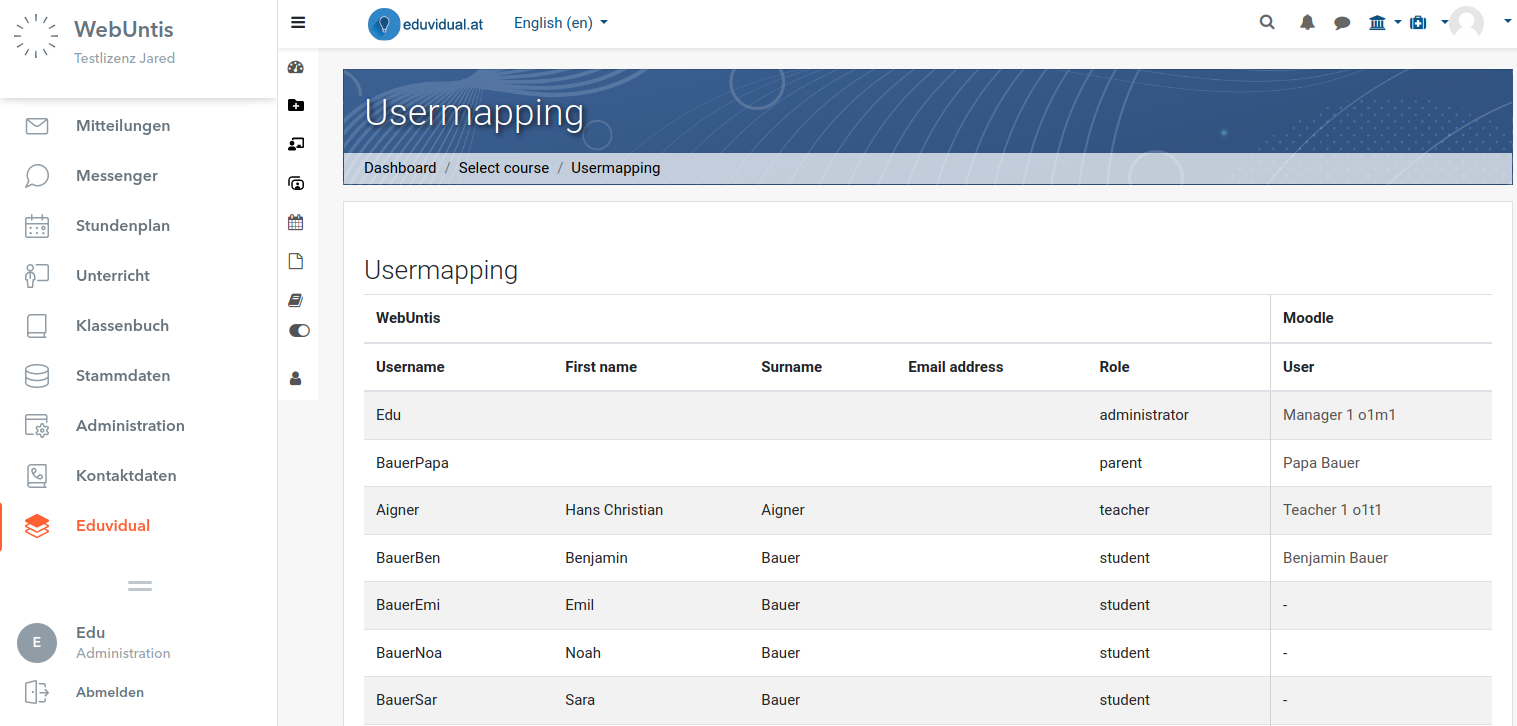
- For admins: List of user mappings
Using this plugin
To use this plugin, you need at least on WebUntis instance and a running Moodle site.
At first, login to your WebUntis instance as Administrator and add the Moodle "platform". As soon as you save the platform, oAuth credentials are transferred from WebUntis to your Moodle-Instance in the background. You can check these in the Website-Configuration of local_webuntis under the page "tenants". Also, if for any reason the automatic creation of the tenant does not work, you can create the tenant manually on this page.
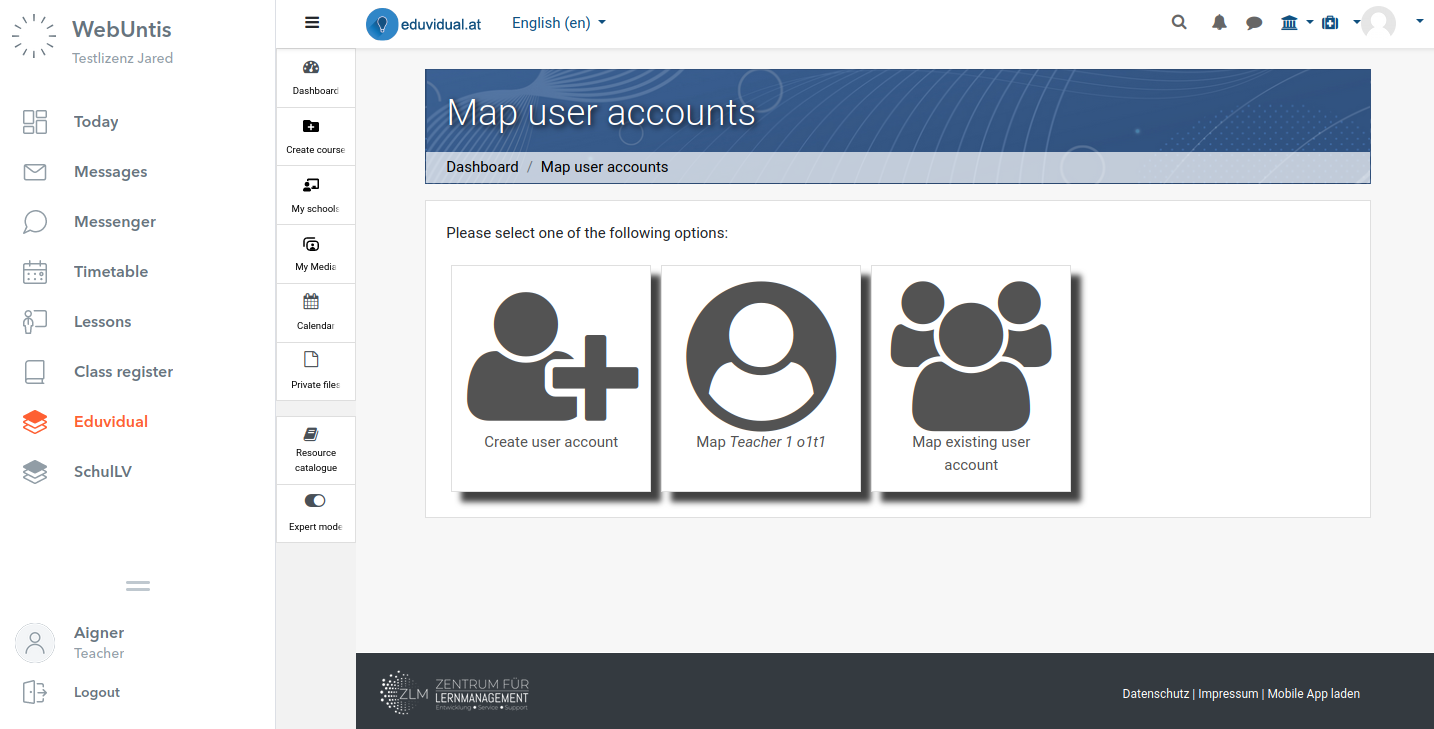
Follow the required steps within WebUntis to add the platform to the various navigation nodes in WebUntis for each user role. When you're done, links to your Moodle site are shown in the main menu of WebUntis and on each lesson page. When a user clicks on such link for the first time, a mapping of user accounts is required (also for the WebUntis-Administrator!)
User mapping
Users can now choose to map an existing Moodle account, or create a new one*). Once this user map has been created, the user is automatically logged in each time. This user mapping can be disconnected by the user using the Button "Disconnect from webuntis" in the Moodle main menu.
Attention: When external login systems like oAuth are used, the login procedure opens in a new tab. This is due to the reason, that these don't allow to be embedded in an iframe. Due to technical reasons, the browser must not be run in private mode! After the user was mapped, everything runs fine within the iframe.
Tenant specific administration
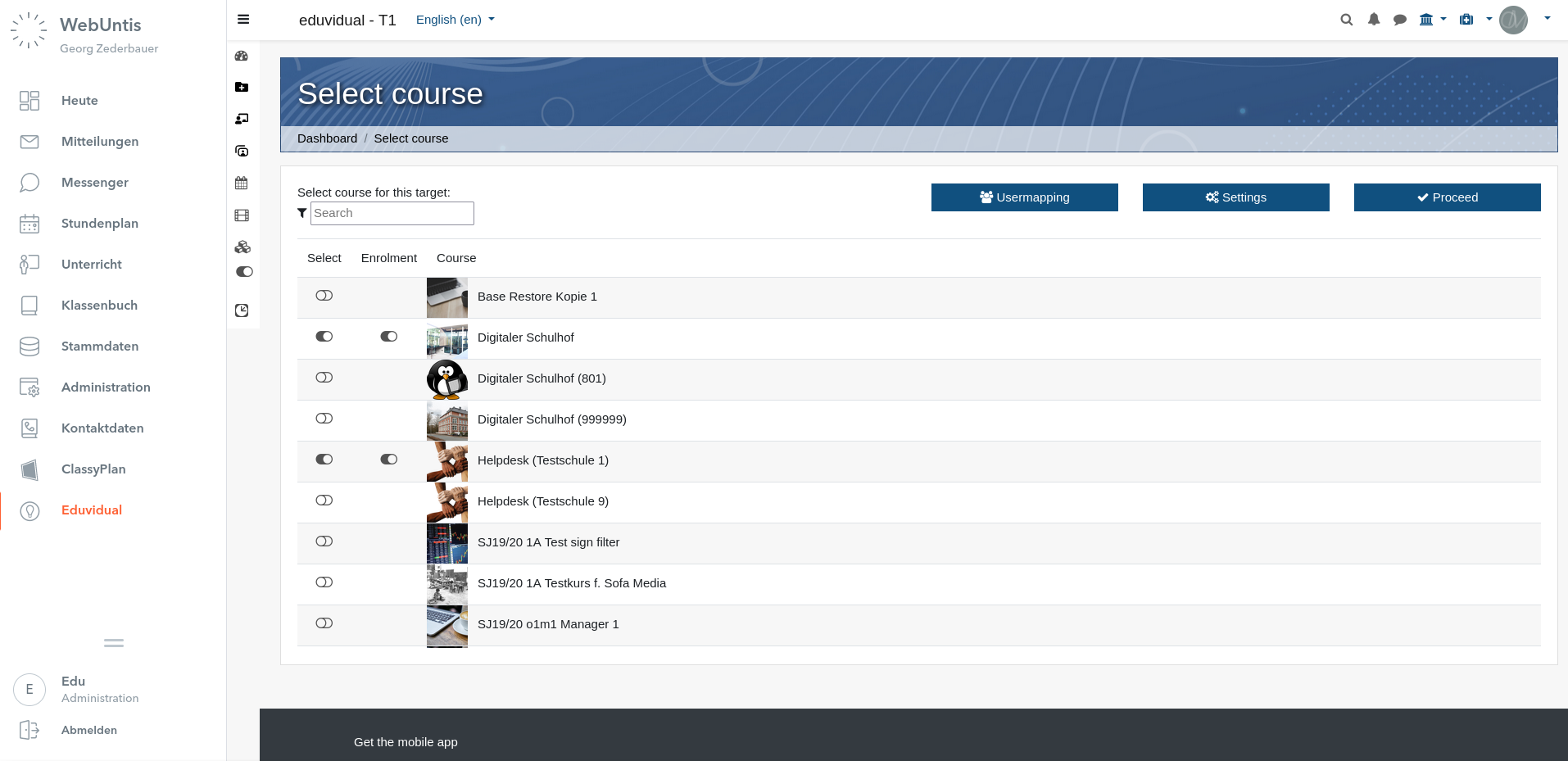
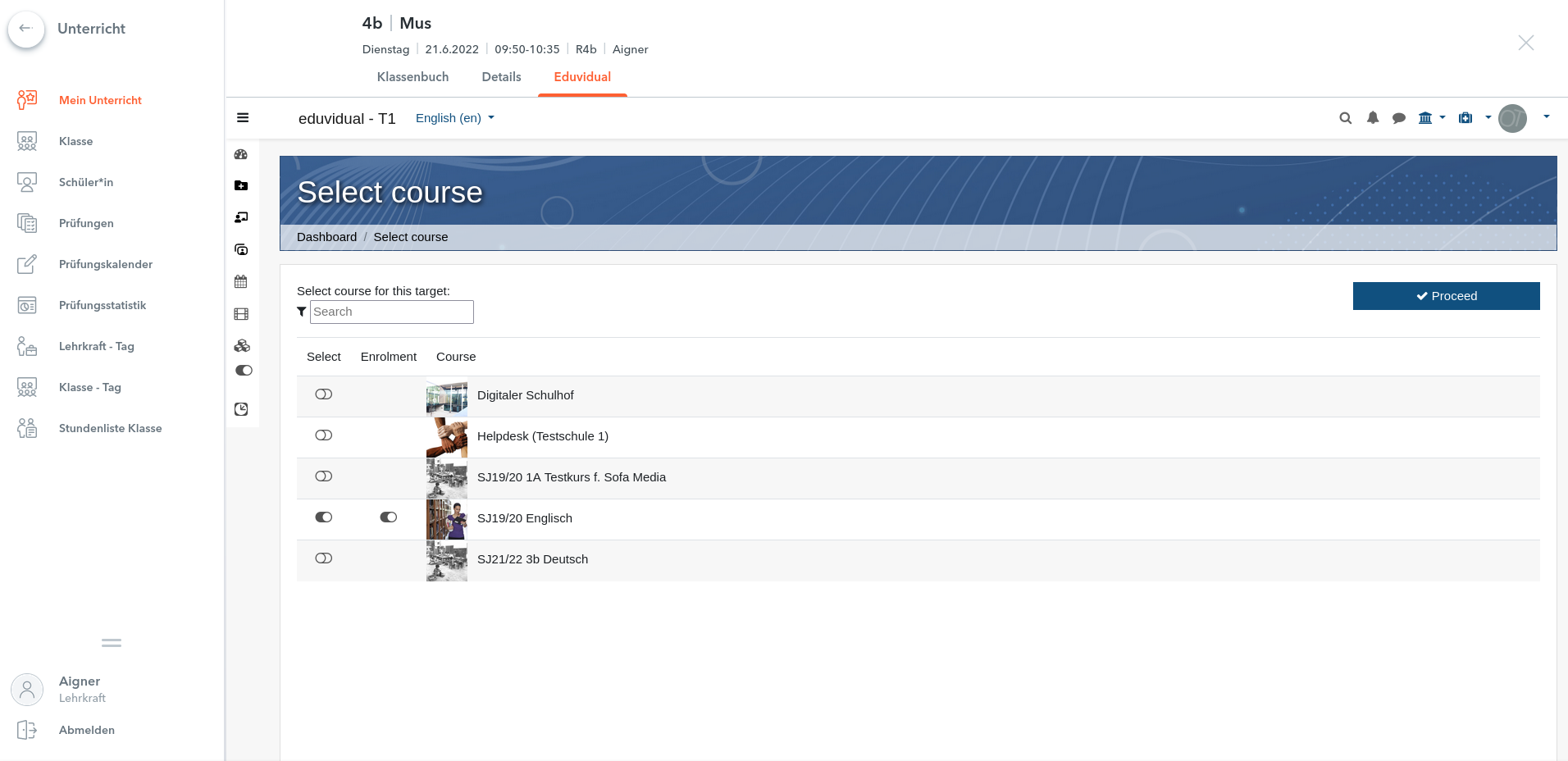
Using the link to the Moodle on the main menu of WebUntis, the WebUntis-Administrator can choose a target course, and open particular settings regarding the behavior of the sync between WebUntis and Moodle. Using the trigger "Enrolment" it can be decided, if users are automatically enrolled to the course(s), when they open the link in WebUntis. Attention: this feature can be disabled globally using the Moodle site administration.
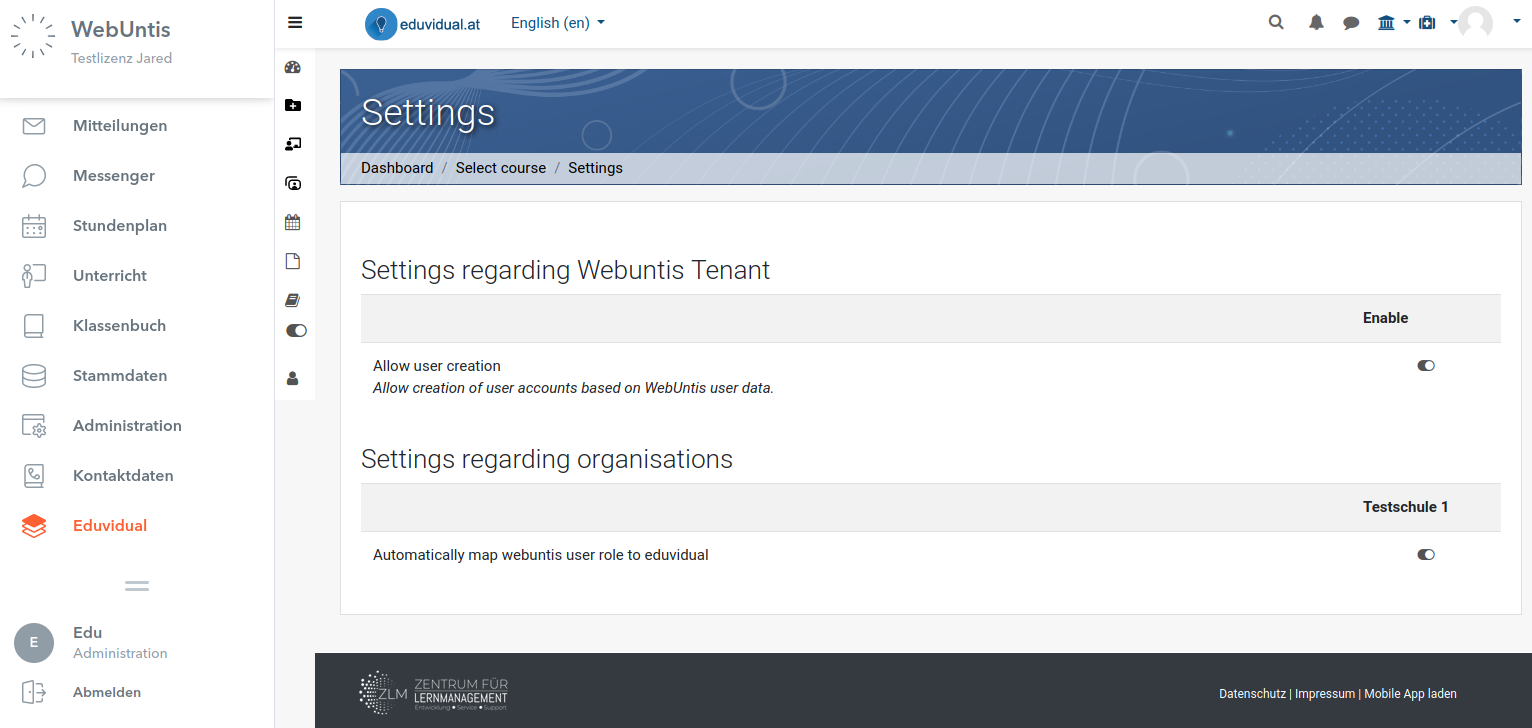
At the "settings" page the WebUntis-Administrator can configure options regarding the particular Webuntis tenant. The option regarding the creation of user accounts based on WebUntis profile data must be enabled in the Moodle Website-Administration and on this page too for each WebUntis tenant. This ensures that the consent was given by the Moodle Administrator and the WebUntis Administrator as well. The mapping of user roles as shown on the following screenshot only applies to Moodle sites that use the "eduvidual"-Plugin. This plugin allows to manage several organisations within one Moodle site with separated managements. The user role of WebUntis can be mapped to each organization individually. Moodle sites that don't use eduvidual, simply do not show this option.
Lastly, the WebUntis Administrator can view a list of actual user mappings.
Future versions of this plugin may provide an option for user synchronisation, management of the user mapping by the Administrator, or bulk creation of user accounts.
Lesson specific configuration
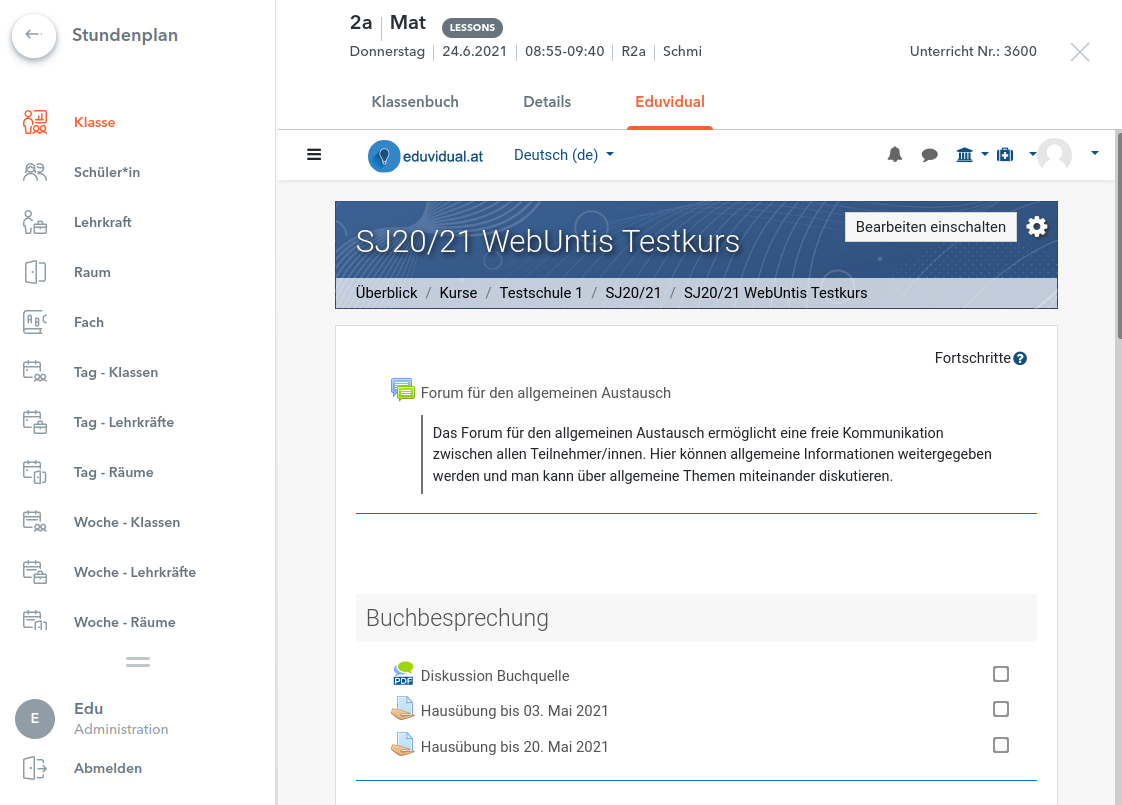
The target course of lesson pages can be selected by Teachers and Administrators. The functionality is the same as with the main menu link. Using the trigger "Enrolment" it can be decided, if users are automatically enrolled to the course(s), when they open the link in WebUntis. Attention: this feature can be disabled globally using the Moodle site administration.
*) Can be disabled in the Moodle Website-Administration, requires sufficient profile data in WebUntis!
Changelog
1.9.2 (Build: 2022100100)
Bugfix in regard of wrong use of get_config
1.9.1 (Build: 2022092600)
Changed default public key for production environment of WebUntis.
1.9 (Build: 2022090700)
Harmonized naming of authentication parameters according to WebUntis: 'consumersecret' is now referred to as 'consumerpassword' (for server2server API), 'consumerkey' is not referred to as 'consumersecret'. Changes apply to database, code and language strings.
1.8 (Build: 2022090200)
Added admin setting to enable debugging of cURL requests
1.7 (Build: 2022081400)
Added a feature to manually create new WebUntis tenants through the Moodle Website Administration
1.6.1 (Build: 2022070800)
According to Untis GmbH, the URL of the integration environment has changed from api-integration.webuntis.com to api.integration.webuntis.dev. The upgrade to version 1.6.1 is only required, if you are using the integration environment of Untis.
1.6 (Build: 2022062000)
Added feature that triggers auto enrolment per course. If admin setting 'local_webuntis/autoenrolforce' is set to the default value, teachers can set per course if users should be automatically enrolled. The admin setting can also disable the feature entirely for the whole Moodle site, or force the enrolment for all courses.
Function \local_webuntis\lessonmap::get_lesson_role now uses server2server API.
As of 27th June 2022, Untis changes the URL of its integration environment. Hence, both options are recognized as integration-environments: integration.webuntis.com and tom.integration.webuntis.dev.
1.9.3 (Build: 2023012500) (2023012500)
1.9.3 (Build: 2023012500)
Plugin type: Local plugins
Frankenstyle component name: local_webuntis
Version build number: 2023012500
Version release name: 1.9.3 (Build: 2023012500)
Maturity: Stable
Supported Moodle versions: 3.10, 3.11, 3.5, 3.6, 3.7, 3.8, 3.9, 4.0, 4.1
Repository URL (Git): https://github.com/center-for-learning-management/moodle-local_webuntis
Repository branch:
Repository tag: v1.9.3
Issue/bug tracker URL: https://github.com/center-for-learning-management/moodle-local_webuntis/issues
moodle-local_webuntis
This plugins allows a connection between Moodle and WebUntis Instances of https://webuntis.com.
About this plugin
This plugin allows an integration of Moodle with WebUntis. The core features are:
- User mapping
- User creation based on WebUntis profile data *)
- Mapping of courses for particular links inside WebUntis (main menu and lesson pages)
- Automatic user enrolment to courses (can be disabled in sitewide in Moodle administration or for particular courses)
- For admins: List of user mappings
Using this plugin
To use this plugin, you need at least on WebUntis instance and a running Moodle site.
At first, login to your WebUntis instance as Administrator and add the Moodle "platform". As soon as you save the platform, oAuth credentials are transferred from WebUntis to your Moodle-Instance in the background. You can check these in the Website-Configuration of local_webuntis under the page "tenants". Also, if for any reason the automatic creation of the tenant does not work, you can create the tenant manually on this page.
Follow the required steps within WebUntis to add the platform to the various navigation nodes in WebUntis for each user role. When you're done, links to your Moodle site are shown in the main menu of WebUntis and on each lesson page. When a user clicks on such link for the first time, a mapping of user accounts is required (also for the WebUntis-Administrator!)
User mapping
Users can now choose to map an existing Moodle account, or create a new one*). Once this user map has been created, the user is automatically logged in each time. This user mapping can be disconnected by the user using the Button "Disconnect from webuntis" in the Moodle main menu.
Attention: When external login systems like oAuth are used, the login procedure opens in a new tab. This is due to the reason, that these don't allow to be embedded in an iframe. Due to technical reasons, the browser must not be run in private mode! After the user was mapped, everything runs fine within the iframe.
Tenant specific administration
Using the link to the Moodle on the main menu of WebUntis, the WebUntis-Administrator can choose a target course, and open particular settings regarding the behavior of the sync between WebUntis and Moodle. Using the trigger "Enrolment" it can be decided, if users are automatically enrolled to the course(s), when they open the link in WebUntis. Attention: this feature can be disabled globally using the Moodle site administration.
At the "settings" page the WebUntis-Administrator can configure options regarding the particular Webuntis tenant. The option regarding the creation of user accounts based on WebUntis profile data must be enabled in the Moodle Website-Administration and on this page too for each WebUntis tenant. This ensures that the consent was given by the Moodle Administrator and the WebUntis Administrator as well. The mapping of user roles as shown on the following screenshot only applies to Moodle sites that use the "eduvidual"-Plugin. This plugin allows to manage several organisations within one Moodle site with separated managements. The user role of WebUntis can be mapped to each organization individually. Moodle sites that don't use eduvidual, simply do not show this option.
Lastly, the WebUntis Administrator can view a list of actual user mappings.
Future versions of this plugin may provide an option for user synchronisation, management of the user mapping by the Administrator, or bulk creation of user accounts.
Lesson specific configuration
The target course of lesson pages can be selected by Teachers and Administrators. The functionality is the same as with the main menu link. Using the trigger "Enrolment" it can be decided, if users are automatically enrolled to the course(s), when they open the link in WebUntis. Attention: this feature can be disabled globally using the Moodle site administration.
*) Can be disabled in the Moodle Website-Administration, requires sufficient profile data in WebUntis!
Changelog
1.9.2 (Build: 2022100100)
Bugfix in regard of wrong use of get_config
1.9.1 (Build: 2022092600)
Changed default public key for production environment of WebUntis.
1.9 (Build: 2022090700)
Harmonized naming of authentication parameters according to WebUntis: 'consumersecret' is now referred to as 'consumerpassword' (for server2server API), 'consumerkey' is not referred to as 'consumersecret'. Changes apply to database, code and language strings.
1.8 (Build: 2022090200)
Added admin setting to enable debugging of cURL requests
1.7 (Build: 2022081400)
Added a feature to manually create new WebUntis tenants through the Moodle Website Administration
1.6.1 (Build: 2022070800)
According to Untis GmbH, the URL of the integration environment has changed from api-integration.webuntis.com to api.integration.webuntis.dev. The upgrade to version 1.6.1 is only required, if you are using the integration environment of Untis.
1.6 (Build: 2022062000)
Added feature that triggers auto enrolment per course. If admin setting 'local_webuntis/autoenrolforce' is set to the default value, teachers can set per course if users should be automatically enrolled. The admin setting can also disable the feature entirely for the whole Moodle site, or force the enrolment for all courses.
Function \local_webuntis\lessonmap::get_lesson_role now uses server2server API.
As of 27th June 2022, Untis changes the URL of its integration environment. Hence, both options are recognized as integration-environments: integration.webuntis.com and tom.integration.webuntis.dev.
1.9.1 (Build: 2022092600) (2022092600)
1.9.1 (Build: 2022092600)
Plugin type: Local plugins
Frankenstyle component name: local_webuntis
Version build number: 2022092600
Version release name: 1.9.1 (Build: 2022092600)
Maturity: Stable
Supported Moodle versions: 3.10, 3.11, 3.5, 3.6, 3.7, 3.8, 3.9, 4.0
Repository URL (Git): https://github.com/center-for-learning-management/moodle-local_webuntis
Repository branch:
Repository tag: v1.9.1
Issue/bug tracker URL: https://github.com/center-for-learning-management/moodle-local_webuntis/issues
moodle-local_webuntis
This plugins allows a connection between Moodle and WebUntis Instances of https://webuntis.com.
About this plugin
This plugin allows an integration of Moodle with WebUntis. The core features are:
- User mapping
- User creation based on WebUntis profile data *)
- Mapping of courses for particular links inside WebUntis (main menu and lesson pages)
- Automatic user enrolment to courses (can be disabled in sitewide in Moodle administration or for particular courses)
- For admins: List of user mappings
Using this plugin
To use this plugin, you need at least on WebUntis instance and a running Moodle site.
At first, login to your WebUntis instance as Administrator and add the Moodle "platform". As soon as you save the platform, oAuth credentials are transferred from WebUntis to your Moodle-Instance in the background. You can check these in the Website-Configuration of local_webuntis under the page "tenants". Also, if for any reason the automatic creation of the tenant does not work, you can create the tenant manually on this page.
Follow the required steps within WebUntis to add the platform to the various navigation nodes in WebUntis for each user role. When you're done, links to your Moodle site are shown in the main menu of WebUntis and on each lesson page. When a user clicks on such link for the first time, a mapping of user accounts is required (also for the WebUntis-Administrator!)
User mapping
Users can now choose to map an existing Moodle account, or create a new one*). Once this user map has been created, the user is automatically logged in each time. This user mapping can be disconnected by the user using the Button "Disconnect from webuntis" in the Moodle main menu.
Attention: When external login systems like oAuth are used, the login procedure opens in a new tab. This is due to the reason, that these don't allow to be embedded in an iframe. Due to technical reasons, the browser must not be run in private mode! After the user was mapped, everything runs fine within the iframe.
Tenant specific administration
Using the link to the Moodle on the main menu of WebUntis, the WebUntis-Administrator can choose a target course, and open particular settings regarding the behavior of the sync between WebUntis and Moodle. Using the trigger "Enrolment" it can be decided, if users are automatically enrolled to the course(s), when they open the link in WebUntis. Attention: this feature can be disabled globally using the Moodle site administration.
At the "settings" page the WebUntis-Administrator can configure options regarding the particular Webuntis tenant. The option regarding the creation of user accounts based on WebUntis profile data must be enabled in the Moodle Website-Administration and on this page too for each WebUntis tenant. This ensures that the consent was given by the Moodle Administrator and the WebUntis Administrator as well. The mapping of user roles as shown on the following screenshot only applies to Moodle sites that use the "eduvidual"-Plugin. This plugin allows to manage several organisations within one Moodle site with separated managements. The user role of WebUntis can be mapped to each organization individually. Moodle sites that don't use eduvidual, simply do not show this option.
Lastly, the WebUntis Administrator can view a list of actual user mappings.
Future versions of this plugin may provide an option for user synchronisation, management of the user mapping by the Administrator, or bulk creation of user accounts.
Lesson specific configuration
The target course of lesson pages can be selected by Teachers and Administrators. The functionality is the same as with the main menu link. Using the trigger "Enrolment" it can be decided, if users are automatically enrolled to the course(s), when they open the link in WebUntis. Attention: this feature can be disabled globally using the Moodle site administration.
*) Can be disabled in the Moodle Website-Administration, requires sufficient profile data in WebUntis!
Changelog
1.9.1 (Build: 2022092600)
Changed default public key for production environment of WebUntis.
1.9 (Build: 2022090700)
Harmonized naming of authentication parameters according to WebUntis: 'consumersecret' is now referred to as 'consumerpassword' (for server2server API), 'consumerkey' is not referred to as 'consumersecret'. Changes apply to database, code and language strings.
1.8 (Build: 2022090200)
Added admin setting to enable debugging of cURL requests
1.7 (Build: 2022081400)
Added a feature to manually create new WebUntis tenants through the Moodle Website Administration
1.6.1 (Build: 2022070800)
According to Untis GmbH, the URL of the integration environment has changed from api-integration.webuntis.com to api.integration.webuntis.dev. The upgrade to version 1.6.1 is only required, if you are using the integration environment of Untis.
1.6 (Build: 2022062000)
Added feature that triggers auto enrolment per course. If admin setting 'local_webuntis/autoenrolforce' is set to the default value, teachers can set per course if users should be automatically enrolled. The admin setting can also disable the feature entirely for the whole Moodle site, or force the enrolment for all courses.
Function \local_webuntis\lessonmap::get_lesson_role now uses server2server API.
As of 27th June 2022, Untis changes the URL of its integration environment. Hence, both options are recognized as integration-environments: integration.webuntis.com and tom.integration.webuntis.dev.
1.9 (Build: 2022090700) (2022090700)
1.9 (Build: 2022090700)
Plugin type: Local plugins
Frankenstyle component name: local_webuntis
Version build number: 2022090700
Version release name: 1.9 (Build: 2022090700)
Maturity: Stable
Supported Moodle versions: 3.10, 3.11, 3.5, 3.6, 3.7, 3.8, 3.9, 4.0
Repository URL (Git): https://github.com/center-for-learning-management/moodle-local_webuntis
Repository branch:
Repository tag: v1.9
Issue/bug tracker URL: https://github.com/center-for-learning-management/moodle-local_webuntis/issues
moodle-local_webuntis
This plugins allows a connection between Moodle and WebUntis Instances of https://webuntis.com.
About this plugin
This plugin allows an integration of Moodle with WebUntis. The core features are:
- User mapping
- User creation based on WebUntis profile data *)
- Mapping of courses for particular links inside WebUntis (main menu and lesson pages)
- Automatic user enrolment to courses (can be disabled in sitewide in Moodle administration or for particular courses)
- For admins: List of user mappings
Using this plugin
To use this plugin, you need at least on WebUntis instance and a running Moodle site.
At first, login to your WebUntis instance as Administrator and add the Moodle "platform". As soon as you save the platform, oAuth credentials are transferred from WebUntis to your Moodle-Instance in the background. You can check these in the Website-Configuration of local_webuntis under the page "tenants". Also, if for any reason the automatic creation of the tenant does not work, you can create the tenant manually on this page.
Follow the required steps within WebUntis to add the platform to the various navigation nodes in WebUntis for each user role. When you're done, links to your Moodle site are shown in the main menu of WebUntis and on each lesson page. When a user clicks on such link for the first time, a mapping of user accounts is required (also for the WebUntis-Administrator!)
User mapping
Users can now choose to map an existing Moodle account, or create a new one*). Once this user map has been created, the user is automatically logged in each time. This user mapping can be disconnected by the user using the Button "Disconnect from webuntis" in the Moodle main menu.
Attention: When external login systems like oAuth are used, the login procedure opens in a new tab. This is due to the reason, that these don't allow to be embedded in an iframe. Due to technical reasons, the browser must not be run in private mode! After the user was mapped, everything runs fine within the iframe.
Tenant specific administration
Using the link to the Moodle on the main menu of WebUntis, the WebUntis-Administrator can choose a target course, and open particular settings regarding the behavior of the sync between WebUntis and Moodle. Using the trigger "Enrolment" it can be decided, if users are automatically enrolled to the course(s), when they open the link in WebUntis. Attention: this feature can be disabled globally using the Moodle site administration.
At the "settings" page the WebUntis-Administrator can configure options regarding the particular Webuntis tenant. The option regarding the creation of user accounts based on WebUntis profile data must be enabled in the Moodle Website-Administration and on this page too for each WebUntis tenant. This ensures that the consent was given by the Moodle Administrator and the WebUntis Administrator as well. The mapping of user roles as shown on the following screenshot only applies to Moodle sites that use the "eduvidual"-Plugin. This plugin allows to manage several organisations within one Moodle site with separated managements. The user role of WebUntis can be mapped to each organization individually. Moodle sites that don't use eduvidual, simply do not show this option.
Lastly, the WebUntis Administrator can view a list of actual user mappings.
Future versions of this plugin may provide an option for user synchronisation, management of the user mapping by the Administrator, or bulk creation of user accounts.
Lesson specific configuration
The target course of lesson pages can be selected by Teachers and Administrators. The functionality is the same as with the main menu link. Using the trigger "Enrolment" it can be decided, if users are automatically enrolled to the course(s), when they open the link in WebUntis. Attention: this feature can be disabled globally using the Moodle site administration.
*) Can be disabled in the Moodle Website-Administration, requires sufficient profile data in WebUntis!
Changelog
1.9 (Build: 2022090700)
Harmonized naming of authentication parameters according to WebUntis: 'consumersecret' is now referred to as 'consumerpassword' (for server2server API), 'consumerkey' is not referred to as 'consumersecret'. Changes apply to database, code and language strings.
1.8 (Build: 2022090200)
Added admin setting to enable debugging of cURL requests
1.7 (Build: 2022081400)
Added a feature to manually create new WebUntis tenants through the Moodle Website Administration
1.6.1 (Build: 2022070800)
According to Untis GmbH, the URL of the integration environment has changed from api-integration.webuntis.com to api.integration.webuntis.dev. The upgrade to version 1.6.1 is only required, if you are using the integration environment of Untis.
1.6 (Build: 2022062000)
Added feature that triggers auto enrolment per course. If admin setting 'local_webuntis/autoenrolforce' is set to the default value, teachers can set per course if users should be automatically enrolled. The admin setting can also disable the feature entirely for the whole Moodle site, or force the enrolment for all courses.
Function \local_webuntis\lessonmap::get_lesson_role now uses server2server API.
As of 27th June 2022, Untis changes the URL of its integration environment. Hence, both options are recognized as integration-environments: integration.webuntis.com and tom.integration.webuntis.dev.
1.8 (Build: 2022090200) (2022090200)
1.8 (Build: 2022090200)
Plugin type: Local plugins
Frankenstyle component name: local_webuntis
Version build number: 2022090200
Version release name: 1.8 (Build: 2022090200)
Maturity: Stable
Supported Moodle versions: 3.10, 3.11, 3.5, 3.6, 3.7, 3.8, 3.9, 4.0
Repository URL (Git): https://github.com/center-for-learning-management/moodle-local_webuntis
Repository branch:
Repository tag: v1.8
Issue/bug tracker URL: https://github.com/center-for-learning-management/moodle-local_webuntis/issues
moodle-local_webuntis
This plugins allows a connection between Moodle and WebUntis Instances of https://webuntis.com.
About this plugin
This plugin allows an integration of Moodle with WebUntis. The core features are:
- User mapping
- User creation based on WebUntis profile data *)
- Mapping of courses for particular links inside WebUntis (main menu and lesson pages)
- Automatic user enrolment to courses (can be disabled in sitewide in Moodle administration or for particular courses)
- For admins: List of user mappings
Using this plugin
To use this plugin, you need at least on WebUntis instance and a running Moodle site.
At first, login to your WebUntis instance as Administrator and add the Moodle "platform". As soon as you save the platform, oAuth credentials are transferred from WebUntis to your Moodle-Instance in the background. You can check these in the Website-Configuration of local_webuntis under the page "tenants". Also, if for any reason the automatic creation of the tenant does not work, you can create the tenant manually on this page.
Follow the required steps within WebUntis to add the platform to the various navigation nodes in WebUntis for each user role. When you're done, links to your Moodle site are shown in the main menu of WebUntis and on each lesson page. When a user clicks on such link for the first time, a mapping of user accounts is required (also for the WebUntis-Administrator!)
User mapping
Users can now choose to map an existing Moodle account, or create a new one*). Once this user map has been created, the user is automatically logged in each time. This user mapping can be disconnected by the user using the Button "Disconnect from webuntis" in the Moodle main menu.
Attention: When external login systems like oAuth are used, the login procedure opens in a new tab. This is due to the reason, that these don't allow to be embedded in an iframe. Due to technical reasons, the browser must not be run in private mode! After the user was mapped, everything runs fine within the iframe.
Tenant specific administration
Using the link to the Moodle on the main menu of WebUntis, the WebUntis-Administrator can choose a target course, and open particular settings regarding the behavior of the sync between WebUntis and Moodle. Using the trigger "Enrolment" it can be decided, if users are automatically enrolled to the course(s), when they open the link in WebUntis. Attention: this feature can be disabled globally using the Moodle site administration.
At the "settings" page the WebUntis-Administrator can configure options regarding the particular Webuntis tenant. The option regarding the creation of user accounts based on WebUntis profile data must be enabled in the Moodle Website-Administration and on this page too for each WebUntis tenant. This ensures that the consent was given by the Moodle Administrator and the WebUntis Administrator as well. The mapping of user roles as shown on the following screenshot only applies to Moodle sites that use the "eduvidual"-Plugin. This plugin allows to manage several organisations within one Moodle site with separated managements. The user role of WebUntis can be mapped to each organization individually. Moodle sites that don't use eduvidual, simply do not show this option.
Lastly, the WebUntis Administrator can view a list of actual user mappings.
Future versions of this plugin may provide an option for user synchronisation, management of the user mapping by the Administrator, or bulk creation of user accounts.
Lesson specific configuration
The target course of lesson pages can be selected by Teachers and Administrators. The functionality is the same as with the main menu link. Using the trigger "Enrolment" it can be decided, if users are automatically enrolled to the course(s), when they open the link in WebUntis. Attention: this feature can be disabled globally using the Moodle site administration.
*) Can be disabled in the Moodle Website-Administration, requires sufficient profile data in WebUntis!
Changelog
1.8 (Build: 2022090200)
Added admin setting to enable debugging of cURL requests
1.7 (Build: 2022081400)
Added a feature to manually create new WebUntis tenants through the Moodle Website Administration
1.6.1 (Build: 2022070800)
According to Untis GmbH, the URL of the integration environment has changed from api-integration.webuntis.com to api.integration.webuntis.dev. The upgrade to version 1.6.1 is only required, if you are using the integration environment of Untis.
1.6 (Build: 2022062000)
Added feature that triggers auto enrolment per course. If admin setting 'local_webuntis/autoenrolforce' is set to the default value, teachers can set per course if users should be automatically enrolled. The admin setting can also disable the feature entirely for the whole Moodle site, or force the enrolment for all courses.
Function \local_webuntis\lessonmap::get_lesson_role now uses server2server API.
As of 27th June 2022, Untis changes the URL of its integration environment. Hence, both options are recognized as integration-environments: integration.webuntis.com and tom.integration.webuntis.dev.
1.7 (Build: 2022081400) (2022081400)
1.7 (Build: 2022081400)
Plugin type: Local plugins
Frankenstyle component name: local_webuntis
Version build number: 2022081400
Version release name: 1.7 (Build: 2022081400)
Maturity: Stable
Supported Moodle versions: 3.10, 3.11, 3.5, 3.6, 3.7, 3.8, 3.9, 4.0
Repository URL (Git): https://github.com/center-for-learning-management/moodle-local_webuntis
Repository branch:
Repository tag: v1.7
Issue/bug tracker URL: https://github.com/center-for-learning-management/moodle-local_webuntis/issues
moodle-local_webuntis
This plugins allows a connection between Moodle and WebUntis Instances of https://webuntis.com.
About this plugin
This plugin allows an integration of Moodle with WebUntis. The core features are:
- User mapping
- User creation based on WebUntis profile data *)
- Mapping of courses for particular links inside WebUntis (main menu and lesson pages)
- Automatic user enrolment to courses (can be disabled in sitewide in Moodle administration or for particular courses)
- For admins: List of user mappings
Using this plugin
To use this plugin, you need at least on WebUntis instance and a running Moodle site.
At first, login to your WebUntis instance as Administrator and add the Moodle "platform". As soon as you save the platform, oAuth credentials are transferred from WebUntis to your Moodle-Instance in the background. You can check these in the Website-Configuration of local_webuntis under the page "tenants". Also, if for any reason the automatic creation of the tenant does not work, you can create the tenant manually on this page.
Follow the required steps within WebUntis to add the platform to the various navigation nodes in WebUntis for each user role. When you're done, links to your Moodle site are shown in the main menu of WebUntis and on each lesson page. When a user clicks on such link for the first time, a mapping of user accounts is required (also for the WebUntis-Administrator!)
User mapping
Users can now choose to map an existing Moodle account, or create a new one*). Once this user map has been created, the user is automatically logged in each time. This user mapping can be disconnected by the user using the Button "Disconnect from webuntis" in the Moodle main menu.
Attention: When external login systems like oAuth are used, the login procedure opens in a new tab. This is due to the reason, that these don't allow to be embedded in an iframe. Due to technical reasons, the browser must not be run in private mode! After the user was mapped, everything runs fine within the iframe.
Tenant specific administration
Using the link to the Moodle on the main menu of WebUntis, the WebUntis-Administrator can choose a target course, and open particular settings regarding the behavior of the sync between WebUntis and Moodle. Using the trigger "Enrolment" it can be decided, if users are automatically enrolled to the course(s), when they open the link in WebUntis. Attention: this feature can be disabled globally using the Moodle site administration.
At the "settings" page the WebUntis-Administrator can configure options regarding the particular Webuntis tenant. The option regarding the creation of user accounts based on WebUntis profile data must be enabled in the Moodle Website-Administration and on this page too for each WebUntis tenant. This ensures that the consent was given by the Moodle Administrator and the WebUntis Administrator as well. The mapping of user roles as shown on the following screenshot only applies to Moodle sites that use the "eduvidual"-Plugin. This plugin allows to manage several organisations within one Moodle site with separated managements. The user role of WebUntis can be mapped to each organization individually. Moodle sites that don't use eduvidual, simply do not show this option.
Lastly, the WebUntis Administrator can view a list of actual user mappings.
Future versions of this plugin may provide an option for user synchronisation, management of the user mapping by the Administrator, or bulk creation of user accounts.
Lesson specific configuration
The target course of lesson pages can be selected by Teachers and Administrators. The functionality is the same as with the main menu link. Using the trigger "Enrolment" it can be decided, if users are automatically enrolled to the course(s), when they open the link in WebUntis. Attention: this feature can be disabled globally using the Moodle site administration.
*) Can be disabled in the Moodle Website-Administration, requires sufficient profile data in WebUntis!
Changelog
1.7 (Build: 2022081400)
Added a feature to manually create new WebUntis tenants through the Moodle Website Administration
1.6.1 (Build: 2022070800)
According to Untis GmbH, the URL of the integration environment has changed from api-integration.webuntis.com to api.integration.webuntis.dev. The upgrade to version 1.6.1 is only required, if you are using the integration environment of Untis.
1.6 (Build: 2022062000)
Added feature that triggers auto enrolment per course. If admin setting 'local_webuntis/autoenrolforce' is set to the default value, teachers can set per course if users should be automatically enrolled. The admin setting can also disable the feature entirely for the whole Moodle site, or force the enrolment for all courses.
Function \local_webuntis\lessonmap::get_lesson_role now uses server2server API.
As of 27th June 2022, Untis changes the URL of its integration environment. Hence, both options are recognized as integration-environments: integration.webuntis.com and tom.integration.webuntis.dev.
1.6 (Build: 2022061300) (2022062000)
1.6 (Build: 2022061300)
Plugin type: Local plugins
Frankenstyle component name: local_webuntis
Version build number: 2022062000
Version release name: 1.6 (Build: 2022061300)
Maturity: Stable
Supported Moodle versions: 3.10, 3.11, 3.5, 3.6, 3.7, 3.8, 3.9, 4.0
Repository URL (Git): https://github.com/center-for-learning-management/moodle-local_webuntis
Repository branch:
Repository tag: v1.6
Issue/bug tracker URL: https://github.com/center-for-learning-management/moodle-local_webuntis/issues
moodle-local_webuntis
This plugins allows a connection between Moodle and WebUntis Instances of https://webuntis.com.
About this plugin
This plugin allows an integration of Moodle with WebUntis. The core features are:
- User mapping
- User creation based on WebUntis profile data *)
- Mapping of courses for particular links inside WebUntis (main menu and lesson pages)
- Automatic user enrolment to courses (can be disabled in sitewide in Moodle administration or for particular courses)
- For admins: List of user mappings
Using this plugin
To use this plugin, you need at least on WebUntis instance and a running Moodle site.
At first, login to your WebUntis instance as Administrator and add the Moodle "platform". As soon as you save the platform, oAuth credentials are transferred from WebUntis to your Moodle-Instance in the background. You can check these in the Website-Configuration of local_webuntis under "tenants". Follow the required steps within WebUntis to add the platform to the various navigation nodes in WebUntis for each user role.
When you're done, links to your Moodle site are shown in the main menu of WebUntis and on each lesson page. When a user clicks on such link for the first time, a mapping of user accounts is required (also for the WebUntis-Administrator!)
User mapping
Users can now choose to map an existing Moodle account, or create a new one*). Once this user map has been created, the user is automatically logged in each time. This user mapping can be disconnected by the user using the Button "Disconnect from webuntis" in the Moodle main menu.
Attention: When external login systems like oAuth are used, the login procedure opens in a new tab. This is due to the reason, that these don't allow to be embedded in an iframe. Due to technical reasons, the browser must not be run in private mode! After the user was mapped, everything runs fine within the iframe.
Tenant specific administration
Using the link to the Moodle on the main menu of WebUntis, the WebUntis-Administrator can choose a target course, and open particular settings regarding the behavior of the sync between WebUntis and Moodle. Using the trigger "Enrolment" it can be decided, if users are automatically enrolled to the course(s), when they open the link in WebUntis. Attention: this feature can be disabled globally using the Moodle site administration.
At the "settings" page the WebUntis-Administrator can configure options regarding the particular Webuntis tenant. The option regarding the creation of user accounts based on WebUntis profile data must be enabled in the Moodle Website-Administration and on this page too for each WebUntis tenant. This ensures that the consent was given by the Moodle Administrator and the WebUntis Administrator as well. The mapping of user roles as shown on the following screenshot only applies to Moodle sites that use the "eduvidual"-Plugin. This plugin allows to manage several organisations within one Moodle site with separated managements. The user role of WebUntis can be mapped to each organization individually. Moodle sites that don't use eduvidual, simply do not show this option.
Lastly, the WebUntis Administrator can view a list of actual user mappings.
Future versions of this plugin may provide an option for user synchronisation, management of the user mapping by the Administrator, or bulk creation of user accounts.
Lesson specific configuration
The target course of lesson pages can be selected by Teachers and Administrators. The functionality is the same as with the main menu link. Using the trigger "Enrolment" it can be decided, if users are automatically enrolled to the course(s), when they open the link in WebUntis. Attention: this feature can be disabled globally using the Moodle site administration.
*) Can be disabled in the Moodle Website-Administration, requires sufficient profile data in WebUntis!
Changelog
1.6 (Build: 2022062000)
Added feature that triggers auto enrolment per course. If admin setting 'local_webuntis/autoenrolforce' is set to the default value, teachers can set per course if users should be automatically enrolled. The admin setting can also disable the feature entirely for the whole Moodle site, or force the enrolment for all courses.
Function \local_webuntis\lessonmap::get_lesson_role now uses server2server API.
As of 27th June 2022, Untis changes the URL of its integration environment. Hence, both options are recognized as integration-environments: integration.webuntis.com and tom.integration.webuntis.dev.
1.5 (Build: 2022032900) (2022032900)
1.5 (Build: 2022032900)
Plugin type: Local plugins
Frankenstyle component name: local_webuntis
Version build number: 2022032900
Version release name: 1.5 (Build: 2022032900)
Maturity: Stable
Supported Moodle versions: 3.10, 3.11, 3.5, 3.6, 3.7, 3.8, 3.9, 4.0
Repository URL (Git): https://github.com/center-for-learning-management/moodle-local_webuntis
Repository branch:
Repository tag: v1.5
Issue/bug tracker URL: https://github.com/center-for-learning-management/moodle-local_webuntis/issues
moodle-local_webuntis
This plugins allows a connection between Moodle and WebUntis Instances of https://webuntis.com.
About this plugin
This plugin allows an integration of Moodle with WebUntis. The core features are:
- User mapping
- User creation based on WebUntis profile data *)
- Mapping of courses for particular links inside WebUntis (main menu and lesson pages)
- For admins: List of user mappings
Using this plugin
To use this plugin, you need at least on WebUntis instance and a running Moodle site.
At first, login to your WebUntis instance as Administrator and add the Moodle "platform". As soon as you save the platform, oAuth credentials are transferred from WebUntis to your Moodle-Instance in the background. You can check these in the Website-Configuration of local_webuntis under "tenants". Follow the required steps within WebUntis to add the platform to the various navigation nodes in WebUntis for each user role.
When you're done, links to your Moodle site are shown in the main menu of WebUntis and on each lesson page. When a user clicks on such link for the first time, a mapping of user accounts is required (also for the WebUntis-Administrator!)
User mapping
Users can now choose to map an existing Moodle account, or create a new one*). Once this user map has been created, the user is automatically logged in each time. This user mapping can be disconnected by the user using the Button "Disconnect from webuntis" in the Moodle main menu.
Attention: When external login systems like oAuth are used, the login procedure opens in a new tab. This is due to the reason, that these don't allow to be embedded in an iframe. Due to technical reasons, the browser must not be run in private mode! After the user was mapped, everything runs fine within the iframe.
Tenant specific administration
Using the link to the Moodle on the main menu of WebUntis, the WebUntis-Administrator can choose a target course, and open particular settings regarding the behavior of the sync between WebUntis and Moodle.
At the "settings" page the WebUntis-Administrator can configure options regarding the particular Webuntis tenant. The option regarding the creation of user accounts based on WebUntis profile data must be enabled in the Moodle Website-Administration and on this page too for each WebUntis tenant. This ensures that the consent was given by the Moodle Administrator and the WebUntis Administrator as well. The mapping of user roles as shown on the following screenshot only applies to Moodle sites that use the "eduvidual"-Plugin. This plugin allows to manage several organisations within one Moodle site with separated managements. The user role of WebUntis can be mapped to each organization individually. Moodle sites that don't use eduvidual, simply do not show this option.
Lastly, the WebUntis Administrator can view a list of actual user mappings.
Future versions of this plugin may provide an option for user synchronisation, management of the user mapping by the Administrator, or bulk creation of user accounts.
Lesson specific configuration
The target course of lesson pages can be selected by Teachers and Administrators. The functionality is the same as with the main menu link.
*) Can be disabled in the Moodle Website-Administration, requires sufficient profile data in WebUntis!
1.4.6 (Build: 2022012400) (2022012400)
1.4.6 (Build: 2022012400)
Plugin type: Local plugins
Frankenstyle component name: local_webuntis
Version build number: 2022012400
Version release name: 1.4.6 (Build: 2022012400)
Maturity: Stable
Supported Moodle versions: 3.10, 3.11, 3.5, 3.6, 3.7, 3.8, 3.9
Repository URL (Git): https://github.com/center-for-learning-management/moodle-local_webuntis
Repository branch:
Repository tag: v1.4.6
Issue/bug tracker URL: https://github.com/center-for-learning-management/moodle-local_webuntis/issues
moodle-local_webuntis
This plugins allows a connection between Moodle and WebUntis Instances of https://webuntis.com.
About this plugin
This plugin allows an integration of Moodle with WebUntis. The core features are:
- User mapping
- User creation based on WebUntis profile data *)
- Mapping of courses for particular links inside WebUntis (main menu and lesson pages)
- For admins: List of user mappings
Using this plugin
To use this plugin, you need at least on WebUntis instance and a running Moodle site.
At first, login to your WebUntis instance as Administrator and add the Moodle "platform". As soon as you save the platform, oAuth credentials are transferred from WebUntis to your Moodle-Instance in the background. You can check these in the Website-Configuration of local_webuntis under "tenants". Follow the required steps within WebUntis to add the platform to the various navigation nodes in WebUntis for each user role.
When you're done, links to your Moodle site are shown in the main menu of WebUntis and on each lesson page. When a user clicks on such link for the first time, a mapping of user accounts is required (also for the WebUntis-Administrator!)
User mapping
Users can now choose to map an existing Moodle account, or create a new one*). Once this user map has been created, the user is automatically logged in each time. This user mapping can be disconnected by the user using the Button "Disconnect from webuntis" in the Moodle main menu.
Attention: When external login systems like oAuth are used, the login procedure opens in a new tab. This is due to the reason, that these don't allow to be embedded in an iframe. Due to technical reasons, the browser must not be run in private mode! After the user was mapped, everything runs fine within the iframe.
Tenant specific administration
Using the link to the Moodle on the main menu of WebUntis, the WebUntis-Administrator can choose a target course, and open particular settings regarding the behavior of the sync between WebUntis and Moodle.
At the "settings" page the WebUntis-Administrator can configure options regarding the particular Webuntis tenant. The option regarding the creation of user accounts based on WebUntis profile data must be enabled in the Moodle Website-Administration and on this page too for each WebUntis tenant. This ensures that the consent was given by the Moodle Administrator and the WebUntis Administrator as well. The mapping of user roles as shown on the following screenshot only applies to Moodle sites that use the "eduvidual"-Plugin. This plugin allows to manage several organisations within one Moodle site with separated managements. The user role of WebUntis can be mapped to each organization individually. Moodle sites that don't use eduvidual, simply do not show this option.
Lastly, the WebUntis Administrator can view a list of actual user mappings.
Future versions of this plugin may provide an option for user synchronisation, management of the user mapping by the Administrator, or bulk creation of user accounts.
Lesson specific configuration
The target course of lesson pages can be selected by Teachers and Administrators. The functionality is the same as with the main menu link.
*) Can be disabled in the Moodle Website-Administration, requires sufficient profile data in WebUntis!
1.4.5 (Build: 2021110400) (2021110400)
1.4.5 (Build: 2021110400)
Plugin type: Local plugins
Frankenstyle component name: local_webuntis
Version build number: 2021110400
Version release name: 1.4.5 (Build: 2021110400)
Maturity: Stable
Supported Moodle versions: 3.10, 3.11, 3.5, 3.6, 3.7, 3.8, 3.9
Repository URL (Git): https://github.com/center-for-learning-management/moodle-local_webuntis
Repository branch:
Repository tag: v1.4.5
Issue/bug tracker URL: https://github.com/center-for-learning-management/moodle-local_webuntis/issues
moodle-local_webuntis
This plugins allows a connection between Moodle and WebUntis Instances of https://webuntis.com.
About this plugin
This plugin allows an integration of Moodle with WebUntis. The core features are:
- User mapping
- User creation based on WebUntis profile data *)
- Mapping of courses for particular links inside WebUntis (main menu and lesson pages)
- For admins: List of user mappings
Using this plugin
To use this plugin, you need at least on WebUntis instance and a running Moodle site.
At first, login to your WebUntis instance as Administrator and add the Moodle "platform". As soon as you save the platform, oAuth credentials are transferred from WebUntis to your Moodle-Instance in the background. You can check these in the Website-Configuration of local_webuntis under "tenants". Follow the required steps within WebUntis to add the platform to the various navigation nodes in WebUntis for each user role.
When you're done, links to your Moodle site are shown in the main menu of WebUntis and on each lesson page. When a user clicks on such link for the first time, a mapping of user accounts is required (also for the WebUntis-Administrator!)
User mapping
Users can now choose to map an existing Moodle account, or create a new one*). Once this user map has been created, the user is automatically logged in each time. This user mapping can be disconnected by the user using the Button "Disconnect from webuntis" in the Moodle main menu.
Attention: When external login systems like oAuth are used, the login procedure opens in a new tab. This is due to the reason, that these don't allow to be embedded in an iframe. Due to technical reasons, the browser must not be run in private mode! After the user was mapped, everything runs fine within the iframe.
Tenant specific administration
Using the link to the Moodle on the main menu of WebUntis, the WebUntis-Administrator can choose a target course, and open particular settings regarding the behavior of the sync between WebUntis and Moodle.
At the "settings" page the WebUntis-Administrator can configure options regarding the particular Webuntis tenant. The option regarding the creation of user accounts based on WebUntis profile data must be enabled in the Moodle Website-Administration and on this page too for each WebUntis tenant. This ensures that the consent was given by the Moodle Administrator and the WebUntis Administrator as well. The mapping of user roles as shown on the following screenshot only applies to Moodle sites that use the "eduvidual"-Plugin. This plugin allows to manage several organisations within one Moodle site with separated managements. The user role of WebUntis can be mapped to each organization individually. Moodle sites that don't use eduvidual, simply do not show this option.
Lastly, the WebUntis Administrator can view a list of actual user mappings.
Future versions of this plugin may provide an option for user synchronisation, management of the user mapping by the Administrator, or bulk creation of user accounts.
Lesson specific configuration
The target course of lesson pages can be selected by Teachers and Administrators. The functionality is the same as with the main menu link.
*) Can be disabled in the Moodle Website-Administration, requires sufficient profile data in WebUntis!
1.4.4 (Build: 2021102100) (2021102100)
1.4.4 (Build: 2021102100)
Plugin type: Local plugins
Frankenstyle component name: local_webuntis
Version build number: 2021102100
Version release name: 1.4.4 (Build: 2021102100)
Maturity: Stable
Supported Moodle versions: 3.10, 3.11, 3.5, 3.6, 3.7, 3.8, 3.9
Repository URL (Git): https://github.com/center-for-learning-management/moodle-local_webuntis
Repository branch:
Repository tag: v1.4.4
Issue/bug tracker URL: https://github.com/center-for-learning-management/moodle-local_webuntis/issues
moodle-local_webuntis
This plugins allows a connection between Moodle and WebUntis Instances of https://webuntis.com.
About this plugin
This plugin allows an integration of Moodle with WebUntis. The core features are:
- User mapping
- User creation based on WebUntis profile data *)
- Mapping of courses for particular links inside WebUntis (main menu and lesson pages)
- For admins: List of user mappings
Using this plugin
To use this plugin, you need at least on WebUntis instance and a running Moodle site.
At first, login to your WebUntis instance as Administrator and add the Moodle "platform". As soon as you save the platform, oAuth credentials are transferred from WebUntis to your Moodle-Instance in the background. You can check these in the Website-Configuration of local_webuntis under "tenants". Follow the required steps within WebUntis to add the platform to the various navigation nodes in WebUntis for each user role.
When you're done, links to your Moodle site are shown in the main menu of WebUntis and on each lesson page. When a user clicks on such link for the first time, a mapping of user accounts is required (also for the WebUntis-Administrator!)
User mapping
Users can now choose to map an existing Moodle account, or create a new one*). Once this user map has been created, the user is automatically logged in each time. This user mapping can be disconnected by the user using the Button "Disconnect from webuntis" in the Moodle main menu.
Attention: When external login systems like oAuth are used, the login procedure opens in a new tab. This is due to the reason, that these don't allow to be embedded in an iframe. Due to technical reasons, the browser must not be run in private mode! After the user was mapped, everything runs fine within the iframe.
Tenant specific administration
Using the link to the Moodle on the main menu of WebUntis, the WebUntis-Administrator can choose a target course, and open particular settings regarding the behavior of the sync between WebUntis and Moodle.
At the "settings" page the WebUntis-Administrator can configure options regarding the particular Webuntis tenant. The option regarding the creation of user accounts based on WebUntis profile data must be enabled in the Moodle Website-Administration and on this page too for each WebUntis tenant. This ensures that the consent was given by the Moodle Administrator and the WebUntis Administrator as well. The mapping of user roles as shown on the following screenshot only applies to Moodle sites that use the "eduvidual"-Plugin. This plugin allows to manage several organisations within one Moodle site with separated managements. The user role of WebUntis can be mapped to each organization individually. Moodle sites that don't use eduvidual, simply do not show this option.
Lastly, the WebUntis Administrator can view a list of actual user mappings.
Future versions of this plugin may provide an option for user synchronisation, management of the user mapping by the Administrator, or bulk creation of user accounts.
Lesson specific configuration
The target course of lesson pages can be selected by Teachers and Administrators. The functionality is the same as with the main menu link.
*) Can be disabled in the Moodle Website-Administration, requires sufficient profile data in WebUntis!
1.4.3 (Build: 2021101501) (2021101501)
1.4.3 (Build: 2021101501)
Plugin type: Local plugins
Frankenstyle component name: local_webuntis
Version build number: 2021101501
Version release name: 1.4.3 (Build: 2021101501)
Maturity: Stable
Supported Moodle versions: 3.10, 3.11, 3.5, 3.6, 3.7, 3.8, 3.9
Repository URL (Git): https://github.com/center-for-learning-management/moodle-local_webuntis
Repository branch:
Repository tag: v1.4.3
Issue/bug tracker URL: https://github.com/center-for-learning-management/moodle-local_webuntis/issues
moodle-local_webuntis
This plugins allows a connection between Moodle and WebUntis Instances of https://webuntis.com.
About this plugin
This plugin allows an integration of Moodle with WebUntis. The core features are:
- User mapping
- User creation based on WebUntis profile data *)
- Mapping of courses for particular links inside WebUntis (main menu and lesson pages)
- For admins: List of user mappings
Using this plugin
To use this plugin, you need at least on WebUntis instance and a running Moodle site.
At first, login to your WebUntis instance as Administrator and add the Moodle "platform". As soon as you save the platform, oAuth credentials are transferred from WebUntis to your Moodle-Instance in the background. You can check these in the Website-Configuration of local_webuntis under "tenants". Follow the required steps within WebUntis to add the platform to the various navigation nodes in WebUntis for each user role.
When you're done, links to your Moodle site are shown in the main menu of WebUntis and on each lesson page. When a user clicks on such link for the first time, a mapping of user accounts is required (also for the WebUntis-Administrator!)
User mapping
Users can now choose to map an existing Moodle account, or create a new one*). Once this user map has been created, the user is automatically logged in each time. This user mapping can be disconnected by the user using the Button "Disconnect from webuntis" in the Moodle main menu.
Attention: When external login systems like oAuth are used, the login procedure opens in a new tab. This is due to the reason, that these don't allow to be embedded in an iframe. Due to technical reasons, the browser must not be run in private mode! After the user was mapped, everything runs fine within the iframe.
Tenant specific administration
Using the link to the Moodle on the main menu of WebUntis, the WebUntis-Administrator can choose a target course, and open particular settings regarding the behavior of the sync between WebUntis and Moodle.
At the "settings" page the WebUntis-Administrator can configure options regarding the particular Webuntis tenant. The option regarding the creation of user accounts based on WebUntis profile data must be enabled in the Moodle Website-Administration and on this page too for each WebUntis tenant. This ensures that the consent was given by the Moodle Administrator and the WebUntis Administrator as well. The mapping of user roles as shown on the following screenshot only applies to Moodle sites that use the "eduvidual"-Plugin. This plugin allows to manage several organisations within one Moodle site with separated managements. The user role of WebUntis can be mapped to each organization individually. Moodle sites that don't use eduvidual, simply do not show this option.
Lastly, the WebUntis Administrator can view a list of actual user mappings.
Future versions of this plugin may provide an option for user synchronisation, management of the user mapping by the Administrator, or bulk creation of user accounts.
Lesson specific configuration
The target course of lesson pages can be selected by Teachers and Administrators. The functionality is the same as with the main menu link.
*) Can be disabled in the Moodle Website-Administration, requires sufficient profile data in WebUntis!
1.4.2 (Build: 2021101500) (2021101500)
1.4.2 (Build: 2021101500)
Plugin type: Local plugins
Frankenstyle component name: local_webuntis
Version build number: 2021101500
Version release name: 1.4.2 (Build: 2021101500)
Maturity: Stable
Supported Moodle versions: 3.10, 3.11, 3.5, 3.6, 3.7, 3.8, 3.9
Repository URL (Git): https://github.com/center-for-learning-management/moodle-local_webuntis
Repository branch:
Repository tag: v1.4.2
Issue/bug tracker URL: https://github.com/center-for-learning-management/moodle-local_webuntis/issues
moodle-local_webuntis
This plugins allows a connection between Moodle and WebUntis Instances of https://webuntis.com.
About this plugin
This plugin allows an integration of Moodle with WebUntis. The core features are:
- User mapping
- User creation based on WebUntis profile data *)
- Mapping of courses for particular links inside WebUntis (main menu and lesson pages)
- For admins: List of user mappings
Using this plugin
To use this plugin, you need at least on WebUntis instance and a running Moodle site.
At first, login to your WebUntis instance as Administrator and add the Moodle "platform". As soon as you save the platform, oAuth credentials are transferred from WebUntis to your Moodle-Instance in the background. You can check these in the Website-Configuration of local_webuntis under "tenants". Follow the required steps within WebUntis to add the platform to the various navigation nodes in WebUntis for each user role.
When you're done, links to your Moodle site are shown in the main menu of WebUntis and on each lesson page. When a user clicks on such link for the first time, a mapping of user accounts is required (also for the WebUntis-Administrator!)
User mapping
Users can now choose to map an existing Moodle account, or create a new one*). Once this user map has been created, the user is automatically logged in each time. This user mapping can be disconnected by the user using the Button "Disconnect from webuntis" in the Moodle main menu.
Attention: When external login systems like oAuth are used, the login procedure opens in a new tab. This is due to the reason, that these don't allow to be embedded in an iframe. Due to technical reasons, the browser must not be run in private mode! After the user was mapped, everything runs fine within the iframe.
Tenant specific administration
Using the link to the Moodle on the main menu of WebUntis, the WebUntis-Administrator can choose a target course, and open particular settings regarding the behavior of the sync between WebUntis and Moodle.
At the "settings" page the WebUntis-Administrator can configure options regarding the particular Webuntis tenant. The option regarding the creation of user accounts based on WebUntis profile data must be enabled in the Moodle Website-Administration and on this page too for each WebUntis tenant. This ensures that the consent was given by the Moodle Administrator and the WebUntis Administrator as well. The mapping of user roles as shown on the following screenshot only applies to Moodle sites that use the "eduvidual"-Plugin. This plugin allows to manage several organisations within one Moodle site with separated managements. The user role of WebUntis can be mapped to each organization individually. Moodle sites that don't use eduvidual, simply do not show this option.
Lastly, the WebUntis Administrator can view a list of actual user mappings.
Future versions of this plugin may provide an option for user synchronisation, management of the user mapping by the Administrator, or bulk creation of user accounts.
Lesson specific configuration
The target course of lesson pages can be selected by Teachers and Administrators. The functionality is the same as with the main menu link.
*) Can be disabled in the Moodle Website-Administration, requires sufficient profile data in WebUntis!
1.4.1 (Build: 2021101200) (2021101200)
1.4.1 (Build: 2021101200)
Plugin type: Local plugins
Frankenstyle component name: local_webuntis
Version build number: 2021101200
Version release name: 1.4.1 (Build: 2021101200)
Maturity: Stable
Supported Moodle versions: 3.10, 3.11, 3.5, 3.6, 3.7, 3.8, 3.9
Repository URL (Git): https://github.com/center-for-learning-management/moodle-local_webuntis
Repository branch:
Repository tag: v1.4.1
Issue/bug tracker URL: https://github.com/center-for-learning-management/moodle-local_webuntis/issues
moodle-local_webuntis
This plugins allows a connection between Moodle and WebUntis Instances of https://webuntis.com.
About this plugin
This plugin allows an integration of Moodle with WebUntis. The core features are:
- User mapping
- User creation based on WebUntis profile data *)
- Mapping of courses for particular links inside WebUntis (main menu and lesson pages)
- For admins: List of user mappings
Using this plugin
To use this plugin, you need at least on WebUntis instance and a running Moodle site.
At first, login to your WebUntis instance as Administrator and add the Moodle "platform". As soon as you save the platform, oAuth credentials are transferred from WebUntis to your Moodle-Instance in the background. You can check these in the Website-Configuration of local_webuntis under "tenants". Follow the required steps within WebUntis to add the platform to the various navigation nodes in WebUntis for each user role.
When you're done, links to your Moodle site are shown in the main menu of WebUntis and on each lesson page. When a user clicks on such link for the first time, a mapping of user accounts is required (also for the WebUntis-Administrator!)
User mapping
Users can now choose to map an existing Moodle account, or create a new one*). Once this user map has been created, the user is automatically logged in each time. This user mapping can be disconnected by the user using the Button "Disconnect from webuntis" in the Moodle main menu.
Attention: When external login systems like oAuth are used, the login procedure opens in a new tab. This is due to the reason, that these don't allow to be embedded in an iframe. Due to technical reasons, the browser must not be run in private mode! After the user was mapped, everything runs fine within the iframe.
Tenant specific administration
Using the link to the Moodle on the main menu of WebUntis, the WebUntis-Administrator can choose a target course, and open particular settings regarding the behavior of the sync between WebUntis and Moodle.
At the "settings" page the WebUntis-Administrator can configure options regarding the particular Webuntis tenant. The option regarding the creation of user accounts based on WebUntis profile data must be enabled in the Moodle Website-Administration and on this page too for each WebUntis tenant. This ensures that the consent was given by the Moodle Administrator and the WebUntis Administrator as well. The mapping of user roles as shown on the following screenshot only applies to Moodle sites that use the "eduvidual"-Plugin. This plugin allows to manage several organisations within one Moodle site with separated managements. The user role of WebUntis can be mapped to each organization individually. Moodle sites that don't use eduvidual, simply do not show this option.
Lastly, the WebUntis Administrator can view a list of actual user mappings.
Future versions of this plugin may provide an option for user synchronisation, management of the user mapping by the Administrator, or bulk creation of user accounts.
Lesson specific configuration
The target course of lesson pages can be selected by Teachers and Administrators. The functionality is the same as with the main menu link.
*) Can be disabled in the Moodle Website-Administration, requires sufficient profile data in WebUntis!
1.4 (Build: 2021101100) (2021101100)
1.4 (Build: 2021101100)
Plugin type: Local plugins
Frankenstyle component name: local_webuntis
Version build number: 2021101100
Version release name: 1.4 (Build: 2021101100)
Maturity: Stable
Supported Moodle versions: 3.10, 3.11, 3.5, 3.6, 3.7, 3.8, 3.9
Repository URL (Git): https://github.com/center-for-learning-management/moodle-local_webuntis
Repository branch:
Repository tag: v1.4
Issue/bug tracker URL: https://github.com/center-for-learning-management/moodle-local_webuntis/issues
moodle-local_webuntis
This plugins allows a connection between Moodle and WebUntis Instances of https://webuntis.com.
About this plugin
This plugin allows an integration of Moodle with WebUntis. The core features are:
- User mapping
- User creation based on WebUntis profile data *)
- Mapping of courses for particular links inside WebUntis (main menu and lesson pages)
- For admins: List of user mappings
Using this plugin
To use this plugin, you need at least on WebUntis instance and a running Moodle site.
At first, login to your WebUntis instance as Administrator and add the Moodle "platform". As soon as you save the platform, oAuth credentials are transferred from WebUntis to your Moodle-Instance in the background. You can check these in the Website-Configuration of local_webuntis under "tenants". Follow the required steps within WebUntis to add the platform to the various navigation nodes in WebUntis for each user role.
When you're done, links to your Moodle site are shown in the main menu of WebUntis and on each lesson page. When a user clicks on such link for the first time, a mapping of user accounts is required (also for the WebUntis-Administrator!)
User mapping
Users can now choose to map an existing Moodle account, or create a new one*). Once this user map has been created, the user is automatically logged in each time. This user mapping can be disconnected by the user using the Button "Disconnect from webuntis" in the Moodle main menu.
Attention: When external login systems like oAuth are used, the login procedure opens in a new tab. This is due to the reason, that these don't allow to be embedded in an iframe. Due to technical reasons, the browser must not be run in private mode! After the user was mapped, everything runs fine within the iframe.
Tenant specific administration
Using the link to the Moodle on the main menu of WebUntis, the WebUntis-Administrator can choose a target course, and open particular settings regarding the behavior of the sync between WebUntis and Moodle.
At the "settings" page the WebUntis-Administrator can configure options regarding the particular Webuntis tenant. The option regarding the creation of user accounts based on WebUntis profile data must be enabled in the Moodle Website-Administration and on this page too for each WebUntis tenant. This ensures that the consent was given by the Moodle Administrator and the WebUntis Administrator as well. The mapping of user roles as shown on the following screenshot only applies to Moodle sites that use the "eduvidual"-Plugin. This plugin allows to manage several organisations within one Moodle site with separated managements. The user role of WebUntis can be mapped to each organization individually. Moodle sites that don't use eduvidual, simply do not show this option.
Lastly, the WebUntis Administrator can view a list of actual user mappings.
Future versions of this plugin may provide an option for user synchronisation, management of the user mapping by the Administrator, or bulk creation of user accounts.
Lesson specific configuration
The target course of lesson pages can be selected by Teachers and Administrators. The functionality is the same as with the main menu link.
*) Can be disabled in the Moodle Website-Administration, requires sufficient profile data in WebUntis!
1.3 (Build: 2021093000) (2021093000)
1.3 (Build: 2021093000)
Plugin type: Local plugins
Frankenstyle component name: local_webuntis
Version build number: 2021093000
Version release name: 1.3 (Build: 2021093000)
Maturity: Stable
Supported Moodle versions: 3.10, 3.11, 3.5, 3.6, 3.7, 3.8, 3.9
Repository URL (Git): https://github.com/center-for-learning-management/moodle-local_webuntis
Repository branch:
Repository tag: v1.3
Issue/bug tracker URL: https://github.com/center-for-learning-management/moodle-local_webuntis/issues
moodle-local_webuntis
This plugins allows a connection between Moodle and WebUntis Instances of https://webuntis.com.
About this plugin
This plugin allows an integration of Moodle with WebUntis. The core features are:
- User mapping
- User creation based on WebUntis profile data *)
- Mapping of courses for particular links inside WebUntis (main menu and lesson pages)
- For admins: List of user mappings
Using this plugin
To use this plugin, you need at least on WebUntis instance and a running Moodle site.
At first, login to your WebUntis instance as Administrator and add the Moodle "platform". You received oAuth-details of your WebUntis-Instance. In a future version of the plugin these data should be transmitted automatically from WebUntis to your Moodle in the background. At the moment you must add the WebUntis tenant directly in the Moodle database (table 'local_webuntis_tenants'). You need the tenant_id, schoolname, subdomain of webuntis (e.g. for kalliope.webuntis.com it is kalliope), and the oAuth-credentials. Follow the required steps within WebUntis to add the platform to the various navigation nodes in WebUntis for each user role.
When you're done, links to your Moodle site are shown in the main menu of WebUntis and on each lesson page. When a user clicks on such link for the first time, a mapping of user accounts is required (also for the WebUntis-Administrator!)
User mapping
Users can now choose to map an existing Moodle account, or create a new one*). Once this user map has been created, the user is automatically logged in each time. This user mapping can be disconnected by the user using the Button "Disconnect from webuntis" in the Moodle main menu.
Attention: When external login systems like oAuth are used, the login procedure opens in a new tab. This is due to the reason, that these don't allow to be embedded in an iframe. Due to technical reasons, the browser must not be run in private mode! After the user was mapped, everything runs fine within the iframe.
Tenant specific administration
Using the link to the Moodle on the main menu of WebUntis, the WebUntis-Administrator can choose a target course, and open particular settings regarding the behavior of the sync between WebUntis and Moodle.
At the "settings" page the WebUntis-Administrator can configure options regarding the particular Webuntis tenant. The option regarding the creation of user accounts based on WebUntis profile data must be enabled in the Moodle Website-Administration and on this page too for each WebUntis tenant. This ensures that the consent was given by the Moodle Administrator and the WebUntis Administrator as well. The mapping of user roles as shown on the following screenshot only applies to Moodle sites that use the "eduvidual"-Plugin. This plugin allows to manage several organisations within one Moodle site with separated managements. The user role of WebUntis can be mapped to each organization individually. Moodle sites that don't use eduvidual, simply do not show this option.
Lastly, the WebUntis Administrator can view a list of actual user mappings.
Future versions of this plugin may provide an option for user synchronisation, management of the user mapping by the Administrator, or bulk creation of user accounts.
Lesson specific configuration
The target course of lesson pages can be selected by Teachers and Administrators. The functionality is the same as with the main menu link.
*) Can be disabled in the Moodle Website-Administration, and requires sufficient profile data in WebUntis!
1.2 (Build: 2021072300) (2021072300)
1.2 (Build: 2021072300)
Plugin type: Local plugins
Frankenstyle component name: local_webuntis
Version build number: 2021072300
Version release name: 1.2 (Build: 2021072300)
Maturity: Stable
Supported Moodle versions: 3.10, 3.11, 3.5, 3.6, 3.7, 3.8, 3.9
Repository URL (Git): https://github.com/center-for-learning-management/moodle-local_webuntis
Repository branch:
Repository tag: v1.2.1
Issue/bug tracker URL: https://github.com/center-for-learning-management/moodle-local_webuntis/issues
moodle-local_webuntis
About this plugin
This plugin allows an integration of Moodle with WebUntis. The core features are:
- User mapping
- User creation based on WebUntis profile data *)
- Mapping of courses for particular links inside WebUntis (main menu and lesson pages)
- For admins: List of user mappings
Using this plugin
To use this plugin, you need at least on WebUntis instance and a running Moodle site.
At first, login to your WebUntis instance as Administrator and add the Moodle "platform" (e.g. Eduvidual). In the background, WebUntis tells Moodle the oAuth consumer credentials**). Follow the required steps to add the platform to the various navigation nodes in WebUntis for each user role.
When you're done, links to your Moodle site are shown in the main menu of WebUntis and on each lesson page. When a user clicks on such link for the first time, a mapping of user accounts is required (also for the WebUntis-Administrator!)
User mapping
Users can now choose to map an existing Moodle account, or create a new one*). Once this user map has been created, the user is automatically logged in each time. This user mapping can be disconnected by the user using the Button "Disconnect from webuntis" in the Moodle main menu.
Tenant specific administration
Using the link to the Moodle on the main menu of WebUntis, the WebUntis-Administrator can choose a target course, and open particular settings regarding the behavior of the sync between WebUntis and Moodle.
At the "settings" page the WebUntis-Administrator can configure options regarding the particular Webuntis tenant. The option regarding the creation of user accounts based on WebUntis profile data must be enabled in the Moodle Website-Administration and on this page too for each WebUntis tenant. This ensures that the consent was given by the Moodle Administrator and the WebUntis Administrator as well. The mapping of user roles as shown on the following screenshot only applies to Moodle sites that use the "eduvidual"-Plugin. This plugin allows to manage several organisations within one Moodle site with separated managements. The user role of WebUntis can be mapped to each organization individually. Moodle sites that don't use eduvidual, simply do not show this option.
Lastly, the WebUntis Administrator can view a list of actual user mappings.
Future versions of this plugin may provide an option for user synchronisation, management of the user mapping by the Administrator, or bulk creation of user accounts.
Lesson specific configuration
The target course of lesson pages can be selected by Teachers and Administrators. The functionality is the same as with the main menu link.
*) Can be disabled in the Moodle Website-Administration, and requires sufficient profile data in WebUntis!
**) Currently this only works the first time the tenant is added.
1.2 (Build: 2021072100) (2021072100)
1.2 (Build: 2021072100)
Plugin type: Local plugins
Frankenstyle component name: local_webuntis
Version build number: 2021072100
Version release name: 1.2 (Build: 2021072100)
Maturity: Stable
Supported Moodle versions: 3.10, 3.11, 3.5, 3.6, 3.7, 3.8, 3.9
Repository URL (Git): https://github.com/center-for-learning-management/moodle-local_webuntis
Repository branch:
Repository tag: v1.2
Issue/bug tracker URL: https://github.com/center-for-learning-management/moodle-local_webuntis/issues
moodle-local_webuntis
About this plugin
This plugin allows an integration of Moodle with WebUntis. The core features are:
- User mapping
- User creation based on WebUntis profile data *)
- Mapping of courses for particular links inside WebUntis (main menu and lesson pages)
- For admins: List of user mappings
Using this plugin
To use this plugin, you need at least on WebUntis instance and a running Moodle site.
At first, login to your WebUntis instance as Administrator and add the Moodle "platform" (e.g. Eduvidual). In the background, WebUntis tells Moodle the oAuth consumer credentials**). Follow the required steps to add the platform to the various navigation nodes in WebUntis for each user role.
When you're done, links to your Moodle site are shown in the main menu of WebUntis and on each lesson page. When a user clicks on such link for the first time, a mapping of user accounts is required (also for the WebUntis-Administrator!)
User mapping
Users can now choose to map an existing Moodle account, or create a new one*). Once this user map has been created, the user is automatically logged in each time. This user mapping can be disconnected by the user using the Button "Disconnect from webuntis" in the Moodle main menu.
Tenant specific administration
Using the link to the Moodle on the main menu of WebUntis, the WebUntis-Administrator can choose a target course, and open particular settings regarding the behavior of the sync between WebUntis and Moodle.
At the "settings" page the WebUntis-Administrator can configure options regarding the particular Webuntis tenant. The option regarding the creation of user accounts based on WebUntis profile data must be enabled in the Moodle Website-Administration and on this page too for each WebUntis tenant. This ensures that the consent was given by the Moodle Administrator and the WebUntis Administrator as well. The mapping of user roles as shown on the following screenshot only applies to Moodle sites that use the "eduvidual"-Plugin. This plugin allows to manage several organisations within one Moodle site with separated managements. The user role of WebUntis can be mapped to each organization individually. Moodle sites that don't use eduvidual, simply do not show this option.
Lastly, the WebUntis Administrator can view a list of actual user mappings.
Future versions of this plugin may provide an option for user synchronisation, management of the user mapping by the Administrator, or bulk creation of user accounts.
Lesson specific configuration
The target course of lesson pages can be selected by Teachers and Administrators. The functionality is the same as with the main menu link.
*) Can be disabled in the Moodle Website-Administration, and requires sufficient profile data in WebUntis!
**) Currently this only works the first time the tenant is added.
1.1 (Build: 2021070100) (2021070100)
1.1 (Build: 2021070100)
Plugin type: Local plugins
Frankenstyle component name: local_webuntis
Version build number: 2021070100
Version release name: 1.1 (Build: 2021070100)
Maturity: Stable
Supported Moodle versions: 3.10, 3.11, 3.5, 3.6, 3.7, 3.8, 3.9
Repository URL (Git):
Repository branch:
Repository tag:
Issue/bug tracker URL: https://github.com/center-for-learning-management/moodle-local_webuntis/issues
moodle-local_webuntis
About this plugin
This plugin allows an integration of Moodle with WebUntis. The core features are:
- User mapping
- User creation based on WebUntis profile data *)
- Mapping of courses for particular links inside WebUntis (main menu and lesson pages)
- For admins: List of user mappings
Using this plugin
To use this plugin, you need at least on WebUntis instance and a running Moodle site.
At first, login to your WebUntis instance as Administrator and add the Moodle "platform" (e.g. Eduvidual). In the background, WebUntis tells Moodle the oAuth consumer credentials**). Follow the required steps to add the platform to the various navigation nodes in WebUntis for each user role.
When you're done, links to your Moodle site are shown in the main menu of WebUntis and on each lesson page. When a user clicks on such link for the first time, a mapping of user accounts is required (also for the WebUntis-Administrator!)
User mapping
Users can now choose to map an existing Moodle account, or create a new one*). Once this user map has been created, the user is automatically logged in each time. This user mapping can be disconnected by the user using the Button "Disconnect from webuntis" in the Moodle main menu.
Tenant specific administration
Using the link to the Moodle on the main menu of WebUntis, the WebUntis-Administrator can choose a target course, and open particular settings regarding the behavior of the sync between WebUntis and Moodle.
At the "settings" page the WebUntis-Administrator can configure options regarding the particular Webuntis tenant. The option regarding the creation of user accounts based on WebUntis profile data must be enabled in the Moodle Website-Administration and on this page too for each WebUntis tenant. This ensures that the consent was given by the Moodle Administrator and the WebUntis Administrator as well. The mapping of user roles as shown on the following screenshot only applies to Moodle sites that use the "eduvidual"-Plugin. This plugin allows to manage several organisations within one Moodle site with separated managements. The user role of WebUntis can be mapped to each organization individually. Moodle sites that don't use eduvidual, simply do not show this option.
Lastly, the WebUntis Administrator can view a list of actual user mappings.
Future versions of this plugin may provide an option for user synchronisation, management of the user mapping by the Administrator, or bulk creation of user accounts.
Lesson specific configuration
The target course of lesson pages can be selected by Teachers and Administrators. The functionality is the same as with the main menu link.
*) Can be disabled in the Moodle Website-Administration, and requires sufficient profile data in WebUntis!
**) Currently this only works the first time the tenant is added.
1.1 (Build: 2021062902) (2021062902)
1.1 (Build: 2021062902)
Plugin type: Local plugins
Frankenstyle component name: local_webuntis
Version build number: 2021062902
Version release name: 1.1 (Build: 2021062902)
Maturity: Stable
Supported Moodle versions: 3.10, 3.11, 3.5, 3.6, 3.7, 3.8, 3.9
Repository URL (Git):
Repository branch:
Repository tag:
Issue/bug tracker URL: https://github.com/center-for-learning-management/moodle-local_webuntis/issues
moodle-local_webuntis
About this plugin
This plugin allows an integration of Moodle with WebUntis. The core features are:
- User mapping
- User creation based on WebUntis profile data *)
- Mapping of courses for particular links inside WebUntis (main menu and lesson pages)
- For admins: List of user mappings
Using this plugin
To use this plugin, you need at least on WebUntis instance and a running Moodle site.
At first, login to your WebUntis instance as Administrator and add the Moodle "platform" (e.g. Eduvidual). In the background, WebUntis tells Moodle the oAuth consumer credentials**). Follow the required steps to add the platform to the various navigation nodes in WebUntis for each user role.
When you're done, links to your Moodle site are shown in the main menu of WebUntis and on each lesson page. When a user clicks on such link for the first time, a mapping of user accounts is required (also for the WebUntis-Administrator!)
User mapping
Users can now choose to map an existing Moodle account, or create a new one*). Once this user map has been created, the user is automatically logged in each time. This user mapping can be disconnected by the user using the Button "Disconnect from webuntis" in the Moodle main menu.
Tenant specific administration
Using the link to the Moodle on the main menu of WebUntis, the WebUntis-Administrator can choose a target course, and open particular settings regarding the behavior of the sync between WebUntis and Moodle.
At the "settings" page the WebUntis-Administrator can configure options regarding the particular Webuntis tenant. The option regarding the creation of user accounts based on WebUntis profile data must be enabled in the Moodle Website-Administration and on this page too for each WebUntis tenant. This ensures that the consent was given by the Moodle Administrator and the WebUntis Administrator as well. The mapping of user roles as shown on the following screenshot only applies to Moodle sites that use the "eduvidual"-Plugin. This plugin allows to manage several organisations within one Moodle site with separated managements. The user role of WebUntis can be mapped to each organization individually. Moodle sites that don't use eduvidual, simply do not show this option.
Lastly, the WebUntis Administrator can view a list of actual user mappings.
Future versions of this plugin may provide an option for user synchronisation, management of the user mapping by the Administrator, or bulk creation of user accounts.
Lesson specific configuration
The target course of lesson pages can be selected by Teachers and Administrators. The functionality is the same as with the main menu link.
*) Can be disabled in the Moodle Website-Administration, and requires sufficient profile data in WebUntis!
**) Currently this only works the first time the tenant is added.
1.0 (Build: 2021062901) (2021062901)
1.0 (Build: 2021062901)
Plugin type: Local plugins
Frankenstyle component name: local_webuntis
Version build number: 2021062901
Version release name: 1.0 (Build: 2021062901)
Maturity: Stable
Supported Moodle versions: 3.10, 3.11, 3.5, 3.6, 3.7, 3.8, 3.9
Repository URL (Git):
Repository branch:
Repository tag:
Issue/bug tracker URL: https://github.com/center-for-learning-management/moodle-local_webuntis/issues
moodle-local_webuntis
About this plugin
This plugin allows an integration of Moodle with WebUntis. The core features are:
- User mapping
- User creation based on WebUntis profile data *)
- Mapping of courses for particular links inside WebUntis (main menu and lesson pages)
- For admins: List of user mappings
Using this plugin
To use this plugin, you need at least on WebUntis instance and a running Moodle site.
At first, login to your WebUntis instance as Administrator and add the Moodle "platform" (e.g. Eduvidual). In the background, WebUntis tells Moodle the oAuth consumer credentials**). Follow the required steps to add the platform to the various navigation nodes in WebUntis for each user role.
When you're done, links to your Moodle site are shown in the main menu of WebUntis and on each lesson page. When a user clicks on such link for the first time, a mapping of user accounts is required (also for the WebUntis-Administrator!)
User mapping
Users can now choose to map an existing Moodle account, or create a new one*). Once this user map has been created, the user is automatically logged in each time. This user mapping can be disconnected by the user using the Button "Disconnect from webuntis" in the Moodle main menu.
Tenant specific administration
Using the link to the Moodle on the main menu of WebUntis, the WebUntis-Administrator can choose a target course, and open particular settings regarding the behavior of the sync between WebUntis and Moodle.
At the "settings" page the WebUntis-Administrator can configure options regarding the particular Webuntis tenant. The option regarding the creation of user accounts based on WebUntis profile data must be enabled in the Moodle Website-Administration and on this page too for each WebUntis tenant. This ensures that the consent was given by the Moodle Administrator and the WebUntis Administrator as well. The mapping of user roles as shown on the following screenshot only applies to Moodle sites that use the "eduvidual"-Plugin. This plugin allows to manage several organisations within one Moodle site with separated managements. The user role of WebUntis can be mapped to each organization individually. Moodle sites that don't use eduvidual, simply do not show this option.
Lastly, the WebUntis Administrator can view a list of actual user mappings.
Future versions of this plugin may provide an option for user synchronisation, management of the user mapping by the Administrator, or bulk creation of user accounts.
Lesson specific configuration
The target course of lesson pages can be selected by Teachers and Administrators. The functionality is the same as with the main menu link.
*) Can be disabled in the Moodle Website-Administration, and requires sufficient profile data in WebUntis!
**) Currently this only works the first time the tenant is added.
1.0 (Build: 2021062900) (2021062900)
1.0 (Build: 2021062900)
Plugin type: Local plugins
Frankenstyle component name: local_webuntis
Version build number: 2021062900
Version release name: 1.0 (Build: 2021062900)
Maturity: Stable
Supported Moodle versions: 3.10, 3.11, 3.5, 3.6, 3.7, 3.8, 3.9
Repository URL (Git): https://github.com/center-for-learning-management/moodle-local_webuntis
Repository branch:
Repository tag:
Issue/bug tracker URL: https://github.com/center-for-learning-management/moodle-local_webuntis/issues
moodle-local_webuntis
About this plugin
This plugin allows an integration of Moodle with WebUntis. The core features are:
- User mapping
- User creation based on WebUntis profile data *)
- Mapping of courses for particular links inside WebUntis (main menu and lesson pages)
- For admins: List of user mappings
Using this plugin
To use this plugin, you need at least on WebUntis instance and a running Moodle site.
At first, login to your WebUntis instance as Administrator and add the Moodle "platform" (e.g. Eduvidual). In the background, WebUntis tells Moodle the oAuth consumer credentials**). Follow the required steps to add the platform to the various navigation nodes in WebUntis for each user role.
When you're done, links to your Moodle site are shown in the main menu of WebUntis and on each lesson page. When a user clicks on such link for the first time, a mapping of user accounts is required (also for the WebUntis-Administrator!)
User mapping
Users can now choose to map an existing Moodle account, or create a new one*). Once this user map has been created, the user is automatically logged in each time. This user mapping can be disconnected by the user using the Button "Disconnect from webuntis" in the Moodle main menu.
Tenant specific administration
Using the link to the Moodle on the main menu of WebUntis, the WebUntis-Administrator can choose a target course, and open particular settings regarding the behavior of the sync between WebUntis and Moodle.
At the "settings" page the WebUntis-Administrator can configure options regarding the particular Webuntis tenant. The option regarding the creation of user accounts based on WebUntis profile data must be enabled in the Moodle Website-Administration and on this page too for each WebUntis tenant. This ensures that the consent was given by the Moodle Administrator and the WebUntis Administrator as well. The mapping of user roles as shown on the following screenshot only applies to Moodle sites that use the "eduvidual"-Plugin. This plugin allows to manage several organisations within one Moodle site with separated managements. The user role of WebUntis can be mapped to each organization individually. Moodle sites that don't use eduvidual, simply do not show this option.
Lastly, the WebUntis Administrator can view a list of actual user mappings.
Future versions of this plugin may provide an option for user synchronisation, management of the user mapping by the Administrator, or bulk creation of user accounts.
Lesson specific configuration
The target course of lesson pages can be selected by Teachers and Administrators. The functionality is the same as with the main menu link.
*) Can be disabled in the Moodle Website-Administration, and requires sufficient profile data in WebUntis!
**) Currently this only works the first time the tenant is added.