Ad-hoc database queries
Maintained by
Tim Hunt, Mahmoud Kassaei, Hieu Vu Van
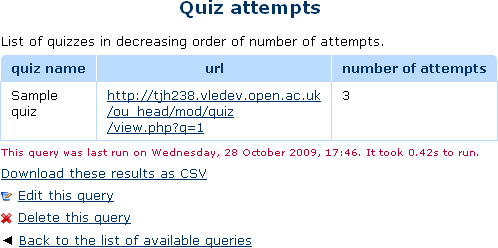
This report plugin allows Administrators to set up arbitrary database queries
to act as ad-hoc reports. Reports can be of two types, either run on demand,
or scheduled to run automatically. Other users with the right capability can
go in and see a list of queries that they have access to. Results can be viewed
on-screen or downloaded as CSV.
Comments
Comments are no longer open for new posts. Existing comments remain available to read.
As I don't want the Non-Editing Teacher role on system context, I created a new role (based on no archetype) on system context with only the report/customsql:view permission and assigned that role to the user(s) who are permitted to run the ad-hoc database queries in any course where I added the HTML block and all seems to works fine now.
Users only have the teacher role within one particular course. These reports are outside of any course, in the systems context. Users do not have the teacher role in the system context, so the permissions on the teacher role are irrelevant.
- I created two reports for viewing by Non-Editing Teachers.
- I gave the Non-Editing Teachers the report/customsql:view role.
Result as others: No report entry (in Essential theme) to run the reports.
Then:
- I created a HTML block in a specific course
- I added the report links in this HTML block with /report/customsql/view.php?id=2
- I logged in and access the course with Non-Editing Teacher role
Result when clicking the link:
- Navigation jumps to Home
- Error message displayed: Sorry, but you do not currently have permissions to do that (View custom queries report)
- defined a report as visibile to anyone (report/customsql:view)
- allowed "View custom query report" in Student role
- Student role is assigned to context Course and Activity module but not System, User, Category and Block
- got an overview from the "capability overview" menu item that shows "Allow" for "View custom query report" and "Student" (but it looks for System)
Thank you for any suggestion on how to solve it or where to look and check.
but we have no idea on writing or amending our own SQL and therefore have no idea on what to do to create our own reports.
does anyone have any ideas or recommendations how we can quickly learn or obtain the reports we need.
I defined the query as report/customsql:view and changed the student role to make this report/customsql:view permitted to the students.
If I report privilege for this report/customsql:view it looks that the student role is enabled to see it.
But users with the student role do not appear to be allowed to access to it.
Would you please suggest where to check to make it work?
Thanks
Can anyone help me regarding this ?
I am looking at the available report options but don't see one that counts currently enrolled users within a time period e.g. How many users were enrolled between 1 month or some other time period (1 week, 30 days). I am just looking for the number of enrolled users across the whole site that are enrolled between dates and not course specific. Could someone point me to which one would carry that out please? Or perhaps help with the query that I would need to use or change?
Thanks
Al
Just added one more pull request. This one puts the list of reports in a table to make it easier to read the list of reports, especially when combined with the expandable/collapsible list feature I added last week.
Let me know if you have any questions or concerns.
Best regards,
Michael
I just added a few pull requests.
Any idea when a Moodle 3.0 compatible version might become available?
Best regards,
Michael Milette