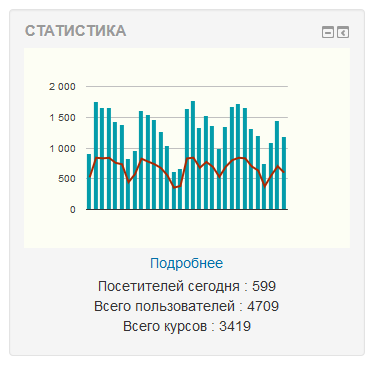
Statistics (Graph Stats)
Maintained by
Éric Bugnet, Vadim Dvorovenko
Little graph with visitors statistics
Comments
Comments are no longer open for new posts. Existing comments remain available to read.
Please take a look at https://github.com/vadimonus/moodle-block_graph_stats
It works only with moodle 2.7+ (for older versions please use version by Wesley Ellis), but have some code improvements.
I updated Wesleys repo with 2.7 compatible log calls.
This version should work with pre and post 2.7 Moodles.
Feel free to test it.
Repo: https://github.com/mwehr/graph_stats
I upgraded to 2.7 and graph_stats stopped seeing the user entries. It still reports the previous entries, but none since the core upgrade. Does anyone have a solution?
Thanks
- Removed Moodle graphing
- Graph is now 100% width (Responsive)
- Changed settings for colours to colour pickers (Can now choose hex codes for graph colours)
- Optimized code + tidy up
- Corrected code using Moodle Code Checker
Avaiable here: https://github.com/wezley98/graph_stats
https://github.com/wezley98/graph_stats
Line 44 : change
$context = get_context_instance(CONTEXT_COURSE, $course_id);to$context = context_course::instance($course_id);Line 53, change
if (has_capability('coursereport/log:view', $context)) {toif (has_capability('report/log:view', $context)) {Line 55, change
echo '<a href="'.$CFG->wwwroot.'/course/report/log/index.php?chooselog=1 ...toecho '<a href="'.$CFG->wwwroot.'/report/log/index.php?chooselog=1 ...By the way, the block graph_stats for Moodle 2.6 will work fine for Moodle 2.5
./blocks/graph_stats/lang/en/block_graph_stats.php
and change the value of
$string['white'] = 'White'; (used as backgroud color)
to what you like...
Better, set a local block_graph_stats.php to keep your modification after an upgrade.
//zh_cn <?PHP
//Moodle 2.0
$string['pluginname'] = 'Statistics';
// Added for V2
$string['style'] = '类型';
$string['style_help'] = '图片类型';
$string['moredetails'] = '更多细节';
$string['area'] = '区域';
$string['classic'] = '风格 : 条形 和 线形';
$string['engine'] = '引擎';
$string['engine_help'] = '渲染引擎';
$string['visitors'] = '访问者';
$string['uniquevisitors'] = '单一访问者';
// English langage
$string['blockname'] = '本站统计';
$string['connectedtoday'] = '今天上线 : ';
$string['coursesnb'] = '总课程数 : ';
$string['graphtitle'] = '最后 {$a} 天上线';
$string['membersnb'] = '总用户数 : ';
$string['seemsnotconfigured'] = '该版块没有配置,请告知您的管理员.';
// Settings
$string['axis_colour'] = '坐标轴';
$string['color1'] = '图形 1';
$string['color2'] = '图形 2';
$string['axis_colour_help'] = '坐标轴颜色';
$string['color1_help'] = '第一个图形的颜色';
$string['color2_help'] = '第二个图形的颜色';
$string['daysnb_help'] = '在图形中显示的天数';
$string['graphheight_help'] = '图形高度';
$string['graphwidth_help'] = '图形宽度';
$string['inner_background_help'] = '图形背景颜色';
$string['inner_border_help'] = '边框颜色';
$string['multi_help'] = '在首页显示多个连接';
$string['outer_background_help'] = '背景颜色';
$string['daysnb'] = '天数';
$string['graphheight'] = '高度';
$string['graphwidth'] = '宽度';
$string['inner_background'] = '图形背景';
$string['inner_border'] = '边框';
$string['multi'] = '多个连接';
$string['outer_background'] = '背景';
// Colors
$string['aqua'] = '浅绿色';
$string['black'] = '黑色';
$string['blue'] = '蓝色';
$string['fuchsia'] = '紫红色';
$string['gray'] = '灰色';
$string['green'] = '绿色';
$string['lime'] = '淡黄绿色';
$string['maroon'] = '褐紫红色';
$string['navy'] = '深蓝';
$string['olive'] = '橄榄色';
$string['orange'] = '橙色';
$string['purple'] = '紫色';
$string['red'] = '红色';
$string['white'] = '白色';
$string['yellow'] = '黄色';
?>
block_graph_stats for Moodle 2.4 is downloadable here :
https://github.com/jfruitet/block_graph_stats_m24
A zip archive is here :
http://moodlemoot2009.insa-lyon.fr/mod/resource/view.php?id=902
And I think you'll find it on Eric Bugnet github soon.
http://61.164.87.150:5483/