ClickView Video (Activity)
Versions
Current version
v3.11-r10 - v4.5-r2 (2023112403)
v3.11-r10 - v4.5-r2
Plugin type: Activities
Frankenstyle component name: mod_clickview
Version build number: 2023112403
Version release name: v3.11-r10 - v4.5-r2
Maturity: Stable
Supported Moodle versions: 3.11, 4.0, 4.1, 4.2, 4.3, 4.4, 4.5
Repository URL (Git): https://github.com/clickviewapp/moodle-mod_clickview.git
Repository branch:
Repository tag: v3.11-r10_v4.5-r2
Issue/bug tracker URL: https://github.com/clickviewapp/moodle-mod_clickview/issues
Moodle ClickView activity plugin

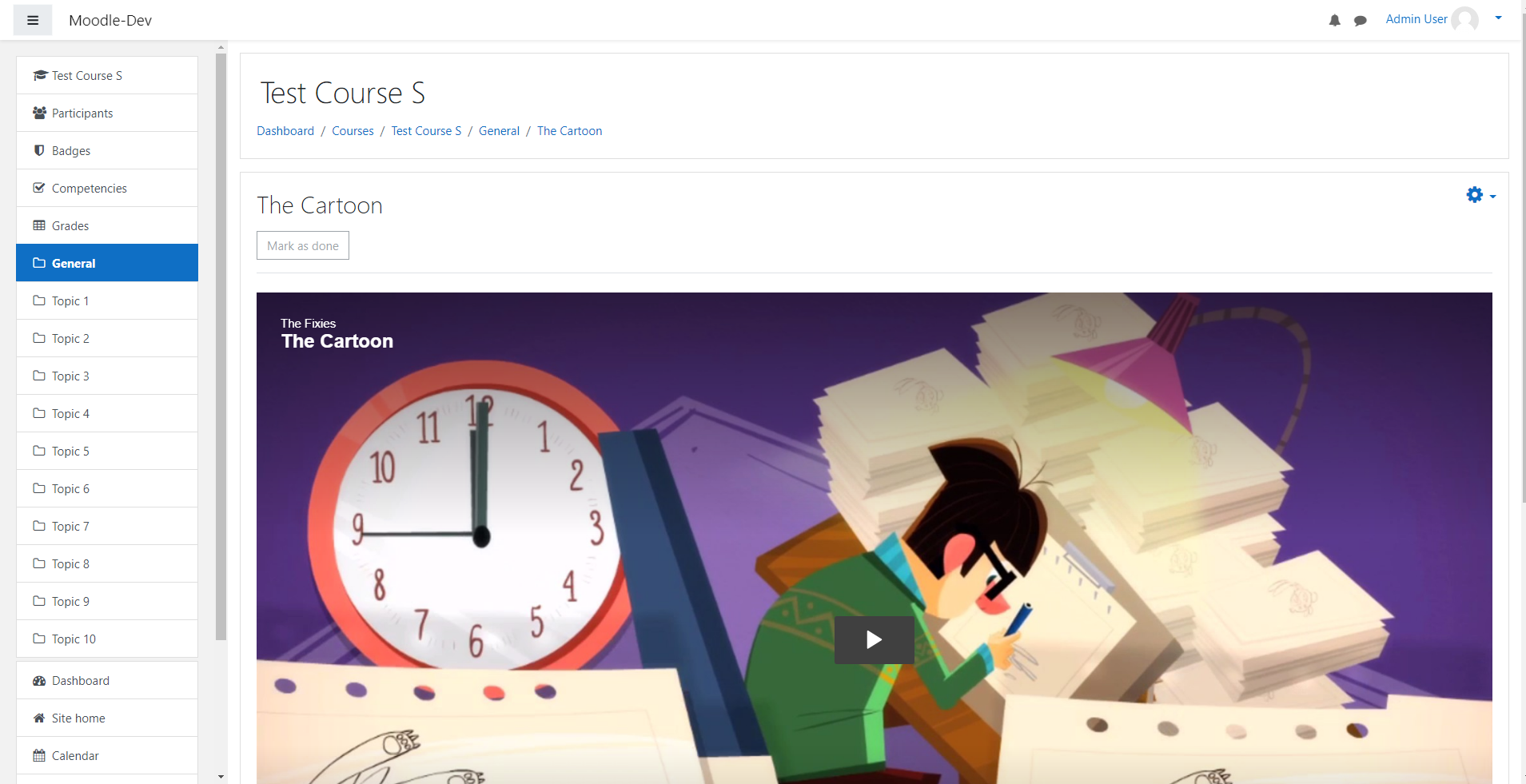
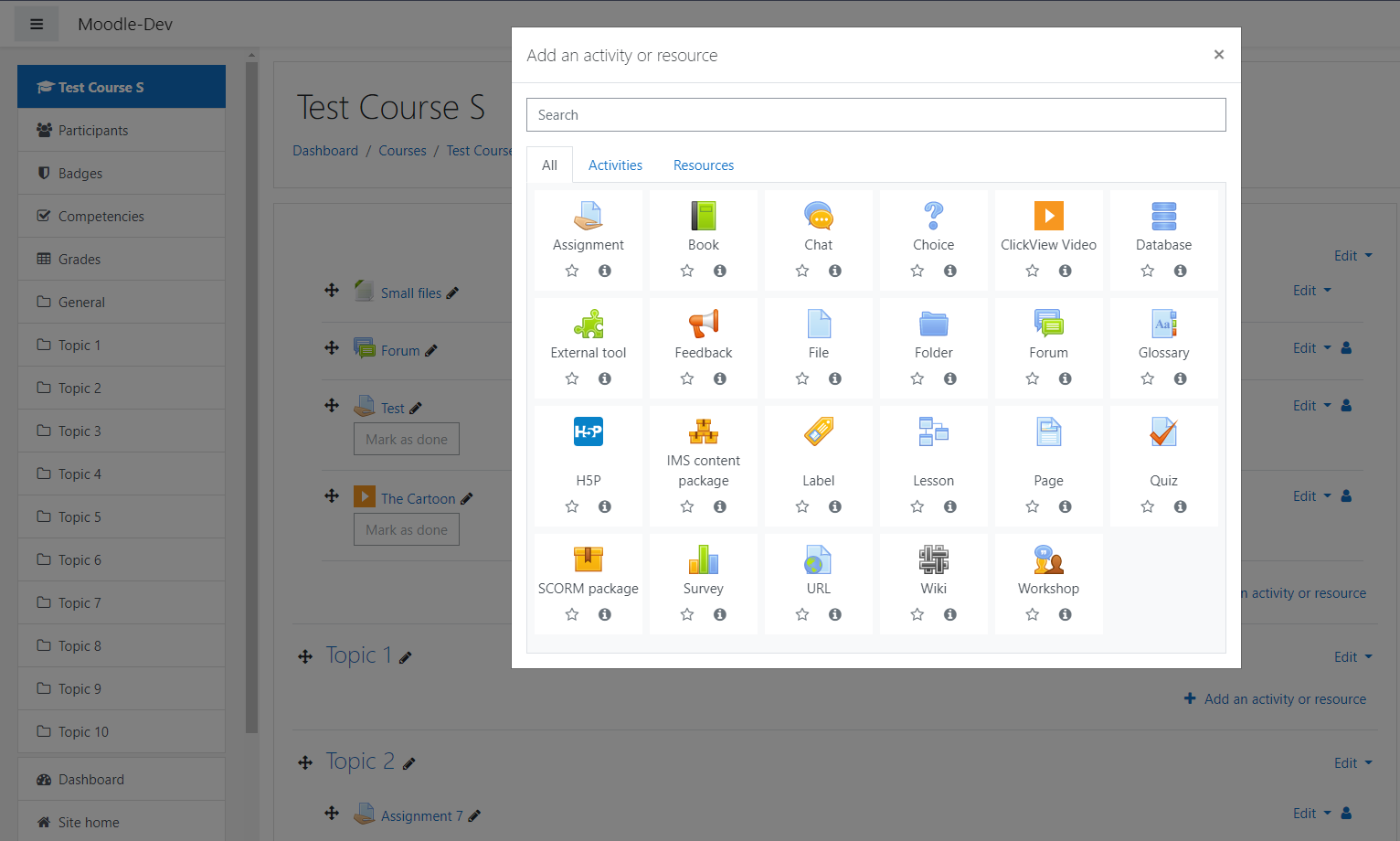
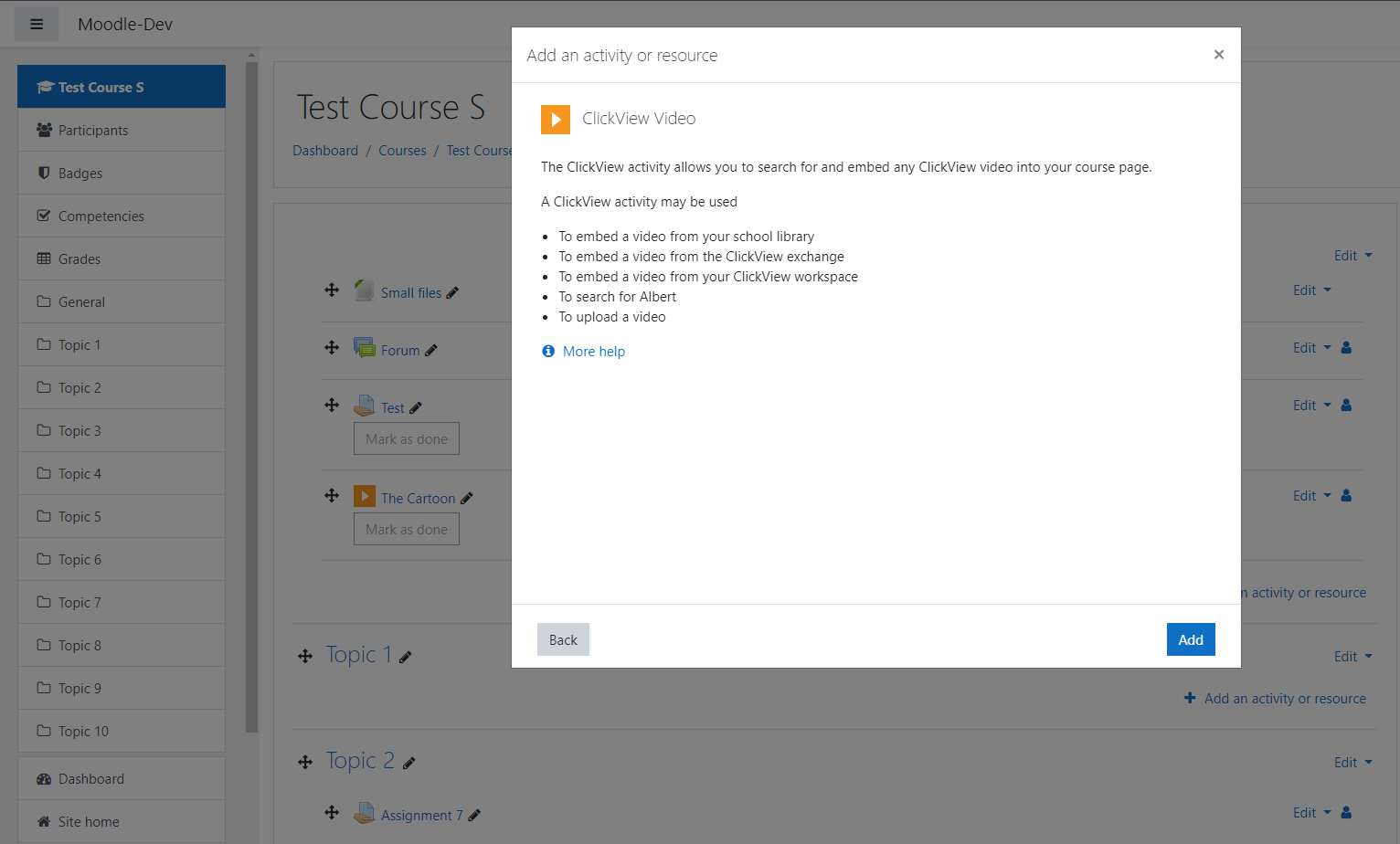
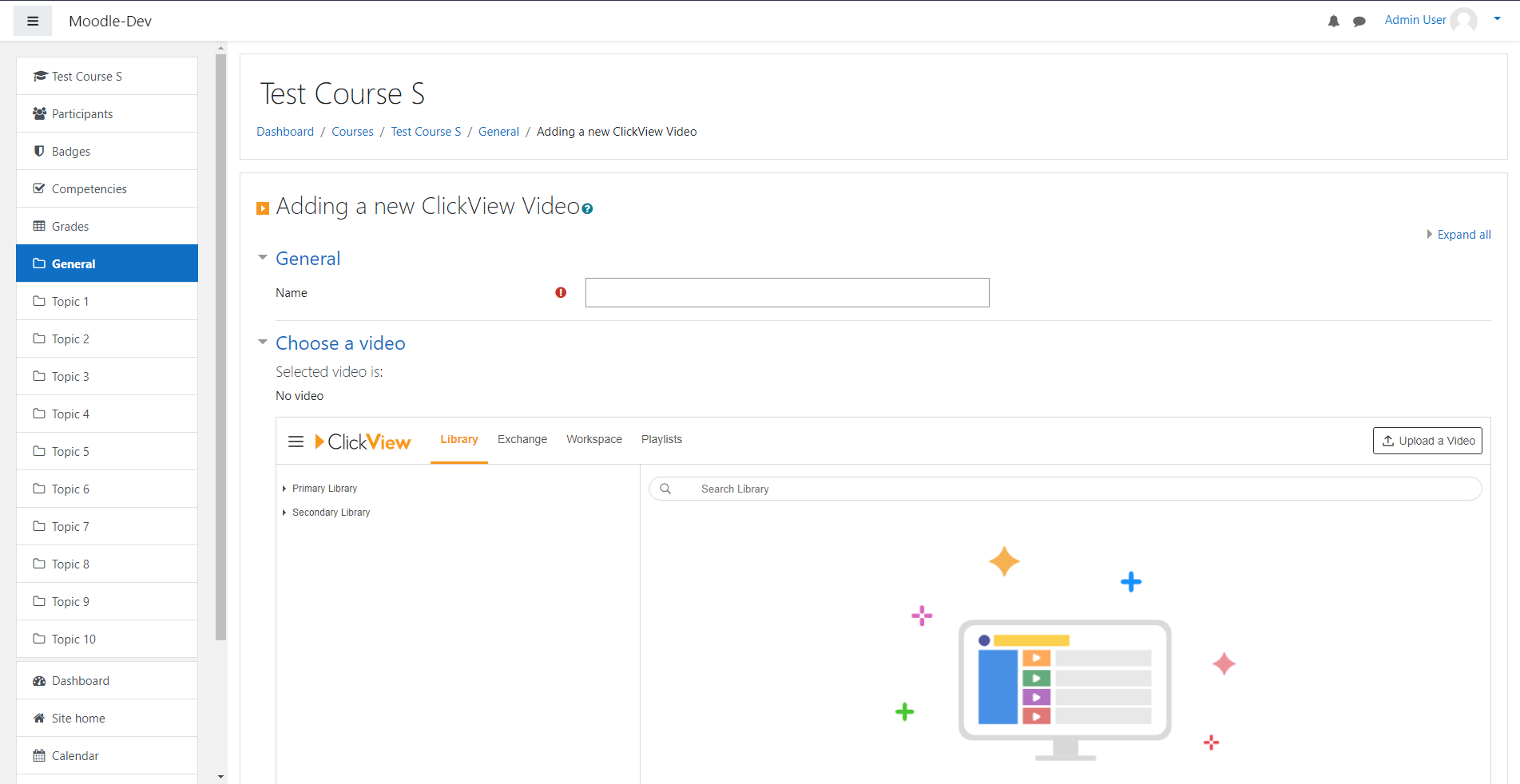
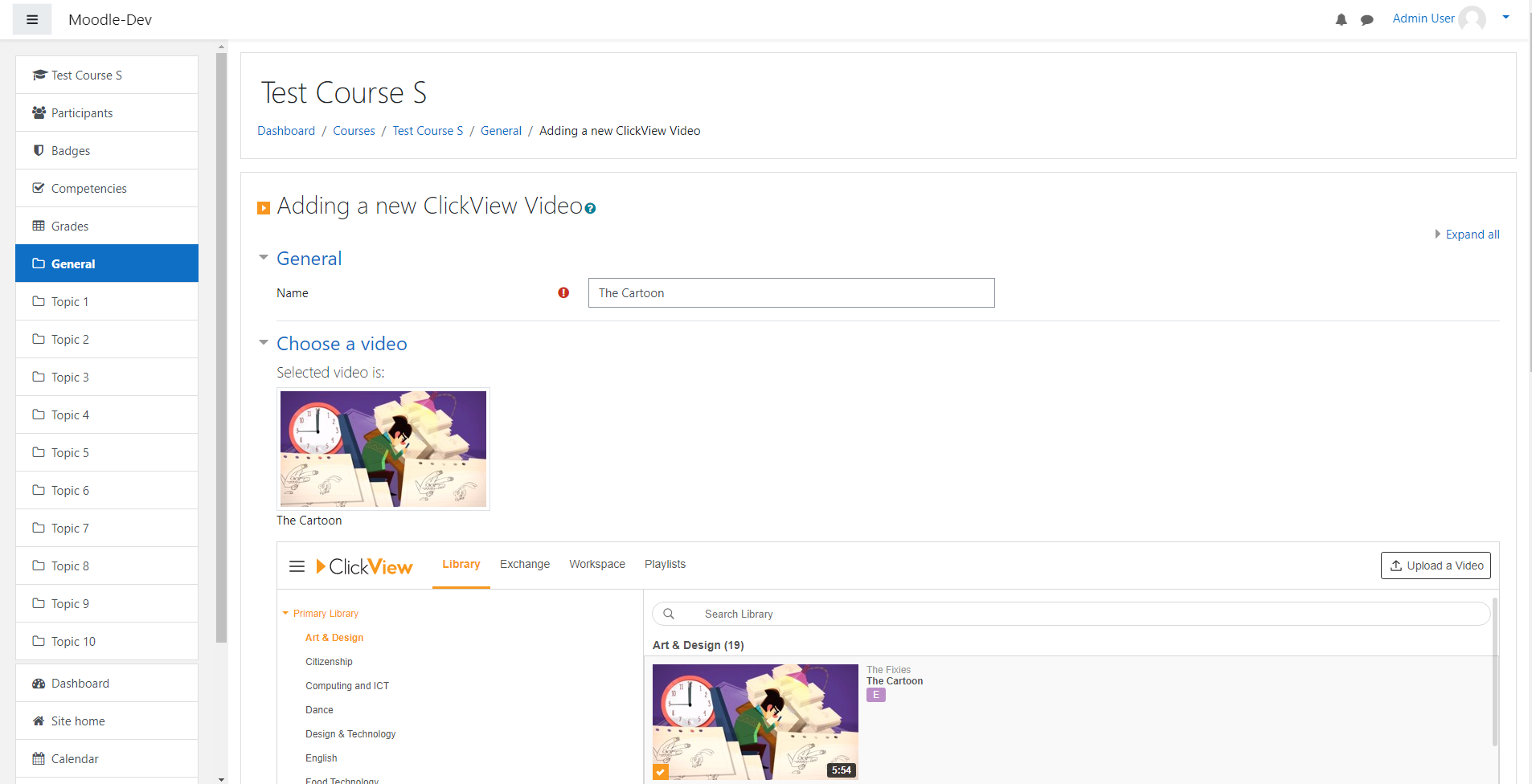
The ClickView activity plugin for Moodle enables you to quickly and safely browse through your entire ClickView library, the ClickView exchange and your own personal workspace from within Moodle.
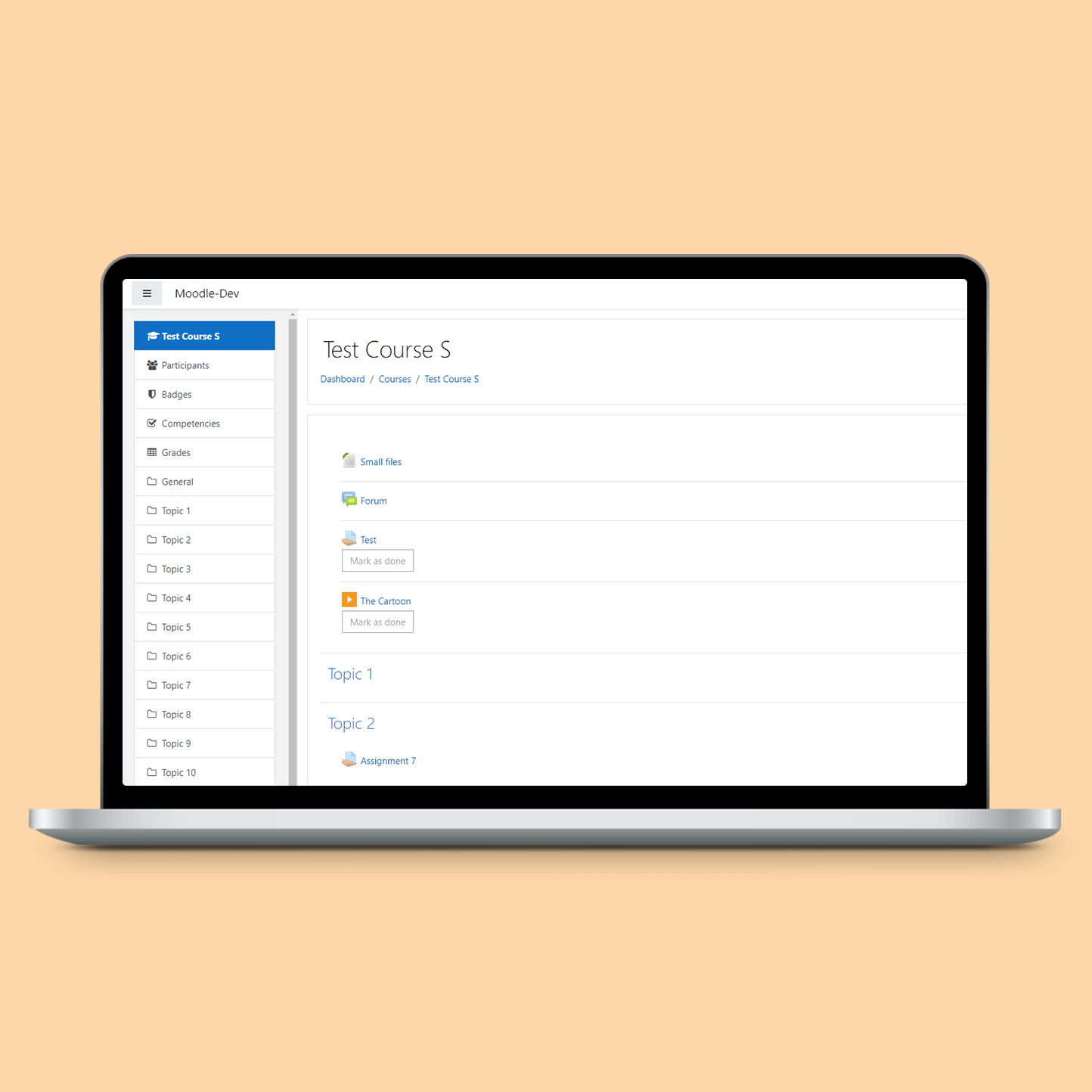
This makes it easy to embed educational videos directly into your courses and share them with your students.
Requirements
The plugin can only be installed if the plugin local_clickview is available.
Installing via uploaded ZIP file
- Log in to your Moodle site as an admin and go to Site administration >
Plugins > Install plugins. - Upload the ZIP file with the plugin code. You should only be prompted to add
extra details if your plugin type is not automatically detected. - Check the plugin validation report and finish the installation.
Installing manually
The plugin can be also installed by putting the contents of this directory to
{your/moodle/dirroot}/mod/clickview
Afterwards, log in to your Moodle site as an admin and go to Site administration >
Notifications to complete the installation.
Alternatively, you can run
$ php admin/cli/upgrade.php
to complete the installation from the command line.
Subscription
This plugin is only available to organizations with an active ClickView subscription. You can request a free trial here https://www.clickvieweducation.com/free-trial/.
License
2021 ClickView Pty. Limited info@clickview.com.au
This program is free software: you can redistribute it and/or modify it under
the terms of the GNU General Public License as published by the Free Software
Foundation, either version 3 of the License, or (at your option) any later
version.
This program is distributed in the hope that it will be useful, but WITHOUT ANY
WARRANTY; without even the implied warranty of MERCHANTABILITY or FITNESS FOR A
PARTICULAR PURPOSE. See the GNU General Public License for more details.
You should have received a copy of the GNU General Public License along with
this program. If not, see https://www.gnu.org/licenses/.
v3.11-r8 - v4.2-r4 (2023112401)
v3.11-r8 - v4.2-r4
Plugin type: Activities
Frankenstyle component name: mod_clickview
Version build number: 2023112401
Version release name: v3.11-r8 - v4.2-r4
Maturity: Stable
Supported Moodle versions: 3.11, 4.0, 4.1, 4.2, 4.3, 4.4, 4.5
Repository URL (Git): https://github.com/clickviewapp/moodle-mod_clickview.git
Repository branch:
Repository tag: v3.11-r8_v4.2-r5
Issue/bug tracker URL: https://github.com/clickviewapp/moodle-mod_clickview/issues
Moodle ClickView activity plugin
The ClickView activity plugin for Moodle enables you to quickly and safely browse through your entire ClickView library, the ClickView exchange and your own personal workspace from within Moodle.
This makes it easy to embed educational videos directly into your courses and share them with your students.
Requirements
The plugin can only be installed if the plugin local_clickview is available.
Installing via uploaded ZIP file
- Log in to your Moodle site as an admin and go to Site administration >
Plugins > Install plugins. - Upload the ZIP file with the plugin code. You should only be prompted to add
extra details if your plugin type is not automatically detected. - Check the plugin validation report and finish the installation.
Installing manually
The plugin can be also installed by putting the contents of this directory to
{your/moodle/dirroot}/mod/clickview
Afterwards, log in to your Moodle site as an admin and go to Site administration >
Notifications to complete the installation.
Alternatively, you can run
$ php admin/cli/upgrade.php
to complete the installation from the command line.
Subscription
This plugin is only available to organizations with an active ClickView subscription. You can request a free trial here https://www.clickvieweducation.com/free-trial/.
License
2021 ClickView Pty. Limited info@clickview.com.au
This program is free software: you can redistribute it and/or modify it under
the terms of the GNU General Public License as published by the Free Software
Foundation, either version 3 of the License, or (at your option) any later
version.
This program is distributed in the hope that it will be useful, but WITHOUT ANY
WARRANTY; without even the implied warranty of MERCHANTABILITY or FITNESS FOR A
PARTICULAR PURPOSE. See the GNU General Public License for more details.
You should have received a copy of the GNU General Public License along with
this program. If not, see https://www.gnu.org/licenses/.
v3.11-r7 - v4.2-r4 (2023112400)
v3.11-r7 - v4.2-r4
Plugin type: Activities
Frankenstyle component name: mod_clickview
Version build number: 2023112400
Version release name: v3.11-r7 - v4.2-r4
Maturity: Stable
Supported Moodle versions: 3.11, 4.0, 4.1, 4.2, 4.3
Repository URL (Git): https://github.com/clickviewapp/moodle-mod_clickview.git
Repository branch:
Repository tag: v3.11-r7_v4.2-r4
Issue/bug tracker URL: https://github.com/clickviewapp/moodle-mod_clickview/issues
Moodle ClickView activity plugin
The ClickView activity plugin for Moodle enables you to quickly and safely browse through your entire ClickView library, the ClickView exchange and your own personal workspace from within Moodle.
This makes it easy to embed educational videos directly into your courses and share them with your students.
Requirements
The plugin can only be installed if the plugin local_clickview is available.
Installing via uploaded ZIP file
- Log in to your Moodle site as an admin and go to Site administration >
Plugins > Install plugins. - Upload the ZIP file with the plugin code. You should only be prompted to add
extra details if your plugin type is not automatically detected. - Check the plugin validation report and finish the installation.
Installing manually
The plugin can be also installed by putting the contents of this directory to
{your/moodle/dirroot}/mod/clickview
Afterwards, log in to your Moodle site as an admin and go to Site administration >
Notifications to complete the installation.
Alternatively, you can run
$ php admin/cli/upgrade.php
to complete the installation from the command line.
Subscription
This plugin is only available to organizations with an active ClickView subscription. You can request a free trial here https://www.clickvieweducation.com/free-trial/.
License
2021 ClickView Pty. Limited info@clickview.com.au
This program is free software: you can redistribute it and/or modify it under
the terms of the GNU General Public License as published by the Free Software
Foundation, either version 3 of the License, or (at your option) any later
version.
This program is distributed in the hope that it will be useful, but WITHOUT ANY
WARRANTY; without even the implied warranty of MERCHANTABILITY or FITNESS FOR A
PARTICULAR PURPOSE. See the GNU General Public License for more details.
You should have received a copy of the GNU General Public License along with
this program. If not, see https://www.gnu.org/licenses/.
v3.11-r6 - v4.2-r3 (2021083006)
v3.11-r6 - v4.2-r3
Plugin type: Activities
Frankenstyle component name: mod_clickview
Version build number: 2021083006
Version release name: v3.11-r6 - v4.2-r3
Maturity: Stable
Supported Moodle versions: 3.11, 4.0, 4.1, 4.2
Repository URL (Git): https://github.com/clickviewapp/moodle-mod_clickview.git
Repository branch:
Repository tag: v3.11-r6_v4.2-r3
Issue/bug tracker URL: https://github.com/clickviewapp/moodle-mod_clickview/issues
Moodle ClickView activity plugin
The ClickView activity plugin for Moodle enables you to quickly and safely browse through your entire ClickView library, the ClickView exchange and your own personal workspace from within Moodle.
This makes it easy to embed educational videos directly into your courses and share them with your students.
Requirements
The plugin can only be installed if the plugin local_clickview is available.
Installing via uploaded ZIP file
- Log in to your Moodle site as an admin and go to Site administration >
Plugins > Install plugins. - Upload the ZIP file with the plugin code. You should only be prompted to add
extra details if your plugin type is not automatically detected. - Check the plugin validation report and finish the installation.
Installing manually
The plugin can be also installed by putting the contents of this directory to
{your/moodle/dirroot}/mod/clickview
Afterwards, log in to your Moodle site as an admin and go to Site administration >
Notifications to complete the installation.
Alternatively, you can run
$ php admin/cli/upgrade.php
to complete the installation from the command line.
Subscription
This plugin is only available to organizations with an active ClickView subscription. You can request a free trial here https://www.clickvieweducation.com/free-trial/.
License
2021 ClickView Pty. Limited info@clickview.com.au
This program is free software: you can redistribute it and/or modify it under
the terms of the GNU General Public License as published by the Free Software
Foundation, either version 3 of the License, or (at your option) any later
version.
This program is distributed in the hope that it will be useful, but WITHOUT ANY
WARRANTY; without even the implied warranty of MERCHANTABILITY or FITNESS FOR A
PARTICULAR PURPOSE. See the GNU General Public License for more details.
You should have received a copy of the GNU General Public License along with
this program. If not, see https://www.gnu.org/licenses/.
v3.11-r5 - v4.2-r2 (2021083005)
v3.11-r5 - v4.2-r2
Plugin type: Activities
Frankenstyle component name: mod_clickview
Version build number: 2021083005
Version release name: v3.11-r5 - v4.2-r2
Maturity: Stable
Supported Moodle versions: 3.11, 4.0, 4.1, 4.2
Repository URL (Git): https://github.com/clickviewapp/moodle-mod_clickview.git
Repository branch:
Repository tag: v3.11-r5_v4.2-r2
Issue/bug tracker URL: https://github.com/clickviewapp/moodle-mod_clickview/issues
Moodle ClickView activity plugin
The ClickView activity plugin for Moodle enables you to quickly and safely browse through your entire ClickView library, the ClickView exchange and your own personal workspace from within Moodle.
This makes it easy to embed educational videos directly into your courses and share them with your students.
Requirements
The plugin can only be installed if the plugin local_clickview is available.
Installing via uploaded ZIP file
- Log in to your Moodle site as an admin and go to Site administration >
Plugins > Install plugins. - Upload the ZIP file with the plugin code. You should only be prompted to add
extra details if your plugin type is not automatically detected. - Check the plugin validation report and finish the installation.
Installing manually
The plugin can be also installed by putting the contents of this directory to
{your/moodle/dirroot}/mod/clickview
Afterwards, log in to your Moodle site as an admin and go to Site administration >
Notifications to complete the installation.
Alternatively, you can run
$ php admin/cli/upgrade.php
to complete the installation from the command line.
Subscription
This plugin is only available to organizations with an active ClickView subscription. You can request a free trial here https://www.clickvieweducation.com/free-trial/.
License
2021 ClickView Pty. Limited info@clickview.com.au
This program is free software: you can redistribute it and/or modify it under
the terms of the GNU General Public License as published by the Free Software
Foundation, either version 3 of the License, or (at your option) any later
version.
This program is distributed in the hope that it will be useful, but WITHOUT ANY
WARRANTY; without even the implied warranty of MERCHANTABILITY or FITNESS FOR A
PARTICULAR PURPOSE. See the GNU General Public License for more details.
You should have received a copy of the GNU General Public License along with
this program. If not, see https://www.gnu.org/licenses/.
v3.11-r4 - v4.2-r1 (2021083004)
v3.11-r4 - v4.2-r1
Plugin type: Activities
Frankenstyle component name: mod_clickview
Version build number: 2021083004
Version release name: v3.11-r4 - v4.2-r1
Maturity: Stable
Supported Moodle versions: 3.11, 4.0, 4.1, 4.2
Repository URL (Git): https://github.com/clickviewapp/moodle-mod_clickview.git
Repository branch: main
Repository tag: v3.11-r4_v4.2-r1
Issue/bug tracker URL: https://github.com/clickviewapp/moodle-mod_clickview/issues
Moodle ClickView activity plugin
The ClickView activity plugin for Moodle enables you to quickly and safely browse through your entire ClickView library, the ClickView exchange and your own personal workspace from within Moodle.
This makes it easy to embed educational videos directly into your courses and share them with your students.
Requirements
The plugin can only be installed if the plugin local_clickview is available.
Installing via uploaded ZIP file
- Log in to your Moodle site as an admin and go to Site administration >
Plugins > Install plugins. - Upload the ZIP file with the plugin code. You should only be prompted to add
extra details if your plugin type is not automatically detected. - Check the plugin validation report and finish the installation.
Installing manually
The plugin can be also installed by putting the contents of this directory to
{your/moodle/dirroot}/mod/clickview
Afterwards, log in to your Moodle site as an admin and go to Site administration >
Notifications to complete the installation.
Alternatively, you can run
$ php admin/cli/upgrade.php
to complete the installation from the command line.
Subscription
This plugin is only available to organizations with an active ClickView subscription. You can request a free trial here https://www.clickvieweducation.com/free-trial/.
License
2021 ClickView Pty. Limited info@clickview.com.au
This program is free software: you can redistribute it and/or modify it under
the terms of the GNU General Public License as published by the Free Software
Foundation, either version 3 of the License, or (at your option) any later
version.
This program is distributed in the hope that it will be useful, but WITHOUT ANY
WARRANTY; without even the implied warranty of MERCHANTABILITY or FITNESS FOR A
PARTICULAR PURPOSE. See the GNU General Public License for more details.
You should have received a copy of the GNU General Public License along with
this program. If not, see https://www.gnu.org/licenses/.
v3.5-r3 (2021082604)
v3.5-r3
Plugin type: Activities
Frankenstyle component name: mod_clickview
Version build number: 2021082604
Version release name: v3.5-r3
Maturity: Stable
Supported Moodle versions: 3.5
Repository URL (Git): https://github.com/clickviewapp/moodle-mod_clickview.git
Repository branch:
Repository tag: v3.5-r3
Issue/bug tracker URL: https://github.com/clickviewapp/moodle-mod_clickview/issues
Moodle ClickView activity plugin

The ClickView activity plugin for Moodle enables you to quickly and safely browse through your entire ClickView library, the ClickView exchange and your own personal workspace from within Moodle.
This makes it easy to embed educational videos directly into your courses and share them with your students.
Requirements
The plugin can only be installed if the plugin local_clickview is available.
Installing via uploaded ZIP file
- Log in to your Moodle site as an admin and go to Site administration >
Plugins > Install plugins. - Upload the ZIP file with the plugin code. You should only be prompted to add
extra details if your plugin type is not automatically detected. - Check the plugin validation report and finish the installation.
Installing manually
The plugin can be also installed by putting the contents of this directory to
{your/moodle/dirroot}/mod/clickview
Afterwards, log in to your Moodle site as an admin and go to Site administration >
Notifications to complete the installation.
Alternatively, you can run
$ php admin/cli/upgrade.php
to complete the installation from the command line.
Subscription
This plugin is only available to organizations with an active ClickView subscription. You can request a free trial here https://www.clickvieweducation.com/free-trial/.
License
2021 ClickView Pty. Limited info@clickview.com.au
This program is free software: you can redistribute it and/or modify it under
the terms of the GNU General Public License as published by the Free Software
Foundation, either version 3 of the License, or (at your option) any later
version.
This program is distributed in the hope that it will be useful, but WITHOUT ANY
WARRANTY; without even the implied warranty of MERCHANTABILITY or FITNESS FOR A
PARTICULAR PURPOSE. See the GNU General Public License for more details.
You should have received a copy of the GNU General Public License along with
this program. If not, see https://www.gnu.org/licenses/.
v3.6-r3 (2021082703)
v3.6-r3
Plugin type: Activities
Frankenstyle component name: mod_clickview
Version build number: 2021082703
Version release name: v3.6-r3
Maturity: Stable
Supported Moodle versions: 3.6
Repository URL (Git): https://github.com/clickviewapp/moodle-mod_clickview.git
Repository branch:
Repository tag: v3.6-r3
Issue/bug tracker URL: https://github.com/clickviewapp/moodle-mod_clickview/issues
Moodle ClickView activity plugin

The ClickView activity plugin for Moodle enables you to quickly and safely browse through your entire ClickView library, the ClickView exchange and your own personal workspace from within Moodle.
This makes it easy to embed educational videos directly into your courses and share them with your students.
Requirements
The plugin can only be installed if the plugin local_clickview is available.
Installing via uploaded ZIP file
- Log in to your Moodle site as an admin and go to Site administration >
Plugins > Install plugins. - Upload the ZIP file with the plugin code. You should only be prompted to add
extra details if your plugin type is not automatically detected. - Check the plugin validation report and finish the installation.
Installing manually
The plugin can be also installed by putting the contents of this directory to
{your/moodle/dirroot}/mod/clickview
Afterwards, log in to your Moodle site as an admin and go to Site administration >
Notifications to complete the installation.
Alternatively, you can run
$ php admin/cli/upgrade.php
to complete the installation from the command line.
Subscription
This plugin is only available to organizations with an active ClickView subscription. You can request a free trial here https://www.clickvieweducation.com/free-trial/.
License
2021 ClickView Pty. Limited info@clickview.com.au
This program is free software: you can redistribute it and/or modify it under
the terms of the GNU General Public License as published by the Free Software
Foundation, either version 3 of the License, or (at your option) any later
version.
This program is distributed in the hope that it will be useful, but WITHOUT ANY
WARRANTY; without even the implied warranty of MERCHANTABILITY or FITNESS FOR A
PARTICULAR PURPOSE. See the GNU General Public License for more details.
You should have received a copy of the GNU General Public License along with
this program. If not, see https://www.gnu.org/licenses/.
v3.7-r3 (2021082803)
v3.7-r3
Plugin type: Activities
Frankenstyle component name: mod_clickview
Version build number: 2021082803
Version release name: v3.7-r3
Maturity: Stable
Supported Moodle versions: 3.7
Repository URL (Git): https://github.com/clickviewapp/moodle-mod_clickview.git
Repository branch:
Repository tag: v3.7-r3
Issue/bug tracker URL: https://github.com/clickviewapp/moodle-mod_clickview/issues
Moodle ClickView activity plugin

The ClickView activity plugin for Moodle enables you to quickly and safely browse through your entire ClickView library, the ClickView exchange and your own personal workspace from within Moodle.
This makes it easy to embed educational videos directly into your courses and share them with your students.
Requirements
The plugin can only be installed if the plugin local_clickview is available.
Installing via uploaded ZIP file
- Log in to your Moodle site as an admin and go to Site administration >
Plugins > Install plugins. - Upload the ZIP file with the plugin code. You should only be prompted to add
extra details if your plugin type is not automatically detected. - Check the plugin validation report and finish the installation.
Installing manually
The plugin can be also installed by putting the contents of this directory to
{your/moodle/dirroot}/mod/clickview
Afterwards, log in to your Moodle site as an admin and go to Site administration >
Notifications to complete the installation.
Alternatively, you can run
$ php admin/cli/upgrade.php
to complete the installation from the command line.
Subscription
This plugin is only available to organizations with an active ClickView subscription. You can request a free trial here https://www.clickvieweducation.com/free-trial/.
License
2021 ClickView Pty. Limited info@clickview.com.au
This program is free software: you can redistribute it and/or modify it under
the terms of the GNU General Public License as published by the Free Software
Foundation, either version 3 of the License, or (at your option) any later
version.
This program is distributed in the hope that it will be useful, but WITHOUT ANY
WARRANTY; without even the implied warranty of MERCHANTABILITY or FITNESS FOR A
PARTICULAR PURPOSE. See the GNU General Public License for more details.
You should have received a copy of the GNU General Public License along with
this program. If not, see https://www.gnu.org/licenses/.
v3.8-r3 - v3.10-r3 (2021082903)
v3.8-r3 - v3.10-r3
Plugin type: Activities
Frankenstyle component name: mod_clickview
Version build number: 2021082903
Version release name: v3.8-r3 - v3.10-r3
Maturity: Stable
Supported Moodle versions: 3.10, 3.8, 3.9
Repository URL (Git): https://github.com/clickviewapp/moodle-mod_clickview.git
Repository branch:
Repository tag: v3.8-r3_v3.10-r3
Issue/bug tracker URL: https://github.com/clickviewapp/moodle-mod_clickview/issues
Moodle ClickView activity plugin

The ClickView activity plugin for Moodle enables you to quickly and safely browse through your entire ClickView library, the ClickView exchange and your own personal workspace from within Moodle.
This makes it easy to embed educational videos directly into your courses and share them with your students.
Requirements
The plugin can only be installed if the plugin local_clickview is available.
Installing via uploaded ZIP file
- Log in to your Moodle site as an admin and go to Site administration >
Plugins > Install plugins. - Upload the ZIP file with the plugin code. You should only be prompted to add
extra details if your plugin type is not automatically detected. - Check the plugin validation report and finish the installation.
Installing manually
The plugin can be also installed by putting the contents of this directory to
{your/moodle/dirroot}/mod/clickview
Afterwards, log in to your Moodle site as an admin and go to Site administration >
Notifications to complete the installation.
Alternatively, you can run
$ php admin/cli/upgrade.php
to complete the installation from the command line.
Subscription
This plugin is only available to organizations with an active ClickView subscription. You can request a free trial here https://www.clickvieweducation.com/free-trial/.
License
2021 ClickView Pty. Limited info@clickview.com.au
This program is free software: you can redistribute it and/or modify it under
the terms of the GNU General Public License as published by the Free Software
Foundation, either version 3 of the License, or (at your option) any later
version.
This program is distributed in the hope that it will be useful, but WITHOUT ANY
WARRANTY; without even the implied warranty of MERCHANTABILITY or FITNESS FOR A
PARTICULAR PURPOSE. See the GNU General Public License for more details.
You should have received a copy of the GNU General Public License along with
this program. If not, see https://www.gnu.org/licenses/.
v3.11-r3 (2021083003)
v3.11-r3
Plugin type: Activities
Frankenstyle component name: mod_clickview
Version build number: 2021083003
Version release name: v3.11-r3
Maturity: Stable
Supported Moodle versions: 3.11
Repository URL (Git): https://github.com/clickviewapp/moodle-mod_clickview.git
Repository branch:
Repository tag: v3.11-r3
Issue/bug tracker URL: https://github.com/clickviewapp/moodle-mod_clickview/issues
Moodle ClickView activity plugin
The ClickView activity plugin for Moodle enables you to quickly and safely browse through your entire ClickView library, the ClickView exchange and your own personal workspace from within Moodle.
This makes it easy to embed educational videos directly into your courses and share them with your students.
Requirements
The plugin can only be installed if the plugin local_clickview is available.
Installing via uploaded ZIP file
- Log in to your Moodle site as an admin and go to Site administration >
Plugins > Install plugins. - Upload the ZIP file with the plugin code. You should only be prompted to add
extra details if your plugin type is not automatically detected. - Check the plugin validation report and finish the installation.
Installing manually
The plugin can be also installed by putting the contents of this directory to
{your/moodle/dirroot}/mod/clickview
Afterwards, log in to your Moodle site as an admin and go to Site administration >
Notifications to complete the installation.
Alternatively, you can run
$ php admin/cli/upgrade.php
to complete the installation from the command line.
Subscription
This plugin is only available to organizations with an active ClickView subscription. You can request a free trial here https://www.clickvieweducation.com/free-trial/.
License
2021 ClickView Pty. Limited info@clickview.com.au
This program is free software: you can redistribute it and/or modify it under
the terms of the GNU General Public License as published by the Free Software
Foundation, either version 3 of the License, or (at your option) any later
version.
This program is distributed in the hope that it will be useful, but WITHOUT ANY
WARRANTY; without even the implied warranty of MERCHANTABILITY or FITNESS FOR A
PARTICULAR PURPOSE. See the GNU General Public License for more details.
You should have received a copy of the GNU General Public License along with
this program. If not, see https://www.gnu.org/licenses/.
v3.5-r1 (2021082601)
v3.5-r1
Plugin type: Activities
Frankenstyle component name: mod_clickview
Version build number: 2021082601
Version release name: v3.5-r1
Maturity: Stable
Supported Moodle versions: 3.5
Repository URL (Git): https://github.com/clickviewapp/moodle-mod_clickview.git
Repository branch: MOODLE_35_STABLE
Repository tag: v3.5-r1
Issue/bug tracker URL: https://github.com/clickviewapp/moodle-mod_clickview/issues
Moodle ClickView activity plugin
The ClickView activity plugin for Moodle enables you to quickly and safely browse through your entire ClickView library, the ClickView exchange and your own personal workspace from within Moodle.
This makes it easy to embed educational videos directly into your courses and share them with your students.
Requirements
The plugin can only be installed if the plugin local_clickview is available.
Installing via uploaded ZIP file
- Log in to your Moodle site as an admin and go to Site administration >
Plugins > Install plugins. - Upload the ZIP file with the plugin code. You should only be prompted to add
extra details if your plugin type is not automatically detected. - Check the plugin validation report and finish the installation.
Installing manually
The plugin can be also installed by putting the contents of this directory to
{your/moodle/dirroot}/mod/clickview
Afterwards, log in to your Moodle site as an admin and go to Site administration >
Notifications to complete the installation.
Alternatively, you can run
$ php admin/cli/upgrade.php
to complete the installation from the command line.
License
2021 ClickView Pty. Limited info@clickview.com.au
This program is free software: you can redistribute it and/or modify it under
the terms of the GNU General Public License as published by the Free Software
Foundation, either version 3 of the License, or (at your option) any later
version.
This program is distributed in the hope that it will be useful, but WITHOUT ANY
WARRANTY; without even the implied warranty of MERCHANTABILITY or FITNESS FOR A
PARTICULAR PURPOSE. See the GNU General Public License for more details.
You should have received a copy of the GNU General Public License along with
this program. If not, see https://www.gnu.org/licenses/.
v3.6-r1 (2021082701)
v3.6-r1
Plugin type: Activities
Frankenstyle component name: mod_clickview
Version build number: 2021082701
Version release name: v3.6-r1
Maturity: Stable
Supported Moodle versions: 3.6
Repository URL (Git): https://github.com/clickviewapp/moodle-mod_clickview.git
Repository branch: MOODLE_36_STABLE
Repository tag: v3.6-r1
Issue/bug tracker URL: https://github.com/clickviewapp/moodle-mod_clickview/issues
Moodle ClickView activity plugin
The ClickView activity plugin for Moodle enables you to quickly and safely browse through your entire ClickView library, the ClickView exchange and your own personal workspace from within Moodle.
This makes it easy to embed educational videos directly into your courses and share them with your students.
Requirements
The plugin can only be installed if the plugin local_clickview is available.
Installing via uploaded ZIP file
- Log in to your Moodle site as an admin and go to Site administration >
Plugins > Install plugins. - Upload the ZIP file with the plugin code. You should only be prompted to add
extra details if your plugin type is not automatically detected. - Check the plugin validation report and finish the installation.
Installing manually
The plugin can be also installed by putting the contents of this directory to
{your/moodle/dirroot}/mod/clickview
Afterwards, log in to your Moodle site as an admin and go to Site administration >
Notifications to complete the installation.
Alternatively, you can run
$ php admin/cli/upgrade.php
to complete the installation from the command line.
License
2021 ClickView Pty. Limited
This program is free software: you can redistribute it and/or modify it under
the terms of the GNU General Public License as published by the Free Software
Foundation, either version 3 of the License, or (at your option) any later
version.
This program is distributed in the hope that it will be useful, but WITHOUT ANY
WARRANTY; without even the implied warranty of MERCHANTABILITY or FITNESS FOR A
PARTICULAR PURPOSE. See the GNU General Public License for more details.
You should have received a copy of the GNU General Public License along with
this program. If not, see .
v3.7-r1 (2021082801)
v3.7-r1
Plugin type: Activities
Frankenstyle component name: mod_clickview
Version build number: 2021082801
Version release name: v3.7-r1
Maturity: Stable
Supported Moodle versions: 3.7
Repository URL (Git): https://github.com/clickviewapp/moodle-mod_clickview.git
Repository branch: MOODLE_37_STABLE
Repository tag: v3.7-r1
Issue/bug tracker URL: https://github.com/clickviewapp/moodle-mod_clickview/issues
Moodle ClickView activity plugin
The ClickView activity plugin for Moodle enables you to quickly and safely browse through your entire ClickView library, the ClickView exchange and your own personal workspace from within Moodle.
This makes it easy to embed educational videos directly into your courses and share them with your students.
Requirements
The plugin can only be installed if the plugin local_clickview is available.
Installing via uploaded ZIP file
- Log in to your Moodle site as an admin and go to Site administration >
Plugins > Install plugins. - Upload the ZIP file with the plugin code. You should only be prompted to add
extra details if your plugin type is not automatically detected. - Check the plugin validation report and finish the installation.
Installing manually
The plugin can be also installed by putting the contents of this directory to
{your/moodle/dirroot}/mod/clickview
Afterwards, log in to your Moodle site as an admin and go to Site administration >
Notifications to complete the installation.
Alternatively, you can run
$ php admin/cli/upgrade.php
to complete the installation from the command line.
License
2021 ClickView Pty. Limited
This program is free software: you can redistribute it and/or modify it under
the terms of the GNU General Public License as published by the Free Software
Foundation, either version 3 of the License, or (at your option) any later
version.
This program is distributed in the hope that it will be useful, but WITHOUT ANY
WARRANTY; without even the implied warranty of MERCHANTABILITY or FITNESS FOR A
PARTICULAR PURPOSE. See the GNU General Public License for more details.
You should have received a copy of the GNU General Public License along with
this program. If not, see .
v3.8-r1 - v3.10-r1 (2021082901)
v3.8-r1 - v3.10-r1
Plugin type: Activities
Frankenstyle component name: mod_clickview
Version build number: 2021082901
Version release name: v3.8-r1 - v3.10-r1
Maturity: Stable
Supported Moodle versions: 3.10, 3.8, 3.9
Repository URL (Git): https://github.com/clickviewapp/moodle-mod_clickview.git
Repository branch: MOODLE_310_STABLE
Repository tag: v3.8-r1_v3.10-r1
Issue/bug tracker URL: https://github.com/clickviewapp/moodle-mod_clickview/issues
Moodle ClickView activity plugin
The ClickView activity plugin for Moodle enables you to quickly and safely browse through your entire ClickView library, the ClickView exchange and your own personal workspace from within Moodle.
This makes it easy to embed educational videos directly into your courses and share them with your students.
Requirements
The plugin can only be installed if the plugin local_clickview is available.
Installing via uploaded ZIP file
- Log in to your Moodle site as an admin and go to Site administration >
Plugins > Install plugins. - Upload the ZIP file with the plugin code. You should only be prompted to add
extra details if your plugin type is not automatically detected. - Check the plugin validation report and finish the installation.
Installing manually
The plugin can be also installed by putting the contents of this directory to
{your/moodle/dirroot}/mod/clickview
Afterwards, log in to your Moodle site as an admin and go to Site administration >
Notifications to complete the installation.
Alternatively, you can run
$ php admin/cli/upgrade.php
to complete the installation from the command line.
License
2021 ClickView Pty. Limited
This program is free software: you can redistribute it and/or modify it under
the terms of the GNU General Public License as published by the Free Software
Foundation, either version 3 of the License, or (at your option) any later
version.
This program is distributed in the hope that it will be useful, but WITHOUT ANY
WARRANTY; without even the implied warranty of MERCHANTABILITY or FITNESS FOR A
PARTICULAR PURPOSE. See the GNU General Public License for more details.
You should have received a copy of the GNU General Public License along with
this program. If not, see .
v3.11-r1 (2021083001)
v3.11-r1
Plugin type: Activities
Frankenstyle component name: mod_clickview
Version build number: 2021083001
Version release name: v3.11-r1
Maturity: Stable
Supported Moodle versions: 3.11
Repository URL (Git): https://github.com/clickviewapp/moodle-mod_clickview.git
Repository branch: main
Repository tag: v3.11-r1
Issue/bug tracker URL: https://github.com/clickviewapp/moodle-mod_clickview/issues
Moodle ClickView activity plugin
The ClickView activity plugin for Moodle enables you to quickly and safely browse through your entire ClickView library, the ClickView exchange and your own personal workspace from within Moodle.
This makes it easy to embed educational videos directly into your courses and share them with your students.
Requirements
The plugin can only be installed if the plugin local_clickview is available.
Installing via uploaded ZIP file
- Log in to your Moodle site as an admin and go to Site administration >
Plugins > Install plugins. - Upload the ZIP file with the plugin code. You should only be prompted to add
extra details if your plugin type is not automatically detected. - Check the plugin validation report and finish the installation.
Installing manually
The plugin can be also installed by putting the contents of this directory to
{your/moodle/dirroot}/mod/clickview
Afterwards, log in to your Moodle site as an admin and go to Site administration >
Notifications to complete the installation.
Alternatively, you can run
$ php admin/cli/upgrade.php
to complete the installation from the command line.
License
2021 ClickView Pty. Limited
This program is free software: you can redistribute it and/or modify it under
the terms of the GNU General Public License as published by the Free Software
Foundation, either version 3 of the License, or (at your option) any later
version.
This program is distributed in the hope that it will be useful, but WITHOUT ANY
WARRANTY; without even the implied warranty of MERCHANTABILITY or FITNESS FOR A
PARTICULAR PURPOSE. See the GNU General Public License for more details.
You should have received a copy of the GNU General Public License along with
this program. If not, see .