H5P Opencast Extension (Core)
Versions
Current version
5.0-r2 (2026010701)
5.0-r2
Plugin type: Local plugins
Frankenstyle component name: local_och5pcore
Version build number: 2026010701
Version release name: 5.0-r2
Maturity: Stable
Supported Moodle versions: 5.0
Repository URL (Git): https://github.com/elan-ev/moodle-local_och5pcore
Repository branch: MOODLE_500_STABLE
Repository tag: 5.0-r2
Issue/bug tracker URL: https://github.com/elan-ev/moodle-local_och5pcore/issues
Integrate JWT authentication (5.0)
4.5-r3 (2025011502)
4.5-r3
Plugin type: Local plugins
Frankenstyle component name: local_och5pcore
Version build number: 2025011502
Version release name: 4.5-r3
Maturity: Stable
Supported Moodle versions: 4.5
Repository URL (Git): https://github.com/elan-ev/moodle-local_och5pcore
Repository branch: MOODLE_405_STABLE
Repository tag: 4.5-r3
Issue/bug tracker URL: https://github.com/elan-ev/moodle-local_och5pcore/issues
Integrate JWT authentication (4.5)
5.0-r1 (2026010700)
5.0-r1
Plugin type: Local plugins
Frankenstyle component name: local_och5pcore
Version build number: 2026010700
Version release name: 5.0-r1
Maturity: Stable
Supported Moodle versions: 5.0
Repository URL (Git): https://github.com/Opencast-Moodle/moodle-local_och5pcore
Repository branch:
Repository tag: v5.0-r1
Issue/bug tracker URL: https://github.com/elan-ev/moodle-local_och5pcore/issues
What's Changed
- Upgrade v5.x and bug fixes by @ferishili in https://github.com/Opencast-Moodle/moodle-local_och5pcore/pull/16\
Full Changelog: https://github.com/Opencast-Moodle/moodle-local_och5pcore/compare/v4.5-r2...v5.0-r1
4.5-r2 (2025011501)
4.5-r2
Plugin type: Local plugins
Frankenstyle component name: local_och5pcore
Version build number: 2025011501
Version release name: 4.5-r2
Maturity: Stable
Supported Moodle versions: 4.5
Repository URL (Git): https://github.com/Opencast-Moodle/moodle-local_och5pcore
Repository branch:
Repository tag: v4.5-r2
Issue/bug tracker URL: https://github.com/elan-ev/moodle-local_och5pcore/issues
$'Enhance theme management (fixes issue #12)\r\n\r\nFull Changelog: https://github.com/Opencast-Moodle/moodle-local_och5pcore/compare/4.5-r1...v4.5-r2'
4.5-r1 (2025011500)
4.5-r1
Plugin type: Local plugins
Frankenstyle component name: local_och5pcore
Version build number: 2025011500
Version release name: 4.5-r1
Maturity: Stable
Supported Moodle versions: 4.5
Repository URL (Git): https://github.com/Opencast-Moodle/moodle-local_och5pcore
Repository branch:
Repository tag: 4.5-r1
Issue/bug tracker URL: https://github.com/elan-ev/moodle-local_och5pcore/issues
$'## What's Changed\r\n* Update & Upgrade by @ferishili in https://github.com/Opencast-Moodle/moodle-local_och5pcore/pull/7\r\n* Switch from services to engage ui url by @ferishili in https://github.com/Opencast-Moodle/moodle-local_och5pcore/pull/9\r\n\r\n## New Contributors\r\n* @ferishili made their first contribution in https://github.com/Opencast-Moodle/moodle-local_och5pcore/pull/7\r\n\r\nFull Changelog: https://github.com/Opencast-Moodle/moodle-local_och5pcore/compare/v3.0-r1...4.5-r1'
3.0-r1 (2023042800)
3.0-r1
Plugin type: Local plugins
Frankenstyle component name: local_och5pcore
Version build number: 2023042800
Version release name: 3.0-r1
Maturity: Stable
Supported Moodle versions: 3.10, 3.11, 4.0, 4.1, 4.2
Repository URL (Git): https://github.com/elan-ev/moodle-local_och5pcore
Repository branch:
Repository tag: v3.0-r1
Issue/bug tracker URL: https://github.com/elan-ev/moodle-local_och5pcore/issues
- Github Actions are included
- Behat testing is also included
- Compatibility for Moodle v4.0 and v4.1 and Moodle Opencast Plugins v4.0-r1
- Added support for privacy policy (null)
- Improved UI/UX by adding clearer labels for the dropdowns
2.1.1-r1 (2022032800)
2.1.1-r1
Plugin type: Local plugins
Frankenstyle component name: local_och5pcore
Version build number: 2022032800
Version release name: 2.1.1-r1
Maturity: Stable
Supported Moodle versions: 3.10, 3.11, 4.0
Repository URL (Git): https://github.com/elan-ev/moodle-local_och5pcore
Repository branch:
Repository tag: v2.1.1-r1
Issue/bug tracker URL: https://github.com/elan-ev/moodle-local_och5pcore/issues
moodle-local_och5pcore
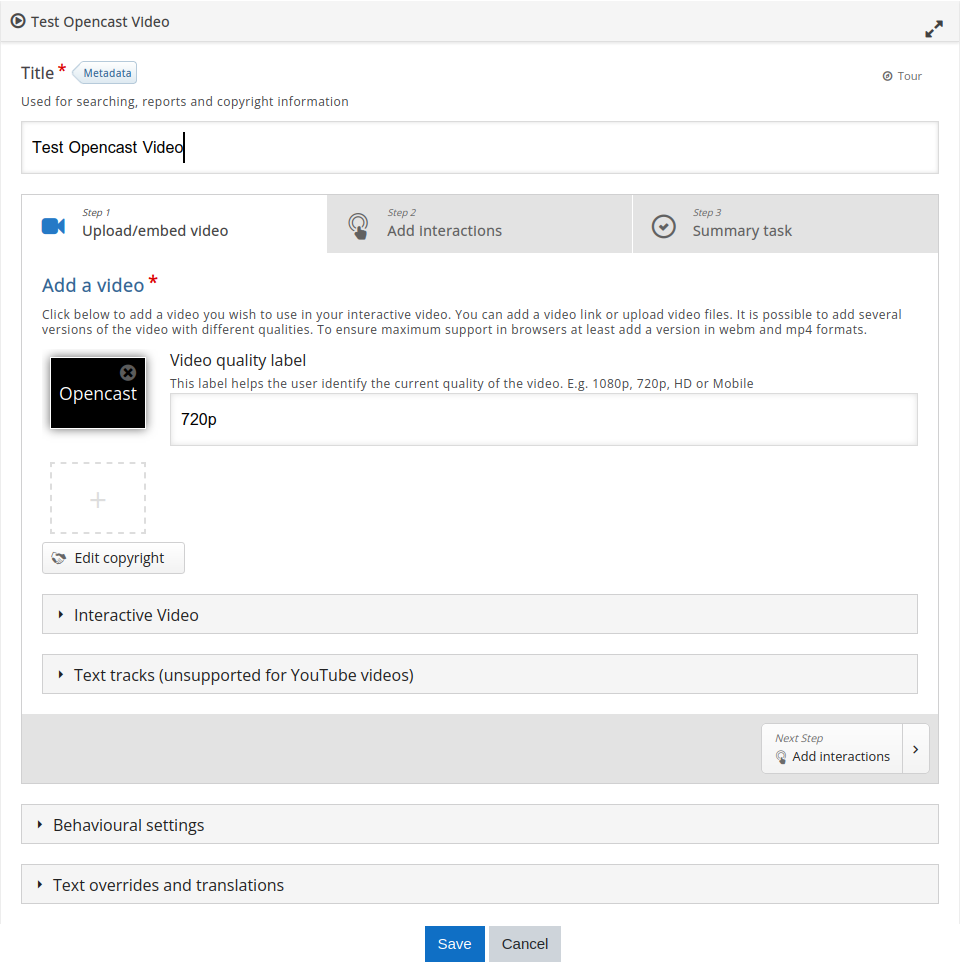
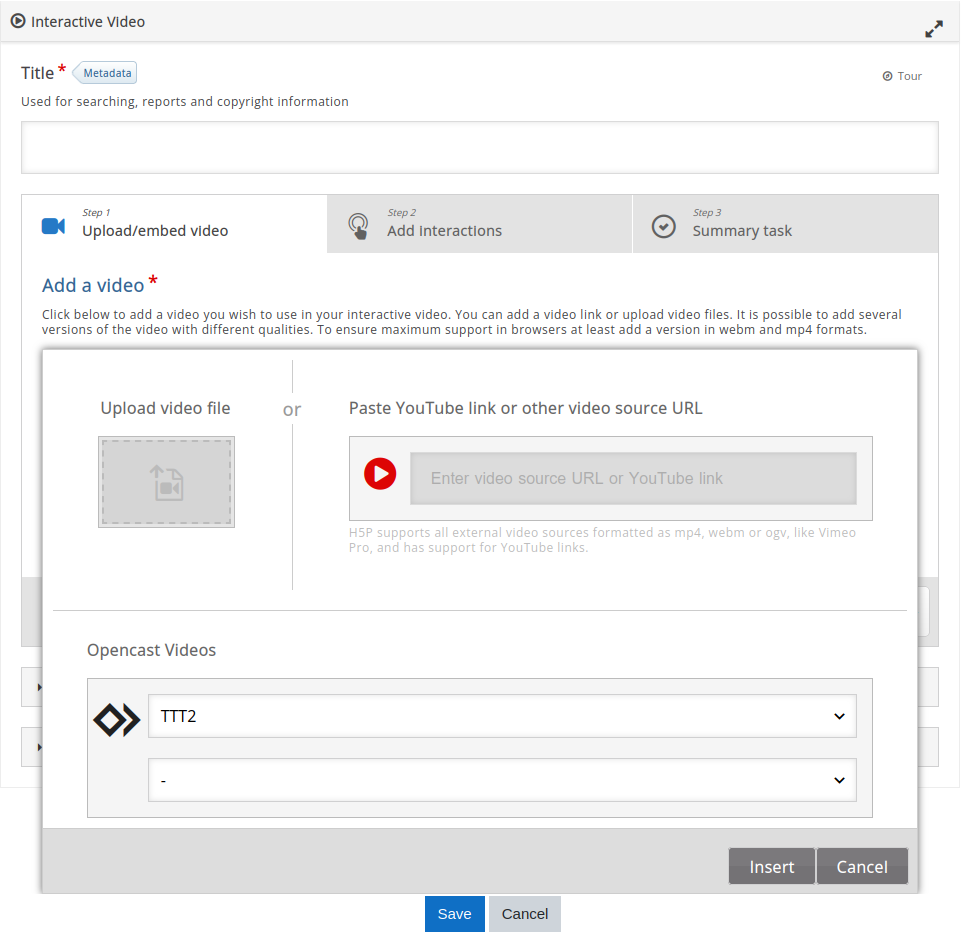
The main purpose of this plugin is to make it possible for the teachers to select Opencast Video from within the H5P Editor when using H5P Interactive Videos feature.
It provides an easy way to add support for H5P opencast to your site themes. It does this by writing new code into your theme renderer.php and config.php files, adding the code required to allow your theme to render H5P opencast content (as suggested by H5P.org in Moodle Customization). Your web server process must also have write access to the Moodle installation tree for this plugin to function.
This design helps to apply the required extension to every installed theme dynamically, instead of creating an extended theme!
Using this integration now enables teachers to select opencast videos in a course, using a dropdown inside the H5P Interactive Videos' editor in course content bank. After selecting the opencast video, another dropdown will be shown to select different types of video flavor (Presenter/Presentation). By selecting the video flavor, all available qualities of the video then will be inserted into H5P Editor videos list and the rest will be processed by H5P.
System requirements
- Min. Moodle Version: 3.10:
From Moodle 3.10 onwards, the H5P Core has the ability to alter H5P via overriding the renderers and hooks MDL-69087 to add customized scripts and styles into H5P. - Installed plugin:
- tool_opencast (Min. version: v3.11-r3)
- block_opencast (Min. version: v3.11-r3)
- IMPORTANT: You should update the tool_opencast first because otherwise the block_opencast installation will fail.
Prerequisites
- Proper write permission on themes directories for the server user (e.g. "www-data" Apache User)
- In case you are using the unofficial version (tool_och5p_core) v1.0.0, it is recommended to uninstall it.
Features
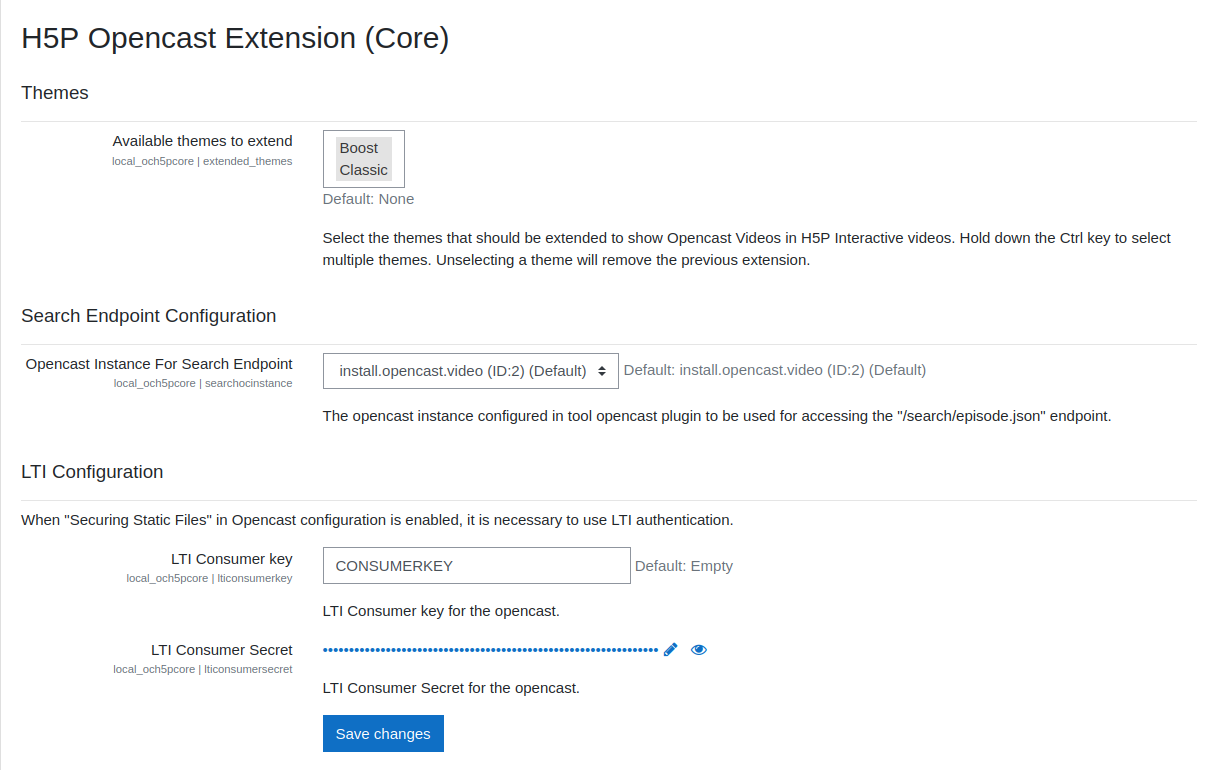
- Extend several themes at once via Moodle's multiselect feature by holding the Ctrl key.
- Remove extensions applied to several themes at once via Moodle's multiselect feature by holding the Ctrl key.
- Display Opencast videos of the course inside H5P Interactive Videos Editor.
- Extract and display Opencast video flavors inside H5P Interactive Videos Editor.
- Extract and use different quality of the Opencast video inside H5P Interactive Videos.
- Opencast LTI authentication
- Getting search endpoint (Engage/Presentation node) from Opencast services
How it works
- In the admin setting page, there is the possibility to select multiple available themes to extend.
- Deselecting a theme will remove the extension changes.
- Only videos which are published to opencast engage player, can be displayed and process, because media index of the event must be available.
- LTI credential can be configured if the "Secure Static Files" in opencast setting is enabled.
Important for admins to know:
- This plugin creates new files within the Moodle core installation.
- By extending a theme, the plugin attempts to add own code into the files of selected themes.
How to revert the changes:
- Through the admin setting page, deselecting a theme will revert the changes.
- Uninstalling the plugin will also trigger the uninstallation event, by which all changes to the extended themes will be removed!
Revert changes manually:
It is possible to revert the changes manually, but it is not recommended doing so. However, the plugin only changes the files as follows:
- (rootdir) > themes > {your installed theme dir} > renderers.php
- (rootdir) > themes > {your installed theme dir} > config.php
Changes made by this plugin can be identified as a code block started with a comment containing "// Added by local_och5pcore plugin" and ends with a comment containing "// End of local_och5pcore code block."
Repair the loss of changes on renderers.php:
In case the changes on renderers.php or even the file itself is gone, the plugin will repeat the changes by itself which can be done simply via admin setting page:
- Deselect the defected theme, to let the plugin know that the changes should not be there anymore!
- Save changes.
- Select the defected theme again, to repeat the changes.
- Save changes.
2.1.1 (2022010300)
2.1.1
Plugin type: Local plugins
Frankenstyle component name: local_och5pcore
Version build number: 2022010300
Version release name: 2.1.1
Maturity: Stable
Supported Moodle versions: 3.10, 3.11
Repository URL (Git): https://github.com/elan-ev/moodle-local_och5pcore
Repository branch:
Repository tag: v2.1.1
Issue/bug tracker URL: https://github.com/elan-ev/moodle-local_och5pcore/issues
moodle-local_och5pcore
This local plugin helps to integrate Opencast Video into the Moodle H5P core.
The main purpose of this plugin is to make it possible for the teachers to select Opencast Video from within the H5P Editor when using H5P Interactive Videos feature.
In order to achieve this goal, it is necessary to customize Moodle H5P core, which is only possible through extending a theme in Moodle Moodle Customization. From Moodle 3.10 onwards, the H5P Core has the ability to alter H5P via overriding the renderers and hooks MDL-69087 to add customized scripts and styles into H5P.
This plugin is designed to overwrite the renderer.php and config.php files of the selected themes and append the necessary codes into these files. This design helps to apply the required extension to every installed theme dynamically, instead of creating an extended theme!
Using this integration now enables teachers to select opencast videos in a course, using a dropdown inside the H5P Interactive Videos' editor in course content bank. After selecting the opencast video, another dropdown will be shown to select different types of video flavor (Presenter/Presentation). By selecting the video flavor, all available qualities of the video then will be inserted into H5P Editor videos list and the rest will be processed by H5P.
System requirements
- Min. Moodle Version: 3.10
- Installed plugin:
- tool_opencast (Min. version: v3.11-r3)
- block_opencast (Min. version: v3.11-r3)
- IMPORTANT: You should update the tool_opencast first because otherwise the block_opencast installation will fail.
Prerequisites
- Proper write permission on themes directories for the server user (e.g. "www-data" Apache User)
- In case you are using the unofficial version (tool_och5p_core) v1.0.0, it is recommended to uninstall it.
Features
- Extend several themes at once via Moodle's multiselect feature by holding the Ctrl key.
- Remove extensions applied to several themes at once via Moodle's multiselect feature by holding the Ctrl key.
- Display Opencast videos of the course inside H5P Interactive Videos Editor.
- Extract and display Opencast video flavors inside H5P Interactive Videos Editor.
- Extract and use different quality of the Opencast video inside H5P Interactive Videos.
- Opencast LTI authentication
- Getting search endpoint (Engage/Presentation node) from Opencast services
How it works
- In the admin setting page, there is the possibility to select multiple available themes to extend.
- Deselecting a theme will remove the extension changes.
- Only videos which are published to opencast engage player, can be displayed and process, because media index of the event must be available.
- LTI credential can be configured if the "Secure Static Files" in opencast setting is enabled.
Important for admins to know:
- This plugin creates new files within the Moodle core installation.
- By extending a theme, the plugin attempts to add own code into the files of selected themes.
How to revert the changes:
- Through the admin setting page, deselecting a theme will revert the changes.
- Uninstalling the plugin will also trigger the uninstallation event, by which all changes to the extended themes will be removed!
Revert changes manually:
It is possible to revert the changes manually, but it is not recommended doing so. However, the plugin only changes the files as follows:
- (rootdir) > themes > {your installed theme dir} > renderers.php
- (rootdir) > themes > {your installed theme dir} > config.php
Changes made by this plugin can be identified as a code block started with a comment containing "// Added by local_och5pcore plugin" and ends with a comment containing "// End of local_och5pcore code block."
Repair the loss of changes on renderers.php:
In case the changes on renderers.php or even the file itself is gone, the plugin will repeat the changes by itself which can be done simply via admin setting page:
- Deselect the defected theme, to let the plugin know that the changes should not be there anymore!
- Save changes.
- Select the defected theme again, to repeat the changes.
- Save changes.
2.1.0 (2021112500)
2.1.0
Plugin type: Local plugins
Frankenstyle component name: local_och5pcore
Version build number: 2021112500
Version release name: 2.1.0
Maturity: Stable
Supported Moodle versions: 3.10, 3.11
Repository URL (Git): https://github.com/elan-ev/moodle-local_och5pcore
Repository branch:
Repository tag: https://github.com/elan-ev/moodle-local_och5pcore/releases/tag/v2.1
Issue/bug tracker URL: https://github.com/elan-ev/moodle-local_och5pcore/issues
moodle-local_och5pcore
This local plugin helps to integrate Opencast Video into the Moodle H5P core.
The main purpose of this plugin is to make it possible for the teachers to select Opencast Video from within the H5P Editor when using H5P Interactive Videos feature.
In order to achieve this goal, it is necessary to customize Moodle H5P core, which is only possible through extending a theme in Moodle Moodle Customization. From Moodle 3.10 onwards the H5P Core has the ability to alter H5P via overriding the renderes and hooks MDL-69087 to add customized scripts and styles into H5P.
This plugin is designed to overwrite the renderer.php and config.php files of the selected themes and append the necessary codes into these files. This design helps to adapt every installed themes instead of only extending a specific theme.
Using this integration now enables teachers to select opencast videos in a course, using a dropdown inside the H5P Interactive Videos' editor in course content bank. After selecting the opencast video, another dropdown will be shown to select different types of video flavor (Presenter/Presentation). By selecting the video flavor all available qualities of the video then will be inserted into H5P Editor videos list and the rest will be processed by H5P.
System requirements
- Min. Moodle Version: 3.10
- Installed plugin:
- tool_opencast (Min. version: v3.11-r3)
- block_opencast (Min. version: v3.11-r3)
- IMPORTANT: You should update the tool_opencast first because otherwise the block_opencast installation will fail.
Prerequisites
- Proper write permission on themes directories for the server user (e.g. "www-data" Apache User)
- In case you are using the unofficial version (tool_och5p_core) v1.0.0, it is recommended to uninstall it.
Features
- Extend/Remove extensions of several themes at once
- Display Opencast videos of the course inside H5P Interactive Videos Editor
- Extract and display Opencast video flavors inside H5P Interactive Videos Editor
- Extract and use different quality of the Opencast video inside H5P Interactive Videos
- Opencast LTI authentication (v2.0.0)
- Getting search endpoint (Engage/Presentation node) from Opencast services (v2.1)
Settings
- In Admin Settings Page, there is the possibility to select multiple available themes to extend.
- Unselecting a theme will remove the extension changes.
- Only videos which are published to opencast engage player, can be displayed and process, because media index of the event must be available.
- Opencast instance for the search endpoint must be configured in tool_opencast and be selected in the setting. (Deprecated in v2.1)
- LTI credential can be configured if the "Secure Static Files" in opencast setting is enabled.
Uninstall
In case the plugin triggers the uninstall event, all changes to the extended themes will be removed!
2.0.0 (2021110800)
2.0.0
Plugin type: Local plugins
Frankenstyle component name: local_och5pcore
Version build number: 2021110800
Version release name: 2.0.0
Maturity: Stable
Supported Moodle versions: 3.10, 3.11
Repository URL (Git): https://github.com/elan-ev/moodle-local_och5pcore
Repository branch:
Repository tag:
Issue/bug tracker URL: https://github.com/elan-ev/moodle-local_och5pcore/issues
moodle-local_och5pcore
This local plugin helps to integrate Opencast Video into the Moodle H5P core.
The main purpose of this plugin is to make it possible for the teachers to select Opencast Video from within the H5P Editor when using H5P Interactive Videos feature.
In order to achieve this goal, it is necessary to customize Moodle H5P core, which is only possible through extending a theme in Moodle Moodle Customization. From Moodle 3.10 onwards the H5P Core has the ability to alter H5P via overriding the renderes and hooks MDL-69087 to add customized scripts and styles into H5P.
This plugin is designed to overwrite the renderer.php and config.php files of the selected themes and append the necessary codes into these files. This design helps to adapt every installed themes instead of only extending a specific theme.
Using this integration now enables teachers to select opencast videos in a course, using a dropdown inside the H5P Interactive Videos' editor in course content bank. After selecting the opencast video, another dropdown will be shown to select different types of video flavor (Presenter/Presentation). By selecting the video flavor all available qualities of the video then will be inserted into H5P Editor videos list and the rest will be processed by H5P.
System requirements
- Min. Moodle Version: 3.10
- Installed plugin:
- tool_opencast (Min. version: v3.11-r3)
- block_opencast (Min. version: v3.11-r3)
- IMPORTANT: You should update the tool_opencast first because otherwise the block_opencast installation will fail.
Prerequisites
- Proper write permission on themes directories for the server user (e.g. "www-data" Apache User)
- In case you are using the unofficial version (tool_och5p_core) v1.0.0, it is recommended to uninstall it.
Features
- Extend/Remove extensions of several themes at once
- Display Opencast videos of the course inside H5P Interactive Videos Editor
- Extract and display Opencast video flavors inside H5P Interactive Videos Editor
- Extract and use different quality of the Opencast video inside H5P Interactive Videos
- Opencast LTI authentication (v2.0.0)
- Different Opencast instance selection for search endpoint via (tool_opencast v3.11-r3 and above) (v2.0.0)
Settings
- In Admin Settings Page, there is the possibility to select multiple available themes to extend.
- Unselecting a theme will remove the extension changes.
- Only videos which are published to opencast engage player, can be displayed and process, because media index of the event must be available.
- Opencast instance for the search endpoint must be configured in tool_opencast and be selected in the setting.
- LTI credential can be configured if the "Secure Static Files" in opencast setting is enabled.
Uninstall
In case the plugin triggers the uninstall event, all changes to the extended themes will be removed!