SCORM Remote
Versions
Current version
2025041000 (2025041000)
2025041000
Plugin type: Activities
Frankenstyle component name: mod_scormremote
Version build number: 2025041000
Version release name: 2025041000
Maturity: Stable
Supported Moodle versions: 3.10, 3.11, 3.9, 4.0, 4.1, 4.2, 4.3, 4.4
Repository URL (Git): https://github.com/catalyst/moodle-mod_scormremote
Repository branch: MOODLE_39_STABLE
Repository tag:
Issue/bug tracker URL: https://github.com/catalyst/moodle-mod_scormremote/issues

Moodle Mod Scormremote
What is this?
This is a new Moodle activity module completely independant from mod_scorm
which allows you to upload a scorm and then serve it remotely to other
learning management systems on other domains.
It works by generating a thin wrapper scorm which is uploaded into the
other lms and passes events across the iframe barrier using window.postMessage
This has a few advantages as you can:
- outsource the learning similar to how LTI works reducing the
burden on the remote LMS's admins - sell your scorm packages without giving them away
- add seat restriction at the domain level
- swap the scorm packages in place and not require the remote LMS
to do anything they automatically get the latest version of the package
How does it work?
This library embeds and serves the Scorm file using the Scorm again library:
https://github.com/jcputney/scorm-again
The wrapper file which is running on the remote site loads the real scorm file
inside a sandboxed iframe and then creates a Scorm API communication bridge
between the two sites using window.postMessage:
https://developer.mozilla.org/en-US/docs/Web/API/Window/postMessage
Branches
| Moodle version | Branch |
| ----------------- | ------------------ |
| Moodle 3.9+ | MOODLE_39_STABLE |
Installation
- You can use git to clone it into your source:
git clone git@github.com:catalyst/moodle-mod_scormremote.git mod/scormremote
- Then run the Moodle upgrade
Configuration
General config
To allow iframes to load on the remote site this admin setting needs to be set:
allowframembedding = 1
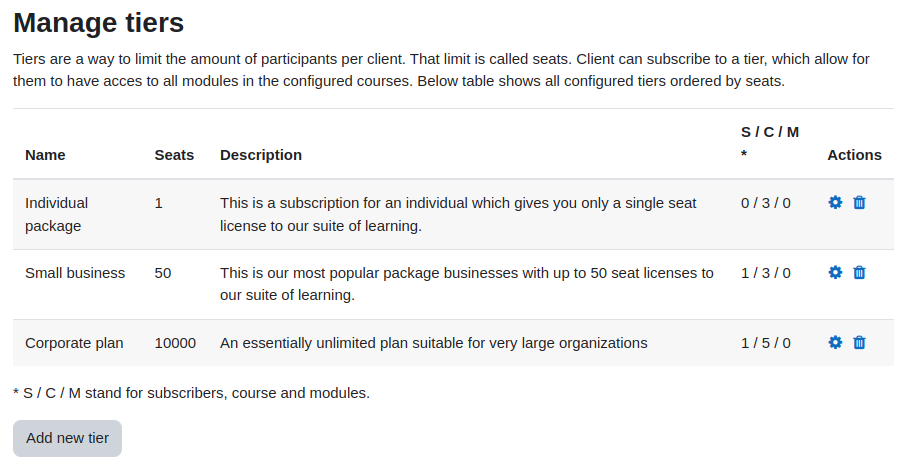
Making a tier
/mod/scormremote/tiers.php
A tier is a level of a subsription which you can use to limit the number of seats
that a client can use. eg you could make a tier called 'Basic plan' and allocate
a maximum of 50 seats to that tier.
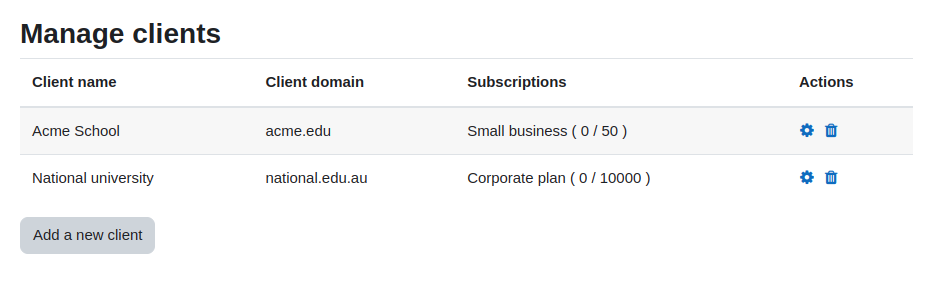
Making a client
/mod/scormremote/clients.php
A client is the remote site which will be embedded your Scorm packages. The main
things a client needs besides a name is the list of domains related to this client.
Make a remote scorm activity
This is very similar to a normal activity, you add a new activity of type 'SCORM Remote'
and then upload your scorm file to it.
Download the wrapper
It will then product a 'wrapper scorm' file which you can download and distribute to
the administrators of the remote site what wants to use the scorm packages. The scorm
wrappers auto detects which client is using the wrapper based on the list of domains
against each client, so the same wrapper can be used with different clients.
Embed the wrapper on the remote site
This wrapper scorm file can then be imported into the remote site in the same way a
normal scorm file would be.
Monitor usage
As learners on the remote site use the scorm, you will see accounts created in your
Moodle and enrolments and completion status for those accounts. You can also see
reports showing how many seats are used against the configured tiers.
Support
If you have issues please log them in
GitHub.
Please note our time is limited, so if you need urgent support or want to
sponsor a new feature then please contact
Catalyst IT Australia.
Credits
This development of this plugin was sponsored by Early Childhood Australia.
http://www.earlychildhoodaustralia.org.au/

This plugin uses the excellent SCORM Again library:
https://github.com/jcputney/scorm-again
This plugin was developed by Catalyst IT Australia.

2024110600 (2024110600)
2024110600
Plugin type: Activities
Frankenstyle component name: mod_scormremote
Version build number: 2024110600
Version release name: 2024110600
Maturity: Stable
Supported Moodle versions: 3.10, 3.11, 3.9, 4.0, 4.1, 4.2, 4.3, 4.4
Repository URL (Git): https://github.com/catalyst/moodle-mod_scormremote
Repository branch: MOODLE_39_STABLE
Repository tag:
Issue/bug tracker URL: https://github.com/catalyst/moodle-mod_scormremote/issues
Moodle Mod Scormremote
What is this?
This is a new Moodle activity module completely independant from mod_scorm
which allows you to upload a scorm and then serve it remotely to other
learning management systems on other domains.
It works by generating a thin wrapper scorm which is uploaded into the
other lms and passes events across the iframe barrier using window.postMessage
This has a few advantages as you can:
- outsource the learning similar to how LTI works reducing the
burden on the remote LMS's admins - sell your scorm packages without giving them away
- add seat restriction at the domain level
- swap the scorm packages in place and not require the remote LMS
to do anything they automatically get the latest version of the package
How does it work?
This library embeds and serves the Scorm file using the Scorm again library:
https://github.com/jcputney/scorm-again
The wrapper file which is running on the remote site loads the real scorm file
inside a sandboxed iframe and then creates a Scorm API communication bridge
between the two sites using window.postMessage:
https://developer.mozilla.org/en-US/docs/Web/API/Window/postMessage
Branches
| Moodle version | Branch |
| ----------------- | ------------------ |
| Moodle 3.9+ | MOODLE_39_STABLE |
Installation
- You can use git to clone it into your source:
git clone git@github.com:catalyst/moodle-mod_scormremote.git mod/scormremote
- Then run the Moodle upgrade
Configuration
General config
To allow iframes to load on the remote site this admin setting needs to be set:
allowframembedding = 1
Making a tier
/mod/scormremote/tiers.php
A tier is a level of a subsription which you can use to limit the number of seats
that a client can use. eg you could make a tier called 'Basic plan' and allocate
a maximum of 50 seats to that tier.
Making a client
/mod/scormremote/clients.php
A client is the remote site which will be embedded your Scorm packages. The main
things a client needs besides a name is the list of domains related to this client.
Make a remote scorm activity
This is very similar to a normal activity, you add a new activity of type 'SCORM Remote'
and then upload your scorm file to it.
Download the wrapper
It will then product a 'wrapper scorm' file which you can download and distribute to
the administrators of the remote site what wants to use the scorm packages. The scorm
wrappers auto detects which client is using the wrapper based on the list of domains
against each client, so the same wrapper can be used with different clients.
Embed the wrapper on the remote site
This wrapper scorm file can then be imported into the remote site in the same way a
normal scorm file would be.
Monitor usage
As learners on the remote site use the scorm, you will see accounts created in your
Moodle and enrolments and completion status for those accounts. You can also see
reports showing how many seats are used against the configured tiers.
Support
If you have issues please log them in
GitHub.
Please note our time is limited, so if you need urgent support or want to
sponsor a new feature then please contact
Catalyst IT Australia.
Credits
This development of this plugin was sponsored by Early Childhood Australia.
http://www.earlychildhoodaustralia.org.au/
This plugin uses the excellent SCORM Again library:
https://github.com/jcputney/scorm-again
This plugin was developed by Catalyst IT Australia.
2024110500 (2024110500)
2024110500
Plugin type: Activities
Frankenstyle component name: mod_scormremote
Version build number: 2024110500
Version release name: 2024110500
Maturity: Stable
Supported Moodle versions: 3.10, 3.11, 3.9, 4.0, 4.1, 4.2, 4.3, 4.4
Repository URL (Git): https://github.com/catalyst/moodle-mod_scormremote
Repository branch: MOODLE_39_STABLE
Repository tag:
Issue/bug tracker URL: https://github.com/catalyst/moodle-mod_scormremote/issues
Moodle Mod Scormremote
What is this?
This is a new Moodle activity module completely independant from mod_scorm
which allows you to upload a scorm and then serve it remotely to other
learning management systems on other domains.
It works by generating a thin wrapper scorm which is uploaded into the
other lms and passes events across the iframe barrier using window.postMessage
This has a few advantages as you can:
- outsource the learning similar to how LTI works reducing the
burden on the remote LMS's admins - sell your scorm packages without giving them away
- add seat restriction at the domain level
- swap the scorm packages in place and not require the remote LMS
to do anything they automatically get the latest version of the package
How does it work?
This library embeds and serves the Scorm file using the Scorm again library:
https://github.com/jcputney/scorm-again
The wrapper file which is running on the remote site loads the real scorm file
inside a sandboxed iframe and then creates a Scorm API communication bridge
between the two sites using window.postMessage:
https://developer.mozilla.org/en-US/docs/Web/API/Window/postMessage
Branches
| Moodle version | Branch |
| ----------------- | ------------------ |
| Moodle 3.9+ | MOODLE_39_STABLE |
Installation
- You can use git to clone it into your source:
git clone git@github.com:catalyst/moodle-mod_scormremote.git mod/scormremote
- Then run the Moodle upgrade
Configuration
General config
To allow iframes to load on the remote site this admin setting needs to be set:
allowframembedding = 1
Making a tier
/mod/scormremote/tiers.php
A tier is a level of a subsription which you can use to limit the number of seats
that a client can use. eg you could make a tier called 'Basic plan' and allocate
a maximum of 50 seats to that tier.
Making a client
/mod/scormremote/clients.php
A client is the remote site which will be embedded your Scorm packages. The main
things a client needs besides a name is the list of domains related to this client.
Make a remote scorm activity
This is very similar to a normal activity, you add a new activity of type 'SCORM Remote'
and then upload your scorm file to it.
Download the wrapper
It will then product a 'wrapper scorm' file which you can download and distribute to
the administrators of the remote site what wants to use the scorm packages. The scorm
wrappers auto detects which client is using the wrapper based on the list of domains
against each client, so the same wrapper can be used with different clients.
Embed the wrapper on the remote site
This wrapper scorm file can then be imported into the remote site in the same way a
normal scorm file would be.
Monitor usage
As learners on the remote site use the scorm, you will see accounts created in your
Moodle and enrolments and completion status for those accounts. You can also see
reports showing how many seats are used against the configured tiers.
Support
If you have issues please log them in
GitHub.
Please note our time is limited, so if you need urgent support or want to
sponsor a new feature then please contact
Catalyst IT Australia.
Credits
This development of this plugin was sponsored by Early Childhood Australia.
http://www.earlychildhoodaustralia.org.au/
This plugin uses the excellent SCORM Again library:
https://github.com/jcputney/scorm-again
This plugin was developed by Catalyst IT Australia.
2024110400 (2024110400)
2024110400
Plugin type: Activities
Frankenstyle component name: mod_scormremote
Version build number: 2024110400
Version release name: 2024110400
Maturity: Stable
Supported Moodle versions: 3.10, 3.11, 3.9, 4.0, 4.1, 4.2, 4.3, 4.4
Repository URL (Git): https://github.com/catalyst/moodle-mod_scormremote
Repository branch: MOODLE_39_STABLE
Repository tag:
Issue/bug tracker URL: https://github.com/catalyst/moodle-mod_scormremote/issues
Moodle Mod Scormremote
What is this?
This is a new Moodle activity module completely independant from mod_scorm
which allows you to upload a scorm and then serve it remotely to other
learning management systems on other domains.
It works by generating a thin wrapper scorm which is uploaded into the
other lms and passes events across the iframe barrier using window.postMessage
This has a few advantages as you can:
- outsource the learning similar to how LTI works reducing the
burden on the remote LMS's admins - sell your scorm packages without giving them away
- add seat restriction at the domain level
- swap the scorm packages in place and not require the remote LMS
to do anything they automatically get the latest version of the package
How does it work?
This library embeds and serves the Scorm file using the Scorm again library:
https://github.com/jcputney/scorm-again
The wrapper file which is running on the remote site loads the real scorm file
inside a sandboxed iframe and then creates a Scorm API communication bridge
between the two sites using window.postMessage:
https://developer.mozilla.org/en-US/docs/Web/API/Window/postMessage
Branches
| Moodle version | Branch |
| ----------------- | ------------------ |
| Moodle 3.9+ | MOODLE_39_STABLE |
Installation
- You can use git to clone it into your source:
git clone git@github.com:catalyst/moodle-mod_scormremote.git mod/scormremote
- Then run the Moodle upgrade
Configuration
General config
To allow iframes to load on the remote site this admin setting needs to be set:
allowframembedding = 1
Making a tier
/mod/scormremote/tiers.php
A tier is a level of a subsription which you can use to limit the number of seats
that a client can use. eg you could make a tier called 'Basic plan' and allocate
a maximum of 50 seats to that tier.
Making a client
/mod/scormremote/clients.php
A client is the remote site which will be embedded your Scorm packages. The main
things a client needs besides a name is the list of domains related to this client.
Make a remote scorm activity
This is very similar to a normal activity, you add a new activity of type 'SCORM Remote'
and then upload your scorm file to it.
Download the wrapper
It will then product a 'wrapper scorm' file which you can download and distribute to
the administrators of the remote site what wants to use the scorm packages. The scorm
wrappers auto detects which client is using the wrapper based on the list of domains
against each client, so the same wrapper can be used with different clients.
Embed the wrapper on the remote site
This wrapper scorm file can then be imported into the remote site in the same way a
normal scorm file would be.
Monitor usage
As learners on the remote site use the scorm, you will see accounts created in your
Moodle and enrolments and completion status for those accounts. You can also see
reports showing how many seats are used against the configured tiers.
Support
If you have issues please log them in
GitHub.
Please note our time is limited, so if you need urgent support or want to
sponsor a new feature then please contact
Catalyst IT Australia.
Credits
This development of this plugin was sponsored by Early Childhood Australia.
http://www.earlychildhoodaustralia.org.au/
This plugin uses the excellent SCORM Again library:
https://github.com/jcputney/scorm-again
This plugin was developed by Catalyst IT Australia.
2024110100 (2024110100)
2024110100
Plugin type: Activities
Frankenstyle component name: mod_scormremote
Version build number: 2024110100
Version release name: 2024110100
Maturity: Stable
Supported Moodle versions: 3.10, 3.11, 3.9, 4.0, 4.1, 4.2, 4.3, 4.4
Repository URL (Git): https://github.com/catalyst/moodle-mod_scormremote
Repository branch: MOODLE_39_STABLE
Repository tag:
Issue/bug tracker URL: https://github.com/catalyst/moodle-mod_scormremote/issues
Moodle Mod Scormremote
What is this?
This is a new Moodle activity module completely independant from mod_scorm
which allows you to upload a scorm and then serve it remotely to other
learning management systems on other domains.
It works by generating a thin wrapper scorm which is uploaded into the
other lms and passes events across the iframe barrier using window.postMessage
This has a few advantages as you can:
- outsource the learning similar to how LTI works reducing the
burden on the remote LMS's admins - sell your scorm packages without giving them away
- add seat restriction at the domain level
- swap the scorm packages in place and not require the remote LMS
to do anything they automatically get the latest version of the package
How does it work?
This library embeds and serves the Scorm file using the Scorm again library:
https://github.com/jcputney/scorm-again
The wrapper file which is running on the remote site loads the real scorm file
inside a sandboxed iframe and then creates a Scorm API communication bridge
between the two sites using window.postMessage:
https://developer.mozilla.org/en-US/docs/Web/API/Window/postMessage
Branches
| Moodle version | Branch |
| ----------------- | ------------------ |
| Moodle 3.9+ | MOODLE_39_STABLE |
Installation
- You can use git to clone it into your source:
git clone git@github.com:catalyst/moodle-mod_scormremote.git mod/scormremote
- Then run the Moodle upgrade
Configuration
General config
To allow iframes to load on the remote site this admin setting needs to be set:
allowframembedding = 1
Making a tier
/mod/scormremote/tiers.php
A tier is a level of a subsription which you can use to limit the number of seats
that a client can use. eg you could make a tier called 'Basic plan' and allocate
a maximum of 50 seats to that tier.
Making a client
/mod/scormremote/clients.php
A client is the remote site which will be embedded your Scorm packages. The main
things a client needs besides a name is the list of domains related to this client.
Make a remote scorm activity
This is very similar to a normal activity, you add a new activity of type 'SCORM Remote'
and then upload your scorm file to it.
Download the wrapper
It will then product a 'wrapper scorm' file which you can download and distribute to
the administrators of the remote site what wants to use the scorm packages. The scorm
wrappers auto detects which client is using the wrapper based on the list of domains
against each client, so the same wrapper can be used with different clients.
Embed the wrapper on the remote site
This wrapper scorm file can then be imported into the remote site in the same way a
normal scorm file would be.
Monitor usage
As learners on the remote site use the scorm, you will see accounts created in your
Moodle and enrolments and completion status for those accounts. You can also see
reports showing how many seats are used against the configured tiers.
Support
If you have issues please log them in
GitHub.
Please note our time is limited, so if you need urgent support or want to
sponsor a new feature then please contact
Catalyst IT Australia.
Credits
This development of this plugin was sponsored by Early Childhood Australia.
http://www.earlychildhoodaustralia.org.au/
This plugin uses the excellent SCORM Again library:
https://github.com/jcputney/scorm-again
This plugin was developed by Catalyst IT Australia.
2024100300 (2024100300)
2024100300
Plugin type: Activities
Frankenstyle component name: mod_scormremote
Version build number: 2024100300
Version release name: 2024100300
Maturity: Stable
Supported Moodle versions: 3.10, 3.11, 3.9, 4.0, 4.1, 4.2, 4.3, 4.4
Repository URL (Git): https://github.com/catalyst/moodle-mod_scormremote
Repository branch: MOODLE_39_STABLE
Repository tag:
Issue/bug tracker URL: https://github.com/catalyst/moodle-mod_scormremote/issues
Moodle Mod Scormremote
What is this?
This is a new Moodle activity module completely independant from mod_scorm
which allows you to upload a scorm and then serve it remotely to other
learning management systems on other domains.
It works by generating a thin wrapper scorm which is uploaded into the
other lms and passes events across the iframe barrier using window.postMessage
This has a few advantages as you can:
- outsource the learning similar to how LTI works reducing the
burden on the remote LMS's admins - sell your scorm packages without giving them away
- add seat restriction at the domain level
- swap the scorm packages in place and not require the remote LMS
to do anything they automatically get the latest version of the package
How does it work?
This library embeds and serves the Scorm file using the Scorm again library:
https://github.com/jcputney/scorm-again
The wrapper file which is running on the remote site loads the real scorm file
inside a sandboxed iframe and then creates a Scorm API communication bridge
between the two sites using window.postMessage:
https://developer.mozilla.org/en-US/docs/Web/API/Window/postMessage
Branches
| Moodle version | Branch |
| ----------------- | ------------------ |
| Moodle 3.9+ | MOODLE_39_STABLE |
Installation
- You can use git to clone it into your source:
git clone git@github.com:catalyst/moodle-mod_scormremote.git mod/scormremote
- Then run the Moodle upgrade
Configuration
General config
To allow iframes to load on the remote site this admin setting needs to be set:
allowframembedding = 1
Making a tier
/mod/scormremote/tiers.php
A tier is a level of a subsription which you can use to limit the number of seats
that a client can use. eg you could make a tier called 'Basic plan' and allocate
a maximum of 50 seats to that tier.
Making a client
/mod/scormremote/clients.php
A client is the remote site which will be embedded your Scorm packages. The main
things a client needs besides a name is the list of domains related to this client.
Make a remote scorm activity
This is very similar to a normal activity, you add a new activity of type 'SCORM Remote'
and then upload your scorm file to it.
Download the wrapper
It will then product a 'wrapper scorm' file which you can download and distribute to
the administrators of the remote site what wants to use the scorm packages. The scorm
wrappers auto detects which client is using the wrapper based on the list of domains
against each client, so the same wrapper can be used with different clients.
Embed the wrapper on the remote site
This wrapper scorm file can then be imported into the remote site in the same way a
normal scorm file would be.
Monitor usage
As learners on the remote site use the scorm, you will see accounts created in your
Moodle and enrolments and completion status for those accounts. You can also see
reports showing how many seats are used against the configured tiers.
Support
If you have issues please log them in
GitHub.
Please note our time is limited, so if you need urgent support or want to
sponsor a new feature then please contact
Catalyst IT Australia.
Credits
This development of this plugin was sponsored by Early Childhood Australia.
http://www.earlychildhoodaustralia.org.au/
This plugin uses the excellent SCORM Again library:
https://github.com/jcputney/scorm-again
This plugin was developed by Catalyst IT Australia.
2024092701 (2024092701)
2024092701
Plugin type: Activities
Frankenstyle component name: mod_scormremote
Version build number: 2024092701
Version release name: 2024092701
Maturity: Stable
Supported Moodle versions: 3.10, 3.11, 3.9, 4.0, 4.1, 4.2, 4.3, 4.4
Repository URL (Git): https://github.com/catalyst/moodle-mod_scormremote
Repository branch: MOODLE_39_STABLE
Repository tag:
Issue/bug tracker URL: https://github.com/catalyst/moodle-mod_scormremote/issues
Moodle Mod Scormremote
What is this?
This is a new Moodle activity module completely independant from mod_scorm
which allows you to upload a scorm and then serve it remotely to other
learning management systems on other domains.
It works by generating a thin wrapper scorm which is uploaded into the
other lms and passes events across the iframe barrier using window.postMessage
This has a few advantages as you can:
- outsource the learning similar to how LTI works reducing the
burden on the remote LMS's admins - sell your scorm packages without giving them away
- add seat restriction at the domain level
- swap the scorm packages in place and not require the remote LMS
to do anything they automatically get the latest version of the package
How does it work?
This library embeds and serves the Scorm file using the Scorm again library:
https://github.com/jcputney/scorm-again
The wrapper file which is running on the remote site loads the real scorm file
inside a sandboxed iframe and then creates a Scorm API communication bridge
between the two sites using window.postMessage:
https://developer.mozilla.org/en-US/docs/Web/API/Window/postMessage
Branches
| Moodle version | Branch |
| ----------------- | ------------------ |
| Moodle 3.9+ | MOODLE_39_STABLE |
Installation
- You can use git to clone it into your source:
git clone git@github.com:catalyst/moodle-mod_scormremote.git mod/scormremote
- Then run the Moodle upgrade
Configuration
General config
To allow iframes to load on the remote site this admin setting needs to be set:
allowframembedding = 1
Making a tier
/mod/scormremote/tiers.php
A tier is a level of a subsription which you can use to limit the number of seats
that a client can use. eg you could make a tier called 'Basic plan' and allocate
a maximum of 50 seats to that tier.
Making a client
/mod/scormremote/clients.php
A client is the remote site which will be embedded your Scorm packages. The main
things a client needs besides a name is the list of domains related to this client.
Make a remote scorm activity
This is very similar to a normal activity, you add a new activity of type 'SCORM Remote'
and then upload your scorm file to it.
Download the wrapper
It will then product a 'wrapper scorm' file which you can download and distribute to
the administrators of the remote site what wants to use the scorm packages. The scorm
wrappers auto detects which client is using the wrapper based on the list of domains
against each client, so the same wrapper can be used with different clients.
Embed the wrapper on the remote site
This wrapper scorm file can then be imported into the remote site in the same way a
normal scorm file would be.
Monitor usage
As learners on the remote site use the scorm, you will see accounts created in your
Moodle and enrolments and completion status for those accounts. You can also see
reports showing how many seats are used against the configured tiers.
Support
If you have issues please log them in
GitHub.
Please note our time is limited, so if you need urgent support or want to
sponsor a new feature then please contact
Catalyst IT Australia.
Credits
This development of this plugin was sponsored by Early Childhood Australia.
http://www.earlychildhoodaustralia.org.au/
This plugin uses the excellent SCORM Again library:
https://github.com/jcputney/scorm-again
This plugin was developed by Catalyst IT Australia.
2024092700 (2024092700)
2024092700
Plugin type: Activities
Frankenstyle component name: mod_scormremote
Version build number: 2024092700
Version release name: 2024092700
Maturity: Stable
Supported Moodle versions: 3.10, 3.11, 3.9, 4.0, 4.1, 4.2, 4.3, 4.4
Repository URL (Git): https://github.com/catalyst/moodle-mod_scormremote
Repository branch: MOODLE_39_STABLE
Repository tag:
Issue/bug tracker URL: https://github.com/catalyst/moodle-mod_scormremote/issues
Moodle Mod Scormremote
What is this?
This is a new Moodle activity module completely independant from mod_scorm
which allows you to upload a scorm and then serve it remotely to other
learning management systems on other domains.
It works by generating a thin wrapper scorm which is uploaded into the
other lms and passes events across the iframe barrier using window.postMessage
This has a few advantages as you can:
- outsource the learning similar to how LTI works reducing the
burden on the remote LMS's admins - sell your scorm packages without giving them away
- add seat restriction at the domain level
- swap the scorm packages in place and not require the remote LMS
to do anything they automatically get the latest version of the package
How does it work?
This library embeds and serves the Scorm file using the Scorm again library:
https://github.com/jcputney/scorm-again
The wrapper file which is running on the remote site loads the real scorm file
inside a sandboxed iframe and then creates a Scorm API communication bridge
between the two sites using window.postMessage:
https://developer.mozilla.org/en-US/docs/Web/API/Window/postMessage
Branches
| Moodle version | Branch |
| ----------------- | ------------------ |
| Moodle 3.9+ | MOODLE_39_STABLE |
Installation
- You can use git to clone it into your source:
git clone git@github.com:catalyst/moodle-mod_scormremote.git mod/scormremote
- Then run the Moodle upgrade
Configuration
General config
To allow iframes to load on the remote site this admin setting needs to be set:
allowframembedding = 1
Making a tier
/mod/scormremote/tiers.php
A tier is a level of a subsription which you can use to limit the number of seats
that a client can use. eg you could make a tier called 'Basic plan' and allocate
a maximum of 50 seats to that tier.
Making a client
/mod/scormremote/clients.php
A client is the remote site which will be embedded your Scorm packages. The main
things a client needs besides a name is the list of domains related to this client.
Make a remote scorm activity
This is very similar to a normal activity, you add a new activity of type 'SCORM Remote'
and then upload your scorm file to it.
Download the wrapper
It will then product a 'wrapper scorm' file which you can download and distribute to
the administrators of the remote site what wants to use the scorm packages. The scorm
wrappers auto detects which client is using the wrapper based on the list of domains
against each client, so the same wrapper can be used with different clients.
Embed the wrapper on the remote site
This wrapper scorm file can then be imported into the remote site in the same way a
normal scorm file would be.
Monitor usage
As learners on the remote site use the scorm, you will see accounts created in your
Moodle and enrolments and completion status for those accounts. You can also see
reports showing how many seats are used against the configured tiers.
Support
If you have issues please log them in
GitHub.
Please note our time is limited, so if you need urgent support or want to
sponsor a new feature then please contact
Catalyst IT Australia.
Credits
This development of this plugin was sponsored by Early Childhood Australia.
http://www.earlychildhoodaustralia.org.au/
This plugin uses the excellent SCORM Again library:
https://github.com/jcputney/scorm-again
This plugin was developed by Catalyst IT Australia.
2024092300 (2024092300)
2024092300
Plugin type: Activities
Frankenstyle component name: mod_scormremote
Version build number: 2024092300
Version release name: 2024092300
Maturity: Stable
Supported Moodle versions: 3.10, 3.11, 3.9, 4.0, 4.1, 4.2, 4.3, 4.4
Repository URL (Git): https://github.com/catalyst/moodle-mod_scormremote
Repository branch: MOODLE_39_STABLE
Repository tag:
Issue/bug tracker URL: https://github.com/catalyst/moodle-mod_scormremote/issues
Moodle Mod Scormremote
What is this?
This is a new Moodle activity module completely independant from mod_scorm
which allows you to upload a scorm and then serve it remotely to other
learning management systems on other domains.
It works by generating a thin wrapper scorm which is uploaded into the
other lms and passes events across the iframe barrier using window.postMessage
This has a few advantages as you can:
- outsource the learning similar to how LTI works reducing the
burden on the remote LMS's admins - sell your scorm packages without giving them away
- add seat restriction at the domain level
- swap the scorm packages in place and not require the remote LMS
to do anything they automatically get the latest version of the package
How does it work?
This library embeds and serves the Scorm file using the Scorm again library:
https://github.com/jcputney/scorm-again
The wrapper file which is running on the remote site loads the real scorm file
inside a sandboxed iframe and then creates a Scorm API communication bridge
between the two sites using window.postMessage:
https://developer.mozilla.org/en-US/docs/Web/API/Window/postMessage
Branches
| Moodle version | Branch |
| ----------------- | ------------------ |
| Moodle 3.9+ | MOODLE_39_STABLE |
Installation
- You can use git to clone it into your source:
git clone git@github.com:catalyst/moodle-mod_scormremote.git mod/scormremote
- Then run the Moodle upgrade
Configuration
General config
To allow iframes to load on the remote site this admin setting needs to be set:
allowframembedding = 1
Making a tier
/mod/scormremote/tiers.php
A tier is a level of a subsription which you can use to limit the number of seats
that a client can use. eg you could make a tier called 'Basic plan' and allocate
a maximum of 50 seats to that tier.
Making a client
/mod/scormremote/clients.php
A client is the remote site which will be embedded your Scorm packages. The main
things a client needs besides a name is the list of domains related to this client.
Make a remote scorm activity
This is very similar to a normal activity, you add a new activity of type 'SCORM Remote'
and then upload your scorm file to it.
Download the wrapper
It will then product a 'wrapper scorm' file which you can download and distribute to
the administrators of the remote site what wants to use the scorm packages. The scorm
wrappers auto detects which client is using the wrapper based on the list of domains
against each client, so the same wrapper can be used with different clients.
Embed the wrapper on the remote site
This wrapper scorm file can then be imported into the remote site in the same way a
normal scorm file would be.
Monitor usage
As learners on the remote site use the scorm, you will see accounts created in your
Moodle and enrolments and completion status for those accounts. You can also see
reports showing how many seats are used against the configured tiers.
Support
If you have issues please log them in
GitHub.
Please note our time is limited, so if you need urgent support or want to
sponsor a new feature then please contact
Catalyst IT Australia.
Credits
This development of this plugin was sponsored by Early Childhood Australia.
http://www.earlychildhoodaustralia.org.au/
This plugin uses the excellent SCORM Again library:
https://github.com/jcputney/scorm-again
This plugin was developed by Catalyst IT Australia.
2024061200 (2024061200)
2024061200
Plugin type: Activities
Frankenstyle component name: mod_scormremote
Version build number: 2024061200
Version release name: 2024061200
Maturity: Stable
Supported Moodle versions: 3.10, 3.11, 3.9, 4.0
Repository URL (Git): https://github.com/catalyst/moodle-mod_scormremote
Repository branch: MOODLE_39_STABLE
Repository tag:
Issue/bug tracker URL: https://github.com/catalyst/moodle-mod_scormremote/issues
Moodle Mod Scormremote
What is this?
This is a new Moodle activity module completely independant from mod_scorm
which allows you to upload a scorm and then serve it remotely to other
learning management systems on other domains.
It works by generating a thin wrapper scorm which is uploaded into the
other lms and passes events across the iframe barrier using window.postMessage
This has a few advantages as you can:
- outsource the learning similar to how LTI works reducing the
burden on the remote LMS's admins - sell your scorm packages without giving them away
- add seat restriction at the domain level
- swap the scorm packages in place and not require the remote LMS
to do anything they automatically get the latest version of the package
How does it work?
This library embeds and serves the Scorm file using the Scorm again library:
https://github.com/jcputney/scorm-again
The wrapper file which is running on the remote site loads the real scorm file
inside a sandboxed iframe and then creates a Scorm API communication bridge
between the two sites using window.postMessage:
https://developer.mozilla.org/en-US/docs/Web/API/Window/postMessage
Branches
| Moodle version | Branch |
| ----------------- | ------------------ |
| Moodle 3.9+ | MOODLE_39_STABLE |
Installation
- You can use git to clone it into your source:
git clone git@github.com:catalyst/moodle-mod_scormremote.git mod/scormremote
- Then run the Moodle upgrade
Configuration
General config
To allow iframes to load on the remote site this admin setting needs to be set:
allowframembedding = 1
Making a tier
/mod/scormremote/tiers.php
A tier is a level of a subsription which you can use to limit the number of seats
that a client can use. eg you could make a tier called 'Basic plan' and allocate
a maximum of 50 seats to that tier.
Making a client
/mod/scormremote/clients.php
A client is the remote site which will be embedded your Scorm packages. The main
things a client needs besides a name is the list of domains related to this client.
Make a remote scorm activity
This is very similar to a normal activity, you add a new activity of type 'SCORM Remote'
and then upload your scorm file to it.
Download the wrapper
It will then product a 'wrapper scorm' file which you can download and distribute to
the administrators of the remote site what wants to use the scorm packages. The scorm
wrappers auto detects which client is using the wrapper based on the list of domains
against each client, so the same wrapper can be used with different clients.
Embed the wrapper on the remote site
This wrapper scorm file can then be imported into the remote site in the same way a
normal scorm file would be.
Monitor usage
As learners on the remote site use the scorm, you will see accounts created in your
Moodle and enrolments and completion status for those accounts. You can also see
reports showing how many seats are used against the configured tiers.
Support
If you have issues please log them in
GitHub.
Please note our time is limited, so if you need urgent support or want to
sponsor a new feature then please contact
Catalyst IT Australia.
Credits
This development of this plugin was sponsored by Early Childhood Australia.
http://www.earlychildhoodaustralia.org.au/
This plugin uses the excellent SCORM Again library:
https://github.com/jcputney/scorm-again
This plugin was developed by Catalyst IT Australia.
2024030700 (2024030700)
2024030700
Plugin type: Activities
Frankenstyle component name: mod_scormremote
Version build number: 2024030700
Version release name: 2024030700
Maturity: Stable
Supported Moodle versions: 3.10, 3.11, 3.9, 4.0
Repository URL (Git): https://github.com/catalyst/moodle-mod_scormremote
Repository branch: MOODLE_39_STABLE
Repository tag:
Issue/bug tracker URL: https://github.com/catalyst/moodle-mod_scormremote/issues

Moodle Mod Scormremote
What is this?
This is a new Moodle activity module completely independant from mod_scorm
which allows you to upload a scorm and then serve it remotely to other
learning management systems on other domains.
It works by generating a thin wrapper scorm which is uploaded into the
other lms and passes events across the iframe barrier using window.postMessage
This has a few advantages as you can:
- outsource the learning similar to how LTI works reducing the
burden on the remote LMS's admins - sell your scorm packages without giving them away
- add seat restriction at the domain level
- swap the scorm packages in place and not require the remote LMS
to do anything they automatically get the latest version of the package
How does it work?
This library embeds and serves the Scorm file using the Scorm again library:
https://github.com/jcputney/scorm-again
The wrapper file which is running on the remote site loads the real scorm file
inside a sandboxed iframe and then creates a Scorm API communication bridge
between the two sites using window.postMessage:
https://developer.mozilla.org/en-US/docs/Web/API/Window/postMessage
Branches
| Moodle version | Branch |
| ----------------- | ------------------ |
| Moodle 3.9+ | MOODLE_39_STABLE |
Installation
- You can use git to clone it into your source:
git clone git@github.com:catalyst/moodle-mod_scormremote.git mod/scormremote
- Then run the Moodle upgrade
Configuration
General config
To allow iframes to load on the remote site this admin setting needs to be set:
allowframembedding = 1
Making a tier
/mod/scormremote/tiers.php
A tier is a level of a subsription which you can use to limit the number of seats
that a client can use. eg you could make a tier called 'Basic plan' and allocate
a maximum of 50 seats to that tier.
Making a client
/mod/scormremote/clients.php
A client is the remote site which will be embedded your Scorm packages. The main
things a client needs besides a name is the list of domains related to this client.
Make a remote scorm activity
This is very similar to a normal activity, you add a new activity of type 'SCORM Remote'
and then upload your scorm file to it.
Download the wrapper
It will then product a 'wrapper scorm' file which you can download and distribute to
the administrators of the remote site what wants to use the scorm packages. The scorm
wrappers auto detects which client is using the wrapper based on the list of domains
against each client, so the same wrapper can be used with different clients.
Embed the wrapper on the remote site
This wrapper scorm file can then be imported into the remote site in the same way a
normal scorm file would be.
Monitor usage
As learners on the remote site use the scorm, you will see accounts created in your
Moodle and enrolments and completion status for those accounts. You can also see
reports showing how many seats are used against the configured tiers.
Support
If you have issues please log them in
GitHub.
Please note our time is limited, so if you need urgent support or want to
sponsor a new feature then please contact
Catalyst IT Australia.
Credits
This development of this plugin was sponsored by Early Childhood Australia.
http://www.earlychildhoodaustralia.org.au/
This plugin uses the excellent SCORM Again library:
https://github.com/jcputney/scorm-again
This plugin was developed by Catalyst IT Australia.
2023070600 (2023070600)
2023070600
Plugin type: Activities
Frankenstyle component name: mod_scormremote
Version build number: 2023070600
Version release name: 2023070600
Maturity: Stable
Supported Moodle versions: 3.10, 3.11, 3.9, 4.0
Repository URL (Git): https://github.com/catalyst/moodle-mod_scormremote
Repository branch: MOODLE_39_STABLE
Repository tag:
Issue/bug tracker URL: https://github.com/catalyst/moodle-mod_scormremote/issues
Moodle Mod Scormremote
What is this?
This is a new Moodle activity module completely independant from mod_scorm
which allows you to upload a scorm and then serve it remotely to other
learning management systems on other domains.
It works by generating a thin wrapper scorm which is uploaded into the
other lms and passes events across the iframe barrier using window.postMessage
This has a few advantages as you can:
- outsource the learning similar to how LTI works reducing the
burden on the remote LMS's admins - sell your scorm packages without giving them away
- add seat restriction at the domain level
- swap the scorm packages in place and not require the remote LMS
to do anything they automatically get the latest version of the package
How does it work?
This library embeds and serves the Scorm file using the Scorm again library:
https://github.com/jcputney/scorm-again
The wrapper file which is running on the remote site loads the real scorm file
inside a sandboxed iframe and then creates a Scorm API communication bridge
between the two sites using window.postMessage:
https://developer.mozilla.org/en-US/docs/Web/API/Window/postMessage
Branches
| Moodle version | Branch |
| ----------------- | ------------------ |
| Moodle 3.9+ | MOODLE_39_STABLE |
Installation
- You can use git to clone it into your source:
git clone git@github.com:catalyst/moodle-mod_scormremote.git mod/scormremote
- Then run the Moodle upgrade
Configuration
General config
To allow iframes to load on the remote site this admin setting needs to be set:
allowframembedding = 1
Making a tier
/mod/scormremote/tiers.php
A tier is a level of a subsription which you can use to limit the number of seats
that a client can use. eg you could make a tier called 'Basic plan' and allocate
a maximum of 50 seats to that tier.
Making a client
/mod/scormremote/clients.php
A client is the remote site which will be embedded your Scorm packages. The main
things a client needs besides a name is the list of domains related to this client.
Make a remote scorm activity
This is very similar to a normal activity, you add a new activity of type 'SCORM Remote'
and then upload your scorm file to it.
Download the wrapper
It will then product a 'wrapper scorm' file which you can download and distribute to
the administrators of the remote site what wants to use the scorm packages. The scorm
wrappers auto detects which client is using the wrapper based on the list of domains
against each client, so the same wrapper can be used with different clients.
Embed the wrapper on the remote site
This wrapper scorm file can then be imported into the remote site in the same way a
normal scorm file would be.
Monitor usage
As learners on the remote site use the scorm, you will see accounts created in your
Moodle and enrolments and completion status for those accounts. You can also see
reports showing how many seats are used against the configured tiers.
Support
If you have issues please log them in
GitHub.
Please note our time is limited, so if you need urgent support or want to
sponsor a new feature then please contact
Catalyst IT Australia.
Credits
This development of this plugin was sponsored by Early Childhood Australia.
http://www.earlychildhoodaustralia.org.au/
This plugin uses the excellent SCORM Again library:
https://github.com/jcputney/scorm-again
This plugin was developed by Catalyst IT Australia.
2023032900 (2023032900)
2023032900
Plugin type: Activities
Frankenstyle component name: mod_scormremote
Version build number: 2023032900
Version release name: 2023032900
Maturity: Stable
Supported Moodle versions: 3.10, 3.11, 3.9, 4.0
Repository URL (Git): https://github.com/catalyst/moodle-mod_scormremote
Repository branch: MOODLE_39_STABLE
Repository tag:
Issue/bug tracker URL: https://github.com/catalyst/moodle-mod_scormremote/issues
Moodle Mod Scormremote
What is this?
This is a new Moodle activity module completely independant from mod_scorm
which allows you to upload a scorm and then serve it remotely to other
learning management systems on other domains.
It works by generating a thin wrapper scorm which is uploaded into the
other lms and passes events across the iframe barrier using window.postMessage
This has a few advantages as you can:
- outsource the learning similar to how LTI works reducing the
burden on the remote LMS's admins - sell your scorm packages without giving them away
- add seat restriction at the domain level
- swap the scorm packages in place and not require the remote LMS
to do anything they automatically get the latest version of the package
How does it work?
This library embeds and serves the Scorm file using the Scorm again library:
https://github.com/jcputney/scorm-again
The wrapper file which is running on the remote site loads the real scorm file
inside a sandboxed iframe and then creates a Scorm API communication bridge
between the two sites using window.postMessage:
https://developer.mozilla.org/en-US/docs/Web/API/Window/postMessage
Branches
| Moodle version | Branch |
| ----------------- | ------------------ |
| Moodle 3.9+ | MOODLE_39_STABLE |
Installation
- You can use git to clone it into your source:
git clone git@github.com:catalyst/moodle-mod_scormremote.git mod/scormremote
- Then run the Moodle upgrade
Configuration
General config
To allow iframes to load on the remote site this admin setting needs to be set:
allowframembedding = 1
Making a tier
/mod/scormremote/tiers.php
A tier is a level of a subsription which you can use to limit the number of seats
that a client can use. eg you could make a tier called 'Basic plan' and allocate
a maximum of 50 seats to that tier.
Making a client
/mod/scormremote/clients.php
A client is the remote site which will be embedded your Scorm packages. The main
things a client needs besides a name is the list of domains related to this client.
Make a remote scorm activity
This is very similar to a normal activity, you add a new activity of type 'SCORM Remote'
and then upload your scorm file to it.
Download the wrapper
It will then product a 'wrapper scorm' file which you can download and distribute to
the administrators of the remote site what wants to use the scorm packages. The scorm
wrappers auto detects which client is using the wrapper based on the list of domains
against each client, so the same wrapper can be used with different clients.
Embed the wrapper on the remote site
This wrapper scorm file can then be imported into the remote site in the same way a
normal scorm file would be.
Monitor usage
As learners on the remote site use the scorm, you will see accounts created in your
Moodle and enrolments and completion status for those accounts. You can also see
reports showing how many seats are used against the configured tiers.
Support
If you have issues please log them in
GitHub.
Please note our time is limited, so if you need urgent support or want to
sponsor a new feature then please contact
Catalyst IT Australia.
Credits
This development of this plugin was sponsored by Early Childhood Australia.
http://www.earlychildhoodaustralia.org.au/
This plugin uses the excellent SCORM Again library:
https://github.com/jcputney/scorm-again
This plugin was developed by Catalyst IT Australia.
2023031301 (2023031301)
2023031301
Plugin type: Activities
Frankenstyle component name: mod_scormremote
Version build number: 2023031301
Version release name: 2023031301
Maturity: Stable
Supported Moodle versions: 3.10, 3.11, 3.9, 4.0
Repository URL (Git): https://github.com/catalyst/moodle-mod_scormremote
Repository branch:
Repository tag: 2023031301
Issue/bug tracker URL: https://github.com/catalyst/moodle-mod_scormremote/issues
Moodle Mod Scormremote
What is this?
This is a new Moodle activity module completely independant from mod_scorm
which allows you to upload a scorm and then serve it remotely to other
learning management systems on other domains.
It works by generating a thin wrapper scorm which is uploaded into the
other lms and passes events across the iframe barrier using window.postMessage
This has a few advantages as you can:
- outsource the learning similar to how LTI works reducing the
burden on the remote LMS's admins - sell your scorm packages without giving them away
- add seat restriction at the domain level
- swap the scorm packages in place and not require the remote LMS
to do anything they automatically get the latest version of the package
How does it work?
This library embeds and serves the Scorm file using the Scorm again library:
https://github.com/jcputney/scorm-again
The wrapper file which is running on the remote site loads the real scorm file
inside a sandboxed iframe and then creates a Scorm API communication bridge
between the two sites using window.postMessage:
https://developer.mozilla.org/en-US/docs/Web/API/Window/postMessage
Branches
| Moodle version | Branch |
| ----------------- | ------------------ |
| Moodle 3.9+ | MOODLE_39_STABLE |
Installation
- You can use git to clone it into your source:
git clone git@github.com:catalyst/moodle-mod_scormremote.git mod/scormremote
- Then run the Moodle upgrade
Configuration
General config
To allow iframes to load on the remote site this admin setting needs to be set:
allowframembedding = 1
Making a tier
/mod/scormremote/tiers.php
A tier is a level of a subsription which you can use to limit the number of seats
that a client can use. eg you could make a tier called 'Basic plan' and allocate
a maximum of 50 seats to that tier.
Making a client
/mod/scormremote/clients.php
A client is the remote site which will be embedded your Scorm packages. The main
things a client needs besides a name is the list of domains related to this client.
Make a remote scorm activity
This is very similar to a normal activity, you add a new activity of type 'SCORM Remote'
and then upload your scorm file to it.
Download the wrapper
It will then product a 'wrapper scorm' file which you can download and distribute to
the administrators of the remote site what wants to use the scorm packages. The scorm
wrappers auto detects which client is using the wrapper based on the list of domains
against each client, so the same wrapper can be used with different clients.
Embed the wrapper on the remote site
This wrapper scorm file can then be imported into the remote site in the same way a
normal scorm file would be.
Monitor usage
As learners on the remote site use the scorm, you will see accounts created in your
Moodle and enrolments and completion status for those accounts. You can also see
reports showing how many seats are used against the configured tiers.
Support
If you have issues please log them in
GitHub.
Please note our time is limited, so if you need urgent support or want to
sponsor a new feature then please contact
Catalyst IT Australia.
Credits
This development of this plugin was sponsored by Early Childhood Australia.
http://www.earlychildhoodaustralia.org.au/
This plugin uses the excellent SCORM Again library:
https://github.com/jcputney/scorm-again
This plugin was developed by Catalyst IT Australia.
2023021600 (2023021600)
2023021600
Plugin type: Activities
Frankenstyle component name: mod_scormremote
Version build number: 2023021600
Version release name: 2023021600
Maturity: Stable
Supported Moodle versions: 3.10, 3.11, 3.9, 4.0
Repository URL (Git): https://github.com/catalyst/moodle-mod_scormremote
Repository branch: MOODLE_39_STABLE
Repository tag:
Issue/bug tracker URL: https://github.com/catalyst/moodle-mod_scormremote/issues
Moodle Mod Scormremote
What is this?
This is a new Moodle activity module completely independant from mod_scorm
which allows you to upload a scorm and then serve it remotely to other
learning management systems on other domains.
It works by generating a thin wrapper scorm which is uploaded into the
other lms and passes events across the iframe barrier using window.postMessage
This has a few advantages as you can:
- outsource the learning similar to how LTI works reducing the
burden on the remote LMS's admins - sell your scorm packages without giving them away
- add seat restriction at the domain level
- swap the scorm packages in place and not require the remote LMS
to do anything they automatically get the latest version of the package
How does it work?
This library embeds and serves the Scorm file using the Scorm again library:
https://github.com/jcputney/scorm-again
The wrapper file which is running on the remote site loads the real scorm file
inside a sandboxed iframe and then creates a Scorm API communication bridge
between the two sites using window.postMessage:
https://developer.mozilla.org/en-US/docs/Web/API/Window/postMessage
Branches
| Moodle version | Branch |
| ----------------- | ------------------ |
| Moodle 3.9+ | MOODLE_39_STABLE |
Installation
- You can use git to clone it into your source:
git clone git@github.com:catalyst/moodle-mod_scormremote.git mod/scormremote
- Then run the Moodle upgrade
Configuration
General config
To allow iframes to load on the remote site this admin setting needs to be set:
allowframembedding = 1
Making a tier
/mod/scormremote/tiers.php
A tier is a level of a subsription which you can use to limit the number of seats
that a client can use. eg you could make a tier called 'Basic plan' and allocate
a maximum of 50 seats to that tier.
Making a client
/mod/scormremote/clients.php
A client is the remote site which will be embedded your Scorm packages. The main
things a client needs besides a name is the list of domains related to this client.
Make a remote scorm activity
This is very similar to a normal activity, you add a new activity of type 'SCORM Remote'
and then upload your scorm file to it.
Download the wrapper
It will then product a 'wrapper scorm' file which you can download and distribute to
the administrators of the remote site what wants to use the scorm packages. The scorm
wrappers auto detects which client is using the wrapper based on the list of domains
against each client, so the same wrapper can be used with different clients.
Embed the wrapper on the remote site
This wrapper scorm file can then be imported into the remote site in the same way a
normal scorm file would be.
Monitor usage
As learners on the remote site use the scorm, you will see accounts created in your
Moodle and enrolments and completion status for those accounts. You can also see
reports showing how many seats are used against the configured tiers.
Support
If you have issues please log them in
GitHub.
Please note our time is limited, so if you need urgent support or want to
sponsor a new feature then please contact
Catalyst IT Australia.
Credits
This development of this plugin was sponsored by Early Childhood Australia.
http://www.earlychildhoodaustralia.org.au/
This plugin uses the excellent SCORM Again library:
https://github.com/jcputney/scorm-again
This plugin was developed by Catalyst IT Australia.
2022091400 (2022091400)
2022091400
Plugin type: Activities
Frankenstyle component name: mod_scormremote
Version build number: 2022091400
Version release name: 2022091400
Maturity: Stable
Supported Moodle versions: 3.10, 3.11, 3.9, 4.0
Repository URL (Git): https://github.com/catalyst/moodle-mod_scormremote
Repository branch: MOODLE_39_STABLE
Repository tag:
Issue/bug tracker URL: https://github.com/catalyst/moodle-mod_scormremote/issues
Moodle Mod Scormremote
What is this?
This is a new Moodle activity module completely independant from mod_scorm
which allows you to upload a scorm and then serve it remotely to other
learning management systems on other domains.
It works by generating a thin wrapper scorm which is uploaded into the
other lms and passes events across the iframe barrier using window.postMessage
This has a few advantages as you can:
- outsource the learning similar to how LTI works reducing the
burden on the remote LMS's admins - sell your scorm packages without giving them away
- add seat restriction at the domain level
- swap the scorm packages in place and not require the remote LMS
to do anything they automatically get the latest version of the package
How does it work?
This library embeds and serves the Scorm file using the Scorm again library:
https://github.com/jcputney/scorm-again
The wrapper file which is running on the remote site loads the real scorm file
inside a sandboxed iframe and then creates a Scorm API communication bridge
between the two sites using window.postMessage:
https://developer.mozilla.org/en-US/docs/Web/API/Window/postMessage
Branches
| Moodle version | Branch |
| ----------------- | ------------------ |
| Moodle 3.9+ | MOODLE_39_STABLE |
Installation
- Yyou can use git to clone it into your source:
git clone git@github.com:catalyst/moodle-mod_scormremote.git mod/scormremote
- Then run the Moodle upgrade
Configuration
General config
To allow iframes to load on the remote site this admin setting needs to be set:
allowframembedding = 1
Making a tier
/mod/scormremote/tiers.php
A tier is a level of a subsription which you can use to limit the number of seats
that a client can use. eg you could make a tier called 'Basic plan' and allocate
a maximum of 50 seats to that tier.
Making a client
/mod/scormremote/clients.php
A client is the remote site which will be embedded your Scorm packages. The main
things a client needs besides a name is the list of domains related to this client.
Make a remote scorm activity
This is very similar to a normal activity, you add a new activity of type 'SCORM Remote'
and then upload your scorm file to it.
Download the wrapper
It will then product a 'wrapper scorm' file which you can download and distribute to
the administrators of the remote site what wants to use the scorm packages. The scorm
wrappers auto detects which client is using the wrapper based on the list of domains
against each client, so the same wrapper can be used with different clients.
Embed the wrapper on the remote site
This wrapper scorm file can then be imported into the remote site in the same way a
normal scorm file would be.
Monitor usage
As learners on the remote site use the scorm, you will see accounts created in your
Moodle and enrolments and completion status for those accounts. You can also see
reports showing how many seats are used against the configured tiers.
Support
If you have issues please log them in
GitHub.
Please note our time is limited, so if you need urgent support or want to
sponsor a new feature then please contact
Catalyst IT Australia.
Credits
This development of this plugin was sponsored by Early Childhood Australia.
http://www.earlychildhoodaustralia.org.au/
This plugin uses the excellent SCORM Again library:
https://github.com/jcputney/scorm-again
This plugin was developed by Catalyst IT Australia.