Question managed by a remote engine
Versions
Current version
2.9 For Moodle 3.11+ (2022062300)
2.9 For Moodle 3.11+
Plugin type: Question behaviour
Frankenstyle component name: qbehaviour_opaque
Version build number: 2022062300
Version release name: 2.9 For Moodle 3.11+
Maturity: Stable
Supported Moodle versions: 3.11, 4.0
Repository URL (Git): https://github.com/moodleou/moodle-qbehaviour_opaque
Repository branch:
Repository tag: v2.9
Issue/bug tracker URL: https://github.com/moodleou/moodle-qbehaviour_opaque/issues
Changes in 2.9
- This version works with Moodle 4.0.
2.8 For Moodle 3.4+ (2018081400)
2.8 For Moodle 3.4+
Plugin type: Question behaviour
Frankenstyle component name: qbehaviour_opaque
Version build number: 2018081400
Version release name: 2.8 For Moodle 3.4+
Maturity: Stable
Supported Moodle versions: 3.10, 3.4, 3.5, 3.6, 3.7, 3.8, 3.9
Repository URL (Git): https://github.com/moodleou/moodle-qbehaviour_opaque
Repository branch:
Repository tag: v2.8
Issue/bug tracker URL: https://github.com/moodleou/moodle-qbehaviour_opaque/issues
Changes in 2.8
- Privacy API implementation.
- Update to use the newer editor_ousupsub, instead of editor_supsub.
- Setup Travis-CI automated testing integration.
- Fix some coding style.
- Due to privacy API support, this version now only works in Moodle 3.4+
For older Moodles, you will need to use a previous version of this plugin.
2.7 For Moodle 2.7+ (2015051000)
2.7 For Moodle 2.7+
Plugin type: Question behaviour
Frankenstyle component name: qbehaviour_opaque
Version build number: 2015051000
Version release name: 2.7 For Moodle 2.7+
Maturity: Stable
Supported Moodle versions: 2.7, 2.8, 2.9, 3.0, 3.1
Repository URL (Git): https://github.com/moodleou/moodle-qbehaviour_opaque
Repository branch: master
Repository tag: v2.7
Issue/bug tracker URL: https://github.com/moodleou/moodle-qbehaviour_opaque/issues
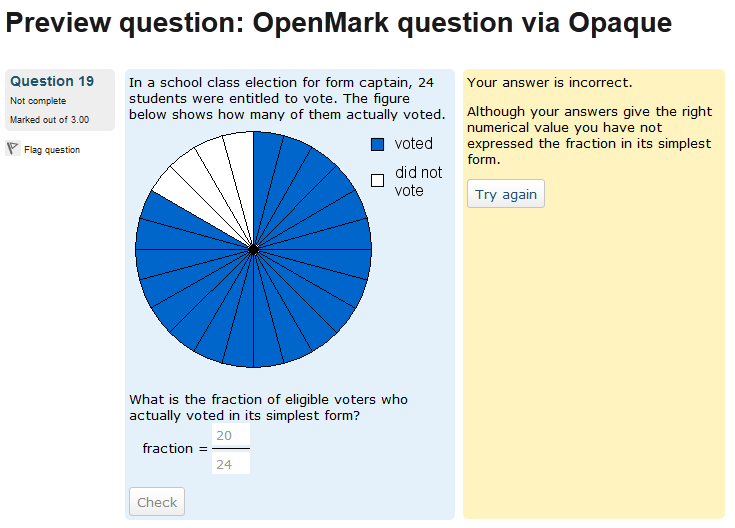
The Opaque question type and behaviour
Opaque (http://docs.moodle.org/en/Development:Opaque) is the Open protocol for
accessing question engines.
The Opaque protocol was originally created by sam marshall of the Open
University (http://www.open.ac.uk/) as part of the OpenMark project
(http://java.net/projects/openmark/). The Moodle implementation of Opaque was
done by Tim Hunt.
As well as OpenMark, this question type can also be used to connect to
ounit (http://code.google.com/p/ounit/) and possibly other question systems we
don't know about.
Opaque has been available since Moodle 1.8, but this version is compatible with
Moodle 2.6+.
This question behaviour also requires the Opaque question type to be installed.
To install using git, type this command in the root of your Moodle install
git clone -b MOODLE_25_STABLE git://github.com/moodleou/moodle-qtype_opaque.git question/type/opaque
echo '/question/type/opaque/' >> .git/info/exclude
git clone -b MOODLE_25_STABLE git://github.com/moodleou/moodle-qbehaviour_opaque.git question/behaviour/opaque
echo '/question/behaviour/opaque/' >> .git/info/exclude
Alternatively, download the zip from
https://github.com/moodleou/moodle-qtype_opaque/zipball/master
unzip it into the question/type folder, and then rename the new
folder to opaque. Then download the zip
https://github.com/moodleou/moodle-qbehaviour_opaque/zipball/master
unzip it into the question/behaviour folder, and then rename the new
folder to opaque.
Once installed you need to go to the question type settings page
(Site administration -> Plugins -> Question types -> Opaque) to
set up the URLs of the question engines you wish to use.
https://github.com/moodleou/moodle-local_testopaqueqe can be used to test that
Opaque is working.
To be able to run the unit tests, you need to add
define('QTYPE_OPAQUE_TEST_ENGINE_QE', 'http://example.com/om-qe/services/Om');
define('QTYPE_OPAQUE_TEST_ENGINE_TN', 'http://example.com/openmark/!question');
define('QTYPE_OPAQUE_TEST_ENGINE_PASSKEY', 'abc123');
define('QTYPE_OPAQUE_TEST_ENGINE_TIMEOUT', '5');
to your config.php file. Of these, only the first is required. The remaining
ones are optional. Specify them if your set-up needs them.
2.6 For Moodle 2.7+ (2014111200)
2.6 For Moodle 2.7+
Plugin type: Question behaviour
Frankenstyle component name: qbehaviour_opaque
Version build number: 2014111200
Version release name: 2.6 For Moodle 2.7+
Maturity: Stable
Supported Moodle versions: 2.7, 2.8
Repository URL (Git): https://github.com/moodleou/moodle-qbehaviour_opaque
Repository branch: master
Repository tag: v2.6
Issue/bug tracker URL: https://github.com/moodleou/moodle-qbehaviour_opaque/issues
The Opaque question type and behaviour
Opaque (http://docs.moodle.org/en/Development:Opaque) is the Open protocol for
accessing question engines.
The Opaque protocol was originally created by sam marshall of the Open
University (http://www.open.ac.uk/) as part of the OpenMark project
(http://java.net/projects/openmark/). The Moodle implementation of Opaque was
done by Tim Hunt.
As well as OpenMark, this question type can also be used to connect to
ounit (http://code.google.com/p/ounit/) and possibly other question systems we
don't know about.
Opaque has been available since Moodle 1.8, but this version is compatible with
Moodle 2.6+.
This question behaviour also requires the Opaque question type to be installed.
To install using git, type this command in the root of your Moodle install
git clone -b MOODLE_25_STABLE git://github.com/moodleou/moodle-qtype_opaque.git question/type/opaque
echo '/question/type/opaque/' >> .git/info/exclude
git clone -b MOODLE_25_STABLE git://github.com/moodleou/moodle-qbehaviour_opaque.git question/behaviour/opaque
echo '/question/behaviour/opaque/' >> .git/info/exclude
Alternatively, download the zip from
https://github.com/moodleou/moodle-qtype_opaque/zipball/master
unzip it into the question/type folder, and then rename the new
folder to opaque. Then download the zip
https://github.com/moodleou/moodle-qbehaviour_opaque/zipball/master
unzip it into the question/behaviour folder, and then rename the new
folder to opaque.
Once installed you need to go to the question type settings page
(Site administration -> Plugins -> Question types -> Opaque) to
set up the URLs of the question engines you wish to use.
https://github.com/moodleou/moodle-local_testopaqueqe can be used to test that
Opaque is working.
To be able to run the unit tests, you need to add
define('QTYPE_OPAQUE_TEST_ENGINE_QE', 'http://example.com/om-qe/services/Om');
define('QTYPE_OPAQUE_TEST_ENGINE_TN', 'http://example.com/openmark/!question');
define('QTYPE_OPAQUE_TEST_ENGINE_PASSKEY', 'abc123');
define('QTYPE_OPAQUE_TEST_ENGINE_TIMEOUT', '5');
to your config.php file. Of these, only the first is required. The remaining
ones are optional. Specify them if your set-up needs them.
2.5 For Moodle 2.6+ (2014042800)
2.5 For Moodle 2.6+
Plugin type: Question behaviour
Frankenstyle component name: qbehaviour_opaque
Version build number: 2014042800
Version release name: 2.5 For Moodle 2.6+
Maturity: Stable
Supported Moodle versions: 2.6, 2.7
Repository URL (Git): https://github.com/moodleou/moodle-qbehaviour_opaque
Repository branch: master
Repository tag: v2.5
Issue/bug tracker URL: https://github.com/moodleou/moodle-qbehaviour_opaque/issues
The Opaque question type and behaviour
Opaque (http://docs.moodle.org/en/Development:Opaque) is the Open protocol for
accessing question engines.
The Opaque protocol was originally created by sam marshall of the Open
University (http://www.open.ac.uk/) as part of the OpenMark project
(http://java.net/projects/openmark/). The Moodle implementation of Opaque was
done by Tim Hunt.
As well as OpenMark, this question type can also be used to connect to
ounit (http://code.google.com/p/ounit/) and possibly other question systems we
don't know about.
Opaque has been available since Moodle 1.8, but this version is compatible with
Moodle 2.6+.
This question behaviour also requires the Opaque question type to be installed.
To install using git, type this command in the root of your Moodle install
git clone -b MOODLE_25_STABLE git://github.com/moodleou/moodle-qtype_opaque.git question/type/opaque
echo '/question/type/opaque/' >> .git/info/exclude
git clone -b MOODLE_25_STABLE git://github.com/moodleou/moodle-qbehaviour_opaque.git question/behaviour/opaque
echo '/question/behaviour/opaque/' >> .git/info/exclude
Alternatively, download the zip from
https://github.com/moodleou/moodle-qtype_opaque/zipball/master
unzip it into the question/type folder, and then rename the new
folder to opaque. Then download the zip
https://github.com/moodleou/moodle-qbehaviour_opaque/zipball/master
unzip it into the question/behaviour folder, and then rename the new
folder to opaque.
Once installed you need to go to the question type settings page
(Site administration -> Plugins -> Question types -> Opaque) to
set up the URLs of the question engines you wish to use.
https://github.com/moodleou/moodle-local_testopaqueqe can be used to test that
Opaque is working.
To be able to run the unit tests, you need to add
define('QTYPE_OPAQUE_TEST_ENGINE_QE', 'http://example.com/om-qe/services/Om');
define('QTYPE_OPAQUE_TEST_ENGINE_TN', 'http://example.com/openmark/!question');
define('QTYPE_OPAQUE_TEST_ENGINE_PASSKEY', 'abc123');
define('QTYPE_OPAQUE_TEST_ENGINE_TIMEOUT', '5');
to your config.php file. Of these, only the first is required. The remaining
ones are optional. Specify them if your set-up needs them.
2.4 For Moodle 2.6+ (2014010801)
2.4 For Moodle 2.6+
Plugin type: Question behaviour
Frankenstyle component name: qbehaviour_opaque
Version build number: 2014010801
Version release name: 2.4 For Moodle 2.6+
Maturity: Stable
Supported Moodle versions: 2.6, 2.7
Repository URL (Git): https://github.com/moodleou/moodle-qbehaviour_opaque
Repository branch: v2.4
Repository tag: master
Issue/bug tracker URL: https://github.com/moodleou/moodle-qbehaviour_opaque/issues
The Opaque question type and behaviour
Opaque (http://docs.moodle.org/en/Development:Opaque) is the Open protocol for
accessing question engines.
The Opaque protocol was originally created by sam marshall of the Open
University (http://www.open.ac.uk/) as part of the OpenMark project
(http://java.net/projects/openmark/). The Moodle implementation of Opaque was
done by Tim Hunt.
As well as OpenMark, this question type can also be used to connect to
ounit (http://code.google.com/p/ounit/) and possibly other question systems we
don't know about.
Opaque has been available since Moodle 1.8, but this version is compatible with
Moodle 2.6+.
This question behaviour also requires the Opaque question type to be installed.
To install using git, type this command in the root of your Moodle install
git clone -b MOODLE_25_STABLE git://github.com/moodleou/moodle-qtype_opaque.git question/type/opaque
echo '/question/type/opaque/' >> .git/info/exclude
git clone -b MOODLE_25_STABLE git://github.com/moodleou/moodle-qbehaviour_opaque.git question/behaviour/opaque
echo '/question/behaviour/opaque/' >> .git/info/exclude
Alternatively, download the zip from
https://github.com/moodleou/moodle-qtype_opaque/zipball/master
unzip it into the question/type folder, and then rename the new
folder to opaque. Then download the zip
https://github.com/moodleou/moodle-qbehaviour_opaque/zipball/master
unzip it into the question/behaviour folder, and then rename the new
folder to opaque.
Once installed you need to go to the question type settings page
(Site administration -> Plugins -> Question types -> Opaque) to
set up the URLs of the question engines you wish to use.
https://github.com/moodleou/moodle-local_testopaqueqe can be used to test that
Opaque is working.
To be able to run the unit tests, you need to add
define('QTYPE_OPAQUE_TEST_ENGINE_QE', 'http://example.com/om-qe/services/Om');
define('QTYPE_OPAQUE_TEST_ENGINE_TN', 'http://example.com/openmark/!question');
define('QTYPE_OPAQUE_TEST_ENGINE_PASSKEY', 'abc123');
define('QTYPE_OPAQUE_TEST_ENGINE_TIMEOUT', '5');
to your config.php file. Of these, only the first is required. The remaining
ones are optional. Specify them if your set-up needs them.
2.4 For Moodle 2.5.x (2014010800)
2.4 For Moodle 2.5.x
Plugin type: Question behaviour
Frankenstyle component name: qbehaviour_opaque
Version build number: 2014010800
Version release name: 2.4 For Moodle 2.5.x
Maturity: Stable
Supported Moodle versions: 2.5
Repository URL (Git): https://github.com/moodleou/moodle-qbehaviour_opaque
Repository branch: MOODLE_25_STABLE
Repository tag: v2.4_m25
Issue/bug tracker URL: https://github.com/moodleou/moodle-qbehaviour_opaque/issues
The Opaque question type and behaviour
Opaque (http://docs.moodle.org/en/Development:Opaque) is the Open protocol for
accessing question engines.
The Opaque protocol was originally created by sam marshall of the Open
University (http://www.open.ac.uk/) as part of the OpenMark project
(http://java.net/projects/openmark/). The Moodle implementation of Opaque was
done by Tim Hunt.
As well as OpenMark, this question type can also be used to connect to
ounit (http://code.google.com/p/ounit/) and possibly other question systems we
don't know about.
Opaque has been available since Moodle 1.8, but this version is compatible with
Moodle 2.5.x.
This question behaviour also requires the Opaque question type to be installed.
To install using git, type this command in the root of your Moodle install
git clone -b MOODLE_25_STABLE git://github.com/moodleou/moodle-qtype_opaque.git question/type/opaque
echo '/question/type/opaque/' >> .git/info/exclude
git clone -b MOODLE_25_STABLE git://github.com/moodleou/moodle-qbehaviour_opaque.git question/behaviour/opaque
echo '/question/behaviour/opaque/' >> .git/info/exclude
Alternatively, download the zip from
https://github.com/moodleou/moodle-qtype_opaque/zipball/master
unzip it into the question/type folder, and then rename the new
folder to opaque. Then download the zip
https://github.com/moodleou/moodle-qbehaviour_opaque/zipball/master
unzip it into the question/behaviour folder, and then rename the new
folder to opaque.
Once installed you need to go to the question type settings page
(Site administration -> Plugins -> Question types -> Opaque) to
set up the URLs of the question engines you wish to use.
https://github.com/moodleou/moodle-local_testopaqueqe can be used to test that
Opaque is working.
To be able to run the unit tests, you need to add
define('QTYPE_OPAQUE_TEST_ENGINE_QE', 'http://example.com/om-qe/services/Om');
define('QTYPE_OPAQUE_TEST_ENGINE_TN', 'http://example.com/openmark/!question');
define('QTYPE_OPAQUE_TEST_ENGINE_PASSKEY', 'abc123');
define('QTYPE_OPAQUE_TEST_ENGINE_TIMEOUT', '5');
to your config.php file. Of these, only the first is required. The remaining
ones are optional. Specify them if your set-up needs them.
2.3 For Moodle 2.5+ (2013070100)
2.3 For Moodle 2.5+
Plugin type: Question behaviour
Frankenstyle component name: qbehaviour_opaque
Version build number: 2013070100
Version release name: 2.3 For Moodle 2.5+
Maturity: Stable
Supported Moodle versions: 2.5
Repository URL (Git): https://github.com/moodleou/moodle-qbehaviour_opaque
Repository branch: master
Repository tag: v2.3
Issue/bug tracker URL: https://github.com/moodleou/moodle-qbehaviour_opaque/issues
The Opaque question type and behaviour
Opaque (http://docs.moodle.org/en/Development:Opaque) is the Open protocol for
accessing question engines.
The Opaque protocol was originally created by sam marshall of the Open
University (http://www.open.ac.uk/) as part of the OpenMark project
(http://java.net/projects/openmark/). The Moodle implementation of Opaque was
done by Tim Hunt.
As well as OpenMark, this question type can also be used to connect to
ounit (http://code.google.com/p/ounit/) and possibly other question systems we
don't know about.
Opaque has been available since Moodle 1.8, but this version is compatible with
Moodle 2.5+.
This question behaviour also requires the Opaque question type to be installed.
To install using git, type this command in the root of your Moodle install
git clone git://github.com/moodleou/moodle-qtype_opaque.git question/type/opaque
git clone git://github.com/moodleou/moodle-qbehaviour_opaque.git question/behaviour/opaque
Then add question/type/opaque and question/behaviour/opaque to your git ignore.
Alternatively, download the zip from
https://github.com/moodleou/moodle-qtype_opaque/zipball/master
unzip it into the question/type folder, and then rename the new
folder to opaque. Then download the zip
https://github.com/moodleou/moodle-qbehaviour_opaque/zipball/master
unzip it into the question/behaviour folder, and then rename the new
folder to opaque.
Once installed you need to go to the question type settings page
(Site administration -> Plugins -> Question types -> Opaque) to
set up the URLs of the question engines you wish to use.
https://github.com/moodleou/moodle-local_testopaqueqe can be used to test that
Opaque is working.
To be able to run the unit tests, you need to add
define('QTYPE_OPAQUE_TEST_ENGINE_QE', 'http://example.com/om-qe/services/Om');
define('QTYPE_OPAQUE_TEST_ENGINE_TN', 'http://example.com/openmark/!question');
define('QTYPE_OPAQUE_TEST_ENGINE_PASSKEY', 'abc123');
define('QTYPE_OPAQUE_TEST_ENGINE_TIMEOUT', '5');
to your config.php file. Of these, only the first is required. The remaining
ones are optional. Specify them if your set-up needs them.
2.2 For Moodle 2.3+ (2013031400)
2.2 For Moodle 2.3+
Plugin type: Question behaviour
Frankenstyle component name: qbehaviour_opaque
Version build number: 2013031400
Version release name: 2.2 For Moodle 2.3+
Maturity: Stable
Supported Moodle versions: 2.3, 2.4
Repository URL (Git): https://github.com/moodleou/moodle-qbehaviour_opaque
Repository branch: master
Repository tag: v2.2
Issue/bug tracker URL: https://github.com/moodleou/moodle-qbehaviour_opaque/issues
The Opaque question type and behaviour
Opaque (http://docs.moodle.org/en/Development:Opaque) is the Open protocol for
accessing question engines.
The Opaque protocol was originally created by sam marshall of the Open
University (http://www.open.ac.uk/) as part of the OpenMark project
(http://java.net/projects/openmark/). The Moodle implementation of Opaque was
done by Tim Hunt.
As well as OpenMark, this question type can also be used to connect to
ounit (http://code.google.com/p/ounit/) and possibly other question systems we
don't know about.
Opaque has been available since Moodle 1.8, but this version is compatible with
Moodle 2.3+.
This question behaviour also requires the Opaque question type to be installed.
To install using git, type this command in the root of your Moodle install
git clone git://github.com/moodleou/moodle-qtype_opaque.git question/type/opaque
git clone git://github.com/moodleou/moodle-qbehaviour_opaque.git question/behaviour/opaque
Then add question/type/opaque and question/behaviour/opaque to your git ignore.
Alternatively, download the zip from
https://github.com/moodleou/moodle-qtype_opaque/zipball/master
unzip it into the question/type folder, and then rename the new
folder to opaque. Then download the zip
https://github.com/moodleou/moodle-qbehaviour_opaque/zipball/master
unzip it into the question/behaviour folder, and then rename the new
folder to opaque.
Once installed you need to go to the question type settings page
(Site administration -> Plugins -> Question types -> Opaque) to
set up the URLs of the question engines you wish to use.
https://github.com/moodleou/moodle-local_testopaqueqe can be used to test that
Opaque is working.
To be able to run the unit tests, you need to add
define('QTYPE_OPAQUE_TEST_ENGINE_QE', 'http://example.com/om-qe/services/Om');
define('QTYPE_OPAQUE_TEST_ENGINE_TN', 'http://example.com/openmark/!question');
define('QTYPE_OPAQUE_TEST_ENGINE_PASSKEY', 'abc123');
define('QTYPE_OPAQUE_TEST_ENGINE_TIMEOUT', '5');
to your config.php file. Of these, only the first is required. The remaining
ones are optional. Specify them if your set-up needs them.
2.1 For Moodle 2.3+ (2012082200)
2.1 For Moodle 2.3+
Plugin type: Question behaviour
Frankenstyle component name: qbehaviour_opaque
Version build number: 2012082200
Version release name: 2.1 For Moodle 2.3+
Maturity: Stable
Supported Moodle versions: 2.3
Repository URL (Git): https://github.com/moodleou/moodle-qbehaviour_opaque
Repository branch: master
Repository tag: v2.1
Issue/bug tracker URL: https://github.com/moodleou/moodle-qbehaviour_opaque/issues
The Opaque question type and behaviour
Opaque (http://docs.moodle.org/en/Development:Opaque) is the Open protocol for
accessing question engines.
The Opaque protocol was originally created by sam marshall of the Open
University (http://www.open.ac.uk/) as part of the OpenMark project
(http://java.net/projects/openmark/). The Moodle implementation of Opaque was
done by Tim Hunt.
As well as OpenMark, this question type can also be used to connect to
ounit (http://code.google.com/p/ounit/) and possibly other question systems we
don't know about.
Opaque has been available since Moodle 1.8, but this version is compatible with
Moodle 2.1+. (For older versions, see
http://cvs.moodle.org/contrib/plugins/question/type/opaque/.)
This question behaviour also requires the Opaque question type to be installed.
To install using git, type this command in the root of your Moodle install
git clone git://github.com/timhunt/moodle-qtype_opaque.git question/type/opaque
git clone git://github.com/timhunt/moodle-qbehaviour_opaque.git question/behaviour/opaque
Then add question/type/opaque and question/behaviour/opaque to your git ignore.
Alternatively, download the zip from
https://github.com/timhunt/moodle-qtype_opaque/zipball/master
unzip it into the question/type folder, and then rename the new
folder to opaque. Then download the zip
https://github.com/timhunt/moodle-qbehaviour_opaque/zipball/master
unzip it into the question/behaviour folder, and then rename the new
folder to opaque.
Once installed you need to go to the question type settings page
(Site administration -> Plugins -> Question types -> Opaque) to
set up the URLs of the question engines you wish to use.
https://github.com/timhunt/moodle-local_testopaqueqe can be used to test that
Opaque is working.
To be able to run the unit tests, you need to add
define('QTYPE_OPAQUE_TEST_ENGINE_QE', 'http://example.com/om-qe/services/Om');
define('QTYPE_OPAQUE_TEST_ENGINE_TN', 'http://example.com/openmark/!question');
define('QTYPE_OPAQUE_TEST_ENGINE_PASSKEY', 'abc123');
define('QTYPE_OPAQUE_TEST_ENGINE_TIMEOUT', '5');
to your config.php file. Of these, only the first is required. The remaining
ones are optional. Specify them if your set-up needs them.
2.0 (2011102500)
2.0
Plugin type: Question behaviour
Frankenstyle component name: qbehaviour_opaque
Version build number: 2011102500
Version release name: 2.0
Maturity: Stable
Supported Moodle versions: 2.1, 2.2
Repository URL (Git): https://github.com/moodleou/moodle-qbehaviour_opaque
Repository branch: master
Repository tag: v2.0
Issue/bug tracker URL: https://github.com/moodleou/moodle-qbehaviour_opaque/issues
The Opaque question type and behaviour
Opaque (http://docs.moodle.org/en/Development:Opaque) is the Open protocol for
accessing question engines.
The Opaque protocol was originally created by sam marshall of the Open
University (http://www.open.ac.uk/) as part of the OpenMark project
(http://java.net/projects/openmark/). The Moodle implementation of Opaque was
done by Tim Hunt.
As well as OpenMark, this question type can also be used to connect to
ounit (http://code.google.com/p/ounit/) and possibly other question systems we
don't know about.
Opaque has been available since Moodle 1.8, but this version is compatible with
Moodle 2.1+. (For older versions, see
http://cvs.moodle.org/contrib/plugins/question/type/opaque/.)
This question behaviour also requires the Opaque question type to be installed.
To install using git, type this command in the root of your Moodle install
git clone git://github.com/timhunt/moodle-qtype_opaque.git question/type/opaque
git clone git://github.com/timhunt/moodle-qbehaviour_opaque.git question/behaviour/opaque
Then add question/type/opaque and question/behaviour/opaque to your git ignore.
Alternatively, download the zip from
https://github.com/timhunt/moodle-qtype_opaque/zipball/master
unzip it into the question/type folder, and then rename the new
folder to opaque. Then download the zip
https://github.com/timhunt/moodle-qbehaviour_opaque/zipball/master
unzip it into the question/behaviour folder, and then rename the new
folder to opaque.
Once installed you need to go to the question type settings page
(Site administration -> Plugins -> Question types -> Opaque) to
set up the URLs of the question engines you wish to use.
https://github.com/timhunt/moodle-local_testopaqueqe can be used to test that
Opaque is working.