
Originality - Plagiarism Detection
Versions
Current version
7.8 (2025051100)
7.8
Plugin type: Plagiarism
Frankenstyle component name: plagiarism_originality
Version build number: 2025051100
Version release name: 7.8
Maturity: Alpha
Supported Moodle versions: 3.1, 3.10, 3.11, 3.2, 3.3, 3.4, 3.5, 3.6, 3.7, 3.8, 3.9, 4.0, 4.1, 4.2, 4.3, 4.4, 4.5, 5.0
Repository URL (Git): https://github.com/mattan-d/moodle-plagiarism_originality
Repository branch:
Repository tag:
Issue/bug tracker URL: https://github.com/mattan-d/moodle-plagiarism_originality/issues
Originality - Plagiarism Plugin for Moodle
-brightgreen)

The Originality Plagiarism Plugin for Moodle is a powerful tool designed to detect and deter plagiarism in educational institutions using the Moodle learning management system (
LMS). This plugin integrates seamlessly with Moodle and provides educators with a reliable solution to promote academic integrity among students.
Commercial Subscription Requirement
Please note that a commercial subscription is required to use the Originality Plagiarism Plugin for Moodle. To obtain a subscription and access the full functionality of the
plugin, please visit our website originality.world for more information.
Features
Advanced Plagiarism Detection: The plugin employs state-of-the-art algorithms to analyze student submissions and compare them against a vast database and online sources to
identify potential instances of plagiarism.
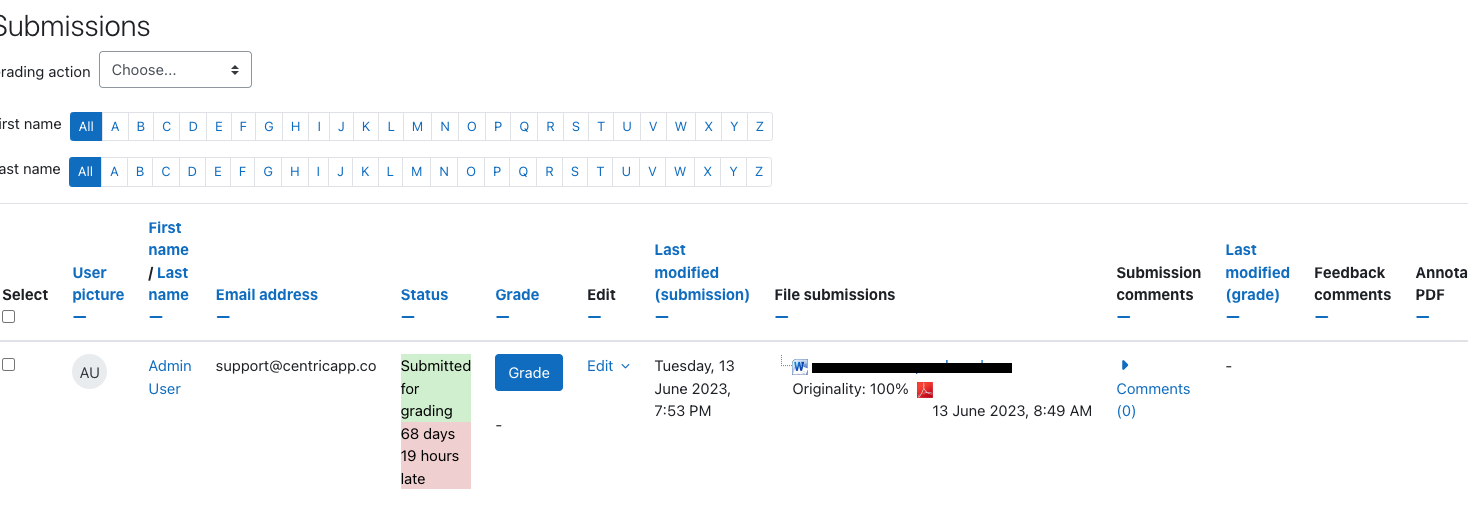
Both teachers and students do not need to learn a new tool. All existing screens remain as they are, with the addition of a single button for the teacher during the creation of
an assignment, and a check box for the student.
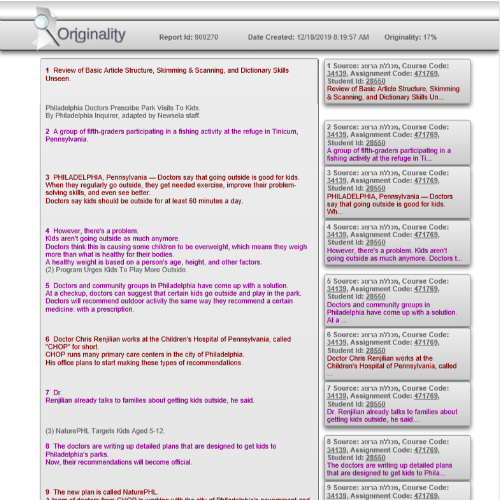
User-friendly Reports: The plugin generates detailed reports for each submitted assignment, highlighting each matching content found during the plagiarism analysis. The
reports provide educators with clear evidence of plagiarism and assist in the decision-making process. Further, the plugin has a new feature that enables the detection of
ghostwriting, be it a human, chatGPT, or a combination of both.
Intuitive Interface: The plugin seamlessly integrates with the Moodle interface, ensuring a smooth user experience for both educators and students. The plagiarism-checking
process is straightforward and can be easily initiated with a few simple clicks.
Database Integration: The plugin is designed to work seamlessly with Moodle's database, storing plagiarism reports securely and efficiently. This integration ensures that
educators can easily access and review reports whenever needed.
Installation
To install the Plagiarism Originality Plugin for Moodle, follow these steps:
Download the plugin package from the official website: https://moodle.org/plugins/plagiarism_originality/ or from Moodle’s
website.
Log in to your Moodle site as an administrator.
Navigate to the "Site Administration" area.
Go to "Plugins" and select "Install plugins."
Choose the "Install plugin from ZIP file" option.
Upload the downloaded plugin package.
Follow the on-screen instructions to complete the installation process.
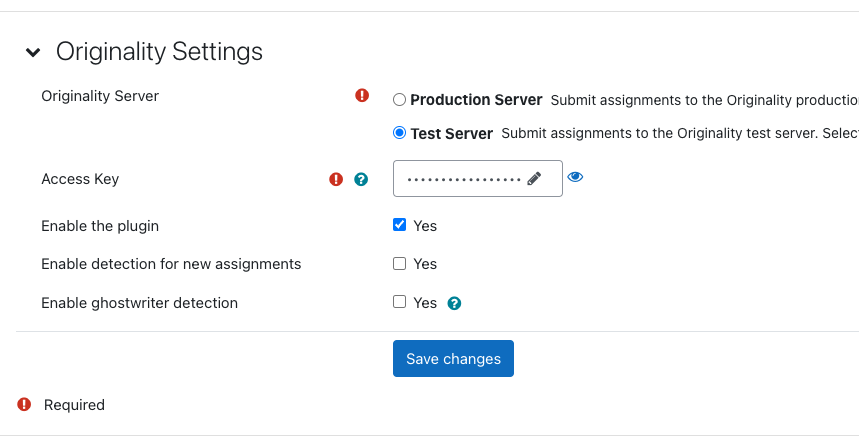
Once the plugin is installed, it creates an originality user, role, and token within your site to allow Originality to update Moodle when a report is available. Configure the
settings according to your institution's requirements. Please contact info@originality.world to obtain your token.
You're ready to start using the Plagiarism Originality Plugin for Moodle!
Click here to download a tutorial on how to configure the Originality plugin
in Moodle.
Usage
After installing the plugin, educators can enable the plagiarism-checking feature for specific assignments or activities within Moodle. Here's how to use the plugin:
Navigate to the course where you want to enable plagiarism checking.
Create or edit an assignment or activity.
Locate the plagiarism settings section and enable plagiarism checking.
Configure the desired plagiarism detection settings, such as similarity thresholds and exclusion rules.
Save the settings and make the assignment or activity available to students.
Once students submit their work, the plugin will automatically analyze the submissions for potential instances of plagiarism.
Educators can access the plagiarism reports for each submission, review the findings, and take appropriate actions based on the results.
Support
If you encounter any issues or have questions regarding the Originality Plagiarism Plugin for Moodle, you can reach out to the support team via their
email info@originality.world
License
The Plagiarism Originality Plugin for Moodle is licensed under the MIT License.
You are free to modify and distribute the plugin in accordance with the license terms.
Acknowledgements
We would like to express our gratitude to the Moodle community and its leaders for developing and maintaining this valuable LMS.
7.5 (2024101500)
7.5
Plugin type: Plagiarism
Frankenstyle component name: plagiarism_originality
Version build number: 2024101500
Version release name: 7.5
Maturity: Alpha
Supported Moodle versions: 3.1, 3.10, 3.11, 3.2, 3.3, 3.4, 3.5, 3.6, 3.7, 3.8, 3.9, 4.0, 4.1, 4.2, 4.3, 4.4, 4.5
Repository URL (Git): https://github.com/mattan-d/moodle-plagiarism_originality
Repository branch:
Repository tag:
Issue/bug tracker URL: https://github.com/mattan-d/moodle-plagiarism_originality/issues
Originality - Plagiarism Plugin for Moodle
The Originality Plagiarism Plugin for Moodle is a powerful tool designed to detect and deter plagiarism in educational institutions using the Moodle learning management system (
LMS). This plugin integrates seamlessly with Moodle and provides educators with a reliable solution to promote academic integrity among students.
Commercial Subscription Requirement
Please note that a commercial subscription is required to use the Originality Plagiarism Plugin for Moodle. To obtain a subscription and access the full functionality of the
plugin, please visit our website originality.world for more information.
Features
Advanced Plagiarism Detection: The plugin employs state-of-the-art algorithms to analyze student submissions and compare them against a vast database and online sources to
identify potential instances of plagiarism.
Both teachers and students do not need to learn a new tool. All existing screens remain as they are, with the addition of a single button for the teacher during the creation of
an assignment, and a check box for the student.
User-friendly Reports: The plugin generates detailed reports for each submitted assignment, highlighting each matching content found during the plagiarism analysis. The
reports provide educators with clear evidence of plagiarism and assist in the decision-making process. Further, the plugin has a new feature that enables the detection of
ghostwriting, be it a human, chatGPT, or a combination of both.
Intuitive Interface: The plugin seamlessly integrates with the Moodle interface, ensuring a smooth user experience for both educators and students. The plagiarism-checking
process is straightforward and can be easily initiated with a few simple clicks.
Database Integration: The plugin is designed to work seamlessly with Moodle's database, storing plagiarism reports securely and efficiently. This integration ensures that
educators can easily access and review reports whenever needed.
Installation
To install the Plagiarism Originality Plugin for Moodle, follow these steps:
Download the plugin package from the official website: https://moodle.org/plugins/plagiarism_originality/ or from Moodle’s
website.
Log in to your Moodle site as an administrator.
Navigate to the "Site Administration" area.
Go to "Plugins" and select "Install plugins."
Choose the "Install plugin from ZIP file" option.
Upload the downloaded plugin package.
Follow the on-screen instructions to complete the installation process.
Once the plugin is installed, it creates an originality user, role, and token within your site to allow Originality to update Moodle when a report is available. Configure the
settings according to your institution's requirements. Please contact info@originality.world to obtain your token.
You're ready to start using the Plagiarism Originality Plugin for Moodle!
Click here to download a tutorial on how to configure the Originality plugin
in Moodle.
Usage
After installing the plugin, educators can enable the plagiarism-checking feature for specific assignments or activities within Moodle. Here's how to use the plugin:
Navigate to the course where you want to enable plagiarism checking.
Create or edit an assignment or activity.
Locate the plagiarism settings section and enable plagiarism checking.
Configure the desired plagiarism detection settings, such as similarity thresholds and exclusion rules.
Save the settings and make the assignment or activity available to students.
Once students submit their work, the plugin will automatically analyze the submissions for potential instances of plagiarism.
Educators can access the plagiarism reports for each submission, review the findings, and take appropriate actions based on the results.
Support
If you encounter any issues or have questions regarding the Originality Plagiarism Plugin for Moodle, you can reach out to the support team via their
email info@originality.world
License
The Plagiarism Originality Plugin for Moodle is licensed under the MIT License.
You are free to modify and distribute the plugin in accordance with the license terms.
Acknowledgements
We would like to express our gratitude to the Moodle community and its leaders for developing and maintaining this valuable LMS.
7.4 (2024073000)
7.4
Plugin type: Plagiarism
Frankenstyle component name: plagiarism_originality
Version build number: 2024073000
Version release name: 7.4
Maturity: Alpha
Supported Moodle versions: 3.1, 3.10, 3.11, 3.2, 3.3, 3.4, 3.5, 3.6, 3.7, 3.8, 3.9, 4.0, 4.1, 4.2, 4.3, 4.4
Repository URL (Git): https://github.com/mattan-d/moodle-plagiarism_originality
Repository branch:
Repository tag:
Issue/bug tracker URL: https://github.com/mattan-d/moodle-plagiarism_originality/issues
Originality - Plagiarism Plugin for Moodle
The Originality Plagiarism Plugin for Moodle is a powerful tool designed to detect and deter plagiarism in educational institutions using the Moodle learning management system (
LMS). This plugin integrates seamlessly with Moodle and provides educators with a reliable solution to promote academic integrity among students.
Commercial Subscription Requirement
Please note that a commercial subscription is required to use the Originality Plagiarism Plugin for Moodle. To obtain a subscription and access the full functionality of the
plugin, please visit our website originality.world for more information.
Features
Advanced Plagiarism Detection: The plugin employs state-of-the-art algorithms to analyze student submissions and compare them against a vast database and online sources to
identify potential instances of plagiarism.
Both teachers and students do not need to learn a new tool. All existing screens remain as they are, with the addition of a single button for the teacher during the creation of
an assignment, and a check box for the student.
User-friendly Reports: The plugin generates detailed reports for each submitted assignment, highlighting each matching content found during the plagiarism analysis. The
reports provide educators with clear evidence of plagiarism and assist in the decision-making process. Further, the plugin has a new feature that enables the detection of
ghostwriting, be it a human, chatGPT, or a combination of both.
Intuitive Interface: The plugin seamlessly integrates with the Moodle interface, ensuring a smooth user experience for both educators and students. The plagiarism-checking
process is straightforward and can be easily initiated with a few simple clicks.
Database Integration: The plugin is designed to work seamlessly with Moodle's database, storing plagiarism reports securely and efficiently. This integration ensures that
educators can easily access and review reports whenever needed.
Installation
To install the Plagiarism Originality Plugin for Moodle, follow these steps:
Download the plugin package from the official website: https://moodle.org/plugins/plagiarism_originality/ or from Moodle’s
website.
Log in to your Moodle site as an administrator.
Navigate to the "Site Administration" area.
Go to "Plugins" and select "Install plugins."
Choose the "Install plugin from ZIP file" option.
Upload the downloaded plugin package.
Follow the on-screen instructions to complete the installation process.
Once the plugin is installed, it creates an originality user, role, and token within your site to allow Originality to update Moodle when a report is available. Configure the
settings according to your institution's requirements. Please contact info@originality.world to obtain your token.
You're ready to start using the Plagiarism Originality Plugin for Moodle!
Click here to download a tutorial on how to configure the Originality plugin
in Moodle.
Usage
After installing the plugin, educators can enable the plagiarism-checking feature for specific assignments or activities within Moodle. Here's how to use the plugin:
Navigate to the course where you want to enable plagiarism checking.
Create or edit an assignment or activity.
Locate the plagiarism settings section and enable plagiarism checking.
Configure the desired plagiarism detection settings, such as similarity thresholds and exclusion rules.
Save the settings and make the assignment or activity available to students.
Once students submit their work, the plugin will automatically analyze the submissions for potential instances of plagiarism.
Educators can access the plagiarism reports for each submission, review the findings, and take appropriate actions based on the results.
Support
If you encounter any issues or have questions regarding the Originality Plagiarism Plugin for Moodle, you can reach out to the support team via their
email info@originality.world
License
The Plagiarism Originality Plugin for Moodle is licensed under the MIT License.
You are free to modify and distribute the plugin in accordance with the license terms.
Acknowledgements
We would like to express our gratitude to the Moodle community and its leaders for developing and maintaining this valuable LMS.
7.1 (2024040500)
7.1
Plugin type: Plagiarism
Frankenstyle component name: plagiarism_originality
Version build number: 2024040500
Version release name: 7.1
Maturity: Alpha
Supported Moodle versions: 3.1, 3.10, 3.11, 3.2, 3.3, 3.4, 3.5, 3.6, 3.7, 3.8, 3.9, 4.0, 4.1, 4.2, 4.3
Repository URL (Git): https://github.com/mattan-d/moodle-plagiarism_originality
Repository branch:
Repository tag:
Issue/bug tracker URL: https://github.com/mattan-d/moodle-plagiarism_originality/issues
Originality - Plagiarism Plugin for Moodle
The Originality Plagiarism Plugin for Moodle is a powerful tool designed to detect and deter plagiarism in educational institutions using the Moodle learning management system (
LMS). This plugin integrates seamlessly with Moodle and provides educators with a reliable solution to promote academic integrity among students.
Commercial Subscription Requirement
Please note that a commercial subscription is required to use the Originality Plagiarism Plugin for Moodle. To obtain a subscription and access the full functionality of the
plugin, please visit our website originality.world for more information.
Features
Advanced Plagiarism Detection: The plugin employs state-of-the-art algorithms to analyze student submissions and compare them against a vast database and online sources to
identify potential instances of plagiarism.
Both teachers and students do not need to learn a new tool. All existing screens remain as they are, with the addition of a single button for the teacher during the creation of
an assignment, and a check box for the student.
User-friendly Reports: The plugin generates detailed reports for each submitted assignment, highlighting each matching content found during the plagiarism analysis. The
reports provide educators with clear evidence of plagiarism and assist in the decision-making process. Further, the plugin has a new feature that enables the detection of
ghostwriting, be it a human, chatGPT, or a combination of both.
Intuitive Interface: The plugin seamlessly integrates with the Moodle interface, ensuring a smooth user experience for both educators and students. The plagiarism-checking
process is straightforward and can be easily initiated with a few simple clicks.
Database Integration: The plugin is designed to work seamlessly with Moodle's database, storing plagiarism reports securely and efficiently. This integration ensures that
educators can easily access and review reports whenever needed.
Installation
To install the Plagiarism Originality Plugin for Moodle, follow these steps:
Download the plugin package from the official website: https://moodle.org/plugins/plagiarism_originality/ or from Moodle’s
website.
Log in to your Moodle site as an administrator.
Navigate to the "Site Administration" area.
Go to "Plugins" and select "Install plugins."
Choose the "Install plugin from ZIP file" option.
Upload the downloaded plugin package.
Follow the on-screen instructions to complete the installation process.
Once the plugin is installed, it creates an originality user, role, and token within your site to allow Originality to update Moodle when a report is available. Configure the
settings according to your institution's requirements. Please contact info@originality.world to obtain your token.
You're ready to start using the Plagiarism Originality Plugin for Moodle!
Click here to download a tutorial on how to configure the Originality plugin
in Moodle.
Usage
After installing the plugin, educators can enable the plagiarism-checking feature for specific assignments or activities within Moodle. Here's how to use the plugin:
Navigate to the course where you want to enable plagiarism checking.
Create or edit an assignment or activity.
Locate the plagiarism settings section and enable plagiarism checking.
Configure the desired plagiarism detection settings, such as similarity thresholds and exclusion rules.
Save the settings and make the assignment or activity available to students.
Once students submit their work, the plugin will automatically analyze the submissions for potential instances of plagiarism.
Educators can access the plagiarism reports for each submission, review the findings, and take appropriate actions based on the results.
Support
If you encounter any issues or have questions regarding the Originality Plagiarism Plugin for Moodle, you can reach out to the support team via their
email info@originality.world
License
The Plagiarism Originality Plugin for Moodle is licensed under the MIT License.
You are free to modify and distribute the plugin in accordance with the license terms.
Acknowledgements
We would like to express our gratitude to the Moodle community and its leaders for developing and maintaining this valuable LMS.
7.0.9 (2024031200)
7.0.9
Plugin type: Plagiarism
Frankenstyle component name: plagiarism_originality
Version build number: 2024031200
Version release name: 7.0.9
Maturity: Alpha
Supported Moodle versions: 3.1, 3.10, 3.11, 3.2, 3.3, 3.4, 3.5, 3.6, 3.7, 3.8, 3.9, 4.0, 4.1, 4.2, 4.3
Repository URL (Git): https://github.com/mattan-d/moodle-plagiarism_originality
Repository branch:
Repository tag:
Issue/bug tracker URL: https://github.com/mattan-d/moodle-plagiarism_originality/issues
Originality - Plagiarism Plugin for Moodle
The Originality Plagiarism Plugin for Moodle is a powerful tool designed to detect and deter plagiarism in educational institutions using the Moodle learning management system (
LMS). This plugin integrates seamlessly with Moodle and provides educators with a reliable solution to promote academic integrity among students.
Commercial Subscription Requirement
Please note that a commercial subscription is required to use the Originality Plagiarism Plugin for Moodle. To obtain a subscription and access the full functionality of the
plugin, please visit our website originality.world for more information.
Features
Advanced Plagiarism Detection: The plugin employs state-of-the-art algorithms to analyze student submissions and compare them against a vast database and online sources to
identify potential instances of plagiarism.
Both teachers and students do not need to learn a new tool. All existing screens remain as they are, with the addition of a single button for the teacher during the creation of
an assignment, and a check box for the student.
User-friendly Reports: The plugin generates detailed reports for each submitted assignment, highlighting each matching content found during the plagiarism analysis. The
reports provide educators with clear evidence of plagiarism and assist in the decision-making process. Further, the plugin has a new feature that enables the detection of
ghostwriting, be it a human, chatGPT, or a combination of both.
Intuitive Interface: The plugin seamlessly integrates with the Moodle interface, ensuring a smooth user experience for both educators and students. The plagiarism-checking
process is straightforward and can be easily initiated with a few simple clicks.
Database Integration: The plugin is designed to work seamlessly with Moodle's database, storing plagiarism reports securely and efficiently. This integration ensures that
educators can easily access and review reports whenever needed.
Installation
To install the Plagiarism Originality Plugin for Moodle, follow these steps:
Download the plugin package from the official website: https://moodle.org/plugins/plagiarism_originality/ or from Moodle’s
website.
Log in to your Moodle site as an administrator.
Navigate to the "Site Administration" area.
Go to "Plugins" and select "Install plugins."
Choose the "Install plugin from ZIP file" option.
Upload the downloaded plugin package.
Follow the on-screen instructions to complete the installation process.
Once the plugin is installed, it creates an originality user, role, and token within your site to allow Originality to update Moodle when a report is available. Configure the
settings according to your institution's requirements. Please contact info@originality.world to obtain your token.
You're ready to start using the Plagiarism Originality Plugin for Moodle!
Click here to download a tutorial on how to configure the Originality plugin
in Moodle.
Usage
After installing the plugin, educators can enable the plagiarism-checking feature for specific assignments or activities within Moodle. Here's how to use the plugin:
Navigate to the course where you want to enable plagiarism checking.
Create or edit an assignment or activity.
Locate the plagiarism settings section and enable plagiarism checking.
Configure the desired plagiarism detection settings, such as similarity thresholds and exclusion rules.
Save the settings and make the assignment or activity available to students.
Once students submit their work, the plugin will automatically analyze the submissions for potential instances of plagiarism.
Educators can access the plagiarism reports for each submission, review the findings, and take appropriate actions based on the results.
Support
If you encounter any issues or have questions regarding the Originality Plagiarism Plugin for Moodle, you can reach out to the support team via their
email info@originality.world
License
The Plagiarism Originality Plugin for Moodle is licensed under the MIT License.
You are free to modify and distribute the plugin in accordance with the license terms.
Acknowledgements
We would like to express our gratitude to the Moodle community and its leaders for developing and maintaining this valuable LMS.
7.0 (2023072500)
7.0
Plugin type: Plagiarism
Frankenstyle component name: plagiarism_originality
Version build number: 2023072500
Version release name: 7.0
Maturity: Stable
Supported Moodle versions: 3.1, 3.10, 3.11, 3.2, 3.3, 3.4, 3.5, 3.6, 3.7, 3.8, 3.9, 4.0, 4.1, 4.2
Repository URL (Git): https://github.com/mattan-d/moodle-plagiarism_originality
Repository branch:
Repository tag:
Issue/bug tracker URL: https://github.com/mattan-d/moodle-plagiarism_originality/issues
Originality - Plagiarism Plugin for Moodle
The Originality Plagiarism Plugin for Moodle is a powerful tool designed to detect and deter plagiarism in educational institutions using the Moodle learning management system (
LMS). This plugin integrates seamlessly with Moodle and provides educators with a reliable solution to promote academic integrity among students.
Commercial Subscription Requirement
Please note that a commercial subscription is required to use the Originality Plagiarism Plugin for Moodle. To obtain a subscription and access the full functionality of the
plugin, please visit our website originality.world for more information.
Features
Advanced Plagiarism Detection: The plugin employs state-of-the-art algorithms to analyze student submissions and compare them against a vast database and online sources to
identify potential instances of plagiarism.
Both teachers and students do not need to learn a new tool. All existing screens remain as they are, with the addition of a single button for the teacher during the creation of
an assignment, and a check box for the student.
User-friendly Reports: The plugin generates detailed reports for each submitted assignment, highlighting each matching content found during the plagiarism analysis. The
reports provide educators with clear evidence of plagiarism and assist in the decision-making process. Further, the plugin has a new feature that enables the detection of
ghostwriting, be it a human, chatGPT, or a combination of both.
Intuitive Interface: The plugin seamlessly integrates with the Moodle interface, ensuring a smooth user experience for both educators and students. The plagiarism-checking
process is straightforward and can be easily initiated with a few simple clicks.
Database Integration: The plugin is designed to work seamlessly with Moodle's database, storing plagiarism reports securely and efficiently. This integration ensures that
educators can easily access and review reports whenever needed.
Installation
To install the Plagiarism Originality Plugin for Moodle, follow these steps:
Download the plugin package from the official website: https://moodle.org/plugins/plagiarism_originality/ or from Moodle’s
website.
Log in to your Moodle site as an administrator.
Navigate to the "Site Administration" area.
Go to "Plugins" and select "Install plugins."
Choose the "Install plugin from ZIP file" option.
Upload the downloaded plugin package.
Follow the on-screen instructions to complete the installation process.
Once the plugin is installed, it creates an originality user, role, and token within your site to allow Originality to update Moodle when a report is available. Configure the
settings according to your institution's requirements. Please contact info@originality.world to obtain your token.
You're ready to start using the Plagiarism Originality Plugin for Moodle!
Click here to download a tutorial on how to configure the Originality plugin
in Moodle.
Usage
After installing the plugin, educators can enable the plagiarism-checking feature for specific assignments or activities within Moodle. Here's how to use the plugin:
Navigate to the course where you want to enable plagiarism checking.
Create or edit an assignment or activity.
Locate the plagiarism settings section and enable plagiarism checking.
Configure the desired plagiarism detection settings, such as similarity thresholds and exclusion rules.
Save the settings and make the assignment or activity available to students.
Once students submit their work, the plugin will automatically analyze the submissions for potential instances of plagiarism.
Educators can access the plagiarism reports for each submission, review the findings, and take appropriate actions based on the results.
Support
If you encounter any issues or have questions regarding the Originality Plagiarism Plugin for Moodle, you can reach out to the support team via their
email info@originality.world
License
The Plagiarism Originality Plugin for Moodle is licensed under the MIT License.
You are free to modify and distribute the plugin in accordance with the license terms.
Acknowledgements
We would like to express our gratitude to the Moodle community and its leaders for developing and maintaining this valuable LMS.
7.0 (2023070500)
7.0
Plugin type: Plagiarism
Frankenstyle component name: plagiarism_originality
Version build number: 2023070500
Version release name: 7.0
Maturity: Alpha
Supported Moodle versions: 3.10, 3.11, 3.5, 3.6, 3.7, 3.8, 3.9, 4.0, 4.1, 4.2
Repository URL (Git): https://github.com/mattan-d/moodle-plagiarism_originality
Repository branch: master
Repository tag:
Issue/bug tracker URL: https://github.com/mattan-d/moodle-plagiarism_originality/issues
Originality - Plagiarism Plugin for Moodle
The Originality Plagiarism Plugin for Moodle is a powerful tool designed to detect and deter plagiarism in educational institutions using the Moodle learning management system (
LMS). This plugin integrates seamlessly with Moodle and provides educators with a reliable solution to promote academic integrity among students.
Commercial Subscription Requirement
Please note that a commercial subscription is required to use the Originality Plagiarism Plugin for Moodle. To obtain a subscription and access the full functionality of the
plugin, please visit our website originality.co.il for more information.
Features
Advanced Plagiarism Detection: The plugin employs state-of-the-art algorithms to analyze student submissions and compare them against a vast database and online sources to
identify potential instances of plagiarism.
Both teachers and students do not need to learn a new tool. All existing screens remain as they are, with the addition of a single button for the teacher during the creation of
an assignment, and a check box for the student.
User-friendly Reports: The plugin generates detailed reports for each submitted assignment, highlighting each matching content found during the plagiarism analysis. The
reports provide educators with clear evidence of plagiarism and assist in the decision-making process. Further, the plugin has a new feature that enables the detection of
ghostwriting, be it a human, chatGPT, or a combination of both.
Intuitive Interface: The plugin seamlessly integrates with the Moodle interface, ensuring a smooth user experience for both educators and students. The plagiarism-checking
process is straightforward and can be easily initiated with a few simple clicks.
Database Integration: The plugin is designed to work seamlessly with Moodle's database, storing plagiarism reports securely and efficiently. This integration ensures that
educators can easily access and review reports whenever needed.
Installation
To install the Plagiarism Originality Plugin for Moodle, follow these steps:
Download the plugin package from the official website: https://moodle.org/plugins/plagiarism_originality/ or from Moodle’s
website.
Log in to your Moodle site as an administrator.
Navigate to the "Site Administration" area.
Go to "Plugins" and select "Install plugins."
Choose the "Install plugin from ZIP file" option.
Upload the downloaded plugin package.
Follow the on-screen instructions to complete the installation process.
Once the plugin is installed, it creates an originality user, role, and token within your site to allow Originality to update Moodle when a report is available. Configure the
settings according to your institution's requirements. Please contact customerservice@originality.world to obtain your token.
You're ready to start using the Plagiarism Originality Plugin for Moodle!
Usage
After installing the plugin, educators can enable the plagiarism-checking feature for specific assignments or activities within Moodle. Here's how to use the plugin:
Navigate to the course where you want to enable plagiarism checking.
Create or edit an assignment or activity.
Locate the plagiarism settings section and enable plagiarism checking.
Configure the desired plagiarism detection settings, such as similarity thresholds and exclusion rules.
Save the settings and make the assignment or activity available to students.
Once students submit their work, the plugin will automatically analyze the submissions for potential instances of plagiarism.
Educators can access the plagiarism reports for each submission, review the findings, and take appropriate actions based on the results.
Support
If you encounter any issues or have questions regarding the Originality Plagiarism Plugin for Moodle, you can reach out to the support team via their
email CustomerService@originality.world
License
The Plagiarism Originality Plugin for Moodle is licensed under the MIT License.
You are free to modify and distribute the plugin in accordance with the license terms.
Acknowledgements
We would like to express our gratitude to the Moodle community and its leaders for developing and maintaining this valuable LMS.
7.0 (2023051600)
7.0
Plugin type: Plagiarism
Frankenstyle component name: plagiarism_originality
Version build number: 2023051600
Version release name: 7.0
Maturity: Alpha
Supported Moodle versions: 3.1, 3.10, 3.11, 3.2, 3.3, 3.4, 3.5, 3.6, 3.7, 3.8, 3.9, 4.0, 4.1, 4.2
Repository URL (Git): https://github.com/mattan-d/moodle-plagiarism_originality
Repository branch:
Repository tag:
Issue/bug tracker URL: https://github.com/mattan-d/moodle-plagiarism_originality/issues
Originality - Plagiarism Plugin for Moodle
The Originality Plagiarism Plugin for Moodle is a powerful tool designed to detect and deter plagiarism in educational institutions using the Moodle learning management system (LMS). This plugin integrates seamlessly with Moodle and provides educators with a reliable solution to promote academic integrity among students.
Features
Advanced Plagiarism Detection: The plugin employs state-of-the-art algorithms to analyze student submissions and compare them against a vast database and online sources to identify potential instances of plagiarism.
Both teachers and students do not need to learn a new tool. All existing screens remain as they are, with the addition of a single button for the teacher during the creation of an assignment, and a check box for the student.
User-friendly Reports: The plugin generates detailed reports for each submitted assignment, highlighting each matching content found during the plagiarism analysis. The reports provide educators with clear evidence of plagiarism and assist in the decision-making process. Further, the plugin has a new feature that enables the detection of ghostwriting, be it a human, chatGPT, or a combination of both.
Intuitive Interface: The plugin seamlessly integrates with the Moodle interface, ensuring a smooth user experience for both educators and students. The plagiarism-checking process is straightforward and can be easily initiated with a few simple clicks.
Database Integration: The plugin is designed to work seamlessly with Moodle's database, storing plagiarism reports securely and efficiently. This integration ensures that educators can easily access and review reports whenever needed.
Installation
To install the Plagiarism Originality Plugin for Moodle, follow these steps:
Download the plugin package from the official website: https://originality.world/ or from Moodle’s website.
Log in to your Moodle site as an administrator.
Navigate to the "Site Administration" area.
Go to "Plugins" and select "Install plugins."
Choose the "Install plugin from ZIP file" option.
Upload the downloaded plugin package.
Follow the on-screen instructions to complete the installation process.
Once the plugin is installed, configure the settings according to your institution's requirements.
You're ready to start using the Plagiarism Originality Plugin for Moodle!
Usage
After installing the plugin, educators can enable the plagiarism-checking feature for specific assignments or activities within Moodle. Here's how to use the plugin:
Navigate to the course where you want to enable plagiarism checking.
Create or edit an assignment or activity.
Locate the plagiarism settings section and enable plagiarism checking.
Configure the desired plagiarism detection settings, such as similarity thresholds and exclusion rules.
Save the settings and make the assignment or activity available to students.
Once students submit their work, the plugin will automatically analyze the submissions for potential instances of plagiarism.
Educators can access the plagiarism reports for each submission, review the findings, and take appropriate actions based on the results.
Support
If you encounter any issues or have questions regarding the Originality Plagiarism Plugin for Moodle, you can reach out to the support team via their email CustomerService@originality.world
License
The Plagiarism Originality Plugin for Moodle is licensed under the MIT License.
You are free to modify and distribute the plugin in accordance with the license terms.
Acknowledgements
We would like to express our gratitude to the Moodle community and its leaders for developing and maintaining this valuable LMS.
7.0 (2023051500)
7.0
Plugin type: Plagiarism
Frankenstyle component name: plagiarism_originality
Version build number: 2023051500
Version release name: 7.0
Maturity: Stable
Supported Moodle versions: 3.1, 3.10, 3.11, 3.2, 3.3, 3.4, 3.5, 3.6, 3.7, 3.8, 3.9, 4.0, 4.1, 4.2
Repository URL (Git): https://github.com/mattan-d/moodle-plagiarism_originality
Repository branch:
Repository tag:
Issue/bug tracker URL: https://github.com/mattan-d/moodle-plagiarism_originality/issues
Originality - Plagiarism Plugin for Moodle
The Originality Plagiarism Plugin for Moodle is a powerful tool designed to detect and deter plagiarism in educational institutions using the Moodle learning management system (LMS). This plugin integrates seamlessly with Moodle and provides educators with a reliable solution to promote academic integrity among students.
Features
Advanced Plagiarism Detection: The plugin employs state-of-the-art algorithms to analyze student submissions and compare them against a vast database and online sources to identify potential instances of plagiarism.
Both teachers and students do not need to learn a new tool. All existing screens remain as they are, with the addition of a single button for the teacher during the creation of an assignment, and a check box for the student.
User-friendly Reports: The plugin generates detailed reports for each submitted assignment, highlighting each matching content found during the plagiarism analysis. The reports provide educators with clear evidence of plagiarism and assist in the decision-making process. Further, the plugin has a new feature that enables the detection of ghostwriting, be it a human, chatGPT, or a combination of both.
Intuitive Interface: The plugin seamlessly integrates with the Moodle interface, ensuring a smooth user experience for both educators and students. The plagiarism-checking process is straightforward and can be easily initiated with a few simple clicks.
Database Integration: The plugin is designed to work seamlessly with Moodle's database, storing plagiarism reports securely and efficiently. This integration ensures that educators can easily access and review reports whenever needed.
Installation
To install the Plagiarism Originality Plugin for Moodle, follow these steps:
Download the plugin package from the official website: https://originality.world/ or from Moodle’s website.
Log in to your Moodle site as an administrator.
Navigate to the "Site Administration" area.
Go to "Plugins" and select "Install plugins."
Choose the "Install plugin from ZIP file" option.
Upload the downloaded plugin package.
Follow the on-screen instructions to complete the installation process.
Once the plugin is installed, configure the settings according to your institution's requirements.
You're ready to start using the Plagiarism Originality Plugin for Moodle!
Usage
After installing the plugin, educators can enable the plagiarism-checking feature for specific assignments or activities within Moodle. Here's how to use the plugin:
Navigate to the course where you want to enable plagiarism checking.
Create or edit an assignment or activity.
Locate the plagiarism settings section and enable plagiarism checking.
Configure the desired plagiarism detection settings, such as similarity thresholds and exclusion rules.
Save the settings and make the assignment or activity available to students.
Once students submit their work, the plugin will automatically analyze the submissions for potential instances of plagiarism.
Educators can access the plagiarism reports for each submission, review the findings, and take appropriate actions based on the results.
Support
If you encounter any issues or have questions regarding the Originality Plagiarism Plugin for Moodle, you can reach out to the support team via their email CustomerService@originality.world
License
The Plagiarism Originality Plugin for Moodle is licensed under the MIT License.
You are free to modify and distribute the plugin in accordance with the license terms.
Acknowledgements
We would like to express our gratitude to the Moodle community and its leaders for developing and maintaining this valuable LMS.
7.0 (2023050404)
7.0
Plugin type: Plagiarism
Frankenstyle component name: plagiarism_originality
Version build number: 2023050404
Version release name: 7.0
Maturity: Stable
Supported Moodle versions: 3.10, 3.11, 3.7, 3.8, 3.9, 4.0, 4.1, 4.2
Repository URL (Git): https://github.com/mattan-d/moodle-plagiarism_originality
Repository branch: master
Repository tag:
Issue/bug tracker URL: https://github.com/mattan-d/moodle-plagiarism_originality/issues
Originality - Plagiarism Plugin for Moodle
The Originality Plagiarism Plugin for Moodle is a powerful tool designed to detect and deter plagiarism in educational institutions using the Moodle learning management system (LMS). This plugin integrates seamlessly with Moodle and provides educators with a reliable solution to promote academic integrity among students.
Features
Advanced Plagiarism Detection: The plugin employs state-of-the-art algorithms to analyze student submissions and compare them against a vast database and online sources to identify potential instances of plagiarism.
Both teachers and students do not need to learn a new tool. All existing screens remain as they are, with the addition of a single button for the teacher during the creation of an assignment, and a check box for the student.
User-friendly Reports: The plugin generates detailed reports for each submitted assignment, highlighting each matching content found during the plagiarism analysis. The reports provide educators with clear evidence of plagiarism and assist in the decision-making process. Further, the plugin has a new feature that enables the detection of ghostwriting, be it a human, chatGPT, or a combination of both.
Intuitive Interface: The plugin seamlessly integrates with the Moodle interface, ensuring a smooth user experience for both educators and students. The plagiarism-checking process is straightforward and can be easily initiated with a few simple clicks.
Database Integration: The plugin is designed to work seamlessly with Moodle's database, storing plagiarism reports securely and efficiently. This integration ensures that educators can easily access and review reports whenever needed.
Installation
To install the Plagiarism Originality Plugin for Moodle, follow these steps:
Download the plugin package from the official website: https://originality.world/ or from Moodle’s website.
Log in to your Moodle site as an administrator.
Navigate to the "Site Administration" area.
Go to "Plugins" and select "Install plugins."
Choose the "Install plugin from ZIP file" option.
Upload the downloaded plugin package.
Follow the on-screen instructions to complete the installation process.
Once the plugin is installed, configure the settings according to your institution's requirements.
You're ready to start using the Plagiarism Originality Plugin for Moodle!
Usage
After installing the plugin, educators can enable the plagiarism-checking feature for specific assignments or activities within Moodle. Here's how to use the plugin:
Navigate to the course where you want to enable plagiarism checking.
Create or edit an assignment or activity.
Locate the plagiarism settings section and enable plagiarism checking.
Configure the desired plagiarism detection settings, such as similarity thresholds and exclusion rules.
Save the settings and make the assignment or activity available to students.
Once students submit their work, the plugin will automatically analyze the submissions for potential instances of plagiarism.
Educators can access the plagiarism reports for each submission, review the findings, and take appropriate actions based on the results.
Support
If you encounter any issues or have questions regarding the Originality Plagiarism Plugin for Moodle, you can reach out to the support team via their email CustomerService@originality.world
License
The Plagiarism Originality Plugin for Moodle is licensed under the MIT License.
You are free to modify and distribute the plugin in accordance with the license terms.
Acknowledgements
We would like to express our gratitude to the Moodle community and its leaders for developing and maintaining this valuable LMS.