Tier plugin
Versions
Current version
0.1.0 (2025063000)
0.1.0
Plugin type: Local plugins
Frankenstyle component name: local_tier
Version build number: 2025063000
Version release name: 0.1.0
Maturity: Beta
Supported Moodle versions: 4.5, 5.0
Repository URL (Git): https://github.com/krestomatio/moodle-local_tier/
Repository branch:
Repository tag: v0.1.0
Issue/bug tracker URL: https://github.com/krestomatio/moodle-local_tier/issues
Tier Instance
Tier Instance provides Moodle administrators with the ability to enforce limits on user registrations, total storage usage, concurrent active sessions, and administrative page access restrictions. Once configured, these limits apply system-wide, including administrative roles if enforced via config.php.
Features
1. User Registration Limit
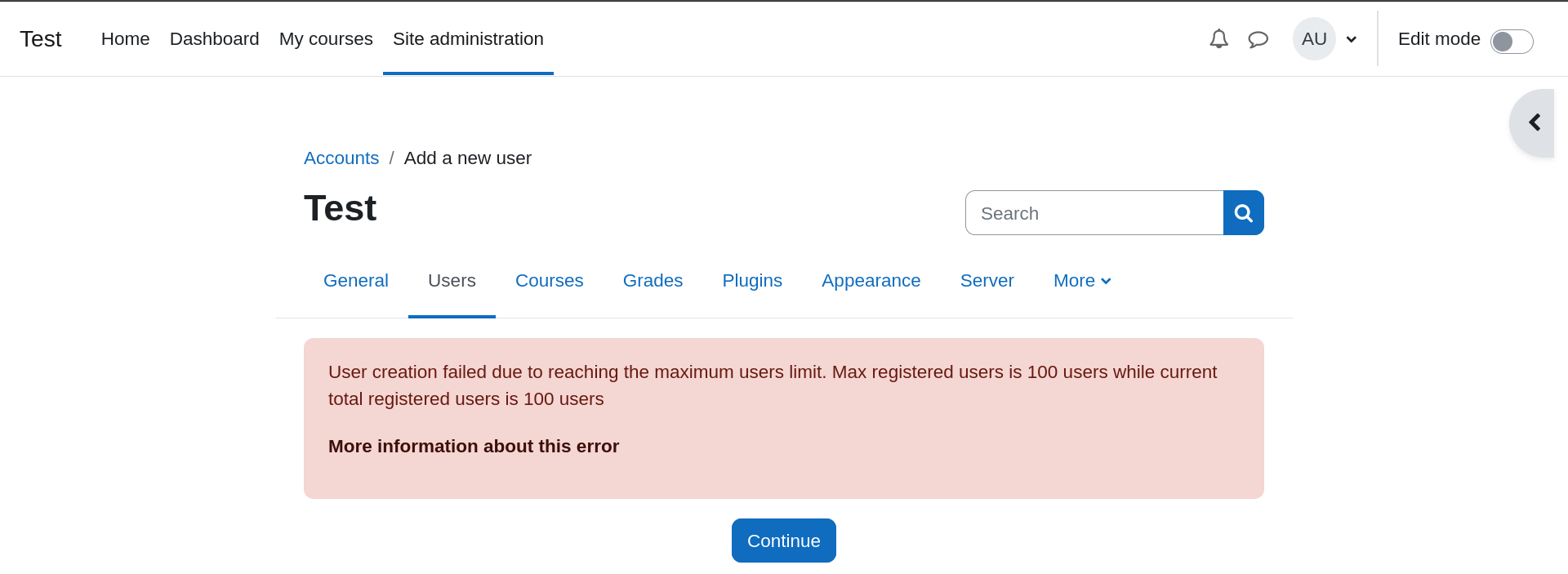
Administrators can set a maximum number of allowed registered users. Once the limit is reached, additional user registrations will be automatically blocked. Note: This functionality requires MDL-78777 to be integrated into Moodle core.
2. Site Storage Limit
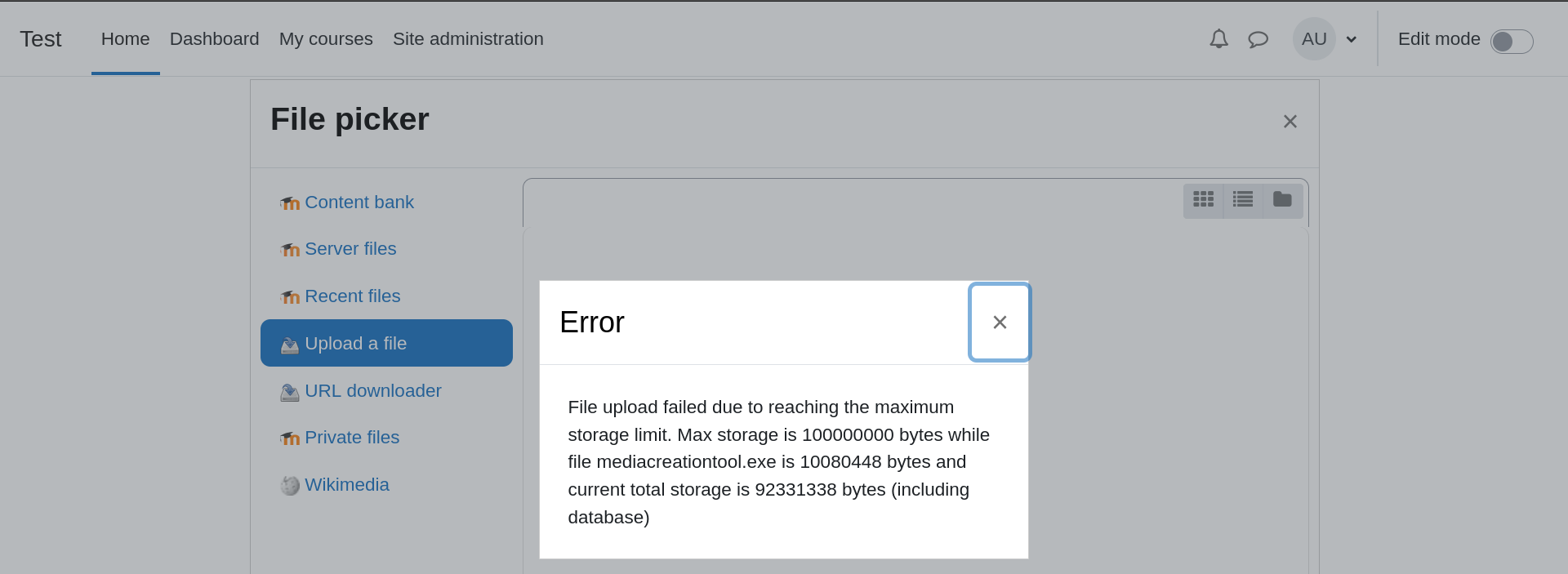
Administrators can specify a storage quota for the entire Moodle instance, covering both uploaded files and database size. When the quota is reached, uploading new files is disabled until existing files are removed to free up space. Total storage usage is recalculated every minute through a scheduled task to minimize database load. A special consideration should be made for the instance trash. Deleted files go to the trash, which is also counted towards the storage limit. Trash is emptied periodically based on the filescleanupperiod setting in Moodle, which defaults to 1 day.
3. Concurrent Sessions Limit
Set a global limit on the number of concurrent (active) user sessions. Once this threshold is reached, no new sessions will be allowed until active sessions expire, users log out, or the limit is increased. This ensures system resources remain under control.
4. Admin Page/Section Restrictions
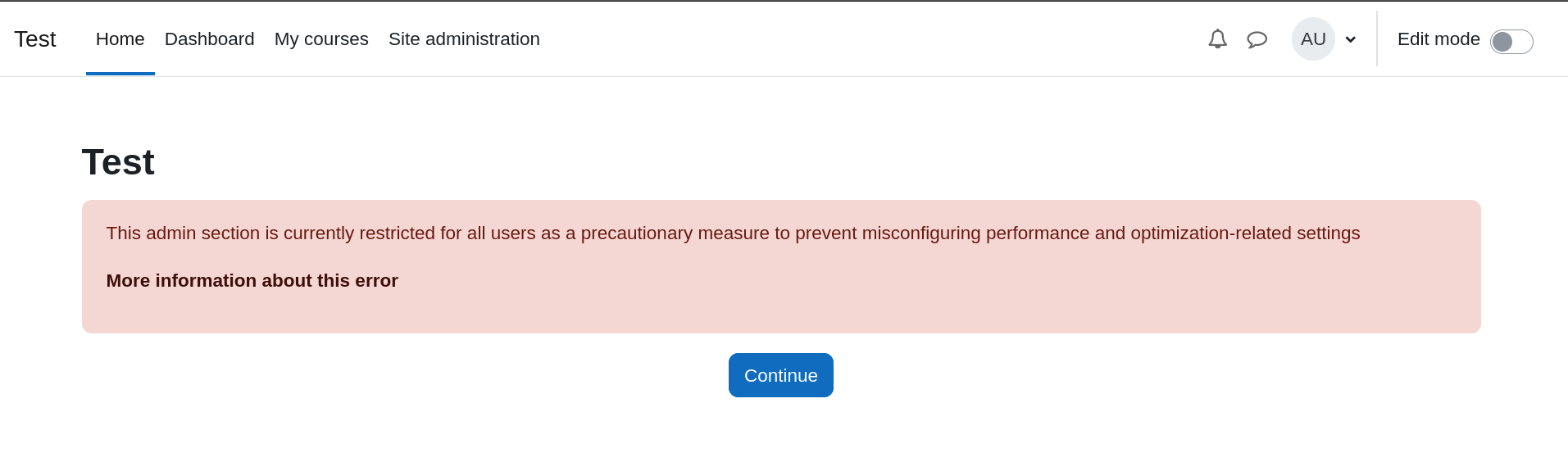
Restrict access to specific administrative settings sections, categories, or pages. This helps prevent accidental misconfiguration of sensitive settings related to performance and optimization.
Configuration Example
Below is an example showing how to set the maximum registered users to 500, storage limit to 5 GB, concurrent sessions limit to 50, and restrict specific admin sections and pages through config.php:
$CFG->forced_plugin_settings = [

    'local_tier' => [

        'maxstoragebytes' => '5000000000',

        'maxregisteredusers' => '500',

        'maxconcurrentsessions' => '50',

        'restrictedadminsettingscategories' => 'cachestores',

        'restrictedadminsettingssections' => 'debugging',

        'restrictedadminpages' => '/cache/testperformance.php,/cache/admin.php',

    ],

];
To prevent modifications to scheduled tasks, use either:
$CFG->preventscheduledtaskchanges = true;
or configure explicitly:
$CFG->scheduled_tasks = [

    'local_tier\*' => [

        'schedule' => '* * * * *',

        'disabled' => 0,

    ],

];
Scheduled Tasks & Caching
Scheduled tasks periodically update usage metrics and store data leveraging Moodle’s built-in caching system. Additionally, event observers promptly update these metrics in response to relevant actions.
Installation
Install via ZIP upload
- Log in as an admin and navigate to: Site administration > Plugins > Install plugins.
- Upload the ZIP file containing the plugin.
- Follow the on-screen instructions to validate and finalize the installation.
Manual installation
Copy the plugin files to:
{your/moodle/dirroot}/local/tier
Then, log in as admin and navigate to Site administration > Notifications to complete the installation.
Alternatively, use CLI:
php admin/cli/upgrade.php
License
© 2025 Krestomatio info@krestomatio.com
This program is free software distributed under the GNU General Public License version 3 or later. It comes without warranty of MERCHANTABILITY or FITNESS FOR A PARTICULAR PURPOSE. See the full license at GNU GPL v3.
0.0.5 (2024012200)
0.0.5
Plugin type: Local plugins
Frankenstyle component name: local_tier
Version build number: 2024012200
Version release name: 0.0.5
Maturity: Alpha
Supported Moodle versions: 4.1, 4.2, 4.3
Repository URL (Git): https://github.com/krestomatio/moodle-local_tier/
Repository branch:
Repository tag: v0.0.5
Issue/bug tracker URL: https://github.com/krestomatio/moodle-local_tier/issues
Tier plugin
Tier plugin provides a solution to control user registrations, storage quotas, and administrative access restrictions system-wide in Moodle. By implementing this plugin, site administrators gain the ability to set maximum limits on registered users, file creations, and access to administrative pages and sections based on custom-defined values defined in config.php. Once these values are set, the intention is for them to be enforced for all users, even those with administrative roles.
User Registration Limitations: Administrators can set a maximum number of registered users. Once the user limit is reached, new users attempting to register will be automatically restricted. FUNCTION NOT AVAILABLE until MDL-78777 is integrated in moodle core.
Site Storage Cap: Tier plugin enables administrators to assign a system wide storage quota based on total files and database size. When the storage quota is reached, users will not be able to add new files, unless storage is reduced by removing files. Total storage in used is calculated every minute in a cron schedule task, avoiding hitting the database to often.
Admin Page/Section Restriction: The plugin allows restricting admin settings sections, categories and/or pages access. This helps prevent misconfiguring performance and optimization-related admin settings.
The following example shows how to set max registered users to 100, max site storage to 5 GB (in bytes) and restrict access to debugging admin section and cache configuration and test pages. Values are set config.php
$CFG->forced_plugin_settings = [

    "local_tier" => [

        "max_storage_bytes" => "5000000000",

        "max_registered_users" => "100",

        "restrictedadminsettingscategories" => "cachestores",

        "restrictedadminsettingssections" => "debugging",

        "restrictedadminpages" => "/cache/testperformance.php,/cache/admin.php",

    ],

];
You also want to prevent this plugin scheduled task modifications by setting $CFG->preventscheduledtaskchanges = true; in config.php or by setting, also in config.php:
$CFG->scheduled_tasks = [

    'local_tier\*' => [

        'schedule' => '* * * * *',

        'disabled' => 0,

    ],

];
Installing via uploaded ZIP file
- Log in to your Moodle site as an admin and go to Site administration >
Plugins > Install plugins. - Upload the ZIP file with the plugin code. You should only be prompted to add
extra details if your plugin type is not automatically detected. - Check the plugin validation report and finish the installation.
Installing manually
The plugin can be also installed by putting the contents of this directory to
{your/moodle/dirroot}/local/tier
Afterwards, log in to your Moodle site as an admin and go to Site administration >
Notifications to complete the installation.
Alternatively, you can run
$ php admin/cli/upgrade.php
to complete the installation from the command line.
License
2022 Krestomatio info@krestomatio.com
This program is free software: you can redistribute it and/or modify it under
the terms of the GNU General Public License as published by the Free Software
Foundation, either version 3 of the License, or (at your option) any later
version.
This program is distributed in the hope that it will be useful, but WITHOUT ANY
WARRANTY; without even the implied warranty of MERCHANTABILITY or FITNESS FOR A
PARTICULAR PURPOSE. See the GNU General Public License for more details.
You should have received a copy of the GNU General Public License along with
this program. If not, see https://www.gnu.org/licenses/.
0.0.3 (2023072101)
0.0.3
Plugin type: Local plugins
Frankenstyle component name: local_tier
Version build number: 2023072101
Version release name: 0.0.3
Maturity: Alpha
Supported Moodle versions: 4.1, 4.2
Repository URL (Git): https://github.com/krestomatio/moodle-local_tier
Repository branch:
Repository tag:
Issue/bug tracker URL: https://github.com/krestomatio/moodle-local_tier/issues
Tier plugin
Tier plugin provides a solution to control user registrations, storage quotas, and administrative access restrictions system-wide in Moodle. By implementing this plugin, site administrators gain the ability to set maximum limits on registered users, file creations, and access to administrative pages and sections based on custom-defined values defined in config.php. Once these values are set, the intention is for them to be enforced for all users, even those with administrative roles.
User Registration Limitations: Administrators can set a maximum number of registered users. Once the user limit is reached, new users attempting to register will be automatically restricted. FUNCTION NOT AVAILABLE until MDL-78777 is integrated in moodle core.
Site Storage Cap: Tier plugin enables administrators to assign a system wide storage quota based on total files and database size. When the storage quota is reached, users will not be able to add new files, unless storage is reduced by removing files. Total storage in used is calculated every minute in a cron schedule task, avoiding hitting the database to often.
Admin Page/Section Restriction: The plugin allows restricting admin settings sections and/or pages access. This helps prevent misconfiguring performance and optimization-related admin settings.
The following example shows how to set max registered users to 100, max site storage to 5 GB (in bytes) and restrict access to debugging admin section and cache configuration and test pages. Values are set config.php
$CFG->forced_plugin_settings = [

    "local_tier" => [

        "max_storage_bytes" => "5000000000",

        "max_registered_users" => "100",

        "restrictedadminsettingssections" => "debugging",

        "restrictedadminpages" => "/cache/testperformance.php,/cache/admin.php",

    ],

];
You also want to prevent this plugin scheduled task modifications by setting $CFG->preventscheduledtaskchanges = true; in config.php or by setting, also in config.php:
$CFG->scheduled_tasks = [

    'local_tier\*' => [

        'schedule' => '* * * * *',

        'disabled' => 0,

    ],

];
Installing via uploaded ZIP file
- Log in to your Moodle site as an admin and go to Site administration >
Plugins > Install plugins. - Upload the ZIP file with the plugin code. You should only be prompted to add
extra details if your plugin type is not automatically detected. - Check the plugin validation report and finish the installation.
Installing manually
The plugin can be also installed by putting the contents of this directory to
{your/moodle/dirroot}/local/tier
Afterwards, log in to your Moodle site as an admin and go to Site administration >
Notifications to complete the installation.
Alternatively, you can run
$ php admin/cli/upgrade.php
to complete the installation from the command line.
License
2022 Krestomatio info@krestomatio.com
This program is free software: you can redistribute it and/or modify it under
the terms of the GNU General Public License as published by the Free Software
Foundation, either version 3 of the License, or (at your option) any later
version.
This program is distributed in the hope that it will be useful, but WITHOUT ANY
WARRANTY; without even the implied warranty of MERCHANTABILITY or FITNESS FOR A
PARTICULAR PURPOSE. See the GNU General Public License for more details.
You should have received a copy of the GNU General Public License along with
this program. If not, see https://www.gnu.org/licenses/.
0.0.2 (2023072100)
0.0.2
Plugin type: Local plugins
Frankenstyle component name: local_tier
Version build number: 2023072100
Version release name: 0.0.2
Maturity: Alpha
Supported Moodle versions: 4.1, 4.2
Repository URL (Git): https://github.com/krestomatio/moodle-local_tier
Repository branch:
Repository tag:
Issue/bug tracker URL: https://github.com/krestomatio/moodle-local_tier/issues
Tier plugin
Tier plugin provides a solution to control user registrations, storage quotas, and administrative access restrictions system-wide in Moodle. By implementing this plugin, site administrators gain the ability to set maximum limits on registered users, file creations, and access to administrative pages and sections based on custom-defined values defined in config.php. Once these values are set, the intention is for them to be enforced for all users, even those with administrative roles.
User Registration Limitations: Administrators can set a maximum number of registered users. Once the user limit is reached, new users attempting to register will be automatically restricted. FUNCTION NOT AVAILABLE until MDL-78777 is integrated in moodle core.
Site Storage Cap: Tier plugin enables administrators to assign a system wide storage quota based on total files and database size. When the storage quota is reached, users will not be able to add new files, unless storage is reduced by removing files. Total storage in used is calculated every minute in a cron schedule task, avoiding hitting the database to often.
Admin Page/Section Restriction: The plugin allows restricting admin settings sections and/or pages access. This helps prevent misconfiguring performance and optimization-related admin settings.
The following example shows how to set max registered users to 100, max site storage to 5 GB (in bytes) and restrict access to debugging admin section and cache configuration and test pages. Values are set config.php
$CFG->forced_plugin_settings = [

    "local_tier" => [

        "max_storage_bytes" => "5000000000",

        "max_registered_users" => "100",

        "restrictedadminsettingssections" => "debugging",

        "restrictedadminpages" => "/cache/testperformance.php,/cache/admin.php",

    ],

];
You also want to prevent this plugin scheduled task modifications by setting $CFG->preventscheduledtaskchanges = true; in config.php or by setting, also in config.php:
$CFG->scheduled_tasks = [

    'local_tier\*' => [

        'schedule' => '* * * * *',

        'disabled' => 0,

    ],

];
Installing via uploaded ZIP file
- Log in to your Moodle site as an admin and go to Site administration >
Plugins > Install plugins. - Upload the ZIP file with the plugin code. You should only be prompted to add
extra details if your plugin type is not automatically detected. - Check the plugin validation report and finish the installation.
Installing manually
The plugin can be also installed by putting the contents of this directory to
{your/moodle/dirroot}/local/tier
Afterwards, log in to your Moodle site as an admin and go to Site administration >
Notifications to complete the installation.
Alternatively, you can run
$ php admin/cli/upgrade.php
to complete the installation from the command line.
License
2022 Krestomatio info@krestomatio.com
This program is free software: you can redistribute it and/or modify it under
the terms of the GNU General Public License as published by the Free Software
Foundation, either version 3 of the License, or (at your option) any later
version.
This program is distributed in the hope that it will be useful, but WITHOUT ANY
WARRANTY; without even the implied warranty of MERCHANTABILITY or FITNESS FOR A
PARTICULAR PURPOSE. See the GNU General Public License for more details.
You should have received a copy of the GNU General Public License along with
this program. If not, see https://www.gnu.org/licenses/.
0.0.1 (2022111400)
0.0.1
Plugin type: Local plugins
Frankenstyle component name: local_tier
Version build number: 2022111400
Version release name: 0.0.1
Maturity: Alpha
Supported Moodle versions: 4.1, 4.2
Repository URL (Git): https://github.com/krestomatio/moodle-local_tier
Repository branch:
Repository tag:
Issue/bug tracker URL: https://github.com/krestomatio/moodle-local_tier/issues
Tier plugin
Tier plugin provides a solution to control user registrations, storage quotas, and administrative access restrictions system-wide in Moodle. By implementing this plugin, site administrators gain the ability to set maximum limits on registered users, file creations, and access to administrative pages and sections based on custom-defined values defined in config.php. Once these values are set, the intention is for them to be enforced for all users, even those with administrative roles.
User Registration Limitations: Administrators can set a maximum number of registered users. Once the user limit is reached, new users attempting to register will be automatically restricted. FUNCTION NOT AVAILABLE until MDL-78777 is integrated in moodle core.
Site Storage Cap: Tier plugin enables administrators to assign a system wide storage quota based on total files and database size. When the storage quota is reached, users will not be able to add new files, unless storage is reduced by removing files. Total storage in used is calculated every minute in a cron schedule task, avoiding hitting the database to often.
Admin Page/Section Restriction: The plugin allows restricting admin settings sections and/or pages access. This helps prevent misconfiguring performance and optimization-related admin settings.
The following example shows how to set max registered users to 100, max site storage to 5 GB (in bytes) and restrict access to debugging admin section and cache configuration and test pages. Values are set config.php
$CFG->forced_plugin_settings = [

    "local_tier" => [

        "max_storage_bytes" => "5000000000",

        "max_registered_users" => "100",

        "restrictedadminsettingssections" => "debugging",

        "restrictedadminpages" => "/cache/testperformance.php,/cache/admin.php",

    ],

];
You also want to prevent this plugin scheduled task modifications by setting $CFG->preventscheduledtaskchanges = true; in config.php or by setting, also in config.php:
$CFG->scheduled_tasks = [

    'local_tier\*' => [

        'schedule' => '* * * * *',

        'disabled' => 0,

    ],

];
Installing via uploaded ZIP file
- Log in to your Moodle site as an admin and go to Site administration >
Plugins > Install plugins. - Upload the ZIP file with the plugin code. You should only be prompted to add
extra details if your plugin type is not automatically detected. - Check the plugin validation report and finish the installation.
Installing manually
The plugin can be also installed by putting the contents of this directory to
{your/moodle/dirroot}/local/tier
Afterwards, log in to your Moodle site as an admin and go to Site administration >
Notifications to complete the installation.
Alternatively, you can run
$ php admin/cli/upgrade.php
to complete the installation from the command line.
License
2022 Krestomatio info@krestomatio.com
This program is free software: you can redistribute it and/or modify it under
the terms of the GNU General Public License as published by the Free Software
Foundation, either version 3 of the License, or (at your option) any later
version.
This program is distributed in the hope that it will be useful, but WITHOUT ANY
WARRANTY; without even the implied warranty of MERCHANTABILITY or FITNESS FOR A
PARTICULAR PURPOSE. See the GNU General Public License for more details.
You should have received a copy of the GNU General Public License along with
this program. If not, see https://www.gnu.org/licenses/.