
Publishing of class grades
Versions
Current version
v1.0.10 (2025100700)
v1.0.10
Plugin type: Activities
Frankenstyle component name: mod_listgrades
Version build number: 2025100700
Version release name: v1.0.10
Maturity: Stable
Supported Moodle versions: 4.1, 4.2, 4.3, 4.4, 4.5, 5.0, 5.1
Repository URL (Git): https://github.com/juacas/moodle-mod_listgrades
Repository branch:
Repository tag: v1.0.10
Issue/bug tracker URL: https://github.com/juacas/moodle-mod_listgrades/issues
Changelog
v1.0.5 (2024-01-31)
v1.0.4 (2024-01-12)
Merged pull requests:
- Show collapsed categories #3 (juacas)
- Category names and default intro text. #2 (juacas)
- Show category names. #1 (juacas)
v1.0.3 (2024-01-10)
v1.0.2 (2024-01-04)
v1.0.1 (2024-01-04)
v1.0.0b (2024-01-04)
v1.0.0a (2024-01-04)
v1.0.0 (2024-01-03)
* This Changelog was automatically generated by github_changelog_generator
v1.0.9 (2024111100)
v1.0.9
Plugin type: Activities
Frankenstyle component name: mod_listgrades
Version build number: 2024111100
Version release name: v1.0.9
Maturity: Stable
Supported Moodle versions: 4.1, 4.2, 4.3, 4.4, 4.5, 5.0
Repository URL (Git): https://github.com/juacas/moodle-mod_listgrades
Repository branch:
Repository tag: v1.0.9
Issue/bug tracker URL: https://github.com/juacas/moodle-mod_listgrades/issues
Changelog
v1.0.9 (2024-11-11) Fix bug with backup/restore. Do not use earlier versions!.
v1.0.5 (2024-01-31)
v1.0.4 (2024-01-12)
Merged pull requests:
- Show collapsed categories #3 (juacas)
- Category names and default intro text. #2 (juacas)
- Show category names. #1 (juacas)
v1.0.3 (2024-01-10)
v1.0.2 (2024-01-04)
v1.0.1 (2024-01-04)
v1.0.0b (2024-01-04)
v1.0.0a (2024-01-04)
v1.0.0 (2024-01-03)
* This Changelog was automatically generated by github_changelog_generator
v1.0.5 (2024050600)
v1.0.5
Plugin type: Activities
Frankenstyle component name: mod_listgrades
Version build number: 2024050600
Version release name: v1.0.5
Maturity: Stable
Supported Moodle versions: 4.1, 4.2, 4.3, 4.4
Repository URL (Git): https://github.com/juacas/moodle-mod_listgrades
Repository branch:
Repository tag: v1.0.7
Issue/bug tracker URL: https://github.com/juacas/moodle-mod_listgrades/issues
Changelog
v1.0.5 (2024-01-31)
v1.0.4 (2024-01-12)
Merged pull requests:
- Show collapsed categories #3 (juacas)
- Category names and default intro text. #2 (juacas)
- Show category names. #1 (juacas)
v1.0.3 (2024-01-10)
v1.0.2 (2024-01-04)
v1.0.1 (2024-01-04)
v1.0.0b (2024-01-04)
v1.0.0a (2024-01-04)
v1.0.0 (2024-01-03)
* This Changelog was automatically generated by github_changelog_generator
v1.0.6 (2024042800)
v1.0.6
Plugin type: Activities
Frankenstyle component name: mod_listgrades
Version build number: 2024042800
Version release name: v1.0.6
Maturity: Stable
Supported Moodle versions: 4.1, 4.2, 4.3, 4.4
Repository URL (Git): https://github.com/juacas/moodle-mod_listgrades
Repository branch:
Repository tag: v1.0.6
Issue/bug tracker URL: https://github.com/juacas/moodle-mod_listgrades/issues
Moodle Privacy-Friendly Grade Publishing Plugin
Overview
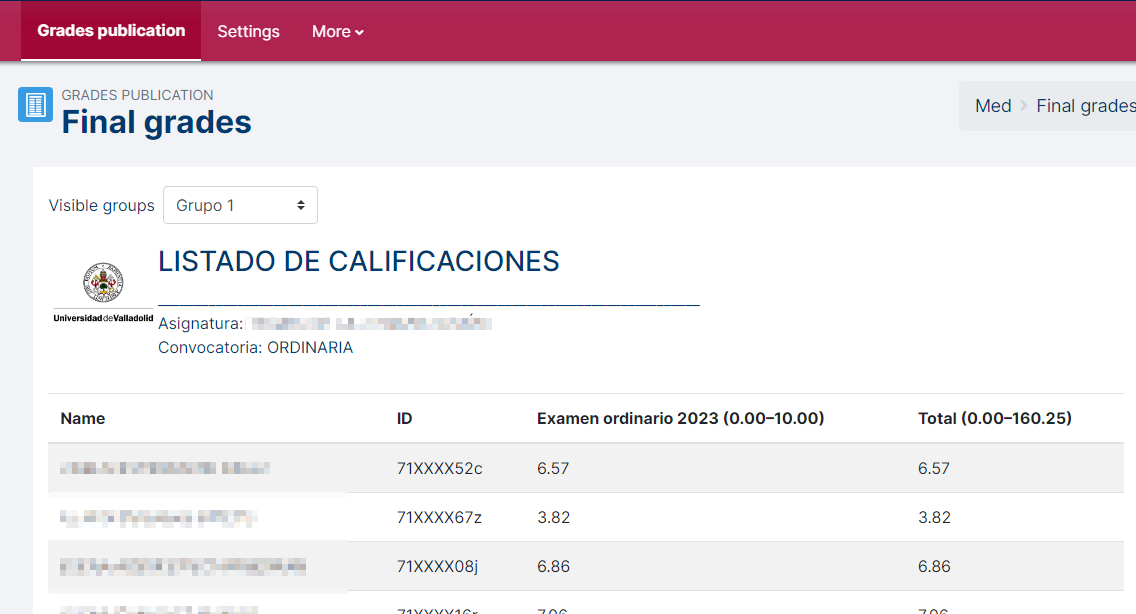
The Moodle Privacy-Friendly Grade Publishing Plugin is a powerful tool designed to enhance transparency in educational institutions while preserving student privacy. This plugin empowers teachers to publish grades for specific assignments, fostering a collaborative and supportive learning environment. It allows instructors to selectively share grades while masking personal IDs, ensuring compliance with privacy regulations.
Features
1. Selective Grade Publishing
Granular Control: Teachers can choose which grades to publish, offering fine-grained control over the information shared with students.
Individual or Group Publishing: Decide whether to give access to the grades to all students or by groups, providing flexibility based on course dynamics.
2. Privacy Masking
Automatic ID Masking: The plugin automatically masks personal IDs, hidding some digits to safeguard student privacy.
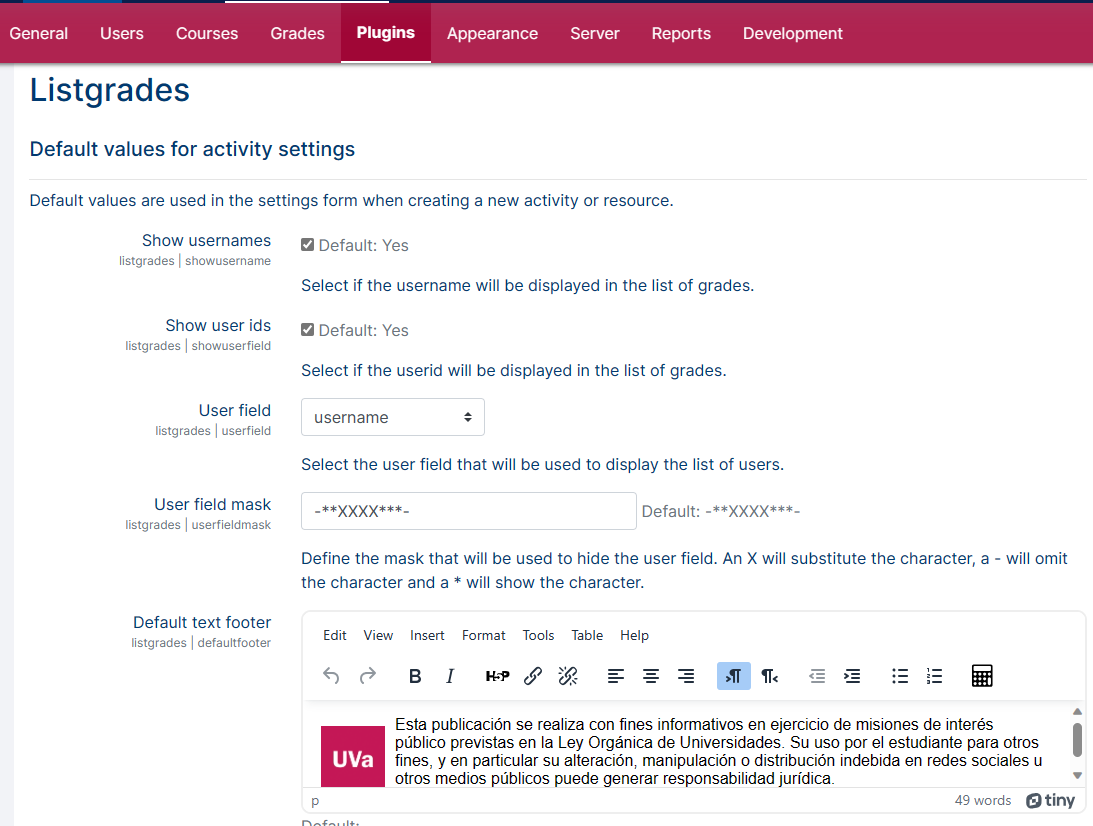
Configurable Masking Options: Customize the masking process based on institutional policies, ensuring compliance with privacy regulations.
3. Transparency and Collaboration
Viewing Options: Students can view the grades of their peers, promoting transparency and collaboration within the learning community.
User-Friendly Interface: A simple and intuitive interface allows both teachers and students to easily navigate and access the published grades.
Installation
- Download the plugin ZIP file from the Moodle Plugins Directory or GitHub repository.
- Upload the ZIP file to the Moodle plugins directory.
- Install the plugin via the Moodle administrator interface.
- Configure the plugin settings to align with your institution's privacy and transparency requirements.
Usage
- Create an instance of the activity
- Select the grade items that you will to publish.
- Select the time window of the publication.
- Set the header and footer texts for decorating the listing.
- Select group mode.
- The grades will be published according to the privacy policy of your institution (contact your admin for details).
Configuration
Access the plugin settings in the Moodle administration panel.
Customize privacy masking options, such as ID replacement patterns and masking algorithms.
Define default settings for new instances.
Compatibility
This plugin is compatible with Moodle version 4.0 and above.
Support and Feedback
For any issues, questions, or feedback, please open an issue on GitHub.
License
This Moodle plugin is released under the GNU General Public License.
See also
- Moodle plugins entry page
- Moodle.org forum discussion thread
- Tutorial and manuals in English and Spanish
Change log
- v1.0.0 Initial release.
- v1.0.3 AEPD ofuscation method.
- v1.0.4 Show collapsed categories.
- v1.0.5 Show grade items feedback messages.
- v1.0.6 Custom fields suport fixed.
v1.0.5 (2024013100)
v1.0.5
Plugin type: Activities
Frankenstyle component name: mod_listgrades
Version build number: 2024013100
Version release name: v1.0.5
Maturity: Stable
Supported Moodle versions: 4.1, 4.2, 4.3
Repository URL (Git): https://github.com/juacas/moodle-mod_listgrades
Repository branch:
Repository tag: v1.0.5
Issue/bug tracker URL: https://github.com/juacas/moodle-mod_listgrades/issues
Moodle Privacy-Friendly Grade Publishing Plugin
Overview
The Moodle Privacy-Friendly Grade Publishing Plugin is a powerful tool designed to enhance transparency in educational institutions while preserving student privacy. This plugin empowers teachers to publish grades for specific assignments, fostering a collaborative and supportive learning environment. It allows instructors to selectively share grades while masking personal IDs, ensuring compliance with privacy regulations.
Features
1. Selective Grade Publishing
Granular Control: Teachers can choose which grades to publish, offering fine-grained control over the information shared with students.
Individual or Group Publishing: Decide whether to give access to the grades to all students or by groups, providing flexibility based on course dynamics.
2. Privacy Masking
Automatic ID Masking: The plugin automatically masks personal IDs, hidding some digits to safeguard student privacy.
Configurable Masking Options: Customize the masking process based on institutional policies, ensuring compliance with privacy regulations.
3. Transparency and Collaboration
Viewing Options: Students can view the grades of their peers, promoting transparency and collaboration within the learning community.
User-Friendly Interface: A simple and intuitive interface allows both teachers and students to easily navigate and access the published grades.
Installation
- Download the plugin ZIP file from the Moodle Plugins Directory or GitHub repository.
- Upload the ZIP file to the Moodle plugins directory.
- Install the plugin via the Moodle administrator interface.
- Configure the plugin settings to align with your institution's privacy and transparency requirements.
Usage
- Create an instance of the activity
- Select the grade items that you will to publish.
- Select the time window of the publication.
- Set the header and footer texts for decorating the listing.
- Select group mode.
- The grades will be published according to the privacy policy of your institution (contact your admin for details).
Configuration
Access the plugin settings in the Moodle administration panel.
Customize privacy masking options, such as ID replacement patterns and masking algorithms.
Define default settings for new instances.
Compatibility
This plugin is compatible with Moodle version 4.0 and above.
Support and Feedback
For any issues, questions, or feedback, please open an issue on GitHub.
License
This Moodle plugin is released under the GNU General Public License.
See also
- Moodle plugins entry page
- Moodle.org forum discussion thread
- Tutorial and manuals in English and Spanish
Change log
- v1.0.0 Initial release.
- v1.0.3 AEPD ofuscation method.
- v1.0.4 Show collapsed categories.
- v1.0.5 Show grade items feedback messages.
v1.0.4 (2024011200)
v1.0.4
Plugin type: Activities
Frankenstyle component name: mod_listgrades
Version build number: 2024011200
Version release name: v1.0.4
Maturity: Stable
Supported Moodle versions: 4.1, 4.2, 4.3
Repository URL (Git): https://github.com/juacas/moodle-mod_listgrades
Repository branch:
Repository tag: v1.0.4
Issue/bug tracker URL: https://github.com/juacas/moodle-mod_listgrades/issues
Moodle Privacy-Friendly Grade Publishing Plugin
Overview
The Moodle Privacy-Friendly Grade Publishing Plugin is a powerful tool designed to enhance transparency in educational institutions while preserving student privacy. This plugin empowers teachers to publish grades for specific assignments, fostering a collaborative and supportive learning environment. It allows instructors to selectively share grades while masking personal IDs, ensuring compliance with privacy regulations.
Features
1. Selective Grade Publishing
Granular Control: Teachers can choose which grades to publish, offering fine-grained control over the information shared with students.
Individual or Group Publishing: Decide whether to give access to the grades to all students or by groups, providing flexibility based on course dynamics.
2. Privacy Masking
Automatic ID Masking: The plugin automatically masks personal IDs, hidding some digits to safeguard student privacy.
Configurable Masking Options: Customize the masking process based on institutional policies, ensuring compliance with privacy regulations.
3. Transparency and Collaboration
Viewing Options: Students can view the grades of their peers, promoting transparency and collaboration within the learning community.
User-Friendly Interface: A simple and intuitive interface allows both teachers and students to easily navigate and access the published grades.
Installation
- Download the plugin ZIP file from the Moodle Plugins Directory or GitHub repository.
- Upload the ZIP file to the Moodle plugins directory.
- Install the plugin via the Moodle administrator interface.
- Configure the plugin settings to align with your institution's privacy and transparency requirements.
Usage
- Create an instance of the activity
- Select the grade items that you will to publish.
- Select the time window of the publication.
- Set the header and footer texts for decorating the listing.
- Select group mode.
- The grades will be published according to the privacy policy of your institution (contact your admin for details).
Configuration
Access the plugin settings in the Moodle administration panel.
Customize privacy masking options, such as ID replacement patterns and masking algorithms.
Define default settings for new instances.
Compatibility
This plugin is compatible with Moodle version 4.0 and above.
Support and Feedback
For any issues, questions, or feedback, please open an issue on GitHub.
License
This Moodle plugin is released under the GNU General Public License.
See also
- Moodle plugins entry page
- Moodle.org forum discussion thread
- Tutorial and manuals in English and Spanish
Change log
- v1.0.0 Initial release.
- v1.0.3 AEPD ofuscation method.
- v1.0.4 Show collapsed categories.
v1.0.3 (2024011000)
v1.0.3
Plugin type: Activities
Frankenstyle component name: mod_listgrades
Version build number: 2024011000
Version release name: v1.0.3
Maturity: Stable
Supported Moodle versions: 4.1, 4.2, 4.3
Repository URL (Git): https://github.com/juacas/moodle-mod_listgrades
Repository branch:
Repository tag: v1.0.3
Issue/bug tracker URL: https://github.com/juacas/moodle-mod_listgrades/issues
Moodle Privacy-Friendly Grade Publishing Plugin
Overview
The Moodle Privacy-Friendly Grade Publishing Plugin is a powerful tool designed to enhance transparency in educational institutions while preserving student privacy. This plugin empowers teachers to publish grades for specific assignments, fostering a collaborative and supportive learning environment. It allows instructors to selectively share grades while masking personal IDs, ensuring compliance with privacy regulations.
Features
1. Selective Grade Publishing
Granular Control: Teachers can choose which grades to publish, offering fine-grained control over the information shared with students.
Individual or Group Publishing: Decide whether to give access to the grades to all students or by groups, providing flexibility based on course dynamics.
2. Privacy Masking
Automatic ID Masking: The plugin automatically masks personal IDs, hidding some digits to safeguard student privacy.
Configurable Masking Options: Customize the masking process based on institutional policies, ensuring compliance with privacy regulations.
3. Transparency and Collaboration
Viewing Options: Students can view the grades of their peers, promoting transparency and collaboration within the learning community.
User-Friendly Interface: A simple and intuitive interface allows both teachers and students to easily navigate and access the published grades.
Installation
- Download the plugin ZIP file from the Moodle Plugins Directory or GitHub repository.
- Upload the ZIP file to the Moodle plugins directory.
- Install the plugin via the Moodle administrator interface.
- Configure the plugin settings to align with your institution's privacy and transparency requirements.
Usage
- Create an instance of the activity
- Select the grade items that you will to publish.
- Select the time window of the publication.
- Set the header and footer texts for decorating the listing.
- Select group mode.
- The grades will be published according to the privacy policy of your institution (contact your admin for details).
Configuration
Access the plugin settings in the Moodle administration panel.
Customize privacy masking options, such as ID replacement patterns and masking algorithms.
Define default settings for new instances.
Compatibility
This plugin is compatible with Moodle version 4.0 and above.
Support and Feedback
For any issues, questions, or feedback, please open an issue on GitHub.
License
This Moodle plugin is released under the GNU General Public License.
See also
- Moodle plugins entry page
- Moodle.org forum discussion thread
- Tutorial and manuals in English and Spanish
Change log
- v1.0.0 Initial release.
- v1.0.3 AEPD ofuscation method.
v1.0.2 (2024010400)
v1.0.2
Plugin type: Activities
Frankenstyle component name: mod_listgrades
Version build number: 2024010400
Version release name: v1.0.2
Maturity: Stable
Supported Moodle versions: 4.1, 4.2, 4.3
Repository URL (Git): https://github.com/juacas/moodle-mod_listgrades
Repository branch:
Repository tag: v1.0.2
Issue/bug tracker URL: https://github.com/juacas/moodle-mod_listgrades/issues
Moodle Privacy-Friendly Grade Publishing Plugin
Overview
The Moodle Privacy-Friendly Grade Publishing Plugin is a powerful tool designed to enhance transparency in educational institutions while preserving student privacy. This plugin empowers teachers to publish grades for specific assignments, fostering a collaborative and supportive learning environment. It allows instructors to selectively share grades while masking personal IDs, ensuring compliance with privacy regulations.
Features
1. Selective Grade Publishing
Granular Control: Teachers can choose which grades to publish, offering fine-grained control over the information shared with students.
Individual or Group Publishing: Decide whether to give access to the grades to all students or by groups, providing flexibility based on course dynamics.
2. Privacy Masking
Automatic ID Masking: The plugin automatically masks personal IDs, hidding some digits to safeguard student privacy.
Configurable Masking Options: Customize the masking process based on institutional policies, ensuring compliance with privacy regulations.
3. Transparency and Collaboration
Viewing Options: Students can view the grades of their peers, promoting transparency and collaboration within the learning community.
User-Friendly Interface: A simple and intuitive interface allows both teachers and students to easily navigate and access the published grades.
Installation
- Download the plugin ZIP file from the Moodle Plugins Directory or GitHub repository.
- Upload the ZIP file to the Moodle plugins directory.
- Install the plugin via the Moodle administrator interface.
- Configure the plugin settings to align with your institution's privacy and transparency requirements.
Usage
- Create an instance of the activity
- Select the grade items that you will to publish.
- Select the time window of the publication.
- Set the header and footer texts for decorating the listing.
- Select group mode.
- The grades will be published according to the privacy policy of your institution (contact your admin for details).
Configuration
Access the plugin settings in the Moodle administration panel.
Customize privacy masking options, such as ID replacement patterns and masking algorithms.
Define default settings for new instances.
Compatibility
This plugin is compatible with Moodle version 4.0 and above.
Support and Feedback
For any issues, questions, or feedback, please open an issue on GitHub.
License
This Moodle plugin is released under the GNU General Public License.
See also
- Moodle plugins entry page
- Moodle.org forum discussion thread
- Tutorial and manuals in English and Spanish
Change log
- v1.0.0 Initial release.
v1.0.1 (2024010304)
v1.0.1
Plugin type: Activities
Frankenstyle component name: mod_listgrades
Version build number: 2024010304
Version release name: v1.0.1
Maturity: Stable
Supported Moodle versions: 4.1, 4.2, 4.3
Repository URL (Git): https://github.com/juacas/moodle-mod_listgrades
Repository branch:
Repository tag: v1.0.1
Issue/bug tracker URL: https://github.com/juacas/moodle-mod_listgrades/issues
Moodle Privacy-Friendly Grade Publishing Plugin
Overview
The Moodle Privacy-Friendly Grade Publishing Plugin is a powerful tool designed to enhance transparency in educational institutions while preserving student privacy. This plugin empowers teachers to publish grades for specific assignments, fostering a collaborative and supportive learning environment. It allows instructors to selectively share grades while masking personal IDs, ensuring compliance with privacy regulations.
Features
1. Selective Grade Publishing
Granular Control: Teachers can choose which grades to publish, offering fine-grained control over the information shared with students.
Individual or Group Publishing: Decide whether to give access to the grades to all students or by groups, providing flexibility based on course dynamics.
2. Privacy Masking
Automatic ID Masking: The plugin automatically masks personal IDs, hidding some digits to safeguard student privacy.
Configurable Masking Options: Customize the masking process based on institutional policies, ensuring compliance with privacy regulations.
3. Transparency and Collaboration
Viewing Options: Students can view the grades of their peers, promoting transparency and collaboration within the learning community.
User-Friendly Interface: A simple and intuitive interface allows both teachers and students to easily navigate and access the published grades.
Installation
- Download the plugin ZIP file from the Moodle Plugins Directory or GitHub repository.
- Upload the ZIP file to the Moodle plugins directory.
- Install the plugin via the Moodle administrator interface.
- Configure the plugin settings to align with your institution's privacy and transparency requirements.
Usage
- Create an instance of the activity
- Select the grade items that you will to publish.
- Select the time window of the publication.
- Set the header and footer texts for decorating the listing.
- Select group mode.
- The grades will be published according to the privacy policy of your institution (contact your admin for details).
Configuration
Access the plugin settings in the Moodle administration panel.
Customize privacy masking options, such as ID replacement patterns and masking algorithms.
Define default settings for new instances.
Compatibility
This plugin is compatible with Moodle version 4.0 and above.
Support and Feedback
For any issues, questions, or feedback, please open an issue on GitHub.
License
This Moodle plugin is released under the GNU General Public License.
See also
- Moodle plugins entry page
- Moodle.org forum discussion thread
- Tutorial and manuals in English and Spanish
Change log
- v1.0.0 Initial release.
v1.0.0a (2024010303)
v1.0.0a
Plugin type: Activities
Frankenstyle component name: mod_listgrades
Version build number: 2024010303
Version release name: v1.0.0a
Maturity: Stable
Supported Moodle versions: 4.1, 4.2, 4.3
Repository URL (Git): https://github.com/juacas/moodle-mod_listgrades
Repository branch:
Repository tag: v1.0.0b
Issue/bug tracker URL: https://github.com/juacas/moodle-mod_listgrades/issues
Moodle Privacy-Friendly Grade Publishing Plugin
Overview
The Moodle Privacy-Friendly Grade Publishing Plugin is a powerful tool designed to enhance transparency in educational institutions while preserving student privacy. This plugin empowers teachers to publish grades for specific assignments, fostering a collaborative and supportive learning environment. It allows instructors to selectively share grades while masking personal IDs, ensuring compliance with privacy regulations.
Features
1. Selective Grade Publishing
Granular Control: Teachers can choose which grades to publish, offering fine-grained control over the information shared with students.
Individual or Group Publishing: Decide whether to give access to the grades to all students or by groups, providing flexibility based on course dynamics.
2. Privacy Masking
Automatic ID Masking: The plugin automatically masks personal IDs, hidding some digits to safeguard student privacy.
Configurable Masking Options: Customize the masking process based on institutional policies, ensuring compliance with privacy regulations.
3. Transparency and Collaboration
Viewing Options: Students can view the grades of their peers, promoting transparency and collaboration within the learning community.
User-Friendly Interface: A simple and intuitive interface allows both teachers and students to easily navigate and access the published grades.
Installation
- Download the plugin ZIP file from the Moodle Plugins Directory or GitHub repository.
- Upload the ZIP file to the Moodle plugins directory.
- Install the plugin via the Moodle administrator interface.
- Configure the plugin settings to align with your institution's privacy and transparency requirements.
Usage
- Create an instance of the activity
- Select the grade items that you will to publish.
- Select the time window of the publication.
- Set the header and footer texts for decorating the listing.
- Select group mode.
- The grades will be published according to the privacy policy of your institution (contact your admin for details).
Configuration
Access the plugin settings in the Moodle administration panel.
Customize privacy masking options, such as ID replacement patterns and masking algorithms.
Define default settings for new instances.
Compatibility
This plugin is compatible with Moodle version 4.0 and above.
Support and Feedback
For any issues, questions, or feedback, please open an issue on GitHub.
License
This Moodle plugin is released under the GNU General Public License.
See also
- Moodle plugins entry page
- Moodle.org forum discussion thread
- Tutorial and manuals in English and Spanish
Change log
- v1.0.0 Initial release.
(2024010301)
Plugin type: Activities
Frankenstyle component name: mod_listgrades
Version build number: 2024010301
Version release name:
Maturity: Alpha
Supported Moodle versions: 4.1, 4.2, 4.3
Repository URL (Git): https://github.com/juacas/moodle-mod_listgrades
Repository branch:
Repository tag: v1.0.0
Issue/bug tracker URL: https://github.com/juacas/moodle-mod_listgrades/issues
Moodle Privacy-Friendly Grade Publishing Plugin
Overview
The Moodle Privacy-Friendly Grade Publishing Plugin is a powerful tool designed to enhance transparency in educational institutions while preserving student privacy. This plugin empowers teachers to publish grades for specific assignments, fostering a collaborative and supportive learning environment. It allows instructors to selectively share grades while masking personal IDs, ensuring compliance with privacy regulations.
Features
1. Selective Grade Publishing
Granular Control: Teachers can choose which grades to publish, offering fine-grained control over the information shared with students.
Individual or Group Publishing: Decide whether to give access to the grades to all students or by groups, providing flexibility based on course dynamics.
2. Privacy Masking
Automatic ID Masking: The plugin automatically masks personal IDs, hidding some digits to safeguard student privacy.
Configurable Masking Options: Customize the masking process based on institutional policies, ensuring compliance with privacy regulations.
3. Transparency and Collaboration
Viewing Options: Students can view the grades of their peers, promoting transparency and collaboration within the learning community.
User-Friendly Interface: A simple and intuitive interface allows both teachers and students to easily navigate and access the published grades.
Installation
- Download the plugin ZIP file from the Moodle Plugins Directory or GitHub repository.
- Upload the ZIP file to the Moodle plugins directory.
- Install the plugin via the Moodle administrator interface.
- Configure the plugin settings to align with your institution's privacy and transparency requirements.
Usage
- Create an instance of the activity
- Select the grade items that you will to publish.
- Select the time window of the publication.
- Set the header and footer texts for decorating the listing.
- Select group mode.
- The grades will be published according to the privacy policy of your institution (contact your admin for details).
Configuration
Access the plugin settings in the Moodle administration panel.
Customize privacy masking options, such as ID replacement patterns and masking algorithms.
Define default settings for new instances.
Compatibility
This plugin is compatible with Moodle version 4.0 and above.
Support and Feedback
For any issues, questions, or feedback, please open an issue on GitHub.
License
This Moodle plugin is released under the GNU General Public License.
See also
- Moodle plugins entry page
- Moodle.org forum discussion thread
- Tutorial and manuals in English and Spanish
Change log
- v1.0.0 Initial release.
v1.0.0 (2024010302)
v1.0.0
Plugin type: Activities
Frankenstyle component name: mod_listgrades
Version build number: 2024010302
Version release name: v1.0.0
Maturity: Stable
Supported Moodle versions: 4.1, 4.2, 4.3
Repository URL (Git): https://github.com/juacas/moodle-mod_listgrades
Repository branch:
Repository tag:
Issue/bug tracker URL: https://github.com/juacas/moodle-mod_listgrades/issues
Moodle Privacy-Friendly Grade Publishing Plugin
Overview
The Moodle Privacy-Friendly Grade Publishing Plugin is a powerful tool designed to enhance transparency in educational institutions while preserving student privacy. This plugin empowers teachers to publish grades for specific assignments, fostering a collaborative and supportive learning environment. It allows instructors to selectively share grades while masking personal IDs, ensuring compliance with privacy regulations.
Features
1. Selective Grade Publishing
Granular Control: Teachers can choose which grades to publish, offering fine-grained control over the information shared with students.
Individual or Group Publishing: Decide whether to give access to the grades to all students or by groups, providing flexibility based on course dynamics.
2. Privacy Masking
Automatic ID Masking: The plugin automatically masks personal IDs, hidding some digits to safeguard student privacy.
Configurable Masking Options: Customize the masking process based on institutional policies, ensuring compliance with privacy regulations.
3. Transparency and Collaboration
Viewing Options: Students can view the grades of their peers, promoting transparency and collaboration within the learning community.
User-Friendly Interface: A simple and intuitive interface allows both teachers and students to easily navigate and access the published grades.
Installation
- Download the plugin ZIP file from the Moodle Plugins Directory or GitHub repository.
- Upload the ZIP file to the Moodle plugins directory.
- Install the plugin via the Moodle administrator interface.
- Configure the plugin settings to align with your institution's privacy and transparency requirements.
Usage
- Create an instance of the activity
- Select the grade items that you will to publish.
- Select the time window of the publication.
- Set the header and footer texts for decorating the listing.
- Select group mode.
- The grades will be published according to the privacy policy of your institution (contact your admin for details).
Configuration
Access the plugin settings in the Moodle administration panel.
Customize privacy masking options, such as ID replacement patterns and masking algorithms.
Define default settings for new instances.
Compatibility
This plugin is compatible with Moodle version 4.0 and above.
Support and Feedback
For any issues, questions, or feedback, please open an issue on GitHub.
License
This Moodle plugin is released under the GNU General Public License.
See also
- Moodle plugins entry page
- Moodle.org forum discussion thread
- Tutorial and manuals in English and Spanish
Change log
- v1.0.0 Initial release.