IP address list quiz access rule
Maintained by
Вадим Дворовенко
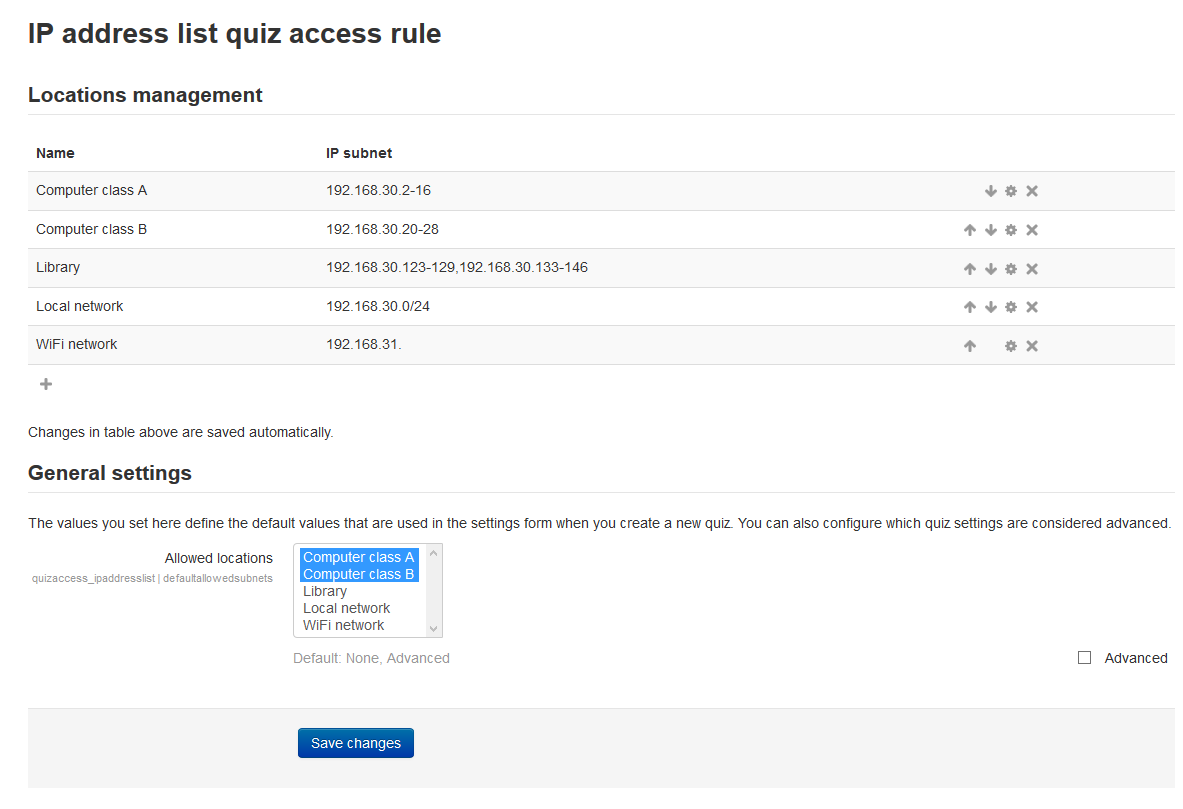
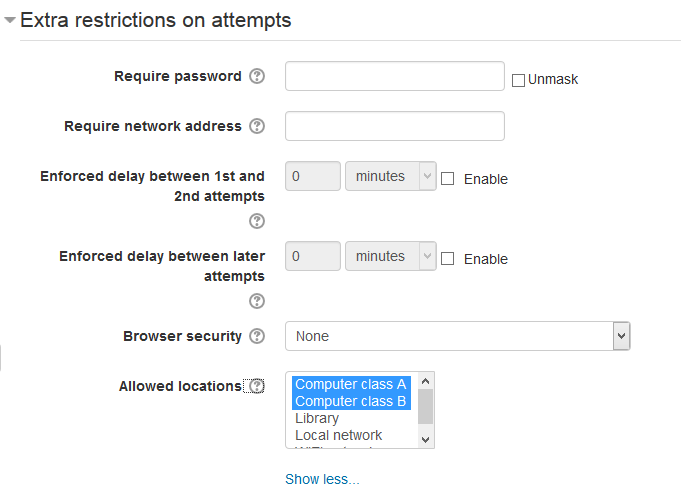
This plugin works just as usual limitation on IP, but the list of subnets with names (eg, library, local area network, a computer lab, etc.) enters the site administrator. Teachers in tests simply select the required subnet.
Comments
Product ratings and reviews are coming to Moodle Marketplace. Until then, existing comments remain available to read, but new posts have been disabled.
Yeah, I was solving very same usability issues with the component selector field at the AMOS translator filter page (https://lang.moodle.org/local/amos/view.php). At the end I concluded that the list of checkboxes works best for multi-selection purpose and the issue with the space occupied by a long list can be solved via CSS by setting maximum height of the wrapping div.
That's common moodle problem with multiselect - it's shown such way on PC. You should use Ctrl to unselect item, as written in caption. On some touchscreen browser this list is shown as list with checkboxes, that's much easier to use.
Currently we have admin_setting_configmulticheckbox, but we do not have same element for mform. On the other hand I see, that if i use list of checkboxes, they will use a lot of screen size, if there are many items in list. Current list is limited in height.
I do not want to code "allow from everywhere" predefined element in this list, as it may lead to contradiction, when you select such item and something else.
Currently site administrator may add such item manually, by adding ip 0.0.0.0/0 to list
I already experienced this "stuck on the new settings page" thing in other plugin (could not find it now). If I recall correctly, it might be caused by the configmultiselect $choices being empty array, or something like that.
I'll be honest, I didn't even know there was such a plugin as a "quiz access rule" until you submitted this.
When I first installed it, it went to the new settings page (like all plugins do). It showed me a page with "New settings - IP address list quiz access rule" and a Save button, but there were no settings to make. Clicking the "Save changes" button just kept redisplaying the page. I was able to break out by going back to the site main URL.
I was able to edit the settings from the main quiz activity settings.
One other small problem. If I select a location set for a quiz, there doesn't seem to be a way to "unselect" it except by selecting another set. How do I choose to make the quiz available to anyone once I have selected location initially?
http://integration.moodle.org/job/Precheck%20remote%20branch/23141/artifact/work/smurf.html