Export book-chapters PDF
Versions
Current version
v4.4 (2024102500)
v4.4
Plugin type: Blocks
Frankenstyle component name: block_bookchapter_pdf
Version build number: 2024102500
Version release name: v4.4
Maturity: Stable
Supported Moodle versions: 3.10, 3.11, 3.9, 4.0, 4.1
Repository URL (Git): https://github.com/LucaDR1998/moodle-block_bookchapter_pdf/tree/main
Repository branch:
Repository tag:
Issue/bug tracker URL: https://github.com/LucaDR1998/moodle/issues
Export Book Chapters to PDF
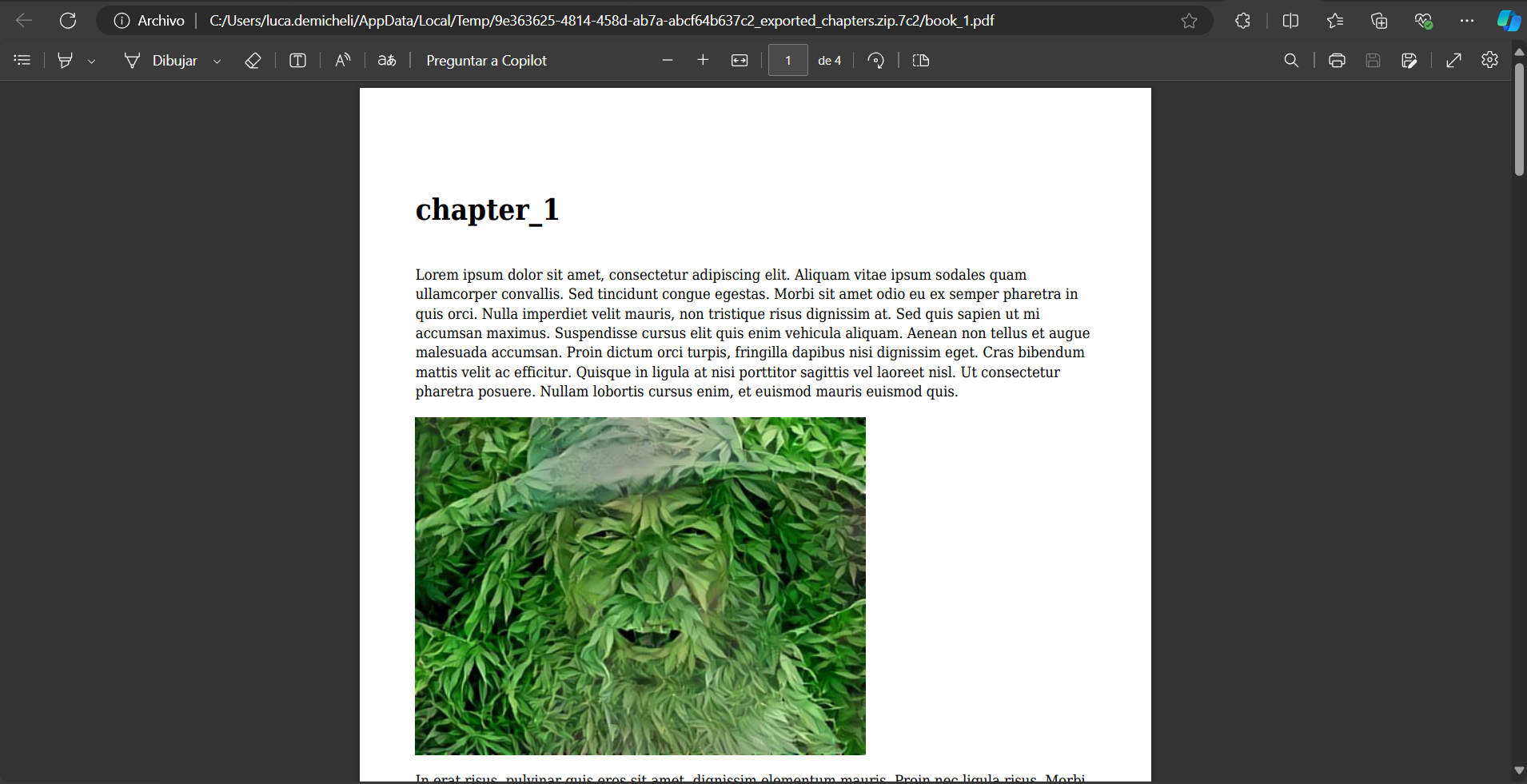
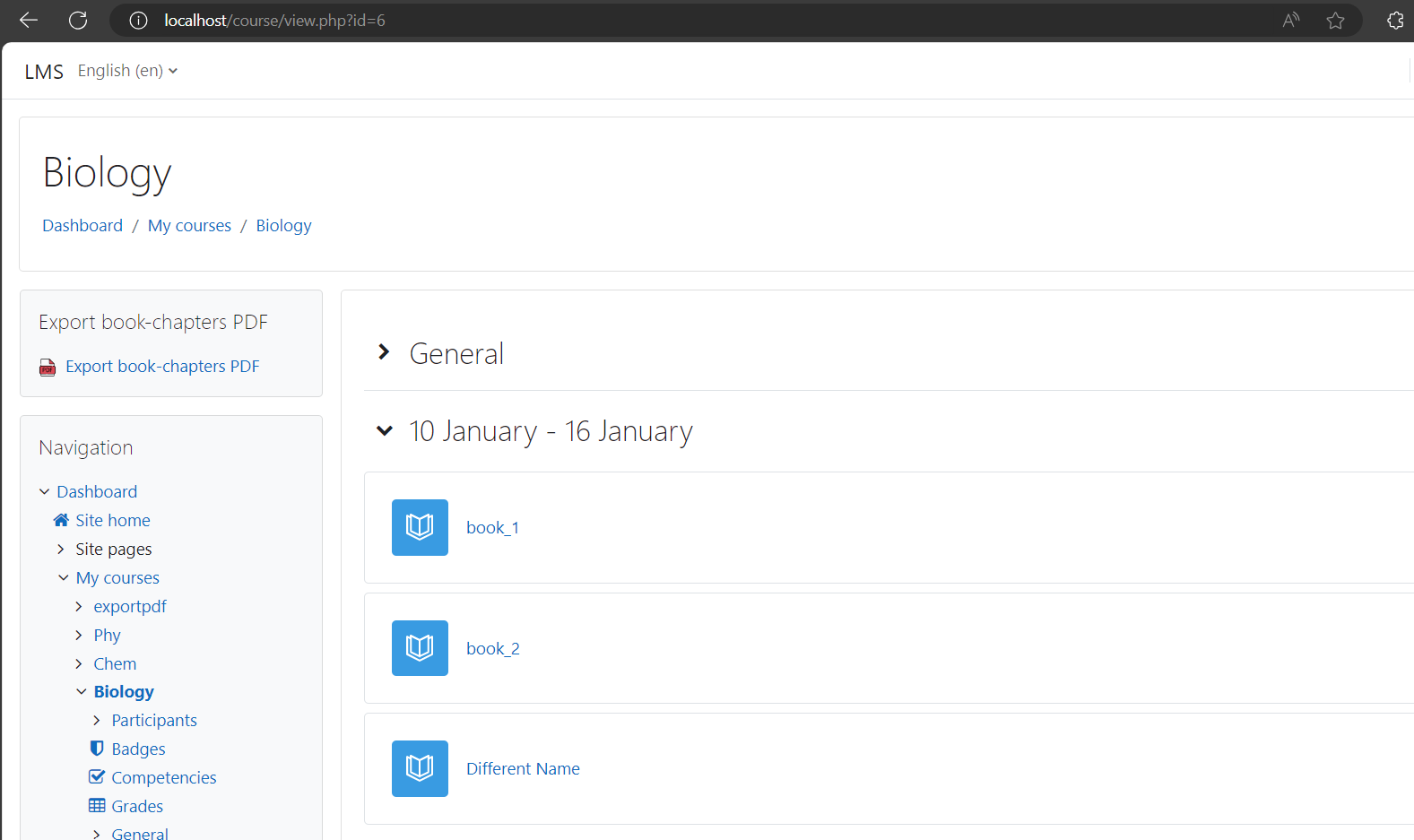
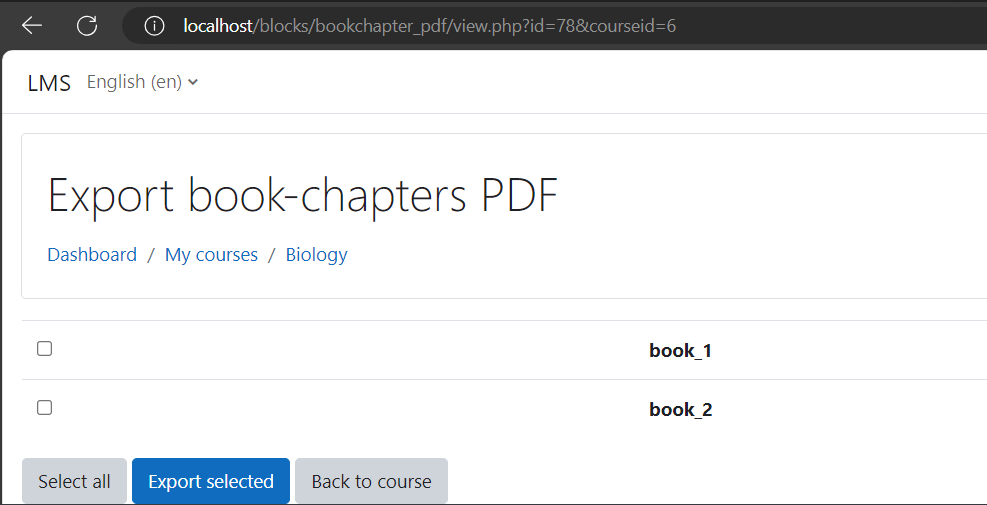
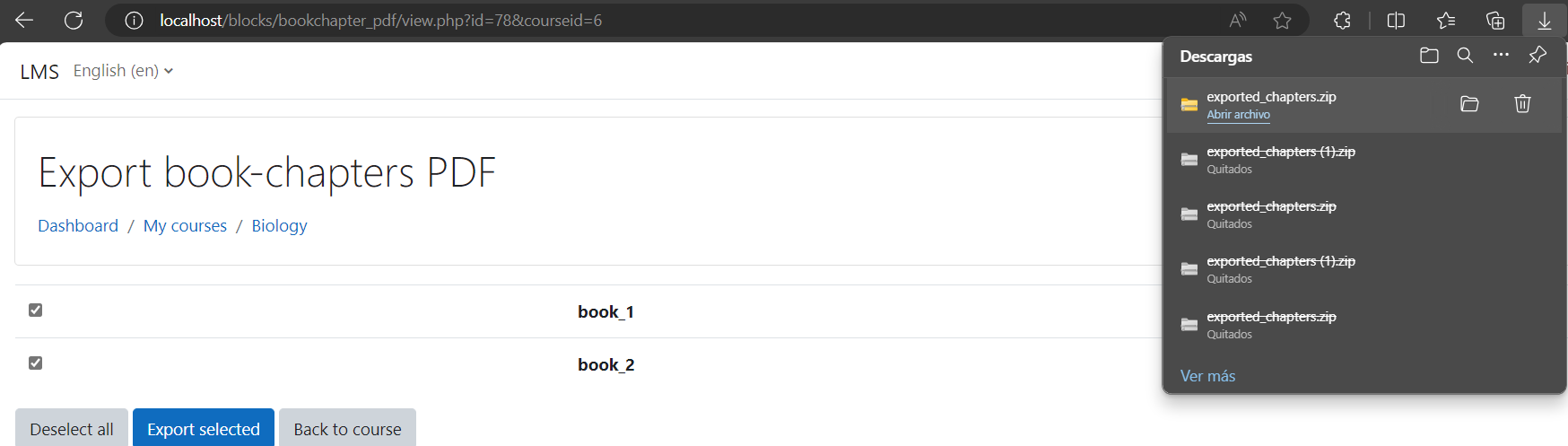
The Export Book Chapters Block is a Moodle block plugin that provides a convenient way for users to download book chapters in PDF format directly from their course.
Key Features:
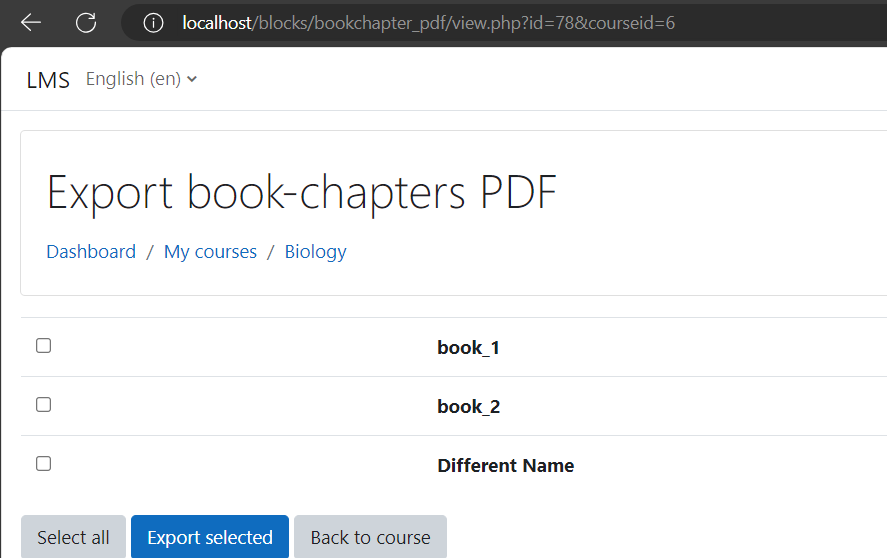
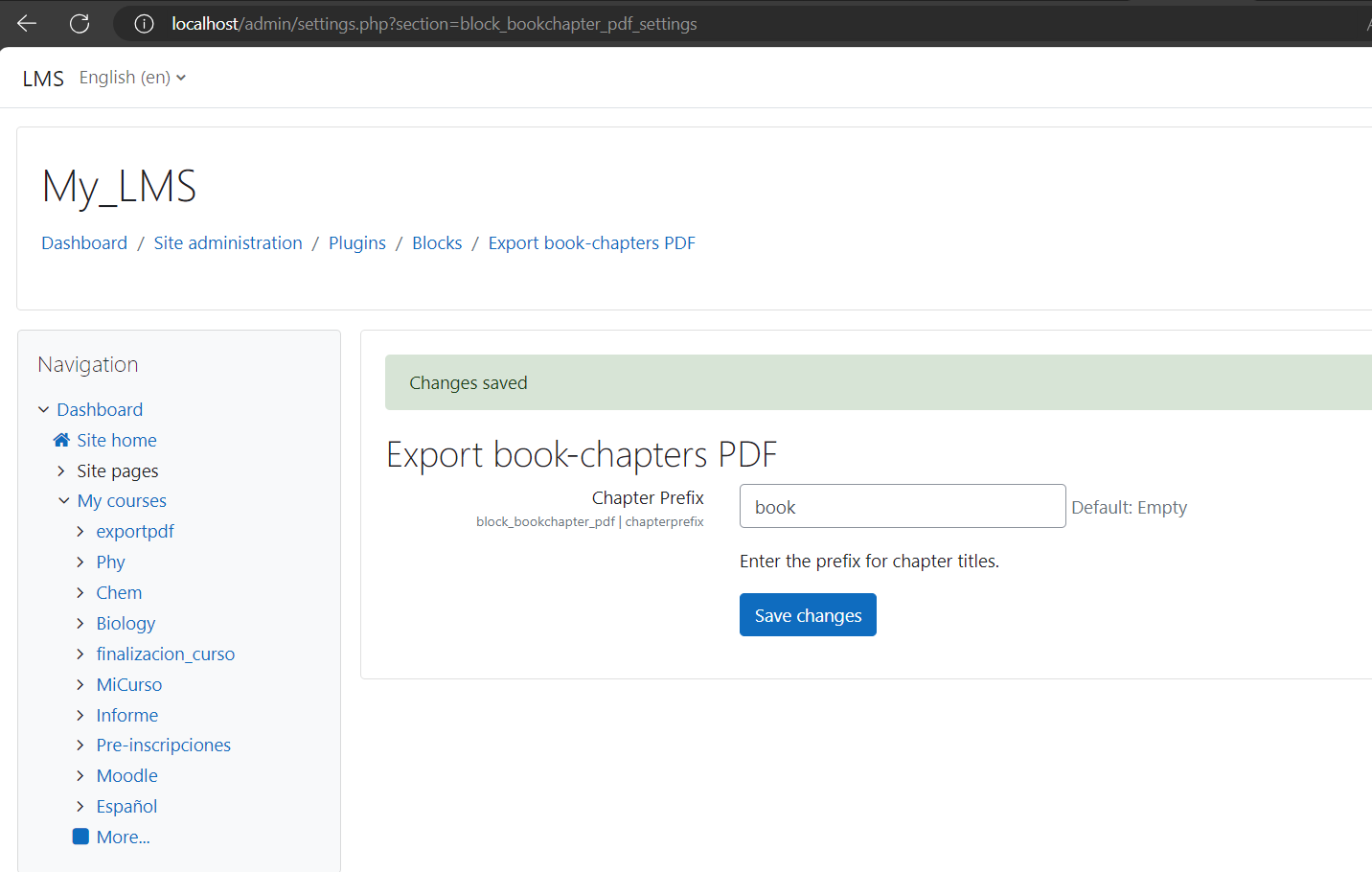
- Keyword-Based Filtering (Book Prefix): Users can configure the block to filter by a specific keyword (prefix) within the book title. Only books that contain this prefix will be included in the export list, making it easier to focus on specific books.
- Full Book Download Option: If the keyword (prefix) is left empty, the block allows users to download all chapters of all books in the course, providing full flexibility.
- Security Enhancements: The block respects Moodle's course restrictions and visibility settings, ensuring that only accessible and visible content can be exported. Students won't be able to download books that are restricted or hidden.
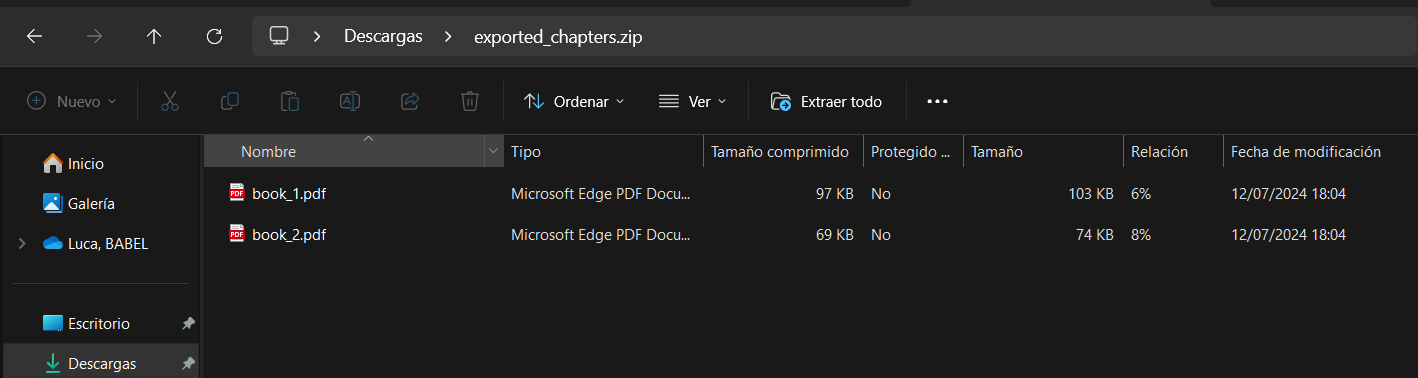
- Zip File Export: The exported chapters are packaged into a ZIP file named
exported_chapters.zip, ensuring an organized and easy-to-handle download. - Pagination Support: The plugin ensures that the downloaded PDFs maintain the original pagination of the book chapters, providing a seamless reading experience.
This block is especially useful for courses with extensive book content, allowing students to easily access and download the material for offline reading and study. It integrates seamlessly into any Moodle course, providing a user-friendly interface for both teachers and students.
Book Prefix Explained:
The Book Prefix feature helps course admins or teachers filter the export by selecting books that start with the specified prefix. For example, if you set the prefix to "Unit 1", only books with titles that begin with "Unit 1" will appear in the export list. If no prefix is provided, all available books will be listed for download.
This ensures that only the relevant books matching the prefix will be listed, simplifying the selection process.
Installing via uploaded ZIP file
- Log in to your Moodle site as an admin and go to Site administration >
Plugins > Install plugins. - Upload the ZIP file with the plugin code. You should only be prompted to add
extra details if your plugin type is not automatically detected. - Check the plugin validation report and finish the installation.
Installing manually
The plugin can be also installed by putting the contents of this directory to
{your/moodle/dirroot}/blocks/bookchapter_pdf
Afterwards, log in to your Moodle site as an admin and go to Site administration >
Notifications to complete the installation.
Alternatively, you can run
$ php admin/cli/upgrade.php
to complete the installation from the command line.
License
2024 Luca Demicheli Rubio lucademichelirubio.portfolio@gmail.com
This program is free software: you can redistribute it and/or modify it under
the terms of the GNU General Public License as published by the Free Software
Foundation, either version 3 of the License, or (at your option) any later
version.
This program is distributed in the hope that it will be useful, but WITHOUT ANY
WARRANTY; without even the implied warranty of MERCHANTABILITY or FITNESS FOR A
PARTICULAR PURPOSE. See the GNU General Public License for more details.
You should have received a copy of the GNU General Public License along with
this program. If not, see https://www.gnu.org/licenses/.
v4.3 (2024102400)
v4.3
Plugin type: Blocks
Frankenstyle component name: block_bookchapter_pdf
Version build number: 2024102400
Version release name: v4.3
Maturity: Stable
Supported Moodle versions: 3.10, 3.11, 3.9, 4.0, 4.1
Repository URL (Git): https://github.com/LucaDR1998/moodle-block_bookchapter_pdf/tree/main
Repository branch:
Repository tag:
Issue/bug tracker URL: https://github.com/LucaDR1998/moodle/issues
Export Book Chapters to PDF
The Export Book Chapters Block is a Moodle block plugin that provides a convenient way for users to download book chapters in PDF format directly from their course.
Key Features:
- Keyword-Based Filtering (Book Prefix): Users can configure the block to filter by a specific keyword (prefix) within the book title. Only books that contain this prefix will be included in the export list, making it easier to focus on specific books.
- Full Book Download Option: If the keyword (prefix) is left empty, the block allows users to download all chapters of all books in the course, providing full flexibility.
- Security Enhancements: The block respects Moodle's course restrictions and visibility settings, ensuring that only accessible and visible content can be exported. Students won't be able to download books that are restricted or hidden.
- Zip File Export: The exported chapters are packaged into a ZIP file named
exported_chapters.zip, ensuring an organized and easy-to-handle download. - Pagination Support: The plugin ensures that the downloaded PDFs maintain the original pagination of the book chapters, providing a seamless reading experience.
This block is especially useful for courses with extensive book content, allowing students to easily access and download the material for offline reading and study. It integrates seamlessly into any Moodle course, providing a user-friendly interface for both teachers and students.
Book Prefix Explained:
The Book Prefix feature helps course admins or teachers filter the export by selecting books that start with the specified prefix. For example, if you set the prefix to "Unit 1", only books with titles that begin with "Unit 1" will appear in the export list. If no prefix is provided, all available books will be listed for download.
This ensures that only the relevant books matching the prefix will be listed, simplifying the selection process.
Installing via uploaded ZIP file
- Log in to your Moodle site as an admin and go to Site administration >
Plugins > Install plugins. - Upload the ZIP file with the plugin code. You should only be prompted to add
extra details if your plugin type is not automatically detected. - Check the plugin validation report and finish the installation.
Installing manually
The plugin can be also installed by putting the contents of this directory to
{your/moodle/dirroot}/blocks/bookchapter_pdf
Afterwards, log in to your Moodle site as an admin and go to Site administration >
Notifications to complete the installation.
Alternatively, you can run
$ php admin/cli/upgrade.php
to complete the installation from the command line.
License
2024 Luca Demicheli Rubio lucademichelirubio.portfolio@gmail.com
This program is free software: you can redistribute it and/or modify it under
the terms of the GNU General Public License as published by the Free Software
Foundation, either version 3 of the License, or (at your option) any later
version.
This program is distributed in the hope that it will be useful, but WITHOUT ANY
WARRANTY; without even the implied warranty of MERCHANTABILITY or FITNESS FOR A
PARTICULAR PURPOSE. See the GNU General Public License for more details.
You should have received a copy of the GNU General Public License along with
this program. If not, see https://www.gnu.org/licenses/.
v4.2 (2024102301)
v4.2
Plugin type: Blocks
Frankenstyle component name: block_bookchapter_pdf
Version build number: 2024102301
Version release name: v4.2
Maturity: Stable
Supported Moodle versions: 3.10, 3.11, 3.9, 4.0, 4.1
Repository URL (Git): https://github.com/LucaDR1998/moodle-block_bookchapter_pdf/tree/main
Repository branch:
Repository tag:
Issue/bug tracker URL: https://github.com/LucaDR1998/moodle/issues
Export Book Chapters to PDF
The Export Book Chapters Block is a Moodle block plugin that provides a convenient way for users to download book chapters in PDF format directly from their course.
Key Features:
- Keyword-Based Filtering (Book Prefix): Users can specify a keyword (prefix) in the block's configuration. Only books whose titles contain this prefix will be included in the download. This feature allows selective exports of specific books, making it easier to filter and focus on relevant content.
- Full Book Download Option: If the keyword (Book Prefix) field is left empty, the block allows users to download all books in the course, offering maximum flexibility.
- Security Enhancements: The block respects course access restrictions and visibility settings. Students will not be able to export book chapters if the book is hidden or restricted, ensuring that only authorized users can access specific content.
- Zip File Export: The exported chapters are packaged into a ZIP file named
exported_chapters.zip, ensuring an organized and easy-to-handle download. - Pagination Support: The plugin ensures that the downloaded PDFs maintain the original pagination of the book chapters, providing a seamless reading experience.
This block is especially useful for courses with extensive book content, allowing students to easily access and download the material for offline reading and study. It integrates seamlessly into any Moodle course, providing a user-friendly interface for both teachers and students.
Book Prefix Explained:
The Book Prefix feature allows course administrators or teachers to filter books by a keyword. For example, if you set the prefix to "Unit 1", only books that start with "Unit 1" in the title will be exported.
Installing via uploaded ZIP file
- Log in to your Moodle site as an admin and go to Site administration >
Plugins > Install plugins. - Upload the ZIP file with the plugin code. You should only be prompted to add
extra details if your plugin type is not automatically detected. - Check the plugin validation report and finish the installation.
Installing manually
The plugin can be also installed by putting the contents of this directory to
{your/moodle/dirroot}/blocks/bookchapter_pdf
Afterwards, log in to your Moodle site as an admin and go to Site administration >
Notifications to complete the installation.
Alternatively, you can run
$ php admin/cli/upgrade.php
to complete the installation from the command line.
License
2024 Luca Demicheli Rubio lucademichelirubio.portfolio@gmail.com
This program is free software: you can redistribute it and/or modify it under
the terms of the GNU General Public License as published by the Free Software
Foundation, either version 3 of the License, or (at your option) any later
version.
This program is distributed in the hope that it will be useful, but WITHOUT ANY
WARRANTY; without even the implied warranty of MERCHANTABILITY or FITNESS FOR A
PARTICULAR PURPOSE. See the GNU General Public License for more details.
You should have received a copy of the GNU General Public License along with
this program. If not, see https://www.gnu.org/licenses/.
v4.1 (2024102300)
v4.1
Plugin type: Blocks
Frankenstyle component name: block_bookchapter_pdf
Version build number: 2024102300
Version release name: v4.1
Maturity: Stable
Supported Moodle versions: 3.10, 3.9, 4.0, 4.1
Repository URL (Git): https://github.com/LucaDR1998/moodle-block_bookchapter_pdf/tree/main
Repository branch:
Repository tag:
Issue/bug tracker URL: https://github.com/LucaDR1998/moodle/issues
Export Book Chapters to PDF
The Export Book Chapters Block is a Moodle block plugin that provides a convenient way for users to download book chapters in PDF format directly from their course.
Key Features:
- Keyword-Based Filtering (Chapter Prefix): Users can specify a keyword (prefix) in the block's configuration. Only book chapters whose titles contain this prefix will be included in the download. This feature allows selective exports of specific chapters, making it easier to filter and focus on relevant content.
- Full Book Download Option: If the keyword (Chapter Prefix) field is left empty, the block allows users to download all chapters of all books in the course, offering maximum flexibility.
- Security Enhancements: The block respects course access restrictions and visibility settings. Students will not be able to export book chapters if the book is hidden or restricted, ensuring that only authorized users can access specific content.
- Zip File Export: The exported chapters are packaged into a ZIP file named
exported_chapters.zip, ensuring an organized and easy-to-handle download. - Pagination Support: The plugin ensures that the downloaded PDFs maintain the original pagination of the book chapters, providing a seamless reading experience.
This block is especially useful for courses with extensive book content, allowing students to easily access and download the material for offline reading and study. It integrates seamlessly into any Moodle course, providing a user-friendly interface for both teachers and students.
Chapter Prefix Explained:
The Chapter Prefix feature allows course administrators or teachers to filter book chapters by a keyword. For example, if you set the prefix to "Unit 1", only chapters that start with "Unit 1" in the title will be exported. If no prefix is specified, the entire book will be available for export.
Installing via uploaded ZIP file
- Log in to your Moodle site as an admin and go to Site administration >
Plugins > Install plugins. - Upload the ZIP file with the plugin code. You should only be prompted to add
extra details if your plugin type is not automatically detected. - Check the plugin validation report and finish the installation.
Installing manually
The plugin can be also installed by putting the contents of this directory to
{your/moodle/dirroot}/blocks/bookchapter_pdf
Afterwards, log in to your Moodle site as an admin and go to Site administration >
Notifications to complete the installation.
Alternatively, you can run
$ php admin/cli/upgrade.php
to complete the installation from the command line.
License
2024 Luca Demicheli Rubio lucademichelirubio.portfolio@gmail.com
This program is free software: you can redistribute it and/or modify it under
the terms of the GNU General Public License as published by the Free Software
Foundation, either version 3 of the License, or (at your option) any later
version.
This program is distributed in the hope that it will be useful, but WITHOUT ANY
WARRANTY; without even the implied warranty of MERCHANTABILITY or FITNESS FOR A
PARTICULAR PURPOSE. See the GNU General Public License for more details.
You should have received a copy of the GNU General Public License along with
this program. If not, see https://www.gnu.org/licenses/.
v3.0 (2024070900)
v3.0
Plugin type: Blocks
Frankenstyle component name: block_bookchapter_pdf
Version build number: 2024070900
Version release name: v3.0
Maturity: Stable
Supported Moodle versions: 3.10, 3.9, 4.0, 4.1
Repository URL (Git):
Repository branch:
Repository tag:
Issue/bug tracker URL: https://github.com/LucaDR1998/moodle/issues
Export Book Chapters to PDF
The Export Book Chapters Block is a Moodle block plugin that provides a convenient way for users to download book chapters in PDF format directly from their course.
Key Features:
Keyword-Based Filtering: Users can specify a keyword in the block's configuration. Only book chapters containing this keyword will be included in the download.
Full Book Download Option: If the keyword field is left empty, the block allows users to download all chapters of all books in the course.
Zip File Export: The exported chapters are packaged into a ZIP file named exported_chapters.zip, ensuring an organized and easy-to-handle download.
Pagination Support: The plugin ensures that the downloaded PDFs maintain the original pagination of the book chapters, providing a seamless reading experience.
This block is especially useful for courses with extensive book content, allowing students to easily access and download the material for offline reading and study. It integrates seamlessly into any Moodle course, providing a user-friendly interface for both teachers and students.
Installation and Configuration:
Installation: Install the plugin through the Moodle plugin installer.
Configuration: Add the block to your course and configure it by specifying a keyword if desired.
Usage: Users can click the download button to get a ZIP file containing the filtered or full book chapters in PDF format.
With the Export Book Chapters Block, managing and distributing course book content has never been easier. Simplify your course material downloads and enhance the learning experience for your students with this essential Moodle plugin.
Installing via uploaded ZIP file
- Log in to your Moodle site as an admin and go to Site administration >
Plugins > Install plugins. - Upload the ZIP file with the plugin code. You should only be prompted to add
extra details if your plugin type is not automatically detected. - Check the plugin validation report and finish the installation.
Installing manually
The plugin can be also installed by putting the contents of this directory to
{your/moodle/dirroot}/blocks/bookchapter_pdf
Afterwards, log in to your Moodle site as an admin and go to Site administration >
Notifications to complete the installation.
Alternatively, you can run
$ php admin/cli/upgrade.php
to complete the installation from the command line.
License
2024 Luca Demicheli Rubio lucademichelirubio.portfolio@gmail.com
This program is free software: you can redistribute it and/or modify it under
the terms of the GNU General Public License as published by the Free Software
Foundation, either version 3 of the License, or (at your option) any later
version.
This program is distributed in the hope that it will be useful, but WITHOUT ANY
WARRANTY; without even the implied warranty of MERCHANTABILITY or FITNESS FOR A
PARTICULAR PURPOSE. See the GNU General Public License for more details.
You should have received a copy of the GNU General Public License along with
this program. If not, see https://www.gnu.org/licenses/.