Generative AI Question Bank
Versions
Current version
1.1.0 (2026041200)
1.1.0
Plugin type: Question bank plugins
Frankenstyle component name: qbank_genai
Version build number: 2026041200
Version release name: 1.1.0
Maturity: Stable
Supported Moodle versions: 4.2, 4.3, 4.4, 4.5, 5.0, 5.1, 5.2
Repository URL (Git): https://github.com/cgrevisse/moodle-qbank_genai
Repository branch:
Repository tag: v1.1.0
Issue/bug tracker URL: https://github.com/cgrevisse/moodle-qbank_genai/issues
Generative AI Question Bank
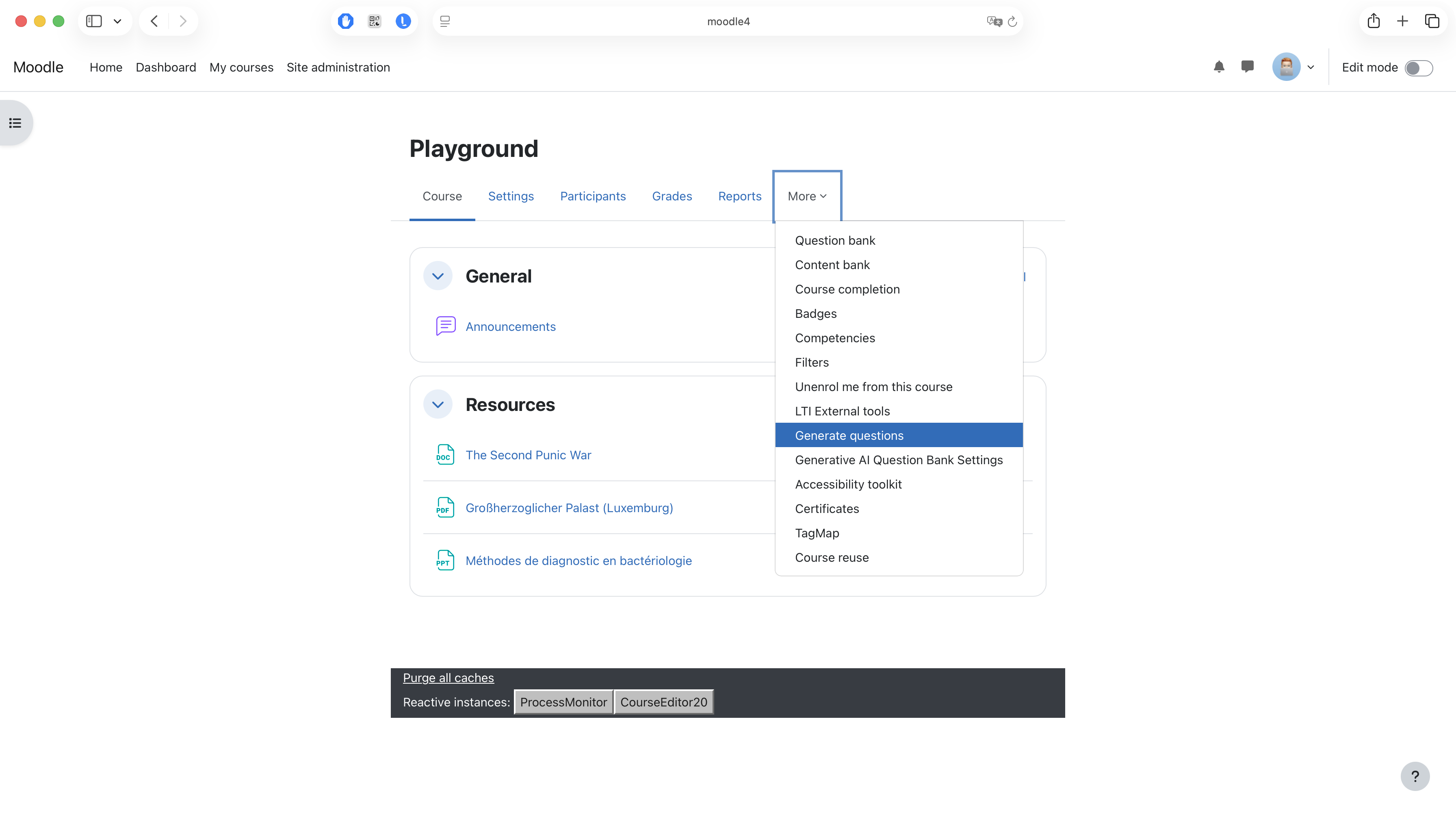
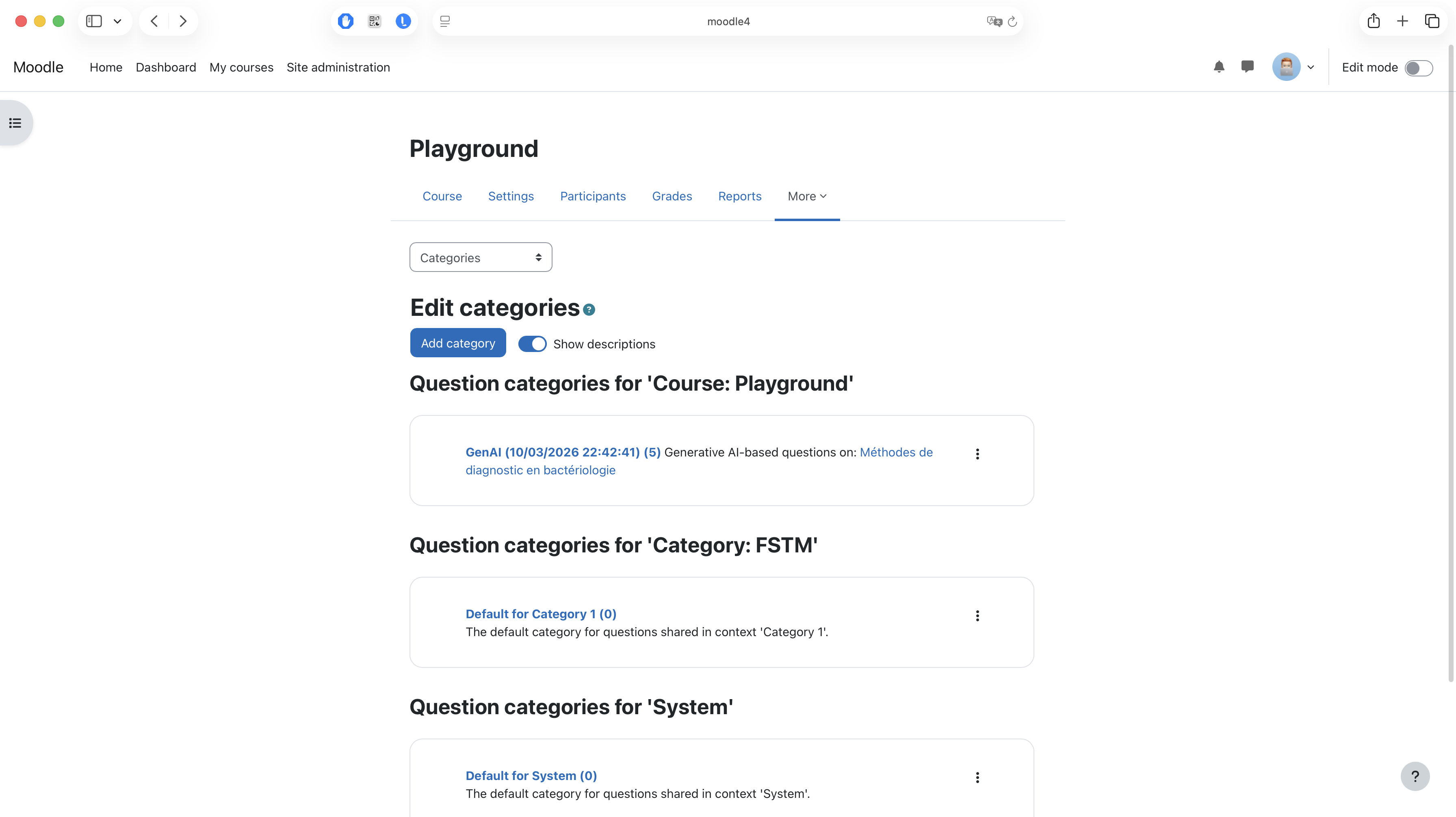
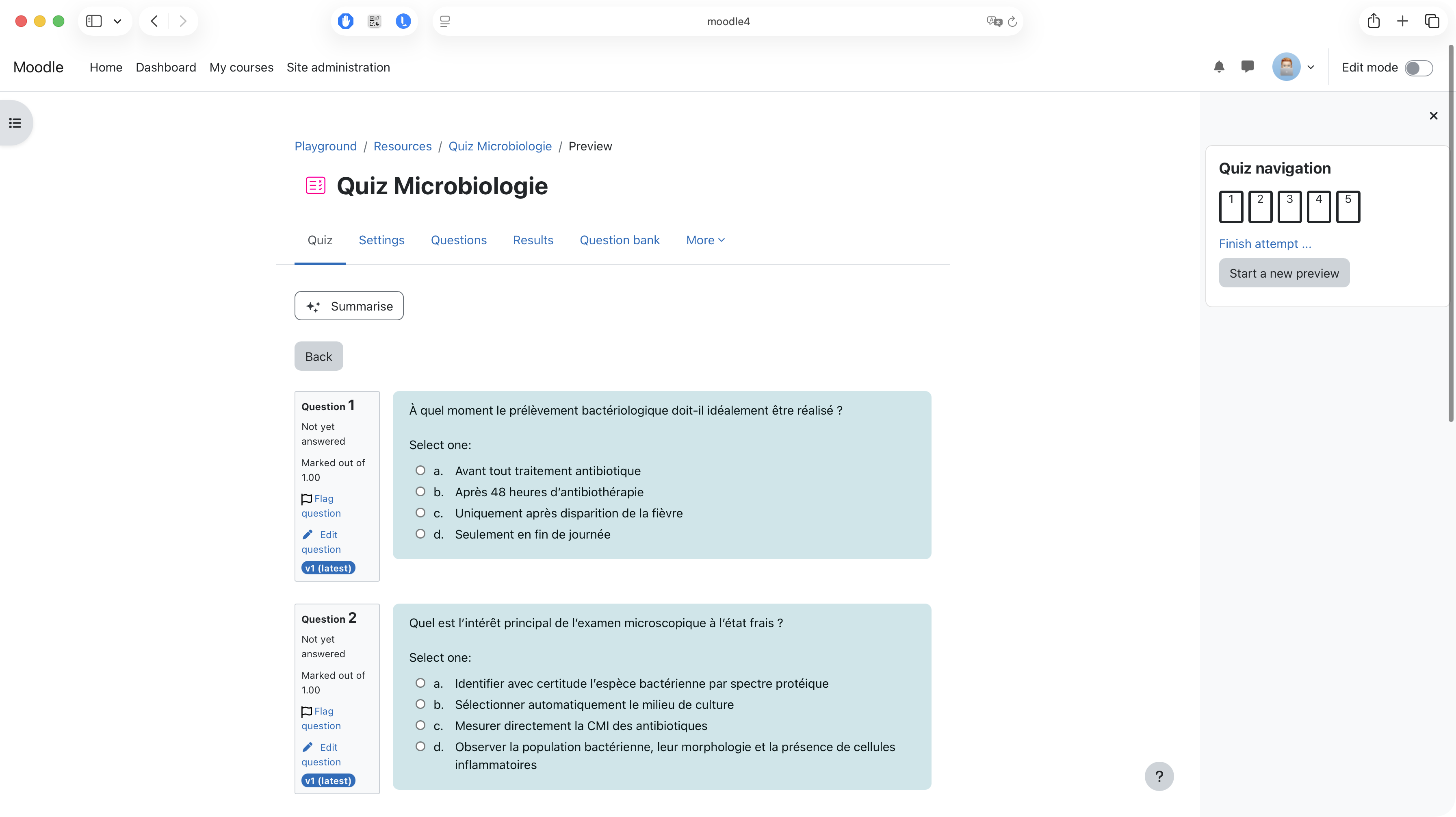
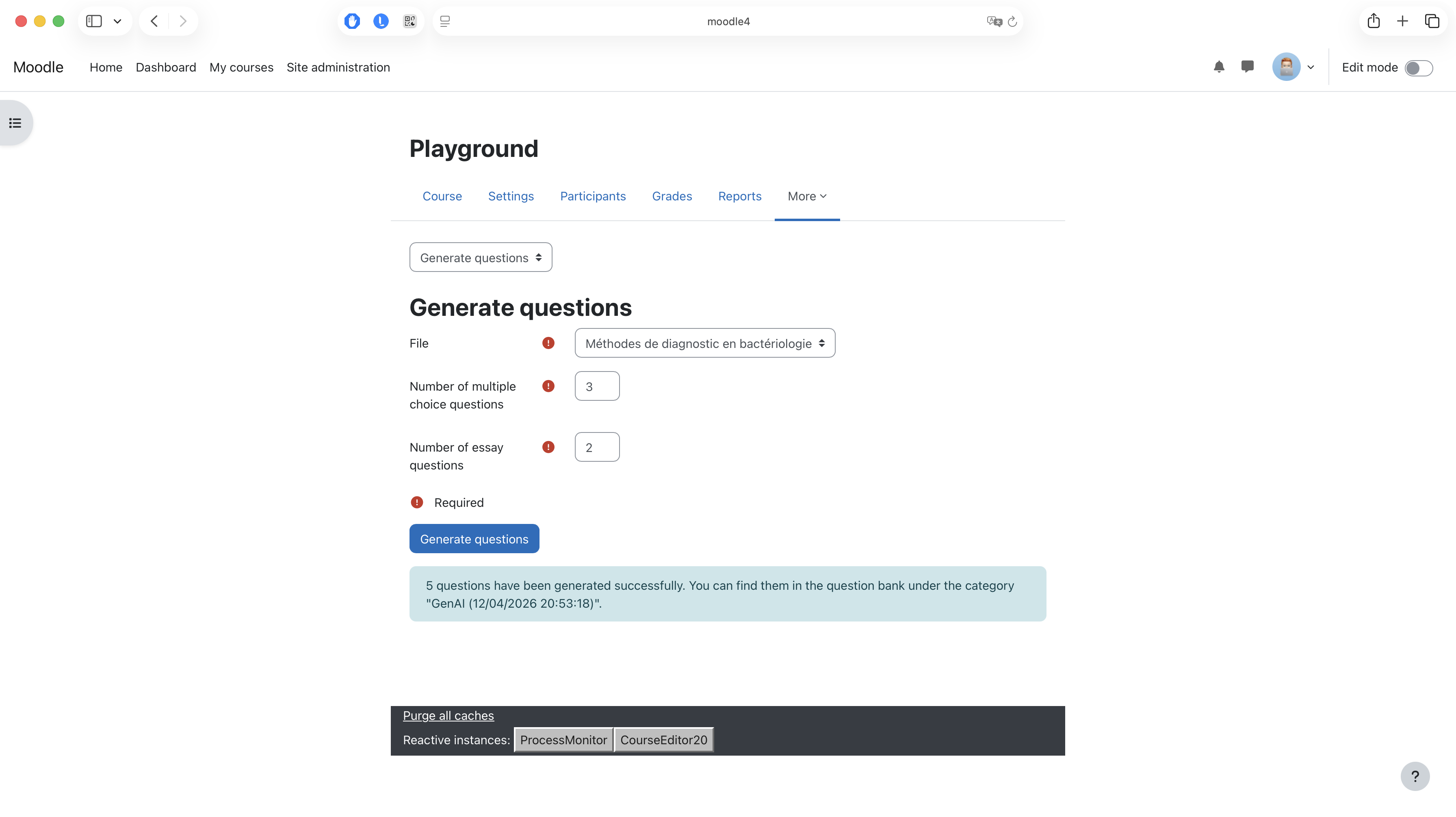
This Moodle plugin allows to generate quiz questions based on the content of a course (e.g., File modules) through an underlying Large Language Model (LLM) such as GPT. The generated questions are added to the question bank of the course and can of course be edited by a human afterwards.
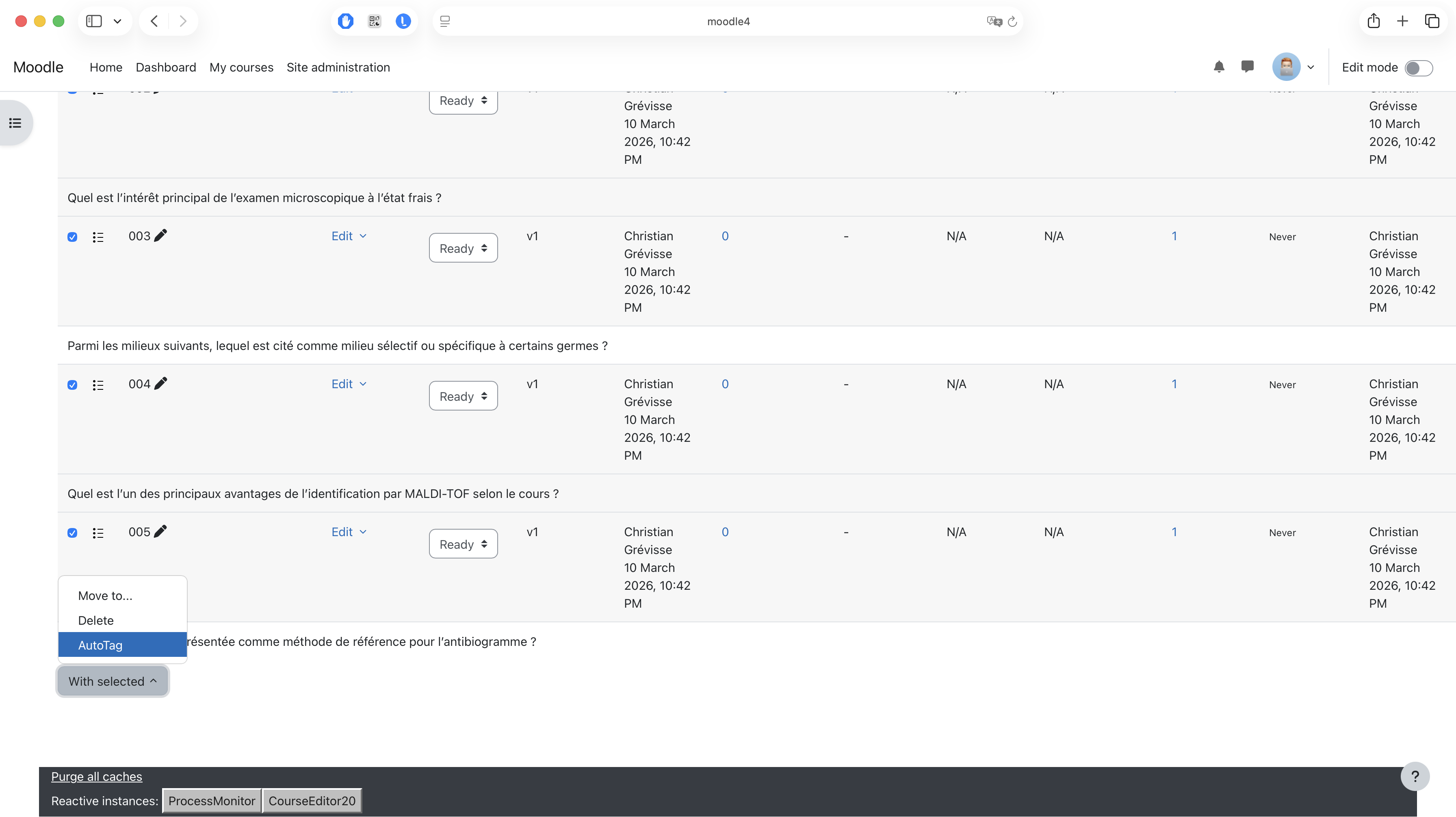
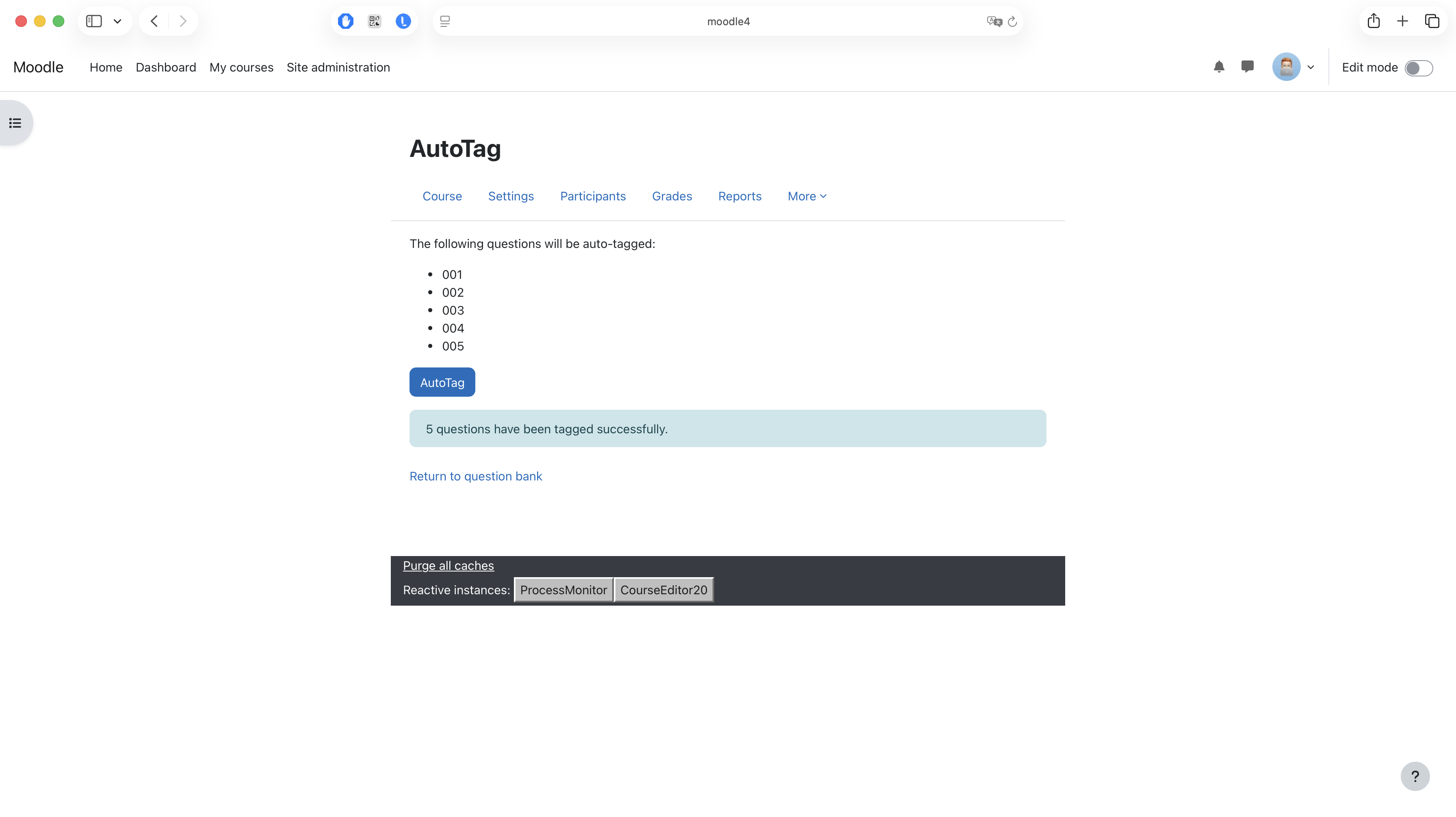
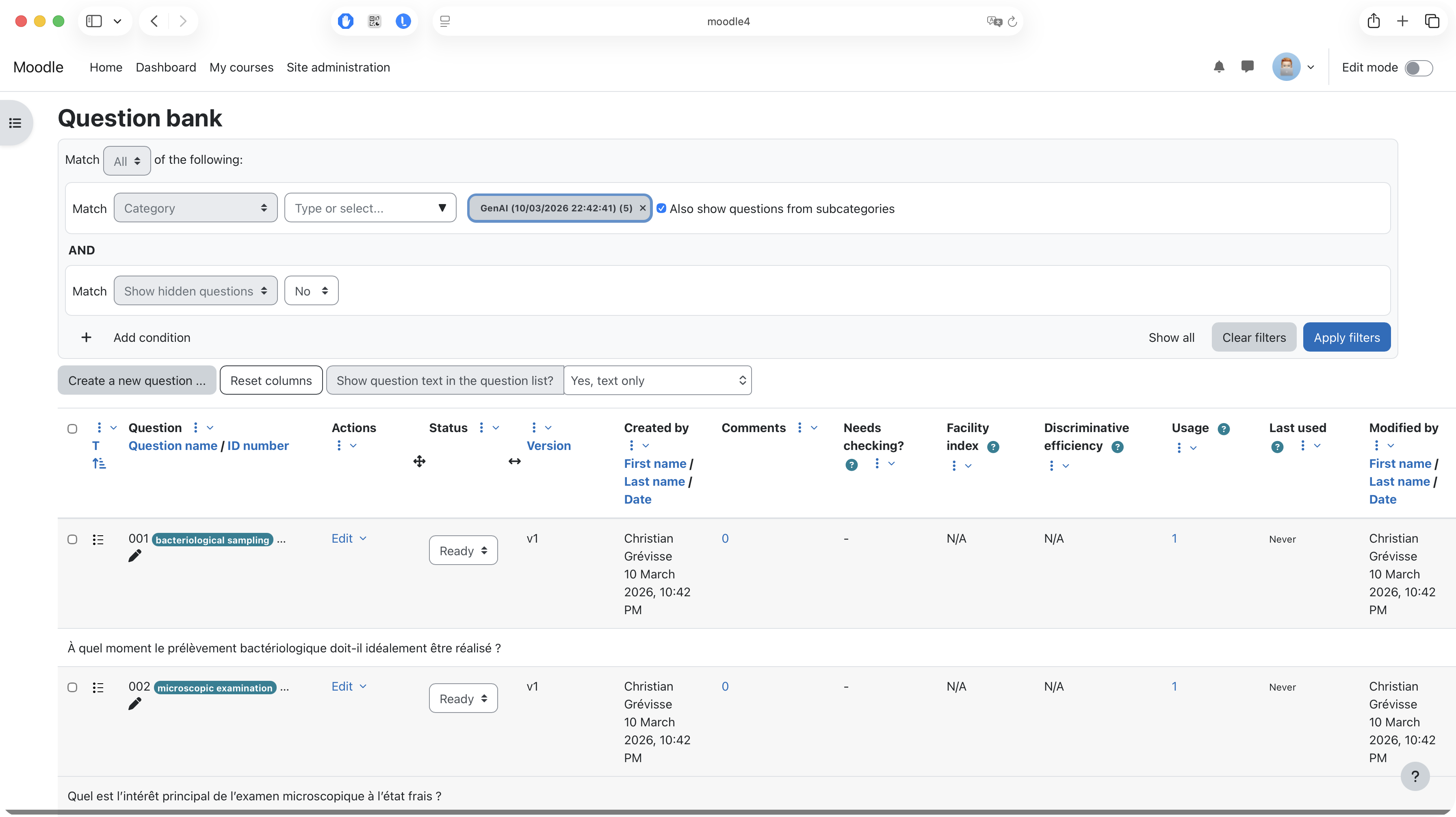
Existing questions can also be auto-tagged, again through LLM support.
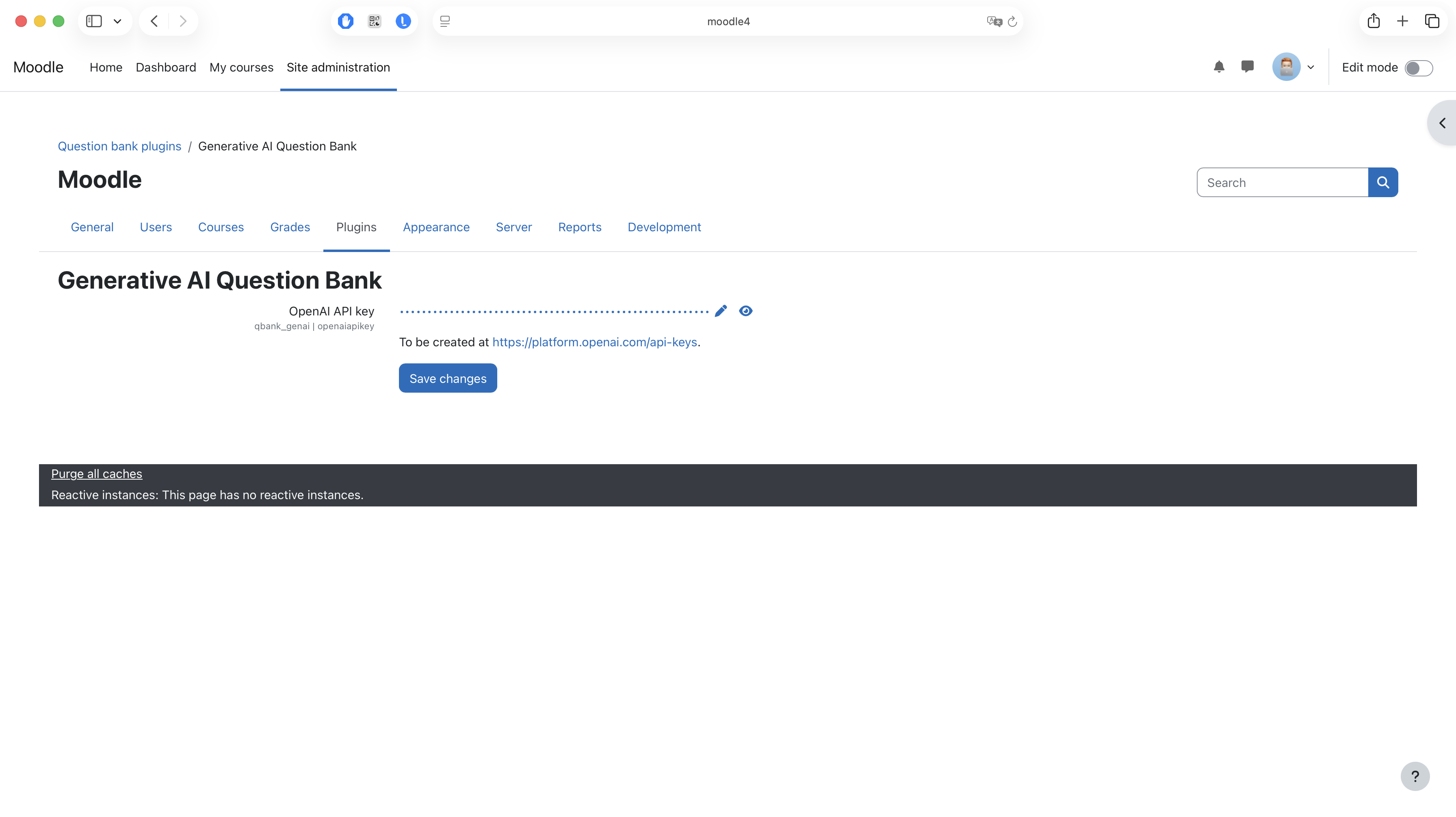
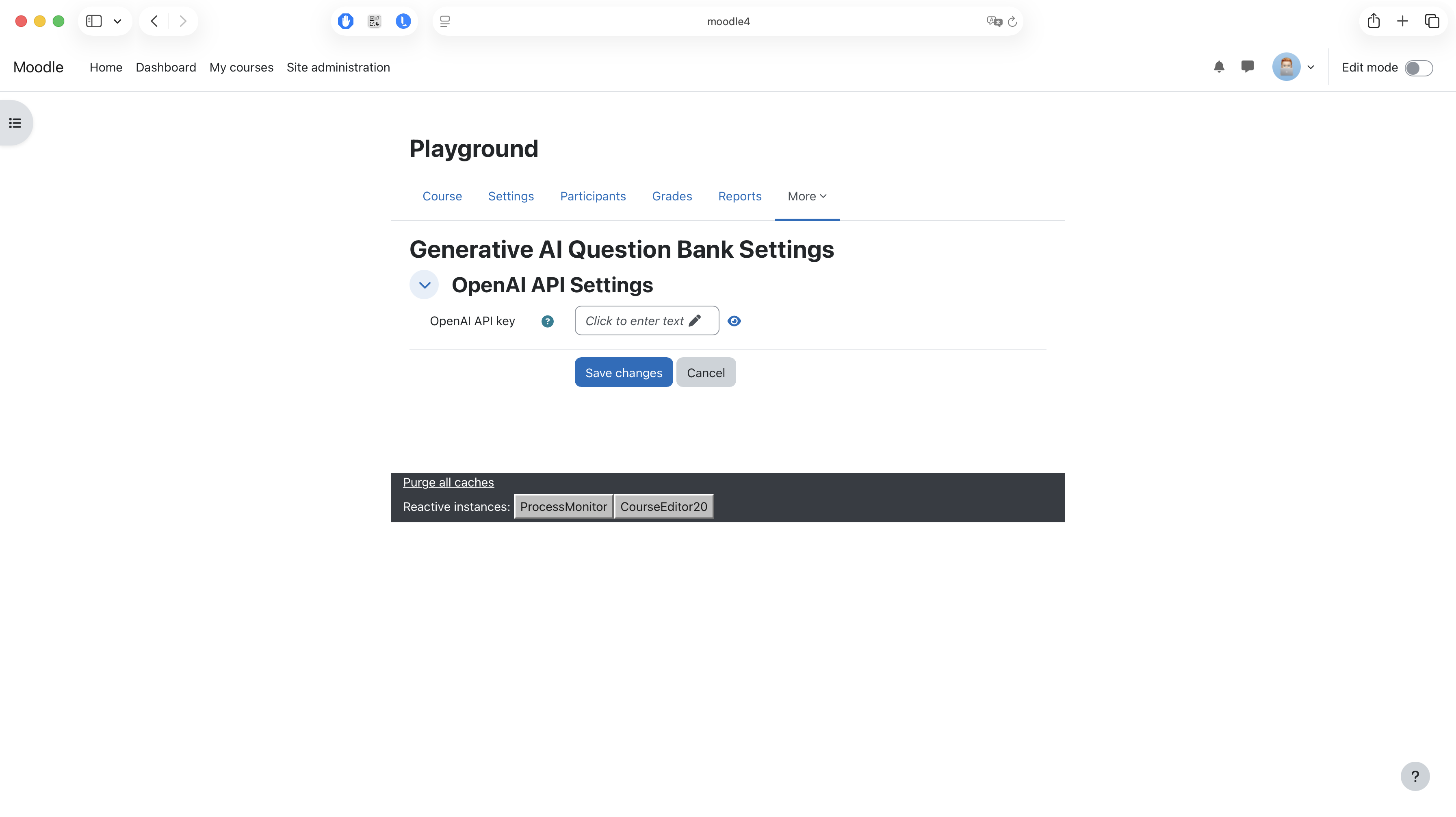
An OpenAI API key is currently required to be able to use this plugin. The key can be set in the settings page of the plugin.
Installing via uploaded ZIP file
- Log in to your Moodle site as an admin and go to Site administration >
Plugins > Install plugins. - Upload the ZIP file with the plugin code. You should only be prompted to add
extra details if your plugin type is not automatically detected. - Check the plugin validation report and finish the installation.
Installing manually
The plugin can be also installed by putting the contents of this directory to
{your/moodle/dirroot}/question/bank/genai
Afterwards, log in to your Moodle site as an admin and go to Site administration >
Notifications to complete the installation.
Alternatively, you can run
$ php admin/cli/upgrade.php
to complete the installation from the command line.
License
2023 Christian Grévisse
1.0.0 (2026031000)
1.0.0
Plugin type: Question bank plugins
Frankenstyle component name: qbank_genai
Version build number: 2026031000
Version release name: 1.0.0
Maturity: Stable
Supported Moodle versions: 4.1, 4.2, 4.3, 4.4, 4.5, 5.0, 5.1
Repository URL (Git): https://github.com/cgrevisse/moodle-qbank_genai
Repository branch:
Repository tag: v1.0.0
Issue/bug tracker URL: https://github.com/cgrevisse/moodle-qbank_genai/issues
Generative AI Question Bank
This Moodle plugin allows to generate quiz questions based on the content of a course (File resources) through an underlying Large Language Model (LLM) such as GPT. The generated questions are added to the question bank of the course and can of course be edited by a human afterwards.
Existing questions can also be auto-tagged, again through LLM support.
An OpenAI API key is currently required to be able to use this plugin. The key can be set in the settings page of the plugin.
Installing via uploaded ZIP file
- Log in to your Moodle site as an admin and go to Site administration >
Plugins > Install plugins. - Upload the ZIP file with the plugin code. You should only be prompted to add
extra details if your plugin type is not automatically detected. - Check the plugin validation report and finish the installation.
Installing manually
The plugin can be also installed by putting the contents of this directory to
{your/moodle/dirroot}/question/bank/genai
Afterwards, log in to your Moodle site as an admin and go to Site administration >
Notifications to complete the installation.
Alternatively, you can run
$ php admin/cli/upgrade.php
to complete the installation from the command line.
License
2023 Christian Grévisse christian.grevisse@uni.lu
This program is free software: you can redistribute it and/or modify it under
the terms of the GNU General Public License as published by the Free Software
Foundation, either version 3 of the License, or (at your option) any later
version.
This program is distributed in the hope that it will be useful, but WITHOUT ANY
WARRANTY; without even the implied warranty of MERCHANTABILITY or FITNESS FOR A
PARTICULAR PURPOSE. See the GNU General Public License for more details.
You should have received a copy of the GNU General Public License along with
this program. If not, see https://www.gnu.org/licenses/.
0.2.4 (2025112100)
0.2.4
Plugin type: Question bank plugins
Frankenstyle component name: qbank_genai
Version build number: 2025112100
Version release name: 0.2.4
Maturity: Stable
Supported Moodle versions: 4.1, 4.2, 4.3, 4.4, 4.5, 5.0, 5.1
Repository URL (Git): https://github.com/cgrevisse/moodle-qbank_genai
Repository branch:
Repository tag: v0.2.4
Issue/bug tracker URL: https://github.com/cgrevisse/moodle-qbank_genai/issues
Generative AI Question Bank
This Moodle plugin allows to generate quiz questions based on the content of a course (e.g., File modules) through an underlying Large Language Model (LLM) such as GPT. The generated questions are added to the question bank of the course and can of course be edited by a human afterwards.
Existing questions can also be auto-tagged, again through LLM support.
An OpenAI API key is currently required to be able to use this plugin. The key can be set in the settings page of the plugin.
Installing via uploaded ZIP file
- Log in to your Moodle site as an admin and go to Site administration >
Plugins > Install plugins. - Upload the ZIP file with the plugin code. You should only be prompted to add
extra details if your plugin type is not automatically detected. - Check the plugin validation report and finish the installation.
Installing manually
The plugin can be also installed by putting the contents of this directory to
{your/moodle/dirroot}/question/bank/genai
Afterwards, log in to your Moodle site as an admin and go to Site administration >
Notifications to complete the installation.
Alternatively, you can run
$ php admin/cli/upgrade.php
to complete the installation from the command line.
License
2023 Christian Grévisse christian.grevisse@uni.lu
This program is free software: you can redistribute it and/or modify it under
the terms of the GNU General Public License as published by the Free Software
Foundation, either version 3 of the License, or (at your option) any later
version.
This program is distributed in the hope that it will be useful, but WITHOUT ANY
WARRANTY; without even the implied warranty of MERCHANTABILITY or FITNESS FOR A
PARTICULAR PURPOSE. See the GNU General Public License for more details.
You should have received a copy of the GNU General Public License along with
this program. If not, see https://www.gnu.org/licenses/.
0.2.3 (2025082900)
0.2.3
Plugin type: Question bank plugins
Frankenstyle component name: qbank_genai
Version build number: 2025082900
Version release name: 0.2.3
Maturity: Stable
Supported Moodle versions: 4.1, 4.2, 4.3, 4.4, 4.5, 5.0, 5.1
Repository URL (Git): https://github.com/cgrevisse/moodle-qbank_genai
Repository branch:
Repository tag: v0.2.3
Issue/bug tracker URL: https://github.com/cgrevisse/moodle-qbank_genai/issues
Generative AI Question Bank
This Moodle plugin allows to generate quiz questions based on the content of a course (e.g., File modules) through an underlying Large Language Model (LLM) such as GPT. The generated questions are added to the question bank of the course and can of course be edited by a human afterwards.
Existing questions can also be auto-tagged, again through LLM support.
An OpenAI API key is currently required to be able to use this plugin. The key can be set in the settings page of the plugin.
Installing via uploaded ZIP file
- Log in to your Moodle site as an admin and go to Site administration >
Plugins > Install plugins. - Upload the ZIP file with the plugin code. You should only be prompted to add
extra details if your plugin type is not automatically detected. - Check the plugin validation report and finish the installation.
Installing manually
The plugin can be also installed by putting the contents of this directory to
{your/moodle/dirroot}/question/bank/genai
Afterwards, log in to your Moodle site as an admin and go to Site administration >
Notifications to complete the installation.
Alternatively, you can run
$ php admin/cli/upgrade.php
to complete the installation from the command line.
License
2023 Christian Grévisse christian.grevisse@uni.lu
This program is free software: you can redistribute it and/or modify it under
the terms of the GNU General Public License as published by the Free Software
Foundation, either version 3 of the License, or (at your option) any later
version.
This program is distributed in the hope that it will be useful, but WITHOUT ANY
WARRANTY; without even the implied warranty of MERCHANTABILITY or FITNESS FOR A
PARTICULAR PURPOSE. See the GNU General Public License for more details.
You should have received a copy of the GNU General Public License along with
this program. If not, see https://www.gnu.org/licenses/.
0.2.2 (2025082601)
0.2.2
Plugin type: Question bank plugins
Frankenstyle component name: qbank_genai
Version build number: 2025082601
Version release name: 0.2.2
Maturity: Stable
Supported Moodle versions: 4.1, 4.2, 4.3, 4.4, 4.5, 5.0
Repository URL (Git): https://github.com/cgrevisse/moodle-qbank_genai
Repository branch:
Repository tag: v0.2.2
Issue/bug tracker URL: https://github.com/cgrevisse/moodle-qbank_genai/issues
Generative AI Question Bank
This Moodle plugin allows to generate quiz questions based on the content of a course (e.g., File modules) through an underlying Large Language Model (LLM) such as GPT. The generated questions are added to the question bank of the course and can of course be edited by a human afterwards.
Existing questions can also be auto-tagged, again through LLM support.
An OpenAI API key is currently required to be able to use this plugin. The key can be set in the settings page of the plugin.
Installing via uploaded ZIP file
- Log in to your Moodle site as an admin and go to Site administration >
Plugins > Install plugins. - Upload the ZIP file with the plugin code. You should only be prompted to add
extra details if your plugin type is not automatically detected. - Check the plugin validation report and finish the installation.
Installing manually
The plugin can be also installed by putting the contents of this directory to
{your/moodle/dirroot}/question/bank/genai
Afterwards, log in to your Moodle site as an admin and go to Site administration >
Notifications to complete the installation.
Alternatively, you can run
$ php admin/cli/upgrade.php
to complete the installation from the command line.
License
2023 Christian Grévisse christian.grevisse@uni.lu
This program is free software: you can redistribute it and/or modify it under
the terms of the GNU General Public License as published by the Free Software
Foundation, either version 3 of the License, or (at your option) any later
version.
This program is distributed in the hope that it will be useful, but WITHOUT ANY
WARRANTY; without even the implied warranty of MERCHANTABILITY or FITNESS FOR A
PARTICULAR PURPOSE. See the GNU General Public License for more details.
You should have received a copy of the GNU General Public License along with
this program. If not, see https://www.gnu.org/licenses/.
0.2.0 (2025070601)
0.2.0
Plugin type: Question bank plugins
Frankenstyle component name: qbank_genai
Version build number: 2025070601
Version release name: 0.2.0
Maturity: Stable
Supported Moodle versions: 4.1, 4.2, 4.3, 4.4, 4.5, 5.0
Repository URL (Git): https://github.com/cgrevisse/moodle-qbank_genai
Repository branch:
Repository tag: v0.2.0
Issue/bug tracker URL: https://github.com/cgrevisse/moodle-qbank_genai/issues
Generative AI Question Bank
This Moodle plugin allows to generate quiz questions based on the content of a course (e.g., File modules) through an underlying Large Language Model (LLM) such as GPT. The generated questions are added to the question bank of the course and can of course be edited by a human afterwards.
Existing questions can also be auto-tagged, again through LLM support.
An OpenAI API key is currently required to be able to use this plugin. The key can be set in the settings page of the plugin.
Installing via uploaded ZIP file
- Log in to your Moodle site as an admin and go to Site administration >
Plugins > Install plugins. - Upload the ZIP file with the plugin code. You should only be prompted to add
extra details if your plugin type is not automatically detected. - Check the plugin validation report and finish the installation.
Installing manually
The plugin can be also installed by putting the contents of this directory to
{your/moodle/dirroot}/question/bank/genai
Afterwards, log in to your Moodle site as an admin and go to Site administration >
Notifications to complete the installation.
Alternatively, you can run
$ php admin/cli/upgrade.php
to complete the installation from the command line.
License
2023 Christian Grévisse christian.grevisse@uni.lu
This program is free software: you can redistribute it and/or modify it under
the terms of the GNU General Public License as published by the Free Software
Foundation, either version 3 of the License, or (at your option) any later
version.
This program is distributed in the hope that it will be useful, but WITHOUT ANY
WARRANTY; without even the implied warranty of MERCHANTABILITY or FITNESS FOR A
PARTICULAR PURPOSE. See the GNU General Public License for more details.
You should have received a copy of the GNU General Public License along with
this program. If not, see https://www.gnu.org/licenses/.
0.1.7 (2025041901)
0.1.7
Plugin type: Question bank plugins
Frankenstyle component name: qbank_genai
Version build number: 2025041901
Version release name: 0.1.7
Maturity: Beta
Supported Moodle versions: 4.1, 4.2, 4.3, 4.4, 4.5, 5.0
Repository URL (Git): https://github.com/cgrevisse/moodle-qbank_genai
Repository branch:
Repository tag: v0.1.7
Issue/bug tracker URL: https://github.com/cgrevisse/moodle-qbank_genai/issues
Generative AI Question Bank
This Moodle plugin allows to generate quiz questions based on the content of a course (e.g., File modules) through an underlying Large Language Model (LLM) such as GPT. The generated questions are added to the question bank of the course and can of course be edited by a human afterwards.
An OpenAI API key is currently required to be able to use this plugin. The key can be set in the settings page of the plugin.
Installing via uploaded ZIP file
- Log in to your Moodle site as an admin and go to Site administration >
Plugins > Install plugins. - Upload the ZIP file with the plugin code. You should only be prompted to add
extra details if your plugin type is not automatically detected. - Check the plugin validation report and finish the installation.
Installing manually
The plugin can be also installed by putting the contents of this directory to
{your/moodle/dirroot}/question/bank/genai
Afterwards, log in to your Moodle site as an admin and go to Site administration >
Notifications to complete the installation.
Alternatively, you can run
$ php admin/cli/upgrade.php
to complete the installation from the command line.
License
2023 Christian Grévisse christian.grevisse@uni.lu
This program is free software: you can redistribute it and/or modify it under
the terms of the GNU General Public License as published by the Free Software
Foundation, either version 3 of the License, or (at your option) any later
version.
This program is distributed in the hope that it will be useful, but WITHOUT ANY
WARRANTY; without even the implied warranty of MERCHANTABILITY or FITNESS FOR A
PARTICULAR PURPOSE. See the GNU General Public License for more details.
You should have received a copy of the GNU General Public License along with
this program. If not, see https://www.gnu.org/licenses/.
0.1.6 (2024121501)
0.1.6
Plugin type: Question bank plugins
Frankenstyle component name: qbank_genai
Version build number: 2024121501
Version release name: 0.1.6
Maturity: Alpha
Supported Moodle versions: 4.1, 4.2, 4.3, 4.4, 4.5
Repository URL (Git): https://github.com/cgrevisse/moodle-qbank_genai
Repository branch:
Repository tag: v0.1.6
Issue/bug tracker URL: https://github.com/cgrevisse/moodle-qbank_genai/issues
Generative AI Question Bank
This Moodle plugin allows to generate quiz questions based on the content of a course (e.g., File modules) through an underlying Large Language Model (LLM) such as GPT. The generated questions are added to the question bank of the course and can of course be edited by a human afterwards.
An OpenAI API key is currently required to be able to use this plugin. The key can be set in the settings page of the plugin.
Installing via uploaded ZIP file
- Log in to your Moodle site as an admin and go to Site administration >
Plugins > Install plugins. - Upload the ZIP file with the plugin code. You should only be prompted to add
extra details if your plugin type is not automatically detected. - Check the plugin validation report and finish the installation.
Installing manually
The plugin can be also installed by putting the contents of this directory to
{your/moodle/dirroot}/question/bank/genai
Afterwards, log in to your Moodle site as an admin and go to Site administration >
Notifications to complete the installation.
Alternatively, you can run
$ php admin/cli/upgrade.php
to complete the installation from the command line.
License
2023 Christian Grévisse christian.grevisse@uni.lu
This program is free software: you can redistribute it and/or modify it under
the terms of the GNU General Public License as published by the Free Software
Foundation, either version 3 of the License, or (at your option) any later
version.
This program is distributed in the hope that it will be useful, but WITHOUT ANY
WARRANTY; without even the implied warranty of MERCHANTABILITY or FITNESS FOR A
PARTICULAR PURPOSE. See the GNU General Public License for more details.
You should have received a copy of the GNU General Public License along with
this program. If not, see https://www.gnu.org/licenses/.
0.1.5 (2024121205)
0.1.5
Plugin type: Question bank plugins
Frankenstyle component name: qbank_genai
Version build number: 2024121205
Version release name: 0.1.5
Maturity: Alpha
Supported Moodle versions: 4.1, 4.2, 4.3, 4.4, 4.5
Repository URL (Git): https://github.com/cgrevisse/moodle-qbank_genai
Repository branch:
Repository tag: v0.1.5
Issue/bug tracker URL: https://github.com/cgrevisse/moodle-qbank_genai/issues
Generative AI Question Bank
This Moodle plugin allows to generate quiz questions based on the content of a course (e.g., File modules) through an underlying Large Language Model (LLM) such as GPT. The generated questions are added to the question bank of the course and can of course be edited by a human afterwards.
An OpenAI API key is currently required to be able to use this plugin. The key can be set in the settings page of the plugin, either at site-wide level or course-specific.
Installing via uploaded ZIP file
- Log in to your Moodle site as an admin and go to Site administration >
Plugins > Install plugins. - Upload the ZIP file with the plugin code. You should only be prompted to add
extra details if your plugin type is not automatically detected. - Check the plugin validation report and finish the installation.
Installing manually
The plugin can be also installed by putting the contents of this directory to
{your/moodle/dirroot}/question/bank/genai
Afterwards, log in to your Moodle site as an admin and go to Site administration >
Notifications to complete the installation.
Alternatively, you can run
$ php admin/cli/upgrade.php
to complete the installation from the command line.
License
2024 Christian Grévisse christian.grevisse@uni.lu
This program is free software: you can redistribute it and/or modify it under
the terms of the GNU General Public License as published by the Free Software
Foundation, either version 3 of the License, or (at your option) any later
version.
This program is distributed in the hope that it will be useful, but WITHOUT ANY
WARRANTY; without even the implied warranty of MERCHANTABILITY or FITNESS FOR A
PARTICULAR PURPOSE. See the GNU General Public License for more details.
You should have received a copy of the GNU General Public License along with
this program. If not, see https://www.gnu.org/licenses/.
0.1.4 (2024120701)
0.1.4
Plugin type: Question bank plugins
Frankenstyle component name: qbank_genai
Version build number: 2024120701
Version release name: 0.1.4
Maturity: Alpha
Supported Moodle versions: 4.1, 4.2, 4.3, 4.4, 4.5
Repository URL (Git): https://github.com/cgrevisse/moodle-qbank_genai
Repository branch:
Repository tag: v0.1.4
Issue/bug tracker URL: https://github.com/cgrevisse/moodle-qbank_genai/issues
Generative AI Question Bank
This Moodle plugin allows to generate quiz questions based on the content of a course (e.g., File modules) through an underlying Large Language Model (LLM) such as GPT. The generated questions are added to the question bank of the course and can of course be edited by a human afterwards.
An OpenAI API key is currently required to be able to use this plugin. The key can be set in the settings page of the plugin.
Installing via uploaded ZIP file
- Log in to your Moodle site as an admin and go to Site administration >
Plugins > Install plugins. - Upload the ZIP file with the plugin code. You should only be prompted to add
extra details if your plugin type is not automatically detected. - Check the plugin validation report and finish the installation.
Installing manually
The plugin can be also installed by putting the contents of this directory to
{your/moodle/dirroot}/question/bank/genai
Afterwards, log in to your Moodle site as an admin and go to Site administration >
Notifications to complete the installation.
Alternatively, you can run
$ php admin/cli/upgrade.php
to complete the installation from the command line.
License
2023 Christian Grévisse christian.grevisse@uni.lu
This program is free software: you can redistribute it and/or modify it under
the terms of the GNU General Public License as published by the Free Software
Foundation, either version 3 of the License, or (at your option) any later
version.
This program is distributed in the hope that it will be useful, but WITHOUT ANY
WARRANTY; without even the implied warranty of MERCHANTABILITY or FITNESS FOR A
PARTICULAR PURPOSE. See the GNU General Public License for more details.
You should have received a copy of the GNU General Public License along with
this program. If not, see https://www.gnu.org/licenses/.
0.1.3 (2024101501)
0.1.3
Plugin type: Question bank plugins
Frankenstyle component name: qbank_genai
Version build number: 2024101501
Version release name: 0.1.3
Maturity: Alpha
Supported Moodle versions: 4.1, 4.2, 4.3, 4.4, 4.5
Repository URL (Git): https://github.com/cgrevisse/moodle-qbank_genai
Repository branch:
Repository tag: v0.1.3
Issue/bug tracker URL: https://github.com/cgrevisse/moodle-qbank_genai/issues
Generative AI Question Bank
This Moodle plugin allows to generate quiz questions based on the content of a course (e.g., File modules) through an underlying Large Language Model (LLM) such as GPT. The generated questions are added to the question bank of the course and can of course be edited by a human afterwards.
An OpenAI API key is currently required to be able to use this plugin. The key can be set in the settings page of the plugin.
Installing via uploaded ZIP file
- Log in to your Moodle site as an admin and go to Site administration >
Plugins > Install plugins. - Upload the ZIP file with the plugin code. You should only be prompted to add
extra details if your plugin type is not automatically detected. - Check the plugin validation report and finish the installation.
Installing manually
The plugin can be also installed by putting the contents of this directory to
{your/moodle/dirroot}/question/bank/genai
Afterwards, log in to your Moodle site as an admin and go to Site administration >
Notifications to complete the installation.
Alternatively, you can run
$ php admin/cli/upgrade.php
to complete the installation from the command line.
License
2023 Christian Grévisse christian.grevisse@uni.lu
This program is free software: you can redistribute it and/or modify it under
the terms of the GNU General Public License as published by the Free Software
Foundation, either version 3 of the License, or (at your option) any later
version.
This program is distributed in the hope that it will be useful, but WITHOUT ANY
WARRANTY; without even the implied warranty of MERCHANTABILITY or FITNESS FOR A
PARTICULAR PURPOSE. See the GNU General Public License for more details.
You should have received a copy of the GNU General Public License along with
this program. If not, see https://www.gnu.org/licenses/.
0.1.2 (2024100701)
0.1.2
Plugin type: Question bank plugins
Frankenstyle component name: qbank_genai
Version build number: 2024100701
Version release name: 0.1.2
Maturity: Alpha
Supported Moodle versions: 4.1, 4.2, 4.3, 4.4, 4.5
Repository URL (Git): https://github.com/cgrevisse/moodle-qbank_genai
Repository branch:
Repository tag: v0.1.2
Issue/bug tracker URL: https://github.com/cgrevisse/moodle-qbank_genai/issues
Generative AI Question Bank
This Moodle plugin allows to generate quiz questions based on the content of a course (e.g., File modules) through an underlying Large Language Model (LLM) such as GPT. The generated questions are added to the question bank of the course and can of course be edited by a human afterwards.
An OpenAI API key is currently required to be able to use this plugin. The key can be set in the settings page of the plugin.
Installing via uploaded ZIP file
- Log in to your Moodle site as an admin and go to Site administration >
Plugins > Install plugins. - Upload the ZIP file with the plugin code. You should only be prompted to add
extra details if your plugin type is not automatically detected. - Check the plugin validation report and finish the installation.
Installing manually
The plugin can be also installed by putting the contents of this directory to
{your/moodle/dirroot}/question/bank/genai
Afterwards, log in to your Moodle site as an admin and go to Site administration >
Notifications to complete the installation.
Alternatively, you can run
$ php admin/cli/upgrade.php
to complete the installation from the command line.
License
2023 Christian Grévisse christian.grevisse@uni.lu
This program is free software: you can redistribute it and/or modify it under
the terms of the GNU General Public License as published by the Free Software
Foundation, either version 3 of the License, or (at your option) any later
version.
This program is distributed in the hope that it will be useful, but WITHOUT ANY
WARRANTY; without even the implied warranty of MERCHANTABILITY or FITNESS FOR A
PARTICULAR PURPOSE. See the GNU General Public License for more details.
You should have received a copy of the GNU General Public License along with
this program. If not, see https://www.gnu.org/licenses/.
0.1.1 (2024100501)
0.1.1
Plugin type: Question bank plugins
Frankenstyle component name: qbank_genai
Version build number: 2024100501
Version release name: 0.1.1
Maturity: Alpha
Supported Moodle versions: 4.1, 4.2, 4.3, 4.4
Repository URL (Git): https://github.com/cgrevisse/moodle-qbank_genai
Repository branch:
Repository tag: v0.1.1
Issue/bug tracker URL: https://github.com/cgrevisse/moodle-qbank_genai/issues
Generative AI Question Bank
This Moodle plugin allows to generate quiz questions based on the content of a course (e.g., File modules) through an underlying Large Language Model (LLM) such as GPT. The generated questions are added to the question bank of the course and can of course be edited by a human afterwards.
An OpenAI API key is currently required to be able to use this plugin. The key can be set in the settings page of the plugin.
Installing via uploaded ZIP file
- Log in to your Moodle site as an admin and go to Site administration >
Plugins > Install plugins. - Upload the ZIP file with the plugin code. You should only be prompted to add
extra details if your plugin type is not automatically detected. - Check the plugin validation report and finish the installation.
Installing manually
The plugin can be also installed by putting the contents of this directory to
{your/moodle/dirroot}/question/bank/genai
Afterwards, log in to your Moodle site as an admin and go to Site administration >
Notifications to complete the installation.
Alternatively, you can run
$ php admin/cli/upgrade.php
to complete the installation from the command line.
License
2023 Christian Grévisse christian.grevisse@uni.lu
This program is free software: you can redistribute it and/or modify it under
the terms of the GNU General Public License as published by the Free Software
Foundation, either version 3 of the License, or (at your option) any later
version.
This program is distributed in the hope that it will be useful, but WITHOUT ANY
WARRANTY; without even the implied warranty of MERCHANTABILITY or FITNESS FOR A
PARTICULAR PURPOSE. See the GNU General Public License for more details.
You should have received a copy of the GNU General Public License along with
this program. If not, see https://www.gnu.org/licenses/.
0.1.0 (2024072301)
0.1.0
Plugin type: Question bank plugins
Frankenstyle component name: qbank_genai
Version build number: 2024072301
Version release name: 0.1.0
Maturity: Alpha
Supported Moodle versions: 4.1, 4.2, 4.3, 4.4
Repository URL (Git): https://github.com/cgrevisse/moodle-qbank_genai
Repository branch:
Repository tag:
Issue/bug tracker URL: https://github.com/cgrevisse/moodle-qbank_genai/issues