Massive Course Copy
Versions
Current version
1.5 (2026060200)
1.5
Plugin type: Administration tools
Frankenstyle component name: tool_copy_courses
Version build number: 2026060200
Version release name: 1.5
Maturity: Stable
Supported Moodle versions: 4.3, 4.4, 4.5, 5.0, 5.1, 5.2
Repository URL (Git): https://github.com/jrangelardila/moodle-tool_copy_courses
Repository branch:
Repository tag:
Issue/bug tracker URL: https://github.com/jrangelardila/moodle-tool_copy_courses/issues
Copy masive courses
Plugin Description
This plugin is designed to facilitate bulk duplication or copying of courses within a platform, based on pre-established configurations. It allows administrators to quickly replicate entire courses, including their structure and content, without the need to recreate each course manually.
Process Overview
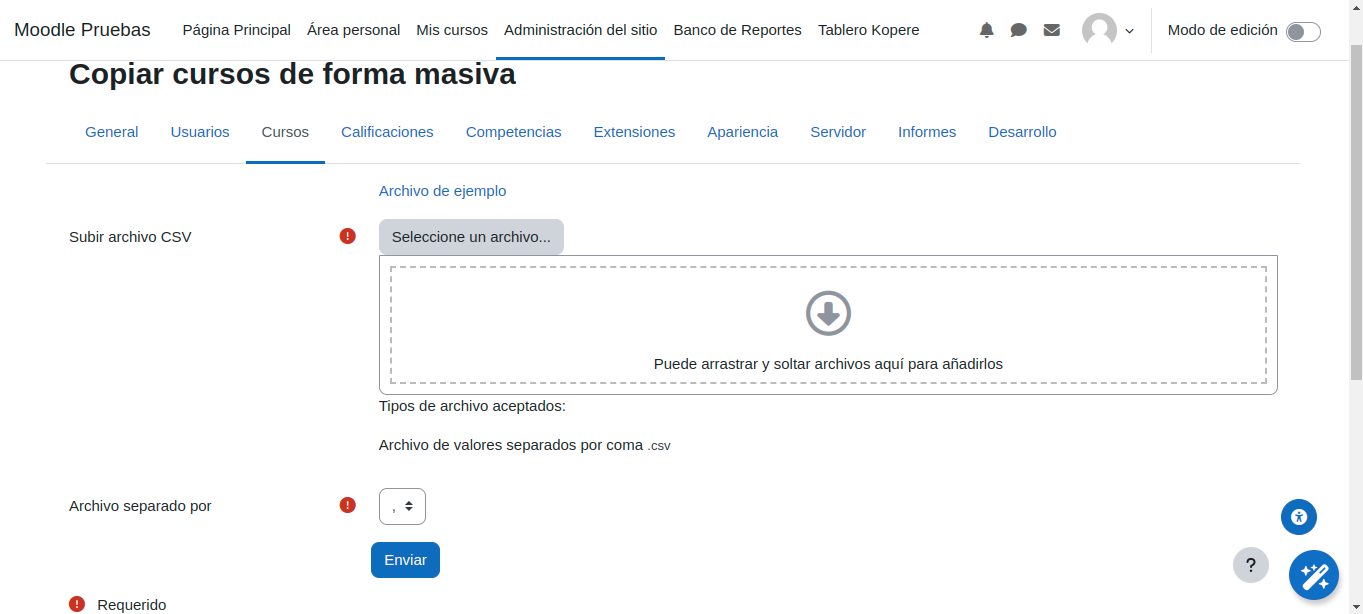
Upload CSV File: Administrators can upload a CSV file specifying the details of the courses they wish to duplicate.
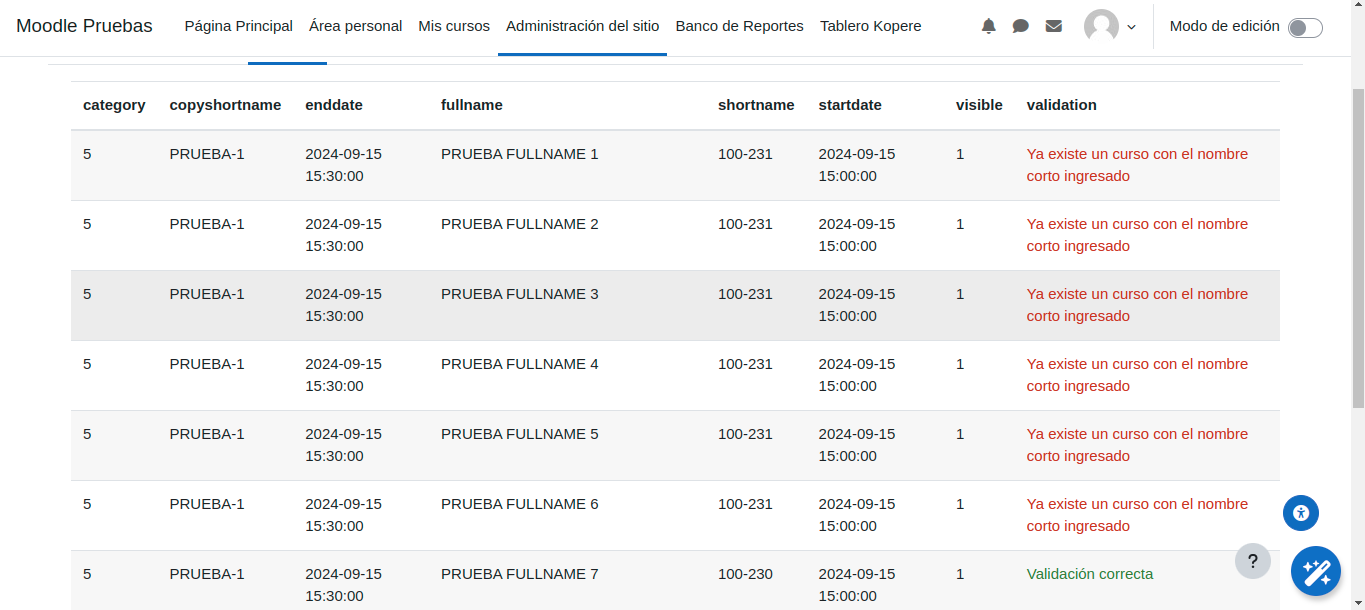
Validation: After uploading, the plugin performs validations to ensure that only correctly configured courses are duplicated.
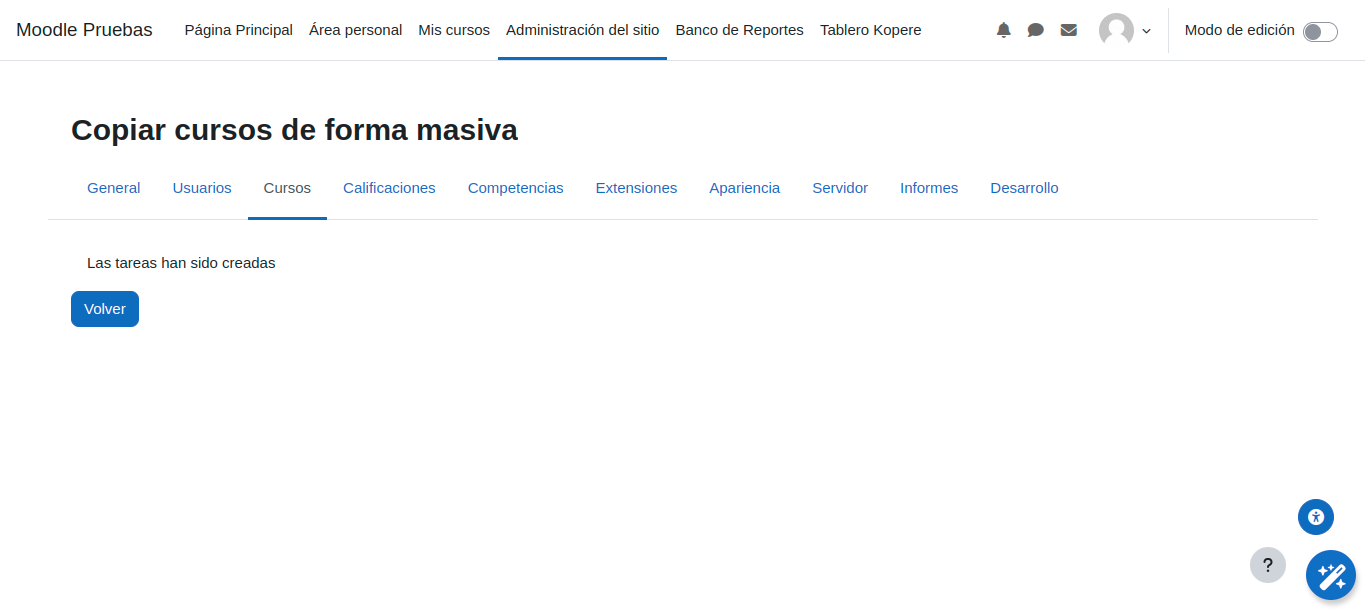
Generate Tasks: Once validated, users can generate the respective adhoc tasks with a single click.
Afterward, the cron job or specific launcher for adhoc tasks will handle the rest.
Usage Instructions
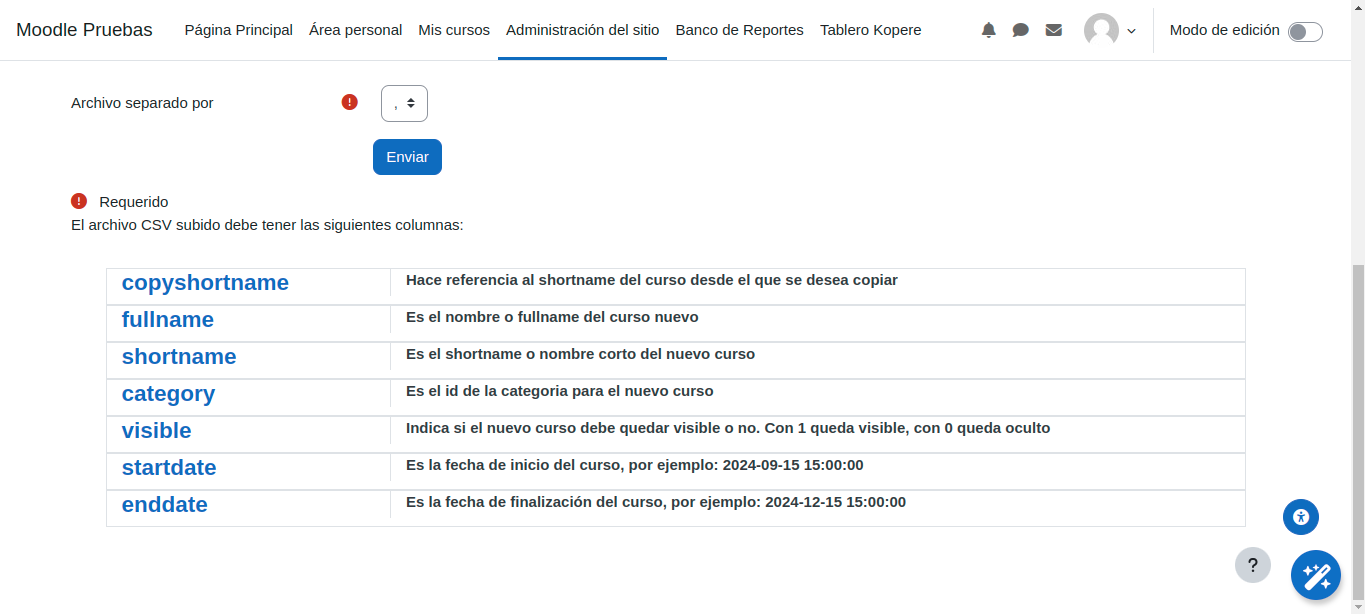
- Upload a CSV file containing the following fields:
| Field | Description |
|---------------|-----------------------------------------------------------------------------------------------|
| copyshortname | Refers to the shortname of the course from which you want to copy. |
| fullname | Is the name or fullname of the new course. |
| shortname | Is the shortname of the new course. |
| category | Is the category id for the new course. |
| visible | Indicates whether the new course should be visible or not. Use 1 for visible, 0 for hidden. |
| startdate | Is the start date of the course, for example: 2024-09-15 15:00:00. |
| enddate | Is the end date of the course, for example: 2024-12-15 15:00:00. |
After uploading, a series of validations will be performed.
Click on "Create Tasks" to generate adhoc tasks for copying each of the courses (tasks will only be created for courses that pass validation).
After this, the cron job or dedicated schedulers will take care of completing the process.
Additionally, you can follow the example file already provided.
Installing via uploaded ZIP file
- Log in to your Moodle site as an admin and go to Site administration >
Plugins > Install plugins. - Upload the ZIP file with the plugin code. You should only be prompted to add
extra details if your plugin type is not automatically detected. - Check the plugin validation report and finish the installation.
Installing manually
The plugin can be also installed by putting the contents of this directory to
{your/moodle/dirroot}/admin/tool/copy_courses
Afterwards, log in to your Moodle site as an admin and go to Site administration >
Notifications to complete the installation.
Alternatively, you can run
$ php admin/cli/upgrade.php
to complete the installation from the command line.
License
2023 Jhon Rangel jrangelardila@gmail.com
This program is free software: you can redistribute it and/or modify it under
the terms of the GNU General Public License as published by the Free Software
Foundation, either version 3 of the License, or (at your option) any later
version.
This program is distributed in the hope that it will be useful, but WITHOUT ANY
WARRANTY; without even the implied warranty of MERCHANTABILITY or FITNESS FOR A
PARTICULAR PURPOSE. See the GNU General Public License for more details.
You should have received a copy of the GNU General Public License along with
this program. If not, see https://www.gnu.org/licenses/.
1.5 (2026040900)
1.5
Plugin type: Administration tools
Frankenstyle component name: tool_copy_courses
Version build number: 2026040900
Version release name: 1.5
Maturity: Stable
Supported Moodle versions: 4.3, 4.4, 4.5, 5.0, 5.1, 5.2
Repository URL (Git): https://github.com/jrangelardila/moodle-tool_copy_courses
Repository branch:
Repository tag:
Issue/bug tracker URL: https://github.com/jrangelardila/moodle-tool_copy_courses/issues
Copy masive courses
Plugin Description
This plugin is designed to facilitate bulk duplication or copying of courses within a platform, based on pre-established configurations. It allows administrators to quickly replicate entire courses, including their structure and content, without the need to recreate each course manually.
Process Overview
Upload CSV File: Administrators can upload a CSV file specifying the details of the courses they wish to duplicate.
Validation: After uploading, the plugin performs validations to ensure that only correctly configured courses are duplicated.
Generate Tasks: Once validated, users can generate the respective adhoc tasks with a single click.
Afterward, the cron job or specific launcher for adhoc tasks will handle the rest.
Usage Instructions
- Upload a CSV file containing the following fields:
| Field | Description |
|---------------|-----------------------------------------------------------------------------------------------|
| copyshortname | Refers to the shortname of the course from which you want to copy. |
| fullname | Is the name or fullname of the new course. |
| shortname | Is the shortname of the new course. |
| category | Is the category id for the new course. |
| visible | Indicates whether the new course should be visible or not. Use 1 for visible, 0 for hidden. |
| startdate | Is the start date of the course, for example: 2024-09-15 15:00:00. |
| enddate | Is the end date of the course, for example: 2024-12-15 15:00:00. |
After uploading, a series of validations will be performed.
Click on "Create Tasks" to generate adhoc tasks for copying each of the courses (tasks will only be created for courses that pass validation).
After this, the cron job or dedicated schedulers will take care of completing the process.
Additionally, you can follow the example file already provided.
Installing via uploaded ZIP file
- Log in to your Moodle site as an admin and go to Site administration >
Plugins > Install plugins. - Upload the ZIP file with the plugin code. You should only be prompted to add
extra details if your plugin type is not automatically detected. - Check the plugin validation report and finish the installation.
Installing manually
The plugin can be also installed by putting the contents of this directory to
{your/moodle/dirroot}/admin/tool/copy_courses
Afterwards, log in to your Moodle site as an admin and go to Site administration >
Notifications to complete the installation.
Alternatively, you can run
$ php admin/cli/upgrade.php
to complete the installation from the command line.
License
2023 Jhon Rangel jrangelardila@gmail.com
This program is free software: you can redistribute it and/or modify it under
the terms of the GNU General Public License as published by the Free Software
Foundation, either version 3 of the License, or (at your option) any later
version.
This program is distributed in the hope that it will be useful, but WITHOUT ANY
WARRANTY; without even the implied warranty of MERCHANTABILITY or FITNESS FOR A
PARTICULAR PURPOSE. See the GNU General Public License for more details.
You should have received a copy of the GNU General Public License along with
this program. If not, see https://www.gnu.org/licenses/.
1.5 (2025110700)
1.5
Plugin type: Administration tools
Frankenstyle component name: tool_copy_courses
Version build number: 2025110700
Version release name: 1.5
Maturity: Stable
Supported Moodle versions: 4.3, 4.4, 4.5, 5.0, 5.1, 5.2
Repository URL (Git): https://github.com/jrangelardila/moodle-tool_copy_courses
Repository branch:
Repository tag:
Issue/bug tracker URL: https://github.com/jrangelardila/moodle-tool_copy_courses/issues
Copy masive courses
Plugin Description
This plugin is designed to facilitate bulk duplication or copying of courses within a platform, based on pre-established configurations. It allows administrators to quickly replicate entire courses, including their structure and content, without the need to recreate each course manually.
Process Overview
Upload CSV File: Administrators can upload a CSV file specifying the details of the courses they wish to duplicate.
Validation: After uploading, the plugin performs validations to ensure that only correctly configured courses are duplicated.
Generate Tasks: Once validated, users can generate the respective adhoc tasks with a single click.
Afterward, the cron job or specific launcher for adhoc tasks will handle the rest.
Usage Instructions
- Upload a CSV file containing the following fields:
| Field | Description |
|---------------|-----------------------------------------------------------------------------------------------|
| copyshortname | Refers to the shortname of the course from which you want to copy. |
| fullname | Is the name or fullname of the new course. |
| shortname | Is the shortname of the new course. |
| category | Is the category id for the new course. |
| visible | Indicates whether the new course should be visible or not. Use 1 for visible, 0 for hidden. |
| startdate | Is the start date of the course, for example: 2024-09-15 15:00:00. |
| enddate | Is the end date of the course, for example: 2024-12-15 15:00:00. |
After uploading, a series of validations will be performed.
Click on "Create Tasks" to generate adhoc tasks for copying each of the courses (tasks will only be created for courses that pass validation).
After this, the cron job or dedicated schedulers will take care of completing the process.
Additionally, you can follow the example file already provided.
Installing via uploaded ZIP file
- Log in to your Moodle site as an admin and go to Site administration >
Plugins > Install plugins. - Upload the ZIP file with the plugin code. You should only be prompted to add
extra details if your plugin type is not automatically detected. - Check the plugin validation report and finish the installation.
Installing manually
The plugin can be also installed by putting the contents of this directory to
{your/moodle/dirroot}/admin/tool/copy_courses
Afterwards, log in to your Moodle site as an admin and go to Site administration >
Notifications to complete the installation.
Alternatively, you can run
$ php admin/cli/upgrade.php
to complete the installation from the command line.
License
2023 Jhon Rangel jrangelardila@gmail.com
This program is free software: you can redistribute it and/or modify it under
the terms of the GNU General Public License as published by the Free Software
Foundation, either version 3 of the License, or (at your option) any later
version.
This program is distributed in the hope that it will be useful, but WITHOUT ANY
WARRANTY; without even the implied warranty of MERCHANTABILITY or FITNESS FOR A
PARTICULAR PURPOSE. See the GNU General Public License for more details.
You should have received a copy of the GNU General Public License along with
this program. If not, see https://www.gnu.org/licenses/.
1.1 (2024101100)
1.1
Plugin type: Administration tools
Frankenstyle component name: tool_copy_courses
Version build number: 2024101100
Version release name: 1.1
Maturity: Stable
Supported Moodle versions: 4.4, 4.5, 5.0, 5.1
Repository URL (Git): https://github.com/jrangelardila/moodle-tool_copy_courses
Repository branch:
Repository tag:
Issue/bug tracker URL: https://github.com/jrangelardila/moodle-tool_copy_courses/issues
Copy masive courses
Plugin Description
This plugin is designed to facilitate bulk duplication or copying of courses within a platform, based on pre-established configurations. It allows administrators to quickly replicate entire courses, including their structure and content, without the need to recreate each course manually.
Process Overview
Upload CSV File: Administrators can upload a CSV file specifying the details of the courses they wish to duplicate.
Validation: After uploading, the plugin performs validations to ensure that only correctly configured courses are duplicated.
Generate Tasks: Once validated, users can generate the respective adhoc tasks with a single click.
Afterward, the cron job or specific launcher for adhoc tasks will handle the rest.
Usage Instructions
- Upload a CSV file containing the following fields:
| Field | Description |
|---------------|-----------------------------------------------------------------------------------------------|
| copyshortname | Refers to the shortname of the course from which you want to copy. |
| fullname | Is the name or fullname of the new course. |
| shortname | Is the shortname of the new course. |
| category | Is the category id for the new course. |
| visible | Indicates whether the new course should be visible or not. Use 1 for visible, 0 for hidden. |
| startdate | Is the start date of the course, for example: 2024-09-15 15:00:00. |
| enddate | Is the end date of the course, for example: 2024-12-15 15:00:00. |
After uploading, a series of validations will be performed.
Click on "Create Tasks" to generate adhoc tasks for copying each of the courses (tasks will only be created for courses that pass validation).
After this, the cron job or dedicated schedulers will take care of completing the process.
Additionally, you can follow the example file already provided.
Installing via uploaded ZIP file
- Log in to your Moodle site as an admin and go to Site administration >
Plugins > Install plugins. - Upload the ZIP file with the plugin code. You should only be prompted to add
extra details if your plugin type is not automatically detected. - Check the plugin validation report and finish the installation.
Installing manually
The plugin can be also installed by putting the contents of this directory to
{your/moodle/dirroot}/admin/tool/copy_courses
Afterwards, log in to your Moodle site as an admin and go to Site administration >
Notifications to complete the installation.
Alternatively, you can run
$ php admin/cli/upgrade.php
to complete the installation from the command line.
License
2023 Jhon Rangel jrangelardila@gmail.com
This program is free software: you can redistribute it and/or modify it under
the terms of the GNU General Public License as published by the Free Software
Foundation, either version 3 of the License, or (at your option) any later
version.
This program is distributed in the hope that it will be useful, but WITHOUT ANY
WARRANTY; without even the implied warranty of MERCHANTABILITY or FITNESS FOR A
PARTICULAR PURPOSE. See the GNU General Public License for more details.
You should have received a copy of the GNU General Public License along with
this program. If not, see https://www.gnu.org/licenses/.