
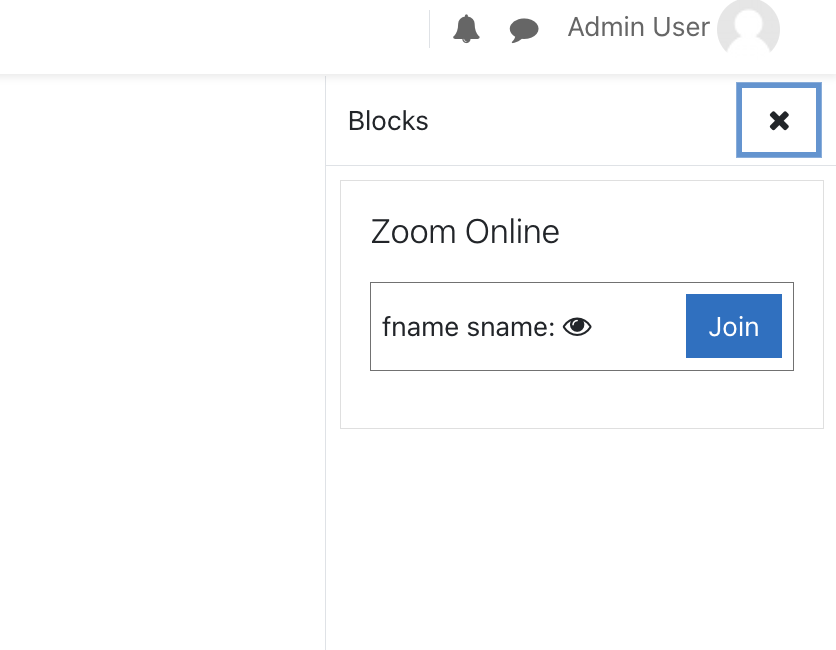
Zoom Online
Versions
Current version
1.0.15 (Build: 20250213) (2025021301)
1.0.15 (Build: 20250213)
Plugin type: Blocks
Frankenstyle component name: block_zoomonline
Version build number: 2025021301
Version release name: 1.0.15 (Build: 20250213)
Maturity: Stable
Supported Moodle versions: 4.2, 4.3, 4.4, 4.5
Repository URL (Git): https://bitbucket.org/cmacdonncha/zoomonline/src/main/
Repository branch:
Repository tag:
Issue/bug tracker URL: https://bitbucket.org/cmacdonncha/zoomonline/issues
Zoom Online Integration Plugin for Moodle
Version: 1.0.0
Release Date: October 2024
Overview:
The Zoom Online Integration Plugin for Moodle simplifies the management of Zoom meetings within Moodle courses.
This plugin automates meeting creation, recording management, and attendance tracking, offering a seamless experience
for educators using Zoom in online learning environments.
Features:
- Automatic Zoom meeting creation and link integration within Moodle courses.
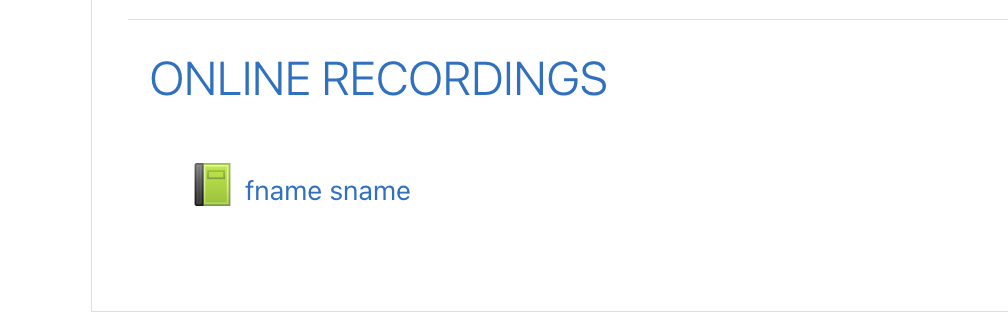
- Video recording management with options to store recordings on AWS S3 or Moodle.
- Automatic deletion of Zoom recordings post-upload to save Zoom storage space.
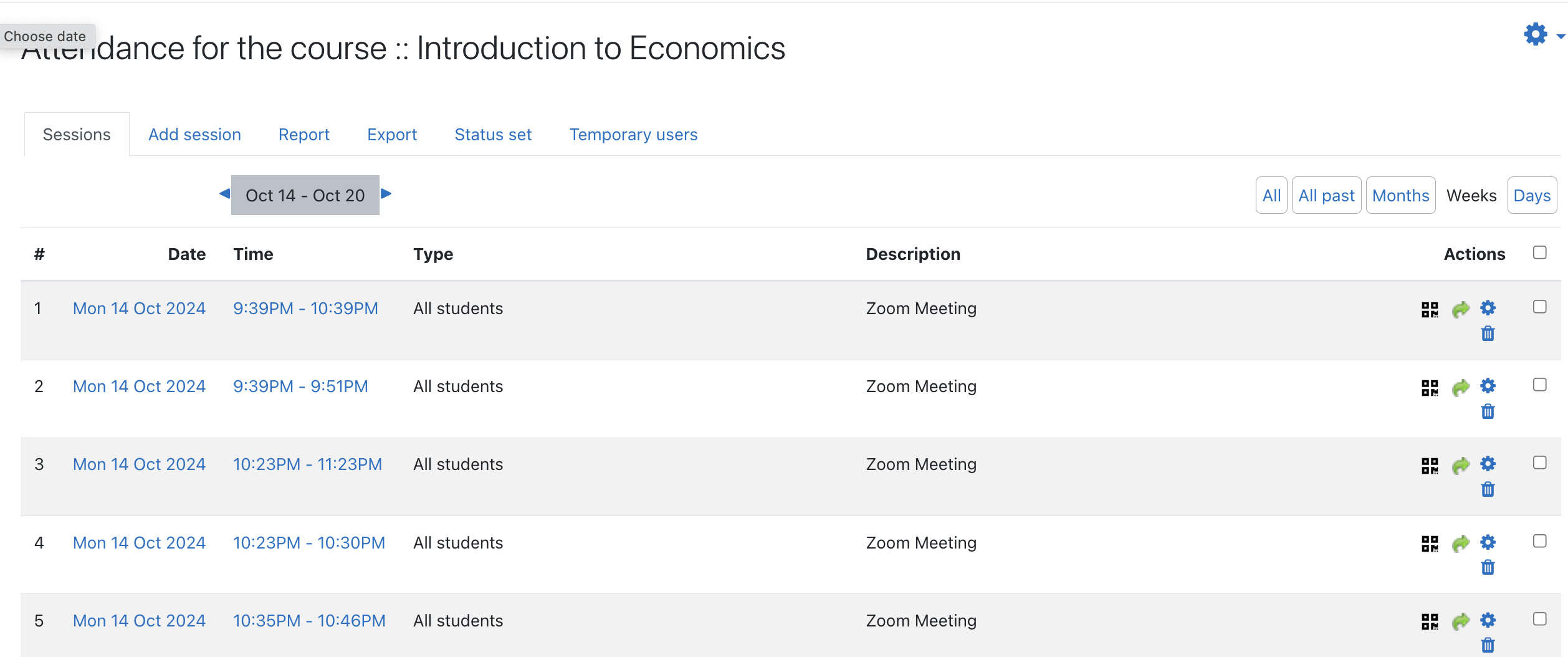
- Attendance tracking using Zoom’s attendance reports integrated with Moodle’s Attendance module.
- Automated creation of Attendance modules for courses where they are not present.
Installation:
- Download the plugin and upload it to your Moodle installation.
- Complete the installation and configuration as described in the documentation.
Configuration:
- Set up your Zoom OAuth app and configure the plugin with the Client ID, Client Secret, and Account ID.
- Choose storage options for video recordings and enable/disable attendance tracking.
Changelog:
- Version 1.0.0:
- Initial release with full meeting creation, recording management, and attendance tracking features.
- Integrated support for AWS S3 and local Moodle storage.
- Automatic Attendance module creation and Zoom attendance syncing.
Known Issues:
- The plugin requires a Zoom Pro or higher account for creating meetings and accessing recordings.
- Dependent on the AWS S3 PHP SDK if using AWS storage.
Support:
For support, please contact support@inneall.com.
License:
This plugin is licensed under the GNU GPL v3 or later. Refer to the LICENSE file or visit https://www.gnu.org/licenses/gpl-3.0.html for more details.
1.0.15 (Build: 20250213) (2025021300)
1.0.15 (Build: 20250213)
Plugin type: Blocks
Frankenstyle component name: block_zoomonline
Version build number: 2025021300
Version release name: 1.0.15 (Build: 20250213)
Maturity: Stable
Supported Moodle versions: 4.2, 4.3, 4.4, 4.5
Repository URL (Git): https://bitbucket.org/cmacdonncha/zoomonline/src/main/
Repository branch:
Repository tag:
Issue/bug tracker URL: https://bitbucket.org/cmacdonncha/zoomonline/issues
Zoom Online Integration Plugin for Moodle
Version: 1.0.0
Release Date: October 2024
Overview:
The Zoom Online Integration Plugin for Moodle simplifies the management of Zoom meetings within Moodle courses.
This plugin automates meeting creation, recording management, and attendance tracking, offering a seamless experience
for educators using Zoom in online learning environments.
Features:
- Automatic Zoom meeting creation and link integration within Moodle courses.
- Video recording management with options to store recordings on AWS S3 or Moodle.
- Automatic deletion of Zoom recordings post-upload to save Zoom storage space.
- Attendance tracking using Zoom’s attendance reports integrated with Moodle’s Attendance module.
- Automated creation of Attendance modules for courses where they are not present.
Installation:
- Download the plugin and upload it to your Moodle installation.
- Complete the installation and configuration as described in the documentation.
Configuration:
- Set up your Zoom OAuth app and configure the plugin with the Client ID, Client Secret, and Account ID.
- Choose storage options for video recordings and enable/disable attendance tracking.
Changelog:
- Version 1.0.0:
- Initial release with full meeting creation, recording management, and attendance tracking features.
- Integrated support for AWS S3 and local Moodle storage.
- Automatic Attendance module creation and Zoom attendance syncing.
Known Issues:
- The plugin requires a Zoom Pro or higher account for creating meetings and accessing recordings.
- Dependent on the AWS S3 PHP SDK if using AWS storage.
Support:
For support, please contact support@inneall.com.
License:
This plugin is licensed under the GNU GPL v3 or later. Refer to the LICENSE file or visit https://www.gnu.org/licenses/gpl-3.0.html for more details.
1.0.14 (Build: 20250212) (2025021200)
1.0.14 (Build: 20250212)
Plugin type: Blocks
Frankenstyle component name: block_zoomonline
Version build number: 2025021200
Version release name: 1.0.14 (Build: 20250212)
Maturity: Stable
Supported Moodle versions: 4.2, 4.3, 4.4, 4.5
Repository URL (Git): https://bitbucket.org/cmacdonncha/zoomonline/src/main/
Repository branch:
Repository tag:
Issue/bug tracker URL: https://bitbucket.org/cmacdonncha/zoomonline/issues
Zoom Online Integration Plugin for Moodle
Version: 1.0.0
Release Date: October 2024
Overview:
The Zoom Online Integration Plugin for Moodle simplifies the management of Zoom meetings within Moodle courses.
This plugin automates meeting creation, recording management, and attendance tracking, offering a seamless experience
for educators using Zoom in online learning environments.
Features:
- Automatic Zoom meeting creation and link integration within Moodle courses.
- Video recording management with options to store recordings on AWS S3 or Moodle.
- Automatic deletion of Zoom recordings post-upload to save Zoom storage space.
- Attendance tracking using Zoom’s attendance reports integrated with Moodle’s Attendance module.
- Automated creation of Attendance modules for courses where they are not present.
Installation:
- Download the plugin and upload it to your Moodle installation.
- Complete the installation and configuration as described in the documentation.
Configuration:
- Set up your Zoom OAuth app and configure the plugin with the Client ID, Client Secret, and Account ID.
- Choose storage options for video recordings and enable/disable attendance tracking.
Changelog:
- Version 1.0.0:
- Initial release with full meeting creation, recording management, and attendance tracking features.
- Integrated support for AWS S3 and local Moodle storage.
- Automatic Attendance module creation and Zoom attendance syncing.
Known Issues:
- The plugin requires a Zoom Pro or higher account for creating meetings and accessing recordings.
- Dependent on the AWS S3 PHP SDK if using AWS storage.
Support:
For support, please contact support@inneall.com.
License:
This plugin is licensed under the GNU GPL v3 or later. Refer to the LICENSE file or visit https://www.gnu.org/licenses/gpl-3.0.html for more details.
1.0.10 (Build: 20250126) (2025012602)
1.0.10 (Build: 20250126)
Plugin type: Blocks
Frankenstyle component name: block_zoomonline
Version build number: 2025012602
Version release name: 1.0.10 (Build: 20250126)
Maturity: Stable
Supported Moodle versions: 4.2, 4.3, 4.4, 4.5
Repository URL (Git): https://bitbucket.org/cmacdonncha/zoomonline/src/main/
Repository branch:
Repository tag:
Issue/bug tracker URL: https://bitbucket.org/cmacdonncha/zoomonline/issues
Zoom Online Integration Plugin for Moodle
Version: 1.0.0
Release Date: October 2024
Overview:
The Zoom Online Integration Plugin for Moodle simplifies the management of Zoom meetings within Moodle courses.
This plugin automates meeting creation, recording management, and attendance tracking, offering a seamless experience
for educators using Zoom in online learning environments.
Features:
- Automatic Zoom meeting creation and link integration within Moodle courses.
- Video recording management with options to store recordings on AWS S3 or Moodle.
- Automatic deletion of Zoom recordings post-upload to save Zoom storage space.
- Attendance tracking using Zoom’s attendance reports integrated with Moodle’s Attendance module.
- Automated creation of Attendance modules for courses where they are not present.
Installation:
- Download the plugin and upload it to your Moodle installation.
- Complete the installation and configuration as described in the documentation.
Configuration:
- Set up your Zoom OAuth app and configure the plugin with the Client ID, Client Secret, and Account ID.
- Choose storage options for video recordings and enable/disable attendance tracking.
Changelog:
- Version 1.0.0:
- Initial release with full meeting creation, recording management, and attendance tracking features.
- Integrated support for AWS S3 and local Moodle storage.
- Automatic Attendance module creation and Zoom attendance syncing.
Known Issues:
- The plugin requires a Zoom Pro or higher account for creating meetings and accessing recordings.
- Dependent on the AWS S3 PHP SDK if using AWS storage.
Support:
For support, please contact support@inneall.com.
License:
This plugin is licensed under the GNU GPL v3 or later. Refer to the LICENSE file or visit https://www.gnu.org/licenses/gpl-3.0.html for more details.
1.0.10 (Build: 20250126) (2025012601)
1.0.10 (Build: 20250126)
Plugin type: Blocks
Frankenstyle component name: block_zoomonline
Version build number: 2025012601
Version release name: 1.0.10 (Build: 20250126)
Maturity: Stable
Supported Moodle versions: 4.2, 4.3, 4.4, 4.5
Repository URL (Git): https://bitbucket.org/cmacdonncha/zoomonline/src/main/
Repository branch:
Repository tag:
Issue/bug tracker URL: https://bitbucket.org/cmacdonncha/zoomonline/issues
Zoom Online Integration Plugin for Moodle
Version: 1.0.0
Release Date: October 2024
Overview:
The Zoom Online Integration Plugin for Moodle simplifies the management of Zoom meetings within Moodle courses.
This plugin automates meeting creation, recording management, and attendance tracking, offering a seamless experience
for educators using Zoom in online learning environments.
Features:
- Automatic Zoom meeting creation and link integration within Moodle courses.
- Video recording management with options to store recordings on AWS S3 or Moodle.
- Automatic deletion of Zoom recordings post-upload to save Zoom storage space.
- Attendance tracking using Zoom’s attendance reports integrated with Moodle’s Attendance module.
- Automated creation of Attendance modules for courses where they are not present.
Installation:
- Download the plugin and upload it to your Moodle installation.
- Complete the installation and configuration as described in the documentation.
Configuration:
- Set up your Zoom OAuth app and configure the plugin with the Client ID, Client Secret, and Account ID.
- Choose storage options for video recordings and enable/disable attendance tracking.
Changelog:
- Version 1.0.0:
- Initial release with full meeting creation, recording management, and attendance tracking features.
- Integrated support for AWS S3 and local Moodle storage.
- Automatic Attendance module creation and Zoom attendance syncing.
Known Issues:
- The plugin requires a Zoom Pro or higher account for creating meetings and accessing recordings.
- Dependent on the AWS S3 PHP SDK if using AWS storage.
Support:
For support, please contact support@inneall.com.
License:
This plugin is licensed under the GNU GPL v3 or later. Refer to the LICENSE file or visit https://www.gnu.org/licenses/gpl-3.0.html for more details.
1.0.9 (Build: 20250125) (2025012504)
1.0.9 (Build: 20250125)
Plugin type: Blocks
Frankenstyle component name: block_zoomonline
Version build number: 2025012504
Version release name: 1.0.9 (Build: 20250125)
Maturity: Stable
Supported Moodle versions: 4.2, 4.3, 4.4, 4.5
Repository URL (Git): https://bitbucket.org/cmacdonncha/zoomonline/src/main/
Repository branch:
Repository tag:
Issue/bug tracker URL: https://bitbucket.org/cmacdonncha/zoomonline/issues
Zoom Online Integration Plugin for Moodle
Version: 1.0.0
Release Date: October 2024
Overview:
The Zoom Online Integration Plugin for Moodle simplifies the management of Zoom meetings within Moodle courses.
This plugin automates meeting creation, recording management, and attendance tracking, offering a seamless experience
for educators using Zoom in online learning environments.
Features:
- Automatic Zoom meeting creation and link integration within Moodle courses.
- Video recording management with options to store recordings on AWS S3 or Moodle.
- Automatic deletion of Zoom recordings post-upload to save Zoom storage space.
- Attendance tracking using Zoom’s attendance reports integrated with Moodle’s Attendance module.
- Automated creation of Attendance modules for courses where they are not present.
Installation:
- Download the plugin and upload it to your Moodle installation.
- Complete the installation and configuration as described in the documentation.
Configuration:
- Set up your Zoom OAuth app and configure the plugin with the Client ID, Client Secret, and Account ID.
- Choose storage options for video recordings and enable/disable attendance tracking.
Changelog:
- Version 1.0.0:
- Initial release with full meeting creation, recording management, and attendance tracking features.
- Integrated support for AWS S3 and local Moodle storage.
- Automatic Attendance module creation and Zoom attendance syncing.
Known Issues:
- The plugin requires a Zoom Pro or higher account for creating meetings and accessing recordings.
- Dependent on the AWS S3 PHP SDK if using AWS storage.
Support:
For support, please contact support@inneall.com.
License:
This plugin is licensed under the GNU GPL v3 or later. Refer to the LICENSE file or visit https://www.gnu.org/licenses/gpl-3.0.html for more details.
1.0.8 (Build: 20250125) (2025012503)
1.0.8 (Build: 20250125)
Plugin type: Blocks
Frankenstyle component name: block_zoomonline
Version build number: 2025012503
Version release name: 1.0.8 (Build: 20250125)
Maturity: Stable
Supported Moodle versions: 4.2, 4.3, 4.4, 4.5
Repository URL (Git): https://bitbucket.org/cmacdonncha/zoomonline/src/main/
Repository branch:
Repository tag:
Issue/bug tracker URL: https://bitbucket.org/cmacdonncha/zoomonline/issues
Zoom Online Integration Plugin for Moodle
Version: 1.0.0
Release Date: October 2024
Overview:
The Zoom Online Integration Plugin for Moodle simplifies the management of Zoom meetings within Moodle courses.
This plugin automates meeting creation, recording management, and attendance tracking, offering a seamless experience
for educators using Zoom in online learning environments.
Features:
- Automatic Zoom meeting creation and link integration within Moodle courses.
- Video recording management with options to store recordings on AWS S3 or Moodle.
- Automatic deletion of Zoom recordings post-upload to save Zoom storage space.
- Attendance tracking using Zoom’s attendance reports integrated with Moodle’s Attendance module.
- Automated creation of Attendance modules for courses where they are not present.
Installation:
- Download the plugin and upload it to your Moodle installation.
- Complete the installation and configuration as described in the documentation.
Configuration:
- Set up your Zoom OAuth app and configure the plugin with the Client ID, Client Secret, and Account ID.
- Choose storage options for video recordings and enable/disable attendance tracking.
Changelog:
- Version 1.0.0:
- Initial release with full meeting creation, recording management, and attendance tracking features.
- Integrated support for AWS S3 and local Moodle storage.
- Automatic Attendance module creation and Zoom attendance syncing.
Known Issues:
- The plugin requires a Zoom Pro or higher account for creating meetings and accessing recordings.
- Dependent on the AWS S3 PHP SDK if using AWS storage.
Support:
For support, please contact support@inneall.com.
License:
This plugin is licensed under the GNU GPL v3 or later. Refer to the LICENSE file or visit https://www.gnu.org/licenses/gpl-3.0.html for more details.
1.0.7 (Build: 20250122) (2025012202)
1.0.7 (Build: 20250122)
Plugin type: Blocks
Frankenstyle component name: block_zoomonline
Version build number: 2025012202
Version release name: 1.0.7 (Build: 20250122)
Maturity: Stable
Supported Moodle versions: 4.2, 4.3, 4.4, 4.5
Repository URL (Git): https://bitbucket.org/cmacdonncha/zoomonline/src/main/
Repository branch:
Repository tag:
Issue/bug tracker URL: https://bitbucket.org/cmacdonncha/zoomonline/issues
Zoom Online Integration Plugin for Moodle
Version: 1.0.0
Release Date: October 2024
Overview:
The Zoom Online Integration Plugin for Moodle simplifies the management of Zoom meetings within Moodle courses.
This plugin automates meeting creation, recording management, and attendance tracking, offering a seamless experience
for educators using Zoom in online learning environments.
Features:
- Automatic Zoom meeting creation and link integration within Moodle courses.
- Video recording management with options to store recordings on AWS S3 or Moodle.
- Automatic deletion of Zoom recordings post-upload to save Zoom storage space.
- Attendance tracking using Zoom’s attendance reports integrated with Moodle’s Attendance module.
- Automated creation of Attendance modules for courses where they are not present.
Installation:
- Download the plugin and upload it to your Moodle installation.
- Complete the installation and configuration as described in the documentation.
Configuration:
- Set up your Zoom OAuth app and configure the plugin with the Client ID, Client Secret, and Account ID.
- Choose storage options for video recordings and enable/disable attendance tracking.
Changelog:
- Version 1.0.0:
- Initial release with full meeting creation, recording management, and attendance tracking features.
- Integrated support for AWS S3 and local Moodle storage.
- Automatic Attendance module creation and Zoom attendance syncing.
Known Issues:
- The plugin requires a Zoom Pro or higher account for creating meetings and accessing recordings.
- Dependent on the AWS S3 PHP SDK if using AWS storage.
Support:
For support, please contact support@inneall.com.
License:
This plugin is licensed under the GNU GPL v3 or later. Refer to the LICENSE file or visit https://www.gnu.org/licenses/gpl-3.0.html for more details.
1.0.7 (Build: 20250122) (2025012201)
1.0.7 (Build: 20250122)
Plugin type: Blocks
Frankenstyle component name: block_zoomonline
Version build number: 2025012201
Version release name: 1.0.7 (Build: 20250122)
Maturity: Stable
Supported Moodle versions: 4.2, 4.3, 4.4, 4.5
Repository URL (Git): https://bitbucket.org/cmacdonncha/zoomonline/src/main/
Repository branch:
Repository tag:
Issue/bug tracker URL: https://bitbucket.org/cmacdonncha/zoomonline/issues
Zoom Online Integration Plugin for Moodle
Version: 1.0.0
Release Date: October 2024
Overview:
The Zoom Online Integration Plugin for Moodle simplifies the management of Zoom meetings within Moodle courses.
This plugin automates meeting creation, recording management, and attendance tracking, offering a seamless experience
for educators using Zoom in online learning environments.
Features:
- Automatic Zoom meeting creation and link integration within Moodle courses.
- Video recording management with options to store recordings on AWS S3 or Moodle.
- Automatic deletion of Zoom recordings post-upload to save Zoom storage space.
- Attendance tracking using Zoom’s attendance reports integrated with Moodle’s Attendance module.
- Automated creation of Attendance modules for courses where they are not present.
Installation:
- Download the plugin and upload it to your Moodle installation.
- Complete the installation and configuration as described in the documentation.
Configuration:
- Set up your Zoom OAuth app and configure the plugin with the Client ID, Client Secret, and Account ID.
- Choose storage options for video recordings and enable/disable attendance tracking.
Changelog:
- Version 1.0.0:
- Initial release with full meeting creation, recording management, and attendance tracking features.
- Integrated support for AWS S3 and local Moodle storage.
- Automatic Attendance module creation and Zoom attendance syncing.
Known Issues:
- The plugin requires a Zoom Pro or higher account for creating meetings and accessing recordings.
- Dependent on the AWS S3 PHP SDK if using AWS storage.
Support:
For support, please contact support@inneall.com.
License:
This plugin is licensed under the GNU GPL v3 or later. Refer to the LICENSE file or visit https://www.gnu.org/licenses/gpl-3.0.html for more details.
1.0.6 (Build: 20250118) (2025011800)
1.0.6 (Build: 20250118)
Plugin type: Blocks
Frankenstyle component name: block_zoomonline
Version build number: 2025011800
Version release name: 1.0.6 (Build: 20250118)
Maturity: Stable
Supported Moodle versions: 4.2, 4.3, 4.4, 4.5
Repository URL (Git): https://bitbucket.org/cmacdonncha/zoomonline/src/main/
Repository branch:
Repository tag:
Issue/bug tracker URL: https://bitbucket.org/cmacdonncha/zoomonline/issues
Zoom Online Integration Plugin for Moodle
Version: 1.0.0
Release Date: October 2024
Overview:
The Zoom Online Integration Plugin for Moodle simplifies the management of Zoom meetings within Moodle courses.
This plugin automates meeting creation, recording management, and attendance tracking, offering a seamless experience
for educators using Zoom in online learning environments.
Features:
- Automatic Zoom meeting creation and link integration within Moodle courses.
- Video recording management with options to store recordings on AWS S3 or Moodle.
- Automatic deletion of Zoom recordings post-upload to save Zoom storage space.
- Attendance tracking using Zoom’s attendance reports integrated with Moodle’s Attendance module.
- Automated creation of Attendance modules for courses where they are not present.
Installation:
- Download the plugin and upload it to your Moodle installation.
- Complete the installation and configuration as described in the documentation.
Configuration:
- Set up your Zoom OAuth app and configure the plugin with the Client ID, Client Secret, and Account ID.
- Choose storage options for video recordings and enable/disable attendance tracking.
Changelog:
- Version 1.0.0:
- Initial release with full meeting creation, recording management, and attendance tracking features.
- Integrated support for AWS S3 and local Moodle storage.
- Automatic Attendance module creation and Zoom attendance syncing.
Known Issues:
- The plugin requires a Zoom Pro or higher account for creating meetings and accessing recordings.
- Dependent on the AWS S3 PHP SDK if using AWS storage.
Support:
For support, please contact support@inneall.com.
License:
This plugin is licensed under the GNU GPL v3 or later. Refer to the LICENSE file or visit https://www.gnu.org/licenses/gpl-3.0.html for more details.
1.0.1 (Build: 20241101) (2024111101)
1.0.1 (Build: 20241101)
Plugin type: Blocks
Frankenstyle component name: block_zoomonline
Version build number: 2024111101
Version release name: 1.0.1 (Build: 20241101)
Maturity: Stable
Supported Moodle versions: 3.11, 4.0, 4.1, 4.2, 4.3, 4.4, 4.5
Repository URL (Git): https://bitbucket.org/cmacdonncha/zoomonline/src/main/
Repository branch:
Repository tag:
Issue/bug tracker URL: https://bitbucket.org/cmacdonncha/zoomonline/issues
Zoom Online Integration Plugin for Moodle
Version: 1.0.0
Release Date: October 2024
Overview:
The Zoom Online Integration Plugin for Moodle simplifies the management of Zoom meetings within Moodle courses.
This plugin automates meeting creation, recording management, and attendance tracking, offering a seamless experience
for educators using Zoom in online learning environments.
Features:
- Automatic Zoom meeting creation and link integration within Moodle courses.
- Video recording management with options to store recordings on AWS S3 or Moodle.
- Automatic deletion of Zoom recordings post-upload to save Zoom storage space.
- Attendance tracking using Zoom’s attendance reports integrated with Moodle’s Attendance module.
- Automated creation of Attendance modules for courses where they are not present.
Installation:
- Download the plugin and upload it to your Moodle installation.
- Complete the installation and configuration as described in the documentation.
Configuration:
- Set up your Zoom OAuth app and configure the plugin with the Client ID, Client Secret, and Account ID.
- Choose storage options for video recordings and enable/disable attendance tracking.
Changelog:
- Version 1.0.0:
- Initial release with full meeting creation, recording management, and attendance tracking features.
- Integrated support for AWS S3 and local Moodle storage.
- Automatic Attendance module creation and Zoom attendance syncing.
Known Issues:
- The plugin requires a Zoom Pro or higher account for creating meetings and accessing recordings.
- Dependent on the AWS S3 PHP SDK if using AWS storage.
Support:
For support, please contact support@inneall.com.
License:
This plugin is licensed under the GNU GPL v3 or later. Refer to the LICENSE file or visit https://www.gnu.org/licenses/gpl-3.0.html for more details.
1.0.1 (Build: 20241111) (2024111100)
1.0.1 (Build: 20241111)
Plugin type: Blocks
Frankenstyle component name: block_zoomonline
Version build number: 2024111100
Version release name: 1.0.1 (Build: 20241111)
Maturity: Stable
Supported Moodle versions: 3.11, 4.0, 4.1, 4.2, 4.3, 4.4, 4.5
Repository URL (Git): https://bitbucket.org/cmacdonncha/zoomonline/src/main/
Repository branch:
Repository tag:
Issue/bug tracker URL: https://bitbucket.org/cmacdonncha/zoomonline/issues
Zoom Online Integration Plugin for Moodle
Version: 1.0.0
Release Date: October 2024
Overview:
The Zoom Online Integration Plugin for Moodle simplifies the management of Zoom meetings within Moodle courses.
This plugin automates meeting creation, recording management, and attendance tracking, offering a seamless experience
for educators using Zoom in online learning environments.
Features:
- Automatic Zoom meeting creation and link integration within Moodle courses.
- Video recording management with options to store recordings on AWS S3 or Moodle.
- Automatic deletion of Zoom recordings post-upload to save Zoom storage space.
- Attendance tracking using Zoom’s attendance reports integrated with Moodle’s Attendance module.
- Automated creation of Attendance modules for courses where they are not present.
Installation:
- Download the plugin and upload it to your Moodle installation.
- Complete the installation and configuration as described in the documentation.
Configuration:
- Set up your Zoom OAuth app and configure the plugin with the Client ID, Client Secret, and Account ID.
- Choose storage options for video recordings and enable/disable attendance tracking.
Changelog:
- Version 1.0.0:
- Initial release with full meeting creation, recording management, and attendance tracking features.
- Integrated support for AWS S3 and local Moodle storage.
- Automatic Attendance module creation and Zoom attendance syncing.
Known Issues:
- The plugin requires a Zoom Pro or higher account for creating meetings and accessing recordings.
- Dependent on the AWS S3 PHP SDK if using AWS storage.
Support:
For support, please contact support@inneall.com.
License:
This plugin is licensed under the GNU GPL v3 or later. Refer to the LICENSE file or visit https://www.gnu.org/licenses/gpl-3.0.html for more details.
1.0.1 (Build: 20241101) (2024110103)
1.0.1 (Build: 20241101)
Plugin type: Blocks
Frankenstyle component name: block_zoomonline
Version build number: 2024110103
Version release name: 1.0.1 (Build: 20241101)
Maturity: Stable
Supported Moodle versions: 3.11, 4.0, 4.1, 4.2, 4.3, 4.4, 4.5
Repository URL (Git): https://bitbucket.org/cmacdonncha/zoomonline/src/main/
Repository branch:
Repository tag:
Issue/bug tracker URL: https://bitbucket.org/cmacdonncha/zoomonline/issues
Zoom Online Integration Plugin for Moodle
Version: 1.0.0
Release Date: October 2024
Overview:
The Zoom Online Integration Plugin for Moodle simplifies the management of Zoom meetings within Moodle courses.
This plugin automates meeting creation, recording management, and attendance tracking, offering a seamless experience
for educators using Zoom in online learning environments.
Features:
- Automatic Zoom meeting creation and link integration within Moodle courses.
- Video recording management with options to store recordings on AWS S3 or Moodle.
- Automatic deletion of Zoom recordings post-upload to save Zoom storage space.
- Attendance tracking using Zoom’s attendance reports integrated with Moodle’s Attendance module.
- Automated creation of Attendance modules for courses where they are not present.
Installation:
- Download the plugin and upload it to your Moodle installation.
- Complete the installation and configuration as described in the documentation.
Configuration:
- Set up your Zoom OAuth app and configure the plugin with the Client ID, Client Secret, and Account ID.
- Choose storage options for video recordings and enable/disable attendance tracking.
Changelog:
- Version 1.0.0:
- Initial release with full meeting creation, recording management, and attendance tracking features.
- Integrated support for AWS S3 and local Moodle storage.
- Automatic Attendance module creation and Zoom attendance syncing.
Known Issues:
- The plugin requires a Zoom Pro or higher account for creating meetings and accessing recordings.
- Dependent on the AWS S3 PHP SDK if using AWS storage.
Support:
For support, please contact support@inneall.com.
License:
This plugin is licensed under the GNU GPL v3 or later. Refer to the LICENSE file or visit https://www.gnu.org/licenses/gpl-3.0.html for more details.
1.0.1 (Build: 20241101) (2024110102)
1.0.1 (Build: 20241101)
Plugin type: Blocks
Frankenstyle component name: block_zoomonline
Version build number: 2024110102
Version release name: 1.0.1 (Build: 20241101)
Maturity: Stable
Supported Moodle versions: 3.11, 4.0, 4.1, 4.2, 4.3, 4.4, 4.5
Repository URL (Git): https://bitbucket.org/cmacdonncha/zoomonline/src/main/
Repository branch:
Repository tag:
Issue/bug tracker URL: https://bitbucket.org/cmacdonncha/zoomonline/issues
Zoom Online Integration Plugin for Moodle
Version: 1.0.0
Release Date: October 2024
Overview:
The Zoom Online Integration Plugin for Moodle simplifies the management of Zoom meetings within Moodle courses.
This plugin automates meeting creation, recording management, and attendance tracking, offering a seamless experience
for educators using Zoom in online learning environments.
Features:
- Automatic Zoom meeting creation and link integration within Moodle courses.
- Video recording management with options to store recordings on AWS S3 or Moodle.
- Automatic deletion of Zoom recordings post-upload to save Zoom storage space.
- Attendance tracking using Zoom’s attendance reports integrated with Moodle’s Attendance module.
- Automated creation of Attendance modules for courses where they are not present.
Installation:
- Download the plugin and upload it to your Moodle installation.
- Complete the installation and configuration as described in the documentation.
Configuration:
- Set up your Zoom OAuth app and configure the plugin with the Client ID, Client Secret, and Account ID.
- Choose storage options for video recordings and enable/disable attendance tracking.
Changelog:
- Version 1.0.0:
- Initial release with full meeting creation, recording management, and attendance tracking features.
- Integrated support for AWS S3 and local Moodle storage.
- Automatic Attendance module creation and Zoom attendance syncing.
Known Issues:
- The plugin requires a Zoom Pro or higher account for creating meetings and accessing recordings.
- Dependent on the AWS S3 PHP SDK if using AWS storage.
Support:
For support, please contact support@inneall.com.
License:
This plugin is licensed under the GNU GPL v3 or later. Refer to the LICENSE file or visit https://www.gnu.org/licenses/gpl-3.0.html for more details.
1.0.0 (Build: 20241030) (2024103003)
1.0.0 (Build: 20241030)
Plugin type: Blocks
Frankenstyle component name: block_zoomonline
Version build number: 2024103003
Version release name: 1.0.0 (Build: 20241030)
Maturity: Stable
Supported Moodle versions: 4.1, 4.2, 4.3, 4.4, 4.5
Repository URL (Git): https://bitbucket.org/cmacdonncha/zoomonline/src/main/
Repository branch:
Repository tag:
Issue/bug tracker URL: https://bitbucket.org/cmacdonncha/zoomonline/issues
Zoom Online Integration Plugin for Moodle
Version: 1.0.0
Release Date: October 2024
Overview:
The Zoom Online Integration Plugin for Moodle simplifies the management of Zoom meetings within Moodle courses.
This plugin automates meeting creation, recording management, and attendance tracking, offering a seamless experience
for educators using Zoom in online learning environments.
Features:
- Automatic Zoom meeting creation and link integration within Moodle courses.
- Video recording management with options to store recordings on AWS S3 or Moodle.
- Automatic deletion of Zoom recordings post-upload to save Zoom storage space.
- Attendance tracking using Zoom’s attendance reports integrated with Moodle’s Attendance module.
- Automated creation of Attendance modules for courses where they are not present.
Installation:
- Download the plugin and upload it to your Moodle installation.
- Complete the installation and configuration as described in the documentation.
Configuration:
- Set up your Zoom OAuth app and configure the plugin with the Client ID, Client Secret, and Account ID.
- Choose storage options for video recordings and enable/disable attendance tracking.
Changelog:
- Version 1.0.0:
- Initial release with full meeting creation, recording management, and attendance tracking features.
- Integrated support for AWS S3 and local Moodle storage.
- Automatic Attendance module creation and Zoom attendance syncing.
Known Issues:
- The plugin requires a Zoom Pro or higher account for creating meetings and accessing recordings.
- Dependent on the AWS S3 PHP SDK if using AWS storage.
Support:
For support, please contact support@inneall.com.
License:
This plugin is licensed under the GNU GPL v3 or later. Refer to the LICENSE file or visit https://www.gnu.org/licenses/gpl-3.0.html for more details.
1.0.0 (Build: 20241010) (2024090414)
1.0.0 (Build: 20241010)
Plugin type: Blocks
Frankenstyle component name: block_zoomonline
Version build number: 2024090414
Version release name: 1.0.0 (Build: 20241010)
Maturity: Stable
Supported Moodle versions: 3.11, 4.0, 4.1, 4.2, 4.3, 4.4, 4.5
Repository URL (Git): https://bitbucket.org/cmacdonncha/zoomonline
Repository branch: main
Repository tag:
Issue/bug tracker URL: https://bitbucket.org/cmacdonncha/zoomonline/issues
Zoom Online Integration Plugin for Moodle
Version: 1.0.0
Release Date: October 2024
Overview:
The Zoom Online Integration Plugin for Moodle simplifies the management of Zoom meetings within Moodle courses.
This plugin automates meeting creation, recording management, and attendance tracking, offering a seamless experience
for educators using Zoom in online learning environments.
Features:
- Automatic Zoom meeting creation and link integration within Moodle courses.
- Video recording management with options to store recordings on AWS S3 or Moodle.
- Automatic deletion of Zoom recordings post-upload to save Zoom storage space.
- Attendance tracking using Zoom’s attendance reports integrated with Moodle’s Attendance module.
- Automated creation of Attendance modules for courses where they are not present.
Installation:
- Download the plugin and upload it to your Moodle installation.
- Complete the installation and configuration as described in the documentation.
Configuration:
- Set up your Zoom OAuth app and configure the plugin with the Client ID, Client Secret, and Account ID.
- Choose storage options for video recordings and enable/disable attendance tracking.
Changelog:
- Version 1.0.0:
- Initial release with full meeting creation, recording management, and attendance tracking features.
- Integrated support for AWS S3 and local Moodle storage.
- Automatic Attendance module creation and Zoom attendance syncing.
Known Issues:
- The plugin requires a Zoom Pro or higher account for creating meetings and accessing recordings.
- Dependent on the AWS S3 PHP SDK if using AWS storage.
Support:
For support, please contact support@inneall.com.
License:
This plugin is licensed under the GNU GPL v3 or later. Refer to the LICENSE file or visit https://www.gnu.org/licenses/gpl-3.0.html for more details.